Our Top Picks
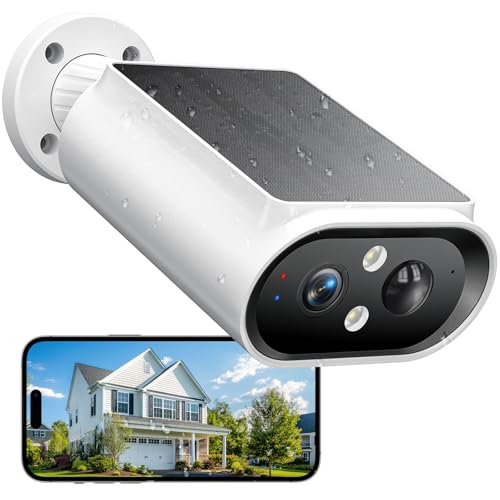


What's inside
- What a spotlight camera is, and what it is not
- How the PIR sensor actually detects movement
- What the spotlight does besides looking bright
- Power sources and what they do to daily behaviour
- The core specifications that decide image usefulness
- Weather sealing and build details
- Storage: local cards, hubs, and cloud plans
- Notifications, delay, and the radio path
- Installation geometry: height, angle, and crossing paths
- Choosing spotlight or floodlight, position by position
- Reading a specification sheet without being misled
- Maintenance and seasonal adjustment
- Privacy, neighbours, and lawful use
- Putting the decision together
- Anatomy of a single recorded event
- One camera or two: covering an L-shaped approach
- Troubleshooting patterns that repeat across brands
- How spotlight cameras age over several years
- Check prices on Amazon
- Disclosure and a closing note
As an Amazon Associate I earn from qualifying purchases. This post may contain affiliate links at no extra cost to you.
A spotlight camera with a sensor is a single outdoor unit that combines three jobs that used to require separate hardware: a security camera, a small LED spotlight, and a passive infrared motion sensor. When the sensor registers a warm body moving through its field, the camera wakes, the light switches on, and recording starts within a fraction of a second. That sequence, repeated reliably night after night, is the entire value of the category. A camera that only records in the dark gives a household footage of an event. A camera that also lights the scene changes the event itself, because most casual intruders, package thieves, and curious trespassers leave when a light comes on and a lens is visibly pointed at them.
This guide explains how the category works in technical terms, so a reader can compare models on specifications that actually predict performance: sensor range and angle, light output in lumens, colour temperature, resolution, field of view, ingress protection, power source, storage method, and notification behaviour. It also covers placement in unusual detail, because a spotlight camera is one of the few security products where mounting position matters more than the badge on the box. A mid-range unit mounted at the correct height, angled across a path, will outperform a premium unit pointed straight down a driveway every single night.
What a spotlight camera is, and what it is not
The defining feature of a spotlight camera is integration at a modest scale. The light source is a small array of LEDs built into the camera body, typically producing somewhere between 100 and 700 lumens. That output is enough to illuminate a porch, a side gate, a short path, or the area immediately around a door, and crucially it is enough light for the image sensor to record in colour after dark. The housing stays compact, often not much larger than a drinks can, and many models run entirely on a rechargeable battery because the light only draws power in short bursts when motion triggers it.
A floodlight camera is a different product class and the two should not be confused when comparing listings. A floodlight camera carries two large, adjustable lamp heads on either side of the lens, commonly producing 2,000 lumens or more, and it is usually wired into a household electrical circuit because that level of light output cannot be sustained by a small internal battery. Floodlight models are built to wash an entire driveway, a wide yard, or a parking area in light. Spotlight models are built to mark a threshold: a door, a gate, a narrow passage between buildings. Choosing between them is mostly a question of area. Lighting a broad open space with a 300-lumen spotlight leaves the edges in darkness, while mounting a full floodlight over a small porch produces glare, annoyed neighbours, and washed-out faces at close range.
There is also a middle group worth naming: wired spotlight cameras that draw continuous power from an adapter or existing doorbell wiring. These keep the compact spotlight form but remove the battery constraint, so the light can stay on longer per event and the camera can pre-record a few seconds before a trigger. Battery models, by contrast, sleep between events to conserve charge, which introduces a short wake-up delay that placement and settings need to compensate for.
How the PIR sensor actually detects movement
PIR stands for passive infrared. The sensor does not emit anything; it sits behind a faceted plastic lens and watches for changes in infrared energy across its segments. Human skin and clothing radiate heat at wavelengths the sensor is tuned to notice, so when a person crosses from one segment of the lens to the next, the sensor registers a shifting heat pattern and signals the camera to wake. Manufacturer documentation for this category commonly rates detection distance at roughly 9 to 10 metres under favourable conditions, with a detection angle often in the region of 110 to 130 degrees horizontally, although exact figures vary by model and by the temperature difference between the person and the background.
The passive infrared approach differs in an important way from pixel-based motion detection, where the camera compares consecutive video frames and flags any region that changes. Pixel comparison cannot distinguish a person from a swaying branch, a passing headlight sweep, or heavy rain, so cameras that rely on it alone tend to generate large volumes of false alerts. A PIR-first design uses the heat signature as the gatekeeper: the camera stays asleep until something warm moves, and only then does the image pipeline start analysing the scene. That is why battery spotlight cameras can operate for months between charges while a continuously analysing camera would drain the same battery in days.
Sensitivity, zones, and the limits of heat sensing
Nearly every model in this class exposes a sensitivity setting in its companion application, usually as a slider or a set of levels. High sensitivity extends the effective range toward the stated maximum but also catches smaller or more distant heat changes, including pets and sun-warmed surfaces cooling after dusk. Low sensitivity shortens the range and restricts triggers to larger, closer movement. The practical method described in most installation guides is to begin at a middle setting, walk the coverage area at the distances that matter, and adjust in small steps until a person crossing the path triggers reliably while routine background movement does not.
Activity zones add a second layer of control. The application lets the owner draw rectangles over the parts of the frame where detection should count, and ignore movement elsewhere, for example masking a public pavement beyond a front gate while keeping the gate itself covered. On PIR-equipped models the zone logic usually applies to the video analysis stage rather than to the physical sensor, which still wakes the camera for heat movement anywhere in its field. That distinction matters for battery life: a camera pointed at a busy street wakes often even if most events are later discarded by zone rules. Physical aim remains the first and most effective filter.
Heat sensing has honest limits that specification sheets rarely emphasise. On a very hot day, when ambient temperature approaches body temperature, the contrast the sensor depends on shrinks and detection range can fall noticeably. A person walking directly toward the sensor also produces a weaker signal than one crossing sideways, because the heat pattern moves between lens segments more slowly. Both facts point to the same installation rule, covered in detail later: mount the camera so that expected movement crosses the field of view rather than approaching it head-on.
What the spotlight does besides looking bright
The deterrent effect of a sudden light is real but it is only half the story. The more measurable contribution of the spotlight is to image quality after dark. Without a light source, an outdoor camera falls back on infrared illumination: small IR LEDs bathe the scene in light the sensor can see but people cannot, and the resulting footage is monochrome. Faces, clothing colours, vehicle colours, and the colour of a jacket or bag are all lost in infrared mode, and those details are often exactly what makes footage useful to a household or to police. When the spotlight fires, the camera can stay in its daylight colour mode, recording a scene that reads naturally and preserves those identifying colours.
Colour temperature shapes how that lit footage looks. LEDs in this category are commonly rated in the cool-to-neutral white range, roughly 3,000 to 6,500 kelvin depending on the model, with many sitting toward the cooler end. Cooler light tends to render edges and text, such as a logo on clothing, with slightly crisper contrast, while warmer light looks less harsh on skin and on pale walls. Some models allow brightness adjustment in the application, and a few allow the light to be scheduled or switched to a softer dusk-to-dawn glow at low output with full brightness reserved for motion events. Checking whether brightness is adjustable matters for anyone mounting a camera close to a neighbour’s window.
Sirens, spoken warnings, and two-way audio
A proportion of spotlight cameras pair the light with a small built-in siren, rated by manufacturers at figures around 100 decibels at close range on some models, and many include a speaker and microphone for two-way talk through the application. These features share the spotlight’s logic: they convert a passive recording device into an active interruption. A short siren burst or a spoken message delivered to a person at a side gate resolves many incidents without any further steps. Households should check local rules and household circumstances before enabling an automatic siren, since a sensor that false-triggers at night will wake the street as reliably as it wakes the camera. Manual triggering from the application, where the owner views the live feed first and then decides, is the configuration most guidance recommends for residential streets.
For readers comparing complete outdoor setups rather than a single threshold camera, a broader survey of resolution-led models is a useful companion read: best 4k outdoor security cameras covers cameras chosen primarily for image detail across larger areas.
Power sources and what they do to daily behaviour
Power is the specification that quietly governs everything else in a battery spotlight camera. Manufacturers quote battery life in months, but those figures always rest on an assumed number of activations per day, often somewhere around ten to twenty events. A camera over a quiet side path may comfortably reach the quoted figure. The same camera over a front door used by a busy household, delivery drivers, and passers-by can trigger sixty or more times a day, and each trigger costs the same package of energy: sensor wake, processor start, light on for the set duration, video encoded, radio transmission to the router or hub, and upload or local write. Battery life in that position can shrink to a few weeks, which is a placement problem disguised as a product problem.
Solar accessories change the arithmetic for sun-exposed positions. A small panel, connected by cable and angled toward the sky, tops up the battery during daylight and can keep a moderately busy camera running indefinitely through bright months. Panels help least exactly when they are needed most, in mid-winter at northern latitudes with short days and low sun, so a household relying on solar should still expect occasional manual charging in December and January. The panel also adds a second mounting job and a cable run that needs to be kept out of reach and out of the sensor’s field, since a moving cable shadow is not a heat source but a flapping panel bracket in wind can rock the camera itself.
Wired models remove the energy budget almost entirely. With continuous power, the camera can maintain a small rolling buffer and attach a few seconds of pre-event footage to each clip, which solves the most common complaint about battery cameras: the clip that begins after the person has already crossed half the frame. Wired units can also keep the spotlight on for longer after each trigger and can record continuously during set hours. The cost is installation effort, since a cable must reach an outlet, a junction box, or a low-voltage transformer, and the mounting position is then fixed by wiring rather than chosen purely for the best sensor geometry.
Light duration and event length settings
Two settings determine how expensive each event is. The first is spotlight duration after a trigger, often adjustable from around 10 seconds to a few minutes. Longer light makes a stronger deterrent and gives the camera more colour footage, but multiplies energy use on battery models. The second is clip length and retrigger behaviour: some cameras record fixed-length clips, others keep recording while movement continues, up to a cap. For a doorway, short clips and a modest light duration are usually sufficient, because the meaningful action happens within the first seconds. For a gate at the end of a path, a longer window captures the approach and the departure, which together tell the fuller story.
Readers working to a tighter budget will find that power and storage choices interact with price across the whole category, a trade-off examined from the cost side in best affordable outdoor security cameras.
The core specifications that decide image usefulness
Resolution is the headline figure, with this category spanning roughly 1080p at the entry end, a large middle band at 2K, and a growing group at 4K. Resolution only pays off when the lens, sensor size, and bitrate support it. A 4K badge on a camera with a narrow field of view can deliver genuinely readable detail on a face or a number plate at moderate distance. The same resolution spread across a very wide lens divides its pixels over more area, so each metre of the scene gets fewer of them. The useful comparison is therefore resolution together with field of view: a 2K camera with a 110-degree lens may resolve a face at a door better than a 4K camera with a 160-degree lens, because the narrower view concentrates its pixels where the person actually stands.
Field of view figures in listings are sometimes quoted as diagonal measurements, which flatter the number compared with the horizontal angle that determines how much of a path or gate the camera covers. Where a manufacturer publishes both, the horizontal figure is the one to plan with. Vertical field matters too at door height, since a camera mounted at 2.5 to 3 metres and tilted down needs enough vertical coverage to include both the ground at the wall base and the head of a tall visitor a few metres out.
Night range, infrared fallback, and frame rate
Most spotlight cameras keep infrared LEDs as a fallback for when the spotlight is disabled, set to a schedule, or configured to activate only after the sensor confirms a closer approach. Infrared range figures of 8 to 15 metres appear widely in documentation for this class. The spotlight’s useful colour range is shorter than the infrared range on many models, because visible light from a small LED array falls off quickly with distance. A sensible expectation is crisp colour footage within the first several metres, grading to softer detail at the edge of the lit area. Frame rate, commonly 15 to 25 frames per second in this category, affects how smooth movement looks and how many chances the camera gets to catch a clear frame of a moving face; higher is better for gates where people pass quickly at an angle.
Compression standards also deserve a glance. Cameras encoding with H.265 produce smaller files than H.264 at similar quality, which stretches local storage and reduces upload volume on busy connections. On a household network shared with streaming and video calls, a camera that uploads smaller clips is a better neighbour, and on a metered connection the difference accumulates across hundreds of nightly events.
Weather sealing and build details
Outdoor ratings in this category cluster around IP65 and IP66. The first digit, 6, means the enclosure is dust-tight in both cases. The second digit separates water resistance levels: IP65 covers protection against water jets from any direction, while IP66 covers more powerful jets. Either rating is appropriate for a camera mounted under ordinary rain exposure, including wind-driven rain against a wall. Neither rating means the unit should be pressure-washed at close range or submerged, and neither protects the lens from the practical enemies of image quality: water droplets sitting on the glass, spider webs built across the warm housing, and condensation after rapid temperature drops.
Mounting hardware influences longevity as much as the rating. Ball-joint mounts allow fine aim adjustment but can sag slowly if the joint is under-tightened, which gradually moves both the camera view and the sensor’s coverage away from the planned geometry. Fixed-angle brackets with a separate sensor tilt, found on some models, hold position better over years. Cable entries on wired and solar-assisted models should face downward or carry a drip loop, so water running down the cable cannot track into the housing. Operating temperature ranges published by manufacturers, often spanning roughly minus 20 to plus 50 degrees Celsius, matter for battery models in cold climates, because lithium cells deliver less capacity in deep cold and a camera that manages a summer month per charge may need attention far sooner in a frost.
Storage: local cards, hubs, and cloud plans
Where footage lives affects cost, privacy, and what happens if the camera itself is stolen. Local storage, usually a microSD card in the camera or in an indoor hub, keeps recordings inside the home and carries no subscription. A hub-based design has a particular advantage for a camera mounted over a door: if an intruder pulls the camera off the wall, the footage survives indoors. Card capacity and overwrite behaviour set the retention window; a busy camera can cycle a small card in days, so households that travel should size storage for the longest absence, not the average week.
Cloud storage moves recordings off-site automatically and typically unlocks the richer alert features, such as distinguishing people, animals, and vehicles in notifications, because that classification often runs on the provider’s servers. The trade-offs are an ongoing subscription, dependence on the home’s upload bandwidth at the moment of an event, and the need to read the provider’s retention and data policies with care. Many models offer a hybrid: local recording as the base layer, with cloud backup of event clips for subscribers. Before choosing, a household should confirm what the camera does with no subscription at all, since on some models the free tier limits clip length, notification images, or history access in ways that only become obvious after installation.
Connectivity interacts with storage more than most buyers expect, particularly in homes where the router sits far from the mounting point; best affordable wifi security cameras looks at wireless cameras with that constraint in mind.
Notifications, delay, and the radio path
A spotlight camera earns its keep in the seconds after a trigger, and the notification pipeline has more stages than most listings admit. The sensor wakes the processor, the camera starts recording, a thumbnail or short preview is prepared, the clip or alert travels over Wi-Fi to a router, onward to a cloud relay on many models, and finally to the phone as a push notification. Each stage adds delay. In a strong-signal position the whole chain can complete in a few seconds; at the edge of Wi-Fi range, retries stretch it out and occasionally drop an event entirely. This is why experienced installers check signal strength at the exact mounting point, with the door or gate in its normal closed position, before drilling anything.
Frequency band choice plays a role. Most models in this category connect on the 2.4 GHz band, which travels farther through walls and outdoor obstacles than 5 GHz, at the cost of lower peak speed that is still ample for event clips. A minority of newer models add 5 GHz support, useful in dense urban areas where the 2.4 GHz band is crowded. Hub-based systems move the long link indoors: the camera talks to its hub over a proprietary low-power link, and the hub uses the home network from a better position. For a camera mounted on a detached garage or a garden gate, that architecture often delivers the reliability that a direct Wi-Fi link from the same spot cannot.
Reducing alert fatigue without missing real events
Alert fatigue is the failure mode that ends more home security setups than any hardware fault. When a phone buzzes forty times a night for moths, rain, and a neighbour’s cat, the owner mutes notifications within a week, and the camera becomes a recording device nobody watches. The layered controls exist to prevent exactly that outcome: physical aim first, then sensitivity, then activity zones, then person-only alert filtering where the model supports it, then schedules that quiet the camera during hours when the household is predictably active in the same space. Applied in that order, each layer removes a class of nuisance while leaving genuine approaches untouched.
Rich notifications, which attach a snapshot to the alert, deserve a specific mention because they change behaviour. An owner who can see at a glance that the trigger was a delivery driver leaves the alert alone; an owner who must open an application and wait for a feed will either check every time with growing irritation or stop checking at all. Where rich notifications sit behind a subscription, that fact belongs in the purchase decision alongside resolution and lumens, not discovered afterwards.
Installation geometry: height, angle, and crossing paths
The standard guidance for this category converges on a mounting height of about 2.5 to 3 metres. That band is high enough to keep the unit out of easy reach and to let the spotlight spread over a useful area, yet low enough that the lens still captures faces rather than the tops of heads, and the sensor still detects movement at ground level within its rated range. Mounting far higher, under a tall eave, is the most common geometry error: the view looks impressive on a phone screen, but identification quality falls and the sensor’s effective ground coverage shrinks to a small patch almost directly below.
Direction of travel is the second rule. Because a PIR sensor responds most strongly to heat moving across its segments, the camera should watch a path from the side, so that anyone using the path crosses the field of view. A camera aimed straight down a driveway at approaching visitors gives the sensor its weakest signal geometry and gives the lens a long period of small, distant figures followed by a sudden close pass. Rotating the same camera to cover the driveway from a side wall, or covering the gate from a perpendicular fence post, improves both detection reliability and the chance of a clear side-profile frame, which is often more recognisable than a squinting frontal shot taken into a bright light.
Heat sources, sunlight, and other false-trigger traps
Several ordinary features of a home’s exterior sit squarely in a PIR sensor’s blind spots. Heating vents and boiler flues discharge warm air in pulses. Air-conditioning condensers cycle on and off. Dark paving and brickwork absorb sun all afternoon and release heat into the evening, sometimes unevenly enough to register as change. A compost heap, a dryer vent, and a frequently opened warm garage door have all been documented in manufacturer troubleshooting guides as nuisance sources. The remedy is aim and distance: keep such sources out of the sensor’s central field where possible, lower sensitivity a step if a source cannot be excluded, and remember that a trigger at the same time every evening usually has a thermal explanation rather than a mysterious one.
The spotlight itself needs aim discipline. If the LED array points too directly along the lens axis at a pale wall or a glossy door at close range, the reflected light can blow out the centre of the frame and leave faces in relative shadow at the edges. A slight downward tilt, a few degrees of offset from any near reflective surface, and a brightness setting matched to the size of the area keep the lit zone even. Vegetation deserves a final check: shrubs grow, and a branch that was clear of the sensor in spring can be waving through its field by late summer, so a seasonal trim belongs in the maintenance routine alongside battery checks.
Choosing spotlight or floodlight, position by position
A front porch or door alcove is the natural home of the spotlight class. Distances are short, the area is defined by walls, and a few hundred lumens light it completely. The sensor watches a space that people enter deliberately, so triggers carry meaning, and a battery model is practical because a porch usually offers some shelter and reasonable Wi-Fi. A side gate or the passage between a house and a fence is an even stronger fit: the passage funnels movement across the sensor’s field exactly as the geometry rules recommend, the light fills the narrow space without waste, and the camera covers a route that burglars historically prefer precisely because it is overlooked by the street.
A narrow path to a bin store, a bicycle shed, or a garden office follows the same logic and suits a spotlight camera with a modest light and a longer battery interval, since traffic is light. A back door opening onto a small patio sits at the boundary: a spotlight covers the patio itself well, but if the household wants the whole garden beyond it lit and recorded in colour, the area outgrows the class and a floodlight model or a second camera becomes the honest answer.
A wide driveway, a front yard open to the street, or a parking area for several vehicles belongs to floodlight territory. The distances exceed a small spotlight’s colour range, the open boundary generates constant sensor traffic from the pavement and road, and the position usually has mains power nearby from garage or porch circuits, which suits wired floodlight hardware. Attempting the job with a battery spotlight camera produces the classic pattern of disappointment: grainy figures at the far end, a battery drained by street triggers, and notifications muted within the month. Matching the class to the area at the start avoids all three outcomes.
For premises that genuinely need recording at every hour rather than on motion alone, such as a small business yard or a home caring for a vulnerable resident, motion-triggered models of either class are the wrong tool, and best 24 7 security cameras addresses the continuous-recording options built for that requirement.
Reading a specification sheet without being misled
Specification sheets for this category reward sceptical reading, because several headline numbers are measured under conditions the manufacturer chooses. Detection range is typically quoted for a person of average build walking across the field at a moderate pace in mild weather; expect less in summer heat and less again for movement toward the camera. Light output in lumens is more standardised, but some listings quote the theoretical output of the LED chips rather than the light that leaves the fixture, so two cameras with identical lumen claims can light a porch noticeably differently depending on lens and diffuser design. A wide, even spread usually serves a doorway better than a narrow, intense beam, even at lower total output.
Battery figures need the assumed trigger count to mean anything, and reputable documentation states it. Where a listing gives months with no stated assumptions, treat the number as a best case measured in a quiet position. Storage claims deserve the same care: a card size in gigabytes only converts into days of retention when the bitrate and the daily event count are known, and both vary with scene complexity, since a camera watching trees in wind encodes larger clips than one watching a still wall. Water resistance ratings, as discussed, describe laboratory jets rather than years of weather, so build details such as sealed cable glands and downward-facing ports remain worth checking in photographs of the actual unit.
Questions to settle before ordering
A short checklist prevents most returns in this category. First, power: is there an outlet or wiring within practical reach of the best mounting position, or must the unit live on battery, and if battery, does the position receive enough sun for a panel to help? Second, connectivity: what is the Wi-Fi signal at that exact spot, measured with a phone held where the camera will sit, and does the model use a hub that could sit closer? Third, storage: does the camera record usefully with no subscription, where do recordings physically live, and what happens to them if the camera is removed? Fourth, light behaviour: can brightness and duration be adjusted, can the light be scheduled off, and does the model keep infrared recording when the visible light is disabled for a neighbour’s sake? Fifth, the application: does it support activity zones, person filtering, and shared access for other household members, and are those features free or paid on this particular model?
Sixth, and often forgotten, physical fit: does the mount allow the tilt and swivel the chosen position needs, does the housing colour suit the wall, and will the sensor’s field, which is not always identical to the lens’s field, actually cover the path when the camera is aimed for the best picture? Manufacturer diagrams that show both fields separately are a good sign; a single combined diagram usually means the sensor sees less than the lens, and the gap is where missed triggers live.
Maintenance and seasonal adjustment
A spotlight camera asks little, but not nothing. The lens and the sensor window both need an occasional wipe with a soft cloth, because a film of dust and pollen softens images and can dull sensor response, and because a single spider web strand across the housing can reflect the infrared or the spotlight straight back into the lens at night, producing a glowing white arc that ruins every clip until it is brushed away. Insects are drawn to the warmth and light of the unit, so a quick check after dark once in a while, looking at the live view for webs and glare, catches problems that daylight inspection misses.
Settings benefit from seasonal review for the reasons covered earlier: detection range shifts with ambient temperature, vegetation grows into the field, and sunset timing changes when a light schedule or a dusk-sensitive mode should engage. Battery models benefit from a charge check before winter rather than during it, since cold reduces capacity at exactly the time of year when nights, and therefore spotlight use, are longest. Firmware updates, applied through the application, occasionally change detection behaviour or add filtering features, so reading the release note after an update and re-walking the coverage area once is a reasonable habit after any significant change.
Privacy, neighbours, and lawful use
A camera that lights up and records a defined threshold will inevitably capture some footage of people who are not its target: neighbours passing a shared path, visitors, delivery drivers, children retrieving a ball. Households should aim the lens to cover their own property as tightly as the geometry allows, use activity zones and privacy masking where the application offers them, and be thoughtful about audio, since microphones on many models are sensitive enough to record conversation at distances where the video is unremarkable, and audio recording is regulated more strictly than video in a number of jurisdictions. A short, honest conversation with the neighbours a camera overlooks prevents more friction than any technical setting, and in some places a visible notice that recording takes place is a legal requirement rather than a courtesy.
Data handling deserves the same plain attention. Recordings stored in a provider’s cloud sit under that provider’s security practices and retention rules; recordings on a local card sit under the household’s physical security. Account security is part of the system either way: a unique password and two-factor authentication on the camera account protect the feed of a home’s entrance, which is exactly the feed a household least wants shared. Shared access for family members should use the application’s own sharing features rather than a common password, so that access can be withdrawn cleanly when circumstances change.
Putting the decision together
The strongest purchase in this category is rarely the model with the longest specification list. It is the model whose sensor range matches the depth of the space, whose light output matches the area of that space, whose power source matches the traffic the position will generate, and whose storage and alert features remain fully useful under the subscription terms the household is actually willing to accept. A porch camera succeeds with modest figures in every column, correctly mounted. A gate camera succeeds on sensor geometry and battery discipline. Neither succeeds on resolution alone, and neither can be rescued by resolution when the aim, the heat sources, or the Wi-Fi path are wrong.
Readers who narrow the choice to two or three models should compare them on the unglamorous rows of the specification sheet: stated detection distance and angle, whether the field of view figure is horizontal or diagonal, spotlight lumens and whether brightness adjusts, ingress rating, card or hub storage capacity, and the list of features that remain active without payment. Those rows predict the second year of ownership, long after the first week’s novelty has passed, and they are the rows where honest documentation separates itself from marketing copy.
Anatomy of a single recorded event
Following one event from start to finish clarifies where models genuinely differ. A person steps through a side gate at night. The heat pattern crosses two segments of the sensor lens, the sensor signals, and the processor wakes from sleep. On a battery model this wake takes a noticeable fraction of a second, during which the person may already be a step or two inside the gate; on a wired model with a rolling buffer, the saved clip can begin a few seconds before the trigger, showing the gate still closed and then opening. The spotlight switches on at the trigger point, and the image sensor, which had been idling in infrared mode, adjusts exposure and white balance for visible light. That adjustment takes a few frames on most models, which is why the opening moment of many night clips looks briefly washed out before settling into balanced colour.
Recording continues either for a fixed length or while the analysis pipeline still sees movement, depending on the model and its settings. The clip is encoded, written to local storage, and, on connected models, uploaded or relayed for notification. A thumbnail frame is selected, usually from early in the clip, and attached to the alert. When the person leaves the field or stands still long enough, the camera closes the event, returns the light to off after its set duration, and sleeps again. Every stage in that chain is a place where specification and settings matter: wake speed decides whether the arrival itself is captured, light duration decides whether the departure is lit, and the stillness timeout decides whether a person who pauses at a door, perhaps to look for a key or to examine a parcel, stays inside one continuous clip or is split across several.
Standing still, loitering, and the stillness problem
The stillness case deserves attention because it surprises new owners. A PIR sensor detects change in heat patterns, so a person who stops moving becomes progressively less visible to the sensor even while standing in plain view of the lens. Cameras handle this in different ways: once woken, most keep recording based on pixel analysis for as long as the clip logic allows, rather than relying on the sensor alone, but battery models eventually close the event to protect charge. A person who approaches, triggers the camera, and then stands motionless at a door for a long period may therefore produce a clip that ends while they are still present, followed by a fresh trigger when they move again. For door positions this behaviour is acceptable, because the approach and the renewed movement are both captured. For positions where a quiet, stationary presence is itself the concern, a model with longer maximum clip lengths, or a wired model that can record continuously during set hours, fits the requirement better.
One camera or two: covering an L-shaped approach
Many homes present an approach that bends: a path runs along the front wall, turns at a corner, and reaches a door set into the side. A single camera at the corner sees both legs of the path imperfectly, since the sensor geometry that suits one leg faces the wrong way for the other, and the spotlight cannot turn the corner either. Two modest spotlight cameras, one watching each leg with a crossing view of its own stretch, routinely outperform one expensive unit at the bend, and their combined triggers give a sequence that shows where a visitor came from as well as where they went. The cost comparison is not always unfavourable either, because two mid-range units can cost less than one flagship model while also removing the single point of failure: if one camera is charging, damaged, or waiting on a firmware fix, the other leg of the path remains covered.
Overlapping coverage needs coordination to avoid a light duel, where one camera’s spotlight triggers the other’s pixel analysis repeatedly through the night. Staggering the aim so each light falls mainly inside its own camera’s zone, setting the second camera to rely on its sensor rather than on frame changes, and using schedules where appropriate keeps a paired setup calm. Households expanding gradually should also confirm that the chosen application and any hub support the number of cameras planned, since some hubs cap the device count and some applications handle multi-camera event timelines far more gracefully than others.
Troubleshooting patterns that repeat across brands
Certain complaints recur across every brand in this category, and each has a recognisable signature. Clips that consistently begin too late point to wake delay combined with head-on aim; rotating the camera toward a crossing geometry usually recovers more footage than any sensitivity increase. Notifications that arrive in bursts at dusk often trace to cooling surfaces and shifting shadows as the sun drops, and respond to a small sensitivity reduction or a zone adjustment at the affected edge. A camera that goes offline after rain may have water in a cable joint or a mount position where the router signal was marginal and the extra attenuation of wet walls pushed it over the edge; both causes are physical, and neither is fixed from the application.
Footage that looks excellent by day and foggy at night, despite a working spotlight, usually means the lens carries a film of moisture or grime that scatters the light, or a web is sitting just outside the visible frame. A battery that aged quickly often turns out to belong to a camera whose event log shows hundreds of daily triggers from a road, a vent, or a tree line that nobody reviewed after installation. Reading the event log as a diagnostic record, rather than only as a security record, is the habit that separates a camera that settles into quiet reliability from one that generates a season of small frustrations.
How spotlight cameras age over several years
Ownership in year three looks different from the first month, and a few slow changes are worth anticipating at purchase time. Rechargeable cells lose capacity gradually, so a battery model that began with generous intervals between charges will ask for attention more often as it ages; models with user-replaceable batteries or widely available replacements age more gracefully than sealed designs. LED output also declines slowly with hours of use, although in a motion-triggered product the total lit hours accumulate so slowly that this rarely becomes the limiting factor. More visible is the wear on mounts and seals: ultraviolet exposure embrittles exposed cable insulation, gaskets harden, and a ball joint that was stiff when new may begin to drift after a few summers of heat and a few winters of frost, quietly moving the aim until a routine check of the live view reveals that the gate has slid to the edge of the frame.
Software support may matter more than any of these physical changes. A camera depends on its application and, for many features, on the maker’s servers, so the maker’s track record for maintaining older models, publishing security updates, and keeping applications compatible with current phone operating systems forms part of the product being bought. A household choosing between a very cheap model from a maker with no visible support history and a moderately priced model from a maker that still updates hardware several years old is not simply paying for a badge; it is buying a longer useful life for the entire installation, including the holes already drilled in the wall. Planning the mounting position with that horizon in mind, on a surface that will accept a future replacement unit of similar size, is a small decision that pays off when the eventual upgrade day arrives.
A note on shared drives and rented homes
Two living situations change the calculation without changing the technology. In a rented home, a battery spotlight camera on a clamp or adhesive-free bracket often wins approval where a wired floodlight never would, because nothing is drilled and nothing is connected to the building’s circuits; the tenant keeps the deterrent and the colour night footage, and the installation leaves with them. On a shared drive or a jointly used access path, the calculus runs the other way: triggers multiply because legitimate users cross the sensor constantly, notifications lose meaning, and the light fires so often that it becomes part of the background for everyone. In that setting a camera aimed tightly at a private door or a private parking bay, with zones drawn to exclude the shared surface, serves its owner far better than a wide view of the whole approach, and a conversation with the other households using the drive is worth more than any sensitivity slider.
One final practical step ties the whole guide together: after mounting, walk the covered area once in daylight and once after dark, at a normal pace and at the edges of the space rather than only through its centre, and review both clips on a phone screen. That single exercise verifies sensor range, crossing geometry, light spread, colour rendering, and notification delay in the real position, with the real router, under the real weather of that week. Any weakness it reveals can still be corrected with a small change of angle or a single setting while the ladder is out and the fixings are fresh, which is a far better moment to discover it than during the first genuinely important event.
Check prices on Amazon
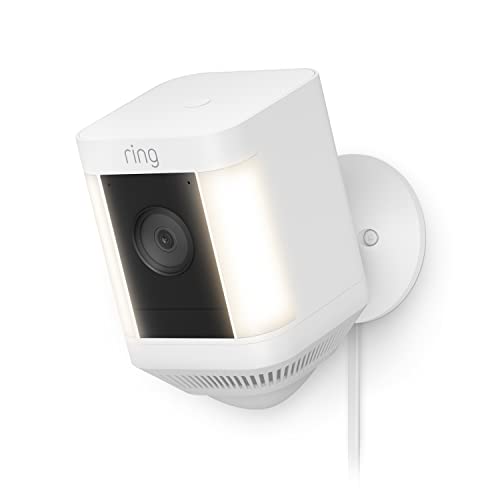
Live listings for the shortlist in this guide are pulled from Amazon below, so prices and availability are always current at the moment you look.



Disclosure and a closing note
Some links in guides published on this site are affiliate links, which means the site may earn a commission when a reader follows a link and buys a product, while the price paid by that reader stays exactly the same as it would be without the link. This particular guide was assembled from manufacturer documentation, published specification sheets, and installation guidance for the spotlight camera category, and its comparisons rest on those stated figures rather than on any arrangement with a maker. Commissions never decide which specifications a guide highlights, and readers who prefer to buy through a local retailer lose nothing by doing so, because the guidance above is written to be used in any shop or showroom.
A well-aimed spotlight camera over a quiet side gate does an unglamorous thing beautifully: it notices warmth crossing in the dark, lends the scene enough light to remember colours honestly, and then goes back to sleep, asking almost nothing of the household until the next genuine arrival.
Related guides
- Best 1080p IP Cameras: PoE Domes, Turrets, Bullets and a PTZ That Earn Their Cable
- Best AC Powered Wireless Security Cameras: Wi-Fi Data, Mains Power, Zero Sleep
- Best Sony Full Frame Cameras for Astrophotography: Sensitivity vs Resolution
- Best Canon Point and Shoot Digital Cameras: PowerShot Picks From Pocket Compacts to Travel Zooms


