Our Top Picks
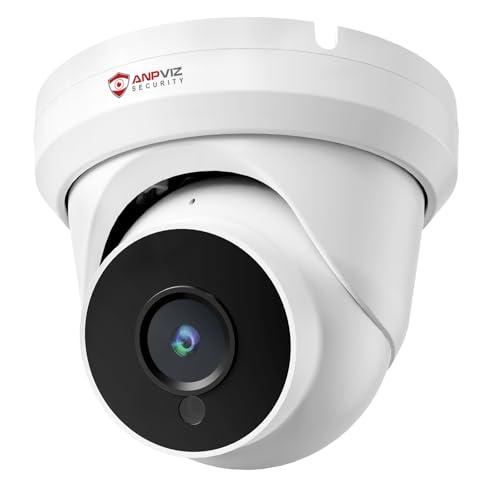
 4MP POE IP Turret Camera 120dB WDR 2.8MM1 Count (Pack of 1)4.45 x 4.29 x 3.43 inches0.8 poundsCheck on Amazon


What's inside
- RTSP and ONVIF: the two doors a camera must leave open
- Main stream, sub stream, and why the small one runs the system
- H.264 and H.265 on Pi 4 and Pi 5 hardware
- What each Pi recording platform asks of a camera
- How many cameras a single Pi can honestly carry
- Power over Ethernet, and the separate question of Wi-Fi stability
- Camera hardware details that decide bad days
- Compatibility traps that datasheets will not underline
- Storage on the Pi side, retention maths and network separation
- A decision checklist keyed to camera count and the Pi already owned
- A bench protocol and worked figures for a four-camera build
- Check prices on Amazon
- Disclosure and a closing note
As an Amazon Associate I earn from qualifying purchases. This post may contain affiliate links at no extra cost to you.
A boxed network video recorder asks for very little thought. It arrives with a fixed channel count, a hard drive bay, a vendor interface and a ceiling that only becomes visible when a ninth camera joins a unit licensed for eight. A cloud subscription removes the box and replaces that ceiling with a monthly meter, plus a dependency on an upload link that may be thinnest exactly when a street fills with activity worth recording. A Raspberry Pi recorder sits between those poles because the owner chooses the software, the storage device, the retention period and the network rules, and because a board that costs less than a single mid-range dome can be rebuilt from a card image after a failure instead of being returned under a service contract.
That freedom carries one hard precondition, and it is worth stating before any camera model enters the discussion. The Pi cannot record a picture it is never allowed to see. A camera intended for this kind of recorder must publish its video as an open network stream that third-party software can request directly, without a vendor account mediating the handshake and without a phone application acting as the only doorway. Cameras that keep their feed inside a closed ecosystem may still be excellent appliances for a household that wants notifications on a handset, yet they leave a Pi with nothing to ingest, no timeline to build and no archive to search.
Everything that follows grows out of that single requirement. Stream protocols decide whether the recorder can connect at all. Stream profiles decide how many cameras the small board can supervise before its processor saturates. Codec choice decides whether footage lands on disk untouched or demands conversion work the Pi is poorly equipped to supply around the clock. Power delivery, edge storage inside the camera and the recorder’s own drive then decide whether the system survives the ordinary accidents of a home network: a switch rebooting, a cable disturbed during cleaning, a card wearing out in August heat.
Readers comparing camera classes before settling on a Pi build may also want the wider landscape covered in best 1080p ip cameras and best 4k ip cameras, because sensor resolution interacts with everything discussed here, from bitrate arithmetic to the size of the archive a household can afford to keep.
RTSP and ONVIF: the two doors a camera must leave open
RTSP, the Real Time Streaming Protocol, is the mechanism by which a recorder asks a camera for moving pictures and keeps that session alive. The request travels to a network address with a path attached, and the shape of a typical address looks like rtsp://192.168.1.64:554/Streaming/Channels/101, where 554 is the listening port, the path names the channel and the final digits often distinguish the main stream from the sub stream, 101 for the full feed and 102 for the reduced one on that particular family of devices. Another manufacturer might expose rtsp://192.168.1.20:554/stream1 and /stream2 instead, while a third uses /live/ch0 for the primary feed. The variation is normal; what matters is that the path is published in documentation rather than reverse-engineered from packet captures by frustrated owners.
Credentials ride inside the request in most small installations, so the address a recorder stores frequently embeds a username ahead of the host portion. That convenience creates a housekeeping duty: the camera account used by the recorder should be a dedicated viewing account with no administrative rights, because the address ends up written in configuration files, motion logs and backup archives on the Pi. A recorder that authenticates with the camera’s master password turns every config backup into a small security incident waiting for a careless upload.
ONVIF solves a different half of the pairing problem. Where RTSP carries the pictures, ONVIF is the discovery and control language that lets software find the camera on the subnet, ask which stream profiles exist, read the address of each one, move a pan-tilt head and subscribe to motion events instead of polling blindly. Profile S covers basic streaming and configuration for IP cameras, and it remains the baseline a Pi recorder expects. Profile T adds support for H.265 streaming, advanced event handling and metadata such as analytics overlays, which matters once a household steps beyond H.264 hardware. A camera that lists Profile S conformance on its specification sheet is making a testable promise; a camera that merely prints the word ONVIF in marketing copy, with no profile named, is making a vaguer one.
Ports reveal how differently vendors assemble the same idea. RTSP almost universally listens on TCP or UDP port 554. ONVIF device services commonly appear on port 80, on 8000 for one large manufacturer’s ecosystem, or on 8899 for another widely sold line of budget cameras, and discovery itself rides WS-Discovery broadcasts to port 3702. None of those numbers needs memorising for its own sake. Their practical use appears the day a recorder reports a timeout: a quick check of which ports a camera answers tells an owner whether the device is absent from the network, whether ONVIF is switched off in its settings, or whether a firmware revision moved the service behind a menu toggle labelled with a trademarked platform name instead of the standard’s own vocabulary.
Verifying openness before money changes hands is a paperwork exercise, and it should stay that way. Open the manufacturer’s datasheet for the exact model, including hardware revision where one is printed, and find the network protocol table. The rows worth photographing list RTSP, ONVIF with a profile letter, and interoperability with third-party recorders. Then open the user manual rather than the glossy brochure and search for the local configuration chapter: a genuine RTSP camera documents how to enable the service, set its authentication mode and choose a port. A camera whose manual discusses only an app pairing flow, a QR code and cloud storage tiers has answered the compatibility question already, whatever its sensor specifications promise.
Datasheets also expose a subtler distinction between a stream that exists and a stream that is usable. Some devices publish RTSP only while cloud service is disabled, some restrict the sub stream to a proprietary low-resolution format when ONVIF is active, and some withdraw RTSP entirely on battery-powered models to protect sleep current. Doorbell and battery cameras deserve particular suspicion in a Pi project, because a device designed to wake for twelve seconds per event cannot feed a recorder that expects continuity, and no recorder setting can persuade a sleeping radio to behave like a wired dome.
Main stream, sub stream, and why the small one runs the system
Nearly every camera in this class encodes the same scene twice at once. The main stream is the evidentiary record: 2560 by 1440 or 3840 by 2160 pixels, 20 to 30 frames per second, and a bitrate commonly set between 4 and 8 megabits per second for a detailed outdoor view. The sub stream is the working copy: 640 by 360 or 704 by 576 pixels, 8 to 15 frames per second, and a bitrate between 256 kilobits and 1 megabit per second. A third, still lower profile sometimes exists for phone viewing over slow uplinks. Recorder software displays the sub stream in multi-camera grids, analyses it for motion and object presence, and writes the main stream to disk either continuously or in segments surrounding each detected event.
The arithmetic behind that division is unforgiving on a quad-core ARM board. Motion analysis means decoding pictures and comparing or classifying them, and decode cost scales with pixel count far more than with scene importance. A 4K frame carries roughly twenty-four times the pixels of a 640 by 360 sub stream frame. Asking a Pi to decode four main streams for detection means asking it to chew through the equivalent of dozens of small feeds, at frame rates that leave no idle cycles for writing archives, serving a web interface or handling a second viewer on a laptop. Feeding detection from sub streams collapses that load into something the board can sustain indefinitely, while the untouched main streams pass through to storage with only container and filesystem overhead.
Frame rate on the sub stream deserves more respect than it usually receives in specification tables. A sub stream throttled to 5 frames per second will still register a person crossing a driveway, yet it smears the timing of fast events: a gate swinging, a parcel leaving a hand, a cyclist clipping a mirror. Detection zones drawn on a 10 or 15 frame-per-second sub stream align far better with the main stream footage an owner later reviews, because the trigger and the evidence describe nearly the same instants. When a camera offers independent frame-rate control per profile, setting the sub stream to half the main rate is a sound compromise; setting it to the encoder’s minimum to save trivial bandwidth usually is not.
Bitrate control method shapes both network behaviour and archive size. Constant bitrate holds a ceiling and simplifies storage forecasting, at the cost of softening complex scenes such as rain over gravel or foliage in wind. Variable bitrate preserves those scenes and inflates quietly on a busy street, which can double a day’s archive compared with the quiet-Sunday figure an owner used when sizing a drive. For a Pi recorder, a capped variable mode, where the camera may roam up to a stated maximum, gives the most predictable planning numbers while sparing the worst compression artefacts, and the cap figure is the one that belongs in every bandwidth calculation later in this guide.
Keyframe interval is the quiet setting that decides how gracefully recordings begin. Encoders emit a full reference frame at intervals typically spanning one to four seconds, with compressed difference frames between them. Event-based recorders keep a rolling pre-buffer so that footage starts slightly before a trigger, and a long keyframe interval forces either a longer buffer in memory or clips that open mid-gesture with blocks still resolving. Two seconds is a widely workable interval for surveillance profiles; an interval stretched to eight seconds to save bitrate will show its cost in every clip that starts with a delivery driver already at the door.
H.264 and H.265 on Pi 4 and Pi 5 hardware
H.264 remains the lingua franca of small recorders for a reason rooted in silicon. The Raspberry Pi 4 carries a hardware decode block for H.264 at up to 1080p60, alongside HEVC decoding rated for 4K at 60 frames per second on paper, although real-world access to that HEVC path through common Linux media stacks has historically been narrower than the specification suggests. The Pi 5 removed the dedicated hardware video encode and decode blocks that earlier boards carried, leaning instead on its much faster Cortex-A76 cores to perform codec work in software. That design choice is perfectly workable for a desktop workload and quietly consequential for a recorder: a Pi 5 decodes a handful of modest H.264 sub streams in software without distress, yet it owns no fixed-function shortcut to fall back on when stream counts climb.
H.265, marketed as HEVC, compresses a scene to roughly half the bitrate of H.264 at comparable perceived quality, and camera makers adopted it eagerly because their own encoder silicon handles it natively. The trap for a Pi build is asymmetry. The camera encodes cheaply; the recorder pays. If the chosen software merely passes the H.265 main stream through to disk, recording stays inexpensive and archives shrink, which is a genuine prize. The bill arrives at analysis and playback time. Motion detection on an H.265 sub stream, thumbnail generation, timeline scrubbing in a browser and any live transcoding for a phone viewer all require decoding that the Pi must fund from general-purpose cores.
Transcoding is where optimistic projects go to overheat. Converting one 1440p H.265 feed to H.264 in real time can occupy multiple cores on a Pi-class board, and it runs without pause, in a case that may sit in a warm cupboard beside a router. Sustained conversion also destroys the very efficiency that justified H.265, because the output file swells back toward H.264 size while the processor works harder than it would have done recording H.264 directly. The sane configurations are therefore stark: either choose cameras that offer H.264 on every profile the recorder touches, or run an H.265 fleet in pass-through recording with detection delegated to the cameras’ own event messages over ONVIF, accepting that richer software-side detection may exceed the board’s budget.
A middle path exists for mixed households, and it hinges on per-profile codec selection. Many cameras allow the main stream to remain H.265 for compact archives while the sub stream runs H.264 for analysis. That pairing gives the recorder a cheap stream to watch and a compact stream to store, and it deserves a place on the pre-purchase checklist because datasheets rarely advertise it in headlines; it hides in the video configuration table of the manual, one row per profile. Where a camera forces a single codec across all profiles, the decision becomes total, and H.264 across the board is the conservative answer for any Pi that must also detect motion itself.
Audio deserves a footnote in the codec discussion because it travels its own encode path. Cameras with microphones typically offer G.711 or AAC audio, and recorder software varies in which it will mux into recordings without complaint. A camera whose only audio option is a proprietary codec can produce silent archives in an otherwise successful installation, a defect owners tend to discover during the first incident review rather than during setup. Checking the audio row of the datasheet takes seconds and belongs beside the video rows already under scrutiny.
What each Pi recording platform asks of a camera
MotionEye presents the gentlest demands. Built around the motion daemon and a browser interface, it accepts RTSP feeds directly, performs frame-difference motion detection and writes clips and stills with modest ceremony. It asks a camera for a reachable stream and, ideally, a sub stream sized for analysis, because MotionEye’s detection works on whatever resolution it is handed. It asks nothing about ONVIF events and gains little from Profile T refinements. For two or three cameras watching a flat or a small shop, that simplicity is a feature; the software’s ceiling appears when detection needs to distinguish a person from a shadow rather than merely register change.
Frigate rearranges the priorities. Its design centres on object detection, using camera sub streams for analysis and hardware accelerators such as a USB neural compute device or an integrated GPU on other platforms to classify people, vehicles and animals. On a Pi, an accelerator is close to mandatory once more than a couple of detection streams run, because the CPU alone must divide its attention between decoding and inference. Frigate rewards cameras with clean, configurable sub streams, reliable keyframe intervals and main streams it can record in segments without re-encoding. It also benefits from cameras whose own motion events are not required, since its pipeline prefers to judge every frame itself rather than trust a camera’s threshold decisions.
Shinobi takes a monitor-centric view, with a dashboard built for walls of feeds and a recording engine comfortable ingesting RTSP at scale for its hardware class. It can copy streams to disk, re-encode when instructed, and expose granular per-monitor settings that suit tinkerers who enjoy tuning buffers and watchdogs. Its camera demands resemble Frigate’s minus the inference burden: stable streams, sane keyframes and honest bitrates. ZoneMinder, the elder of the group, grew up with analogue capture cards and JPEG cameras, and its modern RTSP support arrives through FFmpeg sources inside a zone-based detection model. It remains capable and famously configuration-dense, rewarding owners who read documentation carefully and punishing those who guess at buffer settings.
Across all four platforms, one camera trait separates calm installations from haunted ones: stream stability over days, not minutes. Encoders that drop frames after a memory leak develops, that renegotiate resolution when infrared cut filters engage at dusk, or that reboot their RTSP service when a cloud heartbeat fails will generate recorder logs full of reconnect storms. Manuals will not confess to such behaviour, so the practical screening method is to favour camera lines with a documented local-stream track record in recorder communities and firmware release notes that mention RTSP and ONVIF fixes by name, evidence that the manufacturer maintains those paths rather than tolerating them.
Time synchronisation binds the platforms together as a shared dependency. Every recorder searches footage by timestamp, correlates events across cameras and assembles sequences of a person moving from gate to door. Cameras should therefore point at the same network time source as the Pi, whether that is the router, a local NTP service or a public pool reached through the LAN. A camera drifting ninety seconds from its neighbour manufactures investigative confusion out of accurate pictures, and the fault is invisible until two clips refuse to agree about which event happened first.
How many cameras a single Pi can honestly carry
Start with bandwidth, because it is the easiest ceiling to compute and the least likely to be the binding one. Take the capped bitrate of each main stream and each sub stream, add them, and compare the total with the practical throughput of the Pi’s gigabit Ethernet port, which on a Pi 4 or Pi 5 shares a far healthier internal path than the USB-constrained networking of earlier generations. Six cameras running 6 megabit main streams and 0.7 megabit sub streams present about 40 megabits per second in aggregate, a light load for the port and for any competent switch. Even twelve such cameras stay near 80 megabits per second, well inside the wire’s capacity, although the archive drive and processor will have surrendered long before the network does.
Recording load splits into two very different regimes. Continuous recording with pass-through streams is mostly an exercise in moving bytes: demuxing containers, writing segments and rotating old files. A Pi handles that for a surprising number of cameras, provided the storage device sustains the write rate and the software avoids re-encoding. Event-driven recording cuts the archive dramatically, often to a tenth of the continuous volume on a quiet property, yet it concentrates cost in detection, because the analysis pipeline must watch every sub stream all day in order to catch the few minutes worth keeping. Owners routinely misjudge this trade, assuming event mode is lighter in every dimension, when in truth it trades disk wear for processor load.
A realistic planning ladder for a Pi 4 with 4 gigabytes of memory looks like this in broad strokes. Two to four cameras with software motion detection on sub streams run comfortably, with headroom for a web interface and occasional live viewing. Five to seven cameras call for discipline: sub streams held near 640 by 360, detection frame rates trimmed to 5 or 7 per second, and an accelerator if object classification joins the workload. Beyond that, the honest options are a second Pi dividing the property by zone, delegation of detection to camera-side events, or a different class of recorder altogether. A Pi 5 stretches each rung with its faster cores, but it does not repeal the ladder, and thermal throttling in a sealed enclosure can quietly return a Pi 5 to Pi 4 behaviour on a hot afternoon.
Memory pressure hides inside stream buffers. Each monitored feed holds frame queues for analysis and pre-event recording, and high-resolution sub streams inflate those queues quickly. A recorder that behaves for a week and then restarts its detection service at 3 a.m. is often negotiating with the kernel’s memory limits rather than suffering a software defect. Keeping sub streams small is therefore also a memory policy, and it explains why experienced Pi owners resist the temptation to analyse a 1080p feed simply because the camera offers one and the preview looks crisper.
Households weighing always-on coverage against event-only archives may find the operational differences catalogued in best 24 7 security cameras useful, since duty cycle changes drive sizing, retention promises and the number of simultaneous feeds a small recorder should be asked to supervise.
Power over Ethernet, and the separate question of Wi-Fi stability
Power over Ethernet collapses two installation problems into one cable run. The IEEE 802.3af standard delivers up to 15.4 watts at the sourcing equipment, of which about 12.95 watts are guaranteed at the device after cable losses, and that envelope covers the great majority of fixed bullet and dome cameras, including their infrared illuminators at full night output. The 802.3at revision raises the ceiling to 30 watts at source and roughly 25.5 watts at the device, headroom intended for pan-tilt-zoom mechanisms, heated outdoor housings and cameras with powerful spotlight arrays. A camera datasheet states its PoE class or its maximum draw in watts, and matching that figure against the switch budget is plain addition: eight cameras drawing 9 watts each need 72 watts of the switch’s total PoE budget, not merely eight ports that support the standard.
The Pi itself plays no part in feeding the cameras. Its own power supply, a 5 volt unit rated at 3 amps for a Pi 4 or 5 amps for a Pi 5, serves the board and modest USB peripherals, and the board’s Ethernet port is a data connection with no power sourcing behind it. Installations therefore need a PoE switch between router and cameras, or passive midspan injectors for one or two feeds. A managed PoE switch earns its premium in this setting for a reason that only becomes obvious during troubleshooting: individual ports can be power-cycled remotely, resurrecting a wedged camera on a ladder-free basis, and per-port consumption figures expose a failing camera that has begun drawing abnormal current in the week before it dies.
Passive injectors that simply force voltage onto spare pairs deserve a warning label. Unlike standards-based PoE, which negotiates before energising, passive gear applies power unconditionally and at voltages that vary by brand, and a mismatch can damage a camera or a non-PoE device plugged into the wrong run. For a recorder expected to run unattended for years, standards-based sourcing is the defensible default, with passive hardware reserved for deliberate point-to-point links whose endpoints are labelled at both ends.
Wi-Fi cameras trade that cabling discipline for radio uncertainty, and the trade worsens with fleet size. Each wireless camera contends for airtime on a 2.4 or 5 gigahertz channel shared with phones, laptops and neighbours, and a stream that never drops when one camera runs alone may stutter at dusk when four cameras switch to infrared, raise their bitrates on noisy night scenes and compete with a household streaming video indoors. Recorder logs then fill with timestamp gaps that no setting on the Pi can repair, because the missing pictures never crossed the air. Wireless models retain a legitimate niche for a rented flat with one camera and no permission to drill, a niche explored further in best affordable wifi security cameras, but a multi-camera Pi system should treat wired Ethernet as the default and radio as the documented exception.
Signal figures help owners decide whether a wireless exception is viable. A camera reporting an RSSI near minus 50 dBm sits in strong coverage; readings drifting toward minus 70 dBm predict retransmissions and bitrate collapse under load. Access points with per-client statistics expose those numbers before a recorder is blamed for gaps, and moving an access point two metres often recovers more stability than any encoder adjustment. Where a wireless camera must serve, dedicating a separate SSID and channel to cameras keeps their constant streams from queueing behind bursty household traffic.
Camera hardware details that decide bad days
A microSD slot inside the camera looks like a relic beside a network recorder, until the first switch failure explains its purpose. Cameras with edge storage continue recording to their own card while the Pi, the switch or the cable path is down, and better implementations backfill the central archive or at least preserve the missing interval for retrieval. Card sizing follows the same bitrate arithmetic as any archive: a 6 megabit main stream consumes about 2.7 gigabytes per hour, so a 128 gigabyte card holds roughly two days of continuous footage, or far longer under event-only edge recording. The slot also imposes a maintenance note, because a camera that silently stops writing to a worn card gives no warning through the recorder; periodic checks of edge playback belong on the household calendar.
Night performance is specified in two numbers that reward careful reading. Infrared range, often quoted as 20 or 30 metres, describes how far the illuminators throw usable light under the manufacturer’s test conditions, and real driveways with dark asphalt return less of that light than pale test walls. Minimum illumination in lux describes the sensor’s sensitivity before infrared assistance, with figures such as 0.01 lux indicating a sensor that holds colour longer into twilight. The interaction matters for a Pi recorder because the switch to infrared mode changes the picture’s character, triggers a brief exposure adjustment and, on some models, a momentary stream renegotiation that recorder software logs as a disconnect. A camera whose day-night transition is clean keeps the archive continuous through the most crime-relevant hour of the evening.
Weather sealing follows the ingress protection code, where IP66 certifies resistance to powerful water jets and complete dust exclusion, a rating suited to eaves and exposed walls in driving rain. IP65 sheds jets at lower pressure, IP67 tolerates temporary immersion, and indoor cameras may carry no rating at all. The rating covers the housing as manufactured; it says nothing about the cable gland an installer leaves finger-tight or the junction box where a reset pigtail dangles into pooled water. Most outdoor camera deaths in temperate climates are connector deaths, which is why drip loops and sealed junction boxes appear in professional installations regardless of the digits printed on the dome.
A physical reset button reads like an inconvenience until firmware, passwords or network changes strand a camera on a ceiling. Reset procedures vary from a recessed pinhole held for five seconds to a button on a pigtail cable inside the housing, and the procedure’s accessibility determines whether recovery needs a ladder, a lift or merely a step stool. Owners should record each camera’s reset method and the location of its MAC address label in the same notebook that holds stream addresses, because the day that information is needed is never a day with spare patience for peeling a camera off a soffit to read a sticker.
Mounting hardware intersects with recorder value more than brochures admit. A camera with a three-axis gimbal inside its housing can be aimed precisely after the cable is fixed, while a fixed-angle bullet commits the installer at drilling time. Vandal-resistant domes carry IK ratings for impact, relevant for cameras within arm’s reach of a pavement. None of these traits appears in a stream, yet each decides whether the stream that reaches the Pi shows the gate, the sky or a fascinating close-up of the wall beside the gate.
Compatibility traps that datasheets will not underline
The most expensive trap is the camera that offers RTSP only as a cloud accessory. Certain consumer lines require an active vendor account, a subscription tier or a cloud handshake before the local stream will authenticate, and some withdraw local streaming when the account lapses or the vendor retires a service tier. A recorder built on such a camera inherits the vendor’s business model as a single point of failure. Screening is straightforward: if the manual describes enabling RTSP without mentioning an account, the path is probably local; if the instructions begin with signing in, the stream is a tenancy rather than a property.
Regional variants complicate second-hand purchases. The same model name can cover hardware sold for different markets with different firmware branches, and the variant intended for a domestic market elsewhere may omit ONVIF, restrict its interface language or refuse firmware from the international support site. A bargain camera imported through a marketplace seller can therefore be genuine, functional and permanently unsuited to a Pi recorder. The model number on the housing, including suffix letters, is the unit of compatibility, not the marketing name on the box, and firmware should only ever come from the page that matches that full identifier.
Firmware updates cut both ways. Manufacturers patch security flaws in the same releases that occasionally disable third-party streaming, rename the ONVIF toggle or reset stream credentials to defaults. A Pi recorder that has run happily for a year can lose a camera overnight to an automatic update the owner never noticed. The defensive routine is dull and effective: disable automatic firmware updates on cameras feeding the recorder, read release notes before applying any update manually, keep the previous firmware file where the vendor permits, and update one camera at a time with a rollback window before touching the rest of the fleet.
App-only cameras form the final category, and they are best recognised by absence. No datasheet protocol table, no manual chapter on network services, no desktop configuration utility, pairing performed exclusively by QR code through a phone: each absence is survivable alone, and together they describe a device whose video path was never designed to leave the vendor’s application. Some such cameras have been coaxed into recorders through cloud relay workarounds, at the cost of latency, resolution caps and fragility. A system intended to guard a property deserves components whose cooperation is contractual, printed in their own documentation, rather than borrowed from a loophole a firmware release can close without notice.
A subtler trap hides in ONVIF event support. A camera may stream perfectly while exposing no motion events through ONVIF, forcing the recorder to run software detection it might otherwise have skipped, or it may expose events that fire for its own analytics zones but not for plain motion. Neither behaviour breaks a sale demonstration, and both reshape the Pi’s processor budget after installation. Where camera-side events are part of the plan, the datasheet phrase to seek is ONVIF event or pull-point subscription support, and community recorder documentation often records which models implement it faithfully.
Storage on the Pi side, retention maths and network separation
The boot card in a Pi recorder lives a double life it was never designed for. Consumer microSD cards are engineered for bursts of photography and casual file storage, with flash controllers that assume modest write volumes and long idle periods. Continuous surveillance inverts those assumptions: segments arrive every minute of every day, logs churn, databases index events and the card’s wear-levelling pool is small enough that hot blocks cycle relentlessly. Cards in busy recorders commonly fail inside a year, usually by slipping into read-only behaviour or corrupting the filesystem during a power dip. The failure is doubly rude because it destroys the recorder’s brain and its archive in the same component.
An external SSD on USB 3 changes the endurance equation by orders of magnitude. Even an entry-level solid-state drive carries a terabytes-written rating that dwarfs a card’s practical endurance, sustains the simultaneous write load of several main streams without the latency spikes that make cards drop segments, and costs little capacity-for-capacity once sizes reach half a terabyte. A Pi 4 or Pi 5 in a case with a proper USB or HAT-mounted SSD path, powered by the official-class supply for its generation, is the storage foundation this kind of recorder should start from. The microSD card, if one remains, should be demoted to boot duties or removed from the design entirely where USB boot is configured.
Retention planning is arithmetic, not aspiration. One camera at a capped 6 megabits per second writes about 65 gigabytes per day of continuous footage. Four such cameras consume a terabyte in under four days. Event-only recording on a quiet property might stretch that terabyte across six weeks, while the same system facing a busy road could fill it in ten days. Owners should therefore state retention as a derived figure, announced after bitrate and duty cycle are fixed, rather than choosing thirty days as a slogan and discovering on day five that the drive disagrees. Recorder software will overwrite oldest footage in a loop once the volume fills, and that loop should be a designed behaviour with known boundaries, not a surprise discovered while searching for last Tuesday.
Filesystem and segment choices influence how gracefully that loop runs. Recording in short segments, commonly one to ten minutes, bounds the loss from any single corrupted write to a few minutes of one camera, simplifies event export and keeps the overwrite machinery deleting small files instead of wrestling giants. Databases that index events belong on the SSD as well, because a metadata store on a dying card can orphan terabytes of intact video. Backups of the recorder configuration, stream addresses and detection zones deserve a place on another machine entirely; rebuilding a tuned multi-camera setup from memory after a drive failure is a weekend nobody schedules voluntarily.
Network separation completes the storage picture at the level of practical hygiene. Cameras are small Linux computers with infrequent patches and, in some brands, a history of phoning vendor clouds by default. Placing them on their own VLAN or, in simpler homes, on a dedicated subnet behind the router with no outbound internet route, confines that risk while leaving the Pi, which straddles camera and household networks or holds the firewall rules between them, free to reach time servers and send alerts. Outbound access for cameras is rarely necessary once local streaming is the architecture; firmware updates can be fetched manually and applied from the LAN side. Blocking camera egress also neutralises the cloud-account trap retroactively, because a camera that cannot reach its vendor’s servers either streams locally as documented or reveals, during bench setup rather than after mounting, that it never truly could.
Bench setup deserves its own sentence in any installation plan. Every camera should join the recorder on a desk first, stream for a day, survive a reboot of both devices, accept its static address reservation and demonstrate its sub stream, codec settings and night mode before a ladder is involved. Faults found on a desk cost minutes; the same faults found at gutter height, in drizzle, cost afternoons and occasionally cameras.
A decision checklist keyed to camera count and the Pi already owned
For one or two cameras, almost any recent Pi succeeds if the stream rules are honoured. Choose models with documented RTSP and ONVIF Profile S, H.264 available on both profiles, a sub stream that can sit near 640 by 360 at 10 frames per second, and PoE within 802.3af. Run MotionEye or a light Frigate configuration, record to an SSD from the outset rather than graduating to one after the first card dies, and expect continuous recording to be entirely feasible. At this scale the checklist’s most valuable line is the datasheet check, because a single incompatible camera is half the system.
For three to five cameras, detection economics take command. Insist on per-profile codec choice so that H.265 archives can coexist with H.264 analysis streams, or standardise on H.264 everywhere and buy storage instead of compute. Budget the PoE switch by summed watts with a third in reserve, place the Pi in ventilated space with its proper power supply, and decide early whether object detection justifies an accelerator; adding one later is easy, but discovering at camera five that software inference has consumed the whole processor is a redesign, not an upgrade. Retention should be computed from measured bitrates after a week of real footage, not from the encoder’s idle-scene behaviour on installation day.
For six to eight cameras, treat the Pi as a specialist rather than a universe. Split detection duties: camera-side ONVIF events for perimeter feeds, software analysis reserved for the two views where classification genuinely changes what gets kept. Consider two recorders dividing the property so that a single board failure darkens half the views rather than all of them, and synchronise both to the same time source so cross-recorder timelines agree. PoE budgeting, VLAN separation and SSD endurance stop being refinements at this count and become the design itself. Beyond eight cameras, the honest recommendation is to graduate the recording core to a small x86 machine while keeping every camera principle in this guide, because the cameras, cabling and network discipline transfer intact even when the little board retires to lighter duties such as a dashboard display or a backup time server.
Whatever the count, close the purchase process with a written compatibility sheet per camera: full model identifier, firmware version as received, RTSP addresses for both profiles, ONVIF port, codec per profile, PoE draw and reset procedure. That single page per camera converts future troubleshooting from archaeology into lookup, and it is the document that makes a self-hosted recorder feel less like a hobby and more like infrastructure the household can rely on during the one week a year when the footage truly matters.
A bench protocol and worked figures for a four-camera build
Because the gap between a camera that streams in a demonstration and a camera that streams for a season is measured in days, a written bench protocol protects the whole project. Day one on the desk should establish identity: assign the camera its reserved address, change its default password, record the firmware version and confirm that the ONVIF device service answers on its documented port. Then pull both profiles into the recorder software in turn, verifying with the recorder’s own stream information panel that the main profile truly reports its advertised resolution and codec, and that the sub stream reports the reduced frame size the detection plan assumes. Specification sheets describe intentions; the stream headers describe the camera that actually arrived.
Day two belongs to adversity. Reboot the camera from its PoE port and time how long the recorder takes to re-establish both profiles without human help. Pull the camera’s network cable for ten minutes while its edge card records, restore it and check whether the missing interval is retrievable and whether the camera’s clock held. Cover the light sensor or wait for dusk and watch the recorder log through the infrared transition, noting any disconnect messages. Finally, change nothing and leave the pair running for a full day-night cycle, because encoder memory faults and time-drift problems both prefer an audience of nobody, at hour nineteen, over a supervised afternoon.
The worked figures for a representative four-camera build show how the earlier arithmetic lands in practice. Four cameras with main streams capped at 6 megabits per second and sub streams at 0.6 megabits present 26.4 megabits per second to the switch, a trivial load for gigabit links and a modest one even for the 100 megabit ports fitted to many cameras. Continuous recording writes about 285 gigabytes per day across the fleet, filling a 1 terabyte SSD in roughly three and a half days and a 2 terabyte drive in about a week. Switching the same fleet to event recording at a measured 12 percent duty cycle, typical for a residential street after the novelty of passing cats is excluded by detection zones, stretches the larger drive beyond eight weeks. Those two numbers, three and a half days against two months, explain why retention conversations must begin with duty cycle rather than with drive size.
Detection load for that same build can be estimated in pixels per second. Four sub streams at 640 by 360 and 10 frames per second deliver about 9.2 million pixels per second to the analysis pipeline, a workload a Pi 4 absorbs for frame-difference motion detection and a Pi 5 handles with room for a light object model on an accelerator. Raising the sub streams to 1280 by 720 at 15 frames per second multiplies that figure by six, to roughly 55 million pixels per second, at which point the same boards begin dropping analysis frames during busy scenes even though the recordings themselves remain intact. The lesson generalises beyond any single build: detection resolution is a budget spent in pixels per second, and it should be allocated to the views where identification matters, the door and the gate, rather than spread evenly across a wall and a hedge.
One further bench measurement repays its ten minutes: pointing each camera at the same printed resolution chart and the same moving pendulum target, then reviewing the recorded main stream rather than the live preview. The preview path in vendor software often applies sharpening and noise reduction that the RTSP profile does not carry, so the archive, not the preview, is the honest sample of what an investigation would receive. Number plates taped at measured distances of five, ten and fifteen metres down a driveway give a household its own legibility scale for each mounting position, and a pendulum or a metronome exposes frame drops that a static chart conceals. Saving one such clip per camera, labelled with firmware version and profile settings, creates a baseline against which any future firmware update or encoder change can be judged in minutes instead of argued about from memory.
Power figures close the worked example. Four fixed cameras drawing 8 watts each in daylight and 11 watts with infrared lit consume 44 watts of a switch budget at night, comfortably inside a 65 watt eight-port unit with reserve for a future pan-tilt camera on 802.3at. The recorder side draws its own separate budget: a Pi 5 under detection load with an SSD attached can pull transient peaks that expose an undersized third-party supply as intermittent storage errors, which is why the supply rating belongs on the compatibility sheet next to the cameras’ figures rather than in a drawer of forgotten wall adapters.
Check prices on Amazon
Live listings for the shortlist in this guide are pulled from Amazon below, so prices and availability are always current at the moment you look.


Disclosure and a closing note
Some outbound links on this page are affiliate links attached to the camera and recorder hardware discussed above; if a reader buys through one of them, this publication receives a commission from the retailer while the price charged to that reader stays exactly what it would have been without the link, and that arrangement funds the documentation work behind guides of this kind without placing the Raspberry Pi recorder itself behind any paywall.
Before that final word, one small ritual deserves adoption on installation day: photograph every mounted camera’s field of view from the recorder’s own playback screen, date the photographs, and file them beside the compatibility sheets, because mounts creep, brackets loosen in storms and a view that has drifted thirty centimetres sideways over two winters will otherwise be mistaken for the view the system was designed to hold. A recorder built from a small board and openly streaming cameras rewards the owner who reads datasheets before drilling holes, so let the last word belong to the stream address itself: if a camera will not tell you, in its own manual, exactly where its pictures live on your network, it has already declined the job, politely, in print, long before the ladder came out of the garage or the first hole met the drill bit above the door frame.
Related guides
- Best 1080p IP Cameras: PoE Domes, Turrets, Bullets and a PTZ That Earn Their Cable
- Best AC Powered Wireless Security Cameras: Wi-Fi Data, Mains Power, Zero Sleep
- Best Sony Full Frame Cameras for Astrophotography: Sensitivity vs Resolution
- Best Canon Point and Shoot Digital Cameras: PowerShot Picks From Pocket Compacts to Travel Zooms


