What's inside
- Where to buy
- Key Takeaways
- Quick Picks
- What separates a mains-powered camera from a battery one?
- How does continuous recording change what a camera is for?
- How should a household handle privacy with always-on indoor cameras?
- Comparison table
- How do you place a camera that needs a socket?
- What should you check about subscriptions before buying?
- How do renters and landlords approach plug-in cameras?
- What mistakes do plug-in camera buyers repeat?
- Why does two-way audio matter more than most specifications?
- Final Recommendation
- Frequently Asked Questions
- Related Guides
As an Amazon Associate I earn from qualifying purchases. This post may contain affiliate links at no extra cost to you.
gizmoverdict.com is reader-supported. When you buy through links on our site, we may earn an affiliate commission.
Where to buy
All six cameras below are sold through their Amazon listings, several of them as multi-packs, and the pack arithmetic matters: a two-camera bundle covering a nursery and a hallway can cost less than two singles bought a month apart. Check whether the listing in front of you is the single or the twin pack before comparing anything, and note that every camera here needs a nearby mains socket and a USB power adapter arrangement, which most include and all assume.
The best ac powered wireless security cameras rest on a definition this guide will state once and then apply relentlessly: wireless describes the data, not the power. These cameras send their video over your Wi-Fi and draw their electricity from a wall socket through a cable. That pairing sounds like a compromise until you live with the alternative. A battery camera sleeps to survive, waking for motion and missing the seconds before it; a mains-powered camera never sleeps, watches continuously, holds a live view open indefinitely and records around the clock where storage allows. The cable is not the price of the camera — the cable is what the camera’s vigilance costs, and for indoor watching it is a bargain.
The trade-off is placement. A socket decides where these cameras can live, extension leads are ugly, and a camera watching a room must be positioned where power reaches rather than where the view is theoretically perfect. Every review below therefore treats cable length, adapter size and mounting flexibility as first-order features, and the choosing section maps rooms to sockets the way a good installer would. Buyers who accept that geography gain the most dependable class of indoor camera there is: always awake, always connected, never rationing its own attention to save a battery.
Key Takeaways
- Wireless in this category means Wi-Fi data; every pick plugs into mains power and therefore never sleeps, buffers or rations its live view.
- Blink’s Mini 2K+ is the compact ecosystem pick, adding 2K resolution to Blink’s subscription-friendly indoor line.
- Tapo’s C211 twin pack is the coverage value play, putting pan-and-tilt eyes in two rooms for the price rivals charge for one.
- eufy’s Indoor Cam E30 is the no-subscription flagship here, with 4K detail, on-device intelligence and local storage options.
- Tapo’s C260 pushes the line to 4K with person and pet recognition, while the C210 pair remains the proven budget workhorse.
- Anona’s 4K indoor camera is the dual-band Wi-Fi 6 option for congested networks where older cameras stutter.
Quick Picks
| Pick | Badge | Why it earns its place |
|---|---|---|
| Blink Mini 2K+ | Best compact ecosystem camera | A plug-in Blink with sharper 2K video and enhanced audio, for homes already living in the Blink and Alexa world. |
| Tapo 2K Pan Tilt C211 (2-Pack) | Best two-room value | Two pan-and-tilt cameras with motion tracking and local recording, covering nursery and living room in one purchase. |
| eufy Security 4K Indoor Camera E30 | Best no-subscription flagship | 4K clarity, AI tracking and colour night vision with no monthly fee demanded for the core experience. |
| Tapo 2K Pan Tilt C210 (2-Pack) | Best proven budget pair | The earlier Tapo twin pack whose reliability is established, for buyers who value the known over the new. |
| Tapo 4K Indoor Pan/Tilt C260 | Best recognition features | 4K detail plus person, pet and face recognition for households wanting smarter, quieter alerts. |
| Anona 4K UHD Indoor Camera | Best for busy Wi-Fi networks | Dual-band Wi-Fi 6 support and full pan-tilt coverage for apartments where every device fights for airtime. |
What separates a mains-powered camera from a battery one?
Everything begins with wakefulness. A battery camera conserves its charge by sleeping, then needs a moment to wake, focus and begin recording when motion stirs it — a delay measured in lost context: the parcel thief’s approach, the toddler’s first step toward the stairs. A mains-powered camera watches with its sensor always live, so clips can include the seconds before motion triggers them and live view opens instantly, indefinitely, without draining anything. For nurseries, elderly relatives, pets with medical needs and entrances that matter, that continuity is not a luxury feature; it is the product.
Continuous recording follows from the same power abundance. Where storage and settings allow, plug-in cameras can record around the clock or hold long event histories locally, turning the camera from an alert device into a genuine witness. Battery models cannot follow them there. This guide scored that capability heavily, alongside the alert intelligence that keeps continuous watching from becoming continuous phone-buzzing.
The costs were scored with equal honesty. A cable tethers each camera to socket geography; a power cut silences a plug-in camera that a battery model would sail through; and indoor placement must negotiate furniture, cable runs and the aesthetics of a lead trailing down a wall. Buyers should want this class with eyes open — it trades placement freedom for vigilance, and in room after room of real homes, vigilance is the better bargain.
Selection therefore favoured cameras that exploit mains power fully — pan-and-tilt motors that never worry about a battery budget, bright night vision, two-way audio you can hold open like an intercom — and that manage their subscriptions honestly, telling you what works free, what works with local storage and what truly needs a plan.

Blink Mini 2K+ — Best compact ecosystem camera
The Mini 2K+ is Blink growing up in public. The original Mini became the default inexpensive indoor camera by being small, simple and permanently awake on mains power; this successor sharpens the picture to 2K, improves the audio in both directions and keeps the compact, shelf-friendly body that disappears beside a plant pot. For the millions of homes where a Blink doorbell or outdoor cameras already run, it is the indoor addition that requires no new app, no new account and no new habits.
Picture quality at 2K sits in the practical sweet spot for a room camera. Faces across a living room are identifiable, a pet’s mischief is legible, and the enhanced night vision holds the scene together after lights-out without the washed grey that plagued earlier minis. The enhanced audio matters more than resolution in daily use: two-way talk through this camera sounds like a conversation rather than a radio dispatch, which is the difference between soothing a dog from the office and merely startling it.
Blink’s ecosystem logic shapes the ownership terms, so let them be plain. The camera shines brightest inside the Blink subscription world, where cloud clips, rich notifications and the app’s polished timeline live; without a plan, functionality narrows toward live view and basic alerts, and buyers allergic to subscriptions should read the eufy and Tapo reviews below with extra care. With a Sync Module and local storage routes in the wider Blink system, there are middle paths, but the honest summary is that this camera is designed as a citizen of its subscription city.
Placement is where the Mini’s simplicity pays. It asks for a shelf, a socket within cable reach and a view of the room; there is no pan motor, so the wide lens does the covering, and the small body can perch on a bookcase or mount to a wall without visual fuss. In a nursery it watches the cot without looming; in a hallway it covers the door without announcing itself. The fixed view is a limitation only if your room’s geography defeats a single vantage — in which case the pan-and-tilt Tapo models below exist precisely for you.
Continuous mains power gives the Mini its defining behaviour: the live view that stays open on a kitchen tablet all evening, the clip that starts before the motion, the camera that never once asks you to think about charging. Battery Blink owners adding a Mini often describe the contrast as the moment they understood what the outdoor cameras were rationing. For indoor duty, rationing is unnecessary, and this camera’s quiet refusal to sleep is its whole charm.
Choose it when your home already speaks Blink or Alexa, when one or two fixed indoor views cover your needs, and when a subscription is an accepted household utility rather than a grievance. It is the ecosystem pick, proudly — and ecosystems, chosen knowingly, are conveniences rather than traps.
- Power: plug-in mains via USB adapter — always awake, no charging
- Video: 2K resolution with enhanced night vision
- Audio: two-way talk with improved microphone and speaker
- View: fixed wide-angle lens in a compact shelf or wall body
- Ecosystem: Blink app and Alexa integration; subscription unlocks full clip features
Strengths
- 2K detail and better audio lift the proven Mini formula without complicating it.
- Permanent live view and pre-motion context show what mains power really buys.
- Seamless fit for homes already running Blink outdoor cameras or doorbells.
Trade-offs
- The fixed lens cannot pan to follow a subject across a wide or L-shaped room.
- Full clip history and smart features lean on the Blink subscription.
- Buyers wanting local-only recording should weigh the Tapo and eufy alternatives.
Best for: Blink and Alexa households wanting a compact, always-on indoor eye for a nursery, hallway or living room. Not suited for: subscription refusers, or single-camera coverage of large open-plan spaces.

Tapo 2K Pan Tilt C211 (2-Pack) — Best two-room value
Most indoor security needs arrive in pairs — the nursery and the front door, the dog’s room and the kitchen, the elderly parent’s sitting room and hallway — and Tapo’s C211 twin pack is priced and packaged for exactly that reality. Two identical pan-and-tilt cameras, each recording 2K to its own memory card or the cloud as you choose, each able to rotate its view across a room and tilt from floor to ceiling, land in one box. Buying coverage by the room rather than by the camera changes the economics of the whole category.
The pan-and-tilt mechanism is the feature battery cameras cannot afford and mains power makes free. A C211 can sweep a room on a patrol pattern, track a moving pet across the floor automatically, or be steered from the app to check the specific corner the noise came from. Motion tracking follows the subject within the room rather than merely reporting that something moved — the difference between an alert that says the dog is active and a clip that shows the dog relocating a shoe, in detail, in real time.
Tapo’s storage philosophy keeps the running costs honest. A microSD card in each camera records events or continuous footage locally with no subscription required for the core experience, and Tapo’s optional cloud service adds off-site clips for those who want them. That choice — local by default, cloud by election — is the model this guide wishes every brand followed, and it makes the twin pack’s lifetime cost as attractive as its shelf price.
As a baby and pet monitor, the pair covers the classic duties with polish: night vision for the darkened nursery, two-way audio for the soothing voice, sound detection that flags a cry, and privacy mode that physically turns the lens away when the family is home and watching is neither needed nor wanted. That privacy shutter, present across the Tapo pan-tilt line, deserves more praise than it gets — a camera that visibly closes its eye earns trust in bedrooms and living rooms that a permanently staring lens never will.
Installation is the standard plug-in ritual performed twice: position, plug, pair with the app, aim. The cameras run on the 2.4GHz band that reaches through walls better than higher bands, and in most homes the pair will cover the two rooms that matter without networking drama. Cable length from socket to shelf is the only real planning, and the compact adapters hide behind furniture politely.
Against the single-camera picks here, the C211 pair trades flagship resolution for doubled presence — two 2K rooms watched completely usually beat one 4K room watched partially. Households choosing their first cameras should start from that arithmetic. It is why this bundle, rather than any single body, takes the value crown in a category where coverage is the product.
- Power: plug-in mains for both cameras — continuous watching, no batteries
- Video: 2K per camera with pan, tilt and motion tracking
- Storage: local microSD recording without mandatory subscription; optional cloud
- Features: two-way audio, night vision, sound detection, physical privacy mode
- Format: twin pack for two-room coverage in one purchase
Strengths
- Two complete pan-and-tilt cameras cover the rooms that matter for one-camera money.
- Local recording keeps the core experience subscription-free for life.
- Privacy mode and tracking make the pair as civilised as they are capable.
Trade-offs
- 2K detail trails the 4K picks when a face must be identified across a long room.
- Two cameras mean two sockets and two cable runs to plan.
- The 2.4GHz-only networking can feel slow on very congested modern networks.
Best for: parents, pet owners and carers covering two rooms properly on a single, subscription-optional purchase. Not suited for: buyers needing maximum detail from one camera, or homes with only one room to watch.

eufy Security 4K Indoor Camera E30 — Best no-subscription flagship
The E30 is eufy’s argument that an indoor camera can be both flagship and fee-free. Its 4K sensor delivers the sharpest room view in this guide — fine enough to read the label on a parcel across the room or distinguish which cat owns the countertop — while its pan-and-tilt base, AI tracking and colour night vision run on processing inside the camera rather than in a rented cloud. The brand’s founding promise, that the camera you bought keeps working without a monthly toll, is kept here in full.
On-device intelligence changes the alert experience measurably. The E30 distinguishes people from pets from general motion locally, follows a subject with its motorised view, and files events with thumbnails you can judge at a glance. Because the analysis happens in the camera, alerts arrive quickly and the system keeps its composure when the internet stumbles — local recording to a memory card or a eufy hub continues regardless, a resilience cloud-dependent rivals cannot match during an outage, which is often precisely when a household wants its cameras most.
Colour night vision deserves its sentence of respect. Most indoor cameras switch to monochrome infrared after dark; the E30 can hold a colour image in low light, and colour is information — the intruder’s jacket, the pet’s identity, the difference between a shadow and a person. Paired with the spotlight-free discretion of an indoor device, it makes overnight clips genuinely more useful for the checks that wake people at 3 a.m.
The HomeKit and smart-home story broadens the camera’s citizenship: it can live in Apple’s ecosystem as happily as in eufy’s own app, and voice-assistant households can pull its view onto screens and displays around the home. That flexibility, rare in a no-subscription device, makes the E30 the pick for buyers who have been burned by a camera orphaned when its maker’s app strategy changed.
Mains power underwrites everything: the 4K stream that never needs to conserve, the tracking motor that follows a toddler’s entire afternoon, the live view a grandparent can leave open on a tablet like a window into the nursery. A battery camera attempting this feature list would measure its life in days. The cable is short, the adapter compact, and a bookshelf or wall mount near any socket completes an installation that takes minutes and then disappears from thought.
Its costs are the honest ones: a flagship price among indoor cameras, a body slightly larger than the mini-class picks, and an app ecosystem that rewards staying within eufy’s world for storage expansion. For buyers whose first question is what still works if the company vanished tomorrow, though, the E30’s local-first design is the most reassuring answer in this guide — and its picture is the best here besides.
- Power: plug-in mains — continuous 4K streaming and tracking without battery limits
- Video: 4K with pan, tilt and AI subject tracking
- Intelligence: on-device person and pet detection; no subscription for core features
- Night vision: colour low-light imaging alongside infrared
- Storage: local microSD or eufy hub options; smart-home platform support
Strengths
- The sharpest indoor picture in this guide, with tracking that follows the action.
- Local intelligence and storage keep working through internet outages and without fees.
- Colour night vision preserves identifying detail that monochrome clips discard.
Trade-offs
- Flagship pricing in a category full of bargains asks buyers to value longevity.
- The body is larger than mini cameras, slightly more visible on a shelf.
- Deepest storage features favour staying inside eufy’s hub ecosystem.
Best for: buyers wanting one excellent indoor camera with no subscription and outage-proof local recording. Not suited for: strict budgets, or Blink-ecosystem homes standardising on one app.

Tapo 2K Pan Tilt C210 (2-Pack) — Best proven budget pair
The C210 twin pack is the earlier generation of Tapo’s formula, and its presence beside the C211 above is deliberate: this is the pair with the long track record. Firmware has matured around it, its behaviour in thousands of homes is known rather than promised, and its price has settled to the level where equipping two rooms costs what a single fashionable camera did recently. Buyers who prefer the proven to the newest will find their pick here, and they will sacrifice remarkably little for the preference.
Functionally the story rhymes with its successor: 2K recording, full pan-and-tilt coverage with motion tracking, night vision that handles a dark hallway confidently, two-way audio with the siren option for startling an intruder or summoning a teenager, and microSD recording that keeps the experience subscription-optional. Sound detection flags a baby’s cry or a breaking-glass crash; privacy mode turns the lens to the wall when the household wants its evenings back.
Where the C210 earns specific praise is in the unglamorous middle of ownership. Its app integration is stable, its alerts are configurable enough to silence the curtain-in-the-breeze false alarms that make people disable cameras entirely, and its person detection — refined over its long life — filters the notifications that matter from the ones that merely buzz. A security camera’s real specification is the percentage of its alerts worth reading, and mature products win that metric through accumulated tuning no launch-day review can measure.
The pair format repeats the C211’s coverage argument at an even gentler price: nursery and door, kitchen and office, the two views that between them answer nearly every what-happened question a household asks. Mains power means neither camera ever sleeps on duty, and the small adapters and included mounts make an afternoon’s installation genuinely finishable in an afternoon.
Choose between the Tapo pairs by temperament and price on the day: the C211 is the fresher hardware, the C210 the seasoned campaigner. This guide refuses to manufacture a dramatic difference where an incremental one exists — both are recommended, and the C210’s record makes it the safer recommendation for buyers who keep cameras for many years and value a community of owners who have already solved every problem they might meet.
One caution applies to both pairs equally: pan-and-tilt cameras cover a room sequentially, not simultaneously. A lens following the dog is not watching the door. In rooms where two directions matter at the same instant, two fixed cameras — or one camera per direction — beat one rotating camera, however clever its tracking. Coverage planning, as ever, outranks feature lists.
- Power: plug-in mains for continuous, unsleeping operation
- Video: 2K with pan, tilt and motion tracking per camera
- Storage: microSD local recording; optional cloud service
- Features: person detection, sound alerts, two-way audio with siren, privacy mode
- Format: established twin pack with mature firmware and a long owner history
Strengths
- A proven, refined platform whose behaviour is known from years of real homes.
- The full Tapo feature set — tracking, privacy mode, local recording — at the gentlest pair price.
- Alert tuning maturity keeps notifications worth reading months into ownership.
Trade-offs
- An earlier generation’s hardware; the C211 refresh exists for a reason.
- 2K resolution is the ceiling — no path to 4K detail within this model.
- Pan-and-tilt coverage is sequential, so one camera cannot watch two directions at once.
Best for: value-focused households wanting two dependable, subscription-optional room cameras with a known record. Not suited for: buyers wanting the newest hardware or maximum single-camera detail.

Tapo 4K Indoor Pan/Tilt C260 — Best recognition features
The C260 is Tapo climbing its own range: 4K resolution on the pan-and-tilt platform, with recognition smarts — person, pet and facial identification — that aim to make alerts describe the household rather than merely disturb it. A notification that names a family member’s arrival, distinguishes the dog from a visitor and stays silent for the robot vacuum is a categorically better product than one that buzzes for every shadow, and the C260 is built around that distinction.
Facial recognition in a home camera deserves both its promise and its caveat stated plainly. The promise: alerts gain names, automations gain triggers — a light when a specific person arrives, a log of when the children came home — and the endless scroll of anonymous motion clips collapses into a readable household diary. The caveat: enrolling faces is a household decision, recognition works best with good angles and light, and buyers should use the feature where it serves the family rather than surveilling it. Tapo processes recognition with privacy controls in the app, and households should explore those settings during setup, not after.
The 4K sensor feeding a moving lens compounds usefully. Pan-and-tilt lets the camera patrol a wide room; 4K detail means the far end of that room remains legible when it gets there. Digital zoom into a 4K frame during playback — checking a face at the door, a pet’s target on the counter — retains clarity that a 2K original cannot reconstruct. For open-plan living spaces, the combination is the strongest single-camera answer in this guide.
Tapo’s platform virtues carry over intact: local microSD recording alongside optional cloud, privacy mode, two-way audio, and the mains-powered continuity that lets tracking and recognition run all day without a battery budget. The camera also speaks to the wider Tapo and smart-home ecosystem for automations, so the recognition events can switch lights or announce arrivals where the household wants that choreography.
Positioning a C260 rewards a moment’s thought. Its recognition wants faces at conversational distance and reasonable light — a hallway camera at door height outperforms a ceiling-corner mount for identification, even though the corner sees more floor. Decide whether the camera’s primary job is identification or area coverage, mount for that job, and let the pan range handle the rest.
It takes its place here as the smart-alert flagship of the Tapo line: the camera for households drowning in notifications who want fewer, richer ones. Buyers indifferent to recognition should save money with the pairs above; buyers who feel the alert-fatigue problem daily will understand within a week why this model exists.
- Power: plug-in mains — recognition and tracking run continuously
- Video: 4K with full pan-and-tilt coverage and tracking
- Recognition: person, pet and facial identification for named alerts
- Storage: local microSD plus optional cloud; privacy mode included
- Integration: Tapo app automations and smart-home connections
Strengths
- Named, filtered alerts solve the notification fatigue that makes owners disable cameras.
- 4K detail across a panning view keeps far corners of large rooms genuinely legible.
- Local recording keeps the foundation subscription-free beneath the smart features.
Trade-offs
- Recognition quality depends on mounting height, angle and light — placement homework required.
- Households must consciously agree to face enrolment; it is not a default to sleepwalk into.
- Single-camera sequential coverage still applies despite the intelligence.
Best for: busy households wanting fewer, smarter alerts and 4K detail from one well-placed camera. Not suited for: buyers who neither need nor want facial recognition in their home.
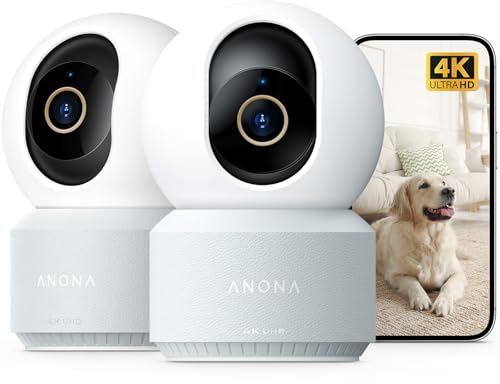
Anona 4K UHD Indoor Camera — Best for busy Wi-Fi networks
The Anona entry earns its place on a specification the other picks treat as plumbing: dual-band Wi-Fi with Wi-Fi 6 support. In a modern apartment — neighbours’ networks stacked on every channel, dozens of household devices competing for airtime, a router two rooms away — a camera’s network manners decide whether its live view glides or stutters. The Anona speaks both the long-reaching 2.4GHz band and the faster 5GHz band on current Wi-Fi standards, letting it take the cleaner road in buildings where the older band is a traffic jam.
Beyond the radios, the camera covers the indoor flagship checklist in full: 4K resolution, complete pan-and-tilt rotation with auto-tracking, phone-app control, and the pet, baby and household monitoring roles this category exists for. Two-way communication, night imaging and motion alerts arrive as expected; the camera is a generalist executed at high specification rather than a specialist, and generalists at 4K with modern networking age gracefully.
Brand maturity is the honest counterweight. Anona does not carry the ecosystem depth of Blink, Tapo or eufy — no vast accessory world, no decade of app refinement, a smaller owner community when a question arises at midnight. Buyers should weigh that against the networking advantage with clear eyes: in a quiet suburban house with a strong router nearby, the established brands’ polish may matter more; in a dense apartment block where a neighbour’s network shouts over yours, the Anona’s radios may be the difference between a camera that works and a camera that buffers.
Mains power, as throughout this guide, keeps the 4K stream and tracking motor free of battery anxiety, and installation follows the familiar plug-pair-aim pattern. The camera’s app handles the household roles — nursery watch, pet checks, elder monitoring — with the alert customisation modern buyers expect, and its storage options should be confirmed on the listing to match your local-versus-cloud preference before purchase, since configurations vary across this newer brand’s range.
It closes the picks as the network realist’s choice: the camera that treats Wi-Fi as a feature rather than a footnote. In the right building, that priority is not a niche — it is the whole product.
- Power: plug-in mains for continuous streaming and tracking
- Video: 4K UHD with full pan-and-tilt and auto-tracking
- Networking: dual-band 2.4GHz and 5GHz with Wi-Fi 6 support
- Roles: pet, baby and general indoor monitoring via phone app
- Positioning: high-specification generalist from a newer brand
Strengths
- Dual-band Wi-Fi 6 keeps live view smooth in congested apartment networks.
- Full 4K pan-and-tilt specification matches the established flagships feature for feature.
- Band flexibility lets the camera choose reach or speed as the building demands.
Trade-offs
- A smaller brand ecosystem means fewer accessories and a thinner owner community.
- App polish and long-term support are less proven than the big three’s records.
- Storage configurations vary; verify the exact arrangement on the listing before buying.
Best for: apartment dwellers and dense-network homes where Wi-Fi congestion defeats lesser cameras. Not suited for: buyers who prize a mature ecosystem and long support history above networking.
How does continuous recording change what a camera is for?
An alert-driven camera answers the question it was asked: something moved, here is the clip. A continuously recording camera answers the questions nobody thought to ask. When did the parcel actually arrive, before the alert’s clip begins? What did the dog do in the hour before it limped? Did the toddler climb, fall or get pushed by gravity and a rug? Mains power, paired with local storage, turns the cameras in this guide from burglar alarms with lenses into household witnesses, and that shift changes which moments families end up keeping forever — usually not the intrusions, mercifully rare, but the first steps, the pet’s secret afternoon life, the grandfather’s wave at the hallway camera.
Storage maths governs how much witness you keep. Continuous recording fills cards steadily, so card size and overwrite policy decide whether your archive reaches back three days or three weeks. Event-only recording stretches the same card across months but risks the un-asked questions above. Most owners settle in the middle: continuous recording on the camera guarding the entrance or the nursery, event recording on secondary rooms, and a monthly habit of saving the clips that turned out to matter before the loop overwrites them.
There is a discipline to reviewing continuous footage efficiently: use the apps’ event markers and thumbnails as an index rather than scrubbing raw hours, jump from marker to marker, and export anything significant the day you notice it. Households that build that small ritual get the witness benefits without the surveillance burden. Households that never look have simply bought storage wearing a lens — harmless, but a waste of the one capability that most separates this class from its battery cousins.
How should a household handle privacy with always-on indoor cameras?
Indoor cameras watch the people you love most, in the rooms where they are least guarded, so the privacy conversation is not a settings page — it is a household agreement. Decide together which rooms get cameras and which never will; bedrooms and bathrooms are the usual absolute exclusions for guests and older children, while nurseries and elderly relatives’ rooms are negotiated with the people involved wherever they can speak for themselves. A camera everyone agreed to becomes a household tool; a camera discovered becomes a household wound.
Use the tools the cameras provide. Privacy modes that physically turn or shutter the lens — a Tapo speciality praised throughout this guide — let a camera visibly stand down when the family is home. Schedules can silence recording during the hours everyone is awake and present, waking the cameras for school hours, work hours and nights. Geofencing in several apps automates the same courtesy from the household’s phones. The goal is a system that watches the house when the house is empty or asleep, and politely looks away when it is neither.
Account security is the other half of privacy, and it is unglamorous: a unique password for the camera account, two-factor authentication switched on, firmware updates accepted rather than postponed, and shared access given deliberately to named people rather than a family password passed around. A camera account is a window into your home; treat its credentials with the seriousness of a house key, because functionally that is what they have become. Review the access list whenever someone moves out, a relationship changes or a device is replaced — five minutes of hygiene that protects everything the cameras were bought to protect.
Guests deserve a sentence too. A small, honest mention that the hallway and living room have cameras — standard practice in homes with baby monitors and pet cams — preserves trust and, in some jurisdictions, satisfies notice expectations for recording. Nobody reasonable objects to a nursery camera; people object to learning about cameras from the footage. Transparency costs nothing and buys the goodwill that makes a camera system a normal part of a hospitable home rather than its secret.
Comparison table
| Camera | Resolution | Movement | Storage philosophy | Primary role |
|---|---|---|---|---|
| Blink Mini 2K+ | 2K | Fixed view | Blink cloud ecosystem, plan-centred | Compact ecosystem camera |
| Tapo C211 (2-Pack) | 2K each | Pan and tilt, tracking | Local microSD first, cloud optional | Two-room value |
| eufy Indoor Cam E30 | 4K | Pan and tilt, AI tracking | Local-first, no subscription core | No-fee flagship |
| Tapo C210 (2-Pack) | 2K each | Pan and tilt, tracking | Local microSD first, cloud optional | Proven budget pair |
| Tapo C260 | 4K | Pan and tilt, tracking | Local plus optional cloud | Recognition and smart alerts |
| Anona 4K Indoor | 4K | Pan and tilt, tracking | Confirm configuration on listing | Congested-network homes |
How do you place a camera that needs a socket?
Start from the view, then negotiate with the socket — never the reverse, because a perfectly powered camera watching a wall helps no one. Identify the vantage the room wants: usually a corner or shelf at head height or slightly above, covering the door and the room’s valuable centre in one frame. Then survey power honestly. Sockets hide behind sofas, under desks and beside the very shelves cameras want; a short, tidy cable run along a skirting board or behind furniture reaches most of them, and cable clips cost pennies. Where the ideal vantage truly has no power within reach, a slim extension lead routed safely — never under rugs where it overheats and trips — beats a compromised camera position.
Height shapes both picture and privacy. Door height or a little above flatters faces for identification and keeps the camera out of a toddler’s grabbing range; ceiling corners maximise floor coverage but turn everyone into hats. Nurseries want the cot framed without a camera looming at mattress level; hallways want the door and the approach; living rooms usually serve the family best aimed at the entrance and seating rather than the television’s glow.
Test before you mount. Every camera here can sit on a shelf for a week of probation — check the live view at noon glare and midnight darkness, walk the room’s paths, confirm the alerts describe reality. Only then drill anything. Renters especially should exhaust the shelf-and-bookcase options, which in most rooms are not a compromise at all but the best positions available.
Finally, plan the power cut. A plug-in camera stops when the house power does; households for whom that gap matters can put the camera and router on a small uninterruptible supply, buying hours of continuity for both. It is an optional refinement, not a requirement — but deciding about it consciously, rather than discovering it during a storm, is the mark of an installation done properly.
What should you check about subscriptions before buying?
Ask three questions of any camera, and ask them before the box opens. What works with no plan at all — live view only, or local recording too? What does the plan add, precisely: cloud history length, smart alerts, named recognition? And what happens to recorded history if you cancel — is it yours, stored locally, or rented access that evaporates? The cameras in this guide answer differently: Blink’s Mini is happiest inside its plan, Tapo and eufy build their core on local storage with plans as garnish, and that difference compounds across years of ownership into the real price of the camera.
Households mixing brands should also count apps. Every additional ecosystem is another notification stream, another account, another timeline to search during an incident. There is genuine value in standardising — one app for the door, the nursery and the hallway — and it is the strongest argument for ecosystem picks like the Mini 2K+ even where a rival’s hardware edges it on paper. Convenience compounds just as costs do.
How do renters and landlords approach plug-in cameras?
Renters are this category’s natural constituency, because everything here installs without drilling into anything structural: a shelf, a socket and a Wi-Fi password constitute the entire works. When the tenancy ends, the system leaves in a shoebox and the property shows no trace — a virtue battery outdoor cameras share but wired recorder systems cannot approach. The probation method recommended earlier, a week on a shelf before any mount is considered, doubles as a renter’s guarantee that no hole is drilled for a view that disappoints.
Landlords and hosts occupy the other side of the conversation and should keep cameras out of private rented space entirely, confining any devices to genuinely shared or exterior areas with clear notice. The technology’s ease of installation makes the ethical line more important, not less: a camera that takes five minutes to install takes five minutes to install wrongly. Households hosting guests land in the middle — disclose the nursery and hallway cameras, offer the privacy mode during visits, and the system remains what it was bought to be, a family tool rather than a source of awkwardness.
What mistakes do plug-in camera buyers repeat?
The foundational mistake is buying the word wireless and expecting a battery camera — then discovering the cable and feeling deceived by a product that described itself accurately. Read this category’s definition once and the disappointment never happens. Second comes socket blindness: ordering cameras for rooms whose only socket sits behind a wardrobe, then living with a view of the wardrobe. Survey power first; the choosing section above exists because this mistake is so common.
Third, owners aim cameras through glass at the outdoors, where night-vision infrared reflects off the pane and blinds the camera after dark — indoor cameras belong indoors, watching rooms. Fourth, households enable every alert at maximum sensitivity, drown in notifications within a week and mute the camera entirely, converting a security device into furniture; tune alerts during the probation week instead. Fifth, buyers forget the router: a camera is only as reliable as the Wi-Fi reaching its corner, and a mesh node near the nursery often improves security more than a camera upgrade would.
Why does two-way audio matter more than most specifications?
Because the moments indoor cameras actually serve are conversations as often as they are recordings. The parent who talks a toddler back to sleep through the nursery camera, the owner who tells the dog to leave the bin from a train, the adult child who checks in with a parent who did not answer the phone — each is using the camera as an intercom that happens to see. Audio quality decides whether those moments feel like presence or like a tannoy, which is why this guide weighted microphones and speakers alongside lenses, and why the Mini 2K+’s enhanced audio earned explicit mention in a field of resolution numbers.
Sound detection extends the same sense in the other direction. A camera that flags a cry, a crash or a smoke alarm’s shriek hears the events that happen outside its frame — the kitchen incident while the camera watches the hall, the fall in the next room. Households with babies, elderly relatives or anxious pets often find the audio alerts outnumber the useful video alerts, and tuning their sensitivity during the probation week is time repaid daily.
There are courtesies to observe. Two-way talk startles first-time hearers — warn the household, especially children and guests, that the camera can speak, or the first disembodied instruction becomes family folklore of the wrong kind. And in shared or rented spaces, audio recording carries stricter expectations than video in many places; households should satisfy themselves about their local position rather than assuming a camera’s defaults settle the question. Used considerately, though, the speaking camera is the feature owners praise most after a year — the specification sheet’s afterthought that became the product.
Final Recommendation
Most households should start with a Tapo twin pack — the C211 for the freshest hardware, the C210 for the proven bargain — because two watched rooms, local recording and no mandatory subscription answer the majority of indoor needs in a single box, and because a system that covers the nursery and the door from its first evening teaches a household what it actually wants from cameras before any larger commitment is made. Blink households add the Mini 2K+ and keep one app for everything; buyers wanting the finest single picture without fees take the eufy E30; alert-weary families graduate to the C260’s recognition; and apartment dwellers on congested networks should seriously consider the Anona. Whichever you choose, you are buying wakefulness — a camera that never sleeps, never rations and never asks to be charged — and in the rooms that matter, that is the whole point of plugging in.
Frequently Asked Questions
If these cameras are wireless, why do they have cables?
Wireless describes how the video travels — over Wi-Fi, with no cable to a recorder. Power arrives by cable from a mains socket, and that is a deliberate design: constant electricity lets the camera stay awake, stream indefinitely and record continuously in ways battery cameras cannot sustain. Think of the cable as the camera’s lifeline and the Wi-Fi as its voice.
What happens to a plug-in camera during a power cut?
It stops, along with the router it depends on — the honest weakness of the class. Battery cameras keep working through outages. Households concerned about that gap can place the camera and router on a small uninterruptible power supply, which carries both through typical short cuts. For most indoor uses, where outages are rare and brief, owners accept the trade for permanent wakefulness the rest of the year.
Can I record without paying for a subscription?
With the Tapo and eufy picks, yes: local microSD recording covers events and, where configured, continuous footage with no monthly fee. Blink’s Mini centres its clip features on the Blink plan, with live view available regardless. Always confirm the exact no-plan feature set of the model you choose, because brands draw that line in different places and occasionally move it.
Is 4K worth it for an indoor camera?
For a camera covering a large room or one whose footage you expect to examine closely — faces at a door, details across a shop floor — yes: the extra detail survives digital zoom during playback. For a nursery or a small hallway watched live, 2K already exceeds what the task requires, and the money is better spent on a second camera. Match resolution to the room’s size and the questions you will ask of the footage.
Will a pan-and-tilt camera follow my pet around the house?
Within its room, yes: tracking models rotate to keep a moving subject in frame across that space. Between rooms, no camera follows — that requires a camera per room, which is precisely why the twin packs in this guide exist. Set tracking sensitivity thoughtfully; a camera that chases every curtain sway will wear its welcome, and its motor, quickly.
How long a power cable do these cameras usually include?
Typically long enough to cross a room’s awkward gap between shelf and socket — a few metres of slim USB cable is the class norm — and standard USB cabling means a longer replacement is inexpensive and universally available. Measure your intended run before ordering if the socket is distant, route the cable along skirting or behind furniture, and avoid stretching a cable across a walkway where it becomes a trip hazard and a future unplugging accident. Where no safe route exists, moving the camera’s shelf is usually wiser than heroic cabling.
Do plug-in cameras use much electricity?
Very little — a few watts each, comparable to a phone charger left in the wall, which across a year amounts to a trivial sum beside the router and television standby loads a household already carries. The always-awake behaviour that defines this class is not an energy concern; a houseful of these cameras draws less than a single forgotten incandescent bulb. Buyers comparing running costs between camera classes will find the differences measured in pennies, and should choose on vigilance and placement instead.
Can these cameras watch through a window to the street?
Poorly, and after dark barely at all: infrared night vision reflects off glass and whites out the image. An indoor camera’s honest job is the room it sits in. For the street, the driveway or the garden, choose a camera designed and rated for outdoor placement, several of which share ecosystems with the indoor picks reviewed here.
Related Guides
Whether your next step is a second room, a sharper sensor or a whole-property recorder system, extend your coverage with our guides to add-on cameras that expand an existing security system, 4K smart home security cameras for sharper coverage and 8-channel home security camera systems for whole properties.


