What's inside
As an Amazon Associate I earn from qualifying purchases. This post may contain affiliate links at no extra cost to you.
gizmoverdict.com is reader-supported. When you buy through links on our site, we may earn an affiliate commission.
Where to Buy
Every system reviewed below is sold on Amazon, and the listings are where the honest details hide. Before comparing headline prices, open the storage line of each listing and ask three questions: how many terabytes of hard drive are actually in the box, how many cameras ship with it rather than how many channels the recorder supports, and whether the cameras draw power from a cable or from a battery that a solar panel has to refill. A kit advertised around a 16-channel recorder with eight cameras in the carton is an eight-camera system today, whatever the banner implies. Check-price buttons on the listings carry the current figures; what matters for a purchase decision is the configuration, because recorders, drives and extra cameras bought later rarely cost what they cost inside a bundle.
Cable deserves a line in the budget too. PoE kits usually include starter lengths that suit a compact house and fall short on a long ranch layout, while plug-in Wi-Fi kits need a weatherproof outlet within reach of every mounting point. Neither cost appears in the product title, and both decide whether the Saturday installation finishes on Saturday.
The phrase on the box is doing heavy lifting, so this guide to the best 24 7 security cameras starts by splitting it in two. Genuine round-the-clock recording means a camera that never sleeps: mains or PoE power, a recorder writing every second of every day to a local hard drive, and footage that exists for 3 a.m. on a rainy Tuesday because the system was awake then too. The second meaning is newer and narrower — battery cameras paired with solar panels that advertise continuous recording while quietly depending on sunshine, moderate bitrates and short winter days being kind. Both meanings appear in the six picks below, and each review states plainly which one you are actually buying.
That distinction decides real outcomes. An insurer, a landlord or a police officer asking for footage wants the minutes before an incident, not a motion clip that begins after a sensor woke up. Continuous recording also changes what a camera is for: instead of an alarm that happens to film, it becomes a record you can rewind through, which is how you learn that the parcel van came at 11:40 and not noon, or that the fox visits the bins every night at the same hour.
Six systems earned places here. Three are wired Hiseeu and Reolink kits built around network video recorders with multi-terabyte drives. One is a wireless Hiseeu kit that still records to a local hard drive around the clock. Two are solar battery cameras — a MUBVIEW single and a SEHMUA pair — whose continuous modes are examined with the scepticism they invite: what panel wattage they carry, what happens across a grey week in December, and which settings quietly end the experiment.
One more framing note before the reviews: every pick below was assessed on the footage it produces on its worst day, not its best. Wired kits barely notice their worst day. Solar cameras have theirs in the statistics of local weather, and their reviews below name the months and conditions plainly so that a buyer in Arizona and a buyer in Aberdeen can read the same words and reach different, correct conclusions.
Key Takeaways
- Continuous recording is a power story before it is a camera story: mains and PoE systems record through the night and the weather, while battery cameras sustain it only while solar income exceeds what the sensor, radio and infrared spend.
- The Reolink RLK16-800D8 is the only pick here whose 4TB drive, eight 8MP PoE domes and 16-channel headroom make month-scale retention realistic without deleting anything by hand.
- Hiseeu builds the value end of true 24/7 three different ways — corded plug-in cameras, a dual-band Wi-Fi kit with a 3TB drive — so the choice between them is about cabling appetite, not recording honesty.
- Solar picks from MUBVIEW and SEHMUA can hold a continuous mode in a sunny climate at sensible bitrates; treat that mode as seasonal in northern winters and test it before relying on it.
- Storage arithmetic beats marketing: at typical bitrates a 3MP camera writes roughly 10–20GB a day, so divide the drive size by the camera count before believing any retention claim.
- None of these six systems needs a subscription for local continuous recording, which is the entire point of the category.
Quick Picks
| Pick | Badge | Why it is here |
|---|---|---|
| Hiseeu 4K NVR Kit with 4× 3MP Corded Cameras | Best value true 24/7 | Plug-in powered cameras and a 4K recorder remove batteries from the argument entirely at a starter-kit price. |
| Hiseeu 5MP Wired Plug-In Bullet System | Best for Wi-Fi households | Dual-band Wi-Fi plus constant mains power gives continuous recording without running Ethernet to each camera. |
| Reolink RLK16-800D8 16CH 4K PoE System | Best overall system | Eight 8MP PoE domes, a 4TB drive and eight spare channels make this the pick that keeps growing instead of being replaced. |
| Hiseeu 5MP Wireless Wi-Fi Pro Kit, 3TB | Best cable-light recorder kit | A proper hard drive and recorder anchor wireless cameras that still record every second, not just motion events. |
| MUBVIEW 4MP Solar Continuous Camera | Best solar experiment | A 10W panel is the hardware detail that makes its continuous claim worth testing on a sun-facing wall. |
| SEHMUA 2K Solar Camera 2-Pack | Best solar pair for two angles | Two dual-band solar cameras cover a driveway and a garden gate where no outlet exists, with honest winter caveats. |
How We Chose These Picks
Selection began with a refusal: any camera that only records motion clips was excluded, however good the clips. To stay in the running a pick had to offer a genuine continuous mode — a recorder writing a constant stream, or a battery camera whose manufacturer explicitly supports always-on recording rather than wake-on-motion. That single filter removed most of the wireless market and left systems that treat recording as their default state.
Within that filter we weighted power architecture first, because it predicts reliability better than resolution. A 3MP camera that never sleeps protects a house better than an 8MP camera asleep when the ladder went up. Storage came second: drive capacity divided by camera count and bitrate gives the retention you will actually experience, and kits were favoured when that arithmetic landed in weeks rather than days. Third came expansion honesty — channels beyond the bundled cameras are worth money only if adding cameras later is genuinely supported.
Solar picks were judged by a stricter, separate standard. Panel wattage, battery capacity and the manufacturer’s own continuous-recording conditions were read as a contract: if holding 24/7 depends on several hours of direct sun and a reduced bitrate, the review says so in those terms rather than repeating the headline. Both solar picks earned their places as honest experiments for outbuildings and sun-rich walls, not as equivalents of the wired kits, and the ordering of this guide reflects that: the further down the list, the more conditions attach to the promise.
Finally, a word about what was left out and why. Several well-known subscription camera brands sell models that can record continuously to their own cloud plans, and they were excluded deliberately: a guide about owning your footage loses its thread when the timeline lives behind a monthly payment and disappears when the payment stops. Every system here keeps recording, subscription-free, for as long as its hardware lasts — that independence is the category’s founding idea.
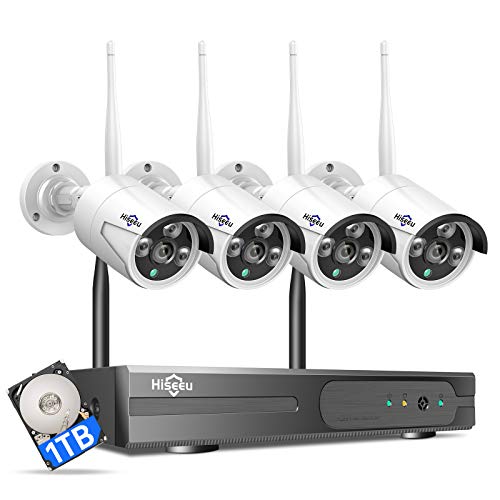
Hiseeu 4K NVR Kit with 4× 3MP Corded Plug-In Cameras — Best value true 24/7
Four corded cameras that plug into power and talk to a 4K network recorder give this Hiseeu kit the simplest possible claim on this page: it records all day because nothing in the chain can run out of charge. Each camera draws mains power through its own adapter, so the infrared lights, the sensor and the Wi-Fi radio spend energy the household supply replaces instantly. That architecture is unfashionable next to wire-free marketing, and it is exactly why the footage is there at 4 a.m. in February.
The 3MP sensors sit below the headline resolution of pricier kits, and the trade deserves a clear-eyed look. Three megapixels resolves faces across a porch and number plates on a driveway at sensible distances; what it will not do is survive aggressive digital zoom across a long garden. Buyers cross-shopping 4K kits should compare honestly: this system trades pixel count for a lower price and lighter storage load, which quietly extends retention on whatever drive is fitted. For a first recorder system covering doors, a drive and a side path, that trade is usually the right one.
The ownership rhythm settles quickly into near-invisibility. There is no charging rota pinned to the fridge and no weekly battery anxiety; the chores reduce to an occasional lens wipe and a glance at the recorder’s drive-health indicator every few months. Systems that ask this little tend to still be running, faithfully and unremarked, five years after installation day.
Setup labour concentrates in two places: finding an outlet or extension route near each camera, and positioning the recorder where its fan noise and blinking lights will not annoy anyone. The cameras being plug-in rather than PoE means no Ethernet runs, but also no single-cable elegance — each position needs power within cord reach, and outdoor sockets or drilled cable entries become part of the plan. Once mounted, the system asks almost nothing: no charging rota, no panel cleaning, no app nagging about battery percentages.
Retention depends on the drive fitted to the specific listing configuration, so check that line before ordering and size expectations accordingly — four 3MP cameras at sensible bitrates fill a 1TB drive in a matter of weeks, not months. Owners who need longer archives can lower frame rates on the least important camera or accept the recorder’s overwrite cycle, which deletes oldest footage first and is the normal, sane behaviour for a home system.
Owners stepping up from a single doorbell camera often underestimate how much behaviour changes when every angle records all the time. Disputes about which delivery van clipped the hedge stop being disputes. The recorder’s timeline becomes the household’s memory of its own perimeter, and the 3MP clarity is, in practice, plenty for the questions households actually ask: who, when, and which direction did they leave.
- Cameras in box: 4 corded plug-in powered outdoor cameras
- Sensor: 3MP
- Recorder: 4K NVR
- Power: Mains adapter per camera — no batteries
- Recording mode: Continuous 24/7 to local drive
- Subscription: None required for local recording
Strengths
- Continuous recording with zero battery management, forever
- Starter-kit pricing for a genuine recorder-based system
- 3MP streams keep storage demands modest and retention longer
Trade-offs
- Each camera needs mains power within cord reach
- 3MP detail limits digital zoom on wide scenes
- Drive size varies by listing configuration — verify before buying
Best for: First-time recorder buyers who want honest all-day recording over a house’s doors and driveway without PoE cabling.
Not suited for: Long rural sightlines where faces or plates must be read at distance, or spots with no reachable power.

Hiseeu 5MP Wired Plug-In Bullet System, Dual-Band Wi-Fi — Best for Wi-Fi households
Bullet housings and 5MP sensors headline this second Hiseeu kit, but its defining decision is the same as its cheaper sibling: the cameras plug into the wall. Constant power is what separates this system from the battery crowd, and the dual-band 2.4G/5G Wi-Fi is there to carry a continuous stream reliably rather than to wake up occasionally. A 5GHz link near the house handles the constant throughput with less congestion from neighbours’ networks, while 2.4GHz reaches the far camera at the garden’s end.
Five megapixels is the sweet spot this category keeps returning to. Faces stay identifiable across a typical front garden, plates read at driveway distances, and the storage cost per day stays well below 4K streams. Paired with the 4K-capable recorder, the system leaves headroom: the recorder’s ceiling sits above the bundled cameras, so a future higher-resolution camera on the most important position does not force a recorder swap.
Night performance follows the bullet template: a defined infrared throw that identifies visitors at gate distance, with the visible housing doing quiet deterrent work the rest of the time. Position one camera to cover the approach rather than the door itself and the timeline captures faces turned toward the lens — the single most useful framing trick in residential surveillance, and free.
The bullet form factor earns its keep outdoors. Bullets shade their own lens with a brow, shed water predictably, and announce themselves — visible cameras deter in a way discreet domes do not, which for many households is half the point. The flip side is aim: a bullet’s direction is obvious and fixed, so mounting position matters more, and a camera that can be reached can be knocked. Mount high, angle down, and let the wide field of view do the rest.
Because the cameras are Wi-Fi despite being wired for power, network quality becomes part of the security system. A router at the opposite end of the house from the furthest camera will produce the one gap in an otherwise continuous record. A mesh node or a repositioned router is a legitimate part of this kit’s installation cost, and buyers should walk the mounting points with a phone checking signal before drilling anything.
One underappreciated benefit of plug-in bullets on dual-band Wi-Fi is upgrade pacing. Because the recorder and network carry the system, a single camera can later be swapped for a higher-resolution model on the one position that earns it — the driveway, usually — without touching the rest. Kits built this way age gracefully, one position at a time, instead of expiring as a sealed unit.
- Cameras in box: Wired plug-in powered outdoor bullets
- Sensor: 5MP
- Recorder: 4K NVR
- Wi-Fi: Dual-band 2.4G/5G Wi-Fi Pro
- Power: Mains adapter per camera
- Recording mode: Continuous 24/7 to local drive
Strengths
- 5MP detail without 4K storage bills
- Dual-band Wi-Fi suits congested neighbourhood networks
- Visible bullet housings double as a deterrent
Trade-offs
- Still needs a power outlet near every camera
- Continuous Wi-Fi streams expose weak router placement
- Fixed bullet aim punishes careless mounting positions
Best for: Houses with strong Wi-Fi and reachable outdoor power that want sharper-than-basic footage recorded around the clock.
Not suited for: Stone-walled or sprawling properties where Wi-Fi at the camera positions is already unreliable.

Reolink RLK16-800D8 16-Channel 4K PoE System, 4TB — Best overall system
Eight 8MP dome cameras, a sixteen-channel recorder and a 4TB hard drive: the RLK16-800D8 is the pick that treats continuous recording as infrastructure rather than a feature. PoE carries power and data down one Ethernet cable per camera, so every camera is awake permanently, immune to Wi-Fi congestion, and recorded at full 4K by a recorder with eight spare channels waiting for the day a workshop, gate or rental unit needs coverage too.
The 4TB drive changes the retention conversation completely. Eight 4K cameras write serious data — figure on the order of a couple of weeks before overwrite begins, depending on bitrate and scene activity — and that is with all eight running at full quality. Drop the frame rate on a quiet side-path camera or trim bitrate on a static view and the archive stretches further. Smart person and vehicle detection runs alongside the continuous record rather than replacing it, so alerts stay useful while the full timeline remains searchable underneath them.
Search and export deserve a sentence of their own, because a continuous archive is only as good as your ability to leave it with the right ninety seconds. Person and vehicle filters narrow a fortnight to a shortlist in moments, and exporting a clip to a USB stick for an insurer takes minutes at the recorder. That workflow — find, export, hand over — is where this system’s polish shows against cheaper kits.
Dome housings suit the places this system typically goes: under eaves, over entrances, in garages and commercial thresholds where a camera might be grabbed at. The vandal-resistant dome shape deflects casual interference, and the wide lenses cover entrances without advertising exactly where they point. Domes do demand one discipline — keep the cover clean, because infrared reflections off a dirty dome fog night footage in a way bullets rarely suffer.
Installation is the honest cost. Eight Ethernet runs through lofts, soffits or conduit take a weekend for a confident DIYer and longer for the rest of us, and the recorder wants a ventilated, unobtrusive home near the router. Nothing about that is hidden or unusual; it is simply the price of the one architecture that has never once missed an event because a battery faded. For houses that will be lived in for years, the arithmetic favours doing it once, properly, at this level.
For small businesses the calculation tilts further toward this Reolink: sixteen channels cover a shop floor, stockroom, car park and office in one recorder, and person/vehicle detection filters the day’s timeline down to the moments a manager actually reviews. The same hardware in a large house simply means the system disappears into the building’s infrastructure, which is the highest compliment surveillance equipment can earn.
- Cameras in box: 8 × 8MP PoE dome cameras
- Recorder: 16-channel 4K NVR
- Storage: 4TB HDD fitted
- Detection: Smart person and vehicle detection
- Power: PoE — one cable per camera
- Expansion: 8 spare channels for future cameras
Strengths
- True 4K continuous recording on eight cameras at once
- 4TB storage gives multi-week retention at full quality
- Half the recorder’s channels remain free for growth
Trade-offs
- Eight Ethernet runs are a real installation project
- Dome covers need occasional cleaning for clear night video
- Largest upfront cost of the six picks
Best for: Homeowners and small premises settling the camera question for years, with several entrances and a appetite for maximum detail.
Not suited for: Renters, short tenancies, or anyone unwilling to run cable.

Hiseeu 5MP Wireless Wi-Fi Pro Kit with 3TB HDD — Best cable-light recorder kit
A recorder with a 3TB hard drive sits at the centre of this Hiseeu kit, and that fact alone separates it from most wireless systems, which treat a memory card or a cloud trial as storage. The cameras connect over dual-band Wi-Fi Pro, record continuously to that drive, and keep the whole archive inside the house where it belongs. For buyers whose walls defeat Ethernet runs but whose patience with batteries has ended, this is the architecture that threads the needle.
Five-megapixel cameras keep the wireless load manageable. A continuous 5MP stream is a serious but sustainable demand on a healthy home network, and the dual-band radios let nearer cameras ride 5GHz while distant ones fall back to the longer reach of 2.4GHz. The recorder’s position becomes a design decision: central in the house, elevated if possible, and within strong signal of every camera it serves.
Audio is part of the package on systems of this class, and on a continuous timeline it changes what footage can establish: a shouted warning, a dog’s alarm, the sound of a gate that the camera’s angle missed. Used within local rules, the microphone turns several cameras from witnesses that saw into witnesses that also heard, which matters more often than buyers expect.
Power still has to come from somewhere, and on this kit it comes from adapters — the cameras are wireless for data, not for energy. That is the correct compromise for continuous recording and the review will not pretend otherwise: each mounting point needs an outlet’s reach, or a planned extension. What you avoid is the battery treadmill; what you keep is a full timeline on a real hard drive with no subscription standing in front of it.
The 3TB capacity divides across the camera count to give retention measured in weeks at 5MP bitrates, and the recorder overwrites oldest-first when it fills, as it should. Households adding cameras later should re-run that division before assuming the archive length survived the expansion. As a whole, this kit suits the large middle of the market: too serious for motion clips, too cable-averse for PoE, and entirely unwilling to rent access to their own footage.
Renters in larger houses and owners of listed buildings with cabling restrictions are the quiet winners here. A 3TB recorder that asks only for power at each camera can be installed in an afternoon and removed without a trace, yet the footage discipline is identical to a wired install: everything, all the time, stored at home. Few products in this roundup resolve that particular tension as cleanly.
- Cameras in box: 5MP wireless outdoor cameras (see listing count)
- Recorder: NVR with 3TB HDD
- Wi-Fi: Dual-band 2.4G/5G Wi-Fi Pro
- Power: Plug-in adapters — no battery charging
- Recording mode: Continuous 24/7 to the local drive
- Subscription: None required
Strengths
- Real 3TB hard drive anchors genuinely continuous recording
- No Ethernet runs to the camera positions
- 5MP detail at wireless-friendly bitrates
Trade-offs
- Cameras still need mains power nearby
- Recorder placement and Wi-Fi quality govern reliability
- Retention shrinks quickly if cameras are added later
Best for: Cable-averse households that refuse both battery charging and cloud subscriptions.
Not suited for: Properties with thick walls and weak Wi-Fi at the exact spots cameras must go.
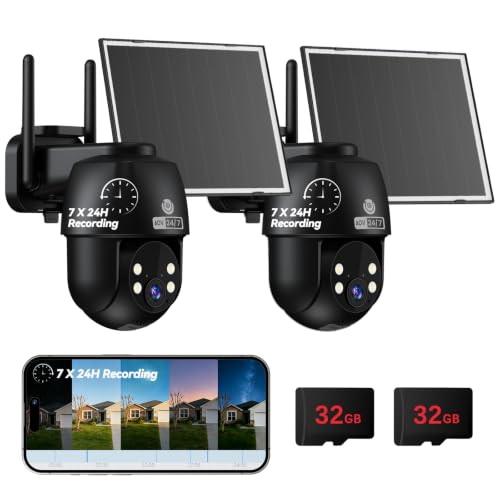
MUBVIEW 4MP Solar Camera with 10W Panel — Best solar experiment
Here is where the guide stops nodding along with the box copy. The MUBVIEW is a battery camera with a 10W solar panel, and its continuous-recording mode is real but conditional — a distinction the listing’s headline blurs and this review will not. Ten watts is a generously sized panel for this class, roughly double what many solar cameras ship with, and in a sun-facing position through spring and summer it can plausibly replace what a 4MP sensor, Wi-Fi radio and night infrared consume. Plausibly, in summer, facing the sun: those qualifiers are the product.
Winter is the audit. Short days, low sun angle and a week of overcast skies cut solar income to a fraction while the camera’s spending barely changes — infrared hours actually lengthen. Owners in northern latitudes should expect the continuous mode to need help in December: a periodic USB top-up charge, a reduced bitrate, or a temporary retreat to motion recording until the light returns. None of that makes the camera dishonest; it makes the claim seasonal, and buyers deserve the season stated.
App experience shapes whether the continuous mode survives contact with real life. A clear battery trend graph, honest low-charge warnings and an easy bitrate slider are what let an owner manage the energy budget in seconds a week. When those tools are present, the solar experiment feels like a system; when they are buried, it feels like a gamble — check the app screenshots on the listing before ordering.
Within its conditions, the camera is genuinely useful. The 4MP sensor and 8x zoom crop serve a gate, an allotment, a boat or a building plot where no power exists at all, and continuous daytime recording of a work site or a wildlife run captures behaviour that motion triggers miss — animals that move slowly, people who loiter just outside a detection zone. Mounting freedom is total: a fence post and a clear view of the sky are the whole infrastructure.
Set it up like an experiment with a control: enable continuous mode, then check the battery graph weekly for the first month. If the level trends upward or holds, your wall and climate sustain it. If it slides, lower the bitrate before blaming the hardware — bitrate is the throttle that decides whether any solar camera on earth can call itself continuous. Bought with that mindset, the MUBVIEW is a clever tool; bought as a like-for-like replacement for a wired kit, it will disappoint by February.
The MUBVIEW also earns a mention as a second camera rather than a first: paired with a wired kit guarding the house itself, a solar unit on a distant barn or field gate extends the perimeter to places the recorder cannot reach. Used as an outpost with a daytime-weighted job — deliveries to a yard, machinery checks, livestock water troughs — its continuous mode covers the hours that matter most to that job.
- Sensor: 4MP
- Panel: 10W solar panel
- Zoom: 8x zoom (crop)
- Power: Battery recharged by solar — no mains
- Recording mode: Continuous mode available; sustainability depends on sun and bitrate
- Subscription: None required for local recording
Strengths
- Largest panel in this roundup class — the continuous claim has hardware behind it
- Total mounting freedom where no power exists
- 4MP detail for a wire-free camera
Trade-offs
- Continuous mode is seasonal at northern latitudes
- Grey weeks force bitrate cuts or manual top-up charging
- A single camera — no recorder, no multi-camera timeline
Best for: Sun-facing gates, plots, boats and outbuildings beyond the reach of any outlet, with an owner who will watch the battery graph.
Not suited for: Anyone expecting wired-kit certainty from a panel through a dark winter.

SEHMUA 2K Solar Camera 2-Pack, Dual-Band — Best solar pair for two angles
Two cameras in the box changes the solar proposition: instead of one heroic viewpoint, the SEHMUA pair covers the two angles most properties actually need — say the driveway approach and the back gate — and spreads the risk. If one position turns out shadier than the map suggested, the other may still thrive, and the household learns its own solar geography from real data rather than from a second purchase.
The 24/7 recording claim on this pack needs the same translation applied to the MUBVIEW, with interest. Two-K sensors spend less than 4MP models, which helps the energy ledger, and dual-band 2.4GHz and 5GHz radios let each camera pick the band that reaches it. But the physics ledger is unchanged: panels earn by day, infrared spends by night, and a British or northern-US December offers roughly a quarter of June’s earning hours. Continuous mode through summer, very likely; through a grey January, plan on intervention.
Colour night vision is the pair’s party trick, rendering a visitor’s jacket and car colour accurately under its illumination instead of the grey-green of basic infrared. Colours are frequently the detail that distinguishes one suspect vehicle from another in a police report, so for the driveway position this feature carries genuine evidentiary weight, not just prettier footage.
Practical setup decides which side of that line a given house lands on. Panels want a south-facing tilt unobstructed by the very eaves that shelter the cameras, and the two often conflict — the best camera angle and the best panel angle are rarely the same wall position, so use the panel’s cable length as a design allowance rather than mounting both as one unit by default. Clean panels twice a year; a film of pollen and traffic dust is a silent tax on every calculation above.
As a pair for low-stakes coverage — watching a garden, a side return, a holiday home between visits — the SEHMUA set is easy to like: no cables, no subscription, colour night vision for identification, and an app view of both angles. As the sole security record for a business or a vulnerable property, the honest advice remains the wired kits higher up this page. The cameras do not pretend otherwise once you read past the headline; neither should the buyer.
Second homes are a natural fit, with one discipline attached: before leaving a property unvisited for a season, charge both cameras fully by cable, set a conservative bitrate, and accept motion-boosted rather than fully continuous recording for the deep-winter weeks. Owners who make that seasonal adjustment report the pair simply working; owners who set summer settings and drive away are the ones composing disappointed reviews in January.
- Cameras in box: 2 solar cameras
- Sensor: 2K
- Wi-Fi: Dual-band 2.4GHz and 5GHz
- Power: Battery plus solar panel per camera
- Recording mode: Continuous mode offered; winter sustainability varies by site
- Subscription: None required
Strengths
- Two angles covered in one purchase
- 2K sensors are frugal enough to flatter the solar budget
- Dual-band radios suit mixed-distance mounting
Trade-offs
- Continuous recording is a fair-weather mode at high latitudes
- Panel placement and camera placement often want different spots
- No central recorder — archives live per camera
Best for: Homeowners wanting two wire-free viewpoints on a garden, drive and gate, comfortable checking battery levels seasonally.
Not suited for: Sole-coverage security for high-risk premises or unvisited properties through winter.
Comparison Table
The table compresses the one argument this guide keeps making: find the power column first, because it predicts whether the recording column survives February.
| Pick | Power | Recording reality | Storage | Cameras | Watch out for |
|---|---|---|---|---|---|
| Hiseeu 4K NVR 3MP kit | Mains per camera | Continuous, unconditional | Drive per listing | 4 | Outlet reach at each position |
| Hiseeu 5MP bullet system | Mains per camera | Continuous, unconditional | Drive per listing | Bundled set | Wi-Fi strength at far cameras |
| Reolink RLK16-800D8 | PoE | Continuous at 4K, unconditional | 4TB fitted | 8 of 16 channels | Installation weekend |
| Hiseeu Wi-Fi Pro 3TB kit | Mains per camera | Continuous to local drive | 3TB fitted | Bundled set | Recorder placement |
| MUBVIEW solar | Battery + 10W panel | Continuous while sun and bitrate allow | Local/app storage | 1 | Winter light |
| SEHMUA solar 2-pack | Battery + panel each | Continuous seasonally | Per-camera storage | 2 | Shade on either panel |
What Does ’24/7′ Actually Mean on a Camera Box?
Three different engineering realities share one marketing phrase, and untangling them is the highest-value reading you will do before buying. The first reality is a recorder system: cameras stream constantly to an NVR that writes a hard drive in real time, and playback is a true timeline with no gaps. The second is a camera with local storage recording a constant stream to its own card or internal memory — genuine continuity, but with a smaller archive and no central point of control. The third is a battery camera in a continuous mode, where continuity lasts exactly as long as the energy budget does, and the budget is renegotiated by the weather every single day.
A fourth, dishonest usage also circulates: cameras that are merely available around the clock — ready to live-view on demand — described with language that lets buyers believe they record around the clock. Availability is not recording. If a listing never names a recording destination for the continuous stream (a drive size, a card capacity, a retention figure), assume the stream does not exist and the camera wakes for motion like every other battery model.
Retention, bitrate and the overwrite cycle
Every recorder in this guide eventually deletes its oldest footage to make room for the new, and understanding that cycle prevents the commonest disappointment in the category. Retention is not a setting; it is an outcome of drive size divided by total bitrate. Lower a camera’s bitrate and its days stretch; add cameras and everyone’s days shrink. Mature buying means choosing your retention target — a week, a fortnight, a month — and then configuring the system to hit it deliberately, rather than discovering the number by accident on the day you scroll back and find the footage gone.
Bitrate also varies with the scene itself. A camera watching a busy street compresses worse than one watching a still hallway, because motion is information and information is data. Two identical kits in different houses can honestly deliver different retention, which is why this guide quotes ranges and arithmetic instead of repeating the rosiest figure on any box.
Night is where continuous systems earn their keep
Most incidents worth recording happen in the hours when battery cameras are at their weakest and solar income is zero. Infrared illumination is a significant power draw sustained for eight to fourteen hours a night depending on season, and it is precisely this load that wired power makes irrelevant and solar budgets must survive. When comparing night specifications, read the infrared range as a claim about identification distance, not detection: a figure moving at the edge of the IR throw is a silhouette, while a face at half that distance is evidence.
Colour night vision changes the spend again, using white-light illumination or very sensitive sensors to keep colour after dark. On mains-powered picks it costs nothing that matters. On solar picks it is a luxury setting to enable selectively — the camera guarding the gate may deserve it while the one watching the bins does not.
A quick word on hard-drive noise and heat
Recorders are small computers that run for years without a day off, and their drives prefer a cool, ventilated shelf to the top of a sunlit cabinet. A faint drive hum in a hallway cupboard is normal; the same hum beside a bed is a placement error. Owners who give the box air and a stable shelf are rewarded with drive lifetimes measured in many years, and since the drive is the archive, its comfort is not a trivial detail.
How Do You Choose a Camera System That Truly Records Around the Clock?
Start with power, not pixels
Write down, for each position you want covered, which of three power sources genuinely exists there: an Ethernet run you are willing to install, a mains outlet within cord reach, or nothing but daylight. That inventory — not a product page — selects your architecture. Ethernet points get PoE; outlet points get plug-in Wi-Fi or corded kits; daylight-only points get solar, with expectations adjusted. Buyers who reverse this order, choosing cameras first and discovering power later, are the ones writing the angry reviews about dead batteries and missing footage.
Be suspicious of any shortcut that promises to abolish the inventory. Battery cameras without solar cannot record continuously for more than a short stunt period; the energy arithmetic forbids it. Solar extends the stunt into a season, sometimes a year in the right climate, but the inventory question — how much sun does that wall actually get in January — still has to be answered honestly.
Do the storage sum before ordering
Retention is a division problem: drive capacity divided by the combined daily bitrate of every camera. A cautious planning figure for a home camera at sensible quality is 10–20GB per camera per day, higher for 4K, lower for 3MP at reduced frame rates. Four cameras on a 1TB drive therefore means roughly one to three weeks of archive; eight 4K cameras on 4TB lands in a similar band. Decide how far back you plausibly need to reach — most households discover incidents within days, while businesses and landlords often need a month — and size the drive to the answer, not to the bundle discount.
What does continuous recording actually buy you?
Three things motion recording cannot. First, the run-up: the thirty seconds before a sensor would have triggered, which is where intent and identity usually live. Second, the slow event: water creeping, a fence leaning, a pet’s odd behaviour at noon — nothing that trips a motion zone, everything that explains a problem later. Third, the negative: proof that nothing happened at a disputed time, which settles arguments with neighbours, couriers and insurers in a way an empty clip list never does.
Plan the recorder’s home and the network’s reach
Recorder kits centralise everything, so give the box a home with ventilation, power and proximity to the router, out of casual sight but not buried where its drive heat builds. For Wi-Fi-fed kits, walk every proposed camera position with a phone and note the signal honestly; one weak position argues for a mesh node budgeted as part of the system. For solar positions, stand there at midday in the worst month you can manage and look for the shadows that will own that wall in winter.
How should you handle privacy and the law with always-on recording?
Continuous recording captures neighbours, passers-by and visitors in a way motion clips also do but timelines make more obvious, so aim cameras at your own property, use privacy masking where the recorder offers it to block a neighbour’s windows, and tell household members the system exists. Rules vary by jurisdiction — audio recording is restricted in more places than video — and several picks here include microphones, so check the local position before enabling sound. None of this is a reason to avoid a recorder system; it is a reason to install one deliberately rather than discover the etiquette afterwards.
Data security follows the same deliberate pattern. A recorder holding a month of your household’s movements deserves a changed default password, firmware updates when the manufacturer offers them, and remote viewing accounts protected like banking accounts. The local-first design of every pick in this guide is itself a privacy feature: the archive sits in your house, under your lock, rather than on a stranger’s server.
Common Mistakes
Believing the headline without reading the power line
The most expensive misunderstanding in this category is buying a battery camera for a continuous-recording job because the box used the words. Read the power specification before the resolution, every time; if energy comes from a battery, continuous recording is a mode with conditions, not a property of the camera.
Undersizing storage and discovering overwrite the hard way
A recorder that overwrites oldest-first is behaving correctly — the mistake is expecting a small drive to hold a month of eight cameras. Owners typically discover the gap the day they need footage from three weeks ago. Run the division in the guide above before the purchase, and re-run it whenever cameras are added.
Mounting solar panels where the camera wants to be
Camera position is chosen for view; panel position must be chosen for sky. Bolting both to the same shaded north wall guarantees a winter failure that gets blamed on the battery. Use the panel lead to separate the two decisions, and tilt panels toward the midday sun.
Starving Wi-Fi kits with a distant router
Continuous streams cannot buffer their way out of a weak link the way occasional clips can. A kit blamed for dropouts is often a router-placement problem wearing a camera costume. Test signal at the mounting points first and budget a mesh node if any position is marginal.
Pointing every camera at the widest possible view
Wide views feel thorough and identify nobody. Continuous recording tempts owners to cover everything thinly; a tighter view of the door, gate and driveway choke points returns footage that actually answers questions. Use the timeline you are paying to record on angles worth rewinding.
Leaving the recorder on factory settings
Default passwords, maximum bitrate on every channel and detection zones covering the whole frame are how these systems ship, not how they should run. Twenty minutes of configuration — credentials changed, bitrates matched to each view, zones drawn around doors and paths — is the difference between a archive you can search and a month of rustling trees.
Final Recommendation
Everything in this guide reduces to one purchasing habit: follow the power cable, or the panel, before following the megapixels.
Match the purchase to the power you actually have and this category becomes simple. Houses ready for a weekend of cabling should take the Reolink RLK16-800D8 and stop thinking about cameras for years: eight 4K domes, a 4TB drive and spare channels are what ‘done’ looks like. Houses with outlets but no appetite for Ethernet are well served by either Hiseeu route — the corded 3MP kit for value, the 5MP bullets for sharper detail, or the 3TB Wi-Fi Pro kit when even power cabling needs to stay minimal and a real hard drive still matters.
Solar belongs in the plan only where nothing else can go, and on those terms the MUBVIEW’s big panel and the SEHMUA pair are both worth their places — bought as seasonal instruments, checked against the battery graph, and never asked to testify about a dark week in January.
Buy the system whose power source you can describe without using the word ‘hopefully’, and the footage will be there on the one morning you actually need it.
Frequently Asked Questions
Can a battery camera really record 24/7?
Briefly, yes; indefinitely, only with help. A battery camera recording continuously drains its cells in days, so sustained always-on recording requires solar income that matches the spend. In strong sun at moderate bitrates a good panel can balance the books for months. Through dark winters it usually cannot, which is why this guide treats solar continuous modes as seasonal rather than equivalent to wired recording.
How much hard drive do I need for a month of continuous recording?
Work backwards from roughly 10–20GB per camera per day at typical home bitrates. Four cameras for thirty days therefore want somewhere between about 1.2TB and 2.4TB of usable drive, and eight 4K cameras can double that. Recorders overwrite oldest footage first, so an undersized drive does not stop recording — it silently shortens how far back you can look.
Is PoE better than plug-in Wi-Fi for continuous recording?
PoE is the more robust architecture: one cable carries power and data, immune to Wi-Fi congestion, interference and router reboots. Plug-in Wi-Fi kits record just as continuously while the network is healthy, and they install far faster. The honest ranking is about failure modes, not picture quality — PoE has fewer of them.
Do any of these systems need a subscription?
No. Every pick here records continuously to local storage — a recorder’s hard drive or the camera’s own local media — without a monthly plan. Subscriptions exist in this market for cloud archives and extra cloud features, but nothing in these six reviews depends on one for the core job of recording around the clock.
What happens to continuous recording in a power cut?
Mains and PoE systems stop unless the recorder and network gear sit on a battery backup unit, which is a worthwhile addition for high-risk premises. Solar battery cameras keep recording through a cut — one genuine advantage of the architecture — though the household router’s death still ends remote viewing until power returns.
Should I lower bitrate to extend solar recording or storage?
Yes — bitrate is the single most effective lever in both directions. Dropping a solar camera’s bitrate can be the difference between a battery that trends downward all winter and one that holds. On recorder systems, trimming bitrate or frame rate on static, low-importance views stretches retention without touching the cameras that guard doors.
Can I watch continuous footage remotely?
Yes — recorder kits stream live and recorded timelines to their apps, and the solar cameras offer live view plus their recorded history. Remote playback of a full timeline is heavier on your home upload connection than a short clip, so expect scrubbing through a 4K archive from a hotel room to feel slower than standing in front of the recorder with a mouse.
How long do recorder hard drives last in continuous service?
Surveillance-rated drives are built for exactly this duty and commonly serve for years of non-stop writing. Recorders surface drive health in their menus; a drive flagged as failing should be swapped before it takes the archive with it. Keeping the recorder cool and dust-free is the cheapest life insurance the drive will ever get.
Related Guides
Keep reading with our companion guides to wired PoE systems, outdoor camera placement, and home network setup for streaming cameras: Best PoE camera systems for homes Outdoor security camera placement guide How to set up a home NVR


