What's inside
- Key Takeaways
- Quick Picks
- How Did We Choose Cameras for Rental Properties?
- What Do Airbnb’s Rules Actually Require of Hosts?
- How Do the Six Compare Side by Side?
- How Should a Host Word the Disclosure?
- What Should a Host Do When the Alerts Say Trouble?
- What Mistakes Do Hosts Make With Rental Cameras?
- Who Else Has a Stake in Your Cameras? The Neighbours
- What About Insurance, Evidence and Keeping Records Like a Professional?
- How Does the System Earn Its Keep Between Guests?
- Final Recommendation
- Frequently Asked Questions
- Related Guides
As an Amazon Associate I earn from qualifying purchases. This post may contain affiliate links at no extra cost to you.
gizmoverdict.com is reader-supported. When you buy through links on our site, we may earn an affiliate commission.
Where to buy: each pick below links straight to its Amazon listing, titled exactly as the maker sells it. Two of the six are not cameras at all, and that is deliberate — read the framing before the products, because in this category the framing is the product.
Every other camera guide on the internet can afford to be casual about placement. This one cannot. The best airbnb security cameras are not simply cameras that suit a rental property; they are cameras used inside a legal and ethical frame that is stricter than the one governing your own home, and a host who ignores that frame risks the only asset that matters — the listing itself. So the rule comes first, before a single product: cameras at a short-term rental belong outside the home or in genuinely shared arrival spaces where policy and law allow them, they must be disclosed to guests in the listing before booking, and they must never — not hidden, not disguised, not “just for security” — watch a bedroom, a bathroom or any space where a guest undresses, sleeps or expects privacy. Hidden cameras are banned outright by Airbnb, and since the platform’s 2024 policy update, indoor cameras are prohibited in the property’s interior altogether, whether disclosed or not.
That sounds restrictive until you realise how much legitimate hosting work remains on the right side of the line. The host’s real problems are almost all exterior problems: Is the property occupied by more people than booked? Did the party spill into the street at midnight? Was the hot tub cover left off, the gate left open, the bins put out, the cleaner actually arrived? A disclosed camera over the driveway and the front door answers those questions. And for the interior problems — noise, over-occupancy, a gathering quietly becoming a party — the compliant tool is not a camera at all but a sensor that measures sound levels and occupancy patterns without recording a single image or word, which is why two of this guide’s six picks have no lens.
Read this guide, then, as two guides woven together. One is a normal product roundup of outdoor cameras and a doorbell that suit rental duty: battery-powered, remotely checkable, tough enough for guests who will never treat them as their own. The other is a compliance brief, repeated at every point where a host might be tempted to cross a line, because the cost of crossing it — a delisted property, a platform ban, in some jurisdictions a criminal record — dwarfs the price of every device on this page combined.
Key Takeaways
- Compliance is the first specification: outdoor and arrival areas only, disclosed in the listing before booking, and never a camera in a bedroom, bathroom or private interior space.
- Airbnb bans hidden cameras outright and, under its current policy, prohibits indoor cameras in rental properties even when disclosed — plan your system around the exterior.
- The Blink Outdoor 4 system is the host’s workhorse: battery cameras for driveway, gate and garden that run for seasons between visits to the property.
- Ring’s battery doorbell is the single most valuable device a host can fit, because check-in, deliveries and the true guest count all happen at the front door.
- The Minut Gen 2 is not a camera — it monitors noise, occupancy, motion and temperature without images or recorded audio, which is exactly why it can legally watch the interior story.
- NoiseAware, the prose-only pick, offers the same sensor philosophy as a service, widely used by professional managers with portfolios of properties.
Everything that follows in this guide is an elaboration of those six points, and the elaboration matters: hosts rarely fail over a product choice, they fail over a sentence missing from a listing or a lens angled ten degrees too far. Read the products for what to buy, and the compliance sections for how to stay the kind of host who is allowed to keep using them.
Quick Picks
| Pick | Badge | Why it earns its place |
|---|---|---|
| Blink Outdoor 4 (System) | Best Exterior System | Disclosed, battery-powered outdoor coverage for drive, gate and garden, with a hub in the box and batteries that outlast a season of bookings. |
| Ring Battery Doorbell 2K | Best for Check-In | The front-door witness: arrivals, departures, deliveries and the real guest count, in 2K, with no doorbell wiring to retrofit. |
| Minut Gen 2 | Best Interior Guardian (Not a Camera) | A sensor that tracks noise, occupancy, motion and temperature without recording images or conversations — the compliant way to know a party is forming. |
| Blink Outdoor 4 (Add-On) | Best for a Second Building | One more battery eye for the garage, annexe or back gate of a Blink-equipped rental — hub required and not included. |
| WYZE Cam v4 | Best Exterior Detail | 2.5K and colour night vision for the driveway of a property with outdoor power — exterior mounting only, disclosed like every pick here. |
| NoiseAware | Best Managed Service | A noise-monitoring service built for hosts and managers, included as prose-only because it is a subscription service rather than a boxed product. |
How Did We Choose Cameras for Rental Properties?
We applied the compliance filter before any technical filter, and it eliminated most of the camera market instantly. Indoor cameras — however excellent for a nursery at home — have no place on this list as interior devices, because Airbnb’s current rules prohibit them inside a rental, full stop. What survives that filter is a specific kind of equipment: outdoor cameras and door devices that can be disclosed plainly, pointed at arrival and exterior areas, and defended to any guest, platform investigator or judge as exactly what they appear to be. If a device’s value proposition required it to be unnoticed, it failed this guide’s first test, however good its lens.
The second filter was operational: rental properties are managed at a distance, often by someone who visits monthly, and their cameras must thrive on neglect. Battery life measured in seasons, remote checking from another city, alerts that distinguish a guest arrival from a raccoon — these are the specifications of hosting, and they reorder the usual camera virtues. Resolution matters less than uptime. A host does not need cinema; a host needs to know, from three hundred miles away, that the driveway camera is alive, its battery is healthy and last night’s arrival matched the booking.
Third came the guest’s perspective, which hosts ignore at their commercial peril. Every device here can be described in a listing in one honest sentence that a reasonable guest would accept: cameras cover the driveway and front door; a sensor monitors noise levels to protect the neighbours and the property. Devices that would make that sentence embarrassing to write did not make the list. That test — could you print it in the listing, in plain words, above the booking button — is the simplest compliance instrument ever devised, and this guide applies it to every pick, every section, every suggestion that follows.
A note on sources and certainty, because this is the one guide in our series where being wrong has legal consequences. The product facts here come from listings verified in the site’s pool. The policy framing reflects Airbnb’s published rules as they stand — the prohibition on hidden cameras, the exclusion of private spaces, and the platform’s more recent ban on indoor cameras altogether — but platform policies are living documents and rental law varies by country, state and city. Treat this guide as the map it is: accurate enough to plan by, and no substitute for reading the current policy page and your local regulations before the first guest arrives. A host who checks once a year stays ahead of every change that matters.
What Do Airbnb’s Rules Actually Require of Hosts?
The platform’s framework rests on three pillars, and hosts should know them as precisely as they know their cleaning rota. First: no hidden cameras, ever. A camera disguised as a smoke alarm, a clock or a charger is prohibited regardless of where it points, and discovery by a guest is treated as among the most serious breaches a host can commit. Second: no cameras in private spaces. Bedrooms and bathrooms are the named examples, and the principle extends to any space a guest uses for sleeping, bathing or changing — including a living room that converts to a bedroom, a detail sofa-bed hosts have learned the hard way. Third, and most recent: Airbnb’s updated policy prohibits indoor cameras in the property altogether, disclosed or not, which moved the entire legitimate conversation outdoors.
Outdoor cameras remain permitted within conditions. They must be disclosed in the listing — the platform provides for this, and burying the disclosure in a house manual handed over after arrival does not satisfy it, because the guest is entitled to know before booking. They must not be aimed into the interior through windows, and they must not monitor outdoor areas where privacy is expected, such as an enclosed outdoor shower or a sauna. Local law layers on top: many jurisdictions regulate audio recording more strictly than video, some require signage, and a host’s obligations to neighbours exist independently of any platform. The devices in this guide were chosen to make compliance easy, but no device can make it automatic — the listing text, the aim of the lens and the host’s honesty remain human responsibilities.
One more principle deserves stating because guests feel it even where rules are silent: proportionality. A disclosed doorbell and a driveway camera protect a property. A lattice of lenses covering every exterior angle of a small cottage surveils a holiday. Guests who feel watched write reviews that say so, and the review, unlike the footage, is permanent and public. The hosts who thrive with cameras are the ones whose systems a guest can read about, shrug at, and forget by the second morning — security as background, not as atmosphere.

Blink Outdoor 4 (System) — Best Exterior System
For the exterior of a rental, the Blink system answers the host’s defining constraint: distance. Its battery cameras record 1080p by day and infrared after dark, report through the included Sync Module Core, and stretch a set of batteries across a timescale measured in seasons of bookings rather than weeks — up to two years under light use, which at a rental translates to a battery errand folded into an annual maintenance visit rather than a special trip. Mounted over the driveway, the parking area and the gate, disclosed in the listing in plain language, they tell the host the exterior story in full: who arrived, in what vehicle, at what time, and whether the property was left secured.
The hosting-specific virtues compound quietly. A camera at the drive verifies the guest count against the booking — the extra car that means the extra six people the cleaning fee never covered — without any human having to spy, knock or accuse. Footage of the bins, the gate and the garden settles the small disputes that otherwise become message-thread trench warfare: the cover was left off the hot tub, the gate stood open all night, the storm — not the guests — took the fence panel. And because the system is Blink, a cleaner or co-host can be given app access for their own visits, then removed when the arrangement ends.
Its limits are the familiar Blink ones, read through a host’s eyes. Event clips mean the system witnesses arrivals and movement rather than recording the garden continuously, which for disclosed exterior duty is arguably a privacy feature as much as a limitation. The 1080p ceiling will not read a plate across a long drive, so mount for the distances that matter — the gate, the parking bay, the path to the door. And the disclosure duty is yours: the listing must name these cameras and their locations before any guest books, in words a tired traveller skimming on a phone can actually absorb.
- Video: 1080p HD, infrared night view
- Power: battery — up to two years under light use
- Included: Sync Module Core hub
- Placement: exterior only — drive, gate, garden, parking
- Disclosure: must be declared in the listing
Strengths
- Battery life matched to a host’s visit rhythm — seasons, not weeks
- Verifies arrivals and guest vehicles without any confrontation
- Complete system in one box, remotely checkable from anywhere
Trade-offs
- 1080p asks for close mounting at gates and parking bays
- Event clips only — no continuous exterior recording
- Long-term clip history leans toward the cloud plan
Best for: hosts managing from a distance who need the exterior story reliably.
Not suited for: any interior placement — prohibited, and excluded here by design.
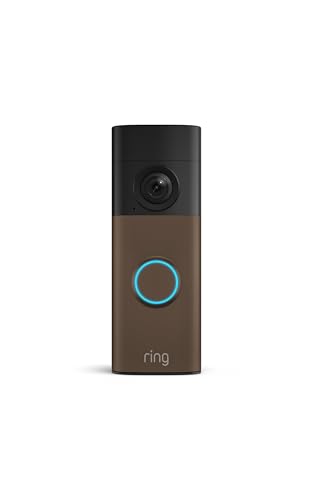
Ring Battery Doorbell 2K — Best for Check-In
If a host may own only one device from this guide, the argument for the doorbell is that the front door is where hosting happens. Check-in is a door event. So are the unbooked guest, the 2 a.m. return, the delivery the guest claims never came and the departure that leaves the door — in one memorable category of incident — standing open to the weather. Ring’s battery doorbell covers that threshold in 2K through a wide-angle lens composed for the doorstep: faces at standing height, parcels at the mat, an enhanced zoom for the details. Its battery design, centred on a swappable pack, suits a property where the cleaner’s turnaround visit can include a ten-second battery exchange instead of a charging outage.
The doorbell also performs a diplomatic function no other camera quite manages: guests expect it. A doorbell camera has become a normal feature of a doorway, like a lock, and a disclosed one raises fewer hackles than any other lens on a property — while still recording the arrival count that protects the host’s occupancy terms. Its two-way talk serves the kindest version of remote hosting: greeting the delayed guest at midnight, directing the courier, telling the lost driver which gate. Used that way, the device is not surveillance of the holiday; it is the host, present at the one moment presence is usually missed.
Boundaries, as ever in this guide, are part of the review. The doorbell watches the door — it should be aimed at the doorstep and path, not angled to peer into windows or across a neighbour’s garden, and its presence belongs in the listing text beside the other cameras. Ring’s video history lives most fully in its subscription tier, a running cost hosts should price into the listing’s economics honestly. Within those lines, no device in this guide returns more hosting value per minute of installation.
- Video: 2K, wide-angle doorstep framing
- Zoom: up to 6x enhanced zoom
- Power: rechargeable battery, swappable pack
- Audio: two-way talk for remote greetings
- Placement: front door — disclosed in the listing
Strengths
- Covers check-in, deliveries and departures — hosting’s decisive moments
- The one camera guests regard as furniture rather than surveillance
- Battery swaps fit inside a cleaner’s turnaround visit
Trade-offs
- Its world is one doorway; the drive and garden need other picks
- Full video history sits in the subscription tier
- Must be aimed with discipline — doorstep, not windows or neighbours
Best for: every host, as the first device fitted and the last one removed.
Not suited for: perimeter coverage, or hosts unwilling to disclose it in writing.
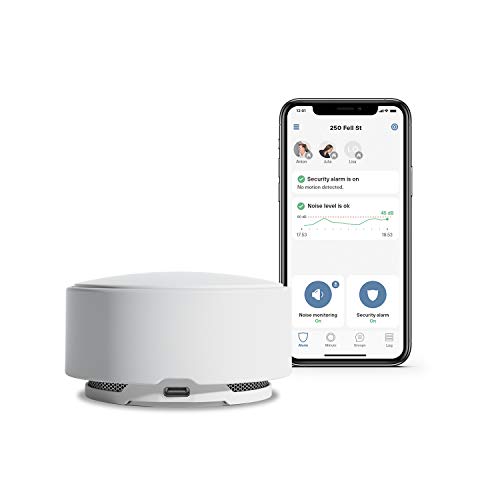
Minut Gen 2 — Best Interior Guardian (Not a Camera)
The Minut Gen 2 has no lens, records no video and stores no conversations, and those absences are precisely why it may be the most important device in this guide. It is a sensor — a small, ceiling- or wall-mounted unit that measures noise levels, infers occupancy from motion and environmental patterns, and tracks temperature and humidity — reporting to the host’s phone when the property’s interior story needs attention. A gathering crossing from dinner party to street-disturbing event registers as a rising noise curve, and the host learns of it as data, in time to send the polite message that prevents the neighbour’s complaint, the police visit and the platform strike. No guest is filmed. No conversation is captured. The interior is protected by a device that cannot betray it.
This is the compliant answer to the question hosts are actually asking when they reach for an indoor camera. They rarely want pictures of their guests; they want warning — of the party, the crowd beyond the booking, the window left open with the heating roaring, the pipe-freezing cold snap in an empty week. Minut’s environmental senses address the whole list. Occupancy estimation flags the eight-person booking that arrived as fourteen. Temperature and humidity trends warn of the damp, the freeze and the sauna impersonation before they become damage claims. The listing states that a subscription is not included for its fuller services, and hosts should price that honestly; the hardware is the beginning of the arrangement, not the whole of it.
Disclosure still applies — the sensor belongs in the listing, described accurately as a noise and occupancy monitor that does not record audio or video, and most guests, reading that sentence, are reassured rather than alarmed, because it tells them the host has chosen the privacy-respecting instrument on purpose. Place it in the main living space, where gatherings gather, and let it do the interior watching that no camera at a rental may lawfully do. In a guide full of lenses, the lens-less pick is the one that understands the assignment best.
- Type: sensor — NOT a camera
- Measures: noise level, occupancy, motion, temperature
- Records: no images, no conversations
- Alerts: noise events and occupancy anomalies to the host’s phone
- Note: subscription not included for full services, per listing
Strengths
- Watches the interior lawfully, because it cannot film or eavesdrop
- Noise warning arrives in time for a polite message, not a police call
- Temperature and humidity senses double as property protection
Trade-offs
- It cannot show you anything — evidence is numerical, not visual
- Fuller services require the subscription the listing excludes
- Occupancy is inference from patterns, not a headcount
Best for: hosts who need interior awareness without interior surveillance.
Not suited for: anyone wanting visual evidence — which, indoors at a rental, no one may lawfully gather.

Blink Outdoor 4 (Add-On) — Best for a Second Building
Rental properties sprawl in ways homes do not: the annexe across the yard, the garage converted to a games room, the back gate that opens on the lane, the bin store whose misuse generates the neighbour correspondence. Once a Blink hub already serves the main house — the system pick above — this add-on camera is how a host extends disclosed exterior coverage to those outposts without buying a second system. It is the same Outdoor 4: 1080p event clips, infrared nights, two-way talk, and the long battery discipline that lets a camera live on a garage wall through a season of changeovers, visited only when the maintenance round comes due.
The listing’s honesty deserves repeating in a hosting context, because hosts buy in a hurry between bookings: the Sync Module is required and not included. A host with the system already installed reads that as a bargain; a host without one reads it as a warning label, and both readings are correct. Assuming the hub exists, the add-on’s economics are the best in this guide — one more disclosed eye, on the building where the bikes live or the gate the deliveries actually use, for the price of a modest dinner.
Placement discipline matters more, not less, as coverage grows. Each added camera is another line in the listing’s disclosure and another view a guest will notice on arrival; keep every lens on arrival routes, parking, gates and the property’s own outbuildings, and keep them off neighbouring gardens and any window line. The annexe door is a legitimate subject. The annexe’s interior is not, and the difference between those two sentences is the difference between a protected listing and a terminated one.
- Video: 1080p HD, infrared night view
- Power: battery — up to two years under light use
- Included: camera only — Sync Module required, not included
- Placement: exterior outbuildings, annexe doors, back gates
- Disclosure: add its location to the listing text
Strengths
- Extends a Blink-equipped rental to annexes and gates at add-on cost
- Battery discipline suits buildings visited only on maintenance rounds
- Same app and access controls the host already manages
Trade-offs
- Dead weight without the hub — the requirement is absolute
- Each added lens is another disclosure line to keep accurate
- 1080p event clips, with the same limits as the system camera
Best for: Blink-equipped hosts covering a second building or a back gate.
Not suited for: first-time Blink buyers, or any interior or window-facing aim.

WYZE Cam v4 — Best Exterior Detail
Some rental exteriors justify a sharper eye than 1080p: the long rural drive where a number plate is the whole question, the parking court shared between properties, the equipment yard behind a farmhouse rental. Where outdoor power exists — a porch socket, a garage feed — the Wyze Cam v4 is this guide’s detail pick, with a condition stated as plainly as its virtues: exterior mounting only. Its 2.5K resolution and colour night vision produce the most descriptive footage in this guide, and colour at night is a host’s friend, because “a dark car” describes half the vehicles in the county while “a red car, just after midnight” describes one.
The colour point deserves its sentence of emphasis. When a host reviews an incident — a damaged gate, a visitor who should not have been there, a delivery dispute with photographic stakes — monochrome infrared footage so often identifies a category where colour identifies an individual. The v4’s mains power funds that clarity continuously: no battery rationing, no sleep discipline, a camera that watches the drive with the same appetite at 4 a.m. as at noon. Its two-way audio, used from the host’s phone, handles the lost guest and the early cleaner without a site visit.
The constraints are twofold and both are manageable with honesty. Power tethers it: no socket, no v4, and an extension lead across a guest’s garden is not a strategy. And its network is 2.4GHz only, which at a rural property with the router indoors and the camera at the gate demands the signal test this guide recommends for every exterior mount. Observe the exterior-only rule, disclose it like every other device here, aim it at the drive and not through a window, and the v4 gives a rental the clearest exterior witness in this company.
- Resolution: 2.5K
- Power: mains — requires an outdoor-accessible socket
- Night: colour night vision
- Network: 2.4GHz Wi-Fi only
- Placement: EXTERIOR only — drive, parking court, equipment yard
Strengths
- Colour night footage identifies vehicles and clothing, not just shapes
- 2.5K detail reads plates at driveway distances its rivals blur
- Mains power means no battery rationing on a busy drive
Trade-offs
- Absolutely exterior-only in this context — never an interior rental camera
- Needs power at the post, which many gates and drives lack
- 2.4GHz only, so rural signal at the mount must be proven first
Best for: powered exterior posts where identification detail is the priority.
Not suited for: unpowered gates, or any placement inside the property.
NoiseAware — Best Managed Service
NoiseAware completes this guide’s sensor story at portfolio scale. It is a noise-monitoring service built specifically for short-term rentals — sensors in the property, alerts routed to the host or manager, and guest messaging workflows designed to resolve a rising party with a text rather than a confrontation. We list it without a link because it is a service arrangement rather than a boxed product with a verifiable listing in our pool, and because its natural buyer is different: the manager with ten, thirty, a hundred properties, for whom Minut-style devices property-by-property become an operations problem that a managed platform exists to solve.
The philosophy is identical to the Minut’s, and it is worth stating why the philosophy matters commercially as well as ethically. Noise is the number-one source of neighbour complaints, municipal fines and platform penalties in short-term letting, and it is measurable without surveillance. A service that watches decibel curves across a portfolio, learns each property’s normal rhythm and escalates only the genuine events effectively sells the host the one thing cameras indoors promised and could never lawfully deliver: early warning. Managers also value the record — a timestamped noise history is a powerful document when a fine is disputed or a damage claim meets a “we were quiet all weekend” defence.
For the single-property host, the honest advice is that the Minut pick above covers the same ground with less machinery. NoiseAware earns its prose place here for the reader this guide also serves — the accidental landlord becoming a small operator — as the signpost for when a property collection has outgrown individual devices. Either way, the principle the two sensor picks embody is the principle of this entire guide: measure the problem, never film the guest.
- Type: noise-monitoring SERVICE — not a camera
- Measures: noise levels, with alert and messaging workflows
- Audience: hosts and managers with multiple properties
- Records: sound levels as data — no images, no conversations
- Link status: prose-only, service rather than boxed product
Strengths
- Portfolio-scale noise management with escalation built in
- Timestamped noise history defends hosts in fine and claim disputes
- Same privacy-respecting principle as the Minut, professionally managed
Trade-offs
- A service contract, not a one-off purchase — ongoing cost by design
- Oversized for a single cottage with occasional weekends
- No visual evidence, deliberately — that absence is the product
Best for: managers and multi-property hosts formalising their noise defence.
Not suited for: single-property hosts, whom the Minut serves more simply.
How Do the Six Compare Side by Side?
| Pick | What it is | Where it may watch | What it records | Host’s job |
|---|---|---|---|---|
| Blink Outdoor 4 (System) | Battery camera system | Drive, gate, garden | 1080p event clips | Disclose locations in listing |
| Ring Battery Doorbell | Doorbell camera | The front doorstep | 2K video, two-way talk | Disclose; aim at doorstep only |
| Minut Gen 2 | Sensor — not a camera | Main living space | Noise, occupancy, temperature data | Describe accurately in listing |
| Blink Outdoor 4 (Add-On) | Expansion camera | Annexe, garage, back gate | 1080p event clips | Hub required; update disclosure |
| WYZE Cam v4 | Mains exterior camera | Drive and parking, outdoors | 2.5K, colour night video | Exterior only; disclose; prove signal |
| NoiseAware | Monitoring service | Interior living spaces | Noise-level data and alerts | Contract; describe in listing |
Read the third column first — it is the compliance column, and it is the only one that can end a hosting business. Every device here has a lawful, useful territory, and every territory has a fence. The fourth column carries the guide’s second lesson: the two interior rows record data rather than images, and that is not a limitation to apologise for but the entire design. A host whose table reads this way — eyes outside, numbers inside, everything disclosed — has understood the modern rental business better than most of its critics.
How Should a Host Word the Disclosure?
The listing disclosure should do three things in plain sight: name the devices, locate them, and state what they do not do. A model passage, in the spirit if not the letter of what platforms expect, reads like ordinary hospitality rather than legal armour: the property has two outdoor cameras covering the driveway and front door for security, disclosed for guests’ awareness; there are no cameras inside the home; a noise monitor in the living room measures sound levels only and does not record audio or video. A guest reading that knows exactly where they stand, a platform reviewer reading it sees a host inside the rules, and a neighbour reading it — neighbours do read listings — sees a property being run by an adult.
Placement of the words matters as much as their content. The disclosure belongs in the listing itself, visible before booking, not debuted in a post-booking message or a printed manual on the kitchen table; a guest who learns of a camera on arrival has been ambushed, whatever the manual says, and ambush is the emotion that generates reports, refunds and reviews. Repeat the essentials in the pre-arrival message as a courtesy, photograph your own cameras’ views at setup to prove their aim, and keep those screenshots: if a complaint ever alleges a lens pointed somewhere it should not be, the host who can produce the camera’s actual view, dated, wins the argument in one attachment.
Finally, brief the humans. Cleaners, co-hosts and maintenance contractors should know what the devices are, what they must never do — move a camera, add a camera, angle one through a window — and whom to call when a guest asks about them. Most compliance failures in real hosting businesses are not villainy; they are a well-meaning contractor “improving” coverage during a repair. The system you disclose must be the system that exists, and keeping those two identical is a management habit, not a purchase.
What Should a Host Do When the Alerts Say Trouble?
The sensor philosophy of this guide produces a distinctive kind of alert — a noise curve climbing at 11 p.m., an occupancy estimate double the booking — and the host’s response is where professionalism shows. The first move is almost always a message, written as if the innocent explanation is true, because it usually is: a quick note that the property’s noise monitor has flagged high sound levels, a reminder of the quiet hours and the neighbours, an offer of help if anything is needed. Most gatherings, reminded once by a host who is plainly awake and attentive, moderate themselves. The message also creates the record: if the night escalates anyway, the host’s reasonableness is documented in the same thread the platform will later read.
Escalation follows a ladder, and skipping rungs is how hosts turn a noisy Saturday into a personal feud. Message, then call, then — for genuine disturbances — the platform’s support and, where the law and safety require, local authorities; never a personal midnight appearance at the door, which risks the host’s safety and the listing’s standing simultaneously. The exterior cameras earn their keep in this sequence by corroborating: vehicles arriving in numbers, a gathering visibly spilling to the drive. What they must never be used for is equally clear — no reviewing footage of guests’ ordinary comings and goings for entertainment, no clips shared beyond a genuine dispute. The footage is a business record with a retention habit to match: kept for the dispute window, then allowed to expire.
What Mistakes Do Hosts Make With Rental Cameras?
The catastrophic mistake is the indoor camera, and it persists because hosts reason from their own homes, where a living-room camera is unremarkable. In a rental it is prohibited by the platform even when disclosed, and in a bedroom or bathroom it is the kind of violation that ends businesses and, in places, liberty. This guide repeats the point without apology because every year hosts lose everything over a device they believed was protecting them. The second mistake is the hidden device — the camera in the clock, the sensor not mentioned — which converts a lawful security setup into a deception, and deception is what guests, platforms and courts actually punish.
The quieter mistakes fill the middle ranks. Disclosing in the manual instead of the listing. Aiming a driveway camera so it frames the hot tub, because the mount was convenient. Letting a system drift — a camera added by a contractor, a doorbell angled during a repaint — until the property no longer matches its own disclosure. Running audio-hungry settings without checking local recording law. And the commercial mistake underneath them all: building a system so pervasive that guests feel managed rather than hosted, then watching the reviews explain, in the politest possible language, exactly why the five-star streak ended.
Who Else Has a Stake in Your Cameras? The Neighbours
Every short-term rental has an invisible third party to every booking: the people who live beside it all year. Neighbours cannot leave a review, but they hold powers reviewers lack — complaints to the council, evidence for a licensing hearing, and the daily goodwill on which a rental’s welcome in its street depends. A camera system designed with neighbours in mind looks different from one designed against them. Its lenses stay on the host’s own land. Its doorbell does not frame the neighbour’s front garden. Its noise sensor exists, in large part, to protect the neighbours’ sleep — and telling them so, in person, before the first season, converts the system from a source of suspicion into a shared asset.
That conversation is worth having properly. Explain what is installed, where it points, and what the noise monitor does; offer the household your number for the nights something goes wrong; and then honour the arrangement when the alert comes, because a host who responds to a sensor warning at 11 p.m. is a host the street will defend at a planning meeting. Several of the disputes that end rentals begin not with a party but with a neighbour who concluded, from silence, that nobody was in charge. The devices in this guide are, among their other functions, instruments for proving somebody is in charge — promptly, measurably and without ever filming a guest’s holiday.
There is a reciprocal benefit hosts rarely anticipate. Neighbours who trust the system become its informal allies: the text message that the gate stood open after the cleaners left, the observation that a car unknown to the booking has been at the house since Tuesday. No camera in this guide can buy that. It accrues, slowly, to hosts whose security arrangements visibly respect everyone they touch — guests in the listing, neighbours in the aiming, and the street in the response time.
What About Insurance, Evidence and Keeping Records Like a Professional?
Insurers and platforms share a taste: they believe documents. A host running the system in this guide generates three kinds of record, and each should be kept with the same dull regularity as the cleaning invoices. The listing disclosure, screenshotted with its date, proves the system was declared. The cameras’ own setup views, saved at installation and after any adjustment, prove where the lenses actually pointed. And the incident record — alert, message thread, outcome — proves the host acted reasonably when something went wrong. Together they form the file that turns a he-said-she-said dispute into a short administrative conversation.
Retention deserves a policy of its own, decided in advance rather than improvised per incident. Exterior footage kept for a short, fixed window — long enough to cover the dispute period after a stay, then deleted or allowed to overwrite — matches both privacy expectations and storage reality. Indefinite archives of guests’ arrivals are a liability wearing a filing cabinet’s clothes: they hold other people’s movements, they can be requested, leaked or misused, and they serve no hosting purpose after the window closes. The sensor data is lighter by nature, but the same discipline applies; keep the summaries that defend the business, let the rest age away.
Finally, tell your insurer what you have installed. Some policies reward monitored properties; some have conditions about security devices and their maintenance; all of them prefer a host whose security arrangements are documented to one whose are discovered mid-claim. The conversation takes ten minutes and occasionally reduces a premium. More often it simply ensures that the system you fitted to protect the property is itself recognised by the contract that protects the property — a small alignment, like every other alignment in this guide, between what exists, what is declared and what is true.
How Does the System Earn Its Keep Between Guests?
A rental’s cameras and sensors work hardest, paradoxically, when nobody is staying. Empty weeks are when pipes freeze, when a slow leak becomes a ceiling, when a storm tests the fence and when opportunist visitors test the doors of a visibly unoccupied house. The Minut’s temperature and humidity senses are the early-warning system for the first three: a property drifting toward freezing with the heating failed announces itself in the data days before the burst pipe would have announced it in person. The exterior cameras cover the rest, confirming after every storm that the roof, the gate and the garden furniture remain where the last photograph left them, and giving a distant host the particular peace of checking a house in a gale without asking a neighbour to brave it.
Turnover days are the system’s other shift. The cleaner’s arrival and departure, timestamped by the doorbell and the drive camera, anchor the day’s logistics without a single phone call: the host knows the property was entered, serviced and secured, and knows it in time to message the incoming guest with confidence. When a turnover goes wrong — a cleaner locked out, a contractor at the wrong house, a guest arriving two hours early to find the property mid-service — the same records untangle the sequence in minutes. Hosts describe this, once experienced, as the feature they would surrender last, ahead of any incident footage: not security as drama, but security as the quiet administration of a hundred small handovers a year, each one verified rather than assumed.
Final Recommendation
Build the compliant stack in this order. Fit the Ring doorbell first, because the doorstep is hosting’s front line and guests accept it as furniture. Add the Blink system for the drive, gate and garden, with the add-on camera when a second building joins the story. Place a Minut in the living space and describe it proudly in the listing as what it is — the monitor that protects the neighbours without filming anyone — and graduate to NoiseAware when the portfolio outgrows individual devices. Reserve the Wyze v4 for the powered exterior post where identification detail genuinely matters.
Do all of that in the open, in the listing, in plain words, and a camera system becomes what it should be at a rental: not a secret the guests might discover, but a feature the right guests are glad to read about — because the host who discloses everything is, by that single habit, advertising the care the whole property is run with. The properties that thrive under modern platform rules are not the ones with the fewest devices or the most; they are the ones where every device can be pointed at, named and explained without anyone in the room feeling their stomach drop. Build that system, write it down where guests book, and then get on with the actual business of hosting — the cameras, properly placed and honestly declared, will quietly take care of themselves.
Frequently Asked Questions
Can I put a camera in the living room of my rental if I disclose it?
Under Airbnb’s current policy, no — indoor cameras are prohibited in the property regardless of disclosure. The compliant way to watch the living space’s story is a sensor like the Minut in this guide, which reports noise and occupancy without recording images or conversations. Hosts on other platforms should check those platforms’ rules and local law, but the direction of travel across the industry is the same.
What exactly counts as a hidden camera?
Any recording device a guest would not reasonably notice or recognise as a camera — devices disguised as clocks, chargers, smoke detectors or decor, and undisclosed devices of any kind. The test is the guest’s reasonable perception, not the host’s intention. Every camera at a rental should be visible, recognisable and declared in the listing before booking.
Are doorbell cameras allowed at short-term rentals?
Generally yes, when disclosed and aimed at the doorstep and arrival area, which is why the Ring doorbell anchors this guide. Keep its view on your own threshold and path, avoid angling it into windows or across neighbours’ private space, name it in the listing like every other device, and check local rules on audio recording, which can be stricter than the rules for video.
How does a noise sensor help if it cannot record anything?
Because noise is a measurement, not a moment. A rising sound-level curve at night is actionable intelligence: it triggers the polite message that resolves most gatherings before neighbours or authorities are involved, and the timestamped history supports the host in any later dispute about fines or damage. What the sensor withholds — images and conversations — is precisely what makes it lawful and guest-acceptable indoors.
Can exterior cameras look at a pool or hot tub area?
With great care and usually not directly. Platform rules prohibit monitoring areas where privacy is expected, expressly including spaces like enclosed outdoor showers and saunas, and a camera framing guests in swimwear invites complaints even where the letter of a rule is arguable. Cover the approach, the gate and the cover-storage area if you must verify the tub was secured — and accept that the water itself is the guests’ private territory during their stay.
What should I do if a guest covers or unplugs a camera?
Treat it as communication before treating it as damage. Guests sometimes cover a disclosed camera they had not noticed in the listing, which is feedback about your disclosure’s prominence as much as about their conduct. Message politely, restate where the exterior cameras are and why, and log the exchange. Repeated interference alongside other warning signs belongs in the platform’s hands — not in a confrontation, and never as a reason to add a less visible device, which would convert their breach into yours.
Do I need to tell guests about a noise sensor if it records nothing?
Yes — disclose it, accurately and proudly. Platforms expect monitoring devices to be declared, and the sensor’s innocence is a selling point only when guests hear it from you first: it measures sound levels, it does not record audio, it exists to protect the neighbours and the booking. A guest who discovers any device unannounced will assume the worst about all of them; a guest told everything assumes, correctly, a careful host.
Can I check my exterior cameras live while guests are staying?
Technically yes; wisely, sparingly. Reviewing footage around arrivals, alerts and incidents is legitimate management. Habitually watching guests use the garden is surveillance of a holiday you sold them, corrosive to trust and difficult to defend if described in a review or a complaint. Set the household rule in advance — alerts and events, not entertainment — and let the system’s existence, rather than your attention, do the deterring.
Related Guides
Continue with our guides to the best affordable wireless home security cameras, the best affordable wifi security cameras and noise monitoring for short-term rentals.
Related guides
- Best 1080p IP Cameras: PoE Domes, Turrets, Bullets and a PTZ That Earn Their Cable
- Best TVs for Viewing Sports: Motion, Daylight Brightness and Broadcast Upscaling
- Best AC Powered Wireless Security Cameras: Wi-Fi Data, Mains Power, Zero Sleep
- Best 400 FPS High Speed Cameras: The Honest Truth About Burst Slow Motion


