What's inside
- Key Takeaways
- Quick Picks
- What did we weigh when ranking these systems?
- Should you choose wired or wireless 4K security?
- How do the six systems compare at a glance?
- What does “no subscription” actually save you?
- How do you place wireless cameras so they actually work?
- What mistakes do people make when buying a 4K security system?
- How do the different detection methods change daily life?
- How should you test a new system during its first week?
- How much footage history should you plan for?
- What about cameras indoors and the people who live with them?
- Which specification numbers can you safely ignore?
- How do these systems handle the weather, really?
- What does a realistic budget for a whole property look like?
- How do you keep footage admissible and useful if the worst happens?
- What if your property has outbuildings or a long garden?
- How should renters and flat-dwellers read this list?
- Final Recommendation
- Frequently Asked Questions
- Related Guides
As an Amazon Associate I earn from qualifying purchases. This post may contain affiliate links at no extra cost to you.
gizmoverdict.com is reader-supported. When you buy through links on our site, we may earn an affiliate commission.
Where to buy: all six systems below are available on Amazon; follow any camera name to its listing to confirm what is in the box, since kit contents and drive sizes vary between configurations of the same model.
The search for the best 4k security cameras lands most buyers at a fork they did not expect. Down one path sit wired kits: a recorder in a cupboard, cameras fed by cable, footage stored on a drive in your own house. Down the other sit wireless systems that mount with two screws, sip power from a small solar panel, and ask almost nothing of you on installation day. Both paths now advertise 4K, and both contain genuinely good products — but they fail in opposite ways, and the right choice depends on which failure you would rather never meet. This guide ranks three wired kits and three wireless systems together, and it is blunt about the two picks whose cameras do not actually record in 4K, because that detail changes what their footage can do.
Headlining the wired side are Reolink’s sixteen-channel bullet kit and an ANNKE system that ships twelve turret cameras in the box — more cameras than most houses have corners. The wireless side is led by aosu’s solar four-camera kit with local storage, followed by a Hiseeu wireless system built around a touchscreen monitor, and the Blink Outdoor 4, which is not a 4K camera at all: it records 1080p and trades resolution for a two-year battery life, a bargain some households will rationally take. A Hiseeu wired kit with a 4K recorder but 3MP cameras rounds out the six, and its honest place here is as the budget route to continuous recording.
Read the rankings with your own property in mind. Renters and anyone forbidden to drill cable runs should start at the wireless picks; owners of larger homes, shops or yards with outbuildings will usually end at the wired kits, because continuous recording and unlimited camera positions are worth one weekend with a drill. Either way, by the final section you will know exactly what each system records, where it stores the footage, and what it asks of you each month — in money, in charging, or in nothing at all.
One more framing note before the rankings themselves. “System” means something different in each camp: for the wired kits it is cameras plus a recorder that stores everything centrally, while for the wireless picks it is cameras plus a base, a screen or an app account that gathers clips. When a section below praises a pick’s storage or criticises its ceiling, it is that architecture being judged — the cameras are only ever half of what you are buying.
Key Takeaways
- Wired kits record continuously to a local drive; wireless kits record motion clips and must manage power — that difference shapes everything else.
- The ANNKE system ships twelve 8MP turrets, the most camera coverage in one box in this roundup.
- aosu’s D1 Max kit is the wireless standout: true 4K cameras, solar charging and local storage with no subscription required.
- Blink Outdoor 4 records 1080p, not 4K — it trades pixels for a two-year battery, which suits low-traffic spots.
- The budget Hiseeu wired kit pairs a 4K-capable recorder with 3MP plug-in cameras; know that before comparing its price to true 4K kits.
- No-subscription local storage appears on five of these six picks; only Blink leans on an optional cloud plan for its best features.
Quick Picks
| Pick | Badge | Why it earns its place |
|---|---|---|
| REOLINK RLK16-800B8 4K Bullet System | Best wired all-rounder | Eight 8MP bullet cameras on a 16-channel recorder with 4TB fitted, plus person and vehicle detection across every channel. |
| aosu D1 Max 4-Cam Solar Kit | Best wireless 4K | Four genuine 4K cameras kept alive by solar panels, recording to local storage that expands to 1TB, with nothing to pay monthly. |
| Blink Outdoor 4 | Longest battery life | Two years on a set of lithium AAs and dead-simple setup — at 1080p, a deliberate swap of detail for endurance. |
| ANNKE 4K PoE 16-Channel System | Most cameras included | Twelve 8MP turret cameras, smart dual-light night imaging and a 4TB drive, for big properties that need every angle covered. |
| Hiseeu 24/7 Recording System (4K NVR) | Cheapest continuous recording | A 4K recorder with four plug-in 3MP cameras that record around the clock with no subscription — modest detail, tireless coverage. |
| Hiseeu 4MP Solar Camera with Touchscreen | Best screen-included wireless | Dual lenses, auto-tracking and a 10-inch touchscreen base you can watch without a phone, on dual-band Wi-Fi. |
What did we weigh when ranking these systems?
First, what the cameras truly record. Marketing language blurs the line between a recorder that supports 4K and cameras that capture it, so we separated the six into honest classes: four picks whose cameras genuinely shoot 4K or 4MP-class detail, one 1080p camera bought for its battery, and one kit whose 3MP cameras feed a 4K-capable recorder. You will find that classification stated plainly in each review rather than buried, because a buyer comparing prices deserves to know when a lower price is buying fewer pixels.
Second, what recording costs you over time. A system that needs a cloud subscription to store clips or unlock person detection carries a monthly rent forever; every pick here except Blink stores footage locally with no required subscription, and we scored that freedom highly. Third, the daily burden: wired kits ask for installation effort once and nothing afterwards, while battery and solar cameras ask for a little attention forever — panels kept out of shade, the occasional battery swap on the Blink. Neither burden is disqualifying; they simply suit different households.
Night performance and detection quality completed the scoring. Dual-light cameras that can record colour with a gentle spotlight, infrared that reaches the end of a real driveway, and detection that labels a person rather than “motion” all moved picks up the order. Raw camera count, by contrast, moved nothing by itself: twelve cameras aimed badly protect a house worse than four aimed well.
Should you choose wired or wireless 4K security?
Choose wired when the building is yours, the camera positions are reachable with cable, and the footage genuinely matters — a business, a home with outbuildings, a property that stands empty for weeks. Continuous recording is the wired system’s quiet superpower: it captures the thirty seconds before motion triggers, the licence plate that never triggered anything, the whole event rather than a clip that starts mid-way. PoE wiring also makes camera count cheap to grow, which is why the two big kits here offer sixteen channels.
Choose wireless when drilling is banned, positions are awkward, or speed matters more than completeness. A solar camera above a front door is protecting the house this afternoon; a wired kit still in its box protects nothing. Wireless systems have also closed much of the quality gap — the aosu kit records true 4K to local storage — but they remain motion-clip recorders with power budgets, and a camera watching a busy street can spend its battery or solar income on false triggers. The honest summary: wired for permanence and evidence, wireless for practicality and pace, and no shame in mixing both on one property.
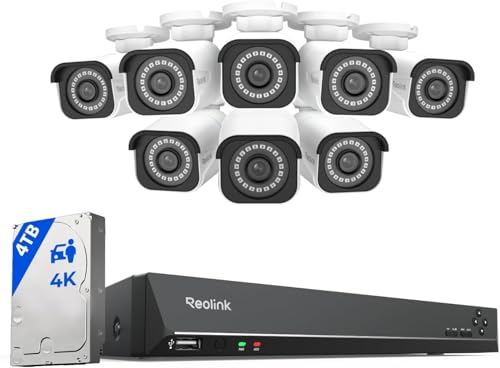
REOLINK RLK16-800B8 4K Bullet System — Best wired all-rounder
If the IP-camera guide’s dome kit is Reolink’s tidy option, this bullet-based sibling is the workhorse. Eight 8MP bullet cameras pair with the same style of 16-channel recorder and a pre-fitted 4TB drive, and the system records continuously with person and vehicle detection filtering the timeline. Bullets make their aiming obvious — which cuts both ways, since a visible camera pointing down a driveway deters in a way a discreet dome does not, and their longer bodies typically carry infrared arrays that reach further into a yard than compact domes manage.
Installation follows the PoE pattern: one Ethernet cable per camera carries power and video back to the recorder, the recorder discovers the cameras, and the phone app connects by scanning a code rather than by router gymnastics. Eight cameras in the box against sixteen channels is the right ratio for a house — front, back, both sides, driveway, garage and garden consume six to eight positions immediately, and the spare channels mean a later turret over the bins does not start a recorder replacement conversation.
Where this kit earns its top billing is the absence of asterisks. The cameras really are 4K, the drive really is fitted, the detection really is on every channel, and there is no subscription line item waiting in month two. Its footage — zoomable, continuous, stored at home — is the benchmark the wireless picks below are judged against, and most of them are judged to be compromises in one direction or another. This is the compromise-free option, priced in installation effort instead of money or pixels.
- Format: 8-camera PoE kit, 16-channel NVR
- Resolution: 8MP (4K) per bullet camera
- Storage: 4TB drive fitted inside the recorder
- Detection: smart person and vehicle alerts on every channel
- Recording: continuous, 24/7
Strengths
- Continuous 4K recording with smart filtering, no subscription attached.
- Bullet bodies project deterrence and reach further at night.
- Eight spare channels make later expansion painless.
Trade-offs
- Cabling eight positions is a full weekend for a first-timer.
- Obvious camera direction tells a watcher exactly what is covered.
- The recorder’s fan and drive want a ventilated, out-of-earshot home.
Best for: owner-occupiers who want evidence-grade footage of the whole property, permanently.
Not suited for: flats, rentals or any home where running cable is off the table.

aosu D1 Max 4-Cam Solar Kit — Best wireless 4K
The aosu D1 Max is the wireless kit that makes wired advocates pause. Its four cameras record genuine 4K, each carries a solar panel to keep its battery topped up, and footage lands on local storage in the home base — expandable up to 1TB — with no subscription required to record, review or keep your clips. That combination removes the three classic wireless objections in one product: the resolution is real, the power largely manages itself in decent light, and the footage lives at home rather than in a rented cloud.
Setup is the wireless ritual at its best: mount each camera with a couple of screws, place the panel where the sun actually falls, pair everything to the base, and check the live view from the exact spots your household will stand. Four cameras suit the standard perimeter — door, drive, back garden, side gate — and solar sizing matters more than any other decision: a panel on a north-facing wall in winter may harvest too little to cover a busy camera’s appetite, so the kit rewards honest placement over convenient placement.
Keep expectations calibrated on recording style. Like all battery-class systems, these cameras wake on motion and record clips rather than an unbroken stream, so the footage tells the story of events rather than of entire afternoons. For most homes that is the right trade — the clip of the courier, the clip of the stranger testing the gate — and the absence of cables, drilling through walls and monthly fees makes it a trade thousands of households will take happily.
- Format: 4-camera wireless kit with home base
- Resolution: 4K per camera
- Power: battery with solar panel charging
- Storage: local, expandable to 1TB
- Subscription: not required
Strengths
- True 4K detail without a single cable run.
- Solar topping-up ends the battery-swap routine in sunny placements.
- Local storage keeps footage and costs under your control.
Trade-offs
- Motion clips only — no continuous recording of quiet periods.
- Shaded panel positions can under-charge through winter.
- Four cameras is a ceiling many larger properties will outgrow.
Best for: homeowners who want real 4K and no cables or monthly fees, on a standard-sized plot.
Not suited for: a business that needs unbroken 24/7 footage for liability or insurance purposes.

Blink Outdoor 4 — Longest battery life
Time for the guide’s most important honesty note: the Blink Outdoor 4 is not a 4K camera. It records 1080p HD, and it appears in a 4K roundup because it embodies the opposite end of a trade every buyer is making whether they know it or not — resolution against endurance. Blink spends its power budget on lasting up to two years on a set of lithium AA batteries, waking for motion, recording a clip, and going back to sleep. Mounted over a quiet side gate or a holiday home’s porch, that means the camera is simply always there, year after year, asking for nothing.
What does 1080p cost you in practice? At conversational distances — a doorstep, a porch, a path two metres from the lens — faces remain recognisable and the footage answers the questions those positions ask: who came, when, and what did they carry. What it will not do is survive a deep crop from across a yard, and nobody should buy it to watch a long driveway. Blink’s app and optional cloud plan handle clips and person-detection extras; the camera also works with Alexa displays for a quick live look-in, which suits its role as the household’s low-effort sentinel.
Judge it as a specialist. Paired with a true 4K system covering the main approaches, one or two Outdoor 4s watching the far shed, the boat, the rarely used rear gate add coverage exactly where running cable or charging batteries is most annoying. Bought as your only camera for a busy front door, its modest resolution and clip-based recording will eventually leave a question unanswered — and that, not the spec sheet, is the real reason it ranks third rather than first.
- Format: single wireless camera (Sync Module system)
- Resolution: 1080p HD — not 4K
- Battery life: up to two years on lithium AAs
- Night view: infrared
- Extras: two-way talk, Alexa live view
Strengths
- Two-year battery life is in a class of its own here.
- Setup takes minutes and needs no wiring of any kind.
- Perfectly adequate detail at doorstep distances.
Trade-offs
- 1080p footage cannot be cropped or zoomed with confidence.
- Best features lean on the optional subscription plan.
- Clip recording sleeps through quiet context around an event.
Best for: remote, low-traffic positions — sheds, side gates, second homes — where visits to recharge are the real cost.
Not suited for: serving as the sole camera over a busy main entrance or driveway.
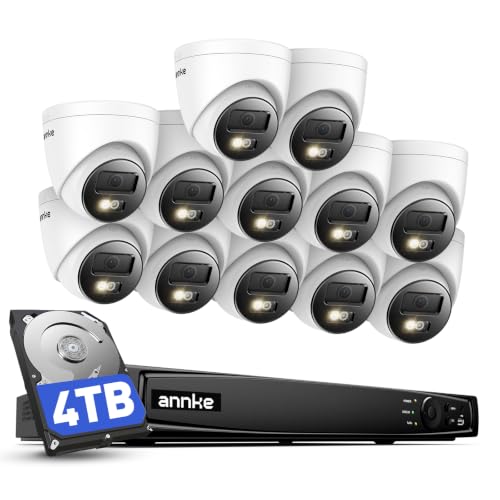
ANNKE 4K PoE 16-Channel System — Most cameras included
Twelve cameras changes the planning conversation. Most kits make you ration positions; the ANNKE box lets you cover the rationed list and then keep going — the workshop, the second gate, the alley behind the bins, the approach to the outbuilding — until a property genuinely runs out of angles. The cameras are 8MP turrets recording to a 16-channel PoE recorder with a 4TB drive, and their smart dual-light design can switch on a visible spotlight at night, recording colour footage of whoever triggered it while announcing, unmistakably, that they have been seen.
Turrets are the pragmatic housing for a big install: they aim by hand in any direction, present no dome bubble to fog, and sit more discreetly than bullets while resisting casual interference better than exposed designs. ANNKE’s AI motion detection works to separate meaningful movement from weather and wildlife, which matters at twelve-camera scale — a system that generates forty false clips a day across a dozen channels trains its owner to ignore it, whatever its resolution.
Be realistic about the undertaking. Twelve cable runs, twelve mountings, twelve views to aim and zone is a substantial project, closer to a small commercial install than a Saturday chore, and the recorder has only four channels of headroom beyond the box. For a large rural property, a small business or a multi-building site, that effort buys the most complete coverage in this guide. For a three-bedroom semi, it buys six cameras that will watch fences nobody crosses.
- Format: 12-camera PoE kit, 16-channel NVR
- Resolution: 8MP (4K) per turret
- Storage: 4TB hard drive included
- Night mode: smart dual light with colour option
- Detection: AI motion with human/vehicle focus
Strengths
- Twelve true-4K cameras cover big properties in one purchase.
- Spotlight colour recording doubles as a visible deterrent.
- Turret housings aim easily and shrug off weather.
Trade-offs
- Installation scale is closer to commercial than domestic.
- Only four spare channels beyond the included cameras.
- Small homes will simply never use half the kit.
Best for: large properties, farms and small businesses that can name twelve positions worth watching.
Not suited for: compact homes, where the Reolink eight-camera kit already overshoots the need.
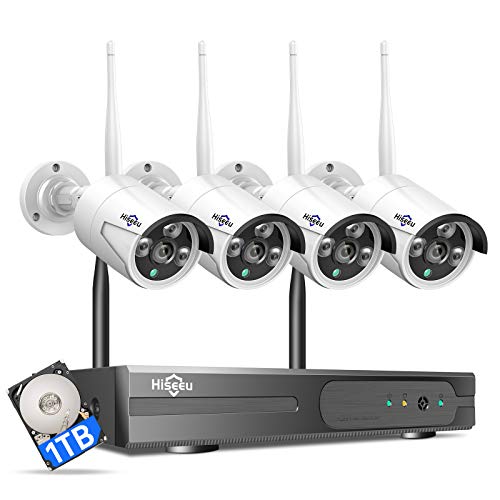
Hiseeu 24/7 Recording System — Cheapest continuous recording
Here is the second honesty note of the guide, and it matters for price comparisons: this Hiseeu system’s recorder supports 4K, but the four cameras in the box record at 3MP. The listing’s headline describes the platform’s ceiling, not the cameras’ output. We include the kit anyway — knowingly, and with the caveat stated up front — because it offers something the wireless picks cannot at anything like its price: continuous, around-the-clock recording with no subscription, from cameras that plug into mains power rather than sipping from batteries.
That combination suits a particular buyer well. A small shop, a rental property’s exterior, a workshop yard: places where the question after an incident is usually “what happened between these times” rather than “read that plate”. Continuous 3MP footage answers the first kind of question completely — nothing sleeps, nothing is missed between clips — while the plug-in power model removes battery anxiety and the recorder keeps everything local. The cameras being corded rather than PoE also simplifies cabling for short runs near sockets, though outdoor power routing needs the same weatherproofing care as any mains work.
Its limits are the mirror image of its strengths. Fine detail at distance is not available, faces across a wide yard will not resolve, and the system will not grow into a true 4K one without replacing the cameras — though the 4K-capable recorder at least means replacement cameras have somewhere capable to land. Buy it as honest, tireless, modest-resolution coverage and it delivers; buy it believing the headline and you will feel misled, which is precisely why this guide insists on the distinction.
- Format: 4-camera wired kit with NVR
- Camera resolution: 3MP (recorder supports up to 4K)
- Power: plug-in mains per camera
- Recording: continuous 24/7
- Subscription: not required
Strengths
- Continuous recording at a price wireless kits cannot match.
- No batteries to manage and no monthly fees to pay.
- Recorder headroom leaves a path to sharper cameras later.
Trade-offs
- 3MP cameras cannot identify faces or plates at distance.
- Each camera needs a reachable power outlet.
- Detail ceiling is fixed until cameras are replaced.
Best for: shops and yards that need unbroken recording on a tight budget, watched from modest distances.
Not suited for: anyone whose main requirement is identifying strangers across a large open area.

Hiseeu 4MP Solar Security Camera — Best screen-included wireless
Most wireless cameras assume a smartphone is the screen. This Hiseeu system ships its own: a 10-inch touchscreen base station that sits in a kitchen or hallway and shows the cameras without anyone unlocking a phone — a design that lands surprisingly well in households with older residents, staff areas in small businesses, or anyone tired of app-hunting while a courier waits at the door. The camera itself is a 4MP solar-powered unit with dual lenses and auto-tracking, following a moving subject across its view rather than letting them walk out of frame.
Dual-band Wi-Fi (both 2.4 and 5GHz) gives the system flexibility in crowded wireless environments, and solar charging keeps the battery fed in a decent position. Auto-tracking deserves a balanced word: it genuinely helps on a wide driveway where a fixed frame loses subjects, and it can also chase a neighbour’s cat across the garden with great enthusiasm — sensitivity and zone settings exist precisely to civilise it, and ten minutes of tuning on day one decides which experience you get.
As with the Blink, calibrate the resolution expectation: 4MP sits between 1080p and 4K, giving comfortable detail at door-and-driveway distances without the storage appetite of full 4K. For the household this system targets — wanting visible, simple, screen-on-the-counter security without cables or subscriptions — that middle resolution is a reasonable engineering choice rather than a shortfall, and the included monitor is a feature none of the other five picks offers at all.
- Format: wireless camera with 10-inch touchscreen base
- Resolution: 4MP
- Power: battery with solar charging
- Features: dual lens, auto-tracking
- Wi-Fi: dual-band 2.4 and 5GHz
Strengths
- Dedicated touchscreen removes the phone from everyday viewing.
- Auto-tracking keeps moving subjects in frame on wide views.
- Solar power and dual-band Wi-Fi ease placement.
Trade-offs
- 4MP detail sits a step below the true 4K picks.
- Tracking needs tuning to avoid following animals.
- The base screen anchors viewing to one room of the house.
Best for: households wanting glanceable, phone-free monitoring — especially with older family members at home.
Not suited for: viewers who mainly check cameras remotely from outside the house.
How do the six systems compare at a glance?
| System | Cameras | True resolution | Recording style | Power |
|---|---|---|---|---|
| Reolink RLK16-800B8 | 8 bullets | 4K | Continuous | PoE cable |
| aosu D1 Max | 4 wireless | 4K | Motion clips | Solar + battery |
| Blink Outdoor 4 | 1 wireless | 1080p | Motion clips | AA batteries, 2 years |
| ANNKE 16CH | 12 turrets | 4K | Continuous | PoE cable |
| Hiseeu 24/7 kit | 4 plug-in | 3MP | Continuous | Mains plug |
| Hiseeu Solar + screen | 1 wireless | 4MP | Motion clips | Solar + battery |
The pattern to notice is that recording style divides the table more sharply than resolution does. Continuous systems catch everything and demand installation; clip systems install in minutes and trust their motion detection to catch what matters. Pick your row by that column first, then by resolution, and the shortlist usually narrows itself to one.
What does “no subscription” actually save you?
Subscription creep is the hidden price of modern security cameras. A modest monthly cloud plan looks trivial beside a kit’s purchase price, but across a five-year life it can rival the cost of the cameras themselves — and the day you stop paying, some systems stop offering the person detection or clip history you bought them for. Five of these six picks store footage locally and ask for nothing monthly: both wired kits and the budget Hiseeu record to drives in the building, the aosu kit records to its expandable base storage, and the Hiseeu touchscreen system keeps clips at home too.
Blink is the exception that proves the value of reading this section. The Outdoor 4 works without a plan, but its richer features — extended clip storage, person detection refinements — live behind Blink’s subscription, so its true cost of ownership includes either the plan or a deliberate acceptance of the free tier’s limits. Neither answer is wrong; the mistake is discovering it after installation. When you compare any camera’s price, compare the five-year cost: hardware plus the plans you will actually keep paying for, because a “cheaper” camera with a mandatory-feeling subscription often ends the period as the expensive one.
Local storage carries one responsibility in exchange: the drive is in your house, so back up any clip that matters — both wired recorders here let you export footage to USB or over the network — and remember that a stolen recorder takes its history with it. Owners who care about that scenario either hide the recorder well or let one cloud-backed camera, such as the Blink, watch the recorder’s own room as a tripwire.
How do you place wireless cameras so they actually work?
Wireless placement has three variables wired cameras never think about: signal, sun and trigger geometry. Signal first — walk to each proposed position with your phone on the home Wi-Fi and check the connection honestly, remembering the camera’s radio is smaller than the phone’s; a position that shows one bar on a phone is a dropout waiting to happen, and a base station or sync module placed centrally beats one tucked behind the television. If a far position matters — the barn, the bottom gate — test there before drilling anything.
Sun decides whether a solar camera is fit-and-forget or a monthly chore. Panels want direct light for a good part of the day; a panel under an eave’s shadow or on a wall that only catches evening sun will under-feed a busy camera through winter, when days are short and triggers are many. The aosu kit’s panels can sit apart from the cameras, so use that freedom: camera in the shade of the porch roof if the view demands it, panel a metre away in the light.
Trigger geometry is the subtle one. Passive infrared sensors notice movement across their field far more reliably than movement straight toward them, so angle a wireless camera so visitors cross its view — along a path, across a doorway — rather than walking head-on down its lens axis. That single adjustment does more for catching the first seconds of an event than any sensitivity slider, and it costs nothing but a ladder and five minutes.
What mistakes do people make when buying a 4K security system?
The expensive mistake is believing the headline resolution of a kit without asking which component it describes. As the budget Hiseeu shows, “4K system” can mean a 4K recorder fed by 3MP cameras; as the Blink shows, a camera can sit in 4K roundups on battery fame alone. Always ask: what resolution does each camera record, and what does the system store? Those two answers, plus the recording style, describe the product you are actually buying.
The second mistake is covering the photogenic angles instead of the useful ones. Cameras end up watching lawns and facades because those views look impressive on a monitor, while the side gate — the way an intruder actually arrives — goes unwatched. Walk your property as a stranger would, at night, and place cameras on that route first. The third mistake is neglecting the boring infrastructure: a recorder in a hot cupboard, a solar panel in permanent shade, a Wi-Fi camera at the edge of coverage. Systems rarely fail at the camera; they fail at the environment the camera was asked to live in.
Finally, buyers forget to rehearse retrieval. The day footage matters is a stressful day; learn the export process on a quiet afternoon — find a clip from last Tuesday, save it to a USB stick, play it on a computer — so the skill exists before it is needed. Both wired ecosystems here make export straightforward, but straightforward still deserves one practice run.
How do the different detection methods change daily life?
Three detection technologies appear across these six systems, and the differences decide how often your phone buzzes. The oldest, pixel-based motion detection, simply notices that part of the image changed. It is tireless and indiscriminate: rain, swaying branches, a spider crossing the lens and a person all look alike to it. Wired recorders can afford its false alarms because they record everything anyway and use detection mainly to mark the timeline — but even there, a timeline marked every four minutes is a timeline nobody reads.
Battery cameras lean on passive infrared sensors, which detect the heat signature of a moving body. PIR is far better at ignoring weather and foliage, and its frugality is what makes two-year battery life possible for the Blink — the sensor sips power while the camera sleeps. Its quirks are geometric: it notices movement across its field more readily than movement toward it, and very hot days, when body temperature approaches ambient, can dull its sensitivity. Placement, again, is the fix: angle the camera so people cross its view.
The third method, on-camera AI classification, is what the Reolink and ANNKE systems advertise as person and vehicle detection. The camera analyses the shape of what moved and labels it, so alerts can be filtered to “a person on the drive” while the cat, the fox and the delivery van each get their own category or none. In daily life this is the difference between checking every notification and trusting them. It is also why the smart kits can run higher sensitivity without drowning you: sensitivity decides what gets examined, classification decides what gets reported, and separating those two jobs is the real advance in modern systems.
How should you test a new system during its first week?
Treat the first week as a commissioning period, not a victory lap. On day one, walk every camera’s route at the pace of a visitor and again at the pace of someone trying not to be noticed, then watch the footage back and ask the only question that matters: could I describe this person to someone who was not there? If a camera fails that test, it needs repositioning while the ladder is still out — a metre lower or a few degrees left is usually the whole fix.
On the first night, review the after-dark footage specifically. Check where infrared reach actually ends on your property rather than on the box, whether any camera is blinded by its own reflection in a window or by a neighbour’s security light, and whether the dual-light cameras’ spotlights trigger at the distance you expected. Night is when these systems earn their money, and night faults are invisible in a daytime setup session.
Across the week, keep a rough tally of false alerts per camera. A camera that cries wolf daily has a zone or sensitivity problem: mask the pavement, exclude the hedge, lower sensitivity a notch, and re-check. The goal by day seven is a system whose notifications you still open — because an ignored alert stream is functionally the same as no system at all, whatever the cameras cost.
How much footage history should you plan for?
Retention is a household decision disguised as a technical one. Ask how long passes between something happening and you learning about it. A package theft is noticed in hours; a scratch on a car might be noticed at the weekend; damage discovered after a fortnight’s holiday needs a fortnight of history behind it. Most households land between seven and fourteen days, which the wired kits’ 4TB drives serve comfortably at sensible bitrates, and which the aosu base can serve by expanding toward its 1TB ceiling — though a clip-based wireless system naturally stretches storage further, since it only keeps moments when something moved.
The failure mode to avoid is silent overwriting of the one clip that mattered. Both wired recorders let you lock or export individual events, and the habit worth building is exporting anything suspicious the day you notice it, before retention maths becomes relevant. Wireless owners should download important clips to a phone the same day for the same reason. Storage you manage beats storage you assume, at every capacity.
What about cameras indoors and the people who live with them?
This guide ranks outdoor systems, but buyers often extend coverage indoors — a hallway, a garage interior, a workshop — and that step changes the social contract of the system. Outdoor cameras watch a property’s perimeter, where expectation of privacy is low; indoor cameras watch the people you live with, where it is not. If you add interior coverage, choose positions that guard things rather than life: the inside of the garage door, the workshop bench, the hallway a burglar must cross between the back door and the stairs.
Use the privacy tools the systems provide. Schedules that disarm indoor channels while the house is occupied, privacy masks over a neighbour-facing window, and honest conversation with family and regular visitors about where cameras are and why — these keep a security system feeling like protection rather than surveillance to the people inside it. A system the household resents gets unplugged; a system the household understands gets maintained, and maintenance, as the first-week testing section argues, is where real security actually lives.
Which specification numbers can you safely ignore?
Camera listings compete on numbers, and several of the loudest are the least useful. Night-vision distance is measured in open darkness against a cooperative target; on a real property, expect identification at a fraction of the headline figure, and treat the number as a comparison between models rather than a promise about your driveway. Field of view in degrees sounds precise but hides distortion: a very wide lens spreads its pixels thin and bends straight lines at the edges, so a 130-degree view can identify less at its centre than a calmer 105-degree one.
Megapixels deserve the same scepticism in the other direction — they matter, but only alongside lens and bitrate. An 8MP camera behind a smeared plastic lens, or recorded at a starved bitrate, delivers less usable detail than its number advertises. The figures worth trusting are the verifiable ones in this guide: how many cameras, what each camera records, how the footage is stored, how the cameras are powered, and whether a subscription is required. A listing that answers those five plainly is a listing written by a confident maker; a listing that shouts about night distance and app features while mumbling about camera resolution is telling you something too.
How do these systems handle the weather, really?
Outdoor cameras live harder lives than any other electronics in the house: ultraviolet all summer, driven rain in autumn, frost prising at seals in winter. The wired cameras here carry proper outdoor housings — turret and bullet bodies designed to be hosed by weather for years — and their cable connections are the vulnerable point, not the shells: a connector left exposed to drip paths will corrode where a sealed junction box would not. Spend the small money on junction boxes and drip loops during installation and you remove the commonest cause of a channel dying in year two.
Wireless cameras add power to the weather equation. Solar panels lose efficiency under grime, so a yearly wipe of each panel is genuine maintenance, not fussiness. Battery performance dips in hard cold — lithium cells like the Blink’s AAs tolerate cold better than most, which is part of how it achieves its two-year figure — and a camera that sails through summer on solar may want a manual charge in a dark January. None of this is a reason to avoid wireless; it is a calendar note. The households that love their wireless systems are the ones who expected a little seasonal attention and planned the panel positions to minimise it.
What does a realistic budget for a whole property look like?
Price the system, not the box. A wired kit’s true cost adds cable clips, junction boxes, possibly a longer cable or two, and either your weekend or an installer’s day rate; a wireless kit’s true cost adds a ladder you may not own, spare batteries for the Blink over the years, and — if you choose it — the subscription that unlocks its best behaviour. Spread over five years, the gap between the cheapest and dearest route in this guide narrows considerably, which is liberating: it means you can choose on fit rather than on the sticker.
The one place not to economise is the position that matters most. If the budget forces a choice between six adequate cameras and four good ones, take the four and place them at the door, the drive, the back and the side — the positions the placement section ranks first. Coverage of the route an intruder must walk, at resolution that identifies, beats a wider net of footage that merely describes. Add the extra cameras later; both wired ecosystems here were chosen partly because their recorders leave channels spare for exactly that growth, and the wireless bases accept the reality that a fifth camera position tends to announce itself within the first year of ownership.
How do you keep footage admissible and useful if the worst happens?
Most home footage is never tested formally, but the habits that make it persuasive cost nothing. Keep the recorder’s clock accurate and synchronised — a timestamp an hour wrong invites doubt about everything else in the clip. Export the original file rather than filming the monitor with a phone; the export carries its metadata and full resolution, while a screen recording throws away the very detail 4K was bought for. Keep the exported copy unedited, and if you trim a version for sharing, keep the untouched original beside it.
Just as important is knowing your footage exists before you need it. The first-week testing routine in this guide — walking routes, checking night images, tallying false alerts — is what guarantees the system was awake, aimed and recording on the night that matters. Owners who do that once, and glance at the recorder’s health screen each season, almost never meet the hollow discovery that the drive failed in March and nobody noticed until June.
What if your property has outbuildings or a long garden?
Distance rearranges the rankings. A wired camera two hundred metres from the recorder exceeds a single Ethernet run’s practical length and needs a switch midway or a different plan; a wireless camera at that range is beyond honest Wi-Fi reach too. The realistic answers are the ones this guide’s picks support in combination: run the wired kit to the house’s own walls, then cover the distant barn or gate with a self-sufficient camera — the Blink, indifferent to distance because it asks nothing of the network between clips, or a solar camera positioned where its panel thrives. Point-to-point wireless bridges exist for determined owners, but they are a project, not a purchase.
Long gardens reward one more idea from the wired world: the overview camera. A single high camera watching the whole plot will not identify anyone, yet it tells you where to look on the choke-point cameras and when — turning four separate recordings into one story. If you extend a system later, spend the spare channel there before adding a fifth door camera.
How should renters and flat-dwellers read this list?
Almost everything above was written for people who own their walls, so here is the translation for those who do not. Your constraint is not budget but permission: no cable runs, no drilled eaves, sometimes no fixings at all. That pushes you firmly toward the wireless end — the aosu kit if four positions and true 4K are within reach, a Blink or two if the need is a door and a parking space, the Hiseeu touchscreen if a landlord-friendly, screen-based setup suits the household. Adhesive and clamp mounts exist for most wireless cameras, and a camera on a bookshelf aimed through a window loses its night vision to glass reflection, so prefer an outdoor-rated camera mounted outside the glass whenever the tenancy allows even a temporary bracket.
Take the system with you when you leave — that portability is the wireless model’s hidden financial virtue. A wired kit’s value stays with the house; a wireless kit’s value moves to the next home, which over two or three rentals can make the apparently dearer option the cheaper one in truth.
Final Recommendation
Decide by building and by lifestyle. If the property is yours and the footage matters, the Reolink RLK16-800B8 is this guide’s default answer — continuous true-4K recording, smart detection, no subscription — with the ANNKE twelve-camera system as the step up for properties big enough to use it. If cables are impossible, the aosu D1 Max delivers genuine 4K without them and asks only for sunny panel positions in return. Add a Blink Outdoor 4 wherever a two-year battery beats perfect detail, consider the Hiseeu touchscreen where a phone-free screen will genuinely be used, and take the budget Hiseeu kit when continuous recording matters more than fine detail. Whatever you choose, choose it with the camera resolutions stated plainly — as they are here — because a security system should never be the thing in your house that misleads you.
Frequently Asked Questions
Is 4K worth it over 1080p for home security?
At doorways and porches where subjects pass close, 1080p identifies people adequately — the Blink’s whole career rests on that fact. The further a camera watches, the more 4K earns: across a driveway or yard, the extra pixels are the difference between describing a visitor and identifying one, and they let you crop into recorded footage without it dissolving.
Do wireless 4K cameras need strong Wi-Fi?
They need adequate Wi-Fi at the camera’s position, which is not the same as fast broadband. A 4K clip is a short burst; what breaks wireless cameras is a weak, dropping signal rather than a modest top speed. Test the signal at each mounting point, and prefer systems whose base station can sit centrally in the house.
How many cameras does an average house need?
Four well-placed cameras cover most houses: front door, driveway, back garden and the side approach. Larger or oddly shaped properties justify the eight-camera kits; twelve cameras, as in the ANNKE box, suits farms, businesses and multi-building plots rather than typical homes.
Can I mix a wired kit and wireless cameras?
Yes, and many households do — a wired kit guarding the main building, a battery camera like the Blink watching a distant shed where cable will never reach. They will live in separate apps, which is a mild inconvenience, but each plays to its strength and neither compromises the other.
What happens to solar cameras in winter?
Short, grey days reduce what a panel harvests, so a busy camera in a marginal position may need an occasional manual charge in midwinter. Placing panels for maximum winter sun — unshaded, angled toward the low sun — prevents most of it; the aosu kit’s separate panels make that placement easier.
Does local storage mean I cannot view cameras when away?
No. Local describes where recordings are kept, not where you watch from. The wired recorders and wireless bases here all support app viewing from outside the home; the footage simply lives on a drive in your house rather than on a company’s servers, and no subscription is needed for that remote look-in on the five no-subscription picks. It also means a broadband outage at home never stops recording — the system keeps its own history and simply shows it to you when the connection returns.
Are security cameras a deterrent on their own?
Visible cameras change behaviour — the ANNKE’s spotlight turrets and Reolink’s obvious bullets trade on exactly that — but deterrence works on opportunists, not on everyone. Treat cameras primarily as recording and alerting tools, keep them visibly maintained rather than cobwebbed, and pair them with the unglamorous basics: locks that are used, lighting that works, and gates that get closed.
Can I start with a wireless kit and go wired later?
Yes, and it is a common path: households protect the house this week with a solar kit, then add a wired recorder system during a renovation when walls and ceilings are open anyway. The wireless cameras usually keep working as supplements for outbuildings and far corners, so the early purchase is rarely wasted. Plenty of the most sensible finished systems started exactly that way, one honest layer at a time.
Related Guides
For wired-only depth, see our roundup of PoE IP cameras in 4K, our guide to outdoor 4k security camera systems and our look at smart-home-ready 4k cameras.
Related guides
- Best 43 1080p TVs: Why 43 Inches Went 4K — and Where True Full HD Survives
- Best 1080p IP Cameras: PoE Domes, Turrets, Bullets and a PTZ That Earn Their Cable
- Best Doorbell Cameras No Subscription: Local Storage Picks, and the Ring/Blink Truth
- Best AC Powered Wireless Security Cameras: Wi-Fi Data, Mains Power, Zero Sleep


