What's inside
- Key Takeaways
- Quick Picks
- How Did We Choose These Home Security Systems?
- Which Wired PoE System Fits a House That Needs Real Coverage?
- Can a Wireless Kit Record Seriously Without a Subscription?
- How Do the Six Systems Compare Side by Side?
- What Mistakes Do Buyers Make When Choosing a Camera System?
- How Should You Plan the Installation Weekend?
- What Does Affordable Actually Buy at Each Level of This Market?
- Which Views Matter Most, Walked Through Property by Property?
- How Do Recording Modes Change What a Kit Can Prove?
- What Does Owning One of These Systems Cost After the Box Is Paid For?
- How Should a Household Handle Privacy, Neighbors, and Guests?
- What Maintenance Keeps a System Honest Through the Seasons?
- How Should You Read a System Listing Before Believing It?
- What Would a Sensible Layout Look Like on an Ordinary House?
- Final Recommendation
- Frequently Asked Questions
- Related Guides
As an Amazon Associate I earn from qualifying purchases. This post may contain affiliate links at no extra cost to you.
gizmoverdict.com is reader-supported. When you buy through links on our site, we may earn an affiliate commission.
Where to buy: Every system named below links to the Amazon listing we verified for this guide, and each kit ships as one box containing its recorder, its cameras, and its storage, so there is no separate recorder purchase hiding behind the headline.
Shopping for the best affordable home security system with cameras usually starts with a single camera and ends, three false alarms and one missed package later, with the realization that coverage is a property of a system, not of a lens. One camera watches one place. A system watches the driveway while the side gate opens, keeps recording when the internet drops, and lets you scroll back to Tuesday without begging a cloud server for permission. That is the gap this guide is built around: complete kits, sold at the affordable end of the market, that arrive with cameras in the box rather than as an afterthought.
The six kits here split along one honest fault line. On one side stand wired Power over Ethernet systems from Reolink, ANNKE, and Hiseeu, where a single cable carries both power and video to each camera and a network video recorder with a real hard drive keeps the footage inside your house. On the other side stand wireless kits from Hiseeu and aosu that trade the cable run for solar panels, batteries, and Wi-Fi, recording locally without a monthly subscription. Neither side is the correct answer for everyone. A two-story house with an accessible attic is a different problem from a rental where drilling is forbidden, and the picks below are ordered so that the reasoning, not just the hardware, is visible.
One promise before the details: every kit in this list genuinely includes cameras. That sounds too obvious to state, yet a surprising share of products marketed as security systems turn out to be alarm hubs, sensor bundles, or recorders sold bare. Here, the camera count, channel count, and drive size printed in each listing title are quoted exactly, and where a kit’s cameras are fewer than its recorder’s channels, that headroom is described as expansion room rather than disguised as coverage you already own.
Key Takeaways
- A kit’s channel count is a ceiling, not a camera count: two Reolink systems here accept sixteen channels yet ship with eight cameras each, which is room to grow rather than footage you get on day one.
- Wired PoE kits from Reolink and ANNKE record around the clock to a 4TB hard drive inside the recorder, so an internet outage costs you remote viewing, not evidence.
- The aosu D1 Max and the solar Hiseeu kit remove cable runs entirely and keep recording locally with no subscription required, at the cost of depending on sunlight and Wi-Fi strength at each mounting point.
- Hiseeu’s wireless NVR kit is the bridge option: its four cameras plug into mains power instead of batteries, so they can record continuously like a wired kit while still sending video over Wi-Fi.
- Resolution claims need reading in context: the PoE kits here are true 4K systems, while the wireless Hiseeu cameras record at 3MP into a 4K-capable recorder, a distinction spelled out wherever it matters below.
- Person and vehicle detection appears across the wired kits, and it matters more than raw pixel counts because it decides how many useless alerts reach your phone each day.
Quick Picks
| Pick | Badge | Why it earns its place |
|---|---|---|
| REOLINK RLK16-800D8 Dome Camera System | Best wired dome kit | Eight 8MP dome cameras on a sixteen-channel recorder with a 4TB drive is the most complete wired starting point in this guide. |
| REOLINK RLK16-800B8 Bullet Camera System | Best for long driveways | The bullet-bodied twin of the dome kit aims its 4K view down driveways and fence lines where a dome’s shape wastes its reach. |
| ANNKE 4K PoE 16 Channel Security Camera System | Most cameras in the box | Twelve 8MP turret cameras with smart dual light cover more walls on day one than any rival here. |
| Hiseeu 24/7 Recording Home Security Camera System | Best wireless recorder kit | Four plug-in cameras record continuously to a 4K NVR with no subscription, dodging both cable runs and battery anxiety. |
| Hiseeu 4MP Solar Security Camera Kit | Best with a built-in screen | A 10-inch touchscreen base and four dual-lens solar cameras make a system you can watch without opening an app. |
| aosu D1 Max 4-Cam Kit | Best cable-free 4K | Four solar 4K pan-and-tilt cameras track a subject across views and store footage on 1TB of expandable local storage. |
How Did We Choose These Home Security Systems?
The first filter was completeness. A candidate had to arrive as a working system: cameras, a recording destination, and enough storage or local recording capacity to be useful in the first week without a second purchase. Bare recorders, alarm-only bundles, and single cameras wearing a system costume were cut. The second filter was honesty of specification. Where a listing’s headline number described the recorder rather than the cameras, we noted the real camera resolution and judged the kit on that figure, not on the larger one.
After that, we weighed the things that decide whether a system is still loved in month six. Continuous recording beat motion-only recording for any camera guarding a driveway or a till, because motion triggers miss the seconds before an event. Local storage beat cloud dependence, since a subscription is a rent that never ends and an outage should never erase evidence. Detection quality mattered as well: systems that separate people and vehicles from swaying branches produce alerts a person can actually live with. Finally, we priced each kit against its own class — a sixteen-channel PoE system and a four-camera solar kit solve different problems, and calling one cheap and the other dear without that context would be noise.
What we deliberately did not do is rank by megapixels alone. A well-placed 3MP camera watching a gate from eight feet away identifies more faces than a distant 4K camera asked to cover a whole yard from the eaves. Placement, light, and recording discipline run through every pick below, because the best affordable home security system with cameras is the one whose footage answers questions on the worst day, not the one with the largest number on the box.
Which Wired PoE System Fits a House That Needs Real Coverage?
Three of the six picks run cable, and they deserve a shared introduction because the decision to run cable is the decision that shapes everything after it. Pulling Ethernet to eight or twelve mounting points is a weekend of attic dust and ladder work, and in exchange you get cameras that never need charging, never drop off a congested Wi-Fi network, and record every second to a drive you physically own. For a house you own and plan to keep, that trade usually wins. For a house you rent, it usually cannot be made at all, which is why the wireless half of this guide exists.

REOLINK 16CH 4K Security Dome Camera System RLK16-800D8 — Best wired dome kit
The RLK16-800D8 is the kit we would hand to a homeowner who wants the wired route settled in one purchase. Eight 8MP dome cameras feed a sixteen-channel network video recorder fitted with a 4TB hard drive, recording continuously in H.265, and the recorder’s spare channels mean a garage, a basement door, or a detached workshop can join the system later by adding cameras rather than replacing the core. Domes suit this role because their shape resists casual tampering and reads as unobtrusive under eaves, over porches, and above a front door where a bullet body would look like a warning sign.
Smart person and vehicle detection runs on the cameras themselves, which changes the daily experience more than the resolution does. Instead of forty clips of a hedge moving in the wind, the timeline fills with events that involve an actual person or an actual car, and searching a weekend reduces to scanning a short list. Eight cameras at 4K into 4TB is a finite well, of course: continuous recording at full quality cycles through older footage on a horizon measured in weeks rather than months, and owners who need a longer archive either lower recording settings for quiet views or accept the rotation. That is arithmetic, not a flaw, and it applies to every hard-drive kit in this guide.
- Recorder: 16-channel NVR with 4TB hard drive fitted
- Cameras in the box: 8 dome cameras, 8MP / 4K each
- Connection: wired PoE, one cable per camera for power and video
- Detection: smart person and vehicle detection
- Recording style: continuous 24/7, H.265 compression
Strengths
- Sixteen channels against eight supplied cameras leaves genuine expansion headroom for outbuildings and extra doors.
- Dome housings shrug off casual interference and blend under eaves better than exposed bullet bodies.
- On-camera person and vehicle filtering keeps the event list short enough to actually review.
Trade-offs
- Every camera needs an Ethernet run, so installation is a planned project rather than an afternoon’s impulse.
- Continuous 4K recording from eight cameras rotates the 4TB archive faster than motion-only setups would.
- Dome covers can gather grime and spider silk that softens night images until someone wipes them.
Best for: Homeowners covering a whole property who want one wired purchase with room to add cameras later. Not suited for: Renters or anyone barred from running cable through walls and ceilings.
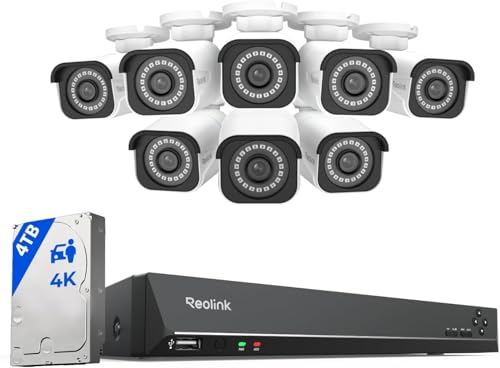
REOLINK 16CH 4K Security Bullet Camera System RLK16-800B8 — Best for long driveways
Take the same recorder, the same 4TB drive, and the same sixteen channels, then swap the domes for eight bullet cameras, and the system’s personality shifts from discreet to directional. The RLK16-800B8 is built for views with a clear axis: the long driveway, the side path between fences, the approach road to a rural property, the loading area behind a small workshop. A bullet body points where it points, holds a narrower and more deliberate aim than a dome tucked under an eave, and its visible presence does quiet deterrent work that a blended dome deliberately avoids.
Because the platform is shared, everything said about detection and recording carries across: 8MP H.265 PoE cameras, smart person and vehicle alerts, continuous recording that survives an internet outage. The real choice between this kit and its dome sibling is architectural. Houses with long approaches, gates set back from the road, or outbuildings aligned along a lane get more from aimed bullets. Houses whose cameras mostly watch doors and porches at conversational distance get more from domes. Buying the bullet kit for a porch-heavy house is not wrong, exactly, but it spends the design’s strength where the property cannot use it.
- Recorder: 16-channel NVR with 4TB hard drive fitted
- Cameras in the box: 8 bullet cameras, 8MP / 4K each
- Connection: wired PoE, power and video on a single cable
- Detection: person and vehicle detection on camera
- Recording style: continuous 24/7 recording to the local drive
Strengths
- Bullet aim suits driveways, gates, and fence lines where the interesting action happens along one corridor.
- An obviously visible camera body discourages casual snooping before any recording starts.
- The shared Reolink recorder platform keeps settings and playback identical to the dome kit’s.
Trade-offs
- Exposed bullet bodies can be knocked off aim by a determined reach, a ladder, or storm-blown branches.
- The overt look that deters at a gate can feel like overkill above a family front door.
- Cable runs to far mounting points, such as a gate post, may need outdoor-rated cable and conduit.
Best for: Properties with long driveways, gates, or outbuildings arranged along clear sight lines. Not suited for: Compact homes whose cameras all sit within a few steps of the doors they watch.
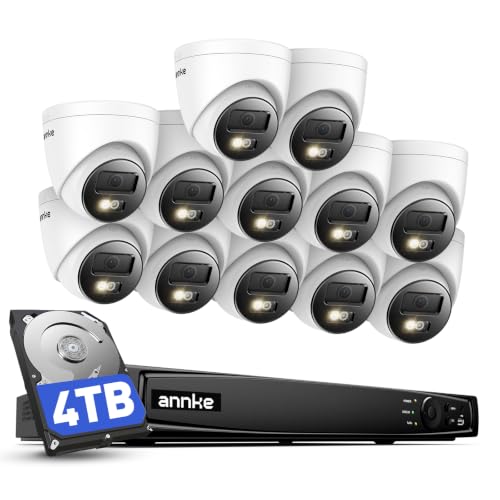
ANNKE 4K PoE 16 Channel Security Camera System — Most cameras in the box
ANNKE’s answer to the same brief is simply to put more cameras in the carton. Twelve 8MP turret cameras arrive with the sixteen-channel recorder and its 4TB hard drive, which means a buyer can cover the front, back, both sides, the garage interior, and the garden gate without an immediate second order. Turrets split the difference between domes and bullets: the ball-and-socket eye aims freely like a bullet, while the compact housing sits tidier than a bullet and avoids the dome cover that can haze night images with reflected infrared.
The smart dual light is the feature that earns discussion. At night the cameras can pair infrared with a warm white light, so an event can be lit visibly enough to record color detail — the color of a jacket, the shade of a car — rather than the gray ghost world of infrared alone. Used thoughtfully, with the light aimed at your own ground, it is the difference between footage that describes a person and footage that merely confirms one existed. AI motion detection with person and vehicle filtering rounds out a kit whose argument is completeness: the fewest compromises about which wall goes unwatched.
- Recorder: 16-channel PoE NVR with 4TB hard drive fitted
- Cameras in the box: 12 turret cameras, 8MP / 4K each
- Night approach: smart dual light with color night vision
- Detection: AI motion detection with person and vehicle filtering
- Connection: wired PoE to every camera
Strengths
- Twelve cameras cover a full property on day one, leaving only four channels of headroom to fill later.
- Dual-light night recording can capture color detail that plain infrared washes into gray.
- Turret eyes aim as freely as bullets while sitting neater against a wall or soffit.
Trade-offs
- Twelve cable runs is the largest installation commitment in this guide, full stop.
- A visible white light at night announces the camera, which some owners want and others dislike.
- With only four spare channels, a growing property reaches the recorder’s ceiling sooner than with the Reolink kits.
Best for: Larger homes and small premises that need many walls covered immediately in 4K. Not suited for: Anyone whose property needs six cameras or fewer and would rather bank the difference.
Can a Wireless Kit Record Seriously Without a Subscription?
The honest answer used to be no: battery cameras slept between motion events, and continuous recording lived behind a paywall. The three kits in this half of the guide attack that history from different directions. One plugs its cameras into the wall so they never sleep. Two harvest sunlight and lean on local storage sized generously enough that the cloud becomes an option instead of a toll. What they share is a refusal to rent you your own footage.
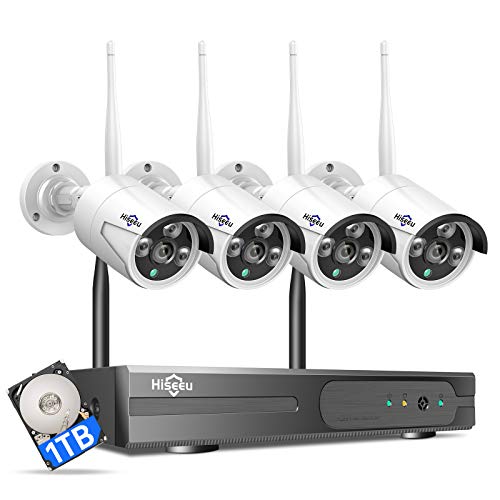
Hiseeu 24/7 Recording Home Security Camera System — Best wireless recorder kit
Hiseeu’s design begins from a simple observation: the painful part of wired systems is the data cable, while the painful part of battery systems is the battery. So this kit keeps the plug and drops the cable. Four corded bullet cameras draw mains power and send their video over 2.4G or 5G Wi-Fi to a 4K NVR, and because their power never runs out, they record around the clock like a PoE kit — no sleeping sensor waiting to be woken by the very motion it might miss. For a shopkeeper or a homeowner burned by a battery camera that caught the aftermath instead of the act, that single trait justifies the shortlist.
Read the specification with care, because it teaches a lesson the whole category needs. The recorder is a 4K NVR; the four supplied cameras are 3MP units. That pairing is legitimate — the recorder has headroom for sharper cameras later — but the footage you watch this year is 3MP footage, judged fairly against other 3MP cameras rather than against the 4K kits above. Within that class it acquits itself well: continuous recording, local storage, and no subscription put it ahead of many nominally sharper battery cameras that record only in nervous fragments.
- Recorder: 4K NVR with local recording, no subscription required
- Cameras in the box: 4 bullet cameras, 3MP each
- Power: corded plug-in, so recording never sleeps
- Connection: dual-band 2.4G / 5G Wi-Fi between cameras and recorder
- Recording style: continuous 24/7
Strengths
- Continuous recording without a single data cable run is a combination few affordable kits offer.
- Mains power removes charging ladders and dead-battery gaps from the maintenance calendar entirely.
- The recorder’s 4K ceiling leaves a real upgrade path when sharper cameras join later.
Trade-offs
- Each camera still needs a reachable power outlet, which rules out fence posts and far garden corners.
- The supplied cameras record at 3MP, visibly softer than the 4K kits when footage is enlarged.
- Video rides your Wi-Fi, so a weak signal at a far wall shows up as stutter rather than silence.
Best for: Owners who want unbroken recording but cannot run Ethernet to the camera positions. Not suited for: Buyers whose priority is maximum image detail for identifying faces at distance.

Hiseeu 4MP Solar Security Camera Kit with 10-Inch Touchscreen — Best with a built-in screen
Most security systems assume a phone is always in hand. Hiseeu’s solar kit questions that assumption by building its base around a 10-inch touchscreen, so the cameras can be watched from a kitchen counter or a shop desk the way a baby monitor is watched — glance, confirm, move on. For an older homeowner who distrusts apps, or a small café whose staff cannot unlock phones mid-shift, that screen is not a gimmick; it is the interface that decides whether the system gets used at all.
The four cameras are solar-powered dual-lens units recording at 4MP, with auto tracking that follows a moving subject across the frame and support for both 2.4 and 5GHz Wi-Fi. Dual lenses widen what one mounting point can see, which matters in a kit of four asked to cover a whole property: a driveway camera that also holds the front garden in view does the work of a fifth camera. Solar power keeps the system honest about placement, though. A camera tucked under a deep north-facing eave will live on stored charge through a gray week and complain by the second, so mounting becomes a negotiation between the view you want and the sky the panel needs.
- Base: 10-inch touchscreen for viewing without a phone
- Cameras in the box: 4 solar cameras, 4MP, dual-lens design
- Tracking: auto tracking follows movement within the view
- Connection: 2.4 and 5GHz Wi-Fi supported
- Audio: two-way talk through the cameras
Strengths
- The touchscreen base serves households and counters where an app-only system would gather dust.
- Dual lenses stretch four cameras across more ground than single-lens rivals manage.
- Solar charging removes both cable runs and routine battery swaps from the chore list.
Trade-offs
- Panels need genuine daylight, so deeply shaded mounting points starve the cameras slowly.
- Four cameras is a starter count for a large property, however wide each lens reaches.
- Battery-based recording leans on motion events more than the plug-in kits in this guide.
Best for: Homes and small counters that want a watchable screen and zero cable work. Not suited for: Shaded properties or anyone needing guaranteed continuous recording at every camera.

aosu D1 Max 4-Cam Kit — Best cable-free 4K
The D1 Max is the wireless kit that refuses to concede the resolution argument. Its four solar cameras record in 4K, pan and tilt through a full 360 degrees, and coordinate through cross-camera auto tracking: when a subject walks out of one camera’s view into another’s, the system follows the handoff instead of presenting you with four disconnected clips and a gap where the story went missing. For a property whose action moves — a delivery driver crossing from gate to porch, a fox working along a fence — that continuity is the difference between footage and evidence.
Storage is handled with unusual generosity for a wireless kit: 1TB of local capacity, expandable, with no subscription required to keep or review recordings. That figure reframes the solar compromise. Yes, the cameras still answer to sunlight and Wi-Fi. But the footage they gather is sharp, the archive is deep, and none of it sits behind a monthly toll. Position the panels with a clear conscience about the sky, keep the cameras within honest Wi-Fi range of the house, and the D1 Max behaves less like a gadget bundle and more like the wired systems it competes with — minus the weekend in the attic.
- Cameras in the box: 4 solar cameras, 4K each
- Movement: 360-degree pan and tilt with cross-camera auto tracking
- Storage: 1TB local, expandable, no subscription required
- Power: solar panels with internal batteries
- Recording style: event-based with tracking handoff between cameras
Strengths
- Cross-camera tracking stitches a moving subject’s path into one followable sequence.
- A terabyte of local storage is deep enough that archiving stops being a weekly decision.
- True 4K recording answers the detail question that most solar kits sidestep.
Trade-offs
- Four cameras must cover the property through movement and tracking rather than fixed numbers.
- Solar dependence remains: winter shade and short days tax the batteries hardest when nights are longest.
- Pan-and-tilt mechanisms add moving parts that fixed cameras simply do not have.
Best for: Owners who want genuine 4K and follow-the-action coverage without running any cable. Not suited for: Properties needing eight or more fixed viewpoints recorded simultaneously.
How Do the Six Systems Compare Side by Side?
| System | Cameras supplied | Recorder / base | Power route | Storage headline |
|---|---|---|---|---|
| REOLINK RLK16-800D8 | 8 dome, 8MP | 16-channel NVR | Wired PoE | 4TB hard drive |
| REOLINK RLK16-800B8 | 8 bullet, 8MP | 16-channel NVR | Wired PoE | 4TB hard drive |
| ANNKE 4K PoE System | 12 turret, 8MP | 16-channel NVR | Wired PoE | 4TB hard drive |
| Hiseeu 24/7 Wireless NVR Kit | 4 bullet, 3MP | 4K NVR | Plug-in, Wi-Fi video | Local NVR recording |
| Hiseeu Solar Touchscreen Kit | 4 dual-lens, 4MP | 10-inch touchscreen base | Solar | Local base storage |
| aosu D1 Max | 4 PTZ, 4K | Homebase-style local hub | Solar | 1TB, expandable |
Read the table as a map of commitments rather than a league table. The wired row entries commit your weekend and repay it with unbroken recording and the deepest channel headroom. The plug-in Hiseeu commits you to outlet placement and repays it with the same unbroken recording over Wi-Fi. The solar pair commit you to sky and signal, and repay it with an installation measured in minutes per camera. Every system here keeps footage locally, which is the quiet theme of the whole guide: at the affordable end, the subscription-free kit that records to a drive in your own hallway beats the elegant cloud camera whose archive vanishes when a card expires.
What Mistakes Do Buyers Make When Choosing a Camera System?
The most common error is counting channels instead of cameras. A sixteen-channel recorder with eight cameras watches eight places, and buyers who skim the big number plan coverage for sixteen. The second error is its mirror image: buying a four-camera kit for a nine-viewpoint property because the per-camera arithmetic looked kind, then discovering that the interesting incident happened, as it always does, on the unwatched wall. Sketch the property first, mark every door, gate, driveway approach, and blind corner, and let that count — not a headline — choose the kit size.
Placement mistakes follow. Cameras mounted at the top of a two-story wall record the tops of heads with great fidelity and faces hardly at all; the identifying view lives closer to door height, angled along the path a visitor must walk. Buyers also forget the recorder’s own security: an NVR sitting visibly beside the television is footage waiting to be carried away, so give it a cupboard, a loft corner, or at least discretion. Finally, wireless buyers routinely mount first and test signal second. Walk each planned position with a phone, confirm the Wi-Fi holds there on a wet evening, and only then drill — a solar camera with a weak link records its disappointment faithfully and often.
How Should You Plan the Installation Weekend?
Start with the recorder’s home, because every cable or signal decision radiates from it: near the router for wired kits, central in the house for wireless ones, and always on a shelf that stays dry, ventilated, and uninteresting to visitors. For PoE kits, run and test each cable before fixing cameras permanently — a cable that fails after the soffit is sealed is a small tragedy — and label both ends, because the person troubleshooting channel seven in two years is you. Mount cameras temporarily with one screw, live-view each angle on the recorder, walk the routes a visitor, a driver, and a prowler would each take, and adjust heights before the final fixings go in.
Budget the unglamorous supplies before the weekend arrives, because a half-mounted system waiting on a forgotten drill bit helps nobody. Outdoor-rated Ethernet cable in generous lengths, a handful of junction boxes for exposed connections, cable clips that suit your wall material, a ladder you trust, and a surge protector for the recorder’s shelf together cost little and decide whether the job finishes on Sunday or drifts into a second weekend of good intentions. PoE buyers should also confirm the switch ports or recorder ports match the camera count they actually plan to run on day one, since a spare camera without a spare port is a paperweight with a lens.
Wireless kits compress the same discipline into signal checks and sun checks. Spend one day watching where shadows actually fall rather than where you assume they fall, and give each solar panel the best sky the view allows. Then set the software up properly on day one: detection zones drawn around your own ground rather than the street, person and vehicle alerts switched on, phone notifications tested by a family member walking the driveway, and the recorder’s clock verified so timestamps would hold up if footage ever had to speak for you. A system tuned in its first week tends to stay tuned; a system left on defaults tends to become ignored, and an ignored system is furniture.
What Does Affordable Actually Buy at Each Level of This Market?
The word affordable hides three distinct purchases, and confusing them is how buyers end up disappointed with hardware that did exactly what it promised. At the first level sits the starter kit: four cameras, a base or small recorder, and coverage for the doors and the driveway of a compact home. The Hiseeu plug-in kit and the two solar kits live here. What this level buys is presence — the ability to answer who came to the door, whether the parcel arrived, and what set the dog off at midnight. What it does not buy is depth: there is no spare channel when a new blind spot reveals itself, and no archive stretching back a season.
The second level is the whole-property wired kit, represented by the two Reolink systems. Here the money buys permanence. Cameras multiply to eight, the recorder’s channels double the camera count, and the hard drive grows to a size where continuous recording becomes a habit rather than a setting you ration. Owners at this level stop thinking about the system weekly and start thinking about it the way they think about plumbing: it is simply part of how the house behaves. The third level, where the ANNKE sits, buys completeness in a single transaction — twelve cameras, every wall answered for, and night footage lit well enough to describe clothing and car colors to someone who was not there.
Notice what none of these levels buys, because the affordable tier is honest about its ceiling. None offers the multi-year on-site warranties, the dealer installation, or the monitored response of a contract system. None integrates with a professionally staffed alarm center. What the affordable tier sells is ownership: footage on your drive, cameras on your walls, and no monthly rent for the privilege. Buyers who understand that trade call these kits bargains. Buyers who expected a monitored service at a kit price call them disappointing, and the difference is expectation, not hardware.
Which Views Matter Most, Walked Through Property by Property?
Start at the front door, because it is where the honest traffic of a house arrives: deliveries, visitors, neighbors, and the occasional stranger testing whether anyone answers. A camera here works at conversational range, so modest resolution performs beautifully and a wide view matters more than reach. The driveway is the second claim on your camera count, and it reverses the priorities: distance stretches, vehicles matter as much as people, and this is where 4K earns its keep and where a bullet’s aimed view outperforms a dome’s polite dome-shaped compromise.
The back garden is where systems quietly fail, because owners spend their cameras at the front and leave the rear to hope. Yet the back is where an intruder prefers to work, unobserved by the street. Give the garden a camera of its own, angled along the fence line rather than across the lawn, and light becomes the governing question: infrared reach fades with distance, so a camera claiming the whole garden from one corner is flattering itself. Side paths and gates deserve the same respect; a narrow passage is a gift to a camera, since anyone using it must walk its length inside the frame.
Inside the property, restraint is the skill. Garages, workshops, and home offices holding tools, stock, or equipment justify a camera in a way a family living room rarely does, and several owners in this guide’s audience run a small business from exactly those rooms. Where people live rather than store, consider whether a camera answers a real question — an elderly parent’s hallway, a dog’s favorite room — or merely accumulates footage nobody will review. The best affordable home security system with cameras is not the one with the most eyes; it is the one whose every eye has a question it was posted to answer.
How Do Recording Modes Change What a Kit Can Prove?
Continuous recording is the gold standard for proof because it cannot be outwitted by timing. An event-based camera wakes when its sensor wakes, and a person who approaches slowly, or shields the sensor’s view, or simply moves during the camera’s cool-down between clips, edits the story without knowing it. The wired kits and the plug-in Hiseeu never sleep, so their timelines include the approach, the act, and the departure, and it is the approach — the face turned toward the house, the car arriving rather than leaving — that so often carries the identifying detail.
Event recording has genuine virtues, and dismissing it would be lazy. It stretches storage, it produces timelines a human can actually scan, and on solar cameras it is the only mode physics allows. The aosu and the solar Hiseeu compensate with tracking and quick wake behavior, narrowing the gap that sleeping sensors once opened. The practical settlement most owners reach is a hybrid: continuous recording on the wired views that guard money and entrances, event recording on battery views that guard gardens and gates. Every kit in this guide fits somewhere in that settlement, and choosing yours is really choosing which of your walls deserve a witness that never blinks.
What Does Owning One of These Systems Cost After the Box Is Paid For?
The sticker is the beginning of the arithmetic, not the end. Wired kits consume electricity around the clock — modestly, but a recorder and eight cameras drinking power through every night of the year adds a quiet line to the household bills, and a small uninterruptible power supply to keep the system alive through short outages is an addition most owners eventually make, because a system that dies with the lights protects nothing during exactly the hours a cut cable would matter. Hard drives, too, are consumables on a long horizon: a drive spinning continuously for years will one day be the component that fails, and owners who check the recorder’s health screen each season hear about it from the software before they learn about it from missing footage.
Wireless kits move the costs rather than removing them. Batteries age; a solar camera’s cell that shrugged off its third winter may sulk through its fifth, and replacements belong in the budget from the start. Wi-Fi infrastructure is the hidden line item: a large property whose far cameras stutter often needs a mesh node or an outdoor access point, which is real money spent on the network rather than the cameras. Against all of this, weigh what these kits refuse to charge. There is no monthly subscription under any of the six names in this guide, and over a five-year ownership that refusal quietly outweighs several of the costs above. The affordable system is not the free system; it is the one whose ongoing costs arrive as occasional hardware rather than as rent.
How Should a Household Handle Privacy, Neighbors, and Guests?
A system that watches your ground will inevitably see slivers of other people’s: the pavement beyond the gate, a neighbor’s driveway edge, the postman’s whole visit. The mature way to handle this begins at aiming — angle cameras to end their meaningful view at your boundary wherever the layout allows, and use detection zones and privacy masks, which every platform here provides in some form, to blank the regions you have no business recording. A conversation with the neighbor whose wall carries your camera’s bracket is worth more than any setting, and it usually ends with them asking which kit you bought.
Guests deserve the same candor. A household that records its garden should say so when friends visit, not because the law of your area necessarily demands a speech, but because trust is cheaper than awkwardness. Indoors, the line most families settle on is functional: cameras guard rooms where things are kept, not rooms where people relax, and any camera that can see into a bathroom or a bedroom has been aimed by someone who was not thinking. Audio deserves a deliberate decision too, since recording conversations carries stricter rules in many places than recording pictures; several owners mute microphones on outdoor cameras and keep two-way talk as an on-demand tool rather than an always-open ear. None of this diminishes a system. A kit aimed with restraint produces footage you can share with police, neighbors, or an insurer without first apologizing for what else it captured.
What Maintenance Keeps a System Honest Through the Seasons?
Cameras live outdoors so their owners do not have to think about them, and that bargain holds only if someone thinks about them briefly, four times a year. Spring is for lenses: pollen and winter grime film every dome and turret eye, and a soft cloth restores night images that owners often blame on failing hardware. Check brackets after storm season, because a camera rotated five degrees by wind now films a hedge with great commitment. Summer is for spiders, whose webs across an infrared array turn night footage into a glowing fog; a long-handled brush on the worst offenders, and moving any nearby light that attracts their insect prey, keeps the view clean.
Autumn belongs to storage and settings. Review the archive depth before the dark months, when longer nights mean more recorded hours that matter, and confirm the recorder’s clock after any power cut so timestamps stay truthful. Solar owners should walk the panels in autumn with particular honesty, because the tree that shaded nothing in June may now own the panel’s whole afternoon. Winter asks for a battery census on wireless cameras and a check that detection zones still match a garden whose plants have died back and whose sight lines have opened. None of this takes an hour a season, and the reward is a system whose footage, on the one night it is needed, looks like the system you thought you bought.
How Should You Read a System Listing Before Believing It?
Kit listings compress four different numbers into one shouty title, and learning to separate them takes a single careful minute. Find the channel count first and file it under future, not present: it describes the recorder’s capacity. Next find the camera count, usually expressed as a pieces figure, and file that under present, because it is what will actually watch your walls this month. Then separate the recorder’s maximum resolution from the cameras’ resolution; a recorder that accepts 4K cameras may ship with gentler ones, as the plug-in Hiseeu in this guide openly does, and the honest listings state both figures for anyone who reads past the headline.
Storage language needs the same skepticism. A kit that names a drive size in its title, as the Reolink and ANNKE systems do with their 4TB drives, has made a verifiable promise. A kit that speaks of supporting large storage, or of expandable capacity, is describing a possibility you will fund yourself, which may still be a fair deal — the aosu’s terabyte supplied in the box is generous by wireless standards — but it should be priced as what is included, not what is imaginable. Finally, translate the phrase no subscription into its precise local meaning for each brand: for every kit here it means recordings are stored and reviewable locally without a monthly payment, which is the only meaning worth paying for. Read this way, listings stop being advertisements and become specifications, and the six kits above survive that reading — which is, in the end, why they are the six kits above.
What Would a Sensible Layout Look Like on an Ordinary House?
Abstractions settle arguments poorly, so consider a specific property: a three-bedroom house on a suburban plot, driveway in front, garden behind, a shed near the back fence, and a side gate everyone forgets to lock. The camera census comes to seven honest views. One watches the front door at head height. One takes the driveway from the garage corner, angled so arriving cars show a plate and departing ones show a driver. One covers the garden along the fence rather than across it. One minds the side gate and the passage it opens. One sits inside the garage, where the tools and the bikes live. One watches the shed door. And one spare view, from the back eave, covers the patio doors that open off the kitchen.
Against that census, the kits sort themselves without any help from marketing. The four-camera wireless kits cover the door, the driveway, the garden, and the gate, and leave the garage, shed, and patio to a second phase — a legitimate plan for a renter, and the aosu’s tracking softens the gap by following movement across its views. The Reolink kits cover all seven views on day one and keep a channel in reserve for the day the household buys a workshop or a caravan that needs watching. The ANNKE covers the seven and still has five cameras looking for work, which on this house is surplus, and on a smallholding with a barn and a yard is exactly right. The lesson generalizes: draw your own census first, in pencil, walking the boundary at dusk when the light shows you what a camera will actually see, and the correct kit usually announces itself before you read a single specification.
Final Recommendation
Choose by commitment, then by count. If the house is yours and the attic is passable, the Reolink dome kit is the default we would defend in any kitchen-table argument: eight 4K domes, sixteen channels, a 4TB drive, and detection that respects your attention. Swap to its bullet sibling when the property’s story is told along driveways and gates, and step up to the ANNKE when twelve walls genuinely need watching on day one, accepting the heavier installation as the price of completeness. If cable is impossible, the plug-in Hiseeu preserves the one feature worth preserving — continuous recording — while the aosu D1 Max is the wireless kit for buyers who refuse to give up 4K or deep local storage, and Hiseeu’s touchscreen kit serves the households where a screen on the counter will be watched more faithfully than any app.
Whatever you choose, buy the coverage your sketch demands rather than the headline that flatters the budget, because the camera you talked yourself out of is precisely the one the incident will choose.
Frequently Asked Questions
Do these systems keep recording when the internet goes down?
The wired PoE kits and the plug-in Hiseeu record to local storage inside the recorder, so an outage costs you remote viewing on your phone, not the footage itself. Solar kits likewise store recordings locally at the base or hub. What stops during an outage is live access from away and cloud backup where it exists, which is exactly why this guide favors local archives.
How long will a 4TB hard drive hold eight 4K cameras?
It depends on frame rates, scene activity, and compression settings, but the honest framing is weeks of continuous recording rather than months. Busy street-facing views consume space faster than a quiet garden view. If your need is a long archive — a property left empty for a season, for instance — lower the recording quality on quiet cameras or choose motion-based recording for secondary views.
Can I add cameras to these kits later?
The Reolink and ANNKE recorders accept sixteen channels and ship with eight and twelve cameras respectively, so additional compatible cameras can join without replacing the recorder. The wireless kits are more bounded: a four-camera kit is designed around its supplied set and base, so treat expansion there as limited and plan the initial count honestly.
Is 3MP footage from the Hiseeu wireless kit good enough?
For recognizing a familiar person at porch or counter distance, yes, comfortably. For reading a license plate across a wide driveway or identifying a stranger at the far end of a garden, the 4K kits hold a real advantage. Match the camera to the distance it must interpret, which is why several owners mix: sharp cameras on long views, modest cameras on near ones.
Do solar cameras work through winter?
They work, but their budget tightens. Shorter days, lower sun, and longer nights all draw on the same battery, and a panel mounted in permanent shade can fall behind. Placing panels with genuine sky exposure, and accepting that a midwinter top-up charge may occasionally be needed at the worst-sited camera, keeps a solar kit dependable rather than disappointing.
Which system suits a small rental property best?
A wireless kit, almost always, because it leaves no cable runs to explain to a landlord and can move house with you. Between the solar pair, the aosu D1 Max offers the sharper recording and deeper storage, while the Hiseeu touchscreen kit suits a tenant who wants a counter screen instead of another app account.
Related Guides
Keep exploring the camera shelf with our guide to the best affordable outdoor security cameras, compare single-camera choices in the best affordable security cameras roundup, and see how alarm kits pair with cameras in the best alarm system with cameras guide.


