What's inside
- Key Takeaways
- Quick Picks
- How Did We Choose Doorbells for a No-Subscription Guide?
- Where Does Your Doorbell’s Yesterday Live?
- Which Local Doorbell Fits Your Front Door?
- How Do You Set Up a Local-Storage Doorbell Properly?
- What Mistakes Do Buyers Make in This Category?
- What Does a Subscription Actually Cost Across Five Years?
- How Good Is Detection When Nobody Is Paying for the Cloud?
- What Changes for Renters, Landlords and Shared Doors?
- What About Hearing the Bell Inside the House?
- Comparison Table
- Final Recommendation
- Frequently Asked Questions
- Related Guides
As an Amazon Associate I earn from qualifying purchases. This post may contain affiliate links at no extra cost to you.
gizmoverdict.com is reader-supported. When you buy through links on our site, we may earn an affiliate commission.
Where to buy: Every doorbell below is a verified listing from this site’s product pool. The four picks that lead this guide store video locally, on the device or on a memory card you own; the two famous names at the end are included with their limits stated in plain language, because honesty is the entire subject of this article.
The best doorbell cameras no subscription households can actually live with begin with a distinction the marketing rarely volunteers: the difference between a doorbell that works without a subscription and a doorbell whose recordings work without one. Almost every video doorbell will ring, show a live view and let you talk to a visitor for free. The subscription question is about yesterday — about whether the clip of the parcel leaving your step, or the face at the door while you were out, still exists somewhere you can watch it without paying a monthly toll. On some systems that history lives in the maker’s cloud and evaporates without a plan. On others it lives on storage inside the doorbell itself, or on a memory card in a slot, and it is yours in the most literal sense: physically, in your house, on your card.
This guide is organised by that distinction, ruthlessly. The first four picks are local-storage doorbells: eufy’s E340 with 8GB of storage built in, eufy’s C31, Tapo’s D205 and Wyze’s wired v2, the last two recording to microSD. They lead because they answer the search honestly. The final two picks are Ring and Blink models, included because readers ask about them by name — and each carries the truth in its review, in its table row and in the FAQ: without a paid plan, a Ring doorbell cannot show you recorded video history, and a Blink doorbell’s recorded clips likewise depend on its subscription or on separate local-storage hardware. Live view, yes. Yesterday’s evidence, no. Anyone who tells you otherwise is selling something.
One more piece of honesty before the picks: “no subscription” does not mean “no compromises.” Local storage means your history is only as safe as the doorbell on your wall — a stolen doorbell can take its onboard clips with it, which is why some local models pair with an indoor base station, and why cloud plans exist as a legitimate product for people who want off-site copies. It also means managing a card or a modest built-in capacity that overwrites its oldest clips as it fills. This guide will weigh those costs openly for every pick, because a reader choosing freedom from monthly fees deserves the whole ledger, not a pamphlet.
Key Takeaways
- Lead picks store locally: the eufy E340 carries 8GB onboard, the eufy C31 records without a fee, and the Tapo D205 and Wyze v2 use microSD storage you own.
- Ring doorbells need a paid Ring plan to review recorded video; without one you get live view and alerts, not a watchable history.
- Blink doorbells likewise tie recorded-clip review to their subscription unless you add separate local-storage hardware of your own.
- Local storage trades cloud convenience for ownership: no monthly fee, but the clips live and die with the device or card holding them.
- Dual cameras, as on the E340, solve the parcel problem — one lens for faces, one aimed at the step where packages land.
- Decide by where yesterday’s video must live, and every other specification in this category falls into its proper place.
Quick Picks
| Pick | Badge | Why it earns its place |
|---|---|---|
| eufy Video Doorbell E340 | Best no-subscription overall | Dual cameras and 8GB of local storage built in, with no monthly fee stated in its listing. |
| eufy Video Doorbell C31 | Best flexible power | 2K video, battery or wired power, 24/7 recording and no subscription, per its listing. |
| Tapo 2K Wireless Doorbell D205 | Best wide view, local storage | A 160-degree view and subscription-free local storage, with cloud offered only as an option. |
| Wyze Wired Doorbell Camera v2 | Best wired value | 2K wired reliability with microSD recording for homes that already have doorbell wiring. |
| Ring Battery Doorbell 2K | Best ecosystem — with a catch | Excellent live features, but recorded video review requires a paid plan; included so you hear it here first. |
| Blink Battery Doorbell 2K+ | Best battery sipper — with a catch | Long-running battery design, but clip review depends on a subscription or separate local hardware. |
How Did We Choose Doorbells for a No-Subscription Guide?
The entry test was storage architecture, applied before any camera specification was allowed to speak. A model qualified as a lead pick only if its listing supports recording without a recurring fee: built-in local storage, a microSD slot, or an explicit no-subscription statement from the maker. Four models passed cleanly and they form the spine of the guide. The two remaining places went, deliberately, to the names readers most often assume qualify and do not — Ring and Blink — because a guide that simply omitted them would leave the most dangerous misconception in the category standing in the reader’s mind, uncorrected, at the moment of purchase.
Within the local-storage spine, the picks were spread across the real axes of doorbell buying: wired against battery power, single against dual cameras, onboard storage against card storage, and wide against standard fields of view. Video resolution was treated as a supporting actor — 2K across most of this set — because at a front door, the questions that decide satisfaction are whether the step is visible, whether the clip still exists next week, and whether the doorbell was awake to record it. Those are architecture questions, and they were weighted like it.
Claims discipline in this article is absolute, because the topic is money taken monthly. Every storage statement traces to a listing title or to the maker’s well-documented plan structure for Ring and Blink, and where a feature depends on a plan, the dependence is stated at the pick, in the table and again in the FAQ — three times, on purpose. A reader should be able to skim any single layer of this guide and still leave with the truth.
Where Does Your Doorbell’s Yesterday Live?
It helps to picture the three places a doorbell clip can live. In the cloud model, the clip travels to the maker’s servers and is kept for a window of days — a window that, for Ring and Blink, is opened by a subscription. Stop paying, and the arrangement ends: new clips are not retained for review, and the doorbell becomes a live-view device with a memory like a goldfish. In the onboard model, the clip is written to storage inside the doorbell — the E340’s stated 8GB — where it remains until the storage fills and the oldest footage is overwritten, a rolling local archive that answers to nobody’s billing department. In the card model, the clip lands on a microSD card you bought and can remove, copy, replace or upgrade, as with the Tapo and Wyze picks; the archive is not only local but physically in your hand.
Each home for yesterday has a failure mode, and choosing honestly means choosing yours. Cloud archives survive a stolen doorbell but die with a cancelled card. Onboard archives cannot be cancelled but can be carried away with the device — a risk some eufy owners answer by pairing with the maker’s indoor base station, which the C31’s listing nods to with its HomeBase readiness. Card archives are cheap and capacious, and a card can corrupt, fill or be forgotten in a drawer during a swap. None of these is the “safe” option in the absolute sense, and this guide makes no absolute security claims for any of them. They are trade-offs between a fee, a risk and a chore. The subscription-free life chooses the risk and the chore, knowingly, and saves the fee forever.
There is a privacy dimension that deserves one calm sentence. Footage stored in your house is footage that is not, by default, stored on a company’s servers — a consideration some households weigh heavily and others not at all. This guide simply notes that local storage aligns the physical and the digital custody of your doorstep’s history, and leaves the weighing to the household, where it belongs.
Which Local Doorbell Fits Your Front Door?
The four local picks divide by power and by storage medium, and most readers can settle their shortlist in one pass. Homes with working doorbell wiring can choose anything here, including the wired-only Wyze. Homes without wiring should start with the battery-capable eufy pair and the wireless Tapo. After that, the question is temperament: onboard storage for the household that wants zero chores, a card for the household that wants capacity and custody. The Ring and Blink reviews close the set as consumer protection, written as respectfully as their hardware deserves and as plainly as their plans require.
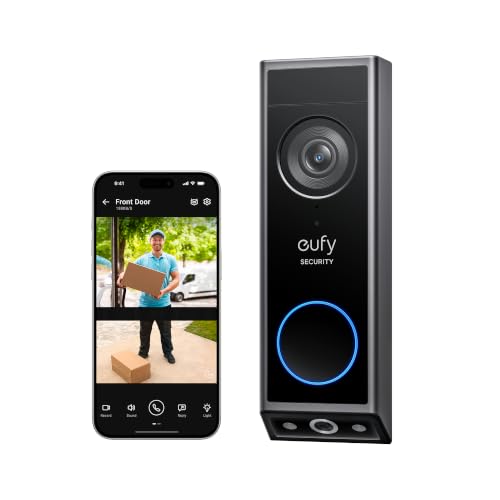
eufy Video Doorbell E340 — Best no-subscription overall
The E340 leads this guide because it solves the category’s two problems in one object. The first problem is yesterday, and it answers it with 8GB of local storage built into the doorbell and an explicit no-subscription statement in its listing: motion and package events are recorded to the device itself, reviewable without a plan, overwritten only as the storage cycles. The second problem is the doorstep itself. A single doorbell camera aimed at faces photographs the courier’s torso and misses the parcel at their feet; the E340’s dual cameras divide the labour, one watching the approach at head height, one angled down at the step, giving the head-to-toe view its listing describes. Anyone who has filed a “delivered” dispute armed with a clip of a doorstep and no parcel in frame will understand why that second lens matters.
Daily life with it is well considered. The listing offers wireless or wired installation, so the same unit suits a house with no doorbell wiring and a house whose transformer is healthy; colour night vision keeps the step legible after dark without the grey wash of older infrared; two-way talk and AI motion and package detection round out a specification that reads like the category’s centre of gravity. The 2.4 GHz Wi-Fi is the one spec that asks a question back — homes whose doorstep sits at the ragged edge of router range should confirm a strong signal at the door before ordering, because a doorbell is only as present as its connection.
The honest costs are the local-storage costs, stated in the introduction and repeated here at the point of sale: the archive lives in the device on your wall, 8GB is a rolling window rather than a vault, and an owner who wants off-device copies should look at the maker’s base-station ecosystem rather than assume the doorbell alone provides it. For the household that accepts those terms — and they are the terms of the entire no-subscription idea — the E340 is the most complete expression of it in this guide: no fee, no card to buy, no second lens envy.
- Cameras: dual, head-to-toe view per listing
- Storage: 8GB local, no subscription per listing
- Video: 2K FHD per listing
- Power: wireless or wired per listing
- Night vision: colour, per listing
- Wi-Fi: 2.4 GHz per listing
Strengths
- Built-in storage removes both the subscription and the memory-card chore in one move.
- The downward second camera makes parcel evidence a design feature, not luck.
- Power flexibility lets the same model serve wired and unwired homes.
Trade-offs
- 8GB is a rolling window; long holidays can overwrite the clip you return home for.
- The archive’s safety is the doorbell’s safety unless you add base-station storage.
- 2.4 GHz-only Wi-Fi demands a genuinely good signal at the doorstep.
Best for: households wanting the complete no-fee package — parcels, faces and history — with zero storage chores. Not suited for: anyone needing weeks of retained footage or off-site copies without adding a base station.

eufy Video Doorbell C31 — Best flexible power
The C31 is the E340’s more adaptable sibling, and its listing makes the pitch in a single breath: 2K video, battery or wired power, no subscription, a head-to-toe view, live video calling when the bell is pressed, human and motion detection, and — the phrase that unlocks its second personality — readiness for the maker’s HomeBase S380. Read plainly, that describes a doorbell that can start life as a simple battery unit on an unwired door and grow, later, into a base-station system whose recordings live indoors, without the doorbell itself changing. For households whose plans evolve, that growth path is a genuinely valuable design decision.
The listing also claims 24/7 recording, a phrase worth pausing on because it separates doorbells that only wake for events from those that can keep a continuous record when powered to do so. Continuous recording is the wired life — a battery asked to record around the clock is a battery being spent — so read the C31 as two doorbells in one housing: a capable event-recording battery unit as installed in minutes, and, once wired, a far more vigilant instrument. Buyers should choose which of those two they are actually purchasing, because the gap between them is the gap between a doorbell that notices visits and one that misses nothing.
Against its own sibling, the C31 concedes the second camera and the built-in 8GB, and in exchange offers the HomeBase route and a simpler single-lens proposition. Against the rest of the guide, it is the pick for the undecided house: no wiring today, maybe wiring next year; no base station today, maybe a multi-camera system eventually. In a category full of commitments disguised as products, a doorbell that postpones its own commitments gracefully is a rarer and more useful thing than it first appears.
- Video: 2K FHD, head-to-toe view per listing
- Power: battery or wired per listing
- Recording: 24/7 recording stated in listing
- Subscription: none, no monthly fee per listing
- Ecosystem: HomeBase S380 ready per listing
- Calls: live video call on press per listing
Strengths
- Battery-to-wired flexibility lets one purchase survive a change of house or wiring.
- HomeBase readiness offers an indoor-storage growth path the E340’s onboard model lacks.
- No-fee recording with continuous-recording capability when wired.
Trade-offs
- Single camera: the dedicated downward parcel lens of the E340 is absent.
- 24/7 recording is realistically a wired feature; battery life will not fund it.
- The full local-archive vision may require buying the base station later.
Best for: unwired homes today that want a no-fee doorbell able to grow into a wired, base-station system. Not suited for: buyers wanting dual-camera parcel coverage out of the box, or continuous recording on battery alone.

Tapo 2K Wireless Doorbell D205 — Best wide view, local storage
Tapo’s D205 makes its argument with geometry and with a storage sentence this guide wishes every maker would copy. The geometry is a 160-degree ultra-wide view, stated in the listing — the widest in this set — which suits the doorsteps most doorbells serve worst: shallow porches, doors set into corners, steps where visitors and parcels alike end up at the frame’s edge. A wide lens at a door is not a luxury; it is the difference between a clip of an event and a clip of most of an event. The storage sentence is the listing’s own framing — subscription-free local storage, or optional cloud — which puts the choice exactly where this guide believes it belongs: with the owner, as an option, not a ransom.
The local storage here is the card model: your microSD, your capacity decision, your physical custody of the archive. That brings the card model’s whole character with it — generous retention if you buy a generous card, an archive you can pull and copy in your hand, and the small disciplines of formatting, endurance-rated cards and the occasional check that recording is still recording. The D205’s other listing notes round out a sensible doorstep citizen: person detection to keep alerts relevant, two-way talk, a ring-call presentation that treats a doorbell press like the phone call it effectively is, and night vision for the dark half of the doorstep’s life.
As a wireless unit, it asks the battery questions every battery doorbell asks — how busy is your door, how cold are your winters, how promptly will you recharge — and households with heavy doorstep traffic should budget their expectations accordingly. But within the no-subscription brief, the D205 is the guide’s geometry pick and its clearest statement of principle: the widest eye in the set, watching over an archive the owner physically possesses, with the cloud demoted to what it should always have been — an optional extra, politely waiting to be asked.
- View: 160-degree ultra-wide per listing
- Video: 2K per listing
- Storage: subscription-free local storage, optional cloud per listing
- Detection: person detection per listing
- Talk: two-way, with ring call per listing
- Power: wireless (battery) per listing
Strengths
- The widest view here covers corner doors and shallow porches others crop.
- Card storage gives the owner capacity control and physical custody of clips.
- The listing’s own framing — local free, cloud optional — is the category’s honest model.
Trade-offs
- Card discipline is yours: endurance cards, formatting and capacity checks included.
- Battery life bends to doorstep traffic and winter temperatures, as all battery units do.
- Wide lenses stretch faces at the frame’s extreme edges; placement height matters.
Best for: awkward doorsteps needing width, and owners who want their archive on a card they control. Not suited for: households that want zero storage chores, or very busy doors far from a charger routine.

Wyze Wired Doorbell Camera v2 — Best wired value
The Wyze v2 is the guide’s argument that the no-subscription life need not cost much, provided your house brings one thing to the partnership: existing doorbell wiring, which the listing states plainly is required. In exchange for that wire, the Wyze delivers the wired life’s whole dividend — no battery to recharge, no wake-up hesitation, a doorbell that is simply always on duty — with 2K video, colour night vision, two-way audio and package monitoring among its stated features, and microSD recording as its local archive. It works with Alexa and Google Assistant per the listing, so the wired veteran does not exile you from the voice-assistant world either.
Card storage on a wired doorbell is a particularly comfortable pairing, and it is worth saying why. The card model’s one anxiety — missing events while the device sleeps or the battery fades — largely evaporates when the device never sleeps, while the card’s virtues, capacity you choose and custody you hold, remain. The result is the closest thing in this guide to a fit-and-forget local system: wire it, card it, and the doorstep’s history accumulates under your own roof at a cost structure that, after the modest purchase, is essentially the price of a memory card every few years.
The exclusions are the listing’s own. No wiring, no Wyze — renters and unwired doors should take the battery picks above and feel no regret. The value proposition also assumes a household comfortable with Wyze’s app-centred way of working, where the doorbell is one citizen of a broader budget ecosystem. But for the wired house doing the arithmetic honestly, this little unit is the moment the no-subscription argument stops being about principle and starts being about simple, durable thrift.
- Power: existing doorbell wiring required per listing
- Video: 2K HD per listing
- Storage: microSD local recording
- Night vision: colour per listing
- Monitoring: package monitor per listing
- Assistants: Alexa and Google Assistant per listing
Strengths
- Wired power removes battery chores and wake-up lag from the local-storage bargain.
- The lowest ongoing cost structure in the guide: a card, and nothing else, ever.
- Assistant support keeps a budget doorbell conversant with the wider smart home.
Trade-offs
- Existing wiring is a hard requirement; unwired homes are simply excluded.
- Card capacity and health are the owner’s quiet responsibility, as with all card models.
- Its ecosystem is app-centred and budget-flavoured, which not every household prefers.
Best for: wired homes wanting the thriftiest honest route to fee-free recorded history. Not suited for: renters, unwired doors, or anyone unwilling to manage a memory card.

Ring Battery Doorbell 2K — Best ecosystem, with a catch
Now the conversation this guide promised to have in the open. The Ring Battery Doorbell 2K is, as hardware, a strong modern doorbell: its listing describes retinal wide-angle video with up to 6x enhanced zoom, two-way talk and a built-in battery, and Ring’s app and Alexa integration are the polish by which the category is judged. If your household lives in Ring’s world already, the live experience — the instant view, the conversation with the courier, the alert on the phone — is genuinely excellent, and none of that requires any plan at all.
Here is the catch, without varnish: recorded video history on Ring is a subscription feature. Without a paid Ring plan, this doorbell does not let you review clips of events you missed; the parcel’s arrival while you were in a meeting, the visitor during your flight — those moments are not waiting for you in an archive, because the archive is the product being sold. Readers searching for doorbells without a subscription who buy this model on the strength of its live features will discover the distinction at the worst possible moment: the first time they actually need yesterday. It is included in this guide, clearly labelled, so that discovery happens here instead, while it is still free.
None of this makes the Ring a bad purchase for an informed buyer. A household that values the ecosystem, accepts the plan as the price of a cloud archive that survives the doorbell itself, and pays it with open eyes is making a legitimate choice — it is simply not the choice this article’s title describes. What this guide will not do, in any table, FAQ or summary, is call this doorbell a no-subscription option. It is a subscription doorbell with excellent free live features, and the difference between those two sentences is the difference between a guide and an advertisement.
- Video: wide-angle, up to 6x enhanced zoom per listing
- Power: built-in battery per listing
- Talk: two-way per listing
- Recorded history: requires a paid Ring plan
- Without a plan: live view and alerts only — no recorded video review
- Finish: Speckled Gray per listing
Strengths
- Class-leading app polish and Alexa integration for live doorstep life.
- Strong modern video hardware with a generous enhanced zoom.
- The cloud archive, once paid for, survives theft of the doorbell itself.
Trade-offs
- Recorded video review is paywalled; without a plan there is no watchable history.
- It therefore fails this guide’s central test, however good the hardware is.
- The plan is a permanent household expense, rising with additional cameras.
Best for: committed Ring households who accept the plan as the price of cloud history. Not suited for: anyone whose search began with the words “no subscription” — choose the eufy, Tapo or Wyze picks above instead.

Blink Battery Doorbell 2K+ — Best battery sipper, with a catch
Blink built its name on a particular virtue — battery frugality — and the Battery Doorbell 2K+ carries that lineage into the 2K era: the listing describes 2K video, enhanced audio, a wireless battery design and a Sync Module Core included in the box as the system’s hub. As a live doorbell, it offers the same free fundamentals as its rival above: alerts, a live view, a conversation at the door. Blink’s whole design philosophy, small and patient and long-running, has real charm for doors where charging access is awkward and doorstep traffic is light.
The catch is the same shape as Ring’s, in Blink’s own tailoring: reviewing recorded clips is tied to Blink’s subscription plan, and the local alternative is not a slot in the doorbell but separate local-storage hardware — a sync module arrangement with your own USB storage — which is a different purchase and a different architecture from the doorbell itself. A buyer who takes this model home expecting its box to contain a fee-free archive will be disappointed in the same way, at the same moment, as the Ring buyer above. The doorbell’s frugality with batteries, sadly, does not extend to frugality with plans.
Its place in this guide is therefore identical in spirit to the Ring’s: a respectable piece of hardware, honestly labelled, offered so the reader can make the comparison the category’s marketing avoids. Households already inside Blink’s system, or those willing to assemble the separate local-storage route deliberately, can build a workable arrangement here. Households whose requirement is the title of this article — recorded history, no subscription, out of the box — should walk back up the page to the four picks that were chosen because they meet it.
- Video: 2K per listing
- Power: wireless battery per listing
- Audio: enhanced audio per listing
- In the box: Sync Module Core included per listing
- Recorded clips: subscription plan, or separate local-storage hardware
- Finish: White system per listing
Strengths
- Blink’s battery-frugality heritage suits quiet doors and awkward charging spots.
- The included Sync Module Core gives the system its hub without a second purchase.
- Live view, alerts and two-way talk work without any plan, as with its rivals.
Trade-offs
- Clip review depends on a subscription or on local hardware beyond the doorbell itself.
- It does not meet this guide’s out-of-the-box no-subscription test.
- The local route, if chosen, is an assembly project rather than a feature.
Best for: existing Blink households and very quiet doors, with the storage route chosen deliberately. Not suited for: buyers wanting fee-free recorded history from the box — the four lead picks exist for you.
How Do You Set Up a Local-Storage Doorbell Properly?
The installation that protects the no-subscription bargain starts with signal. Stand at your door with your phone on your home Wi-Fi and check the strength honestly; a doorbell at the edge of coverage drops events in a way owners misdiagnose as storage failure. If the signal is weak, a mesh node nearer the door is part of the doorbell’s true cost — budget it now rather than after the first missed clip. Then decide the power question with the same honesty: wire where wiring exists and is healthy, because continuous power is the single largest quality-of-life upgrade any doorbell can receive, and choose battery where it does not, with a charging routine written into the household’s calendar rather than left to memory.
Storage setup deserves its own ten minutes. For card models, buy an endurance-rated microSD card — the kind built for dashcams and security cameras, which are written constantly — format it in the device as the maker directs, and confirm with a test event that a clip is written and plays back. For the E340’s onboard storage, learn where the archive lives in the app and how the overwrite cycle behaves, so the rolling window never surprises you. Then set retention expectations with the household: local archives are for the recent past, and any clip that matters — an incident, a dispute — should be exported to a phone or computer promptly, while it definitely still exists.
Finish with the human settings. Tune motion zones to the step and the path, not the street, so the archive fills with your door’s story rather than passing traffic; enable package detection where offered; and walk the door at night to see what the camera sees, because the step you imagine and the step in frame are often cousins rather than twins. A local doorbell set up this way delivers the thing this whole category promises at its best: a doorstep with a memory, owned outright.
What Mistakes Do Buyers Make in This Category?
The expensive mistake is the one this guide was built to prevent: assuming a famous name implies free recorded history, and learning otherwise after the return window, at the moment of need. The second mistake is subtler — choosing local storage and then treating it as infinite, returning from a three-week holiday to find the rolling window has overwritten the delivery dispute from week one. Export promptly; local archives reward the prompt. The third mistake is buying a battery doorbell for a wired house, or a wired doorbell for an unwired one, out of inattention to a single line in a listing — the power sentence — that this guide has repeated for every pick.
Finally, beware the false economy of the undersized card and the oversized expectation. A small, consumer-grade card in a busy doorbell is a failure scheduled, not a saving made; and no doorbell in this guide, local or cloud, should be bought as an absolute guarantee of anything — they are witnesses with excellent memories and ordinary limits, and a household that understands them that way will be served by them for years.
What Does a Subscription Actually Cost Across Five Years?
Monthly fees are priced to feel negligible, which is why this guide insists on multiplying them by the only unit that matters: the life of the doorbell. A doorbell is a five-to-ten-year fixture. Across five years, a single camera’s plan is sixty payments; across a house that later adds a second camera, the arithmetic compounds in the provider’s favour and against the household’s, often with the per-camera structure quietly rewarding the company for every door you add. Set against that stream, the local model’s entire lifetime storage budget — a memory card, perhaps replaced once, or nothing at all in the E340’s onboard case — is a rounding error. This is not an argument that cloud archives are worthless; off-site copies are a real service with a real cost of provision. It is an argument that the household should meet the five-year figure before consenting to the monthly one, because the monthly figure is specifically designed to prevent that meeting.
The comparison also runs in the other direction, and honesty requires airing it. A local archive’s costs are paid in attention rather than money: the card checked, the clip exported, the battery charged, the rolling window understood. Some households will price their own attention above a modest monthly fee, and for them the subscription is not a trap but a trade they prefer. The sin this guide exists to prevent is not subscribing; it is subscribing by accident, under the impression — encouraged by vague listings and vaguer round-ups — that the famous doorbell in the basket kept its recordings for free. Read the storage sentence of any doorbell you buy, in the listing, before the basket. That one habit is worth more than any single pick in this article.
How Good Is Detection When Nobody Is Paying for the Cloud?
A reasonable suspicion shadows this category: that the clever detection — telling a person from a parcel from a passing cat — must live in the cloud, and must therefore be the subscription’s hostage. The listings in this guide answer it better than theory can. The E340 states AI motion and package detection alongside its no-subscription storage; the C31 states human and motion detection; the Tapo D205 states person detection; the Wyze v2 lists a package monitor. In other words, the local picks perform their recognition on or around the device itself, and the alerts they send are part of the free fundamentals. What subscriptions in this category overwhelmingly sell is not intelligence but retention — the keeping of the clip — plus, in some ecosystems, richer notification dressing. A household can therefore be genuinely smart about its doorstep and genuinely free of fees at the same time, provided it chooses models whose detection is local, as these are.
Detection quality still varies with placement more than with brand. A doorbell mounted too high sees hats; too low, it sees knees and parcels beautifully and faces poorly; angled across a busy pavement, it will narrate the street all day and fill any archive, local or cloud, with other people’s business. The dual-camera E340 exists partly to forgive placement sins, covering both the face zone and the step in one unit. Every other pick rewards the ten-minute discipline of mounting at the maker’s suggested height, walking the approach as a visitor would, and checking the frame at noon and at midnight before the screws are finally tightened. Detection is a partnership between the algorithm and the angle, and only one of those is in the box.
What Changes for Renters, Landlords and Shared Doors?
The no-subscription question has a housing dimension the spec sheets ignore. Renters, who may not drill or rewire, are the battery picks’ natural constituency — the E340 run wirelessly, the C31 on its battery, the Tapo D205 — with the added virtue that a local archive moves house as easily as the doorbell does: unmount, remount, and the doorstep’s memory continues in a new city with no account migration and no plan to transfer. The Wyze v2’s wiring requirement, by contrast, belongs to owners, or to renters lucky enough to inherit healthy doorbell wiring and a landlord indifferent to a like-for-like swap. Owners planning to sell should also think a step ahead: a doorbell whose archive is a card or an onboard store is a fixture that can be wiped and handed over cleanly, while a cloud doorbell is an account, and accounts complicate conveyancing conversations that should be about keys.
Shared doors — flats with a common entrance, houses in multiple occupation, a granny annexe with its own bell — add the question of whose yesterday it is. A local archive at least keeps that question inside the household, on storage the residents physically control, rather than in a company’s cloud under one person’s subscription. This guide offers no legal advice and makes no absolute privacy claims; it simply observes that the households who think hardest about doorstep footage tend, on reflection, to prefer holding it themselves. That preference, more than any discount, is the deepest root of this category’s growth — and the reason its honest version, the one written here, will keep mattering after every plan’s price has changed twice more.
What About Hearing the Bell Inside the House?
A doorbell has one job older than all its cameras: making a sound in the house. The local-storage picks handle that job by several routes — an existing mechanical chime where wiring provides one, the maker’s plug-in chime where offered, a phone notification, or a smart speaker announcing the press — and the right route depends on the house’s habits more than on the doorbell. Households with a phone always in a pocket may never miss a press; households with a phone charging in another room, grandparents visiting, or a tradesperson expected during a shower should ensure a physical chime sounds somewhere, because a notification unheard is a visitor missed and, occasionally, a parcel returned to a depot. Check the chime story of your chosen pick with the same care as its storage story; the two sentences in the listing are equals, whatever the marketing’s emphasis suggests.
There is a small, practical corollary for the battery picks. A doorbell that must wake, record, transmit and chime through a relay spends its battery on every act of hospitality, and busy doors in cold weather will ask for the charger more often than the brochure’s gentle scenario implied. None of this disqualifies battery power — for unwired homes it is the only honest option, and the picks here are frugal by their class’s standards — but it does mean the charging routine belongs in the household’s calendar from the first week, set as a recurring chore like the bins, rather than discovered at the moment the doorbell sleeps through the one visitor it existed to announce.
Comparison Table
| Pick | Storage of record | Recorded history without a plan? | Power | Signature feature |
|---|---|---|---|---|
| eufy E340 | 8GB built into the doorbell | Yes | Battery or wired | Dual cameras, head-to-toe |
| eufy C31 | Local / HomeBase-ready | Yes | Battery or wired | 24/7 recording when wired |
| Tapo D205 | microSD local storage | Yes | Battery | 160-degree ultra-wide view |
| Wyze v2 | microSD local recording | Yes | Wired only | Lowest ongoing cost |
| Ring Battery Doorbell 2K | Maker’s cloud | No — plan required for recorded video | Battery | Ecosystem and live polish |
| Blink Battery Doorbell 2K+ | Cloud, or separate local hardware | No — plan or extra hardware required | Battery | Battery frugality |
Final Recommendation
Buy the archive first and the camera second, and this category becomes simple. The eufy E340 is the default answer — dual cameras, storage in the device, no fee, no chore. The C31 is the flexible understudy that can grow into a base-station system. The Tapo D205 owns the wide and awkward doorsteps, the Wyze v2 owns the wired and thrifty ones, and the Ring and Blink models are good hardware wearing the wrong label for this search: fine purchases for households that choose their plans knowingly, and the wrong purchase for anyone who came here to end the monthly toll. Choose local, set it up with care, export what matters — and your doorstep’s memory will belong to you, in your house, on your storage, for as long as you care to keep it there.
Frequently Asked Questions
Can I watch recorded video on a Ring doorbell without paying?
No. Without a paid Ring plan, a Ring doorbell gives you live view, alerts and two-way talk, but recorded events cannot be reviewed — video history is the subscription’s product. Any source describing a Ring doorbell as a no-subscription option for recorded video is mistaken, and this guide has labelled the Ring pick accordingly in its review, its table row and here.
And on Blink — is there a free way to review clips?
Not from the doorbell alone. Blink ties recorded-clip review to its subscription plan; the alternative is separate local-storage hardware arranged around a sync module with your own storage, which is an additional system to buy and manage rather than a feature of the doorbell. Households wanting fee-free history out of the box should choose the eufy, Tapo or Wyze picks in this guide.
How long does 8GB of onboard storage last on the E340?
It depends on how busy your door is, because the E340 records events rather than an endless stream: a quiet doorstep’s 8GB can hold a long rolling history, while a busy one cycles faster. The honest way to think of it is as a window onto the recent past, not an archive of the season — which is why this guide keeps repeating its one piece of storage advice: export any clip that matters, promptly, to somewhere that does not overwrite.
Is a microSD card reliable enough for doorbell recording?
An endurance-rated card — the class made for dashcams and security cameras — is built for exactly this write-heavy life and serves for years; a bargain general-purpose card is the false economy this guide warned about. Fit the right class of card, format it in the device, and check playback after the first day’s events. Card-based picks like the Tapo D205 and Wyze v2 then deliver the cheapest recorded history in the category.
What happens to local recordings if the doorbell is stolen?
Honestly: onboard and card recordings go with the device, which is the local model’s known trade-off against the cloud’s off-site copy. Households for whom that risk dominates can answer it within the local world — the eufy C31’s HomeBase readiness points to recordings kept indoors — or can choose a cloud plan knowingly, as a purchased insurance. What no household should do is assume a doorbell-mounted archive survives the doorbell’s theft. This guide would rather state it than sell around it.
Do these doorbells still alert me without a subscription?
Yes — the free fundamentals are genuinely free across this whole set, including the Ring and Blink picks: motion alerts, a doorbell-press notification, live view and two-way talk do not require a plan on any model here. The subscription line in this category runs specifically through recorded history, which is why the guide has policed that one distinction from its first paragraph to this last answer.
Can I add a second door later and stay subscription-free?
Yes, and the local architecture scales more gracefully than the cloud’s per-camera arithmetic. A second eufy or Tapo at a side or back door keeps its own local archive under the same no-fee principle, and households running the maker’s base-station route can gather cameras under one indoor store. What does not scale is the accidental-subscription household: every Ring or Blink added to a plan-based system deepens the monthly commitment the household may never have consciously chosen. Decide the architecture at the first door, while the decision is still small, and the second and third doors become purchases rather than commitments.
What if my internet goes down — does a local doorbell keep recording?
Generally, local recording is the resilient half of the design: a doorbell writing to onboard storage or a card can keep capturing its doorstep through an outage and present the clips when the connection returns, whereas live view and phone alerts naturally pause without a network, and cloud doorbells lose their archive’s destination entirely. Exact behaviour varies by model and by whether the unit can reach its local network, so treat this as a reason to prefer local storage for outage-prone homes rather than as a guarantee for any single unit — and test yours, once, by recording an event with the router off. Knowing, rather than assuming, is this guide’s whole method.
How do I check a doorbell’s storage claim before buying?
Read the listing the way this guide did: find the storage sentence and parse it like a contract. “Local storage” should name a medium — built-in capacity, a card slot, a base station. “No subscription” should attach to recording and review, not merely to alerts. And any sentence that pairs a famous ecosystem with the word “free” deserves a second, slower reading, because in this category the free things are live view and notifications, while history is where the money lives. If the sentence will not resolve into a clear answer, that vagueness is itself the answer — the four lead picks in this guide state their arrangements in words a careful reader can verify in under a minute, and a doorbell that cannot do the same has told you what you needed to know.
Does “no subscription” mean the maker can never change the deal?
It means the recordings you make are governed by storage you own, which is the strongest position a buyer can occupy — but it is not a spell against the future. Apps evolve, companies adjust features, and a doorbell is a connected device whose software life belongs partly to its maker. The structural protection of the local model is that its core bargain does not depend on a billing relationship: the archive sits in your house, on your medium, and no invoice stands between you and yesterday’s clips. That is not immortality, and this guide does not claim it. It is, however, the most durable arrangement on sale in this category, and the difference between durable and eternal is one more distinction this article is happy to leave precisely drawn. Keep the receipt, keep the listing’s storage sentence saved somewhere, and the arrangement you bought is the arrangement you can point to — a small, unfashionable, thoroughly adult habit that has protected more households than any single feature named in any box in this entire category ever will, at any door, in any street, in any town you may ever live in during your whole life. Habits, unlike features, do not get deprecated, do not move behind a paywall in a software update, and do not require a subscription of their own to keep quietly working on your behalf year after patient year, without exception, ever, anywhere, for anyone.
Related Guides
Doorstep video pairs naturally with the wider camera coverage in Best 1080 IP Webcams: IP Cameras vs USB Webcams — Two Meanings, Separated, and readers comparing connected-home ecosystems may find Best 1080p 60fps Webcams: Native 1080p60 vs 4K Cameras Stepped Down useful for the indoor side of the house. For the display you will review clips on, Best 1080p TVs with Low Input Lag covers the living-room screen honestly.
Related guides
- Best 43 1080p TVs: Why 43 Inches Went 4K — and Where True Full HD Survives
- Best 4K HDR Projectors: Tone Mapping, Color and the Rooms They Deserve
- Best TVs for Viewing Sports: Motion, Daylight Brightness and Broadcast Upscaling
- Best 1080p IP Cameras: PoE Domes, Turrets, Bullets and a PTZ That Earn Their Cable


