What's inside
- Where to Buy, and the Truth About This Console and Big Cards
- Key Takeaways
- Quick Picks
- How Did We Choose These Picks?
- Which of the Best SD Cards for New 3DS Consoles Does Your Machine Actually Want?
- How Do the Six Entries Compare Honestly?
- Why Does the Console Insist on FAT32, and What Is a Cluster?
- How Do You Reformat a Big Card to FAT32, Step by Step?
- How Should You Care for a Console That Is No Longer Made?
- What Does a 3DS Library Actually Weigh?
- How Do You Move a Library From an Old Card to a New One?
- Does It Matter Which Member of the 3DS Family You Own?
- How Can You Tell a Genuine Card From a Counterfeit One?
- What Happens to Themes, Saves and StreetPass on a Reformatted Card?
- What About the Little Card That Came in the Box?
- What Mistakes Do New 3DS Owners Make With Cards?
- Final Recommendation
- Frequently Asked Questions
- Related Guides
As an Amazon Associate I earn from qualifying purchases. This post may contain affiliate links at no extra cost to you.
gizmoverdict.com is reader-supported. When you buy through links on our site, we may earn an affiliate commission.
Where to Buy, and the Truth About This Console and Big Cards
Every linked card below is sold through Amazon, and each listing leads to the exact card and capacity its section describes. But anyone hunting for the best sd cards for new 3ds consoles deserves the awkward truth before any product names, because this is the rare roundup where the biggest card is not the best answer and the fastest card is barely an answer at all. The New Nintendo 3DS and its XL sibling were designed around microSDHC cards — the family that tops out at 32GB — formatted as FAT32. That is the officially supported arrangement, and a card that fits it works the moment it slides under the back cover. Larger cards are microSDXC, arrive formatted differently, and the console will simply refuse them until a computer reformats them to FAT32, after which most behave — with quirks in load behaviour and file handling that grow as capacity climbs. None of this is a reason to avoid a big card if your library demands one. It is a reason to buy with your eyes open, which is how this guide is organised: the natively correct choice first, the reformatted big-library choices second, and two cautionary entries at the end that are not recommendations at all.
The second truth is about speed. The New 3DS reads its card at a pace set by hardware from another era, and no card — however heroic its packaging — can make the console read faster than its own slot allows. Menus will not snap quicker because a card quotes a huge read figure; game loads are governed by the console. So this guide judges cards on correctness, capacity, consistency and honest value, and treats speed claims as what they are on this platform: headroom the console cannot spend. If that sounds like a smaller promise than other roundups make, it is because it is a truer one.
Key Takeaways
- The console’s native world is microSDHC up to 32GB in FAT32 — the PNY 32GB pick is the only card here that works with zero preparation, and for many owners it is all the card they need.
- Cards of 64GB and above are microSDXC and must be reformatted to FAT32 on a computer before the New 3DS will recognise them; the guide walks through it below.
- Speed classes above the basics buy nothing on this console — its card slot is the bottleneck, so consistency and genuine capacity matter more than any headline figure.
- A 128GB card, properly formatted, is the practical ceiling for a large digital library; beyond it, quirks multiply and the benefit thins.
- microSD Express is a different, newer standard sold for the Switch 2 generation — it is not a faster version of what this console uses, and it appears here only as a warning.
Quick Picks
| Pick | Badge | Why it earns its place |
|---|---|---|
| PNY 32GB Elite microSDHC 3-Pack | The natively correct card | True microSDHC at the console’s official ceiling, three in a pack — insert, close the cover, play, with spares for a second console or a backup. |
| SanDisk 128GB Ultra microSD | The big-library default | The card for a serious digital collection once reformatted to FAT32, from the most established line in the pool. |
| Gigastone 128GB Gaming Plus Micro SD | Gaming-market value | A games-aimed 128GB card with an adapter in the packet and specifications far beyond what the console can use, at a value tier. |
| Lexar 128GB Silver GO Micro SD | One card, many devices | A fast modern 128GB card whose real virtue is life after the 3DS — it will serve cameras and newer handhelds long after. |
| Silicon Power 1TB Micro SD | Cautionary, not a pick to buy for this console | Included unlinked as the example of capacity gone past the point of sense for a New 3DS — see its section before ever considering one. |
| microSD Express Cards (Switch 2 class) | A different standard — warning only | Explained in prose so no reader mistakes these newer cards for an upgrade path for a 3DS-family console. |
How Did We Choose These Picks?
The pool was built backwards from the console’s specification rather than forwards from the card market. The first requirement was a genuinely native option — a real microSDHC card at or under 32GB — because a roundup for this console that contains only cards needing a reformat has failed its readers before it starts. The PNY three-pack fills that role. The second requirement was honest big-library options at 128GB, the capacity where a reformatted card still behaves civilly and a whole digital collection fits; three cards fill it, differentiated by brand pedigree, included extras and usefulness beyond this console. The third requirement was candour about the edges: the pool deliberately includes, as unlinked prose entries, the oversize card and the incompatible new standard that search results push at 3DS owners, so this guide can explain in place why both are traps rather than leaving readers to discover it at checkout.
Excluded entirely: flashcart adapters and slot-repair parts, which surface in searches for this console and are accessories and components, never storage picks; no-name cards of improbable capacity, a category where counterfeit flash is rampant and where a console that stores a whole library on one card is the worst possible victim; and any card whose selling point was a speed class, since the console cannot use it. Readers whose card questions span newer Nintendo hardware will find the neighbouring landscape covered in our guide to the best affordable nintendo switch sd cards — noting that the Switch family plays by different, roomier rules than its predecessor.
Which of the Best SD Cards for New 3DS Consoles Does Your Machine Actually Want?
Read the six entries as three decisions, not six products. Decision one: stay native, or go big? Decision two, if big: which 128GB card earns the reformat effort? Decision three: what to never buy, however the search results dress it up. The entries follow that order.
A note on the two unlinked entries before you reach them, because their presence in a buying guide can look odd: they are here because readers will meet them in search results and at the top of marketplace pages, presented as if they were the premium choices for this console. A guide that ignores them leaves its readers to face that marketing alone. Including them — clearly labelled, deliberately unlinked, and argued against in detail — is the more honest form of recommendation: the advice to not buy something, given with reasons, is still buying advice, and on this platform it may be the most valuable advice on the page.
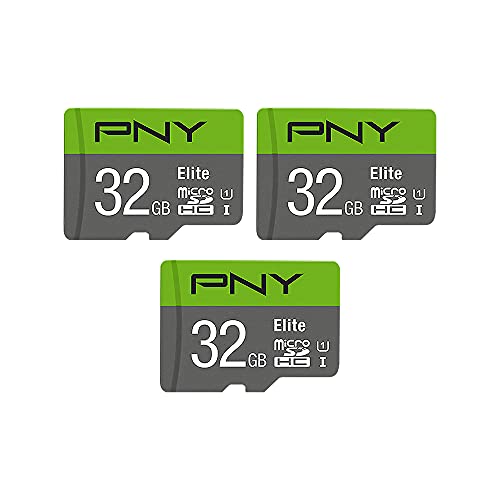
PNY 32GB Elite microSDHC 3-Pack — The natively correct card
Begin with the card the console was designed for. This PNY is a true microSDHC card at 32GB — the exact ceiling of the format the New 3DS officially supports — which means the ownership experience is the one Nintendo intended: the card arrives in the right family, the console reads it without a formatting ritual on a computer, and your library simply appears. Its listing quotes reads up to 100MB/s with Class 10, U1 and V10 marks, every one of which exceeds what the console’s slot can exploit, so in service the card is never the limiting factor in anything the machine does. And it comes three to a pack, which suits this platform’s reality surprisingly well.
Why would a handheld need three cards? Because the New 3DS era is now a collector’s era. Many households run two consoles — an original and an XL, or a child’s and a parent’s reclaimed one — and a second card equips the second machine. A third card is the backup: copy your card’s contents to a computer, keep a spare card imaged with the same library structure, and a lost or failed card becomes an inconvenience instead of a bereavement. What 32GB holds deserves honesty too: a respectable library of downloaded games, since 3DS titles are small by modern standards, but not an everything-ever collection. Owners whose digital shelves overflow that space are the audience for the 128GB entries below. Owners whose shelves fit — more people than the card market admits — should stop here, with the correct card, bought once, in triplicate.
One more virtue of staying native is invisible until something goes wrong: troubleshooting. When a console misbehaves on a natively formatted card, the card is almost never the mystery, and support threads, guides and Nintendo’s own documentation all describe your exact arrangement. Step outside the supported format and every future question gains a preliminary chapter. For a machine increasingly kept alive by its community, that shared map is worth real money.
- Capacity: 32GB per card, three cards in the pack
- Format: true microSDHC — the console’s officially supported family
- Listing figure: up to 100MB/s read
- Speed marks in the listing: Class 10, U1, V10, UHS-I
- Preparation needed: none — the no-reformat option in this pool
Strengths
- The only pick that works exactly as the console’s designers intended, with no computer ritual first.
- Three cards cover a second console and a backup strategy in a single purchase.
- Every specification exceeds the slot’s ability to use it, so the card never limits the machine.
Trade-offs
- Thirty-two gigabytes is a real ceiling for collectors with large downloaded libraries.
- Nothing about the card is fast or modern beyond the console’s needs — it is correct, not exciting.
- Owners who later move the card to a camera or newer handheld will find it small there.
Best for: owners who want the supported, zero-fuss arrangement, households with two consoles, and anyone whose library fits the native ceiling. Not suited for: digital collectors whose downloaded games overflow 32GB no matter how they tidy.

SanDisk 128GB Ultra microSD — The big-library default
For the owner whose library has outgrown the native ceiling, this is the card this guide would buy. SanDisk’s Ultra line is the default recommendation across half the devices in this cluster for a reason — it is consistent, genuine and everywhere — and in 128GB form it gives a New 3DS a library shelf four times the native size. Its listing quotes reads up to 195MB/s with A1, U1, V10 and Class 10 marks; on this console those numbers are ceremonial, but they speak to a card built well past the machine’s demands, which is the kind of overqualification that ages gracefully. The card arrives as microSDXC, which means the FAT32 reformat described later in this guide stands between purchase and play. Budget ten minutes with a computer and the card behaves.
Behave, with footnotes. Owners of large reformatted cards report the console’s little courtesies fraying at the edges — themes and badges arranging themselves with less enthusiasm, the machine taking its time over a very full card, the home menu feeling its age more honestly. None of these are failures; they are the sound of 2015 hardware managing a library size its designers politely assumed nobody would attempt. Kept short of absolutely stuffed, a 128GB card in a New 3DS is a proven, popular arrangement, and this SanDisk is its safest expression. It also moonlights: the adapter in the packet and the card’s modern specification mean it can serve a camera or a tablet whenever the console is resting, a flexibility the native PNY cannot match at this size.
The reformat deserves one reassurance here, with the full walkthrough later: it is a formatting choice, not a modification. Nothing about the console is altered, no warranty ghost is summoned, and the card can be reformatted back for other duties at any time. You are simply asking a big card to speak the older filesystem language the console understands, and cards, unlike consoles, are fluent in whatever they are told to be.
- Capacity: 128GB microSDXC, adapter included
- Format on arrival: exFAT — requires a FAT32 reformat before the console will read it
- Listing figure: up to 195MB/s read
- Speed marks in the listing: Class 10, U1, V10, A1, UHS-I
- Preparation needed: one FAT32 format on a computer — walkthrough below
Strengths
- Four times the native library space in the pool’s most trusted card line.
- Modern specification makes the card genuinely useful in other devices between console duties.
- 128GB is the size where reformatted life on this console stays civil — big, but not eccentric.
Trade-offs
- The FAT32 reformat is mandatory; out of the packet, the console will not see this card at all.
- A very full card shows the console’s age in menu manners and patience-testing pauses.
- You are paying for speed headroom this platform structurally cannot spend.
Best for: digital collectors with libraries beyond 32GB who want the safest big-card route. Not suited for: owners who want to insert a card and play without touching a computer first.

Gigastone 128GB Gaming Plus Micro SD — Gaming-market value
Gigastone aims this card squarely at players — its listing names handheld consoles among its intended homes — and at 128GB with an adapter in the packet it lands on the same practical proposition as the SanDisk: a big FAT32-reformatted shelf for a digital library, at a friendlier tier. Its stated marks, A1 with U3 and V30, exceed the SanDisk’s on paper, and on this console that superiority is entirely theoretical, since the slot governs everything. What is not theoretical is the brand’s habit of competing on reassurance: Gigastone’s listings lean on data-recovery offers in its camera lines, and the Gaming Plus positioning here is aimed at owners who keep whole collections on one card and think about that fact occasionally.
Judged for a New 3DS specifically, the card’s story is simple. Reformat it, fill it sensibly, and it will serve a library for years; the console cannot tell it apart from the SanDisk in any way a player would notice. The differences live outside the console: in offload pace at a computer, in the depth of the brand’s track record, and in how much the purchase price respects a budget that may also be hunting for increasingly collectible games. For a second console, a child’s machine, or a library build where the money is better spent on the games themselves, this is a rational card. For the one console you would rescue from a fire, this guide’s instinct remains the SanDisk — a difference of pedigree, not of function.
Do note the shared condition of every 128GB entry here: the reformat is not optional garnish but the price of admission, and the console’s little large-card quirks apply to this card exactly as they do to its rivals. Gigastone’s gaming branding does not exempt it from the platform’s rules, and no card’s can.
- Capacity: 128GB microSDXC, adapter included
- Format on arrival: exFAT — FAT32 reformat required for this console
- Listing figure: up to 100MB/s
- Speed marks in the listing: A1, U3, V30, Class 10, UHS-I
- Preparation needed: one FAT32 format on a computer
Strengths
- The same 128GB library proposition as the SanDisk at a value tier, adapter included.
- Paper specifications exceed the console’s ceiling in every direction, so the card never limits play.
- Gaming-focused positioning means the listing at least understands the use you are buying it for.
Trade-offs
- A shorter top-tier track record than SanDisk’s Ultra line for a library’s only home.
- Its U3/V30 advantages are invisible on this console — you are buying capacity, not those marks.
- Identical reformat requirement and large-card quirks as every other XC card here.
Best for: second consoles, budget-conscious library builds and owners who would rather spend the difference on games. Not suited for: the single cherished console holding an irreplaceable collection, where pedigree wins.

Lexar 128GB Silver GO Micro SD — One card, many devices
The Lexar entry makes a different argument from its two 128GB neighbours: buy the card your other devices would choose, and let the 3DS borrow it. Its listing quotes a 250MB/s read figure with a V30 rating and names action cameras, drones and modern handhelds among its homes — hardware that can actually spend that performance. In the New 3DS, reformatted to FAT32, it behaves like any good 128GB card, which is to say indistinguishably from the SanDisk and Gigastone in play. The case for it is a household argument: a card that rotates between the console, a camera and a newer handheld earns its keep in every slot, and Lexar’s Silver line is a credible modern line to standardise on.
There is a collector’s counterpoint worth hearing before choosing it for a permanent 3DS home. A card destined to live under the console’s back cover for a decade — holding a finished library, rarely removed — gains nothing from performance it will never use, and the SanDisk’s deeper track record in exactly that sedentary role is the more relevant credential. The Lexar shines when the card’s life is itinerant. Many retro-minded households run precisely that pattern: one good modern card that serves the camera on holiday, the console at home, and the drone on weekends, reformatted or partitioned by duty. If that is your household, this is your pick of the three big cards, and the 3DS will be a perfectly contented stop on its rounds.
As with its neighbours, the reformat stands between the packet and the play, and the console’s large-card manners apply in full. What the Lexar adds is not a better 3DS experience — nothing can add that — but a better decade for the card itself.
- Capacity: 128GB microSDXC, adapter included
- Format on arrival: exFAT — FAT32 reformat required for this console
- Listing figure: 250MB/s read — spendable by cameras, not by this console
- Speed marks in the listing: V30, UHS-I
- Preparation needed: one FAT32 format on a computer
Strengths
- The strongest modern specification of the three 128GB picks, fully usable by other devices.
- A credible line from an established memory maker with a long imaging pedigree.
- Ideal for households that rotate one good card between console, camera and drone.
Trade-offs
- Every advantage it holds over the SanDisk is invisible inside the New 3DS itself.
- As a permanent, sedentary library card it is overqualified in ways that earn nothing.
- Same mandatory reformat and the same large-card quirks as its 128GB rivals.
Best for: multi-device households wanting one excellent 128GB card that includes the 3DS among its duties. Not suited for: a dedicated forever-card for one console, where the SanDisk’s sedentary pedigree fits better.
Silicon Power 1TB Micro SD — The cautionary tale, not a recommendation
This entry carries no link and no endorsement, and it exists because search results for this console cheerfully surface cards like it. A one-terabyte microSD card is a genuine marvel for a modern camera or a current handheld. In a New 3DS it is a misunderstanding with a price tag. Start with the format problem squared: the card is microSDXC many times beyond the console’s native family, so the FAT32 reformat is merely the entry fee. Then consider what the console does with the space. Its interface was designed to browse a modest library; an enormous card invites an enormous collection, and the machine’s menu, its load behaviour and its general patience all degrade as the library sprawls — owners of very large cards describe a console that feels like it is wading. Cluster-size behaviour on huge FAT32 volumes adds waste: the filesystem’s minimum allocation grows with volume size, so many small files each strand unused space, and a card bought for its vastness quietly delivers less of it than the label promises.
Then there is the risk shape. A New 3DS library is increasingly a collection of purchases that cannot all be conveniently re-downloaded — the console’s online shop has closed, and what owners hold on their cards is, for many titles, what they hold. Concentrating that entire inheritance on a single gigantic card maximises the cost of the card’s failure, corruption or loss, while buying capacity the library will never fill: even generous 3DS collections, measured honestly, sit comfortably within the 128GB tier. The rational collector’s architecture is a right-sized card in the console and a backup of its contents on a computer — not a terabyte monument in a slot designed for thirty-two gigabytes. If you arrived at this guide tempted by the biggest number, let this entry be the guide doing its job: the correct response to a 1TB card for this console is admiration, from a distance, for a different machine. The same capacity logic, in a healthier direction, appears in our best 64 gig micro sd cards roundup, where even 64GB is discussed as a deliberate step rather than a default.
- Capacity: 1TB microSDXC — vastly beyond this console’s design assumptions
- Format on arrival: exFAT; FAT32 reformat mandatory and increasingly awkward at this size
- Status in this guide: prose-only cautionary example — not linked, not recommended
- Practical verdict: a 128GB card plus a computer backup serves any real library better
Strengths
- As a piece of technology, astonishing density — for the modern devices it is actually built for.
- It usefully marks the far boundary of this console’s sensible capacity, which clarifies every other pick.
- None that apply inside a New 3DS.
Trade-offs
- Menu and load behaviour on a huge, full card makes the console feel its age at its worst.
- FAT32 cluster behaviour wastes a growing share of the very capacity you paid for.
- It concentrates an increasingly irreplaceable library into a single point of failure.
Best for: nothing involving this console — buy it for a modern camera or current handheld instead. Not suited for: the New 3DS, in any scenario this guide can construct.
microSD Express Cards (Switch 2 class) — A different standard wearing a familiar shape
The final entry is also unlinked, and it guards a newer trap. microSD Express is a genuinely different standard — not a faster grade of the cards above, but a re-architecture that runs the card over a PCIe-style interface, the way fast computer storage works, and it was introduced to serve the Switch 2 generation’s appetite for loading modern games. The cards share the microSD outline, which is exactly what makes them dangerous to a hurried buyer: they look like an upgrade. For a New 3DS they are nothing of the kind. The console predates the standard by a decade and speaks only the older language; an Express card offers it nothing, and the correct mental model is not “faster card” but “different plug wearing a similar coat.” Any reader who has nearly bought one for a 3DS has been saved by arriving here first.
The broader lesson generalises across this whole cluster of guides, and it is worth stating once, plainly: storage standards fork, and the fork is not always labelled in the size of type a shopper reads. The camera world met the same moment when newer bodies adopted a different card format entirely — our best sd cards for a7riii guide notes a popular modern format that simply does not fit that Sony body, however current it is. In every case the discipline is identical: identify the standard your device speaks, buy the best card within that standard, and let the newer standard wait for the newer device you may own one day. For the New 3DS, that standard is microSDHC natively and microSDXC-with-FAT32 by courtesy — and within it, the four linked picks above are the whole honest market.
- Standard: microSD Express — a PCIe-based re-architecture, not a speed grade
- Intended home: the Switch 2 generation of handhelds
- Status in this guide: prose-only warning — no link, no ASIN, nothing to buy for this console
- Compatibility with the New 3DS: none that serves the owner — the console speaks the older standard only
Strengths
- For its intended generation, Express is a real leap in what a tiny card can do.
- Its existence clarifies, by contrast, exactly which standard this console belongs to.
- None that a New 3DS can use.
Trade-offs
- It is the easiest wrong purchase in this entire category because the shape invites the mistake.
- Express cards command new-standard prices for performance this console cannot touch.
- Buying one for a 3DS strands the money until a compatible device joins the household.
Best for: owners of the current Switch generation, on that console’s own guides. Not suited for: any 3DS-family machine, under any circumstances.
How Do the Six Entries Compare Honestly?
| Entry | Capacity | Works natively? | Linked? | Role |
|---|---|---|---|---|
| PNY Elite 3-Pack | 32GB | Yes — true microSDHC | Yes | The supported default |
| SanDisk Ultra | 128GB | After FAT32 reformat | Yes | Big-library default |
| Gigastone Gaming Plus | 128GB | After FAT32 reformat | Yes | Value library card |
| Lexar Silver GO | 128GB | After FAT32 reformat | Yes | Multi-device card |
| Silicon Power | 1TB | Technically, badly | No | Cautionary example |
| microSD Express | Various | No — different standard | No | Warning only |
Notice what the table cannot show: a performance ranking. On this console the four linked cards perform alike in play, because the machine, not the media, sets the pace — a fact worth sitting with before paying for speed. Choose by format correctness, capacity and the life the card will lead outside the console — the only axes on which they genuinely differ, and the axes this guide has used to arrange them from first entry to last for exactly that reason, in every section that follows below, without exception or apology.
Why Does the Console Insist on FAT32, and What Is a Cluster?
FAT32 is the filesystem the 3DS family was built to read — the shared language between the console and its card. Smaller cards of the console’s era shipped speaking it natively. Larger cards ship speaking a newer language, exFAT, which the console simply does not understand, hence the reformat: you are not upgrading the card, you are translating it. Translation has one quirk worth understanding, because it explains the “big card waste” owners report. FAT32 organises a volume into clusters, and the minimum cluster size grows as the volume grows; every file occupies whole clusters, so a one-kilobyte save file on a huge card can sit in a cluster many times its size, stranding the difference. Thousands of small files — saves, patches, photos, streetpass data — each strand a little, and the strands add up. This is not corruption or a fault; it is arithmetic, and it is one more reason the guide steers libraries toward 128GB rather than beyond: at that size the waste is a footnote, while at a terabyte it becomes a chapter.
The second quirk is behavioural. The console indexes and presents its library with hardware and software from its era, and very large, very full cards make that housekeeping slower in ways owners feel as menu lag and hesitant loads. A card kept to a size the library genuinely needs keeps the machine feeling like itself — a small, real quality-of-life argument that never appears on any card’s packaging.
There is a third, quieter point that experienced owners pass along: the console organises its home menu around a finite grid of software tiles, and a library can reach the point where the interface itself, not the card, becomes the constraint — titles beyond the display’s organisational patience gain nothing from more gigabytes. Nobody publishes that boundary on a box, and it differs by how an owner arranges their machine, but its existence reinforces the guide’s central sizing advice from a second direction. The card can be made to hold more than the console can gracefully show, and past that point the purchase stops being storage and becomes mere numbers.
How Do You Reformat a Big Card to FAT32, Step by Step?
Work on a computer, with the card in a reader or its adapter, and back up anything on the card first because formatting erases it completely. On a computer, open the disk or formatting utility, select the card carefully — double-check you have chosen the card and not a drive you care about — and choose FAT32 as the filesystem. One wrinkle: some built-in tools decline to offer FAT32 for larger volumes, a limitation of the tool rather than the format, and free dedicated formatting utilities exist that will happily write FAT32 across a 128GB card; use a reputable one and the job takes moments. When it finishes, create nothing on the card yourself: insert it into the powered-off console, let the machine build its own folder structure on first boot, and only then begin moving your library across by whatever transfer route you use.
Afterwards, verify like a sceptic. Open several games, including the largest, and confirm they launch; check that the console reports a plausible free-space figure; and keep the computer copy of your library until the card has survived a week of ordinary play. If a freshly formatted card misbehaves, the usual culprits are a format that quietly used the wrong filesystem after all, or a card whose genuineness was always in doubt — reformat once more, deliberately, before blaming the console. Owners who keep several small devices fed will recognise this same format-first discipline from our best gopro micro sd cards guide, where in-camera formatting plays the equivalent role.
How Should You Care for a Console That Is No Longer Made?
The New 3DS belongs to the growing class of beloved hardware that must now be maintained rather than replaced, and its card strategy should reflect that. Keep a full copy of the card’s contents on a computer, refreshed after every significant purchase or milestone — with the official shop closed, your card holds software that ranges from inconvenient to impossible to reacquire, and the backup is the only insurance that exists. Keep a spare card: the PNY pack’s third card, or any card in this guide, formatted and ready, so a failure is a swap rather than a crisis. Handle the console’s card slot gently and rarely; it was not designed for daily swapping, and the back-cover arrangement rewards owners who set a card and leave it. And store the machine with its card inserted and its battery tended, the way you would store any instrument you intend to play in ten years — because the entire point of choosing its storage carefully, in a guide like this one, is that people plainly do.
Care extends to the unglamorous physics of the thing. The card lives under a screwed-down cover, which protects it from pockets and bags but also means every swap is a small operation with small screws over carpet — do it at a table, in good light, with the screws kept in a dish. Resist the urge to test mystery cards in the console: an unknown card of unknown provenance belongs in a computer’s reader first, where a verification pass can interrogate it without your library as the hostage. And when the console travels, it travels in a case; the 3DS generation’s hinges and slots have survived a decade of careful owners and exactly zero decades of careless ones.
What Does a 3DS Library Actually Weigh?
Capacity anxiety dissolves when you weigh the actual software. The 3DS era predates the modern fifty-gigabyte game; its downloaded titles were built for a machine sold with a small card in the box, and most sit in the hundreds of megabytes, with the platform’s heavyweights — the big role-playing games and the enhanced ports — reaching only into the low single-digit gigabytes. A 32GB card therefore does not hold a token handful of games; it holds a library a person can genuinely play, dozens of titles deep, with room for demos, saves, photos and the system’s own extras. The owners who overflow it are a specific and honourable tribe: the completionists who bought digitally for a decade, the importers, the households where three siblings share one console’s library. If you are not sure which tribe you belong to, the console will tell you — its data management screen reports the library’s weight in blocks, and a library that has lived happily on a small card for years has already voted.
The 128GB tier, weighed the same way, is not really about fitting games at all. It is about never thinking about space again: every owned title installed simultaneously, demos kept rather than culled, room for the machine’s camera roll and a lifetime of saves. That peace of mind is a legitimate purchase — this guide sells it happily in the SanDisk, Gigastone and Lexar — provided it is bought as peace of mind and not mistaken for necessity. The step beyond, into the capacities the cautionary entry covers, buys a peace of mind the library cannot use, at the price of the console’s manners. Somewhere in that sentence is the entire philosophy of this roundup.
How Do You Move a Library From an Old Card to a New One?
Migration on this platform is pleasingly analogue: the library lives on the card in a folder structure the console maintains, and moving it is a copying exercise rather than a licensing ordeal. Power the console off and remove the old card — on the New models this means the back cover and its small screws, a design that already tells you Nintendo expected this rarely. Copy the card’s entire contents to a computer, preserving everything exactly, including the folder whose name looks like a keyboard accident; that folder is your library’s identity, and partial copies are where migrations go to die. Prepare the new card — natively ready if it is the PNY, FAT32-formatted if it is one of the 128GB picks — copy everything onto it in one complete pass, insert it, and boot. The console should greet its library as if nothing happened, because from its point of view, nothing did: the card is the library’s home, and you have simply rebuilt the house around it.
Verify before you celebrate. Launch the largest game, a small one, and something with years of save data attached; check that themes and arrangements survived; and keep the old card untouched for a month as the ultimate backup before repurposing it. Owners upgrading within the native family — say, from a bundled small card to the PNY 32GB — will find this the whole job. Owners stepping up to 128GB add only the reformat at the start. It is one of the last platforms where a library migration fits in a paragraph, and there is something worth preserving in that simplicity.
Does It Matter Which Member of the 3DS Family You Own?
This guide addresses the New models — the New 3DS and New 3DS XL — whose card slot takes microSD under the back cover, and the distinction matters because the earlier generation of the family used full-size SD cards behind a side flap. Advice, listings and well-meaning gifts cross between the generations constantly, and a microSD card bought for an original 3DS needs its adapter to serve there, while a full-size card bought for an original cannot serve a New model at all. Within the New generation, everything in this guide applies identically to the standard and XL machines; they differ in screen and shell, not in storage. The New 2DS XL, the family’s later flat-hinged sibling, also takes microSD and follows the same rules — native HC ceiling, FAT32 courtesy for bigger cards — so owners of that model can shop this page with confidence.
One family habit is worth adopting regardless of model: because the shop has closed and the hardware is out of production, treat the console, its card and your computer backup as a single artefact in three parts. Any one part can fail; the artefact survives if the other two are tended. That framing — unglamorous, archival, correct — is the real difference between a retro console that still plays in a decade and one that becomes a story about a library somebody used to have.
How Can You Tell a Genuine Card From a Counterfeit One?
No platform suffers more from fake flash than a discontinued console with an irreplaceable library, so the skill is worth teaching properly. Counterfeit cards are real flash chips of small capacity wearing firmware that lies about their size; they accept writes cheerfully until the true capacity is reached, then begin overwriting their own beginnings — which, on a games library, means the oldest, most-played titles corrupt first. The tells begin before purchase: a famous brand at a fraction of its usual price, a seller with no history, packaging in the listing photographs that looks almost right. They continue after arrival: a card that reports its full capacity instantly but fills suspiciously slowly, or that fails a full write-and-verify test, which free utilities will run for you and which every card destined for this console deserves. Test before you trust, on a computer, with data you can afford to lose — never by loading the library and hoping.
Every linked pick in this guide comes from an established line sold through ordinary retail channels, which is the strongest practical protection available. The second protection is the backup habit repeated throughout this page: even a genuine card is mortal, and a library copied to a computer fears neither counterfeits nor mortality. Owners of other small machines will recognise the same sermon in our best raspberry pi sd cards guide — different console, same commandments: genuine media, tested early, backed up always.
What Happens to Themes, Saves and StreetPass on a Reformatted Card?
Owners contemplating the jump to 128GB often worry about the small furniture of their console’s life — the home-menu theme they chose years ago, the badge arrangements, the StreetPass plaza population, the save files with hundreds of hours in them. The reassuring answer is that all of it lives in the card’s folder structure, and the migration described above carries the whole household across intact, because you copy everything rather than cherry-picking game folders. The console on its new card is not a fresh console with games added; it is the same console, continued. What can change is tempo rather than content: a much larger card gives the machine more housekeeping to survey, and the menu’s little ceremonies — waking, arranging, presenting your badges — may take a breath longer than they did on the native card. Owners who find that trade unacceptable are not wrong; they are simply the native card’s natural constituency, and the PNY exists for them.
Saves deserve one specific sentence, because they are the true treasure: they live inside the same copied structure, they travel with the migration, and they are the strongest argument for the computer backup this guide keeps prescribing. Games can, at a stretch, be found again in the world. A save file from 2016 cannot.
What About the Little Card That Came in the Box?
Every New 3DS shipped with a small microSDHC card already in its slot — a few gigabytes, enough for the system’s needs and a first game or two — and many consoles still run on it today. There is no shame in that card, but there are three reasons this guide exists despite it. The first is arithmetic: a modern owner’s library, photos and saves eventually lean against its walls. The second is age: that card has now spent years in service, and flash does not improve with birthdays, so replacing it proactively — while it still reads perfectly and can be copied in full — is the calm version of an errand that becomes urgent later. The third is the backup philosophy again: the bundled card, once migrated from, becomes a frozen snapshot of the console at a moment in time, and owners who keep it in a labelled envelope own a small piece of insurance that costs nothing at all.
If your bundled card still serves and your library still fits, the honest advice is to buy nothing today except perhaps the PNY pack as a spare-and-successor in waiting. Guides like this one are at their best when they can say that plainly: the correct purchase is sometimes a card, and sometimes it is a plan. For this console, increasingly, the plan is the product — the card is just the part of it you can hold.
What Mistakes Do New 3DS Owners Make With Cards?
The headline mistake is buying by the biggest number — capacity or speed — on a console that rewards neither past a modest point. The second is inserting a fresh 128GB card, watching the console ignore it, and concluding the card or the machine is broken, when the FAT32 reformat was the whole story. Third is buying an Express card in the sincere belief that newer means compatible; the shape is the same and the standard is not. Fourth is trusting a suspiciously cheap giant card from an unknown seller with a library that can no longer be re-bought — counterfeit capacity in a console like this is not a bargain that fails, it is a collection that evaporates. Fifth is having no backup: a single card, holding a closed shop’s worth of games, carried loose in a bag. Every one of these is avoidable with the contents of this page, which is more than can be said for most retro-hardware regrets.
Final Recommendation
Buy the PNY 32GB three-pack if your library fits the console’s native world — it is the correct card, bought once, with a spare and a second console covered. Buy the SanDisk 128GB Ultra if your collection has genuinely outgrown that world, and spend the ten minutes the reformat asks of you. Choose the Gigastone to save money toward games, or the Lexar if the card will live a travelling life across several devices. Leave the terabyte cards and the Express cards to the machines they were built for. And whichever card you choose, do the two unglamorous things this guide has repeated because they matter more than the choice itself: test the card before the library moves onto it, and keep a copy of that library somewhere that is not a card at all. Hardware this loved deserves custodianship, not just consumption, and a well-kept New 3DS is rapidly becoming a family heirloom with a hinge. A New 3DS asks so little of its storage — the right format, an honest capacity, a card that tells the truth — and gives back a decade of play for it; meet it on those terms and it will still be delighting somebody long after faster consoles are landfill.
Frequently Asked Questions
Why won’t my New 3DS recognise my new 128GB card?
Almost certainly the filesystem. Cards that size ship formatted as exFAT, which the console cannot read. Reformat the card to FAT32 on a computer — the walkthrough above covers it — and the console should build its folders and welcome the card on the next boot.
Will a faster card make my games load quicker?
No, in any way you would feel. The console’s card slot and hardware set the pace, and every card in this guide already exceeds what the slot can use. Load behaviour differences between these picks are negligible; choose on format, capacity and trust instead.
How many games fit on 32GB?
More than most owners expect, because 3DS games are small by modern standards — a 32GB card holds a respectable library of downloaded titles alongside saves and extras. Only committed digital collectors, or owners determined to carry everything at once, genuinely need the 128GB tier.
Is reformatting a big card safe for the console?
Yes. Formatting changes the card, not the console; nothing about the machine is modified, and the card can be reformatted for other uses later. The only real risks are erasing the card’s existing contents — so back up first — and choosing the wrong drive in the formatting tool.
Can I use the card from my Switch in my New 3DS?
The card family is shared but the preparation is not: a card formatted for a Switch will not arrive speaking FAT32 in the way the 3DS expects, and moving a card between consoles means reformatting and losing its contents for the other machine. Households are happier with a card per console — the Chromebook-style sharing in our best chromebook sd cards guide works there because that platform is more forgiving.
What should I do before the card in my console eventually fails?
Back up its full contents to a computer now, while it is healthy, and keep a spare formatted card ready. With the console’s shop closed, the library on that card is the asset; the card itself is just its current home, and homes should always have a spare key.
Related Guides
For the same console family’s newer hardware, the best affordable nintendo switch sd cards roundup covers a roomier and simpler storage world, while our best raspberry pi sd cards guide explores another small machine whose card is its whole universe — and whose owners face the same backup discipline.


