What's inside
- Where to buy
- Key Takeaways
- Quick Picks
- How Did We Choose These Six Label Printers?
- Dye or Pigment: Which Ink Survives Your Product’s Life?
- What Does Print Width Really Decide?
- What Do Barcodes, Batch Codes and Regulators Ask of a Label Printer?
- How Do You Keep Brand Colour Honest Across Runs and Machines?
- What Does a Finished Label Actually Cost You?
- Gap, Black Mark or Continuous: How Does the Printer Know Where a Label Ends?
- How Do You Look After a Printhead You Cannot Afford to Replace Casually?
- When Should Labelling Stay Outsourced Even After You Buy a Printer?
- How Do You Apply Labels Straight When the Run Gets Long?
- What Should Your First-Week Test Protocol Include?
- How Does Label Printing Change as a Business Grows?
- Which Questions Should You Put to the Seller Before the Roll Runs Out?
- What Separates a Label That Sells From a Label That Merely Sticks?
- How Should You Organise Design Files, Versions and Reprints?
- Why Do Short Runs Change How You Should Think About Design Itself?
- What Does a Mature Label Bench Look Like a Year After Purchase?
- Can You Print Labels for Products You Do Not Make Yourself?
- A Last Word on Samples Before You Spend Anything
- Label Stock, Adhesive and the Roll You Choose Matter as Much as the Printer
- How Do the Six Machines Split on Width, Speed and Working Style?
- Which Label-Printing Mistakes Cost New Owners the Most?
- Final Recommendation
- Frequently Asked Questions
- Related Guides
As an Amazon Associate I earn from qualifying purchases. This post may contain affiliate links at no extra cost to you.
gizmoverdict.com is reader-supported. When you buy through links on our site, we may earn an affiliate commission.
Where to buy
The best color product label printers answer a question every growing product business eventually asks out loud: at what point does ordering pre-printed labels stop making sense? The answer usually arrives disguised as a problem — a recipe tweak that strands a cupboard of obsolete labels, a seasonal scent that needs four hundred labels rather than the printer’s five-thousand minimum, a retailer who wants a barcode variant by Friday. The six machines in this guide print full-colour product labels in-house, in short runs, on demand. They span the realistic territory: Epson’s ColorWorks line built for businesses that treat labels as operations, Primera’s long-serving LX family, Afinia and VIPColor machines aimed at faster and wider production, and a touchscreen-driven QL-E100 that can run a label job without a computer attached.
Colour label printing is an ink story before it is a printer story. Dye inks deliver the saturated, glossy pop that sells a candle or a craft beer, and pigment inks deliver the water and chemical resistance that a shampoo bottle, a cleaning product or a chilled food label needs to survive its own life. Some of these machines commit to one chemistry; some let you swap. That single decision — what will happen to your label after it leaves the printer — should be made before any brand comparison, because a beautiful label that runs in a wet hand is worse than a plain one that endures. The reviews below keep returning to that fork, deliberately.
Key Takeaways
- Dye versus pigment is the founding decision: dye for shelf pop on dry goods, pigment where labels meet water, oils, refrigeration or sunlight.
- Print width divides the field — the Primera LX910 and VIPColor VP550 handle wide labels up to the eight-inch class, while the Epson CW-C4000 and Primera LX500 serve the narrower mainstream.
- Speed claims mean little without your label size attached; the VP550’s stated rate of up to 8 inches per second matters to long runs, not to fifty-label batches.
- Built-in cutters appear across the Epson, both Primeras and the QL-E100, and they matter because a colour label line without a cutter outsources its finishing to scissors.
- The QL-E100 is the odd one out in a useful way: touchscreen, stored designs and USB printing for workplaces where the label printer must not depend on one office PC.
Quick Picks
| Pick | Badge | Why it earns its place |
|---|---|---|
| Epson ColorWorks CW-C4000 | The operations-grade desktop | Epson’s ColorWorks engineering in a compact matte-ink machine with an auto cutter, for labels that must survive real handling. |
| Primera LX910 Color Label Printer | The wide-format veteran | Prints up to 8.25 inches wide and built its reputation on interchangeable dye and pigment flexibility. |
| Afinia Label L502 | The production step-up | Afinia’s mid-production machine for businesses whose label volume has outgrown entry desktop pace. |
| VIPColor VP550 Color Label Printer | The speed-and-resistance pick | Stated output up to 8 inches per second with water-resistant label output for demanding product lives. |
| Primera LX500 Color Label Printer | The compact starter | A 4800 DPI desktop with a built-in cutter, sized and priced for a first in-house label operation. |
| QL-E100 Full Color Label Printer | The standalone touchscreen route | Prints from stored memory or USB with its own touchscreen and bundled design software — no dedicated PC required. |
How Did We Choose These Six Label Printers?
Every pick had to be a true product-label machine: full colour, roll-fed, built to print on the die-cut label media that product packaging actually uses, rather than a shipping-label thermal printer wearing colour language. Listings had to state the facts a buyer plans around — print width, cutter provision, and in the VP550’s case a speed figure — or the machine had to be a well-documented model from a maker whose label line is its whole business. Ink chemistry was recorded for every pick where the listing or the model’s documented design states it, and treated as a first-order buying fact rather than a footnote, because it decides which products each printer may honestly serve.
The six were then read against three businesses: a food producer labelling jars in weekly batches whose designs change with the seasons; a cosmetics maker whose bottles live wet lives in bathrooms; and a small manufacturer shipping private-label goods whose customers dictate label variants. No single machine wins all three stories, and the guide does not pretend otherwise — it maps each printer to the story it serves, and names the story it should sit out.
Dye or Pigment: Which Ink Survives Your Product’s Life?
Follow a label through its week. A candle label sits dry on a shelf and is read under warm light; dye ink’s saturation is pure advantage there, and its weakness — water — never gets a vote. A hot-sauce label is handled with wet fingers, refrigerated, wiped and handled again; pigment ink’s particles sit on the media surface and shrug off that week. A chemical or automotive product goes further, meeting oils and solvents that test not just the ink but the label stock and adhesive beneath it. The printer decision is therefore really a media-system decision: ink, stock and adhesive chosen as one recipe for one product life.
Two of the makers here built their names on flexibility at exactly this fork. Primera’s LX line is known for letting owners run dye for brilliance or pigment for durability within the same machine family, and Epson’s ColorWorks line leans the other way — pigment discipline, matte finishes, labels engineered for the unglamorous environments where most products actually live. Neither philosophy is wrong. What is wrong is buying brilliance for a wet product or durability for a dry one and paying the wrong premium for years of ink orders.
What Does Print Width Really Decide?
Width is the specification buyers under-read until their flagship product’s label does not fit. Measure your largest label — not the jar, the label, wrap and overlap included — and hold that number against each machine’s stated maximum. The eight-inch class represented by the LX910 and the VP550 swallows wide jar wraps, gallon containers and multi-panel labels whole. The narrower desktop class around four inches covers the great majority of bottles, jars, boxes and pouches sold by small producers, and does so in machines that fit on the bench the business actually has. Buying width you never use costs money and footprint; buying width you need next year costs a printer. The honest exercise is listing your next three products alongside your current ones before choosing the class.

Epson ColorWorks CW-C4000 — The operations-grade desktop
Epson’s ColorWorks machines were built for a buyer who finds the word operations comforting: factories, fulfilment benches and food producers who print labels as part of a process, with the printer expected to behave like equipment rather than a hobby. The CW-C4000 carries that DNA into a desktop footprint, and its listing specifies the matte configuration with an auto cutter. Matte pigment output is the point — labels that stay legible and intact through refrigeration, handling, condensation and the general disrespect products receive between shelf and sink.
Choose the C4000 when your labels work for a living. Its strengths are consistency across long runs, a media path designed for business label stocks, and Epson’s support structure behind a product line sold into industry. Its trade is showroom sparkle: a matte pigment label will never glow like a glossy dye label, and for a premium candle or a gift product that glow may be the entire point of the label. Read the listing’s configuration carefully — the ColorWorks family includes gloss and matte variants and cutter options, and the machine you want is the one whose stated configuration matches your media, not the family’s general reputation.
- Configuration: matte inkjet with auto cutter, per the listing
- Maker: Epson ColorWorks — business label line
- Ink character: pigment discipline for durable labels
- Finishing: built-in automatic cutting
- Position: process-grade desktop for working labels
Strengths
- Built and supported as business equipment rather than a craft accessory.
- Matte pigment output suits refrigerated, handled and damp product lives.
- An auto cutter keeps short-run finishing inside the same machine.
Trade-offs
- Matte durability trades away the glossy pop dye machines show off.
- Family variants make configuration-checking at purchase essential.
- Narrower than the eight-inch class for very wide wraps.
Best for: food, beverage and household producers whose labels must survive their products. Not suited for: gift and décor brands whose label is primarily a glossy first impression.
Primera LX910 Color Label Printer — The wide-format veteran
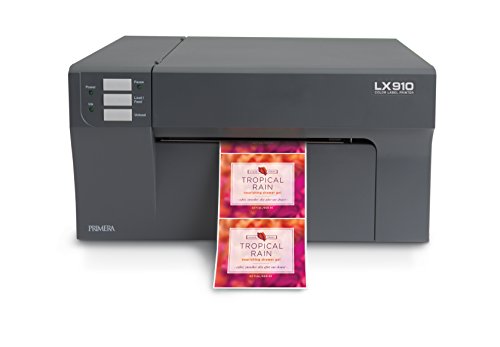
The LX910 is Primera’s wide answer: its listing states plainly that it prints up to 8.25 inches wide, which moves it out of the bottle-label mainstream and into territory the narrower machines cannot enter — wide jar wraps, larger containers, multi-up layouts printed across the web and cut down. Around that width, Primera built the LX family’s defining convenience: a single-cartridge system in which dye and pigment inks can be swapped for the job at hand, so a producer with both dry gift lines and wet working lines is not forced to choose one chemistry forever at purchase.
That flexibility has a running-cost personality buyers should understand. A single combined cartridge is simple to manage and wasteful in a specific way — the colour that runs out first retires the cartridge — so high-volume single-product producers should run the ink maths against their actual coverage before falling in love. For varied short-run work, though, the LX910’s combination of width and swap-able chemistry is genuinely distinctive in this guide. Add Primera’s long history in short-run label printing, with media and support organised around exactly this buyer, and the LX910 becomes the pick for a business whose label catalogue refuses to standardise.
- Print width: up to 8.25 inches, per the listing
- Ink system: single-cartridge design, dye or pigment by job
- Maker: Primera — short-run label specialist
- Finishing: cutter provision in the LX family design
- Position: wide, flexible short-run production
Strengths
- The widest print path in this guide alongside the VP550.
- Dye-or-pigment swapping serves mixed product catalogues from one machine.
- A specialist maker’s media and support ecosystem behind it.
Trade-offs
- Combined-cartridge economics punish heavy single-colour coverage.
- Width and capability are wasted on a one-bottle business.
- Swap-able ink demands operator discipline to match ink to job.
Best for: varied producers with wide labels or mixed dry and wet product lines. Not suited for: a single-product line printing one narrow label by the thousand.

Afinia Label L502 — The production step-up
Afinia occupies the rung where a business stops calling its label printing a side task. The L502 is the company’s mid-production colour machine, and its listing’s brevity — the title trails off at the ink word — means the careful buyer confirms the configuration details against Afinia’s documentation before ordering; what the model line is documented for is versatility in ink choice and a build aimed at sustained runs rather than occasional batches. Treat this review as a pointer to that documented machine, and the listing as the place to verify the exact unit on offer.
In a production story the L502’s appeal is momentum: a machine specified for businesses graduating from entry desktops, with the media handling and ink capacity thinking that keeps a run a run instead of a series of interruptions. Afinia sells into the same short-run world as Primera but with a more industrial accent — its buyers talk about shifts and throughput rather than craft fairs. If your label volume has a growth curve and a person whose job includes feeding the printer, the L502 is the conversation to have; if your volume is a quiet shelf of jars each month, the smaller Primera or the Epson will serve you with less machine to feed.
- Maker: Afinia Label — production label line
- Ink configuration: verify against the seller documentation — the listing title is truncated
- Class: mid-production colour label printing
- Position: step-up for growing label volume
- Buying note: confirm the exact configuration in the listing before ordering
Strengths
- Specified for sustained production rather than occasional batches.
- An industrial-leaning maker with label printing as its whole business.
- Room to grow into volume that would strand an entry desktop.
Trade-offs
- The listing title is truncated, so configuration homework is mandatory.
- More machine than a monthly-batch micro-producer can justify.
- Production pace only pays when a real production schedule exists.
Best for: a growing producer whose label runs have become a scheduled operation. Not suited for: a hobby-scale seller printing a few dozen labels at a time.

VIPColor VP550 Color Label Printer — The speed-and-resistance pick
The VP550 makes the boldest claim in this guide and prints it in its own listing: up to 8 inches per second, with water-resistant label output. Speed at that level changes what in-house labelling means — a run that occupies a desktop machine for an afternoon becomes a task measured in minutes, and the business case shifts from convenience to genuine production substitution. The water-resistance claim rides on pigment-class output, placing the VP550 in the same durability conversation as the Epson while aiming at wider and faster work.
Read the speed figure like an adult: it is a maximum, achieved under the conditions the maker chose, and your real throughput will be set by label length, gaps, data and how the finished roll is handled. Even discounted honestly, the VP550 sits at the fast end of this guide, and for a co-packer, a beverage producer or a private-label operation with daily runs, that headroom is the product. Width in the eight-inch class completes the picture. The counterweight is commitment — a machine of this capability wants volume to justify it, a bench to live on, and media bought in rolls sized to its appetite. Buy it for the schedule you have, not the one in the pitch deck.
- Speed: up to 8 inches per second, per the listing
- Output character: water-resistant labels, per the listing
- Class: fast desktop colour label production
- Maker: VIPColor — Memjet-powered label line
- Position: high-throughput short-to-mid runs
Strengths
- The fastest stated output in this guide by a wide margin.
- Water-resistant output serves wet and chilled product lives.
- Wide-label capability pairs with the speed for real production work.
Trade-offs
- Maximum speed is a best-case figure, not a promise for every label.
- Capability this size needs volume to earn its bench space.
- Media appetite suits planned purchasing, not emergency single rolls.
Best for: beverage, co-packing and private-label operations with daily label runs. Not suited for: a quiet studio whose weekly output fits in a shoebox.
Primera LX500 Color Label Printer — The compact starter
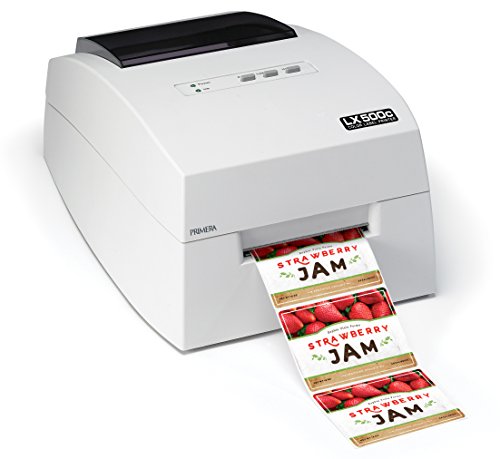
The LX500 is where many product businesses start printing their own labels, and its listing states the two facts that explain why: 4800 DPI output and a built-in cutter, in a desktop box a small studio can actually house. The resolution figure deserves translation — at label sizes, what matters is that small type stays crisp and photographic jar labels hold their detail at reading distance, and the LX500’s specification was chosen to make exactly that true for the bottle-and-box mainstream. The cutter matters just as much in practice, because a first label operation has no finishing department; the machine that prints and cuts is the whole department.
As a starter it asks the right compromises of its owner. It serves the narrower label widths most small products use, it keeps the process in one device, and it lets a business learn its real label economics — cost per finished label, waste rate, design discipline — at a scale where mistakes are tuition rather than losses. Its ceiling is equally clear: when runs lengthen and widths grow, the LX500’s desktop pace becomes the bottleneck the VP550 and LX910 exist to remove. Buy it as the machine that teaches you your numbers; if the numbers outgrow it, it will have paid for its own replacement in avoided minimum-order waste.
- Resolution: 4800 DPI, per the listing
- Finishing: built-in cutter, per the listing
- Maker: Primera — LX family entry model
- Class: compact desktop, narrow-to-mid label widths
- Position: first in-house label operation
Strengths
- Print-and-cut in one compact machine suits a one-person label department.
- Resolution headroom keeps small type and photo labels honest.
- A gentle scale at which to learn real per-label economics.
Trade-offs
- Desktop pace becomes the bottleneck as runs grow.
- Wide wraps belong to the eight-inch class, not to this machine.
- Starter economics still require media discipline to beat outsourcing.
Best for: a first-time in-house label operation for bottles, jars and boxes. Not suited for: an established producer already running daily volume.
QL-E100 Full Color Label Printer — The standalone touchscreen route
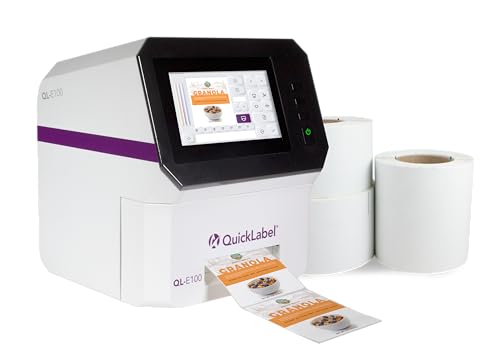
The QL-E100 solves a problem the other five assume away: the computer. Its listing describes a built-in touchscreen and auto-cutter, free design software, and printing from stored memory, a USB stick or a Windows computer — which means the label station can live in a packing area, a market stall or a production bench where no dedicated PC belongs. Designs are prepared once, stored, and called up at the touchscreen by whoever is packing that day, with quantities set on the spot. For a business whose labels are stable and whose staff rotates, that independence is not a novelty; it is the feature that keeps labelling possible when the office laptop is elsewhere.
The same independence defines its limits. A standalone workflow rewards a small catalogue of finished designs and punishes constant design tinkering, which belongs on a computer with a big screen regardless. Ink and media economics should be verified against the maker’s documentation with the same care as any pick here, since the listing leads with workflow rather than consumable detail. Judged on its own terms — dependable colour labels, cut and ready, from a machine that runs itself — the QL-E100 is the most operationally forgiving pick in this guide, and for market traders and multi-staff packing benches it may be the most sensible one.
- Interface: built-in touchscreen, per the listing
- Job sources: stored memory, USB stick or Windows computer
- Software: free design software stated in the listing
- Finishing: auto-cutter stated in the listing
- Position: standalone label station
Strengths
- Runs label jobs without depending on a dedicated office computer.
- Stored designs suit rotating staff and stable catalogues.
- Touchscreen quantity control fits packing-bench reality.
Trade-offs
- Frequent design changes still belong on a full computer setup.
- Consumable economics need confirming in the maker documentation.
- A small stable catalogue benefits most; sprawling ones strain stored-job workflows.
Best for: packing benches, market stalls and multi-staff operations with stable label designs. Not suited for: a design-led brand revising artwork weekly.
What Do Barcodes, Batch Codes and Regulators Ask of a Label Printer?
A product label is a legal document wearing a design. Ingredients in the right order, net weight, allergen declarations, batch and date codes that survive the product’s life — the printer’s job is to render all of it legibly at small sizes, every run, without a faded panel or a smeared code. That is a resolution and consistency test more than a beauty test, and it is why the reviews above keep noting cutter and configuration details: a label run whose last fifty labels drift out of registration is a compliance problem, not an aesthetic one. Print a sample at your smallest regulatory type size and read it with tired eyes under poor light; that is the condition your customer and your inspector share.
Barcodes raise the stakes further. A retail barcode must scan at a till, first time, on a curved jar, through a chilled cabinet’s condensation. Ink spread on the wrong stock fattens bars until scanners sulk, which is why barcode verification belongs in your first-week testing with the actual scanner model your retailers use. Variable data — sequential numbers, batch codes, best-before dates merged from a spreadsheet — is the other quiet requirement, and it lives in your software more than in the printer. Confirm the data path before purchase if your products carry codes, because a beautiful printer fed by copy-pasted spreadsheets will eventually print a wrong date on a thousand jars.
How Do You Keep Brand Colour Honest Across Runs and Machines?
Your brand red is a promise, and label printing tests it weekly. Colour drifts with ink lots, media batches, printhead age and the humidity of the room, and the drift announces itself at the worst moment — new stock shelved beside old, the difference visible to anyone who glances. The defence is a reference ritual: keep one approved label from the master run in a drawer, print a short proof strip at the start of each new media roll or ink change, and compare under the same light every time. Adjust while the run is young, not after five hundred labels have married the wrong red.
Design can forgive what process cannot. Brands built on forgiving palettes — deep tones, textured backgrounds, illustrations rather than flat corporate fields — survive small drift invisibly, while a label that is one vast flat brand colour shows every wobble. If your identity allows it, build breathing room into the artwork: borders that tolerate a hair of misregistration, backgrounds with life in them, type that stays legible across a shade of variation. The printers in this guide are consistent machines; the ritual and the artwork decide whether that consistency is visible.
What Does a Finished Label Actually Cost You?
Build the number from three buckets and refuse to round any of them to zero. Ink cost per label follows coverage — a full-bleed photographic label drinks, a mostly-white apothecary label sips — and combined cartridges complicate the maths because one exhausted colour retires the set, a fact the LX910 review flags for its owners. Media cost per label follows the roll: divide honestly, including the leader waste at loading and the labels sacrificed to alignment checks. Time cost follows the workflow: loading, proofing, cutting, and applying, valued at the wage of the person doing it, because in-house printing that only pencils out with free labour is a hobby wearing a business case.
Against that honest number, set the true outsourced comparison — not the trade printer’s per-label price, but that price plus minimum-order waste, plus the obsolete stock your last recipe change created, plus the rush job that could not wait for a delivery slot. In-house printing wins its case on flexibility far more often than on unit cost, and owners who know both numbers stop arguing about which is cheaper and start using each where it belongs: the stable bestseller outsourced in bulk if the maths says so, everything changeable printed at the bench.
Gap, Black Mark or Continuous: How Does the Printer Know Where a Label Ends?
Roll media tells the printer where one label stops and the next begins, and it speaks in one of three dialects: the gap between die-cut labels sensed through the liner, a black mark printed on the liner’s back, or no signal at all on continuous stock that the cutter portions by length. Mismatched settings are the new owner’s first mystery — labels that drift, skip or feed two at once are usually a sensor conversation, not a mechanical failure. Every machine in this guide handles the mainstream die-cut world; the discipline is matching the media setting to the roll you loaded and recalibrating when the roll changes, a thirty-second habit that separates smooth runs from haunted ones.
Continuous stock deserves its mention because it tempts: one roll, any length, cut to size. It suits variable-length work and simple graphics, and it punishes designs that need precise registration to a die-cut shape. Most product labels are die-cut citizens — buy those rolls, respect the gap, and let the cutter-equipped machines in this guide do the finishing they were bought for.
How Do You Look After a Printhead You Cannot Afford to Replace Casually?
The printhead is the heart and the invoice of every inkjet label printer. Its enemies are drying ink, abrasive dust, and media that sheds fibres or adhesive into the path. The routines that protect it are dull and total: keep the machine covered or closed when idle, run the maker’s cleaning cycle on schedule rather than on symptoms, print something — a test label, next week’s batch — often enough that nozzles never sit long enough to sulk, and never let adhesive ooze build on rollers where it can transfer to the head’s neighbourhood. Store media in its wrapping; a roll that has lived open on a shelf has been collecting the dust your head will meet.
When quality fades, work the ladder in order: nozzle check, cleaning cycle, media change, alignment — one variable at a time, logged. Owners who leap straight to deep cleans burn ink and sometimes the head’s patience along with it. And keep the head’s replacement cost in your budget document from day one; a machine whose wear parts are planned is equipment, while the same machine unplanned is a future emergency with a delivery delay attached.
When Should Labelling Stay Outsourced Even After You Buy a Printer?
Buying a printer does not retire the trade printer; it promotes you to choosing. Keep outsourcing the jobs where its strengths are decisive: foil and embossed finishes none of these six can imitate, enormous single-design runs where scale pricing crushes in-house costs, and constructions — metallic stocks, special adhesives, booklet labels — outside desktop media handling. Keep in-house everything time-sensitive, variable, experimental or small. That hybrid is not indecision; it is the mature shape of most real label operations, and it reframes the purchase correctly: you did not buy a replacement for your label supplier, you bought the ability to never again strand a product unlabelled while waiting for one.
How Do You Apply Labels Straight When the Run Gets Long?
Printing is half the label; application is the half customers see. Hand-applying a long run introduces the drift every producer recognises — labels climbing a degree at a time until the last shelf row looks tipsy. The countermeasures scale with volume: a simple bench applicator or a wrap station for round containers turns placement into a jig’s decision rather than a wrist’s, and even without machinery, a marked guide line on the bench and a two-hand technique practised for ten minutes will hold a run straighter than talent does. Build application time into your cost maths from the earlier section; a printer that produces a thousand labels an hour feeding a human who applies ninety has a bottleneck, and it is not the printer.
Round containers forgive least and dominate most catalogues, so let them set the standard: label height chosen so the wrap neither wrinkles at the shoulder nor starves at the base, adhesive given its curing day before the jar meets the cold, and one sacrificial case from every new container batch labelled and lived with for a week before the design is declared final. Containers change suppliers more often than labels change designs, and a new jar with a subtly different taper is the classic cause of a label that suddenly will not sit down.
What Should Your First-Week Test Protocol Include?
Print your real labels — every SKU, not the demo — and put each through the life it will actually live. One jar labelled, filled, refrigerated and handled daily. One bottle in the shower. One box in a sunny window. Photograph each on day one and day seven and compare without mercy; fading, lifting and smearing all announce themselves early to anyone who schedules the announcement. Scan every barcode variant with the real scanner. Wash the cosmetics bottle with the product itself. These are not paranoid rituals; they are the cheapest possible version of the customer complaints they prevent.
Write the results into a media log — printer, ink, stock, adhesive, result — because in six months, when a new scent launches, that log is the difference between reordering a proven recipe and re-running a week of tests from memory. The log is also your evidence when a supplier’s roll behaves differently from the last one: you will know exactly what changed, and it will not be your settings.
How Does Label Printing Change as a Business Grows?
The first printer teaches; the second printer is bought with the lessons itemised. Growth usually arrives as one of three pressures: width, when a new product’s label outgrows the desktop class; pace, when runs colonise whole days; or people, when the label station must run without its one expert. Each pressure maps to a machine in this guide — the eight-inch class, the VP550’s speed, the QL-E100’s independence — which is why a growing business can read this guide twice, a year apart, and correctly choose two different printers. Plan the bench for that evolution: power, extraction if your products need it, media storage that keeps rolls off the floor and out of the sun, and a naming system for design files that a second operator can navigate without archaeology.
Keep the first machine when the second arrives, if space allows. A backup printer that knows your media is worth more during a breakdown week than its resale value in a quiet one, and the starter machine often retires gracefully into short-run and sample duty — the very work it was best at all along.
Which Questions Should You Put to the Seller Before the Roll Runs Out?
Ask which inks the exact listing ships with and what a full replacement set involves — cartridge architecture differs across this guide, and the answer is your running-cost future. Ask which media the maker certifies for your product’s environment, and whether sample rolls exist, because a sample roll tested in your shower is worth a page of specifications. Ask what the cutter’s rated life and replacement path look like on cutter-equipped models, since the cutter is a wear part doing quiet thousands of cycles. Ask how the machine behaves at your label size specifically — throughput at your dimensions, not at the brochure’s. And ask who answers when it stops mid-run in month four: the maker’s own support, the marketplace seller, or a forum. The six makers here answer those questions differently, and the pattern of their answers is itself a review.
What Separates a Label That Sells From a Label That Merely Sticks?
Stand in the aisle your product will live in and look at the shelf the way a stranger does: three seconds, arm’s length, a dozen competitors. The labels that win those seconds share a discipline — one idea per label, a name that can be read before it can be admired, and colour used as a signal rather than a celebration. In-house printing tempts owners toward complexity because complexity is suddenly free: gradients, photographs, six typefaces, the whole story. Resist with the aisle test. Print three candidate designs, apply them, shelve them among real competitors, and photograph the shelf from a customer’s distance. The design that survives that photograph is your label; the two that needed zooming were brochures.
Then let the back and side panels carry the storytelling — the ingredients’ provenance, the maker’s note, the ritual of use — where a reader who has already picked the product up is a willing audience. The printers in this guide render fine type and photography well enough to support that division of labour; the discipline is editorial, not technical, and it costs nothing but honesty about which three seconds matter.
How Should You Organise Design Files, Versions and Reprints?
Every label disaster with a date on it is a version-control failure: the old recipe printed after the new one was approved, the barcode variant for the wrong retailer, the seasonal design that outlived its season. Run the label library like software — one master folder, files named with product, variant and version, a printed proof of the current version pinned at the bench, and a rule that the printer only ever prints from the master folder, never from an email attachment or a desktop copy. When a recipe or regulation changes, retire the old file to an archive folder the same day; a file that still exists in the working folder will eventually be printed by someone in a hurry.
Reprints deserve their own small protocol: note the reason — damage, shortage, variant — because a month of reprint reasons is a diagnostic of the whole operation, pointing at application losses, forecasting misses or a retailer whose variants multiply. The QL-E100’s stored-design model makes this discipline physical, since only approved designs live on the machine; the computer-driven machines make it procedural. Either way, the library is the business’s memory, and labelling is a memory test disguised as a print job.
Why Do Short Runs Change How You Should Think About Design Itself?
Outsourced printing punished experimentation: every variant cost a minimum order, so catalogues froze into a few safe designs. In-house printing reverses the economics and the creative risk that follows. A seasonal label becomes a weekend’s work rather than a quarter’s commitment; a local edition for one retailer, a numbered small batch, a collaboration with a neighbouring maker — all become printable thoughts. Businesses that grasp this treat the printer as a publishing tool, refreshing packaging the way they refresh a social feed, while keeping the core identity steady enough that the shelf still recognises them.
The discipline that keeps that freedom healthy is a template system: fixed bones — logo position, name treatment, regulatory block — with sanctioned spaces where the seasonal art may play. Design freedom inside a frame reads as a living brand; freedom without a frame reads as a different company every month. Set the frame while the catalogue is small, because retrofitting one onto forty wandering designs is the kind of project that quietly never happens.
What Does a Mature Label Bench Look Like a Year After Purchase?
It looks boring, and the boring is earned. Rolls stand labelled in a rack, each with its product and adhesive noted; the media log hangs beside the printer with a year of entries; a reference label from every approved design lives in a binder that new staff are walked through on their first day. The printer itself runs a schedule — a proof strip on Monday, production on set days, samples whenever a designer has an idea worth twelve labels. Breakdowns still happen, but they happen inside a system that has a spare roll, a support number and a trade printer’s email for the true emergencies, so a breakdown is an afternoon rather than a crisis. If your bench reaches that state, the machine you chose from this guide has done its real job: it has made labels disappear as a topic of anxiety, leaving the business free to argue about the interesting things — the products themselves, and what their labels should say next season.
Can You Print Labels for Products You Do Not Make Yourself?
Plenty of owners discover, a month after purchase, that the printer has become a small side business: the café whose beans need retail bags, the neighbouring soap maker whose volumes are half yours, the market organiser who needs stall signage and jar labels by Friday. Printing for others is legitimate margin on idle machine time, and it sharpens your own discipline — another business’s deadline is a marvellous teacher of media logs and proof approvals. Keep two guardrails. Your own production schedule keeps first claim on the machine, written down before the first favour is promised. And every outside job gets a signed-off printed proof, because a friend’s label printed from a misread file is a friendship expense no margin repays. Priced honestly and scheduled defensively, the side work can carry the printer’s consumables budget — turning the label bench from a cost centre into the quietest little profit in the building.
A Last Word on Samples Before You Spend Anything
Every maker in this guide will, through one channel or another, put printed samples in your hands — and a sample printed on your stock, of your artwork, carried through your product’s worst week, is worth more than any paragraph in this guide, including this one. Ask for it before the order, run the fridge and shower tests on it, and let the result arbitrate between the two machines your shortlist cannot separate. Printers are bought on specifications and owned on behaviour; the sample is your one chance to meet the behaviour first.
Label Stock, Adhesive and the Roll You Choose Matter as Much as the Printer
Owners shop for printers and then discover, one peeling jar at a time, that they were actually shopping for a system. The stock’s face material decides how ink sits and how the label feels; the adhesive decides whether the label survives the freezer, the dishwasher’s steam or the oil on a workshop shelf; the liner and core decide whether the roll runs happily through the machine at all. Every maker in this guide publishes media guidance for its machines, and the discipline is simple: buy stock specified for your ink chemistry and your printer’s sensor system, in the core size the machine expects, and test one roll through your product’s real life — fridge, sink, sunlight, pocket — before the design is approved.
Adhesive deserves its own sentence because it fails silently. A label can print beautifully and lift at the corners a week later on a curved, chilled or slightly textured surface, and no printer setting reaches that problem. Match adhesive aggression to the container, give labels a day to cure before subjecting them to cold and wet, and keep a labelled sample of every product in a drawer, dated, so month-three behaviour is a fact you own rather than a customer report you dread.
How Do the Six Machines Split on Width, Speed and Working Style?
| Pick | Width class | Defining figure | Working style | First question to ask |
|---|---|---|---|---|
| Epson ColorWorks CW-C4000 | Narrow desktop | Matte build with auto cutter | Process labels for working products | Does matte pigment suit my shelf look? |
| Primera LX910 | Up to 8.25 inches | Dye or pigment by job | Varied short runs, wide labels | Will combined-cartridge costs fit my coverage? |
| Afinia L502 | Production class | Configuration to verify | Scheduled production runs | What exactly does this listing configure? |
| VIPColor VP550 | Wide class | Up to 8 inches per second | Fast, water-resistant output | Do my daily runs justify the pace? |
| Primera LX500 | Narrow desktop | 4800 DPI with built-in cutter | First in-house operation | Will my largest label fit its width? |
| QL-E100 | Desktop | Touchscreen standalone running | Stored designs at the bench | Is my catalogue stable enough for stored jobs? |
The honest summary is that these machines divide by business shape, not by quality rank. A one-product jam maker and a private-label co-packer can each buy the correct printer from this table and would each be miserable with the other’s choice — which is why the reviews keep asking what your labels do for a living.
Which Label-Printing Mistakes Cost New Owners the Most?
Choosing ink by photograph rather than by product life is the classic: a glossy dye label on a bottle that lives in a shower is a return waiting for its date. Second is measuring the jar instead of the label and discovering the wrap exceeds the printer’s width. Third is approving a design on screen without a printed, applied, week-old sample — screens forgive everything, shelves forgive nothing. Fourth is ignoring the cutter and hand-finishing a run that was supposed to save labour. Fifth is stocking one adhesive for every surface in the catalogue. Each mistake shares a shape: a decision made at the printer that belonged to the product. Make product decisions at the product, and the printer choice becomes almost clerical.
Final Recommendation
Start with the wettest, coldest, roughest hour of your product’s life and let it choose your ink; then measure your largest label and let it choose your width class; then count a real week’s labels and let the count choose your pace. That sequence lands most small producers on the LX500 or the CW-C4000 — the learner and the workhorse — most mixed catalogues on the LX910, most production schedules on the VP550 or the L502, and most computer-free packing benches on the QL-E100. Buy the machine your products describe, feed it the stock its maker specifies, and your labels will stop being a recurring emergency and become what they should have been all along: a quiet part of the product that customers trust because it still looks intentional on the day the jar is empty. Choose by the life your labels must survive, test them in that life before you commit, and the printer on your bench will earn its space every single production day.
Frequently Asked Questions
Can these printers print waterproof labels?
Some combinations can get you there: pigment-class ink on synthetic stock with the right adhesive is the standard recipe, and the VP550 states water-resistant output in its listing while the Epson’s matte pigment build targets durable work. Paper stock with any ink remains a dry-goods material — the stock choice matters as much as the printer.
What label sizes can I print?
Within each machine’s width limit, size is set by the die-cut media you load — the printer prints the label the roll provides. That is why width class is a purchase decision and label size is a media decision: choose the machine for your widest label, then stock rolls for each size your catalogue uses.
Is it cheaper than ordering printed labels?
For short runs, changing designs and rush variants, almost always — the outsourced minimum order is the cost in-house printing exists to delete. For one design in tens of thousands, a trade printer’s scale usually wins. Most businesses live between those poles, which is exactly the territory these six machines serve.
Do I need special software to design labels?
You need some design path: the QL-E100 includes free design software per its listing, and the other makers’ ecosystems work with standard label design programs. Budget the learning curve as part of the purchase — templates, barcode fields and database merges for batch data are the features your second month will ask about.
Can one printer serve food, cosmetics and household products?
Only if its ink story covers the wettest of the three lives. A pigment-capable machine like the Epson or VP550, or a flexible one like the LX910 with the right ink fitted, can span the range; a dye-only setup should stay with the dry goods and leave the shower bottles to a chemistry that survives them.
Related Guides
Labels usually arrive alongside other packaging jobs, so keep best card stock professional printers nearby for inserts and cartons, best dual sided card printers for the loyalty cards that travel with the product, and best blueprint printers if the same bench also handles the workshop’s drawings.


