What's inside
- Where to Buy, and Why the GH5 Punishes Ordinary Cards
- Key Takeaways
- Quick Picks
- How Did We Choose These Picks?
- Which of the Best SD Cards Panasonic GH5 Bodies Can Use Belong in Which Slot?
- How Do All Six Cards Compare at a Glance?
- What Do the GH5’s Two Slots Actually Do Differently?
- How Should You Set Up the Camera and Cards Before a Shoot?
- How Does Bitrate Translate Into What a Card Must Do?
- What Does a Sensible GH5 Card Kit Look Like for Different Shooters?
- How Long Should a Professional Card Stay in Service?
- What About High Frame Rates, Bursts and the Camera’s Other Appetites?
- How Does Offload Speed Fit Into the Decision?
- How Do You Choose Between the Three Flagship Cards?
- Why Do Cards Fail, and Why Does the Seller Matter?
- How Should Stills-Only GH5 Owners Read All of This?
- Which Mistakes Cost GH5 Owners Their Footage?
- Final Recommendation
- Frequently Asked Questions
- Related Guides
As an Amazon Associate I earn from qualifying purchases. This post may contain affiliate links at no extra cost to you.
gizmoverdict.com is reader-supported. When you buy through links on our site, we may earn an affiliate commission.
Where to Buy, and Why the GH5 Punishes Ordinary Cards
All six cards below are sold through Amazon, and each link leads to the capacity and card family described in its own section — with SD cards, the photograph on a listing cannot tell a UHS-I card from its UHS-II sibling, so the printed class marks in the title are what you are actually buying. Anyone shopping for the best sd cards panasonic gh5 owners can trust should understand what makes this particular camera such a demanding host. The GH5 was built around video modes that most stills cameras of its generation could not offer at all, including 4K recording at bitrates in the 400-megabit class using All-Intra compression, where every single frame is encoded in full rather than predicted from its neighbours. That is wonderful for editing and grading. It is also a firehose: the camera pours data at the card continuously, and a card that falters for even a moment ends the take. The GH5 answers with two card slots and a clear hierarchy between them — one slot speaks the fast UHS-II language, the other tops out at UHS-I — and this entire guide is organised around respecting that asymmetry instead of pretending both slots are equal.
So the pool divides honestly in two. Four UHS-II cards compete for slot 1, where the camera’s most ambitious video modes live, and they carry V90 or professional high-write credentials. Two UHS-I V30 cards compete for slot 2, where they are genuinely useful — for stills, for overflow, for relay recording and for backup copies of less demanding footage — and this guide will never present them as substitutes for a fast card when the top modes are engaged. A buying guide that blurs that line sells cards; it does not protect takes.
It is also worth saying who this guide is not for, because the GH5’s reputation attracts them: the owner who will never leave the camera’s gentlest video settings and shoots stills at family pace does not need a flagship card at all, and the second-slot picks below will serve that camera honourably for years. The flagship tier exists for the modes in the camera’s brochure — the ones with bitrates that read like typos — and the honest purchase is the one matched to the modes on your own menu, not the modes on the box. Read the sections on bitrate arithmetic and slot strategy before spending, and the right tier usually names itself.
Key Takeaways
- The GH5’s flagship 4K All-Intra modes belong in slot 1 on a V60 or V90 UHS-II card; everything in the top half of this pool qualifies, and nothing in the bottom half should be asked to do that job.
- Slot 2 is a UHS-I slot no matter what card you insert, so a second UHS-II card there buys durability and easy swapping, not speed.
- V90 is a guaranteed minimum sustained write class, which is the number a long take actually depends on; the read figure on the box mostly decides how fast footage leaves the card afterwards.
- Relay, backup and dual-record modes turn the second slot into insurance — configure them before a paid shoot, not during one.
- Capacity planning runs backwards from the top bitrate: high-bitrate 4K eats storage several times faster than the camera’s lighter modes, so 128GB is the working floor for video-first owners.
Quick Picks
| Pick | Badge | Why it earns its place |
|---|---|---|
| Delkin Devices Power 128GB UHS-II | The working pro’s card | A professional-line UHS-II card quoting 250MB/s writes, from a maker whose reputation rests on cards surviving paid shoots. |
| ProGrade Digital 128GB UHS-II V90 | Cinema-first V90 | ProGrade builds only for imaging professionals, and this V90 card’s stated figures target exactly the GH5’s top recording modes. |
| SanDisk 128GB Extreme PRO UHS-II V90 | Top claimed write speed | Its listing quotes write figures up to 300MB/s alongside the V90 guarantee — the strongest paper specification in this pool. |
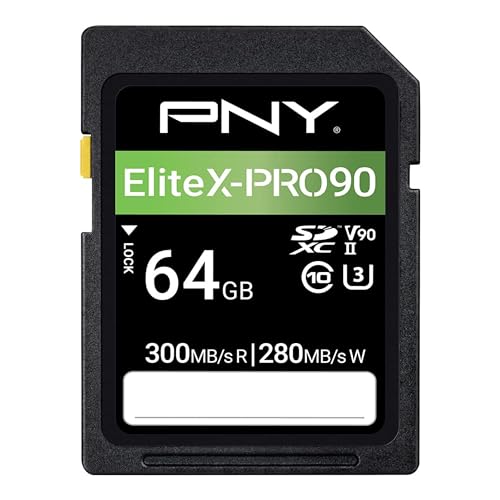
| PNY 64GB EliteX-PRO90 UHS-II | V90 in a smaller size | Full V90 class and a quoted 280MB/s write at 64GB, for stills-led shooters and shorter video days who rotate cards often. |
| SanDisk 256GB Extreme PRO UHS-I V30 | Second-slot capacity | A big, fast-for-UHS-I card that gives slot 2 real endurance for relay recording, stills and lighter video modes. |
| Gigastone 256GB SD Card V30 | Budget second slot | 256GB of V30 storage with a data-recovery offer in the listing, priced by its class for owners equipping a backup slot cheaply. |
How Did We Choose These Picks?
The selection began with the camera’s own demands rather than the card market’s habits. Slot 1 of a GH5 running its celebrated high-bitrate modes needs a card whose sustained write floor — not its peak, its floor — clears the bitrate with room to spare, so the shortlist for that slot required UHS-II and either a V90 mark or a professional line quoting write speeds in that territory. Four cards met the bar from four different makers, which is healthy: Delkin and ProGrade are imaging-specialist firms, SanDisk is the industry’s default, and PNY’s PRO90 line is the challenger. Slot 2 was judged by a different rubric entirely — capacity per money, a V30 floor for the lighter video modes and stills bursts, and the kind of reliability that lets a card sit in the backup role without becoming the weak link. Two 256GB cards met it.
What was excluded matters as much. No UHS-I card was allowed to masquerade as a slot-1 recommendation, however impressive its read speed, because read speed does not record video. No card without a stated V-class or professional write figure was shortlisted for the fast slot. And no enormous-capacity UHS-II card was crowned by default: GH5 professionals typically rotate several 128GB cards through a shoot day rather than concentrating a whole production on one piece of flash, a practice this guide endorses in its workflow sections. Readers researching the broader fast-card landscape will find useful context in our guide to the best sd cards 4k, and those weighing the GH5 against newer bodies can cross-check the best 4k mirrorless cameras roundup.
Which of the Best SD Cards Panasonic GH5 Bodies Can Use Belong in Which Slot?
Think of the GH5 as two cameras sharing a body. The first is a cinema tool that happens to shoot stills, and it lives in slot 1. The second is a dependable stills and standard-video camera, and it lives in slot 2. The four detailed reviews that follow serve the first camera; the last two serve the second — and a well-equipped GH5 bag carries both kinds.

Delkin Devices Power 128GB UHS-II — The working pro’s card
Delkin occupies a particular niche in the card market: it is the name working photographers reach for when a card failure would mean a refunded client rather than a spoiled afternoon. The Power line is its flagship, and this 128GB UHS-II card quotes a 300MB/s read and a 250MB/s write in its listing — write territory that sits comfortably above anything the GH5’s slot 1 will ever request, including the All-Intra modes at their hungriest. The listing frames the card for 8K, 4K, HDR and 360-degree video, which is marketing breadth, but the underlying proposition is the one that matters: sustained, professional-grade writing in a card built to be formatted, filled and formatted again across a career of shoots.
On a GH5 specifically, the Delkin’s appeal is how uninteresting it makes storage feel. Long takes run without the camera’s buffer anxiety ever entering your mind; bursts of stills clear while you are still reviewing them; the end-of-day offload moves at the pace the read figure promises when paired with a UHS-II reader. One honest caveat belongs here: the listing title does not print a V-class mark, so this recommendation rests on the quoted write speed and the Power line’s professional standing rather than on a certified V90 floor. Buyers who want the guarantee in writing should look at the next two picks, which carry it explicitly. Buyers who trust the maker’s professional line — as a great many working shooters do — will find nothing to criticise in service.
Delkin also deserves a word for who it is not. It does not sell phones, televisions or toasters; memory cards and readers are the business, and support conversations are with people who know what a dropped frame costs. For a GH5 owner building a small, serious kit, that specialisation is a rational tiebreaker among flagships whose paper figures all clear the camera’s demands — you are choosing the company you want answering the phone in the unlikely event a card ever gives you a reason to call.
- Capacity: 128GB SDXC
- Bus: UHS-II
- Listing figures: up to 300MB/s read, 250MB/s write
- Video class mark in the listing title: none printed — see the analysis above
- Intended slot: slot 1, including the top All-Intra modes
Strengths
- Professional-line construction from a maker whose whole business is cards that must not fail.
- Quoted write speed clears the GH5’s most demanding modes with generous headroom.
- 128GB suits the professional habit of rotating several cards through a shoot day.
Trade-offs
- No V-class is printed in the listing title, so the sustained floor is reputational rather than certified.
- Professional positioning means it rarely competes on price with consumer lines of similar paper speed.
- One capacity in this pool; owners wanting a matching 256GB sibling must look elsewhere.
Best for: working videographers and hybrid shooters whose GH5 earns money and whose card budget is insurance. Not suited for: buyers who want a certified V90 mark on the label above all else.

ProGrade Digital 128GB UHS-II V90 — Cinema-first V90
ProGrade Digital was founded by people from the professional memory industry with a deliberately narrow mission: cards for imaging professionals, nothing else. This Iridium-series card carries the V90 mark the Delkin listing omits, and its stated figures — reads up to 300MB/s, writes up to 200MB/s — are framed in its listing around fast capture and professional workflows rather than consumer superlatives. For a GH5 owner, the V90 certification is the heart of the matter. It is a promise about the worst moment of a long take, not the best moment of a benchmark: the card undertakes to keep accepting video-class data at the V90 floor indefinitely, which is precisely the behaviour the camera’s 400-megabit-class modes are designed around.
The quoted write ceiling of 200MB/s sits below the SanDisk flagship’s paper figure, and it is worth being clear about why that does not demote this card for GH5 duty: the camera’s appetite, even at its most extreme, is a fraction of either number, so both cards operate with headroom and the difference shows up mainly in offload-adjacent tasks and burst clearing on faster bodies. What ProGrade owners tend to cite is consistency — card after card behaving identically — and a support operation staffed by people who understand cinema workflows. In a two-slot strategy, a pair of these makes an elegant arrangement: one recording, one shadowing in backup mode when the mode allows, both from a single production run.
There is a subtler pleasure to this card worth mentioning: predictability across a set. Professionals who buy four cards for a two-camera shoot want the fourth to behave exactly like the first, in the camera and in the reader, month after month. ProGrade’s narrow catalogue exists to serve exactly that buyer, and GH5 owners stepping up from consumer cards often describe the difference less as speed than as the absence of variance — every take starts, every offload runs at the same pace, and storage quietly leaves the list of things a shoot day can be about.
- Capacity: 128GB SDXC
- Bus: UHS-II
- Video class: V90, stated in the listing
- Listing figures: up to 300MB/s read, up to 200MB/s write
- Intended slot: slot 1 for all modes; also at home shadowing in slot 2
Strengths
- Certified V90 floor matches the GH5’s top recording modes by design, not by implication.
- A single-focus maker: professional imaging cards are the entire catalogue, and it shows in consistency.
- 128GB capacity fits the rotate-several-cards discipline of professional video days.
Trade-offs
- The quoted write ceiling is the lowest of the three flagship UHS-II picks here.
- Less ubiquitous at retail than SanDisk, so last-minute local replacement can be harder.
- Premium professional pricing applies, as with the Delkin.
Best for: video-first GH5 owners who want the certified class mark and professional consistency in slot 1. Not suited for: bargain hunters, or stills-only owners who will never engage the modes this card is built for.

SanDisk 128GB Extreme PRO UHS-II V90 — Top claimed write speed
SanDisk’s Extreme PRO line is the closest thing the card world has to a default setting, and this UHS-II edition arrives with the boldest paper specification in the pool: its listing quotes read speeds up to 300MB/s and write speeds up to 300MB/s alongside the V90, U3 and Class 10 marks. Treat the symmetry of those figures with the usual respect owed to headline numbers — they are peaks achieved under test conditions — but even discounted, the card’s certified V90 floor plus SanDisk’s manufacturing scale make it the easiest flagship recommendation to defend. It is also the card a GH5 owner is most likely to find in stock anywhere on earth, which is a genuine professional virtue: a card system you can replace in a strange city the night before a shoot is worth more than a marginally finer card you cannot.
In the camera, expect the full repertoire to simply work — All-Intra 4K, high-frame-rate modes, long stills bursts — with buffer clearing that keeps pace with hybrid shooting. The Extreme PRO also travels well between bodies: owners who later add a faster camera, or who share cards with a second shooter running different gear, will find this card remains appropriate long after a lesser pick would have been retired to a drawer. That longevity reframes its price. Among the three flagship slot-1 cards here, this is the one to buy when you want the decision to stay made for years.
- Capacity: 128GB SDXC
- Bus: UHS-II
- Video class: V90, stated in the listing
- Listing figures: up to 300MB/s read, up to 300MB/s write
- Intended slot: slot 1; also the pool’s most future-proof card across bodies
Strengths
- The strongest combined specification in the pool: V90 certification plus the highest quoted write figure.
- Unmatched availability — the easiest flagship card to replace anywhere, at short notice.
- Remains the right card if a faster body joins the bag later, protecting the purchase.
Trade-offs
- Headline symmetry invites over-reading; the V90 floor, not the 300 figure, is the working promise.
- Flagship pricing from the biggest brand rarely undercuts the specialist rivals.
- 128GB still demands rotation discipline on long high-bitrate days.
Best for: GH5 owners who want the flagship slot-1 card with the least possible second-guessing, now and across future bodies. Not suited for: owners equipping several slots on a tight budget, where the PNY below stretches further.
PNY 64GB EliteX-PRO90 UHS-II — V90 in a smaller size
Every other slot-1 pick in this pool is a 128GB card, and there is a real constituency for whom that is the wrong size. Stills-led GH5 owners who shoot video in shorter bursts, wedding photographers running the GH5 as a second body, and anyone raised on the discipline of swapping cards at every natural break — so that no single failure can hold a whole day — often prefer 64GB cards and more of them. The PNY EliteX-PRO90 serves that constituency without asking them to step down a class: it is a genuine UHS-II V90 card, its listing quoting reads up to 300MB/s and writes up to 280MB/s, figures that on paper embarrass pricier rivals. The GH5’s top modes remain fully available; only the length of the leash changes.
That leash deserves honest arithmetic in class terms. At the camera’s highest bitrates, a 64GB card holds a modest span of footage — think in terms of a ceremony segment or a set of interviews rather than a full day — while at the lighter bitrates most owners actually use, the same card stretches far longer. The card therefore suits two shooting styles: deliberate, segmented video work with swaps at natural pauses, and stills-led days where video is garnish. It is a poor fit for the owner who mounts the camera, presses record and walks away for hours. Within its intended style, though, it offers the pool’s most accessible entry into certified V90 ownership, and buying several for rotation is a coherent professional strategy rather than a compromise.
There is also a bookkeeping charm to small cards that big-card owners concede: a 64GB card offloads fast, verifies fast and backs up fast, so the end-of-day ritual shrinks. Shooters who process footage nightly on the road — travel creators in particular — often prefer a wallet of these to a pair of flagships for exactly that reason. The PNY’s job in this pool is to make that legitimate style available without surrendering the V90 class, and it does it cleanly.
- Capacity: 64GB SDXC
- Bus: UHS-II
- Video class: V90, stated in the listing
- Listing figures: up to 300MB/s read, up to 280MB/s write
- Intended slot: slot 1, with rotation across a shoot day
Strengths
- Full V90 UHS-II credentials at the pool’s smallest capacity and most accessible tier.
- Quoted write figure rivals the flagships — the class is genuine, not a label.
- Smaller cards enforce the healthy habit of never letting one card hold an entire day.
Trade-offs
- At the top bitrates the card fills quickly; unattended long-form recording is not its game.
- Rotation means more cards to track, label and offload at day’s end.
- PNY’s pro line has a shorter track record at this tier than the specialist makers here.
Best for: stills-led and segmented-video shooters who rotate cards deliberately, and second-body duty. Not suited for: long-form event recording at top bitrates without an attendant swapping cards.

SanDisk 256GB Extreme PRO UHS-I V30 — Second-slot capacity
Now for slot 2, and a change of values. A UHS-I card in the GH5’s second slot will never see the camera’s flagship modes, and this guide has promised not to pretend otherwise. What it can do — superbly, in this SanDisk’s case — is everything else: hold a day’s stills, record the camera’s lighter video modes for hours, accept relayed footage when slot 1 fills, and keep a backup copy flowing during dual-record stills work. The Extreme PRO UHS-I quotes reads up to 200MB/s and writes up to 140MB/s in its listing, with SanDisk’s QuickFlow technology named — figures that make it one of the quickest UHS-I cards available, which matters at the computer, where a 256GB card’s offload is a real chunk of an evening.
The capacity is the argument. At 256GB, this single card outlasts a pair of the flagship picks, and in the second slot that endurance converts directly into shooting styles: relay recording that effectively doubles your continuous runtime across the two slots, event stills without a mid-day swap, travel days where the laptop stays at the hotel. Paired with any flagship above in slot 1, it completes the GH5’s two-chamber heart. What it must never be asked to do is substitute for the flagship when All-Intra is engaged — the camera itself will constrain modes to what the selected card supports, and discovering that mid-shoot is an avoidable embarrassment. Label it, mentally and literally, as the second card, and it is among the most useful purchases a GH5 owner can make.
One more duty suits it: the loaner card. Every GH5 owner eventually lends the camera or shoots alongside a friend whose card turns out to be a supermarket special. A big, trustworthy UHS-I card in the bag rescues those days without risking a flagship, and its capacity means the favour never has to be rationed. Unromantic, yes — but working photographers’ bags are full of unromantic objects that save shoots, and this card belongs in that company.
- Capacity: 256GB SDXC
- Bus: UHS-I — slot 2 territory on this body
- Video class: V30, stated in the listing
- Listing figures: up to 200MB/s read, up to 140MB/s write, QuickFlow named
- Intended slot: slot 2 — relay, backup, stills and lighter video modes
Strengths
- Double the flagship picks’ capacity, turning relay mode into genuinely long continuous recording.
- Among the fastest UHS-I cards on paper, so its large offloads stay civilised.
- Extreme PRO line consistency matches the flagship SanDisk in slot 1 for a tidy two-card system.
Trade-offs
- Cannot serve the top All-Intra modes; the camera will limit what it offers this card.
- Its speed is wasted in slot 2 beyond the UHS-I ceiling — you are buying capacity and offload pace.
- Concentrating 256GB in a backup role concentrates the loss if the card is mislaid.
Best for: the GH5’s second slot in a flagship pairing — relay recording, event stills and travel endurance. Not suited for: anyone’s only card, if the camera’s top video modes are part of the plan.

Gigastone 256GB SD Card V30 — Budget second slot
The final pick equips the same second slot at a friendlier tier. Gigastone’s 256GB card carries a V30 rating and quotes up to 170MB/s in its listing, with an A1 application mark that is irrelevant to a camera but harmless, a mini case in the packet, and the brand’s five-year free data recovery offer stated in the title. That recovery offer is worth pausing on: it is a service promise about attempting to rescue data from a failed card, not a guarantee of rescue, and it should be read as a sign of how the brand competes — on reassurance — rather than as insurance you can plan around. The card itself is a straightforward UHS-I V30, which defines both its competence and its ceiling with unusual clarity.
In service, expect it to handle the second slot’s honest work: stills at any pace the GH5’s UHS-I path allows, the lighter video modes, relay overflow and backup copies. Expect also the places where a value card announces itself — offloads that run at the pace its class suggests rather than the SanDisk’s, and a long-term track record that is simply shorter than the established lines. For a hobbyist GH5 that shoots family events and travel, or as a third card kept in the bag for emergencies, those are acceptable trades. For paid work, this guide’s advice is to let the second slot hold the SanDisk above and keep the Gigastone as the spare. Knowing which of those owners you are is the whole decision.
It also makes a sensible first card for a GH5 bought used, which is how many owners meet this camera now. A second-hand body plus a fresh, honestly specified V30 card covers the camera’s everyday modes while the new owner learns which of its flagship talents they actually use — and the card remains useful in slot 2 forever after, whatever flagship eventually joins it. Few purchases in a used-camera journey age as gracefully as a big card bought for the second slot.
- Capacity: 256GB SDXC
- Bus: UHS-I — second-slot duty
- Video class: V30, stated in the listing
- Listing figure: up to 170MB/s; data-recovery offer and mini case stated in the title
- Intended slot: slot 2 for hobbyist rigs; bag spare for professional ones
Strengths
- Full 256GB of V30 storage at the pool’s friendliest tier for a second slot.
- The stated data-recovery offer and included case show a brand competing on owner reassurance.
- Perfectly adequate for stills, lighter modes and relay work — the second slot’s real job description.
Trade-offs
- Same hard ceiling as any UHS-I card: the flagship video modes are not available to it.
- A shorter professional track record than the SanDisk it undercuts.
- The recovery offer is an attempt, not a promise — backups remain the owner’s responsibility.
Best for: hobbyist GH5 rigs equipping a second slot affordably, and as a labelled emergency spare in any bag. Not suited for: the primary backup card on paid work, where the SanDisk’s pedigree earns its premium.
How Do All Six Cards Compare at a Glance?
| Card | Bus and class | Capacity | Listing write figure | Home slot |
|---|---|---|---|---|
| Delkin Power | UHS-II, pro line | 128GB | 250MB/s | Slot 1 |
| ProGrade Iridium | UHS-II V90 | 128GB | 200MB/s | Slot 1 |
| SanDisk Extreme PRO II | UHS-II V90 | 128GB | 300MB/s | Slot 1 |
| PNY EliteX-PRO90 | UHS-II V90 | 64GB | 280MB/s | Slot 1, rotated |
| SanDisk Extreme PRO I | UHS-I V30 | 256GB | 140MB/s | Slot 2 |
| Gigastone | UHS-I V30 | 256GB | Not stated as a write figure | Slot 2 / spare |
The table’s last column is the one to shop by. Decide the slot first and the contest narrows to two or three cards; shop across the whole table at once and you will end up comparing numbers that were never in competition with each other.
Notice, too, what the table refuses to do: rank all six from best to worst. A ranking implies a single ladder, and this camera’s storage is not a ladder but a pair of sockets with different jobs. The Gigastone at the foot of the table is not a worse Delkin; it is a correctly specified answer to a different question, and in a hobbyist’s second slot it will give years of service that a flagship there could not improve by one frame. Buy for the socket, then for the shoot, then — only then — for the specification sheet, and the GH5 will repay the logic every single time it records, without exception.
What Do the GH5’s Two Slots Actually Do Differently?
The GH5’s dual slots are not twins, and the menu rewards owners who understand the division of labour. Slot 1 connects over UHS-II, the interface with the second row of contacts that unlocks the fast cards’ full speed; slot 2 connects over UHS-I, so any card placed there — even a flagship UHS-II card — performs at UHS-I pace. The camera then offers recording relationships between the slots. Relay recording treats the pair as one long volume, rolling from the first card to the second when space runs out, which is the event shooter’s friend. Backup recording writes the same material to both, the paranoid professional’s friend. Allocation modes send stills one way and video the other, tidying the edit before it begins. Each relationship assumes what this guide keeps repeating: the demanding work belongs to slot 1, and slot 2’s card should be chosen for the role the mode assigns it.
A practical consequence follows for buyers equipping both slots at once. Spend the serious money in slot 1, where the camera can use it, and spend capacity money in slot 2, where it cannot. The fashionable error — two identical flagship cards — wastes the second flagship’s speed entirely; the unfashionable pairing this guide recommends, flagship plus big UHS-I, outperforms it for relay and backup purposes at a lower total outlay. Owners who also run an action camera will find the inverse lesson in our best gopro micro sd cards guide, where a single slot forces all the money into one card.
How Should You Set Up the Camera and Cards Before a Shoot?
Format both cards in the camera, not on a computer, on the day before — in-camera formatting guarantees the filesystem the camera expects and clears the card completely. Set the recording relationship deliberately: relay for long events, backup for unrepeatable ones, allocation if stills and video must land separately. Confirm the video mode you intend to use is actually offered with the cards inserted; the GH5 ties its most demanding modes to suitable media in slot 1, and the time to discover a mismatch is at the kitchen table, not at the venue. Label every card with its slot role and a number, and keep a rigid case so rotation stays orderly. Then shoot a thirty-second test clip at the day’s intended settings and play it back in camera — the cheapest insurance in all of videography.
After the shoot, offload before you format, verify the copies open, and only then return cards to service. Professionals keep two copies on separate drives before a card is cleared; hobbyists should keep at least one verified copy and a healthy suspicion of any workflow that involves the words “I’m sure it copied.” Card care between shoots is dull and decisive: store cards in their cases, keep them dry, and retire any card that has ever produced a corrupt file without an innocent explanation.
One setup habit deserves its own emphasis because it is free and widely skipped: decide your card rotation before the day begins and write it down — which card starts in slot 1, which follows, where full cards go, where fresh ones live. In the middle of a wedding or a documentary day, nobody improvises a good system; they execute the one they brought. A wallet with labelled slots and a pocket reserved for spent cards is the whole technology required, and it pairs naturally with the smaller-card rotation strategy the PNY pick encourages. The shoot you save with this habit will never know it was in danger, which is exactly how good systems behave.
How Does Bitrate Translate Into What a Card Must Do?
It helps to do the arithmetic once, slowly, because it permanently changes how card specifications read. A bitrate quoted in megabits per second describes the stream the camera produces; divide by eight and you have megabytes per second, the unit card writes are quoted in. The GH5’s top modes live around the 400-megabit mark, which is roughly 50 megabytes arriving every second, without pause, for the length of the take. Now read a card’s marks against that. A V30 card guarantees to accept 30 megabytes per second indefinitely — visibly short of the stream, which is why no V30 card appears in this guide’s slot-1 half. A V60 card doubles that floor and clears the stream; a V90 card clears it with room to spare for the camera’s other simultaneous housekeeping. The peak write figures in listings — 200, 250, 300 megabytes per second — describe what a card can do briefly on a benchmark, and they matter for burst clearing and offload feel, but the guaranteed floor is the number a long take is built on.
The lighter modes reverse the picture completely. At the camera’s everyday bitrates, the stream shrinks to a fraction of the flagship figure, and suddenly the V30 cards in slot 2 are loafing — which is precisely why this guide can recommend them warmly for those modes without contradicting itself. Card suitability is never a property of the card alone; it is a relationship between the card’s floor and the mode’s appetite. Owners who internalise that one relationship will never buy a wrong card again, for this camera or any other.
What Does a Sensible GH5 Card Kit Look Like for Different Shooters?
For the wedding and event videographer: two flagship 128GB cards for slot 1 across the day, the big SanDisk UHS-I permanently resident in slot 2 running relay or backup, and the discipline of offloading at every venue change. The kit’s logic is that no single card ever holds an unrepeatable hour alone. For the travel filmmaker: one flagship, one big UHS-I, and a laptop or portable drive each night; weight matters more than redundancy at altitude, and the nightly offload is the redundancy. For the stills-led hybrid owner: the PNY 64GB V90 in slot 1 for bursts and short clips, the Gigastone or SanDisk 256GB in slot 2 for the day’s stills volume, rotating the small fast cards as they fill. For the hobbyist who shoots the school play twice a year: honestly, the SanDisk UHS-I alone covers those modes, and the flagship money is better spent the day the top modes become a real habit rather than an aspiration. Kits should describe the shooting you actually do; the most common GH5 storage mistake is equipping for the filmmaker you intend to become while the one you are goes under-served.
How Long Should a Professional Card Stay in Service?
Cards do not announce their retirement, so professionals impose one. The working rules are simple to state and worth adopting at any level: a card that has ever produced a corrupt file without a clear external cause — a yanked cable, a dead battery mid-write — leaves front-line service permanently, however well it behaves afterwards. Cards in heavy rotation get replaced on a schedule measured in shoots rather than years, because the cost of a flagship card is trivial against the cost of a lost production. Every card gets formatted in camera before each assignment, exercised with a test clip, and stored in a case rather than a pocket. And the offload is never the card’s problem to survive alone: footage exists in two places before any card is cleared, full stop. Follow those rules and the differences between the excellent cards in this pool matter far less than the workflow around them — which is, in the end, the most professional sentence in this entire guide.
What About High Frame Rates, Bursts and the Camera’s Other Appetites?
Video bitrate is the loudest demand a GH5 makes, but not the only one. High-frame-rate recording modes write their data in patterns that surprise owners who assumed slower motion meant lighter work: capturing many frames per second, even at reduced resolution, keeps the card busy in a way that rewards the same sustained-write headroom as the flagship 4K modes. Stills bursts make a different shape of demand — a sudden flood as the buffer empties, then quiet — and there the peak write figures and the camera’s buffer depth share the credit; a flagship card in slot 1 clears a long raw burst noticeably sooner than a UHS-I card, which decides whether the camera is ready when the next moment arrives. Time-lapse and interval work sit at the gentle end: small writes, widely spaced, any card in this pool unbothered. The pattern across all of it is the guide’s recurring lesson — match the card to the hungriest mode you genuinely use, and every lesser mode takes care of itself.
There is one more appetite worth naming because it catches owners out: simultaneous stills during video, and the dual-record arrangements that write to both slots at once. The moment two destinations are involved, the slower card sets the pace of the pair, which is a final practical argument for keeping slot 2’s card honest. A flagship in slot 1 cannot rescue a recording arrangement whose second half is a bargain-bin card wheezing behind it.
How Does Offload Speed Fit Into the Decision?
Half of a card’s working life happens outside the camera, in a reader, at the end of the day, and this half is governed by the read figures the recording half taught you to ignore. A UHS-II card in a UHS-II reader returns its footage several times faster than the same card in an older reader, where it falls back to UHS-I pace — so owners who buy flagship cards and keep an elderly reader are paying for speed they only collect in the camera. Budget for the pair. The arithmetic of a shoot day makes the case: a full 128GB flagship holds enough footage that the difference between a fast and slow offload is the difference between copying during dinner and copying during sleep, and on a multi-day production those hours compound into either rest or its absence.
Offload discipline matters more than offload pace, though. Verify copies before formatting — open files, scrub through them, confirm the count matches the card. Keep the card unformatted until the verified copies exist in their two places. And resist the reader-market’s temptations: the card reader is a tool you buy once for the interface your cards use, not a pick to agonise over, and certainly never a substitute for a card chosen correctly in the first place.
How Do You Choose Between the Three Flagship Cards?
Since the Delkin, ProGrade and SanDisk flagships all clear the GH5’s demands, the honest tiebreakers are human rather than technical. Choose the SanDisk if your life involves travel, deadlines and the possibility of replacing a card in an unfamiliar city tomorrow; ubiquity is a feature, and its paper specification leads the pool besides. Choose the ProGrade if you buy cards in matched sets, value a maker who speaks cinema fluently, and want the V90 promise printed by a firm whose entire reputation rides on professional media. Choose the Delkin if you are swayed by the working-photographer tradition — a card line that has built its name in wedding and documentary bags — and are comfortable that its listing argues from quoted write speed and pedigree rather than a printed V-class. None of these is the wrong answer, and a shoot day will never reveal which you picked. What a shoot day does reveal is a card from below this tier being asked to do this tier’s work, which is the only flagship mistake available to make.
One more consideration occasionally decides it: the rest of your bag. Owners whose other bodies are Sony will find the same three names competing in that ecosystem; owners standardising on one brand across cameras simplify their spares, their readers and their instincts. There is no technical requirement to standardise — the cards are interchangeable standards-based media — but there is a small, real comfort in a wallet where every card behaves the way the card before it did.
Why Do Cards Fail, and Why Does the Seller Matter?
Genuine cards from the lines in this pool fail rarely, and usually after long service or physical insult — a bent card, a drowned bag, contacts worn by years of swapping. The failures that fill forum threads with GH5 owners swearing their camera is broken are disproportionately counterfeit cards: flash that reports a capacity it does not have, controllers that collapse under sustained writes, labels wearing a famous name over anonymous innards. A demanding camera is a counterfeit-detection machine, because its top modes stress exactly the sustained-write behaviour fakes cannot fake. This is the practical reason the guide keeps returning to established lines and reputable listings: the price gap between a genuine flagship and a too-cheap imitation is the price of the take you cannot reshoot. If a card’s price looks like a printing error, it is one — just not in your favour.
The same logic applies at replacement time. When a card retires, replace it like-for-like from the same tier rather than seizing the moment to experiment downward; the day a production leans on the new card is the wrong day to learn what its floor really is. Cards are the cheapest insurance in the entire GH5 system — cheaper than the body, cheaper than any lens, cheaper than the journey to the location — and they should be bought with the seriousness that ratio deserves.
How Should Stills-Only GH5 Owners Read All of This?
Perhaps you bought the GH5 for its ergonomics, its stabilisation and its lenses, and video to you is the occasional clip of a birthday candle. Your card needs are real but different, and this guide’s hierarchy still serves you — read it in a lower key. Your hungriest moment is a raw burst at a school sports day, and for that the PNY V90 in slot 1 is the sweet spot: flagship clearing pace without flagship capacity you will never fill with clips. Slot 2 wants volume for the day’s stills, which is the 256GB tier’s home ground. The two big flagships are not wrong for you, merely more than your shooting asks, and the money difference buys a spare battery — which, for a stills owner, will save more days than any card upgrade. What does not change at any key is the discipline: format in camera, offload before reuse, retire cards that misbehave. Stills forgive slow cards; they do not forgive lost ones, and they reward owners who treat a modest card with professional discipline far more than owners who treat a flagship card carelessly.
Which Mistakes Cost GH5 Owners Their Footage?
The classic error is shopping by read speed and discovering, mid-take, that recording is a write activity. The second is symmetry: buying two identical mid-tier cards for both slots, which leaves slot 1 underpowered for the modes that made the GH5 famous and slot 2 overspecified for its ceiling. Third is treating backup mode as a substitute for offloading — two copies on two cards in the same camera bag are one accident away from being zero copies. Fourth is formatting in the computer and returning the card to the camera with a filesystem it tolerates but did not create; format in camera, always. Fifth, and quietest, is ignoring the mode-card relationship: engaging a top-tier mode while the camera is set to record to the UHS-I slot produces either a refusal or a compromised recording, and either discovery is better made at home.
Final Recommendation
Equip slot 1 with the SanDisk Extreme PRO UHS-II if you want the decision settled for years, the ProGrade if the certified mark and professional consistency matter most, or the Delkin if you trust the working pro’s line — all three serve the flagship modes properly. Add the 256GB SanDisk UHS-I in slot 2 and the camera becomes the two-chamber instrument it was designed to be. Buy the PNY when your shooting style rotates small cards, and the Gigastone when the second slot’s budget is genuinely tight. If you take one habit from this guide alongside the cards, let it be the test clip at the kitchen table the night before, because every card failure discovered there is a story you get to laugh about instead of a shoot you have to explain. But whatever pairing you choose, honour the asymmetry the camera was built with — because a GH5 forgives almost any creative mistake except asking the wrong slot to hold the take of the day.
Frequently Asked Questions
Can a UHS-I card record the GH5’s 400Mbps All-Intra mode?
No — that family of modes is the reason UHS-II V60 and V90 cards exist in this guide. A UHS-I card’s sustained write behaviour sits below what All-Intra demands, and the camera reserves its top modes for suitable media in slot 1. UHS-I cards serve stills, lighter modes, relay and backup roles.
Is V60 enough, or does the GH5 need V90?
V60-class UHS-II cards cover the GH5’s high-bitrate modes in class terms, and V90 adds headroom and future-proofing for faster bodies. This pool’s slot-1 picks are V90 or professional equivalents because the price gap rarely justifies stepping down for a camera this demanding.
What happens if I put a UHS-II card in slot 2?
It works perfectly — at UHS-I speed. The slot’s interface is the ceiling, so the flagship card performs like the UHS-I picks while remaining a perfectly good spare for slot 1. Some owners do this deliberately to keep every card interchangeable.
How much footage fits on a 128GB card?
It depends entirely on the mode: at the top All-Intra bitrates, a 128GB card holds a modest span measured in tens of minutes, while the camera’s lighter modes stretch the same card across hours. Plan capacity from the mode you actually shoot, and treat relay recording across both slots as your runtime extender.
Should I format cards in the camera or the computer?
In the camera, every time. In-camera formatting creates exactly the filesystem structure the GH5 expects and clears the card fully. Computer formatting invites subtle incompatibilities that tend to announce themselves at the worst available moment.
Do I need two cards for the camera to work at its best?
No — a single flagship in slot 1 delivers every mode the camera offers. The second slot adds recording relationships: relay for runtime, backup for safety, allocation for tidiness. Plenty of owners run one card for years; the second slot becomes compelling the first time a shoot is unrepeatable or longer than one card.
Why does my GH5 clear its buffer slowly with stills bursts?
Buffer clearing is card writing, so the answer is usually the card in the selected slot: a UHS-I card, or recording directed to slot 2, will clear far more slowly than a flagship in slot 1. Burst-heavy stills work belongs on the fast card, which is why hybrid shooters keep one there permanently. Owners comparing burst behaviour across bodies may also enjoy our look at the best autofocus mirrorless cameras.
Related Guides
Sony’s high-resolution bodies make a fascinating comparison — see the best sd cards for a7riii roundup for a camera with the same two-speed slot arrangement — and the best sd cards for new 3ds guide covers the opposite end of the card world, where the host is old, slow and entirely unbothered by speed classes.
The micro cards left over from a camera kit often end up in a single-board computer, and our roundup of the best raspberry pi sd cards explains which of them actually belong there.
Related guides
- Best 1440p 165Hz Monitors: One Native 165Hz Pick, Three 180Hz Upgrades, an Overclock Headline and a 160Hz Ultrawide
- Best 13×19 Professional Printers
- Best 3rd Party MacBook Chargers: 96W-Class Alternatives, the 100W Cable Rule, and the Apple Benchmark
- Best Built PC: Six Prebuilt Gaming PCs Judged on Parts, Power and Upgrades


