What's inside
- Where to Buy, and Why the Card Matters More Than the Camera Setting
- Key Takeaways
- Quick Picks
- How Did We Choose These Picks?
- What Actually Makes a microSD Card Good Enough for a GoPro?
- What Happens When a Card Cannot Keep Up?
- How Do the Six Cards Compare Side by Side?
- Does Your GoPro’s Generation Change the Answer?
- How Should You Size and Care for a GoPro Card?
- How Do You Set Up a New Card and Protect a Day’s Footage?
- Which Capacity Fits the Way You Actually Shoot?
- How Do the Speed Ratings on the Label Actually Differ?
- How Should You Rotate Cards Across a Long Trip?
- What About Adapters, Readers, and Getting Footage Off the Card?
- What Mistakes Ruin GoPro Footage Most Often?
- Final Recommendation
- Frequently Asked Questions
- Related Guides
As an Amazon Associate I earn from qualifying purchases. This post may contain affiliate links at no extra cost to you.
gizmoverdict.com is reader-supported. When you buy through links on our site, we may earn an affiliate commission.
Where to Buy, and Why the Card Matters More Than the Camera Setting
Every pick below is sold through Amazon, and each linked card takes you to the exact capacity and family described in its section, so check the capacity in the listing title before you pay — microSD cards in the same family look identical in photos and differ only in the number printed on the label. If you are shopping for the best gopro micro sd cards, the honest starting point is that a GoPro almost never fails because its sensor gave up. It fails because the card inside it could not keep accepting data, the recording stopped mid-run, and the clip you actually wanted exists only as a story you tell afterwards. The camera writes continuously at high bitrates, in heat, in cold, while vibrating on a helmet or a handlebar, and the card has to absorb all of that without a pause. That is why this guide judges cards on sustained writing first and treats the big read number on the packaging as advertising garnish.
A modern GoPro recording 5.3K or 4K at its higher frame rates pushes a heavy, unbroken stream of data at the card for minutes at a time. A card that benchmarks beautifully for three seconds and then throttles will corrupt that stream or end the recording early. The Video Speed Class mark is the closest thing to a promise here: V30 guarantees a minimum sustained write of 30 megabytes per second, and every card in this roundup carries V30 and U3, which is the floor a current GoPro needs. Above that floor, what separates the picks is how much headroom they hold when the camera gets hot, how much capacity you get before the card fills on a long day, and how the card behaves when it records for hours without a break.
Capacity is the other half of the decision, and it interacts with how you shoot. A rider who records short clips between stops can live happily with 128GB and offload every evening. A diver, a skier, or anyone recording long continuous sessions far from a laptop should think in terms of whole days, not clips, and that pushes the sensible size up to 256GB or 512GB. Six cards made the cut: three capacities of one proven SanDisk family, two capacities of a value alternative from Gigastone, and one endurance-built SanDisk card for people whose cameras record all day, every day.
Key Takeaways
- Sustained write speed decides whether a long 4K or 5.3K clip survives; the read figure printed largest on the box describes offloading to a computer, not recording.
- V30 with U3 is the entry ticket for a current GoPro, and all six cards here clear it — the differences that matter are headroom, capacity, and endurance design.
- The three SanDisk Extreme cards are one recommendation at three sizes: 128GB for day shooters, 256GB for weekend trips, 512GB for week-long recording away from a laptop.
- Gigastone’s pair undercuts the big brand while keeping the same V30 and A2 marks, and bundles a data-recovery offer the SanDisk cards do not match.
- The High Endurance card trades peak speed for a build meant for nonstop loop recording, which suits dash-style and monitoring-style GoPro use.
- Format a fresh card inside the camera before its first real session, and retire any card that has ever dropped a clip — it will do it again under load.
Quick Picks
| Pick | Badge | Why it earns its place |
|---|---|---|
| SanDisk 128GB Extreme microSD | Best for most riders | The current Extreme generation at the size a day of clips actually needs, with the strongest write headroom of the 128GB class. |
| SanDisk 256GB Extreme microSD | Best weekend capacity | Doubles the room of the 128GB card for multi-day trips while staying in the same trusted Extreme line. |
| SanDisk 512GB Extreme microSD | Best for long expeditions | Half a terabyte of Extreme-class recording for travel where offloading is not an option. |
| Gigastone 128GB Micro SD Card | Best value at 128GB | V30 and A2 marks with a five-year data-recovery offer, aimed squarely at action cameras. |
| Gigastone 512GB Micro SD Card | Best value at 512GB | Big capacity and a V30 rating from the challenger brand, for buyers who would rather spend the savings on mounts. |
| SanDisk 128GB High Endurance microSD | Best for nonstop recording | Built for dash cams and monitoring duty, which translates directly to loop-recording and time-lapse GoPro work. |
How Did We Choose These Picks?
We started from what the camera demands rather than what the card market advertises. A GoPro’s hardest job is a long, hot, high-bitrate recording, so the first filter was the Video Speed Class: nothing below V30 was considered, because V30 is the rating that speaks to sustained writing rather than a brief burst. Every survivor also carries U3 and at least an A1 app rating, though for a camera the A2 mark on most of these cards is a bonus for phone use rather than a deciding factor.
The second filter was honesty about speed claims. Read speeds of 190 or 245 megabytes per second describe how fast finished footage moves to a computer through a good reader; they say nothing about whether the card can swallow a 5.3K stream for twenty minutes. We therefore weighted the write figures and the speed-class guarantees, and we treated any card whose marketing led with read speed alone as a suspect until its class marks cleared it. Readers comparing cards for other devices should know the same discipline applies elsewhere — our roundup of the best sd cards 4k makes the identical distinction for full-size cards.
Third, we checked each candidate against the class of cards GoPro itself recommends for its cameras: UHS-I microSDXC with a V30 or higher rating from an established maker. All six picks sit inside that class. Finally, we split the list by job rather than by brand loyalty — one family at three capacities for the mainstream, a value brand at two capacities for the budget-conscious, and one endurance design for the minority who record continuously. If a card could not justify its seat in one of those three roles, it did not make the table.
What Actually Makes a microSD Card Good Enough for a GoPro?
Three specifications do the real work, and two of them are printed small. The Video Speed Class — V30 on every card here — certifies a minimum sustained write speed that the card must hold across its whole capacity, not just while it is empty and cool. The UHS Speed Class, U3 on all six picks, makes a similar promise at the bus level. Capacity, the third specification, is the one printed largest after the brand name, and it matters in a different way: a nearly full card writes slower and fragments its free space, so a card that is always ninety percent full lives a harder life than its rating suggests. Buying one size up is a performance decision as much as a storage one.
The numbers printed largest deserve the most suspicion. When a listing leads with a read speed approaching 245 megabytes per second, that figure came from a short sequential test in a fast reader under ideal conditions. Your GoPro never reads that way while recording; it writes, continuously, in whatever temperature your helmet reaches in the sun. Heat is the silent variable in action-camera storage. A card mounted inside a sealed camera on a dashboard or a ski helmet can run hot enough to throttle, and the better cards hold their write speed further into that heat. This is also why the same card can behave flawlessly in a phone yet disappoint in a camera — phones write in bursts and rest between them, cameras do not rest.
One more distinction matters before the detailed picks. All six cards are UHS-I, which is what GoPro cameras use; there is no UHS-II microSD slot in a GoPro to take advantage of, so paying for a faster bus you cannot use buys nothing. Spend the difference on capacity or on a second card instead. Two mid-size cards rotated between shoots beat one giant card for most people, because a lost or failed card then costs you half a trip rather than the whole of it. The exception is the continuous recorder, whose camera may be mounted somewhere retrieval is a chore — that reader should look hardest at the endurance pick and the largest Extreme.
What Happens When a Card Cannot Keep Up?
The failure rarely arrives as a clean error message at a convenient moment. More often it is a recording that stops by itself partway down a run, a clip that plays with a frozen frame where the action peaked, or a file the camera lists but no computer can open. Heat and bitrate conspire: the same card that survived gentle 1080p testing in a cool room gives up at 5.3K inside a sun-baked housing, because sustained writing generates heat in the card itself and a throttling controller protects itself by slowing down — exactly when the camera cannot afford slowness.
Diagnosing a suspect card is methodical rather than mysterious. First, reproduce the failure deliberately: format the card in the camera, then record at your highest mode in a warm room until it either fails or fills a meaningful portion of its capacity. A card that cannot complete that test has no business on a trip. Second, check the boring causes — a camera on old firmware, a card bought from a marketplace seller at an implausible price, contacts dulled by pocket carry. Counterfeit capacity is the cruellest version of this failure, because the card reports space it does not have and overwrites your earliest footage in silence; reputable sellers and a full-capacity test recording are the only real defences.
If a card passes the stress test but failed once in the field, treat the incident as data rather than bad luck. Cards do not heal. The sensible ladder of trust runs from front-line duty, to spare duty, to duty in devices whose contents do not matter, and a card should only ever move down that ladder, never back up it. This is also the moment the Gigastone recovery offer and SanDisk’s rescue-software ecosystem earn their mention — not as reasons to buy, but as the last resort when a card full of unrepeatable footage stops answering.

SanDisk 128GB Extreme microSD — Best for most riders
This is the card we would hand to someone who just unboxed a GoPro and asked what to put in it. The Extreme line is the family SanDisk aims at action cameras and drones, and this 128GB card is the current generation: its listing quotes read speeds up to 245MB/s and write speeds up to 120MB/s, with V30, U3, and A2 marks behind those numbers. The write ceiling matters less than the V30 guarantee underneath it, but headroom is headroom — a card whose peak write sits well above the camera’s bitrate has room to stay composed when the housing gets warm and the trail gets rough.
At 128GB, the size suits the way most owners actually shoot: a day of mountain-bike runs, a surf session, a child’s football match, then an offload at home. You are unlikely to fill it in a single outing at 4K, and if you shoot 5.3K at the highest frame rates you will still get through a long day before the camera warns you. The A2 rating is wasted on the camera itself but useful if the card ever moonlights in a phone or a tablet, where app-class random performance decides how snappy things feel. As one rung of a three-rung ladder, this is the rung for people who come home every night.
- Form factor: microSDXC with a full-size SD adapter in the box
- Capacity: 128GB
- Speed class marks: V30, U3, Class 10, A2
- Bus: UHS-I
- Listing figures: reads up to 245MB/s, writes up to 120MB/s
- Stated uses in the listing: action cameras, drones, Android devices
Strengths
- Current-generation Extreme silicon with the highest quoted write ceiling among the 128GB cards here
- V30 and U3 guarantees cover every recording mode a current GoPro offers
- Adapter included, so the same card slides into a laptop slot or a full-size reader
Trade-offs
- Day-trip capacity only — multi-day 5.3K shooting will fill it
- Costs more per gigabyte than the Gigastone alternative at this size
- No endurance design, so it is not the pick for months of nonstop loop recording
Best for: everyday GoPro owners who record in sessions and offload at home. Not suited for: week-long expeditions or always-on recording rigs.

SanDisk 256GB Extreme microSD — Best weekend capacity
The middle rung of the Extreme ladder doubles the room without changing the recipe. This 256GB card’s listing quotes reads up to 190MB/s and writes up to 130MB/s — a slightly higher quoted write ceiling than its smaller sibling, wrapped in an earlier generation’s read figure, which tells you something useful about how little the read number means. The marks that matter are identical: V30, U3, A2, UHS-I. In the camera, this card behaves like the 128GB version with a longer leash.
That leash changes how a trip feels. A long weekend of riding, with the camera rolling on descents and time-lapses running at camp, fits without the nightly ritual of copying files to a laptop you may not have brought. Photographers who shoot bursts alongside video also notice the difference, because burst sequences and high-bitrate clips draw from the same pool of free space. If the 128GB card is sized for a day, this one is sized for a trip, and it is the capacity we would choose for a camera that travels in a jacket pocket for days at a time.
- Form factor: microSDXC with a full-size SD adapter in the box
- Capacity: 256GB
- Speed class marks: V30, U3, Class 10, A2
- Bus: UHS-I
- Listing figures: reads up to 190MB/s, writes up to 130MB/s
- Stated uses in the listing: action cameras, drones, smartphones
Strengths
- Same Extreme guarantees with double the room of the entry rung
- Quoted write ceiling slightly higher than the 128GB card’s
- Lets you skip nightly offloads on short trips entirely
Trade-offs
- Read figure on the box trails the newer 128GB generation, though it changes nothing in the camera
- Still a single point of failure — one card holds the whole trip
- Premium per gigabyte over the value brand at larger sizes
Best for: travellers and weekend shooters who record for days between offloads. Not suited for: buyers who want the absolute largest pool of storage in one card.

SanDisk 512GB Extreme microSD — Best for long expeditions
The top rung exists for the shoots where running out of card is not an inconvenience but a lost expedition. Half a terabyte in a fingernail-sized card still feels faintly absurd, and the listing backs the capacity with the strongest figures in this roundup: reads up to 245MB/s and writes up to 170MB/s, again with V30, U3, and A2 certification. On a boat, on a multi-day trek, or mounted somewhere that takes effort to reach, that combination of room and write headroom is the whole argument.
There is a discipline that comes with a card this size. The more footage a single card holds, the more footage a single failure can take, so expedition shooters should treat offloading as a safety habit rather than a capacity necessity — copy at camp when you can, even though you do not have to. The card also rewards a fast reader back home, because pulling half a terabyte through a slow USB reader is an evening gone. Within the camera, though, nothing about the size penalises you; the Extreme family’s behaviour at 512GB is the same assured writing as at 128GB, simply sustained over a far longer day.
- Form factor: microSDXC with a full-size SD adapter in the box
- Capacity: 512GB
- Speed class marks: V30, U3, Class 10, A2
- Bus: UHS-I
- Listing figures: reads up to 245MB/s, writes up to 170MB/s
- Stated uses in the listing: action cameras, drones, Android devices
Strengths
- Largest Extreme capacity here, with the family’s highest quoted write figure
- Removes capacity anxiety from multi-day and remote shoots
- Same V30 floor as its smaller siblings, so no mode is off-limits
Trade-offs
- Concentrates a whole trip’s footage in one fragile object
- Highest upfront cost of the six picks
- Long offloads demand a decent reader to stay tolerable
Best for: expeditions, remote work, and cameras mounted out of easy reach. Not suited for: casual shooters who will never fill a quarter of it.
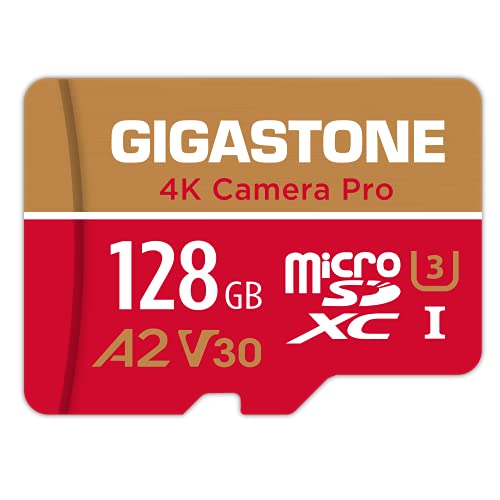
Gigastone 128GB Micro SD Card — Best value at 128GB
Gigastone built its pitch directly at the GoPro owner: the listing names GoPro, action cameras, DJI drones, and the Nintendo Switch as its home turf, and backs that aim with the marks that matter — UHS-I, U3, A2, V30, Class 10, with read and write figures quoted up to 150MB/s and 120MB/s respectively. On paper, that write ceiling matches the SanDisk Extreme 128GB card’s. In practice the SanDisk name carries the longer track record, but the Gigastone’s certification set is genuinely the same language, and a V30 guarantee is a V30 guarantee whoever prints it.
What Gigastone adds that SanDisk does not is in the listing’s first bracket: five years of free data recovery. For an action camera, that offer is aimed at the exact disaster this guide keeps circling — the card that comes home from a trip unreadable. Recovery is never guaranteed and no service resurrects every file, yet as a bundled safety net on a value card it is a thoughtful inclusion. Choose this card when the budget is real and the shooting is ordinary day-trip work; it covers the same recording modes, and the money saved buys a spare battery, which most GoPro owners need sooner than they need a faster card.
- Form factor: microSDXC with adapter
- Capacity: 128GB
- Speed class marks: V30, U3, Class 10, A2
- Bus: UHS-I
- Listing figures: reads and writes up to 150/120 MB/s
- Bundled extra in the listing: five years of free data recovery
Strengths
- Full V30/U3/A2 certification at a value-brand price position
- Data-recovery offer softens the worst-case outcome of a failed card
- Listing is written for action cameras rather than adapted from a phone card
Trade-offs
- Shorter track record than the SanDisk families it undercuts
- Read ceiling well below the current Extreme generation, so offloads run slower
- Only two capacities in this roundup, so the ladder has gaps
Best for: budget-aware owners who still want certified V30 recording. Not suited for: professionals whose footage is unrepeatable and paid for.

Gigastone 512GB Micro SD Card — Best value at 512GB
The larger Gigastone stretches the same formula to half a terabyte. Its listing quotes read and write speeds up to 170MB/s and 150MB/s, carries A2 and V30 marks with U3 and Class 10, and keeps the five-year data-recovery offer that distinguishes the brand. Against the SanDisk Extreme 512GB, the paper gap is small: a lower quoted read ceiling, a slightly lower quoted write ceiling, and a meaningfully friendlier price position. For a buyer choosing between capacity and brand reassurance, this is the card that makes capacity win.
Think about who that buyer is. A creator filming a week of travel content, a sailing vlogger, a researcher mounting cameras on equipment for days — anyone whose shooting volume is high and whose budget is watched. The card’s V30 floor keeps every GoPro mode available, and the A2 rating means it can double as phone storage in a pinch. The honest caveat mirrors the smaller Gigastone: when the footage is a wedding, a paid job, or a once-in-a-decade trip, the established brand’s history is worth its premium. When the footage is voluminous and repeatable, this card’s arithmetic is hard to argue with.
- Form factor: microSDXC with adapter
- Capacity: 512GB
- Speed class marks: V30, U3, Class 10, A2
- Bus: UHS-I
- Listing figures: reads and writes up to 170/150 MB/s
- Bundled extra in the listing: five years of free data recovery
Strengths
- Half-terabyte capacity with certified V30 writing at a value position
- Quoted write ceiling close to the premium 512GB competition
- Data-recovery coverage included, as on its smaller sibling
Trade-offs
- Same single-card risk as any 512GB card, amplified by the footage volume it invites
- Brand history shorter than SanDisk’s in action cameras
- Slower peak reads make full-card offloads a longer wait
Best for: high-volume shooters who prioritise capacity per pound spent. Not suited for: unrepeatable professional work where brand history is the point.

SanDisk 128GB High Endurance microSD — Best for nonstop recording
This card comes from a different design brief entirely. SanDisk builds the High Endurance line for dash cameras and home monitoring systems — devices that write continuously, overwrite their oldest footage, and do it again the next day for years. Its marks still clear the GoPro floor comfortably: Class 10, U3, V30, with 4K UHD recording named in the listing. What it does not chase is peak speed; the endurance engineering is about surviving write cycles, not winning a benchmark.
Plenty of GoPro use looks more like monitoring than like filmmaking. A camera loop-recording a commute from a handlebar mount, a time-lapse running for a week on a construction site, a unit watching a boat or a pit area overnight — these jobs punish ordinary cards with sheer repetition. In that service, the High Endurance design is the rational choice even though its speed figures look modest beside the Extreme family. The 128GB capacity suits loop recording well, since a loop only ever holds the most recent hours anyway. If your GoPro lives a double life as a security camera, this is also the card that already serves in our picks among the best dash camera sd cards, for exactly the same reasons.
- Form factor: microSDXC with adapter
- Capacity: 128GB
- Speed class marks: V30, U3, Class 10
- Bus: UHS-I
- Design purpose in the listing: dash cams and home monitoring systems
- Recording claim in the listing: 4K UHD video
Strengths
- Endurance engineering aimed at continuous overwrite cycles
- Still V30-certified, so ordinary GoPro recording modes remain available
- Proven class of card for set-and-forget recording jobs
Trade-offs
- Peak speeds trail the Extreme family, so big offloads feel slower
- Only offered here at 128GB, limiting long-session capacity
- Wasted on session shooters who record an hour at a time
Best for: loop recording, long time-lapses, and GoPros doing monitoring duty. Not suited for: speed-chasing session shooters who offload constantly.
How Do the Six Cards Compare Side by Side?
| Card | Capacity | Class marks | Quoted read / write | Character |
|---|---|---|---|---|
| SanDisk Extreme | 128GB | V30, U3, A2 | Up to 245 / 120 MB/s | The default recommendation for day shooting |
| SanDisk Extreme | 256GB | V30, U3, A2 | Up to 190 / 130 MB/s | The trip-sized version of the same idea |
| SanDisk Extreme | 512GB | V30, U3, A2 | Up to 245 / 170 MB/s | Expedition room with the family’s best write ceiling |
| Gigastone | 128GB | V30, U3, A2 | Up to 150 / 120 MB/s | Certified value, plus a recovery offer |
| Gigastone | 512GB | V30, U3, A2 | Up to 170 / 150 MB/s | Capacity-first buying without leaving V30 behind |
| SanDisk High Endurance | 128GB | V30, U3 | Not the headline — endurance is | Built for overwrite cycles and long unattended runs |
Read the table by columns two and three first. Capacity decides how your shooting days are shaped; the class marks decide whether the camera’s modes all work. The quoted speed column is the least important one in the room, included because buyers ask about it — treat it as a rough character sketch, never as the reason one V30 card beats another. The character column is the honest summary: three rungs of one ladder, two rungs of a cheaper ladder, and one specialist for continuous duty.
Does Your GoPro’s Generation Change the Answer?
Older GoPro models record at gentler bitrates, and their owners sometimes assume any modern card is overkill — which is true right up until they borrow the card for something else. The picks here are deliberately specified for the current generation’s demands, which means they cover every older model with headroom to spare. If your camera is several generations old and will never be replaced, the Gigastone 128GB card is the rational ceiling; spending Extreme money to feed a camera that cannot stress a V30 card buys nothing but a logo.
The opposite case is the owner planning an upgrade. Cards outlive cameras in most bags, so buying for the camera you will own next year rather than the one in your hand today is sound economics — a card bought to the current flagship’s standard will serve two or three camera generations. This is also why the capacity rungs matter more than the speed rungs for future-proofing: resolutions and bitrates keep climbing, and the appetite for storage climbs with them, while the V30 floor has remained the relevant guarantee across several generations of action cameras.
Session-style features change the arithmetic in one more way. Short-clip modes, highlight tagging, and scheduled capture all reduce wasted footage, so owners who use them heavily genuinely need less capacity than the raw bitrate suggests. Owners who press record and forget the camera exists — the documentary style that action cameras invite — should do the opposite and treat every estimate in this guide as a floor rather than a ceiling.
How Should You Size and Care for a GoPro Card?
Work backwards from your longest recording day. Estimate the hours you will actually roll, multiply by the appetite of your chosen resolution and frame rate, and then buy the next size up from the answer — the headroom keeps the card out of its slowest, nearly-full state and leaves space for the day that runs long. Shooters who mix cameras should standardise on one card family per camera bag; identical cards make rotation, labelling, and troubleshooting dramatically simpler. A strip of tape and a marker on each card case, dated by trip, sounds fussy until the evening you are trying to work out which of four black rectangles holds the good descent.
Formatting deserves more respect than it gets. Format a new card in the camera that will use it, not on a computer, because the camera lays down the file system and folder structure exactly as it expects to find them. Reformat in-camera after each full offload rather than deleting files one by one; deletion leaves the card’s housekeeping in a worse state over time. And keep cards out of the worst environments when they are not in the camera — a hard case in a bag beats a loose card in a wetsuit pocket, both for the card’s contacts and for your chances of finding it again.
Retirement is the last skill. Flash memory wears, and a card that has produced one corrupted clip has told you something important about its future. Move it to low-stakes duty — a spare for a phone, a music card — and replace it in the camera. The cost of any card in this roundup is trivial next to the cost of the trip it records. If you are also choosing cards for a drone or a second action camera, the same sizing logic travels; our guide to the best micro sd cards 4k works through it for the broader device zoo.
How Do You Set Up a New Card and Protect a Day’s Footage?
Setup takes five unglamorous minutes. Insert the card, power the camera, and run the in-camera format before you record anything you care about. Then shoot a test clip at the highest mode you plan to use — the highest resolution and frame rate combination — for at least a couple of minutes, play it back on the camera, and scrub through it. A card that is going to struggle usually announces itself early, at peak bitrate, not during a gentle test at low settings. Only after that test should the card go into the case as a trusted one.
During the shoot, a few habits protect the footage already captured. Swap cards at natural breaks rather than riding one card to its last megabyte; a card pulled at eighty percent is a card whose contents are already safe in your pocket. Keep the camera’s firmware current, because manufacturers quietly improve card compatibility in updates. If the camera ever reports a card error mid-session, stop, swap, and deal with the suspect card at a computer later — continuing to record on an unhappy card risks the clips already stored on it.
Offloading is the final step of the same discipline. Copy, verify the copy opens, and only then format the card for reuse. Cloud upload from the camera is convenient for short clips but a poor substitute for a verified local copy of a full day’s 5.3K footage. Two copies on two devices is the standard that professionals hold themselves to, and with cards this affordable, a spare card in the bag is the cheapest insurance in the whole kit.
Which Capacity Fits the Way You Actually Shoot?
Capacity advice fails when it is given in gigabytes instead of in days, so translate your own habits before choosing. A trail rider who records the interesting descents and leaves the camera off on the climbs might roll forty minutes of footage in a five-hour day. A fishing guide whose camera watches the boat from dawn to dusk rolls ten hours. Both people own the same camera; they need cards that differ by a factor of four. The first is served by 128GB with room to spare. The second should start at 512GB or plan a midday swap, because the highest-bitrate modes are unforgiving about volume.
Resolution choices multiply the effect. Stepping from 4K to 5.3K, or from standard frame rates to high frame rates for slow motion, can double the data a minute of recording produces. Protune-style high-bitrate settings push further still. A card sized generously for your current settings may become marginal the day you experiment with the camera’s flagship mode, which is another argument for buying one rung above the arithmetic answer. The reverse also holds: if you know you will always shoot 1080p for quick sharing, a modest card is not a compromise at all, and spending expedition money on capacity you will never touch is its own kind of waste.
There is also the question of how a card behaves as it fills. Flash storage writes fastest into empty space; a card at ninety-five percent capacity is juggling fragments and housekeeping while the camera demands a steady stream. Owners who chronically run cards to the brim report the flakiest behaviour, and it is not superstition — it is the physics of the medium. Sizing up so that a normal day ends with the card half full is the cheapest reliability upgrade available, cheaper than any premium tier, and it is why this guide keeps nudging readers one rung higher than their first instinct.
Finally, consider the household effect. Many GoPro owners end up with a second camera — a partner’s, a child’s, a dedicated unit for the car — and cards migrate between them. Standardising the whole household on one capacity simplifies everything: any card fits any camera, spares are interchangeable, and the card case in the bag needs no mental map. For most households that standard size is 256GB, the rung where price, room, and risk balance out; expedition and monitoring households standardise higher or on the endurance design respectively.
How Do the Speed Ratings on the Label Actually Differ?
A microSD label is a crowd of logos, and untangling them once saves confusion forever. The oldest mark, Class 10, promises ten megabytes per second of sustained writing — a 2010-era guarantee that modern video modes blow straight past, which is why a Class 10 badge alone means almost nothing now. The UHS Speed Class refines it: U1 repeats the same ten-megabyte promise, while U3 triples it to thirty. The Video Speed Class states the same idea in video language: V10, V30, V60, and V90 certify sustained writes of ten, thirty, sixty, and ninety megabytes per second. On any modern card, U3 and V30 are two dialects of one promise, and that promise is the floor this entire roundup is built on.
The A ratings answer a different question entirely. A1 and A2 certify random read and write performance — the small, scattered operations that launching apps and loading maps consist of. A camera recording video barely cares, because its writes are one long sequential river. A phone cares enormously. That is why A2 appears on the Extreme and Gigastone cards as a versatility bonus rather than a recording credential: it makes the card a better citizen if it ever migrates to a handset, a tablet, or a handheld console, but it neither helps nor hurts the GoPro.
The bus marking, UHS-I on all six picks, describes the electrical interface and its theoretical ceiling. UHS-II cards add a second row of contacts and much higher potential speeds, but a GoPro’s slot is UHS-I, so a UHS-II card would simply run at UHS-I pace inside it. Knowing this saves real money: buyers sometimes pay a premium for a UHS-II microSD card expecting their camera to fly, and the camera physically cannot use the extra contacts. Match the bus to the slot, match the class to the bitrate, match the capacity to the day — those three matches are the whole science of choosing a camera card.
One last label deserves translation: the capacity suffix. Cards up to 32GB are microSDHC; larger ones are microSDXC. Every card in this roundup is XC, which modern GoPros accept without ceremony. The distinction matters for older or more limited devices — the handheld-console article elsewhere in this batch turns on exactly this line — but for a current action camera it is a non-issue worth one sentence and no more.
How Should You Rotate Cards Across a Long Trip?
A rotation system sounds like professional fussiness until the first time it saves a trip. The method is simple: number your cards, use them in order, and treat a card that comes out of the camera as full until its contents exist in two other places. Full cards live in a different pocket or a different-coloured case from fresh ones. That physical separation is the entire trick — most card disasters are not electronic failures but human ones, where a card holding a day’s footage gets formatted because it looked identical to an empty one.
Each evening, the ritual takes ten minutes. Copy the day’s card to a laptop or a portable drive, spot-check that a few clips play, and leave the original card untouched as the second copy until the next evening’s offload is verified. Only then does it return to the fresh pile, formatted in the camera. Travellers without a laptop can lean on the camera maker’s cloud service for short clips, but a full day of high-resolution footage over hotel Wi-Fi is a fantasy; a small portable SSD in the bag is the realistic partner for a card rotation on the road.
Rotation also spreads wear. Flash cells tolerate a finite number of writes, and a household that always reaches for the same favourite card ages it years ahead of its siblings. Rotating evenly means the whole set ages together and no single card is quietly approaching failure while the others sit new. When one card in the set does eventually misbehave, retire it from camera duty without sentimentality and promote a fresh one into the rotation — the set is a system, and systems survive individual failures precisely because they were designed to.
What About Adapters, Readers, and Getting Footage Off the Card?
Every linked pick in this roundup ships with a full-size SD adapter, and that little plastic frame deserves a word of respect and a word of caution. Respect, because it lets the same card serve in a laptop slot, a full-size card reader, or an older camera in a pinch. Caution, because the adapter is a passive pass-through with contacts of its own, and a worn or dirty adapter is a classic hidden cause of mysterious transfer errors that owners blame on the card. If offloads ever turn flaky, test the card in a dedicated microSD reader before condemning it.
The reader is where the read speeds on the box finally become real. A 245MB/s read figure assumes a reader and a computer port that can keep up; plug the card into an ageing USB 2.0 reader and your half-terabyte expedition offload becomes an overnight job regardless of the card’s ceiling. Owners of the 512GB picks in particular should budget for a modern USB-C reader from a reputable maker — it is an accessory, never a pick in its own right, but it decides whether the big cards feel like a luxury or a chore at the end of every trip.
Wireless offload through the camera has its place for a handful of clips destined for a phone edit, yet it is the slowest and least verifiable route for bulk footage. The working hierarchy is dull but dependable: card into a fast reader for the main copy, a second copy to another device before any formatting, and the camera’s wireless link reserved for previews and quick shares. Readers and adapters also explain a final purchasing point — because the adapter is included across this roundup, nobody needs to pay extra for a bundle whose only addition is that same frame of plastic.
What Mistakes Ruin GoPro Footage Most Often?
The classic error is buying by the biggest number on the box. A card shouting a huge read speed may carry only a V10 or U1 write guarantee underneath, and it will drop frames or stop recordings in a GoPro while looking superb in a product photo. Always read the class marks before the marketing figures. The second error is the counterfeit bargain: microSD cards are among the most faked products in electronics, and a too-cheap card from an unknown seller may report a capacity it does not have, quietly overwriting your earliest footage once its real, smaller capacity fills. Buy from reputable sellers and test a suspiciously cheap card before trusting it.
Third, owners treat one giant card as a filing cabinet, leaving weeks of footage on it because there is still room. Every day that footage exists in exactly one place is a day it can vanish. Fourth, people delete clips in-camera to make space, which fragments the card and can slow its writing during the next long recording; offload and format instead. Finally, there is the quiet mistake of mixing standards — assuming any microSD-shaped object will do, including older Class 10 cards from a drawer. A drawer card that predates V30 has no place in a camera recording 5.3K, however fond your memories of it.
Final Recommendation
One way to sanity-check your choice before ordering: imagine the card full, at the end of your longest plausible day, in the worst heat you shoot in. If that picture makes you nervous, the card is too small or too slow, whatever the arithmetic said. If it makes you shrug, you have sized it right. Storage is the rare camera purchase where a little honest pessimism at the buying stage pays out on every single trip afterwards, because nobody has ever lost footage to a card that was slightly too capable.
For most GoPro owners, the decision is simpler than the marketing suggests: pick your capacity honestly, then buy the SanDisk Extreme at that size. The 128GB card covers day shooters, the 256GB card covers travellers, and the 512GB card covers expeditions, all with the same V30 assurance underneath. Choose a Gigastone when the budget needs relief — its certifications are real and its recovery offer is genuinely thoughtful — and choose the High Endurance card when your camera records in loops or marathons rather than sessions. Whatever you buy, format it in the camera, test it at your highest mode, and offload like the footage matters. The mountain will not repeat the run because your card was not ready, so the card is the one part of the kit that has to be ready every single time.
Frequently Asked Questions
Does a GoPro need a V30 card, or will a cheaper U1 card work?
Lower modes will often record on a U1 card, which is exactly the trap: the failure arrives when you switch to a high-bitrate mode, raise the frame rate, or record long enough for the card to heat up. V30 is the rating that guarantees sustained writing at the level current GoPro modes demand, and since every card in this roundup carries it at reasonable prices, there is little reason to gamble below it.
Why does my card quote 245MB/s but record at far lower speeds?
Because the quoted figure is a read speed measured in short bursts through a fast reader — it describes offloading, not recording. Recording speed is governed by the card’s sustained write behaviour, which is what the V30 mark certifies and what the smaller write figure in each listing hints at. Judge cards for a camera by the write side of the sheet.
How much 4K footage fits on 128GB?
It depends on bitrate settings, frame rate, and how much of the day the camera actually rolls, but the practical answer is that 128GB comfortably holds a typical day of mixed 4K clips for a recreational shooter. Continuous recording at the highest settings eats capacity far faster; if you regularly record hours without stopping, size up to 256GB or 512GB rather than rationing the camera.
Can I use the same card in my GoPro and my phone?
Physically yes, and the A2 rating on most of these cards means they perform well in phones too. Practically, swapping invites trouble: each device formats and organises storage its own way, and a card mid-trip is safest left in the camera it was formatted for. Dedicate cards to devices and label them.
What should I do if the camera reports an SD card error?
Stop recording, power down, and remove the card without formatting it. At a computer, copy everything readable off it first, working clip by clip if the file system stutters, because a partially copied day is worth far more than a perfect copy of nothing. Resist the urge to run repair tools on the only copy of the footage; image the card first if you can, and experiment on the image rather than on the original. If the files are safe and the card formats cleanly in the camera afterwards, treat it as demoted — fine for casual use, no longer trusted with important footage. Recurring errors mean replacement, full stop.
Do these cards work in drones and other action cameras too?
Yes — the demands are near-identical. Drones and rival action cameras write the same kind of sustained, high-bitrate video, work in the same heat and vibration, and specify the same UHS-I V30 class of card. The SanDisk Extreme listings name drones explicitly, and the Gigastone listings do the same. What changes between devices is mostly capacity appetite: a drone’s flight time caps each session, so drone pilots often favour several mid-size cards swapped with batteries, while a GoPro on a long mount favours one large card.
Should I buy the fastest card I can afford just to be safe?
Only up to the point where the camera can use the speed. Beyond the V30 guarantee and a healthy write ceiling, extra benchmark performance buys nothing inside a GoPro, because the camera’s own slot and bitrates set the pace. Money past that point serves you better as capacity, as a second card, or as a faster reader for offloads. The one exception is the buyer who knows a card will migrate to a more demanding device later — then buying ahead is planning, not waste.
Is one 512GB card better than two 256GB cards?
For convenience, yes; for risk, no. Two cards split your footage across two objects, so a loss or failure costs half as much, and rotating them spreads the wear. One large card wins when the camera is hard to reach or when swapping mid-activity is impractical. Most owners are better served by the pair.
Related Guides
Storage choices echo across the rest of a camera kit, and the habits in this guide — buy the class first, size for the longest day, rotate and retire without sentiment — transfer unchanged to every other device you own that swallows a memory card. If your shooting extends beyond a GoPro, the best sd cards 4k roundup covers full-size cards for mirrorless and cinema cameras, while our look at the best 64 gig micro sd cards suits smaller devices and shorter sessions. And if a card here ends up doing vehicle duty, the best dash camera sd cards guide explains endurance ratings in more depth.
The same card drawer usually holds a handheld console or two, and our guide to the best sd cards for new 3ds explains why that drawer’s biggest card is rarely the right one there.


