What's inside
- Key Takeaways
- Quick Picks: The Best 17.3 Inch Laptop Backpacks at a Glance
- How We Chose These Picks
- Why Does a 17.3-Inch Laptop Need Its Own Kind of Backpack?
- The Six 17.3-Inch Laptop Backpacks, Reviewed in Detail
- How Do the Best 17.3 Inch Laptop Backpacks Compare Side by Side?
- How Do You Measure Your Laptop for a Backpack That Actually Fits?
- What Should Travel with a 17.3-Inch Laptop Inside the Bag?
- What Are the Most Common Mistakes When Buying a Backpack for a Big Laptop?
- How Do You Carry a Heavy Laptop Without Punishing Your Back?
- Which Packing Profile Matches Your Kind of Trip?
- How Long Should a Backpack Like This Last, and What Kills It Early?
- How Do You Keep a Big Laptop Safe in Public Places?
- What Is the Case for Owning Two Bags Instead of One Perfect One?
- How Do You Test a New Backpack in Its First Week?
- Why Do Gamers and Workstation Owners Need Different Bags for the Same Screen Size?
- What Do Airlines, Trains and Car Boots Each Ask of the Bag?
- Should a Student Carry a 17.3-Inch Laptop at All?
- What Small Features Separate a Good Big-Laptop Bag from a Great One?
- How Do You Decide Between the Two MATEIN Bags and the Two Travel Classics?
- What Happens When the Laptop Is Upgraded but the Bag Remains?
- Final Recommendation
- Frequently Asked Questions
- Related Guides
As an Amazon Associate I earn from qualifying purchases. This post may contain affiliate links at no extra cost to you.
gizmoverdict.com is reader-supported. When you buy through links on our site, we may earn an affiliate commission.
Where to buy: every backpack below links to its Amazon listing, where you can check price on Amazon, read the manufacturer’s stated laptop fit carefully, and confirm dimensions against your own machine’s measurements before ordering.
The best 17.3 inch laptop backpacks exist because of an awkward truth: a 17.3-inch laptop is a wonderful thing to use and a miserable thing to carry. Machines this size are gaming rigs and mobile workstations — heavy, thick, expensive and usually accompanied by a power brick the size of a paperback. An ordinary backpack swallows them badly or not at all, strains its seams doing it, and offers the laptop’s corners no meaningful protection in the process. The bags in this guide are built specifically for that cargo: sleeves and compartments sized for 17.3-inch machines, structures that stay upright when loaded, and travel features designed for people who carry a portable desktop through airports.
Size honesty is this guide’s founding rule, because the category’s marketing abuses it. A bag described as fitting “most 17-inch laptops” is not the same product as a bag built for 17.3 inches, and the difference decides whether a thick gaming machine slides home or jams at the zip. So the reviews below distinguish sharply between the true 17.3-inch designs — VANKEAN, KROSER and both MATEIN bags state 17.3 inches in their listings — and the fits-most-17 options from SwissGear and Targus, which suit slim 17.3-inch machines and standard 17-inch ones but ask thick gaming rigs to squeeze. Measure your laptop, read the fit claim literally, and this category becomes simple.
Beyond size, the six picks divide by travel style. The SwissGear 1900 ScanSmart is the airport veteran with a lay-flat TSA design and a stated 31-litre capacity. The Targus Voyager EXP expands from 27 to 30 litres when a trip grows. The VANKEAN and KROSER compete on weather resistance and charging ports, and the two MATEIN bags split the difference between a brown business-friendly design and a gaming model with a rain cover and organiser pouch. One of them is the right way to carry your biggest laptop; the reviews exist to find which.
Key Takeaways
- True 17.3-inch compartments are stated in the listings of the VANKEAN, KROSER and both MATEIN bags — those are the safe homes for thick gaming laptops.
- The SwissGear 1900 is rated for most 17-inch laptops at a stated 31L: fine for slim 17.3-inch machines, tight for thick gaming rigs.
- Targus’s Voyager EXP fits 15- to 17-inch laptops and expands from 27L to 30L, suiting variable loads rather than maximum machines.
- TSA-friendly lay-flat designs appear across this guide and genuinely speed up security when you travel with a big laptop.
- USB charging ports on the VANKEAN and KROSER route a cable to your own power bank — the bank itself is never part of the bag.
- Measure your laptop’s width and thickness, not just its screen size, before choosing: screen inches alone do not guarantee a fit.
Quick Picks: The Best 17.3 Inch Laptop Backpacks at a Glance
| Pick | Badge | Why it made the cut |
|---|---|---|
| VANKEAN 17.3″ Travel Laptop Backpack | Best True 17.3 Fit | A stated 17.3-inch design with waterproof fabric, RFID protection and a USB port for committed big-laptop travellers. |
| KROSER TSA Friendly Backpack 17.3 | Best All-Weather Commuter | Water-repellent construction, RFID pockets and a USB port in an XL frame built for daily 17.3-inch duty. |
| SWISSGEAR 1900 ScanSmart | Best for Air Travel | The airport classic: lay-flat ScanSmart opening, 31L stated capacity and an RFID organiser for most 17-inch laptops. |
| MATEIN 17.3 Gaming Laptop Backpack | Best for Gaming Rigs | A gaming-shaped 17.3-inch bag with padded protection, a rain cover and a separate organiser pouch in the listing. |
| MATEIN Brown 17.3 Inch Backpack | Best Business Look | The same true 17.3-inch class in a brown, office-appropriate design with anti-theft and flight-approved positioning. |
| Targus Voyager EXP 17 Inch | Best Expandable | Expands from 27L to 30L for trips that grow, fitting 15- to 17-inch laptops in a carry-on format. |
How We Chose These Picks
Fit came first, and it was judged by the listings’ own words rather than by category optimism. Bags stating 17.3 inches were classed as true-fit; bags stating 17 inches or “most 17-inch” were classed as such and recommended only where their other virtues — airport design, expandability — justify the narrower promise. Any bag whose listing was vague about size was excluded entirely, because a backpack guide that guesses about fit is a returns generator, not a guide.
Second, we judged travel competence: whether the bag opens flat for security, whether its organisation suits a charger-and-cables cargo, whether it carries weight on padded straps rather than optimism. Third, weather and security features were credited only where listings state them — waterproof or water-repellent fabrics, RFID-blocking pockets, anti-theft design, rain covers — and never upgraded in the telling. A water-repellent bag is not a waterproof bag, and the reviews keep that distinction intact because the first rainstorm will enforce it anyway.
Finally, we kept the category’s two honest archetypes in view. Some buyers carry a gaming rig and need a bag shaped like a equipment case with straps; others carry a slim large laptop for work and need a bag that would not embarrass a boardroom. Both archetypes are served below, labelled as what they are, because the fastest way to disappoint a backpack buyer is to sell them the other archetype’s bag.
Why Does a 17.3-Inch Laptop Need Its Own Kind of Backpack?
Because every dimension conspires. The machine is wider than standard sleeves, so it either does not enter a normal backpack’s laptop compartment or enters and bows the bag’s structure around itself. It is heavier, so straps and stitching rated for an ultrabook’s featherweight live a short, dramatic life. Its power supply is a brick with a cable that wants to tangle around everything it meets. And its corners — the parts that die in drops — sit exactly where a too-small bag leaves them unpadded and pressed against zips. A bag designed for the class answers all four problems: a compartment genuinely dimensioned for the machine, load-bearing construction, organisation that quarantines the brick, and padding where physics will test it.
There is also the matter of what else travels with a big laptop. Its owners disproportionately carry headsets, mice, external drives, notebooks and a change of clothes, because a 17.3-inch machine is usually a destination computer — it goes somewhere to be set up and used seriously. Bags for the class therefore need honest cargo room beyond the sleeve, and the stated capacities in this guide (31 litres for the SwissGear, 27–30 for the Targus) should be read as the working volume for that whole travelling kit, not merely as a number bigger than a rival’s.
The Six 17.3-Inch Laptop Backpacks, Reviewed in Detail

VANKEAN 17.3″ Travel Laptop Backpack — Best True 17.3 Fit
The VANKEAN leads this guide because it makes the promise the category is named for, in writing: its listing states a 17.3-inch travel laptop backpack, TSA-friendly, waterproof, with RFID protection and a USB charging interface, positioned for business travel. That combination is precisely the brief of the big-laptop traveller — a machine that costs more than some cars’ engines, carried through airports and weather by someone whose work depends on it arriving functional. The waterproof fabric is the feature that will matter on the one day it matters: a soaked-through bag with a gaming laptop inside is a catastrophe that unfolds slowly and expensively, and a bag that shrugs off rain removes that day from your calendar.
The USB port deserves its standard clarification, because listings phrase it hopefully: the port is a pass-through. Your own power bank rides inside the bag, a cable connects it to the port, and your phone charges from the bag’s exterior without opening a zip. It is a small convenience done honestly, and it suits this bag’s traveller profile — long concourses, delayed flights, a phone that must survive to display a boarding pass. The RFID element protects passport and card data from skimming in crowded terminals, a quieter virtue that frequent travellers learn to appreciate.
Fit is the VANKEAN’s headline, but the discipline of this guide still applies: a stated 17.3-inch design accommodates the class properly, yet exceptionally thick gaming machines should still be checked against the listing’s compartment dimensions, because “17.3-inch” describes the screen diagonal of the intended cargo, not a guarantee about every chassis ever built around such a screen. Within that single caution, this is the most straightforward recommendation in the guide for anyone whose laptop is genuinely a 17.3 and whose life involves weather and airports.
- Laptop fit: stated 17.3-inch design
- Travel: TSA-friendly layout
- Protection: waterproof fabric, RFID protection per listing
- Charging: USB pass-through port for your own power bank
Strengths
- True 17.3-inch sizing stated plainly in the listing.
- Waterproof construction answers the category’s worst travel day.
- RFID and USB features suit airport-heavy working lives.
Trade-offs
- Extremely thick gaming chassis should still be measured against compartment dimensions.
- USB port requires your own power bank and cable to do anything.
- Travel-first design may be more bag than a simple home-to-office carrier needs.
Best for: owners of true 17.3-inch laptops who travel in all weathers. Not suited for: buyers wanting the slimmest possible daily carry.

KROSER TSA Friendly Travel Laptop Backpack 17.3 — Best All-Weather Commuter
KROSER’s entry states its credentials in the same honest order this guide would choose: TSA friendly, 17.3-inch XL size, water-repellent construction, RFID pockets and a USB port, positioned as a college and business daypack. The distinction to savour is water-repellent rather than waterproof. KROSER’s fabric sheds rain — the walk from the station, the dash across the car park — rather than surviving submersion or a monsoon, and for the daily commuter that is the correct specification: lighter, supple, and adequate for the weather that commuting actually involves. Buyers facing serious rain should either choose the VANKEAN’s waterproofing or add a rain cover, a point this guide makes without embarrassment because the listing itself is honest.
The XL framing matters for the rest of the cargo. A 17.3-inch laptop’s entourage — brick, mouse, headset, lunch, a layer of clothing — needs a bag that treats the laptop compartment as the beginning rather than the whole, and KROSER’s daypack positioning delivers that everyday versatility: the same bag does the office run on Tuesday and the campus run on Thursday. The lay-flat TSA design speeds the airport days when they come, and the RFID pockets give cards and passport a designated safe home instead of a random zip.
As a commuter proposition, then, the KROSER is the guide’s most balanced daily driver for big-laptop owners: true 17.3-inch fit, weather manners for ordinary rain, charging pass-through for the train, and organisation that assumes a life rather than a photo shoot. Verify your machine’s thickness against the compartment dimensions as with every pick here, and if your commute is short and dry, consider whether its travel features are more bag than you need — but for the year-round, all-weather big-laptop commute, this is the one.
- Laptop fit: stated 17.3-inch XL compartment
- Travel: TSA-friendly lay-flat design
- Protection: water-repellent fabric, RFID pockets per listing
- Charging: USB pass-through port for your own power bank
Strengths
- True 17.3-inch size in a genuine everyday daypack shape.
- Water-repellent finish matches real commuting weather honestly.
- RFID pockets and USB port round out a complete commuter feature set.
Trade-offs
- Water-repellent is not waterproof; serious storms need more protection.
- XL proportions are overkill for carriers of slim machines and light loads.
- Power bank for the USB port is, as always, yours to supply.
Best for: year-round commuters carrying a 17.3-inch laptop daily. Not suited for: minimalists or owners of small laptops wanting a compact bag.

SWISSGEAR 1900 ScanSmart — Best for Air Travel
The SwissGear 1900 is the bag other travel backpacks are measured against, and its listing states the terms precisely: a ScanSmart lay-flat design for TSA checkpoints, a fit for most 17-inch laptops, a TabletSafe pocket, an RFID organiser and a stated 31-litre capacity. Begin with the fit, because this guide’s honesty rule demands it: this is a 17-inch-class bag, not a stated 17.3-inch design. A slim 17.3-inch laptop will generally ride in it; a thick 17.3-inch gaming rig will be a squeeze and may not close comfortably. Owners of genuinely large gaming machines should choose a true-17.3 pick from this guide, while owners of 17-inch machines and slim 17.3s get one of the finest airport bags made.
What makes it fine is the ScanSmart concept: the bag unzips and lays flat with the laptop compartment exposed, so the machine goes through security without being removed and repacked at the belt — a small mercy multiplied by every flight of a travelling life. The 31-litre capacity is stated by the manufacturer, and it reads honestly: this is a bag that carries the laptop, its brick, a change of clothes and the day’s necessities in organised compartments rather than in a single cavern. The RFID organiser and the dedicated tablet pocket complete a picture of a bag designed by people who have watched travellers fumble and decided to fix the fumbling.
SwissGear’s decades in luggage show in the details that listings cannot photograph: zips that feel like they will survive the decade, straps that distribute a heavy load without sawing shoulders, a structure that stands rather than slumps when set down in a departure lounge. For the frequent flyer whose laptop is 17 inches or a slim 17.3, this is the guide’s most confident recommendation. For the gaming-rig owner, it is the guide’s clearest illustration of why fit claims must be read literally — a superb bag in the wrong size is the wrong bag.
- Laptop fit: most 17-inch laptops per listing (not a stated 17.3 design)
- Capacity: 31L as stated by the manufacturer
- Travel: ScanSmart lay-flat TSA-friendly opening, TabletSafe pocket
- Security: RFID organiser pocket per listing
Strengths
- ScanSmart lay-flat design genuinely speeds airport security.
- Stated 31L capacity with organisation travellers actually use.
- SwissGear build reputation suits heavy, frequent travel.
Trade-offs
- Fit is rated for most 17-inch laptops — thick 17.3-inch gaming rigs will be tight.
- Travel features are wasted on buyers who rarely fly.
- Its popularity means a generic look in any departure lounge.
Best for: frequent flyers with 17-inch or slim 17.3-inch laptops. Not suited for: owners of thick 17.3-inch gaming laptops needing a true-fit compartment.
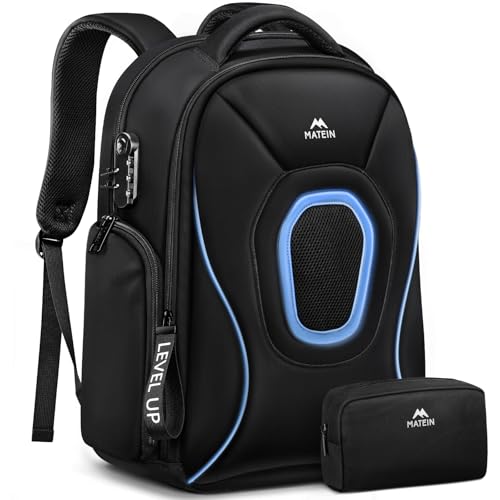
MATEIN 17.3 Inch Gaming Laptop Backpack — Best for Gaming Rigs
MATEIN’s gaming model is the bag in this guide that starts from the gaming laptop’s reality rather than the business traveller’s: the listing states a 17.3-inch gaming laptop backpack, TSA friendly, with padded laptop protection, a rain cover and a separate organiser pouch. Each element answers a known gaming-carry pain. The padding answers the rig’s weight and value. The rain cover answers the walk from the venue or the station when the sky opens — a cover being the honest heavy-weather solution, deployable when needed and absent when not. The organiser pouch answers the cable chaos that gaming peripherals breed: mouse, headset leads, chargers and adapters corralled into one removable unit instead of colonising every pocket.
The TSA-friendly layout keeps the bag honest as a travel proposition too, since gaming laptops fly to LAN events, tournaments, university and home at term’s end more often than their desktop-tower cousins ever move. A lay-flat security experience with a machine this size is a genuine quality-of-life feature. What the listing does not state, this review does not claim: no capacity figure is printed here because none is given, and buyers comparing litres should note the absence rather than let a reviewer fill it with a guess.
Position the bag correctly and it is an easy recommendation: this is the equipment carrier for the gaming laptop’s whole ecosystem, not merely a sleeve with straps. Buyers whose 17.3-inch machine is a slim productivity model will find its gaming-first organisation more than they need, and the business MATEIN below speaks their language better. Buyers whose laptop has vents like a sports car and a power brick like a doorstop have found the bag designed by people who have carried exactly that.
- Laptop fit: stated 17.3-inch gaming design
- Travel: TSA-friendly layout
- Protection: padded laptop protection, rain cover included per listing
- Organisation: separate organiser pouch included per listing
Strengths
- Built around thick gaming laptops rather than tolerating them.
- Rain cover provides real heavy-weather protection when deployed.
- Organiser pouch tames the peripheral cable sprawl gaming creates.
Trade-offs
- Gaming-first styling will not suit formal business settings.
- No manufacturer capacity figure is stated in the listing.
- More bag than slim-laptop owners need for a simple commute.
Best for: gaming laptop owners carrying the full peripheral ecosystem. Not suited for: professionals needing a boardroom-quiet appearance.

MATEIN Brown 17.3 Inch Laptop Backpack — Best Business Look
The brown MATEIN answers a question the gaming model cannot: what does the owner of a big laptop wear into a client meeting? The listing describes a 17.3-inch extra-large backpack, TSA friendly, anti-theft in design, flight approved and carry-on suitable, positioned for business, work and college — in brown. That colour is doing professional work. A 17.3-inch machine usually signals gaming, and its owner in a corporate setting often wants the bag to lower the volume: this one reads as a leather-toned business daypack that happens to swallow a very large computer.
The fundamentals match the wardrobe. The fit is a stated 17.3 inches — a true-fit compartment, unlike the 17-inch-class bags — so the professional with a mobile workstation or a large-format productivity laptop gets the size honesty this guide insists on, in a design that does not announce itself. Anti-theft positioning and the flight-approved, carry-on framing suit the consultant’s pattern: train, client site, airport, home, with the machine never leaving the bag’s protection and the bag never leaving the traveller’s side.
Its trade-offs are matters of taste and detail rather than competence. Brown will not suit every wardrobe, and buyers wanting weather armour should note that this listing does not make the waterproof claims of the VANKEAN or carry the gaming MATEIN’s rain cover — a separate cover or a careful eye on the forecast covers the gap. Within its brief, though, it is the guide’s most complete answer for the professional whose laptop is large and whose settings are formal: true size, travel manners, and a finish that belongs in the meeting it carried you to.
- Laptop fit: stated 17.3-inch, extra-large design
- Travel: TSA friendly, flight approved carry-on positioning
- Security: anti-theft design per listing
- Finish: brown, business-appropriate styling
Strengths
- True 17.3-inch fit in a genuinely office-appropriate design.
- Anti-theft and flight-approved framing suits consultant travel.
- Extra-large capacity handles a workstation’s whole entourage.
Trade-offs
- No waterproof or rain-cover claim in the listing for heavy weather.
- Brown finish will not match every professional wardrobe.
- Extra-large proportions exceed a light daily carrier’s needs.
Best for: professionals carrying a 17.3-inch workstation into formal settings. Not suited for: buyers prioritising storm-proofing above appearance.

Targus 17 Inch Voyager EXP Laptop Travel Backpack — Best Expandable
The Targus Voyager EXP is built around a single intelligent idea: trips do not stay the size you packed for. The listing states an expandable design growing from 27 litres to 30 litres, a fit for 15- to 17-inch laptops, TSA checkpoint-friendly construction and carry-on positioning for men and women. The expansion is the feature that earns the bag its place in this guide — the difference between the bag you packed on Monday and the bag swollen with conference materials, a jacket and airport purchases on Friday is exactly the difference between 27 and 30 litres, and a bag that grows on demand beats a bag that is always at its maximum bulk.
Apply this guide’s fit honesty to Targus as to SwissGear: the stated fit is 15 to 17 inches, so this is a bag for standard large laptops and slim 17.3-inch machines at the owner’s verification, not a true-17.3 compartment for thick gaming rigs. Targus’s long history in laptop carrying shows in the carry-on discipline of the design — dimensions and layout aimed at overhead bins and security trays — and the brand’s corporate heritage makes it a natural citizen of business travel, where its expansion quietly absorbs the souvenirs of a working trip.
Choose the Voyager EXP when your loads vary more than your laptop does: the trainer who carries handouts some days, the traveller whose trips grow, the student whose library books come and go. Choose a true-17.3 pick instead when the laptop itself is the immovable object. Targus has made laptop bags longer than most of its rivals have existed, and the Voyager EXP’s expandability is the kind of feature that only occurs to a manufacturer after decades of watching travellers try to close an overstuffed bag in a departure lounge.
- Laptop fit: stated 15- to 17-inch laptops
- Capacity: expandable 27L to 30L per listing
- Travel: TSA checkpoint-friendly, carry-on format
- Design: unisex business travel positioning
Strengths
- Expansion from 27L to 30L matches loads that change mid-trip.
- Targus’s carry-on discipline suits overhead bins and security lines.
- One bag covers both light days and heavy days without swapping.
Trade-offs
- Fit tops out at 17 inches as stated — not a true 17.3 gaming compartment.
- Expanded mode is bulkier than fixed bags of similar capacity.
- Buyers with one unchanging daily load gain little from expansion.
Best for: travellers whose packing grows between departure and return. Not suited for: owners of thick 17.3-inch gaming laptops needing a true-fit sleeve.
How Do the Best 17.3 Inch Laptop Backpacks Compare Side by Side?
| Bag | Stated laptop fit | Capacity stated | Travel design | Signature feature |
|---|---|---|---|---|
| VANKEAN 17.3 | 17.3 inch | Not stated | TSA friendly | Waterproof fabric, RFID, USB port |
| KROSER 17.3 XL | 17.3 inch | Not stated | TSA friendly | Water-repellent, RFID pockets, USB port |
| SWISSGEAR 1900 | Most 17 inch | 31L | ScanSmart lay-flat | TabletSafe pocket, RFID organiser |
| MATEIN Gaming 17.3 | 17.3 inch | Not stated | TSA friendly | Rain cover, organiser pouch |
| MATEIN Brown 17.3 | 17.3 inch | Not stated | TSA friendly, flight approved | Anti-theft, business finish |
| Targus Voyager EXP | 15–17 inch | 27L–30L expandable | TSA checkpoint friendly | Expansion zip |
The table’s most important column is the second one. Four bags state a true 17.3-inch fit and two state a 17-inch fit, and no amount of brand prestige converts one claim into the other. The capacity column teaches the companion lesson: only SwissGear and Targus state litres, so comparisons of volume across the whole table are impossible to make honestly — judge the others by their stated fit and features, and by the dimensions on their listings.
How Do You Measure Your Laptop for a Backpack That Actually Fits?
Measure the machine, not the marketing. Screen size is a diagonal of the display; the bag must swallow the chassis, so take three numbers from the laptop itself or its specification page: width across the lid, depth from hinge to front edge, and thickness at its thickest point with the lid closed. Then compare those numbers against the compartment dimensions on the bag’s listing — not against the bag’s headline fit claim alone. A stated 17.3-inch compartment from a reputable listing will fit most machines built around 17.3-inch screens, but gaming laptops vary in thickness more than any other class, and thickness is the dimension that defeats zips.
Add your carrying reality to the arithmetic. If the power brick travels daily, its bulk belongs in your capacity judgement; if a headset or a change of clothes joins the load, say so before choosing rather than after. Finally, weigh the loaded bag in your imagination honestly: a 17.3-inch machine, its brick and a day’s cargo make a serious load, and padded straps and a structured back panel — features to look for on any listing you consider — are the difference between carrying that load and enduring it.
What Should Travel with a 17.3-Inch Laptop Inside the Bag?
Pack around the machine’s ecosystem. The power brick gets its own pocket or pouch — the gaming MATEIN’s included organiser is the model citizen here — because a loose brick abrades everything it touches and its cable colonises bags like ivy. A mouse, a headset and any external drive belong in padded or designated pockets rather than pressed against the laptop’s lid. Documents and a tablet ride in their own sleeves, as the SwissGear’s TabletSafe pocket recognises. And the traveller’s small essentials — passport, cards, phone — belong in the RFID-protected or anti-theft zones these bags provide, which exist precisely so that valuables are not floating in the main compartment with the cables.
Weight distribution is the packer’s craft: heaviest items closest to your back and centred, so the load rides on your hips’ line rather than dragging at your shoulders. Big-laptop bags are long by necessity, and a badly packed one acts like a lever against your spine on a long concourse. Pack it as the bag’s designer imagined — laptop in its compartment against the back panel, brick low and central, soft goods filling the voids — and even a gaming rig becomes a manageable companion rather than a punishment.
What Are the Most Common Mistakes When Buying a Backpack for a Big Laptop?
Trusting the headline inches without reading the fit claim is the champion error: a “17-inch” bag bought for a thick 17.3-inch gaming laptop produces the category’s most predictable returns. The second mistake is buying capacity by vibes — choosing a bag for the laptop alone and discovering the brick, headset and clothes have nowhere to live. Third, buyers confuse water-repellent with waterproof and learn the difference in a downpour; the listings in this guide use the words precisely, and readers should too.
Fourth, the USB port fools someone every day: it is a pass-through for your own power bank, not a battery, and a buyer who expects the bag itself to charge a phone will be disappointed in an airport at the worst moment. Fifth, shoppers forget the bag must fit their life as well as their laptop — overhead bins, car boots, office aesthetics and the walk from the station all vote. A bag that fits the machine but fights the journey is only half a solution.
How Do You Carry a Heavy Laptop Without Punishing Your Back?
A loaded 17.3-inch backpack is one of the heaviest things a knowledge worker routinely lifts, and carrying it well is a skill rather than a talent. Use both straps, always: a single-strap carry of a gaming rig’s weight torques the spine and shortens the bag’s strap life in one gesture. Adjust the straps so the bag rides high and close, with its base near your waist rather than sagging toward your knees, and let the sternum or hip features, where a design offers them, do their share. Pack heavy items against the back panel as the packing section advised, because a load that sits close to your centre of gravity feels dramatically lighter than the same load swinging behind you.
Be honest about distance, too. A bag that is comfortable across a car park may be a genuine burden across a two-kilometre campus or a sprawling airport hub, and owners who regularly walk long distances with a big machine should weigh the loaded bag before committing to the routine — and should treat padded straps, a structured back panel and breathable contact surfaces as necessities rather than trim levels. Your shoulders will file their review of this purchase every single day; choose the bag they would choose.
Which Packing Profile Matches Your Kind of Trip?
The consultant’s profile is order under time pressure: laptop against the back, brick quarantined, documents flat, passport and cards in the protected pocket, one change of clothes rolled into the main compartment’s voids. Bags like the SwissGear and the brown MATEIN were drawn by people imagining exactly this traveller, and their organisation rewards a packer who gives every item a permanent address. The rule that makes it work is consistency — the same pocket for the same object on every trip — because a bag you can pack and search blindfolded is a bag that never makes you late.
The student’s profile is volume and variety: the big laptop, a library’s worth of books some days, gym clothes on others, a lunch that must not meet the laptop. The KROSER’s XL daypack shape and the Targus’s expansion suit this shapeshifting load, and the student’s craft is separation — food and fluids in their own zone, always, because a leaked bottle is the classic assassin of student laptops. The gamer’s profile is an ecosystem in transit: rig, brick, headset, mouse, controller, cables, and the organiser pouch of the gaming MATEIN exists because that ecosystem, unpacked loose, becomes a rat’s nest with a screen in it. Three profiles, three different correct bags — which is why this guide refuses to crown a single winner for a category defined by cargo.
How Long Should a Backpack Like This Last, and What Kills It Early?
A well-made big-laptop backpack should serve for years of daily use, and the established names in this guide — SwissGear and Targus by the decade, KROSER and MATEIN as the newer generation — build to that expectation with load-rated stitching and zips chosen for heavy compartments. What kills bags early is rarely the laptop; it is the owner’s habits. Overloading beyond the design’s intent strains seams at exactly the points a big machine already stresses. Hauling a loaded bag by its top handle, trip after trip, asks one stitched loop to do a pair of straps’ work. Leaving a damp bag sealed after a rainy commute invites mildew to do quietly what weather could not.
Care is correspondingly simple. Empty the bag fully every few weeks and shake out the grit that accumulates in the laptop compartment, because grit plus a sliding laptop equals scratched lids. Work the zips gently when the bag is stuffed rather than forcing them across a bulge. Let a wet bag dry open before storing it. None of this is precious; it is the minimal respect owed to the object that protects the most expensive thing you carry, and owners who practise it routinely get the long service these bags were built to give.
How Do You Keep a Big Laptop Safe in Public Places?
Theft of opportunity follows a script: a bag left open, unattended or hanging on a café chair is an invitation, and a 17.3-inch machine is too valuable to star in that story. The anti-theft design of the brown MATEIN and the RFID pockets across this guide address the electronic and the casual ends of the risk, but behaviour closes the rest: keep the bag zipped, keep it in contact with your body or furniture you control, and keep the laptop compartment facing you or a wall rather than a room. In co-working spaces and libraries, a bag that stands upright and closed beside your chair is a far harder target than one slumped open on the floor.
There is also a digital half to physical security. A machine this portable should have its disk encryption on, its sign-in set to something stronger than convenience, and its backups running to somewhere that is not the same bag — because the best backpack security in the world cannot help the owner whose only copy of their work was inside the stolen bag. Protect the object with the bag; protect the work with habits; the two together are the complete answer this category can offer.
What Is the Case for Owning Two Bags Instead of One Perfect One?
Some big-laptop owners eventually conclude that the search for one perfect bag was the mistake. A cavernous travel bag that swallows a gaming rig, a change of clothes and a conference’s worth of paper is a clumsy companion for a light day when only the laptop and its brick are travelling; a trim commuter bag that is perfect on Tuesday is a crisis on the Friday the trip expands. The two-bag answer — a true-17.3 travel bag for journeys and a slimmer carrier for daily duty — costs more once and fits better forever, and several pairings suggest themselves from this guide: the VANKEAN or gaming MATEIN for expeditions, with the KROSER or Targus handling the ordinary weeks.
The counter-argument is simplicity, and it is respectable: one bag, perfectly known, its every pocket memorised, is a genuine quality-of-life asset, and the expandable Targus exists precisely for owners who want one bag to flex between the light day and the heavy trip. Decide by your calendar’s variance. If your loads swing wildly, two bags or an expander will serve you; if your load is a metronome, buy the single bag that fits it and spend the savings on the laptop’s next accessory.
How Do You Test a New Backpack in Its First Week?
Load it with the real cargo — the actual laptop, its brick, and everything you genuinely carry — and wear it on a real journey, not a lap of the living room. Check that the laptop enters and leaves its compartment without a wrestling match, that the zips close over your fullest realistic load without force, and that the straps stay where you set them under weight. Walk your longest regular route with it. Set it down in the places you will set it down — office floor, train rack, café corner — and notice whether it stands, slumps or topples. Put the rain plan to the test mentally one more time: if your bag is water-repellent rather than waterproof, order the cover now, in the calm of the first week, rather than during the first storm.
Finally, rehearse the airport: open the TSA layout, remove nothing, close it again, and time yourself. The bags in this guide promise a calmer security line; the first week is when you learn whether your packing habits let them keep that promise, and when small adjustments — the brick’s pocket, the passport’s home — are still free to make.
Why Do Gamers and Workstation Owners Need Different Bags for the Same Screen Size?
Because the screen diagonal is where their similarity ends. A gaming laptop is thick, vented and accompanied by a large power brick, a headset and often a controller; its owner’s journeys end at desks, venues and dorm rooms where the bag is unpacked completely and the machine is set up like a small desktop. A mobile workstation is often slimmer, its owner’s journeys end at client sites and site offices, and the bag may be opened twenty times a day for documents, a tablet and the machine itself. The first life needs volume, padding and weather armour; the second needs organisation, presentable styling and security features. This guide’s MATEIN pair embodies the split — one bag for the rig, one for the boardroom — and the SwissGear, Targus, VANKEAN and KROSER each lean toward one life or the other in ways the reviews name.
The practical lesson is to shop by itinerary rather than by screen. Write down where the laptop goes in a month, what travels with it, and what rooms the bag enters, and the correct pick usually identifies itself. Shopping by diagonal alone is how a consultant ends up carrying a gaming bag into a boardroom and a gamer ends up forcing a rig into a bag that resents it — both outcomes this guide was written to prevent.
What Do Airlines, Trains and Car Boots Each Ask of the Bag?
Every vehicle in a travelling life interrogates a backpack differently. The airline asks about dimensions and discipline: will it slide into an overhead bin without a performance, will it pass as a personal item at a strict gate, will its laptop compartment perform at security without unpacking your life onto the belt? The lay-flat designs in this guide were born from that interrogation, and the carry-on positioning of the Targus and the brown MATEIN shows their designers measuring bins rather than imagining them. The train asks about racks and laps: a bag that fits the overhead shelf, survives being swung up there fully loaded, and can be opened at your seat for the laptop without disturbing a carriage. The car boot asks the rudest question of all — what lands on top of it — and it is the question padding exists to answer, because a gaming laptop under a week’s shopping is a laptop being tested by groceries.
None of these tests appears in a listing, and all of them happen weekly. The traveller who mentally runs their bag through their three most common vehicles before buying will choose better than the traveller who compares pocket counts, because vehicles are where backpacks earn or lose their reputations — one overhead bin, one luggage rack, one boot at a time.
Should a Student Carry a 17.3-Inch Laptop at All?
It is worth asking, because campuses are where big laptops go to be carried furthest. A 17.3-inch gaming machine bought for a dorm desk becomes, by timetable accident, a machine carried between lectures, libraries and cafés all day — the heaviest possible interpretation of student life. Students who thrive with one treat the bag as seriously as the laptop: a true-17.3 backpack with real straps, a route planned around lockers or a base room, and the discipline to leave peripherals behind on light days. Students who suffer are usually carrying the right laptop in the wrong bag — a fashion backpack whose sleeve nominally fits and whose straps were designed for a paperback. If you are buying both machine and bag for a student, this guide’s KROSER and MATEIN bags are the honest starting points, and the kindest gift in the whole purchase may be the organiser pouch that keeps the charger from eating the textbooks.
What Small Features Separate a Good Big-Laptop Bag from a Great One?
After fit, weather and travel design, greatness in this category hides in small mercies. A luggage strap that slides the bag onto a rolling suitcase handle turns an airport into a stroll. A sternum strap that actually adjusts — and stays adjusted — redeems long walks. Zips with pulls you can operate in gloves, a top pocket that fits a phone without a excavation, a key leash that ends the doorway pat-down: none of these will headline a listing, and all of them will be used more often than the features that do. When two bags in this guide otherwise tie for your money, let the small mercies arbitrate — check the listing photographs and descriptions for the handles, straps and pockets your own hands already know they want. A backpack is touched more often than it is admired, and it should be chosen by the hands.
How Do You Decide Between the Two MATEIN Bags and the Two Travel Classics?
The four-way decision at this guide’s heart resolves into two questions. First: is your machine a true, thick 17.3, or a 17-inch or slim 17.3 design? A thick machine ends the debate instantly — the SwissGear and Targus state 17-inch fits, and the honest buyer moves to the true-17.3 four. Second: what room does the bag enter most often? A venue, a dorm or a home office welcomes the gaming MATEIN’s equipment-first design; a client site or a boardroom asks for the brown MATEIN’s discretion; a departure lounge rewards the SwissGear’s security-line choreography; and a traveller whose loads change shape weekly is the Targus expansion’s natural owner. Two questions, honestly answered, and the six bags sort themselves — which is what a buying guide is for.
What Happens When the Laptop Is Upgraded but the Bag Remains?
Backpacks outlive laptops more often than buyers expect, which quietly argues for buying the bag a size of honesty beyond today’s machine. A true-17.3 compartment will host a future 17.3 replacement without complaint and will carry a smaller machine securely enough in the meantime, while a bag bought tight around a slim 17-inch laptop has nowhere to go when its owner’s next machine is a gaming rig. The reverse discipline applies to features: travel layouts, protected pockets and weather defences remain useful across every laptop generation, because airports, rain and crowds do not upgrade on a product cycle. Buy the bag for the cargo pattern of your life rather than for this quarter’s chassis, and it will still be the right bag two laptops from now.
Final Recommendation
Owners of true 17.3-inch machines should start with the bags that say so: the VANKEAN for waterproof travel, the KROSER for the all-weather commute, the gaming MATEIN for a rig and its peripherals, and the brown MATEIN when the destination is a boardroom. Frequent flyers with 17-inch or slim 17.3-inch laptops should take the SwissGear 1900’s airport polish or the Targus Voyager EXP’s growing room, with eyes open about the stated fit. Measure your machine, read the claim literally, pack the brick like it matters — because a backpack for a laptop this size is not an accessory but the other half of the computer’s portability, and it deserves to be chosen with the same care as the machine itself.
Frequently Asked Questions
Will a 17-inch backpack fit my 17.3-inch laptop?
Sometimes — a slim 17.3-inch machine may fit a generous 17-inch compartment — but a thick gaming laptop often will not close comfortably, and forcing the zip teaches the bag habits it will not unlearn. This guide distinguishes stated 17.3-inch bags from stated 17-inch bags for exactly this reason; measure your chassis and compare it with the compartment dimensions on the listing, and if your machine sits near the boundary, choose the bag whose claim covers it without optimism.
What does TSA-friendly actually mean on a backpack?
The laptop compartment unzips to lay flat on the security belt, so the machine can be scanned without being removed from the bag, subject to the officers’ instructions on the day. SwissGear calls its version ScanSmart; the other picks here offer equivalent lay-flat designs. The saving is measured in seconds per flight and in the calmer repacking that follows, which frequent travellers value out of proportion to the stopwatch.
Is water-repellent the same as waterproof?
No. Water-repellent fabrics shed light rain and splashes — the KROSER’s honest specification — while waterproof construction, as claimed for the VANKEAN, resists sustained rain. A rain cover, like the gaming MATEIN’s, is a third approach: deployable heavy-weather protection carried in the bag. Match the defence to your climate and your commute’s longest exposed walk, and any of the three will serve you well.
Do the USB ports on these backpacks charge my phone by themselves?
No. The port is a pass-through: your own power bank sits inside the bag and connects to the port, letting you plug a phone in outside without opening the bag. Neither the VANKEAN nor the KROSER listing includes a battery, and no backpack in this guide claims one, whatever the photographs may tempt you to assume at a quick glance in the listing or in the showroom.
What does RFID protection in a backpack protect?
RFID-blocking pockets shield contactless cards and passports from skimming attempts in crowded places. It is a quiet, inexpensive layer of travel security offered by the SwissGear, VANKEAN and KROSER picks here, and most valuable to frequent travellers in busy terminals. It protects one specific thing — the data readable from your cards without contact — so think of it as a lock on one window of the house: worthwhile, especially when it costs you nothing in weight or space, and no substitute for keeping the bag itself zipped, attended and sensibly placed in public.
Can these backpacks work as airline carry-on luggage?
They are designed as carry-on and personal travel bags — the MATEIN brown is explicitly flight approved and the Targus is a carry-on format — but airline size rules vary and change, so check your carrier’s current dimensions against the listing before relying on any bag as your only luggage. Remember too that a backpack stuffed to its absolute maximum may measure larger than its resting dimensions, so leave a margin when a strict gate agent is part of your travel future.
Related Guides
A bag this size exists to serve a big machine, so pair this guide with our coverage of the best 17 inch laptops if you are choosing the computer itself, and with the best 18 inch laptops if your ambitions run even larger — though note that 18-inch machines exceed most backpack compartments entirely. Travellers torn between screen sizes across the market should also browse the best 15.6 inch laptops, whose owners enjoy a far wider choice of bags.


