What's inside
- Where to buy
- Key Takeaways
- Quick Picks
- How did we judge cards for a job that changed address?
- What can a PCIe card still do for a producer in practice?
- Why did recording leave the slot, exactly?
- What should you verify before any PCIe card enters a studio tower?
- Monitors or headphones — what does the card change for each?
- What can honestly be said about latency in this guide?
- The six listed cards, taken one at a time
- The two names this guide covers in prose — and why they matter
- What does the rest of the tower owe the card?
- How do the six listed cards compare side by side?
- How should you integrate a PCIe card into a working studio?
- What mistakes do PCIe production buyers keep making?
- Final Recommendation
- Frequently Asked Questions
- Related Guides
As an Amazon Associate I earn from qualifying purchases. This post may contain affiliate links at no extra cost to you.
gizmoverdict.com is reader-supported. When you buy through links on our site, we may earn an affiliate commission.
Where to buy
Six products below carry live Amazon listings, and two more are covered in prose because honesty requires them. But anyone shopping for the best pci sound cards for music production deserves the truth in the first paragraph: music production has largely left the PCIe slot. The work of recording — microphone preamps, instrument inputs, low-latency monitoring — migrated to USB audio interfaces years ago, and our companion guide to studio recording covers that world in full. What remains on PCIe, and what this guide judges, is a different shelf: hi-fi and gaming-leaning cards with excellent playback conversion, a driver-free hi-fi experiment, and legacy utility hardware that keeps old machines making sound.
That is not a dismissal. Playback quality matters to producers — you mix what you hear — and a quiet, well-converted monitoring path inside a stationary tower is a legitimate production tool, especially for beat-makers, editors and mix engineers who record through other means or work entirely with virtual instruments. The cards below are judged on the criteria that survive the honest framing: conversion quality as far as their listings state it, driver stability, and the inputs and outputs they actually provide. Where a card’s talents are playback rather than recording, the review says so in plain words.
Two names appear in prose because a production guide that omitted them would be lying by silence. The EVGA NU Audio was the most serious attempt ever made at an audiophile PCIe card, and the RME and Lynx class of PCIe interfaces is what “PCI sound card for music production” means in a professional studio. Neither is a retail click away, and the section devoted to them explains what they are and who should genuinely pursue them.
Key Takeaways
- Production recording moved to USB interfaces; PCIe’s remaining strengths are playback quality, integration and legacy support.
- Creative’s AE-5 Plus is the strongest all-round card here — SABRE32-class conversion at 32-bit/384kHz with a stated 122dB SNR and a discrete headphone bi-amp.
- The Sound Blaster ZxR remains the monitoring-and-control option, with its desktop audio control module keeping levels under your fingers.
- GLOTRENDS’ ST113 is the minimalist hi-fi route: an ESS SABRE32 ES9018K2M DAC, driver-free setup and an isolated optical output.
- ASUS’s Strix SOAR and Creative’s Audigy Fx Pro cover the gaming-leaning and budget-upgrade seats respectively — useful, but playback-first hardware.
- The Padarsey CMI8738 card is legacy utility: basic 5.1 for old boards and old operating systems, framed plainly as such.
Quick Picks
| Pick | Badge | Why it earns its place |
|---|---|---|
| Creative Sound BlasterX AE-5 Plus | Best monitoring card | SABRE32-class 32-bit/384kHz conversion, up to 122dB SNR per the listing, and a discrete Xamp headphone bi-amp for honest headphone checks. |
| Creative Sound Blaster ZxR | Best control at the desk | Audiophile-grade positioning with a high-performance headphone amp and a desktop control module for volume and mic within reach. |
| GLOTRENDS ST113 | Best minimalist hi-fi card | ESS SABRE32 ES9018K2M conversion, driver-free setup and an isolated optical output for a clean feed to external gear. |
| ASUS Strix SOAR | Best gaming-leaning 7.1 card | A 7.1 PCIe card from ASUS’s Strix line for producers whose tower also games and whose monitors run from analog outs. |
| Creative Audigy Fx Pro | Best budget slot upgrade | A hi-res PCIe step up from onboard audio with surround support, for cleaner playback without flagship commitment. |
| Padarsey CMI8738 5.1 card | Best legacy utility | A CMI8738-based 5.1 card that keeps older PCs and older Windows versions making multi-channel sound at all. |
How did we judge cards for a job that changed address?
By refusing to grade them as recording interfaces, because they are not. No card in the linked set offers a microphone preamp of the kind a recording guide would demand, and none was penalised for that absence — instead each was judged as what it claims to be. Playback conversion came first, using only the figures the maker’s listing itself states: the AE-5 Plus’s 122dB SNR and 32-bit/384kHz ceiling, the ST113’s named ESS converter, and silence respected everywhere else.
Driver stability came second, because a production machine is a livelihood, not a hobby bench. A card whose drivers argue with a Windows update costs a session, and a session costs more than any hardware in this article. The reviews therefore weigh each maker’s support posture and the design’s dependence on software: a driver-free card like the ST113 makes a stability argument by architecture, while Creative’s mature Sound Blaster line makes it by track record.
Inputs and outputs were counted against production reality. A card feeding studio monitors needs clean analog outs or an optical path to a better converter; a card serving headphone checks needs an amplifier that tells the truth; a card in a hybrid gaming-production tower needs to not embarrass itself at either job. Latency and low-level driver features for DAW work are discussed as things to verify with the maker for your specific software, because the listings behind this guide do not state them — and a production purchase made on an unverified driver assumption is a return waiting to happen.
What can a PCIe card still do for a producer in practice?
It can own the monitoring path. If your recording happens through a separate interface, a mixer, or entirely in the box with virtual instruments, the card that feeds your monitors and headphones is your daily window into every mix decision. A quiet converter with honest amplification — the AE-5 Plus’s brief, and the ZxR’s — makes that window clearer than a motherboard’s audio traces running beside a graphics card’s power stages. Producers who have chased a phantom buzz through a mix at 2 a.m. do not need the value of a silent background explained.
It can also serve the hybrid tower honestly. A great many real studios are also gaming rigs, editing suites and household PCs, and a card like the Strix SOAR or AE-5 Plus covers entertainment duties — surround outputs, Dolby and DTS handling where the listing states them — without forcing a second device for after-hours. Purity has its place, and so does the machine that pays rent in three currencies.
It can also simplify a room. Every external box is another power supply, another cable, another thing competing for the desk’s geography, and in small studios geography is destiny. An internal card that handles playback superbly lets the one external box on the desk be the recording interface, with the microphone chain short and the session setup reduced to a single device to check. Producers who have troubleshot a three-box signal chain in front of a waiting vocalist understand that simplicity is not minimalism for its own sake — it is session insurance.
What it cannot do is record you. No XLR input, no phantom power, no instrument input lives on these cards, and any producer whose work begins with a microphone or a guitar should start with the USB interface guide and treat this page as the monitoring supplement. Keeping that boundary bright is this article’s main act of respect for its readers.
Why did recording leave the slot, exactly?
Because recording is a connection problem and playback is a conversion problem, and the two evolved apart. A recording chain needs preamps with gain, phantom power for condensers, high-impedance instrument inputs, monitor mixing at near-zero latency and controls a hand can reach mid-take — a feature set that fits naturally in a desktop box with knobs, and awkwardly on a bracket at the back of a tower. USB interfaces put all of it on the desk, made it portable to any machine, and let one product serve a laptop in a bedroom and a tower in a studio on consecutive days.
Playback, meanwhile, asked for none of that. It asked for a clean digital-to-analog conversion, an honest output stage and silence — things a well-made internal card delivers beautifully, integrated invisibly, with no desk footprint. The professional world kept a PCIe recording tradition alive at the high end, in the RME and Lynx class discussed below, where enormous channel counts and driver engineering justify the slot. The middle of the market — the home and project producer — followed the USB boxes, and the cards in this guide are what the slot offers that middle today: superb playback, gaming versatility, and utility.
Understanding that split prevents the classic mis-purchase: a producer buying a gaming card for its “studio” adjectives and discovering, microphone in hand, that there is nowhere to plug it in. Read the bracket, not the adjectives. If the bracket shows line-level jacks and optical ports, you are looking at a playback device, however muscular its conversion may be.
What should you verify before any PCIe card enters a studio tower?
Slot and space first: every card here wants a PCIe slot — typically a x1 — and a tower with a graphics card the size of a brick may have its small slots buried. Check the motherboard layout, the card’s length against your case, and whether front-panel audio headers matter to your workflow, since internal cards differ in how they court the case’s own jacks.
Drivers second, and this time with your DAW open beside you. Confirm the maker’s current driver supports your Windows version, and if your workflow depends on specific low-latency driver behaviour inside your particular DAW, verify that support on the maker’s own documentation for your exact model before money moves — listings do not state it, and this guide will not state it for them. A card that is magnificent in a media player and unsupported in your DAW is, for production purposes, furniture.
Grounding and noise third. Internal cards live beside power-hungry components, so plan cable runs inside the case with the same care you would give a guitar lead on stage: keep audio cabling clear of power runs where the layout allows, and test with your most revealing headphones at idle and under GPU load before the return window closes. The flagship cards are engineered for this neighbourhood; verification is still cheaper than faith.
Monitors or headphones — what does the card change for each?
Monitor speakers forgive a converter its small sins and expose a room’s large ones; headphones do the opposite. That asymmetry should steer which card you buy. A producer mixing mainly on nearfield monitors needs the card’s line output to be clean and its background silent at the gain staging they actually use — the AE-5 Plus’s stated figures and the ST113’s optical escape route both serve that reader. A producer mixing mainly on headphones — the apartment majority — needs the amplifier stage to be the star, because the headphone output is not a convenience jack but the entire monitoring chain, and a weak one recolours every decision downstream of it.
Most real producers alternate, and the alternation itself is a diagnostic method: balances checked on monitors, details interrogated on headphones, translation tested on whatever the audience owns. A card that serves both paths honourably — strong line output, serious headphone stage — removes the temptation to trust one path and neglect the other. In this guide’s linked set, that dual competence is the AE-5 Plus’s clearest claim and the ZxR’s historical one; the specialists around them ask you to choose, and reward the choosing.
There is a budget sermon buried here. Money spent duplicating a mediocre version of both paths buys less truth than money spent on one excellent path plus patience. Decide which surface your next fifty mixes will be judged on, fund that path properly from this guide, and let the other path be adequate until its turn comes.
What can honestly be said about latency in this guide?
Less than marketing would like, and the restraint is deliberate. Latency in a DAW is a chain — interface or card, driver, buffer settings, the DAW’s own plug-in delays — and no honest figure can be quoted for a card without naming the whole chain and the software versions involved. The listings behind this guide do not state latency figures, so this guide states none. What can be said truthfully is structural: playback and mixing work tolerates generous buffers comfortably, while tracking a performance through software monitoring is where latency turns physical — and tracking is the recording interface’s job, which is one more reason the two product families separated.
For the in-the-box producer — programming, editing, mixing — a PCIe playback card’s latency story is mostly about driver stability at sensible buffer sizes, and that is a property to verify in the maker’s documentation and owner reports for your DAW, not a number to harvest from a listing. Producers who play virtual instruments live, with fast parts and low buffers, should treat that verification as the purchase itself: the card is only bought once its driver behaviour in your exact setup is confirmed in writing by the people who make it.
The reassuring coda is that none of this affects the cards’ core competence. A monitoring path does not become more honest at lower latency; it becomes more honest with cleaner conversion and quieter backgrounds, and those are the virtues this guide could verify and did.
The six listed cards, taken one at a time
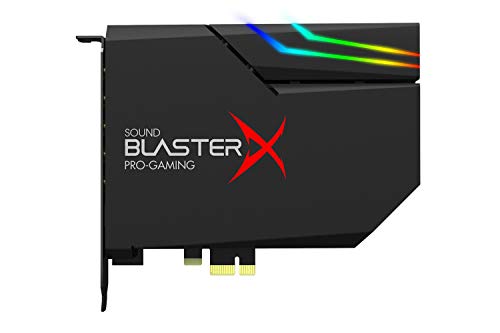
Creative Sound BlasterX AE-5 Plus — Best monitoring card
The AE-5 Plus is the strongest argument the slot still makes to a producer, and its listing states the case numerically: a SABRE32-class hi-res DAC running 32-bit/384kHz, up to 122dB signal-to-noise ratio, a discrete Xamp headphone bi-amplifier, and Dolby Digital and DTS handling for its entertainment hours. As a monitoring heart for a tower — feeding powered monitors its clean line output and headphones through an amplifier that drives each channel with its own stage — it is a genuinely serious piece of conversion hardware wearing a gaming card’s clothes.
The Xamp architecture matters for the headphone-check ritual every mixer knows: the moment late in a session when the monitors come down and the mix is interrogated on headphones for edits, breaths and reverb tails. A bi-amped output holds demanding headphones together at that quiet, forensic listening level, and the stated SNR means the silences you are inspecting are the recording’s silences, not the card’s. Producers working entirely in the box — sample-based, virtual-instrument, edit-heavy work — will find this card covers their entire audible world.
Its gaming plumage is real and should be weighed honestly rather than sneered at. Dolby and DTS support plus the RGB lighting system serve the tower’s evening shift, and for the hybrid producer that dual citizenship is value, not contamination. What the AE-5 Plus does not do is record: no microphone preamp, no instrument input, and no claim in its listing that it wants them. Buy it as a monitoring instrument and it will not disappoint you; buy it as an interface and the disappointment is scheduled.
Driver maturity is the final quiet virtue. Creative’s Sound Blaster line has been through enough Windows generations that its software behaviour is a known quantity in a way boutique hardware rarely achieves, and a production tower values known quantities above almost everything. Set it up once, verify it under your DAW’s playback engine, and the AE-5 Plus becomes the part of the studio you stop thinking about — the highest praise production gear can earn.
One session habit will endear it to you: leave it as the tower’s only enabled playback device. Windows loves to keep onboard audio alive as a tempting alternative output, and DAWs inherit the confusion. A single, authoritative path — this card, these monitors, these headphones — is the unglamorous foundation of a studio that sounds the same on Tuesday as it did on Monday, and the AE-5 Plus is good enough to deserve that monopoly.
- Role: PCIe gaming sound card and DAC, used here as a monitoring card
- Conversion: SABRE32-class, 32-bit/384kHz per the listing
- Stated SNR: up to 122dB
- Amplification: Xamp discrete headphone bi-amp
- Extras: Dolby Digital and DTS support, RGB lighting system
Strengths
- The cleanest stated conversion figures in this guide’s linked set.
- Headphone bi-amplification built for forensic mix checks.
- Mature driver lineage from the category’s longest-running line.
Trade-offs
- Playback only — recording still requires a separate interface.
- Gaming features and lighting are ballast for a pure studio build.
- Demands a free PCIe slot and a case layout that respects it.
Best for: in-the-box producers and mix engineers monitoring from a tower. Not suited for: anyone whose next purchase must record a microphone.
Monitoring-focused readers can inspect the AE-5 Plus listing on Amazon and confirm its output set matches their monitors and headphones.

ASUS Strix SOAR — Best gaming-leaning 7.1 card
The Strix SOAR arrives from ASUS’s gaming division wearing its allegiance openly: the listing calls it a 7.1 PCIe gaming sound card, and this guide takes the description at face value. Its seat in a production article is the hybrid tower — the machine that mixes by day and games by night — where its multi-channel analog outputs can feed a surround speaker arrangement and its conversion gives everyday production playback a cleaner path than the motherboard offers.
Honesty about the SOAR’s vintage and positioning serves the reader better than adjectives. This is a card from the era when gaming sound cards were a thriving shelf, built around 7.1 output and ASUS’s Strix design language, and its production value is that of a solid, known playback device rather than a monitoring instrument of the calibre Creative’s flagship claims. Producers whose critical listening happens on good headphones through a separate path, and who want their tower’s speaker audio and gaming handled by one tidy internal card, are its natural constituency.
There is also a maintenance argument for a card like this in a working studio. Studios accumulate machines — the render box, the office PC, the spare tower that runs the old plug-ins nothing else will host — and a dependable internal card keeps such a machine’s audio respectable without adding another USB device to an already crowded desk. The SOAR’s job in that ecosystem is competence across every hour of the machine’s day.
Verify before buying, as with every mature design: confirm current driver support for your Windows version on ASUS’s own pages, and confirm the 7.1 analog arrangement matches the speaker system you actually own. A card bought for outputs your room cannot use is a bracket decoration, and the SOAR deserves a room that uses it whole.
Rooms matter to the SOAR more than to its headphone-leaning rivals. A 7.1 analog card is only ever as good as the speaker placement it feeds, and the producer who installs it in a room where the surround speakers can actually be placed — rather than balanced on bookshelves at apologetic angles — will hear the design’s whole argument. In a cramped bedroom studio, that argument goes unheard, and a headphone-focused card would have been the wiser spend.
- Role: 7.1 PCIe gaming sound card
- Outputs: multi-channel analog for surround speaker sets
- Lineage: ASUS Strix gaming line, per the listing
- Best habitat: hybrid production-and-gaming towers
- Installation: internal PCIe, no desk footprint
Strengths
- True 7.1 analog outputs for speaker-based setups.
- A tidy internal answer for towers that game as hard as they produce.
- ASUS’s gaming-line build and design maturity.
Trade-offs
- Playback-first hardware — no recording inputs for microphones.
- A mature design: verify current drivers before committing.
- Its conversion ambitions sit a tier below the AE-5 Plus’s stated figures.
Best for: hybrid towers feeding surround speakers. Not suited for: critical headphone monitoring or any recording duty.
Hybrid-tower owners can check the Strix SOAR’s Amazon page for its output layout before measuring their own speaker cabling.

GLOTRENDS ST113 — Best minimalist hi-fi card
The ST113 is the guide’s quiet radical. GLOTRENDS builds it around the ESS SABRE32 ES9018K2M DAC, advertises driver-free setup, and gives it an isolated optical output for a clean, noise-free hi-fi feed — a combination that reads like a deliberate rebuttal to everything bloated in the sound-card world. No software suite, no lighting, no game modes: a respected converter chip, an electrically isolated digital exit, and a card that a computer simply recognises.
For a producer, that optical output is the headline. Feeding an external DAC, a high-quality monitor controller or a receiver through an isolated optical path sidesteps the ground-loop gremlins that haunt USB and analog connections between a tower and the rest of a studio. The ST113 can thus serve as the tower’s clean digital doorway even in a setup whose final conversion happens elsewhere — a role no other card in this guide plays so single-mindedly.
Driver-free operation is the second half of its philosophy, and in a production context it is a stability manifesto. A card that needs no proprietary driver cannot be orphaned by one, cannot argue with an operating-system update, and asks nothing of a fresh Windows installation beyond being noticed. Studios that have lost a morning to a driver resurrection will feel the appeal in their bones.
The trade is equally plain: minimalism means the card’s talents end at clean playback and clean digital output. There is no headphone amplifier story to rival the Creative flagships, no surround processing suite, no recording path of any kind. The ST113 is a specialist for listeners and producers who know their chain and want one honest link in it — and for that reader, its restraint is the most professional feature in this entire article.
There is a quiet pleasure in specifying a part like this on a build sheet. Everything else in a studio tower argues for attention — the interface, the monitors, the microphone locker — while the ST113 simply occupies its slot and moves clean digits from the machine to the converter the studio already trusts. Infrastructure that never introduces itself at a session is infrastructure done right.
- Role: PCIe hi-fi sound card
- Converter: ESS SABRE32 ES9018K2M DAC, per the listing
- Signature output: isolated optical for noise-free digital feeds
- Setup: driver-free, per the listing
- Character: minimalist playback specialist
Strengths
- Isolated optical output makes it a superb digital source for external gear.
- Driver-free design removes an entire category of studio downtime.
- A named, respected ESS converter at its heart.
Trade-offs
- No headphone-amp heroics or surround processing suite.
- Playback and digital output only — recording lives elsewhere.
- Its minimalism gives tweakers nothing to play with.
Best for: producers feeding external DACs or receivers from a tower. Not suited for: headphone-first listeners or surround gamers.
Minimalists can view the ST113’s listing on Amazon and picture its optical output landing on the gear already in their rack.

Creative Sound Blaster ZxR — Best control at the desk
The ZxR’s listing calls it an audiophile-grade gaming sound card with a high-performance headphone amp and a desktop audio control module, and it is that last item — the module — that keeps this veteran in a production conversation. A physical control pod on the desk, carrying volume and microphone connections within arm’s reach, answers the internal card’s oldest ergonomic sin: burying its controls in software while its owner is mid-take, mid-mix or mid-call.
As a monitoring device the ZxR was Creative’s flagship statement of its generation, built around a main card and a daughterboard arrangement that separated duties for cleanliness, with headphone amplification meant for serious cans rather than bundled earbuds. In a production tower its proposition is continuity: an owner who mixes on monitors by day and checks on headphones by night gets both paths from one established device whose behaviour has been documented by a decade of owners.
Age must be priced in honestly. The ZxR is a mature product from an earlier Sound Blaster generation, and a buyer should verify driver support for their current Windows version and weigh the AE-5 Plus’s newer stated conversion figures if maximum playback purity is the goal. What the ZxR returns for that homework is its control module and a flagship pedigree at a station of the market the newer card does not occupy in quite the same way.
Studios are conservative places for good reason — a device that works is a device that stays — and the ZxR’s longevity in working towers is its own testimonial. For the producer whose desk discipline revolves around a knob and a mic jack that are always exactly where the hand expects them, it remains a rational, satisfying answer.
The module deserves one more sentence, because it also carries the microphone connection to the desk — and in a modern studio the desk microphone is no longer only for talkback. It is the podcast mic, the client-call mic, the quick voice-memo mic, and having its jack live at the control pod rather than at the tower’s rear bracket is the difference between a thought captured and a thought postponed.
- Role: PCIe audiophile-grade gaming sound card
- Amplification: high-performance headphone amp, per the listing
- Signature extra: desktop audio control module
- Arrangement: main card with daughterboard design from its flagship era
- Audience: producers who want physical control over an internal card
Strengths
- The control module fixes internal audio’s reach problem elegantly.
- Flagship-era headphone amplification for serious mix checks.
- A decade of documented behaviour in real studios and towers.
Trade-offs
- An older generation — verify current driver support first.
- Newer Creative cards state higher conversion figures.
- Playback and monitoring only; it records nothing.
Best for: desk-control devotees running a permanent production tower. Not suited for: buyers wanting the newest conversion silicon or a recording input.
Control-minded producers can read the ZxR’s Amazon listing and decide whether its desktop module earns its cable run in their setup.

Creative Audigy Fx Pro — Best budget slot upgrade
The Audigy Fx Pro carries one of the oldest names in PC audio into the current catalogue: a hi-res PCIe sound card promising hi-res audio, surround sound and clean audio as a PC upgrade, per its listing. The Audigy badge has always marked Creative’s sensible tier — the card for a machine whose onboard audio has become the weakest link — and the Pro’s role in a production article is exactly that: the affordable internal step that gives a secondary or budget tower a cleaner playback voice.
Studios run on more than the hero machine. There is the editing tower assembled from last year’s parts, the office PC that reviews mixes and renders video, the teaching machine in the corner. Outfitting every one of them with flagship conversion is waste; leaving them on wheezing onboard audio is false economy when a card like this exists. The Fx Pro’s surround support also lets such a machine double as the room’s entertainment source without apology.
Expectations should be set by tier, as always. This is an upgrade card, not a monitoring instrument: its promise is clean, hi-res playback that plainly betters a motherboard, not the stated conversion figures or bi-amped headphone stage of the AE-5 Plus. A producer whose critical decisions happen on the main rig will find the Fx Pro perfectly cast in the supporting role; a producer asking it to star will be shopping again within the year.
Installation simplicity is part of the casting. A single PCIe card, Creative’s current software ecosystem, and a machine that sounds respectable by lunchtime — for the second tower, the spare room, the student’s first production PC, that is the whole brief, and the Audigy name has been filling it for a very long time.
Teachers of production should note the casting too. A classroom or a first home studio built around a modest tower learns monitoring fundamentals — gain staging, reference tracks, honest levels — just as well through a competent upgrade card as through a flagship, and the money saved buys the acoustic treatment that will improve those lessons more than any converter could.
- Role: hi-res PCIe sound card and PC audio upgrade
- Promise per listing: hi-res audio, surround sound, clean audio
- Lineage: Creative’s Audigy sensible tier
- Best habitat: secondary towers and budget production PCs
- Installation: single internal PCIe card
Strengths
- The rational price-of-entry for leaving onboard audio behind.
- Surround support keeps one card serving work and leisure.
- Creative’s current software and support ecosystem behind it.
Trade-offs
- An upgrade card, not a critical-monitoring instrument.
- No recording inputs — playback is the entire brief.
- Headphone drive is everyday, not flagship, in character.
Best for: second machines, students and budget towers needing clean playback. Not suited for: primary monitoring duties in a serious mix room.
Budget builders can find the Audigy Fx Pro on Amazon and match its promise against the onboard audio they are retiring.
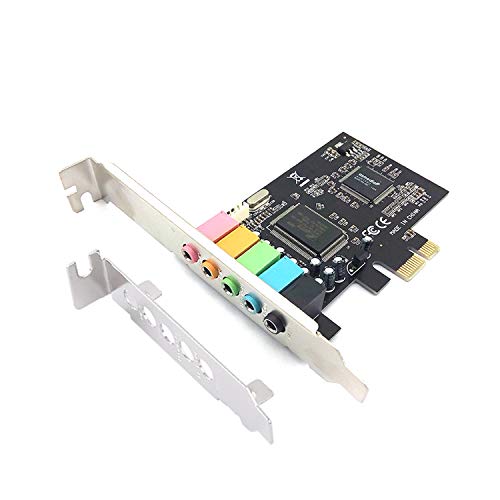
Padarsey CMI8738 5.1 card — Best legacy utility
Every honest guide needs its floor, and the Padarsey card is this one’s — described by its own listing without ornament: a PCIe 5.1 internal sound card for PC, built on the CMI8738 chip, offering 3D stereo audio, with Windows 7 named in its title. That operating-system mention is the most informative phrase in the listing. This card’s parish is the old machine: the tower running legacy software, the workshop PC, the retro build, the specialised box whose replacement would cost more in reconfiguration than the hardware is worth.
Within that parish, the card does a real job. It gives an ageing or audio-less machine basic 5.1 multi-channel sound through a PCIe slot, keeping surround speakers, training stations, kiosk systems and legacy production utilities audible. Studios keep such machines for unglamorous reasons — a dongle-locked plug-in, a controller for older hardware, an archive station — and when their audio dies, a utility card like this is the difference between a working room and a cascade of upgrades nobody budgeted for.
The limits must be stated as plainly as the listing states its chip. The CMI8738 is a veteran design from a different era of PC audio; conversion quality, driver expectations and feature depth belong to that era. Nobody should buy this card to monitor a mix, drive good headphones, or begin a production journey in the present tense, and this guide will not dress it in such language. Its virtue is resurrection, not refinement.
Buy it the way you would buy a spare part for an old car: gratefully, cheaply in spirit, and with the correct expectation that it restores function rather than transforming it. For the machine it saves, that is not a small thing — it is the whole thing.
Label the machine it saves, by the way. Legacy towers drift into mystery over the years — nobody remembers why the workshop PC must never be upgraded — and a card like this is often the load-bearing reason. A strip of tape on the case, naming the card and the software it protects, is the cheapest insurance in this entire guide.
- Role: PCIe 5.1 internal sound card for legacy PCs
- Chip: CMI8738, per the listing
- Era marker: Windows 7 named in the listing
- Output: basic 5.1 multi-channel and 3D stereo audio
- Best habitat: legacy, workshop and utility machines
Strengths
- Restores multi-channel sound to machines nothing else serves.
- A spare-part price in spirit for a spare-part job.
- Keeps legacy systems whole instead of forcing rebuilds.
Trade-offs
- Veteran conversion quality from a much older design era.
- Driver expectations belong to its Windows generation — verify yours.
- Absolutely not a monitoring or recording device.
Best for: legacy machines that must simply make sound again. Not suited for: any modern production, monitoring or listening duty.
Keepers of old towers can look up the Padarsey card’s listing on Amazon and confirm its slot and system fit before resurrecting anything.
The two names this guide covers in prose — and why they matter
EVGA NU Audio — prose-only: the audiophile PCIe card EVGA developed with Audio Note, built as a no-compromise listening instrument for inside the case; it left the market when EVGA exited its product lines, so it survives as second-hand history rather than a buyable recommendation — if you find one, you are collecting a fascinating artefact, not shopping.
The NU Audio matters to this guide because it proves the ceiling the format once reached: a major manufacturer, a hi-fi partner of genuine pedigree, and a card designed for listeners rather than gamers. Its disappearance, despite that pedigree, is the market’s verdict on where serious listening now lives — outside the case — and every producer weighing a PCIe purchase should understand that they are buying into the format’s afterglow, however warm.
RME HDSPe and Lynx E22 class — prose-only: the true studio PCIe interfaces, sold through pro-audio dealers rather than the retail listings verified for this guide; multi-channel, driver-engineered recording hardware for studios whose channel counts, expansion needs and support expectations belong to the professional tier — the honest destination if a DAW rig genuinely requires internal PCIe recording.
The distinction is worth engraving. The RME and Lynx class are not expensive versions of the cards above; they are a different species — recording interfaces that happen to live in a slot, with the preamp-free line-level I/O, word-clock thinking and driver development budgets of professional infrastructure. A producer whose work has grown to that scale should budget accordingly and buy through a dealer who will support the installation. Everyone else is better served by the USB interface world, with a card from this guide’s linked set keeping the tower’s playback honest.
What does the rest of the tower owe the card?
An internal card is a tenant, and tenants live at the mercy of the building. The first landlord duty is power: a clean, adequately sized power supply with its cabling dressed away from the card’s neighbourhood gives conversion the quiet electrical environment the flagship cards were designed to exploit. The second is airflow with manners — a case that roars like a server rack will be heard through the monitors no matter how silent the card’s background is, because microphones are absent here but ears are not, and a producer’s room tone includes the machine in the corner.
The third duty is restraint in neighbours. A tower stuffed with RGB controllers, spinning rust drives and a graphics card overclocked to the edge of stability is a hostile block for any audio tenant. None of the cards in this guide demands a monastic PC, but the monitoring-grade ones repay a build that treats stability as a feature: stock clocks for the session machine, drivers updated on the studio’s schedule rather than the manufacturer’s enthusiasm, and a restore point taken before any of it changes. Production towers are infrastructure, and infrastructure is boring on purpose.
Finally, the room outside the case owes the card its part. A monitoring path is a chain that ends in air: monitors placed symmetrically, a listening position that is not a wall’s echo chamber, and enough treatment to keep the room from editorialising. The most common verdict error in this category is blaming or crediting a card for the room’s behaviour — which is why the integration advice above insists on familiar material and matched levels before any verdict is allowed to harden.
How do the six listed cards compare side by side?
| Pick | Core identity | Conversion note | Signature strength | Watch out for |
|---|---|---|---|---|
| AE-5 Plus | Monitoring-grade gaming card | SABRE32-class, 32-bit/384kHz, 122dB SNR stated | Playback purity plus Xamp headphone drive | Records nothing |
| ZxR | Flagship veteran with desk control | Audiophile-grade positioning | Desktop control module | Older generation drivers |
| GLOTRENDS ST113 | Minimalist hi-fi card | ESS ES9018K2M named | Isolated optical output, driver-free | No amp or processing extras |
| ASUS Strix SOAR | 7.1 gaming card | Not stated in listing | Multi-channel analog outputs | Verify current drivers |
| Audigy Fx Pro | Budget upgrade card | Hi-res per listing | Clean step up from onboard | Supporting-role hardware |
| Padarsey CMI8738 | Legacy utility card | Veteran chip design | Revives old machines in 5.1 | Era-bound quality and drivers |
How should you integrate a PCIe card into a working studio?
Decide its job in one sentence before it enters the machine: monitoring path, digital doorway, or utility resurrection. Then build the signal flow around that sentence. A monitoring card takes the DAW’s main output and feeds monitors directly or through a controller, with headphones on its amplified output for checks. A digital-doorway card like the ST113 feeds the external converter your monitors already trust, and its own analog outputs can stay respectfully unused.
Set the operating system and the DAW to agree. Production grief often lives in the gap between them — the system default pointing one way, the DAW’s device selection another, sample rates mismatched between the two until a render sounds subtly wrong. Choose one rate policy for the studio, set it in both places, and write it on a note taped inside the case door, because the person who will thank you is yourself in eight months.
Finally, A/B the new path against the old one with a mix you know intimately, at matched levels, before you trust it with a client session. A monitoring change recalibrates your ears over days, not minutes; schedule the card’s arrival between projects, not during one, and let a week of familiar material teach you what your new window shows and what it flatters.
What mistakes do PCIe production buyers keep making?
The expensive mistake is the category error: buying a playback card to do a recording interface’s job, usually because a listing’s adjectives sounded studio-flavoured. If your next session involves a microphone, your next purchase is an interface — full stop — and this guide’s linked cards enter the story only when monitoring needs its own answer.
Second is assuming driver features a listing never promised. Low-latency DAW behaviour is model-specific, DAW-specific and version-specific; producers who need it must verify it in the maker’s documentation for their exact setup, because the cost of discovering otherwise is a card that games beautifully and produces reluctantly. Third is ignoring the case: slots smothered by graphics cards, brackets at war with drive cages, front-panel headers that do not reach. Measure the machine before the card is on a truck.
Fourth, producers chase conversion figures into rooms that cannot honour them — a flagship monitoring card feeding monitors in an untreated corner will reveal the corner, not the card. And fifth, the sentimental error: rebuilding a legacy machine around a utility card like the Padarsey and then gradually asking it to be a studio. Legacy hardware earns affection by doing its one job; let it.
Final Recommendation
Let the honest framing make the decision simple. If you record, buy an interface first — that guide is linked below — and return here when your monitoring deserves its own instrument. For the tower that produces in the box, the AE-5 Plus is this set’s clear summit: stated conversion figures, bi-amped headphone drive and mature drivers in one slot. The ZxR serves the producer whose hand wants a knob, the ST113 the minimalist feeding better converters downstream, the SOAR and Audigy Fx Pro the hybrid and secondary machines, and the Padarsey the old soldier in the corner. PCIe’s production story is narrower than it was — but for the reader whose work fits the remaining chapters, these cards write them very well indeed, and a monitoring path you trust is worth more to a mix than any plug-in you will buy this year.
Frequently Asked Questions
Can I record vocals through any of these cards?
Not properly. None of the linked cards provides a microphone preamp or phantom power, which a condenser microphone requires and any vocal chain deserves. Line-level sources can enter some cards in a pinch, but a production vocal deserves an interface with a real preamp — that is the studio recording guide’s entire subject, and cutting the corner costs more in retakes than it saves in hardware.
Do these cards work with my DAW?
As playback devices, they present themselves to the operating system and your DAW plays through them like any output. The deeper question — specialised low-latency driver support inside a specific DAW — is one the listings do not answer, so verify it in the maker’s documentation for your exact model and software version before buying for that purpose. Playback certainty is included; driver assumptions are not.
Is an internal card noisier than a USB interface?
It lives in a noisier neighbourhood, which is not the same verdict. Flagship internal cards are engineered with shielding and layout discipline for exactly that environment, and the AE-5 Plus’s stated 122dB SNR is the claim of a card that expects to be believed. Your specific case and graphics card set the real test, which is why the setup section insists on listening under GPU load before the return window closes.
Why are the RME and Lynx cards not linked for purchase?
Because they are professional infrastructure sold through pro-audio dealers, not retail listings this guide could verify — and because their buyers need dealer support, system integration and channel-count planning that a shopping link cannot provide. They are named so that a producer outgrowing the USB world knows the honest next address, not as a tease.
What happened to the EVGA NU Audio?
It was discontinued when EVGA withdrew from its product lines, despite being the most serious audiophile PCIe card of its era. Remaining units circulate second-hand. This guide covers it in prose because a production-and-playback history of the slot that omitted it would be incomplete — and because its fate explains the market every other card in this article now inhabits.
Can a gaming card really be trusted for mixing?
For playback, judge the conversion and the amplifier, not the marketing tribe — the figures Creative publishes for the AE-5 Plus would be respectable in any catalogue, and a mix is judged by ears that cannot see the box. The honest cautions are different ones: gaming software suites sometimes add processing you must switch off for critical work, and RGB-era cards assume a gaming tower’s habits. Defeat the processing, verify the flat path, and the hardware underneath is a monitoring device like any other.
Should a beginner producer buy a PCIe card or an interface first?
An interface, without hesitation. It records, it monitors, it travels to any computer, and it teaches the fundamentals on hardware designed for them. A PCIe card becomes the right second purchase when a stationary tower’s playback quality is the identified bottleneck — a diagnosis you can only make after the interface has shown you what your mixes actually sound like.
A parting thought for the producer still torn between the slot and the desk: the two are not enemies, and most mature studios quietly run both — an interface that records, a card or converter chain that monitors, each doing the job its shape suits. Buy in that order, verify drivers before money moves, and let the work itself, rather than any category’s marketing, tell you when the next piece has earned its place in the chain.
Related Guides
The recording half of the story lives in Best Sound Cards for Studio Recording, builders choosing a card for a general desktop should compare Best Desktop Sound Cards, and listeners whose priority is pure playback can continue to Best Sound Cards Audiophile.
Related guides
- Best 4K UHD HDR HDMI Extenders: 4K60, Long-Run and 4K120 Kits Compared
- Best 25–35 Inch Monitors With Lowest Display Lag: An Honest Ranking Without Invented Numbers
- Best Enterprise SATA SSDs: Endurance Classes, Power-Loss Protection and Fleet Sense
- Best Color Product Label Printers: Six Desktop Machines for Short-Run Product Labels



[…] should compare Best External Sound Cards, producers weighing the slot for studio work belong in Best PCI Sound Cards for Music Production, and purists chasing the finest headphone drive can continue to Best Sound Cards Audiophile. The […]