What's inside
- Where to Buy, and an Honest Word About the Rugged Market First
- Key Takeaways
- Quick Picks
- How Were These Six Chosen for Bay Work Rather Than Desk Work?
- What Does Diagnostic Work Actually Demand, Bay by Bay?
- Why Does Renewed Stock Dominate This Category, and How Should a Technician Buy It?
- Which Ports and Connections Does a Workshop Laptop Genuinely Need?
- How Should the Machine Be Set Up and Protected Once It Arrives?
- What Changes When the Laptop Works at the Vehicle Instead of the Bench?
- Factory Software, Aftermarket Platforms and the Multi-Brand Reality
- What Does the Whole Purchase Cost Once the Workshop Adds What It Actually Needs?
- New Rugged or Renewed Flagship: How Does the Money Actually Compare?
- What Should Be Checked in the First Week, Before the Machine Earns Trust?
- Gloves, Screens and Keyboards: the Interface Questions Listings Never Answer
- What Mistakes Do Technicians Make When Buying a Workshop Laptop?
- Does the Arrival of Electric Vehicles Change the Laptop Decision?
- One Workshop, Several Technicians: Who Owns the Machine’s Setup?
- Final Recommendation
- Frequently Asked Questions
- Related Guides
As an Amazon Associate I earn from qualifying purchases. This post may contain affiliate links at no extra cost to you.
gizmoverdict.com is reader-supported. When you buy through links on our site, we may earn an affiliate commission.
Where to Buy, and an Honest Word About the Rugged Market First
The best laptops for automotive technicians are not ordinary laptops, and the shopping starts with a fact most roundups bury: the rugged-laptop market on Amazon is led by renewed stock. The famous names of the category — Panasonic’s Toughbook line, Dell’s Latitude Rugged family, Getac’s convertibles — circulate on Amazon overwhelmingly as refurbished machines, because their first owners are fleets, utilities and workshops that lease them, return them, and feed a healthy second life through professional refurbishers. A technician who understands that market can buy brilliantly. A technician who expects a sealed-box flagship at a consumer price will be disappointed, or worse, misled.
So this guide is built in two honest halves. Three picks are verified new listings you can buy with a normal link and a normal warranty conversation: Dell’s Pro Rugged 14, the Durabook S15 and the Getac S510. Three further picks are the renewed flagships — a Toughbook FZ-55 MK3, a Latitude Rugged 5430 and a Getac V110 G6 — presented without links, plainly labelled as renewed routes, because for many workshops they are the smartest money in the category and pretending otherwise would make the guide useless. What unites all six is the job: diagnostic software, wiring diagrams at arm’s length under a lift, service information systems, scope software, and a working environment of concrete floors, oil mist, cold mornings and drops that would end a consumer laptop’s career.
Everything else in the guide follows from that environment. Screens must be readable under workshop lighting and, for mobile techs, daylight. Ports matter because scan tools, oscilloscopes and older vehicle interfaces still speak USB-A and serial. Keyboards must tolerate gloves at least some of the time, and the machine must survive being carried by one hand, set down on a wing, and knocked off a workbench once in its life — because it will be.
Key Takeaways
- Half of this list is renewed on purpose: the Toughbook FZ-55 MK3, Latitude Rugged 5430 and Getac V110 G6 are refurb-led routes, labelled as such and left unlinked.
- The Dell Pro Rugged 14 is the strongest verified-new buy, a current-generation rugged machine with a Core Ultra processor and 16GB of DDR5 memory.
- The Durabook S15 and Getac S510 give workshops 15.6-inch screens in genuinely rugged chassis, the size most diagnostic software quietly assumes.
- Screen size and port selection matter more in a bay than processor benchmarks; most diagnostic suites are light software running on unforgiving hardware schedules.
- Buy the warranty and the battery plan with the same care as the laptop — in a workshop, support is a feature of the machine.
Quick Picks
| Pick | Badge | Why it is here |
|---|---|---|
| Dell Pro Rugged 14 | Best New Rugged Buy | Current-generation Dell rugged hardware with a Core Ultra 5, DDR5 memory and a 512GB drive, sold new with a proper warranty path. |
| Durabook S15 Rugged Laptop | Best Workshop Value | A 15.6-inch semi-rugged machine with a smartcard reader and backlit keyboard from a maker that builds nothing else. |
| Getac S510 Rugged Laptop | Best Big-Screen Rugged | 32GB of memory and a 1TB drive in Getac’s 15.6-inch rugged chassis, the roomiest verified-new specification here. |
| Panasonic Toughbook FZ-55 MK3 | Best Renewed — Modular | The xPAK expansion standard of the trade; the verified listing is renewed stock, so it is covered here without a link. |
| Dell Latitude Rugged 5430 | Best Renewed — Fleet Route | Ex-fleet machines with deep parts availability; renewed listings only, bought with the caveats spelled out below. |
| Getac V110 G6 | Best Renewed — Convertible | A rotating-screen rugged convertible for techs who work standing at the vehicle; renewed stock, unlinked. |
How Were These Six Chosen for Bay Work Rather Than Desk Work?
The selection began with the drop, not the benchmark. A technician’s laptop lives where gravity and concrete conspire, so every machine here comes from a maker’s rugged line — built, tested and marketed for falls, vibration, dust and temperature swings that consumer ranges never claim to survive. Ordinary business laptops, however good, were excluded on that ground alone: their hinges, ports and screens are not designed around a workshop, and no processor advantage compensates the first time a machine slides off a bonnet.
The second filter was the software’s real appetite. Factory and aftermarket diagnostic platforms, parts catalogues and service-information systems are mostly undemanding programs; they want a stable Windows installation, adequate memory, storage for large diagram and data libraries, and ports that match the interfaces in the drawer. Sixteen gigabytes of memory and a modern processor cover that comfortably, which is why this guide spends its attention on chassis, screen, ports and support instead of chasing benchmark crowns. The third filter was honesty about condition: each listing’s full title was read, and where the verified stock was renewed, the pick was moved to the prose-only group rather than dressed up as new. That is not a demotion — in this category the renewed machines include the most capable hardware of all — but the reader deserves to know which transaction they are entering.
A note on what was left out, because it shapes the list as much as what stayed. Fully sealed, ultra-rugged flagships aimed at military and mining buyers exist above this list’s ceiling, and their prices reflect contracts rather than workshops; a general repair business rarely extracts value from the extra sealing. At the other end, tablet-only solutions were set aside because diagnostic platforms remain Windows applications with keyboards in their ancestry, and the one convertible here — the V110 — keeps a proper keyboard attached for exactly that reason. The six that remain are the machines a working technician can buy this week, through channels a workshop already uses, and defend in the accounts.
What Does Diagnostic Work Actually Demand, Bay by Bay?
Picture the machine’s Tuesday. It opens on a cold bench, runs a scan tool through a full module sweep, and holds a wiring diagram steady while its owner lies on a creeper comparing wire colours by torchlight. It gets carried to a parts washer’s neighbour, a waiting room, a customer’s driveway. It runs oscilloscope software during an intermittent-fault hunt that takes two hours and three road tests. It spends the night syncing a service-information update measured in gigabytes. None of that is heavy computation. All of it is hostile logistics: gloves, glare, vibration, dust, temperature, and the constant small violence of being set down hard by someone whose other hand holds a torque wrench.
Two consequences follow. First, the screen is the workshop interface — 15.6 inches at full HD is the size at which dense diagrams, waveform traces and split-screen service procedures stay legible without constant zooming, which is why three of the six picks are built at that size and the 14-inch machines here earn their place through toughness rather than display area. Second, ports are diagnostic instruments in their own right. USB-A has not retired from the bay, whatever laptop designers believe; scan tools, key programmers and older interfaces assume it, and a machine that needs a dongle for every connection will lose that dongle in a toolbox by March.
Why Does Renewed Stock Dominate This Category, and How Should a Technician Buy It?
The economics are structural. Rugged laptops are bought new mainly by organisations — fleets, forces, utilities, large workshops — on lease cycles. When the cycle turns, thousands of Toughbooks, Latitude Ruggeds and Getacs flow to refurbishers who test them, replace batteries and drives, and sell them at a fraction of the original price to exactly the people who value toughness over novelty: independent workshops and mobile technicians. Amazon’s rugged shelves reflect that flow honestly. The verified listings for the FZ-55 MK3, the Latitude Rugged 5430 and the V110 G6 are renewed machines, and this guide treats them as a legitimate first-class route rather than a compromise.
Buying renewed well is a skill with a short checklist. Buy from a refurbisher who states the grading plainly and backs it with a real warranty period, not a marketplace shrug. Expect the battery to be the consumable it is: ask its condition, and budget for a replacement pack in year one if the answer is vague — a rugged laptop with a tired battery is a desktop with a handle. Check the screen for pressure marks, the ports for damage, and the included accessories against the listing photograph, because rugged machines often travel with vehicle docks and straps that may or may not be in the box. And confirm the exact generation in the title — the difference between a Toughbook FZ-55 MK2 and MK3 is a real specification gap, and renewed listings reward careful readers.
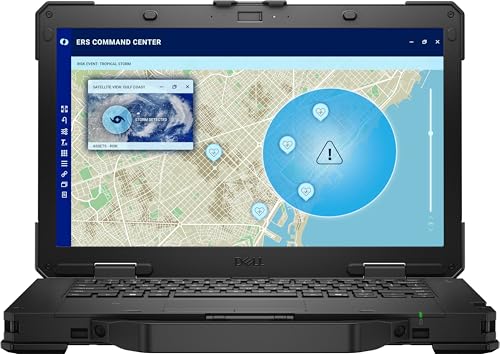
Dell Pro Rugged 14 — Best New Rugged Buy
The Dell Pro Rugged 14 is what the category looks like when bought new in the current generation: a 14-inch full HD rugged laptop built around an Intel Core Ultra 5 135U processor with twelve cores, 16GB of DDR5 memory and a 512GB NVMe drive. For a workshop that wants one machine, one invoice and one warranty conversation, it is the straightforward answer on this list. Dell’s rugged line is engineered for the drop-and-vibration world — reinforced corners, sealed ports, a chassis designed to be carried by a handle and set down without ceremony — and the Pro generation brings that hardware up to date with modern memory, an AI-capable processor for the software that is starting to use it, and Windows 11 Pro as the operating system the diagnostic world expects.
In bay terms, the specification is well judged rather than extravagant. Sixteen gigabytes is the right amount for diagnostic suites, a browser full of service bulletins and a scope application running together; the 512GB drive holds the diagram libraries and update caches without immediate rationing; and the backlit keyboard earns its place on early winter mornings and in dim inspection pits. The 14-inch size is the portable end of this list — the machine for a mobile technician or a multi-bay workshop where the laptop walks to the vehicle, rather than the fixed diagnostic station where a 15.6-inch screen would serve better. Dell’s business support behind it is the other half of the purchase: rugged machines lead hard lives, and a support channel that understands fleet hardware is worth having before it is needed.
- Processor: Intel Core Ultra 5 135U, 12-core
- Memory and storage: 16GB DDR5 RAM, 512GB NVMe SSD
- Display: 14-inch FHD
- Camera and input: webcam, backlit keyboard
- Rugged design: Dell Pro Rugged line chassis, built for drops and vibration
- Operating system: Windows 11 Pro
Strengths
- The only current-generation flagship here sold new with a clean warranty story.
- DDR5 memory and a 12-core processor give it the longest useful life on the list.
- 14-inch rugged portability suits mobile techs and multi-bay movement.
Trade-offs
- The 14-inch screen is the smallest here for diagram work.
- New rugged pricing is steep next to the renewed flagships below.
- Glove operation still favours the convertible and touchscreen specialists in the category.
Best for: workshops and mobile technicians who want new rugged hardware, current parts and a single support relationship. Not suited for: a fixed diagnostic bench where a 15.6-inch screen would be used all day, every day.

Durabook S15 Rugged Laptop — Best Workshop Value
Durabook is the name workshops mention when the big brands’ prices get discussed, and the S15 shows why. It is a semi-rugged 15.6-inch machine with a full HD non-touch display, an Intel Core i5-1235U processor, 16GB of memory and a 256GB drive, plus two details that reveal its intended workplace: a smartcard reader, for the secured systems fleets and larger organisations run, and a backlit keyboard for the hours when the workshop is darker than the weather outside. Semi-rugged is the honest middle of this category — reinforced, drop-tested and dust-aware without the full military sealing of the flagship lines — and for a machine that lives on a bench, a cart or a diagnostic trolley rather than a building site, that middle is usually the correct amount of armour.
The compromises sit where a value machine’s should. The drive is the smallest on this list at 256GB, and a workshop that keeps several brands’ service libraries locally will fill it; budget for an upgrade or an external drive from the start. The processor is a generation behind the Dell, which matters not at all to diagnostic software and slightly to the machine’s total lifespan. What the S15 gets right is the shape of the thing: a big, legible screen, a full-size keyboard, and a chassis that treats a knock off the bench as an incident rather than a funeral. For an independent workshop equipping its first proper diagnostic station, that is the correct set of priorities at a sane position in the category’s pricing.
- Processor: Intel Core i5-1235U
- Memory and storage: 16GB RAM, 256GB SSD
- Display: 15.6-inch FHD, non-touch
- Camera and input: webcam, backlit keyboard, smartcard reader
- Rugged design: Durabook semi-rugged chassis
- Operating system: Windows 11 Pro
Strengths
- Full 15.6-inch working area at the value end of the rugged market.
- Smartcard reader suits secured fleet and organisational systems.
- Semi-rugged build matches bench and trolley duty without flagship pricing.
Trade-offs
- 256GB of storage is the tightest here; plan the upgrade path on day one.
- Non-touch screen asks for a mouse or touchpad where rivals allow a gloved tap.
- Processor is a generation older than the newest machines on the list.
Best for: independent workshops building a bench or trolley diagnostic station on a controlled budget. Not suited for: technicians who store many brands’ full data libraries locally and never want to think about storage.

Getac S510 Rugged Laptop — Best Big-Screen Rugged
Getac builds rugged machines the way Panasonic does — as the whole business, not a sideline — and the S510 is its 15.6-inch answer for vehicle-adjacent work. The verified listing is generously specified: an Intel Core Ultra 5 processor, 32GB of memory and a 1TB drive behind a full HD non-touch screen. That memory and storage pairing is the roomiest on this list, and it changes how the machine feels across a working week. Every brand’s diagnostic suite can stay installed, the service-information libraries can live locally rather than on a network share that fails at the wrong moment, and the machine never asks its owner to ration.
The S510’s natural home is the serious diagnostic station: the workshop that runs module programming, keeps scope software resident, and treats the laptop as infrastructure. Thirty-two gigabytes also future-proofs it against the steady growth of factory software, which never gets lighter. The non-touch screen is the deliberate trade — Getac’s rugged buyers often prefer a conventional panel for durability and glove-free clarity, and a bench mouse does the pointing. As with the Dell, the support relationship matters: Getac’s rugged warranties are a known quantity in fleet circles, and a workshop buying new should register the machine, confirm the cover’s terms in writing, and treat that paperwork as part of the tool inventory.
- Processor: Intel Core Ultra 5
- Memory and storage: 32GB RAM, 1TB SSD
- Display: 15.6-inch FHD, non-touch
- Camera and input: webcam; full port selection per the listing’s specification
- Rugged design: Getac rugged chassis for field and workshop duty
- Operating system: Windows (see the listing for the exact edition supplied)
Strengths
- 32GB and 1TB is the most comfortable specification on this list, full stop.
- Getac’s rugged pedigree is fleet-proven across harsher trades than this one.
- Big screen plus big storage suits a permanent, multi-brand diagnostic station.
Trade-offs
- Non-touch panel in a category where some rivals take a gloved tap.
- Size and weight assume a station or a vehicle, not a shoulder bag.
- The listing leaves the exact Windows edition to be confirmed at purchase.
Best for: established workshops running several brands’ software from one rugged station. Not suited for: a mobile technician who carries the laptop to every job and would feel every extra inch and gram.
Panasonic Toughbook FZ-55 MK3 — Best Renewed, the Modular Standard
Ask a room of experienced technicians which rugged laptop defines the category and the Toughbook name arrives first, usually attached to the FZ-55 and its xPAK expansion system — swappable modules that let the same machine gain extra ports, a smartcard reader, additional storage or a dedicated graphics option as the job changes. The MK3 is the current generation of that idea, and it is the machine many workshops actually run. It is included here as a prose-only pick for one plainly stated reason: the verified Amazon listing for it is renewed stock. Presenting it as a shiny new purchase would be a lie this guide declines to tell.
Bought knowingly, the renewed route is strong. FZ-55s come off fleet cycles with years of structural life left, the xPAK ecosystem means a renewed unit can still be tailored to a workshop’s interfaces, and Panasonic’s own channels and specialist refurbishers stand behind the model with parts and knowledge. The checks from the renewed-buying section apply with full force: confirm the exact configuration and which xPAK modules, if any, are fitted; ask the battery’s condition directly; and verify the warranty the refurbisher is actually offering. A technician who does that homework gets the trade’s standard machine for a fraction of its first-life price — which is, in the end, why so many workshops already have one.
- Condition: renewed — the verified listing is refurbished stock, not new
- Design: semi-rugged Toughbook chassis with xPAK expansion modules
- Expansion: xPAK options vary by unit — confirm what is fitted before buying
- Memory and storage: vary by renewed configuration; verify against the listing
- Display: 14-inch class Toughbook panel; touch options vary by unit
- Operating system: Windows Pro on fleet-standard configurations
Strengths
- xPAK modularity lets one machine adapt to changing interfaces and tasks.
- The trade’s deepest pool of parts, docks and refurbisher knowledge.
- Renewed pricing puts flagship rugged hardware within independent reach.
Trade-offs
- It is renewed: condition, battery health and fitted modules vary by unit.
- No standard new-machine warranty; the refurbisher’s terms are the cover.
- Configuration homework is mandatory — two listings with the same name can differ.
Best for: experienced buyers who will verify the exact unit and value the xPAK system. Not suited for: a first-time buyer who wants a sealed box, a fixed specification and nothing to check.
Dell Latitude Rugged 5430 — Best Renewed, the Fleet-Surplus Route
The Latitude Rugged 5430 spent its first life in exactly the environments this guide is about — service fleets, utilities, field engineering — and its second life is where the value sits. Like the Toughbook above, it appears here without a link because the verified listings are renewed stock, and the same honesty applies: this is ex-fleet hardware, professionally refurbished, sold at a steep discount to its original price. What the 5430 offers in return is Dell’s rugged engineering in a 14-inch form, a huge installed base, and the parts-and-knowledge ecosystem that follows any machine organisations bought by the thousand.
The buying discipline mirrors the FZ-55’s with one addition: Dell’s service tag system is the renewed buyer’s friend. The tag on the chassis lets a buyer check the machine’s original configuration and service history through Dell’s support site before money moves, turning a vague listing into a specific machine with a paper trail. Use it. Confirm the processor generation, the memory, whether the unit carries the touchscreen option, and the battery’s reported health where the refurbisher states it. A 5430 bought that way — verified tag, stated grade, real refurbisher warranty — is one of the most rational purchases in this entire category, and the workshops that run them tend to buy a second.
- Condition: renewed — verified listings are refurbished ex-fleet stock
- Design: Dell Latitude Rugged 14-inch class chassis
- Verification: Dell service tag confirms original configuration before purchase
- Memory and storage: vary by unit; confirm via the tag and the listing
- Display: touch and non-touch variants exist in the fleet pool
- Operating system: Windows Pro on standard fleet configurations
Strengths
- Service-tag transparency makes each renewed unit individually checkable.
- Deep fleet pool means parts, batteries and docks stay available for years.
- Genuine rugged engineering at second-life pricing.
Trade-offs
- Renewed condition varies; grading language differs between refurbishers.
- Battery age is the standing question and must be asked outright.
- Specifications are per-unit homework, not a fixed menu.
Best for: value-focused workshops willing to verify a service tag and buy a specific machine rather than a model name. Not suited for: buyers who need identical units in quantity, all with matching specifications and new-machine cover.
Getac V110 G6 — Best Renewed, the Convertible
The third prose-only pick exists because it does something none of the linked machines do: the V110’s screen rotates and folds flat into a tablet, which is the form a technician wants when standing at an open engine bay with a diagram in one hand and a probe in the other. Getac’s V110 line has served field trades for generations for exactly that reason. The G6 covered here is, again, a renewed story — the verified listing is refurbished stock — so it is presented unlinked, with its condition stated rather than smoothed over.
As a renewed purchase the V110 rewards the checklist and adds one item of its own: test the hinge and the latch, because a convertible’s moving parts carry its whole value proposition, and check the touchscreen and pen behaviour across the full panel. Beyond that, the appeal is durable. A convertible rugged machine at second-life pricing gives a mobile technician a tool that works at the bench, at the vehicle and in the customer’s driveway without a second device, and Getac’s support for the line’s accessories — vehicle docks, straps, spare batteries — remains easy to find. For the technician whose work is mostly standing up, it may be the most suitable machine in this guide at any condition.
- Condition: renewed — the verified listing is refurbished stock
- Design: rugged convertible; screen rotates to tablet form
- Input: touchscreen with pen support on standard configurations
- Memory and storage: vary by renewed unit; verify before purchase
- Checks specific to this model: hinge, latch and full-panel touch response
- Operating system: Windows Pro on standard configurations
Strengths
- Convertible form suits standing work at the vehicle like nothing else here.
- Touch and pen input handle diagrams and forms without a mouse.
- Getac accessory support keeps docks and batteries obtainable.
Trade-offs
- Renewed: hinge and touchscreen condition must be physically verified.
- Smaller screen than the 15.6-inch bench machines for long diagram sessions.
- Specification varies by unit, as with every renewed pick in this guide.
Best for: mobile and roadside technicians whose diagnostic work happens standing at the vehicle. Not suited for: a permanent bench station, where the bigger fixed screens above serve better.
Which Ports and Connections Does a Workshop Laptop Genuinely Need?
Start with USB-A, plural. Scan tools, pass-through devices, key programmers, older scope interfaces and the workshop’s accumulated drawer of cables assume the rectangular port, and a rugged machine that offers several of them saves a daily ration of adapters. USB-C earns its place for charging, modern peripherals and docking at a bench. Ethernet, unfashionable as it sounds, still matters: workshop networks are not always kind, some module-programming procedures prefer a wired connection’s stability, and a native port beats a dongle when a flash is mid-write. HDMI or another display output feeds the big wall screen that many workshops use for training and for showing a customer a waveform. Before buying any machine here, list the interfaces already in the drawer and check the candidate against the list — the port audit takes ten minutes and prevents a year of small annoyances.
Serial deserves a sentence of its own. Genuine RS-232 has largely left new laptops, rugged included, and the honest position is that a quality USB-to-serial adapter with a reputable chipset covers most legacy interfaces a technician will still meet. Where a specific diagnostic platform is known to be fussy about adapters, that platform’s own recommended hardware wins the argument, and the laptop should be chosen around it — one more case of the software drawer deciding the hardware purchase.
How Should the Machine Be Set Up and Protected Once It Arrives?
Setup for a workshop laptop is half software, half furniture. On the software side: install the diagnostic suites before the machine’s first job, run every update the platforms demand while the connection is good, and image the finished setup if the workshop has the skills — a working backup turns a failed drive from a week of reinstallation into an afternoon. Create a standard user account for daily work and keep the administrator password in the office safe; diagnostic software occasionally demands elevation, and the discipline costs nothing. On the furniture side: give the machine a defined home — a trolley, a bench dock, a vehicle mount — because laptops that live somewhere get put back somewhere, and laptops that live anywhere get left on a wing.
Protection is mostly habit. A screen protector earns its keep against the grit that workshop air carries. The charging cable should be routed where feet and creeper wheels do not cross it. Batteries on machines that live docked benefit from the maker’s charge-limit setting where one exists, since a pack held at full charge for years ages faster than one held lower. And the machine should be blown out and inspected on the same schedule as the workshop’s other precision tools — dust is a diagnostic-laptop failure mode with a calendar, and the calendar can be beaten.
What Changes When the Laptop Works at the Vehicle Instead of the Bench?
Vehicle-side work rearranges the priorities. A bench machine can be heavy, dim and tethered; a machine used at the vehicle must be readable under a canopy or a bright sky, operable with one hand while the other holds a lead, and powered for a road test that ends forty minutes from the workshop. This is where the renewed V110’s convertible form stops being a novelty: folded to a tablet, it hangs from a steering wheel hook or rests on a seat with the diagram facing up, and a stylus works where a touchpad cannot. It is also where screen brightness — a figure listings state inconsistently, so treat any single number cautiously and judge by the maker’s outdoor claims for the line — separates machines designed for field trades from machines merely hardened against drops.
Power at the vehicle has its own discipline. The honest solution is a spare battery where the design allows swapping, or a vehicle power adapter from the machine’s maker wired properly into the service van, rather than a generic inverter humming under a seat. Road-test logging sessions are long, ignition cycles interrupt naive charging arrangements, and a laptop that dies mid-capture takes the evidence with it. Mobile technicians should also think about heat and cold: a machine left in a van overnight in winter starts its day with a cold-soaked battery that delivers less than its label promises, and the rugged lines here tolerate that reality better than consumer hardware, but no battery chemistry enjoys it. Bring the machine indoors on the coldest nights; it is the cheapest range-extender there is.
Connectivity at the vehicle is the third leg. Modern diagnostic work assumes the laptop talks to a wireless interface at the vehicle while simultaneously reaching the workshop’s service-information system over Wi-Fi — two networks, one machine, no patience for a radio that drops either. All six picks carry modern wireless, but the workshop’s own access-point placement decides more than the laptop does; a dead corner behind a lift is an infrastructure problem wearing a laptop costume. Test the actual bays before blaming any machine.
Factory Software, Aftermarket Platforms and the Multi-Brand Reality
Independent workshops rarely choose their software; the cars choose it. A general shop may run two factory platforms for the brands it sees weekly, an aftermarket suite for everything else, a separate oscilloscope application, a key-programming tool with its own quirks, and a parts catalogue that lives in a browser. Each was written by a different team with a different idea of a normal computer, and the laptop’s job is to host the whole argumentative family without becoming the problem. That is a memory and storage story far more than a processor story: installations are large, updates are larger, and several suites insist on their own database services idling in the background all day.
Two habits keep the peace. The first is separation: some workshops keep factory platforms in virtual machines, one per brand, so an update that breaks one brand’s suite cannot take the others with it — every machine in this guide has the processor support for virtualisation, and the 32GB S510 makes the practice comfortable rather than theoretical. The second habit is sequencing: run the big platform updates on a quiet afternoon, one suite at a time, with the machine on mains power and the workshop’s connection unloaded, rather than letting five updaters fight on a Monday morning with cars waiting. Neither habit costs money. Both are the difference between a laptop that is infrastructure and a laptop that is a recurring incident.
Dealer-level and specialist work adds one more consideration: some factory platforms certify or quietly assume particular hardware behaviours — stable USB, specific adapter chipsets, uninterrupted power during module programming. The laptop cannot fix a fussy platform, but a rugged machine with honest ports, a healthy battery acting as its own uninterruptible supply, and a technician who keeps the charger connected during any flash write removes the variables that are within the workshop’s control. Module programming is the one task in this trade where the laptop’s steadiness is measured in bricked control units; treat those sessions with the ceremony they deserve, whichever pick is on the bench.
What Does the Whole Purchase Cost Once the Workshop Adds What It Actually Needs?
The laptop’s price is the beginning of the invoice, not the whole of it. A working diagnostic station also wants its dock or trolley, the vehicle interface cables that live with the machine rather than wandering the workshop, a spare battery for the mobile pattern or a second charger for the bench pattern, and the software subscriptions that dwarf the hardware across a five-year life. Renewed purchases add a probable battery replacement and occasionally a drive upgrade to the first-year column; new purchases add the extended warranty decision. None of this is an argument against any pick here — it is an argument for pricing the station, not the laptop, because workshops that price the station choose the machine calmly and workshops that price the laptop alone keep being surprised by the accessories.
There is also a downtime column, invisible until it is enormous. A diagnostic laptop that fails during a booked week costs the workshop its bay throughput, not its purchase price, which is why the support conversation — who answers, how fast, with what parts — runs through this guide like a spine. A renewed flagship with a strong refurbisher behind it can be a better downtime bet than a new machine with a vague retail warranty, and a new Dell or Getac with proper business cover can be better than both. Buy the answer to the failure question first and the badge second; the badge is the part that shows in photographs, and the answer is the part that shows in October.
New Rugged or Renewed Flagship: How Does the Money Actually Compare?
| Route | Machines | What the money buys | What it asks in return |
|---|---|---|---|
| Verified new | Dell Pro Rugged 14, Durabook S15, Getac S510 | Full warranty, known battery, current parts | The category’s highest prices |
| Renewed modular | Toughbook FZ-55 MK3 | xPAK flexibility, flagship build, low entry cost | Per-unit verification, refurbisher warranty |
| Renewed fleet | Latitude Rugged 5430 | Service-tag transparency, deep parts pool | Grading and battery homework |
| Renewed convertible | Getac V110 G6 | Tablet form for standing work | Hinge and touchscreen checks |
What Should Be Checked in the First Week, Before the Machine Earns Trust?
A workshop laptop should be proven like a repaired vehicle: on the road, under load, before it is handed over. Spend the first week deliberately. Run every diagnostic suite the shop owns, including the one nobody likes, and complete a real module sweep on a real car rather than a demo mode. Connect every interface in the drawer — the scan tool, the scope, the key programmer, the battery tester that reports to a PC — because a port or driver conflict found in week one is a return; found in month three, it is a grievance. Take the machine to the furthest bay and the customer’s driveway pattern it will actually serve, and watch the wireless behaviour and the screen in real light.
For a renewed purchase, the first week carries extra weight because it is usually the window in which a refurbisher’s warranty is easiest to invoke. Check the battery by using it: a full diagnostic session unplugged should leave a sensible reserve, and a pack that collapses early is a conversation to have immediately, with the listing’s promises in hand. Run a full drive-health check with the maker’s own diagnostic tool, exercise every port and key, photograph any cosmetic surprises against the listing’s grading description, and confirm the serial or service tag matches the paperwork. None of this is suspicion; it is the same incoming inspection a good workshop gives a exchanged part, applied to the tool that will diagnose everything else.
Finish the week by making the machine recoverable. Take the system image while the setup is clean and verified, file the warranty and invoice where the office keeps tool records, label the charger and the machine with the workshop’s name, and write the asset into whatever register the business keeps. A laptop set up this way can be restored, claimed on, or replaced in a day. A laptop that skipped the week becomes a small archaeology project the first time anything goes wrong.
Gloves, Screens and Keyboards: the Interface Questions Listings Never Answer
Three interface realities decide daily satisfaction and appear in almost no listing. The first is gloves. Thin nitrile gloves trouble no touchscreen or keyboard here; the heavier mechanics’ gloves that winter and diesel work demand are another matter, and the honest answers are a stylus for touch machines, a trackball or mouse at the bench for the rest, and keyboard shortcuts learned for the five commands used a hundred times a day. The second reality is the keyboard itself: diagnostic work is not typing-heavy, but service notes, emails and reports accumulate, and a keyboard with a number pad — natural on the 15.6-inch machines — quietly speeds up every parts order and estimate built on it.
The third reality is glare. Workshops mix overhead fluorescents, inspection lamps and open doors, and a glossy screen in that mix becomes a mirror with a diagram behind it. Matte panels — the default across the rugged lines in this guide — are not a preference but a workplace adaptation, and they are one more reason the category looks the way it does. When comparing any two machines here in person, stand where the machine will stand, under the lights it will live under, and read a wiring diagram at arm’s length. That thirty-second test predicts a year of satisfaction better than any specification table, including the honest one in this guide.
What Mistakes Do Technicians Make When Buying a Workshop Laptop?
The commonest is buying a consumer laptop because the specification looked strong, then watching a hinge or a screen die in a season. The second is the mirror error: paying new-flagship money for toughness the job never uses, when a semi-rugged machine and a spare battery would have served the bench better. The third is buying renewed carelessly — no grade stated, no warranty, no battery question asked — and blaming the category for one bad refurbisher. The fourth is forgetting the interfaces: the machine arrives, the scan tool’s cable does not fit, and the dongle era begins. The fifth is treating the laptop as a personal purchase rather than workshop infrastructure: no backup image, no defined home, no service paperwork filed. Every one of these mistakes is cheap to avoid and expensive to learn.
Does the Arrival of Electric Vehicles Change the Laptop Decision?
Less than the headlines suggest, and in one specific direction. EV service adds high-voltage safety procedures that live in service information, insulation and waveform testing that runs through the same oscilloscope software, and battery diagnostics that arrive as yet another platform on the machine. The laptop’s burden grows in breadth — more suites, more data, more documentation open at once — rather than in raw computation, which strengthens the case this guide has already made: memory headroom and storage over benchmark trophies, with the S510’s specification looking less like generosity and more like foresight. What EVs do not change is the environment. The machine still gets carried, dropped, read in glare and connected to a drawer of interfaces, so the rugged premise survives the powertrain transition intact.
One EV-era habit is worth adopting early: the documentation trail matters more. Battery health reports, software versions before and after an update, and waveform captures are increasingly the evidence a workshop stands behind, and they accumulate into real storage with real organisation behind them. Name the files, keep the captures with the job card, and let the laptop’s drive — or the workshop’s backed-up share — be as systematic as the toolbox. The technicians who thrive in the EV transition are rarely the ones with the fastest laptop; they are the ones whose records can be found again.
One Workshop, Several Technicians: Who Owns the Machine’s Setup?
Shared diagnostic laptops fail socially before they fail electronically. Without an owner, updates get postponed by whoever is busiest, licences expire unnoticed, the desktop fills with one-off downloads, and the first symptom is a Monday-morning platform that refuses to connect. Workshops that run these machines well assign a named person — often the diagnostic lead — who owns the update calendar, the licence renewals, the backup image and the drawer of interfaces that belong with the machine. The role takes an hour a month and returns it the first time a platform update would otherwise have ambushed a booked job.
The same ownership logic covers security in its plain, practical form. The laptop holds customer records, key codes and remote-access credentials for vehicles, which makes it a machine to treat with the same care as the key cabinet: disk encryption on, a real password policy, remote sessions logged out, and an off-boarding habit when staff change. None of the six picks prevents a workshop from doing this properly, and the business operating systems across the list exist partly to make it manageable. Ruggedness protects the machine from the floor; ownership protects it from everything else.
Final Recommendation
Buy according to the shape of the workshop. A shop that wants new, current and warrantied should take the Dell Pro Rugged 14 for mobility or the Getac S510 for a fixed, multi-brand station, with the Durabook S15 as the value route to a big screen. A shop willing to do an hour of homework should look hard at the renewed flagships: a verified Toughbook FZ-55 MK3 for its modularity, a service-tag-checked Latitude Rugged 5430 for its transparency, or a hinge-tested V110 G6 for standing work. Either way, the winning purchase is the one made with open eyes — about condition, about ports, about where the machine will live. In a trade that diagnoses everything else for a living, the laptop deserves the same courtesy: inspect it properly, then trust it for years.
Frequently Asked Questions
Is a renewed rugged laptop a sensible buy for a professional workshop?
Yes, with discipline. The rugged category’s renewed pool is ex-fleet hardware built for a harder first life than most laptops ever see, sold by refurbishers at a fraction of new pricing. Verify the exact unit, ask the battery question, insist on a stated grade and a real warranty period, and the route is rational — which is why three of this guide’s six picks are renewed machines, labelled plainly.
How much processing power does diagnostic software need?
Less than the marketing suggests. Mainstream diagnostic suites, service-information systems and scope software run comfortably on the processors in every machine here; memory and storage shape the experience more, because several suites and large data libraries live side by side. Sixteen gigabytes is the sensible floor, and the S510’s 32GB is headroom, not necessity.
Does a technician’s laptop need a touchscreen?
It helps in specific postures: standing at the vehicle, working through a checklist, showing a customer a reading. Bench-based work is equally well served by a mouse, which is why this list mixes both. The V110’s convertible touch design is the strongest answer for mobile work; the non-touch S15 and S510 are deliberate bench choices.
Can these laptops run factory diagnostic software for several brands at once?
Generally yes — the suites coexist on a Windows Pro installation, and the storage figures on the new picks, especially the S510’s 1TB drive, anticipate exactly that. Keep installers and licences organised, and consider a system image once everything works, so a drive failure does not mean rebuilding five installations.
What screen size suits workshop use best?
Fifteen-point-six inches is the workshop sweet spot for diagrams and waveforms at a bench; fourteen inches trades some legibility for portability. Choose by where the machine spends its hours, not by which looks better in a listing photograph.
Should a workshop keep a spare diagnostic laptop?
Any shop whose bookings depend on one machine should seriously consider it, and the renewed route makes the arithmetic gentle: a verified Latitude Rugged 5430 or FZ-55 held as the spare, imaged with the same software, turns a hardware failure from a cancelled week into a swapped morning. The spare also covers the update window — one machine can take a risky platform update first while the other keeps working.
What should a mobile technician carry besides the laptop itself?
The short kit list that experience teaches: the maker’s vehicle charger or a charged spare battery, the two interface cables the week’s work actually uses rather than the whole drawer, a stylus if the machine is a convertible, a microfibre cloth that lives in the case and is replaced when it starts moving grit instead of removing it, and a paper notebook. The notebook sounds like a joke in a laptop guide; it is the fastest diagnostic instrument ever made for intermittent faults, customer descriptions and the waveform values that need comparing across a road test, and it never once asks for a charger.
Do rugged laptops need special vehicle mounts?
Only where the work is genuinely mobile. Roadside and fleet-service technicians benefit from a proper vehicle dock matched to the machine — the rugged makers’ ecosystems exist for this — because a docked laptop charges, connects and survives the journey. Occasional driveway work is served perfectly well by a careful pair of hands and a flat surface.
How long should a rugged workshop laptop last?
The chassis are built for five years and more; batteries and drives are the consumables inside that span. A renewed flagship bought in good order commonly gives three to four further years. Budget for a battery across the life of any of these machines and the arithmetic stays honest.
Related Guides
Technicians speccing machines for neighbouring jobs may also want our guides to laptops for Allen Bradley PLC programming, where the serial-port question gets its own treatment, the best laptops for a computer science major for the apprentice still in classes, and workstations for ArcGIS and image processing for the survey-adjacent work some workshops grow into.


