What's inside
- Where to buy
- Key Takeaways
- Quick Picks
- How did we choose these padded-compartment backpacks?
- How do the six padded-compartment backpacks compare?
- How does laptop damage in backpacks actually happen?
- How should you judge padding when a backpack is in your hands?
- How do you pack around a padded laptop compartment?
- Is a separate laptop sleeve inside a backpack better than a padded compartment?
- What mistakes do buyers of padded laptop backpacks keep making?
- Which pick matches which kind of laptop owner?
- How does a padded compartment change the way a backpack carries?
- What about gaming laptops and other thick machines?
- How do you care for a padded backpack so the protection lasts?
- Does a padded compartment matter for cyclists and runners?
- What should you check in the first week with a new padded backpack?
- How much should you spend on protecting a laptop this way?
- What does the padded-compartment idea look like in five years?
- Final Recommendation
- Frequently Asked Questions
- Related Guides
As an Amazon Associate I earn from qualifying purchases. This post may contain affiliate links at no extra cost to you.
gizmoverdict.com is reader-supported. When you buy through links on our site, we may earn an affiliate commission.
Where to buy
The best backpacks with padded laptop compartment design share one belief: the laptop is the most expensive and most fragile thing in the bag, and it should travel in a room of its own — cushioned on its faces, guarded at its corners, and ideally suspended so that the one blow every backpack eventually takes, being set down hard on the ground, never reaches the machine at full force. The six verified picks below were chosen because their listings centre on a dedicated laptop compartment, and they are reviewed through a single lens: how seriously does this bag take the physics of protecting a computer?
That lens produces a clear hierarchy of ideas, and this guide will teach you to see it. At the top sits suspension: a compartment whose base holds the laptop above the bag’s floor, so a dropped bag spends its impact on its own structure first. The Thule EnRoute in this set states an elevated 17-inch laptop pocket in its listing — the clearest expression of the idea here. Below suspension comes honest padding: dedicated, compartment-scale cushioning of the kind the Targus Classic names outright in its title. And at the foundation sits the dedicated compartment itself — a separate, close-fitting home against the back panel, which every pick here provides and which already beats the laptop-in-the-main-cavern arrangement of ordinary daypacks by a wide margin.
Padding is also the easiest specification to exaggerate in marketing and the hardest to verify from a photograph, so this guide holds a strict line: it claims for each bag only what its listing claims, describes the rest in terms of design and use, and spends its advice sections teaching you how to judge cushioning with your own hands when a bag is in front of you. A laptop costs more than any backpack in this guide many times over. The compartment is where the money should think hardest.
Key Takeaways
- Suspension beats thickness: an elevated compartment, like the Thule EnRoute’s stated design, protects against the set-down impact that padding alone absorbs poorly.
- The Targus Classic is the padding-first pick — “padded” is in its name and its 15–16 inch brief.
- Every pick here gives the laptop a dedicated compartment against the back panel; none asks it to float in the main cavern.
- Judge padding by corners and base, not by squeezing the back panel — edges are where laptops actually get hurt.
- Your habits complete the system: nothing hard shares the compartment, and the bag is set down, never dropped.
Quick Picks
| Pick | Badge | Why it is here |
|---|---|---|
| Thule EnRoute Backpack 26L | Best suspended protection | An elevated 17-inch laptop pocket lifts the machine off the bag’s base, inside a smartly organised 26L pack. |
| Targus Classic 15-16 Padded | Best padding-first value | A padded travel backpack for 15- to 16-inch laptops, built around the compartment as its headline idea. |
| SWISSGEAR 1900 ScanSmart | Best protected organiser | A structured 31L travel bag whose dedicated ScanSmart section gives most 17-inch laptops a defined, flat-lying home. |
| SwissGear 2769 ScanSmart | Best checkpoint-friendly compartment | Up to 16-inch laptops ride in a lay-flat section that doubles as a fast screening routine. |
| MATEIN Travel Laptop Backpack 15.6 | Best slim protected commuter | A slim, sturdy 15.6-inch daypack that keeps the laptop in its own compartment at a value position. |
| tomtoc 24L Laptop Backpack | Best everyday fit | A 24L everyday pack fitted for laptops up to 16 inches, sized for the daily load most people actually carry. |
How did we choose these padded-compartment backpacks?
We filtered the verified pool for bags whose listings make the laptop compartment a headline rather than a footnote — a stated padded design, a stated elevated pocket, or a dedicated lay-flat laptop section — and then arranged the survivors along the protection hierarchy the introduction describes. The result deliberately spans philosophies: suspension at the top, named padding beside it, structured dedicated compartments below, because readers arrive at this category with different machines, budgets and carrying lives, and the honest guide maps the territory instead of crowning one idea for everyone.
Specification discipline matters doubly in this category, because “padded” is the most abused adjective in luggage. Where a listing states a protective design — the Targus’s padded name, the Thule’s elevated pocket — the review says so and builds on it. Where a listing states a dedicated or lay-flat compartment without detailing its cushioning, the review discusses that compartment’s design merits and says plainly that the maker does not publish a padding specification. No foam thicknesses have been invented for this guide, no drop-test results imagined. What you are buying, in each case, is described as it was described to us.
We also weighed the compartment’s neighbours, because protection is a system: what shares the bag with the laptop, how the main compartment’s hard contents are kept from pressing on the machine, and whether the bag’s overall structure holds its shape under load or collapses its contents against the laptop panel. A padded sleeve inside a shapeless sack is a mattress in a landslide. The picks below all bring enough structure to let their compartments do their job.

Thule EnRoute Backpack 26L — Best suspended protection
The EnRoute’s listing contains the most important four words in this guide: elevated laptop pocket. Its stated design lifts the 17-inch laptop pocket off the base of the bag, and that single decision addresses the most common way laptops die in backpacks — not the dramatic fall, but the everyday set-down, repeated hundreds of times, each one driving the machine’s lowest corner into the ground through whatever happens to be beneath it. A suspended or elevated compartment turns the bag’s own floor into a crumple zone: the impact spends itself on structure and air before it ever consults the laptop. Around that idea, Thule builds a smartly organised 26L pack with an 11-inch tablet sleeve, aimed at work and weekend gear alike.
Consider who this serves best. The commuter whose bag lands on train floors, office concrete and café tiles all day; the student whose pack hits the lecture-hall floor between every class; the traveller whose bag is set down on platforms across a continent. For those lives, base protection is not a refinement — it is the main event, and the EnRoute is the only pick here whose listing builds its laptop story on it. The 17-inch fit widens the welcome further: big machines, which carry the most momentum into every set-down, are exactly the machines that benefit most from elevation, and exactly the ones most padded compartments forget.
The EnRoute asks for two concessions. Its 26 litres are organised, deliberate litres — this is a pack that wants you to pack with intent, and the stuff-everything-in school of travel will find it opinionated. And Thule’s outdoor-bred design language reads more trailhead than boardroom, though the black finish keeps it civilised. Neither concession touches the central fact: if your laptop’s survival is the brief, the elevated pocket is the most sophisticated answer in this guide, and it is not close.
- Stated laptop fit: 17-inch laptop, elevated pocket
- Stated capacity: 26L
- Second device: 11-inch tablet sleeve (per listing)
- Organisation: smartly organised for work and weekend (per listing)
Strengths
- Elevated pocket directly answers the set-down impact
- 17-inch fit serves the heaviest, most vulnerable machines
- Thule’s organisation keeps hard items in their own places
Trade-offs
- Organised 26L rewards deliberate packers only
- Outdoor styling may not suit formal offices
- Protection focus is the base — corners still deserve your care
Best for: commuters and students whose bags meet hard floors many times a day. Not suited for: free-form packers or those wanting maximum unstructured volume.

Targus Classic 15-16 Padded — Best padding-first value
Some products bury their virtue in a feature list; the Targus Classic prints its virtue in its name. This is a padded laptop backpack for machines from 15 to 16 inches, aimed at business commuters, students and travellers, from the maker that has probably built more laptop bags than any company on earth. The Classic line’s proposition is unfashionable and excellent: take the mainstream laptop sizes, give the compartment honest padding as the design’s headline, wrap it in a sensible commuter bag, and sell the result at a position that does not require a meeting with your bank.
The 15-to-16-inch window deserves respect as a design decision. It covers the centre of the laptop universe — the standard business machines, the mainstream creator laptops, most student computers — and a compartment tailored to that window holds its residents more snugly than a cavern rated for everything up to 17 inches. Snugness is protection: a laptop that cannot build up momentum inside its compartment arrives with less energy at every stop, slide and set-down. Buyers with exactly-16-inch machines, often ill-served by 15.6-rated sleeves that almost fit, will find this stated range a small mercy.
Where does the Classic sit in the guide’s hierarchy? It is the padding-first answer, without the EnRoute’s elevation idea, and its price of admission is a design that prioritises the compartment over flourish — the styling is classic in the sense of unremarkable, the organisation serves the commute rather than the expedition. For the reader whose brief is “protect my 15- or 16-inch laptop properly, every day, without drama”, that is not a compromise at all. It is the brief, answered by the bag that named itself after it.
- Stated laptop fit: most laptops up to 16 inches (15–16 class)
- Design headline: padded laptop backpack (per listing)
- Audience in listing: business commuters, college, travel
- Model reference in listing: TBB943GL
Strengths
- Padding is the stated design priority, not an afterthought
- 15–16 inch window fits the mainstream with a snug, protective hold
- Targus’s laptop-bag heritage at a value position
Trade-offs
- No elevated or suspended base design is claimed
- Styling is deliberately plain
- 17-inch laptops are outside its stated brief
Best for: commuters and students with 15- or 16-inch laptops who want padding first. Not suited for: 17-inch owners or buyers seeking the suspended-base idea.

SWISSGEAR 1900 ScanSmart — Best protected organiser
The 1900 approaches protection through structure. Its laptop section is a dedicated ScanSmart compartment that opens completely flat — designed for TSA screening — inside a 31L bag built from 1200D polyester, with a TabletSafe pocket for a second device and an RFID organiser for documents. A lay-flat section has an underappreciated protective virtue: the laptop lies in its own full-length room, opened and closed along a long, low-stress zip path, never wrestled through a tight top opening or bent around a corner of books. Machines are damaged by handling as well as by impacts, and a compartment that makes handling gentle is quietly doing protective work every single day.
The bag around that section reinforces the theme. Structure is a form of padding at one remove: a bag that holds its shape keeps the main compartment’s cargo — chargers, bottles, hardback notebooks — in their assigned places instead of slumped against the laptop panel, and the 1900’s organisation is the most deliberate in this guide. The heavy-denier shell adds abrasion resistance for the travel life the bag is built for, and the trolley sleeve means the whole assembly spends airport time riding a suitcase rather than swinging from a tired shoulder into door frames.
Its debits are the familiar ones for this design: structure weighs, and the 1900 is a substantial object before the laptop goes in; and its maker does not publish a foam specification for the laptop section, so this review claims a dedicated, well-handled compartment rather than a measured thickness of cushioning. Buyers whose top priority is the thickest stated padding should take the Targus; buyers whose laptop travels inside a working system of organisation and structure will find the 1900 the most complete travelling environment in the guide.
- Stated laptop fit: most 17-inch laptops
- Stated capacity: 31L
- Compartment style: dedicated ScanSmart lay-flat section
- Extras in listing: TabletSafe pocket, RFID organiser, 1200D polyester
Strengths
- Full-length dedicated section makes daily handling gentle
- Structure keeps hard cargo away from the laptop panel
- Travel system — trolley sleeve, organiser — reduces rough moments
Trade-offs
- No published padding thickness to compare
- Structured build is heavier before loading
- Organisation-first design will not suit minimalists
Best for: travelling professionals with up to 17-inch laptops and a full mobile office. Not suited for: buyers who want the single thickest stated padding above all.
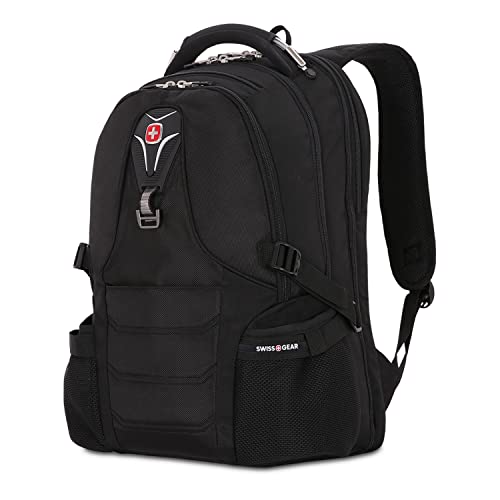
SwissGear 2769 ScanSmart — Best checkpoint-friendly compartment
The 2769 shares its larger sibling’s core idea — a dedicated ScanSmart laptop section that opens flat for screening — in a bag for laptops up to 16 inches, aimed at work, school and travel. In a guide about padded compartments, its inclusion rests on a truth worth stating plainly: the compartment’s design is itself protective, even where a maker does not headline a foam thickness. A separate, full-length room against the back panel, sized for the machine, accessed without disturbing the rest of the load — that arrangement prevents the daily abrasions, pressure points and handling accidents that account for most laptop wear in bags, and it does so for one of the most popular laptop size classes in the world.
The checkpoint routine deserves its paragraph here too, because frequent flyers inflict a special category of damage on laptops: the bin drop, the hurried repack, the machine slid across a steel roller table. A lay-flat section removes most of that theatre. The laptop stays in its compartment, the compartment opens on the belt, closes after the scanner, and the traveller walks away with the machine never having left its padded address. Multiply that mercy by a hundred flights and the 2769’s protective case makes itself, quietly, in the currency of accidents that never happened.
Its limits are honest ones. Sixteen inches is the ceiling — the 17-inch crowd should take the 1900 or the EnRoute — and the bag’s organisation, while sound, is a step below its sibling’s mobile-office depth. The listing likewise does not publish a specific padding specification, so the claim here is design-level protection, not a measured cushion. For the 15- and 16-inch travelling mainstream, though, the 2769 offers the compartment idea in its most travel-practised form, from a maker whose entire business is this category.
- Stated laptop fit: most 16-inch laptops
- Compartment style: ScanSmart lay-flat, TSA friendly (per listing)
- Intended use in listing: work, school, travel
- Padding specification: not published in the listing
Strengths
- Lay-flat compartment removes airport handling damage
- Dedicated full-length section sized for the 16-inch class
- Travel-specialist build at a mid-guide position
Trade-offs
- 16-inch ceiling excludes larger machines
- No published padding thickness
- Organisation is sound rather than the 1900’s elaborate
Best for: frequent flyers with 15- or 16-inch laptops. Not suited for: 17-inch owners or padding-specification maximalists.

MATEIN Travel Laptop Backpack 15.6 — Best slim protected commuter
The MATEIN’s argument in this guide is about fit and closeness. It is a slim, sturdy business daypack for 15.6-inch laptops — the single most common laptop size on earth — water-resistant, styled in grey, and sized to double as a personal-item bag. A slim bag keeps its laptop compartment close to the wearer’s back and keeps the whole assembly in the owner’s custody and sight: under the seat, between the feet, against the legs on the train. Protection is partly a matter of foam, but it is also a matter of how many uncontrolled moments a bag experiences in a day, and slim, present bags experience fewer than big, stowed ones.
Within its class, the design is the familiar MATEIN formula that has made the brand a default recommendation for students and commuters: a dedicated home for the 15.6-inch machine, businesslike organisation for the day’s documents and tech, and a price position that leaves the laptop itself as the only precious object in the arrangement. For a student whose bag meets lecture-hall floors and library tables daily, that combination — snug dedicated compartment, close carry, replaceable bag — is a rational protection strategy even before any padding is discussed.
Be clear about what is not claimed: the listing does not publish a padding specification, and this bag’s compartment should be understood as a dedicated, structured home rather than a measured cushion system. The 15.6-inch ceiling is also absolute — owners of larger machines must look elsewhere in this guide, and owners of thick gaming laptops in the 15.6 class should check their machine’s depth against the slim profile with care. For the mainstream commuter, though, the MATEIN remains what it has long been: the sensible default, here recommended with its protective logic stated honestly.
- Stated laptop fit: 15.6 inches
- Profile: slim, sturdy business daypack (per listing)
- Shell: water-resistant; colour in listing: grey
- Padding specification: not published in the listing
Strengths
- Snug dedicated compartment for the world’s commonest laptop size
- Slim profile keeps the bag in custody and out of harm’s way
- Value position makes the bag itself the replaceable component
Trade-offs
- No published padding specification
- Hard 15.6-inch ceiling; thick machines need a depth check
- Less structure than the SwissGear pair
Best for: students and commuters with standard 15.6-inch laptops. Not suited for: larger or unusually thick laptops, or spec-sheet padding hunters.

tomtoc 24L Laptop Backpack — Best everyday fit
The tomtoc 24L closes the guide with the everyday argument: the safest laptop bag is the one sized to your actual day, because an oversized bag lets its contents — laptop included — travel, slump and collide, while a right-sized bag holds its world still. This 24L pack is listed as fitting laptops up to 16 inches, including the 16-inch MacBook Pro class, and is aimed at work, commute, business, college and weekend trips. Twenty-four litres is the honest volume of a laptop, its charger, a notebook, a layer and lunch — which is to say, the load most readers of this guide carry on most days, held in a bag that does not give any of it room to misbehave.
tomtoc’s reputation was built on protective carry for electronics — sleeves and cases are the brand’s home territory — and while this review claims for the backpack only what its listing states, the design intent shows in the brief: a laptop-first daypack rather than a general sack with a laptop afterthought. For the commuter whose machine is a 16-inch creator laptop, that intent matters doubly, because 16-inch owners are the class most often squeezed into 15.6-rated compartments that almost fit. A stated fit for their machine, in a bag shaped around it, is the correct starting point for protection.
The trade is capacity headroom. Twenty-four litres will not swallow a weekend’s clothing beside the laptop without a negotiation, and travellers should look at the larger picks here. Nor does the listing publish a padding specification to set against the Targus’s stated padding or the Thule’s elevation. What it offers is proportion: the right volume, the right fit, from a protection-minded maker. In a category where excess space is a hazard disguised as generosity, proportion is a protective feature, and the tomtoc is its clearest example.
- Stated laptop fit: up to 16 inches, including 16-inch MacBook Pro class
- Stated capacity: 24L
- Intended use in listing: work, commute, business, college, weekend trips
- Padding specification: not published in the listing
Strengths
- Right-sized volume keeps the whole load still and settled
- Stated 16-inch fit serves creator laptops honestly
- Laptop-first design intent from a protective-carry specialist
Trade-offs
- 24L limits clothing-heavy or weekend packing
- No published padding specification
- Less organisational sprawl than the travel picks
Best for: daily commuters with laptops up to 16 inches and a disciplined load. Not suited for: one-bag weekend travellers or 17-inch owners.
How do the six padded-compartment backpacks compare?
| Backpack | Protection idea | Stated laptop fit | Stated size |
|---|---|---|---|
| Thule EnRoute | Elevated (suspended) pocket | 17″ | 26L |
| Targus Classic | Padded by design and name | 15–16″ | Not stated |
| SWISSGEAR 1900 | Dedicated lay-flat section + structure | Most 17″ | 31L |
| SwissGear 2769 | Dedicated lay-flat section | Up to 16″ | Not stated |
| MATEIN 15.6 | Dedicated compartment, slim close carry | 15.6″ | Not stated |
| tomtoc 24L | Dedicated compartment, right-sized volume | Up to 16″ | 24L |
Read the protection column as a ladder of ideas rather than a league table. Elevation answers the floor; named padding answers the squeeze; dedicated structure answers the daily handling. Most laptops need all three answers in some proportion, and the right pick is the one whose strongest answer matches your bag’s most frequent accident.
How does laptop damage in backpacks actually happen?
Ask a repair technician and you will not hear about dramatic drops. You will hear about corners. The classic backpack injury is a cracked screen corner or a dented chassis corner, produced by the bag being set down — not thrown, set down — with the laptop’s weight arriving on one corner through a thin base. Repeat customers add the second classic: pressure damage, a keyboard’s imprint ghosted into a screen, produced by an overfilled main compartment pressing hard objects against the laptop for hours. The third is abrasion and flex, the slow wear of a machine sliding in an oversized compartment, working its ports and hinges against fabric and seams ten thousand steps at a time.
Each injury has its designed answer, and this guide’s picks map onto them neatly. Set-down corner damage is answered by suspension and base padding — the EnRoute’s elevated pocket is the purest answer here, because it removes the corner from the impact path entirely. Pressure damage is answered by structure and packing discipline: a compartment of its own, hard neighbours kept in the organiser, and a main compartment never stuffed to the point of leaning on the machine. Abrasion and flex are answered by fit — the snug 15–16 window of the Targus Classic, the right-sized volume of the tomtoc — because a held laptop cannot build the momentum that a loose one spends against its housing.
Understanding the mechanisms changes how you shop. Photographs of plush back panels tell you little; the questions that matter are where the laptop’s base sits relative to the bag’s floor, what presses against the screen side, and how much the machine can move when the bag is shaken. Any of the six picks here answers those questions better than a general daypack. The sections below turn the same understanding into handling habits, because design sets the ceiling and behaviour decides how close to it you live.
How should you judge padding when a backpack is in your hands?
Start at the base, because that is where gravity files its claims. With the bag empty, press the floor of the laptop compartment upward from outside: you are feeling for the cushion and structure between the machine’s lowest edge and the ground. Then check whether the compartment’s floor sits above the bag’s base at all — the elevation the EnRoute states in words, visible in person as a pocket whose bottom ends before the bag does. A compartment that runs to the very floor of a soft bag offers only its fabric and foam between your laptop and every pavement it will ever meet.
Move to the corners. Slide a hand into the compartment and feel the side walls where a laptop’s corners will rest: continuous padding that wraps the corner is worth more than a thick panel that stops short of it. Then test the fit with your own machine if the shop allows, or with its measurements if it does not. The laptop should enter without force, sit without swimming, and the zip should close without persuading. A compartment that must be persuaded is a compartment applying pressure all day, which is the second classic injury arriving by invitation.
One more test, the one sales staff least expect: the set-down. Place the empty bag on the floor from knee height — not dropped, released the way a tired commuter releases it — and listen. A bag whose structure thuds dully and stands is spending the impact on itself; a bag that slaps, tips or collapses is forwarding the energy to whatever will be inside it. Repeat it with a book standing in the laptop compartment if you want the full picture. It takes ten seconds, it looks eccentric, and it tells you the single most important thing this entire category exists to answer.
Finally, load the main compartment with something hard — a book, a bottle — and press. You are checking the wall between the cargo and the computer: does the structure hold the pressure off the laptop panel, or does everything you pack become a rumour against the screen? Bags differ enormously here, and the difference is invisible in photographs. Five minutes of this handling teaches more than five pages of specifications, including the specifications in this guide — which is why the guide teaches the handling.
How do you pack around a padded laptop compartment?
The compartment protects the laptop from the world; packing protects it from its travelling companions. Rule one is absolute: nothing else lives in the laptop compartment. Not the charger, not a notebook, not a paperback “just for today”. Every object added is a hard point pressed against the machine by the bag’s own straps and the day’s motion, and the rule’s absoluteness is what makes it survive busy mornings. The charger, the usual first offender, belongs in the main compartment or organiser, ideally in a pouch, where its prongs and corners are somebody else’s problem — specifically, the problem of things that cannot be damaged by them.
Rule two concerns the main compartment’s geography. Heavy, hard-edged cargo belongs at the bottom of the main space, pushed forward so it leans on the bag’s face rather than on the computer; soft items — clothing, a towel, a packed lunch in its box — form the buffer layer against the panel itself. Packed this way, the main compartment becomes part of the protection system, a crumple zone of jumpers between the world and the machine. Packed carelessly, with a water bottle standing against the panel and a hardback leaning on it, the same compartment becomes the threat the padding must fight.
Rule three is about closure and carry. A padded compartment works when the bag is carried as designed — both straps, load close, zips fully closed so the structure holds its geometry. A bag swung from one shoulder twists its panels and migrates its contents; a bag set down by dropping it tests the base in ways that even elevated designs should be spared as a matter of routine. None of this requires delicacy. It requires the two seconds of intention that separate setting from dropping, and those two seconds, spent daily, are the cheapest laptop insurance in this entire guide.
Is a separate laptop sleeve inside a backpack better than a padded compartment?
It is a fair question, because many travellers already own a good sleeve. The sleeve-in-a-daypack arrangement has one genuine virtue — the sleeve can move between bags — and a list of quiet defects. The sleeved laptop still floats in a large compartment, free to slide and tip; the sleeve protects faces but leaves the combination’s base exactly as vulnerable as the daypack’s floor; and the daily ritual of sleeve-in, sleeve-out adds handling, which is where machines get dropped in kitchens at 7 a.m. A dedicated compartment in a structured bag answers all three defects by fixing the machine’s address, elevating or cushioning its base, and reducing its handling to a single motion.
Where the sleeve still wins is as a supplement, not a substitute. A thin sleeve inside a padded compartment is belt and braces — genuinely useful for the traveller whose laptop also lives on desks and in meeting rooms away from the bag, since the sleeve becomes its away-from-base protection. And for owners of general backpacks they love, a sleeve is the honest upgrade path short of a new bag. But readers shopping today, with protection as the brief, should buy the compartment and consider the sleeve an accessory to it — the order matters, and this guide’s six picks all start from the compartment.
What mistakes do buyers of padded laptop backpacks keep making?
The first is judging padding by squeezing the back panel between finger and thumb — a test that measures the one surface that almost never hurts a laptop, while ignoring the base and corners where the damage statistics live. The second is buying a compartment rated well above their machine’s size, on the theory that bigger is safer, when the physics run the other way: slack is travel, travel is momentum, and momentum is what corners spend on impact. Buy the compartment that fits your laptop class snugly — it is why this guide lists a 15–16 specialist and a 24L right-sizer alongside the 17-inch options.
Third, buyers undo the compartment at the packing stage, sharing it with chargers and hard drives until the machine sleeps in a nest of its natural enemies. Fourth, they treat water resistance as an impact feature or padding as a weather feature, confusing two different protective systems; these bags’ shells shed showers, their compartments cushion knocks, and neither property substitutes for the other on a wet platform with a dropped bag. Fifth, they never retire a compartment. Padding compresses over years of daily load, and a sleeve that once held a laptop in a cushioned grip can wear into a fabric suggestion; pinch the base padding of an old bag and compare it with a new one, and you will feel the case for replacement more clearly than any calendar could state it.
Which pick matches which kind of laptop owner?
The floor-hitter comes first: the student or commuter whose bag meets hard ground a dozen times a day, whose laptop has already survived one corner scare. The EnRoute’s elevated pocket was designed for her biography, and she should stop comparison-shopping and buy the suspension. Beside her stands the mainstream professional with a 15- or 16-inch machine and a simple brief — protect it properly, daily, without paying for ideas she does not need. The Targus Classic is her bag, named after her requirement.
The travelling organiser, whose laptop shares its bag with a tablet, documents and a change of clothes, belongs to the SWISSGEAR 1900, with the 2769 as the same doctrine in a 16-inch, slightly lighter form for the flyer whose routes are domestic and frequent. The student on a budget with the standard 15.6 machine belongs to the MATEIN, whose slim custody is a protection strategy a bursary can afford. And the 16-inch creator with a disciplined daily load belongs to the tomtoc, whose right-sized volume keeps her expensive, heavy machine from travelling inside its own home. Six bags, six biographies — the protection each offers is real, and it is aimed at different accidents.
How does a padded compartment change the way a backpack carries?
A dedicated laptop room against the back panel is also a carrying decision, and a good one. The heaviest single object in most bags is the laptop; fixing it high, flat and close to the spine turns it from a wandering weight into part of the bag’s structure, the way a frame sheet steadies a hiking pack. Owners notice the effect without naming it — the bag feels composed, the load does not shift at corners, stairs stop being negotiations. Compare that with the main-cavern laptop, sliding to whichever side the last turn favoured, and the compartment earns its keep twice: once in protection, once in posture.
This is also why the compartment’s position is universal across the picks in this guide despite their many differences. Makers disagree about organisation, access and style; none of them puts the laptop anywhere but against the back. When you evaluate bags beyond this guide, treat any design that parks the machine elsewhere — floating in the middle, slung at the front — as a design that has optimised for something other than the laptop, and ask what that something is before you pay for it.
What about gaming laptops and other thick machines?
Thickness is the padded compartment’s hardest test, because a gaming or workstation laptop brings more of everything: more depth for the sleeve to swallow, more weight arriving at the base, more heat-exhaust hardware protruding at the rear. Owners of such machines should read this guide’s stated fits as written for the slim end of each class and verify depth with particular care — the 17-inch options here, the EnRoute and the 1900, are the natural starting points, and the EnRoute’s elevation is worth extra attention precisely because heavy machines hit the ground hardest when a bag is set down tired at the end of a day.
Padding also works harder around a thick machine’s entourage. The gaming laptop’s charger is a brick in the literal sense, and the packing rules in this guide — charger pouched, low, forward, never in the compartment — matter twice as much when the brick outweighs a small tablet. Give the machine a bag whose structure can keep that brick honest, and the compartment’s job becomes possible; ask a soft bag to do it, and no foam specification will save the screen.
How do you care for a padded backpack so the protection lasts?
Foam has a memory and a lifespan, and both respond to how the bag is stored. Keep the backpack unstuffed and uncompressed when it is not in use — a bag stored crushed under other luggage spends its rest being taught to be thin, and the laptop compartment’s base padding is the first lesson it learns. If the bag will sit for a season, leave the compartment open so air moves through it, and keep the whole thing out of the heat cycles of attics and car boots, which age foam quietly and completely.
In use, the care is mostly the handling this guide has already preached: set down rather than drop, lift by the straps rather than by a single grab handle when loaded, and keep grit out of the laptop compartment, because trapped grit between machine and padding is sandpaper with a daily commute to work in. Once a year, empty the bag fully, shake it out, and pinch-test the compartment’s base and corners against your memory of new. Protection you can feel failing is protection you can replace in time — and timing, with laptops, is the difference between a new bag and a new screen.
Does a padded compartment matter for cyclists and runners?
It matters differently. A cycling commuter’s bag lives a life of vibration and sudden stops rather than set-downs, and the protective emphasis shifts from the base to the hold: a snug compartment that prevents the laptop from working loose and flexing over ten thousand pedal strokes is worth more than base foam that rarely meets the ground. The right-sized tomtoc and the snug-window Targus speak to that life, as does any pick here whose compartment grips its resident. The cyclist’s own packing rule is stricter, too — nothing hard rides anywhere near the panel, because vibration presses travelling companions against the machine with a patience that a walk to the office never musters.
Weather joins the brief as well, since a cycling bag is a roof as much as a container. The water-resistant shells named in several listings here shed road spray and showers; a true storm still wants a cover. But the compartment’s contribution stands: a machine held still, high and dry against the back is a machine that arrives ready to work, and for the growing population who commute by bike with a laptop as their office, that arrival is the entire product.
What should you check in the first week with a new padded backpack?
Fit first: load your actual laptop, close the compartment, and carry the bag through one ordinary day before removing any tags you can still benefit from. Feel for the three failures — the machine sliding when you climb stairs, the zip straining at a corner, the base of the compartment meeting the ground with a knock you can hear through the bag when you set it down. Each is information, and each has a remedy: a different pick from this guide, in most cases, chosen while returning is still easy.
Then rehearse the routine the bag implies. Where does the charger live? Which pocket takes the bottle so it never leans on the panel? How does the bag stand when you set it at your desk — upright and stable, or prone to toppling forward onto its face with the laptop inside? A week of ordinary days teaches a bag’s character more honestly than any review, including this one, and the reader who treats that week as a trial rather than a honeymoon ends up with the right compartment — which, given what rides inside it, is one of the better outcomes a purchase can have.
How much should you spend on protecting a laptop this way?
Frame the purchase against the machine, not against other bags. A screen replacement or a motherboard-level repair on a modern laptop costs a substantial fraction of the computer itself, and the data interruption costs professionals more than the invoice. Against those numbers, the spread between the value picks in this guide and the premium EnRoute is small money for a difference in protective philosophy — elevation versus padding versus structure — that you will benefit from, or miss, every single day. The correct question is never “what is the cheapest padded bag” but “what is my laptop’s most likely accident, and which design answers it”.
That said, overspending has its own failure mode: the most elaborate compartment in the guide cannot protect a laptop from a bag used carelessly, and a modest bag used with the discipline this guide teaches will out-protect a flagship used as a sack. Spend first on the design that matches your accident, then on nothing — the habits are free, and they are the larger half of the system. Readers who internalise that order will find every pick in this guide sufficient, and the one matched to their life genuinely excellent.
What does the padded-compartment idea look like in five years?
The direction of travel is visible in this guide’s own table. Compartments began as a padded pocket, became dedicated rooms, and are now — in the EnRoute’s elevated design — becoming engineered structures that think about impact paths rather than foam thickness. Expect the next generation to borrow more openly from footwear and helmet design: foams that stiffen under sudden load, bases that float the machine on a flexible hammock, shells that sacrifice themselves at the corners. None of that makes today’s picks obsolete; the physics they answer is permanent, and a well-chosen compartment bought now will still be answering it when its owner has forgotten the purchase price entirely.
What will not change is the other half of the system. Bags will keep being set down by tired humans, packed by hurried ones, and swung onto shoulders by people thinking about something else. The designs in this guide already respect those humans; the habits in this guide exist to help the humans deserve the designs. Between the two, a laptop’s odds of a long, unbroken life are better than they have ever been — which, for a machine that holds your work, your photographs and your livelihood, is a sentence worth ending a section on.
Final Recommendation
Decide which accident you are insuring against, and the guide resolves itself. If it is the set-down — the daily, unglamorous impact that statistics favour — the Thule EnRoute’s elevated pocket is the most intelligent protection here, and worth its premium in avoided repair bills. If it is the general squeeze and shuffle of commuting with a mainstream machine, the Targus Classic’s stated padding, in its snug 15–16 window, is the category’s honest centre. The SWISSGEAR pair protect through structure and gentle handling for travellers, the MATEIN through closeness and custody for the budget-minded, and the tomtoc through proportion for the right-sized day. Whichever you choose, pack by the rules above and set the bag down like the laptop inside is yours — because the best compartment in the world is only ever half of a system whose other half is you.
Frequently Asked Questions
What does an elevated or suspended laptop pocket actually do?
It holds the laptop so its base sits above the bottom of the backpack. When the bag is set down, the impact reaches the bag’s floor and structure first, and the machine — parked above that floor — is spared the direct blow that cracks corners. The Thule EnRoute’s listing states an elevated 17-inch laptop pocket, making it this guide’s clearest example of the design.
My laptop is between sizes — which compartment should I choose?
Choose by measurement, not by the marketing class. A machine sold as 15.6 inches with a thick chassis may live more safely in a compartment stated for 16 inches than in one tailored snugly to slim 15.6 models, because depth — the dimension listings least often publish — is where between-size laptops get squeezed. Measure your laptop’s thickness and width, favour the compartment whose stated range contains your machine with a little grace rather than none, and remember the guide’s physics: a small amount of room is a fit, a large amount is a slide, and a strain at the zip is a pressure injury scheduled in advance. When genuinely torn between two picks here, choose the one whose protection idea — elevation, padding, structure — best matches your daily accident, and let the size fall where the measurements put it.
Is thicker padding always better protection?
No. Placement beats thickness: padding at the base and corners, where impacts arrive, protects more than a plush back panel, and a suspended design can outperform thick flat padding against the commonest accident of all, the set-down. Fit matters too — a snug compartment that prevents the laptop from moving protects better than a thick one that lets it slide and build momentum.
Can a padded compartment protect a laptop in a fall from a table?
It improves the odds meaningfully — cushioning and structure absorb and spread energy — but no backpack compartment in this guide is a guarantee against a full-height fall onto a hard floor, especially onto a corner. Treat padding as insurance against the everyday knocks, set-downs and squeezes that make up nearly all real-world damage, and still handle the bag as though the machine inside is breakable, because it is.
Should anything else go in the laptop compartment with the laptop?
No. Chargers, drives, notebooks and bottles each become hard pressure points against the machine as the bag moves, and pressure against the screen side is a recognised cause of display damage. Give every accessory a home in the main compartment or organiser — the picks in this guide all provide them — and keep the laptop’s room a single-occupancy one.
Does a padded compartment help in checked or stowed luggage situations?
Only modestly, and the honest advice is to keep the laptop out of checked luggage entirely — baggage holds subject bags to drops, stacks and temperatures that no compartment in this guide was designed to survive, and airlines themselves advise keeping laptops in the cabin. Where a backpack is stowed rather than checked — overhead bins, under seats, car boots — the compartment earns its keep against the knocks and pressure of neighbouring luggage, provided the bag is packed by this guide’s rules and the laptop section is not the surface the bag lands on. Protection has a design envelope; the traveller’s job is to keep the journey inside it.
How do I know when a padded compartment has worn out?
Pinch the padding at the compartment’s base and corners and compare it with your memory of the bag when new: foam that has compressed to a fraction of its depth, or that no longer springs back, has retired whether or not the bag looks respectable. Also watch for the laptop developing play — sliding where it once sat snug — since a loose fit is both a symptom of worn padding and a risk in itself.
Related Guides
For the rest of the laptop’s protection and productivity story, see Best Accessories for Laptops: Docks, Stands, Sleeves and Cooling Pads, and for carrying the machine on the road, Best Acer Laptops: Aspire, Swift and Chromebook Picks for Work, Study and Travel.


