What's inside
- Key Takeaways
- Quick Picks
- How Did We Choose These Picks?
- Which a7S III Modes Actually Require V90?
- How Do the Two Hybrid Slots Change Your Media Strategy?
- What Does Each Codec Ask of the Card, Mode by Mode?
- Why Do Editors Ask for S-I, and What Does That Cost in Media?
- How Does Heat Behave During Long High-Bitrate Recording?
- How Many Cards Does a Working a7S III Kit Need?
- What Does a Good Ingest Pipeline Look Like for This Camera?
- How Do the Six V90 Cards Compare on Paper and in the Bag?
- How Should You Configure the Camera and Handle These Cards?
- What Mistakes Do a7S III Owners Keep Making With Cards?
- How Do These Cards Behave for Stills and Hybrid Days?
- What If This Camera Works Beside Other Sony Bodies?
- Should You Buy Older or Discounted V90 Stock?
- Is Renting or Borrowing Media Ever the Right Answer?
- What About Proxy Recording and Backup Workflows?
- Final Recommendation
- Frequently Asked Questions
- Related Guides
As an Amazon Associate I earn from qualifying purchases. This post may contain affiliate links at no extra cost to you.
gizmoverdict.com is reader-supported. When you buy through links on our site, we may earn an affiliate commission.
Where to buy: The six cards below link to their Amazon listings, where you can confirm the capacity variant and the V90 mark on that exact card before ordering. This camera’s media market is heavily counterfeited, so treat any listing whose price undercuts every established retailer by a wide margin as a warning rather than a bargain, and buy from sellers you would trust with an unrepeatable shoot.
Looking for the best sd cards for a7siii ownership starts with a correction to the way these cards are usually sold. The a7S III is famous for its most demanding recording modes, and card marketing has happily implied that the camera needs flagship media for everything it does. It does not. Only the highest-bitrate modes, the XAVC S-I intraframe recording and the fastest S&Q work, genuinely require V90 SD cards or CFexpress Type A media. The camera’s XAVC HS and XAVC S modes, which cover the great majority of real production, run on V60 cards and in many settings on V30. This guide ranks the V90 SD cards, because that is the question its title asks, but it will keep telling you where the requirement actually begins so that you can spend flagship money only on the modes you truly shoot.
One structural fact frames everything else: both of the a7S III’s slots are hybrid slots, each accepting either an SD UHS-II card or a CFexpress Type A card. CFexpress Type A is the faster medium and the camera’s absolute ceiling lives there. This article deliberately ranks only the SD route, six V90 SDXC cards, because SD media is cheaper per card, readable everywhere, and sufficient for every mode the camera offers when the card carries the V90 badge. Think of CFexpress Type A as the unranked alternative standing just offstage: faster, pricier, and necessary only if your workflow outgrows even V90, which for most owners it will not.
All six picks therefore share the same essential credential, a certified V90 sustained-write guarantee, and the contest between them is fought on other ground: write speeds beyond the floor, build and toughness, capacity, brand support, and how each behaves in a working dual-slot kit. That is a more interesting contest than marketing suggests, because at this level the differences that matter are the ones you feel at 2 a.m. on an ingest, not the ones on the packet.
Key Takeaways
- Only the a7S III’s highest-bitrate modes, XAVC S-I and the fastest S&Q recording, demand V90 or CFexpress Type A; XAVC HS and XAVC S modes run on V60 and often V30 media.
- Every pick here is a V90 UHS-II SD card, so each one unlocks the camera’s full SD-mode menu; choosing between them is about build, pace, capacity and support.
- Both slots also accept CFexpress Type A, the faster alternative this guide does not rank; the SD route remains sufficient for every mode when the card is V90.
- Never assume a V60 card unlocks the S-I modes: the camera will refuse or restrict those settings on lesser media, by design.
- Buy matched pairs for dual-slot work, because simultaneous recording and relay behaviour are only as strong as the slower card in the camera.
Quick Picks
| Card | Badge | Why it earns its place |
|---|---|---|
| SanDisk Extreme PRO 128GB SDXC UHS-II V90 | Best all-round V90 | Flagship sustained writes and the widest availability make it the default V90 for this camera. |
| Lexar Professional 2000x 256GB SDXC V90 | Best capacity for long takes | Double storage at full V90 pace for S-I shooters whose files devour 128GB cards. |
| ProGrade Digital Iridium 128GB SDXC V90 | Best video-specialist pick | A cinema-minded maker’s V90 with strong sustained behaviour and a recovery-tool ecosystem. |
| Delkin Devices Power 128GB SDXC UHS-II | Best working-pro workhorse | Built and supported for professional punishment, with fast quoted writes and a serious warranty culture. |
| Sony TOUGH-G 128GB SDXC V90 | Best toughness | A one-piece moulded design from the camera’s own maker, made to survive handling that bends ordinary cards. |
| Kingston Canvas React Plus 128GB SDXC V90 | Best value V90 | Full V90 credentials and fast transfers at the friendliest point in this flagship class. |
How Did We Choose These Picks?
The entry requirement was non-negotiable: a certified V90 rating on a UHS-II SDXC card, verified against a live listing, because V90 is the class the camera’s own documentation names for its top modes. That single rule produces a short world list, and the six cards here are its credible core, from the two giants of flash memory, through the video and professional specialists, to the camera maker’s own reinforced design.
Beyond the badge, we weighted the qualities that separate flagship cards in service. Sustained-write behaviour beyond the certified floor matters for the longest S-I takes. Build matters because these cards live in working kits rather than drawers. Support matters because a V90 card is a real investment and its maker’s warranty culture is part of the product. Capacity matters in a new way on this camera, because intraframe files are so large that the 256GB option in this list is a workflow decision, not a luxury.
We also kept the guide honest about its own boundary. CFexpress Type A media is not ranked here, not because it is unworthy but because it answers a different question, and V60 cards are discussed as the sensible alternative for HS and S shooters rather than smuggled in as picks. A guide that knows what it is not ranking is more useful than one that ranks everything and explains nothing.
Which a7S III Modes Actually Require V90?
Start with the modes that do not, because they are most of the camera. XAVC HS, the efficient HEVC codec, records beautiful 4K at bitrates that sit comfortably within V60 and, at its gentler settings, V30 guarantees. XAVC S, the H.264 workhorse, likewise covers its standard frame rates on V60 media. An owner whose production lives in these codecs, which describes most documentary, event, corporate and online work, can run this camera superbly on good V60 cards and will never meet the restriction this section is about. Any guide implying otherwise is selling, not advising.
The requirement arrives with XAVC S-I, the intraframe codec that records every frame in full. Intraframe files are enormous by design, chosen for editing fluidity and grading resilience, and at 4K in its higher frame rates the mode’s data rate exceeds what V60 certifies. Sony’s own media table therefore asks for V90 SD or CFexpress Type A for these modes, and the camera enforces the table: insert lesser media and the top S-I settings are simply unavailable. The fastest S&Q slow-motion work, which leans on the same high-rate recording path, draws the same line.
So the honest buying question is whether S-I is part of your real work. If you deliver in intraframe because your post pipeline is built on it, or your slow-motion style depends on the fastest modes, V90 is not an upgrade but a licence, and this guide is your shopping list. If you have never opened the S-I page of the menu, the six cards here are future-proofing and offload speed, valuable but optional, and a V60 kit plus the money saved may serve you better. Both conclusions are respectable; confusing one for the other is the only error.
How Do the Two Hybrid Slots Change Your Media Strategy?
The a7S III’s slots each accept SD UHS-II or CFexpress Type A, and that flexibility creates strategies a single-format camera cannot offer. An all-SD kit, the subject of this guide, is the simplest: matched V90 pairs, universal readers, no second media type to buy or carry. An all-CFexpress kit chases the camera’s ceiling and pays for it at every step. A mixed kit, SD in one slot and CFexpress in the other, tempts many owners and deserves a warning: simultaneous recording and several of the camera’s tidier tricks depend on comparable media, and a mixed pair can limit modes to what the slower side allows.
For most SD-route owners, the winning configuration is boring: two identical V90 cards, one in each slot, set to simultaneous recording for anything unrepeatable and to relay or separate duties for volume work. Identical cards behave identically, which removes a whole category of mid-shoot surprises, and the pair costs less than a single large CFexpress card while covering every mode the camera offers on SD. When one card eventually retires, replace the pair’s weaker member and keep the rotation even.
Stills shooters should note that the same slots serve the camera’s bursts, and V90 UHS-II media clears buffers with a speed that makes the SD route feel anything but second-class. The honest summary is that CFexpress Type A wins on ultimate ceiling and loses on cost, convenience and reader universality; SD V90 wins on everything except that ceiling, and the ceiling is a place most productions never visit.
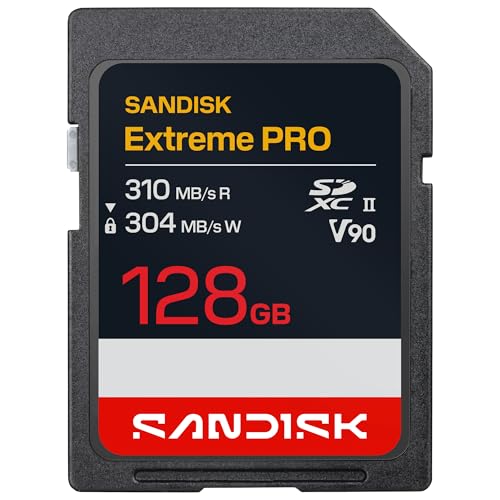
SanDisk Extreme PRO 128GB SDXC UHS-II V90 — Best all-round V90
The flagship Extreme PRO is the card most a7S III owners will end up with, and it earns the position without drama. Its V90 certification unlocks the S-I modes on SD, SanDisk quotes read speeds up to 310MB/s and writes approaching that in the family’s best conditions, and the card sits inside the deepest support and retail network in this guide. On a working camera it behaves like the reference product it is: long intraframe takes recorded without complaint, buffers cleared briskly, ingests that respect your evening.
Two cautions from elsewhere in this cluster apply with force. The Extreme PRO name also covers a V60 card, so the V90 badge on the listing is the product, not the branding; and flagship SanDisk media is counterfeited relentlessly, so the seller matters as much as the specification. Buy this card from a reputable source, verify it on arrival by filling and reading it back, and it becomes the least interesting part of your kit, which is the highest praise recording media can earn.
- Format: full-size SDXC, UHS-II
- Speed class: V90, U3, Class 10
- Capacity listed: 128GB
- Headline read speed: up to 310MB/s (brand-stated)
- Stated write capability: up to 304MB/s
- Suited to: full-mode a7S III work including S-I on the SD route
Strengths
- Reference-level V90 behaviour with the fastest quoted transfers in this guide.
- Replacement and support availability exceed every rival here.
- Proven across the widest range of professional bodies and workflows.
Trade-offs
- The shared family name with the V60 version invites ordering errors.
- Counterfeiting pressure on this exact product is the highest in the list.
- 128GB fills quickly in S-I, pushing heavy users toward pairs or the 256GB pick.
Best for: owners who shoot the camera’s top modes and want the default professional answer. Not suited for: HS and S-only shooters, for whom its premium buys modes they never open.

Lexar Professional 2000x 256GB SDXC V90 — Best capacity for long takes
Lexar’s 2000x line is its UHS-II flagship, and this 256GB V90 edition answers the a7S III’s most practical media problem: intraframe files are huge, and a 128GB card in S-I service is a short leash. Doubling the capacity at the full V90 class, with reads quoted up to 300MB/s, turns the card from a per-setup consumable into a per-session one. Long interviews in S-I, extended slow-motion sequences and single-card days on a gimbal all become calmer when the media stops counting down like a fuel gauge.
The capacity cuts both ways, and the note deserves making. A 256GB card concentrates twice the footage in one losable object, so the dual-slot discipline matters more, not less: run it mirrored, or offload at every natural break. Used that way, the big Lexar is the connoisseur’s pick in this list, the card for shooters who know precisely why they need the room, and its presence quietly reframes the others as the compact options.
- Format: full-size SDXC, UHS-II
- Speed class: V90, U3
- Capacity listed: 256GB
- Headline read speed: up to 300MB/s per the maker’s figures
- Series: Professional 2000x
- Suited to: S-I long takes, slow-motion sessions, single-card rigs
Strengths
- Double capacity at the full V90 certification, unique in this guide.
- Keeps flagship transfer pace despite the larger size.
- Reduces mid-session swaps on rigs where media access is awkward.
Trade-offs
- Concentrates the most footage and the most cost in a single card.
- Large S-I offloads still take real time even at flagship read speeds.
- Overkill for HS shooters, whose files are a fraction of the size.
Best for: S-I and slow-motion specialists who feel 128GB as a constraint. Not suited for: owners whose codecs are efficient and whose cards return half-empty.

ProGrade Digital Iridium 128GB SDXC V90 — Best video-specialist pick
ProGrade Digital was founded by memory-industry veterans to serve exactly this tier, and the Iridium is its V90 statement: reads quoted up to 300MB/s, writes up to 200MB/s, and a product culture aimed at cinema and professional video rather than general storage. ProGrade’s ecosystem, including its refresh and recovery software philosophy, treats cards as managed professional media with a health lifecycle, which resonates with how a7S III owners actually work: cards are tracked, rotated and retired, not merely owned.
On the camera, the Iridium’s credentials place it in the same full-mode company as every pick here, and its sustained-write character is the quality its maker most emphasises. It is the choice for shooters who like their media from a house that speaks video natively and publishes conservative, working figures rather than laboratory theatre. If the giants feel like generalists to you, this is the specialist’s card, and its growing presence in cinema kits is the market agreeing.
- Format: full-size SDXC, UHS-II
- Speed class: V90
- Capacity listed: 128GB
- Headline read speed: up to 300MB/s as listed
- Stated write capability: up to 200MB/s
- Suited to: cinema-style production on the a7S III
Strengths
- Video-first maker with a professional media-management culture.
- Strong quoted write figure for sustained intraframe work.
- Conservative, working-grade specification style inspires confidence.
Trade-offs
- Retail footprint is thinner than the two giants’ networks.
- No larger sibling in this guide for capacity-hungry S-I work.
- Premium positioning matches the flagship tier it competes in.
Best for: production shooters who manage media as a system and value a video-native maker. Not suited for: buyers who need a replacement card tonight from a local shelf.

Delkin Devices Power 128GB SDXC UHS-II — Best working-pro workhorse
Delkin’s Power line has built its reputation in the least forgiving corner of photography, wildlife and sports bodies firing savage bursts in bad weather, and that heritage transfers directly to the a7S III’s video demands. The card quotes 300MB/s reads and 250MB/s writes, carries the full UHS-II V90-class credentials its listing describes for 8K, 4K and HDR work, and comes from a maker whose support culture treats professional users as its entire business rather than a segment.
Delkin owners tend to speak about the company the way mechanics speak about a good garage: the product is strong and the people answer. For a card that will be trusted with paid work, that support reputation is a specification in its own right, and it is why the Power earns the workhorse badge here despite sharing its class numbers with everyone else. It is the pick for the owner whose a7S III earns money weekly and whose media decisions are made like insurance decisions, conservatively and for keeps.
- Format: full-size SDXC, UHS-II
- Capacity listed: 128GB
- Headline read speed: 300MB/s (maker’s headline figure)
- Stated write capability: 250MB/s as the brand states it
- Series: Power, professional line
- Suited to: paid production work and harsh-location shooting
Strengths
- Professional support culture aimed squarely at working shooters.
- Fast quoted writes suit both S-I video and heavy stills bursts.
- Heritage in extreme-environment photography bodies.
Trade-offs
- Buyers must confirm the V90 class on the exact listing variant.
- Smaller retail presence than SanDisk or Lexar in many regions.
- Its stills-burst virtues are wasted on a video-only rig.
Best for: professionals whose camera earns its keep and who buy support as much as speed. Not suited for: casual owners, whose needs the value V90 below meets for less.

Sony TOUGH-G 128GB SDXC V90 — Best toughness
Sony’s TOUGH-G is the one card here that rethinks the object’s physical design. Ordinary SD cards are a shell of thin plastic around a board, with ribs and a write-protect switch that give them familiar failure points; the TOUGH design moulds the card as a single piece, removing the fragile features, and Sony rates it for bending, drops and the general violence of working kits. Its electrical credentials are full flagship: V90, with reads quoted at 300MB/s and writes at 299MB/s, figures that place it at the very top of this guide’s paper race.
There is also a certain logic in feeding a Sony camera Sony’s own flagship media: the pairing is the one combination the camera maker has certainly tested exhaustively, and the TOUGH card’s lack of a write-protect switch removes the classic mystery of a card that suddenly refuses to record because a tiny slider moved in the bag. It asks a premium for its armour, and owners whose cards live gentle lives may not need it, but for run-and-gun work, travel and any kit that gets thrown rather than placed, the TOUGH-G is the card least likely to become the story.
- Format: full-size SDXC, UHS-II, one-piece TOUGH design
- Speed class: V90, Class 10, U3
- Capacity listed: 128GB
- Headline read speed: up to 300MB/s
- Stated write capability: up to 299MB/s per its listing
- Suited to: rough handling, travel, and the camera maker’s own media
Strengths
- One-piece moulded build removes the SD card’s usual fracture points.
- Top-tier quoted write speed alongside the full V90 guarantee.
- No write-protect switch to cause silent recording refusals.
Trade-offs
- The same missing switch means no hardware protection against accidental formatting.
- Toughness premium is wasted on studio-bound cameras.
- Its slightly different shell feel can be tight in some older readers.
Best for: travel, documentary and event shooters whose kits take physical punishment. Not suited for: tripod-bound studio work, where ordinary flagship cards face no physical threat.

Kingston Canvas React Plus 128GB SDXC V90 — Best value V90
Kingston’s Canvas React Plus closes the list by lowering the V90 entry price without lowering the credential. The card carries the full class set, UHS-II, V90, U3, with quoted transfers of 300MB/s reading and 260MB/s writing that embarrass nothing in this company. Kingston has made memory since before SD existed, and its flagship React Plus line is the company’s straightforward bid for the professional tier: the right numbers, a serious build, and pricing that lets an owner buy the matched pair this camera deserves instead of agonising over a single card.
That pair economics is its real argument. Dual-slot best practice asks for two identical cards, and the React Plus makes the pair the price of a single flagship from some rivals, without asking the camera to accept a lesser class in either slot. For the owner stepping into S-I work on a budget that also includes lights, audio and everything else production demands, this is the card that keeps the media line honest and the total survivable.
- Format: full-size SDXC, UHS-II
- Speed class: V90, U3
- Capacity listed: 128GB
- Headline read speed: 300MB/s (stated figure)
- Stated write capability: 260MB/s
- Suited to: matched-pair buying and budget-conscious S-I work
Strengths
- Full V90 credentials at the friendliest point in this class.
- Quoted write speed is genuinely flagship-grade on paper.
- Makes the recommended identical pair financially painless.
Trade-offs
- Kingston’s pro-video support profile is quieter than the specialists’.
- Flagship-tier counterfeiting still applies; buy from reputable sellers.
- No reinforced build story for owners who prioritise toughness.
Best for: pairs, spares and first steps into S-I recording without flagship-pair pricing. Not suited for: buyers who want a media-management ecosystem or armoured build above all.
What Does Each Codec Ask of the Card, Mode by Mode?
XAVC HS is the efficiency champion, using HEVC compression to deliver 4K at data rates that older codecs needed far more room to match. Its gentlest settings are content on modest media, its stronger settings sit inside V60, and its well-known cost is paid in the edit rather than at the camera: HEVC footage asks more of a computer to decode, which is a pipeline consideration, not a card one. For card buying, HS is the codec that lets a V60 kit feel like a flagship kit, and owners who master it rarely feel media-poor.
XAVC S is the middle path, H.264 recording with moderate bitrates and universal editing manners. It is the codec of corporate shoots, weddings and fast turnarounds, and its card demands are equally moderate, V60 territory at its working settings. Generations of production ran on this codec family, and its presence on the a7S III means the camera can be fed sensibly for the jobs that pay for the exotic modes it also offers.
XAVC S-I is the connoisseur’s expense. By recording each frame completely, it removes the temporal compression that makes efficient codecs efficient, gaining footage that scrubs, grades and holds together under aggressive post work, at data rates that multiply the media bill. This is the mode family that writes V90 into the requirement, and it should be chosen for its post-production virtues with open eyes about its appetite, not stumbled into because it sits at the top of a menu and top must mean best.
S&Q mode, the camera’s slow and quick recording, borrows whichever codec you set and stretches its demands with the frame rate. Gentle slow motion within the efficient codecs stays within modest classes; the fastest rates on the strongest settings join S-I at the V90 line. The practical rule is to test your exact S&Q recipe against your media before the shoot that matters, because the combination of codec, frame rate and rate control is what the camera checks, and no general claim, including in this guide, substitutes for your menu’s verdict.
Why Do Editors Ask for S-I, and What Does That Cost in Media?
Post-production’s love of intraframe is practical, not precious. A codec that stores every frame lets editing software display any frame instantly, scrub without reconstructing images from their neighbours, and hold fine detail through colour work that can smear temporally compressed footage. On a powerful workstation the difference may be invisible; on a laptop in a hotel room, S-I footage is the difference between editing and waiting. Productions choose it to buy time in post, and they pay for that time in media, drives and archive space, a trade this guide’s readers should make deliberately.
The media cost compounds downstream in ways card guides rarely mention. S-I days produce several times the data of HS days, which means more cards in rotation, longer ingests even at flagship read speeds, larger working drives and an archive that grows at a pace the budget must have agreed to in advance. None of that argues against S-I; it argues for choosing it per production rather than per habit. The wedding does not need what the commercial needs, and the card drawer is where that decision becomes physical.
There is a middle path many owners settle into: HS or S for the bulk of a production, S-I reserved for the sequences that justify it, the hero shots, the heavy grades, the slow-motion centrepieces. Mixed-codec days ask the media to be ready for the hungriest mode on the call sheet, which is another reason the V90 fleet earns its place even in a mostly efficient workflow: the card must cover the day’s peak, not its average.
How Does Heat Behave During Long High-Bitrate Recording?
Sustained intraframe recording is the a7S III’s hardest thermal work, and the card shares that environment. A body recording at its ceiling for extended takes warms its media, and warm flash writes less eagerly than cool flash, which is precisely the condition the V90 margin exists to absorb. This is why a card that benchmarks beautifully in a reader can still be the wrong tool for a two-hour S-I interview, and why this guide keeps returning to certified floors rather than peak figures: the floor is the promise that survives the heat.
Owners can help their media more than they realise. Shade and airflow around a locked-off camera, sensible breaks between the longest takes, and avoiding recording with the body baking in direct sun all lower the temperature at which the card must keep its promise. None of these courtesies rescues an under-classed card, the camera will still refuse the mode, but within the V90 fleet they are the difference between a system working near its edge and one working comfortably inside it.
If a recording ever stops on heat or media grounds, treat the event as information rather than insult. Note the mode, the take length, the card and the conditions, and let that log entry inform the next purchase or the next production’s media plan. Professional kits are built from exactly such notes; amateur kits are built from hope and repeat the experiment at the next important shoot.
How Many Cards Does a Working a7S III Kit Need?
Count in pairs and sessions. A pair lives in the camera, matched and mirrored for anything that cannot be repeated. A second pair waits in the case for the moment the first pair fills or the day extends, because S-I sessions consume 128GB with a speed that still surprises owners arriving from efficient codecs. Beyond that, the count follows your ingest rhythm: owners who offload nightly can rotate two pairs indefinitely, while multi-day location work without a laptop argues for a pair per day and a disciplined labelling system that survives tired evenings.
The 256GB Lexar in this guide bends the arithmetic without breaking it. One big pair can replace two standard pairs for session length, at the cost of concentrating footage, which the mirroring slot exists to answer. Owners who shoot single-card for weight or rig reasons should treat the big card as their session boundary and offload at every break, because a full day of S-I on one card is a full day of risk in one object.
Budget honestly for the fleet, not the card. The a7S III is a professional instrument whose media, bought at the correct class and in working quantity, will cost a visible fraction of the body’s price across its life. Owners who plan for that from the start never face the miserable choice between a top mode and an empty slot; owners who buy one card at a time meet that choice on location, where it is most expensive.
What Does a Good Ingest Pipeline Look Like for This Camera?
The pipeline begins with the reader, and for this fleet the reader must be UHS-II. The flagship read speeds quoted throughout this guide are only available through a reader that speaks the second row of contacts; anything less turns every ingest into a tax on the exact files, S-I’s giants, that most need speed. Connect the reader directly to the computer, keep its firmware and your software current, and let the copy verify itself with checksums when the footage is commercial, because a verified copy is the moment a card becomes free to format.
Storage behind the reader must be sized for intraframe reality. Working drives fill at S-I rates in days rather than weeks, and an ingest that stalls for lack of destination space, mid-shoot and mid-evening, is a self-inflicted wound this camera’s owners specialise in during their first month. Plan the archive when you plan the media, mirror the working copy before the cards are wiped, and keep the pairs together through the process so rotation stays even and card histories stay known.
Close the loop with a log, however humble. Card numbers against productions, incidents against cards, retirements against dates: three columns in a notebook transform media from a drawer of identical black rectangles into a managed fleet with a memory. The a7S III rewards system thinking everywhere, and its cards are simply where that thinking becomes visible first.
How Do the Six V90 Cards Compare on Paper and in the Bag?
| Card | Capacity | Class | Distinguishing virtue |
|---|---|---|---|
| SanDisk Extreme PRO V90 | 128GB | V90 | Reference all-rounder, widest availability |
| Lexar Professional 2000x | 256GB | V90 | Double room for intraframe sessions |
| ProGrade Iridium | 128GB | V90 | Video-specialist maker and media culture |
| Delkin Power | 128GB | UHS-II flagship class | Professional support and harsh-duty heritage |
| Sony TOUGH-G | 128GB | V90 | One-piece armoured build |
| Kingston Canvas React Plus | 128GB | V90 | Friendliest price for matched pairs |
Because the class is uniform, the table’s last column is the decision. Availability, capacity, specialism, support, armour or price: each card leads on one human consideration while matching the others on the credential that unlocks the camera. Choose the virtue your working life actually uses, buy two of it, and the a7S III’s SD route is settled completely.
How Should You Configure the Camera and Handle These Cards?
Format new cards in the camera before their first shoot, and set the slot behaviour deliberately rather than accepting defaults. For unrepeatable work, simultaneous recording to both slots is the professional default, with the understanding that the camera’s most demanding modes always deserve matched media. For volume work where backup lives elsewhere, relay recording stretches a pair across a day. Decide per production, in the menu, before the first take; the wrong discovery is learning your slot strategy from a card-full warning during the right one.
At the ingest, use a UHS-II reader and let these cards show their second talent. V90 media files are large and the flagship read speeds in this list exist to move them; an old reader throttles the whole fleet to yesterday’s pace. Verify copies before formatting anything, keep the pair together through the offload so their rotation stays even, and log S-I shoots against card numbers if you shoot commercially, because when a client asks for an original in six months, media discipline is what answers.
Treat the cards’ health as a monitored quantity. Any unexplained stop, error or slow patch retires a card from front-line S-I duty immediately; at these prices a suspect card costs less than one reshoot’s catering. Rotate pairs evenly, store them cased and cool, and remember that the camera’s most expensive modes deserve media whose history you know completely.
What Mistakes Do a7S III Owners Keep Making With Cards?
The expensive mistake is buying V90 by default for a camera whose owner never leaves XAVC HS, then resenting the cost of media that changed nothing. The dangerous mistake is its twin: assuming a good V60 card will somehow cover an S-I booking, and learning at the location, in front of the client, that the menu disagrees. Both errors come from shopping by reputation instead of by mode list, and both are cured by the same five minutes with the camera’s media table.
Mixing media carelessly is the third error: a V90 in one slot and an old V30 in the other, with simultaneous recording set and a top mode selected, produces a system whose ceiling is the old card and whose behaviour confuses its owner. Pairs should match in class at minimum and in model by preference. The fourth error is subtler and lives in post: shooting S-I for its editing virtues and then ingesting through a slow reader or onto a nearly full drive, blaming the cards for a pipeline that strangles them after the fact.
Finally, owners neglect the CFexpress question until it ambushes them. Know before a production whether any planned mode or future body pushes you toward Type A, and know that this guide’s SD fleet remains fully useful regardless, in the second slot, in the next body, in the reader on every desk you own. Media bought at the correct class never becomes waste; media bought at the wrong class becomes a lesson with a receipt.
How Do These Cards Behave for Stills and Hybrid Days?
The a7S III’s modest-resolution sensor makes it an unlikely burst monster, yet its stills work benefits from the same media virtues as its video. UHS-II cards clear the buffer quickly after a burst, which matters at events where the camera alternates between S-I clips and rapid stills sequences, and the V90 fleet’s fast writes keep the body feeling responsive in a way owners notice without being able to name. A hybrid shooter never has to wonder whether the card in the slot suits the next thirty seconds, because at this class the answer is always yes, and that absence of friction is a genuine creative feature.
Hybrid days also expose the capacity question from the other side. Stills on this sensor are small, video in S-I is enormous, and a card planned around photographs can be ambushed by ten minutes of intraframe recording. Plan hybrid media by the video appetite and let the stills be the rounding error; the reverse planning has ended more event coverage than any battery ever made. The pair in the camera should be the pair you would choose for a pure video day, and then the photographs are simply free.
What If This Camera Works Beside Other Sony Bodies?
Many a7S III cameras work as the low-light or video specialist inside a multi-body Sony kit, beside stills bodies and cinema-line siblings that share the same hybrid slot design. A V90 SD fleet standardised across those bodies is one of the quiet pleasures of the system: any card fits any body, the classes satisfy the hungriest member, and the media drawer becomes a single pool with a single rule. Owners who mix CFexpress into one body and SD into another lose that interchangeability and gain a logistics hobby, which is worth it only when a specific body’s ceiling genuinely demands the faster format.
Standardisation also disciplines buying. One card model, bought in pairs as bodies arrive, keeps behaviours uniform and makes any card’s failure informative about its siblings. When a body leaves the kit, its media stays useful; when a new body arrives, the fleet already speaks its language. In a system built around a common mount and common slots, the media fleet is the cheapest place to be consistent and the most expensive place to be whimsical.
Should You Buy Older or Discounted V90 Stock?
Flagship card lines are revised over the years, and earlier V90 stock circulates at attractive prices beside current production. The certification is the certification, and a genuine older V90 card unlocks the same modes as a new one, which makes discounted stock a rational buy from a reputable seller. The cautions are provenance and age: flash that has already lived a life in a rental fleet is a different purchase from sealed old stock, and marketplace listings blur that distinction enthusiastically. Buy sealed, buy from sellers with returns, and verify on arrival with a full write-and-read test before the card meets a paying job.
What you should never buy is a card whose class is described in adjectives rather than badges. Listings that promise professional speed, extreme performance or cinema quality without printing V90 are asking you to fund their ambiguity, and on this camera the experiment ends at the mode menu. The badge is a certification with a test behind it; adjectives are weather. In a category where the camera itself enforces the standard, only the standard counts.
Is Renting or Borrowing Media Ever the Right Answer?
For the owner whose S-I work arrives twice a year, a production, a wedding booked at the top tier, a short film, the flagship fleet can look like a lot of capital sleeping in a drawer. Rental houses do stock high-class media, and borrowing a partner’s V90 pair for a weekend is a real economy. The discipline it demands is verification: rented and borrowed cards arrive with unknown histories, so they earn a full test, a format in your camera and a place in the mirrored slot configuration before they earn trust. Used that way, occasional media is a legitimate strategy rather than a gamble.
The counter-argument is availability at the moment of ambition. Owners who rent their ceiling tend to decline spontaneous top-mode work, the unplanned slow-motion sequence, the client who upgrades on the day, because the media is a hire-shop trip away. There is no universal answer, only an honest count of how often the top modes knock. If they knock monthly, own the fleet from this guide; if they knock yearly, rent it without guilt and put the savings into the V60 kit you use weekly.
What About Proxy Recording and Backup Workflows?
The a7S III can record lightweight proxy files alongside its main footage, and that feature interacts with media planning in a way worth understanding. Proxies add a second, smaller stream to the card’s work; on correct V90 media the addition is absorbed without drama, while on marginal media it is one more claim on a budget already spent by the main recording. Owners troubleshooting borderline behaviour on lesser cards sometimes find the proxy setting is the straw, which is another way of saying the class requirement should be met with margin rather than arithmetic optimism.
In post, proxies reward the same media discipline as everything else in this guide: keep the pairs together, keep the folder structures the camera wrote, and let the editing software relink rather than reorganising by hand. The productions that lose time are the ones that treat card contents as raw material to be tidied at ingest. The camera’s file organisation is part of the recording, and the fleet’s job is to deliver it to the edit intact, which these six cards, correctly classed and correctly handled, will do every working day.
One closing observation from the way professionals actually stock this camera: nobody in a working kit talks about their V90 cards, and that silence is the compliment. Media at the correct class disappears from conversation, leaving the codec, the light and the subject to occupy the crew, while media at the wrong class becomes the conversation, on location, at the worst hour. Everything in this guide, the classes, the pairs, the verification rituals, exists to purchase that silence, and it remains the best value in the entire a7S III system.
Before ordering, perform one small ritual that this guide recommends to every a7S III owner regardless of budget: open your camera’s format and media settings, list the modes you have genuinely used in the last three months, and write the list down. That piece of paper, not a forum, not a launch video, is your media specification. If S-I and the fastest S&Q settings are on it, the six cards above are your market and the only remaining question is which virtue to lead with. If they are absent, you have just saved real money with five honest minutes, and you can return for these cards on the day the list changes, as lists honestly kept have a way of doing.
Final Recommendation
Build the kit around the SanDisk Extreme PRO V90 if you want the reference card, the Lexar 2000x 256GB if S-I sessions make capacity your binding constraint, or the Kingston pair if the budget must stretch across two slots honestly. Choose the TOUGH-G when your kit’s life is physical, the ProGrade when you value a video-native maker’s culture, and the Delkin when support matters as much as speed. But let the mode list make the first decision: if XAVC S-I and the fastest S&Q work are truly yours, these V90 cards are the licence the camera asks for, and if they are not, buy them knowing they are headroom rather than necessity, because on this camera the truth about media is printed in its own menu for anyone willing to read it before spending.
Frequently Asked Questions
Can I shoot everything on V60 cards instead?
Everything except the top of the menu. XAVC HS and XAVC S, including their high-frame-rate settings within those codecs, run on V60 media, and for many owners that is the whole camera. XAVC S-I at its higher rates and the fastest S&Q modes will be unavailable or restricted, so the answer depends entirely on whether those modes are part of your work.
Is CFexpress Type A better than these SD cards?
It is faster, and the camera’s absolute performance ceiling lives there, at a higher cost per card and with its own readers. It is not more sufficient: a V90 SD card already unlocks every mode the camera offers on the SD route. Type A is the choice for workflows that outgrow V90 or owners standardising on that format across bodies, not a requirement imposed by the a7S III itself.
Why does the camera refuse a mode with my card inserted?
Because Sony’s media requirements are enforced, not advisory. The mode’s data rate exceeds your card’s certified class, and the camera declines rather than risk a failed recording. The remedy is media of the named class for that mode, V90 SD or CFexpress Type A for the S-I tier, and no setting or workaround changes the arithmetic.
Should both slots hold the same card model?
For simultaneous recording and predictable behaviour, yes. Matched cards keep both slots at the same class and pace, so the pair’s ceiling is the flagship’s rather than the straggler’s. At minimum, match the class; mixing a V90 with a lesser card silently demotes the whole configuration.
How long does 128GB last in XAVC S-I?
Not long, and that is the codec’s nature rather than a card flaw. Intraframe files at high frame rates consume capacity at several times the rate of the efficient codecs, which is why the 256GB Lexar exists in this guide and why S-I shooters plan media per session the way film shooters once planned magazines. Run the camera’s own remaining-time display in your chosen S-I setting before a production and let that number, measured on your settings rather than quoted from anyone’s table, set the number of cards in the case.
Are these cards overkill for stills on this camera?
Their video class is unused by stills, but their UHS-II pace clears the a7S III’s bursts rapidly and their build suits working kits. An owner who never records video could buy lesser media happily; an owner who records at all will eventually want the modes these cards unlock, and buying the class once is cheaper than buying it twice. There is also a resale and reuse argument: V90 media remains welcome in every current flagship body, so a pair bought for this camera today is unlikely to be stranded by the next one.
Related Guides
The wider landscape of classes and buses is mapped in our general roundup of the best sd cards 4k cameras of every kind can use, which explains when V60 is the smarter spend. Travellers splitting their kit between this body and an action camera can compare which micro sd cards 4k small devices should carry, and aerial shooters will find the sustained-write logic continued in how to select sd cards for dji drones and their approved lists. The same Sony bodies moonlight under dark skies, where the dedicated cameras take over in the best astronomy ccd cameras. The RX10 line is the fixed-lens branch of the same Sony family tree, with its three generations compared in the best bridge cameras with 1 inch sensor.


