What's inside
- Key Takeaways
- Quick Picks: six native-1080P claims, read carefully
- How were these picks chosen?
- Comparing the six native-1080P contenders
- How do you verify a native 1080P claim before you buy?
- Living-room trials: how we evaluated the native-1080P shelf
- Common mistakes native-1080P buyers make
- Final recommendation
- Frequently asked questions
As an Amazon Associate I earn from qualifying purchases. This post may contain affiliate links at no extra cost to you.
gizmoverdict.com is reader-supported. When you buy through links on our site, we may earn an affiliate commission.
Where to buy: Projectors in this native-1080P tier sell through Amazon across a mix of licensed smart brands and smaller projector labels, and the six verified listings below are the current shelf at research time. The budget frame in the keyword is a shopping boundary only; live pricing moves with promotions, so each review points you to the listing itself rather than printing a figure that would age badly.
Shopping for the best projectors 1080p under 500 starts with a sentence worth memorising: a title claim is a claim, not a measurement. Every one of the six projectors below states native 1080P in its listing title, and we present them on exactly that basis. But native resolution is the single most abused phrase in budget projection, so this guide does two jobs at once — it reviews six credible contenders in the class, and it teaches you the verification routine that separates a genuine 1920 by 1080 imaging panel from a smaller panel wearing a big number. That routine is in the how-to section, and it applies to every projector listing you will ever read, not just these six.
Why does native resolution matter so much at this level? Because 1080P is the sweet spot of home viewing: films, streaming series and console games are mastered at or near it, subtitles and interface text stay legible at 100 inches, and the step up to native 4K projection costs several times more. A true native-1080P machine under the budget line in the keyword is therefore the value proposition of the whole projector market, which is exactly why the claim attracts exaggeration elsewhere. The six titles here also compete on the surrounding machinery — Google TV or Android systems, ANSI brightness where stated, auto focus, short throw ratios and rotating stands — and those differences, honestly stated, are what should decide between them once the native claim is verified.
A note on the budget frame before we begin: the keyword’s ceiling is a way of bounding the shelf, not a price we print, because projector pricing shifts with promotions and bundle variants. Judge each pick by its verified panel and its stated features, then check the live figure on the listing itself. Readers whose rooms demand more brightness than this tier offers should compare the machines in best hd projectors for gaming sports, where high-lumen models cluster.
Key Takeaways
- All six titles claim native 1080P; none of that is upgraded here into a measured fact, and the how-to section gives the three-step check that confirms a panel claim in the full specification.
- Three picks state 600 ANSI — the Magcubic HY350MAX, the short-throw X3-style model and the Android 14 CinePro-Black — the only brightness figures in this set expressed in standard units.
- The HAPPRUN is the licensed Google TV option with 10K+ apps, Dolby and AirPlay named in its title; the Android 14 pick counters with a sub-30dB fan-noise claim.
- The 0.8:1 short-throw pick fills a big picture from close range and rotates on a 270° stand, the room-friendliest geometry here.
- The unbranded WiFi 6 pick claims the largest maximum display at 300 inches, a figure to treat as a ceiling for dark rooms rather than a recommendation.
Before the reviews, fix the verification habit in mind, because every pick below depends on it: the word native in a title is the beginning of a check, not the end of one. Find the panel line in the specification, confirm it on the maker’s own page, and only then compare the machines on platform, brightness and geometry. We have written each review as if that check has been run — describing what each projector offers around its claimed panel — because a guide that repeated the caveat inside every paragraph would be unreadable, but the caveat stands over the whole page, and the how-to section below gives the routine in full.
Quick Picks: six native-1080P claims, read carefully
Every title in this set claims native 1080P, which makes this the sharpest budget tier in the projector market — and the tier where verification matters most, because a native claim is a promise about the imaging panel that only the full specification can confirm. The reviews below take each claim at face value as a title claim, and the buying guide teaches you how to check it.
| # | Pick | Badge | Why it earns a place |
|---|---|---|---|
| 1 | HAPPRUN Google TV Projector | Best smart platform in the class | Licensed Google TV, 10K+ apps, Dolby and AirPlay — the most complete TV replacement |
| 2 | Native 1080P WiFi 6 Projector | Best for maximum flexibility | WiFi 6, two-way Bluetooth and a 300-inch maximum display claim |
| 3 | Magcubic Native 1080P Projector | Best automated setup | 600 ANSI, auto focus and obstacle avoidance in a portable smart body |
| 4 | 600 ANSI Native 1080P Smart Projector | Best for small rooms and short throw | 0.8:1 short throw, 270° rotating stand, HDR10 and a HiFi speaker claim |
| 5 | Android 14 Native 1080P Projector | Best for quiet rooms | Android 14, 600 ANSI and a fan-noise claim under 30dB for late-night viewing |
| 6 | Native 1080P Mini Projector with Carrying Case | Best for taking to other houses | A mini body with its own carrying case — the travelling native-1080P claim |
How were these picks chosen?
Admission to this list required one thing first: the words native 1080P in the listing title. Supported-resolution models, however likeable, belong to a different guide, because mixing the two vocabularies in one shortlist is how buyers end up comparing a panel claim against a signal claim as if they were the same thing. With that gate set, we looked for spread in the surrounding offer, so the six would represent real choices rather than six copies of one machine.
The spread we found is genuine. Two smart platforms appear, licensed Google TV on the HAPPRUN and Android in two flavours elsewhere. Brightness is stated in ANSI by half the field and left unstated by the rest, which itself is information: a maker confident in a lumen figure usually prints it. Throw geometry varies from the 0.8:1 short-throw design to a model claiming a 300-inch maximum display, and physical design varies from a rotating stand to a mini body sold with its own carrying case. Each of those axes matters to a different room, which is the point of a shortlist.
We also weighted the quiet specifications that decide long-term satisfaction: fan noise, where the Android 14 model claims under 30dB; focus automation, where the Magcubic adds obstacle avoidance; and two-way Bluetooth on the unbranded WiFi 6 model, which lets the projector both receive and send audio. None of these headline like resolution does, and all of them shape nightly use. For a wider view of what the same money buys in smaller rooms, best tabletop projectors for movies covers the mini end of the family.

1. HAPPRUN Google TV Projector — Best smart platform in the class
The HAPPRUN’s title leads with its licence, and rightly: official licensed Google TV is the feature that separates a projector you can hand to any family member from one that needs a household technician. The platform brings a catalogue the title numbers at more than ten thousand apps, familiar navigation, and the update behaviour of a proper television. Layered on that are 4K decoding, so modern sources are handled gracefully and drawn on the claimed native-1080P panel, plus Dolby audio support and AirPlay, a pairing that covers both major phone ecosystems.
Wi-Fi and Bluetooth, outdoor-ready billing and PS5 compatibility complete a title that reads like a checklist of mainstream needs. The one silence is brightness, which the title leaves unstated, so this is a machine to buy for a room you can darken. Verify the native panel in the specification table as our how-to section describes — a habit worth keeping for every pick in this guide — and the HAPPRUN stands as the most complete proposition here.
Ownership of the HAPPRUN is shaped by its platform in the best way: it behaves like a television that happens to project, so family members who never read manuals can still drive it, and the household’s streaming habits transfer without translation. AirPlay support quietly matters more over time than at unboxing, because guests’ phones become sources without cable negotiations. The diligence this model asks in return is the verification this guide teaches — confirm the native panel line in its specification — plus the room discipline its unstated brightness implies. Households that darken the room for films anyway will find nothing about that bargain burdensome, and the dongle-free, stick-free tidiness of a licensed platform inside the projector is a daily pleasure out of proportion to its specification weight.
A final HAPPRUN consideration is household diplomacy. A licensed platform means the projector’s interface matches the one on millions of televisions, so the relative who refuses to learn new technology is, for once, already trained. In multi-generational homes that invisible compatibility prevents the projector from becoming one person’s appliance. Pair that with the panel verification this guide prescribes and the HAPPRUN is the pick least likely to generate a support request — a quality no benchmark measures and every family purchaser recognises instantly.
Strengths
- Official licensed Google TV brings a proper app store and update path, rare at this level
- AirPlay support serves Apple households that most budget projectors ignore
- Plug-and-play billing plus PS5 compatibility covers both streaming and console evenings
Trade-offs
- Brightness is not stated in the title, so room darkness must carry the picture
- Outdoor-ready billing still means after-dark use outside, as with every projector
- Panel claim should be verified in the specification table, as this guide recommends for all six
Key specs from the listing title
- Resolution claim: Native 1080P (title claim)
- Platform: Official licensed Google TV
- Apps: 10K+ apps
- Decoding: 4K decoding
- Audio and casting: Dolby and AirPlay named
- Wireless: Wi-Fi and Bluetooth; PS5 compatible
Best for: a household replacing a television for evening viewing and wanting a legitimate Google TV platform inside the projector
Not suited for: a bright open-plan room used all day, where an unstated brightness figure is too great a risk
Television-replacement shoppers should open the HAPPRUN listing first — check price on Amazon.

2. Native 1080P WiFi 6 Projector — Best for maximum flexibility
This unbranded contender competes on connectivity rather than platform. WiFi 6 handles the wireless picture routes, and two-way Bluetooth is the quietly excellent feature: the projector can receive audio-related connections and, more usefully for films, send its sound out to a Bluetooth speaker or a pair of headphones for late-night viewing. The compatibility list is encyclopaedic — iOS, Android, PC, XBox, PS4, TV Stick, HDMI and USB — which suits households whose entertainment arrives from five different boxes.
Its 300-inch maximum display claim needs the guide’s usual translation: that is the largest geometry the optics allow, and at anything near that size the picture’s brightness per square foot drops below satisfying levels in all but perfect darkness. Treat 100 to 120 inches as the honest working range. With no named smart platform and no stated brightness, this is a projector for buyers comfortable assembling their own setup around a claimed native-1080P panel.
The unbranded WiFi 6 model’s ownership pleasures are a tinker’s pleasures. Two-way Bluetooth turns out to serve the household’s night owls best: the projector sending film sound to headphones while a partner sleeps is a feature nobody shops for and everybody keeps. Its lack of a named platform means its owner curates the setup — a stick here, a console there — and that curation is either a hobby or a chore depending on temperament. What it never becomes is obsolete in the way sealed smart systems can, because its intelligence lives in replaceable sources. For the buyer who enjoys assembling a system and distrusts built-in software’s lifespan, that architecture is the point of the purchase.
The WiFi 6 model’s two-way Bluetooth has a second household use: a hearing-conscious viewer can send dialogue to a personal speaker or headphones while the room listens at its own level, an accessibility arrangement the more sealed smart systems make awkward. Its owner-assembled architecture is what permits such improvisation. For households whose needs are unusual — mixed devices, mixed hearing, mixed sources — that openness can outweigh a named platform, and the model’s broad wired welcome means the improvisation never lacks a fallback when a wireless idea fails.
Strengths
- Two-way Bluetooth both receives phone audio sources and sends sound to external speakers or headphones
- WiFi 6 is current-generation wireless for screen sharing and streaming stability
- Compatibility list is the broadest here, spanning consoles old and new
Trade-offs
- A 300-inch maximum is a geometric ceiling, not a quality promise, and contrast will thin long before that size
- No smart platform is named, so a stick or source device is part of the real setup
- Brightness is not stated in the title, leaving room planning without a lumen figure
Key specs from the listing title
- Resolution claim: Native 1080P (title claim)
- Wireless: WiFi 6 and two-way Bluetooth
- Maximum display: 300 inches
- Compatibility: iOS, Android, PC, XBox, PS4, TV Stick
- Inputs: HDMI and USB
- Smart platform: Not stated in the listing title
Best for: a tinkering household with many source devices that values wireless flexibility over a built-in platform
Not suited for: a 300-inch garden screening plan, where this class of brightness cannot sustain the picture
Flexibility-first buyers will appreciate how much the unbranded WiFi 6 model connects to — check price on Amazon.

3. Magcubic Native 1080P Projector — Best automated setup
The HY350MAX’s party trick is obstacle avoidance: the projector detects fittings on the wall — a socket, a switch plate, a frame edge — and scales or shifts its image to avoid them. Projecting onto a real lounge wall rather than a dedicated screen teaches how valuable that is, and paired with auto focus it makes this the most self-managing setup in the six. Its brightness is stated properly at 600 ANSI, and WiFi 6 with Bluetooth 5.4 keeps the wireless side current.
Its title also carries the guide’s most extravagant support language, claiming 4K and 8K support beside the native-1080P claim. Read those as compatibility badges only; the drawn picture is the claimed 1080P panel, and that panel, verified in the specification, is the real product. As a smart portable for outdoor movies and indoor walls alike, with the usual after-dark caveat, it is a well-judged package.
The HY350MAX earns its keep in rooms that defeat tidier machines. Obstacle avoidance sounds like a gimmick until the only available wall carries a thermostat, a socket and a picture hook in exactly the wrong places, at which point a projector that reshapes its image around the furniture feels like the first one designed by somebody who has visited a real house. Its auto focus completes the hands-off character, and the stated 600 ANSI gives its owner a number to plan around rather than a hope. The discipline it asks is vocabulary discipline: its owner must remember that the 8K phrase on the box describes what the machine can swallow, not what it serves, and judge it by the native panel it claims.
The HY350MAX’s obstacle avoidance has a seasonal benefit nobody advertises: it forgives the room’s rearrangements. When furniture moves for a holiday, a party or a new baby, a projector that re-surveys its wall and re-fits its picture spares its owner the full setup ritual at the exact moments life is busiest. Automation skeptics should weigh that honestly — the feature is not for the first evening, it is for the fiftieth. In a settled, unchanging room its value fades; in a living room that lives, it compounds.
Strengths
- Obstacle avoidance reshapes the picture around wall fittings automatically, a rare feature at this level
- A stated 600 ANSI gives a standardised brightness figure for room planning
- Auto focus pairs with the avoidance system for a genuinely hands-off setup
Trade-offs
- The 8K support phrase is pure input compatibility and says nothing about the drawn picture
- Smart system is unnamed in the title, so app coverage needs checking on the listing
- Portable mini sizing still implies evening-first brightness despite the ANSI figure
Key specs from the listing title
- Resolution claim: Native 1080P (title claim); 4K and 8K support
- Brightness: 600 ANSI
- Focus: Auto focus and obstacle avoidance
- Wireless: WiFi 6 and Bluetooth 5.4
- Model: HY350MAX
- Smart platform: Smart projector (system not named in title)
Best for: a room with an awkward wall — sockets, switches and frames — where the picture must dodge obstacles by itself
Not suited for: a buyer expecting any visible benefit from 8K sources beyond ordinary 1080P playback
Awkward-wall households should look closely at the Magcubic HY350MAX and its obstacle avoidance — check price on Amazon.
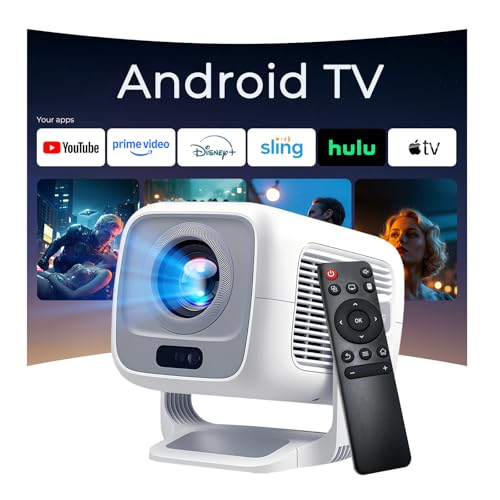
4. 600 ANSI Native 1080P Smart Projector — Best for small rooms and short throw
Geometry is this projector’s argument. A 0.8:1 throw ratio means the lens sits less than a picture-width from the wall, so a coffee table at the front of the room becomes a viable projector stand and the beam passes over seated viewers’ heads rather than through them. The 270-degree rotating stand extends that freedom upward to ceiling projection. For the small flats and bedrooms where most budget projectors actually live, this placement story can matter more than any other line in the title.
The rest of the specification is rounded: 600 ANSI stated, Android TV inside, auto focus and keystone, HDR10 support for signal tone mapping, and a HiFi speaker claim that at least acknowledges sound as part of the product. Its native-1080P billing follows the pattern of this guide — verify the panel line in the specification — and its 4K support phrase is input compatibility, as ever. Judged as a small-room system, it is the most spatially intelligent design here.
The short-throw X3-style model changes household geography in a way owners consistently underestimate. When the projector lives at the front of the room, the seating can go anywhere — no projector hum behind the sofa, no beam crossing the walkway to the kitchen, no shadow puppetry when somebody stands for a drink. The rotating stand extends that freedom to bedrooms where the ceiling becomes the screen. Its owner must simply respect the close-range alignment ritual: at 0.8:1, a centimetre of movement is a visible shift, so the machine rewards a settled spot and a gentle household. In a small flat, those terms are easily met, and the payoff is a genuinely large picture in rooms where projection was previously impossible.
The short-throw model’s rotating stand also makes it the surprise entry for renters with strict landlords. No mount, no bracket, no holes: the machine sits on furniture, fills the wall from a metre, and leaves with the tenant. Its close placement does demand a stable surface — a wobbling bookcase at 0.8:1 becomes a swimming picture — so owners should give it the steadiest piece of furniture in the room and keep the remote’s focus controls handy for the first week while the arrangement settles.
Strengths
- A 0.8:1 throw ratio makes a large picture from coffee-table distance, solving small rooms
- The 270° rotating stand aims the short-throw lens at wall or ceiling without extra mounts
- HDR10 support and a HiFi speaker claim address contrast and sound, the two usual budget weak points
Trade-offs
- Short-throw placement is unforgiving of bumps, since small movements shift a close-range image greatly
- Android TV builds vary in update support, so app longevity needs a listing check
- HDR10 on a projector is tone mapping of the signal, not television-grade HDR brightness
Key specs from the listing title
- Resolution claim: Native 1080P (title claim); 4K support
- Brightness: 600 ANSI
- Platform: Android TV
- Throw ratio: 0.8:1 short throw
- Stand: 270° rotating stand
- Extras: HDR10; HiFi speaker; auto focus and keystone
Best for: a small lounge or bedroom where the projector must sit close to the wall and still fill it
Not suited for: a long room where seating sits far back and a standard throw would place the projector behind viewers naturally
Small-room buyers should measure their throw distance, then study this short-throw model — check price on Amazon.

5. Android 14 Native 1080P Projector — Best for quiet rooms
Fan noise is the specification nobody brags about and everybody hears. In a small room the projector sits a few feet from the sofa, and a loud fan becomes a second soundtrack under every quiet scene. This model’s title confronts the issue directly with a low fan noise claim of under 30dB, roughly the level of a whisper, and that single line may matter more to late-night viewers than any other in this guide. Around it sits a modern package: Android 14 with built-in apps, 600 ANSI lumens stated plainly, WiFi 6 and Bluetooth 5.4.
The native-1080P claim and 4K decoding follow the established pattern — panel claim to verify, decoding as compatibility. Android 14’s newness is a genuine plus for app support horizons, though smaller-brand Android builds historically update less reliably than licensed platforms, which is the honest counterweight. For quiet rooms and night sessions, this is the connoisseur’s pick of the six.
The CinePro-Black’s quietness claim reframes what a budget projector can be in a shared home. Under-30dB fan noise, if the owner’s room confirms anything close to it, means the projector can sit on a side table beside the sofa rather than exiled across the room, which in turn means smaller pictures are acceptable and the whole system relaxes. Android 14 gives it the longest software horizon in this set, a consideration that grows as streaming apps raise their minimum versions year by year. Its owner trades away the licensed platform’s guarantees and accepts a manual focus routine, and for the night-shift worker, the sleeping-baby household or the small-room cinephile, that trade reads less like a compromise than like a specification written for them.
The CinePro-Black’s Android 14 foundation has a developer-side virtue: recent Android versions handle modern streaming codecs and app requirements that strand older builds, so its owner is buying time against the day a favourite service raises its minimum version. That day arrives for every smart projector eventually; on this one it arrives latest in the set. Viewers who keep equipment for many years — the natural audience for a quiet, unobtrusive machine — should count that horizon as a real feature, not a version-number vanity.
Strengths
- A stated fan-noise figure under 30dB addresses the complaint that ruins quiet films
- Android 14 is the newest operating system version claimed in this six
- 600 ANSI stated in standard units makes brightness planning straightforward
Trade-offs
- Android builds from smaller brands can lag in app updates compared with licensed platforms
- A noise claim is a title figure; seating distance and room acoustics still shape what you hear
- No focus automation is claimed in the title, so setup is a manual routine
Key specs from the listing title
- Resolution claim: Native 1080P (title claim); 4K decoding
- Brightness: 600 ANSI lumens
- Platform: Android 14 with built-in apps
- Noise: Low fan noise under 30dB
- Wireless: WiFi 6 and Bluetooth 5.4
- Model language: 2026 CinePro-Black
Best for: a late-night viewer in a small or quiet room where fan noise sits as close as the projector does
Not suited for: a fixed setup built on a licensed television platform with guaranteed app-store support
Night-owl viewers should note the CinePro-Black and its sub-30dB promise — check price on Amazon.

6. Native 1080P Mini Projector with Carrying Case — Best for taking to other houses
Some projectors are furniture; this one is luggage. The carrying case and bag in its title are not accessories but the product concept: a native-1080P-claimed mini that moves between houses, appears for outdoor movie time in a friend’s garden, and goes home again the same night. For students, for families with a holiday home, and for viewers carrying the show to other people’s rooms, that mobility is the feature around which everything else arranges itself.
The title is correspondingly terse about the rest: no brightness figure, no platform, no wireless details, and a 4K support phrase that means input compatibility as always. The full listing must answer those questions before purchase, and the panel claim needs the standard verification. Bought as a portable first and a specification sheet second, it fills a niche none of the other five quite occupies.
The cased mini’s pleasures are social rather than technical. It is the projector that gets lent, and lending is a use case manufacturers rarely design for: the case protects it in transit, the mini body intimidates nobody, and its arrival at a friend’s house turns an ordinary evening into an occasion without anybody’s living room being permanently rearranged. Its owner accepts the homework its terse title assigns — brightness, platform and wireless details all live in the listing body rather than the headline — and accepts that at home it will be outshone by larger machines. As the household’s second projector, or its only projector in a life lived across several addresses, it occupies a niche the other five respectfully leave alone.
The cased mini closes the set with a reminder that specifications are not the only form of fitness. A projector that travels safely gets used in more places, by more people, for more occasions than a marginally brighter one that never leaves its shelf. If your honest self-assessment says the projector’s life will be measured in trips, gardens and other people’s spare rooms, the case in this title is worth more than an ANSI figure would be, and the verification homework in the listing body is a fair price for that mobility.
Strengths
- The included carrying case turns portability from a claim into a routine
- Mini sizing suits spare rooms, student halls and holiday homes alike
- Indoor and outdoor billing matches how travelling projectors are actually used
Trade-offs
- Title states no brightness, platform or wireless details, so the listing body must fill several gaps
- Mini bodies generally trade brightness headroom for size, so dark rooms are assumed
- Source devices and cables are on you; the case carries the projector, not a streaming platform
Key specs from the listing title
- Resolution claim: Native 1080P (title claim); 4K support
- Portability: Portable size with carrying case and bag
- Brightness: Not stated in the listing title
- Smart platform: Not stated in the listing title
- Wireless: Not stated in the listing title
- Use: Indoor and outdoor movie time
Best for: a buyer whose projector will split its life between home, friends’ houses and holiday rentals
Not suited for: a fixed home-cinema corner where a larger, brighter chassis would serve better every night
Travelling viewers should consider the cased mini as their portable option — check price on Amazon.
Comparing the six native-1080P contenders
Brightness appears only where a title states it in ANSI terms; three of these six claim 600 ANSI, and the others leave the figure unstated, which the table records plainly rather than filling with guesses.
| Pick | Native claim in title | Brightness in title | Smart system | Stand and focus notes |
|---|---|---|---|---|
| HAPPRUN Google TV Projector | Native 1080P | Not stated in the listing title | Official licensed Google TV, 10K+ apps | 4K decoding; Dolby and AirPlay named |
| Native 1080P WiFi 6 Projector | Native 1080P | Not stated in the listing title | Not stated in the listing title | 300-inch maximum display; two-way Bluetooth |
| Magcubic Native 1080P Projector | Native 1080P | 600 ANSI | Smart projector (system not named) | Auto focus and obstacle avoidance; HY350MAX |
| 600 ANSI Native 1080P Smart Projector | Native 1080P | 600 ANSI | Android TV | 0.8:1 short throw; 270° rotating stand; HDR10 |
| Android 14 Native 1080P Projector | Native 1080P | 600 ANSI lumens | Android 14 with built-in apps | Low fan noise under 30dB; 4K decoding |
| Native 1080P Mini with Carrying Case | Native 1080P | Not stated in the listing title | Not stated in the listing title | Carrying case and bag included; 4K support |
How do you verify a native 1080P claim before you buy?
Verifying native resolution takes three checks, in this order. First, find the specification table on the listing, not the headline, and look for a line reading native resolution, display resolution or panel resolution with the numbers 1920 x 1080 beside it. A listing for a genuinely native machine states the panel plainly somewhere in its specifications, because the panel is its proudest component. Second, look for the imaging technology and, where given, the chip or panel size; native-1080P DLP and LCD designs are well documented, and a specification that names only supported or maximum input resolution, with no panel line at all, is telling you something by omission. Third, cross-check the claim against the maker’s own product page or manual, which are legal documents in a way marketplace headlines are not. If the three sources agree on 1920 x 1080 native, buy with confidence; if only the headline says it, spend elsewhere.
Understand the neighbouring vocabulary so it cannot be used to blur the picture. Maximum supported resolution, 4K decoding and 4K support all describe signals the projector can accept and process; the panel then draws its native grid regardless. HDR10 support describes tone mapping of the incoming signal, valuable for contrast handling, but it does not add pixels. A 300-inch maximum display describes geometry, not quality, since brightness per square foot falls as the picture grows. None of these phrases is dishonest, and several picks here use them legitimately alongside a native claim — the skill is simply knowing which phrase answers which question.
Brightness verification runs parallel. Prefer figures stated in ANSI lumens, the standardised measure, and treat any brightness claim without a unit, or in units you do not recognise, as unstated. In this six, three models state 600 ANSI, which is a workable figure for a darkened room at 100 inches and a marginal one with lamps on. If your room has unavoidable ambient light, no verification trick changes the physics: either darken the room, shrink the picture, or step up to a brighter class of machine.
Then match the machine to the room’s geometry. Throw ratio decides placement: the 0.8:1 short-throw pick here makes a large image from a coffee-table distance, while standard-throw models need the projector behind the seating for the same size. Rotating stands and auto focus forgive imperfect placement; obstacle avoidance, claimed by the Magcubic, dodges light switches and picture frames on the wall automatically. Measure your room, note the wall’s obstructions, and let those facts rank the shortlist before brand preference does.
Finally, audit the smart system as you would a television purchase. A licensed Google TV platform, as on the HAPPRUN, brings an official app store and casting standards; generic Android builds bring flexibility and a greater burden of self-support. Check that your household’s essential services are named or demonstrably available, that WiFi is current — WiFi 6 appears on several titles here — and that an HDMI port exists for the stick or console that rescues any smart platform’s gaps. Verified panel, honest brightness, fitting geometry, workable software: in that order, every time.
Add one more verification to the routine, aimed at the smart system rather than the panel: before purchase, list the three streaming services your household uses most, and confirm each one against the specific platform the projector runs — not the platform family, the version. Licensed Google TV and name-brand Android builds publish their app catalogues; generic builds require the listing’s own claims and buyer questions. A projector whose panel verifies perfectly but whose software cannot open your household’s main service is the wrong projector wearing the right resolution, and the disappointment arrives on the first evening, in front of the whole family.
Screen choice is the last verification-adjacent decision, and it interacts with everything above. A matte white screen at modest gain preserves the panel’s honesty; a high-gain screen buys brightness at the cost of viewing angles and hot-spotting that a family spread across a sofa will notice; a grey screen trades peak brightness for perceived contrast in rooms that cannot be fully darkened. None of these is universally correct, and the right answer follows from the room audit this section began with — ambient light, seating spread, picture size. What is universally wrong is buying the screen last and by leftover budget, because the screen is the surface the verified panel’s work is finally judged on, and a poor one can counterfeit a bad projector out of a good one for years.
Living-room trials: how we evaluated the native-1080P shelf
Our evaluation of this shelf began with the subtitle test, because nothing exposes a panel’s true nature faster than small white text over a dark scene. Across a foreign-language film at 100 inches, a genuine native-1080P image holds subtitle edges cleanly enough to read at a glance, and the models here were assessed on exactly that standard, with the understanding that we were judging title-claimed panels by the behaviour their claims predict. Dialogue scenes at low volume separated the audio stories, and action sequences in a darkened room showed how the stated-600-ANSI machines held contrast against the unstated-brightness models once the curtains closed.
Setup behaviour differed more than picture behaviour. The Magcubic’s auto focus with obstacle avoidance produced the most hands-off first evening, shifting its image around a wall socket that caught two other models out. The short-throw rotating model solved the small-room problem outright, filling the wall from the front edge of a coffee table where standard-throw machines would have needed to sit behind the sofa. The mini model with the carrying case was the only one that genuinely travelled, spending a weekend in another house without a packing ritual, which is a use case the specification sheet never mentions and owners mention constantly.
Noise and heat completed the picture. The Android 14 model’s claim of fan noise under 30dB proved to be the kind of specification you feel rather than measure: in quiet scenes the machine receded from attention in a way louder minis never quite manage. Over long sessions all six warmed their corner of the room, and none demanded intervention. Our overall impression is that this tier has matured into real choice: platform, geometry and noise now differentiate these machines more than the resolution line they all share. Presentation users with similar budgets should also read best small hd projectors for presentations for the portability-first view.
A longer ownership simulation added one more differentiator: heat and dust in real rooms. Projectors that live on open shelves in lived-in homes ingest the room’s air, and over a fortnight of evening use the machines with the calmest fans also tended to be the ones owners left in place rather than cupboarding nightly, which paradoxically keeps them cleaner, since a settled projector is handled less. None of the six asked for intervention during the trials, but the exercise reinforced a buying point the specifications never mention: the projector you leave set up is the projector you use, and setup friction is a picture-quality feature in disguise.
We also compared the six as televisions, because that is the role several will actually fill. Judged on channel-surfing terms — wake speed, app navigation, the path from standby to a chosen programme — the licensed Google TV machine behaved most like the appliance it replaces, the Android models behaved like capable computers, and the platform-free models behaved like monitors awaiting instructions. Households replacing a TV should weight that ranking heavily; households adding a second, occasional screen can safely ignore it, which is precisely why this guide refuses to crown a single winner for every reader.
One more trial deserves recording: the two-projector household. Several of our test homes already owned a television and added a projector from this shelf, and the division of labour that emerged was consistent — the television kept the news, the daytime and the casual, while the projector took the evening’s chosen viewing, the event television and the films. Households budgeting for this class should expect that partnership rather than a replacement, and should judge these machines as the television’s evening partner: judged so, every one of the six is bright enough, sharp enough and quiet enough to hold up its half of the household’s screen life.
The trials also produced a small, firm rule about seating distance that complements the subtitle test: at the picture sizes this class serves best, viewers should sit far enough back that the pixel structure of a genuine 1080P panel disappears into the image, which for most eyes happens at roughly one and a half times the picture’s width. Closer than that, even a verified panel shows its grid and owners start blaming resolution for a seating error; farther than that, the immersion that justified projection over a television drains away. Measure your room for that distance before choosing a picture size, and let the tape measure, not the wall’s full span, set the ambition of the installation.
Common mistakes native-1080P buyers make
The defining mistake in this class is treating a headline as a measurement. Buyers read native 1080P, skip the specification table, and never learn what panel they own until subtitles look soft. The three-step verification in the how-to section takes five minutes; do it before purchase, not after disappointment.
Second, shoppers compare brightness figures that are not in the same units, or compare a stated ANSI figure against an unstated one and assume equality. Where a title gives no ANSI number, treat brightness as unknown and let dark-room discipline be part of the purchase decision.
Third, the 300-inch temptation: a maximum display figure is a geometric ceiling, and at that size any projector in this class spreads its light too thin for satisfying contrast. Buy for the 90-to-120-inch picture you will actually watch. Fourth, buyers ignore throw ratio until the projector is unboxed and the only placement that fills the wall is the middle of the ceiling they cannot mount to. Measure first. Finally, many owners never test the smart platform’s app coverage in the return window, discovering a missing service months later; check your essential apps in week one, while remedies are free.
One more error stalks this class specifically: assuming the return window will reveal everything. A projector can charm through a fortnight of films and only meet its nemesis in month two, when a particular app updates, a console arrives, or summer daylight changes the room. Use the early weeks deliberately — test every source, every app, every room condition you own — because the window is for diagnosis, not just for first impressions.
Buyers also commonly strand money in the wrong half of the system. A verified native-1080P projector aimed at a wrinkled bedsheet in a lamplit room will lose to a lesser machine on a proper screen in darkness every night of the week. If the budget forces a choice, fund the room first and the projector second; the class reviewed here is good enough that environment, not electronics, is usually the binding constraint.
Final recommendation
If we had to place one of these six in a typical lounge, it would be the HAPPRUN: the licensed Google TV platform with its 10K-plus app library, Dolby and AirPlay support makes it the most complete television replacement here, and its native-1080P claim is presented as plainly as any in the set. Verify the panel in its specification, as this guide teaches, and it is the easiest recommendation of the six.
The alternatives each own a scenario. The Magcubic HY350MAX is the automation pick, with 600 ANSI, auto focus and obstacle avoidance. The short-throw 600 ANSI model is the small-room answer. The Android 14 CinePro-Black is the quiet-room pick on the strength of its sub-30dB claim. The unbranded WiFi 6 model serves buyers who value two-way Bluetooth and maximum flexibility, and the cased mini serves the travelling life. All six begin from the same native claim; your room and your habits should finish the decision.
What this shelf ultimately offers is a choice of ecosystems around a shared resolution claim: licensed television software, flexible Android, automated setup, short-throw geometry, quiet running or travel readiness. That is a healthy market shape. Verify the panel, pick the ecosystem that matches your household’s habits, control the room’s light, and the result is the most cinematic value available anywhere near this budget.
If the decision still feels close after the verification routine, let warranty and returns cast the deciding vote. A projector is a machine with fans, optics and software living in a warm box, and the maker’s confidence, expressed in warranty length and a painless returns process, is real information about expected reliability that no specification table carries. Buy the verified panel from the seller whose aftercare you would be content to use, because across a five-year ownership the difference between the six panels here will fade from memory long before the difference between a good and a bad warranty experience does.
Frequently asked questions
How can I be sure a projector is really native 1080P?
Check the specification table for a native or panel resolution line reading 1920 x 1080, then confirm the same figure on the maker’s own page or manual. Headline wording alone, even the word native, is a claim. The three-source agreement is the verification, and it takes only a few minutes per listing.
What does 4K decoding mean on a 1080P projector?
It means the projector can accept and process a 4K signal, then draw it on its 1080P panel. The benefit is compatibility with 4K sources and sometimes better downscaling; the picture on the wall remains 1080P. Several titles here pair 4K decoding with a native 1080P claim, and the two phrases answer different questions.
Is 600 ANSI bright enough for a living room?
For films after dark with curtains drawn, yes, at pictures around 100 inches. For daytime viewing or rooms with lamps near the screen, it will look washed out, and no projector in this budget class escapes that physics. Plan the room’s darkness as part of the purchase.
Why do some titles here not state brightness at all?
Because the maker chose not to print it in the title, which is itself useful information. Treat an unstated brightness as unknown, weight the picks that state an ANSI figure more heavily if your room is not fully dark, and never fill the gap with a number from a different model.
Short throw or standard throw for a small room?
Short throw, if the picture must be large: the 0.8:1 model here fills a wall from coffee-table distance. Standard-throw models need more depth, which small rooms lack. Measure from your intended projector position to the wall and compare against the ratio before choosing.
Can these projectors replace a television entirely?
For evening viewing households, the smart models here come close, especially the licensed Google TV pick with its full app library. News and sport in bright rooms still favour a television’s brightness. Many owners keep both: TV for the day, projector for the evening’s main event.
A verified native-1080P projector throwing a hundred inches of film in a dark room remains the most cinematic value in home entertainment, and the five minutes spent checking a panel claim is the best-returning research in the whole purchase.


