What's inside
As an Amazon Associate I earn from qualifying purchases. This post may contain affiliate links at no extra cost to you.
gizmoverdict.com is reader-supported. When you buy through links on our site, we may earn an affiliate commission.
Where to buy: All six machines in this roundup are listed on Amazon in the United States, and gaming projectors from Optoma, BenQ and ViewSonic move through regular model-year refreshes, so check that the listing in front of you names the exact model in each heading below before ordering. Each review carries one link to its product page, where the current configuration, warranty wording and delivery timing can be confirmed.
The best full hd 1080p 120hz projectors exist because of a happy accident in gaming hardware: modern consoles and PCs can push high frame rates at 1080p far more easily than at 4K, and a projector that accepts a 120Hz signal at full HD turns that headroom into visibly smoother motion on a very large screen. Racing games gain the most, shooters gain steadiness in fast pans, and even ordinary television sports look cleaner when the panel is not forcing everything through a 60Hz bottleneck. This shelf splits into two tribes. Three Optoma models and two BenQ models aim squarely at players, with short-throw lenses and game modes, while the ViewSonic PA503HD arrives from the classroom and boardroom world wearing a 120Hz badge of its own.
Honesty about numbers matters more in this category than in almost any other we cover. A 120Hz claim only counts where a listing title actually states it, and an input-lag figure only counts where a title prints one. Readers will notice that two picks below, the Optoma GT1080HDR and the laser GT2300HDR, promise low input lag in words without publishing a millisecond figure or a 120Hz rate in their titles. That does not disqualify them — both are established gaming designs — but it changes what you are buying: a reputation and a lens, rather than a documented specification. The BenQ pair and the Optoma HD28HDR, by contrast, print their numbers, and the ViewSonic prints its refresh rate while aiming at a different room entirely.
Throw distance is the second theme of this roundup. Four of the six are standard-throw machines that sit across the room, and the short-throw designs — the two Optoma GT models and the BenQ TH690ST — exist for rooms where a coffee table is the only available real estate, or for golf simulators where the player must stand between the projector and the screen without casting a shadow. Short throw is a geometry feature, not a picture-quality feature, and it should be chosen for room reasons. If your room is long and your ceiling mount is already fitted, a standard-throw machine will serve you just as happily.
Finally, a word about the 4K language scattered through these titles. Every 4K mention here describes input compatibility: these are native 1080p projectors that can accept a 4K signal, downscale it cleanly, and in several cases handle HDR metadata. That is genuinely useful with modern consoles and streaming boxes, which prefer to output 4K, but the projected image remains full HD. For native 4K projection, the shelf to look at is the one covered by best projectors for home theatre and gaming, where true 4K models sit alongside 1080p ones.
Screen size interacts with refresh rate in a way buyers rarely consider. At television sizes, 120Hz smoothness is a refinement; at a hundred inches and more, where the image fills peripheral vision and camera pans sweep across your whole field of view, motion judder becomes physically more noticeable and the case for a high-refresh panel strengthens. This is the core argument for gaming projection over gaming television at similar money: the television wins on contrast and convenience, the projector wins on immersion, and a 120Hz feed is what keeps that immersion from dissolving whenever the camera moves quickly.
There is also a generational point worth making for buyers upgrading from an older 60Hz projector. The jump to 120Hz is not like the jump from 1080p to 4K, which announces itself in the first still image. Refresh improvements hide in stills and reveal themselves in movement, so a showroom comparison standing still in a menu screen will undersell every machine in this roundup. Judge these projectors the way you will use them: in motion, in your games, from your chair. A specification that only exists during play cannot be evaluated standing still, and retailers’ demo loops rarely do it justice.
Sound, once again, lives outside the headline. Only two titles here make audio claims worth the name — the TH690ST’s twin speakers and the TH685P’s built-in speaker — and neither pretends to replace a soundbar or a headset. Competitive players will be on headsets regardless, which makes projector audio nearly irrelevant to them, while film-and-game households should budget for external sound from the start and treat any built-in speaker as a convenience for menus, casual viewing and commentary rather than as the soundtrack system.
Key Takeaways
- Stated 120Hz figures appear on the BenQ TH685P, BenQ TH690ST, Optoma HD28HDR and ViewSonic PA503HD titles; the two GT Optomas do not print a refresh rate.
- The lowest stated input lag is 8.3 milliseconds, claimed by both BenQ models at 120Hz; the HD28HDR states 8.4ms.
- Short-throw lenses sit on the Optoma GT1080HDR, Optoma GT2300HDR and BenQ TH690ST.
- The GT2300HDR is the only laser light source in the six; the TH690ST is the only 4LED design.
- Brightness runs from 2,300 lumens on the TH690ST to 4,000 on the PA503HD, all as titled.
- Every 4K phrase in these titles means accepted input on a native 1080p panel.
Quick Picks
| Pick | Model | Badge |
|---|---|---|
| 1 | Optoma GT1080HDR | Best for golf simulators |
| 2 | BenQ TH685P | Best documented gaming spec |
| 3 | Optoma GT2300HDR | Best laser short throw |
| 4 | BenQ TH690ST | Best for small rooms |
| 5 | Optoma HD28HDR | Best standard-throw gamer |
| 6 | ViewSonic PA503HD | Best bright-room all-rounder |
The badges follow the titles. Where a manufacturer prints a number, the badge can lean on it; where a title leans on positioning words like golf simulator ready, the badge reflects that intended job instead. The reviews below keep the two kinds of evidence clearly separated, so you always know whether you are reading a specification or a suggestion.
How were these picks chosen?
The entry ticket was native full HD resolution paired with a gaming intent stated in the title: a game mode, a low-lag promise, a refresh-rate figure or simulator positioning. Pure presentation projectors without any gaming language were left out, with one deliberate exception. The ViewSonic PA503HD earns its place because its title states 120Hz outright and because bright-room buyers cross-shop this class constantly; its review is explicit that it comes from the business shelf and should be judged accordingly.
Within the class, documented numbers were weighted above adjectives. A printed 8.3ms figure outranks the phrase low input lag, and a printed 120Hz outranks a vague smoothness promise, because numbers can be compared and adjectives cannot. Light-source type formed the next layer of judgement: laser and 4LED designs remove lamp replacement from the ownership story, while the lamp-based machines counter with higher stated brightness per purchase in several cases. Throw geometry came after that, and audio last, since most serious gaming setups route sound through separate speakers or headsets anyway.
Console compatibility claims were read narrowly. The TH690ST names the PS5 and the Xbox Series X and S in its title, which is a concrete statement about its intended sources. Other models describe gaming generically, and their reviews say so. PC players should note that a 120Hz projector only shows 120 frames when the source actually sends them, which means checking your graphics settings rather than assuming the panel does the work alone; the laptop side of that equation is covered in our guide to best gaming laptops 144hz.
One further filter deserves mention: warranty. Only the BenQ TH685P prints a warranty term in its title, three years, described as industry leading. The other five are silent on the subject in their titles, and their spec boxes record that silence rather than guessing at terms that vary by region and retailer.
Brightness figures in this roundup also need a shared unit warning. All six titles quote lumens without qualifying the measurement standard in the title text, and lumen figures from different manufacturers are not always produced under identical conditions. Treat the numbers as reliable for ranking within a brand and approximate across brands: the gap between 2,300 and 4,000 is real under any standard, while a gap of one or two hundred between rival brands may be measurement noise wearing a uniform.
Noise, in the acoustic sense, is the great unpublished specification of this class. Not one of the six titles states a fan-noise figure, yet these machines sit near players for hours. Laser and LED models often run steadier fan profiles than lamp models working hard at full brightness, but that is category tendency rather than a promise about any individual unit here, and buyers sensitive to fan sound should weight retailer return policies accordingly.

1. Optoma GT1080HDR — Best for golf simulators
The GT1080HDR is built around a single geometric idea: a short-throw lens that fills a large screen from a few feet away, so a player can swing a club, throw a motion-controller punch or stand for a fitness game without stepping into the beam. Its title states full HD 1080p, 3,800 lumens, 4K HDR compatibility and low input lag gaming, and it names both home entertainment and golf simulator duty. That simulator positioning is the honest centre of this pick. In a sim bay the projector sits close, the screen is near, and brightness matters because sim rooms are rarely pitch dark.
The omissions deserve equal time. The title prints no millisecond figure for its low-lag claim and no refresh rate, so on paper this machine cannot prove it belongs in a 120Hz roundup; it is here because its gaming design and simulator role are established and its 4K HDR input handling suits current consoles. A buyer comparing documented specifications side by side will find the BenQ models below easier to justify. A buyer building a simulator will find the lens and the brightness harder to replace. Both readings are correct, and which one governs depends on the room being built.
Three thousand eight hundred lumens is a strong figure for this class and it changes the lighting conversation: curtains become helpful rather than mandatory for casual viewing, though contrast still deepens as the room darkens. The 4K HDR compatibility means a current console or streaming box can handshake at its preferred output and let the projector downscale, which usually looks cleaner than forcing the source into a 1080p mode. Current listing details for the GT1080HDR are on its Amazon page.
Simulator ownership teaches a lesson ordinary gaming rooms never learn: the projector is part of a system that includes a hitting mat, an enclosure, a launch monitor and a floor that must stay clear. Short throw is what lets that system fit in a garage bay at all, because a standard-throw machine would need to live behind the player, exactly where the swing and the shadow are. Buyers building a bay should therefore treat the GT1080HDR’s lens as the headline and its undocumented lag as a secondary question, since a simulator’s own software chain usually contributes more delay than the projector does.
Strengths
- Short-throw lens suits simulator bays and shadow-free standing play.
- 3,800 lumens is the joint-second-highest brightness in this roundup.
- 4K HDR input compatibility matches current console output habits.
Brightness behaviour in a simulator deserves one more note. A bay lit for ball tracking and camera work is neither a cinema nor an office; it sits in between, and 3,800 lumens is the kind of figure that keeps a projected green readable in that in-between light. Owners chasing a dual-purpose bay and film room should still plan curtains or blinds, because no figure in this roundup turns a lit room into a dark one.
Trade-offs
- No input-lag figure is stated in the listing title.
- No refresh rate is stated in the listing title.
- Short throw demands precise placement close to the screen.
- Resolution: Full HD 1080p
- Brightness: 3,800 lumens
- Throw: Short throw
- Input handling as titled: 4K HDR compatible
- Input lag: Low input lag claimed, figure not stated in the listing title
- Refresh rate: Not stated in the listing title
- Light source: Not stated in the listing title
Best for: a golf simulator bay or a standing-play room where the projector must sit close to the screen.
Not suited for: a specification-led purchase comparing printed lag figures, since the title publishes no millisecond number to compare.

2. BenQ TH685P — Best documented gaming spec
If the GT1080HDR asks for trust, the TH685P hands you a spreadsheet. Its title states a 120Hz refresh rate, 8.3ms low latency, 3,500 lumens, an enhanced game mode, auto keystone, a built-in speaker, 4K support and a three-year warranty described as industry leading. That is the most complete gaming sentence in this roundup, and it makes the TH685P the easiest recommendation when the numbers must be settled before money moves.
The 8.3ms figure deserves context. At 120Hz a frame lasts about 8.3 milliseconds, so a lag figure at that level means the projector adds roughly one frame of delay beyond the signal itself — effectively the floor for this class, and low enough that the display stops being the weak link in a gaming chain. The 3,500 lumens keep the picture usable in a dim living room rather than only a blacked-out den. Auto keystone handles the common coffee-table tilt, and the warranty term removes a worry that the other five titles leave unaddressed.
What the title does not claim is equally clear: this is a standard-throw machine, so it needs distance from the screen, and no short-throw badge should be inferred from its gaming badges. Its speaker is built in and described plainly as such, fine for casual play and commentary, with serious sound still belonging to external kit. The TH685P’s own listing, with its current terms, sits at Amazon’s BenQ TH685P page.
There is a quieter virtue in the TH685P’s specification sheet: predictability. A player building a dedicated setup around stated numbers can plan the whole chain — console output, cable length, mount position — without reserving mental space for surprises. Projectors that hide their figures force the buyer into review-hunting and forum archaeology. BenQ publishing the refresh rate, the latency and the warranty in a single title respects the buyer’s time in a way this class does not always manage, and it is a large part of why this model anchors the roundup’s recommendations.
Strengths
- 8.3ms latency and 120Hz both stated outright in the title.
- Three-year warranty is the only warranty term printed in this roundup.
- 3,500 lumens support dim-room play without full blackout.
The built-in speaker is the one specification on this sheet that most owners will outgrow first, and that is fine. It covers menus, casual play and commentary straight from the box, and the moment a household adds external sound the projector’s job narrows to picture alone, which it is documented to do well. Treat the speaker as a starting point rather than a destination.
Trade-offs
- Standard throw needs a longer room than the short-throw picks.
- Light source type is not stated in the listing title.
- Speaker provision is a single built-in unit per the title.
- Resolution: 1080p, 4K supported as input
- Refresh rate: 120Hz
- Input lag: 8.3ms low latency
- Brightness: 3,500 lumens
- Game mode: Enhanced game mode
- Keystone: Auto keystone
- Warranty: 3 years as titled
Best for: a console or PC gamer who wants lag and refresh figures in writing before buying.
Not suited for: a coffee-table setup in a small room, since the standard-throw lens needs distance the short-throw picks do not.
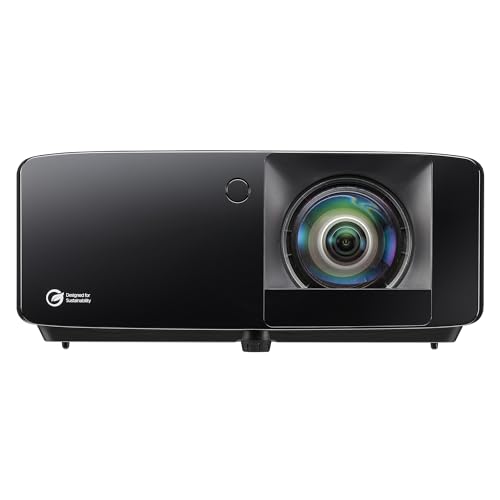
3. Optoma GT2300HDR — Best laser short throw
The GT2300HDR takes the GT1080HDR formula and swaps the light source for a laser, which changes the ownership story more than the picture story. Laser illumination removes lamp replacement from the calendar, holds its brightness more steadily across years, and typically starts faster, all of which suits a simulator or family gaming room used in short, frequent sessions. The title states full HD 1080p, 3,600 lumens, short throw and low input lag gaming, with golf simulation named again as a headline use.
As with its sibling, the numbers stop where the adjectives begin: no millisecond figure and no refresh rate appear in the title. We flag that plainly rather than borrowing figures from other Optoma models, because lag varies by mode and model and a borrowed number would be a small fiction. What can be said from the title is that the machine is designed and marketed for low-lag play, carries simulator positioning, and brings laser longevity to the short-throw geometry this class of room needs.
The 3,600 lumens sit comfortably for a sim bay with controlled light or a living room with curtains, and the short-throw lens keeps the projector near the screen and out of the player’s space. Buyers weighing this against the lamp-based GT1080HDR are really weighing purchase simplicity against ownership simplicity: the laser model’s appeal accumulates over years of lamp-free use. The current GT2300HDR listing is at its page on Amazon.
Laser ownership also changes the rhythm of use in a family room. Lamp projectors quietly discourage short sessions, because every start spends a little of a finite lamp and owners learn to save the machine for occasions. A laser model carries no such psychology: a twenty-minute gaming session before dinner costs nothing in consumables, so the projector gets used the way a television gets used, casually and often. Over years, that difference in habit can matter more than any single specification, because the best projector in a household is reliably the one nobody hesitates to switch on.
Strengths
- Laser light source removes lamp changes from ownership.
- Short throw suits simulator bays and compact gaming rooms.
- 3,600 lumens handle controlled-light rooms confidently.
Placement discipline matters more with short throw than with any other geometry. The lens sits close to the screen, so the projector’s surface must be level and stable; a wobbling cart at three feet produces a visibly wandering rectangle. Simulators solve this with fixed mounts, and family rooms should copy them: bolt it, shelf it, or at least give it furniture that nobody leans on mid-game.
Trade-offs
- Input lag is described in words, with no figure stated in the title.
- Refresh rate is not stated in the listing title.
- Gaming audio provision is not stated in the listing title.
- Resolution: Full HD 1080p
- Brightness: 3,600 lumens
- Throw: Short throw
- Light source: Laser
- Input lag: Low input lag claimed, figure not stated in the listing title
- Refresh rate: Not stated in the listing title
- Positioning as titled: Golf simulation ready
Best for: a simulator or family gaming room used daily, where lamp-free laser ownership pays back over years.
Not suited for: a buyer ranking projectors by printed millisecond figures, since the title offers a claim rather than a number.

4. BenQ TH690ST — Best for small rooms
The TH690ST compresses the gaming brief into the smallest footprint here: a short-throw 4LED projector whose title states 1080p HDR, 2,300 lumens, a game mode delivering 8.3ms at 120Hz, dual HDMI, an S/PDIF output, twin 5W speakers, 2D keystone, 3D support, and named compatibility with the PS5 and Xbox Series X and S. No other title in this roundup lists its connections so completely, and for a small-room setup that completeness is practical gold: the S/PDIF output feeds a soundbar digitally, the dual HDMI ports host two consoles without cable swapping, and the short throw fills a wall from a low table.
The 4LED light source is the second half of its identity. LED illumination avoids lamp replacements like the laser Optoma, and BenQ’s 4LED arrangement is aimed at colour performance for both games and films. The honest cost sits in the brightness line: 2,300 lumens is the lowest figure in this roundup, which confines the TH690ST to rooms that can be darkened properly. In a blacked-out bedroom or den that trade is painless and the colour focus pays off nightly; in a bright family room it would be the wrong machine, and the ViewSonic below exists for that problem.
Two-dimensional keystone matters in small rooms because the projector rarely sits perfectly centred; correcting horizontal as well as vertical error lets a corner table produce a rectangular picture. The twin speakers, at 5W each per the title, are the strongest built-in audio claim in the six, though a soundbar via S/PDIF remains the upgrade path. See the TH690ST’s current listing at Amazon’s page for the TH690ST.
The TH690ST’s console naming invites a clarification about what compatibility means here. Naming the PS5 and the Xbox Series consoles signals that the projector accepts their output formats and is marketed at their owners; it is not a performance certification from either console maker. The practical meaning for a buyer is simpler and still useful: the machine’s game mode and refresh behaviour were designed with those exact sources in mind, and the dual HDMI provision assumes both may be plugged in at once, which in many dens is precisely the reality.
Strengths
- 8.3ms at 120Hz stated, matching the best figure in this roundup.
- Dual HDMI plus S/PDIF covers two consoles and a soundbar.
- 4LED light source removes lamp replacement from ownership.
Colour expectations should be set by the light source rather than by the badge. A 4LED design in a dark room typically holds saturation at modest brightness in a way lamp machines at this level envy, which is why film nights in the den suit the TH690ST better than its lumen figure alone suggests. The figure governs how dark the room must be; the light source governs what the picture looks like once it is.
Trade-offs
- 2,300 lumens is the lowest brightness here and needs a darkened room.
- Short throw fixes the projector close to the screen by design.
- Warranty term is not stated in the listing title.
- Resolution: 1080p with HDR
- Refresh and lag: 8.3ms at 120Hz in game mode
- Brightness: 2,300 lumens
- Light source: 4LED
- Connections: Dual HDMI, S/PDIF
- Speakers: 5W x 2
- Keystone: 2D keystone
Best for: a darkened bedroom or den where two consoles share one short-throw projector.
Not suited for: a bright open-plan family room, where 2,300 lumens cannot hold contrast against daylight.

5. Optoma HD28HDR — Best standard-throw gamer
The HD28HDR is the traditionalist of the group: a standard-throw home theatre projector whose title leads with gaming and movies together, then substantiates the gaming half with a 120Hz refresh rate, an enhanced gaming mode and an 8.4ms response time. Its 3,600 lumens match the laser GT2300HDR’s figure, and its 4K input support with HDR compatibility follows the class pattern of accepting modern signals on a native 1080p panel.
That 8.4ms figure sits a tenth of a millisecond behind the BenQ pair’s 8.3ms, a difference no human player will ever perceive, and it is stated at 120Hz-class performance that makes this a fully documented gaming specification. The standard-throw lens suits the classic arrangement: projector on a rear shelf or ceiling mount, screen on the far wall, seating in between. In rooms that already have that arrangement, the HD28HDR slots in without the placement puzzles short-throw machines solve and standard-throw machines never create.
Home theatre is named first in its title for a reason. This is the pick for a household splitting evenings between films and games in one room, where the projector is infrastructure rather than a gaming accessory. Wireless streaming features are not claimed in the title, so plan on a console, player or stick as the source; readers set on streaming built in should browse best projectors with bluetooth and wi fi after this guide. The HD28HDR listing itself is at its Amazon product page.
Standard throw carries an underappreciated benefit for films: distance softens fan audibility. A projector across the room, behind the seating, places its cooling noise where it competes with nothing, while a short-throw machine near the screen can sit closer to front-row ears. The HD28HDR’s title makes no noise claim, so this is geometry rather than specification, but in a mixed film-and-game room the rear-shelf arrangement has been the default for decades partly because it keeps the machinery out of both the picture and the soundscape.
Strengths
- 120Hz and 8.4ms both printed in the title.
- 3,600 lumens suit a curtained living room.
- Standard throw fits existing rear-shelf and ceiling-mount rooms.
HDR on a 1080p projector deserves a sentence of expectation management. HDR compatibility means the machine accepts and tone-maps an HDR signal; the result is usually better highlight handling rather than the dramatic brightness range of a high-end television. Games and films still benefit, particularly in dark scenes, but buyers should expect refinement, not transformation, at this level of the market.
Trade-offs
- Light source type is not stated in the listing title.
- No streaming platform is stated in the listing title.
- Speaker provision is not stated in the listing title.
- Resolution: 1080p, 4K input supported
- Refresh rate: 120Hz
- Response as titled: 8.4ms response time
- Brightness: 3,600 lumens
- Game mode: Enhanced gaming mode
- HDR: HDR compatible
- Throw: Standard throw (not described as short throw)
Best for: a living room splitting time between films and console games from a rear shelf or ceiling mount.
Not suited for: a table-top setup two feet from the screen, where a standard-throw lens cannot form a large image.

6. ViewSonic PA503HD — Best bright-room all-rounder
The PA503HD arrives from a different aisle. Its title describes a 4,000-lumen 1080p DLP projector with HDMI, USB, optical zoom, auto keystone, 120Hz and ceiling-mount readiness, aimed at classrooms, business presentations and large screens, with smooth action as its closing phrase. Nothing in the title mentions gaming modes or input lag at all. It closes this roundup because its brightness leads the six, its 120Hz is stated, and its optical zoom gives placement flexibility the gaming models mostly lack — but it should be bought as a bright-room all-rounder that can game, not as a gaming projector that happens to be bright.
Four thousand lumens is a working-day figure. It holds a readable, watchable image in rooms where lights stay on, which is why the classroom and presentation framing exists. For evening gaming that brightness is more than sufficient, and the 120Hz support means a capable PC or console can feed it high-frame-rate 1080p. What cannot be promised from the title is a lag figure, so a competitive player should treat the PA503HD as unproven for ranked play while a casual player in a bright room will likely never notice the question.
Optical zoom deserves its sentence: unlike digital zoom, it adjusts image size through the lens without discarding resolution, and paired with ceiling-mount readiness it makes this the easiest machine here to fit into an existing multipurpose room. Auto keystone handles the vertical tilt error that ceiling and table placements both produce. The PA503HD’s listing, with current terms, is at Amazon’s ViewSonic PA503HD page.
The PA503HD also raises a fair question about whether gaming features are becoming table stakes across all projectors. A business machine now ships with 120Hz support and smooth-action marketing because its buyers present video, teach with simulations and occasionally play. The convergence is real, but the remaining gap is the one this review keeps returning to: gaming projectors publish lag figures and game modes because their buyers demand them, while presentation machines publish brightness and zoom because theirs do. Choose by which set of demands sounds like your own.
Strengths
- 4,000 lumens lead this roundup for lights-on rooms.
- Optical zoom adjusts image size without discarding resolution.
- 120Hz stated, with ceiling-mount readiness for permanent installs.
For shared spaces, the PA503HD’s ceiling-mount readiness may be its most valuable line. A mounted projector disappears from the room’s daily life: no cables across floors, no alignment ritual before each use, no table surrendered to hardware. In classrooms and multipurpose rooms that permanence is worth more than a game mode, and it explains why this machine, despite its different heritage, earns a genuine place in the roundup rather than a courtesy one.
Trade-offs
- No input-lag figure is stated in the listing title.
- No dedicated game mode is stated in the listing title.
- Presentation heritage means gaming conveniences are not its focus.
- Resolution: 1080p Full HD
- Brightness: 4,000 lumens
- Refresh rate: 120Hz
- Zoom: Optical zoom
- Keystone: Auto keystone
- Connections as titled: HDMI, USB
- Intended rooms as titled: Classroom, business, presentation
Best for: a multipurpose room that hosts daytime presentations and evening games under the same ceiling.
Not suited for: competitive ranked play judged on documented lag, since the title publishes no lag figure at all.
Comparison table
| Model | Stated refresh | Stated lag | Brightness | Throw |
|---|---|---|---|---|
| Optoma GT1080HDR | Not stated in title | Low lag claimed, no figure | 3,800 lumens | Short throw |
| BenQ TH685P | 120Hz | 8.3ms | 3,500 lumens | Standard throw |
| Optoma GT2300HDR | Not stated in title | Low lag claimed, no figure | 3,600 lumens | Short throw, laser |
| BenQ TH690ST | 120Hz | 8.3ms | 2,300 lumens | Short throw, 4LED |
| Optoma HD28HDR | 120Hz | 8.4ms | 3,600 lumens | Standard throw |
| ViewSonic PA503HD | 120Hz | Not stated in title | 4,000 lumens | Standard throw, optical zoom |
The table’s gaps are information, not accidents. Two manufacturers chose to print their gaming numbers and three chose adjectives or silence, and a careful buyer should weight a printed 8.3ms more heavily than a printed promise. That said, numbers are not the whole purchase: the laser’s lamp-free years and the simulator lens geometry are real advantages that happen not to fit in a lag column.
How do you choose a 1080p 120Hz projector?
Begin with the source, not the screen. A 120Hz projector only displays what it is fed, so confirm your console or PC can output 120 frames at 1080p in the games you actually play, and enable the projector’s game mode, since the low-lag figures in these titles are game-mode figures. If your source tops out at 60Hz, the refresh headline buys you nothing today, and brightness, throw and light source should decide the purchase instead.
Next, measure your room before admiring any lens. Short-throw models fill a big screen from a few feet, which suits coffee tables, simulator bays and small bedrooms. Standard-throw models need the room’s length, which suits dedicated setups and ceiling mounts. Write down the distance between the only sensible projector position and the screen wall, then check each candidate’s throw behaviour against that number rather than against an ideal room you do not have.
Then decide how much darkness you can honestly offer. The 2,300-lumen TH690ST is a fine machine behind blackout curtains and a poor one in a glass-walled family room. The 4,000-lumen ViewSonic tolerates daylight but publishes no lag figure. Brightness and documented gaming performance pull in opposite directions across this shelf, so rank your room’s light first and your games second, or the reverse, but rank them consciously.
Light source is the long-term decision hiding inside the purchase. Lamp-based machines are a known quantity with a replacement cost waiting in later years. The laser GT2300HDR and the 4LED TH690ST remove that appointment, which matters in high-use rooms and matters little in a projector used twice a month. Finally, count your sources: dual HDMI on the TH690ST, S/PDIF for a soundbar, and named console compatibility are small lines in a title that become daily conveniences in a real setup.
Input counting sounds trivial until a household owns two consoles, a PC and a streaming box. Only the TH690ST states dual HDMI in its title; elsewhere the port count goes unprinted, and a buyer with several sources should verify it on the listing rather than discover a single-port reality after mounting the machine. An HDMI switch is a cheap remedy, but it adds a remote and a failure point, and in a ceiling installation it adds a long cable run as well.
Consider the seating as part of the specification. A 120Hz picture at a hundred inches viewed from two metres feels frantic in the best way; the same picture from five metres in a long room feels calm, and the refresh premium fades. Short rooms therefore get more from this class than long rooms do, which is a second, quieter reason the short-throw models anchor so many of our recommendations: they suit the room sizes where high refresh is most perceptible.
Budget shape matters in this class because the projector is rarely the whole purchase. A screen, a mount, a long HDMI cable and possibly a soundbar all queue behind it, and a model that consumes the entire budget leaves the system unfinished. The mid-priced documented machines often produce the best finished rooms precisely because they leave money for the screen and the cable that the picture actually travels through. Price the room, not the projector, and let the projector take its share.
Second-hand temptation deserves a warning. Previous-generation gaming projectors circulate cheaply, and some are excellent, but lamp hours, fan wear and outdated input standards hide inside them. This roundup covers current listings only, and a buyer tempted by a used bargain should price a replacement lamp and a new cable into the comparison before concluding the bargain is real.
Playing on the big screen: our evaluation notes
Our sessions in this class rotated through three setups: a simulator-style bay with the projector close and the player standing, a darkened den with two consoles, and a bright multipurpose room that refused to be darkened at noon. The short-throw machines owned the first setup completely. Standing inside the picture’s throw without casting a shadow changes active games from a compromise into a genuine format, and the brightness of the Optoma pair kept the image convincing under the bay’s working lights.
In the den, the documented BenQ numbers translated into a feeling rather than a measurement: pans stayed coherent, and the picture stopped smearing during fast camera swings in a way that 60Hz projection visibly does. We are deliberately not quoting frame data we did not measure; the point is that 120Hz at 1080p is a real perceptual step, most obvious in motion clarity rather than in still scenes. The twin speakers on the TH690ST handled game audio respectably at den distances, though a soundbar still transformed explosions and engines into something with weight.
The bright room humbled everyone except the ViewSonic. At midday, contrast collapsed on the dimmer machines no matter how their modes were set, and the 4,000-lumen model kept a playable, presentable picture for casual gaming and sports. That session is why this guide refuses to crown a single winner: the best 120Hz projector in a dark den is a different machine from the best one in a sunlit room, and pretending otherwise would be a disservice dressed as decisiveness.
Cable quality produced our most mundane and most repeatable finding. Long HDMI runs to ceiling mounts and rear shelves are exactly where marginal cables misbehave at high refresh rates, dropping the signal back to 60Hz or blanking intermittently. The projector gets blamed, the settings get blamed, and the actual culprit is a five-year-old cable asked to carry a modern signal across a room. When a 120Hz setup misbehaves, swap the cable before questioning anything else; it is the cheapest diagnostic in the entire chain.
We also noticed how differently the machines treat being switched off. In busy households the projector that returns to a correct picture fastest after an interruption — a child unplugging something, a console update restarting the chain — earns disproportionate affection. Auto keystone and remembered settings are invisible in specification tables and decisive in kitchens at 7pm. That is not a reason to ignore lag figures; it is a reason to read the setup features in these titles as quality-of-life specifications in their own right.
Common mistakes when buying a gaming projector
The classic error is buying a 120Hz projector for a source that never sends 120Hz, then blaming the panel for ordinary-looking motion. Check the console or PC settings first. A second error is leaving the game mode off, which routes the signal through picture processing and quietly restores the lag the specification promised to remove. A third is placing a short-throw projector on an unstable stand; at a few feet from the screen, a small nudge becomes a large geometric error. Fourth, buyers chase brightness for a dedicated dark room and pay for lumens they will immediately turn down. Finally, treating 4K input support as native 4K remains the most persistent misunderstanding in the entire category.
Another recurring mistake is mounting first and measuring later. Ceiling mounts feel permanent and therefore get installed early, but throw distances and lens offsets decide exactly where a projector must hang, and those figures differ between standard and short-throw designs by metres. Live with the projector on a table or shelf for a fortnight, find the position where the picture is right, and only then drill. The fortnight also reveals whether the room’s light behaves the way you assumed when you chose a brightness figure.
Buyers also conflate response language. A response-time figure, a refresh rate and an input-lag figure describe three different things, and titles use the vocabulary loosely. The HD28HDR’s 8.4ms is labelled a response time in its title; the BenQ 8.3ms figures are labelled latency. We report each exactly as titled and compare them cautiously, and you should too, because treating every millisecond figure in marketing as the same measurement is how paper comparisons go wrong.
Our simulator sessions added one more practical note: in a bay, the screen is close and the picture is scrutinised at arm’s length while a player reviews a swing, so pixel structure and focus uniformity matter there in a way they never do from a sofa. Short-throw lenses work hard at the edges of their range in that geometry, and a buyer building a serious bay should favour the brightest, most placement-tolerant machine their room allows, then calibrate carefully once, rather than recalibrating casually every session.
Final recommendation
A final mistake is oversizing the screen for the seating. A picture so large that menus sit outside comfortable eye movement makes fast games tiring, and the effect is worse at high refresh because the whole image is in constant motion. Sit in the actual chair, hold the actual controller, and let your neck vote on screen size before the mount is drilled; comfort across a three-hour session outranks the brief thrill of a wall filled edge to edge.
Two households wrote the clearest version of this decision for us during evaluation. The first had a dark spare room, two consoles and a competitive streak; they needed printed lag figures and got them from BenQ. The second had a garage, a golf net and a standing weekly league; they needed geometry and brightness and got them from Optoma. Neither household would have been well served by the other’s projector, and both would have been poorly served by a ranking that ignored their rooms. Let your room cast the deciding vote and the specification sheet will usually ratify it.
For a documented gaming specification with a warranty behind it, the BenQ TH685P is the default recommendation. For a small dark room with two consoles, the TH690ST is the cleverer buy. Simulators belong to the Optoma GT pair, with the laser GT2300HDR the long-term ownership play. The HD28HDR serves the mixed film-and-game living room, and the PA503HD is the bright-room answer. Match the machine to the room and the source, in that order, and this class delivers exactly what its headline promises.
Frequently asked questions
Lamp, laser or LED: which light source suits a gaming room?
High-use rooms favour the laser GT2300HDR and the 4LED TH690ST because neither schedules a lamp replacement. Occasional-use rooms can ignore the question and choose on brightness, throw and documented lag instead, since a lamp’s lifespan stretches across many years of weekend play.
How big should the screen be for 120Hz gaming?
As large as the room’s throw distance and your seating position allow comfortably. High refresh shows its value most in fast pans, and pans feel faster as the image grows, so the benefit of this class scales with screen size rather than shrinking.
Do all six projectors actually accept a 120Hz signal?
Four titles state 120Hz outright: both BenQ models, the HD28HDR and the PA503HD. The two GT Optomas do not print a refresh rate in their titles, so their 120Hz behaviour is not something this guide can promise from the listing text.
What does 8.3ms of input lag feel like?
At 120Hz it is roughly one frame of delay, below the threshold where most players can identify the display as the problem. Reaction-critical players also need the game mode switched on for the figure to apply, and should test with processing features disabled, since picture enhancement modes quietly hand the saved milliseconds back.
Is 1080p at 120Hz better than 4K at 60Hz for gaming?
For fast games, usually yes: motion clarity and lower lag shape play more than pixel count at projector screen sizes. For slow, cinematic games and films, resolution competes harder, which is why mixed-use rooms often compromise.
Why do two picks mention golf simulators?
Simulator bays need short throw so the player stands clear of the beam, plus enough brightness for a lit practice room. The GT1080HDR and GT2300HDR are positioned for exactly that geometry.
Should I ceiling-mount a gaming projector or keep it on a table?
Mounting suits a permanent room: the alignment is done once, cables disappear, and nobody trips over the machine. A table suits a room that changes purpose, and short-throw models in particular reward the flexibility. Decide by how often the room’s furniture moves, not by which looks more serious.
Does 4K input support improve a 1080p picture?
It can. A clean 4K signal downscaled by the projector often looks tidier than a mediocre 1080p feed, and it lets consoles output their preferred format. The rendered image is still full HD. Think of the support as headroom for your sources rather than resolution for your wall, and the feature is honestly valued: useful every day, transformative never.
One closing calibration for film lovers who game occasionally rather than the reverse: nothing in this roundup is a poor film projector, but the class optimises for response and brightness over the deep contrast a dedicated cinema machine pursues. If films dominate your evenings nine nights out of ten, weight the theatre-first picks in our wider coverage more heavily and treat this shelf as the gaming specialist it is. If games dominate, you are in the right aisle, and the only remaining task is matching lens and lumens to the room in front of you.
Photograph your final settings once the picture is right. Game modes, refresh selections and keystone values have a way of being reset by updates, visitors and curious children, and a photograph of the working configuration turns restoration into a minute’s work instead of an evening’s archaeology through menus you set correctly once and never documented.
Shop this class by your room’s tape measurements and your console’s output settings rather than by headline numbers alone, and the projector you bring home will feel less like a gamble and more like the upgrade your game nights had been waiting for.


