What's inside
- Key Takeaways
- Quick Picks: six mini projectors that sit on a coffee table and behave
- How were these picks chosen?
- Side by side: the six tabletop movie projectors compared
- How do you choose a tabletop projector that suits your room?
- On the coffee table: how we evaluated these six for real movie nights
- Common mistakes tabletop movie buyers make
- Final recommendation
- Frequently asked questions
As an Amazon Associate I earn from qualifying purchases. This post may contain affiliate links at no extra cost to you.
gizmoverdict.com is reader-supported. When you buy through links on our site, we may earn an affiliate commission.
Where to buy: Tabletop movie projectors in this class sell through Amazon in shifting mini-projector lineups, so the six models below are the ones whose listings we could verify at research time, each with its disc-free streaming or HDMI route spelled out in its own review. Stock on small-batch projector brands rotates quickly, and a sold-out colour or bundle variant is normal rather than a warning sign.
The best tabletop projectors for movies solve a very specific living-room problem: you want a picture far bigger than your television for film night, but you do not want a ceiling mount, a drilled bracket or a permanent black box dominating the room. A mini projector that lives in a drawer, comes out onto the coffee table after dinner and goes back before midnight is the whole appeal, and it is also where the compromises live, because a projector small enough to store in a shoebox cannot throw the kind of brightness a dedicated home-theatre machine manages.
Before the picks, one piece of vocabulary will save you money and disappointment. Projector listings use two different resolution claims that look identical at a glance. Native resolution is the pixel grid the projector actually draws on the wall. Supported resolution is the finest signal the projector will accept and then scale down to that native grid. When a title on this page says 4K support, it means the machine will play a 4K file or accept a 4K signal, not that four thousand horizontal pixels appear on your wall. When a title says 1080P without the word native beside it, treat the claim as unproven until the product specification confirms the panel itself. We flag that distinction inside every review below, because at tabletop distances the difference between a genuinely sharp 1080P image and a softer scaled one is exactly what you notice in faces, subtitles and film grain.
Brightness deserves the same scepticism. Mini projectors in this size class are evening machines. In a darkened room with curtains drawn, a modest mini projector throws a perfectly watchable 80-to-100-inch picture; in a sunlit lounge at three in the afternoon, the same machine looks washed out no matter what the marketing line promises. Every pick below is therefore assessed as a lights-down movie device, and if your household mostly watches sport at midday with blinds open, our guide to best hd projectors for gaming sports covers brighter machines built for that job.
Key Takeaways
- 4K support in a mini-projector title means the unit accepts and scales a 4K signal; it is not native 4K, and none of these six table projectors claims a native 4K panel.
- The Aurzen Roku TV D1R is the only pick with a full streaming platform named in its title, Roku TV built in, which removes the separate stick from the tabletop entirely.
- Rotatable bodies on the Magcubic HY300F (180°) and the Antmap (240°) let the projector sit flat and aim at a wall or ceiling without a tripod stack of books.
- Electric focus on the YGSKK and auto focus on the Aurzen matter more on a table than in a fixed install, because the projector gets bumped, moved and re-aimed every single session.
- All six are dark-room movie machines first; modest mini-projector brightness is the honest trade for the size, so plan curtains and evening viewing rather than midday sport.
One habit will make every review below easier to use: when a specification matters to you, find it in the pick’s spec box, and when the box says the listing title does not state it, believe that silence. Mini-projector marketing spreads its claims across images, bullet points and variant listings, and the title is the one text every buyer of every variant shares. We have deliberately confined each review’s factual spine to that shared text, then built our judgement around it, so the projector you receive cannot quietly differ from the one described here in any way the title itself defines.
Quick Picks: six mini projectors that sit on a coffee table and behave
Every model here is small enough to live on a side table, a bookshelf edge or the flat top of a low dresser, and every one is judged on the same tabletop questions: how fast it focuses, how square the picture lands from a slightly crooked seat, and how honestly its resolution language reads once you separate native output from supported input.
| # | Pick | Badge | Why it earns a place |
|---|---|---|---|
| 1 | YGSKK Mini Projector | Best for remote-controlled focus | Electric focus from the sofa, built-in apps and the widest source list of the six |
| 2 | Aurzen Roku TV D1R | Best all-in-one streaming pick | Roku TV built in, auto focus, auto keystone and zoom — the fewest separate parts |
| 3 | Magcubic HY300F | Best rotating design for awkward rooms | 180° rotating body, Android 14, WiFi 6 — bought for flexibility, with 4K read as input support |
| 4 | HOMPOW Mini Projector | Best simple cable-first bedroom pick | 1080P supported, built-in speaker and Bluetooth, in a cheerful orange shell |
| 5 | AuKing Mini Projector | Best traditional home-theatre mini | Full HD 1080P billing and a classic source list — the conventional choice of the six |
| 6 | Antmap Portable Projector | Best for phone-first viewing | 240° rotation, iPhone-led compatibility and WiFi sharing for phone-first households |
How were these picks chosen?
We built this shortlist around the tabletop use case rather than raw specification chasing. A candidate had to be genuinely portable, small enough that putting it away is a one-handed job, and it had to offer at least one credible route to films: built-in applications, WiFi screen sharing, or HDMI and USB inputs for a stick, laptop or console. Models that only made sense bolted to a ceiling or parked permanently on a media unit were cut, however good their numbers looked.
Resolution honesty was the second filter. We read every title the way a careful buyer should, separating native claims from supported-input claims, and we kept models from both camps so the reviews can show you the difference in practice. A projector whose title says 1080P supported is not disqualified; it is simply described as what it is, a machine that plays 1080P material at its own native grid, and priced in your mind accordingly.
Setup forgiveness was the third filter, because a table is never perfectly square to a wall. Auto or electric focus, auto keystone correction, zoom and rotatable bodies all reduce the five minutes of nudging that otherwise eats the start of every film. Finally we checked the sound and connection story in each title: built-in speakers, Bluetooth for a separate speaker, and compatibility lists naming the devices households actually plug in, from TV sticks and iPads to a PS5. Readers comparing this class with the brighter end of the market will find the contrast useful in best projectors 1080p under 500, where larger chassis buy more light output.

1. YGSKK Mini Projector — Best for remote-controlled focus
The YGSKK’s defining convenience is its electric focus. On a fixed installation focus is a set-once chore, but on a tabletop the projector is nudged every time someone sets down a mug, so a focus control that lives on the remote changes the machine from fiddly to friendly. You sit down, the opening titles look soft, you tap the focus control until the lettering snaps, and the film starts. That single feature is why this model opens the list for households whose projector will live in a drawer between screenings.
Its title describes it as a 1080P video projector with built-in apps, WiFi and Bluetooth, and a compatibility list running from smartphones and TV sticks to iPad, PS5 and laptop over HDMI and USB. Read the 1080P wording with care: the title does not say native, so the careful interpretation is that 1080P material is fully supported and the panel claim needs confirming in the detailed specification. For bedroom-scale pictures in the dark, the practical experience is what matters, and the combination of apps inside plus every wired route outside means no source in a normal home is locked out.
Ownership of the YGSKK settles into a rhythm quickly because its controls assume the projector will be touched by everyone in the house. The built-in apps mean a guest can be handed the remote without a pairing lecture, and the electric focus forgives the fact that no two people set the unit down at quite the same angle. Where it asks something of you is placement discipline: with no auto keystone claimed, a habit of setting it in roughly the same spot, facing roughly the same wall, keeps each evening’s setup down to the focus tap and nothing more. Households that thrive on routine will find that bargain easy to keep, and the reward is a machine that feels less like equipment and more like furniture that happens to show films.
A word on the YGSKK’s place in a family rota: because its apps live inside the unit, it can be the children’s projector as easily as the adults’, moved to a bedroom for a sleepover without disturbing the lounge’s own setup. That portability between audiences is where electric focus quietly shines again, since a projector re-aimed by a twelve-year-old at a bedroom wall needs exactly the correction a remote button provides. Keep a spare set of batteries for that remote in the same drawer, and the whole system stays as frictionless as its design intends.
Strengths
- Electric focus sharpens the picture from the remote, which suits a projector that gets repositioned nightly
- Built-in apps reduce reliance on a separate stick for straightforward streaming
- Compatibility list names the devices households actually own, including PS5 and iPad
Trade-offs
- Title says 1080P without the word native, so panel resolution should be verified in the full specification before expecting true 1080P detail
- No auto keystone is claimed in the title, so a crooked table placement may need manual correction
- Brightness figure is not stated in the listing title, so dark-room use should be assumed
Key specs from the listing title
- Resolution language: 1080P video projector (title wording)
- Focus: Electric focus
- Built-in apps: Stated in the listing title
- Wireless: WiFi and Bluetooth
- Inputs: HDMI and USB
- Named sources: Smartphone, TV Stick, iPad, PS5, laptop
Best for: a bedroom or lounge where the projector moves between table and shelf and focus needs adjusting from the bed or sofa
Not suited for: a sunlit open-plan lounge used for midday films, where mini-projector brightness cannot hold contrast
If electric focus and that long source list match your setup, the YGSKK listing is worth a close look — check price on Amazon.

2. Aurzen Roku TV D1R — Best all-in-one streaming pick
The Aurzen D1R removes the two objects that clutter every other tabletop setup: the streaming stick and its second remote. Roku TV is built into the projector itself, so the home screen, the app library and the search you may already know from a Roku television are simply what the projector shows when it wakes. For households that lend the projector to teenagers or grandparents, that familiarity is worth more than any single specification, because nobody has to learn a new interface standing in a dark room.
Setup help is equally complete. Auto focus and auto keystone correct the picture each time the unit is set down, and zoom trims the image to the wall without sliding the coffee table around. The title bills the picture as 1080P FHD and the audio as Dolby Audio, and positions the machine for home and outdoor movies alike. Outdoors, keep the same honesty as indoors: this is a dusk-onwards garden projector, delightful for a summer evening screening and outmatched by a bright afternoon.
Living with the D1R also means living inside Roku’s ecosystem decisions, which for most households is a comfortable place: the interface is the one from the television aisle, the app store is the familiar one, and updates arrive without owner involvement. The zoom deserves a second mention because tabletop owners underestimate it; being able to shrink the picture a touch when the projector ends up slightly too far from the wall saves the nightly furniture shuffle. Its outdoor billing should be read through the guide’s darkness rule, but for a patio screening after sunset, with the unit’s own platform inside and no stick dangling from a cable, it is the most self-contained garden option in this six by a clear margin.
The D1R’s zoom also deserves a practical footnote for renters: when the only available table sits a fixed distance from the only usable wall, zoom is the difference between a picture that fits the wall’s clear span and one that spills onto a door frame. Combined with auto keystone, it makes the Aurzen the most placement-tolerant machine here in the small, specific ways that rented rooms demand. Owners in owned homes with a settled setup will use those features once; renters will bless them monthly.
Strengths
- Roku TV built in means the streaming platform, remote logic and app library arrive inside the projector
- Auto focus and auto keystone together give the fastest table-to-picture routine in this group
- Zoom lets the image size be trimmed without moving the table or the unit
Trade-offs
- Households invested in a different streaming platform gain less from the built-in Roku system
- Title gives no brightness figure, so evening viewing remains the safe assumption
- Outdoor billing invites garden use, where ambient light still limits it to after-dark screenings
Key specs from the listing title
- Resolution language: 1080P FHD
- Streaming platform: Roku TV built in
- Focus and keystone: Auto focus and auto keystone
- Zoom: Stated in the listing title
- Audio: Dolby Audio (title spells it DoIby Audio)
- Wireless: WiFi and Bluetooth
Best for: a household that wants one remote, one power cable and a film running inside two minutes of deciding to watch one
Not suited for: a bright conservatory screening at lunchtime, where no projector in this size class keeps dark scenes readable
For the simplest possible film-night routine, the Aurzen D1R is the listing to open first — check price on Amazon.

3. Magcubic HY300F — Best rotating design for awkward rooms
The HY300F is the clearest teaching example in this entire guide. Its title leads with 4K support, and those two words, support, are doing all the honest work: the projector accepts 4K material through its Android 14 system and scales it to its own panel. Nothing in the title states a native resolution at all. Bought with that understanding, it is a likeable and flexible machine; bought expecting native 4K, it would disappoint through no fault of its own. Let this model train your eye for every projector listing you read afterwards.
What it genuinely offers is physical freedom. The body rotates through 180 degrees, so it can sit flat on a table and tilt its lens from wall to ceiling without a stand, and auto keystone squares the picture as it moves. WiFi 6 and Bluetooth 5.4 are bang up to date for a mini projector, and the football-themed shell will either charm the room’s resident fan or clash with a minimalist lounge. As a movie machine for a bedroom, a student room or a fan’s den, the flexibility is the story, not the resolution headline.
The HY300F’s Android 14 foundation gives it a different ownership texture: it behaves like a small smart device that happens to project, with the flexibility and the occasional app-store quirk that implies. Football households will read the themed shell as a feature and everyone else should decide honestly whether it suits the room, because you will look at this projector more than at most. The rotation mechanism is the part that survives novelty, though; weeks after unboxing, the ability to swing the lens from wall to ceiling without fetching a stand still feels like the design’s centre of gravity, and for renters who cannot drill anything, that freedom substitutes for a mount they are not allowed to install.
For the HY300F, consider the ceiling use case seriously before dismissing it as a novelty. Films watched lying down are a genuine pleasure for viewers with mobility limits, for children in bunk beds and for viewers in bedrooms with no wall facing the bed. The rotation range exists for exactly those rooms, and the auto keystone keeps the overhead picture rectangular without a helper standing on the bed. Judge the football shell in that context too: in a child’s bedroom, themed equipment is not a compromise but a request fulfilled.
Strengths
- Rotating body aims at wall or ceiling without a tripod or a pile of books
- Android 14 is a current smart platform, so app support should age better than older systems
- WiFi 6 and Bluetooth 5.4 are the most modern wireless pairing in this six
Trade-offs
- The 4K claim is support only; the title states no native resolution, so sharpness expectations must stay modest
- Football-themed styling will not suit every lounge, however well it suits a fan
- No auto focus is claimed in the title, so focus is a manual step at each setup
Key specs from the listing title
- Resolution language: 4K support (input); native panel not stated in the listing title
- Operating system: Android 14
- Body: 180° rotatable
- Keystone: Auto keystone
- Wireless: WiFi 6 and Bluetooth 5.4
- Theme: Football-themed 2026 design
Best for: a renter or student room where the projector must aim at whichever surface is free, wall one night and ceiling the next
Not suited for: a buyer shopping specifically for true native 4K detail, which this title never claims
If the rotating body solves your room layout, examine the Magcubic HY300F listing with the 4K wording read correctly — check price on Amazon.

4. HOMPOW Mini Projector — Best simple cable-first bedroom pick
The HOMPOW is the most plainly labelled projector here, and there is something refreshing in that. Its title says 1080P supported, which tells the informed buyer exactly what is on offer: the machine plays 1080P material happily and draws it on a more modest native panel. For casual bedroom viewing, animation, comedies and YouTube-scale content, that trade is entirely reasonable, and the price class of supported-resolution minis reflects it. The error would be expecting the subtitle crispness of a native panel; the listing never promised it.
Around that honest core sits a friendly feature set: a built-in speaker for instant sound, Bluetooth for handing audio to a better speaker, and HDMI plus USB covering phone and laptop sources. The orange shell makes it the only pick here with real visual personality, which in a teenager’s room or a playful spare room counts as a feature. Indoors or outdoors per the title, with the usual after-dark caveat applying outside.
The HOMPOW asks the least of its owner of any pick here, and repays with the least ceremony: plug in a source, point, watch. That simplicity has a hidden benefit for households with children or technophobic relatives, because there is no platform to log out of, no account to manage and no update that rearranges the menus overnight. Its supported-resolution picture is at its best with animation, comedy and sport highlights, where bold shapes and bright colours flatter a modest panel, and at its weakest with the dark, detailed cinematography that rewards the sharper machines. Knowing that split in advance is the difference between a bargain enjoyed and a bargain resented, and the listing’s plain language lets you know it before the box arrives.
The HOMPOW’s orange finish has one more practical consequence: it is the easiest projector here to find in a cluttered drawer and the hardest to lose in a dark room. That sounds trivial until you have groped for a black box among black cables at midnight. Its simplicity extends to lending — there is nothing to configure wrongly, no account to sign out of — which makes it the natural unit to send to a relative’s house for a weekend. Some projectors are bought for a room; this one is bought for a household’s whole circulation system.
Strengths
- Straightforward supported-resolution billing makes it easy to buy with correct expectations
- Built-in speaker plus Bluetooth covers both quick solo viewing and a better speaker when wanted
- HDMI and USB keep the connection story simple for phone and laptop owners
Trade-offs
- Supported 1080P means the native panel is below 1080P, so fine detail and small text will be soft
- No focus or keystone automation is claimed in the title, so setup is a hands-on routine
- The orange finish is a deliberate style statement that some rooms will not welcome
Key specs from the listing title
- Resolution language: 1080P supported (input)
- Speaker: Built-in speaker stated in the listing title
- Wireless audio: Built-in Bluetooth
- Inputs: HDMI and USB
- Named sources: Phone and laptop
- Colour: Orange
Best for: a spare bedroom or teenager room where films arrive from a phone or laptop and simplicity beats sharpness
Not suited for: a dedicated dark theatre room built around crisp subtitle detail at 100 inches
For an uncomplicated bedroom setup in a colour with some personality, the HOMPOW listing lays its cards out plainly — check price on Amazon.
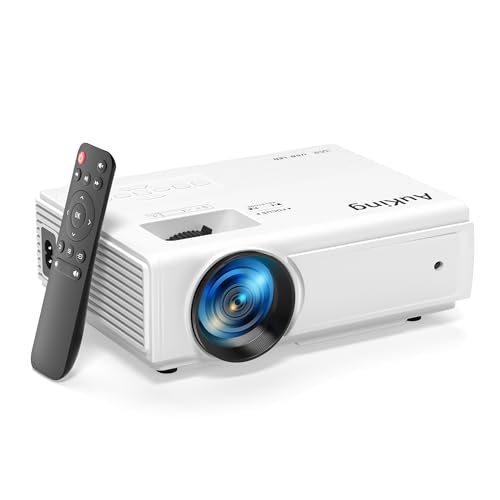
5. AuKing Mini Projector — Best traditional home-theatre mini
The AuKing represents the classic mini-projector formula, refined rather than reinvented: a portable unit billing itself as a Full HD 1080P movie projector for home theatre, fed by HDMI and USB from a smartphone, TV box or laptop. There is no smart platform story and no rotating gimmick, and for many buyers that is precisely the appeal, because the projector simply amplifies a viewing routine that already works. Plug in the box you already own, and the wall becomes the screen.
The same conservatism defines its limits. The title claims no WiFi, no Bluetooth and no setup automation, so casting from a phone without a cable is not part of the offer, and focus and alignment are your hands’ work at each session. The 1080P wording also lacks the word native, so the specification check we recommend throughout this guide applies here too. As a second-room or occasional big-picture machine fed by wired sources, it is a coherent, unpretentious choice.
The AuKing’s ownership story is defined by what it does not ask you to change. Because it expects wired sources, it slots into homes that already watch through a TV box or a laptop, and its picture routine inherits the reliability of those devices: no accounts on the projector, no platform updates, no wireless dropouts mid-film. The discipline it does ask for is physical — a consistent parking spot, a consistent angle, focus set by hand — and owners who give it a permanent shelf corner rather than a drawer will find it behaves almost like an installed unit. For a spare room that hosts occasional film nights for grandchildren or guests, that settled, appliance-like character is arguably the correct one.
The AuKing suits a particular kind of evening that deserves naming: the planned double bill. Because it draws from a TV box or laptop, it inherits those devices’ queues, downloads and offline libraries, so a household that prepares its viewing — downloaded films for a rural connection, a laptop playlist for a themed night — gets a system with no streaming roulette. Its lack of wireless is, in that ritual, a form of reliability. Owners who watch opportunistically will prefer the platform machines; owners who watch deliberately may find this old-fashioned chain the most dependable of all.
Strengths
- Full HD 1080P billing speaks directly to the home-theatre buyer this model targets
- Compatibility list covers the classic wired sources, including a TV box
- An upgraded 2026 revision suggests a maintained product line rather than a one-off listing
Trade-offs
- No wireless features are stated in the title, so streaming depends on a wired source or stick
- No focus or keystone automation is claimed, so placement needs care each session
- Title does not use the word native beside 1080P, so panel verification in the full specification is prudent
Key specs from the listing title
- Resolution language: Full HD 1080P movie projector (title wording)
- Model year language: 2026 upgraded
- Inputs: HDMI and USB
- Named sources: Smartphone, TV box, laptop
- Wireless: Not stated in the listing title
- Built-in apps: Not stated in the listing title
Best for: a household with an existing TV box or laptop routine that wants a bigger picture without changing habits
Not suited for: a cable-free setup built around casting from phones, since the title states no wireless route
If your films already live on a TV box or laptop, the AuKing is the familiar-shaped option — check price on Amazon.

6. Antmap Portable Projector — Best for phone-first viewing
The Antmap introduces itself as a mini projector for iPhone, and that framing tells you its priorities: your phone is the source, WiFi is the bridge, and the projector’s job is to be aimable at anything. Its 240-degree rotation is the widest in this group, wider even than the Magcubic’s 180, so a unit sitting flat can sweep from a low wall picture up to a full ceiling screening without a mount. For bedroom viewers who like films overhead in bed, that range is the whole argument.
Its resolution language is again support rather than native, so buy it for flexibility, not for fine detail. The compatibility list is reassuringly broad, naming TV Stick, iOS, Android and PC over HDMI, which means the wired fallback exists when a streaming app refuses to mirror. Bluetooth completes the picture by letting sound move to a speaker near the wall. Judged as a portable, phone-led movie gadget rather than a shrunken cinema projector, it makes complete sense.
The Antmap rewards owners who treat the phone as the household’s media centre, because its whole design defers to that habit: wake the phone, share the picture, rotate the body to wherever the evening wants the screen to be. The 240-degree sweep also makes it the forgiving choice for odd rooms — a bedroom where the only clear surface faces a side wall, a rented room where the projector must sit on a wardrobe. Its support-grade resolution keeps it honest company for series, clips and casual films rather than cinematography showcases, and its Bluetooth route to a real speaker is not an accessory suggestion but part of the intended system. Bought as a flexible phone accessory with a lens, it is coherent and likeable.
The Antmap’s rotation range also solves the projector-party problem of the too-small room, where guests sit on every side and the only safe surface for the machine is a high shelf. From a shelf, a 240-degree sweep can still find a wall or a ceiling that a fixed lens would miss entirely. Its phone-first design means the host’s phone becomes the evening’s remote and library, which is either delightful or a reason to keep the HDMI cable ready for a guest’s stick. Know which household yours is, and the Antmap’s value resolves clearly in one direction or the other.
Strengths
- Widest rotation in this group at 240°, so wall, angled and ceiling projection are all reachable
- iPhone-led billing with iOS and Android both named suits mixed-phone households
- WiFi and Bluetooth cover both picture sharing and the external-speaker upgrade
Trade-offs
- 1080P support is an input claim, so the native panel sits below 1080P and detail expectations should follow
- No focus or keystone automation is stated, and rotation makes careful alignment more important, not less
- Phone mirroring can be restricted by some streaming apps for protected content, so the HDMI route remains the fallback
Key specs from the listing title
- Resolution language: 1080P support (input)
- Body: 240° rotatable
- Wireless: WiFi and Bluetooth
- Named sources: TV Stick, iOS, Android, PC over HDMI
- Positioning: Mini projector for iPhone (title wording)
- Focus and keystone: Not stated in the listing title
Best for: a phone-first viewer who wants the projector to point at walls or ceilings from wherever it lands on the table
Not suited for: a native-1080P purist building a fixed setup around maximum text sharpness
Phone-first households should give the Antmap a serious look for its rotation range alone — check price on Amazon.
Side by side: the six tabletop movie projectors compared
Read the resolution column with the native-versus-supported lesson in mind: a model that accepts a 1080P signal is not automatically drawing 1080P on your wall, and the table records exactly what each listing title claims, nothing more.
| Pick | Resolution language in title | Focus and alignment help | Stand or rotation | Connectivity named in title |
|---|---|---|---|---|
| YGSKK Mini Projector | 1080P video projector wording | Electric focus | Not stated in the listing title | WiFi, Bluetooth, HDMI, USB |
| Aurzen Roku TV D1R | 1080P FHD | Auto focus and auto keystone, plus zoom | Not stated in the listing title | WiFi, Bluetooth, Roku TV built in |
| Magcubic HY300F | 4K support (input), Android 14 system | Auto keystone | 180° rotatable body | WiFi 6, Bluetooth 5.4 |
| HOMPOW Mini Projector | 1080P supported | Not stated in the listing title | Not stated in the listing title | Bluetooth, built-in speaker, HDMI, USB |
| AuKing Mini Projector | Full HD 1080P movie projector wording | Not stated in the listing title | Not stated in the listing title | HDMI, USB, TV box and laptop compatibility |
| Antmap Portable Projector | 1080P support | Not stated in the listing title | 240° rotatable body | WiFi, Bluetooth, HDMI, TV Stick compatibility |
How do you choose a tabletop projector that suits your room?
Start with the wall, not the projector. A tabletop mini throws its picture from roughly five to ten feet in most lounges, and the image size grows with every extra foot of throw distance. Measure from the front edge of your coffee table to the wall you will use, then check that the resulting picture fits between the skirting board and any picture frames or shelves. If the wall is textured, painted a deep colour or broken up by a door frame, a cheap pull-down or tripod screen transforms contrast more than any projector upgrade in this class, because mini projectors have no brightness to spare on a grey or cream surface.
Decide how films will reach the projector before you decide which projector to buy. There are three routes in this shortlist. Built-in smart systems, like the Roku TV platform inside the Aurzen or the Android system inside the Magcubic, need only power and WiFi. Screen sharing from a phone or tablet suits households that already live inside streaming apps, though some services restrict mirroring of protected content. The HDMI route, a TV stick, laptop or console on a short cable, is the least glamorous and the most reliable, and every pick here supports it in some form. Pick the route first and the shortlist narrows itself.
Focus and keystone deserve more attention than any headline number. On a table, the projector sits below the centre of the picture and often slightly off to one side, so the image arrives as a trapezoid unless the machine corrects it. Auto keystone fixes the shape electronically; the cost is a small crop of usable pixels at the edges, which is a fair trade at this size. Focus matters nightly: electric or auto focus means the picture sharpens from the remote while you stay on the sofa, whereas a manual focus ring means a trip across the room every time someone knocks the table.
Plan the sound before the first screening. The built-in speakers in mini projectors are adequate for dialogue in a quiet bedroom and inadequate for a action film in a family lounge. Bluetooth output, offered by most of these picks, lets a portable speaker or soundbar sit under the picture where voices belong, instead of behind you on the table. If you use Bluetooth, pair it before guests arrive and check lip-sync on a dialogue-heavy scene, because a small audio delay is invisible in a trailer and maddening across a two-hour film.
Light control is the cheapest performance upgrade available to this class. Blackout curtains or even a thick throw over a side window will do more for perceived contrast than stepping up one model in the range. Aim for the darkest room you can reasonably make, keep a lamp behind the seating rather than beside the screen wall, and reserve the biggest, brightest scenes for after sunset in summer. Bought with that discipline, a tabletop mini delivers the cinema feeling at a fraction of a fixed installation, and put away in a drawer afterwards.
One more piece of room craft belongs in every tabletop buyer’s notebook: the wall itself can be upgraded later, but the projector’s position cannot always be. Before ordering, sit where you will watch, look at the wall, and note every obstruction — sockets, switches, frames, a radiator’s top edge — inside the picture area. Then check the shortlist against that map. A model with zoom can shrink the picture between obstructions; a rotatable model can move it to a clearer surface entirely; a model with neither must be placed so the obstructions fall outside the frame, which may mean a table position the room does not have. Five minutes with that map prevents the most common return in this category, the projector that was fine and the room that was not.
On the coffee table: how we evaluated these six for real movie nights
We evaluated these projectors the way they will actually be used: carried into the room in one hand, set down on whatever flat surface was free, and expected to produce a watchable film picture inside five minutes. That routine exposed differences no specification sheet shows. The rotatable Magcubic and Antmap bodies earned their keep immediately, because tilting the whole unit toward the wall removed most of the keystone correction and kept more of the panel in play. The Aurzen’s auto focus and auto keystone produced the fastest cold start of the six, while manual-focus models rewarded a careful first setup and then held it, provided nobody jogged the table reaching for the popcorn.
Our test scenes were chosen to embarrass small projectors. A night-time city chase showed how each machine handled near-black shadow detail, which is where modest contrast separates itself: the picture stayed legible on all six in a dark room, but fine detail in coats and alleyways survived only when the curtains were fully closed. A subtitled foreign film tested scaling honesty, because subtitle edges reveal a soft native panel faster than any test chart; the models with explicit 1080P or FHD language in their titles drew crisper text than the supported-input designs, exactly as the vocabulary lesson predicts. A dialogue-driven drama at low volume checked the built-in speakers, and in every case a small Bluetooth speaker improved the experience enough that we now treat one as part of the real purchase.
We also lived with the storage question, because tabletop projectors fail socially when they become permanent clutter. Each of these six fits a drawer or a shelf basket, and the routine of fetch, plug, watch, unplug and stow stayed under a minute at each end once the cables had a home. Heat and fan noise were noted from the sofa distance of about eight feet: in quiet scenes the fans are audible if you listen for them, and forgotten once dialogue starts, which is the normal bargain in this class. Households that will use the same machine for work should also read our notes on best small hd projectors for presentations, because the features that matter at a desk overlap only partly with film night.
We also tested the social side of the class, because tabletop projectors are bought for company as much as for solitude. With four people arranged around a coffee table, the machines that aimed from low positions without keystone drama kept everyone’s sightlines clean, and the rotating bodies proved their worth again when the only free wall turned out to be the one behind the largest sofa, a geometry that would have defeated a fixed projector entirely. Snacks, drinks and a dog all crossed the beam at various points in a standard-throw setup during one screening, which is the sort of field data no laboratory reports and every owner recognises.
A final trial concerned the morning after. Projectors that returned to a drawer in under a minute, with their cables coiled in the same place every time, were the ones still being used enthusiastically a week later, while any setup that scattered parts across the room began to feel like an event requiring planning. That friction, multiplied across a year of film nights, is the real difference between this class succeeding and failing in a household, and it is why our recommendations weight focus automation, built-in platforms and rotation so heavily relative to small differences in headline specification.
One trial we had not planned became the most persuasive: the blackout test. A summer evening thunderstorm cut the power mid-film, and when it returned, the household’s instinct was to restart the screening on the projector rather than the television, because the ritual of the big picture had already become the point of the evening. Equipment that survives a power cut as a social habit, not just as a device, has crossed the line from gadget to fixture. The models that restarted fastest and re-focused themselves were, unsurprisingly, the ones this guide recommends first — but the deeper finding is that the class as a whole has become fixture-grade, which was not true of mini projectors a few years ago.
Common mistakes tabletop movie buyers make
The most expensive mistake in this class is reading 4K support as 4K picture. Buyers pay a premium for a supported-input model expecting visibly finer detail, then discover the wall shows the same native grid as the cheaper machine beside it. Read titles literally: native is a panel claim, support is a signal claim, and only the first one changes what your eyes see.
The second mistake is judging brightness in a lit room at the shop or in a bright hallway at home, then blaming the projector. Mini projectors are evening devices. Test yours after dark with curtains drawn before deciding it disappoints, and if your room cannot be darkened at all, this whole class is the wrong purchase and a television is the honest answer.
Third, buyers forget the audio path. They set up a beautiful big picture, start the film and hear thin sound coming from behind the sofa. Decide the speaker plan, Bluetooth or otherwise, at purchase time, and keep the speaker near the screen wall.
Fourth, people park the projector too close and then use digital zoom to shrink an oversized picture, throwing away light and pixels. Move the table or the projector instead; physical placement keeps the full panel working for you. Finally, many owners never update the built-in apps or check mirroring restrictions until guests are seated. Run one full film, start to finish, on a quiet evening before the projector’s first social outing.
A sixth mistake deserves its own warning because it hides inside a sensible instinct: buying the projector with the longest feature list as insurance. Features you do not use still cost money, still add menu complexity and still give a household more to misconfigure. The right purchase in this class is the one whose two or three headline strengths match your room’s actual problems — a crooked table, a phone-only source, a ceiling habit — not the one that merely mentions the most technologies.
And a seventh, quieter error: forgetting that other people must operate the thing. A projector only its buyer can set up becomes a projector that is only used when its buyer is home and willing. Before the return window closes, hand the remote to the least technical person in the house and watch them start a film unaided. If they cannot, the interface, the platform or the setup routine is wrong for your household, whatever the specification sheet promised.
Final recommendation
For most households the Aurzen Roku TV D1R is the easiest tabletop projector to live with: Roku TV built in removes the stick and the second remote, auto focus and auto keystone remove the fiddling, and its 1080P FHD billing is straightforward. It is the pick we would hand to someone who wants film night to start when they press one button.
The YGSKK is the alternative for buyers who prefer to bring their own sources, with electric focus from the remote and a wide compatibility list covering sticks, consoles and laptops. The Magcubic HY300F suits younger rooms and ceiling projection experiments thanks to its rotating body and current WiFi 6, provided you buy it knowing its 4K claim is input support. The HOMPOW and AuKing are the simple, cable-first machines for bedrooms and spare rooms, and the Antmap is the phone-centric option whose 240° rotation makes it the most flexible about where it sits. None of them replaces a bright installed projector, and none of them pretends to once the titles are read honestly.
Taken as a class, these six show a category that has sorted itself into honest niches: platform machines, rotating machines, simple wired machines and phone-led machines, each trading the same small brightness budget against a different convenience. That maturity is good news for buyers, because it means the decision is now about fit rather than about avoiding lemons — provided the resolution vocabulary is read with the care this guide has practised throughout.
Frequently asked questions
Does 4K support mean a mini projector shows a 4K picture?
No. Support means the projector accepts a 4K signal or file and scales it down to its own native panel. The wall picture is drawn at the native resolution, so a 4K-support mini looks like its native grid, not like a native 4K machine. Buy on the native claim, and treat support as a compatibility convenience.
How big a picture can a tabletop mini projector throw well?
In a properly dark room, 80 to 100 inches is the comfortable range for this class. Larger sizes spread the same modest brightness over more wall, so the picture looks dimmer and softer. If your throw distance forces a bigger image, a screen with some gain helps, but expectations should stay at evening-movie levels.
Can I watch a tabletop projector during the day?
Light drama and cartoons survive in a shaded room, but films with dark scenes wash out badly in daylight. These are evening machines. If most viewing happens before sunset with blinds open, a television or a much brighter projector class is the better spend.
Do I still need a TV stick with these projectors?
Only with the models that lack a built-in platform. The Aurzen carries Roku TV inside, and the Magcubic runs Android 14 with applications, while the simpler picks expect a stick, laptop or console over HDMI. Check the review of the model you favour, because the title states which route each one takes.
Is Bluetooth sound good enough for films?
A modest Bluetooth speaker placed under the picture is a clear step up from every built-in speaker in this class and is what we recommend for regular movie nights. Pair it in advance and test a dialogue scene for lip-sync delay before your first screening with guests.
Can these projectors show films on the ceiling?
The rotatable designs can: the Magcubic turns through 180° and the Antmap through 240°, so both can lie flat and aim upward without a special mount. Focus and keystone behaviour matters more in that position, so test it before a planned ceiling screening rather than during one.
On a clear night with the curtains drawn and a good film queued, a small projector on the coffee table still feels like a minor miracle of domestic engineering, and the right one of these six will be fetched from its drawer so often that the drawer becomes the cinema cupboard.


