What's inside
- Where to buy
- Key Takeaways
- Quick Picks
- How did we choose these best 4k hdr projectors?
- What does HDR actually ask of a projector?
- Which HDR format should your projector speak?
- Why do lens shift and zoom matter more than another hundred lumens?
- LED, laser or triple laser: what do the light sources change?
- How far should you sit from a 4K HDR screen?
- What about sound — the other half of HDR cinema?
- How do calibration and ownership evolve over years?
- Why can’t brightness buy contrast?
- How do the six compare side by side?
- What mistakes do 4K HDR projector buyers keep making?
- How should you set up a 4K HDR theater for the first film?
- Final Recommendation
- Frequently Asked Questions
- Related Guides
As an Amazon Associate I earn from qualifying purchases. This post may contain affiliate links at no extra cost to you.
gizmoverdict.com is reader-supported. When you buy through links on our site, we may earn an affiliate commission.
Where to buy
Every linked projector in this guide is sold through Amazon in the United States, and each pick below leads to that model’s live listing, where you can check the current price before deciding. This is a considered-purchase category — home theater machines bought for years of evenings — so take the listings’ specification pages seriously, and match the HDR format support printed there against the players and services you actually own.
The hunt for the best 4k hdr projectors is really two hunts wearing one search term. The first is for resolution: a 4K image with enough fineness that a 120-inch screen stops looking projected and starts looking like a window. The second, harder hunt is for HDR judgment — a projector that can take a high-dynamic-range signal, with its searing highlights and cavernous shadows, and render it gracefully through a light engine that will never match a television’s peak brightness. Resolution is a number. HDR is an interpretation. The machines below earn their places by interpreting well, and this guide will keep returning to that distinction, because it is where the money is.
The six divide into three philosophies. BenQ fields the theater traditionalists: the HT4550i, an LED-lit smart theater projector at 3,200 lumens with the full HDR format set; the W4100i, its factory-calibrated sibling with 100% DCI-P3 color and four-way lens shift; and the HT5550, the older lens-shift theater design with HDR-PRO tone mapping. XGIMI’s Horizon 20 Pro is the triple-laser insurgent — 4,100 ISO lumens, Dolby Vision, IMAX Enhanced certification and a lifestyle body with Google TV. Optoma’s UHZ36 brings laser light to the class in a black, theater-first box, and ViewSonic’s PX749-4K crashes the party with 4,000 lumens and gaming speed. One terminology discipline governs everything below: the DLP machines here render their 4K images by pixel shifting, a genuine and visibly fine technique that we name as such rather than dressing it as native 4K.
Key Takeaways
- HDR quality on a projector is tone-mapping quality — how intelligently the machine compresses a bright HDR signal into projector brightness — and it separates these six more than resolution does.
- Format support differs by model and must be read from the listings: the BenQ HT4550i covers HDR10+, HDR10 and HLG; the W4100i lists HDR10+; the XGIMI Horizon 20 Pro carries Dolby Vision and IMAX Enhanced.
- Every DLP pick here is a pixel-shifting 4K design — real, screen-filling UHD detail, honestly labelled, rather than a native 4K imager.
- The BenQ W4100i is the calibration purist’s pick: 100% DCI-P3, factory calibration, four-way lens shift and a three-year warranty in its listing.
- The Horizon 20 Pro is the brightness and convenience insurgent: 4,100 ISO lumens of RGB triple laser, optical zoom with lens shift, and licensed Netflix on Google TV.
- Lens shift — generous on the BenQ theater models and present on the Horizon — is the unglamorous feature that decides whether a theater install ends square or keystoned.
Quick Picks
| Pick | Badge | Why it earns its place |
|---|---|---|
| BenQ HT4550i | Best complete smart theater | LED light, 3,200 lumens, Android TV with Netflix, and the full HDR set — HDR10+, HDR10 and HLG — in a theater projector that streams by itself. |
| BenQ W4100i | Best for color purists | Factory-calibrated 100% DCI-P3 color, HDR10+, four-way lens shift and Netflix on Android TV — the connoisseur’s specification, warranted for three years. |
| BenQ HT5550 | Classic theater design | The older lens-shift theater model with HDR-PRO tone mapping and full DCI-P3 and Rec. 709 coverage, for dedicated rooms that prize placement freedom. |
| XGIMI Horizon 20 Pro | Best triple-laser lifestyle | RGB triple laser at 4,100 ISO lumens with Dolby Vision, IMAX Enhanced, optical zoom and lens shift — theater ambition in a living-room body. |
| Optoma UHZ36 | Laser theater, Optoma style | A 4K UHD laser HDR home theater projector in black — laser light’s longevity and steadiness applied to the dedicated-room brief. |
| ViewSonic PX749-4K | Best bright-room gamer | Four thousand lumens, a 240Hz ceiling and a listed 4.2ms input lag bring 4K HDR gaming into rooms that never go fully dark. |
How did we choose these best 4k hdr projectors?
Two gates stood at the entrance. A pick had to present a genuine 4K image — pixel-shifted DLP qualifies, and is labelled as such throughout, while upscaling pretenders that merely accept a 4K signal do not — and it had to implement HDR as a real tone-mapping pipeline, not a logo on a box. Format support was taken from the listings themselves, model by model, because HDR is not one feature but a family: HDR10 is the universal baseline, HDR10+ and Dolby Vision add dynamic, scene-by-scene metadata, and HLG serves broadcast. A guide that blurs those distinctions teaches its readers to buy logos, so we print each machine’s formats exactly where its listing states them and stay silent where it does not.
Within the gates, we weighted the theater virtues in their true order. Tone mapping first, because it governs every HDR frame. Color volume second — the DCI-P3 coverage figures on the BenQ models are the class’s honest currency. Placement optics third, since a theater projector lives or dies by lens shift and zoom long after its unboxing. Then the light source’s character — LED, laser, triple laser — and finally the modern conveniences: smart platforms, gaming speed, and the warranty terms a listing is willing to print. Six machines survived, and notably, no two of them win the same argument.
What does HDR actually ask of a projector?
A television renders HDR by brute force: its panel can produce genuinely bright highlights, so the signal’s extremes map almost directly onto the screen. A projector works in a different economy. Its entire brightness budget — every lumen in this guide — is spread across a screen measured in square meters, so no projector highlight will ever sear like a flagship television’s. HDR on a projector is therefore an act of translation called tone mapping: the machine reads the signal’s intent, decides which highlights deserve its scarce peak brightness, rolls the extremes off gracefully, and protects the mid-tones where faces, fabrics and most of cinema actually live. Good tone mapping is invisible intelligence. Bad tone mapping is the washed-out, gray, why-did-I-buy-HDR picture that gives the format a bad name in projection.
This is why the format letters matter less than the processing behind them, and why we treat manufacturer systems — BenQ’s HDR-PRO on the HT5550, the dynamic-metadata formats on its newer siblings — as the substance of the category. Dynamic metadata, carried by HDR10+ and Dolby Vision, lets the source whisper instructions scene by scene: this sequence is dark, spend nothing; this explosion is the point of the film, spend everything. A projector with the processing to obey those whispers will look a generation ahead of a brighter machine guessing frame by frame. When you audition these six, do not watch the demo reel’s fireworks. Watch a dark scene with one bright window, and see which machine keeps both.
Brightness still matters — it is the budget the tone mapper spends. The class’s spread, from the BenQ pair’s 3,200 lumens through the PX749-4K’s 4,000 to the Horizon 20 Pro’s 4,100 ISO lumens, buys HDR headroom in rooms that are dim rather than pitch black, at the usual cost: the brightest machines rarely render the deepest blacks. ISO lumens and ANSI-tradition lumens are close cousins rather than identical twins, so treat cross-brand brightness comparisons here as approximate and let the room arbitrate. The dedicated theater with black walls remains a contrast contest; the living room at dusk is a brightness one. Know which contest your room is holding.
Which HDR format should your projector speak?
HDR10 is the floor of the civilized world: static metadata, universal support, the format every UHD disc and service falls back to. Every machine in this guide operates in an HDR10 world, and for many libraries that is genuinely sufficient. HDR10+ adds dynamic metadata in an open standard — the HT4550i lists it alongside HDR10 and HLG, and the W4100i lists it as its dynamic format — and its value depends on your sources speaking it, which Samsung-ecosystem players and a good slice of streaming content do. HLG, the broadcast format in the HT4550i’s set, matters if your HDR arrives from broadcasters rather than discs and apps.
Dolby Vision is the proprietary summit: dynamic metadata with the tightest creative control, licensed rather than free, and in this guide it belongs to the Horizon 20 Pro, whose listing pairs it with IMAX Enhanced — a certification program concerned with aspect ratio, sound and image discipline on participating content. If your library and services lean Dolby Vision, that listing line is not a garnish; it is the machine’s central claim, and no amount of rival brightness substitutes for a format your projector cannot decode. Conversely, a Dolby Vision badge buys nothing for a household whose content never sends it. Audit your shelves and subscriptions before you audit projectors: the correct format set is the one your content speaks, and the most expensive lesson in this category is buying the wrong alphabet.
One more discipline: format support lives in the whole chain. A Dolby Vision disc in a player set to HDR10 output, through a receiver that strips metadata, arrives as HDR10 whatever the projector can do. When a new machine’s HDR disappoints, interrogate the chain before the projector — cable ratings, receiver passthrough settings and player output modes are the usual culprits, and they are all cheaper to fix than buyer’s remorse.
Why do lens shift and zoom matter more than another hundred lumens?
Because theaters are built in rooms, and rooms have joists, sofas, doors and opinions. A projector without lens shift must sit exactly on the screen’s axis or resort to keystone correction, which shrinks and resamples the image — a quiet tax on the 4K detail you paid for. Lens shift moves the image optically, preserving every pixel while the machine sits where the room allows: on a shelf, off to the side of a ceiling beam, above a doorway. The W4100i’s four-way lens shift is the fullest expression here, the HT5550 built its theater reputation on the same freedom, and the Horizon 20 Pro’s pairing of optical zoom with lens shift is remarkable precisely because lifestyle projectors usually skip both.
Zoom is shift’s partner. An optical zoom range lets one mounting position serve different screen sizes and lets the installer fine-tune the image to the screen’s borders instead of moving a ceiling mount by inches at midnight. Together, shift and zoom convert installation from a geometry exam into a fitting. When you compare the theater models in this guide, read their optics with the same greed you bring to their lumens: a machine that fits your room squarely at 3,200 lumens will embarrass a brighter machine hanging crooked and keystoned, every night, in the only comparison that matters — the one on your wall.
The PX749-4K makes the counter-argument honestly: keystone correction in both axes and a sensible zoom, aimed at rooms that rearrange rather than dedicate. For a living room that hosts the projector rather than housing it, electronic correction’s small tax buys enormous freedom. The sin is not keystone; the sin is keystoning a dedicated theater that could have been fitted properly. Match the optics to the room’s permanence.
LED, laser or triple laser: what do the light sources change?
The HT4550i’s LED engine is the quiet revolutionary of this class. LEDs switch instantly, hold their color with unusual stability across their lives, and free the color system from the compromises of a spinning wheel’s compromises — BenQ pairs the source with its color tuning to cover the wide gamuts HDR demands. For a theater that runs nightly rather than constantly, LED’s combination of longevity, stability and instant manners is close to ideal, and its 3,200 lumens are honestly sufficient in any room that can darken properly.
Single-laser designs like the UHZ36 trade in the same longevity currency with a brightness accent: laser-phosphor engines sustain high output with minimal drift, shrug off orientation and duty cycle, and ask almost nothing of their owners for years. The Horizon 20 Pro’s RGB triple laser goes a step further in kind, not just degree: three pure laser primaries can paint an exceptionally wide color volume without filters eating light, which is part of how it pairs 4,100 ISO lumens with Dolby Vision ambition. Triple laser is the technology the class’s future is being written in, and its presence in a lifestyle body — rather than a rack-bound theater box — is this guide’s clearest sign of where home projection is heading.
The lamp, notably, has no champion in this guide, and that absence is itself a finding: at the 4K HDR tier, solid-state light has effectively won. What the buyer gains is a decade-scale light source whose brightness and color at year five resemble year one. What the buyer must accept is that the engine and the machine now share a lifespan — when the light eventually goes, the projector goes with it. At the lifetimes these sources offer, that trade reads less like a compromise than like the definition of a modern appliance.

BenQ HT4550i — Best complete smart theater
The HT4550i is BenQ’s answer to the buyer who wants the theater and the streaming box to be the same object. Its LED engine delivers 3,200 lumens — a figure calibrated for rooms that darken rather than rooms that apologize — and its Android TV platform carries Netflix natively, with built-in Chromecast and Dolby Digital Plus audio support rounding out a machine that needs nothing plugged into it to start the evening. For households whose current ritual involves three remotes and a dongle, that completeness is not a convenience. It is the product.
Its HDR set is the fullest in BenQ’s portion of this guide: HDR10+ and HDR10 for discs and streaming’s dynamic and static worlds, HLG for broadcast, all interpreted by BenQ’s theater processing rather than passed through raw. In practice that breadth means the machine rarely meets a signal it must dumb down, and its LED color stability gives the tone mapping a consistent canvas year after year. Dark-room viewers will find its picture composed and confident — highlights spent where the metadata directs, shadows kept articulate rather than crushed.
The boundaries are the class’s usual ones, honestly held. Three thousand two hundred lumens is a dark-room budget; a bright living room at noon belongs to the Horizon or the PX749-4K. And its smart platform, like all smart platforms, ages on a software calendar the hardware cannot control — though with HDMI inputs standing ready, a future streaming stick restores youth for pocket change. As a complete, self-sufficient theater for a room that can go dark, it is this guide’s most rounded machine.
- Light engine: LED, DLP 4K (pixel-shifted)
- Brightness: 3,200 lumens
- HDR formats per listing: HDR10+, HDR10, HLG
- Smart platform: Android TV with Netflix, built-in Chromecast
- Audio support: Dolby Digital Plus, built-in speaker
Strengths
- The complete package: streams, casts and projects with nothing added.
- The broadest HDR format set among the BenQ picks here.
- LED color stability keeps tone mapping honest for years.
Trade-offs
- 3,200 lumens asks for a room that darkens properly.
- Pixel-shifted 4K, labelled as such — not a native 4K imager.
- Smart platforms age faster than light engines.
Best for: dark-room households wanting one box that streams and projects beautifully. Not suited for: bright living rooms or Dolby Vision loyalists. If a self-contained theater is the dream, check the HT4550i’s current Amazon price and count the remotes it retires.

BenQ W4100i — Best for color purists
Some buyers read a projector listing the way musicians read a score, and the W4100i was written for them. Its listing is a purist’s checklist: 3,200 lumens, 100% DCI-P3 color coverage alongside Rec. 709, HDR10+, factory calibration — the machine arrives measured, not merely assembled — Netflix on Android TV, four-way lens shift, 3D support for the legacy shelf, and a three-year warranty printed where everyone can see it. Each line answers a specific connoisseur anxiety, and together they describe the most deliberately specified projector in this guide.
Factory calibration deserves unpacking, because it changes the ownership experience more than any single picture specification. A calibrated machine’s promise is that the colors the director approved are the colors on your wall, out of the box, without a calibration disc, a colorimeter or a weekend of menus. Paired with full DCI-P3 coverage — the cinema gamut HDR content is mastered in — the W4100i’s picture has the quality purists actually chase: not vividness, but correctness, the sense that nothing in the frame is showing off. Its HDR10+ support gives that correctness dynamic instructions to work with, scene by scene.
The four-way lens shift completes the installation story, letting the machine sit where a real room permits while the image stays pixel-true. Its caveats mirror its sibling’s: 3,200 lumens is a dark-room endowment, and buyers whose content speaks Dolby Vision rather than HDR10+ should let that alphabet decide between this and the Horizon. For the HDR10+ household with a dedicated room and a purist’s eye, this is the guide’s summit of its kind.
- Light engine: DLP 4K (pixel-shifted), smart theater design
- Brightness: 3,200 lumens
- Color per listing: 100% DCI-P3, Rec. 709, factory calibrated
- HDR and extras per listing: HDR10+, 3D support, 3-year warranty
- Optics: 4-way lens shift; platform: Netflix Android TV
Strengths
- Factory-calibrated full DCI-P3 — correctness as a factory feature.
- Four-way lens shift for pixel-true installation in real rooms.
- A three-year warranty stated plainly in the listing.
Trade-offs
- Dark-room brightness budget, like its sibling.
- HDR10+ is its dynamic dialect; Dolby Vision households should look at the Horizon.
- Pixel-shifted 4K rendering, as throughout this class.
Best for: color purists with dedicated rooms and HDR10+ libraries. Not suited for: bright rooms or Dolby Vision-first households. Purists can see the W4100i’s live price on Amazon and read its calibration promise in full.

BenQ HT5550 — Classic theater design
The HT5550 is the elder statesman of this guide: a dedicated home theater projector from the generation that established BenQ’s theater line, carrying HDR-PRO tone mapping, 100% DCI-P3 and 100% Rec. 709 color coverage, and frame interpolation for viewers who like their motion smoothed. Its listing calls it True 4K UHD in the marketing language of its day; in this guide’s disciplined vocabulary it is a pixel-shifting DLP design, and a very good one — the shifting renders UHD detail that satisfies at theater sizes, and we name the technique rather than the slogan because the picture needs no slogan’s help.
What the HT5550 sells, years into its run, is theater architecture. Its lens-shift-centered design assumes a dedicated room, a fixed mount and an owner who sets geometry once and expects it to hold — the opposite philosophy from lifestyle machines that re-square themselves nightly on a sideboard. In that habitat its HDR-PRO processing does the era’s thoughtful tone mapping, its color coverage keeps faith with the DCI-P3 masters, and frame interpolation offers its smoothing to sports and documentary viewers who want it, while film purists leave it off and lose nothing.
Age is the honest caveat, in both directions. The design predates the current smart era, so streaming arrives by HDMI from whatever you plug in — a limitation that is also a kind of future-proofing, since sticks are cheaper to refresh than projectors. Its brightness class belongs to properly dark rooms. Buyers building a permanent theater who value placement freedom and proven theater manners over built-in apps will find the HT5550 the most classically correct machine here; buyers furnishing a multipurpose room should take their cue from the newer names.
- Light engine: DLP 4K UHD (pixel-shifted)
- HDR: HDR-PRO tone mapping
- Color per listing: 100% DCI-P3 and 100% Rec. 709
- Motion: frame interpolation available
- Design brief: dedicated theater with lens-shift installation
Strengths
- Theater-first architecture with installation-grade placement freedom.
- Full DCI-P3 coverage and HDR-PRO tone mapping.
- HDMI-fed design ages gracefully — upgrade the stick, keep the projector.
Trade-offs
- Older-generation model — no modern smart platform inside.
- Dark-room brightness class; not a living-room floodlight.
- Frame interpolation is a taste; film purists will disable it.
Best for: dedicated theater rooms being built around fixed, square installation. Not suited for: multipurpose rooms needing built-in streaming. Traditionalists can check the HT5550’s Amazon price and plan a mount worthy of it.

XGIMI Horizon 20 Pro — Best triple-laser lifestyle
The Horizon 20 Pro is the machine that makes the theater traditionalists nervous, because it refuses their trade-offs. Its listing stacks the claims without pausing: an RGB triple-laser engine at 4,100 ISO lumens, Google TV with licensed Netflix, optical zoom and lens shift — the installation optics lifestyle projectors are supposed to skip — IMAX Enhanced certification, Dolby Vision, a 20,000:1 contrast figure, and a 1ms input lag claim for its gaming mode. Read skeptically, it sounds like three products’ brochures merged. Read fairly, it is the clearest statement in this guide of where the category is going: theater specifications, living-room manners.
The triple-laser engine is the foundation everything else stands on. Three pure primaries produce a wide, stable color volume without a wheel’s compromises, and they do it at a brightness that lets the machine live in real rooms — dimmed for film, not blacked out for survival. Dolby Vision support gives that engine the format’s most disciplined instructions to follow, and IMAX Enhanced content brings its expanded-ratio presentations to a screen big enough to justify them. The 1ms lag figure, like all such figures, belongs to its fastest gaming mode rather than to 4K film playback; even discounted properly, a lifestyle machine that games this seriously is a new animal.
Its questions are the new-breed questions. A lifestyle body placed on furniture will never achieve the HT5550’s fixed-installation purity, and its smart platform is the product’s face, with all the software-aging that implies. Contrast in a truly black room will still favor the dedicated theater designs. But for the enormous class of buyers whose theater is also their living room, the Horizon 20 Pro does not ask them to choose between the two anymore — and that refusal is exactly why it leads this guide’s second philosophy.
- Light engine: RGB triple laser, 4K
- Brightness: 4,100 ISO lumens
- HDR and certification per listing: Dolby Vision, IMAX Enhanced
- Optics: optical zoom and lens shift
- Platform and gaming: Google TV with licensed Netflix, 1ms input lag claim in fastest mode, 20,000:1 contrast per listing
Strengths
- Triple-laser brightness and color in a living-room body.
- Dolby Vision plus IMAX Enhanced — the premium format set.
- Real installation optics, almost unheard of in lifestyle designs.
Trade-offs
- Furniture placement will not match a fixed theater install for purity.
- Peak gaming figures belong to the fastest mode, not 4K playback.
- Deepest-black contests in black rooms still favor dedicated theaters.
Best for: living-room theaters, Dolby Vision households and buyers who refuse the old trade-offs. Not suited for: black-room purists with fixed mounts. The curious should look at the Horizon 20 Pro’s current price on Amazon — it is the future’s opening argument.
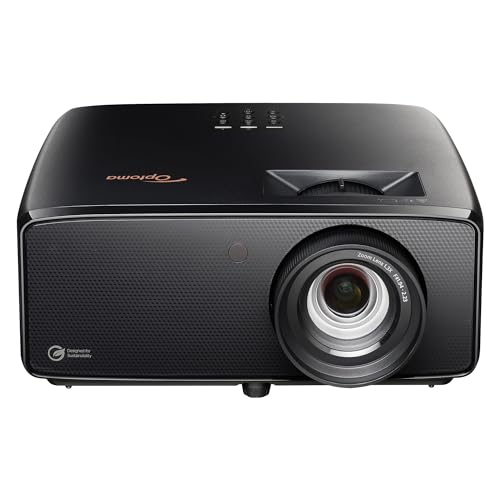
Optoma UHZ36 — Laser theater, Optoma style
Optoma’s UHZ36 makes its case with unusual economy: its listing describes a 4K UHD laser HDR home theater projector, in black, and stops talking. In a guide full of machines arguing loudly, that restraint is itself information — this is a theater component from a line that has always sold picture and light source rather than platform and personality. The UHZ36’s proposition is the laser engine applied to the dedicated-room brief: laser steadiness, laser longevity, and HDR playback without a smart layer interposing itself between your sources and your screen.
Think about what laser means across a theater’s decade. The picture at year five resembles the picture at year one, because laser-phosphor output drifts minimally and asks for no lamp calendar; the machine wakes instantly for an unplanned film; and the absence of a wheel-era light path’s consumables suits a projector that lives mounted, aligned and deliberately forgotten. For owners whose previous theater projector taught them lamp economics the hard way, that ownership shape is not a detail — it is the reason to buy, with the 4K HDR picture as the considerable bonus.
The corollary of its restraint is that the ecosystem is yours to supply: streaming, players and sound all arrive by HDMI, which theater owners with receivers and considered sources will count as purity and living-room minimalists will count as errands. Its listing’s brevity also means the careful buyer should read the full specification on the listing page — HDR format particulars and optics among them — before committing, a discipline this guide recommends for every pick and this one most warmly. Judged as a laser heart for a dedicated room, it is the guide’s quiet professional.
- Light engine: laser, 4K UHD
- HDR: HDR home theater support per listing
- Form: black theater projector
- Sources: HDMI-fed component design
- Intended rooms: dedicated home theaters
Strengths
- Laser longevity and brightness steadiness for a mounted theater.
- Component purity — no platform layer between sources and screen.
- Optoma’s theater lineage in a modern solid-state design.
Trade-offs
- Streaming and sound are bring-your-own, by design.
- Read the listing’s full spec for HDR format particulars before ordering.
- Not a lifestyle machine — it expects a theater to live in.
Best for: dedicated-room owners who want laser permanence and already own their sources. Not suited for: one-box living-room minimalists. Theater builders can check the UHZ36’s Amazon price and spec the rest of the rack around it.

ViewSonic PX749-4K — Best bright-room gamer
Every theater guide needs its heretic, and the PX749-4K heresies are brightness and speed. Its listing promises a 4K UHD gaming projector with 4,000 lumens, a 240Hz refresh ceiling with HDR aimed at Xbox, dual HDMI, a 4.2ms input lag figure from its high-refresh mode, a screen range up to 300 inches, keystone correction in both axes, optical zoom and USB-C. Where the BenQ theater models assume darkness and permanence, this machine assumes a living room with the lights half on, a console underneath and friends on the sofa — and it is engineered, unapologetically, for that room.
The HDR story it tells is the bright-room dialect of the format. Four thousand lumens give its tone mapping a budget the dark-room machines cannot spend in ambient light, so highlights keep their authority at dusk and games keep their pop on a Sunday afternoon. Its 4K presentation is the pixel-shifting DLP kind this guide labels honestly, and at gaming distances and film sizes alike the fineness is real. The lag figure’s condition deserves repeating because players will quote it: 4.2ms belongs to the high-refresh 1080p operation, which is where competitive play happens, while 4K console play runs at standard refresh with perfectly playable response.
What it surrenders is the theater’s inner sanctum: black depth in a pitch-dark room, calibration-grade color neutrality, and the hushed manners of a dedicated component. Those surrenders are the price of its powers, and for its constituency the exchange is obviously correct. If your 4K HDR life is lived in a room with windows, people and a console, this is the only pick in the guide that was designed for your actual evenings rather than your aspirational ones.
- Light engine: DLP, 4K UHD (pixel-shifted)
- Brightness: 4,000 lumens
- Gaming: 240Hz ceiling, 4.2ms input lag in high-refresh mode, Xbox HDR
- Inputs and optics: dual HDMI, USB-C, optical zoom, H/V keystone
- Screen range per listing: up to 300 inches
Strengths
- 4K HDR that survives ambient light — brightness as an HDR feature.
- Genuine gaming speed in its high-refresh mode.
- Placement freedom for rooms that rearrange.
Trade-offs
- Black depth and color neutrality trail the theater BenQs in the dark.
- Headline lag belongs to high-refresh mode, not 4K play.
- Pixel-shifted UHD, as with its DLP peers here.
Best for: bright living rooms, console gamers and households that watch with life going on. Not suited for: black-room cinephiles. Players should see the PX749-4K’s live Amazon price and clear the wall.
How far should you sit from a 4K HDR screen?
Resolution rewrites seating geometry. The old 1080p rule — sit far enough that pixels dissolve — gives way at 4K to a more immersive arithmetic: with four times the detail, the same screen can be viewed from noticeably closer, or grown noticeably larger at the same distance, before the image’s structure betrays itself. Pixel-shifting narrows the margin slightly compared with a native imager, but in practice every machine in this guide supports the modern theater arrangement: a screen that fills your central vision, seating at roughly one to one-and-a-half screen widths, and an image whose fineness you stop analyzing within the first scene.
HDR adds a second seating variable that resolution never had: brightness falls with size, and HDR spends brightness like money. The viewer who grows the screen to the room’s maximum is simultaneously shrinking the highlight budget the tone mapper works with, which is why experienced theater builders size for the HDR picture first and let 2D inherit the result. If your room forces a choice between a vast screen with strained highlights and a merely large one with authority, the merely large one wins every evening — HDR’s drama lives in its peaks, and peaks need lumens per square foot, not square feet per lumen.
Practical method, then: choose the screen from the seating you will actually build, check that size against the projector’s brightness for your room’s darkness, and only then fall in love with a diagonal. The BenQ theater pair reward the 100-to-130-inch heartland in dark rooms; the Horizon and PX749-4K push the same quality outward toward 150 inches in dim ones. Every projector in this guide can draw a bigger picture than it should. The discipline of this category is declining, politely, to let it.
What about sound — the other half of HDR cinema?
A guide about image judgment must still say the unfashionable thing plainly: half of what audiences call picture quality at a premiere is the sound. The machines here divide by audio philosophy exactly as televisions do. The smart models — the HT4550i with its Dolby Digital Plus support and built-in speaker, the Horizon 20 Pro with its integrated audio ambitions — aim to be complete appliances for rooms where a soundbar might follow later. The theater components — HT5550, UHZ36 — assume a receiver and real speakers, and spend nothing pretending otherwise. Neither philosophy is wrong; the error is buying one while needing the other.
For HDR film specifically, dialogue clarity is the specification that matters and the one no listing prints. Blockbuster mixes bury speech under score and effects with directorial intent, and a small built-in speaker at the wrong end of a large room will lose that argument nightly. The pragmatic ladder is short: start with the built-in sound in a small room, add a soundbar at the screen when the room or the mixes demand it, and graduate to a receiver and separated speakers when the theater becomes permanent — the HT5550 and UHZ36 were designed for that top rung and will wait patiently while you climb.
Placement completes the sermon. Sound should live at the screen, not at the projector: a voice that issues from behind the audience while lips move fifteen feet ahead is a small, constant wrongness that viewers feel without naming. The smart models mitigate by firing from their front faces on furniture below the screen; mounted theater machines delegate to speakers where they belong. Whichever route you take, put the voices on the wall with the faces, and your HDR picture will mysteriously seem sharper for it.
How do calibration and ownership evolve over years?
The W4100i’s factory calibration introduces the subject honestly: a projector’s picture is a living thing, and light sources age at different rates of honesty. Lamp-era machines drifted visibly and dimmed on a schedule their owners could set watches by. The solid-state engines in this guide — LED, laser, triple laser — drift so slowly that calibration becomes a preference rather than a maintenance regime, which quietly changes the economics of the whole category: the picture you auditioned is, to a close approximation, the picture you keep. Recheck focus after the mount settles, dust the optics’ air path as the manual directs, and a modern HDR projector’s second five years resemble its first in a way its ancestors never managed.
Software is the new aging curve. The smart models here — HT4550i, W4100i, Horizon 20 Pro — will receive platform updates on their makers’ schedules, and their streaming faces will evolve accordingly; the component models, HT5550 and UHZ36, age only as fast as the sources you plug into them, which is the slowest clock in the industry. Choose which clock you prefer with open eyes: integration that renews itself until it cannot, or purity that never changes at all. Both are defensible. Regret arrives only when a buyer discovers, in year four, that they wanted the other one.
One ownership habit serves every model in the guide: keep the chain documented. A note of the input settings, the picture mode you settled in, the tone-mapping strength, the cable that finally worked — five lines in a drawer — converts every future upgrade, replacement or house move from an archaeological dig into a fitting. Theaters are systems, and systems reward the owners who write things down.
Why can’t brightness buy contrast?
Every specification in this guide eventually collides with the same physical truth: a projector’s black is the room’s darkness, projected. The light engine can only add light; the deepest shadow on your screen is whatever ambient illumination and reflected spill the room returns to it. This is why the brightness race has a ceiling of usefulness in HDR — past the point where highlights have authority, more lumens lift the blacks along with the peaks, and the ratio that audiences actually perceive as drama stays where the room put it. The Horizon 20 Pro’s listed 20,000:1 contrast figure describes its engine’s native discipline, which matters most in the room that can honor it: dark walls, a dark ceiling, and seating that does not reflect the film back at itself.
The practical consequence rearranges budgets. In a white-walled living room, money spent on light control — curtains that truly close, a screen with ambient-light discipline, a wall color negotiation with the household — buys more perceived HDR than the same money spent climbing from 3,200 to 4,100 lumens. In a dedicated room already dark, the equation inverts and the engine’s native contrast and tone mapping become the whole contest, which is the BenQ theater models’ home ground. Either way, the room is a component. The buyers who understand that sentence stop shopping for projectors and start designing systems, and their pictures show it.
None of this diminishes the bright machines. The PX749-4K’s 4,000 lumens in a family room are not failed contrast; they are a different and legitimate HDR dialect, trading shadow subtlety for highlight punch in the light the room insists on. Fluency in both dialects — and honesty about which room you own — is the entire expertise this category asks of its buyers.
How do the six compare side by side?
| Model | Brightness as listed | Light source | HDR formats per listing | Character |
|---|---|---|---|---|
| BenQ HT4550i | 3,200 lumens | LED | HDR10+, HDR10, HLG | Complete smart theater |
| BenQ W4100i | 3,200 lumens | Smart theater engine | HDR10+ | Calibrated color purist |
| BenQ HT5550 | Dark-room class | Theater design | HDR-PRO | Classic lens-shift theater |
| XGIMI Horizon 20 Pro | 4,100 ISO lumens | RGB triple laser | Dolby Vision, IMAX Enhanced | Lifestyle insurgent |
| Optoma UHZ36 | Theater class | Laser | HDR | Quiet laser component |
| ViewSonic PX749-4K | 4,000 lumens | DLP | HDR (Xbox) | Bright-room gamer |
The table’s lesson is that “4K HDR” names a territory, not a machine. Within it, the BenQs sell interpretation and calibration, the XGIMI sells the future’s integration, the Optoma sells permanence, and the ViewSonic sells the room as it is. Your content’s format alphabet and your room’s light will choose between them more honestly than any ranking could.
What mistakes do 4K HDR projector buyers keep making?
The first is buying resolution and calling it HDR. A 4K badge guarantees fineness, not dynamic range judgment, and the disappointments that fill return queues are usually tone-mapping disappointments wearing a resolution costume. The second is format mismatch: paying for Dolby Vision your sources never send, or discovering your library speaks it and your projector does not. Audit the alphabet first. The third is installation casualness — keystoning a pixel-shifted 4K image into softness, or mounting beyond the lens shift’s mercy — in a category where the entire purchase is detail.
Fourth, buyers feed these machines through chains that strangle them: elderly receivers that will not pass the metadata, cables that fail at 4K HDR bandwidth, players left in SDR output modes. The projector is blamed for the chain’s sins with metronomic regularity. Fifth, they judge HDR at noon. Every machine here interprets HDR for dim rooms; the PX749-4K and Horizon stretch that to dusk, but none repeals physics, and a buyer who auditions at midday will return a machine that would have sung at eight in the evening. Finally, they ignore the screen: a gray, wrinkled or undersized surface taxes exactly the highlight-and-shadow subtlety HDR exists to deliver. In this category the wall is part of the optics. Budget it like optics.
How should you set up a 4K HDR theater for the first film?
Geometry first, as always: mount or place the machine so the image lands square within the lens shift’s comfortable middle, focus at the screen’s center and corners once the engine has warmed, and resist keystone as you would resist a loan. Then the chain: player output set to its best HDR mode, receiver passing signals untouched, cables rated for the bandwidth 4K HDR demands, and the projector’s input set to the enhanced mode most models reserve for full-bandwidth signals. Half of all “HDR looks wrong” stories end at that input setting.
Picture settings come next, and restraint is the skill. Choose the calibrated or cinema HDR mode as your baseline — on the W4100i, trust the factory’s work before your own — set the tone-mapping strength to the middle of its range, and leave frame interpolation off for film unless your household has voted otherwise. Darken the room to the level you will actually maintain, because a calibration done in blackout and watched at dusk is a fiction. Finally, pick the first film like a professional: something with night streets, faces in lamplight and one bright set piece, and watch it whole before touching another setting. HDR judgment, yours and the machine’s, calibrates by evenings, not by menus.
Final Recommendation
Let your content’s alphabet and your room’s darkness decide. HDR10+ households with dedicated rooms should take the W4100i for its calibrated correctness, or the HT4550i when the same theater must also be its own streaming box. Traditionalists building a fixed theater around placement freedom will find the HT5550’s classic architecture waiting patiently. Dolby Vision households — and anyone who wants tomorrow’s projector today — belong to the Horizon 20 Pro, whose triple laser and format set redraw the category’s map. Laser permanence in a component-pure rack is the UHZ36’s quiet brief, and bright rooms with consoles belong, unapologetically, to the PX749-4K. Buy the interpretation your films deserve, install it square, and the biggest screen in your life will start behaving like the best one.
Frequently Asked Questions
Is pixel-shifted 4K real 4K?
It is a real 4K image produced by a non-native method: the DLP chip renders at a lower native resolution and shifts pixels at high speed to address the full UHD grid, and the detail on screen is genuinely far beyond 1080p. What it is not is a native 4K imager, which is why this guide labels the technique wherever it appears instead of repeating marketing phrases. At theater sizes and seating distances, most viewers cannot separate a good pixel-shifted picture from a native one — but you deserve to know which you bought.
HDR10+ or Dolby Vision — which should I choose?
The one your content speaks. Audit your discs, player and streaming services first: Dolby Vision libraries point to the Horizon 20 Pro, HDR10+ libraries to the BenQ HT4550i and W4100i, and a plain HDR10 library is served by every machine here. Both dynamic formats outperform static HDR10 when the projector’s tone mapping is good; neither performs at all when the chain never sends it.
Why does HDR look washed out on my projector?
Usually one of three culprits: the room is too bright for the tone mapping’s assumptions, the chain is stripping or failing the HDR signal — check player output, receiver passthrough and the projector’s enhanced input mode — or the picture mode is a vivid showroom setting rather than a cinema one. Work the list in that order before blaming the machine; in our experience the projector is the least guilty component in the room.
How bright does a 4K HDR projector need to be?
Enough for your room’s real darkness, because HDR tone mapping spends brightness on highlights. In a properly darkened theater, the 3,200-lumen BenQ models are honestly sufficient and their contrast tells the story. In dim-but-lived-in rooms, the 4,000-lumen PX749-4K and the Horizon 20 Pro’s 4,100 ISO lumens buy headroom that matters. Judge at the hour you actually watch, not the hour you shop.
Do I need a special screen for HDR?
A good matte white screen is the honest default, and a smooth wall will serve while you learn your room. What HDR punishes is texture, wrinkles and gray, light-scattering surfaces, because its whole vocabulary is subtle highlight and shadow gradation. If an upgrade follows the projector, make it a proper screen sized to your brightness — in HDR, the surface is part of the tone mapping whether you planned it or not.
Is a 4K HDR projector worth it over a large television?
At the sizes these machines serve, the comparison inverts: a 100-to-150-inch projected image is an experience no comparably priced television approaches, and the projector disappears when the evening ends in a way no giant panel can. The television wins on daylight convenience, instant setup and peak highlight brightness; the projector wins on scale, immersion and the room’s daytime dignity. Households that watch film as an event choose projection and never look back; households that graze all day should keep the panel and let the projector be the weekend instrument.
Can these projectors handle gaming?
Two of them were built for it. The Horizon 20 Pro claims a 1ms input lag in its fastest mode and the PX749-4K lists 4.2ms in high-refresh operation with a 240Hz ceiling — figures that belong to their fast modes at lower resolutions, as such figures always do, while 4K play runs at console refresh rates. The theater BenQs and the Optoma will game perfectly happily at mainstream refresh; only competitive players need the specialists.
Related Guides
Budgets being real, our best 4k projectors under a thousand roundup shows how much of this experience the tier below buys. Readers whose rooms refuse to darken should cross-shop the best 4000 lumen plus projectors guide, where brightness leads and HDR follows. And for the dedicated-room path in its purest form, our best 4k projectors home theater coverage stays with the lights off from first page to last. The portable 3LCD shelf is ranked in the best 3 lcd portable projectors. Installers working at venue scale should read the best 7000 lumens projectors.
Related guides
- Best Doorbell Cameras No Subscription: Local Storage Picks, and the Ring/Blink Truth
- Best TVs for Viewing Sports: Motion, Daylight Brightness and Broadcast Upscaling
- Best Barn Cameras: 4G LTE, Long-Range Wi-Fi and Hub Systems Compared
- Best 1080p IP Cameras: PoE Domes, Turrets, Bullets and a PTZ That Earn Their Cable


