What's inside
- Key Takeaways
- Quick Picks: six briefcase-friendly projectors for people who present
- How were these picks chosen?
- The six presentation portables compared
- How do you choose a small projector that will not embarrass you in a meeting?
- Boardroom and classroom trials: how we evaluated these presentation portables
- Common mistakes presenters make with mini projectors
- Final recommendation
- Frequently asked questions
As an Amazon Associate I earn from qualifying purchases. This post may contain affiliate links at no extra cost to you.
gizmoverdict.com is reader-supported. When you buy through links on our site, we may earn an affiliate commission.
Where to buy: Pocket and mini projectors suitable for presenting sell through Amazon from both established electronics names and smaller projector labels, and the six verified listings below are the current shelf at research time. Presentation buyers should note that this class trades brightness for size, so availability of a specific model matters less than matching its stated connections to the laptop you actually carry.
The best small hd projectors for presentations are not really bought for their pictures; they are bought for their behaviour in the ninety seconds after you walk into a room that is not yours. The client is seated, the laptop is open, and the projector that takes five minutes to focus, refuses the cable you brought or fades into invisibility under office lighting has failed at its only job. This guide therefore ranks six pocket and mini projectors on the presenter’s real criteria — how they travel, how they connect, how fast they square up, and how honestly their modest brightness fits the rooms they will meet.
That honesty matters, so let us establish it at the start. Mini projectors are dim by the standards of installed boardroom machines, and no title in this set changes that physics. What they offer instead is presence: a projector that is actually in your bag beats a brighter one locked in another building’s AV cupboard. In a small meeting room with blinds drawn, or a classroom at the end of the day, these machines show slides, spreadsheets and video clips perfectly serviceably. In a glass-walled office at noon, they will struggle, and this guide says so wherever it applies rather than letting a specification imply otherwise. Choosing between them is then a matter of matching connections and setup help to your routine.
Resolution language needs the same care here as everywhere in projection. Titles in this set range from the KODAK Luma 150’s plain 1080p input wording — an input claim, not a panel claim — through several native 1080P claims to 4K support phrases that describe accepted signals. For slides, what matters practically is text legibility at the sizes you present, and the reviews flag which claims support that and which merely describe compatibility. Teachers and trainers who also show films should cross-read best tabletop projectors for movies for the evening side of these machines’ lives.
Key Takeaways
- Mini-projector brightness is modest across this whole class: plan for blinds drawn and lights dimmed, and treat any noon-in-a-glass-office plan as a mismatch.
- The KODAK Luma 150 is the pocket option with a battery per its title; the Aurzen D1R Air answers with USB-C power and power-bank support for socket-free rooms.
- The Vamvo offers the presenter’s widest wired welcome: HDMI, USB and Type-C, with Android and iOS devices named.
- Auto keystone on the Magcubic, the HY260 Pro and the unbranded smart model is the setup-speed feature that matters most when the projector lands on a borrowed table.
- Only the HY260 Pro states a brightness figure in its title, 300 ANSI; the rest leave it unstated, so dark-room discipline is part of every other pick’s deal.
Read the six spec boxes that follow with a presenter’s eye for silence. In this class, the figures a title withholds — brightness above all — shape your working life as surely as the ones it prints, because you will present in rooms you did not choose under lighting you cannot always control. We have recorded each title’s silences in its box rather than smoothing them over, and the reviews treat a stated figure as a planning asset in itself: a machine that tells you its brightness can be scheduled into a room with confidence, while a silent one must be trialled before it is trusted with an audience.
Quick Picks: six briefcase-friendly projectors for people who present
A presentation projector is judged in the first ninety seconds: out of the bag, connected, focused and readable before the room loses patience. Each pick below is weighed on that routine — portability, connection routes and setup speed — with brightness expectations kept honest for a class of machine that fits in a coat pocket or a laptop bag.
| # | Pick | Badge | Why it earns a place |
|---|---|---|---|
| 1 | KODAK Luma 150 | Best true pocket option | A battery-powered pocket projector from an established imaging name |
| 2 | Aurzen Roku TV D1R Air | Best power flexibility | USB-C powered with power-bank support, native 1080P and Roku TV inside |
| 3 | Vamvo Native 1080P Projector | Best wired welcome | HDMI, USB and Type-C with Android, iOS, PC and console compatibility named |
| 4 | Magcubic Mini Projector | Best rotating all-rounder | Auto vertical keystone, 180° rotation and a 5W soundbase speaker |
| 5 | HY260 Pro Mini Projector | Best stated brightness and automation | 300 ANSI stated, native 1080P, auto keystone and a 35–130 inch screen range |
| 6 | Portable Smart Projector WiFi 6 | Best app-equipped budget route | Built-in app, auto keystone and 180° rotation in a white smart mini |
How were these picks chosen?
We chose for the travelling presenter, not the fixed boardroom. Every candidate had to be small enough to disappear into a laptop bag or coat pocket alongside the day’s other kit, because a presentation projector that needs its own case and a free hand gets left behind, and a projector left behind presents nothing. Within that size gate, we looked for the connection routes working life actually uses: HDMI for the universal laptop handshake, USB-C as modern machines shed older ports, and wireless options for phone-led presenting.
Setup automation was weighted unusually heavily, because presenting time is borrowed time. Auto keystone correction, auto focus where claimed, and rotatable bodies that aim without a stand all compress the arrival routine, and the picks here were favoured when their titles promised that compression. Battery or power-bank operation counted for the same reason: rooms with one occupied socket are the norm, not the exception.
We deliberately kept one honest baseline in the set. The KODAK Luma 150’s title is almost bare — 1080p input, battery — and it represents the ultra-pocket class where size outranks everything. Against it, the native-1080P claims and smart platforms of the others show what a slightly larger bag allowance buys. Presenters who also game or show sport on the road will find the brighter end of the spectrum in best hd projectors for gaming sports.
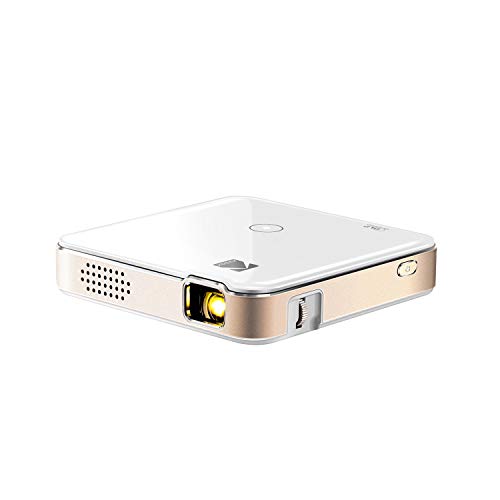
1. KODAK Luma 150 — Best true pocket option
The Luma 150’s title is three ideas long — mini projector, 1080p input, battery — and those three ideas define a whole philosophy of presenting: the projector you always have beats the projector you meant to bring. Kodak’s pocket line exists for the impromptu session, the coffee-shop walkthrough, the classroom moment where showing is worth a thousand descriptions. Battery power completes the independence, freeing the unit from the socket geography of strange rooms.
The compromises are written in the same brevity. The 1080p claim is an input claim, so expect a modest native picture that flatters images and large type while softening dense text, and the title’s silence on inputs, wireless and brightness means the listing body carries unusual weight in this purchase. Buy it as the always-carried tool, with expectations set by its size, and it is a delight; buy it as a boardroom workhorse and the physics will correct you.
The Luma 150’s ownership virtue compounds quietly: because it is always present, it gets used for the unplanned moments that never justify fetching a bigger machine — the photograph shown properly to grandparents, the document walked through at a kitchen table, the impromptu lesson. Its battery habit is the discipline it teaches: owners learn to drop it on charge the way they charge a phone, and in return it is simply ready. Those who buy it expecting a miniature boardroom will misjudge it; those who buy it as the projector equivalent of a pocket notebook, always there and adequate for the moment, tend to keep it for years and replace its battery-era successors with its descendants.
A closing note on the Luma 150’s brand: in a category crowded with disposable labels, an established imaging name implies a support channel, a manual that exists and a product line with a reputation to protect. For a tool bought to be carried into professional situations, that background has a cash value out of proportion to the specification sheet. It does not make the little Kodak brighter or sharper than it is; it makes its plain promises more believable, and in the pocket class, believable plainness is the product.
Strengths
- Battery operation removes the socket hunt from unfamiliar rooms
- Pocket sizing means it travels even when presenting is only a possibility, not a plan
- An established brand name stands behind an otherwise minimal specification
Trade-offs
- The title’s 1080p wording is an input claim, so the panel draws a smaller native picture and fine text softens
- Almost every practical detail — inputs, wireless, brightness — is unstated in the title and must be confirmed on the listing
- Battery runtime is not given, so long sessions need a charging plan
Key specs from the listing title
- Resolution language: 1080p input (signal claim)
- Power: Battery
- Brand: KODAK Luma line
- Wireless: Not stated in the listing title
- Inputs: Not stated in the listing title
- Focus and keystone: Not stated in the listing title
Best for: a consultant or teacher who wants a projector permanently resident in a coat pocket or small bag for opportunistic presenting
Not suited for: a two-hour training session with dense spreadsheets, where runtime and fine-text sharpness both run short
If pocketability outranks everything in your working life, the KODAK Luma 150 is the honest expression of that priority — check price on Amazon.
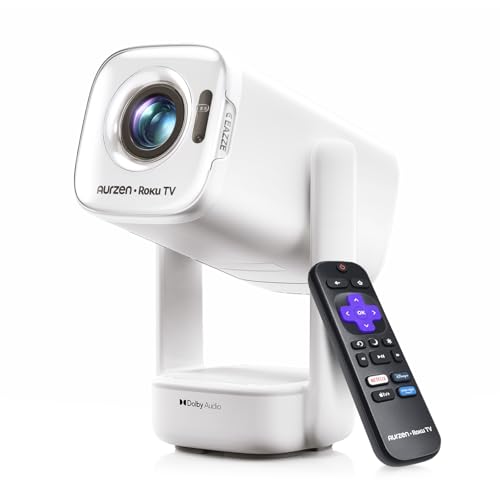
2. Aurzen Roku TV D1R Air — Best power flexibility
The D1R Air redesigns the presenter’s power problem out of existence. It runs from USB-C and explicitly supports power banks, so the same battery that rescues your phone through a travel day can drive the projector through a meeting, and the same charger that tops up your laptop can feed both. In rooms where the only socket is behind the client’s television, that independence is worth more than lumens. The white finish and mini sizing keep it unobtrusive in the bag and on the table.
Its picture claim is native 1080P, the strongest wording in this set alongside the Vamvo and HY260 Pro, and Roku TV built in gives it a second life after hours that pure presentation tools lack. WiFi and Bluetooth cover wireless picture and sound routes. What the title does not claim is setup automation, so bring the paperback-stand trick for height and square the image by hand. As an integrated travel system, it is the most modern proposition here.
The D1R Air’s second life deserves a paragraph of its own, because travelling presenters spend more evenings in hotels than in meeting rooms. Roku TV inside turns the unit into the trip’s entertainment without a single extra device, and the same USB-C powering that frees it in the boardroom frees it from the hotel’s socket archaeology. Its native-1080P claim keeps workday text respectable, and its white shell reads as consumer equipment rather than corporate kit, which in creative industries is a social asset. The presenter whose bag already revolves around USB-C will find this the least frictional machine in the set to adopt, because it joins an existing charging ecosystem instead of founding a new one.
The D1R Air’s white finish, easily dismissed as styling, has a presenter’s logic: it reads as a consumer object rather than surveillance-adjacent black equipment, and in schools, clinics and community settings that softness lowers the room’s guard. Small social signals matter to people who present for a living. Combined with its power-bank independence, the Air is the machine least likely to make an entrance — and in presenting, the equipment that never becomes the topic is the equipment that worked.
Strengths
- USB-C powering with power-bank support dissolves the mains-socket problem entirely
- Native 1080P billing supports the text legibility presenting depends on
- Roku TV built in covers the hotel-room evening as well as the meeting-room day
Trade-offs
- Power-bank running depends on the bank’s capacity, so long sessions need a large bank or a socket after all
- No auto keystone is claimed in the title, so squaring the picture is a manual step
- Its home-and-outdoor billing means presentation-specific features take second place to versatility
Key specs from the listing title
- Resolution claim: Native 1080P (title claim)
- Power: USB-C powered; power bank supported
- Platform: Roku TV built in
- Wireless: WiFi and Bluetooth
- Audio: Dolby Audio (title spells it DoIby Audio)
- Colour: White
Best for: a travelling presenter whose laptop already lives on USB-C and whose power bank already lives in the same bag
Not suited for: an all-day conference stand, where continuous running outlasts a power-bank budget
Road warriors should study the Aurzen D1R Air’s power story closely — check price on Amazon.

3. Vamvo Native 1080P Projector — Best wired welcome
Compatibility is the Vamvo’s whole personality. Its title names Android and iOS smartphones, PC, PS5 and TV Stick as sources, and backs them with HDMI, USB and Type-C inputs, the full modern trio. For a trainer or salesperson whose material must appear from whatever machine the client provides, that spread is not a luxury; it is the difference between a presentation and an apology. WiFi and Bluetooth layer the wireless options on top for controlled environments.
The framing is home-theatre — it calls itself a mini movie projector — so presentation buyers should note what is absent: no battery claim, no auto keystone, no brightness figure. The native-1080P claim supports text legibility, which is the picture quality presenting actually needs. Treat it as a versatile, mains-powered hub for rooms you can dim, and its breadth of welcome makes it a bag-worthy tool.
The Vamvo’s breadth of inputs creates an unexpected ownership effect: it becomes the household’s universal display. The same ports that welcome a client’s laptop on Tuesday welcome a console on Friday and a phone’s photo library on Sunday, and a machine that serves every device tends to justify its bag space in a way a single-purpose tool cannot. Its home-theatre billing is thus not a distraction from its presenting case but an extension of it. The presenter who buys it should simply budget the accessories its title omits — the stand, the longer cable, the speaker plan — because the machine itself is a hub, and hubs are completed by what their owners connect to them.
The Vamvo’s console compatibility, PS5 named in its title, hints at its after-hours truth: it will spend part of its life as a games and film machine, and a presenter buying one device for a small flat gets both duties covered. That dual citizenship should be planned, not discovered — a shelf position that serves the desk by day and the sofa by night, cables dressed for both. Owners who set it up as a permanent dual station report the highest satisfaction with this class generally, because the machine stops travelling and starts residing, with all the reliability residence brings.
Strengths
- Three wired input types cover virtually every laptop and phone a presenter will meet
- Naming both phone platforms plus PC and PS5 signals a genuinely broad device welcome
- WiFi and Bluetooth add the wireless routes for rooms where cables cannot run
Trade-offs
- Home-theatre billing means no presentation-specific claims such as battery or auto keystone appear
- No brightness figure is stated, so the dim-room discipline of this class applies in full
- Setup automation is unstated, so arrival routine is in your hands
Key specs from the listing title
- Resolution claim: Native 1080P (title claim)
- Inputs: HDMI, USB and Type-C
- Compatibility: Android, iOS smartphone, PC, PS5, TV Stick
- Wireless: WiFi and Bluetooth
- Positioning: Mini movie projector for home theater
- Focus and keystone: Not stated in the listing title
Best for: a presenter who faces a different borrowed laptop every week and needs every port covered
Not suited for: a socket-free venue, since the title claims no battery or power-bank operation
If your presenting life is a tour of other people’s laptops, the Vamvo’s port list is the argument — check price on Amazon.

4. Magcubic Mini Projector — Best rotating all-rounder
Magcubic’s mini attacks the two frictions of improvised presenting: geometry and sound. Auto vertical keystone handles the trapezoid that appears whenever the projector sits below screen centre on a borrowed table, and the body rotates through 180 degrees so the lens can be aimed from surfaces at awkward heights without a tripod of paperbacks. The 5W soundbase speaker is the other practical touch, because presentation video with inaudible audio is a special kind of failure, and a named speaker specification at least promises the attempt.
Its resolution language is the weakest in this set — 4K support with no native figure stated — so this is a machine for big-type slides, images and video rather than dense data. WiFi 6 and Bluetooth 5.4 keep connections current. For the presenter whose material is visual and whose rooms are unpredictable, the trade is coherent.
The Magcubic’s rotating body finds its presenting use in the rooms nobody designs: the café corner, the community hall with one usable table, the classroom where the only surface is a student’s desk. Auto vertical keystone handles the resulting angles with a competence that still slightly surprises, and the named speaker wattage gives spoken video a chance in those spaces. Its owner should keep expectations for data firmly modest, because its resolution language is the set’s most evasive, but for image-led material — design reviews, photo walkthroughs, video content — it is the improviser’s friend, and improvisation is most of presenting once you leave your own office.
The Magcubic’s 5W soundbase speaker deserves its final word: in presentation after presentation, intelligible speech at modest volume is the difference between a video that lands and a video the presenter narrates over apologetically. Five watts will not fill a hall, but in the small rooms this class serves it fills the need, and it removes one more device from the bag. Presenters whose material is speech-led — training videos, interviews, language work — should rank that speaker higher than any resolution adjective in this guide.
Strengths
- Auto vertical keystone corrects the most common table-placement distortion automatically
- A named 5W soundbase speaker gives video clips a fighting chance in small rooms
- Rotation through 180 degrees aims the unit from low tables without a stand
Trade-offs
- 4K support is an input claim with no native resolution stated, so fine text expectations should be modest
- Only vertical keystone is auto; horizontal misalignment still needs physical squaring
- No brightness figure is stated in the title
Key specs from the listing title
- Resolution language: 4K support (input)
- Speaker: 5W soundbase speaker
- Keystone: Auto vertical keystone
- Body: 180° rotatable
- Wireless: WiFi 6 and Bluetooth 5.4
- Smart platform: Smart projector (system not named in title)
Best for: a presenter who sets up on borrowed furniture at odd heights and needs the picture squared and audible fast
Not suited for: a data-heavy finance review, where unstated native resolution risks soft small print
Presenters tired of stacking books under projectors should look at the rotating Magcubic — check price on Amazon.

5. HY260 Pro Mini Projector — Best stated brightness and automation
The HY260 Pro is the specification sheet presenter in a set of vaguer rivals: native 1080P claimed, support for 4K resolution noted as compatibility, brightness stated at 300 ANSI, screen range given as 35 to 130 inches, auto keystone correction and a 180-degree rotating body. That completeness lets a buyer plan a room on paper, which is how professionals prefer to buy. Android 11 inside covers basic smart duties, with WiFi 6 and Bluetooth 5.4 keeping the wireless side modern despite the platform’s age.
Keep the 300 ANSI in perspective: it is the honest top of this mini class, not a rival to installed boardroom brightness, and the dim-room rule still applies. But within the class, a stated figure beats a silent one every time, because it converts hope into planning. For trainers and teachers with regular small rooms, that planning confidence is the product.
The HY260 Pro’s stated screen range, 35 to 130 inches, quietly teaches its owner good presenting habits: it invites the small, bright image for the small room instead of the vast, dim one. Trainers who adopt it report the discipline this guide preaches — size to the room — becomes automatic when the machine’s own documentation frames size as a choice. Its Android 11 platform is the set’s elder, adequate for built-in duties today and a reason to keep a laptop or stick as the long-term source strategy. As a specified, plannable, honestly documented tool for regular small-room work, it remains the easiest of the six to justify in a purchase request.
The HY260 Pro’s Android 11 platform, the set’s oldest, carries one compensating virtue: maturity. Its app behaviour is a known quantity, its menus are documented across years of owner experience, and a buyer researching it will find a deep trail of real-world answers. Newer platforms promise longer futures; older ones offer thicker evidence. Presenters who value the evidence — who buy the tool whose quirks are all already public — have a defensible logic, and this model’s stated figures make that logic easy to act on.
Strengths
- The only stated ANSI brightness in this set gives presenters a real figure to plan rooms around
- Auto keystone plus rotation covers both halves of the setup routine
- A stated screen range of 35 to 130 inches sets honest size expectations
Trade-offs
- Android 11 is an older platform generation, so app support horizons are shorter
- 300 ANSI remains modest in absolute terms and still needs a dimmable room
- No battery or power-bank operation is claimed, so mains power is part of the kit
Key specs from the listing title
- Resolution claim: Native 1080P (title claim); support for 4K resolution
- Brightness: 300 ANSI
- Platform: Android 11
- Keystone: Auto keystone correction
- Body: 180° rotatable
- Screen range: 35 to 130 inches
Best for: a trainer presenting to small classes who wants brightness and screen size stated before purchase
Not suited for: a bright seminar room with floor-to-ceiling glass, beyond what 300 ANSI can contest
Presenters who like their specifications stated should start with the HY260 Pro — check price on Amazon.

6. Portable Smart Projector WiFi 6 — Best app-equipped budget route
This unbranded smart mini assembles the fashionable checklist — WiFi 6, Bluetooth 5.4, a built-in app, auto keystone, 180-degree rotation — and a compatibility list that names the presenter’s working sources: HDMI and USB hardware, TV Stick, smartphone, laptop and PS5. On paper it is the dual-life machine, presenting by day and streaming by night, in a white shell that disappears into a meeting room’s décor.
Its silences are the counterweight. The title’s bare 4K wording states no native resolution, and neither brightness nor battery figures appear, so the two numbers a presenter most needs are the two it withholds. The full listing may answer them; the title does not. Buy it for casual dual duty with modest text demands, verify the details on the listing, and it represents the accessible end of this class fairly.
The unbranded smart mini’s ownership story is the familiar white-label bargain: a generous feature assembly at an accessible position, with longevity questions that only time answers. Its built-in app and auto keystone make it genuinely capable on day one, and for the casual presenter — the society speaker, the hobbyist, the occasional trainer — day one capability may be the whole requirement. Professionals should note what its title withholds and decide whether the withheld numbers matter to their rooms; if they do, the stated-figure models above exist precisely for them. As the class’s accessible door, it serves buyers whose presenting is occasional and whose films are frequent, and there are many more such buyers than the industry admits.
The smart mini’s built-in app, unnamed as it is, should be tested against one specific question during the return window: does it open the files and services you actually use, at the quality your room needs, without a fight? If yes, its anonymous platform has passed the only examination that matters and its other virtues — rotation, auto keystone, broad compatibility — can carry the purchase. If no, the window is the time to learn it. That test, applied to every smart model in this guide, is worth more than any platform comparison written in advance.
Strengths
- Built-in app provision covers basic streaming and file duties without a source device
- Auto keystone and full rotation make the setup routine forgiving on borrowed tables
- Compatibility list spans the presenter’s realistic sources, laptop and smartphone included
Trade-offs
- The bare 4K wording gives no native resolution, so text sharpness is the open question
- No brightness or battery figures are stated, leaving the two presenter-critical numbers unknown
- An unnamed smart system means app coverage must be verified title by title on the listing
Key specs from the listing title
- Resolution language: 4K (title wording; treat as input class)
- App: Built-in app stated in the listing title
- Keystone: Auto keystone
- Body: 180° rotation
- Wireless: WiFi 6 and Bluetooth 5.4
- Compatibility: HDMI, USB, TV Stick, smartphone, laptop, PS5
Best for: a casual presenter and home user who wants one inexpensive machine to cover meetings by day and films by night
Not suited for: client-room presenting where spreadsheet legibility carries your reputation
Budget-conscious presenters who also want a home machine should weigh this smart mini — check price on Amazon.
The six presentation portables compared
Power is a column most projector tables omit and presenters cannot: two of these six can run away from a wall socket in different ways, and the table records exactly what each title claims about it.
| Pick | Resolution language in title | Power story | Connections named in title | Setup help in title |
|---|---|---|---|---|
| KODAK Luma 150 | 1080p input (title says 1080p Input) | Battery (title wording) | Not stated in the listing title | Not stated in the listing title |
| Aurzen Roku TV D1R Air | Native 1080P | USB-C powered; power bank supported | WiFi and Bluetooth; Roku TV built in | Not stated in the listing title |
| Vamvo Native 1080P Projector | Native 1080P | Not stated in the listing title | HDMI, USB, Type-C; Android and iOS named | WiFi and Bluetooth for wireless routes |
| Magcubic Mini Projector | 4K support (input) | Not stated in the listing title | WiFi 6 and Bluetooth 5.4 | Auto vertical keystone; 180° rotatable |
| HY260 Pro Mini Projector | Native 1080P; support for 4K resolution | Not stated in the listing title | Bluetooth 5.4 and WiFi 6 | Auto keystone correction; 180° rotatable; 300 ANSI |
| Portable Smart Projector WiFi 6 | 4K (title wording) | Not stated in the listing title | HDMI, USB, TV Stick, smartphone, laptop | Auto keystone; built-in app; 180° rotation |
How do you choose a small projector that will not embarrass you in a meeting?
Start with your worst room, not your best. Picture the brightest space you regularly present in, at the brightest time you present in it, and be honest about whether blinds exist and whether you may close them. Mini projectors need that cooperation. If your worst room is a sunlit glass box with no blinds, this entire class is the wrong tool and a portable monitor or the room’s own display is the professional answer. If your worst room can be dimmed even halfway, proceed, and let the HY260 Pro’s stated 300 ANSI be your reference point for what this class calls brightness.
Audit your connections with the laptop in front of you. List its actual ports. A modern ultrabook may offer only USB-C, which makes the Vamvo’s Type-C input or a carried adapter the difference between presenting and apologising. HDMI remains the universal fallback and appears across most of this set. Wireless presenting sounds liberating and often is, but guest networks, captive portals and mirroring restrictions make it the route most likely to fail in a stranger’s building; treat WiFi as your convenience at home base and the cable as your guarantee on the road. Carry both, always.
Rehearse the ninety-second routine until it is boring. Bag open, projector down, cable in, power sorted, keystone corrected, first slide up. Auto keystone models shorten the squaring step to seconds; manual models reward a presenter’s trick — carry a slim paperback or a folding stand to set the projector’s height, rather than stacking whatever the room offers. Focus on the smallest text on your busiest slide, not the title slide, because body text is where legibility fails first, and if the back row cannot read your spreadsheet’s footnotes in rehearsal, they will not read them in the meeting either.
Power deserves its own rehearsal. Battery models like the KODAK remove the socket hunt but impose a session budget, so know your runtime against your longest meeting and recharge the night before as a ritual. USB-C and power-bank designs like the Aurzen Air turn the same power bank that rescues your phone into the projector’s supply, which simplifies the bag. For mains models, a two-metre cable and a compact extension lead weigh little and have saved more presentations than any feature in any title in this guide.
Finally, prepare the content for the medium. Slides for mini projectors want large type, high contrast and one idea per screen, because modest brightness punishes grey text on white backgrounds and rewards bold dark lettering. Video clips should be downloaded, not streamed, wherever rights allow, removing the venue’s network from your critical path. The presenter who adapts the material to the machine looks professional; the one who blames the machine for unreadable slides does not, however justified the complaint.
One more audit completes the pre-purchase routine: the bag audit. Lay out everything the presentation requires — projector, its power solution, your laptop’s cable, one adapter you hope not to need, the clicker, a printed copy of the critical slide — and confirm the whole kit fits the bag you actually carry, with the projector in a padded sleeve. A setup that needs a second bag will, on a rainy Tuesday in a hurry, be left behind in pieces. The machines in this set were chosen to pass that audit; the discipline of performing it belongs to the buyer, and it is the last step between a good purchase and a working system.
Venue etiquette is the final professional layer, and it costs nothing. Arrive early enough that your setup is finished before the first attendee sits down, because an audience that watches a presenter wrestle cables starts the session grading the struggle rather than hearing the material. Leave the room’s own equipment as you found it, carry your cables out with you, and if the venue’s staff helped, thank them by name to their manager later. Presenters are remembered as much for the rooms they leave as for the slides they show, and the small projector in the bag — precisely because it asks nothing of the venue — is the easiest tool in the world with which to build that reputation.
Boardroom and classroom trials: how we evaluated these presentation portables
Our trials simulated the working week of a travelling trainer: a dimmable training room in the morning, a client’s brighter meeting room after lunch, and a classroom in the late afternoon. The pattern repeated with every model — the morning and afternoon sessions were genuinely good, with slides readable from the back of a small room once blinds were drawn, while the midday glass-walled session humbled the whole class equally. That consistency is itself the finding: within this size category, room discipline matters more than model choice, and the differences that did emerge were about routine, not raw picture.
The routine differences were real. The Aurzen Air’s USB-C powering from a power bank produced the calmest arrival of the week, because power and picture each needed one modern cable and no socket negotiation. The Vamvo’s spread of HDMI, USB and Type-C swallowed every laptop we offered it without an adapter hunt. The auto keystone models — Magcubic, HY260 Pro and the unbranded smart projector — squared their pictures while we were still sitting down, and the KODAK’s pocketability meant it was the only unit that came along to a coffee-shop one-to-one, where it threw a small, dim, perfectly adequate picture onto a shaded wall for two people.
Text legibility tracked the resolution language as this guide predicts. Native-1080P-claimed models held spreadsheet body text at sizes the input-claimed designs softened, and the 4K support phrases contributed nothing visible to slides at all, exactly as the vocabulary says they should not. Our closing advice from the trials is procedural: whatever you buy, run your own worst slide in your own worst room before the first real audience, and pack the cable you hope not to need. For home-base presenting with a fixed screen, the larger machines in best projectors 1080p under 500 reward the stationary presenter.
We added a railway-station test to the trials, because travelling presenters work in transit more than brochures admit. Each machine was asked to turn a laptop’s second screen into a shared view for two people in a shaded corner, running from whatever power its design allowed. The battery and power-bank models performed the trick as a matter of course; the mains models watched from their bags. It is an edge case, but edge cases are where portable equipment earns its name, and buyers whose work genuinely happens between places should weight the power column of our comparison table accordingly.
Failure rehearsal completed the evaluation. We simulated the three classic disasters — the missing cable, the uncooperative network, the un-dimmable room — against each machine’s design. No model survived all three, but the ones with broad wired inputs and independent power survived two, and the exercise produced the packing list this guide now recommends without exception: the cable for your laptop’s actual port, a two-metre extension, your slides on a local drive, and one printed copy of the single slide the meeting cannot proceed without. Equipment is half the system; the other half is the presenter’s own redundancy.
The trials ended with a graduation exercise: each machine was handed to a colleague who had never seen it, with a five-minute clock and a room of patient volunteers. The results flattered the automated models and the USB-C design, as expected, but the deeper lesson was about documentation — the presenters who succeeded fastest were those whose predecessors had left a one-line setup note in the case. Whatever you buy from this page, write that note: the port, the input name, the focus trick, the room’s quirk. It is the cheapest performance upgrade in this entire guide, and it transfers to whoever presents after you.
Our trials closed with an unfashionable observation: the presenters who got the most from this class were not the ones with the best machines but the ones with the most settled routines. Their slides were built for projection, their cables were coiled the same way every time, their batteries charged on the same night of the week, and their first slide was a test card they had used for years. Any of the six machines above will serve such a presenter well, because the machine is the smaller half of the system. Buy the one whose connections, power and automation fit the routine you can honestly sustain, then let repetition do what specifications cannot.
Common mistakes presenters make with mini projectors
The costliest presenter mistake is assuming brightness. A mini projector that charmed you in a dark showroom or a evening living room will wash out under office lighting, and discovering that in front of a client costs more than the projector did. Test in conditions that match your real rooms, or carry the blinds-and-lamps conversation into every booking.
Second, presenters trust wireless. They arrive planning to mirror, meet a guest network with a captive portal, and lose ten minutes of a thirty-minute slot. The cable is not old-fashioned; it is the professional default, with wireless as the bonus when it works.
Third, nobody rehearses with their smallest slide text. Title slides always look fine; the dense data slide is the one the back row must read. Fourth, battery models get packed uncharged, because they were fine last Tuesday. Charge the night before, every time. Fifth, presenters forget sound: a video clip’s audio from a small projector speaker in a ten-person room needs the Bluetooth speaker or the laptop’s own audio planned in advance, not improvised in silence.
A sixth mistake is presentational rather than technical: apologising for the equipment. The moment a presenter opens by excusing the projector, the audience starts watching the picture instead of the argument. Set up early, test quietly, and if the room defeats the machine, switch to the laptop screen and proceed as if that were always the plan. Confidence is a feature no manufacturer can sell you, and it covers more lumens than any specification in this guide.
Finally, presenters neglect the journey home for their equipment: a projector dropped loose into a bag with keys and cables arrives at its fiftieth meeting scratched, dusty and eventually unreliable. A padded sleeve costs little, weighs less, and is the difference between a tool that ages gracefully and one that quietly becomes the spare nobody trusts.
Final recommendation
For the classic travelling presenter, the Aurzen Roku TV D1R Air is our recommendation: native 1080P per its title, USB-C powering with power-bank support that dissolves the socket problem, and a built-in Roku platform that doubles as the entertainment at the hotel end of the day. It is the most routine-proof machine in this six.
The Vamvo is the connection maximalist’s choice, the HY260 Pro the only pick with a stated ANSI figure and auto keystone together, the Magcubic the rotating all-rounder, and the unbranded smart model the app-equipped budget route. The KODAK Luma 150 remains the true pocket option, bought for size and battery with expectations set by its plain title. Match the machine to your rooms, your laptop’s ports and your charging discipline, and the ninety-second routine becomes the least interesting part of your presentation — which is exactly what you want.
The deeper pattern across these six is that portability has stopped meaning fragility: the modern mini presenter is a considered tool with real connections, real automation and, in the best cases, honestly stated figures. Choose by your rooms, your ports and your power reality, rehearse the routine until it disappears, and the smallest projector in the building can carry the biggest meeting in your calendar.
Consider, as the last step before ordering, the second audience every presentation tool eventually meets: the colleague who borrows it. Equipment gets lent in working life, and the machine that returns praise instead of questions is the one whose setup explains itself — labelled inputs, a standard cable, a power story with no riddles. The automated and USB-C designs in this set lend best by that measure, while the more idiosyncratic setups lend with a briefing attached. If your projector will circulate, and most good ones do, that lendability is a professional asset worth ranking alongside brightness and resolution, because your reputation travels in the bag with it, into rooms you will never enter, in front of people you may never meet, and it presents there entirely without you.
There is one more audience-proofing habit worth adopting before the first real session: photograph your working setup, once it is perfect, with the projector’s position, the cable route and the screen all in frame. That photograph becomes the reset image for every future room, the thing you glance at while unpacking so the arrangement rebuilds itself from memory instead of improvisation. Presenters who keep it on their phone set up faster in month six than in week one, which is the direction a professional routine is supposed to travel, and it costs exactly one photograph to start.
Finally, keep the projector’s firmware and your own habits on the same review cycle: once a term, run the full routine at home, update what needs updating, recharge what needs charging and replace the cable that has started to fray. Fifteen unhurried minutes at home is what prevents the five public minutes nobody forgets, and a presenter whose equipment is boringly reliable gets invited back for the quality of the material, which is the only reason anyone should ever be invited back.
Frequently asked questions
Can a mini projector handle a bright meeting room?
Honestly, only with help. This class is modest in brightness — the one stated figure here is 300 ANSI — so blinds drawn and lights near the screen switched off are part of the deal. In a glass-walled room at noon with no blinds, use the room’s display or a portable monitor instead.
Which connection should I rely on for presenting?
HDMI, carried with you, is the reliable default across venues. USB-C suits modern laptops and powers the Aurzen Air’s design. Wireless mirroring is convenient at home base but guest networks make it fragile on the road, so treat it as a bonus route, never the only plan.
Is native 1080P important for slides?
For text, yes. Spreadsheet body copy and slide footnotes stay legible on a native-1080P-claimed panel at sizes where input-only designs soften. If your material is mostly big title slides and images, the difference shrinks; if you present data, it is the specification to prioritise.
How long will a battery projector last in a meeting?
The KODAK Luma 150’s title states a battery without a runtime figure, so plan conservatively: charge fully the night before, keep sessions well inside an hour where possible, and carry the charging cable as the fallback. The Aurzen Air’s power-bank support offers a different route to the same freedom.
Can I present from my phone with these?
Several picks name phone compatibility — the Vamvo names Android and iOS, and the wireless models support sharing routes. Phone presenting works well for photo-led and simple material. For anything complex, a laptop’s control over order, notes and timing still wins, so rehearse phone-led sessions especially carefully.
What screen size works for a small meeting room?
Sixty to eighty inches suits a room of six to ten people with these brightness levels, keeping text large and the picture bright enough. Resist the urge to fill the whole wall; a smaller, brighter, readable image presents more professionally than a vast washed-out one.
The presenter who walks in with a charged projector, the right cable and slides built for the medium never has to mention equipment at all, and that invisibility — the audience remembering the argument, not the apparatus — is the real specification this class should be bought against.


