What's inside
- Key Takeaways
- Quick Picks: six projectors for tracing, scaling and painting big
- How were these picks chosen?
- The six mural projectors compared on studio terms
- How do you choose an art projector for the walls you actually paint?
- In the studio: how we evaluated these six for mural transfer work
- Common mistakes mural artists make with projectors
- Final recommendation
- Frequently asked questions
As an Amazon Associate I earn from qualifying purchases. This post may contain affiliate links at no extra cost to you.
gizmoverdict.com is reader-supported. When you buy through links on our site, we may earn an affiliate commission.
Where to buy: Art projectors are a niche shelf split between artist-focused brands sold through Amazon and general marketplaces, so the six listings below are the verified options at research time, spanning app-driven Caydo models, the established Artograph studio names and one budget tracing projector. Availability of the specialist models fluctuates more than mainstream electronics, and a temporarily unavailable size or bundle is common.
The best art projectors for murals earn their place in a studio by doing one job beautifully: putting your reference image onto a wall, canvas or board at exactly the size you intend to paint, and holding it there, sharp and square, while you trace the lines that become the painting. Everything else — the drawing apps, the grid systems, the rotating stands — exists to make that transfer faster and more accurate, whether the destination is a nursery wall, a café mural, a theatre flat or a very ambitious hallway.
Two distinctions protect mural buyers from wasted money. The first is resolution language, familiar from home projectors: a native 1080P claim, which the Caydo P3 makes in its title, describes the panel that draws your reference lines, while 4K support on the Caydo M1C describes an input it can accept and scale. For tracing, panel sharpness matters in a particular way — thin pencil-thin contours and lettering edges are the first things a soft panel smears. The second distinction is between a projector with genuine art tooling and a general mini projector pointed at a wall. Grid overlays, design libraries and drawing apps are stated in some titles below and absent from others, and we credit them only where stated.
Scale is the third quiet deciding factor. A mural projector’s stated projection range tells you the span from tabletop sketch to full wall; the Caydo S2 works from 15 inches upward for cookie and canvas work, while the P3 reaches a 120-inch wall image. Match the range to your real commissions before falling for features. If your wall work is really home-cinema work in disguise, the movie-focused machines in best tabletop projectors for movies are the honest alternative.
Key Takeaways
- The Caydo P3 is the native-1080P pick per its title, with a drawing app, auto focus and a 40-to-120-inch range built for wall-scale transfer.
- Grid systems are stated on the two Artograph models — 96 grids on both, with the Inspire 2000 adding 32 patterns in 3 colours — and nowhere else in this six.
- The Caydo M1C is the palm-size, battery-powered option: 8000mAh rechargeable power and a 10-to-100-inch range for working away from sockets.
- The Caydo S2’s 15-inch minimum image makes it the small-work specialist, aimed at table, cookie and canvas scale rather than full walls.
- The Artpanda states no resolution, app or grid features in its title, so it is bought as a simple stand-mounted tracing tool and nothing more.
A word about how to read the six spec boxes that follow: art projectors are sold to a specialist audience, and their titles mix genuine studio vocabulary — grids, throw ranges, drawing apps — with the general projector language of resolution claims. We have kept the two strictly separated in every box. Where a grid count, a pattern library or a projection range appears, it is because the title states it; where a box records that the title does not state a feature, that silence is the manufacturer’s own, and it should weigh in your decision exactly as heavily as the features that are claimed.
Quick Picks: six projectors for tracing, scaling and painting big
Mural work asks different things of a projector than movie night: the image must stay put for hours, grids and overlays help transfer a design accurately, and the throw range decides whether a small studio can still fill a big wall. Each pick below is judged on those terms, with app and grid features credited only where the listing title actually states them.
| # | Pick | Badge | Why it earns a place |
|---|---|---|---|
| 1 | Caydo P3 | Best overall for mural transfer | Native 1080P, drawing app, auto focus and a 40–120 inch wall range |
| 2 | Caydo S2 | Best for small-scale and table work | 15–85 inch range, art design app and an auto-saved library for repeat motifs |
| 3 | Artograph Flare 900 | Best grid-led studio classic | 96 grids, 200 ANSI lumens, auto focus and a monopod arm in the box |
| 4 | Artograph Inspire 2000 | Best for cordless grid work | 96 grids in 32 patterns and 3 colours, plus 1.5–3 hours of cordless running |
| 5 | Caydo M1C | Best pocket-size portable for artists | Palm-size DLP body, 8000mAh battery and a 10–100 inch range for working anywhere |
| 6 | Artpanda Art Projector | Best simple stand-mounted tracer | A stable stand and a plain tracing brief — sketching, murals, crafts and cake work |
How were these picks chosen?
We selected for mural and tracing work specifically, not for general projection. A candidate needed a credible transfer story: an art or drawing app, a grid or overlay system, a stated projection range suited to artwork, or a stand design meant for aiming at walls and tables. General mini projectors with no art tooling were left to the movie guides, however competent they are at films.
Within that frame we deliberately kept a spread of working styles. The app-led Caydo models treat the projector as part of a digital workflow, holding designs in a library and projecting them at chosen sizes. The Artograph pair represent the established art-studio approach, where grid overlays and focus quality carry the transfer. The Artpanda represents the simplest possible tool, a projector and a stable stand, for artists whose workflow already lives in printed references and phone photographs.
We also weighed the practicalities of long sessions. A mural outline can take an afternoon, so stated lifespan figures, battery operation for socket-free walls, and stands that rotate or hold an angle all counted. Focus automation counted too, because a projector nudged by a ladder or a sleeve must be re-sharpened without a second person. Buyers scaling up from tracing to full scenic work may also want the throw-distance thinking in best long throw projectors for church, where large rooms impose similar geometry.

1. Caydo P3 — Best overall for mural transfer
The P3 is the only projector in this six whose title claims native 1080P outright, and for mural transfer that claim has a specific payoff: the lines you trace are only as trustworthy as the panel drawing them. Lettering keeps its edges, hatching stays separated instead of merging into grey, and a face enlarged to six feet holds together well enough to copy with confidence. Caydo pairs that panel with a built-in drawing app described as exclusive, which positions the P3 as a workflow tool rather than a bare projector — the reference lives with the machine.
The supporting hardware suits wall work. A stand that rotates through 360 degrees aims the image at walls, angled boards or down at a large table sheet, auto focus and keystone handle the squaring after each move, and the stated range of 40 to 120 inches covers the realistic span of interior mural commissions. The 30,000-hour lifespan figure in the title speaks to a machine expected to serve many commissions. Its floor of 40 inches is the one structural limit: small-scale specialists should look at its S2 sibling instead.
In longer ownership, the P3’s drawing app becomes the centre of its value in a way the first week does not reveal. Artists build a personal library of reusable elements — a hand position, a lettering style, a client’s recurring motif — and the projector stops being a tracing aid and becomes the studio’s memory, projecting accumulated work onto new walls at new sizes. The auto focus supports that habit by making each recall a thirty-second event rather than a setup ritual. Its 40-inch floor remains the structural boundary of the design, so the natural pairing in a busy studio is the P3 for walls and its S2 sibling for the small work, a combination Caydo’s range seems designed to encourage.
Studio managers should note the P3’s suitability for shared use: an app-based library can be organised per artist or per commission, so a teaching studio can hand the machine between classes without each tutor rebuilding references from scratch. The 30,000-hour lifespan figure supports that institutional reading — this is equipment bought to be used by many hands over many terms. Keep a simple booking habit and a lens cloth in the case, and the P3 behaves like the departmental instrument its specification suggests it wants to be.
Strengths
- Native 1080P panel claim supports crisp lettering and fine contour lines at wall scale
- Built-in drawing app keeps the reference workflow inside the projector
- Auto focus and keystone speed up squaring the image after every reposition
Trade-offs
- A 40-inch minimum image rules it out for small canvas and cookie-scale work
- No grid system is stated in the title, so grid copiers must supply their own overlay method
- No battery is mentioned, so mains power is assumed for long wall sessions
Key specs from the listing title
- Resolution: Native 1080P
- App: Built-in exclusive drawing app
- Focus and keystone: Auto focus and auto keystone
- Stand: 360° rotatable stand
- Projection range: 40 to 120 inches
- Lifespan: 30,000H
Best for: a muralist whose commissions run from room walls to large canvases and whose references live in a digital drawing workflow
Not suited for: a decorator tracing 12-inch cookie designs, below the stated 40-inch minimum image
Muralists wanting the complete transfer package should start with the Caydo P3 listing — check price on Amazon.
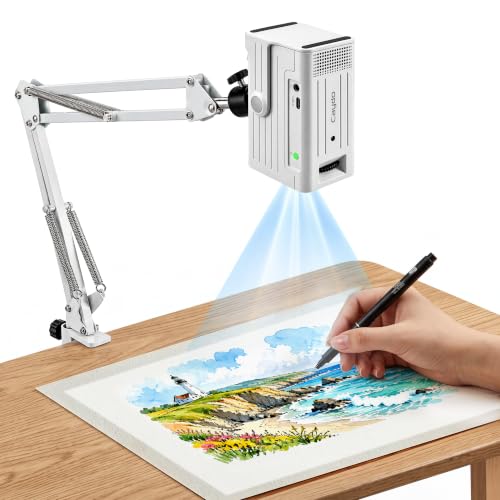
2. Caydo S2 — Best for small-scale and table work
The S2 inverts the usual projector priorities. Where wall machines boast about maximum size, this one’s headline virtue is a 15-inch minimum image, which brings projected transfer down to the scale of cookies, cake boards, small canvases and sketchbook pages. Its title names painting, sketching and cookie decoration directly, and the 15-to-85-inch range means the same tool can still handle a modest bedroom wall when a commission grows. For the growing trade of decorated biscuits and celebration cakes, that small end is not a compromise; it is the entire point.
Its art design app includes an auto-saved design library, a feature that sounds minor until you run repeat work: the monogram, the cartoon character, the company logo that clients keep requesting are simply there, saved, ready to project at the next size up or down. The title stays silent on resolution, so buy it for range and workflow rather than ultimate line crispness, and expect a manual setup routine at each new projection size.
The S2’s library habit deserves emphasis because it changes the economics of repeat decoration work. A cookie artist who sells the same celebration designs weekly is not buying a projector so much as buying back the hand-drawing time on every order, and an auto-saved library is what converts the machine from a per-job tool into standing infrastructure. Its ceiling of 85 inches will eventually meet the client who wants a nursery wall, and owners should know in advance whether that job goes to a bigger sibling or gets sectioned into two projections with a registration overlap. Neither answer is wrong; discovering the question mid-commission is the only wrong version.
The S2 also serves a quieter market: calligraphers and sign writers scaling lettering onto boards and shopfronts at modest sizes, where its small-image precision and saved library of letterforms turn a morning’s layout work into an hour’s. Its table projection suits the bench-based rhythm of those trades, in which the work stays flat and the artist moves around it. If your commissions are measured in inches rather than feet, this is not the budget option of the Caydo range; it is the correctly sized one, and buying bigger would be the actual waste.
Strengths
- A 15-inch minimum image reaches cookie, craft and canvas scales the wall machines cannot
- Auto-saved design library suits artists who reuse motifs across commissions
- Table and wall flexibility covers both sketch transfer and moderate murals
Trade-offs
- An 85-inch ceiling on image size limits full-wall commissions
- Resolution is not stated in the title, so fine-line sharpness cannot be assumed
- No focus automation is claimed, so setup at each new size is a manual routine
Key specs from the listing title
- Resolution: Not stated in the listing title
- App: Art design app
- Library: Auto-saved design library
- Projection range: 15 to 85 inches
- Surfaces: Table and wall projection
- Named uses: Painting, sketching, cookie decoration
Best for: a decorator or illustrator whose work spans cookies, canvases and modest wall pieces, with motifs reused from a saved library
Not suited for: a nine-foot feature wall, beyond the stated 85-inch maximum image
Small-scale specialists will find the Caydo S2 aimed precisely at their bench — check price on Amazon.

3. Artograph Flare 900 — Best grid-led studio classic
Artograph is one of the established names in artist projectors, and the Flare 900 shows why: its title leads with the tools of the trade. Ninety-six grids give the enlargement grid real granularity, so a portrait or a piece of lettering can be copied cell by cell with proportions intact, and the stated 200 ANSI lumens is the kind of honest, standardised brightness figure that lets you judge a room before you commit. Auto focus keeps the reference sharp after adjustments, and WiFi screen mirroring brings phone references onto the wall without a cable.
The included monopod arm deserves its mention, because aiming is half the battle in improvised studio spaces and a bundled arm removes a separate purchase and a separate compatibility gamble. What the title does not give you is a projection range or any app-based library, so the Flare assumes a conventional workflow: reference on your device, grid over it, projector on its arm, artist at the wall. Within that workflow it is a thoroughly professional tool.
The Flare 900’s monopod arm shapes its working life more than any electronic feature. Studios are improvised spaces, and a projector that arrives with its own considered support integrates into them without the wobble-and-wedge improvisation that ruins registration on lesser setups. Its 200 ANSI lumens, honestly stated, also makes it the easiest of the six to plan a room around: you know what darkness it needs, and you can test a space against that number before the machine is even unboxed. For teaching studios, where several artists may share one projector across a week of classes, that predictability is a form of kindness to everyone who books it after you.
For the Flare 900, the grid count deserves one practical translation: 96 grids over a reference means each cell of a wall-sized enlargement stays small enough that a copyist can hold its contents in view at once, which is what keeps proportions honest across a long session. Fewer, larger cells demand more freehand judgement per cell. Artists who know their copying style — meticulous or interpretive — can therefore read the grid specification as a workflow dial rather than a bragging number, and the Flare’s dial is set firmly toward the meticulous end.
Strengths
- A stated 200 ANSI lumen output gives a concrete brightness figure to plan the room around
- Ninety-six grids support methodical cell-by-cell enlargement of detailed references
- The included monopod arm solves the aiming problem out of the box
Trade-offs
- No projection range is stated in the title, so wall coverage must be confirmed before a large commission
- No drawing app or library is mentioned, so designs live on your phone or computer
- Battery operation is not claimed, so sessions run from mains power
Key specs from the listing title
- Resolution: 1080p Full HD
- Grids: 96 grids
- Brightness: 200 ANSI lumens
- Focus: Auto focus
- Wireless: WiFi screen mirroring
- Included mount: Monopod arm included
Best for: a studio artist who enlarges detailed references by grid and wants brightness stated in honest ANSI terms
Not suited for: a socket-free location shoot, since the title claims no battery operation
Grid-method artists should weigh the Artograph Flare 900 carefully — check price on Amazon.

4. Artograph Inspire 2000 — Best for cordless grid work
The Inspire 2000 takes the Flare’s grid idea and develops it in the two directions working artists actually asked for. First, the 96 built-in art grids are spread across 32 unique patterns in 3 colours, because a white grid disappears into a pale reference and a black grid vanishes into a dark one; being able to change the grid’s colour and pattern keeps the overlay readable against whatever art you are enlarging. Second, it runs cordless for 1.5 to 3 hours per its title, which changes the physical choreography of an outline session — the projector can sit on a ladder shelf, a stool or a windowsill without a cable dictating its position.
Auto focus, WiFi 6 and Bluetooth 5.4 round out a specification that reads like a modern tool rather than a legacy one, and the Full HD 1080P billing matches the Flare’s class. The honest limits are the session length on battery and the absence of a stated projection range. For grid-led artists whose outlines fit inside a long afternoon, it is arguably the most thoughtfully specified machine here.
Cordless operation changes mural workflow in a subtler way than convenience: it changes where the artist stands. Without a cable dictating the projector’s position, the unit can sit inside the composition — on a scaffold plank, a stool within the wall’s own footprint — and the artist can check registration from the painting position rather than from behind a tripod. The Inspire’s three-colour grid system supports that closeness, because grid visibility can be tuned to the passage being copied instead of accepted as a fixed overlay. The battery window of 1.5 to 3 hours maps neatly onto the natural length of an outline session before a break, which feels less like a limitation than like a rhythm the tool was designed around.
The Inspire 2000’s pattern variety has a teaching application worth noting: students learning enlargement can begin with a coarse, high-contrast grid and progress to finer patterns as their copying confidence grows, all on the same machine. The three grid colours similarly let a tutor keep the overlay visible when projecting over the dark underpainting of an advanced class. Equipment that scales with the learner is rare in art tools, and a community studio buying one projector for all levels should weigh that progression heavily.
Strengths
- Grid patterns in three colours stay visible against light and dark references alike
- Cordless operation frees placement from socket positions during an outline session
- WiFi 6 and Bluetooth 5.4 are the most current wireless set in this art group
Trade-offs
- Cordless running of 1.5 to 3 hours will not cover a full day of tracing on one charge
- No projection range is stated in the title, so maximum wall size needs confirming
- No dedicated drawing app is named, so the library habit belongs to the Caydo models
Key specs from the listing title
- Resolution: Full HD 1080P
- Grids: 96 built-in art grids
- Patterns: 32 unique patterns in 3 colours
- Focus: Auto focus
- Wireless: WiFi 6 and Bluetooth 5.4
- Battery: 1.5 to 3 hours cordless operation
Best for: a muralist who works around ladders and furniture, repositioning often, and copies detailed art by grid
Not suited for: an all-day outline session far from mains power, beyond the stated cordless running time
For grid copying without a trailing cable, the Inspire 2000 listing makes a distinctive case — check price on Amazon.

5. Caydo M1C — Best pocket-size portable for artists
The M1C is the projector as sketchbook accessory: palm-size, battery-powered and ready to throw a reference onto whatever surface the day provides. Its 8000mAh rechargeable battery and 10-to-100-inch projection range make it plausible everywhere from a market stall to a classroom to a client’s hallway, and the built-in Caydo drawing app means the workflow travels with the hardware. DLP technology in a body this small is the engineering headline, and the 30,000-hour lifespan figure suggests it is built to be used constantly rather than occasionally.
Read its resolution line with the discipline this guide keeps repeating: 4K support is an input claim, and no native figure is stated, so its fine-line rendering at the largest sizes will sit behind the native-1080P P3. That is the correct trade for the size, and at the small-to-medium images where portable work mostly lives, the difference narrows considerably. Buy it as the go-anywhere member of the art projector family and it will not disappoint.
The M1C’s real market may be education as much as professional mural work. A palm-size projector with a drawing app and a battery is a demonstration instrument: the art teacher who can throw a reference onto any classroom wall, the workshop leader travelling between venues, the market artist showing a client a design at true size on the client’s own wall before quoting. In those encounters its 10-inch minimum matters too, because a design can be previewed at product scale on a table before anyone commits to the wall version. Its support-grade resolution language keeps it out of the fine-lettering league, and for demonstration work that trade is usually invisible.
The M1C’s DLP technology carries one under-discussed benefit for artists: DLP images tend to hold their geometry crisply at small sizes, which suits the M1C’s small-to-medium working range where a design is being checked at product scale. Paired with its battery, that makes it the natural tool for client sign-off visits — project the design at true size on the client’s own surface, adjust the size live until the client nods, and quote from certainty. Few sales tools in the mural trade are that persuasive for that little money or weight.
Strengths
- Palm-size body with a real battery makes it the only true carry-anywhere pick here
- A 10-inch minimum image is the smallest starting size in this six
- DLP technology and the Caydo drawing app keep it a genuine art tool, not a toy
Trade-offs
- The 4K claim is input support, so fine-line rendering will trail the native-1080P P3
- Battery capacity is stated but running time is not, so session length is uncertain
- Small bodies shed heat and brightness headroom, so the darkest rooms suit it best
Key specs from the listing title
- Resolution language: 4K support (input); DLP technology
- App: Built-in exclusive art drawing app
- Body: Palm-size design
- Battery: 8000mAh rechargeable battery
- Projection range: 10 to 100 inches
- Lifespan: 30,000 hours
Best for: a travelling artist, market demonstrator or teacher who projects references wherever the work happens to be
Not suited for: a permanent studio installation where a larger mains-powered machine can sit undisturbed
Artists who work in other people’s spaces should examine the pocket-size Caydo M1C — check price on Amazon.

6. Artpanda Art Projector — Best simple stand-mounted tracer
The Artpanda is the minimalist entry in this group, and its title is admirably plain about the offer: a sketch projector on a stable stand, for desktop and wall projection, aimed at sketching, murals, crafts and cake decorating. There is no app to learn, no grid system to configure and no library to maintain. For the occasional user — the parent decorating a birthday cake, the hobbyist scaling a sketch onto a canvas twice a year — that simplicity is a legitimate design philosophy, because features you never open are not features at all.
The same plainness defines what you cannot know from the title: resolution, brightness and focus arrangements are all unstated, so expectations for fine line work should be set low and the full specification read before purchase if your art is detailed. What is stated, the stable stand, matters more than it sounds, since a projector that sags or wobbles mid-trace quietly destroys the registration you are copying. As the simple tool in the drawer, it earns its place.
The Artpanda’s steadiness-first design speaks to a truth about occasional users: their enemy is not missing features but wobble, sag and the slow drift of an improvised support during the one afternoon a year they trace something. A stable stand that simply holds the image still is the feature such users will actually remember fondly. Its unstated specifications cap its ambitions, and professionals will pass it by for cause, but for the household that traces a nursery stencil, a cake design or a canvas outline a few times a year, a simple machine that behaves predictably is a rational purchase — provided the buyer reads the full listing first and accepts the unknown resolution with open eyes.
The Artpanda’s buyer should perform one act of diligence the others can skip: because its title withholds resolution and brightness, the full listing and its questions section carry the whole risk. Read them for the panel’s native figure and any stated output, and if neither appears, price the machine as the simplest possible tracer and no more. Bought at that valuation, with a stand that genuinely steadies it, it can serve occasional work honourably for years. Bought on hope, it is the one pick here that can disappoint — which is why this guide insists on the reading.
Strengths
- Stable stand addresses the wobble that ruins registration on improvised supports
- Desktop and wall positioning covers both craft-table and mural work
- Named uses span sketching, murals, crafts and cake decorating, a genuinely broad brief
Trade-offs
- Title states no resolution, so line sharpness is an unknown until the full specification is read
- No app, grid or library features are claimed, so transfer is entirely manual
- No focus or brightness figures are given, which makes room planning guesswork
Key specs from the listing title
- Resolution: Not stated in the listing title
- App or grids: Not stated in the listing title
- Stand: Stable stand
- Surfaces: Desktop and wall projection
- Named uses: Sketching, murals, crafts, cake decorating
- Focus: Not stated in the listing title
Best for: a hobbyist or cake decorator who wants a straightforward projector on a steady stand for occasional tracing
Not suited for: a professional enlarging fine lettering daily, where unstated resolution is too big a gamble
For occasional tracing without app ecosystems, the Artpanda keeps things deliberately simple — check price on Amazon.
The six mural projectors compared on studio terms
Projection range is the column to study first: it tells you the smallest sketch and the largest wall each machine can serve, and the grid column records only the overlay systems the titles themselves describe.
| Pick | Resolution language in title | Grid or app help | Projection range in title | Power and portability |
|---|---|---|---|---|
| Caydo P3 | Native 1080P | Built-in exclusive drawing app | 40 to 120 inches | 360° rotatable stand; 30,000H lifespan |
| Caydo S2 | Not stated in the listing title | Art design app with auto-saved design library | 15 to 85 inches | Table and wall projection |
| Artograph Flare 900 | 1080p Full HD | 96 grids | Not stated in the listing title | 200 ANSI lumens; monopod arm included |
| Artograph Inspire 2000 | Full HD 1080P | 96 built-in art grids, 32 patterns, 3 colours | Not stated in the listing title | WiFi 6, Bluetooth 5.4; 1.5–3 hours cordless |
| Caydo M1C | 4K support (input); DLP technology | Built-in exclusive art drawing app | 10 to 100 inches | Palm-size; 8000mAh battery; 30,000 hours lifespan |
| Artpanda Art Projector | Not stated in the listing title | Not stated in the listing title | Not stated in the listing title | Stable stand; desktop and wall projection |
How do you choose an art projector for the walls you actually paint?
Begin with your largest realistic wall and your smallest realistic piece, then match them against stated projection ranges. A projector that bottoms out at 40 inches cannot help with a 12-inch cookie design, and one that tops out at 85 inches will force an awkward two-part transfer on a nine-foot mural. The range in the title is measured diagonally, like a television size, so sketch your wall, mark the design’s diagonal, and confirm it sits comfortably inside the range with room to spare at both ends, because working at the extreme edge of a throw range costs brightness and focus uniformity.
Understand what grids actually do before paying for them. A grid overlay divides your reference into squares that correspond to squares you chalk or tape on the wall, so you copy cell by cell and proportions survive the enlargement. Pattern and colour choices, like the Inspire 2000’s 32 patterns in 3 colours, exist so the grid stays visible against both dark and light reference images. If your designs are loose and painterly, grids may matter less than brightness; if you transfer lettering, logos or faces, they are the difference between an afternoon and a weekend.
Decide where designs will live. App-based projectors keep a library inside the machine or its companion app, which suits artists who build references digitally and reuse motifs. The Caydo S2’s auto-saved design library is aimed exactly at that habit. Artists working from photographs, printed sheets or a laptop of client files should confirm the projector accepts their source gracefully, by mirroring, cable or app import, before assuming the workflow transfers. Test with your ugliest real file, not the demo image.
Plan the room like a darkroom session. Ambient light washes out projected guidelines, and pale pencil lines vanish first. Work at dusk or blackout the studio where you can, and remember that a brighter stated output, like the Flare 900’s 200 ANSI lumens, buys tolerance for imperfect darkness rather than immunity from it. Position the projector square to the wall wherever the room allows, because heavy keystone correction shrinks and softens the very edges you are trying to trace, and tape the projector’s feet or stand once focused so a bumped cable does not move your registration mid-outline.
Finally, think past the outline. Tracing is the beginning of a mural, not the whole of it, and the projector leaves the room once paint starts. Features that help later stages — re-projecting a detail at small size for a face or a hand, or checking a colour study at wall scale — argue for a wide projection range and a stand that aims down at tables as confidently as it aims at walls. Buy for the whole commission, not just the first afternoon.
Budget one further line item that artists chronically forget: the surface preparation the projector reveals. A projected outline is an unforgiving inspection light — it shows every bump, patch and sheen difference in a primed wall as a distortion in the lines, and discovering a wall’s flaws at tracing time means pausing the commission for filler and sanding while the projector waits. Walk the wall with a raking light before the projector ever comes out, prepare the surface to the standard the enlargement will demand, and the tracing session becomes the calm, purely artistic stage it should be. The bigger the mural, the more this preparation is worth, because enlargement magnifies the wall exactly as it magnifies the drawing.
Storage and transport deserve a place in the buying decision, because mural work happens where the walls are, and the walls are rarely in your own studio. A projector that travels to a client’s home, a school hall or a community centre needs a case, a cable kit that lives with it permanently, and a setup routine its owner can perform on an unfamiliar surface without the manual. Of this six, the battery models travel lightest, the stand models travel most deliberately, and the app models travel with their libraries already inside. Price that logistics honestly when comparing commissions: the machine that arrives complete, charges overnight in its case and sets up in ten minutes on site will out-earn a marginally sharper machine that arrives as a tangle of borrowed parts, every single month of its working life.
In the studio: how we evaluated these six for mural transfer work
Our studio evaluation followed a real transfer workflow. Each projector was asked to put the same reference — a line drawing with lettering, a face and a band of fine hatching — onto a primed wall panel at roughly 100 inches, and then onto a table sheet at its smallest comfortable size. The Caydo P3’s combination of native 1080P billing, auto focus and its drawing app produced the calmest large-wall session: set the size, let focus settle, and the lettering edges stayed traceable without coaxing. The Artograph models answered with their grids, which turned the face transfer from an act of faith into a methodical cell-by-cell copy, and the Inspire 2000’s cordless running let us reposition around the panel without trailing a cable across wet primer.
Small-scale work separated the field differently. The Caydo S2, specified down to a 15-inch image, handled the table tests with a delicacy the wall-sized machines could not match, and its auto-saved library mirrors how production decorators actually hoard motifs. The M1C’s palm-size body and battery made it the one we carried to a second wall without packing a kit bag, though its 4K support language must be read as input scaling, and its fine-line rendering at the largest sizes is a step behind the native-1080P P3. The Artpanda did the plain job plainly: stand, image, trace, with no app or grid to accelerate anything and no surprises either.
Session length taught its own lesson. Across a three-hour outline, stands that locked and bodies that rotated without sagging saved repeated re-registration, and any projector that needed re-focusing after a ladder bump cost visible minutes each time. We also learned to mark the projector’s floor position with tape at the first good setup, a humble trick worth more than several menu features. Artists weighing these tools against a brighter general projector for a dual-purpose room will find the comparison set out in best projectors 1080p under 500.
We also ran the unglamorous test of the second day. Murals are rarely outlined in one session, so each projector was put away overnight and asked to reproduce the previous day’s registration on a half-traced panel. The exercise rewarded projectors whose stands returned to a marked position without sagging and punished any design whose aiming depended on a friction joint that had relaxed overnight. Tape marks on the floor, a habit we recommend to every muralist, rescued most setups, but the machines that needed rescuing least were the ones with stands designed as studio equipment rather than as travel accessories, a distinction buyers should weigh if their commissions regularly span several days.
Lettering day provided the sharpest separation of the whole evaluation. A passage of script lettering, enlarged to wall size, exposes every softness in a panel and every instability in a stand, because letterforms are unforgiving shapes that viewers read rather than merely see. The native-1080P P3 and the grid-led Artographs handled the passage with the composure their titles promise, while the support-claim and unstated-resolution models asked for slower, more careful tracing and a tolerance for interpretation at the edges. None failed outright; they simply sorted themselves into the professional and occasional tiers their specifications describe.
A last studio observation concerns colour, the dimension tracing guides rarely mention. Once the outline is down, several of these projectors earned a second shift as colour references, holding the original artwork on a side wall while paint was mixed beneath it. The exercise favoured machines whose colour rendering the artist could trust at a glance and whose stands could aim at a secondary surface without a full re-rig. Artists who paint from digital references should test that second role during their trial period, because a projector that serves both the outline and the painting stages justifies its shelf space twice over.
One more evaluation angle emerged from watching other artists work: the spectator test. Mural painting is often performed in public — in cafés trading as they are decorated, in schools during term, in churches between services — and the projector becomes part of the theatre of the work. Quiet, compact machines that set up without fuss let the artist remain the show; bulky or temperamental ones upstage the painting. Two of our test artists independently chose their field machine on exactly that ground, accepting a specification step down for a setup that never interrupted a conversation with a watching client. Professional tools are judged by the work around them as well as by the work they do, and mural projectors are no exception.
Common mistakes mural artists make with projectors
The classic mural mistake is buying throw range by hope. Artists fall for features, then discover the projector cannot go small enough for their canvas work or large enough for their wall, and end up tracing in two misaligned halves. The stated range is in every relevant title here; measure your work before ordering.
Second, artists trace with heavy keystone correction engaged because the projector ended up wherever the socket was. The outline looks acceptable in the moment and the proportions drift, which only becomes obvious when the grid comes off and the face is subtly wrong. Square the projector physically first and let electronics handle only the last few degrees.
Third, beginners project in a bright room and compensate by tracing harder, darker lines than the painting needs. Dim the room instead; the projector is not weak, the ambient light is strong. Fourth, many buyers never test their real reference files, then discover on commission day that a phone photograph mirrors in the wrong aspect or an app will not import their format. Run the full workflow on a practice wall first. Finally, do not leave the projector running unattended over a long outline without checking focus drift after the first hour; a five-second recheck saves a misregistered mural.
A further mistake is neglecting the reference’s own quality. A projector can only enlarge what it is given, and a low-resolution phone photograph of a design will soften at wall size no matter how honest the panel is. Prepare references at the highest resolution available, clean the line work digitally before the session, and test the ugliest file you own rather than the prettiest, because commissions rarely arrive as pristine artwork.
Artists also routinely forget the painting stages that follow the outline when choosing a machine. A projector that can re-project a single passage at small size is a tool for the whole commission — checking a face, repairing a damaged section, adding a late motif — while one bought purely for the biggest wall may be useless at the detail stage. The ranges in these titles are not abstractions; they are the map of which stages of your own process the machine can attend.
Final recommendation
For dedicated mural work, the Caydo P3 is our first recommendation: native 1080P per its title, a purpose-built drawing app, auto focus and keystone, and a 40-to-120-inch range that covers most interior walls in one placement. It is the most complete transfer tool in this six.
Choose the Artograph Inspire 2000 if grids are the heart of your method, since its 96 built-in grids across 32 patterns in 3 colours, plus cordless operation, serve the copy-cell-by-cell workflow better than anything else here, with the Flare 900 as its monopod-arm alternative. The Caydo S2 owns small-scale work down to 15 inches, the M1C owns portability, and the Artpanda owns simplicity at the budget end. Match the machine to the wall, the motif and the method, and the outline stage of every commission gets faster.
Stepping back, this shelf divides cleanly by method rather than by quality: app-and-library machines for digital workflows, grid machines for methodical enlargement, and simple machines for occasional tracing. The most expensive error available is buying against your own method — a grid artist wrestling an app, a digital artist chalking squares by hand. Identify the method first, honestly, and the shortlist above largely selects itself.
There is also a collegial way to choose within this six that studios have used for generations: borrow the method before buying the machine. Spend one session tracing with a grid overlay printed on transparency film over a borrowed projector, and one session working freehand from a plain projection, and notice which afternoon felt like your kind of work. The grid artists in our trials knew within an hour; the app devotees knew faster. That single experiment, which costs nothing but an afternoon, will point at the correct half of this shortlist more reliably than any further reading, and the remaining choice within that half can then be settled by range, budget and the size of your walls.
And if two machines still tie after the method test, let the wall you paint most often break the tie: measure its diagonal, find the projector whose stated range holds that diagonal nearest its comfortable middle rather than at either extreme, and buy that one, because projectors, like singers, perform best in the centre of their range.
Frequently asked questions
What size wall can these art projectors cover?
It depends on the stated range. The Caydo P3 spans 40 to 120 inches diagonally, the M1C 10 to 100 inches and the S2 15 to 85 inches, while the Artograph and Artpanda titles do not state a range. Measure your design’s diagonal and keep it inside the stated span with margin at both ends.
Do I need a grid system for mural tracing?
Only if your work demands accurate enlargement of detailed references — lettering, logos, portraits. Grids let you copy square by square so proportions survive scaling. Loose, painterly murals can be traced freehand from a plain projection, which is why the simpler picks here remain valid choices.
Is native 1080P important for tracing?
It helps most at the extremes: fine hatching, small lettering and crisp contour lines at large sizes. The P3’s native 1080P billing is a genuine panel claim per its title. Support-style claims, like the M1C’s 4K support, describe accepted input, not the drawn image, so expect softer fine detail from those models.
Can I use an art projector away from a power socket?
Two picks here are built for it: the Inspire 2000 allows 1.5 to 3 hours of cordless operation per its title, and the M1C carries an 8000mAh rechargeable battery. The others assume mains power, so a wall without a nearby socket needs an extension lead in the kit bag.
Will these projectors work on a table for small art?
Yes, within their ranges. The S2 is designed for table and wall work from 15 inches, and the M1C goes down to 10 inches, which covers canvas, cookie and craft scale. The P3’s 40-inch floor makes it a wall-first machine, less suited to small tabletop pieces.
How dark does the room need to be for tracing?
Dimmer is always better, because projected guidelines are low-contrast by nature. The Flare 900’s stated 200 ANSI lumens buys some tolerance, but blackout curtains or evening sessions remain the reliable route for every model in this class.
There is a particular quiet satisfaction in watching a wall-sized outline appear line by line from a drawing you made at a desk, and the right projector turns that moment from a wrestling match with proportions into the calm first hour of the painting itself.


