What's inside
- Where to buy
- Key Takeaways
- Quick Picks
- Why does ecosystem lock-in decide everything in this category?
- How should a household stage its expansion across a year?
- What happens to storage and subscriptions as a system grows?
- What should you do when a new add-on refuses to pair?
- Comparison table
- How do you verify compatibility before ordering an add-on?
- How many cameras does a home actually need?
- Should added cameras deter, document, or both?
- What mistakes do system expanders keep making?
- How do you manage power across a growing fleet of cameras?
- Final Recommendation
- Frequently Asked Questions
- Related Guides
As an Amazon Associate I earn from qualifying purchases. This post may contain affiliate links at no extra cost to you.
gizmoverdict.com is reader-supported. When you buy through links on our site, we may earn an affiliate commission.
Where to buy
The four linked products below are sold through their Amazon listings, and add-on cameras carry one listing-reading duty the rest of this site rarely demands: confirm, in the listing’s own compatibility language, that the camera works with the hub, module or recorder already in your home. An add-on camera is not a standalone product — it is a citizen of a system — and the reviews below name each one’s required partner hardware explicitly so the confirmation takes seconds rather than a returns process.
The best add on home security cameras exist because security systems grow the way households do: one camera for the door, then the realisation that the side gate, the garage and the back garden are unwatched. Adding cameras to a running system beats replacing the system — the app stays familiar, the recordings live in one timeline, the hub you already own gains new eyes. But the bargain carries the rule this guide will repeat until it cannot be misunderstood: an add-on camera works only inside its own manufacturer’s ecosystem. A Blink camera joins a Blink system. It will not join a Ring system, an Arlo base station or a no-name recorder, ever, under any adapter. Compatibility is not a feature of these products; it is their physics.
So the honest way to shop this category is backwards from your existing kit. Identify your hub first — a Blink Sync Module, a recorder box from an expandable kit, a solar system’s home base — then buy only the cameras that speak to it, after checking the generation and capacity limits the choosing section explains. Readers who own no system yet should not start here at all: buy a starter kit whose hub leaves expansion room, then return to this guide when the second camera’s moment arrives.
Key Takeaways
- Add-on cameras are ecosystem-locked by design: a camera joins only its own brand’s hub or recorder, so compatibility checks come before every purchase.
- Blink’s Outdoor 4 is the classic add-on — a battery camera that extends any Blink system through a Sync Module, indoors or out.
- Blink’s Mini 2K+ adds an always-awake indoor eye to a Blink household, plugging into mains instead of drawing on batteries.
- The expandable 8-channel kit’s spare channels accept additional cameras from its own family, growing toward full-property coverage.
- aosu’s D1 Classic cameras extend an aosu solar system whose home base stores footage locally without a subscription.
- Arlo and Ring add-on cameras are discussed without links: both are excellent inside their own ecosystems and useless outside them.
Quick Picks
| Pick | Badge | Why it earns its place |
|---|---|---|
| Blink Outdoor 4 | Best add-on for Blink systems | The two-year-battery outdoor camera that extends a Sync Module system to gardens, gates and garages. |
| Blink Mini 2K+ | Best indoor add-on | A plug-in 2K camera that gives a Blink household an always-on indoor view alongside its battery cameras. |
| Security Cameras Wireless Outdoor 8Channel Expandable | Best expandable-kit route | An eight-channel solar kit with local storage whose spare channels are the expansion path itself. |
| aosu D1 Classic 4-Cam Kit | Best solar system to grow | A four-camera solar kit on a local-storage base, designed to anchor a subscription-free property system. |
| Arlo add-on cameras | Prose-only: Arlo ecosystem | Premium cameras that extend Arlo base stations and the Arlo app, discussed for Arlo households without a link. |
| Ring add-on cameras | Prose-only: Ring ecosystem | Stick Up and Spotlight family additions for Ring Alarm and doorbell households, covered here for context only. |
Why does ecosystem lock-in decide everything in this category?
Because an add-on camera is half a product. The camera half captures light; the system half — hub, app, storage, notifications — turns that light into security. Manufacturers engineer the two halves to speak private languages, partly for genuine technical reasons involving power management and encryption, and partly because a household invested in one ecosystem tends to stay for the next camera, the doorbell and the subscription. Neither motive changes the buyer’s reality: the camera on the shelf either speaks your hub’s language or it is an expensive paperweight with a lens.
Selection for this guide therefore started from the systems households actually own and expand. Blink earns two places because its installed base is enormous and its add-on path — Sync Module plus cameras, indoor and outdoor, battery and plug-in — is the clearest in the industry. The expandable recorder kit and the aosu system represent the other great tradition: a base unit with spare channels or capacity, bought once and grown deliberately. Arlo and Ring complete the map as prose-only entries because their add-ons are major purchases for their own households, and a guide that ignored them would fail the readers most likely to be shopping.
Capacity limits were checked as carefully as compatibility. Systems cap how many cameras a hub supports, how many channels a recorder holds and how much storage a base retains, and the camera that exceeds a cap is as useless as the camera from the wrong brand. Each review names its system’s expansion ceiling so growth can be planned rather than discovered.
Finally, we favoured add-ons that strengthen a system’s weak side: an indoor plug-in for a battery outdoor system, outdoor reach for a recorder kit that began indoors. Expansion is strategy, not shopping, and the picks below are ordered to help households think that way.

Blink Outdoor 4 — Best add-on for Blink systems
The Outdoor 4 is the add-on camera in its purest form: a weather-sealed, battery-powered eye that joins an existing Blink system through a Sync Module and immediately inherits the app, the timeline and the household’s habits. Its headline endurance — up to two years from a set of lithium AA cells under typical settings — is what makes expansion painless. You mount it at the side gate, pair it in minutes and then, in the best sense, forget it exists until its alerts earn your attention.
The compatibility sentence, stated with the bluntness this category demands: this camera requires a Blink Sync Module and works only within the Blink ecosystem. It will not pair with a Ring alarm, an Arlo station or any other brand’s hub, and no setting changes that. For Blink households — a large share of camera-owning homes — that is no limitation at all, merely the system’s shape. For everyone else, this review is a signpost to their own brand’s equivalent further down the page.
As a camera, the Outdoor 4 covers the outdoor brief completely: 1080p video by day, infrared night view after dark, two-way talk for greeting couriers or discouraging lingerers, and motion detection whose zones and sensitivity can be tuned per camera — vital when one system watches both a quiet garden and a busy driveway. Person detection and the richer features live in Blink’s subscription tier, while the fundamentals, live view and motion alerts work as the system’s baseline; households should know which side of that line their habits fall before expanding.
Expansion strategy with Blink rewards thinking in positions rather than products. The Sync Module supports a fleet of cameras, and owners typically grow from the door outward: front approach, driveway, side access, garden, garage interior with an indoor-rated sibling. Because every addition shares one app and one clip library, the system’s value compounds — an incident can be followed across cameras in a single timeline, which is the moment a collection of cameras becomes a security system in truth.
Placement discipline matters more as systems grow. Each new camera should answer a question the existing ones cannot: a blind approach, an unrecorded boundary, a valuable outbuilding. Cameras added from enthusiasm rather than need mostly add notifications, and notification fatigue is the silent killer of home security — the alert that matters gets ignored inside fifty that do not. Add deliberately, tune each camera’s zones the week it arrives, and the Outdoor 4’s two-year battery means the system you build this spring is still quietly whole two winters from now.
It takes the top slot because it is the add-on most readers of this guide can actually use, executed with the least friction the category offers: no wires, no new app, no new subscription decision beyond the one the household already made. Expansion should feel like this — a small box, ten minutes, one more watched corner of the world.
- Requires: a Blink Sync Module and the Blink ecosystem — no cross-brand pairing
- Power: lithium AA batteries with up to two-year life under typical use
- Video: 1080p HD with infrared night view and two-way talk
- Rating: weather-resistant for outdoor mounting
- Role: extending Blink coverage to gates, gardens, driveways and outbuildings
Strengths
- Two-year battery endurance makes each addition nearly maintenance-free.
- Pairing into an existing Blink system takes minutes and one app.
- Per-camera zones and sensitivity let a growing system stay quiet and relevant.
Trade-offs
- Absolutely Blink-only; households on other ecosystems cannot use it at all.
- Person detection and extended clip features sit behind the Blink subscription.
- 1080p detail is a step below the 2K and 4K cameras elsewhere in this guide.
Best for: Blink households extending coverage outdoors, one well-chosen position at a time. Not suited for: owners of Ring, Arlo or recorder-based systems — their add-ons are different products entirely.

Blink Mini 2K+ — Best indoor add-on
Every Blink system built from battery cameras has the same blind spot: indoors, where a camera that sleeps to save its battery misses the beginning of everything. The Mini 2K+ is the add-on that closes it. It plugs into mains power, so it never sleeps; it speaks Blink, so it joins the existing app and timeline without ceremony; and its 2K sensor with enhanced audio gives the household one sharp, always-awake indoor view to complement the battery fleet outside.
Compatibility, in this guide’s ritual phrasing: the Mini 2K+ is a Blink camera for Blink households. It operates within the Blink app — notably, it can also serve as the indoor presence in a small system of its own — and it does not join Ring, Arlo or recorder ecosystems. Within Blink, its integration is the point: the same motion timeline, the same Alexa announcements, the same subscription covering the whole household’s clips rather than a patchwork of plans.
The division of labour it enables is elegant. Battery cameras guard the perimeter, where wiring is hard and events are rare; the Mini guards the interior, where events are frequent and wakefulness matters — the hallway at night, the nursery across the day, the kitchen where the dog’s counter-surfing career unfolds. Because it never rations power, its live view can sit open on a tablet indefinitely, a use battery owners ration without realising they are doing so until they own a camera that removes the ration.
Picture and sound both stepped up in this generation: 2K detail that identifies a face across a room, night vision that holds a sleeping household’s geography legibly, and two-way audio clear enough for a genuine conversation with a child, a carer or a pet. For elder-check households, that audio is the product — the camera is how a distant family member says goodnight and hears the answer.
As an expansion purchase it is also the gentlest in this guide: no ladder, no weather sealing decisions, no battery schedule — a shelf, a socket and five minutes. Households testing whether indoor coverage suits them can start here at low commitment, and households already certain gain a permanent indoor sentinel. Either way, it demonstrates the strategic principle this category runs on: add the camera that fixes the system’s actual weakness, not the camera that duplicates its strength.
Choose it when your Blink system’s outdoors are covered and its indoors are dark. It is the natural second chapter of a Blink story — and, not coincidentally, the purchase that most often converts a camera collection into a system the household actually relies on daily.
- Requires: the Blink ecosystem and app — no cross-brand compatibility
- Power: plug-in mains, always awake with continuous live view
- Video: 2K with enhanced night vision
- Audio: two-way talk with improved clarity for family check-ins
- Role: indoor complement to battery Blink cameras outdoors
Strengths
- Permanent wakefulness fixes the indoor blind spot of battery-based Blink systems.
- 2K detail and better audio make it the strongest indoor Blink option.
- Shelf-and-socket installation is the easiest expansion in this guide.
Trade-offs
- Blink-only, like its sibling — other ecosystems need their own indoor equivalents.
- Fixed view; wide or L-shaped rooms may want a pan-and-tilt rival instead.
- Full clip features follow the household’s Blink subscription status.
Best for: Blink households adding an always-on indoor view for nurseries, hallways or elder care. Not suited for: non-Blink systems, or rooms needing motorised pan coverage.

Security Cameras Wireless Outdoor 8Channel Expandable — Best expandable-kit route
This pick represents the recorder tradition of expansion: an eight-channel wireless system, solar-powered cameras, local storage included and no subscription — bought as a kit whose spare channels are an explicit invitation to grow. Where Blink expands by pairing cameras to a module, this architecture expands by filling channels on a central system, and the cameras that join it must come from its own family. That sentence, by now, should surprise no reader of this guide: check the channel count and the camera family before ordering additions, because the recorder will accept its own and politely ignore everything else.
The kit’s economics explain the tradition’s durability. Local storage on the included media means the system records without renting its own memory back from a cloud, solar panels on the cameras erase battery chores in sunny placements, and the eight-channel ceiling lets a household start with the cameras in the box and add positions across seasons — the workshop this year, the far fence next — without replacing the core. For rural properties, smallholdings and small businesses, that grow-as-you-go structure matches how budgets and needs actually evolve.
Wireless here follows the security industry’s usual meaning: cameras communicate with the base without video cables, while solar and battery arrangements handle their power. Placement freedom is therefore real but not unlimited — cameras need sun for their panels and a workable signal path to the base, and the pre-purchase survey should walk the property with both in mind. A camera position in permanent shade or behind two metal-clad walls will underperform its specification through no fault of its own.
As an add-on destination, the system’s virtue is headroom with honesty: the channel count is a hard, knowable ceiling, and within it expansion is a purchasing decision rather than a research project. Households should confirm which specific camera models the base accepts — within these kit families, generations matter — and keep the base’s firmware current so new additions pair smoothly.
Compared with the app-ecosystem picks, this route trades brand polish for independence: no subscription, no account-centred storage, a system that keeps recording if the internet dies. Households burned by a cloud camera’s outage, or simply unwilling to rent their own footage, will find the philosophy familiar and welcome. It earns its place as the expansion path for the self-reliant — a system you own outright, grown channel by channel.
- Architecture: eight-channel base system; add cameras from the same family only
- Power: solar-assisted cameras reducing battery maintenance
- Storage: local recording included; no subscription required
- Expansion ceiling: eight channels total across the property
- Role: rural homes, smallholdings and small-business coverage that grows over time
Strengths
- Spare channels make expansion a plan rather than a replacement cycle.
- Local storage and solar power minimise running costs and chores.
- The system keeps recording through internet outages.
Trade-offs
- Additions must match the kit’s own camera family and generation.
- Solar cameras need honest sunlight; shaded positions undermine the design.
- App polish and smart features trail the big subscription ecosystems.
Best for: property owners wanting a subscription-free system that expands channel by channel. Not suited for: Blink, Ring or Arlo households — this is a separate system, not an addition to theirs.
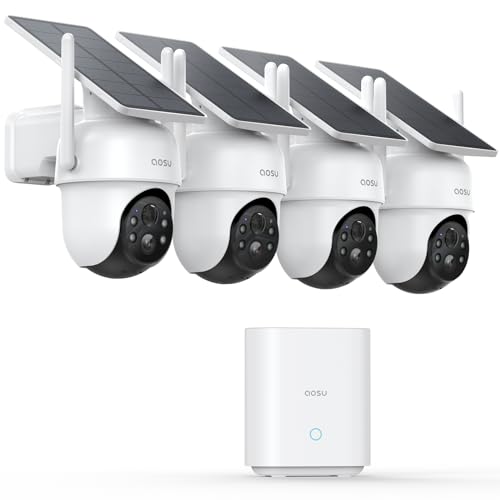
aosu D1 Classic 4-Cam Kit — Best solar system to grow
aosu’s D1 Classic kit anchors the other subscription-free tradition in this guide: four solar-powered outdoor cameras speaking to a home base that stores footage locally, in a system designed from the start to be a property’s whole answer rather than a door’s accessory. As an add-on story, it works in both directions — households can begin with this kit as their foundation and extend within the aosu family, and existing aosu owners will recognise the D1 cameras as the kin their base is waiting for. The ritual warning applies verbatim: aosu cameras join aosu systems, and no other brand’s hub will adopt them.
The solar proposition deserves its honest framing. Panels sized to the cameras keep batteries topped through ordinary weather in placements with real daylight, converting the battery camera’s great chore — the quarterly ladder climb with a charger — into a non-event for most owners most of the year. Deep winter shade and storm weeks can still ask for a manual charge, and the guide’s advice is to mount panels for the worst month, not the best: a position that works in December works all year.
Local storage on the base is the system’s second pillar. Footage lives in the house rather than a distant cloud, the core experience carries no subscription, and the cameras keep their counsel during internet outages. For households whose security philosophy is ownership — of the hardware, the footage and the ongoing cost, which is zero — the D1 pattern is the most complete expression in this guide.
Four cameras in the foundation kit cover a typical property’s decisive positions: front approach, driveway, back garden and side access. Expansion thinking then turns to the second rank — garage interior, far boundary, the outbuilding — added within the family as budget allows, each new camera inheriting the base’s storage and the app’s single timeline. That staged growth, foundation first and refinements later, is how most real properties actually get covered, and systems that support it gracefully earn their keep for a decade.
Against the Blink route, aosu trades ecosystem size for independence; against the channel kit, it trades recorder formality for app-era ease. Its place here is the solar foundation pick: the system to start when you intend to grow, or the family to extend when you already own its base. Either way, check your base model against the camera generation before ordering additions — the one compatibility habit this entire category runs on.
- Architecture: cameras pair to an aosu home base; aosu family only
- Power: solar panels sustaining outdoor camera batteries
- Storage: local storage on the base; no subscription for the core system
- Foundation: four cameras covering a typical property’s key positions
- Role: subscription-free property system designed for staged growth
Strengths
- Solar power removes routine battery maintenance from outdoor positions.
- Local base storage keeps footage at home and costs nothing monthly.
- A four-camera foundation covers most properties from day one.
Trade-offs
- Panels need genuine daylight; deep-shade positions need manual charging.
- The aosu ecosystem is smaller than Blink’s or Ring’s accessory world.
- Additions must match the base’s supported camera generations.
Best for: homeowners building a subscription-free, solar-sustained system meant to expand over years. Not suited for: households invested in another brand’s hub, or heavily shaded properties.
Arlo add-on cameras — Prose-only: Arlo ecosystem
Arlo’s add-on cameras are discussed without a link so this guide can serve Arlo households with context rather than a detour. Arlo built its name on premium wire-free cameras, and its add-ons extend either a compatible Arlo base station or, in newer generations, connect within the Arlo app’s own architecture. The ecosystem sentence writes itself by now: Arlo cameras join Arlo systems. They will not pair with a Blink module, a Ring alarm or a recorder kit, and Arlo households should verify their base station’s model against any camera’s compatibility list, because Arlo’s generations have shifted connection rules more than most brands.
What Arlo owners get for their loyalty is a polished app, strong video quality across the range and a subscription — Arlo Secure — that unlocks the advanced detection the hardware advertises. Expansion planning in Arlo’s world therefore includes the plan’s camera limits and pricing tiers, not merely the hub’s capacity. Households deep in Arlo with a plan already running will find adding cameras the obvious, satisfying move; households on the fence about the subscription should resolve that question first, because the add-on inherits the answer.
Positions Arlo add-ons serve especially well include the high-value, low-traffic spots where premium image quality justifies itself — a workshop, a vehicle store, a remote gate — and the brand’s floodlight and spotlight variants extend the family into active deterrence. None of that changes the guide’s structural advice: confirm base compatibility, confirm plan capacity, then buy. Arlo rewards its own households generously and offers nothing to anyone else’s, which is not a criticism — it is the category’s constitution, stated one more time.
- Requires: Arlo base station or Arlo app architecture, model-dependent
- Subscription: Arlo Secure unlocks advanced detection features
- Character: premium wire-free cameras with a polished app
- Status: discussed for Arlo households; no purchase link in this guide
- Role: extending Arlo systems to high-value positions
Strengths
- High video quality and a refined app reward households inside the ecosystem.
- A broad family — spotlight and floodlight variants — covers deterrence roles.
- Base-station local storage options exist for subscription-wary owners.
Trade-offs
- Generation-to-generation connection rules demand careful compatibility checks.
- Advanced features lean on the Arlo Secure subscription.
- Premium pricing makes each addition a considered purchase.
Best for: Arlo households extending a system they already value, after verifying base and plan capacity. Not suited for: any household running a different brand’s hub.
Ring add-on cameras — Prose-only: Ring ecosystem
Ring closes the guide’s map of the major ecosystems, likewise without a link. For the enormous number of homes that began with a Ring doorbell, the add-on path runs through Ring’s camera family — the Stick Up and Spotlight lines and their siblings — all citizens of the Ring app and the Ring Protect subscription structure. The constitution applies: Ring cameras join Ring systems, pair with Ring Alarm households especially happily, and do not speak to Blink modules, Arlo bases or recorder kits despite sharing a parent company with one of them — a detail worth stating, because corporate cousins are not compatible cousins.
Ring’s expansion appeal is integration breadth. Added cameras share the doorbell’s timeline, feed the same neighbourhood-aware app, and — for Ring Alarm owners — participate in a household security story that includes sensors and professional monitoring options where subscribed. A camera added to that household is not merely another view; it is another witness inside an already-organised system, which is the deepest form of the value this whole category sells.
The checks before buying mirror Arlo’s: confirm the camera’s power variant suits the position — battery, solar-assisted or wired versions of Ring cameras exist and are not interchangeable in the box — and confirm the household’s Protect plan covers the intended camera count at the tier the family wants. Ring’s generations are broadly consistent, which makes its compatibility homework the lightest among the prose-only brands, but the homework remains assigned.
Ring households reading this guide for an add-on should take the structural lesson and shop within their family with confidence. Everyone else should read Ring’s presence here as the map’s completeness: whichever ecosystem a home already runs, its expansion cameras exist, they are good, and they are the only ones that will work. That sentence, in the end, is this entire guide in miniature.
- Requires: the Ring app ecosystem; integrates with Ring Alarm households
- Subscription: Ring Protect tiers govern cloud history and features
- Family: Stick Up, Spotlight and sibling cameras in battery, solar and wired variants
- Status: discussed for Ring households; no purchase link in this guide
- Role: extending doorbell-first homes into whole-property coverage
Strengths
- Doorbell, cameras and alarm compose one timeline and one app for the household.
- Power variants let each position choose battery, solar or wired as it suits.
- A vast owner community makes every problem searchable and solved.
Trade-offs
- Cloud history and richer features depend on the Protect subscription.
- Ring cameras remain Ring-only despite corporate kinship with Blink.
- Battery variants inherit the charging chore their wired siblings avoid.
Best for: Ring doorbell and Alarm households growing into full coverage within their app. Not suited for: any other ecosystem — including, emphatically, Blink.
How should a household stage its expansion across a year?
Stage one is the anchor: the door and the approach, the view that answers who came and when. Most households begin there — often with the doorbell or first camera they already own — and stage one’s real product is not coverage but knowledge. A month of alerts teaches the household its own rhythms: which hours the driveway stirs, which motions are the neighbour’s cat, how the light moves across the garden at the hours that matter. Every later purchase should be made by the household that knowledge creates, not the one that guessed on day one.
Stage two covers the blind approaches the anchor revealed: the side path, the back gate, the garage entry — positions chosen because stage one’s footage showed people and parcels arriving from somewhere the camera could not see. This is the wave where the picks in this guide do their work, and where per-camera tuning matters most, because each new view overlaps a neighbour’s territory and double-alerts for one event teach the household to ignore both. Stagger the zones, set one camera as each approach’s primary witness, and let the others corroborate quietly.
Stage three is refinement, and it is where restraint pays. Interior coverage for the hallway or the vulnerable room, a better-placed camera replacing an early compromise, storage upgraded because the archive has proven worth keeping — these are purchases made from evidence. Households that reach stage three calmly own systems that fit their properties like joinery. Households that bought stage three on day one own a drawer of relocated cameras and a mild resentment of the whole idea.
Across all stages, keep the household note updated: hub model, camera positions, battery dates, subscription tier. That humble document is what turns a pile of devices into a maintained system, and it is the first thing a future troubleshooter — possibly you, at midnight, in the rain — will ask for.
What happens to storage and subscriptions as a system grows?
Growth taxes both, quietly. Each added camera divides the same local storage into smaller slices of history, so a base that held a month of one camera’s footage may hold a week of six cameras’. Households expanding a local-storage system should re-derive their retention expectations with each addition and upgrade storage where the platform allows, rather than discovering during an incident review that the crucial day rotated away last Tuesday. Cloud households meet the same arithmetic in subscription form: tiers are priced by camera count or by household, and the right tier at two cameras can be the wrong one at five.
Bandwidth joins the ledger too. Every camera’s live view and cloud upload shares the home’s connection, and while modern systems are frugal, a large fleet on a slow rural line will feel its own weight — another reason the local-storage architectures in this guide suit big properties. Router placement and, where needed, a mesh node near a distant hub are expansion purchases as real as any camera, and cheaper than the frustration they prevent.
The mature habit is an annual system review, an hour with the household note: Are all cameras alive, aimed and honest? Does the retention window still match our needs? Is the subscription tier the one our camera count would choose today? Systems maintained that way age gracefully; systems left to accumulate become the cautionary tales that make neighbours swear off cameras entirely.
What should you do when a new add-on refuses to pair?
Work the boring list first, because pairing failures are almost always boring. Confirm the hub is online and updated — a base that has missed firmware updates may not know its newest camera exists. Bring the camera within easy range of the hub or router for the pairing itself, however distant its final post; walls that a working stream tolerates can defeat the handshake. Check the power state honestly: a battery camera with tired cells pairs reluctantly, and a fresh set has ended more support calls than any reset button.
If the boring list fails, verify the identity questions this guide has drilled: exact hub model against the camera’s compatibility list, generation against generation, region against region where brands sell market-specific variants. A camera bought from an international listing can be flawless hardware speaking to the wrong regional service. Only after those checks should resets and support tickets begin — and when they do, the household note with models and purchase dates turns the conversation from archaeology into a five-minute fix.
Comparison table
| Add-on | System required | Power | Storage model | Primary role |
|---|---|---|---|---|
| Blink Outdoor 4 | Blink Sync Module | Battery, up to two years | Blink cloud / module options | Outdoor expansion for Blink |
| Blink Mini 2K+ | Blink ecosystem | Plug-in mains | Blink plan-centred clips | Always-on indoor addition |
| 8Channel Expandable kit | Its own recorder base | Solar-assisted | Local, no subscription | Channel-based property growth |
| aosu D1 Classic kit | aosu home base | Solar-assisted | Local on base, no subscription core | Solar foundation system |
| Arlo add-ons | Arlo base or app | Battery / wired variants | Arlo Secure-centred | Premium ecosystem extension |
| Ring add-ons | Ring app / Alarm | Battery, solar or wired | Ring Protect-centred | Doorbell-home expansion |
How do you verify compatibility before ordering an add-on?
Work through four checks, in order, every time. First, name your hub precisely — not the brand, the model: which Sync Module generation, which recorder, which home base — because families contain generations that accept different cameras. Second, find the camera’s official compatibility statement, on the listing or the manufacturer’s support page, and match your exact hub model against it; near-enough model names are how returns begin. Third, count your system’s current cameras against its ceiling — channels on a recorder, devices on a module, cameras on a subscription tier — and confirm the addition fits with room for the next one you already suspect is coming. Fourth, check the power variant in the box: battery, solar and wired versions of outwardly identical cameras are different products, and the position you are filling has already decided which one it needs.
Two habits protect every expansion after the first. Keep a household note — a phone note suffices — recording hub model, camera models, purchase years and subscription tier; future-you, standing in a shop eighteen months later, will be grateful. And buy additions from sellers with painless returns, because even careful checkers occasionally meet a firmware generation gap that no listing disclosed. Compatibility work is five minutes of diligence that this entire category exists to reward.
How many cameras does a home actually need?
Fewer than enthusiasm suggests, placed better than instinct suggests. Walk the property as a stranger would: the front approach, the driveway where vehicles sleep, the side path a fence hides, the back garden’s access, and the one interior hallway everything passes through. Most homes find their honest number between three and six — every entry watched, no room surveilled for sport. Each camera beyond the honest number adds alerts, maintenance and storage pressure while watching a view nobody will ever review.
Renters and smaller homes sit at the modest end of that arithmetic and should feel no pressure from the larger numbers: a door position and one interior view constitute a complete, respectable system for a flat, and both can be battery or plug-in cameras that leave no trace when the tenancy ends. The staged philosophy scales down as gracefully as it scales up — the point is not the count but the fit between the cameras and the questions the household genuinely asks of them. A two-camera system whose footage is reviewed is worth more than an eight-camera estate whose app nobody opens.
Grow in stages and let each stage teach you. The first cameras reveal where incidents and curiosities actually occur; the second wave, bought with that knowledge, lands in the right places the first time. Households that buy the final camera count on day one routinely discover two are redundant and one crucial position was missed — the staged path this category is built for exists precisely to spend the expansion budget on evidence rather than guesses.
Should added cameras deter, document, or both?
Every position on a property leans toward one of two jobs, and naming the job clarifies the camera choice. Deterrence positions — the front approach, the visible corner over a driveway — want to be seen: a camera whose presence reroutes a casual intruder before anything happens, sometimes paired with light or a notice. Documentation positions — the side gate, the rear boundary, the workshop door — want to be forgotten: discreet cameras whose footage matters after an event, when the question is not whether someone came but exactly who and when.
Confusing the jobs wastes money in both directions. A hidden camera at the front door forfeits the free security of being noticed; a conspicuous camera with lights over a quiet rear path may disturb neighbours and wildlife while documenting nothing for years. As a system expands, assign each new position its job before choosing its model, and let the assignment explain the choice to anyone who questions the fleet’s size: this one prevents, that one proves, and the household can articulate the difference.
There is a neighbourly dimension to deterrence worth a sentence. Visible cameras and any accompanying lighting should be aimed at your own approaches, not across a neighbour’s garden; the footage that protects your home should not be purchased with someone else’s privacy. Systems grown with that courtesy rarely generate the disputes that give home cameras a bad name on a street, and a quick word with the neighbours when a new camera goes up converts potential suspicion into shared reassurance — several streets informally watch each other’s approaches, which is the oldest security system of all, now with better eyesight.
What mistakes do system expanders keep making?
The defining mistake is the cross-brand purchase: a camera bought on a deal, unboxed with excitement, and discovered to speak no language your hub understands. This guide has repeated the constitution in every review because the mistake remains the category’s most common and most avoidable. Second comes ignoring the ceiling — filling a recorder’s last channel with a minor view, then meeting the position that truly matters with nowhere to put it. Reserve capacity for the future the property is likely to grow into.
Third, expanders forget the subscription arithmetic: a plan priced per camera quietly doubles as the fleet grows, and a household that never re-reads its tier wakes to a renewal that repriced its security. Fourth, new cameras get factory-default motion settings, and the system’s carefully tuned quiet shatters under a fresh source of false alerts — tune each addition in its first week, as its siblings were tuned. Fifth, batteries: a growing battery fleet needs a rotation habit and a calendar reminder, or the system’s weakest camera is always the one that died before the incident.
How do you manage power across a growing fleet of cameras?
A single battery camera is a pet; six are a small utility, and utilities need systems. The households that keep multi-camera fleets alive share three habits. They standardise cells where the ecosystem allows — a drawer of one battery type, one charger, no archaeology. They rotate deliberately: when one camera reports low power, its fresh set goes in and the date goes in the household note, so endurance per position becomes known rather than guessed. And they schedule the ladder work — a seasonal round of the high cameras with a pocket of cells — instead of discovering each death from a gap in the timeline.
Position shapes appetite, and the note reveals it. The driveway camera over a busy street may eat batteries three times faster than the garden camera over a sleeping lawn, because motion wakes it constantly. That knowledge feeds back into expansion: the hungry position is the one to convert to solar assistance or a wired variant at its next replacement, while the quiet positions stay battery-simple forever. A system managed this way improves itself a little every year, each replacement correcting the last round’s weakest decision.
Solar assistance, where the ecosystems offer it, deserves its reputation as the fleet manager’s friend — with the placement honesty the aosu review demanded. A panel in genuine sun converts a quarterly chore into an annual inspection; a panel in shade converts money into disappointment. Audit the light across a winter day before committing, and remember the panel is a per-position decision, not a fleet-wide ideology.
Finally, treat a camera’s death as information rather than failure. A unit that dies before its expected interval is reporting something — a new motion source, a failing cell batch, a Wi-Fi struggle making it work harder. Households that read those reports keep systems that quietly harden over time; households that merely swap batteries inherit the same surprise on the next cycle. Expansion, done well, is less about buying cameras than about learning a property — and the fleet, patiently managed, is how the property teaches.
Final Recommendation
Start from the hub you own and nowhere else. Write its model on the household note tonight, count the cameras it already carries, and let those two facts — not a sale banner, not a rival’s prettier specification — nominate the shortlist. Then walk the property once at dusk, when the light shows you what your current cameras actually see, and mark the single darkest gap. That gap, filled by the one camera your system can adopt, is worth more than a cart of bargains from foreign ecosystems, and buying in that order is the difference between expanding a system and merely accumulating devices that happen to contain lenses. Blink households should add the Outdoor 4 for new outdoor positions and the Mini 2K+ where an indoor view should never sleep. Owners of expandable recorder kits and aosu bases should grow inside those families, respecting channel ceilings and panel sunlight. Arlo and Ring households have excellent add-ons waiting inside their own apps, and should buy them there with the compatibility checks above completed. The right add-on camera is never the best camera in the abstract — it is the one your system can adopt, placed where your property is actually blind, and a system grown that way, one deliberate eye at a time, ends up watching a home rather than merely decorating it with lenses.
Frequently Asked Questions
Will a Blink camera work with my Ring system?
No. Despite sharing a parent company, Blink and Ring are separate ecosystems with separate apps and hubs, and their cameras do not pair across the line. The same rule applies universally in this category: Arlo cameras need Arlo systems, aosu cameras need aosu bases, recorder-kit cameras need their own recorder family. Buy the add-on your existing hub names as compatible.
How many cameras can I add to a Blink Sync Module?
Blink modules support a fleet of cameras — up to ten per module in Blink’s standard configuration — and households can run more than one module under one account for larger properties. Count your current devices before adding, and remember that subscription tiers and storage arrangements have their own limits alongside the hardware’s.
Do I need a subscription to use add-on cameras?
It depends on the ecosystem, which is why this guide separates the models. The recorder-kit and aosu picks record locally with no subscription for their core function. Blink, Ring and Arlo cameras work at a baseline without a plan, but their richer detection and cloud history live in their subscriptions. Price the plan into the add-on decision, because the camera’s true cost includes the tier it will live on.
Can I mix wired and battery add-on cameras in one system?
Within an ecosystem, usually yes — Blink’s battery Outdoor 4 and plug-in Mini 2K+ coexist in one app precisely so each position gets the power type it suits. The mixture must stay inside the family: same brand, same hub, same app. That per-position flexibility is one of the strongest reasons to expand a system rather than replace it.
What should I check on a recorder kit before adding cameras?
Three things: free channels remaining on the recorder, the exact camera models and generations the base accepts, and storage headroom for the additional footage. Channel counts are hard ceilings, and kit families revise camera designs over time, so match the addition to the base’s supported list rather than to a lookalike listing.
Can I add a camera from a newer generation to an older hub?
Sometimes — and the word sometimes is doing heavy work. Brands generally try to keep new cameras working with recent hubs, but hub generations age out of support, and a camera several generations younger than its base may pair partially, pair without its newest features, or refuse entirely. The manufacturer’s compatibility page for your exact hub model is the only trustworthy oracle; forum optimism is not. Where a beloved old hub cannot adopt current cameras, running a second, newer hub under the same account is often the graceful bridge.
Should an add-on camera match the resolution of my existing ones?
It does not need to. Systems happily mix resolutions — a sharper camera at the door where faces matter, standard cameras at the boundaries where presence matters — and the app presents them in one timeline regardless. The same mixing logic applies to generations: a current add-on beside a three-year-old original is a normal, healthy fleet, provided the hub adopts both. Spend resolution where identification happens and save it where detection suffices; matching every camera to the fleet’s highest specification is a symmetry tax with no security dividend.
Is it worth adding a camera just for wildlife or deliveries?
More often than purists admit. A garden camera bought for foxes and hedgehogs ends up documenting the boundary it watches, and a delivery-position camera resolves more household disputes about parcels than any security incident ever will. The honest framing is that utility wears many costumes: a camera earning its place weekly through small answers is a better purchase than a theoretically perfect security camera whose footage nobody opens for a year. Add for the life you actually live, and let security be the dividend.
My system is full. Should I replace it or start a second one?
First check whether your ecosystem supports a second hub under the same account — Blink and Ring households often can, keeping one app while doubling capacity. If not, weigh a planned migration against running two apps honestly for a while. What rarely makes sense is replacing a working, understood system in a panic; expansion ceilings are a planning problem, and planning is cheaper than replacement.
Related Guides
Compatibility first, positions second, cameras third — and when you are ready to widen the net beyond a single addition, plan the wider system with our guides to AC powered wireless cameras that never sleep, 4K outdoor security cameras for the perimeter and 8-channel home security systems for whole properties.


