Our Top Picks
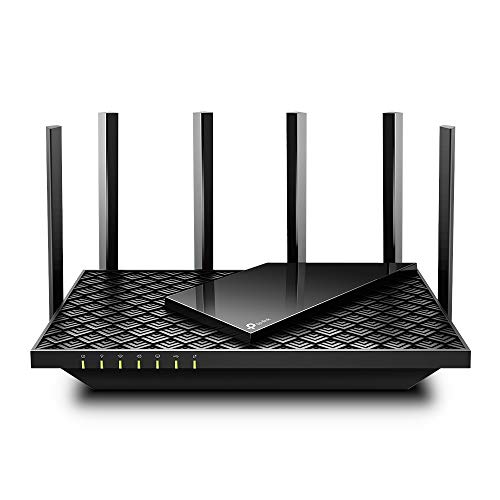
 TP-Link AC1900 Smart WiFi Router Dual Band RouterWi-Fi 5 AC19009.57 x 6.32 x 1.28 inches0.91 poundsCheck on Amazon



What's inside
- Why Wireless Control of an X32 Live Show Lives or Dies on the Router
- The X32 Has No Built-In Wi-Fi, and That Fact Shapes Everything
- What the Control Link Actually Demands
- 2.4 GHz or 5 GHz: The Band Decision at the Heart of the Rig
- Antennas, Gain, and the Value of a Clear View
- Clients, Monitor Apps, and the Hidden Load of a Full Band
- Four Families of Hardware, and Who Each One Suits
- Access Point Mode or Router Mode: Pick One Job and Set It Deliberately
- The Wired Ports Still Matter in a Wireless Plan
- Setting Up the Network, Step by Step
- Placement on the Day: Height, Sight Lines, and Honest Walking
- When the Room Fills: Faults That Only Appear After Doors
- Power, Racks, and the X32 Rack Touring Case
- Choosing by Venue Size and Show Type
- Check prices on Amazon
- Final Advice: Buy for the Room You Fear, Not the Room You Hope For
As an Amazon Associate I earn from qualifying purchases. This post may contain affiliate links at no extra cost to you.
Why Wireless Control of an X32 Live Show Lives or Dies on the Router
Walking a room with a tablet while a band runs through its first song is now a normal part of mixing on a Behringer X32. The engineer leaves the front of house position, listens near the bar, under a balcony, and beside a loud side fill, and adjusts the main mix from the places where the audience actually stands. A monitor engineer, or the musicians themselves, can do the same work for wedge and in-ear mixes. None of that freedom comes from the mixer alone. It comes from a small, often overlooked box plugged into the back of the console, and when that box is weak, badly placed, or badly configured, the freedom turns into a frozen screen at the worst possible moment.
The failure rarely looks dramatic at first. A fader on the tablet stops responding for two seconds. A meter bridge pauses, then jumps. The app reports that the connection was lost and offers to reconnect, right in the middle of a vocal entrance. The audio itself keeps passing through the X32, because the mixer is still doing its own work, but the person holding the tablet has lost control of it. In a quiet rehearsal room that is an annoyance. In a packed hall during a headline set, it is a genuine operational problem, because the engineer may be thirty metres from the console with no quick way to pull a fader down.
That is why choosing a router for an X32 is not the same job as choosing a router for a home office. Home networking rewards raw speed, wide feature lists, and painless setup for streaming and downloads. Live sound rewards something narrower and harder to advertise: a connection that stays attached, responds at once, and survives a room full of bodies, phones, metal truss, and competing radio traffic. The control data for a mixer is tiny compared with a video stream. What matters is not peak throughput but low delay, clean airtime, and a link that does not drop when two hundred people stand up between the access point and the tablet.
This guide works through that problem in the order it appears in real life. It starts with why the X32 needs an external box at all, then looks at frequency bands, antennas, client limits, and placement. It compares the main families of hardware, from compact travel routers to desktop units with external antennas, mesh nodes working as access points, and rack friendly options for an X32 Rack rig. It then gives a full setup sequence covering a fixed address for the mixer, the address pool for tablets and phones, network naming, security, and channel choice at the venue. A later section deals with faults that only appear once doors open, and with the wired backup and show discipline that keep a dropped tablet from becoming a dropped show.
The X32 Has No Built-In Wi-Fi, and That Fact Shapes Everything
Every member of the X32 family shares the same basic control model. The original X32, the X32 Compact, the X32 Producer, and the X32 Rack all provide an Ethernet port for remote control, and none of them contains a wireless radio. The Midas M32 family, which shares the same platform and much of the same control logic, follows the same pattern. There is no internal access point to switch on, no antenna socket for wireless control, and no menu page that creates a network out of nothing. If a tablet is going to talk to the mixer without a cable, an external router or access point has to be connected by Ethernet cable and has to create that wireless network.
The distinction matters because new users often search the mixer menus for a wireless setting that does not exist, or assume a phone can connect to the console the way it connects to a smart speaker. It cannot. The chain always has three parts: the mixer on a cable, the router or access point in the middle, and the control device on wireless. Break any one of those parts and control stops, even though the other two are healthy. A flat tablet battery, a loosened Ethernet plug, and a crashed router all produce the same blank screen, so a reliable rig treats all three with equal care.
The control side uses ordinary local networking. Applications such as X32-Edit on a computer and Mixing Station or the X32-Q monitor application on phones and tablets find the mixer at an address on the local network. That network does not need the internet at all. A router in a village hall with no upstream connection can still run a full show, because the tablet and the mixer only need to reach each other. In fact, a self-contained local network is often calmer than one shared with a venue system, since no unrelated traffic competes for airtime and no captive portal or venue firewall sits between the tablet and the console.
Two other connections on the back panel cause regular confusion and deserve plain statements. AES50 is not Ethernet networking, even though the sockets look similar and use similar cable. AES50 carries digital audio between the mixer and stage boxes such as the S16, S32, and SD8, using its own point to point protocol. Plugging a stage box into a router, or a router into an AES50 port, will not create a control network and can waste precious setup time while a crew hunts for a fault that is really a misunderstanding. Keep AES50 runs physically and mentally separate from the control network, label both, and never borrow a cable from one system to rescue the other without noting it. A Dante expansion card is also a separate matter. Dante is networked audio over Ethernet, fitted as an expansion card, with its own addressing and switch requirements. A control router chosen for tablet access should not be assumed to be a suitable Dante network, and the two jobs should be planned as separate systems unless the person designing the network fully understands both.
What the Control Link Actually Demands
Remote control traffic is light. Fader moves, mute changes, meter data, scene recalls, and the personal monitor adjustments made by musicians add up to a fraction of what a single laptop downloading files would use. This is good news and a trap at the same time. The good news is that an older or modest router can carry the data itself with ease. The trap is that buyers focus on headline speed figures, which tell them almost nothing about whether a singer standing at the far end of a long room, behind a crowd, will keep a stable monitor connection through a whole set.
Stability depends on signal quality at the exact spots where people stand with devices. It depends on how the radio handles many phones waking, sleeping, and reconnecting. It depends on how quickly the router hands out addresses, how it treats a tablet that has been idle with its screen off, and whether helpful sounding automation keeps moving clients between bands or between nodes at the wrong moment. A router that wins a speed contest on a desk may still steer a tablet from the 5 GHz band to the 2.4 GHz band mid-show, drop the session in the process, and leave the engineer reconnecting while the band plays on.
Reliability First, Then Coverage, Then Everything Else
A useful order of priorities helps when comparing models. First comes connection reliability under live conditions: the link should hold for hours, reconnect quickly after a device sleeps, and behave predictably when the room fills. Second comes coverage in the real space, including the stage for monitor control and the far corners of the audience area for front of house work. Third comes client capacity, because a band where six musicians each run a personal monitor app, plus a front of house tablet, a backup laptop, and a stage phone, can reach double figures faster than expected. Only after those three should extra features, decorative design, or headline wireless speed influence the choice.
2.4 GHz or 5 GHz: The Band Decision at the Heart of the Rig
The two bands available to ordinary wireless networking behave like different tools. The 2.4 GHz band travels farther, bends around obstacles a little more kindly, and passes through walls and scenery with less loss. In an empty room it can cover a long hall from one end to the other, which makes it tempting for a single access point placed at the stage or beside the mixer rack. Its weakness appears when the room fills and when neighbouring networks crowd in. Only a small number of channels in this band do not overlap, and in a built-up area those channels may already carry venue systems, neighbouring businesses, Bluetooth traffic, wireless camera links, and the personal hotspots in audience pockets.
Human bodies make the problem sharper. A crowd is mostly water, and water absorbs radio energy in these bands. A path that measured strong during an afternoon soundcheck, across an empty floor, can weaken a great deal once the same floor is packed shoulder to shoulder. The 2.4 GHz signal still tends to travel the longer path, but it does so through a noisier neighbourhood, sharing airtime with every other legacy device that cannot use anything else. Slower, in this band, also means each transmission occupies the air for longer, so a weak client at the back of the room can hold up service for everyone else connected to the same access point.
The 5 GHz band offers the opposite trade. It provides many more channels, wider channel choices, and usually a far cleaner local picture, because fewer nearby systems use it and its signals fade faster through walls, which limits how much of the street outside reaches the room. For mixer control, that cleanliness often matters more than distance. A tablet twenty metres away with a clear line of sight to a well placed access point on 5 GHz will usually enjoy a snappier, steadier session than the same tablet clinging to a distant 2.4 GHz signal that fights through three other networks. The cost is range and penetration. Put a wall, a metal door, or a dense crowd directly in the path and the 5 GHz link falls away sooner.
Dual band hardware, which offers both, is the sensible default for most X32 rigs. It lets the crew put front of house control on 5 GHz when the access point is high and visible, while retaining 2.4 GHz as a longer reach option for a stage box area, a side stage monitor position, or a room shape that defeats the higher band. The mistake is to let the router merge the two into one name and move clients around on its own judgement. For show use, many engineers give the bands separate network names, connect each device deliberately, and write down which band each position uses. Predictability beats automation when the show has started.
Antennas, Gain, and the Value of a Clear View
Antennas decide where the signal actually goes, and for live work the external antenna remains a strong practical advantage. A desktop router with two, three, or four visible antennas can be aimed, spread, and repositioned. Antennas that detach go further still: they can be replaced with higher gain types, mounted on short extension leads, or placed on top of a rack or cabinet while the router body stays with the mixer. A sealed unit with internal antennas may look neater on a desk, but it offers the crew no adjustment when the room turns out to have a dead spot behind a pillar or a balcony front that shadows the main floor.
Gain figures need careful reading. Higher gain does not create power from nothing; it reshapes the pattern, sending more energy toward the horizon and less straight up and down. That suits a long flat hall where the access point sits high at one end and the tablets are all roughly at head height across the floor. It suits a multi level venue less well if the engineer also needs coverage on a balcony far above the antenna plane or in a pit below it. For most single room venues, moderate gain external antennas, angled with some variety rather than all bolt upright, give a good balance. One vertical and one tilted antenna often serve a mix of tablet orientations better than a neat row of identical sticks.
Placement matters more than any antenna specification. Height and line of sight are the two cheapest performance upgrades in the whole system. A router sitting on the floor inside a rack, behind the metal side of a mixer case, will struggle no matter how impressive its radio claims are. The same router raised above head height, on top of a loudspeaker stack, a lighting truss, a tall stand, or a shelf with a clear view down the room, can transform coverage without any change of hardware. Radio in these bands behaves much like light from a lamp: shadows form behind solid objects, and raising the source shortens the shadows.
Keep the access point away from large metal surfaces where possible, and think about what stands between it and the working positions. A front of house position at the rear of a hall needs a path over the crowd, not through it, which is another argument for height. A monitor position at the side of the stage needs coverage that reaches across the performers without the signal passing through a backline of amplifier cabinets and drum hardware. In a theatre with a fly tower, scenery flats, and a proscenium wall, one access point may honestly not cover both the auditorium and the stage well, and planning for two wired access points, one on each side of the wall, is better engineering than hoping a stronger single box will force its way through.
Clients, Monitor Apps, and the Hidden Load of a Full Band
Counting clients sounds trivial until a real band arrives. Start with the obvious devices: a front of house tablet, perhaps a laptop running the editor at the mix position, and a phone carried by the system technician. Add the stage. A five piece band where every member adjusts a personal monitor mix with the Q application on a phone is already five more clients. Add a musical director with a tablet, a playback operator, and a spare device charging at the side of the stage, and the network may hold a dozen associations before the show begins. Each one is light in data, but each one must stay associated, keep its address, and reconnect gracefully after its screen sleeps between songs.
Inexpensive routers often carry low practical client limits, whatever the marketing implies about connected homes. Some handle a busy room of phones poorly because their processors, memory, or wireless design were built for a handful of active devices in a flat. Symptoms include new clients failing to join once a certain number are connected, addresses not being offered, or the whole wireless side restarting under load. For X32 duty, choose hardware with comfortable headroom above the largest crew and band the rig will serve, and treat very small travel units with caution when the plan involves a full stage of personal monitor users.
Behaviour matters as much as the headline limit. Musicians open the monitor app, make an adjustment, and lock the phone. Minutes later they open it again and expect their mix, on their assigned bus, at once. If the router has dropped the association aggressively to save power, or if an idle timeout somewhere in the chain forces a slow rejoin and a fresh address, the delay lands exactly when a performer is asking for more vocal before a song starts. Settings that favour staying connected over saving tiny amounts of power belong on a show network. Where the router offers controls for group key renewal, idle behaviour, or client isolation, read them with this pattern in mind. Client isolation, in particular, should normally be off for a control network where an administrator laptop may need to reach devices, and where odd isolation behaviour can break discovery between app and mixer.
Four Families of Hardware, and Who Each One Suits
Compact Travel Routers for Small, Fast Rigs
A travel router is the small square box that lives in a gig bag, draws power from USB, and can be running within a minute of opening the case. For a solo performer with an X32 Rack, a duo working small rooms, or an engineer who carries a personal control kit from venue to venue, that convenience is real. Setup is quick, replacement is easy to carry as a spare, and the unit can sit on top of the rack close to the mixer it serves. In a cafe, a small bar, or a rehearsal studio, where the farthest tablet is perhaps fifteen metres away and the client count is three or four, a good travel unit may be all the network the show ever needs.
The limits arrive with scale. Internal antennas give little adjustment, transmit coverage is modest, and the client ceiling can be reached by one full band. A travel router placed inside a rack sleeve, surrounded by metal and power supplies, loses much of its already limited reach. These units also tend to offer a single Ethernet socket or a small number of ports, so a wired backup position and a laptop may compete for connections. Treat the travel router as a deliberate choice for small rooms and low client counts, or as an excellent spare carried alongside a larger main unit, rather than as a universal answer for every hall on a tour.
Desktop Routers With External Antennas for General Venue Work
The conventional desktop router, with external antennas and several LAN ports, is the workhorse choice for most X32 systems. It offers the best balance of coverage, client capacity, configuration depth, and physical flexibility at a sensible level of complexity. The antennas can be arranged for the room, the body can sit on or above the mixer case, and the wired ports serve a front of house laptop, a backup computer at the stage, or a second access point without extra hardware. For a house system in a club, theatre, school hall, or place of worship, this is usually the family to start with.
Look for clear control over the basics rather than a long list of entertainment features. Separate band names, manual channel selection, a proper access point mode, control over transmit power, and the ability to switch off steering and fairness features matter more than gaming modes or parental controls. A model that allows a full configuration backup is valuable too, because a known good setup can be restored after an accident or cloned onto a spare unit kept in the same case.
Mesh Nodes Working as Access Points for Awkward Buildings
Mesh systems were designed for houses with dead spots, and that talent transfers to awkward venues: long corridors, split level foyers, thick walls between stage and auditorium, and festival sites where control is needed at both a stage and a distant mix tower. A mesh node used purely as an access point, wired back to the main router where possible, can put a clean signal in a second zone without asking one radio to punch through masonry. For a venue team that already owns a mesh kit, or a production company covering a building with several performance spaces, this approach can solve geometry problems that no single router can.
The caution is roaming. Mesh systems love to move clients to the node they judge best, and a moving engineer is exactly the client most likely to be handed over mid walk. A handover that interrupts the control session while crossing from stage coverage to auditorium coverage is worse than a slightly weaker signal that stays attached to one node. Where mesh nodes are used, wire them back to the main unit rather than relying on a wireless hop if the building allows it, give the show network a fixed plan, and walk the full working route during setup to find handover behaviour before the audience does. If the system cannot be persuaded to behave predictably, a pair of plain access points with the same network name and carefully chosen channels may serve the show better than an intelligent mesh with ideas of its own.
best advance featured mesh routers
Dedicated Access Points and Rack Friendly Options
At the larger end, a dedicated access point separates the wireless job from routing entirely. The mixer network can use a simple router or even a fixed addressing scheme for address management, while one or more ceiling or wall mounted access points handle the radio side with antennas designed for wide, even coverage. Theatres, large worship spaces, and permanent installs benefit most, because the access point can be installed high and central, cabled once, and left as part of the building. PoE, power over Ethernet, suits this style well, since one cable carries both data and power to a point far from a mains socket.
For an X32 Rack touring rig, physical integration matters as much as radio design. A small router or access point that mounts neatly in the rack, on a shelf, or on a short rail, with its power supply secured and its antennas brought to the rear or top panel, will survive transport far better than a desktop box loose on a foam pad. Antenna bulkhead extensions let the radiating parts sit outside the metal enclosure while the electronics stay protected inside. Power supplies should be latched, taped, or otherwise prevented from creeping out of their sockets on a vibrating stage. A rig that has to be rebuilt and reconfigured at every load-in will eventually be built wrong under time pressure; a rig that opens, powers up, and presents the same network every night removes a whole category of risk.
Access Point Mode or Router Mode: Pick One Job and Set It Deliberately
Most desktop hardware can work in two roles. As a router, it creates the local network, owns the address range, hands out addresses to clients, and would normally also manage an internet connection. As an access point, it simply bridges wireless clients onto an existing wired network and leaves address management to something else. For a standalone X32 network with no internet, router mode is the straightforward choice: one box defines the network, gives the mixer and tablets their addresses, and keeps the whole system self-contained in the flight case.
Access point mode is the right answer when the mixer already sits on a managed venue or production network, or when a second wireless unit is added to extend coverage. In that case only one device on the network should hand out addresses. Two active address servers on one network produce the classic intermittent fault where some tablets receive addresses in one range, some in another, and connections work or fail depending on which box answered first. That fault is maddening because it looks random and changes after every restart. Decide which single device manages addresses, switch every other unit to access point or bridge mode, and record the decision on the rig documentation.
The Wired Ports Still Matter in a Wireless Plan
It is easy to shop for a wireless product and ignore the sockets, but the LAN ports on the router earn their keep on show day. A wired laptop at front of house is the most reliable control surface in the building: it cannot roam, its battery arrangement is usually better, and its connection does not care about crowd absorption. Running a long Ethernet cable from the router at the stage to the mix position is not always practical, and in many rooms the whole point of the tablet is to escape that tether, but where the layout allows a wired backup at the main mix position, take it. It turns a wireless failure from a crisis into an inconvenience.
best 2 4 ghz 5ghz wifi extenders
Setting Up the Network, Step by Step
Good setup happens at a bench, not in a panic at the venue. Configure the router at home, in the studio, or in the warehouse, save the configuration, and arrive with a network that only needs its channel checked against local conditions. The sequence below assumes a standalone router creating a private control network for one mixer, which covers the great majority of X32 rigs. Where a step differs for access point mode, the difference is noted.
Step One: Start Clean and Update With Care
Begin from a factory reset if the unit has an unknown history, then set an administrator password that the production team controls and records in its own secure place. Update the firmware before the unit enters service if an update is available, because a stable, current firmware removes known faults and odd wireless behaviour. Do the update on a bench with reliable power, never in the hour before a show, and after updating, run through the full configuration again rather than assuming every setting survived. Once a firmware version proves stable on the road, think twice before changing it mid tour. A known behaviour, even with a minor quirk the crew understands, is often safer than a fresh release nobody has lived with yet.
Step Two: Give the Mixer a Fixed Address
Assign the X32 a static address on the local network, chosen inside the network range but outside the pool the router hands out automatically. For example, on a common private range the router itself might sit at the first address, the mixer can be fixed a little higher, and the automatic pool can begin well above both, leaving a tidy block for other fixed items such as a stage laptop or a second access point. The exact numbers matter less than the discipline: fixed devices get fixed addresses, visiting tablets and phones take whatever the pool offers, and the two groups never overlap. Write the mixer address on a label on the rack and in the show documentation, because that one number unlocks manual connection on any device.
Set the same fixed address in the mixer network settings, with the matching subnet mask and the router address as the gateway where the mixer asks for one, even though the network may never reach the internet. Then restart the connection, join a tablet to the network, and confirm control by address before moving on. If the mixer also offers an automatic address option, leave it off for show use. A mixer that changes its address after a power cut, because the address server was slow to answer, can vanish from the apps at the exact moment the crew is recovering from the power problem itself.
Step Three: Shape the DHCP Pool for the Crew You Actually Have
The automatic address pool, managed by DHCP, should be large enough for the full company with room to spare, but not so sprawling that the rig documentation becomes meaningless. A pool of a few dozen addresses suits most bands and crews comfortably. Keep the lease time reasonably long, measured in many hours or a full day, so a phone that sleeps through a long support set does not return to find its address given away and its session rebuilt. Short leases belong on public networks with constant turnover, not on a closed show system where the same fourteen devices should keep their identities from soundcheck to encore.
Where the router supports reservations, reserve addresses for the regular production devices: the front of house tablet, the monitor tablet, and the system laptop. Reservations combine the convenience of automatic setup with the predictability of fixed addressing, and they make fault finding easier because the same device appears at the same address in the client list every night. Guest devices, if they are allowed at all, can take ordinary pool addresses. Better still, keep the show network for show devices only, and let everyone else use the venue system or their own mobile data.
Step Four: Name the Network and Set Security Properly
Give the network a clear name that the crew will recognise in a list of venue networks, something tied to the production or the mixer rather than a default model name. If the bands are split, name them so the band is obvious at a glance. A clear name prevents the classic error of a musician joining the venue audience network with a similar name and then reporting that the monitor app cannot find the mixer. Print the name in the stage paperwork and say it aloud at soundcheck.
On the question of hiding the name, a hidden network offers little real protection and adds friction: devices must be configured by hand, some behave oddly when joining, and anyone scanning with intent can find the network anyway. Most show networks are better left visible to their own crew, protected by a proper password, and ignored by everyone else. Use WPA2 security with a strong passphrase, or the mixed mode a device offers when older control hardware needs it, and avoid obsolete security options entirely. Share the passphrase with the band and crew through production channels, change it between tours or productions if it has spread widely, and never leave a show network open. An open network in a public venue invites audience phones to join, fill the client list, and consume the airtime the show depends on.
Step Five: Choose Channels From a Scan at the Venue
Channel choice is the one part of configuration that should be finished at the venue, because only the venue knows its own radio traffic. Use a scanning application on a phone or laptop to look at both bands from the stage and from the mix position before doors. On 2.4 GHz, choose among the non-overlapping channels used in your region and pick the one with the weakest competing signals. On 5 GHz, the choice is wider; pick a channel that is empty or lightly used at both working positions, and stay with a moderate channel width for the reasons covered earlier.
Automatic channel selection can be left on in a fixed install where conditions change slowly, but for touring work manual selection after a scan is more predictable. A router set to auto may decide to move channels during a restart or after detecting interference, changing the landscape under connected devices at an unhelpful time. Note the chosen channels in the show report, along with any strong local networks discovered, so the next visit to the same venue starts from knowledge rather than guesswork. At festivals, where neighbouring stages and production compounds all run their own networks, coordinate with the other audio crews if possible. Two stages choosing the same clean channel while ignoring each other is a common and avoidable outcome of everyone scanning at different times of day.
Step Six: Switch Off the Clever Features That Fight the Show
Modern routers arrive with automation aimed at homes, and several of those features work against a control network. Band steering tries to move clients to the band the router prefers, which can interrupt a session. Airtime fairness tries to protect fast clients from slow ones by limiting how long weak devices may transmit, which sounds fair until the weak device is the front of house tablet at the back of the hall that now cannot hold its control link. Roaming assistance features may actively disconnect clients judged to have a weak signal, pushing them to rejoin elsewhere, when the show would rather they stayed attached to the only access point there is.
Turn these features off for the show network unless there is a specific, understood reason to keep one. The same applies to scheduled wireless switch-offs, eco modes that reduce radio power overnight, and guest network features that split the show clients into a separate segment. WMM and basic quality of service behaviour can stay at defaults; the control traffic does not need elaborate prioritisation on a dedicated network because there is nothing else of consequence to prioritise it against. Every feature switched off should be noted in the saved configuration notes, so a reset unit can be rebuilt to the same calm state without rediscovering each setting under pressure.
Placement on the Day: Height, Sight Lines, and Honest Walking
With configuration settled, placement is the remaining decision that changes results every night. Put the router or access point high, ideally above head height, with the clearest possible view of both the stage and the mix position. On a small stage that may mean the top of the mixer rack with antennas raised. In a club it may mean a shelf or bracket on the wall behind the stage, looking down the room. At an outdoor show it may mean a stand beside the stage, under weather protection, with the antennas above the heads of the front rows. The right answer is always the one that gives the radios an unobstructed path, not the one that hides the box most neatly.
Then walk the room the way the show will use it. Carry the actual front of house tablet to the mix position, to the far corners, under any balcony, and to any spot where an engineer might stand to judge a problem. Carry a phone running the monitor app across the stage, behind the backline, and into the wings. Watch the connection behaviour, not just a signal meter. Open the app, move faders, change pages, lock the screen, unlock it, and confirm the session returns promptly. A signal reading is a hint; a working session at the exact working positions is evidence.
Pay attention to the objects that create shadows. A metal lighting truss between the access point and the mix position, a stacked set of flight cases, a thick pillar, or a closed fire door can each carve a dead zone out of an otherwise strong layout. Small moves fix many of them: shifting the access point a metre sideways, raising it half a metre, or rotating an antenna can reopen a path. If a dead zone sits exactly where the engineer must stand, and no placement cures it, that is the venue telling the crew it needs a second wired access point. Accept the message during setup, while cable can still be run, rather than during the first song.
When the Room Fills: Faults That Only Appear After Doors
The defining frustration of venue wireless is the system that behaves flawlessly at soundcheck and falters at showtime. Understanding why makes the faults manageable. The crowd is the first cause. Hundreds of bodies absorb and scatter the signal, and hundreds of phones arrive with them, each probing for known networks, running hotspots, or holding its own connection to the venue system on the same channels. A link budget that had margin to spare over an empty floor can be consumed entirely by that change. The defence is margin built in advance: height, line of sight, a clean channel, the 5 GHz band where the path allows it, and a placement that sends the signal over the crowd rather than through the thickest part of it.
Other show systems add their own traffic and clutter. Wireless microphone and in-ear systems work in different spectrum and do not directly collide with Wi-Fi, but their receivers, antenna distribution, and cabling often share the same cramped rack and the same physical space, and a badly placed Wi-Fi antenna hard against other radio hardware helps nobody. Video walls, camera links, wireless intercom in the 2.4 GHz range where used, microwave ovens in venue kitchens, and neighbouring bars with strong networks all contribute to the local picture. This is why the channel scan should happen as late as practical, ideally with house systems powered and the room in show state, and why a scan from only one position can mislead. The stage and the mix position can live in quite different radio neighbourhoods in the same building.
Roaming and reconnection faults form the third group. A tablet carried from stage to front of house through a multi node layout may cling to a fading node or drop during a handover. A phone that sleeps aggressively may rejoin slowly. A router that restarts its wireless side after a perceived radar event on certain 5 GHz channels can clear the room of clients in one stroke; channels that require radar detection behaviour deserve care in venues near airports or weather radar, and choosing a simpler channel avoids the whole category. When a fault appears, note the time, the position, the device, and the band. Patterns in those notes solve problems that memory alone turns into folklore.
A disciplined response order helps when control drops mid show. First, keep mixing from the console surface or the wired backup; the show continues while the wireless side is a side issue. Second, glance at the basics: is the tablet still on the show network, does the router show power and link lights, is the Ethernet cable seated at both ends. Third, rejoin or reconnect by the known fixed address rather than waiting on automatic discovery. Only after the show should the crew start changing channels or settings, because a configuration change made in a panic, unrecorded, becomes tomorrow mystery fault. Write down whatever was changed, even on a scrap of tape on the rack, before load-out begins.
Power, Racks, and the X32 Rack Touring Case
Power is part of network reliability, even though it never appears in a wireless specification. A router powered from a loose wall adapter at the end of a shared strip can be unplugged by a cleaner, a guitarist looking for a phone charging point, or a case lid closing on the wrong cable. In a touring rack, power the router from the same conditioned distribution that feeds the mixer, secure the adapter so vibration cannot walk it out of its socket, and dress its cable so opening and closing the rack cannot pinch it. If the production carries a small uninterruptible supply for the mixer position, the router belongs on it too; a brief mains dip that the mixer rides through should not restart the network and scatter every tablet session.
For an X32 Rack system, think through the load-in sequence. The ideal rig powers the mixer and router together, the network appears under its known name within a short time, and the stage tablets join without anyone opening a settings page. Antennas should either live permanently mounted in working positions or have a marked, repeatable home, because an antenna screwed on at a random angle inside a closed rack door is decoration, not coverage. Where the rack is metal or tightly packed, external antenna positions on the rack rails or rear panel earn their small extra cost every single night.
Choosing by Venue Size and Show Type
Small rooms forgive a great deal. In a bar, cafe, or function room where the stage and the farthest listener are within about twenty metres, the client count is low, and one person mixes both mains and monitors, a compact travel router placed high on the rack, or a modest desktop unit, will usually serve well. Spend the effort on placement and a clean channel rather than on bigger hardware, and keep a wired laptop option at the small mix position if the room layout allows one.
Medium venues are the natural home of the desktop router with external antennas. A club or theatre holding a few hundred people, with a full band on personal monitors and an engineer who walks the room, needs the client headroom, the antenna adjustment, and the extra LAN ports this family provides. Plan the access point position as part of the venue setup conversation, not as an afterthought once the stage is built. If the building splits stage and auditorium with heavy construction, budget the second access point from the start.
Large and complex spaces reward infrastructure thinking. Halls with balconies, worship spaces with side rooms and overflow areas, conference venues with breakout spaces, and festival stages with a distant mix tower all push toward wired access points in planned positions, possibly fed through a small switch, with the router handling only the network management. In these spaces the question stops being which single box to buy and becomes where the coverage zones are, how they are cabled, and who owns the plan. A modest access point in the right ceiling position outperforms a flagship router in the wrong corner every time.
Check prices on Amazon
Live listings for the shortlist in this guide are pulled from Amazon below, so prices and availability are always current at the moment you look.
Final Advice: Buy for the Room You Fear, Not the Room You Hope For
Every engineer remembers the easy rooms, where any small box on top of the rack would have run the night without a flicker. Router choice should be made for the other rooms: the packed basement with a low ceiling, the wedding marquee full of phones, the theatre where the mix position sits behind glass or under a deep balcony, the festival changeover with twenty minutes and three other networks in the compound. Hardware that holds those nights, with height, clean spectrum, and a wired fallback, will feel almost boring in the easy rooms, and boring is exactly what show infrastructure should feel like.
Start with a dual band desktop unit with external antennas for general work, or a compact travel unit for genuinely small rigs, and add wired access points when the building demands them. Configure it once, carefully, with a fixed mixer address, a sane address pool, clear names, WPA2 security, manual channels chosen by scan, and the clever home features switched off. Place it high with a clear view, walk the room with the real devices, keep the wired backup honest, and write the whole plan down where the next engineer can find it. None of that requires exotic equipment. All of it together is the difference between wireless control as a pleasant extra and wireless control as a tool the show can lean on.
This article is based on published manufacturer documentation and publicly released specifications for the mixer family, control applications, and networking hardware discussed, together with established wireless networking practice for live venues. The writer has not personally used the products covered here, and no direct handling of those products is claimed or implied anywhere in the guide above. Retailer links, where a publication chooses to place them, may earn the publisher a commission, and that commission never adds anything to the amount a reader pays. Readers should confirm current specifications against the documentation for their own mixer variant and firmware before a production depends on any single detail.
When the house lights fall and the first song lifts a room full of strangers onto its feet, the best router for an X32 is simply the one nobody in the building ever has to think about again.