What's inside
- Key Takeaways
- Quick Picks
- How Do You Choose a Router for Speakers Rather Than for Speed Tests?
- Which Networks Keep Every Speaker Present, Grouped and In Time?
- What Network Conditions Do Sonos Speakers Actually Need?
- How Do You Set Up a Mesh Network for Speakers, Step by Step?
- Why Do Speakers Cling to the Wrong Node, and What Is Band Steering?
- How Do the Six Compare on Coverage Style and Control?
- What Mistakes Make Sonos Systems Miserable?
- Final Recommendation
- Frequently Asked Questions
- Related Guides
As an Amazon Associate I earn from qualifying purchases. This post may contain affiliate links at no extra cost to you.
gizmoverdict.com is reader-supported. When you buy through links on our site, we may earn an affiliate commission.
Where to buy: The six systems below link to listings checked against this site’s verified product pool; this guide leaves dollar figures and fixed star scores on the listings themselves, and no Sonos speaker is a pick — speakers are the clients this network must serve, never the network itself. One disclosure frames everything that follows: not a single listing title in this pool claims Sonos compatibility. Each spec box records that silence in the standing formula, and the reviews instead grade what genuinely decides a Sonos household’s happiness: coverage where the speakers actually stand, a stable 2.4 GHz layer, backhaul that does not wobble, and network behaviour that keeps every speaker visible to the app.
The best routers for Sonos speakers are not found by searching for a Sonos logo, because multiroom audio makes demands that spec sheets rarely print. A Sonos system is a small society of computers that happen to play music: speakers in the kitchen, the bedroom, the bathroom and the garden room must discover each other, stay in synchrony to within a fraction of a blink, receive their streams, and answer the app on your phone instantly and every time. The failure modes are domestic and maddening — the speaker that vanishes from the app on Saturday mornings, the grouped rooms that drift apart during a dinner party, the new speaker that refuses to join during setup. Almost none of these are bandwidth problems. A music stream is a trickle next to a video call. They are coverage problems, roaming problems and network-citizenship problems, and they are solved by the shape of the Wi-Fi rather than by its top speed.
That is why five of these six picks are mesh systems and the sixth is an extendable router: the Sonos question is fundamentally a geography question. Speakers live in the rooms routers are worst at reaching — kitchens full of metal, bathrooms full of tile and water, bedrooms at the far end of corridors — and they live there permanently, without the option of being carried closer to the router when the signal fades. A mesh blanket, laid properly, gives every speaker a near neighbour to talk to. The differences among the picks are the differences that matter to that blanket: how the nodes talk to each other, how much house the kit honestly covers, how the system treats the 2.4 GHz band the speakers lean on, and how much control the owner keeps when something needs adjusting by hand. Geography first, then temperament, then everything else — that ordering runs through every verdict below.
Our Top Picks
Key Takeaways
- No title in this pool claims Sonos compatibility; every pick is marked not-stated, and graded on coverage and behaviour instead.
- Sonos trouble is rarely bandwidth — it is weak signal in awkward rooms, roaming speakers, and speakers and phones landing on different network segments.
- Mesh systems dominate this pool because speakers live permanently in the rooms single routers reach worst.
- A stable 2.4 GHz layer matters more to speakers than headline Wi-Fi 7 speed; placement and backhaul decide it.
- Wiring one speaker or one mesh node can stabilise a whole system — but wire thoughtfully, because looped wired paths confuse networks very badly.
- Keep speakers and the controlling phone on the same network, with no double NAT or isolated guest segment between them.
- Add speakers and nodes one at a time, verifying patiently as you go; rushed multiroom setups hide their own faults for weeks.
Quick Picks
| Pick | Badge | Why it is here |
|---|---|---|
| TP-Link Deco S4 (3-Pack) | Value mesh blanket | An AC1900 mesh trio that covers a typical home’s speaker rooms without flagship ceremony. |
| Amazon eero Pro 7 | Tri-band Wi-Fi 7 flagship | A tri-band mesh Wi-Fi 7 router whose dedicated inter-node capacity suits speaker-dense, device-dense homes. |
| Amazon eero 6 | Simple starter mesh | The approachable eero mesh router for smaller homes beginning a multiroom system. |
| ASUS ZenWiFi BD4 | Configurable WiFi 7 mesh | A WiFi 7 mesh router from the maker that lets owners separate bands and tune settings by hand. |
| NETGEAR Orbi 370 Series (3 Pack) | Big-coverage Orbi | A WiFi 7 mesh system rated up to 6,000 sq ft, for houses where speakers live at the far ends. |
| ASUS RT-AX1800S | Single-router alternative | An extendable WiFi 6 router for compact homes where one well-placed box genuinely reaches every speaker. |
How Do You Choose a Router for Speakers Rather Than for Speed Tests?
We graded this pool on the four behaviours a Sonos household actually experiences. First, coverage honesty: does the kit’s design — node count, mesh architecture, the coverage figure where a title prints one — plausibly put a strong signal in kitchens, bathrooms and end bedrooms, the rooms speakers inhabit? Second, backhaul quality: mesh nodes must talk to each other, and systems differ in whether that conversation shares the clients’ airtime or has capacity of its own; a speaker grouped across two nodes inherits the quality of the link between them. Third, the 2.4 GHz layer: most speakers lean on it, it carries through walls better than the faster bands, and a system that treats it as an afterthought will produce exactly the vanishing-speaker symptoms this keyword’s readers are trying to escape. Fourth, citizenship: whether the system keeps all speakers and phones on one happy segment, exposes enough settings to fix the odd quirk, and stays maintained with firmware updates.
Two deliberate exclusions shaped the guide. We did not grade on peak wireless speed, because a speaker’s stream could run on a fraction of any band here and synchrony is a latency-and-stability property, not a throughput one. And we did not credit any pick with Sonos-specific features, because no title claims any — the not-stated line appears in every spec box, and the analysis sticks to networking behaviour that a reader can verify from the system’s design. Within those rules the six divide by house size and owner temperament: value mesh, flagship mesh, simple mesh, configurable mesh, big-house mesh, and one honest single router for the homes that never needed mesh at all.
A note on evidence, since speaker households run on anecdote. Every multiroom owner has a story in which some unlikely change — moving a node a metre, retiring a baby monitor, a neighbour’s new router arriving on the same channel — transformed the system overnight. Such stories are data about how many variables share the air, not instructions. This guide therefore prefers the remedies with mechanisms: shorten a speaker’s path, strengthen its band, unify the segment, slow the rate of change. When a reader’s house disagrees with a general claim here, the mechanism still points at the fix, which is more than a spec sheet or a testimonial can offer. Choose the system whose remedies you can actually perform, in your rooms, with your patience — that is the real selection criterion hiding under all the others.
Which Networks Keep Every Speaker Present, Grouped and In Time?
The reviews below read each system the way a speaker would experience it: signal in awkward rooms, behaviour when rooms group, and the temperament of the app that runs it. Prices and ratings are absent, as throughout this site; the titles’ own figures are the only numbers trusted.
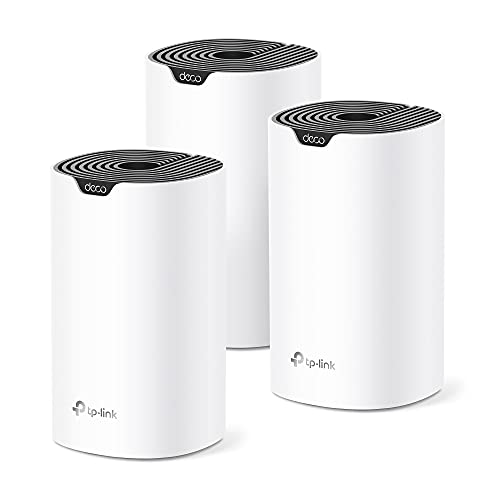
TP-Link Deco S4 (3-Pack) — Value mesh blanket
The Deco S4 is the workhorse answer to the Sonos question in an ordinary house. Its title describes a mesh AC1900 WiFi system in a three-pack, and three nodes is the meaningful figure: one at the router’s home, one mid-house, one toward the far rooms, laying a blanket under the kitchen, the main bedroom and the living room in a single purchase. For speakers, that geometry matters more than the AC1900 class printed beside it. A speaker streaming in the kitchen does not care that the system predates WiFi 6; it cares that a node sits within a room or two, that the 2.4 GHz layer is strong at the counter where it lives, and that the node-to-node path back to the music source is short and unhurried. The S4’s mesh was designed for exactly this domestic scale, and its app-led setup suits households that want the blanket laid without a networking seminar.
The trade-offs are generational and should be bought knowingly. AC1900 is a Wi-Fi 5 platform: its nodes share their bands between clients and backhaul, so a house simultaneously streaming television in 4K, gaming and grouping six speakers is asking more of the air than this system loves. Device-dense homes will also feel the older platform’s smaller client comfort. But the Sonos-specific ledger stays favourable — music is light traffic, the mesh keeps speakers near a node, and TP-Link’s Deco app exposes the essentials, including the ability to see which node each device uses. For the flat, the terraced house, the modest family home whose speaker count is three or four rooms of music, the S4 remains the proportionate blanket: coverage first, ceremony nowhere.
One placement habit decides this system’s success with speakers. Resist clustering nodes where the wiring is convenient; place them where the speakers are. A node in the hall outside the kitchen serves the kitchen speaker better than a node in the study beside the router, and the Deco app’s per-device view lets you verify each speaker’s chosen node and signal after placement. Ten minutes of that verification, done once, is the difference between a system that merely covers the house and one that covers the speakers — the distinction this entire keyword exists to teach.
Longevity is the honest shadow over this pick. A Wi-Fi 5 mesh bought today will serve speakers faithfully for years, because speakers are undemanding clients that rarely renew themselves — the household’s phones and laptops will outgrow the S4 before its speakers do. Buy it as the speaker-and-basics layer of a home whose heavy lifting is modest, and it will not embarrass you. Buy it as the foundation of a coming device empire, and the Orbi and eero Pro picks further down are the wiser money. The S4’s charm is that it never pretends to be the empire. It is a good blanket, honestly sized, at the end of the market where blankets are bought by the roomful of real houses.
- Model: TP-Link Deco S4, 3-pack
- Class: mesh AC1900 WiFi system (from the listing title)
- Nodes in kit: 3
- Sonos compatibility: Not stated in the listing title — verify with TP-Link documentation
- Wireless generation: Wi-Fi 5
Strengths
- Three nodes in the box blanket a typical home’s speaker rooms in one purchase.
- App-led setup and per-device visibility suit non-specialist households.
- Music’s light demands play to this system’s strengths rather than its limits.
Trade-offs
- Wi-Fi 5 backhaul shares airtime with clients; very busy houses will feel it.
- No WiFi 6 or 7 efficiency for dense device fleets.
- Sonos behaviour is a matter of placement and settings, not a title promise.
Best for: a typical home seeking mesh coverage for a handful of speaker rooms. Not suited for: a large, device-dense house streaming everything at once.

Amazon eero Pro 7 — Tri-band Wi-Fi 7 flagship
The eero Pro 7 brings the heaviest networking artillery in this pool to a problem that mostly needs kindness, and the kindness turns out to be real. Its title calls it a tri-band mesh Wi-Fi 7 router, and tri-band is the operative word for multiroom audio: with an additional band available for the mesh’s own conversations, the nodes can talk to each other without continually borrowing the airtime your speakers and phones are using. Grouped rooms stay grouped because the path between a kitchen speaker and a bedroom speaker rides a network whose inter-node links are not competing with the evening’s streaming. Wi-Fi 7’s refinements then keep a dense modern household — and speaker households are dense, because every speaker is a full network citizen — from developing the small congestions that present as audio dropouts.
eero’s philosophy is the counterweight. The system is famously app-bound and automation-leaning: it prefers to make band, channel and roaming decisions itself, and it offers the owner fewer manual levers than the ASUS or Orbi picks. For most Sonos households that is a blessing — the vanishing-speaker genre of problem is often caused by an owner’s well-meant manual setting, and eero simply declines to offer the rope. For the minority of homes with an unusual quirk — a speaker that clings to a far node, a band behaviour that needs separating by hand — the same philosophy can frustrate, because the fix must be persuaded out of an automated system rather than set directly. Judge your own temperament honestly. The eero Pro 7 is the flagship for households that want the network to be an appliance: plugged in, updated by itself, and beneath notice while the music plays.
Speaker households also benefit from a quieter eero trait: its mesh is built to expand node by node, and speakers are usually the reason for expanding. The porch speaker, the workshop speaker, the guest-room speaker each extend the blanket’s edge, and adding a node near them is a cleaner answer than asking a distant node to shout. Plan the first layout for the rooms that matter most, live with the system through a few weekends of real use, and let the speakers’ own behaviour — visible in the app as connection quality — dictate where node two or three earns its shelf space.
There is a subscription-shaped footnote to read before buying into any premium mesh ecosystem, this one included: some advanced features in this market live behind optional subscriptions, and households should confirm which capabilities are core and which are extras at purchase time, from the maker’s own pages. The core mesh behaviour a Sonos household needs — coverage, roaming, stability — is the product itself, not an add-on, on the systems in this guide. Read the fine print once, with that distinction in mind, and the Pro 7’s proposition stays clean: flagship hardware, automated manners, and a network that treats a six-room group as a normal Tuesday.
- Model: Amazon eero Pro 7
- Class: tri-band mesh Wi-Fi 7 router (from the listing title)
- Bands: tri-band — extra capacity for mesh backhaul
- Sonos compatibility: Not stated in the listing title — verify with Amazon documentation
- Management: app-led, automation-first
Strengths
- Tri-band design protects inter-node traffic from client congestion — grouped rooms benefit directly.
- Wi-Fi 7 platform suits dense, modern, speaker-rich households.
- Automation-first management removes most owner-inflicted configuration errors.
Trade-offs
- Few manual levers when an unusual speaker quirk needs a hand-set fix.
- Flagship class; smaller homes will not use its headroom.
- App-bound administration assumes comfort with phone-based control.
Best for: a busy, speaker-dense home seeking flagship mesh with minimal administration. Not suited for: an owner who wants manual control over bands and roaming behaviour.
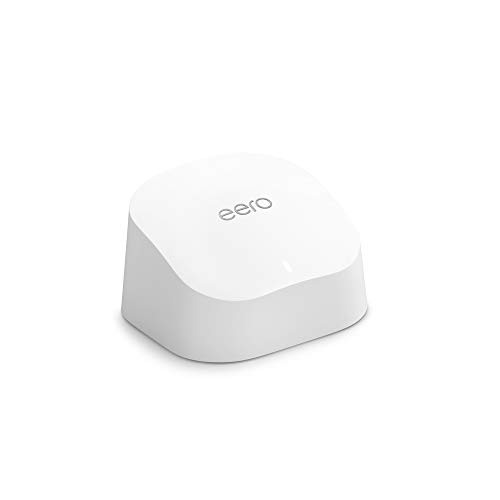
Amazon eero 6 — Simple starter mesh
The eero 6 is the pool’s invitation to begin. Its title is the plainest here — an eero 6 mesh wifi router — and the plainness matches the product’s role: a WiFi 6 mesh unit for smaller homes that need a real blanket rather than a single shouting box, administered entirely through an app that treats networking as a household utility. For a first Sonos system — a soundbar in the living room, a speaker in the kitchen, one in the bedroom — the eero 6’s virtues align exactly with the need. The mesh puts a node near the far rooms, the WiFi 6 platform handles a modern device count comfortably, and the absence of manual complexity means the network under the speakers is configured the way its maker intended, which is to say correctly, by default.
Its ceiling is size and density. A single eero 6 unit or a small set suits flats and modest houses; the sprawling or gadget-crammed home should look at the Pro 7’s tri-band capacity or the Orbi’s printed coverage figure instead. Dual-band mesh also means backhaul shares bands with clients — fine at this scale, a constraint at larger ones. None of that diminishes the pick for its intended reader, who is not building a device fleet but a music system that works in every room it occupies. In Sonos households the most common network sin is overbuying the centre and under-covering the edges; the eero 6’s expandable modesty inverts that sin, letting the blanket grow a node at a time as speakers colonise new rooms.
Practical counsel for this pick is mostly about beginnings. Set the system up before the speakers arrive in force: a network that is stable for a week of ordinary use is the right foundation for a Saturday of speaker setup, whereas configuring both on the same afternoon multiplies mysteries. Add speakers one room at a time, confirming each in the app before moving on, and resist renaming networks mid-project. The eero 6 rewards that patience with the quality its line is known for — an unremarkable network, which under a multiroom music system is the highest available praise.
The eero 6 also suits a particular Sonos life stage: the renter’s. Landlords frown on cabling and ceiling mounts; a small eero set asks for neither — nodes on bookshelves, speakers where they fit, everything removable in an afternoon when the lease ends. Multiroom audio used to be an owner’s game, wired into walls. Systems of this class, paired with wireless speakers, make it a tenant’s game too, and the network discipline this guide teaches — one network name, nodes near speakers, additions made slowly — was practically written for homes that must stay reversible.
- Model: Amazon eero 6
- Class: mesh WiFi 6 router (from the listing title)
- Bands: dual-band mesh
- Sonos compatibility: Not stated in the listing title — verify with Amazon documentation
- Management: app-led
Strengths
- The gentlest route from a single router to a genuine speaker-serving mesh.
- WiFi 6 platform covers a smaller home’s modern device count.
- Expandable node by node as the speaker system colonises rooms.
Trade-offs
- Dual-band backhaul and modest capacity cap its house size.
- Automation-first control offers few manual fixes for odd quirks.
- Large or dense homes should start with the Pro 7 instead.
Best for: a smaller home starting a multiroom system on a calm, simple mesh. Not suited for: a big household with many speakers and heavy simultaneous streaming.

ASUS ZenWiFi BD4 — Configurable WiFi 7 mesh
The ZenWiFi BD4 is the mesh pick for the owner who reads settings menus recreationally. Its title states a WiFi 7 mesh router, and behind that sits ASUS’s AiMesh platform and the ASUSWRT tradition: mesh convenience with an unusually deep bench of manual controls for a consumer system. For Sonos households, one of those controls deserves naming above the rest — the ability to run a dedicated network name for the 2.4 GHz band, or to bind particular devices to particular nodes and bands. Most speakers behave beautifully on a modern combined network; a minority of rooms and devices behave better when the speaker joins a clearly separated 2.4 GHz network that never asks it to make band decisions. On the BD4, that experiment is a setting. On automation-first systems, it is a hope.
WiFi 7 brings the platform’s other half: modern capacity and backhaul behaviour for houses whose problem is not one awkward speaker but forty devices negotiating. The ZenWiFi line is also designed to look like furniture rather than infrastructure, which matters more in speaker households than in server closets — nodes live in living rooms and bedrooms, in sight, beside the speakers themselves. A node the household is willing to place openly, on a shelf rather than hidden behind a cabinet, is a node doing its job at full strength; industrial-looking hardware tends to get banished to cupboards, and cupboards eat signal. ASUS seems to understand that the aesthetics of a mesh node are a networking specification.
The counterweight is responsibility. Deep settings cut both ways: the owner who can separate bands by hand can also misconfigure roaming, isolation or channel choices in ways that manufacture the very vanishing-speaker symptoms this guide exists to prevent. The BD4 is therefore the pick for the household with a confident administrator — or a willingness to change one setting at a time and observe. In such hands it is arguably the most capable Sonos platform in this pool, because every known remedy for speaker quirks, from band separation to per-device binding, is present in its menus rather than locked behind a vendor’s philosophy.
A worked example shows the BD4’s value concretely. Suppose one heritage speaker in a tiled bathroom drops from the app twice a week while the rest of the system is flawless. On an automated mesh, your remedies are relocation and hope. On the BD4, you can bind that speaker to the nearest node, confirm it is holding the 2.4 GHz band rather than flirting with a distant 5 GHz signal, or stand up the separated speaker network and move the whole fleet onto it in one session. Each experiment is reversible and observable. That is what configurability buys in a speaker household: not features for their own sake, but a diagnostic path when one room misbehaves — and in multiroom audio, it is always, eventually, one room.
- Model: ASUS ZenWiFi BD4
- Class: WiFi 7 mesh router (from the listing title)
- Platform: AiMesh with deep manual controls
- Sonos compatibility: Not stated in the listing title — verify with ASUS documentation
- Notable control: band separation and per-device binding options
Strengths
- Manual depth lets an owner apply every known speaker-quirk remedy directly.
- WiFi 7 capacity suits dense, modern households.
- Furniture-friendly design encourages the open placement mesh needs.
Trade-offs
- Deep settings can be mis-set; it rewards a careful administrator.
- More system than a small flat’s two speakers require.
- Sonos behaviour still depends on placement and configuration, not a title claim.
Best for: a confident owner seeking WiFi 7 mesh with hands-on speaker remedies. Not suited for: a household requiring the network to administer itself entirely.

NETGEAR Orbi 370 Series (3 Pack) — Big-coverage Orbi
The Orbi 370’s title carries the pool’s only printed coverage promise: a WiFi 7 mesh system, up to 6,000 sq ft, in a 3 pack. Treat the figure the way this site treats all coverage claims — as a best-case, open-plan number — and it still tells the essential truth about the pick’s intent. This is the system for the house where the speaker problem is measured in metres and masonry: the long ranch, the three-storey townhouse, the home whose garden room and garage workshop also have speakers in them. Three WiFi 7 nodes, placed with discipline, put a near neighbour within reach of rooms a single router cannot pronounce, and Orbi’s long-standing design focus — strong inter-node links as the system’s spine — serves grouped playback across a big floor plan, where the path between the patio speaker and the kitchen speaker may cross two nodes.
Orbi’s administration sits between eero’s automation and ASUS’s depth: a capable app and web interface, sensible defaults, and enough settings exposed for the common remedies without inviting a full networking hobby. For the big-house Sonos owner that middle position is often the sweet spot, because the problems at this scale are geographic first and configurational second. Solve the geography — nodes placed at honest intervals, none asked to relay through two brick walls, the furthest speaker still within a comfortable hop — and most big-house audio gremlins retire. The WiFi 7 platform then absorbs the household’s other ambitions without the mesh becoming the story.
Discipline in placement deserves the final word, because 6,000 square feet is a promise about area, not about your walls. Brick, concrete, foil-backed insulation and large appliances all tax the blanket; the correct response is node placement that respects them — nodes in open air, roughly in sight of the rooms they serve, never all three lined up along one corridor like lanterns. Wire a node with Ethernet backhaul where the house allows it and the furthest rooms gain the most. The Orbi gives you the coverage budget; spending it wisely is the owner’s half of the bargain, and speakers are the auditors that report, room by room, whether it was spent well.
Big houses also collect a particular Sonos pattern: the outdoor and outbuilding speakers, on patios and in workshops, sitting at the blanket’s ragged edge where signal arrives weather-dependent. The Orbi’s budget of coverage is what such rooms draw on, and the correct technique is to give the edge its own node rather than asking the house’s centre to reach through two exterior walls. Exterior walls are the most expensive obstacles in domestic radio; a node inside the workshop, linked by a strong hop or a cable run, converts a marginal speaker into a citizen. If your speaker map includes the garden, judge every system in this pool by that room first — it is the examination the others merely sit.
- Model: NETGEAR Orbi 370 Series, 3 pack
- Class: WiFi 7 mesh system (from the listing title)
- Coverage claim: up to 6,000 sq ft (from the listing title; best-case figure)
- Sonos compatibility: Not stated in the listing title — verify with NETGEAR documentation
- Backhaul option: Ethernet backhaul where cabling allows
Strengths
- The pool’s largest printed coverage figure, aimed at genuinely big homes.
- Orbi’s inter-node focus suits grouped playback across long distances.
- WiFi 7 platform with a middle path between automation and manual control.
Trade-offs
- Coverage figures assume kind walls; masonry houses must place nodes with care.
- Oversized for flats and small homes, where its nodes would crowd each other.
- Three-node kits ask for three good placements, which some floor plans resist.
Best for: a large home seeking WiFi 7 mesh reach for speakers in far rooms. Not suited for: a compact home where two nodes would already be company.

ASUS RT-AX1800S — Single-router alternative
Every mesh guide needs its control case, and the RT-AX1800S is this one: a dual-band WiFi 6 extendable router, per its title, with subscription-free network security. In the right home — a flat, a small house with kind walls, speakers in two or three rooms arranged around one sensible router position — a single modern router serves Sonos perfectly well, and buying mesh would be buying nodes to stand within earshot of each other. The AX1800S covers that home with WiFi 6 competence, and its extendable design is the honest escape hatch: if a far bedroom speaker later proves the exception, an AiMesh partner can be added and the single router becomes the root of a small mesh rather than landfill.
Its Sonos-relevant virtues are the ASUS platform’s. The settings expose band behaviour, so an owner can test a separated 2.4 GHz network name for the speakers if the combined network ever gives a speaker ideas; the interface shows connected clients clearly enough to confirm each speaker’s band and signal; and the subscription-free security avoids a class of cloud features that occasionally complicate local device discovery. None of this is claimed as Sonos support — the spec box repeats the not-stated line — but it is the practical toolkit with which speaker quirks on a single-router network get solved, and it is deeper than most single routers offer at this class.
Buy it with the geography test passed, not hoped for. Stand where the router will live; count the walls to the furthest speaker; if the answer involves a chimney breast, a foil-lined kitchen and a floor slab, the mesh picks above exist for you. If the answer is a normal flat’s worth of plasterboard, the AX1800S is the proportionate, configurable, extendable answer — and the money not spent on unneeded nodes buys a great deal of music.
Position is this pick’s whole craft, so spend the effort there. A single router should live high, central and unhidden — on a shelf in the middle room of the flat rather than in the corner cabinet the internet installer chose for cabling convenience. Speakers then inherit the best version of its signal, and the 2.4 GHz layer, which reaches furthest, arrives at the bedroom speaker with margin to spare. Owners are routinely surprised how much of a “Sonos problem” was a router-position problem wearing a disguise; on a single-router network there is nowhere else for the blame to hide, which is its own diagnostic virtue.
- Model: ASUS RT-AX1800S
- Class: dual-band WiFi 6 extendable router (from the listing title)
- Security: subscription-free network security (from the listing title)
- Sonos compatibility: Not stated in the listing title — verify with ASUS documentation
- Expansion: AiMesh-compatible growth path
Strengths
- All the router a compact home’s speakers actually need, with settings depth to spare.
- Extendable design converts to mesh later without replacing the anchor.
- Clear client views make verifying each speaker’s connection simple.
Trade-offs
- One box cannot defeat hostile architecture; far speakers will expose it.
- AX1800 capacity is mainstream, sized for ordinary device counts.
- No mesh blanket until a partner node is added.
Best for: a compact home seeking one configurable router for its speakers. Not suited for: a large or masonry-heavy house with speakers at the extremes.
What Network Conditions Do Sonos Speakers Actually Need?
Strip the folklore away and a Sonos system asks for five mundane things. First, signal: every speaker should sit in coverage it would describe as comfortable, which in practice means a node or router in the same room or the next one, not three walls away. Second, sameness: speakers and the phones controlling them must share one network in the full sense — same segment, no guest isolation between them, no second router double-NATing a corner of the house into a separate world where the app cannot follow. Third, a healthy 2.4 GHz layer, because speakers lean on it and because it is the band that survives kitchens and corridors. Fourth, an uncrowded path between grouped speakers, which is backhaul by another name. Fifth, time: a network left stable, on maintained firmware, without weekly experiments. Multiroom audio is a conservative technology wearing a modern costume; it rewards boring networks extravagantly.
Two traditional Sonos arrangements deserve translation into mesh-era language. The first is the wired speaker: historically, cabling one speaker created a dedicated speaker mesh. In a modern Wi-Fi deployment the equivalent stabiliser is wiring a mesh node or placing a speaker within easy reach of one — and if you do wire speakers directly, wire one, or wire through a properly configured switch, because multiple speakers cabled into a network without loop management can create broadcast storms that look exactly like a haunted house. The second is the dedicated network: some veterans once ran speakers on their own router. The modern, saner version is a dedicated band or network name on a configurable system like the ZenWiFi BD4 — separation as a setting, not as a second infrastructure. Both translations share a moral: the old remedies were about stability and singleness of path, and those remain the goals under new names.
A word about the controller’s experience completes the picture, because the app is where the household judges the network. When you tap a room, the app must discover the speaker, confirm its state and issue commands across the same network the music uses; discovery relies on the local network letting devices announce and find each other freely within the segment. Features that isolate clients from one another — guest modes, client isolation toggles, an over-zealous second router segmenting the house — break discovery while leaving raw internet working, producing the maddening state where every speaker can stream yet none can be seen. This is why this guide keeps returning to sameness: one network, one segment, no isolation between the chairs and the speakers. If a setting’s description mentions isolating devices for security, it belongs on the guest network, never on the one the music lives on.
How Do You Set Up a Mesh Network for Speakers, Step by Step?
First, place the main node where the internet enters, as centrally as the wiring allows, and bring the system up on its own for a day of ordinary use. Second, add satellite nodes one at a time, placing each roughly halfway between the main node and the room it must serve — close enough to hold a strong link to its neighbour, far enough to extend the blanket — and confirm in the app that each node’s own connection quality reads healthy before placing the next. Third, walk the speaker rooms with a phone and check signal where each speaker will stand, at the speaker’s height, not at yours; a shelf in a tiled bathroom is a different radio environment from the doorway.
Fourth, add speakers one room at a time, confirming each appears in the app and plays grouped with a neighbour before adding the next; grouping is the real test, because a speaker can stream alone on a weak link that synchrony would expose. Fifth, fix the small things while they are small: reserve addresses for the speakers if your platform offers reservations, note which node each speaker prefers, and resist rearranging nodes for aesthetics during the first fortnight. Sixth, run the household’s worst evening — televisions, calls, a houseful of phones — with music grouped across the furthest two rooms. If that evening passes unremarked, the network is finished; write down the node positions, and let the system’s only remaining job be disappearing.
Seventh, and last, teach the household the one rule that protects the whole arrangement: the network’s name and the nodes’ positions are now load-bearing, like the boiler’s settings, and are changed deliberately or not at all. Most multiroom misery in mature systems traces not to equipment ageing but to a well-meant afternoon of rearranging — a node moved for a party, a network renamed for tidiness, a relative’s extender plugged in to help. A small note in a drawer, listing the node positions and the network name’s birthday, has saved more dinner parties than any firmware feature in this guide.
Why Do Speakers Cling to the Wrong Node, and What Is Band Steering?
Two behaviours explain most remaining speaker mysteries after placement is right. The first is stickiness: a speaker that joined the network near one node may keep that association as conditions change, holding a weakening link to a distant node while a stronger one sits in its own room. Phones roam aggressively because they are carried; speakers, being furniture, often wait to be pushed. Mesh systems handle this with varying grace — some nudge clients toward better nodes, some expose per-device binding for owners to do the nudging, which is one of the BD4’s practical advantages. The remedy ladder runs from a speaker reboot, through toggling its connection in the app, to binding it deliberately where the platform allows. Knowing stickiness exists converts an apparently haunted speaker into a client with an outdated opinion about geography.
The second behaviour is band steering, the network’s habit of encouraging dual-band clients onto the faster 5 GHz band. For a laptop that is wisdom; for a speaker at the edge of coverage it can be folly, because the 2.4 GHz band it is steered away from is the one that reaches its shelf reliably. Modern systems steer more gently than their ancestors, and most speakers in most rooms are fine. When one is not, the configurable systems in this pool offer the surgical options — a separated 2.4 GHz network name for the speaker fleet, or per-device band preferences — while the automated systems ask you to solve it with placement, moving a node until the speaker’s preferred band is also the strong one. Neither philosophy is wrong. They are different answers to the same small radio drama, and the Sonos household should choose the philosophy it would rather live with at 11 p.m. when the bedroom speaker blinks.
How Do the Six Compare on Coverage Style and Control?
| Pick | Architecture | Control style | Sonos in title |
|---|---|---|---|
| TP-Link Deco S4 (3-Pack) | Mesh, Wi-Fi 5, three nodes | App-led | Not stated |
| Amazon eero Pro 7 | Mesh, tri-band Wi-Fi 7 | Automation-first app | Not stated |
| Amazon eero 6 | Mesh, WiFi 6 | App-led, simplest | Not stated |
| ASUS ZenWiFi BD4 | Mesh, WiFi 7, AiMesh | Deep manual settings | Not stated |
| NETGEAR Orbi 370 (3 Pack) | Mesh, WiFi 7, up to 6,000 sq ft claimed | App plus web, middle path | Not stated |
| ASUS RT-AX1800S | Single router, extendable | Deep manual settings | Not stated |
What Mistakes Make Sonos Systems Miserable?
The classic is the split household: speakers joined to one network name, the phone habitually on another — a guest network, a second router’s Wi-Fi left broadcasting, an extender’s clone name — so the app opens to an empty room list and the speakers are declared broken while playing happily to nobody. Kill duplicate network names, retire the old router’s radios when a mesh arrives, and keep one household network for speakers and controllers alike. Second comes node vanity: mesh nodes hidden inside cabinets, behind televisions, in the metal shadow of a fridge, placed for the eye instead of the air. Third is the over-wired tangle — several speakers cabled into switches without loop awareness, manufacturing storms that no firmware update will exorcise.
The quieter mistakes are about change. Renaming the network or splitting bands mid-season forces every speaker through re-onboarding; do network surgery in one deliberate session, with the app open and an hour in hand, never five minutes before guests arrive. Chasing the newest firmware on day one, on router and speakers simultaneously, muddies every diagnosis; stagger updates so any new symptom has one parent. And the most human mistake is adding speakers faster than the network settles — a new room every day for a week, each addition blamed for the last one’s wobble. Add, verify, live with it, then add again. Multiroom systems are gardens: planted in a rush, they look like it.
One more deserves its own sentence because it hides inside good intentions: the range extender added to rescue a single far speaker. Extenders that clone the network name while creating their own segment are discovery poison for multiroom systems — the speaker joins, streams, and cannot be found by the app, or is found by half the phones. If a room needs help, give it a true node of the same mesh system, never a foreign extender. Uniformity of infrastructure is the unglamorous secret under every reliable multiroom home, and it is cheaper to keep than to retrofit.
Final Recommendation
Let the house decide. The flat or small home beginning multiroom life should start with the eero 6’s calm or the Deco S4’s three-node value, according to whether simplicity or blanket-per-box matters more. The busy, device-dense household graduates to the eero Pro 7, whose tri-band mesh keeps grouped rooms serene under load, while the owner who wants every remedy within manual reach chooses the ZenWiFi BD4. The genuinely large house is the Orbi 370’s whole argument, and the compact, kind-walled home should save its money with the RT-AX1800S and its extendable honesty. Underneath every choice sits the same truth this guide opened with: no box here promises Sonos anything, and the systems that serve speakers best are the ones that give them signal, sameness and stability — a blanket laid where the music lives, and then left gloriously alone.
Judge the result a month later, not on installation night. A speaker network proves itself across ordinary life — the rainy Saturday, the full house, the update that arrives uninvited — and the system that still shows every room in the app at the end of that month has passed the only review that matters. Pick for that month, place for that month, and the music will handle the rest of the year without asking anything further of you.
Frequently Asked Questions
Do Sonos speakers need a special router?
No special router exists in this pool — no title claims Sonos compatibility, and this guide says so in every spec box. Speakers need what this guide grades: strong coverage in the rooms they occupy, a stable 2.4 GHz layer, all devices on one network segment, and backhaul that keeps grouped rooms in step. Any system here delivers those conditions when placed and configured with ordinary care.
Why does a speaker disappear from the app?
Usually because it and the phone have landed in different network worlds — the speaker on the main network, the phone on a guest network or a leftover extender name — or because the speaker’s signal has degraded where it stands. Confirm both are on the same network name, check the speaker’s connection quality in the router’s app, and improve its node placement before blaming the speaker itself.
Is mesh or a single powerful router better for Sonos?
Geography decides. Speakers are stationary and live in awkward rooms, so distributed mesh nodes usually beat one powerful shout from a hallway cupboard. In a compact home where one router genuinely reaches every speaker with strength, a single router like the RT-AX1800S is simpler and entirely sufficient — and its extendable design lets it become a mesh root later if a far room proves stubborn.
Should I wire one of my speakers with Ethernet?
Wiring can stabilise a system, and wiring a mesh node with Ethernet backhaul is the modern, low-risk version of the same instinct. If you cable speakers directly, cable one, or use a switch configuration that handles loops properly; several speakers wired casually into a network can create broadcast storms. When in doubt, improve the wireless placement first — most speaker misery is signal, not cabling.
Does Wi-Fi 7 matter for music streaming?
Not for the stream itself, which is tiny. Wi-Fi 7 matters around the stream: in dense households its capacity and scheduling keep the mesh’s inter-node links and the home’s other traffic from crowding the air the speakers share. A quiet two-speaker flat gains nothing audible from it; a forty-device house with six grouped rooms may gain exactly the calm it was missing.
Can I keep my existing router and just add speakers?
Yes, when the geography test passes: speakers within comfortable signal of the router, everything on one network name, no extender segments in between. Many multiroom systems live happily on ordinary routers in flats and small houses. When a far room fails the test, the cleanest upgrade is a mesh system from this guide replacing the router’s wireless role entirely — not an extender bolted onto the old setup, which tends to import the discovery problems the mistakes section describes.
Why do grouped rooms drift out of sync?
Synchrony is a timing discipline, and it degrades when one speaker’s network path is much worse than the others’ — a far speaker on a weak signal, a node relaying through bad air, a congested band. The remedies are the guide’s refrains: bring a node nearer the struggling speaker, prefer wired backhaul where possible, and keep the household’s heavy traffic from saturating the band the laggard depends on.
Related Guides
Round out the system with our guide to mesh WiFi placement for real houses, our explainer on fixing Wi-Fi dead zones room by room, and our walkthrough of wired backhaul for mesh networks. The speakers will not thank you in words, but they will answer the app every single time, which is their way. Keep the node map you made during setup with those guides in mind, and the next room the music colonises — the nursery, the workshop, the garden — becomes an afternoon’s pleasant errand rather than a research project at all.
Related guides
- Best Modem Router Combos
- Best Backpacks With Padded Laptop Compartment: Suspension, Padding and Structure Compared
- Best Hard Drives for Mac Backups: Time Machine Drives From a Slim 2TB to an 8TB Household Vault
- Best Webcams for Recording Fitness Class — Tracking Cameras, Honest Frame Rates and Wide Angles for Moving Instructors


