What's inside
- Key Takeaways
- Quick Picks
- How Did We Choose Routers for a Fios Handoff?
- How Does Fios Actually Reach a Router?
- What Happens to Fios TV When the Gateway Changes?
- How Do You Move a Fios Home From the Gateway to Your Own Router?
- Reading the Six Picks Against the Two Fios Questions
- What Do Fios Households Get Wrong When Replacing the Gateway?
- How Does Renting Versus Owning the Gateway Pencil Out?
- Where the ONT Sits Decides Where the Router Can Live
- What Should the First Week With a New Fios Router Prove?
- How Much Router Does a Given Fios Tier Actually Require?
- What Changes for the Household That Works From Home on Fios?
- How Will This Choice Look in Five Years?
- What Support Looks Like After the Swap, Honestly Described
- How Do Apartments and Landlords Fit the Fios Picture?
- Why Does the Coax in the Walls Still Matter to an Ethernet Story?
- What Is the Sensible Order of Purchases Around the Swap?
- What If the Household Later Leaves Fios?
- Final Recommendation
- Frequently Asked Questions
- Related Guides
As an Amazon Associate I earn from qualifying purchases. This post may contain affiliate links at no extra cost to you.
gizmoverdict.com is reader-supported. When you buy through links on our site, we may earn an affiliate commission.
Where to buy: Each router below links to its Amazon listing; the two Verizon-branded gateways can be checked there against the model already in the home, and the third-party routers against the port layout the household’s wired devices require.
The best routers compatible with Verizon Fios begin with a fact that surprises many Fios customers: the service usually does not need Verizon’s router at all. Fios arrives at the home through an Optical Network Terminal — the ONT, a box typically mounted where the fibre enters — and when that terminal is provisioned to deliver internet over its Ethernet port, the connection beyond it is ordinary Ethernet networking. Any competent router can take the handoff, run the home network, and be the household’s own property rather than a rental line on the bill. That is the honest premise of this guide, and everything in it is built on the Ethernet handoff being active or requestable.
The premise has one large footnote, and this guide prints it in the same size type: television. Households taking Fios TV service alongside internet may find parts of that service — set-top box functions such as guide data and on-demand features that travel over the home’s coaxial wiring — depending on a Verizon gateway’s presence on the network. Internet-only households face no such complication. TV households face a design question, answered below, about keeping a Verizon box in a supporting role rather than the starring one. The six picks divide accordingly: Verizon’s own two gateways, which ask no questions of any Fios installation, and four third-party routers — TP-Link, NETGEAR and ASUS — that serve the Ethernet handoff superbly while their listings, properly, make no Fios claim at all.
One exclusion deserves a sentence of its own. Cable modem-router combinations, however excellent on cable networks, cannot terminate Fios: the service speaks fibre to the ONT, not DOCSIS over coax, and a DOCSIS modem has no role in a Fios home except as a paperweight with good Wi-Fi. No such combo appears among the picks. What appears instead is a range from the official gateways to a WiFi 7 flagship with 10G ports, sized for everything from a first rental-replacing purchase to a house that intends its router to outlast the next two service tiers.
Our Top Picks
Key Takeaways
- Fios internet reaches the router as ordinary Ethernet from the ONT, which is why standard third-party routers work with the service.
- Fios TV bundles are the exception: some set-top functions may still want a Verizon gateway present on the network.
- The G3100 and G1100 are Verizon’s own gateways — the zero-questions answers for any Fios installation.
- Third-party picks make no Fios claim in their listings; their compatibility rests on the Ethernet handoff, and their boxes say so.
- A DOCSIS cable modem-router cannot terminate Fios, whatever its other virtues.
- Provisioning matters: the ONT’s Ethernet output may need to be activated, a step handled through Verizon before the new router takes over.
- The swap is also the natural moment to move the router out of the cupboard and into the middle of the home’s life.
Quick Picks
| Pick | Badge | Why it earns its place |
|---|---|---|
| Verizon Fios Router G3100 | Verizon’s own tri-band gateway | The current-generation Fios gateway, tri-band, built by the service for the service — every Fios feature native. |
| Verizon Fios Gateway G1100 | The established Fios gateway | The AC1750 gateway a generation of Fios homes already runs, still the straightforward official answer. |
| TP-Link Archer AX21 | Wi-Fi 6 starter for the handoff | An AX1800 router with gigabit ports and Easy Mesh, sized for internet-only Fios homes starting out. |
| TP-Link Archer AX73 | Streaming-house step-up | An AX5400 design whose listing leads with streaming and long-range coverage for busier Fios households. |
| NETGEAR Nighthawk R6700AX | Compact Nighthawk coverage | A WiFi 6 router rated by its listing for 1,500 square feet and 20 devices, with four gigabit ports. |
| ASUS RT-BE88U | WiFi 7 flagship with 10G | A WiFi 7 router with two 10G ports, SFP+ and included security — the long-horizon Fios border. |
How Did We Choose Routers for a Fios Handoff?
The first test was the handoff itself: a pick had either to be Verizon’s own gateway, native to the service in every respect, or to be a standard Ethernet router of a class worth owning — because compatibility with Fios, for a third-party box, is simply the property of being a good router behind an ONT. No pick was admitted for a claimed Fios feature in its listing, since the third-party listings make no such claim; their specification boxes record that silence explicitly, and their reviews rest on the Ethernet premise stated in this guide’s opening rather than on any promise the makers did not make.
The second test was the household the router would serve after the handoff: internet-only homes in their variety — flats, streaming houses, wired workstations, device-dense families — matched against radio class, port counts and mesh paths as the listings state them. The third test was candour about the TV question. Every pick’s review states its position relative to Fios TV plainly, because a guide that hides the one real complication of its subject has failed at the only moment it was needed.
How Does Fios Actually Reach a Router?
The fibre terminates at the ONT, and the ONT is Verizon’s property and Verizon’s responsibility — the household neither buys it nor replaces it. From the ONT, internet can leave by Ethernet cable or, in older installations, by coaxial cable to a Verizon gateway. The Ethernet path is the one this guide is about: a standard network cable carrying a standard connection, into which any router’s WAN port can be plugged. Where an installation still delivers internet over coax, the conversion to Ethernet output is a provisioning change requested from Verizon, after which the household’s router options open completely. Installations differ by era and region, and the five minutes spent confirming which side of that line a given home sits on is the best-spent five minutes in the whole project.
Beyond the handoff, a Fios home network is an ordinary network with an unusually good feed. The router assigns addresses, runs the Wi-Fi, holds the settings; the wired devices take gigabit or faster ports as the router offers them; a faster service tier is absorbed by a router whose WAN and LAN were sized for it. This ordinariness is the point worth absorbing: shopping for Fios is shopping for a router, full stop, once the handoff is Ethernet — and the reviews below therefore judge the four third-party picks as routers, on the same terms any household would, with the Fios-specific questions confined to the sections where they belong.
What Happens to Fios TV When the Gateway Changes?
The television side of a Fios bundle uses the home’s coaxial wiring to reach its set-top boxes, and some of those boxes’ services — guide data, on-demand catalogues and certain remote features — have historically travelled through a Verizon gateway acting as the bridge between the coax world and the internet. Remove the gateway entirely and an internet-only household notices nothing; a TV household may notice specific features sulking. The established household pattern is therefore a supporting role rather than an eviction: the household’s own router runs the network from the ONT’s Ethernet port, and a Verizon gateway remains connected behind it, serving the coax side of the house, when the TV service requires one.
Two of this guide’s picks exist precisely for households that prefer the question never to arise. Verizon’s G3100 and G1100 are the service’s own gateways: every Fios feature, internet and television alike, is native to them, support calls begin without a third-party caveat, and the household that values that seamlessness over owning the newest radios is making a coherent choice, not a timid one. The third-party four are for households — the internet-only majority, and TV households content with the supporting-role arrangement — that want their router chosen from the whole market rather than from the provider’s shelf.
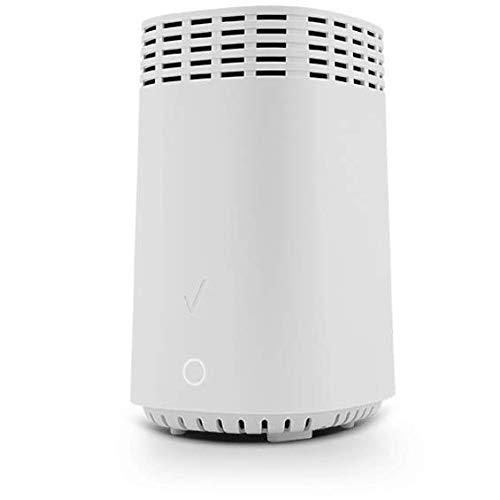
Verizon Fios Router G3100 — Verizon’s own tri-band gateway
The G3100 is the answer that ends arguments: Verizon’s own current gateway for its own service, tri-band by its listing’s brief description, designed to sit between the ONT and the household with every Fios behaviour — internet, television integration, the provider’s support scripts — native rather than negotiated. For the household with TV inside its Fios bundle, with low tolerance for network archaeology, or with a home that must simply work because too much rides on it, owning the provider’s flagship outright replaces the rental line on the bill with an asset and keeps every feature conversation simple: there is no third party to blame, and no compatibility question to research, ever.
Tri-band architecture is the G3100’s networking substance: three radios dividing the household’s devices with more air than the dual-band designs below, which suits the device-dense Fios home — the televisions and boxes the service itself encourages, plus the family’s own fleet. As the service’s own hardware it also inherits the provider’s ecosystem expectations, including the extender arrangements Verizon sells for larger homes, so coverage growth stays inside one maker’s grammar.
The cautions are the official-hardware cautions everywhere. The G3100’s feature set, update cadence and interface are Verizon’s choices, made for the median customer rather than for the enthusiast; households chasing deep VPN arrangements, elaborate segmentation or the newest radio generation will find the third-party picks below speaking their language more fluently. And its listing title is terse — tri-band and the name — so households comparing wired specifications should consult the listing’s full description and Verizon’s documentation for the port-level detail this guide declines to invent.
- Identity: Verizon Fios home router, per listing
- Wi-Fi: Tri-band, per listing title
- Fios TV: Native — the service’s own gateway
- Port detail: Not stated in the listing title — verify with Verizon documentation
- Positioning: Current-generation official gateway
Strengths
- Every Fios feature native, television included
- Tri-band air for device-dense Fios homes
- Support conversations start with no caveats
Trade-offs
- Feature depth set by the provider, not the owner
- Terse listing leaves wired detail to documentation
- Enthusiast arrangements live in the third-party picks
Best for: a Fios TV household seeking the official gateway owned outright
Not suited for: a tinkerer building elaborate VPN and segment policies
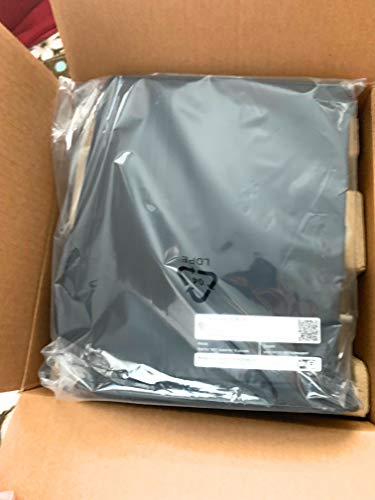
Verizon Fios Gateway G1100 — The established Fios gateway
The G1100 is the G3100’s predecessor and the gateway a generation of Fios households already knows: an AC1750 Wi-Fi device, per its listing, that has run the service’s internet and television in countless homes. Its presence in this guide is partly replacement logic — a household with a rented or aging G1100 due for renewal can buy the same model outright and change nothing else about its network — and partly value logic, since an established gateway at an established tier serves an internet-and-TV household’s actual needs without paying for radios the household’s devices cannot yet use.
AC1750 is a dual-band Wi-Fi class from the service’s earlier era, and honesty about that class is the review’s duty: it covers ordinary homes and ordinary device counts perfectly well, it will not impress a house full of Wi-Fi 6 and 7 clients, and its ceiling shows first in the busiest wireless hours. What it never compromises is the Fios nativeness that justifies its existence — every service feature at home, the coax-side television world fully served, and a support relationship with no asterisks.
Against its own sibling the decision is generational arithmetic. The G3100’s tri-band platform is the current answer for a household buying a decade of gateway; the G1100 is the answer for a household replacing like with like, serving a modest device census, or holding its budget for the day the whole network — router, devices and all — steps up a generation together. Both are defensible; the indefensible purchase is the one made without knowing the two are different generations of the same official idea.
- Identity: Verizon Fios Gateway, per listing
- Wi-Fi: AC1750, per listing title
- Fios TV: Native — the service’s own gateway
- Generation: Predecessor to the G3100
- Positioning: Established official gateway
Strengths
- Like-for-like replacement changes nothing else at home
- Full Fios nativeness at an established tier
- Proven across a generation of installations
Trade-offs
- AC1750 radios trail every other pick here
- Busy Wi-Fi 6 households will find its ceiling
- Buying yesterday’s platform for a long horizon
Best for: a Fios household replacing an aging G1100 without redesigning anything
Not suited for: a device-dense home stepping up to modern radio classes

TP-Link Archer AX21 — Wi-Fi 6 starter for the handoff
The Archer AX21 is where the third-party story begins: an AX1800 WiFi 6 router whose listing names dual-band wireless, gigabit ports, Easy Mesh and Alexa compatibility — and not one word about Fios, which is exactly as it should be. Its compatibility is the Ethernet premise itself: provision the ONT to hand off over Ethernet, plug the AX21’s WAN port into that handoff, and the router runs the home network on a fast, modern, inexpensive platform while the rental gateway goes back to Verizon. For the internet-only Fios household in a flat or small house, this is the cleanest version of the whole idea.
Easy Mesh is the pick’s forward-looking detail: the AX21 can begin alone and later absorb compatible mesh units, so the household that discovers a dead corner in month three extends its network rather than replacing the router it just liberated itself with. Gigabit ports cover the wired desk and the television; the Wi-Fi 6 radios handle the ordinary census of phones, laptops and gadgets with the generation’s efficiency improvements over the AC-era gateways above.
The boundaries are a starter platform’s boundaries. AX1800 is the gentlest class among the third-party picks, a gigabit-tier household with many simultaneous heavy streams will find the AX73 below a better fit, and the Fios TV household must remember this router’s position: superb at internet, silent on television, with the supporting-role arrangement for a Verizon gateway described earlier in this guide as the bridge between the two facts. Its box records the listing’s silence on Fios formally, because the honesty is the product information.
- Wi-Fi: AX1800 WiFi 6, dual band
- Wired: Gigabit ports, per listing
- Mesh: Easy Mesh, per listing
- Fios: Not stated in the listing title — works via the ONT Ethernet handoff; verify with TP-Link documentation
- Extras: Works with Alexa; Certified for Humans device, per listing
Strengths
- Cleanest rental-replacement arithmetic for small homes
- Mesh path protects the purchase against dead corners
- Wi-Fi 6 platform retires the AC-era gateway honestly
Trade-offs
- Gentlest wireless class among the third-party four
- No native Fios TV role
- Busy gigabit households should step up the page
Best for: an internet-only Fios flat ending the gateway rental
Not suited for: a Fios TV household expecting one box to serve the coax side

TP-Link Archer AX73 — Streaming-house step-up
The Archer AX73 is the AX21’s bigger sibling in spirit: an AX5400 WiFi 6 router whose listing frames it around streaming and long-range coverage, on gigabit wired ports, for the household outgrowing starter platforms in tier and device census alike. Behind a Fios handoff, that framing translates directly — the fibre feed is fast and unmetered by the router’s WAN, the house streams in several rooms, and the router’s job is to keep the air organised while the wired core carries the heaviest machines. AX5400’s summed capacity, read with the usual discipline as capacity rather than promise, gives a busy household headroom its evenings can actually feel.
The step-up logic deserves precision, because the two TP-Link picks will be compared by every reader of this guide. The AX73 buys radio capacity and coverage ambition; it does not buy a different relationship with Fios. Both routers meet the service at the same Ethernet handoff, both leave television to the arrangements described earlier, and neither claims otherwise in its listing. The household choosing between them is choosing a router for its rooms, which is precisely the freedom the Ethernet premise grants — the Fios question having been answered once, upstream, by the ONT.
Its ceilings are the class’s ceilings: gigabit wired ports in a world where the RT-BE88U below carries 10G, and no mesh ecosystem named in its listing beyond TP-Link’s own arrangements, a detail worth confirming in the listing’s full text for households planning multi-unit coverage. As the streaming house’s Fios router — fast feed, many screens, no rental — the AX73 is the guide’s centre of mass for third-party buyers.
- Wi-Fi: AX5400 WiFi 6, dual band
- Wired: Gigabit ports, per listing
- Headline use: Streaming and long-range coverage, per listing
- Fios: The title makes no Fios claim — compatibility rests on the ONT Ethernet handoff; see TP-Link documentation for the router’s own detail
Strengths
- Radio headroom matched to fast Fios tiers
- Streaming-first framing fits the fibre household
- Gigabit wired core for the heavy machines
Trade-offs
- No multi-gig port for future tier jumps
- No native Fios TV role
- Single unit still answers to difficult architecture
Best for: a streaming-heavy Fios household on a gigabit-class tier
Not suited for: a multi-gig subscriber requiring a faster front door

NETGEAR Nighthawk R6700AX — Compact Nighthawk coverage
The Nighthawk R6700AX brings NETGEAR’s household name to the third-party bench with a listing that quantifies its intended home: WiFi 6 at AX1800 class with 1.8Gbps summed, coverage up to 1,500 square feet, up to 20 devices, four gigabit ports, dual band. Read as a Fios proposition, that is the small-house or flat profile stated in numbers — the internet-only household with a census inside twenty devices and a floorplan inside the coverage figure, after a set-and-forget router from a mainstream shelf behind its ONT handoff. NETGEAR’s setup polish is the soft feature that matters at this scale: the household replacing a rental gateway is often doing its first router configuration, and the Nighthawk line is built for that afternoon.
The four gigabit ports deserve their mention, because at this tier they are generosity: the television, the console, the work laptop’s dock and the network drive can all wire themselves, leaving the radios to the devices that truly move around the house. On a fast Fios tier, that wired core is where the service’s speed is actually experienced, and a router that provisions it properly at a modest class serves its household better than a faster radio with a starved switch.
Its limits are printed in its own listing, which is to its credit: twenty devices is a real ceiling for the gadget-dense house, 1,500 square feet is a real boundary for the rambling one, and the AX1800 class matches the AX21’s tier rather than the AX73’s. Households inside those numbers get a tidy, honest Fios router; households outside them should keep reading down the page, where the ASUS is waiting with a different order of ambition.
- Wi-Fi: WiFi 6, AX1800 class, 1.8Gbps per listing
- Coverage: Up to 1,500 sq ft and 20 devices, per listing
- Wired: 4× gigabit ports
- Fios: No Fios claim in the title; the ONT’s Ethernet handoff is the mechanism — NETGEAR documentation carries the router’s own detail
- Positioning: Compact mainstream household router
Strengths
- Intended home stated in honest numbers
- Four wired ports provision a proper desk core
- Mainstream setup polish for first-time configurers
Trade-offs
- Device and coverage ceilings are real and printed
- No native Fios TV role
- Radio class matches the starter tier
Best for: a small Fios home counting its devices on the listing’s own terms
Not suited for: a gadget-dense household past the twenty-device line

ASUS RT-BE88U — WiFi 7 flagship with 10G
The RT-BE88U is the pick for the Fios household thinking in service tiers yet to come. Its listing describes a WiFi 7 router with two 10G ports, up to 7.2Gbps wireless, mesh compatibility, subscription-free network security, parental controls, a 10G SFP+ port, four 2.5G ports and four 1G ports, plus VPN support. That wired inventory is the argument: a router whose front door and interior doors alike exceed gigabit cannot be bottlenecked by any Fios tier a household is likely to buy this decade, and whose SFP+ cage speaks to network drives and switches in fibre. Behind an ONT Ethernet handoff, it converts Fios from a service into infrastructure the house owns outright.
The software layer matches the hardware’s seriousness. Subscription-free security and parental controls, stated in the listing, give the flagship the filtering household’s tools without a rental drip; VPN support serves the household running its tunnels at the same border; mesh compatibility promises that the flagship can preside over a wider ASUS system when the house’s architecture demands more than one radio location. This is the pick that treats the rental gateway’s departure as a permanent regime change rather than a gadget swap.
Proportionality is the caution, as with every flagship in this group of guides. A household on a modest tier in a small flat will use a fraction of the BE88U’s ports and a smaller fraction of its radios, and the Fios-specific position is unchanged from the AX21’s: the listing claims no Fios role, television arrangements remain the household’s design problem, and the Ethernet handoff does all the compatibility work. Buy it as the last router of the decade and the arithmetic sings; buy it to end a rental in a studio flat and the AX21 ends the same rental with money left for the deposit.
- Wi-Fi: WiFi 7, up to 7.2Gbps per listing
- Wired: 2× 10G ports, 1× 10G SFP+, 4× 2.5G, 4× 1G
- Security: Subscription-free network security; parental controls included, per listing
- Fios: Not stated in the listing title — works via the ONT Ethernet handoff; verify with ASUS documentation
- Extras: Mesh compatible; VPN support, per listing
Strengths
- Wired headroom outlasts foreseeable Fios tiers
- Security and controls included without subscription
- Flagship platform for a decade-long installation
Trade-offs
- Capacity far beyond a modest flat’s needs
- No native Fios TV role despite the flagship tier
- Port wealth demands devices that can use it
Best for: a multi-gig Fios household building its border for the decade
Not suited for: a studio flat ending a rental on the smallest budget
How Do You Move a Fios Home From the Gateway to Your Own Router?
The migration has one technical hinge and several courtesies. The hinge is the handoff: confirm whether the ONT currently delivers internet by Ethernet or by coax, and if coax, arrange the Ethernet activation through Verizon before touching anything else, since the household’s router can only accept the Ethernet form. While that change is pending, prepare the new router at leisure — firmware current, network name and password chosen, the household’s wired core planned — so that swap day is a cabling exercise rather than a research project. On the day: ONT’s Ethernet to the new router’s WAN port, power, a first device joined, the connection verified, and only then the old gateway disconnected and its return or retention decided.
The courtesies concern the rest of the house. Every device rejoins a network with a new name unless the household deliberately reuses the old network’s name and password on the new router — the single most effective courtesy available, since phones, televisions and gadgets then migrate silently, believing nothing has changed. TV households add the step described earlier: the Verizon gateway’s supporting role arranged and tested against the set-top boxes’ features before the old arrangement is dismantled. And the rental paperwork closes the loop: a rented gateway returned with its receipt kept, because the final compatibility question in any Fios home is between the household and the bill.
Reading the Six Picks Against the Two Fios Questions
| Pick | Internet via Ethernet handoff | Fios TV position | Platform |
|---|---|---|---|
| Verizon G3100 | Native gateway | Native, full service | Tri-band official gateway |
| Verizon G1100 | Native gateway | Native, full service | AC1750 official gateway |
| TP-Link Archer AX21 | Yes — standard router | Needs Verizon box in support role | AX1800 WiFi 6 |
| TP-Link Archer AX73 | Yes — standard router | Needs Verizon box in support role | AX5400 WiFi 6 |
| NETGEAR R6700AX | Yes — standard router | Needs Verizon box in support role | AX1800 WiFi 6 |
| ASUS RT-BE88U | Yes — standard router | Needs Verizon box in support role | WiFi 7, 10G wired |
Two questions organise the table, and every Fios household should answer both before choosing a row. Internet-only households live entirely in the second column, where all six rows pass; TV households must read the third column as a design decision, choosing between the native rows and the supporting-role arrangement. Nothing else about the picks changes between the two readings — the radios, ports and platforms are what they are — which is the deepest sense in which Fios compatibility is a premise about the handoff rather than a feature of the box.
What Do Fios Households Get Wrong When Replacing the Gateway?
The founding error is buying a modem. Fios has no modem in the household’s part of the chain — the ONT is the fibre terminal and it stays — so a DOCSIS modem-router purchased for Fios is a category error that no quality of Wi-Fi can redeem. The second error is assuming the coax-era installation will plug straight into a third-party router: where the ONT still hands off by coax, the Ethernet activation comes first, and households that skip the confirmation spend an evening blaming an innocent router. The third is forgetting the television until the guide data sulks, then blaming the router for a service architecture the household never asked about.
Fourth, households overshoot or undershoot the platform. A gigabit Fios tier feeding an AX1800 router in a streaming house manufactures a bottleneck the service never imposed; a WiFi 7 flagship on a modest tier in a studio manufactures only a receipt. Fifth, the rental’s return gets fumbled — the old gateway in a cupboard, still billed monthly, discovered at the year’s end. The migration checklist in this guide exists because every one of these errors is made by careful people in a hurry, and all five are cheaper to read about than to hold.
How Does Renting Versus Owning the Gateway Pencil Out?
The arithmetic that starts most of these projects is simple: a rented gateway is a monthly line with no terminal date, and an owned router is a single purchase with a working life of years. Households that run the division honestly usually find the owned box paying for itself well inside its first lease of life, after which the network runs on the house’s own capital. But the honest arithmetic has a second column. Renting buys the provider’s responsibility: a rented gateway that fails is replaced on the provider’s errand, and support for it is the front door of every service call. Owning transfers that responsibility to the household, which is why the picks in this guide lean toward mainstream platforms with mainstream support, and why the two Verizon gateways — ownable outright — occupy a genuinely distinct position: the provider’s own hardware, with the provider’s own familiarity, at a purchase price instead of a rent.
The third column is freedom, and it does not appear on the bill. An owned router is configured as the household wishes — its VPN arrangements, its controls, its mesh growth, its firmware calendar — and it survives a change of address or even of provider, carrying the household’s network name and settings into the next home like furniture. A rented gateway is returned, and the network’s memory with it. Households that move often, or that simply dislike rebuilding their digital house, should weigh that portability as heavily as the monthly figure; the router is the one piece of the Fios installation that is allowed to become the family’s own.
Where the ONT Sits Decides Where the Router Can Live
Fibre installations inherit the geography of the house’s previous eras: the ONT often lands in a garage, a basement corner or a utility cupboard, because that is where services enter and where installers are welcome. A gateway tethered to that spot by a short coax run inherits the worst radio position in the home. The Ethernet handoff quietly abolishes the constraint — Ethernet cable can run from the ONT to a central, elevated, living-space position where a router’s radios actually serve the rooms — and households planning the swap should treat the cable run as part of the project, not an afterthought. A modest router in the middle of the house will out-serve a flagship in the garage on every evening that matters.
The same geography governs the wired core. The desk, the television and the network drive cluster where people live, not where the fibre enters, and a router placed among them wires them with short, honest cables while its radios cover the rest. Households in larger or older buildings should read the mesh-capable picks — the AX21’s Easy Mesh, the RT-BE88U’s mesh compatibility, the G3100’s place in Verizon’s own extender world — as answers to geography as much as to capacity: the Fios feed is rarely the problem, and the walls nearly always are.
What Should the First Week With a New Fios Router Prove?
That nothing the household values has quietly changed address. The televisions should find their services, the work laptop its morning calls, the wired machines their full speed, the far bedroom its signal. A deliberate evening of testing beats a month of ambient suspicion: run the household’s heaviest simultaneous hour — streams, calls, a download, the console’s update — and watch whether the router’s class, chosen from this guide’s rows, matches the life it was chosen for. TV households add the set-top checklist while the old arrangement is still reconstructible; internet-only households spend the same hour confirming the bill’s rental line has an end date.
The week is also when the paperwork closes. The administrator password changed and recorded, the firmware current, the old gateway’s return receipt filed, the network’s name either preserved or its successor taught to the last gadget — these small completions are the difference between a migration and an anecdote. Households that finish them own a network; households that defer them own a project, and projects have a way of presenting their invoices during holidays.
How Much Router Does a Given Fios Tier Actually Require?
Less than the advertisements suggest, and more than the cheapest shelf offers — the honest answer is a matching exercise. The router must not be the narrowest point between the ONT and the household’s hungriest hour. A modest tier in a small home asks for a sound gigabit WAN, honest dual-band Wi-Fi 6 and little else, which is the AX21 and R6700AX’s exact brief. A gigabit-class tier in a streaming house asks for radio headroom and a wired core that keeps the heavy machines off the air — the AX73’s brief. A multi-gig tier, or a house with internal traffic rivalling its internet traffic, asks for the front door and the interior doors to widen together, which only the RT-BE88U’s port inventory attempts here. Matching in the other direction matters too: an oversized router does not harm a small network, but it converts money that could have bought mesh units, cables or the household’s next device into idle capacity with a power light.
The subtler requirement is the upload direction, which fibre households actually feel. Fios tiers are famously more symmetrical than cable’s, and the home’s video calls, cloud backups and working-from-home uploads all draw on that symmetry through the router. A platform that handles the household’s simultaneous upload life without queueing misery is worth more than a headline download figure, and it is another reason the wired core matters: every machine that can be cabled should be, leaving the symmetrical feed’s wireless share to the devices with no choice.
What Changes for the Household That Works From Home on Fios?
The router becomes business infrastructure with a domestic address. The work laptop’s calls inherit the house’s network discipline: a wired port for the desk if the router’s placement allows it, a guest segment that keeps visitors’ devices away from the work machine’s neighbourhood, and — in the picks carrying VPN support, the RT-BE88U most explicitly — the option of the household’s own tunnel arrangements living at the border rather than per device. Employer VPNs pass through any competent router, but the household that also runs its own services at the gateway should check the interplay in the vendor’s documentation, since two layers of tunnel make for specific configuration conversations.
Reliability takes on a salary’s weight. A rented gateway’s failure is the provider’s errand; an owned router’s failure at 9 a.m. on a presentation day is the household’s, which argues for the boring virtues — a mainstream platform, a configuration backed up, the old gateway not yet returned during the first fortnight of the new regime. None of that argues against owning; it argues for owning like an organisation, with a spare path and a written note of how the network is built, kept where a stressed morning can find it.
How Will This Choice Look in Five Years?
The ONT will still be on the wall, the fibre still in the ground, and the household’s devices will have turned over twice. The router chosen today sits between those constants, and its five-year value is decided by headroom and by ecosystem rather than by this season’s speed tests. The RT-BE88U’s ports and WiFi 7 radios are the extreme case of buying the future early; the G3100’s value is the opposite shape — a service that will keep defining its own gateway expectations, met natively for as long as Verizon supports the model; the midfield picks stake their claim on being correctly sized for the household’s present with a mesh path into its future. Households should choose which kind of five years they believe in — the provider’s steady state, the market’s rising curve, or their own floorplan’s slow change — and buy the pick whose bet matches, because a router is one of the few technology purchases still expected to be boring, current and forgotten half a decade after the receipt fades.
What Support Looks Like After the Swap, Honestly Described
A household owning its router owns a new first question on every support call: is the fault in the service or in the house? The discipline that keeps that question cheap is a five-minute isolation ritual — a laptop wired directly to the ONT’s Ethernet port, bypassing the router entirely. If the service sings there, the router is the suspect and its vendor’s support, or the household’s own settings, hold the answer; if the service falters at the ONT itself, the call to Verizon begins with evidence rather than apology, and no representative can attribute the fault to the household’s equipment. Households should rehearse that ritual once, in peacetime, so that the wartime version is a procedure rather than an improvisation.
The two official gateways exist in this guide partly as the refusal of that whole paragraph: with a G3100 or G1100 at the border, the service and the box share a maker, and the isolation question answers itself. That simplicity is a real feature with a real price — the feature depth and radio generations the third-party market races ahead with — and households should choose it knowingly in either direction. What no household should choose is the swap performed casually, without the rehearsal, the receipt or the retreat path, because the technology forgives preparation and punishes only its absence.
How Do Apartments and Landlords Fit the Fios Picture?
Rented homes add a paperwork layer to the same physics. The ONT is the provider’s, the gateway decision is the tenant’s in most arrangements, and the owned router is the one piece of the installation that leaves with the tenant — carrying, as noted earlier, the household’s network name and settings into the next address, where a different provider’s handoff may greet the same box. Tenants should simply confirm that no lease clause conscripts them into the building’s own networking arrangements, and that the ONT’s location permits the Ethernet run the router’s placement deserves. In practice the Fios-and-own-router pattern is at its most natural in apartments: smaller floorplans suit the starter picks precisely, the rental gateway’s monthly line is the most resented in a small bill, and the whole installation can be unbolted in an afternoon when the lease ends.
Why Does the Coax in the Walls Still Matter to an Ethernet Story?
Because many Fios homes are wired twice: Ethernet where the computers live, coax where the televisions live, and the two systems meet inside the Verizon gateway’s traditional role as translator. The set-top boxes’ reliance on that translation is the entire substance of the TV footnote running through this guide. Households planning the supporting-role arrangement should picture it physically — the household router at the ONT’s Ethernet, the Verizon gateway connected behind it, the coax network continuing to serve the boxes as it always has — and test every box’s features after the change, since individual services have individual dependencies that no guide can enumerate for every installation era. The household that tests keeps its guide data and its new router; the household that assumes keeps one of the two and a weekend of telephoning.
Internet-only households can read this section as a history lesson and skip it in practice, which is itself worth stating: the coax complication belongs entirely to the television bundle, and the growing population of streaming-only Fios homes — for whom the set-top box is an app on the television — faces a swap with no footnote at all. Their six-pick decision is the pure one, and the comparison table’s second column is the only column they need.
What Is the Sensible Order of Purchases Around the Swap?
Router first, opinions later. The household that buys the router while the rental still runs can configure it at leisure, rehearse the network name decision, and schedule the handoff change for a quiet morning rather than a streaming evening. Cables come second — the Ethernet run to the router’s chosen position, plus one spare — because the swap day should contain no shopping. Mesh units, if the floorplan eventually demands them, come last and deliberately, bought against a measured dead corner rather than a feared one; several households discover that a well-placed single router, freed from the ONT’s cupboard, covers a home they had assumed needed three. The sequence is a small discipline with a large dividend: every purchase after the first is made from evidence, and the evidence is the household’s own evenings.
What If the Household Later Leaves Fios?
The owned router is the one part of the installation that emigrates. Every third-party pick in this guide is a standard router that will serve a cable, fibre or fixed-wireless handoff at the next address with nothing more than a WAN setting and the household’s preserved network name; even the two Verizon gateways’ departure merely returns the household to the market it now understands. That portability quietly changes the purchase’s risk profile: money spent on a good router is spent on the household, not on the provider relationship, and the five-year question asked earlier in this guide can be answered without forecasting which company’s fibre will serve the next street. Households in motion — and most households are, on a long enough clock — should count that portability among the third-party picks’ structural advantages, alongside the radios and the ports, when the official gateways make their simpler pitch.
Final Recommendation
Answer the television question first, and the rest is ordinary good router shopping. TV households seeking zero complications own the G3100, or renew the G1100 like for like; internet-only households — and TV households content with a gateway in a supporting role — choose from the whole market: the AX21 to end a rental simply, the AX73 for the streaming house, the Nighthawk for the small home counted in its listing’s own numbers, the RT-BE88U for the decade-long border. Whichever row fits, confirm the Ethernet handoff before the box arrives, reuse the old network’s name on the new router, and let the first evening with Fios be the last evening the household ever thinks about which router it is — because from that night on, it is theirs.
Frequently Asked Questions
Do I need Verizon’s permission to use my own router?
The router behind the ONT’s Ethernet handoff is the household’s choice; what may need arranging through Verizon is the handoff itself, if the installation still delivers internet over coax. Internet-only customers make this change routinely. The ONT remains Verizon’s equipment either way. It is worth adding that the household’s own router also ends the equipment-rental conversation for that line item, which is why so many of these projects begin at the bill rather than at the brochure — the compatibility question and the ownership question turn out, on inspection, to be the same question wearing two coats.
Will a third-party router slow down Fios?
Only if the router is undersized for the tier and the household. The wired and radio classes in this guide were matched to Fios households deliberately: starter platforms for modest tiers and homes, the AX73 and RT-BE88U where tiers and device counts climb. The handoff itself imposes no penalty — it is standard Ethernet. One honest exception deserves naming: a household keeping a Verizon gateway in the supporting-role arrangement for television has added a device to the chain for the TV’s benefit, and while the internet path through a modern router is not meaningfully taxed by that arrangement, the household should verify its full speed after the swap, during the first-week checks this guide prescribes, rather than assuming the arithmetic in either direction.
Can I use a cable modem router with Fios?
No. Cable modem-routers terminate DOCSIS service over coaxial cable; Fios terminates fibre at the ONT and hands off Ethernet. A DOCSIS device has no port that speaks to an ONT, which is why no modem combo appears among this guide’s picks.
What happens to my Fios TV if I switch routers?
Internet service is unaffected. Some set-top box features that travel over the home’s coax wiring may want a Verizon gateway present; the established arrangement keeps one connected behind the household’s own router in a supporting role, or the household simply keeps a Verizon gateway — the G3100 or G1100 — as its router and sidesteps the question entirely.
Should I reuse my old network name and password?
Yes, unless there is a reason to change them. Setting the new router’s Wi-Fi name and password to the old ones lets every device in the house rejoin silently, turning a household-wide reconfiguration into a single box swap — the cheapest courtesy in the whole migration. The exception is the household with old credentials shared too widely or set in a less careful era; for them the swap is the natural moment to start clean, accepting one evening of rejoining devices as the price of a password the whole street does not know.
Related Guides
Continue with best WiFi 7 routers for the flagship generation in full, best routers for streaming for the fibre household’s evening workload, and best mesh WiFi systems when the Fios home outgrows any single router’s reach.
Related guides
- Best 3rd Party MacBook Chargers: 96W-Class Alternatives, the 100W Cable Rule, and the Apple Benchmark
- Best Graphics Cards with HDMI Out for TV Only: Six Picks for a PC Whose Only Screen Is a Television
- Best TLC SSDs: Six Drives With TLC NAND Confirmed in Their Own Listings
- Best Built PC: Six Prebuilt Gaming PCs Judged on Parts, Power and Upgrades