What's inside
- Where to Buy the Best Comcast Xfinity Cable Modem Routers
- Key Takeaways
- Quick Picks
- How Did We Sort the Best Comcast Xfinity Cable Modem Routers Into Voice and Internet-Only?
- How Do the Best Comcast Xfinity Cable Modem Routers Compare Side by Side?
- What Should a Voice Household Understand Before Buying Anything?
- How Does Activation Work When You Own the Modem on Xfinity?
- What Mistakes Do Xfinity Buyers Make With Modems and Voice?
- Final Recommendation
- What Does the Renewed Market Actually Mean for a Modem Buyer?
- How Should You Choose a Router to Sit Behind a Voice Gateway?
- How Should You Test a New Voice Setup Before Returning the Rental?
- How Is Provider Voice Different From an Internet Calling App?
- What Changes When You Move House With an Owned Gateway?
- How Should You Read a Voice Gateway Listing Like a Sceptic?
- A Note on Households That Are Still Deciding About Voice Itself
- Frequently Asked Questions
- Related Guides
As an Amazon Associate I earn from qualifying purchases. This post may contain affiliate links at no extra cost to you.
gizmoverdict.com is reader-supported. When you buy through links on our site, we may earn an affiliate commission.
Where to Buy the Best Comcast Xfinity Cable Modem Routers
The best comcast xfinity cable modem routers cannot be chosen until you answer a question about your own account, because Xfinity sells two different services that happen to arrive down the same cable. Internet-only households need a modem and a router. Households that also take Xfinity Voice need something extra inside the modem: a telephony adapter, known in the trade as an eMTA, with physical phone ports on the back. Buy an internet-only box for a voice account and your internet will work beautifully while your house phone stays dead, which is why this guide is organised around that split rather than around speed badges. Buy through the linked listing under each pick name, and check the exact model code there, because voice and non-voice versions of similar hardware sit confusingly close together on this shelf.
Now the uncomfortable truth about this particular shelf, stated plainly because it shapes everything below. The two voice combination units people most often ask for by name reach the US market, at the time this pool was assembled, only as renewed listings — refurbished returns rather than fresh stock. We do not link renewed units as if they were new, so those two famous names appear here as prose-only entries: recognised, explained, and deliberately not linked. The linked voice hardware that remains splits into one true voice combination unit and two voice modems with no Wi-Fi inside them at all, which must be paired with a separate router. Read the labels on every pick in this guide as carefully as the pick names, because in this category the label is the product.
Activation on Xfinity always runs through Xfinity’s own process, whichever box you buy, and we describe that process neutrally in the how-to section below rather than pretending any brand can bypass it. Owning your modem removes the equipment rental from the bill and hands you control of your home network; it also makes you the person who checks the approved-equipment list for your tier. That list, on Xfinity’s own site, outranks this guide and every other guide — use our picks to form a shortlist, then confirm the shortlist against your account before money moves.
Key Takeaways
- Decide voice first: Xfinity Voice requires a telephony modem with phone ports, and no internet-only combo can substitute for one.
- The NETGEAR C7100V is the linked true voice combination here, pairing a cable modem and AC1900 Wi-Fi with support for two phone lines.
- The CM1150V and SBV3202 are voice modems only, with no Wi-Fi inside; each needs a separate router, and this guide labels them that way everywhere.
- The Motorola MG7550 is the internet-only combination rung for households whose phone is a mobile and nothing else.
- The SVG2482AC and MT7711 are prose-only because their available listings are renewed stock, and this guide will not dress refurbished units up as new.
- Every activation runs through Xfinity itself, so confirm your exact model against your tier on Xfinity’s approved list before ordering.
Quick Picks
| Pick | Badge | Why it earns its place |
|---|---|---|
| NETGEAR Nighthawk C7100V with Voice | Linked Voice Combo | The one linked box here that does everything for a voice household: modem, Wi-Fi and two phone lines in a single unit. |
| Motorola MG7550 | Internet-Only Combo | A straightforward two-in-one modem router for Xfinity internet households that take no voice service at all. |
| NETGEAR Nighthawk CM1150V | Voice Modem Only | A voice-certified modem with four Ethernet ports and no Wi-Fi, built to feed a separate router you choose yourself. |
| ARRIS SURFboard SBV3202 | Voice Modem Only | A DOCSIS 3.0 telephony modem with two phone ports and one Ethernet port for voice households with modest internet tiers. |
| ARRIS SURFboard SVG2482AC | Prose-Only Voice Combo | The voice combination many readers search for by name, currently reaching the market as renewed stock, so explained here without a link. |
| Motorola MT7711 | Prose-Only Voice Combo | Motorola’s voice combination counterpart, likewise found as renewed listings only, and likewise described rather than linked. |
How Did We Sort the Best Comcast Xfinity Cable Modem Routers Into Voice and Internet-Only?
We began with the account types rather than the hardware, because Xfinity’s own service design dictates the shortlist. An eMTA is not an optional accessory or a firmware feature that can be unlocked later; it is telephony hardware, with phone jacks and battery-backed voice behaviour, built into the modem at the factory. If your account includes voice, the modem must be an eMTA model that Xfinity certifies for voice, full stop. If your account is internet-only, that requirement vanishes and a wider, newer field of combinations opens up, though readers who might add voice later should weigh buying a voice-capable box now against replacing hardware when the account changes.
Within the voice field we then applied a stock rule that cost this guide its two most famous names. Listings were checked as they actually stood, and where a model’s presence amounted to renewed units — returned, refurbished and resold — we refused to present it as an ordinary linked recommendation. Renewed hardware has its defenders and can be perfectly serviceable, but a buying guide that links it silently has misled its reader about what will arrive in the box. The prose-only entries below exist so that readers searching those model names find an honest explanation instead of an absence.
The remaining judgement was about completeness. A linked pick had either to be a complete answer for its household type, or to declare its incompleteness in its name: the two modem-only voice gateways are labelled modem-only in the quick picks, in their headings’ badges, in their sections and in the comparison table, because a reader skimming at speed should never be able to mistake them for combinations. If you take one discipline from this guide, take that one — in the voice corner of the modem shelf, read what the box does not contain before admiring what it does.
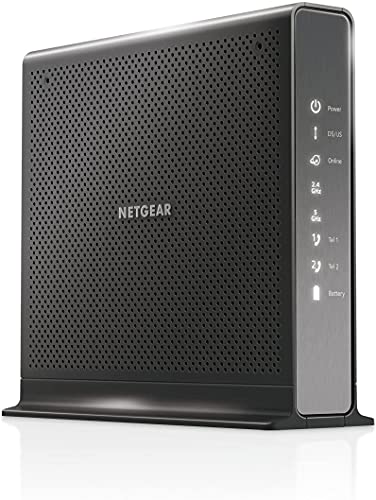
NETGEAR Nighthawk C7100V with Voice — Linked Voice Combo
The C7100V holds a distinction in this guide that no other linked pick can claim: it is a complete voice household in one box. NETGEAR’s listing describes a cable modem and Wi-Fi router combination with voice, supporting Xfinity cable and voice plans up to 600 megabits, with two phone lines and an AC1900-class Wi-Fi radio. For a household that wants its landline-style service, its internet and its Wi-Fi from a single owned unit — no separate router, no modem-only gateway feeding another box — this is the linked answer, and its plan ceiling is the first thing to check against your own tier.
That ceiling deserves honest framing. Six hundred megabits covers a large share of real Xfinity households, whose actual tiers sit at or below that line, and for them the C7100V’s limit is theoretical. Households on faster tiers, however, should not buy a voice combo whose modem cannot be activated at their speed and then act surprised; check the tier first, and if your plan outruns this box, the modem-only CM1150V below — certified in its listing for voice plans up to a higher ceiling — paired with a modern router becomes the sensible architecture instead. There is no shame in that two-box route; it is how many voice households with fast plans are actually built.
The radio is AC generation rather than Wi-Fi 6, and in a voice household that trade often matters less than it would elsewhere, because voice households skew towards stability over novelty: the phones must work, the television must stream, the laptop must hold a call. The two phone lines support the way such homes actually use voice — a main line and a second line for a home office or a fax-era leftover that refuses to die. Place the unit where both the coax and the phone wiring can reach it, since a voice combo serves two physical networks, not one, and that placement constraint is the hidden cost of the one-box life.
- Class: cable modem, Wi-Fi router and voice eMTA in one
- Listing plan support: Xfinity cable and voice plans up to 600 Mbps
- Phone lines per listing: two
- Radio class per listing: AC1900 Wi-Fi
- Household fit: voice plus internet from a single owned box
Strengths
- The only linked pick here that covers modem, Wi-Fi and two phone lines without a second box.
- One activation, one admin page and one unit to reboot for the whole household’s communications.
- Nighthawk branding brings NETGEAR’s familiar setup flow to a category that needs it.
Trade-offs
- The 600-megabit plan ceiling excludes faster Xfinity tiers outright.
- AC-generation Wi-Fi lags the Wi-Fi 6 radios in internet-only combinations.
- Placement must satisfy coax and phone wiring at once, which can compromise Wi-Fi position.
Best for: Xfinity voice households on tiers at or below its ceiling who want one owned box doing everything. Not suited for: gigabit-tier voice households, who should build from the modem-only gateway below instead.

Motorola MG7550 — Internet-Only Combo
The MG7550 is the calm option in this guide: a two-in-one cable modem with a built-in Wi-Fi router, in Motorola’s listing language, aimed squarely at internet-only Xfinity households. It makes no attempt to serve voice, carries no phone ports, and asks to be judged as the straightforward owned replacement for a rented internet gateway. There are households — more every year — for whom that is the entire requirement, because the telephone in their lives is the one in their pocket and the idea of a house line sounds like a museum exhibit.
Motorola’s long cable heritage is the quiet argument here. The brand’s modems have sat on Xfinity’s approved lists for generations of the standard, and a buyer choosing the MG7550 is choosing maturity over features: a combination that does the ordinary things without auditioning new tricks. In practice that suits smaller households, renters who own their equipment to dodge rental lines on the bill, and anyone whose internet life is streaming, browsing and calls on a laptop rather than a device census. Readers should still confirm the model against their own tier on Xfinity’s list, because maturity is not the same as universal approval.
Where the MG7550 asks for compromise is headroom. It is a product of its generation, and households that can see their device count and speed needs climbing — a move to a faster tier, a house filling with Wi-Fi 6 clients, a gamer arriving home from university — may find the general cable modem router guide in this series, with its newer combinations, a better long-term shelf to shop from. Bought for the household it fits, though, the MG7550 is the definition of a sensible, unshowy purchase: it replaces rent with ownership and then gets out of the way.
- Class: cable modem with built-in Wi-Fi router, two-in-one
- Voice: none — no telephony ports
- Listing description: 2-in-1 cable modem with built-in WiFi router
- Household fit: internet-only Xfinity accounts
- Design priority: maturity and simplicity
Strengths
- A complete internet-only answer with no voice hardware inflating the purchase.
- Motorola’s cable pedigree shows in straightforward setup and broad familiarity among support staff.
- Suits the growing majority of households whose only phone is a mobile.
Trade-offs
- Adding Xfinity Voice later means replacing this box entirely.
- Its generation shows against Wi-Fi 6 combinations in the wider cable guide.
- Heavy, device-dense households will find its ceiling sooner than they expect.
Best for: internet-only Xfinity households of modest size who want ownership without ceremony. Not suited for: anyone with voice service now, or a firm plan to add it this year.
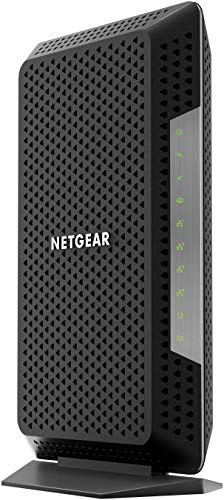
NETGEAR Nighthawk CM1150V — Voice Modem Only, No Wi-Fi Inside
Read this heading twice, because it carries the most important label in the guide: the CM1150V is a modem with voice, and it contains no Wi-Fi router whatsoever. NETGEAR’s listing describes a Nighthawk cable modem with voice, certified for Xfinity internet and voice plans up to 800 megabits, with two phone lines and four gigabit Ethernet ports. What leaves those Ethernet ports is wired internet for a router you supply yourself. Buy this expecting wireless and you will be standing in a connected house with no network name to join, holding a phone that works and a laptop that does not.
Understood correctly, though, the two-piece architecture is a strength rather than a defect. Voice service changes rarely, while Wi-Fi standards change constantly, so separating the voice modem from the router lets each be replaced on its own schedule: the CM1150V can serve through two or three generations of routers, and the router can be a mesh system, a gaming model or whatever the household’s wireless life demands. Its four Ethernet ports also allow a wired device or two to sit beside the router — a work computer near the modem point, for instance — though most homes will simply run one cable to the router and let it manage everything downstream.
The plan ceiling in the listing, higher than the C7100V’s, makes this the voice gateway for faster tiers, and the certification language in the listing names Xfinity internet and voice together, which is exactly the combination that must appear for a voice account. Pair it with a router you have chosen deliberately rather than whatever is in a drawer, because the router half of this arrangement carries the whole wireless experience and skimping there wastes the gateway’s headroom. And keep the two-box layout in mind when planning the shelf: coax and phone wiring come to the modem, one Ethernet cable leaves for the router, and the router — unlike a combo — is free to live wherever in the house Wi-Fi works best.
- Class: voice cable modem only — no Wi-Fi router inside
- Listing certification: Xfinity internet and voice plans up to 800 Mbps
- Phone lines per listing: two
- Wired ports per listing: four 1G Ethernet
- Requires: a separate router for any Wi-Fi
Strengths
- The higher voice-plan ceiling among the linked picks, suiting faster Xfinity tiers.
- Lets the router be chosen, placed and upgraded independently of the voice service.
- Four Ethernet ports give wired options at the modem point itself.
Trade-offs
- No Wi-Fi at all — the separate router is a second purchase, not an accessory.
- Two boxes mean two power supplies, two admin stories and more shelf to manage.
- Troubleshooting spans two devices, so faults take one extra step to localise.
Best for: voice households on faster tiers who want a mesh or high-end router of their own choosing. Not suited for: anyone expecting a single box, or unwilling to buy a router alongside it.

ARRIS SURFboard SBV3202 — Voice Modem Only, No Wi-Fi Inside
The same label discipline applies here, in bold: the SBV3202 is a modem with voice and no Wi-Fi inside it. ARRIS lists a DOCSIS 3.0 cable modem with voice for Xfinity, with two telephony ports and a single gigabit Ethernet port, supporting Xfinity internet and voice plans. Its natural home is the voice household on a modest internet tier, where the phone service matters daily and the internet requirement is ordinary browsing, streaming and mail rather than a gigabit badge. For that household, this gateway plus a router they already own can be the cheapest honest route off rented equipment.
The DOCSIS 3.0 generation is the fact to weigh without flinching. It is an older modem standard, adequate for the slower tiers it is sold against, and it will not be approved for the faster plans where DOCSIS 3.1 is expected. A buyer whose tier might rise should treat that as the deciding question, because a modem bought for today’s modest plan becomes e-waste the day the household upgrades. Conversely, a settled household — a relative’s home, a small office with a voice line and light internet — may rationally choose the older standard at its lower shelf position and never feel the difference.
Its single Ethernet port simplifies the wiring story to the point of elegance: one cable out, into one router, and everything else in the home hangs from that router. There is no spare port for a wired desktop at the modem point, so plan the router’s position as the household’s wired hub. The two telephony ports mirror the C7100V’s line count for homes running a second line. Judge this pick as what it is — a voice gateway for gentle internet needs — and it is a coherent product; judge it as a would-be combination and it will only disappoint, which is precisely why this guide refuses to present it as one.
- Class: voice cable modem only — no Wi-Fi router inside
- Modem generation per listing: DOCSIS 3.0
- Telephony ports per listing: two
- Wired ports per listing: one 1 GbE
- Requires: a separate router for any Wi-Fi
Strengths
- A focused voice gateway for modest tiers, without paying for combination features.
- Two telephony ports cover a second line for an office or an alarm-era leftover.
- A single Ethernet port makes the wiring plan impossible to get wrong.
Trade-offs
- DOCSIS 3.0 dates the modem half and bars it from faster-tier approvals.
- No Wi-Fi inside, so a router purchase stands between this box and a working network.
- One Ethernet port leaves no wired spare at the modem point.
Best for: settled voice households on modest Xfinity tiers pairing it with a router they already trust. Not suited for: faster tiers, planned upgrades, or anyone wanting Wi-Fi from the same box.
ARRIS SURFboard SVG2482AC — Prose-Only Voice Combo
This is the name many voice households type into a search box first, and it deserves a direct explanation rather than a silent gap. The SVG2482AC is, on paper, exactly what those households want: an ARRIS voice combination unit with modem, Wi-Fi and telephony together. The problem is not the product’s design but its current supply. When this pool was assembled, the model reached the US market as renewed listings — refurbished stock — and this guide’s rule is that renewed units are not presented as ordinary linked picks, because the reader deserves to know what condition of hardware a recommendation actually delivers.
So the SVG2482AC stands here as knowledge, not as a shortcut. If you find one through a channel you trust, with a condition description and a returns path you have actually read, that is your judgement to make as an informed buyer. What we will not do is blur the line by linking it among new units. Readers who want a linked voice combination today should look at the C7100V above; readers whose tier outruns it should build on the CM1150V. The famous name, meanwhile, is best treated as a lesson in how mature categories behave: the most-wanted model is often the one the new market has quietly stopped supplying.
- Class: voice combination unit — described, not linked
- Availability reality: renewed listings at pool time
- Link status: prose-only, no purchase link, no image marker ASIN
- Closest linked alternative: C7100V for one-box voice, CM1150V for faster tiers
Strengths
- The all-in-one voice design explains its lasting search popularity.
- ARRIS telephony experience sits behind the model name readers already trust.
- As renewed stock it can suit a confident buyer who reads condition notes carefully.
Trade-offs
- Renewed supply means condition and included accessories vary by seller.
- No linked listing here, deliberately, so there is no vetted route in this guide.
- An older design regardless of condition, against newer internet-only combinations.
Best for: informed readers who specifically want this model and accept the renewed market on its own terms. Not suited for: buyers who want new stock with a straightforward recommendation behind it.
Motorola MT7711 — Prose-Only Voice Combo
The MT7711 plays the same role in Motorola’s line that the SVG2482AC plays in ARRIS’s: the voice combination unit that households ask for by name, combining modem, Wi-Fi and telephony in a single owned box. Its story in this guide is also the same, and repeating it plainly is the point. At pool time, this model too reached buyers as renewed listings rather than clean new stock, and so it is written up here without a link, without an image marker and without any pretence that clicking through would deliver a factory-fresh unit.
Treat the pair of prose-only entries as a map of the voice market’s real shape in this period. Demand for voice combinations persists — households keep landline-style service for reliability, for older relatives, for home businesses — while new supply of the beloved models has thinned to refurbished channels. A third name from the same era circulates in the same renewed condition, which tells the same story from another badge. The practical consequence for a buyer today is a fork: take the linked voice hardware that exists now, in the C7100V or the modem-only gateways, or enter the renewed market knowingly with your eyes on condition grades and return terms. Both are defensible; drifting into the second while believing it is the first is not.
- Class: voice combination unit — described, not linked
- Availability reality: renewed listings at pool time
- Link status: prose-only, no purchase link, no image marker ASIN
- Closest linked alternative: C7100V for one-box voice, CM1150V for faster tiers
Strengths
- A single-box voice design from a maker with deep cable telephony history.
- Its continued demand signals a product owners were broadly content with.
- Renewed channels keep the model obtainable for readers set on it.
Trade-offs
- Renewed condition varies, and battery or accessory inclusion is a per-listing question.
- This guide links no seller for it, by design rather than by oversight.
- Like its ARRIS counterpart, it is an older-generation design by now.
Best for: Motorola loyalists who understand the renewed market and shop it deliberately. Not suited for: readers who want a new unit, a clean listing and a guide’s link behind the purchase.
How Do the Best Comcast Xfinity Cable Modem Routers Compare Side by Side?
| Pick | Voice | Wi-Fi inside | Form | Character |
|---|---|---|---|---|
| NETGEAR C7100V | Yes, two lines | Yes, AC1900 class | Combination | The linked one-box voice answer |
| Motorola MG7550 | No | Yes | Combination | The internet-only rung |
| NETGEAR CM1150V | Yes, two lines | No — modem only | Voice gateway | The faster-tier voice foundation |
| ARRIS SBV3202 | Yes, two ports | No — modem only | Voice gateway | The modest-tier voice foundation |
| ARRIS SVG2482AC | Yes | Yes | Combination, prose-only | The renewed-market favourite |
| Motorola MT7711 | Yes | Yes | Combination, prose-only | The renewed-market counterpart |
Two columns decide everything in this table: voice, and Wi-Fi inside. Find your row by answering those honestly and the pick selects itself — voice plus one box points at the C7100V, voice plus a fast tier points at the CM1150V and a router of your choice, voice plus a gentle tier can rest on the SBV3202, and no voice at all frees the MG7550 or the wider cable guide. Any other order of operations, starting from brand or badge, is how households end up with a working internet connection and a silent telephone.
What Should a Voice Household Understand Before Buying Anything?
Understand first that the phone ports are the product. An eMTA modem carries telephony hardware that registers with Xfinity’s voice service, presents dial tone to ordinary house phones through the ports on its back, and keeps that service behaving like a landline, including how it interacts with the home’s existing phone jacks when wired by someone who knows the demarcation point. None of that can be added later by an adapter bought in hope. If there is any chance the household will take voice — an older relative moving in, a home business line, an alarm arrangement that expects a line — say so before buying, because the modem decision is the moment that chance is cheap to honour.
Understand second that battery backup is a voice topic, not an internet topic. Traditional landlines carried their own power, and households accustomed to a phone that works in a blackout are often surprised that cable voice depends on local power unless the gateway has a battery provision. Provisions differ by model and battery inclusion differs by listing, so treat it as a specific question to ask of the exact unit you buy rather than an assumption to carry. Households for whom blackout communication is a genuine safety matter should plan for it explicitly, the way they plan for torches, rather than discovering the gap during the outage.
Understand third that the house wiring has a say. A voice gateway placed beside the coax can feed the home’s phone jacks if the internal wiring is connected correctly, a job some households handle themselves and others hand to a technician, but the alternative — one corded or cordless base station plugged straight into the gateway — serves many homes perfectly well. Decide which pattern your household will actually use, because it influences where the gateway must live, and a gateway exiled to a wiring closet is a fine home for a modem-only unit and a poor home for a combination whose Wi-Fi must also escape that closet.
How Does Activation Work When You Own the Modem on Xfinity?
Xfinity’s activation always runs through Xfinity, and owning the hardware changes the equipment on the account rather than the authority over it. The broad sequence is consistent: connect the new unit to the coax — and to the phone wiring or a base station if it is a voice model — power it up and let it settle, then follow Xfinity’s activation path through its app or website, signing in and confirming the new equipment against your account. Voice households should expect the voice service to be confirmed as part of that flow and should test an outgoing and an incoming call, not merely a dial tone, before declaring victory.
Have the unit’s label photographed before it goes onto its shelf, because account conversations ask for identifiers printed there, and reading small print upside down behind a cabinet is nobody’s idea of a support call. Keep the rented gateway until the owned unit has carried a full ordinary day, calls included, and when you return the rental, keep the receipt with the same zeal as in any equipment handover, since a returned gateway that lingers on an account is a billing story older than this category itself.
If activation stalls, the likeliest culprits are mundane: a model not approved for your tier, an account still pointing at the old equipment, or a coax run whose signal the new modem dislikes more honestly than the old one did. Work them in that order with Xfinity’s support, and resist the temptation to factory-reset in a loop, which mostly manufactures new waiting periods. A calm, documented activation — date, model, who you spoke to — is also your evidence if the rental charge takes a month to fall off the bill.
What Mistakes Do Xfinity Buyers Make With Modems and Voice?
The defining mistake of this category is buying an internet-only combination for a voice account, and it is made constantly because the boxes look alike and the product names do not shout their difference. The second mistake is the mirror image: buying a modem-only voice gateway while believing it contains Wi-Fi, an error this guide has labelled against at every appearance because it is so easy to make while skimming. Both mistakes share a cure — read what the box does not contain — and both are usually discovered at the worst moment, with the old gateway already disconnected.
A third mistake is assuming renewed listings are new because the model is famous. In a mature category, beloved models persist as refurbished stock long after fresh supply ends, and the condition line in a listing is part of the product. A fourth is forgetting the tier check: voice combinations have plan ceilings, and a household that upgrades its speed first and its hardware second can strand a working phone line behind an unactivatable modem. Sequence upgrades hardware-first, or at least hardware-aware, and the phone keeps ringing through the transition.
Final Recommendation
Voice households on mainstream tiers should take the C7100V and enjoy the one-box life; voice households on faster tiers should build on the CM1150V and spend their router money gladly, since that split is an architecture rather than a compromise; gentle-tier voice homes can rest on the SBV3202 with an existing router; and internet-only households should take the MG7550 here or the newer combinations in the general cable guide. The prose-only pair deserve their explanation but not your confusion: they are the market’s memory of what voice buyers used to purchase new. Choose by the two questions this guide opened with, and the phone that rings on your new gateway’s first evening — tested both ways, incoming and outgoing, before the old box goes back — is the sound of a category navigated correctly.
What Does the Renewed Market Actually Mean for a Modem Buyer?
Renewed is a word that covers a multitude of pasts. A renewed modem might be a customer return opened once and never activated, a unit refurbished by the manufacturer, or a gateway that served years in someone else’s home before being cleaned, tested and resold by a third party. Listings compress all of those biographies into one reassuring adjective, and the details that separate them — who refurbished it, what warranty stands behind it, whether accessories and any voice battery are included — live in the fine print of the specific seller’s page. A buyer who reads that fine print and accepts it is making a legitimate choice; a buyer who never sees it because a guide linked the unit without comment has been failed by the guide.
Modems carry one renewed-specific risk that phones and headphones do not: activation history. A cable modem is identified to the network by its hardware address, and a unit still associated with someone else’s account, or flagged from a previous life, can turn activation into a support saga. Reputable renewed sellers account for this, but it is a further reason this guide keeps renewed voice combinations in prose. If you do buy renewed, activate promptly while the return window is open, test the phone lines as well as the internet, and treat a unit that will not provision as a return, not as a puzzle to solve over weeks.
None of this is an argument that renewed hardware is junk. It is an argument about information. The voice combinations in the prose-only sections earned their reputations over years of service, and a well-refurbished example can serve a household perfectly well. What a reader is owed is the knowledge, before purchase, that the market for those models is a refurbished market now — so the comparison they run is renewed-versus-new across different models, with condition and warranty weighed openly, rather than an imaginary shelf where every famous name is factory fresh.
How Should You Choose a Router to Sit Behind a Voice Gateway?
Households taking the CM1150V or SBV3202 route inherit a second decision, and it deserves the same care as the gateway itself, because the router is the half of the system the family will actually feel. Start from the home’s geography. A compact flat needs only a competent single router; a long or multi-storey house is mesh territory, and a voice gateway pairs happily with a mesh kit, one node cabled to the gateway and the rest placed through the home. The gateway does not care what brand sits behind it, which is the quiet freedom of the two-box pattern: the voice decision and the wireless decision never have to compromise each other.
Then match the router to the plan the gateway is feeding it. A gateway certified for a faster voice tier deserves a router whose wired ports and radio can actually use that tier, while the SBV3202’s modest-tier household can pair with an equally modest router without waste. Check the router’s WAN port speed as carefully as its Wi-Fi badge, since a gigabit plan arriving at a router with a slower ceiling is money evaporating at the front door. Households with a home office should also ask about call-friendly behaviour — a wired port for the work machine near the router, and sensible prioritisation settings — because in a two-box home the router, not the gateway, arbitrates the evening.
Placement completes the picture, and here the two-box pattern quietly beats every combination in this guide. The gateway is chained to the coax and the phone wiring, but the router is chained only to an Ethernet cable, and Ethernet can run through walls, along skirting or across a room to the spot where Wi-Fi actually works. Owners of combinations spend their ingenuity making one location serve two masters; owners of gateways simply put the voice box by the wiring and the router by the people. When a combination household envies anything about the two-box life, it is that freedom.
How Should You Test a New Voice Setup Before Returning the Rental?
Testing internet is easy and therefore over-trusted: a page loads, a speed test runs, everyone relaxes. Voice deserves its own checklist because its failures hide until the moment the line is needed. Make an outgoing call and stay on it for several minutes, listening for dropouts or delay. Receive an incoming call from a mobile, because ringing behaviour and caller identification are separate systems from dial tone. If a second line exists, test it independently rather than assuming symmetry. Then test the awkward cases your household actually has: the cordless handset in the far bedroom, the home office phone, any device that expects the line to behave like the old one did.
Emergency calling deserves a sober sentence. Voice service over cable carries location information registered to the account, and households should confirm the service address on the account is correct after any equipment change, because responders go where the account says. Do not test this by dialling the emergency number itself; verify the address through the provider’s account pages or support line. It is a two-minute administrative check that belongs on the same list as photographing the modem label, and it matters more than any speed figure in this guide.
Only when internet and voice have both survived an ordinary day — the evening streaming hour, a morning of calls, the house’s usual rhythms — should the rented gateway begin its journey back. Return it promptly once that day has passed, since rental charges run until the provider logs the return, and keep the receipt beside the activation notes. The household that tests in this order rarely meets the category’s horror story, which is a disconnected rental, a half-provisioned phone line and a support queue, all discovered on the same evening.
How Is Provider Voice Different From an Internet Calling App?
Households sometimes ask why they cannot simply run a calling app over an ordinary modem and call it a phone line, and the answer clarifies what an eMTA actually buys. An app lives on a device, depends on that device being charged, awake and connected, and reaches the household only through that device. Provider voice through a telephony gateway behaves like the landline it replaced: ordinary phones ring in ordinary rooms, the number belongs to the house rather than to a handset, and the service is provisioned and supported as a utility by the provider. For a household with older relatives, children who need to reach a phone that is always in the kitchen, or a home business that wants a number separate from anyone’s mobile, that household-level behaviour is the entire point.
Independent VoIP services occupy a middle ground worth naming. They run over ordinary internet, work with internet-only combinations, and often use a small adapter of their own to feed house phones. A household choosing that route does not need an eMTA gateway at all, and should not buy voice hardware for a service that is not Xfinity’s. The confusion arises because all of these arrangements end with a familiar dial tone, while the infrastructure behind the tone differs completely. Name your actual service before shopping — provider voice, independent VoIP, or no house phone at all — and the correct column of this guide’s comparison table lights up on its own.
What Changes When You Move House With an Owned Gateway?
Moving is where owned equipment quietly proves or complicates itself. Within Xfinity territory, an owned modem generally travels with the account and is re-provisioned at the new address, but the new home’s wiring, signal levels and even the tier available at that address all change, so treat the move as a fresh activation with familiar hardware rather than a plug-and-go formality. Voice households should confirm the service address update discussed earlier as part of the move, since the account’s location record is a safety detail and not merely billing decoration.
Moving away from cable territory ends the gateway’s working life in your household regardless of its condition, because a DOCSIS voice modem has no second career on fibre or DSL. That reality is worth one thought at purchase time for households who already suspect a move: a combination bought today is a bet on staying, usually a good bet, occasionally a stranded one. The households that fare best are simply the ones who made the bet knowingly, enjoyed the rental savings while they stayed, and passed the hardware on to a cable household when they left rather than mourning it as a loss.
How Should You Read a Voice Gateway Listing Like a Sceptic?
Listings in this corner of the market reward slow reading, because the words that matter are rarely the largest ones. Start with the form: does the title say combination, modem router, or simply modem? A voice product whose title never claims Wi-Fi is telling the truth quietly, and the buyer who assumes a radio into existence has only skimmed, not been deceived. Continue to the telephony details: how many phone ports, how many lines, and whether any battery is included or merely supported, three facts that marketing photographs of the front panel will never tell you because the answers all live around the back.
Then read the plan language with a lawyer’s ear. Certified for a provider’s internet and voice plans up to a stated speed is a precise claim with a ceiling inside it, and the ceiling is the part to compare with your bill. A gateway whose ceiling sits below your tier is not a bargain at any discount; it is an activation refusal waiting for a date. Where a listing is vague about ceilings, the provider’s own approved list is the court of appeal, and it answers in model numbers rather than adjectives.
Finish with the condition and completeness lines, which this category makes unusually important. New or renewed, and if renewed, refurbished by whom and warranted by whom. Which cables and power supply are in the box. Whether the voice battery, where the design uses one, is present, absent or sold separately. A listing that answers all of that plainly is a listing from a seller who expects an informed customer, and in a category where the famous names now trade largely as refurbished stock, that plainness is the most reliable quality signal available to a buyer who cannot hold the box.
A Note on Households That Are Still Deciding About Voice Itself
Some readers arrive at this guide unsure whether to keep a house phone at all, and the hardware decision is easier once that question is answered honestly. Keep voice if the number is woven into the household’s life: printed on a business’s cards, known by heart to an elderly parent, expected by an alarm arrangement, or simply loved as the phone that rings in the kitchen and belongs to everyone. Let it go if the line exists from inertia, unanswered for months while every real conversation happens on mobiles. Neither answer is more modern or more sensible in the abstract; they are descriptions of different households. What is not sensible is buying hardware for a service you are about to cancel, or cancelling a service your household genuinely uses to justify a cheaper box, so settle the human question first and let the modem follow it.
There is a middle path a few households take deliberately: keep the voice service, but move its hardware out of the performance conversation entirely by choosing a modem-only gateway, then spend the creative energy on the router. That separation is why this guide treats the modem-only label as information rather than insult. A gateway’s job is to be provisioned, stable and forgotten; a router’s job is to be fast, well-placed and occasionally admired. Households that assign those jobs to different boxes tend to replace each on its own natural schedule, and their phone service — the thing that must simply never fail — stops being collateral damage in every Wi-Fi upgrade the household fancies.
Whichever route you choose, write the household’s decision down where the next person will find it: voice or internet-only, gateway model, router model, and the date the rental went back. Modem shelves outlast memories, and the relative or partner who faces a blinking box in three years will bless the note that explains what the two devices are and which one owns the phone line. In a category built on boxes that look identical while doing different jobs, that scrap of paper is genuinely part of the installation.
And if the household includes someone who still calls the whole arrangement the phone company out of lifelong habit, be patient with the vocabulary while being exact about the hardware. Names drift; ports do not. The ports on the back of the chosen box — coax in, phone lines out, Ethernet to the world — describe the service more truthfully than any label on the front, and a buyer who learns to read a back panel can shop this entire category without fear, this year and at the next upgrade, and can explain the choice clearly to whoever shares the bill and the broadband with them at home, tonight or years from now when the shelf gets rearranged again.
Frequently Asked Questions
Can I use an ordinary cable modem router if I have Xfinity Voice?
No. Voice service requires a telephony modem — an eMTA — that Xfinity certifies for voice, with physical phone ports. An internet-only combination will bring your internet up and leave your phone service with nothing to register to. If your account includes voice, shop only among voice models: the C7100V combination, or the CM1150V and SBV3202 gateways paired with a router.
Do the CM1150V and SBV3202 really have no Wi-Fi?
Really. Both are voice modems only: they terminate the cable connection, provide phone ports, and hand internet to a separate router over Ethernet. This guide labels them modem-only in every section because the misunderstanding is common and expensive. Budget for a router alongside either of them, and treat that router choice as the decision that shapes your wireless life.
Why are the SVG2482AC and MT7711 not linked?
Because at the time this pool was checked, those models reached the market as renewed listings — refurbished stock rather than new units — and this guide does not present renewed hardware as an ordinary linked recommendation. They are explained in prose so that readers searching for them understand the situation, and the linked voice alternatives are the C7100V and the two voice gateways.
Will Xfinity activate a modem I bought myself?
Yes, provided the exact model appears on Xfinity’s approved equipment list for your plan tier, and activation runs through Xfinity’s own app, site or support process. Check that list before ordering, since approval is per model and per tier, and keep your activation details and your rental-return receipt in case the equipment charge lingers on a bill.
What happens to my phone during a power cut?
Cable voice depends on power at your home unless the gateway has a battery provision, and provisions and included batteries vary by model and listing. Households that rely on the line during outages should verify the specific unit’s backup arrangements before buying and plan accordingly, rather than assuming the line behaves like an old powered landline.
Can a voice gateway feed all the phone jacks in my house?
Often, yes, if the home’s phone wiring is connected to the gateway correctly, though some households need a technician to make that connection safely at the demarcation point. The simpler pattern — a cordless base station plugged directly into the gateway, with handsets around the house — avoids the wiring question entirely and is what many voice households end up preferring.
Related Guides
Neighbouring decisions in this cluster are covered in best cable modem routers, best centurylink dsl modem routers and best aimesh routers.
Related guides
- Best Printers for Watercolor: Pigment and Fine-Art Machines for Reproducing Paintings
- Best Direct Thermal Printers: Shipping-Label Machines and Professional Label Systems
- Best 4K UHD HDR HDMI Extenders: 4K60, Long-Run and 4K120 Kits Compared
- Best 25–35 Inch Monitors With Lowest Display Lag: An Honest Ranking Without Invented Numbers


