What's inside
- Key Takeaways
- Quick Picks
- How Did We Choose These Picks?
- VPN Client or VPN Server — Which Journey Is Yours?
- Why Does the Router’s Processor Decide Your VPN Speed?
- Which Routers Run a VPN Properly?
- How Do the Six Compare Side by Side?
- What Does a VPN Router Not Do?
- How Does Router-Level VPN Change Streaming and Gaming?
- How Should Remote Workers Use a Household VPN Router?
- How Do You Choose the Provider the Router Will Connect To?
- Where Does DNS Fit Into the Privacy Picture?
- Travel Router or Full-Size Router — Where Should the VPN Live?
- What Should You Do When the Tunnel Misbehaves?
- What About Two Homes, or a Home and an Office?
- How Should You Set Up a Router VPN Without Regretting It?
- What Mistakes Do VPN Router Shoppers Keep Making?
- What Should a Household Agree Before Turning the Tunnel On?
- Final Recommendation
- Frequently Asked Questions
- Related Guides
As an Amazon Associate I earn from qualifying purchases. This post may contain affiliate links at no extra cost to you.
gizmoverdict.com is reader-supported. When you buy through links on our site, we may earn an affiliate commission.
Where to buy: Every router below links to its Amazon listing from this site’s verified pool, and every one was chosen because its VPN capability is stated in its own listing or platform — a client, a server, or both — not because a marketing page used the word “secure.” Read the distinction sections before the picks; in this category, knowing which kind of VPN you need is worth more than any single model.
The best VPN routers are bought for two opposite journeys, and confusing them is the category’s founding error. In the first journey, your household’s traffic travels outward through an encrypted tunnel to a VPN provider’s server, emerging onto the internet from somewhere else — this is the VPN client, the privacy and region-shifting tool most shoppers mean. In the second journey, traffic travels inward: you, on a hotel network across the world, tunnel back to your own router and browse as if from your own sofa, reaching your home’s storage, cameras and local services — this is the VPN server. A router can offer either, both or neither, and the listings do not always shout which. This guide names the direction at every pick, because a household that buys a server-only router for outward privacy — or the reverse — has purchased a very capable answer to a question it never asked, and will spend a confused month discovering the difference at the worst possible moments.
The second honesty concerns speed. A VPN is arithmetic: every packet encrypted and decrypted by a processor that was designed, first of all, to route. Put the tunnel on the router and the router’s CPU becomes the whole household’s encryption engine, which means VPN throughput is capped by silicon long before it is capped by your internet plan — a truth stated qualitatively throughout this guide because the exact ceiling varies with protocol, provider and firmware, and any guide printing a single confident number for it is guessing in your name. WireGuard’s lean design generally extracts more from the same processor than the older OpenVPN, and the picks below are ordered with that physics in mind: the strongest VPN citizens first, the capable all-rounders after, each with its direction and its protocol story told plainly.
One more framing before the picks, because it decides budgets: a VPN router is not a subscription in a box, and it is not a talisman. It is a piece of household infrastructure whose value compounds quietly — every gadget covered without an app, every trip home made safe, every year the firmware stays young — and whose costs are equally quiet: a processor’s ceiling, a provider’s renewal, a map somebody must maintain. Readers who accept that ledger in advance tend to keep their VPN routers for a very long time; readers who expected magic tend to blame excellent hardware for arithmetic. This guide is written for the first group, and the picks below are ordered for them.
The cast, in brief: TP-Link’s Archer AX55, whose listing puts VPN clients and server in its very title; GL.iNet’s Beryl AX and Slate AX, travel-bred routers whose OpenWrt platforms treat VPN as a first language; ASUS’s RT-AX86U Pro and RT-BE86U, whose stock firmware carries a deep VPN toolkit for full-size homes; and TP-Link’s Archer AXE75, the 6 GHz step-up with VPN support aboard. Between them they cover the flat and the farmhouse, the privacy household and the returning traveller — provided you read the directions before you buy.
Key Takeaways
- VPN client and VPN server are opposite journeys — this guide names which each pick performs before recommending it.
- Router-level VPN covers every device at once, including televisions and gadgets that cannot run a VPN app.
- VPN speed is capped by the router’s processor, not your plan; WireGuard generally extracts more than OpenVPN from the same chip, so protocol support belongs on the shopping list beside the radios.
- The Archer AX55 is the mainstream pick whose listing promises both client and server roles.
- The GL.iNet pair are the VPN natives — OpenWrt platforms built around tunnels, in travel-sized hardware.
- A VPN subscription is still required for the outward journey; the router is the vehicle, not the destination, and the provider you choose matters as much as the hardware.
Quick Picks
| Pick | Badge | Why it earns its place |
|---|---|---|
| TP-Link Archer AX55 | Client and server in one box | Its listing names VPN Clients & Server outright — the mainstream household’s complete VPN answer. |
| GL.iNet Beryl AX | VPN-native traveller | OpenWrt platform, WireGuard and OpenVPN clients, 2.5G WAN — a tunnel specialist that fits in a pocket. |
| GL.iNet Slate AX | VPN-native with headroom | The same tunnel fluency with more processing room for many devices and long rentals. |
| ASUS RT-AX86U Pro | Full-size VPN depth | A serious stock VPN toolkit, per-device routing options and AiMesh growth for larger homes. |
| ASUS RT-BE86U | Wi-Fi 7 VPN flagship | Mesh-VPN-ready platform with a 10G WAN port — the VPN household’s longest-lived chassis. |
| TP-Link Archer AXE75 | VPN plus new spectrum | VPN support aboard a tri-band 6E router with a 2.5G WAN port for future-facing homes. |
How Did We Choose These Picks?
The entry requirement was a VPN capability we could point to: named in the verified listing, or native to a platform whose VPN tooling is its defining feature. Direction was recorded for each — client, server, or both — and so was protocol support, because a WireGuard-capable router and an OpenVPN-only router deliver different evenings on identical plans. Processing headroom weighed heavily, since the CPU is the tunnel’s ceiling; so did the quality of per-device controls, because the mature form of router VPN is selective — the television through the tunnel, the work laptop direct, the doorbell nowhere near either — rather than a single household-wide switch.
We also required each pick to stand as a router in its own right: current Wi-Fi standard, gigabit-or-better ports, coverage honest for its format. A brilliant VPN client wrapped around a feeble radio is a dongle with delusions. Finally, renewed stock is flagged where a listing declares it, because a VPN router is a trust appliance — you should know exactly what arrived in the box before you route a household’s privacy through it, and the setup sections below include the factory-reset ritual that makes any unit, renewed or new, properly yours.
VPN Client or VPN Server — Which Journey Is Yours?
Run the client journey when the goal is how the internet sees your household. The router connects to your chosen VPN provider, and every device behind it — or every device you select — browses from the provider’s exit point rather than your street address. This is the configuration for privacy from your access provider’s gaze, for keeping a whole house’s gadgets under one subscription’s umbrella, and for presenting the household to the internet from a location of your choosing. Its costs are the subscription itself, a speed ceiling set by the router’s processor, and the occasional website that treats VPN exits with suspicion and demands extra proof you are human.
Run the server journey when the goal is how you see your household. The router accepts an incoming tunnel from your phone or laptop anywhere on earth, and suddenly the hotel’s untrusted network is merely a pipe: your traffic rides encrypted to your own home and out through your own connection, and the devices that live only on your local network — the storage box, the camera system, the home server — answer as if you were on the sofa. No subscription is involved; you are the provider. Its costs are configuration care — a server exposed to the internet must be set up with strong credentials and current firmware — and an uplink at home that becomes your ceiling when you are away.
The households with the richest networking lives run both, on purpose, for different devices and different hours — outward through a provider for the streaming and browsing population, inward to home for the travelling worker. That is why this guide prizes the picks that carry both roles, and why it reads the listings’ small print on your behalf: “VPN” on a box is a chapter title, not the story.
Why Does the Router’s Processor Decide Your VPN Speed?
Encryption is arithmetic performed on every packet, in both directions, without pause. A desktop shrugs at it because its processor has cores and clocks to spare; a router’s silicon was budgeted for moving packets, not transforming them, and the difference shows the moment a tunnel opens. On older or lighter routers, a whole-house OpenVPN tunnel can settle at a fraction of the line’s rate — fine for browsing and standard streaming, a wall for a household expecting its full fibre plan through the tunnel. This is not a defect in any brand; it is physics collecting its fee, and it is why this guide refuses to quote single-figure VPN speeds for any pick: the honest variables are protocol, provider, server distance and firmware, multiplied by your own plan.
Three levers move the ceiling. Protocol is the largest: WireGuard’s design is markedly leaner than OpenVPN’s and generally delivers substantially more throughput on identical hardware, which is why the GL.iNet pair and the modern stock platforms’ WireGuard support matter beyond a bullet point. Silicon is the second: the processors in the full-size picks — and especially the newest ASUS pair — lift the ceiling to where many households stop noticing it for ordinary use. Selectivity is the third and most underused: tunnelling only the devices that need it, rather than the whole census, reserves the arithmetic for the traffic that benefits. A household that tunnels its televisions and its browsing, while letting the game downloads and cloud backups run direct, gets the privacy it wanted at a speed it can live with — and that configuration, not raw horsepower, is the mature form of the VPN router.
Which Routers Run a VPN Properly?

TP-Link Archer AX55 — Client and server in one box
The AX55 leads this guide because its listing does the thing this category so often avoids: it says “VPN Clients & Server” in the product’s own name, promising both journeys from one mainstream box. Around that promise sits an AX3000 Wi-Fi 6 platform — roughly 574 Mbps on 2.4 GHz and 2402 Mbps on 5 GHz in theoretical terms — a quad-core processor, a USB 3.0 port, EasyMesh expansion and TP-Link’s HomeShield layer. For the household whose VPN interest is practical rather than ideological — privacy for the whole census, a tunnel home when travelling, no desire to learn what a firmware file is — this is the complete sentence in a single purchase.
Its natural configuration is the selective one this guide keeps recommending: the streaming devices and general browsers ride the client tunnel to the household’s provider, the work machine goes direct or through its employer’s own arrangements, and the server side waits armed for the trips — a laptop in a rental, a phone on airport Wi-Fi, reaching home as if the distance were a rumour. The processor will set the tunnel’s ceiling, as processors do; on an ordinary plan with WireGuard-class expectations managed honestly, most households will find the trade — total coverage of every gadget, one subscription, one configuration — decisively in the AX55’s favour. It is the VPN router for people who want the outcome, not the hobby.
- VPN: client and server, named in the listing itself
- Class: AX3000 dual-band Wi-Fi 6 (574 + 2402 Mbps theoretical)
- Ports: gigabit WAN/LAN plus USB 3.0
- Mesh: EasyMesh compatible; HomeShield security aboard
Strengths
- Both VPN directions in one mainstream, warrantied box
- Covers app-less devices — televisions, sticks, consoles — by design
- EasyMesh lets coverage grow without replacing the VPN brain
Trade-offs
- Tunnel speed still capped by its processor, like every router here
- Deeper per-device policy lives on the enthusiast platforms below
- HomeShield’s fuller tier leans on a subscription
One practical note for AX55 households: configure the server side before the first trip that needs it, and test the tunnel home from a phone on mobile data while still standing in your own kitchen. A server verified from the sofa is a travel tool; a server first attempted from a foreign hotel is a suspense novel, and the genre rarely ends with the storage box reachable.
Best for: households wanting whole-home VPN privacy plus a tunnel home, without a hobby. Not suited for: tinkerers who want to script the tunnel’s behaviour.

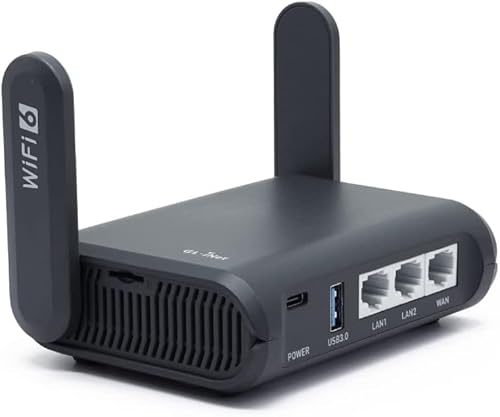
GL.iNet Beryl AX — VPN-native traveller
If the AX55 treats VPN as a headline feature, the Beryl AX treats it as a native language. Built on OpenWrt, GL.iNet’s travel router was designed around the tunnel: WireGuard and OpenVPN clients configured through an interface a non-specialist can survive, a repeater mode that joins the venue’s network once and shares your private version of it with every device you own, and a physical format that disappears into a carry-on. Its listing adds the hardware flourishes — dual-band Wi-Fi 6 rated 574 Mbps on 2.4 GHz and 2402 Mbps on 5 GHz in theoretical terms, a 2.5 gigabit WAN port, gigabit LAN, USB 3.0 — but the VPN is the biography.
Its parish is motion: hotels, rentals, client sites, conferences, the relative’s house whose network you would rather not join bare. At home it moonlights as a dedicated VPN gateway — park a streaming device or a work laptop behind it and that corner of the house lives in the tunnel permanently while the main network runs direct — a trick that gives small households selective VPN without replacing their main router at all. What it will not do is cover a house or pretend its room-scale radios are anything else. Judged as the VPN specialist it is, the Beryl is the purest pick in this guide: the one whose every design decision bows to the tunnel.
- VPN: WireGuard and OpenVPN clients on an OpenWrt base
- Class: AX3000 dual-band Wi-Fi 6 (per listing, theoretical)
- Ports: 2.5G WAN, gigabit LAN, USB 3.0
- Form: pocket-sized travel router with repeater mode
Strengths
- Turns untrusted venue networks into one private tunnel for all devices
- VPN configuration designed for humans, not just administrators
- Doubles as a selective home VPN gateway for one corner
Trade-offs
- Room-scale coverage — a specialist, not a house router
- Server-side use is secondary to its client calling
- Whole-house buyers need one of the full-size picks instead
Best for: travellers and remote workers, plus homes wanting a VPN corner. Not suited for: serving as a whole household’s main router.
GL.iNet Slate AX — VPN-native with headroom
The Slate AX is the Beryl’s brief with a bigger engine room. The same OpenWrt foundation and VPN fluency ride on an AX1800 platform with more processing headroom, and the listing’s note about supporting well over a hundred simultaneous device connections hints at its intended scenes: the family rental where everyone’s gadgets join the tunnel, the small team’s site office, the long-stay traveller whose “travel kit” has quietly become a mobile household. Where the Beryl is the solo professional’s instrument, the Slate is the group’s.
Headroom, in VPN terms, is not vanity — it is the tunnel’s ceiling raised, the interface staying responsive while encryption runs, the extra packages an OpenWrt user can install without apology. The Slate also serves as the safest possible apprenticeship for the household considering a VPN-first network: set it up as the home’s VPN gateway in front of one room, live with router-level tunnelling for a month, learn whether the household loves the privacy or resents the occasional challenge page, and only then decide whether the main router should carry the role. Few purchases in networking offer a rehearsal; this one does, and then packs into a bag and comes on the road with you.
- VPN: WireGuard and OpenVPN clients, OpenWrt-based
- Class: AX1800 dual-band Wi-Fi 6 (theoretical sum)
- Capacity: 120+ simultaneous devices per the listing
- Form: pocket-sized, travel-first design
Strengths
- More tunnel headroom for groups and long stays
- The ideal rehearsal stage for a VPN-first home network
- OpenWrt packages extend it well beyond travel duty
Trade-offs
- Still travel-scale radios — not a house-covering router
- Solo travellers may never spend its extra capacity
- Costs more than its sibling for power some won’t tap
Best for: travelling groups, long rentals and households rehearsing router-level VPN. Not suited for: whole-house coverage on its own.

ASUS RT-AX86U Pro — Full-size VPN depth
The RT-AX86U Pro is where VPN stops being a feature and becomes a policy. ASUS’s stock firmware carries one of the deepest VPN toolkits in consumer routing — client and server roles, and the per-device direction control (the platform’s VPN Fusion idea) that lets a household route the television through a provider, keep the gaming PC direct for latency, and send the work laptop down its employer’s path, simultaneously, without splitting the network into rival kingdoms. On an AX5700 platform (roughly 861 Mbps on 2.4 GHz and 4804 Mbps on 5 GHz, theoretical) with a 2.5 gigabit port and AiMesh expansion, it is the full-size answer for the house that has outgrown a single tunnel switch. The listing describes a renewed unit; check its condition terms, and factory-reset on arrival as the setup section advises.
The household this suits is the complicated one: streamers and workers and gamers under one roof, each with a different relationship to the tunnel, on a plan fast enough that the processor’s ceiling deserves respect. ASUS’s interface rewards the administrator who thinks in rules rather than toggles, and its subscription-free security watches the edges while the VPN minds the exits. If the AX55 is the VPN router for people who want the outcome, the AX86U Pro is the one for people who want the outcome tailored — the same privacy, fitted per device, in a house big enough to need the tailoring.
- VPN: client and server with per-device routing control
- Class: AX5700 dual-band Wi-Fi 6 (861 + 4804 Mbps theoretical)
- Ports: 2.5G multi-role plus gigabit LAN
- Note: listing describes a renewed unit — verify condition at purchase
Strengths
- Per-device tunnel direction — the mature form of home VPN
- Strong silicon lifts the encryption ceiling respectably
- AiMesh lets the VPN brain gain nodes as the house grows
Trade-offs
- Renewed listing means condition varies — reset and inspect
- Policy depth is overkill for a one-toggle household
- No 6 GHz band for buyers chasing new spectrum too
Best for: complex households routing different devices different ways. Not suited for: buyers who want VPN as a single switch and nothing more.

ASUS RT-BE86U — Wi-Fi 7 VPN flagship
The RT-BE86U is the longevity argument wearing a VPN badge. Its listing describes a Wi-Fi 7 gaming platform that is “Mesh VPN Compatible,” with a 10 gigabit WAN port, four 2.5 gigabit ports, subscription-free security and parental controls — the wired and wireless chassis of a router bought for a decade. The mesh-VPN positioning matters: in ASUS’s current ecosystem, VPN policy can be extended across an AiMesh system, so the tunnel rules you craft at the main unit follow the household into the rooms the nodes serve, rather than evaporating at the edge of one box’s reach.
For the VPN household, the calculation is about ceilings and years. Wi-Fi 7’s silicon raises the encryption ceiling further than any other pick here; the 10G port means the next two internet plans arrive without a router change; and the platform’s newness buys the longest firmware future in the guide. The honest costs are the era’s usual ones — Wi-Fi 7 clients are still arriving, and this is premium hardware bought partly on promise. But a household whose network is already a VPN network, whose members work and travel through tunnels daily, is exactly the household that amortises a flagship: the router is not an appliance to them, it is the border crossing, and border crossings should be built once and built well.
- VPN: mesh-VPN-ready ASUS platform, client and server tooling
- Class: Wi-Fi 7 gaming platform (per listing)
- Ports: 10G WAN plus 4 × 2.5G
- Extras: subscription-free security, AiMesh expansion
Strengths
- Highest VPN ceiling and longest service horizon in the guide
- VPN policy that extends across a mesh, not just one box
- Wired ports that will outlast several internet plans
Trade-offs
- Premium hardware, bought partly on Wi-Fi 7’s promise
- Full value waits for Wi-Fi 7 clients to populate the house
- Capability depth exceeds a casual VPN user’s needs
Best for: committed VPN households building their network for the long term. Not suited for: occasional tunnel users or tight budgets.

TP-Link Archer AXE75 — VPN plus new spectrum
The AXE75 closes the list with a combination none of the others offer: VPN support riding on a tri-band Wi-Fi 6E platform, where the third band is the empty 6 GHz spectrum. Its listing confirms VPN among its features, alongside the 2.5 gigabit WAN port, 160 MHz channels, OneMesh expansion and WPA3 — and a 2025 PCMag Editors’ Choice mention, cited by the manufacturer. The household portrait is specific: a family that wants its browsing population tunnelled for privacy, its newest laptops and phones flying on uncongested spectrum, and its plan upgrades unblocked by a multi-gig WAN, all from one mainstream box with a mainstream interface.
The VPN expectations should be set with the same honesty as everywhere in this guide: the AXE75 is a capable all-rounder whose VPN is a strong feature, not a tunnel specialist whose radios are secondary. Households whose VPN use is the network’s main event should look up the list to the ASUS pair’s policy depth or across to the GL.iNet natives; households whose VPN is one important duty among several — privacy for the browsers, a server for the trips, direct lanes for the games — will find the AXE75’s balance, and its empty new band, the most contemporary answer here. It is the pick for the reader who refuses to choose between the privacy decade and the spectrum decade, and is willing to accept competence at both over obsession with either.
- VPN: client/server support per the listing
- Class: AXE5400 tri-band Wi-Fi 6E with 6 GHz
- Ports: 2.5G WAN plus gigabit LAN
- Expansion: OneMesh compatible; WPA3 aboard
Strengths
- VPN plus the empty 6 GHz band in one mainstream box
- 2.5G WAN ready for faster plans
- Balanced feature set for mixed-duty households
Trade-offs
- VPN policy depth trails the ASUS picks
- 6 GHz serves only newer clients, at shorter range
- Specialists will prefer a dedicated tunnel platform
Best for: mixed households wanting privacy features and new spectrum together. Not suited for: VPN maximalists who live in the tunnel full-time.
How Do the Six Compare Side by Side?
| Router | VPN direction | Platform character | Defining trait |
|---|---|---|---|
| Archer AX55 | Client and server | Mainstream Wi-Fi 6 | Both journeys, plainly promised |
| Beryl AX | Client-first | OpenWrt travel | Tunnels for borrowed networks |
| Slate AX | Client-first | OpenWrt travel | Group travel headroom |
| RT-AX86U Pro | Client and server | Deep stock firmware | Per-device tunnel policy |
| RT-BE86U | Client and server, mesh-ready | Wi-Fi 7 flagship | Ceiling and longevity |
| Archer AXE75 | Client and server | Wi-Fi 6E tri-band | Privacy plus empty spectrum |
The table’s first decision is directional: households needing the inward journey — the tunnel home — should shop the client-and-server rows, while pure outward-privacy shoppers can consider the whole page. The second decision is temperamental: the GL.iNet pair speak VPN as a native language in travel-sized bodies, the TP-Link pair deliver it as a mainstream feature, and the ASUS pair build policy around it. Speed, notably, appears in no column, because it is the one figure this category cannot honestly print — it will be set by your protocol, your provider and your plan, on silicon whose headroom the picks above are ordered by.
What Does a VPN Router Not Do?
It does not make you anonymous in any complete sense, and a guide that lets you believe otherwise has failed you. A client tunnel hides your traffic’s contents and origin from your access provider and presents your household to websites from the provider’s exit address — a real and valuable shift — but the websites still see your accounts, your browser’s fingerprints and your behaviour, and the VPN provider itself becomes a party you must trust with the metadata your access provider no longer holds. The tunnel moves trust; it does not abolish it. Likewise it does not encrypt the last hop inside a website that was never encrypted, absolve a compromised device, or turn a weak password into a strong one.
Nor does it repeal geography’s other laws. Services that license content by region actively detect and refuse many VPN exits, and a household whose plan is “the whole house, tunnelled, always” will meet those refusals at the television — which is, again, why selective routing is the mature configuration rather than a compromise. And it does not make an untrusted network trustworthy in both directions: your tunnel home from a hotel protects the journey, but the laptop’s own hygiene — its updates, its firewall, its user’s judgement about attachments — still decides what arrives at the home network’s door. A VPN router is a superb instrument with a defined score; play it for what it is written for.
How Does Router-Level VPN Change Streaming and Gaming?
Streaming feels the tunnel in two places: the catalogue and the ceiling. The catalogue follows the exit’s geography, which households experience either as a feature or as a baffling evening when a familiar service presents a stranger’s library — plan the exit’s location as deliberately as you plan the tunnel itself, and keep a note of which exit the household prefers for which service. The ceiling is the processor’s arithmetic again: a single 4K stream through a tunnel is well within the modern picks’ abilities, while a house asking for three simultaneous tunnelled streams plus a call is doing capacity planning, whether it knows it or not — one more argument for tunnelling the televisions and leaving the rest of the census direct.
Gaming’s relationship with the tunnel is mostly a divorce. Competitive play prizes the shortest, steadiest path, and a VPN adds distance and a processor’s queue to every packet; the per-device platforms exist largely so the gaming machine can be excused from the tunnel while everything around it stays inside. The exceptions are real but narrow — a player reaching a distant region’s servers deliberately, or one whose access provider routes game traffic pathologically, occasionally finds a tunnel steadier than the direct road. Treat those as experiments with a control group of one evening each, and let the household’s default be: games direct, streams tunnelled, work where the employer says.
How Should Remote Workers Use a Household VPN Router?
Carefully, and usually in the server direction. The worker’s classic need is not the household’s client tunnel — an employer’s laptop generally carries its own corporate VPN, and wrapping it inside a second, personal tunnel can break policies, slow the path and confuse the employer’s security tooling. The household router’s gift to the worker is the opposite journey: the server that lets a personal device reach home resources, and the safe harbour of tunnelling a personal laptop’s traffic home when working from a café or a client site, emerging from the home connection rather than the venue’s. Households with two workers should also negotiate the client tunnel’s census explicitly, because one partner’s streaming exit geography is the other partner’s baffling single-sign-on failure, and most such mysteries are solved by the written map this guide keeps recommending.
There is also a fairness setting nobody ships: the tunnel’s ceiling is shared. If the household’s client tunnel runs at the processor’s limit and a worker’s personal traffic joins it, everyone’s margin thins at the same hour. The grown-up configurations — work devices direct or on the employer’s tunnel, entertainment tunnelled, the server armed for travel — are less a technical diagram than a household treaty, and the routers in this guide are recommended partly for making treaties like that expressible in settings rather than in arguments.
How Do You Choose the Provider the Router Will Connect To?
The router is the vehicle; the provider is the road, the weather and half the destination, and it deserves the same scrutiny as the hardware. Check first that the provider supports router connections at all, and in which protocols — a provider that offers WireGuard configurations for routers pairs with this guide’s picks far more happily than one whose apps are its only door. Read its logging policy with a sceptic’s affection: the household is moving its trust from the access provider to this company, and the policy’s specifics — what is recorded, for how long, under whose jurisdiction — are the product being bought, more than any speed claim.
Then weigh the unglamorous virtues: enough server locations to make exit geography a choice rather than an accident, a connection allowance that covers a router counting as one device while sheltering a household behind it (policies differ — confirm yours), and a track record long enough to have weathered scrutiny. Finally, test before committing the household: run the provider on one device for a month, learn its habits and its support desk’s character, and only then promote it to the router, where it becomes infrastructure. A VPN provider chosen this way tends to be renewed without drama for years, which is the correct emotional register for a privacy utility.
Where Does DNS Fit Into the Privacy Picture?
A household can tunnel every packet and still announce its curiosity through the side door of DNS — the lookups that translate names into addresses, which by default often travel to the access provider’s resolvers in the clear. A VPN configuration done properly carries DNS through the tunnel as well, resolving names at the provider’s end or at a resolver you choose, so the list of sites the household visits is not left readable on the doorstep while the visits themselves are wrapped. It is a five-minute check that separates a privacy setup from a privacy story, and the households that run it sleep noticeably better than the ones that assume it. The platforms in this guide handle DNS routing as part of their VPN configuration to varying degrees of visibility; whichever pick you choose, verify after setup — a DNS leak test from a tunnelled device takes a minute and tells you whether the side door is actually shut.
The broader lesson is that privacy is a system, and the tunnel is its largest single component rather than its totality. Encrypted DNS, current firmware, a guest network fencing the gadget population, and browsers with sane settings each close a different window. The VPN router earns its place as the foundation because it is the one measure that covers devices incapable of protecting themselves — but a foundation, as any builder will tell you, is the beginning of the house rather than the house.
Travel Router or Full-Size Router — Where Should the VPN Live?
Both, in the households that take this seriously, and the division of labour is natural. The full-size router is the home’s border: it holds the client tunnel for the census, runs the server for the family’s returns, and carries the policies. The travel router is the expedition kit: it assumes every network it meets is hostile until tunnelled, it asks no permission from the home setup, and it gives the traveller a private room inside any venue’s chaos. Owning one of each is not duplication; the travel unit’s entire value is that it leaves, and the home unit’s entire value is that it stays.
For households choosing only one, the deciding question is where the distrust lives. If the worry is the home’s own exposure — the access provider’s gaze, the gadgets’ chatter, the household’s address on every visit — the full-size pick is the answer, and the AX55 is its most accessible form. If the worry is the road — the conferences, the client sites, the rentals — the GL.iNet answer is the honest one, and its home-gateway moonlighting covers a surprising amount of domestic duty besides. Name the distrust’s address and the pick names itself.
What Should You Do When the Tunnel Misbehaves?
Begin with the map you wrote at setup — which devices ride the tunnel, through which provider, exiting where — because most VPN mysteries are geography or census mysteries in disguise. A service that worked yesterday and refuses today is often an exit the service has newly distrusted; change the exit before changing anything else. A device that crawls while its neighbours fly may be double-tunnelled, wrapped in its own app or an employer’s client inside the household’s tunnel; unwrap one layer. A whole household suddenly browsing bare is the kill switch’s absence announcing itself after a tunnel drop — re-enable the tunnel, then enable the switch, in that order of embarrassment.
Keep the provider’s status page and the router’s firmware page in the same bookmark folder; between them they explain most outages without a single setting changed. And hold the discipline this guide has repeated since its first page: change one variable at a time, note it on the map, and let an evening pass before the next change. A VPN network debugged in that rhythm converges; a VPN network debugged by handfuls of simultaneous toggles becomes folklore, and folklore is very hard to route.
What About Two Homes, or a Home and an Office?
The quietly advanced use of the server role is the site-to-site link: two routers, in two places, holding a permanent tunnel between them so the households or the household and the small office share one private geography. The holiday home reaches the main house’s storage; the office’s printer answers the home desk; the cameras at either end are viewable without exposing them to the open internet. The full-size picks with server tooling — the ASUS pair especially — are the natural chassis for this, and the configuration’s demands are the server section’s demands doubled: impeccable credentials, current firmware at both ends, and a written map, because a two-site network’s mysteries compound.
For most readers this is a horizon rather than a starting point, and the guide flags it as such deliberately: master the single household’s selective tunnel first, run a server for your own travel second, and let the site-to-site ambition arrive when both feel boring. Networking’s pleasures compound in that order — and so, mercifully, do its safety habits.
How Should You Set Up a Router VPN Without Regretting It?
Begin before the tunnel: update the router’s firmware, set a fresh admin password, and factory-reset the unit if it arrived renewed or previously owned, so the privacy appliance at your network’s centre carries nobody else’s history. Then choose the protocol your provider and router share most leanly — WireGuard where both offer it — and import the provider’s configuration exactly as supplied rather than improvising fields. Enable the kill switch if the platform offers one: it is the difference between a tunnel that fails closed, pausing traffic, and one that fails open, quietly browsing bare while you believe otherwise.
Resist the all-or-nothing temptation at first. Tunnel a test population — one television, one laptop — and live with it for a week, noting which services object, which feel slower, and which members of the household complain. Banking and government sites sometimes distrust VPN exits; streaming catalogues shift with exit geography; a work laptop may already carry its employer’s tunnel and resent a second one wrapped around it. Expand the tunnel’s census device by device, keeping a written note of which devices ride it and why — that note is the household’s map when something odd happens in six months, and the per-device platforms in this guide exist to make the map executable. For the server side, use strong unique credentials, keep the firmware current, and enable the server only when its convenience justifies its exposure — a door you open for yourself is still a door, and it should be a good one.
What Mistakes Do VPN Router Shoppers Keep Making?
The founding mistake is directional: buying a server when the household wanted a client, or the reverse, because the box said “VPN” in large type and the small print went unread. The second is expecting the plan’s full speed through the tunnel, then blaming the router for the arithmetic of encryption on a routing processor — set the expectation by protocol and silicon, as this guide does, and the same hardware suddenly performs “as expected.” Third, shoppers tunnel everything by default, including the competitive gaming rig and the backup drive, then conclude that router VPN is slow, when the selective configuration they actually needed was three settings away.
Fourth, they forget the subscription: a client router is a vehicle that still needs a destination, and the provider’s quality — its servers, its policies, its honesty — matters more than any router in this guide. Fifth, they leave the server side running with a weak password and old firmware, converting a privacy tool into the network’s most interesting door. Sixth, they double-tunnel by accident, wrapping a work laptop’s corporate VPN inside the household tunnel and wondering why the employer’s systems crawl. Every one of these is a configuration biography, not a hardware verdict — the picks above are all capable of a good VPN life, provided the household reads its own directions before setting out.
What Should a Household Agree Before Turning the Tunnel On?
A short treaty, written down, prevents most of the genre’s domestic incidents. Agree the default: which devices live in the tunnel permanently, which never enter it, and who may change the lists. Agree the exit: the household’s browsing geography is now a place, and everyone should know which place, because half the “the internet is wrong today” reports are simply the exit being somewhere the complainant did not expect. Agree the exceptions process — a visiting relative whose banking refuses the tunnel, a work deadline that cannot risk a challenge page — so that exceptions are granted from the map rather than improvised at midnight by whoever finds the admin password first.
And agree the maintenance: whose job is the firmware, whose is the provider renewal, and where the map lives. A VPN router fails socially before it fails technically — an unmaintained tunnel, an expired provider account quietly failing open, a policy nobody remembers setting — and the treaty is the maintenance schedule for the social half. Households that write these five lines down discover that the technology, afterwards, is the easy part; households that skip them re-litigate the same three arguments at the speed of their slowest evening.
Final Recommendation
Match the direction first and the badge second. Most households should start with the Archer AX55: both journeys in one mainstream box, the whole census coverable, the trips home provided for. Travellers and the privacy-serious should add — or start with — the GL.iNet natives, Beryl for the solo road and Slate for the group, because no full-size router loves a borrowed network the way they do. Households that think in policies should climb to the ASUS pair, per-device tailoring on the AX86U Pro or the decade-long flagship in the BE86U, and households that want their privacy with a side of empty spectrum will be happiest with the AXE75. Whichever you choose, choose the protocol lean, tunnel selectively, and keep the firmware young — a VPN router is a promise the household makes to itself, and these six are the ones built to keep it. Write the map, test the server from your own kitchen, tell the household which country its evenings now leave from, and then let the tunnel do what tunnels do best: disappear into the background of a network that simply feels private, at home and everywhere the road takes you.
Frequently Asked Questions
Do I still need a VPN subscription with a VPN router?
For the outward, client journey, yes — the router connects to a provider you choose, and the subscription is that provider’s. For the inward, server journey, no subscription exists: your own router is the destination, and you are the provider.
Will a router VPN slow down my whole network?
Only the traffic you route through the tunnel, and by an amount set by the router’s processor and the protocol — WireGuard generally costs far less speed than OpenVPN on the same hardware. Devices left outside the tunnel keep full speed, which is why selective routing is this guide’s standing advice.
Can a router VPN cover my smart TV and streaming stick?
Yes — that is its signature advantage. Devices that cannot run a VPN app inherit the tunnel simply by being on the network, or on the tunnelled portion of it, which is why the AX55 and its peers lead so many households’ lists.
What is a kill switch, and should I enable it?
It halts a device’s traffic if the tunnel drops, rather than letting it continue unprotected. Enable it on devices whose privacy is the point of the exercise; leave it off only where connectivity matters more than concealment, such as a work machine with its own protections.
Is it legal and safe to run a VPN server at home?
Running a server for your own access is a standard router feature and broadly legitimate; its safety depends on your hygiene — strong unique credentials, current firmware, and the server enabled deliberately rather than by default. Treat it as a door to your home and fit it with a good lock, then test it from outside before you ever need it from an airport.
Does every device in the house have to use the tunnel?
No, and in most households it should not. The selective configuration — browsers and televisions tunnelled, games and work machines direct, gadgets fenced on their own network — is the arrangement this guide recommends throughout, and the per-device picks exist precisely to make it a settings page rather than a wiring project. Start selective, expand deliberately, and keep the written map current as devices join.
Can I run the client and the server at the same time?
On the dual-role picks, yes — the household’s browsers can ride the outward tunnel while you, travelling, ride the inward one to reach home. The two journeys share the processor, so expect each to feel the other’s busiest hours; households that live in both directions daily are the natural audience for the stronger silicon in the ASUS picks, and they should budget their expectations accordingly rather than discovering the shared ceiling mid-call.
Why does my banking app complain when the tunnel is on?
Financial services often treat VPN exit addresses as elevated risk and ask for extra verification, or decline. The standard remedy is selective routing: keep the banking device or banking traffic outside the tunnel, which the per-device picks in this guide make straightforward.
Related Guides
VPN decisions sit inside a wider privacy picture. Continue with our explainer on WireGuard versus OpenVPN for home networks, a guide to segmenting smart gadgets away from your main network, and our walkthrough of secure router setup, from passwords to firmware habits. Direction first, protocol second, provider third, hardware fourth — readers who shop in that order rarely shop twice, and they almost never end up configuring a tunnel for the first time from an airport departure lounge with a boarding call approaching.



[…] open-firmware world rewards background reading. Continue with our explainer on OpenWrt and what its package system makes possible, a guide to running a VPN at router level for the whole household, and our walkthrough of […]