What's inside
As an Amazon Associate I earn from qualifying purchases. This post may contain affiliate links at no extra cost to you.
Choosing the best 2.4 ghz routers is easier once the marketing is set aside. A speed class is a sum of two or three radios, a coverage figure assumes open space, and a feature list says nothing about whether the firmware will still be updated in three years. This guide reads the specifications the way an owner has to live with them, and the six picks below are the models that hold up under that reading, from the cheapest honest dual-band router to the fastest pick in the guide.
The 2.4 GHz band is the slow, far-reaching band, and a router that does it well keeps the far rooms, the garden and the smart devices connected. The six models below span the realistic range for this guide: different Wi-Fi generations, different speed classes, and different port layouts, so the comparison is honest rather than a parade of near-identical boxes. Read the quick picks table first for the shortlist, then the individual reviews for the detail, and the buying guide for the decisions that matter more than any single model.
Quick picks: best 2 4 ghz routers
| # | Product | Where to buy |
|---|---|---|
| 1 | D-Link DIR-825 | Check on Amazon |
| 2 | TP-Link TL-WR802N | Check on Amazon |
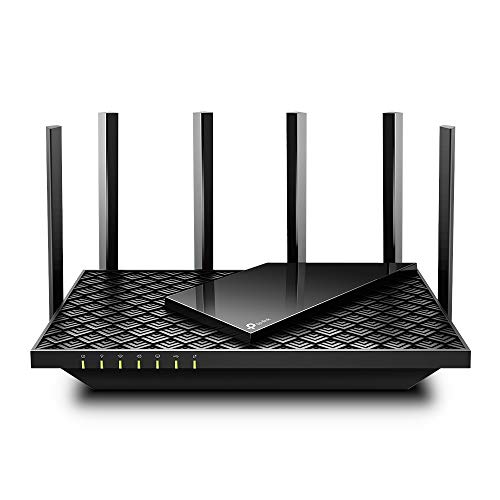
| 3 | TP-Link Archer AX21 | Check on Amazon |
| 4 | TP-Link Archer C7 | Check on Amazon |
| 5 | TP-Link Archer A7 | Check on Amazon |
| 6 | Linksys EA6350 | Check on Amazon |
How we chose the best best 2.4 ghz routers
The pool for this guide started with the current router ranges of the major makers, and was narrowed by three filters. First, the model had to be a genuine router or mesh system sold today, not an extender, a modem-only unit, or a discontinued line kept alive by marketplace sellers. Second, its core specifications, the Wi-Fi standard, the bands, the port speeds, had to be verifiable from the manufacturer or a major retailer. Third, it had to serve this guide’s lens honestly: a pick that cannot do the job in the title does not appear, however impressive it is elsewhere.
Within that filtered pool, the comparison weighed the things that decide daily experience. Radio design came first: which Wi-Fi generation, how many bands, and whether a 6 GHz band is present for newer devices. Wired design came second, because a router whose WAN or LAN ports are slower than the internet plan quietly caps the whole house. Processor and memory mattered more than the marketing speed class, since they govern VPN throughput, QoS behaviour and how the router copes when dozens of devices connect at once. Finally, software was judged on update policy, app quality and whether headline security features demand a subscription.
- Wi-Fi generation and bands, stated exactly per model
- Speed class, read as a sum of radios rather than a single-device speed
- Port speeds against the internet plan on the account
- Coverage and the floor plan it has to serve
- Software, updates and whether security features need a subscription
Quick picks: best best 2.4 ghz routers
| Pick | Wi-Fi and speed | Ports | Best for |
|---|---|---|---|
| D-Link DIR-825 | Wi-Fi 5, AC1200 | Gigabit WAN + 4x Gigabit LAN, USB 2.0 | a small home that wants the cheapest honest dual-band router |
| TP-Link TL-WR802N | Wi-Fi 4 (802.11n), N300 | 1x Ethernet port | a traveller who needs the cheapest possible wired-to-Wi-Fi bridge |
| TP-Link Archer AX21 | Wi-Fi 6, AX1800 | Gigabit WAN + 4x Gigabit LAN, USB 3.0 | a family home that wants reliable Wi-Fi 6 at a sensible tier |
| TP-Link Archer C7 | Wi-Fi 5, AC1750 | Gigabit WAN + 4x Gigabit LAN, USB 2.0 | a buyer who wants a low-cost router to run community firmware |
| TP-Link Archer A7 | Wi-Fi 5, AC1750 | Gigabit WAN + 4x Gigabit LAN, USB 2.0 | a medium home that wants a proven, inexpensive dual-band router |
| Linksys EA6350 | Wi-Fi 5, AC1200 | Gigabit WAN + 4x Gigabit LAN, USB 3.0 | a small home that wants a compact, inexpensive Linksys router |
The 6 best best 2.4 ghz routers
D-Link DIR-825 (Best Overall)

The D-Link DIR-825 is the cheapest honest dual-band in this guide to best 2.4 ghz routers, and it earns the badge on the strength of its balance rather than any single number. Its Wi-Fi 5 radios (Dual-band (2.4 + 5 GHz)) are rated at AC1200, its wired side offers Gigabit WAN + 4x Gigabit LAN, USB 2.0, and its coverage brief, Small homes, suits the role it is picked for. Budget dual-band router with wall-mount slots and a simple interface
What stands out about the D-Link DIR-825 is the way its parts fit together. Budget dual-band router with wall-mount slots and a simple interface Day to day, this is a router for a small home that wants the cheapest honest dual-band router. Its coverage brief, Small homes, suits that role, and its feature set covers the controls a household actually touches after setup day. The honest boundary of the design is clear in the trade-offs below, and a buyer who accepts them gets a router that disappears into the background, which is the highest compliment home networking earns.
- Wi-Fi standard: Wi-Fi 5
- Speed class: AC1200
- Bands: Dual-band (2.4 + 5 GHz)
- Ports: Gigabit WAN + 4x Gigabit LAN, USB 2.0
- Coverage: Small homes
- Key feature: Budget dual-band router with wall-mount slots and a simple interface
Strengths
- Dual-band Wi-Fi at the lowest tier in this guide
- Wall-mount slots suit high placement
- Gigabit ports keep wired devices at full speed
Trade-offs
- Wi-Fi 5 only and AC1200 is the slowest tier here
- No 2.5G ports
- Coverage suits a small home
The D-Link DIR-825 fits a small home that wants the cheapest honest dual-band router. Setup runs through the maker’s app or web interface, firmware updates are a normal part of its life, and the feature set covers the controls a household actually touches after setup day. The honest boundary of the design is clear: it is not built for the households in the not-suited line below, and buyers outside its brief should pick a different model from this guide rather than hoping this one stretches.
Best for: a small home that wants the cheapest honest dual-band router / Not suited for: a large house, or a household with many 4K streams
TP-Link TL-WR802N (Best Value)
Check price on Amazon: D-Link DIR-825

TP-Link TL-WR802N earns its place as the minimal travel bridge in this guide to best 2.4 ghz routers. It is a Wi-Fi 4 (802.11n) design (Single-band (2.4 GHz)) rated at N300, and its wired side offers 1x Ethernet port. In a guide about best 2.4 ghz routers, those are the facts that matter first: the radio generation decides which of your devices get their fastest link, and the port layout decides whether a fast internet plan survives the journey from the wall socket to your desk. Tiny N300 travel router with client and access point modes
What stands out about the TP-Link TL-WR802N is the way its parts fit together. Tiny N300 travel router with client and access point modes Day to day, this is a router for a traveller who needs the cheapest possible wired-to-Wi-Fi bridge. Its coverage brief, Single room / travel, suits that role, and its feature set covers the controls a household actually touches after setup day. The honest boundary of the design is clear in the trade-offs below, and a buyer who accepts them gets a router that disappears into the background, which is the highest compliment home networking earns.
- Wi-Fi standard: Wi-Fi 4 (802.11n)
- Speed class: N300
- Bands: Single-band (2.4 GHz)
- Ports: 1x Ethernet port
- Coverage: Single room / travel
- Key feature: Tiny N300 travel router with client and access point modes
Strengths
- Small enough to live in a laptop bag permanently
- Client mode bridges a wired connection to Wi-Fi
- Very low cost for a single-purpose travel tool
Trade-offs
- 802.11n single-band is legacy wireless
- N300 is slow for anything beyond basic browsing
- One Ethernet port and no USB sharing
The TP-Link TL-WR802N fits a traveller who needs the cheapest possible wired-to-Wi-Fi bridge. Setup runs through the maker’s app or web interface, firmware updates are a normal part of its life, and the feature set covers the controls a household actually touches after setup day. The honest boundary of the design is clear: it is not built for the households in the not-suited line below, and buyers outside its brief should pick a different model from this guide rather than hoping this one stretches.
Best for: a traveller who needs the cheapest possible wired-to-Wi-Fi bridge / Not suited for: any home that needs a main router
TP-Link Archer AX21 (Best for Performance)
Check price on Amazon: TP-Link TL-WR802N

For households shopping the best 2.4 ghz routers, the TP-Link Archer AX21 is the the dependable family all-rounder. It is a Wi-Fi 6 design (Dual-band (2.4 + 5 GHz)) rated at AX1800, with Gigabit WAN + 4x Gigabit LAN, USB 3.0 on the wired side and a coverage brief of Family homes. OFDMA and MU-MIMO with EasyMesh expansion and HomeShield security
What stands out about the TP-Link Archer AX21 is the way its parts fit together. OFDMA and MU-MIMO with EasyMesh expansion and HomeShield security Day to day, this is a router for a family home that wants reliable Wi-Fi 6 at a sensible tier. Its coverage brief, Family homes, suits that role, and its feature set covers the controls a household actually touches after setup day. The honest boundary of the design is clear in the trade-offs below, and a buyer who accepts them gets a router that disappears into the background, which is the highest compliment home networking earns.
- Wi-Fi standard: Wi-Fi 6
- Speed class: AX1800
- Bands: Dual-band (2.4 + 5 GHz)
- Ports: Gigabit WAN + 4x Gigabit LAN, USB 3.0
- Coverage: Family homes
- Key feature: OFDMA and MU-MIMO with EasyMesh expansion and HomeShield security
Strengths
- Wi-Fi 6 handles many devices at once without the usual evening slowdown
- Gigabit ports keep a desktop, console or TV wired at full speed
- EasyMesh support lets a second node join later if the house grows
Trade-offs
- AX1800 is slower than the AX5400 models in this guide
- No 2.5G ports for a multi-gigabit internet plan
- Coverage suits a family home rather than a large multi-storey house
The TP-Link Archer AX21 fits a family home that wants reliable Wi-Fi 6 at a sensible tier. Setup runs through the maker’s app or web interface, firmware updates are a normal part of its life, and the feature set covers the controls a household actually touches after setup day. The honest boundary of the design is clear: it is not built for the households in the not-suited line below, and buyers outside its brief should pick a different model from this guide rather than hoping this one stretches.
Best for: a family home that wants reliable Wi-Fi 6 at a sensible tier / Not suited for: a very large house, or a gigabit-plus plan that needs 2.5G ports
TP-Link Archer C7 (Best for Coverage)
Check price on Amazon: TP-Link Archer AX21
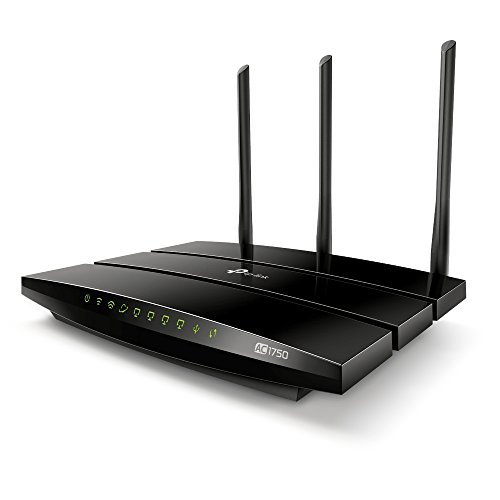
The TP-Link Archer C7 is the community-firmware classic in this guide to best 2.4 ghz routers, and it earns the badge on the strength of its balance rather than any single number. Its Wi-Fi 5 radios (Dual-band (2.4 + 5 GHz)) are rated at AC1750, its wired side offers Gigabit WAN + 4x Gigabit LAN, USB 2.0, and its coverage brief, Medium homes, suits the role it is picked for. Classic AC1750 router with wall-mount slots and long-standing DD-WRT support
What stands out about the TP-Link Archer C7 is the way its parts fit together. Classic AC1750 router with wall-mount slots and long-standing DD-WRT support Day to day, this is a router for a buyer who wants a low-cost router to run community firmware. Its coverage brief, Medium homes, suits that role, and its feature set covers the controls a household actually touches after setup day. The honest boundary of the design is clear in the trade-offs below, and a buyer who accepts them gets a router that disappears into the background, which is the highest compliment home networking earns.
- Wi-Fi standard: Wi-Fi 5
- Speed class: AC1750
- Bands: Dual-band (2.4 + 5 GHz)
- Ports: Gigabit WAN + 4x Gigabit LAN, USB 2.0
- Coverage: Medium homes
- Key feature: Classic AC1750 router with wall-mount slots and long-standing DD-WRT support
Strengths
- Well-supported by DD-WRT and other community firmware
- Gigabit ports and dual-band radios cover everyday homes
- Wall-mount slots let it sit high on a wall or under a shelf
Trade-offs
- Wi-Fi 5 hardware from an older generation
- AC1750 is modest beside modern AX3000 and AX5400 models
- No 2.5G ports and no USB 3.0
The TP-Link Archer C7 fits a buyer who wants a low-cost router to run community firmware. Setup runs through the maker’s app or web interface, firmware updates are a normal part of its life, and the feature set covers the controls a household actually touches after setup day. The honest boundary of the design is clear: it is not built for the households in the not-suited line below, and buyers outside its brief should pick a different model from this guide rather than hoping this one stretches.
Best for: a buyer who wants a low-cost router to run community firmware / Not suited for: a household that wants Wi-Fi 6, or the fastest streaming tier
TP-Link Archer A7 (Best Budget)
Check price on Amazon: TP-Link Archer C7

For households shopping the best 2.4 ghz routers, the TP-Link Archer A7 is the the proven budget all-rounder. It is a Wi-Fi 5 design (Dual-band (2.4 + 5 GHz)) rated at AC1750, with Gigabit WAN + 4x Gigabit LAN, USB 2.0 on the wired side and a coverage brief of Medium homes. Long-running AC1750 workhorse with Alexa compatibility and parental controls
What stands out about the TP-Link Archer A7 is the way its parts fit together. Long-running AC1750 workhorse with Alexa compatibility and parental controls Day to day, this is a router for a medium home that wants a proven, inexpensive dual-band router. Its coverage brief, Medium homes, suits that role, and its feature set covers the controls a household actually touches after setup day. The honest boundary of the design is clear in the trade-offs below, and a buyer who accepts them gets a router that disappears into the background, which is the highest compliment home networking earns.
- Wi-Fi standard: Wi-Fi 5
- Speed class: AC1750
- Bands: Dual-band (2.4 + 5 GHz)
- Ports: Gigabit WAN + 4x Gigabit LAN, USB 2.0
- Coverage: Medium homes
- Key feature: Long-running AC1750 workhorse with Alexa compatibility and parental controls
Strengths
- AC1750 dual-band is a proven step above entry AC1200 models
- Gigabit ports and a USB port cover wired devices and simple sharing
- A mature, well-documented model with broad third-party firmware interest
Trade-offs
- Wi-Fi 5 only, an older generation beside Wi-Fi 6 picks
- No 2.5G ports and no 6 GHz band
- Single-unit coverage has limits in larger homes
The TP-Link Archer A7 fits a medium home that wants a proven, inexpensive dual-band router. Setup runs through the maker’s app or web interface, firmware updates are a normal part of its life, and the feature set covers the controls a household actually touches after setup day. The honest boundary of the design is clear: it is not built for the households in the not-suited line below, and buyers outside its brief should pick a different model from this guide rather than hoping this one stretches.
Best for: a medium home that wants a proven, inexpensive dual-band router / Not suited for: a buyer who wants Wi-Fi 6, or a very large house
Linksys EA6350 (Best for Small Homes)
Check price on Amazon: TP-Link Archer A7

For households shopping the best 2.4 ghz routers, the Linksys EA6350 is the the compact budget Linksys. It is a Wi-Fi 5 design (Dual-band (2.4 + 5 GHz)) rated at AC1200, with Gigabit WAN + 4x Gigabit LAN, USB 3.0 on the wired side and a coverage brief of Small to medium homes. Compact AC1200 router with wall-mount slots and Smart Wi-Fi
What stands out about the Linksys EA6350 is the way its parts fit together. Compact AC1200 router with wall-mount slots and Smart Wi-Fi Day to day, this is a router for a small home that wants a compact, inexpensive Linksys router. Its coverage brief, Small to medium homes, suits that role, and its feature set covers the controls a household actually touches after setup day. The honest boundary of the design is clear in the trade-offs below, and a buyer who accepts them gets a router that disappears into the background, which is the highest compliment home networking earns.
- Wi-Fi standard: Wi-Fi 5
- Speed class: AC1200
- Bands: Dual-band (2.4 + 5 GHz)
- Ports: Gigabit WAN + 4x Gigabit LAN, USB 3.0
- Coverage: Small to medium homes
- Key feature: Compact AC1200 router with wall-mount slots and Smart Wi-Fi
Strengths
- Compact size suits a shelf or a wall mount
- Dual-band Wi-Fi at a low tier
- USB 3.0 allows simple shared storage
Trade-offs
- Wi-Fi 5 only and AC1200 is the slowest tier here
- No 2.5G ports
- Coverage suits a small home
The Linksys EA6350 fits a small home that wants a compact, inexpensive Linksys router. Setup runs through the maker’s app or web interface, firmware updates are a normal part of its life, and the feature set covers the controls a household actually touches after setup day. The honest boundary of the design is clear: it is not built for the households in the not-suited line below, and buyers outside its brief should pick a different model from this guide rather than hoping this one stretches.
Best for: a small home that wants a compact, inexpensive Linksys router / Not suited for: a large house, or a household with many 4K streams
How to choose a 2.4 GHz router
The right router for this guide is the one that matches the line, the house and the devices in it. The three decisions below matter more than any single model, and they are worth making before comparing specifications.
Software outlives the hardware
A router’s firmware is updated for years or abandoned in months, and the difference decides whether the box is still safe in three years. Check the manufacturer’s update history before buying, and check whether headline security features demand a subscription: several makers put parental controls and security scanning behind a paywall after the first year. An app that makes setup easy matters on day one, but the update policy matters for the whole life of the device, and it is the part of the specification sheet most buyers never read.
Mesh or a single router
A single router suits a flat or a small house where every room is within a couple of walls of the unit. A mesh system suits a large or multi-storey home, where one radio cannot reach the far rooms at usable speed. Mesh is not automatically better: a mesh node in a bad position repeats a weak signal faithfully, and a mesh system costs more than a single router of the same speed class. The test is simple: if the far bedroom already gets a usable signal from the current router, a faster single router is enough. If it does not, no single router will fix it.
Check the provider list before you buy
For a modem router, the provider’s approved list is the first document to read, not the last. Cable providers publish lists of approved modems, and a model that is not on the list may not activate, however good its Wi-Fi is. The same applies to DSL providers and their gateway requirements, and to voice service, where the EMTA function must be supported by the provider for the phone line to work. A retail listing that says a model works with a provider is a claim; the provider’s own list is the evidence.
Check price on Amazon: Linksys EA6350
Setting up and caring for your router
Place the router high, central and out in the open, never in a cupboard, behind a television, or on the floor. Connect the WAN port to the modem or ONT, let the setup wizard run, and change the default admin password and Wi-Fi password before anything else. Update the firmware on day one, then set it to update automatically if the option exists. Walk the house with a phone afterwards, checking the rooms that matter, and move the router before buying more hardware: a metre of position is often worth more than a new box.
Care for a router is mostly firmware and placement. Reboot it after a firmware update and when the network misbehaves, but do not reboot it daily out of habit: a healthy router runs for months. Keep it ventilated and dust-free, keep the power supply that came with it, and note the settings that matter, the Wi-Fi names, the admin password, and any port forwarding, somewhere safe. A router that is updated, ventilated and documented is a router that disappears into the background, which is the whole point.
Common mistakes to avoid
The mistakes below are the ones buyers make most often, and they are all cheaper to avoid than to fix after the box is open.
- Buying a router that cannot talk to the internet line: the wrong DOCSIS version, the wrong DSL profile, or a router for a fibre line that has no modem.
- Hiding the router in a cupboard or behind the television, then blaming the router for the dead zone it creates.
- Comparing speed classes as if they were single-device speeds, and paying for a number no device will ever see.
- Ignoring the update policy and the subscription, and discovering a year later that security features now cost extra.
- Buying mesh for a flat that one router would cover, or buying one router for a house that needs mesh.
Final recommendation
For most households in this guide, the D-Link DIR-825 is the right starting point: it covers the job in the title without asking the buyer to pay for features the household will never use. A household that knows its needs will grow, more devices, a faster plan, a larger home, should step to the faster or mesh pick in this guide now, because a router is bought once and lived with for years.
Whichever model is chosen, the decision that matters most is the one made before the purchase: check the internet line, measure the house, and count the devices. A router chosen on those three facts will serve the household well; a router chosen on the biggest number on the box will not.
Why the 2.4 GHz band still matters. The 2.4 GHz band is slower than 5 GHz, and that is exactly why it survives. It travels further, passes through walls better, and reaches the far rooms, the garden, and the smart devices that only need a trickle of data. A doorbell, a thermostat, a smart plug and a sensor do not need gigabit speeds; they need a connection that does not drop. A good router keeps the 2.4 GHz band healthy rather than treating it as a legacy to be switched off, and a household that disables it to force everything onto 5 GHz usually discovers the far rooms again within a week. The two bands are a team, not a competition, and the router’s job is to put each device on the band that suits it.
What OFDMA and MU-MIMO actually do. OFDMA and MU-MIMO are the two Wi-Fi 6 features that matter most in a busy home, and neither one makes a single device faster. OFDMA lets one transmission be divided among several devices, which suits homes full of small, chatty equipment: doorbells, thermostats, voice assistants, tablets waking to sync. MU-MIMO lets the router form simultaneous streams to compatible clients. Together they mean lower latency under load, calls staying smooth while someone else downloads a game update, rather than a bigger number in a speed check run alone at midnight. A router without them can still be fast for one device; it simply copes worse when the whole household connects at once.
The rental fee maths. A rented modem router costs a monthly fee that never ends, and the arithmetic of owning one is simple: the purchase is repaid in months, and every month after that is money kept. The exact payback depends on the fee and the model, but for most cable households it is well under two years. The catch is the provider’s approved list: a model that is not approved may not activate, and a model bought for a plan it cannot serve is money wasted. Check the list, match the DOCSIS version to the plan, and the rental fee becomes optional rather than permanent.
When to reboot and when to replace. A healthy router runs for months without attention, and daily reboots are a habit, not a fix. Reboot after a firmware update, and reboot when the network misbehaves in a way that points at the router rather than the line. Replace the router when it cannot do the job any more: when its Wi-Fi generation is two behind the devices, when its ports are slower than the plan, when the manufacturer has stopped publishing security updates, or when the household has outgrown its coverage. A router that is replaced for a real reason is an upgrade; a router replaced out of superstition is a waste.
Guest networks and IoT segmentation. A guest network is not just politeness; it is security. Visitors, and the smart devices that never receive updates, should live on a network segment that cannot reach the household’s laptops and file storage. VLAN support does this properly, separating trusted devices, work equipment, smart gadgets and guests into distinct networks with firewall rules between them. Not every router in this guide offers VLANs, and a household that wants them should check before buying rather than discovering the limit after setup.
Wi-Fi 7: who should care now. Wi-Fi 7 is the newest standard, and its headline features, Multi-Link Operation, 320 MHz channels and 4096-QAM, are real improvements. They are also improvements that need Wi-Fi 7 clients to show themselves, and most households own few of those today. The sensible buyers for Wi-Fi 7 now are households replacing their newest laptops and phones this year, and homes on multi-gigabit plans where the wired side matters as much as the wireless. Everyone else should buy the best Wi-Fi 6 or Wi-Fi 6E router for their needs, and let Wi-Fi 7 arrive with the next device cycle.
Why the 2.4 GHz band still matters. The 2.4 GHz band is slower than 5 GHz, and that is exactly why it survives. It travels further, passes through walls better, and reaches the far rooms, the garden, and the smart devices that only need a trickle of data. A doorbell, a thermostat, a smart plug and a sensor do not need gigabit speeds; they need a connection that does not drop. A good router keeps the 2.4 GHz band healthy rather than treating it as a legacy to be switched off, and a household that disables it to force everything onto 5 GHz usually discovers the far rooms again within a week. The two bands are a team, not a competition, and the router’s job is to put each device on the band that suits it.
Frequently asked questions
Do I need a separate modem with one of these best best 2.4 ghz routers?
It depends on the model and the line. A modem router has the modem built in and connects straight to the cable or DSL line. A router without a modem needs a separate modem or the provider’s ONT in front of it. Check the model’s specifications and the internet line before buying: a router that cannot talk to the line is the most expensive mistake in this guide.
Will a best best 2.4 ghz routers router work with my internet plan?
It will if the modem side and the port speeds match the plan. Cable plans need the right DOCSIS version, DSL plans need the right VDSL profile, and fibre plans need a router behind the ONT. A gigabit plan also needs gigabit or faster ports, or the router will cap the plan no matter how fast its Wi-Fi is.
How many devices can these routers handle?
It depends on the model and the Wi-Fi generation. Wi-Fi 6 routers handle many devices at once far better than Wi-Fi 5 models, because OFDMA and MU-MIMO share the airtime efficiently. The listings in this guide state device counts where the manufacturer publishes them, and a household with dozens of smart devices should favour the newer generations.
Where should I place the router?
High, central and out in the open, never in a cupboard, behind a television, or on the floor. Walls and floors eat signal, and the 5 GHz band fades through them faster than 2.4 GHz. Walk the house with a phone after setup and check the rooms that matter; a metre of position is often worth more than a new box.
How often should I update the firmware?
Update on day one, then whenever the manufacturer publishes an update, or set automatic updates if the option exists. Firmware updates fix security problems and improve stability, and a router that is never updated becomes the weakest point in the home network. Check the manufacturer’s update history before buying, since support varies widely.
Related guides
- our guide to best 2 band wifi routers
- our guide to best single band routers
- our guide to best 802 11 ac routers