What's inside
- Key Takeaways
- Quick Picks
- What Makes a Router Commercial Grade Rather Than Merely Expensive?
- Which Commercial Routers Anchor a Small Business Network?
- What Should a Business Check Before Choosing a Commercial Router?
- How Do You Roll Out a Commercial Router Without Dropping the Business?
- What Do Multi-WAN, VLANs and VPN Actually Do All Day?
- How Do the Six Compare on Role, WAN and Wireless?
- What Mistakes Do Businesses Make When Buying a Commercial Router?
- Final Recommendation
- Frequently Asked Questions
- Related Guides
As an Amazon Associate I earn from qualifying purchases. This post may contain affiliate links at no extra cost to you.
gizmoverdict.com is reader-supported. When you buy through links on our site, we may earn an affiliate commission.
Where to buy: The six routers below are drawn from this site’s verified product pool, and each links to the listing whose title supplied the facts in its review. You will not find a printed cost or a pinned star score in this guide — for kit bought against a business budget, the live listing is the only figure worth trusting. One warning belongs at the top, because it decides whether a purchase delights or bewilders: five of these six machines are wired routers with no Wi-Fi radios at all, and they expect separate access points to put wireless into the air. That is not a defect. It is the defining architecture of the commercial category.
The best commercial grade routers solve a different problem from the best home routers, and the difference starts with the failure that prompts the search. A home router fails socially — the streaming stutters, the call drops — and somebody reboots it. A business router fails commercially: the card terminal stops mid-queue, the booking system freezes during check-in, the site-to-site VPN to the accountant’s office drops with payroll half-sent. Commercial grade, as a phrase, describes equipment built and managed for that second world: routers designed to run for months untouched, to be configured deliberately rather than discovered by an app, to separate guest traffic from till traffic, and to hold a second internet connection ready for the day the first one dies.
This pool illustrates the category faithfully. It contains a wired TP-Link VPN router, its multi-gigabit Omada sibling, a TRENDnet multi-WAN business box, two Ubiquiti EdgeRouters of very different port counts, and one Peplink that breaks the pattern by including Wi-Fi alongside dual WAN. What it does not contain is a domestic mesh kit wearing a business badge, and the guide treats that absence as a credential. Every pick below is assessed on the commercial questions: how many networks can it keep apart, what happens when a WAN fails, how is it managed at nine in the morning versus nine at night, and what else must you buy — access points, a switch, a controller — before the system is whole. Numbers for WAN ports and VPN behaviour are taken only from listing titles; where a title is silent, the spec box says so rather than borrowing figures from a datasheet the listing did not print.
Key Takeaways
- Five of the six picks are wired-only routers; wireless comes from separate access points you plan and budget for.
- Commercial value lives in failover, VLAN separation and VPN, not in headline wireless speed.
- WAN and VPN figures in this guide come only from listing titles; silence in a title is reported as silence.
- The Peplink B-One is the exception in the pool: dual WAN and Wi-Fi inside one box.
- Management style divides the pool — controller ecosystems, traditional web interfaces, and Ubiquiti’s configurable EdgeOS.
- Total system cost includes access points and switching; the router is the brain, not the whole network.
Quick Picks
| Pick | Badge | Why it is here |
|---|---|---|
| TP-Link ER605 | Wired VPN workhorse | A gigabit VPN router in the Omada orbit, sized for the small office that wants business plumbing without ceremony. |
| Omada ER707-M2 | Multi-gigabit step-up | The multi-gigabit VPN router for premises whose fibre service and internal traffic have outgrown gigabit thinking. |
| TRENDnet TWG-431BR | Multi-WAN failover | A gigabit multi-WAN VPN business router built around the moment one internet line fails and another must already be working. |
| Ubiquiti EdgeRouter 12P | PoE port bank | Ten gigabit ports with 24V PoE support, for sites where the router also powers and connects a roomful of equipment. |
| Ubiquiti EdgeRouter 4 | Routing purist | A compact wired EdgeRouter for the administrator who wants routing done properly and everything else done elsewhere. |
| Peplink B-One | Dual WAN with Wi-Fi | The pool’s all-in-one exception: a gigabit dual WAN WiFi router for small premises wanting resilience without a rack. |
What Makes a Router Commercial Grade Rather Than Merely Expensive?
We chose these six by applying the tests a small-business buyer actually applies, and the first test is architectural honesty. A commercial router separates routing from wireless. The router sits at the edge, terminates the internet connections, runs the firewall, the VPN tunnels and the traffic rules; access points, placed where the people are, handle radios. That separation is why five titles in this pool say “wired” without embarrassment, and it is why the buying guide below spends as long on access points and switches as on the routers themselves. A listing that hid its wired nature would fail this guide; these state it in their names.
The second test is continuity. Commercial premises buy routers to survive failures: a cut cable, a provider outage, a fried modem. Multi-WAN capability — named in the TRENDnet and Peplink titles, present as a class feature in the Omada line — is the concrete expression of that priority, and we weighted it heavily. The third test is separation: the ability to keep the guest network, the payment terminals, the staff machines and the cameras in different lanes with different rules, which is baseline behaviour across this pool’s platforms. The fourth is manageability over years — firmware maintained for business duty, configuration that can be backed up, audited and handed to a successor. Raw throughput matters, but it ranks last; every title here is at least gigabit class, which clears the bar for the premises these machines serve.
Which Commercial Routers Anchor a Small Business Network?
The reviews below keep two ledgers for every pick: what the listing title establishes, and what the platform’s role in a real premises network looks like once access points, switching and a second WAN enter the picture. Read the wired-only warnings as planning information, not as marks against the machines.

TP-Link ER605 — Wired VPN workhorse
The ER605’s title is admirably plain: a wired gigabit VPN router. Inside those five words sits the standard small-office recipe. Wired means the box routes and nothing else; gigabit means its ports match the internet services and local traffic of a typical small premises; VPN means it can stitch the office to another site or admit staff securely from home, which for many small firms is the single feature that justifies stepping up from an ISP box. The ER605 belongs to TP-Link’s Omada family, so it can be adopted into Omada’s software-defined management alongside Omada access points and switches, giving a small business one dashboard for the whole network — or it can simply be configured alone through its own interface, like routers have been for decades. Both postures are legitimate; the option is the value.
Picture the premises it suits: a dental practice, a small agency, a workshop office — somewhere between five and twenty-five connected people, a card terminal that must never share a lane with the guest Wi-Fi, and an owner who wants the network to stop being a topic. The ER605 routes that world comfortably, provided the rest of the system is planned with it: Omada or third-party access points for the rooms, a switch if the wired device count grows, and ideally a second WAN service for the failover the platform supports. Its limits are the limits of its class. Gigabit ports ceiling the design on multi-gigabit fibre, the title states no WAN count or VPN throughput, and this guide will not invent either — those figures are exactly what the not-stated line in the spec box is for. Buyers with a fast fibre line and growth ambitions should look one pick down the page.
A word on the VPN emphasis, since the title leads with it. For a business with a second location — a storage unit with cameras, a sister shop across town — a router-level tunnel means the two networks behave as one private system rather than as two offices exchanging files through consumer cloud tools. For a business with none of that, the same VPN machinery serves the owner checking the till system from home. Either way, the feature earns its place in the title; this is the pick where the small-office essentials arrive with the least fuss and the shallowest learning curve in the pool.
Installation day for this class of router follows a pattern worth rehearsing. The ER605 arrives, the old ISP box is photographed for its settings, the new router takes the edge, one access point goes up to prove the design, and only then does the rest of the estate follow. Because the ER605 can run standalone first and join Omada management later, the migration can be staged across two weekends rather than gambled on one evening — a flexibility that suits businesses which cannot close for a network project. Keep the ISP router’s login details and the old configuration export somewhere findable; commercial calm is mostly the absence of surprises, and a documented rollback is the cheapest form of it.
- Model: TP-Link ER605
- Type: wired router — no Wi-Fi radios; separate access points required
- Ports: gigabit class (from the listing title)
- Headline feature: VPN routing (from the listing title)
- WAN port count: Not stated in the listing title — verify with TP-Link documentation
- Management: Omada ecosystem compatible
Strengths
- The small-office essentials — routing, firewall, VPN — in a box with no gaming or domestic decoration.
- Omada adoption offers a growth path to centrally managed access points and switches.
- Equally workable standalone, which suits a single-site business with simple needs.
Trade-offs
- No Wi-Fi at all; the wireless budget is a separate line item.
- Gigabit ceiling will pinch premises on multi-gigabit fibre services.
- The title states no WAN count, so failover planning starts with the documentation, not the listing.
Best for: a small office seeking wired VPN routing with an optional managed ecosystem. Not suited for: a premises expecting wireless from the router itself, or multi-gigabit internet.

Omada ER707-M2 — Multi-gigabit step-up
Where the ER605 is the recipe, the ER707-M2 is the recipe cooked for a bigger appetite. Its title says multi-gigabit VPN router, and that first adjective is the whole pitch: ports and processing above the gigabit line, for premises whose internet service, local storage traffic or sheer device count have made gigabit the bottleneck rather than the standard. A design studio shuttling footage to a local server, a clinic whose imaging lives on a NAS, a co-working floor selling reliability to tenants — these are multi-gigabit problems wearing small-business clothes, and they are the natural constituency of this pick. Like its sibling it sits in the Omada ecosystem, so the management story scales from one box to a whole building’s worth of adopted switches and access points under a single controller view.
The honest framing is that multi-gigabit routing only pays where something can feed it. Pair this router with a gigabit internet plan, gigabit switches and gigabit access points and you have bought headroom that nothing downstream can use — impressive on a diagram, invisible in the workday. The correct purchase sequence is systemic: confirm the fibre tier, confirm the local traffic that crosses the router rather than staying inside a switch, and then let the ER707-M2 be the component that stops being the ceiling. VPN remains in the title, so the site-linking and remote-access duties of the smaller model carry over at the higher capacity. The title again withholds a WAN count and tunnel figures; commercial buyers are expected to read documentation, and this guide models that expectation rather than laundering guesses into facts.
There is a temperament difference worth noting between this pick and the Ubiquiti pair further down. Omada’s philosophy is the managed fleet: adopt devices, push configuration from the controller, see the whole estate in one pane. Administrators who like that philosophy will find the ER707-M2 the centre of a tidy system. Administrators who prefer each box sovereign, configured on its own terms, tend to gravitate to EdgeOS. Neither is wrong; they are different theories of how a network should be run, and the choice between them will outlast any single hardware decision in this guide.
Who feels the multi-gigabit difference first is worth picturing concretely. It is not the person browsing; it is the editor pulling a project from the server while a colleague pushes a backup across the same router, the imaging technician opening studies while the front desk syncs records, the tenant businesses in a shared floor each convinced the others are hogging something. When the router is the narrow point, those collisions queue invisibly and present as a network that is “slow today” in a way nobody can reproduce for the IT firm. Removing the narrow point rarely produces a dramatic speed-test screenshot. It produces the absence of a recurring complaint, which in commercial networking is the more valuable artefact.
- Model: Omada ER707-M2
- Type: wired-only router; wireless supplied by separate access points
- Ports: multi-gigabit class (from the listing title)
- Headline feature: VPN routing (from the listing title)
- WAN port count: Not stated in the listing title — verify with TP-Link documentation
- Management: Omada controller ecosystem
Strengths
- Multi-gigabit capacity removes the router as the ceiling on fast fibre and heavy local traffic.
- Omada management scales from a single office to a multi-room, multi-floor estate.
- VPN duties carry over from the smaller sibling at the higher performance tier.
Trade-offs
- Headroom is wasted money unless the service, switches and storage can feed it.
- Wired only, like its sibling — access points remain a separate purchase.
- The ecosystem rewards commitment; mixing brands forfeits the single-pane benefit.
Best for: a growing premises seeking multi-gigabit wired routing inside a managed ecosystem. Not suited for: a small office on a gigabit plan with no heavy local traffic.

TRENDnet TWG-431BR — Multi-WAN failover
The TRENDnet’s title reads like a checklist written by someone who has been paged at midnight: gigabit, multi-WAN, VPN, business router. Multi-WAN is the headline because it answers the most expensive small-business network event, the day the internet stops. With two services from two providers — say cable as primary and fibre or a wireless service as backup — a multi-WAN router detects the failure and moves traffic to the surviving line, ideally before the card terminal in the queue has finished timing out. Sessions may reset; the business does not. For a retailer, a restaurant group or a clinic, that behaviour is not a luxury feature. It is the difference between an anecdote and a lost afternoon of trade.
TRENDnet occupies a particular niche in this market: business networking equipment sold plainly, configured through a traditional web interface, without an ecosystem subscription or a controller philosophy to adopt. The TWG-431BR fits that mould. It asks the administrator to know what a WAN is, what failover policy they want — failover only, or load balancing across both lines in normal times — and how the VPN tunnels should behave when traffic changes roads. In return it avoids asking the business to standardise on one vendor’s access points to unlock its own features. In a pool containing two ecosystem plays, this is the pick for the premises that already owns a miscellany of switches and access points and intends to keep them.
Set the expectations the title sets. Gigabit is the class, so multi-gigabit fibre is not its stage. The title confirms multi-WAN without stating a port count, and confirms VPN without stating tunnel numbers or throughput — figures a serious deployment will confirm from TRENDnet’s documentation before the purchase order, as the spec box notes. Wireless, again, is somebody else’s job: this router will never put a signal in the air, and the shop that buys it still needs access points on the ceiling. What it promises in exchange is focus. It is a business router in the older, narrower sense — edge, failover, tunnels — and premises whose pain is precisely those three words will find it the most legible pick in this guide.
Failover deserves one more layer of honesty, because it is this pick’s reason to exist. A second WAN only rescues the business if the failure is upstream of the router: a provider outage, a cut line, a dead modem. It does nothing for a failed router, a tripped breaker or a switch dying in the back room, which is why mature small networks pair multi-WAN with mundane disciplines — the router on a small UPS, configuration backed up, a spare power supply in the drawer. TRENDnet’s box covers the most common and most public failure, the line going down mid-service. The administrator who buys it should finish the job with the boring extras, so the rescue the title promises is the rescue the premises actually gets.
- Model: TRENDnet TWG-431BR
- Type: wired router without radios; plan access points separately
- WAN: multi-WAN (from the listing title)
- Ports: gigabit class (from the listing title)
- VPN tunnel counts: Not stated in the listing title — verify with TRENDnet documentation
- Management: standalone web interface
Strengths
- Multi-WAN failover is the title feature, aimed squarely at the costliest small-business outage.
- Vendor-neutral posture works with whatever switches and access points the premises already owns.
- Traditional interface and plain positioning keep the learning curve in the administrator’s hands, not an app’s.
Trade-offs
- Gigabit class only; not the router for multi-gigabit services.
- No ecosystem dashboard — each device is managed on its own.
- Exact WAN and VPN figures require the documentation, as the title omits them.
Best for: a trading premises seeking dual-line failover without adopting a vendor ecosystem. Not suited for: a business wanting centrally managed everything from one console.
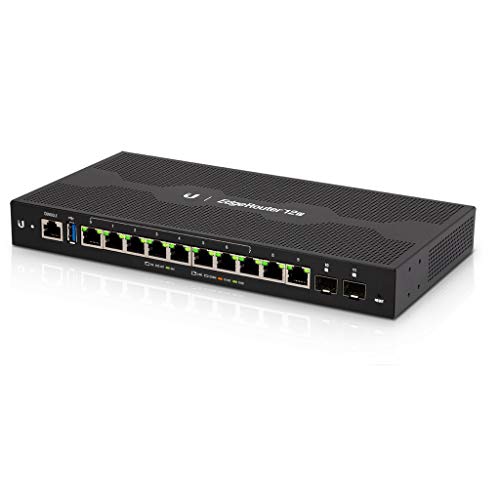
Ubiquiti EdgeRouter 12P — PoE port bank
The EdgeRouter 12P’s title carries the most hardware detail in this pool: a commercial 10-port gigabit router with 24V PoE support. Translate that into a premises. Ten gigabit ports mean the router can also serve as the wired heart for a small site — internet in, and out to a till, two office PCs, a printer, a NAS, a camera recorder and the access points — while 24V Power over Ethernet means the router itself can power compatible devices down the same cable that carries their data. Access points on ceilings and cameras under eaves are the classic PoE loads: one cable each, no power supplies hunted behind furniture, and a single box to reboot if something sulks. For a compact site — a café, a boutique, a small warehouse office — that consolidation is genuinely valuable, collapsing what would be a router plus a PoE switch into one configured device.
The platform underneath is EdgeOS, Ubiquiti’s routing environment, and it defines both the appeal and the demand of this pick. EdgeOS exposes serious routing: multiple WAN configurations, policy routing, firewall rules of real granularity, VLANs, VPN, quality of service — with a web interface for the common paths and a command line beneath it for everything else. Administrators who think in routing tables will feel at home. Owners who expected a phone app and three taps will not, and should choose the Omada or Peplink picks with clear eyes. The title’s word “Commercial” is doing honest work here: this is equipment that assumes a competent hand at the keyboard, whether that hand belongs to the owner, an employee, or the local IT firm on a retainer.
Two cautions complete the picture. The 24V in the title is passive PoE voltage, and it must match the devices being powered — check the access points and cameras against the router’s PoE specification in Ubiquiti’s documentation rather than assuming every PoE device drinks the same voltage. And ten ports, while generous, still end: a site that outgrows them adds a switch, at which point the 12P settles into the pure routing role its siblings occupy. Neither caution dents the central proposition. In this pool, the 12P is the pick where the router reaches furthest into the rest of the network, powering and connecting as well as routing — the closest thing here to a one-box wired infrastructure for a small site.
Deployment rhythm matters with a box this capable. Because the 12P can route, switch and power, a rushed install tangles three jobs into one confusing afternoon; a staged install — routing first, then wired devices, then powered access points and cameras, testing each layer — takes barely longer and leaves a network the administrator understands. Document the port map as you go: which socket feeds which room, which ports carry PoE, which are reserved. On a ten-port device that map is the difference between a five-minute fix in month nine and an hour of cable-tracing during a lunch rush. Commercial equipment rewards commercial habits, and this router, more than any other pick here, is a small infrastructure project rather than an appliance swap.
- Model: Ubiquiti EdgeRouter 12P
- Type: wired router — no Wi-Fi radios; separate access points required
- Ports: 10-port gigabit (from the listing title)
- PoE: 24V PoE support (from the listing title) — match device voltage before powering
- Platform: EdgeOS, web interface plus command line
- WAN port count: Not stated in the listing title — verify with Ubiquiti documentation
Strengths
- Ten ports plus PoE can collapse router and PoE switch into one device at a small site.
- EdgeOS offers routing depth — policy routing, granular firewall, VLANs — beyond consumer firmware.
- Powers compatible ceiling access points and cameras over their data cables.
Trade-offs
- Assumes administrator competence; there is no hand-holding app experience.
- 24V passive PoE must be matched to devices, not assumed universal.
- Still no radios — the powered access points are a separate purchase.
Best for: a compact site seeking one wired box that routes, connects and powers. Not suited for: an owner wanting app-guided setup and no networking homework.

Ubiquiti EdgeRouter 4 — Routing purist
If the 12P is the EdgeRouter that reaches outward, the EdgeRouter 4 is the one that minds its own business perfectly. Its title is the tersest in the pool — Ubiquiti Networks Edgerouter 4 Ethernet LAN black wired router — and the terseness is accurate positioning. This is a compact wired router for the edge of a network whose switching, wireless and power are handled by other, dedicated equipment. Four-port-class EdgeRouters built their reputation on throughput-per-size and on EdgeOS behaving like a real routing platform: static and dynamic routing, firewall, NAT, VPN, QoS, all configurable to a depth that consumer firmware does not attempt. In a small server corner, a branch office, or a prosumer premises with a proper switch and ceiling access points already installed, the ER4 is the quiet specialist hired for one job.
The contrast with its sibling clarifies both. The 12P spends its budget on ports and PoE; the ER4 spends its on routing capacity in a small chassis, expecting the network around it to be grown-up already. Neither posture is superior — they are answers to different rooms. The ER4’s room contains a rack or at least a shelf, a switch with ports to spare, and an administrator who regards the router as infrastructure rather than appliance. Put it in a café with no other networking kit and its minimalism becomes a shopping list: switch, access points, possibly PoE injectors. Put it in the equipped room and it may run for years without being thought about, which is the highest praise routing equipment can earn.
Because the title offers so little, the spec box below is deliberately spare, and the pre-purchase homework matters more here than for any other pick: port roles, throughput with features enabled, and VPN behaviour all live in Ubiquiti’s documentation rather than in the listing. That is normal for this class of equipment — commercial buyers spec from datasheets — but this guide flags it rather than filling the gap with borrowed numbers. What can be said from the platform’s standing is qualitative: EdgeOS is a known, documented, long-lived environment, and an administrator buying an ER4 is buying into that documentation and community as much as into the aluminium box.
One constituency deserves a direct mention: the home-based professional whose work has quietly become commercial — the trader, the consultant with client VPN obligations, the small studio in a converted garage. Such networks often already have a decent switch and a mesh or access-point setup, and what they lack is an edge that takes security and tunnelling seriously. The ER4 drops into exactly that gap without demanding the wireless be rebuilt around it. It is also the pick most likely to be bought by the reader’s IT provider rather than the reader, and that is a healthy pattern: commercial routing is one of the places where paying for an hour of experienced configuration beats spending a weekend learning why a firewall rule order matters.
- Model: Ubiquiti EdgeRouter 4
- Type: wired router, no radios fitted; switching and access points are external
- Class: Ethernet LAN wired router (from the listing title)
- Platform: EdgeOS, web interface plus command line
- Port count and roles: Not stated in the listing title — verify with Ubiquiti documentation
- PoE: not claimed in the listing title
Strengths
- A focused routing platform with depth well beyond consumer firmware.
- Compact chassis suits racks, shelves and branch-office corners.
- Long-documented EdgeOS environment with a deep pool of administrator knowledge.
Trade-offs
- Minimalism externalises cost: switch, access points and power are all separate.
- The listing title is nearly bare, so specification homework is unavoidable.
- Configuration depth will overwhelm a complete beginner.
Best for: an equipped site seeking a dedicated, configurable edge router. Not suited for: a bare premises expecting the router to be the whole network.

Peplink B-One — Dual WAN with Wi-Fi
Every pool needs its exception, and the Peplink B-One is this one: a gigabit dual WAN WiFi router, in its title’s own stack of claims. Dual WAN puts it in the failover conversation with the TRENDnet; WiFi makes it the only pick here that can serve a small premises alone, radios included. That combination sketches its constituency precisely — the small shop, studio or branch that wants resilience but has neither the space nor the appetite for a router-plus-access-point architecture. Peplink’s heritage is multi-WAN bonding and failover for environments from cafés to vehicles, and the B-One brings that lineage down to a single desktop box: two internet services in, one resilient network out, wireless included for the room it sits in.
The design questions are the grown-up ones despite the simpler shape. Which two services will feed it — cable plus fibre, fibre plus a cellular modem on the second port? Should the second WAN be a pure standby or carry overflow on busy days? Which devices must never drop — the till, the booking laptop — and which can wait out an outage? Peplink’s firmware is built around answering exactly these, and a small business that works through them gets continuity that customers never notice, which is the point. The Wi-Fi, meanwhile, should be judged as room-scale convenience: excellent for the premises it sits in, not a substitute for ceiling access points across a large or multi-floor site, where this router would sensibly be paired with additional access points like its wired siblings.
Against the rest of the pool, the B-One trades depth for wholeness. It will not route with the EdgeRouters’ granularity, will not anchor an Omada-style managed fleet, and its title offers no VPN detail beyond the brand’s multi-WAN identity — the spec box records the silence. What it offers instead is the shortest path in this guide from two internet lines to a working, resilient, wireless small-business network. For the owner-operator who is also the IT department, that shortest path is not a compromise. It is the feature.
The second-WAN decision is where this pick is won or lost, so think it through before the box arrives. The strongest pairing joins two different technologies — fibre plus cable, or wired service plus a cellular gateway — because shared infrastructure fails together. The weakest pairing, two contracts riding the same provider’s same street cabinet, buys the appearance of resilience. Also decide the guest question: in a café the B-One’s own wireless can carry a modest guest and staff load, but the moment the premises adds a terrace, a second room or a floor, plan the access point that extends it, wired back to the router. The B-One welcomes that growth; it simply should not be asked to radio through walls it was never sized to penetrate.
- Model: Peplink B-One
- Type: router with Wi-Fi — the pool’s all-in-one exception
- WAN: dual WAN (from the listing title)
- Ports: gigabit class (from the listing title)
- VPN detail: Not stated in the listing title — verify with Peplink documentation
- Wireless coverage: room-scale; larger sites still add access points
Strengths
- Dual WAN resilience and Wi-Fi in one box — the only complete single purchase in the pool.
- Peplink’s multi-WAN heritage shows in failover tooling aimed at small premises.
- Gigabit class keeps pace with mainstream business fibre and cable tiers.
Trade-offs
- Less routing depth and ecosystem breadth than the EdgeOS or Omada picks.
- Built-in Wi-Fi covers its room, not a whole multi-floor premises.
- Title omits VPN specifics, so tunnel requirements need a documentation check.
Best for: a small premises seeking dual-WAN continuity and wireless from one device. Not suited for: a large site needing a managed fleet of access points and deep routing policy.
What Should a Business Check Before Choosing a Commercial Router?
Begin with the failure you are insuring against, because it ranks every feature. If an internet outage costs you trade by the hour, dual WAN with a genuinely independent second service — different provider, ideally different physical path into the building — outranks everything else on this page, and the TRENDnet or Peplink become the conversation. If the outage risk is modest but a security audit looms, separation is the priority: VLANs for guests, payments, staff and cameras, with firewall rules between them, which any pick here can anchor provided the switches and access points support it too. If the pain is growth — more rooms, more staff, a second site — management architecture and VPN decide, pointing toward Omada’s fleet view or EdgeOS’s depth. Naming the failure first prevents the classic error of buying the router with the longest feature list for a problem it does not address.
Next, count the whole system, not the router. A wired pick needs access points — one per coverage zone, ceiling-mounted, powered by PoE from a switch or from a 12P-style router — plus enough switch ports for the wired estate, plus cabling to wherever those access points live. The router’s price is often a minority of the installed total, and pretending otherwise produces the familiar half-finished network: a serious router feeding one consumer access point in a corridor. Draw the premises, mark the wired devices, mark the wireless zones, and let the drawing size every component. Finally, decide who administers it. An ecosystem dashboard suits a business where several people might touch the network; EdgeOS suits a business with one competent administrator or an IT firm on call; the Peplink suits the owner who wants resilience with the least ongoing attention. The best commercial router is the one your actual support arrangement can keep configured, patched and understood in year three.
There is also a growth question to answer honestly: what does this premises look like in three years? A second room, a second site, a dozen more staff, a faster fibre contract already announced for the street? Routers are replaced less often than laptops, and the cheap way to buy one twice is to size for today exactly. The pool’s spread exists for this reason. A business confident of staying small can let the ER605 or the B-One be the whole story; a business with a growth plan should weigh the ER707-M2’s headroom and the Omada path, or the EdgeRouters’ depth, as insurance bought once. Conversely, a stable micro-business gains nothing from multi-gigabit routing it will never feed. The discipline is matching the router’s ceiling to the premises’ plausible future — not its fantasy one, and not its past.
How Do You Roll Out a Commercial Router Without Dropping the Business?
Stage the change like the premises depends on it, because it does. First, document the existing setup before touching a cable: current router settings, static addresses for printers and terminals, port forwards, the Wi-Fi names and passwords staff and guests expect. Second, build the new network in parallel — configure the router, VLANs, VPN and failover on the bench with the second WAN connected, and test with a laptop and a card terminal simulator or a spare terminal. Third, choose the cutover window from the business’s rhythm: the closed evening for retail, the weekend for offices, never the morning of the busiest trading day.
Fourth, migrate wireless deliberately: run the new access points on the same network names and passwords where possible, so staff devices rejoin without a helpdesk queue, and keep the guest network’s name identical too — customers notice nothing, which is success. Fifth, test the failures, not just the success: pull the primary WAN and watch the till keep working; join the guest network and confirm it cannot see the office machines; connect from home through the VPN. Sixth, keep the old router, labelled and configured, on a shelf for a fortnight as the rollback plan. Most rollouts that follow this shape are remembered, if at all, as the week the Wi-Fi quietly got better and the internet stopped being a single point of failure with a blinking light.
What Do Multi-WAN, VLANs and VPN Actually Do All Day?
Three features carry the commercial label, and each earns it in a different hour of the working week. Multi-WAN is the insurance policy: two internet services enter the router, and the router decides, moment by moment, which line carries traffic. In failover mode the second line waits idle until the first fails; in load-balancing mode both work daily and each covers the other’s absence. The subtlety is session behaviour — a card terminal or a video call mid-conversation may reset when its line changes — so commercial practice puts the most fragile devices on the most stable line and treats the switch as a rescue, not an invisibility cloak. Even with that caveat, the arithmetic is brutal in multi-WAN’s favour for trading premises: a backup line costs a modest monthly sum, while a Saturday afternoon without card payments costs a season’s goodwill.
VLANs are the architecture of trust inside the building. A virtual LAN carves one physical network into several logical ones: guests on one, payment terminals on another, staff machines on a third, cameras and recorders on a fourth, each with firewall rules governing what may cross between them. The guest in the café reaches the internet and cannot even see the till; the camera network can be reached by the recorder and by nobody’s laptop. This separation is also what payment-card compliance regimes expect to find when they audit a small merchant, which turns a networking nicety into a trading licence. Every platform in this pool can anchor such a design — the discipline is in configuring the switches and access points to carry it, which is why this guide keeps returning to the whole system rather than the single box.
VPN, the third leg, is the architecture of distance. A site-to-site tunnel makes a second premises — the other shop, the storage unit, the owner’s home office — behave like another room on the same private network, so the stock system, the camera recorder and the shared drive work across town as they do across the corridor. Remote-access VPN serves the individual: the bookkeeper connecting from home reaches the accounting machine as if plugged into its switch, without exposing that machine to the open internet. Both patterns replace riskier habits — emailed spreadsheets, consumer remote-desktop tools left running, files on personal cloud accounts — with one governed doorway. When a listing title prints VPN, as four of these six do in one form or another, it is advertising this doorway; the counts and speeds of tunnels live in the datasheets, and this guide leaves them there.
How Do the Six Compare on Role, WAN and Wireless?
| Pick | Type | WAN story from title | Wireless |
|---|---|---|---|
| TP-Link ER605 | Wired VPN router | Count not stated in title | None — access points required |
| Omada ER707-M2 | Wired VPN router, multi-gigabit | Count not stated in title | None — access points required |
| TRENDnet TWG-431BR | Wired business router | Multi-WAN | None — access points required |
| Ubiquiti EdgeRouter 12P | Wired router, 10 ports, 24V PoE | Count not stated in title | None — powers access points instead |
| Ubiquiti EdgeRouter 4 | Wired router | Not stated in title | None — access points required |
| Peplink B-One | Router with Wi-Fi | Dual WAN | Built in |
What Mistakes Do Businesses Make When Buying a Commercial Router?
The signature mistake is buying a wired router and discovering the wires at unboxing — ordering an ER605 or an EdgeRouter for an office that owns no access points, then running the business for a week on a phone hotspot while the rest of the system is improvised. The titles in this pool state their wired nature plainly; read them as architecture, not as fine print. The second mistake is failover theatre: installing a dual-WAN router with both lines from the same provider over the same street cabinet, so the single real-world failure takes both. Independence is the feature; the second port is merely where it plugs in. The third is flattening the network — one LAN for tills, guests, cameras and the boss’s laptop — on equipment bought precisely for its ability to separate them, because separation takes an afternoon to configure and nobody scheduled it.
Specification mistakes follow close behind. Buying multi-gigabit routing for a gigabit world wastes money that access points needed; buying gigabit routing for a multi-gigabit fibre contract wastes the contract. Skipping the documentation check on PoE voltage can strand access points unpowered or worse. And the quietest mistake is administrative: no configuration backup, no record of who changed what, the one knowledgeable employee leaving with the passwords in their head. Commercial equipment assumes commercial habits — backups, records, a named owner for the network. The router cannot supply the habits, but choosing a platform your support arrangement actually understands, as the buying guide argues, makes the habits far easier to keep.
A final mistake is temporal: treating the installation as the finish line. Firmware ages, staff join and leave with credentials, the second site opens and the VPN design that suited one location strains at two. Put a recurring half-hour in the calendar — quarterly is enough for most small premises — to review firmware, backups, user accounts and the failover test. Pull the main WAN cable during that review and watch the business continue; an untested backup is a rumour. The businesses that get a decade from this class of equipment are not the ones that bought the most features. They are the ones that kept the small disciplines after the installer left.
Final Recommendation
For the typical small office making its first deliberate network purchase, the ER605 is the calm centre of this guide: wired VPN routing, an optional managed ecosystem, nothing to unlearn later. Premises that have outgrown gigabit, or honestly will within the equipment’s life, step up to the ER707-M2 and build the Omada fleet around it. Where continuity of trade is the whole argument, the TRENDnet’s multi-WAN focus and the Peplink B-One’s dual-WAN-plus-Wi-Fi wholeness divide the choice between them — the TRENDnet for sites with access points already, the Peplink for the small premises that wants one box. The EdgeRouter 12P earns its place wherever a compact site can exploit ten ports and powered devices, and the EdgeRouter 4 remains the purist’s edge for an already-equipped network. Whichever name goes on the order, order the access points in the same breath, schedule the cutover for the quiet hour, and let the first outage that nobody notices be the review this equipment was bought to earn.
And keep the perspective the category itself teaches: a commercial router is not a faster toy but a piece of business continuity, closer in spirit to the alarm system and the backup routine than to the television. Judged that way, the right question was never which of these six is best in the abstract. It is which failure your business can least afford — the dead line, the flat network, the unmanageable estate — and which of these machines was plainly built, title and all, to make that failure boring.
Frequently Asked Questions
Why do commercial routers so often have no Wi-Fi?
Because the jobs scale differently. Routing, firewall and VPN needs concentrate at the internet edge in one device, while wireless needs spread across the physical premises in several access points placed where people work. Separating the roles lets each be upgraded, positioned and replaced independently. Five of the six picks here follow that architecture; the Peplink B-One includes Wi-Fi because it targets premises small enough for one room of coverage to be the whole job.
Do I need two internet connections for a commercial router to make sense?
No. Separation, VPN, management and reliability all justify the category on a single line. The second connection is what unlocks failover on the multi-WAN and dual-WAN picks, and it is worth its modest cost when an outage stops trade — but a single-line business still gains a network that can be segmented, audited and remotely administered, none of which an ISP’s bundled box does well.
What else must I budget for besides the router?
Access points for wireless coverage, a switch if wired devices outnumber router ports, cabling and mounting for the access points, and possibly a controller or management arrangement depending on the platform. On wired picks, plan the router as roughly the brain of the system rather than the whole purchase. The rollout section above walks through sizing those pieces from a floor plan before ordering.
Which pick suits a business with no IT staff?
The Peplink B-One asks the least ongoing expertise while still delivering dual-WAN resilience and wireless in one box, and the ER605 with Omada management is the next gentlest path, especially if a local installer sets it up and the business later adds matching access points. The EdgeRouter pair, by contrast, repay expertise richly but assume it exists — either in-house or on a support contract.
Can these routers separate guest Wi-Fi from the payment terminals?
Yes — network separation through VLANs and firewall rules is baseline commercial behaviour, and every platform in this pool supports that design. The condition is that the rest of the chain cooperates: the access points must broadcast the separate networks and the switch must carry the VLANs. Configured end to end, guests reach the internet and nothing else, while the terminals sit in a lane of their own.
Is a commercial router worth it for a one-person business?
It can be, when the one person sells online, takes card payments, or works with client data under a contract that asks hard questions about network separation. The Peplink B-One’s dual-WAN resilience also suits a solo trader whose entire income stops when the line does. Where the business is one laptop and a phone, a good home router remains the proportionate answer, and this guide’s honesty about architecture cuts both ways.
How do I verify WAN counts and VPN figures before buying?
From the manufacturer’s documentation for the exact model, not from the listing title — this guide marks every such figure that a title omits as not stated, deliberately. Commercial datasheets publish WAN port counts, tunnel capacities and throughput with features enabled. Ten minutes with the correct datasheet is the cheapest insurance in the whole purchase, and it is the step that separates a specification from a hope.
Related Guides
Continue with our guide to access points for small business premises, our explainer on dual WAN failover for shops and clinics, and our walkthrough of setting up separate guest and staff networks. Read together, they cover the whole commercial system this guide’s routers anchor — edge, air and policy — in the order a real premises actually gets built.


