What's inside
- Where to buy
- Key Takeaways
- Quick Picks
- How did we choose these picks?
- What actually matters when a camera photographs products?
- Why does lighting matter more than the body at the budget end?
- How do you run a repeatable product shoot, step by step?
- How should different products change your camera choice?
- What role does video play in product listings now?
- How do backgrounds, props and styling earn their budget?
- What should happen to the files after the shoot?
- Which camera fits which kind of seller?
- What support gear does a product camera actually need?
- When does a growing shop need a second camera?
- What mistakes ruin otherwise good product photographs?
- How do you keep a product studio reliable month after month?
- Final Recommendation
- What do marketplaces and your own store ask of the same photograph?
- Frequently Asked Questions
- Related Guides
As an Amazon Associate I earn from qualifying purchases. This post may contain affiliate links at no extra cost to you.
gizmoverdict.com is reader-supported. When you buy through links on our site, we may earn an affiliate commission.
Where to buy
All six cameras below are sold through Amazon’s US store under the listings we verified, and every linked pick points at the exact listing whose title we checked. Product-photography cameras are bought in two very different ways — as a body to build a small studio around, or as a single box that must do everything the day it arrives — so read each listing’s kit contents carefully: two of the mirrorless picks below arrive with a lens, one is a body alone that assumes you already own glass, and the compacts carry everything they will ever have inside the box.
Choosing among the best product photography cameras starts with an admission this guide will repeat until it sticks: at the budget end, lighting matters more than the camera body. A modest camera under two decent lights, on a steady support, with a background that has been thought about, produces catalogue pictures that a flagship body under a ceiling panel cannot match. That is not a reason to buy carelessly — colour fidelity, manual control, close-focus ability and a screen that lets you shoot overhead are real differences, and they decide how much of your time goes into photographing products and how much goes into rescuing photographs. It is a reason to buy in the right order, and to judge the six cameras below by how they behave on a product table rather than by the size of the numbers on their boxes.
The six split into three honest tiers. Three mirrorless bodies — Sony, Fujifilm and Canon — are the serious tier, cameras a small business can grow inside for years. One premium compact from Canon serves sellers who want quality without a lens system. Two inexpensive no-name compacts close the list as the genuine budget tier: usable for marketplace listings and simple catalogues, sold with headline figures we treat as seller claims rather than measurements, and recommended only with their limits stated in daylight.
Key Takeaways
- Lighting outranks the body at the budget end; light boxes and lighting kits are accessories that improve any pick here, and they are never picks themselves.
- The mirrorless trio — Sony ZV-E10, Fujifilm X-T30 III and Canon EOS R50 — is the serious tier, offering interchangeable lenses, manual control and colour you can build a brand on.
- The ZV-E10 listing is a body only: budget for an E-mount lens in the same purchase, or the camera photographs nothing.
- The Canon PowerShot G7 X Mark III is the one-box answer for sellers who want strong pictures without owning a lens collection.
- The two no-name compacts are the honest floor of the market; their headline megapixel figures are seller claims, not tested resolution, and their value is simplicity rather than fidelity.
- Overhead and flat-lay work is a screen test before it is a sensor test — a vari-angle display you can read from above saves more shots than any specification.
Quick Picks
| Pick | Badge | Why it earns its place |
|---|---|---|
| Sony ZV-E10 Mirrorless Camera Body | Best studio foundation | An APS-C mirrorless body built for creators, with a vari-angle screen and Sony’s deep E-mount lens shelf waiting behind it. |
| FUJIFILM X-T30 III Mirrorless Camera | Best colour character | Fujifilm’s film-simulation colour in a compact body, kitted here with the XC 13-33mm lens so it shoots the day it lands. |
| Canon EOS R50 Mirrorless Camera | Best all-round kit | Canon’s friendly hybrid with the RF-S 18-45mm kit lens — the easiest route here from unboxing to a first clean catalogue. |
| Canon PowerShot G7 X Mark III | Best premium compact | A pocketable Canon with a fast lens and a name behind it, for sellers who photograph products between everything else they do. |
| 5K Digital Camera (no-name compact) | Budget tier, eyes open | A flip-screen compact for simple listings; its headline figures are seller claims, and it is bought for convenience, not fidelity. |
| 4K Digital Camera (no-name compact) | Cheapest workable route | USB-C charging, a small IPS screen and basic modes — enough for a first marketplace shop, with limits stated plainly below. |
How did we choose these picks?
We judged cameras the way a product table judges them. A product photograph must hold colour honestly — a terracotta pot rendered orange is a return waiting to happen — must focus closely enough for labels, stitching and small parts, must accept manual exposure so a white product on a white background stops fooling the meter, and must present its screen to a photographer standing over a flat-lay. Cameras were also weighed on what surrounds them: the lens system above a mirrorless body, the support and firmware record behind a compact, and the truthfulness of the claims printed on the box.
That last test eliminated more cameras than any other. This category’s budget shelf is crowded with listings whose megapixel headlines describe interpolation arithmetic rather than captured detail, and our rule throughout is simple: a figure a seller asserts is reported as a seller’s assertion, never repeated as a tested result. You will see that discipline applied openly in the two budget sections below. It is also why the guide’s centre of gravity sits with the three mirrorless bodies, whose makers publish real specifications and stand behind them. Sellers photographing small goods should read alongside our close-focus guide to the best digital cameras macro, since jewellery-scale work stresses exactly the traits this article weighs.
Every pick was verified against its listing before writing. Where a listing states a fact — a sensor size, a lens in the kit, a screen that articulates — the article uses it. Where the listing is silent, the article either says so or speaks in the class terms any experienced product photographer would recognise. Nothing in the six sections below invents a tethering protocol, a focus distance or a colour measurement for the sake of a fuller spec box.
What actually matters when a camera photographs products?
Colour fidelity comes first, and it is less about the sensor than about the pipeline. A camera that records a faithful file — ideally with a raw option you can correct against a grey card — lets a shop develop one repeatable look and apply it to every shoot. Brands diverge in taste: Canon’s rendering flatters warm goods and food, Fujifilm’s film simulations hand a seller a finished aesthetic without editing software, and Sony’s files reward a deliberate hand in post. None is wrong; inconsistency is the only wrong answer, which is why mixing bodies across one catalogue quietly damages more shops than any single camera choice.
Close focus is the second test, and it is a lens test wearing a camera’s clothes. Kit zooms focus respectably close at their wide ends, which covers most tabletop work, while genuine macro territory — a hallmark stamp, a watch movement, the weave of a fabric — wants a dedicated macro lens on the mirrorless bodies or the close-focus modes discussed in our guide to the best cameras jewelry photography. Judge any camera here by the closest honest photograph it can take of a coin, and you have judged the trait small-product sellers live on.
Manual control is the third test, because product scenes lie to automatic exposure as a profession. A white candle on a white cloth, a black wallet on dark slate — auto modes average these into grey mush and focus-hunt across featureless surfaces. The serious picks below all let you fix exposure, focus deliberately and lock white balance against a reference, then repeat the identical recipe next month when the catalogue expands. Repeatability, more than any single frame’s beauty, is what a business is buying.
The screen is the fourth test and the most underestimated. Product work is shot from above, from below, at table edge and inside light tents; a vari-angle screen that faces whichever way the photographer stands converts those contortions into ordinary work. Tethering — reviewing each frame large on a monitor as you shoot — is the studio refinement above that, available in class terms on the mirrorless tier through their makers’ software ecosystems, and worth confirming for your exact body and computer before a high-volume catalogue day depends on it. A seller checking files at size also benefits from the displays surveyed in our roundup of the best monitors for design and photography.

Sony ZV-E10 Mirrorless Camera Body — Best studio foundation
The ZV-E10 is the foundation pick: an APS-C mirrorless body whose listing states a 24.2MP Exmor CMOS sensor, 4K30 and 1080p120 video, a three-capsule directional microphone and a 3.0-inch vari-angle touch screen. For product stills, translate that specification into table behaviour. The sensor is a known, mature design with colour that corrects predictably — the working photographer’s favourite kind. The vari-angle screen folds out and turns to face a photographer standing over a flat-lay, which on a product table is worth more than a viewfinder ever will be. And the E-mount behind the body is one of the deepest lens shelves in photography, so the day a dedicated macro or a fast prime becomes necessary, the upgrade is a lens rather than a new system.
Note the words in its name: camera body. This listing sells no lens, and a body without glass photographs nothing at all — the single most common disappointment attached to this pick is a parcel that cannot be used until a second parcel arrives. Treat the lens as part of the purchase: the kit zoom class covers general catalogue work, while small-goods sellers should price a macro lens into the same decision. Configured that way, the ZV-E10 becomes the centre of a small studio that can grow for years — tethered review on a monitor, manual everything, and a video side strong enough to shoot the product clips marketplaces increasingly reward.
- Sensor: 24.2MP APS-C Exmor CMOS, as stated in the listing title
- Mount: Sony E — plan a lens purchase alongside this body-only listing
- Screen: 3.0-inch vari-angle touch LCD, the overhead-shooting enabler
- Video side: 4K30 and 1080p120 for product clips and demonstrations
Strengths
- The deepest lens ecosystem in this guide waits behind it, including true macro options.
- Vari-angle screen makes flat-lay and overhead compositions routine instead of acrobatic.
- A mature sensor with predictable colour that builds a repeatable catalogue look.
Trade-offs
- Body only in this listing — the real starting price always includes a lens.
- No viewfinder, which stills photographers shooting outdoors will feel.
- Its creator-video heritage means stills ergonomics take second place to the screen.
Best for: sellers building a small studio they intend to keep, especially small-goods and macro-leaning catalogues. Not suited for: buyers who need to photograph products the hour the box arrives, with nothing else to buy.
FUJIFILM X-T30 III Mirrorless Camera — Best colour character
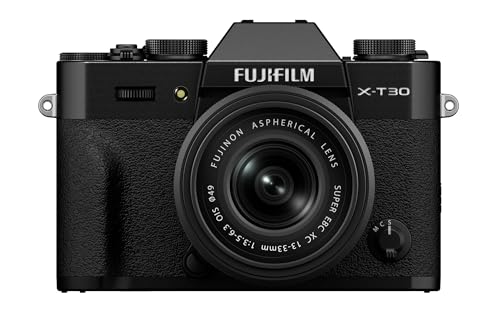
Fujifilm sells something the other makers treat as an afterthought: a finished look, straight from the camera, with a personality. The X-T30 III arrives here as a kit with the XC 13-33mm lens, and its reason to exist in a product guide is Fujifilm’s film-simulation colour — a shelf of considered renderings, derived from the company’s film heritage, that a seller can choose once and apply to an entire catalogue. For a candle brand, a leather workshop or a ceramics studio, that consistency is a brand asset: every photograph arrives wearing the same taste, without an editing subscription or a colourist’s afternoon standing between the shoot and the listing.
The kit lens deserves a practical word. Its range runs unusually wide, which on a product table means a small shooting space still fits a full scene — the styled arrangement, the lifestyle corner, the packaging shot — while the short end handles single items across a table without the photographer retreating into the wall. Photographers raised on dials will also appreciate that Fujifilm still builds cameras you operate by touch and intention rather than by menu. It is the pick for a seller whose products are sold partly on mood, and who would rather choose a look once, photographically, than manufacture one later in software.
- Format: APS-C mirrorless, sold with the XC 13-33mm lens kit in this listing
- Colour: Fujifilm film simulations as the catalogue’s house style
- Handling: dial-led controls for deliberate, repeatable settings
- Kit range: wide enough for styled scenes in small rooms
Strengths
- Finished, characterful colour at the moment of capture — a whole catalogue in one taste.
- Kit included, so the camera works on delivery day.
- Compact body and lens that suit a tabletop studio in a spare corner.
Trade-offs
- The kit lens is a starting lens; macro ambitions still mean a dedicated lens later.
- Fujifilm’s control philosophy delights dial-lovers and puzzles touchscreen natives briefly.
- Its look is a commitment — choose the simulation as carefully as a logo.
Best for: brand-led sellers — food, craft, homeware, apparel — whose pictures sell a mood alongside a product. Not suited for: high-volume white-background factories that want the most neutral file possible.

Canon EOS R50 Mirrorless Camera — Best all-round kit
The R50 is the guide’s easiest recommendation to hand to a non-photographer. Canon’s listing pairs the body with the RF-S 18-45mm kit lens and states a 24.2 megapixel APS-C sensor, 4K video and the hybrid photo-and-video brief the maker aims at content creators. On a product table that translates into the gentlest path from box to catalogue in this guide: autofocus that finds a product and stays there, automatic modes honest enough for a first month of listings, and manual controls waiting underneath for the day the seller starts locking exposure against a grey card and wondering why they ever trusted the meter.
Canon’s colour is the quiet reason many sellers stay. Skin tones made Canon’s reputation, but the same rendering flatters the warm materials product photography lives on — wood, leather, baked goods, brass — with a generosity that reduces editing to a crop and a nudge. The R50 also hedges a business’s future gracefully: the same body shoots the catalogue, the behind-the-scenes clips and the founder’s talking-head updates, in one system whose lenses step up from the kit in affordable increments. If a shop can own exactly one camera and must never think about it again, this is the one to think about once.
- Sensor: 24.2 megapixel CMOS (APS-C), as stated in the listing title
- Lens in kit: RF-S 18-45mm F4.5-6.3 IS STM, stabilised
- Brief: hybrid photo and video for creators, per the listing
- Handling: beginner-friendly automation over full manual control
Strengths
- The shortest learning curve of the mirrorless trio, with automation a new seller can trust.
- Warm, forgiving colour for the materials small brands photograph most.
- One body covers catalogue, clips and social video without a second purchase.
Trade-offs
- The kit lens focuses closely enough for general goods, not for hallmark-and-stitching detail.
- RF-S lens choice is narrower than Sony’s E shelf at the budget end.
- Keen photographers may outgrow its compact control layout within a year.
Best for: first-time sellers and small teams who need one dependable camera for everything. Not suited for: dedicated macro specialists, who should start from the ZV-E10 and a macro lens.

Canon PowerShot G7 X Mark III — Best premium compact
Not every seller wants a lens system; some want a camera that lives in a drawer, emerges for a product shoot, and returns to the drawer without a bag, a shelf or a decision. The G7 X Mark III is that camera at its most credible: a premium Canon compact with a fast built-in zoom, a one-inch-class sensor pedigree in this line, and a maker’s name attached to its colour and its firmware. For a market trader photographing stock on a stall, a maker shooting between craft-fair weekends, or a café listing its retail shelf, the compact’s virtue is that photography never becomes a department.
Its limits are the compact limits, stated plainly. The lens it has is the lens it will always have, so genuine macro and specialised work stay out of reach; close-ups are handled by getting physically close within the lens’s honest range and cropping with restraint. The battery is a compact battery, sized for a session rather than a catalogue marathon, so a spare belongs in the drawer beside it. Within those borders it is a thoroughly grown-up tool — manual control when the white-background lie needs correcting, a screen that tilts for table work, and files that hold together in editing far better than a phone’s or a budget compact’s. Buy it as the end of the search, not the beginning of a system, and it satisfies for years.
- Type: premium compact with fixed zoom lens — no lens purchases, ever
- Maker: Canon, with the colour rendering the brand is known for
- Screen: tilting display for table-height and overhead angles
- Power: compact battery — budget a spare for catalogue days
Strengths
- Everything included: unbox, charge, photograph, with zero system decisions.
- Files and colour a clear class above phones and no-name compacts.
- Small enough to travel to wherever the products actually are.
Trade-offs
- Fixed lens forever — macro and specialist work are outside its borders.
- Session-length battery life rather than all-day stamina.
- Premium pricing buys convenience and pedigree, not interchangeable-lens growth.
Best for: sellers who want strong product pictures without owning a camera system. Not suited for: anyone planning macro work or a growing studio.

5K Digital Camera (no-name compact) — Budget tier, eyes open
This is the first of two budget compacts, and it is introduced the way it must be sold to you: honestly. Its listing leads with large headline figures — a 5K badge and a megapixel number in the eighties — and those figures are the seller’s claims, printed to win a search results page. They are not tested resolution, and this guide does not repeat them as fact, because cameras in this class typically reach such numbers through interpolation rather than through a sensor that captures that detail. What the listing also describes, more usefully, is a flip screen that rotates for overhead and self-facing angles, autofocus, Wi-Fi transfer, a lens hood and a memory card in the bundle — the furniture of a simple listing-photography workflow.
Judged on that workflow rather than on its badges, the camera has a real, narrow job. A seller listing straightforward goods — phone cases, simple tools, toys, household items — in decent light, at marketplace sizes, can produce clean, bright, correctly focused pictures with a device like this, especially inside an inexpensive light tent that flatters everything it touches. The flip screen genuinely helps flat-lay composition, and Wi-Fi transfer keeps a phone-based shop’s routine intact. Where it must not be trusted is anywhere fidelity is the product: colour-critical goods, fine texture, print use, or a brand being built. Buy it as a listing appliance with a known ceiling, and it earns its modest keep; buy it believing the box, and the disappointment belongs to the box.
- Type: no-name compact, fixed lens, flip screen for overhead framing
- Headline figures: seller claims only — not treated as tested resolution anywhere in this guide
- Transfer: Wi-Fi to a phone-based workflow, per the listing
- Bundle notes: memory card and lens hood listed among the inclusions
Strengths
- Flip screen makes flat-lay composition easier than on many costlier compacts.
- A complete bundle that starts a simple listing workflow immediately.
- Cheap enough to live at the packing bench where the mirrorless bodies would be babied.
Trade-offs
- Headline resolution figures are marketing arithmetic, not captured detail.
- Colour fidelity and low-light behaviour are the weakest of the six picks.
- No maker ecosystem behind it — support, firmware and spares are the seller’s goodwill.
Best for: high-turnover marketplace listings of simple goods in good light. Not suited for: colour-critical products, fine detail, or any brand being built on its photography.

4K Digital Camera (no-name compact) — Cheapest workable route
The second budget compact sits a rung below its sibling and makes no apology for it. The listing describes a small camera with a 2.8-inch IPS screen, USB-C charging, a rechargeable battery, continuous shooting, a self-timer and a time-lapse mode, plus duty as a PC webcam. Its headline figures — a 4K badge and a fifty-megapixel claim — receive exactly the treatment given above: they are the seller’s assertions, not measurements, and no purchasing decision should rest on them. Rest the decision instead on the mundane virtues the listing actually evidences: it charges from the same cable as everything else you own, it starts instantly, and its modes cover the simple choreography of listing photography — prop the product, frame it, let the self-timer avoid the shake of a pressed shutter.
The webcam mode is the quiet reason this camera suits a particular seller: the one-person shop whose products are demonstrated live and listed afterwards, using one device for both. Picture quality in either role is listing-grade rather than catalogue-grade, and the small screen makes critical focus a matter of faith at macro distances — so keep subjects simple, light them generously, and review each frame on a phone before the product goes back on the shelf. As the floor of this guide it is a legitimate floor: a real camera-shaped tool, with manual-ish habits to learn on, for less commitment than a single mirrorless lens cap. Sellers who discover they love the work will outgrow it within a season, and it will still have paid for itself in listings that a phone’s warped wide lens would have cheapened.
- Type: no-name compact with 2.8-inch IPS screen
- Charging: USB-C, shared with modern phones and laptops
- Modes named in the listing: continuous shooting, self-timer, time-lapse, PC webcam use
- Headline figures: seller claims only — never treated as tested resolution in this guide
Strengths
- The lowest-commitment route in this guide to camera-shaped listing photography.
- USB-C charging removes one more proprietary cable from a small business.
- Webcam duty doubles its value for sellers who also demonstrate live.
Trade-offs
- Small screen makes checking fine focus genuinely difficult.
- Listing-grade files only; texture and colour-critical work are beyond it.
- Like its sibling, it stands on a seller’s claims rather than a maker’s record.
Best for: a first shop, simple goods, and sellers testing whether product photography deserves a bigger budget. Not suited for: detail-led products or anyone printing their photographs.
Why does lighting matter more than the body at the budget end?
Because a product photograph is mostly a picture of light that happens to contain a product. A camera records the light a scene offers; offer it a single ceiling bulb and every camera in this guide — mirrorless flagships included — returns the same grey soup of harsh shadow and blown highlight. Offer it two large, soft, well-placed sources and the cheapest compact here suddenly produces the smooth gradients and honest colour that buyers read as quality. Light boxes, softboxes and LED panels are therefore discussed in this guide as accessories, the supporting cast that upgrades whichever camera you choose; they are never picks, because the question asked for cameras, and because a light bought today still serves the camera you upgrade to in three years.
The practical starter arrangement costs less than the difference between the budget compacts and the G7 X. One large soft source at forty-five degrees to the product, a second weaker source or a white reflector filling the shadow side, and a background chosen rather than inherited from the room. Inside a light tent the arrangement simplifies further, which is why tents are the budget seller’s cheat code: the tent is the lighting design, pre-built. Spend on light before glass, and on glass before bodies, and a small studio improves in the order that photographs actually notice.
How do you run a repeatable product shoot, step by step?
Set the stage once and photograph it forever. Choose the corner, the background and the light positions, then mark them — tape on the floor for the tripod feet, a note of the light’s height and distance, the product’s place measured from the background’s edge. A catalogue’s professionalism is mostly sameness: forty products photographed across four months should look like one afternoon’s work, and sameness is a set of marks and numbers, not a talent.
Fix the camera’s decisions next. Manual exposure, locked against a grey card or a known product that ships in every shoot as a reference. White balance set from that same card, not from the room’s mood. Focus placed deliberately on the label, the logo, the detail the buyer inspects first. Then shoot a frame, review it large — on a monitor if your body supports tethered review, on a tablet if it does not — and only then work through the batch. The first frame is the shoot; the other thirty-nine are photocopies of it, which is exactly what a catalogue wants.
Handle the product like the evidence it is. Fingerprints on glossy goods photograph like weather; lint on dark fabric reads as damage; a slightly rotated label makes a careful brand look careless. Cotton gloves for the shiny, a blower and a lint roller for the matte, and a final turntable inspection under the shooting lights before the shutter ever fires. Finish by naming and backing up files the same day, in the same pattern, because a catalogue’s archive is the business’s memory — and because reshooting a sold-out product is the one expense no camera in this guide can prevent.
How should different products change your camera choice?
Jewellery and watches are the extremists of the product world: tiny, reflective and unforgiving, they demand close focus, ruthless dust discipline and light shaped into gradients rather than blasted. They belong on a mirrorless body with a macro lens and a tethered screen, full stop — which is why the ZV-E10’s lens shelf matters more to a jeweller than any figure on its box. Apparel sits at the opposite pole: large, matte and colour-sensitive, it cares about white balance honesty and a wide enough lens for styled scenes, the ground where the Fujifilm kit and the R50’s forgiving automation both feel at home.
Food and homeware sell warmth and texture, and they reward the makers whose colour leans generous — Canon’s rendering and Fujifilm’s simulations both flatter a loaf and a glaze in ways a clinical file must be edited toward. Electronics and tools invert the brief again: buyers inspect edges, ports and print, so sharpness at the centre, honest contrast and glare control outrank charm, and a polarising filter over the lens earns more than a sensor upgrade. Glossy goods of every kind share one rule — you do not photograph the object, you photograph the reflections it wears, so the studio skill is arranging large soft sources whose reflections become the product’s finish. No camera in this guide does that for you; the mirrorless trio simply refuses to stand in its way.
Scale changes the verdict on the budget tier more than category does. A compact that flatters a cushion at marketplace size may disgrace a necklace at the same size, because the necklace’s entire value lives in detail the budget sensor never captured. Match the camera to the smallest, finest, most colour-critical thing you sell — not to your average product — and the whole catalogue is covered by the same decision.
What role does video play in product listings now?
Marketplaces increasingly let a short clip sit beside the stills, and buyers increasingly watch it: the turn of a mug in the hand, the clasp working, the fabric moving. Every pick in this guide records video of some description, but the mirrorless bodies treat it as a first-class citizen — clean 4K, dependable autofocus while a product rotates on a turntable, and screens that let the seller frame from in front of the table. The ZV-E10 was designed for exactly this hybrid life, and the R50 follows it closely. Treat video as a second catalogue shot with the same recipe — same lights, same background, same colour decision — and a shop gains the trust that only motion confers, because a product that survives being turned around has fewer secrets than one frozen at its best angle.
Keep clips humble. Fifteen honest seconds under the catalogue lights out-perform a minute of ambitious camera movement, and the audio barely matters beyond silence or a soft room tone. What matters is the discipline of sameness again: a clip that matches its stills in colour and light reassures, while one shot on a phone by a window quietly contradicts them.
How do backgrounds, props and styling earn their budget?
After light, the background is the highest-leverage purchase in product photography, and the least technological. A seamless sweep — paper, vinyl or a purpose-made board — removes the room from the photograph and leaves only decisions. White for marketplaces that demand it, a considered tone for a brand’s own store, a textured surface for goods whose story is material. Props obey a stricter law: one prop that explains scale or use is staging, three are a flea market. The hand entering the frame to hold a wallet does more selling than any arrangement of coins and keys around it, because hands give size, use and trust in a single gesture.
Styling also has a maintenance side nobody budgets for: backgrounds scuff, paper yellows at the edges, and the white sweep that launched the catalogue slowly becomes the grey sweep that dates it. Replace consumables on schedule rather than on evidence, and log the background alongside the lighting recipe in the shoot card, so a replacement roll is matched before the old one is retired. Consistency is a supply chain as much as an aesthetic.
What should happen to the files after the shoot?
A product photograph is finished in the edit, and the cameras here divide by how much finishing they invite. Fujifilm’s simulations aim to end the conversation at capture. Canon’s files accept a house recipe gracefully. Sony’s reward the seller who builds one deliberate preset and applies it to everything. Whichever route, the workflow rules are the same: correct against the grey-card frame from the shoot itself, crop to the marketplace’s ratio before judging composition, export at the platform’s preferred size rather than its maximum, and keep the unedited originals archived under the same names forever. The day a supplier disputes a colour or a platform questions a listing, the archive is the business’s evidence.
Resist per-image heroics. A catalogue edited photograph by photograph drifts exactly like a catalogue shot that way, each frame slightly more polished than its neighbour until the set looks restless. Batch the recipe, spot-check the extremes — the whitest product, the blackest, the reddest — and let the middle of the range ride. Buyers scroll catalogues the way they walk shop aisles: they feel coherence long before they can name it, and coherence is a workflow, not a camera.
Which camera fits which kind of seller?
| Pick | Class | Lens situation | Screen for overhead work | Character |
|---|---|---|---|---|
| Sony ZV-E10 | Mirrorless body | None included — E-mount shelf behind it | Full vari-angle | The studio foundation |
| FUJIFILM X-T30 III | Mirrorless kit | XC 13-33mm included | Tilting, dial-led handling | Colour as a brand asset |
| Canon EOS R50 | Mirrorless kit | RF-S 18-45mm included | Articulating, beginner-friendly | The one-camera answer |
| Canon G7 X Mark III | Premium compact | Fixed fast zoom | Tilting | Quality without a system |
| 5K no-name compact | Budget compact | Fixed | Flip screen | Listing appliance, claims discounted |
| 4K no-name compact | Budget compact | Fixed | Small fixed IPS screen | The floor, honestly labelled |
Read the table as three decisions wearing six names. Decide first whether photography is infrastructure for your business or an occasional chore: infrastructure buys a mirrorless body, a chore buys the G7 X or a budget compact. Decide second whether a look matters — brand-led sellers gravitate to the Fujifilm’s simulations or Canon’s warmth, while neutral catalogue factories lean Sony and correct in post. Decide third how small your products are, because coin-sized goods quietly eliminate the compacts and promote whichever mirrorless body can wear a macro lens. Answer those three and the table collapses to one row, which is what a buying guide is for.
What support gear does a product camera actually need?
A product camera spends its life held still, so the support beneath it shapes more photographs than its sensor does. A tripod with a geared or carefully lockable head lets the photographer set a frame and then use both hands on the product — the fundamental product-shooting posture, impossible handheld. For overhead work the tripod’s centre column must swing horizontal or yield to a dedicated overhead arm, and the whole rig must be rigid enough that a bumped table leg does not redraw the composition. The mirrorless bodies’ screens exist for this geometry: camera pointing down, photographer standing upright, framing from a display turned toward their face instead of from a viewfinder pressed into the back of a horizontal camera.
Small accessories compound quietly. A remote release or the self-timer removes the tremor of a pressed shutter at macro distances. A tethering cable with slack managed — taped, clipped, never dangling across the set — turns review-at-size from a studio luxury into a habit. A colour reference card, photographed at the start of every session, anchors the edit months later when memory has repainted everything warmer. None of these items photographs anything alone; together they are the difference between a camera used hopefully and a camera used professionally, and they cost less, combined, than the gap between any two tiers in this guide.
When does a growing shop need a second camera?
Later than enthusiasm suggests, and earlier than logistics admit. One body runs a catalogue comfortably until the business adds a second shooter, a second location, or a returns-and-resale stream whose photography cannot queue behind the main catalogue. The disciplined answer is a second body in the same system — ideally the same model — because colour consistency across a catalogue is worth more than variety across a shelf, and because lenses, batteries and habits all transfer without translation. Shops that buy a different brand for the second station spend the savings on matched colour forever after.
Until that day, money aimed at a second body earns more in the unglamorous directions this guide keeps naming: the second light, the spare battery, the replacement background roll, the macro lens that unlocks the small-goods range. A camera collection is a photographer’s pleasure; a catalogue is a business’s asset, and the two budgets should never be confused — especially by the person who happens to enjoy both.
What mistakes ruin otherwise good product photographs?
The classic is photographing the product you wish you sold: overexposed until the white goods glow, saturated until the colours promise what the parcel cannot keep. Marketplaces punish it with returns, and reviews punish it with photographs of their own. Shoot the product you actually ship, lit honestly, and let the pictures under-promise by a shade — the gap between listing and parcel should always break in the customer’s favour.
Second is the inherited background: the kitchen table, the office carpet, the garden fence at noon. A background is a decision, and the cheapest professional upgrade in this entire article is a roll of seamless paper and the discipline to use it for every shot. Third is mixing light sources — window daylight from the left, warm ceiling light from above, a cool LED from the right — which hands the camera three white balances at once and guarantees that one of them renders your product in a colour it is not. One family of light, or one window with everything else switched off: those are the only two honest arrangements.
Fourth, and quietest, is inconsistency across the catalogue: three shoots, three looks, two cameras and a phone, so the shop reads as four businesses sharing a name. One body, one background, one lighting recipe and one colour decision — written down and taped to the wall — will do more for a small brand than any single upgrade in this guide. The cameras above differ genuinely, but every one of them can hold a look; none of them can hold four.
How do you keep a product studio reliable month after month?
Treat the studio as equipment with a service schedule rather than as furniture. Sensors gather dust in proportion to lens changes, and product photography — with its small apertures and plain backgrounds — displays every speck like a fingerprint at a scene, so a blower routine and an occasional wet clean belong in the calendar, not in a crisis. Screens and hinges get checked the way a driver checks tyres: briefly, regularly, before the long journey of a catalogue deadline rather than during it. Batteries rotate and retire by behaviour, not by age; a pack that sags mid-session is demoted to emergency duty before it can choose its own moment.
Keep one unglamorous box stocked: spare cables for every connection the recipe depends on, a second memory card from a reputable maker, lens cloths that have never touched anything but glass, and the grey card that anchors the colour. The box costs little and converts most studio emergencies into errands. Reliability, in the end, is the trait buyers of these cameras are truly purchasing — a catalogue that appears on schedule, in one voice, season after season — and it is built from habits like these far more than from any specification compared in this guide.
Final Recommendation
Build in this order: light first, then the camera the light deserves. A seller starting today with serious intent should take the Canon EOS R50 kit for its painless path to a first clean catalogue, or the Sony ZV-E10 with a lens budgeted beside it if small goods and macro ambitions are already on the roadmap. Choose the Fujifilm X-T30 III when the brand’s mood is the product’s selling point and you want that mood baked in at capture. Take the G7 X Mark III if photography must stay a drawer-sized chore done well, and take either budget compact only with its ceiling understood and its box’s arithmetic politely ignored. For the ceramics studio photographing forty new pieces a season under two soft lights, the R50’s warm files and uncomplaining autofocus turn shoot day into the calmest afternoon of the month — and that calm, repeated across a year of catalogues, is what a product camera is really for.
What do marketplaces and your own store ask of the same photograph?
Different things, and a wise shoot serves both in one session. Large marketplaces favour the white-background hero: product large in frame, colour faithful, no props arguing with the algorithm’s crop. A brand’s own store can afford the styled scene, the lifestyle frame, the detail crop that behaves like a shop assistant pointing at the stitching. Shoot the hero first, on the recipe, while the setup is pristine; then dress the set for the styled frames, because the reverse order contaminates the hero with styling debris and tired light positions. The same discipline governs aspect ratios — capture with headroom on every side, and let each platform’s crop be an export decision rather than a shooting accident.
Zoom behaviour deserves a sentence of its own, because buyers pinch and magnify as a matter of habit. The magnified view is where the tiers in this guide separate most cruelly: mirrorless files reward the gesture with real detail, the premium compact holds together respectably, and the budget compacts dissolve into the interpolation their boxes boasted about. If your products are bought by zooming — and detail-led goods always are — that single test should settle your tier before any other argument is heard.
Finally, keep the set’s paperwork as carefully as its pictures: which body, which lens, which recipe, which background roll. Six months later, when the catalogue expands and the new frames must marry the old, that card is the difference between an afternoon’s matching and a weekend’s reshoot. Professional product photography is largely the art of being able to repeat yourself, and repetition is paperwork before it is talent.
Frequently Asked Questions
Can a phone replace all six of these cameras?
For many listings, nearly — a current phone in good light produces marketplace-acceptable pictures, and this guide’s budget tier exists partly because phones raised the floor. A dedicated camera pulls ahead where phones are weakest: honest colour under mixed light, true close focus without digital-crop mush, manual exposure that stays where you put it across a forty-product batch, and files that survive editing. If your catalogue is growing, the camera is not a luxury; it is batch discipline in a box.
Do I need a macro lens for small products?
Only when the detail is the selling point. A kit zoom at its closest focus covers products down to roughly postcard size with room to crop; below that — jewellery, watches, coins, electronics internals — a macro lens on one of the mirrorless bodies stops being an upgrade and becomes the tool itself. The compacts’ close-up modes are framing conveniences, not substitutes, and their results should be checked at full size before a listing depends on them.
Why does this guide discount the budget cameras’ megapixels?
Because a megapixel figure is only meaningful when it counts light the sensor actually captured. Budget listings in this class commonly advertise numbers reached by interpolation — software inventing pixels between real ones — which enlarges a file without adding detail. We report those numbers as what they are, seller claims, and judge the cameras instead on the workflow traits their listings genuinely evidence: screens, charging, modes and transfer.
What is tethering, and do I need it?
Tethering means each photograph appears immediately on a computer or tablet screen as you shoot, reviewed at a size where focus and dust cannot hide. High-volume sellers swear by it because a flaw caught at frame three costs seconds, while the same flaw caught after forty frames costs the afternoon. It is a mirrorless-tier refinement, arranged through each maker’s software — confirm your exact body and computer pairing before planning a catalogue day around it.
How much should lighting cost relative to the camera?
At the budget end, plan on the lighting rivalling the camera’s cost without embarrassment: the two budget compacts under a decent light tent will outsell a mirrorless body under a ceiling bulb. As budgets grow the ratio inverts — the mirrorless bodies reward better light too, but their own contribution becomes unmistakable. The order of purchase matters more than the ratio: light, then support, then body, then lens.
Is buying a used mirrorless body a sensible shortcut?
Often the most sensible one in this entire guide. Product cameras live gentle lives — mounted, indoors, fired in batches rather than sprayed at sports — so used examples of the mirrorless class frequently arrive with years of catalogue service left in them. Inspect what a product studio actually stresses: the mount’s tightness, the screen hinge’s honesty, the hot shoe and ports if tethering and flash matter to your recipe, and the sensor’s cleanliness, judged by a plain frame of the white background itself, where dust announces itself immediately. Shutter counts that frighten event photographers are a weak signal here; a body that has shot two hundred catalogues on a tripod has lived easier than one that shot ten weddings in the rain.
Should a beginner start with the budget tier and upgrade later?
Only if the beginner’s products forgive it. Simple, matte, generously sized goods in good light can carry a shop’s first season on a budget compact, and the lessons learned — lighting, backgrounds, recipe discipline — transfer upward intact when the mirrorless body arrives. Colour-critical, tiny or glossy goods teach a crueller lesson: the beginner blames their own technique for failures the camera caused, and may abandon good products over bad files. When in doubt, start one tier higher than the budget allows and one light simpler than the studio deserves; skills compound, while reshoots merely repeat.
How many products should one shoot session cover?
As many as the recipe holds without drifting — and the honest limit is set by light, patience and product handling rather than by any camera here. A practised seller with a fixed set, a reference frame and products prepared in advance moves through dozens in a session; the same seller breaking the set down between every item manages a handful. Group the batch by size and colour family so the recipe survives intact, shoot the reference product again at the end, and compare the two frames before striking the set: if they match, the session was one photograph taken many times, which is the whole ambition of catalogue work.
Related Guides
Sellers working at the smallest scales should continue with the best cameras to do timelapse if their products ever need process stories — a kiln firing, a print emerging, a build unfolding — told over hours rather than in a single frame.
Video-first sellers graduate to the bodies in best dslr cameras for live streaming.
When the product on stage is a service rather than an object, best church live streaming cameras takes over.
Related guides
- Best AC Powered Wireless Security Cameras: Wi-Fi Data, Mains Power, Zero Sleep
- Best Balancing Stabilizers for Mirrorless Cameras: Payload, Balancing and Native Vertical Shooting
- Best Canon Point and Shoot Digital Cameras: PowerShot Picks From Pocket Compacts to Travel Zooms
- Best 1080p IP Cameras: PoE Domes, Turrets, Bullets and a PTZ That Earn Their Cable


