What's inside
- Key Takeaways
- Quick Picks
- How Did We Choose Printers for a Blended Life?
- What Does Cost Per Page Really Mean for a Small Office?
- How Much Printer Does a Home Office Actually Need?
- Which of These Belongs in Your Office’s Next Three Years?
- How Should a Small Office Set Up Its Printer Network?
- What Mistakes Do Home and Small Offices Make When Buying Printers?
- How Should a Blended Desk Handle Paper, Labels and the Odd Jobs?
- What About Security for an Office That Prints Contracts and Payroll?
- How Do You Keep a Small Office Printer Alive for Years?
- How Should Remote and Hybrid Workers Think About the Office Printer?
- What Does a Sensible Supplies Cupboard Look Like?
- How Should a Growing Office Plan Its Second Printer?
- Why Do Offices Keep Printers Longer Than Any Other Technology?
- What Should Happen to the Old Printer When You Step Up?
- How Does Print Quality Actually Differ Across This List?
- A Short Word on Fax, Scanning to Email and Other Survivors
- How Should a One-Person Business Choose Differently From a Family Desk?
- One Last Consideration: Noise, Heat and the Room Itself
- A Note on Buying at the Right Moment
- Final Recommendation
- Frequently Asked Questions
- Related Guides
As an Amazon Associate I earn from qualifying purchases. This post may contain affiliate links at no extra cost to you.
gizmoverdict.com is reader-supported. When you buy through links on our site, we may earn an affiliate commission.
Where to buy: Each machine below links to a listing checked in this site’s product pool. Office printers are commodity stock with fast-moving availability, so if a particular model shows a wait, its siblings in this list cover the same ground without drama.
The best printers for home and small office work live a double life that pure home printers and pure office printers both escape. In the morning the machine prints a school permission slip and a returns label; by ten it is producing invoices, contracts and a forty-page report for a client who judges your professionalism partly by the paper it arrives on; by evening it is scanning receipts for the accounts and copying a passport for a holiday form. A printer for this blended territory must be two machines in one chassis — domestic in its size, price and manners, commercial in its reliability, its running costs and its tolerance for being needed urgently by someone whose business is waiting.
The six machines here span that territory deliberately. Three are monochrome lasers for the text-heavy majority of office life, one is a colour inkjet for households whose documents are colourful, one is a colour laser for small offices that present in colour, and the list climbs at the top to genuine enterprise hardware for the small office that has quietly become a medium-sized one. What unites them is the arithmetic that decides this category: cost per page over years, not cost per box on the day. A printer bought cheap and fed dear is the most expensive machine in this guide, whatever its badge says.
One framing note before the picks. The two machines at the top of the range — Brother’s high-volume HL-L6400DW and HP’s LaserJet Enterprise M507dn — are step-ups, not starters. They appear because home-and-small-office is a spectrum that real businesses travel along, and a guide that pretends the spectrum ends at the third machine abandons its readers exactly when their printing becomes serious. Buy for the office you have, with one eye on the office you are becoming, and let the reviews below sort out which point on the spectrum is yours.
Key Takeaways
- Cost per page over three years, not the shelf price, decides value in this category — toner and ink economics dominate everything.
- Automatic duplex and an auto document feeder are the two features blended home-office life uses daily.
- The Brother DCP-L2640DW is the balanced centre: monochrome laser printing with scan and copy in a compact body.
- Colour is a business decision — the Canon colour laser and the Brother inkjet serve offices whose documents face clients.
- The HL-L6400DW and the Enterprise M507dn are step-up machines for volume, framed as such rather than as starter picks.
- Ethernet, dismissed as old-fashioned, is the small office’s cheapest reliability upgrade.
Quick Picks
| Pick | Badge | Why it earns its place |
|---|---|---|
| Brother DCP-L2640DW | Best overall | Compact monochrome laser with copy and scan, duplex and mobile printing — the blended desk’s default answer. |
| Brother Work Smart 1360 | Best colour inkjet value | Colour printing with an ADF and a 1.8-inch display for households whose documents are not all black text. |
| Canon Color imageCLASS MF753Cdw II | Best colour laser | Colour duplex laser at 35 pages per minute with scanner, copier, fax and a three-year warranty story. |
| HP LaserJet Pro 4001dn | Best wired workhorse | Ethernet-connected monochrome pace for the desk that values a cable’s certainty over wireless manners. |
| Brother HL-L6400DW | Best high-volume mono | Brother’s heavy-duty print-only engine for small offices whose page counts have outgrown compact machines. |
| HP LaserJet Enterprise M507dn | Enterprise step-up | HP’s enterprise class with built-in Ethernet and two-sided printing for the office becoming a business. |
How Did We Choose Printers for a Blended Life?
We set the examination the category actually sits. Every machine had to handle the domestic syllabus — forms, labels, homework, the occasional photograph-free household document — without fuss, and the commercial syllabus — invoices, reports, contracts, scanned receipts — without costing like a copier contract. Machines that were merely cheap failed the second test on running costs; machines that were merely capable failed the first on size and price. The six survivors are the ones whose whole-life arithmetic and whole-week manners both hold up.
Duty headroom was judged qualitatively and honestly: not the fantasy that a home user will print a manufacturer’s maximum monthly figure, but the simpler question of whether the machine is built to be used hard without complaint. Paper capacity, cartridge capacity and the solidity of the transport are the visible signs. A machine whose tray holds a ream and whose toner is sold in high-yield form is telling you what it expects of life; a machine with a hundred-sheet tray and a starter cartridge is telling you the opposite, and both should be believed.
We also respected the scan-and-copy half of the brief. In blended life the scanner is not an accessory: it is how paper becomes email, how receipts become accounts, how the signed page gets to the client before the courier collects the original. Every pick except the two print-only step-ups carries scanning, and the two exceptions are labelled as print engines for offices that scan elsewhere — a fleet decision, honestly framed, rather than an omission smuggled past the reader.
What Does Cost Per Page Really Mean for a Small Office?
It means the only number that compounds. A printer’s purchase price is paid once and forgotten by spring; its cost per page is paid on every invoice, every contract, every misprinted draft dragged from the tray and binned, for years. The levers are cartridge yield and cartridge price, and the habit that saves the most money in this category is unglamorous: buy the high-yield cartridge when the machine offers one, because the per-page difference between standard and high-yield toner, across a small office’s year, routinely exceeds the price difference between two printers on a shelf.
Duplex is the second lever, and it works on paper rather than ink. Automatic two-sided printing halves the paper bill of a report-heavy office and halves the filing cabinet those reports eventually fill; it also, quietly, makes documents look deliberate. The third lever is behavioural: a printer placed where drafts can be previewed and cancelled, drivers set to monochrome by default in a mostly-text office, and colour — where a colour machine serves — treated as a presentation choice rather than a habit. Offices rarely overspend on printers. They overspend on pages, one unconsidered page at a time, and the machines in this guide are the ones whose economics forgive that least badly.
How Much Printer Does a Home Office Actually Need?
Count a real month before answering. The home worker printing twenty pages a week of text, scanning a handful of documents and copying rarely is served completely by the compact Brother at this list’s head, and buying further up the range purchases capacity that will never be used — capacity that also arrives as a larger box, a larger cartridge bill when replacements come, and a machine whose talents are wasted in the manner of a delivery van used for the school run. There is no virtue in headroom you never touch.
The counterweight is growth, and it is real. The freelancer whose twenty pages become two hundred, the household business whose invoices become a daily stack, the home office that hires its first employee — these cross the compact machines’ comfort line quickly, and the crossing announces itself in refills: trays emptied mid-job, cartridges replaced mid-month, a queue of people waiting on one small engine. When the refills become the rhythm, the step-up machines stop being indulgences. The skill this category rewards is timing: buy the compact while compact is true, and step up when the evidence, not the anxiety, says so.

Brother DCP-L2640DW — Best overall
The DCP-L2640DW is the machine this category would design if it could: a wireless compact monochrome multi-function printer offering print, copy and scan, automatic duplex and mobile printing, in a body that fits the home desk and an engine that respects the small office. Brother’s DCP line has occupied this exact chair for years — the laser printer for people whose printing is serious but whose space and budget are domestic — and this generation continues the arrangement without disturbing what made it work.
The multi-function half deserves emphasis, because in blended life the scanner earns its keep weekly: contracts signed on paper and returned by email, receipts digitised before they fade, ID copied for a dozen household purposes. A compact that prints only would leave those jobs to phone-camera improvisation, with its skewed pages and grey shadows; the DCP’s proper flatbed turns them into clean documents in one pass. Add duplex — the feature that halves the report and the reading packet alike — and mobile printing for the phone-first way documents now arrive, and the specification reads like a description of an actual week, which is the highest compliment a specification can earn.
Its limits are the honest ones of its class. It is monochrome, so the household’s colour work — the child’s project, the colour chart in a presentation — goes elsewhere or does not happen. It is compact, so its trays and toner are sized for a household-plus-office rhythm rather than a department’s. Within those limits it is, for most readers of this guide, simply the answer, and the rest of the list exists for the readers whose lives lean further toward colour, volume or enterprise than the centre allows.
- Functions: Print, copy, scan — monochrome laser
- Two-sided printing: Automatic duplex
- Connectivity: Wireless, mobile printing
- Footprint: Compact, home-desk class
- Sweet spot: The blended home-and-office desk
Strengths
- The complete blended brief — print, scan, copy, duplex — in one compact box.
- Laser economics: toner that waits through quiet weeks without drying or fading.
- Mobile printing that matches how documents actually arrive in a modern household.
Trade-offs
- Monochrome only; colour households need a second answer or the inkjet below.
- Compact trays and toner suit a household rhythm, not a department’s.
- No fax, for the shrinking number of desks that still send them.
Best for: the typical home-and-small-office desk printing text daily and scanning weekly. Not suited for: offices whose client-facing documents live in colour.

Brother Work Smart 1360 — Best colour inkjet value
The Work Smart 1360 — the MFC-J1360DW class machine in Brother’s naming — is the colour answer for households that cannot live in monochrome: a wireless colour inkjet all-in-one with print, scan and copy, duplex printing, an auto document feeder, mobile printing, a 1.8-inch display and Alexa compatibility. Its natural habitat is the family business in the literal sense: the home where invoices share the printer with homework, where a flyer for the school fair follows a spreadsheet, and where colour is not a luxury but the difference between a document that communicates and one that merely records.
The ADF is its quietly serious feature. Multi-page scanning — the signed agreement, the sheaf of receipts, the child’s multi-page project — is where flatbed-only machines become tedious, and tedious scanning is scanning that does not happen, which is how paper records stay paper until they are lost. A feeder turns the archive habit into a ten-minute weekly routine. The display, small as it is, keeps setup and status in words rather than blinking codes, which in a household of varied technical confidence is worth more than its size suggests.
Inkjet economics require the honest paragraph. Cartridge ink costs more per page than laser toner, and ink dries in disuse where toner waits patiently; a household that prints in bursts separated by holidays should weigh the Brother laser above. But a household that prints steadily, in colour, at household volumes will find this machine’s balance — real features, domestic price, colour on tap — to be the correct side of the trade, and its duplex printing keeps the paper half of the bill honest regardless.
- Functions: Print, scan, copy — colour inkjet
- Feeder: Auto document feeder
- Display: 1.8-inch
- Two-sided printing: Duplex
- Connectivity: Wireless, mobile printing, works with Alexa
Strengths
- Full colour for the household-business whose documents face the world.
- An ADF that makes archiving a routine instead of a project.
- Brother’s household manners: word-based display, duplex, mobile printing.
Trade-offs
- Inkjet running costs exceed laser’s at text-heavy volumes.
- Ink dislikes long holidays; toner households sleep easier.
- Colour pace is domestic, not departmental.
Best for: family businesses and colour-document households printing steadily through the week. Not suited for: bursty, text-only offices where a laser’s patience and page costs win.

Canon Color imageCLASS MF753Cdw II — Best colour laser
The MF753Cdw II is where this guide’s small offices become colour professionals: an all-in-one colour duplex laser with wireless, scanner, copier, fax, an auto document feeder, mobile readiness, output at 35 pages per minute and a three-year limited warranty standing behind it. Colour laser is the technology of client-facing paper — proposals whose charts must sing, contracts whose branding must match the screen, handouts that will sit on a client’s desk beside a competitor’s — and Canon’s imageCLASS line is its established home-office expression.
Thirty-five pages per minute in colour changes an office’s relationship with deadlines in a way monochrome speed never quite does, because colour jobs are the presentation jobs, and presentation jobs are the ones produced last, against the clock, by someone whose taxi is waiting. The ADF and the fax complete the office syllabus; the warranty length is worth pausing on, because a maker who stands behind a machine for three years is making a statement about its intended working life that a shorter term does not, and small offices — which cannot shrug off a dead printer as a fleet cost — should price that statement into the comparison.
The costs are real and should be faced in the same paragraph as the praise. Colour laser toner is four cartridges, and an office that prints colour carelessly will meet all four regularly; the discipline of monochrome-by-default drivers, mentioned earlier in this guide, is this machine’s necessary companion. Its size and price are office-class rather than household-class. For the small office whose documents persuade for a living, those are the correct costs. For the household printing homework, they are a sports car bought for the school run.
- Functions: Print, scan, copy, fax — colour laser
- Speed: 35 pages per minute
- Two-sided printing: Duplex
- Feeder: Auto document feeder
- Warranty: Three-year limited warranty per the listing
Strengths
- Client-grade colour at a pace that respects presentation deadlines.
- The complete office feature set, fax and feeder included, in one machine.
- A three-year warranty that prices reliability into the purchase.
Trade-offs
- Four toner cartridges reward disciplined, monochrome-by-default habits.
- Office-class size and price overshoot a purely domestic desk.
- Colour capability invites colour spending; governance is the owner’s job.
Best for: small offices whose proposals, charts and branding face clients in colour. Not suited for: households whose colour needs are a school project twice a term.

HP LaserJet Pro 4001dn — Best wired workhorse
The LaserJet Pro 4001dn makes a case that the wireless era keeps forgetting: a cable is a feature. It is a monochrome LaserJet Pro with fast black-and-white printing, mobile printing and Ethernet connectivity — a print-only engine designed to be plugged into the network and then to be there, at the same address, with the same name, every day, immune to the wireless weather that makes lesser setups mysterious on a Monday morning. For a small office whose printer serves several desks, that permanence is worth more than any convenience feature in this guide.
Print-only is the other half of its honesty. There is no scanner because the office it imagines scans centrally — on the colour machine down the hall, on a dedicated scanner, on the multi-function in the corner — and wants this box to be the text engine: invoices, statements, packing documents, the daily black-and-white river. Dividing labour that way is how real offices actually organise themselves once they pass a certain size, and a machine designed for one job, built to do it at pace all day, is a more serious tool than a compromise that does everything adequately beside the kettle.
HP’s Pro line manners apply throughout: setup aimed at administrators rather than hobbyists, management tools for the office that wants to see its fleet, and an engine whose speed figure is meant in earnest. The buyer it suits is specific — a wired desk, a network that exists, printing that is mostly text and entirely business — and for that buyer the 4001dn’s refusal to be charming is exactly its charm.
- Functions: Print only — monochrome laser
- Connectivity: Ethernet, mobile printing
- Class: LaserJet Pro office line
- Design centre: Network permanence and pace
- Sweet spot: Multi-desk small offices with wired networks
Strengths
- Ethernet permanence ends the wandering-printer problem for shared offices.
- A focused text engine with professional pace and management manners.
- Print-only honesty: no money spent duplicating a scanner the office owns.
Trade-offs
- No scanning or copying at all; single-desk homes need the all-in-ones above.
- Its value assumes a wired network worth plugging into.
- Monochrome only, in an office that must source its colour elsewhere.
Best for: wired small offices wanting a permanent, shared text engine. Not suited for: a lone home desk that needs one box to print, scan and copy.
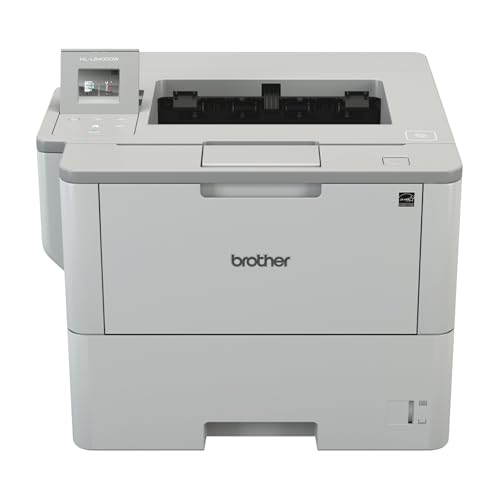
Brother HL-L6400DW — Best high-volume mono
The HL-L6400DW is Brother’s heavy artillery in monochrome: a high-volume, print-only laser built for the small office whose page count has become a line in the budget. Everything about its class speaks of capacity — large paper handling, high-yield toner economics, an engine designed to run at volume daily rather than to sip at household jobs — and its place in this guide is the step-up for the business that has felt a compact machine’s limits in the specific currencies of empty trays and monthly cartridge orders.
Print-only, again, is a fleet statement rather than a lack. The office that buys this machine has scanning solved — often by the very compact all-in-one it is outgrowing, retained for the purpose — and needs a dedicated river of black text: statements, reports, documentation, the paperwork of a business whose product is partly paper. Concentrating that river on an engine built for it lowers the per-page cost of every sheet and frees the all-in-one from the heavy work that was wearing it.
Judged as a starter it would be absurd, and this guide does not so judge it: its size, its toner commitment and its single talent are all scaled for volume that a young office may never reach. But offices that have reached it will recognise the description of their own week in this review, and for them the HL-L6400DW is not an extravagance but the correction of an earlier under-purchase — the machine that makes printing stop being a recurring minor crisis and become infrastructure.
- Functions: Print only — high-volume monochrome laser
- Class: Brother heavy-duty workgroup line
- Toner posture: High-yield economics
- Paper posture: Large-capacity handling
- Sweet spot: Volume text rivers in growing offices
Strengths
- Built for daily volume that would exhaust compact machines.
- High-yield toner brings the per-page cost down where volume makes it matter.
- Frees the office’s all-in-one from heavy work it was never sized for.
Trade-offs
- No scanner or copier; it is one instrument in a fleet, not the fleet.
- Its economics only engage at volumes a home desk never reaches.
- A substantial machine that claims office space, not a corner.
Best for: growing small offices whose monochrome volume has become a budget line. Not suited for: home desks, however ambitious, printing dozens rather than thousands of pages.

HP LaserJet Enterprise M507dn — Enterprise step-up
The M507dn carries the word Enterprise in its name and means it: an HP LaserJet Enterprise monochrome printer with built-in Ethernet and two-sided printing, from the line HP builds for organisations with IT expectations — security, manageability, fleet consistency and engines rated for serious duty. Its presence at the head of this guide’s range is a signpost for the small office in transition: the one with a server cabinet now, with staff whose printing is a workflow rather than an event, with a growing sense that the printer should be administered like infrastructure because it has become infrastructure.
What enterprise buys, beyond pace and capacity, is governance. Central management of settings and supplies, security policies applied to a device that handles contracts and payroll, consistent behaviour across several machines as the office grows — these are invisible in a home and indispensable in a business crossing the threshold where an hour of printer chaos costs real money. The M507dn’s two-sided printing and Ethernet are the visible tips of that philosophy; the rest is the discipline of a product line designed to be deployed, not merely bought.
The honesty of this guide requires the counterweight in the same breath: for the home-and-small-office reader at the spectrum’s near end, this machine is over-specification in its purest form — capability paid for and never touched, at a size and price that belong to a different buyer’s spreadsheet. It is in this guide so that the reader who needs it can find it named and framed correctly, and so that every other reader can recognise, by contrast, that their own needs end earlier on the list — which is also a service.
- Functions: Print only — enterprise monochrome laser
- Connectivity: Built-in Ethernet
- Two-sided printing: Included
- Class: HP LaserJet Enterprise line
- Sweet spot: Offices crossing into administered infrastructure
Strengths
- Enterprise governance: security and fleet management for growing businesses.
- An engine and duty posture built for organisational, not household, rhythms.
- The natural standard when several printers must behave as one fleet.
Trade-offs
- Over-specified and over-priced for the home end of this guide’s audience.
- Print only; scanning lives on other machines in any fleet it joins.
- Its talents assume an administrator’s mindset, if not an actual IT department.
Best for: small businesses becoming medium ones, standardising their printing as infrastructure. Not suited for: home offices, whose needs the top of this list already covers completely.
Which of These Belongs in Your Office’s Next Three Years?
Let the page count decide, with colour as the tiebreak. Text-only, household-plus volumes take the DCP-L2640DW and stop reading. Text with real colour needs at household volumes takes the Work Smart 1360. Colour that faces clients takes the Canon colour laser, whose warranty and pace are bought with money the colour work itself should be earning. Wired, shared, text-only offices take the HP Pro; monochrome rivers take the Brother HL-L6400DW; and the office that has begun thinking like an IT department takes the Enterprise M507dn and hires its discipline along with it.
Notice what the decision never turns on: the headline speed of a machine whose jobs are twelve pages, or a feature list read as a score. It turns on volume, colour, wiring and growth — the four facts of an office’s actual life. A buyer who writes those four facts on paper before shopping will find the choice in this list takes about five minutes, and will still be pleased with it when the third toner cartridge goes in.
How Should a Small Office Set Up Its Printer Network?
Give the printer a fixed place on the network, literally: a reserved address, a sensible name, and a location where its paper and its people can reach it without a expedition. Wireless is fine for a single-desk home office; the moment several desks depend on one machine, Ethernet earns its cable, which is why two of this guide’s picks lead with it. Set the defaults centrally where the machine allows — monochrome first on colour machines, duplex on everything that has it — because defaults are the only settings that survive contact with a busy office.
Then write the two-minute guide nobody writes: where the paper lives, which tray takes labels, who orders toner and at what trigger point, what to do when it jams besides shaking it. Small offices lose more time to printer folklore than to printer failure, and a laminated card beside the machine is the cheapest consultancy in business. Review the arrangement when the office changes — new staff, new premises, new volume — because a printer setup, like a printer choice, is correct only relative to the office it serves.
What Mistakes Do Home and Small Offices Make When Buying Printers?
The first is buying on shelf price and discovering running costs by instalments — the inkjet bought for a song that drinks cartridges through a text-heavy year, when the laser beside it would have paid its higher price back by Easter. The second is the mirror error: buying enterprise capacity for a household rhythm, then resenting the machine’s size and toner bills for talents never used. Both errors are the same failure — not counting a real month’s pages before shopping — wearing two different price tags.
The third mistake is ignoring the scanner until the day a forty-page signed document must be emailed by noon, at which point the print-only bargain reveals its missing half. The fourth is leaving colour unmanaged: a colour machine with colour defaults in a text office is a small, steady leak in the supplies budget. The fifth is forgetting the spare: one toner cartridge on the shelf, ordered when the current spare is opened, is the difference between a pause and a crisis on the day the machine runs dry mid-job — and in a small office, that day is always the day of the deadline.
How Should a Blended Desk Handle Paper, Labels and the Odd Jobs?
The blended printer’s week is a variety act, and its paper handling should be set up for the variety rather than rediscovered per job. Keep the main tray for the office’s standard stock, and treat labels, envelopes and letterhead as deliberate events: loaded singly or in small stacks, with the driver told the truth about what is loaded, because a printer that believes it holds plain paper will feed a label sheet with plain-paper enthusiasm and occasionally peel it in the path. The offices that print labels happily are the ones with a labelled drawer — labels here, envelopes there, the good paper separate — and a house rule that the tray returns to standard stock after every special job, so the next person’s invoice does not emerge on the last of the letterhead.
Envelopes deserve their sentence: feed them as the manual directs, in the orientation it shows, a few at a time, and print the addresses from the contacts system rather than retyping them at the printer. Letterhead, where a small business still keeps it, lives or dies by the second-page problem — the plain sheets that follow the printed first sheet must match in weight and whiteness or the document betrays its assembly. These are clerical details, beneath the dignity of a specification sheet, and they are precisely the details by which clients judge whether a small office is a business or a hobby with a logo.
What About Security for an Office That Prints Contracts and Payroll?
A printer in a small office handles the business’s most sensitive paper: contracts before they are announced, payroll before it is distributed, client data under obligations the office may not have fully considered. The enterprise end of this guide exists partly for this reason — machines with proper access controls and the ability to hold a job until its owner stands at the tray — but habits matter at every level. Collect sensitive output promptly rather than letting it sit in the tray as office reading; shred the misprints of confidential documents instead of binning them; and think, once, about where the printer sits, because a machine beside the visitor’s chair prints a different confidentiality than one inside the office’s working room.
The network side deserves the same single careful thought. A printer is a computer on your network, and it should be treated with a computer’s hygiene: firmware kept current when the maker offers updates, unused services left off, and the machine placed on the office network rather than exposed beyond it. Small offices need not become paranoid; they need to have thought about it once, deliberately, which is a standard the machines in this guide — and especially the enterprise pick — are built to support.
How Do You Keep a Small Office Printer Alive for Years?
Printers die of environment and neglect more than of mileage. Keep the machine out of direct sun and away from the radiator’s blast; feed it paper stored dry and flat rather than the ream that lived on the damp floor; and run something through it regularly, because mechanisms and, in inkjets, ink pathways both prefer use to storage. When a paper jam happens — and in a long life, it will — remove the sheet by the path the manual describes, in the direction of travel, rather than by the yank that leaves a corner inside to star every subsequent page.
Supplies discipline is the other half of longevity. Toner stored sealed until needed, cartridges shaken only as their makers advise, firmware updated in quiet moments rather than mid-deadline, and a note of the machine’s total page count taken once a year so its age is a fact rather than a feeling. An office that treats its printer this way will typically be retired from service by changing needs — the growth this guide’s upper picks exist for — rather than by failure, which is the correct order of events for any piece of infrastructure.
How Should Remote and Hybrid Workers Think About the Office Printer?
Hybrid work rearranged this category’s geography. The printer that once served five people in one room may now serve two in the office and three in spare bedrooms across town, and the buying question splits accordingly: one capable machine at the centre, or adequate machines at each desk. The economics favour the centre for anything volume-like — one set of high-yield toner beats five sets of compact cartridges — while the reality of a signature needed at home by five o’clock favours a small machine at the remote desk for the domestic syllabus. Many small businesses land on the arrangement this guide’s list quietly describes: a compact all-in-one where the person is, a serious engine where the paper concentrates, and scanning as the bridge that moves documents between them without a courier.
Cloud and mobile printing, present across these picks in various forms, are the connective tissue of that arrangement: the document composed on a train becomes paper on the office tray, the form photographed at home becomes a scan in the office file. Set those routes up in a quiet week, test them with harmless documents, and write the steps down for the next hire. Hybrid offices fail at printing not through bad machines but through unwritten knowledge concentrated in one person’s head, and the two-page internal guide is, once again, the cheapest consultancy in business.
What Does a Sensible Supplies Cupboard Look Like?
One spare toner or ink set, as this guide has insisted for every category it covers, ordered when the working spare is opened. Paper in two grades: the everyday stock the office runs on, and a better sheet for the documents that face clients, kept separate and labelled so the good paper is never consumed by internal drafts. Labels and envelopes in the sizes the office actually sends, counted twice a year. And a small stock of the unglamorous — a spare cable, the manual’s location known, cleaning supplies the maker approves — because printer crises are disproportionately caused by five-pound absences.
The cupboard’s deeper function is calm. An office that knows its supplies are stocked experiences a low toner warning as a task; an office that does not experiences it as an emergency with a delivery estimate. Across a year, the difference between those two experiences is worth more than the price gap between any two machines in this guide, which is why this section exists in a printer buying guide at all: the machine is half the system, and the shelf is the other half.
How Should a Growing Office Plan Its Second Printer?
The second printer is where small offices become fleets, usually by accident: the compact all-in-one is retained for scanning when the volume engine arrives, or a colour machine joins a monochrome household, and suddenly there are two drivers, two toner families and two personalities to manage. Planned deliberately, the pairing follows the divisions this guide has used throughout — one machine owns scanning and colour, the other owns the monochrome river — and the office standardises within a brand family where it can, so that toner ordering, driver behaviour and sheer familiarity compound rather than fragment.
The unplanned version costs more in attention than the planned one ever costs in money. Two machines bought at random sales, from different families, with different apps and different ideas about what a paper-type setting means, will each be individually fine and collectively exhausting. If a second printer is on your horizon — and the refill rhythm described earlier in this guide is the signal — buy it as the second half of a system whose first half you already own, and let the pair be boring together for years.
Why Do Offices Keep Printers Longer Than Any Other Technology?
Because a printer’s job does not change. The laptop’s software outgrows it, the phone’s battery fades, but paper remains paper, and a well-bought laser from this list can serve through several generations of the computers that feed it. That longevity cuts both ways in the buying decision: it forgives buying slightly above today’s needs, since the machine will meet tomorrow’s too, and it punishes buying below them, since the mistake will be lived with daily for years. It is also why the warranty length on the Canon colour laser earned its paragraph earlier — in a category measured in half-decades, the maker’s own confidence about the machine’s working life is data, not decoration.
Plan, therefore, in the printer’s own timescale. The question is never which machine suits this quarter; it is which machine the office of three years from now — its volume, its colour, its wiring, its headcount — will still be glad of. Every review in this guide was written against that longer clock, and a reader who adopts it will find the six-way choice resolves into the one machine whose three-year description sounds like their own office’s biography.
What Should Happen to the Old Printer When You Step Up?
Growth leaves a machine behind, and its fate deserves the thirty seconds of thought this section gives it. A compact all-in-one displaced by a volume engine usually has a second career waiting as the office’s scanner and copier — the role this guide has repeatedly described as the natural fleet division — provided its toner is not kept in expensive duplicate; many offices run the old machine’s final cartridge down on scanning-adjacent light duty and then retire it. A machine with no second role should be passed on while it still works: sold, donated to a school or a start-up, or recycled through the maker’s programme, with its memory — for machines that store copies of jobs — cleared as the manual directs.
What should not happen is the printer graveyard: three retired machines in a store room, each with a cable missing and a cartridge dried or leaked, kept against a contingency that will never rationally arrive. One working spare is a policy. Three dead ones are a museum, and the office’s space is worth more than the exhibits.
How Does Print Quality Actually Differ Across This List?
For the text that dominates this category, remarkably little — and that is worth saying plainly in a guide that sells distinctions. Every laser here produces black text that a client cannot distinguish between machines at reading distance, and the inkjet’s text, while a fraction softer at the edge under a loupe, is entirely respectable. The differences that are real live elsewhere: in colour fidelity on the two colour machines, in the solidity of large black areas, in how a machine renders the fine print of a contract’s sixth page at the end of a long job when it is warm and working hard. Offices choose between these printers on economics, features and duty, and should let any salesperson who argues otherwise sell them a loupe first.
Photographs are the exception that proves the rule. None of these office machines is a photo printer, and the household that prints photographs to keep should treat that as a separate, occasional need — served by a photo service or a borrowed moment on a relative’s machine — rather than distorting an office purchase around it. Buy the printer for the week’s work; let the year’s exceptions be exceptions.
A Short Word on Fax, Scanning to Email and Other Survivors
Two machines in this guide still carry fax, a technology obituaries have been written for across three decades, and its survival is instructive: certain corners of law, medicine, property and government still run on it, and a small office serving those corners does not get to vote on the matter. If your clients fax, the Canon colour laser and the household inkjet class keep you in that world without a separate machine; if they do not, the feature costs you nothing by existing. Scanning to email is fax’s modern heir and the more universally useful talent: the signed page that leaves the building as an attachment seconds after the pen lifts, from the machine itself, without a computer intermediary. Set it up once, with the office’s common destinations saved, and it becomes the most-used button in the building — a small, daily proof that in this category, convenience features compound exactly like costs do.
How Should a One-Person Business Choose Differently From a Family Desk?
The one-person business prints with a client’s eyes on the output and a cash flow behind the supplies, and both facts sharpen the choice. Client-facing paper argues for the colour laser sooner than a family would need it, because a proposal is a sales document and its production values are part of its argument. Cash flow argues for the laser’s toner patience over the inkjet’s rhythm, because a business that prints in project-shaped bursts cannot afford ink that ages between engagements. And solitude argues for reliability above features: there is no colleague whose printer can be borrowed on the bad day, so the spare cartridge, the written two-minute guide and the machine with the longer warranty all weigh heavier in a one-person office than in any other setting this guide serves.
The family desk inverts each of those weights. Colour is for school and celebration as much as for clients; printing is steady rather than bursty; a borrowed printer is a neighbour away. That is why this guide’s centre holds two different machines — the monochrome DCP for the text-led blend, the Work Smart inkjet for the colour-led one — and why neither is a compromise version of the other. They are answers to two different questions that happen to share a search phrase, and the reader who identifies which question is theirs has effectively finished shopping.
One Last Consideration: Noise, Heat and the Room Itself
A home office printer shares a room with a life. Lasers warm the air slightly and breathe out a faint fan note while they work; a machine printing a long report beside a video call or a sleeping baby is a presence, not an appliance, and its placement — in a hall cupboard on the network, in the room’s far corner — can matter more to daily happiness than a page per minute ever will. The compact machines in this guide were designed with that domestic acoustics in mind; the enterprise hardware was not, and does not pretend otherwise. Choose the room when you choose the machine, and the two will get along for the whole of the machine’s long life.
A Note on Buying at the Right Moment
Office printers are among the most reliably discounted machines in technology, cycling through sale seasons tied to the business calendar rather than to any change in the hardware itself. A reader who has identified their machine from this guide and can wait for the next cycle will usually be rewarded for the patience, while a reader whose old printer died this morning should buy the right model at today’s figure without regret — the cost of a week without printing, in a working office, exceeds any plausible saving.
Final Recommendation
The centre of this category is the Brother DCP-L2640DW, and most home-and-small-office readers should buy it and think about printing no more for years. Colour households step to the Work Smart 1360; colour-facing businesses to Canon’s MF753Cdw II; wired teams to the HP LaserJet Pro 4001dn; volume to the HL-L6400DW; and the office becoming an organisation to the Enterprise M507dn, knowingly. Count your pages, face your colour honestly, keep a spare cartridge on the shelf — and the printer, that most argued-about of office machines, will settle into the background where all good infrastructure belongs.
Frequently Asked Questions
Laser or inkjet for a home office?
Laser for text-heavy, bursty or business-critical printing: toner waits through quiet weeks, pages are dry and sharp, and page costs at volume are kinder. Inkjet earns its place when colour documents and the occasional photo are weekly needs at household volumes, as with the Work Smart 1360 in this guide.
Do I need an auto document feeder?
If you scan multi-page documents — contracts, receipt bundles, signed agreements — more than occasionally, yes: it converts archiving from a project into a routine. Single-page scanners-by-flatbed suffice for the household that digitises a form now and then.
When does a small office outgrow a compact printer?
When the refills become the rhythm: trays emptied mid-job, cartridges ordered mid-month, staff queuing for one engine. Those are the signals to step up to the high-volume or enterprise picks, and they are more reliable than any page-count threshold a guide could print.
Is Ethernet still worth having in a wireless office?
For a shared printer, emphatically yes. A cabled machine holds a fixed address and a permanent presence that several desks can depend on, immune to wireless congestion. Two picks in this guide — the HP Pro 4001dn and the Enterprise M507dn — are built around exactly that permanence.
How can a small office control colour printing costs?
Set monochrome as the driver default, reserve colour for client-facing documents, and buy high-yield cartridges. Colour capability is a presentation tool; the offices that treat it as one find its cost entirely reasonable, and the ones that leave it as the default find it in the supplies budget.
Print-only or all-in-one?
All-in-one for a single-desk operation, which needs scanning within arm’s reach. Print-only machines make sense as dedicated engines inside a small fleet where scanning already lives on another device — the arrangement the HP Pro, the HL-L6400DW and the M507dn are designed for.
Related Guides
Offices equipping the whole desk may also want our guide to compact monochrome lasers for home workers, the companion survey of colour laser printers for client-facing documents, and our walkthrough of document scanners for paperless small offices.



[…] also want our survey of high-volume monochrome lasers for busy departments, the companion guide to document scanners and feeders for paper-heavy offices, and our overview of colour printers for small-business marketing […]