What's inside
- Where to buy
- Key Takeaways
- Quick Picks: Six Thermal Label Printers, Two Walled Gardens and Four Open Roads
- How Did We Choose These Label Printers for Small Businesses?
- Which Label Printer Fits Your Shipping Bench?
- DYMO Labels or Any Labels: How Do You Choose Your Road?
- What Makes a Shipping Label Actually Work?
- How Should a Growing Business Stage Its Label Setup?
- How Do You Set Up a Shipping Bench Around a Label Printer?
- What Label Sizes Does a Small Business Actually Need?
- How Do You Keep Label Costs Honest as Volume Grows?
- How Do You Survive the Peak Shipping Week?
- What Should a Second Location or a Market Stall Copy From the Main Bench?
- How Do You Train a New Packer on the Label System in One Shift?
- How Do You Audit a Month of Labelling for Waste and Wins?
- What Does a Customer Learn From Your Label Before Opening the Box?
- How Do the Six Label Printers Compare?
- What Label Printer Mistakes Do Small Businesses Make?
- Final Recommendation
- Frequently Asked Questions
- Related Guides
As an Amazon Associate I earn from qualifying purchases. This post may contain affiliate links at no extra cost to you.
gizmoverdict.com is reader-supported. When you buy through links on our site, we may earn an affiliate commission.
Where to buy
A small business discovers its label printer the way it discovers its accountant: late, and in a small panic. Orders are stacking up, a marker pen has been writing addresses on boxes, the carrier’s drop-off closes in an hour — and suddenly the best label printers small business owners can buy stop being office supplies and become revenue infrastructure. A thermal label printer turns that panic into a rhythm: print, peel, stick, ship, with barcodes a carrier scanner reads first time and labels that survive the van, the rain and the warehouse shelf.
Six verified thermal machines make up this guide, and they divide along one line every buyer must draw first: label freedom. DYMO’s LabelWriter models — the 5XL and the 550 Turbo — print beautifully but accept only genuine DYMO labels, a walled garden we flag in every profile where it applies. Rollo, Brother, MUNBYN and JADENS take the open road of standard thermal labels from any maker. Neither road is wrong; they suit different tolerances for lock-in, and choosing between them consciously is the single most important decision in this category.
Everything here is direct thermal — no ink, no toner, no ribbons — which is why these machines are so cheap to run and so hard to kill. What differs is width, speed, connectivity and software temperament: the 4 by 6 inch shipping label is the category’s unit of currency, and each pick below earns its place by how gracefully it produces that label, and the smaller barcode, shelf and product labels around it, inside a real small business’s actual week.
A word about where these machines are sold, because label printers live in two retail worlds at once: the office suppliers, where DYMO and Brother sit among the filing cabinets, and the ecommerce-seller ecosystem, where Rollo, MUNBYN and JADENS are marketed beside scales and poly mailers. Both worlds are legitimate; the checks differ. In either, confirm the exact model name against our profiles — label printer model numbers differ by a letter and a whole connectivity story — and confirm which labels, if any, are bundled, because a starter roll’s presence or absence changes the first week’s experience more than any other line in the box.
Key Takeaways
- DYMO’s two picks accept genuine DYMO labels only — a real ongoing constraint, weighed against their polish in each profile.
- Rollo, Brother, MUNBYN and JADENS all print on standard thermal labels from any supplier, keeping label shopping competitive.
- The 4 by 6 inch shipping label is the test every pick passes; they differ on narrower labels, speed and connections.
- All six are direct thermal — no ink or toner costs, ever — so labels themselves are the only consumable decision.
- Brother’s QL-1110NWB is the connectivity maximalist: Wi-Fi, Bluetooth and Ethernet for shared, busy shipping benches.
Quick Picks: Six Thermal Label Printers, Two Walled Gardens and Four Open Roads
| Pick | Badge | Why it earns its place |
|---|---|---|
| DYMO LabelWriter 5XL | Extra-Wide DYMO for Serious Shippers | Prints extra-wide 4 by 6 shipping labels for all major carriers and platforms — on genuine DYMO labels only. |
| Rollo Wireless Shipping Label Printer | Wi-Fi Freedom With Any Label | Wireless 4 by 6 thermal printing with AirPrint from Apple devices and any brand of label in the tray. |
| Brother QL-1110NWB | The Connectivity Maximalist | Wide-format professional label printing with Wi-Fi, Bluetooth and Ethernet — the shared-bench Brother. |
| MUNBYN Bluetooth Thermal Label Printer | Phone-First Bluetooth Shipper | Bluetooth 4 by 6 label printing across a 1.57 to 4.25 inch width range for businesses run from a phone. |
| DYMO LabelWriter 550 Turbo | High-Speed DYMO With LAN | DYMO’s fast lane — high-speed thermal printing with USB and LAN networking, on genuine DYMO labels. |
| JADENS Bluetooth Thermal Label Printer | The Value Bluetooth Shipper | Straightforward Bluetooth 4 by 6 label printing for Amazon, Shopify, Etsy and USPS sellers on a budget. |
How Did We Choose These Label Printers for Small Businesses?
Every pick had to prove itself against the small business week rather than a spec sheet: shipping labels at 4 by 6 inches for the major carriers and selling platforms, barcode and product labels at smaller sizes, and a connection story that matches how orders actually arrive — from a phone, from a shop laptop, from the back-office computer that runs the store. Listings were verified for each model, and the label-compatibility question was researched as a first-class criterion, because a printer’s appetite for labels decides its running cost more than any other trait in this category.
We deliberately kept both philosophies in the frame. DYMO’s closed label system buys integration and consistency that many sellers genuinely love, at the price of label shopping freedom. The open machines buy commodity labels and supplier competition, at the price of slightly more variable label quality. A guide that hid either side of that trade would fail the businesses reading it, so each profile states its machine’s position plainly and lets your tolerance decide.
Which Label Printer Fits Your Shipping Bench?
Picture your busiest hour, not your average one. The seller printing forty shipping labels before a carrier deadline needs speed and a wide mouth. The market trader printing price labels from a phone needs Bluetooth and a battery-friendly temperament — though all six here are mains machines, their phone connections differ. The warehouse corner needs Ethernet and labels by the thousand. Six profiles follow, each honest about its label diet and its connection habits.

DYMO LabelWriter 5XL — Extra-Wide DYMO for Serious Shippers
The 5XL is DYMO’s answer to the seller whose label is the big one. It prints extra-wide shipping labels — the 4 by 6 inch format carriers and marketplaces run on — directly from platforms like Amazon, eBay, Etsy and Poshmark, and its automatic label recognition means the machine knows what label is loaded and tells the software, removing the misprint-by-wrong-size genre of error entirely. For a shipping bench processing daily volume, that recognition system is a quiet daily mercy.
Now the constraint, stated as plainly as DYMO’s own design states it: this printer works with genuine DYMO labels. Third-party labels are not merely discouraged; the machine’s recognition system is built around DYMO’s own stock. Sellers inside the DYMO garden gain consistent, known-quality labels and software that always agrees with the printer. Sellers who resent paying the garden’s prices should walk to the Rollo or Brother profiles now, because no firmware update is coming to change this machine’s nature.
Within its terms, the 5XL is the most shipping-focused machine here: widest DYMO appetite, platform integrations aimed at ecommerce sellers, and a print rhythm built for the afternoon dispatch run. Businesses that ship daily and value polish over label-shopping freedom will feel entirely at home.
The 5XL’s working week deserves a concrete picture. Orders close at noon; the seller exports the batch, and the machine produces the afternoon’s shipping labels in a continuous, recognised, correctly sized stream while the boxes are taped in parallel. That rhythm — software, printer and label stock in verified agreement — is what the DYMO premium purchases, and sellers who have lived the alternative, a mis-sized batch discovered at the carrier counter, rarely begrudge it. Keep the discipline the system assumes: genuine rolls stored by size within arm’s reach, the next roll opened before the current one dies mid-batch, and the recognition feature trusted rather than overridden. The garden is pleasant precisely when its paths are followed.
- Label width: extra-wide, up to 4 by 6 inch shipping labels
- Recognition: automatic label recognition for loaded stock
- Labels: genuine DYMO labels only — third-party stock not supported
- Platforms: prints for major carriers and selling marketplaces
Strengths
- Purpose-built for high-volume shipping labels
- Automatic recognition ends wrong-size misprints
- Deep integration with ecommerce selling platforms
Trade-offs
- Genuine DYMO labels only, at DYMO prices
- No wireless — this is a bench-tethered machine
- Oversized investment for occasional label printing
Best for: an ecommerce seller shipping daily who values platform polish and accepts DYMO’s label ecosystem knowingly.
Not suited for: a bargain-hunting label buyer — the open-label machines below exist because your label spreadsheet matters to you.

Rollo Wireless Shipping Label Printer — Wi-Fi Freedom With Any Label
Rollo built its name on a liberation: a shipping label printer that takes any maker’s thermal labels and connects by Wi-Fi, so the label shopping stays competitive and the printer sits wherever the packing bench actually is. The Wireless model prints the standard 4 by 6 shipping label at the brisk pace dispatch runs demand, and speaks AirPrint natively — an iPhone or iPad in the packing area becomes a label station without a computer intermediary.
That phone-first habit suits how small businesses actually run now. Orders live in apps, the packing bench is a phone propped against a box, and a printer that joins that world wirelessly — while also supporting Windows, Chromebook and Android — removes the dedicated-label-PC era entirely. Rollo’s own shipping software discounts add a second economy for sellers who also buy postage through it, though the printer works happily with labels generated anywhere.
Against the DYMO above, Rollo is the open road: cheaper label shopping forever, in exchange for choosing your own label quality rather than having it curated. Businesses printing hundreds of labels a week feel that exchange in their supply budget within the first quarter.
Rollo’s wireless freedom creates one responsibility: network hygiene at the bench. Give the printer a stable place on the shop’s Wi-Fi, note its settings in the same document as the router’s, and the AirPrint convenience stays convenient through router swaps and password changes. Sellers should also exploit the any-label freedom intelligently rather than maximally — settle on one or two label suppliers whose stock has proven itself in your carrier’s scanners, and resist the weekly temptation of a marginally cheaper unknown roll. The open road rewards a known-good label the way the DYMO garden rewards its own: with silence, batch after batch, at the dispatch hour that forgives nothing.
- Label width: 4 by 6 inch shipping labels, any brand
- Connectivity: Wi-Fi with AirPrint for iPhone, iPad and Mac
- Platforms: Windows, Chromebook and Android also supported
- Method: direct thermal — no ink or toner
Strengths
- Any-brand labels keep consumable costs competitive
- Wireless placement frees the packing bench layout
- AirPrint suits phone-run small businesses
Trade-offs
- Label quality varies with the stock you choose
- Wi-Fi setup needs a stable network at the bench
- Shipping focus means fewer small-label refinements
Best for: a growing online seller printing shipping labels daily who wants wireless freedom and open label shopping.
Not suited for: a seller who wants the printer to curate label quality for them — DYMO’s closed garden is that product, honestly priced.

Brother QL-1110NWB — The Connectivity Maximalist
Brother’s QL-1110NWB is the label printer for businesses whose labelling happens in more than one place and on more than one kind of label. It prints wide — shipping labels included — and connects every way a business might ask: Wi-Fi for the bench, Bluetooth for the phone in hand, Ethernet for the wired reliability a warehouse corner demands. In a shared workspace, that triple connectivity means the printer never becomes one person’s peripheral; it is infrastructure.
Brother’s label ecosystem adds the second dimension: a deep catalogue of label sizes and types, from address and barcode labels to signage widths, with software that has served businesses for generations of QL models. A café labelling ingredients, a workshop labelling parts bins and a shipper labelling parcels can share one machine and three label rolls, which is a consolidation small businesses feel in both budget and bench space.
It is the most business-serious machine here, with a price of admission and a physical presence to match, and Brother’s label rolls — while widely available — are a brand ecosystem rather than the fully open commodity market the Rollo enjoys. Buy it when labelling is a system in your business, not a task.
A shared label station earns a small constitution, and businesses that write theirs get the Brother’s full worth. Agree which label roll lives in the machine by default — for most, the shipping size — and where the alternative rolls are stored, labelled by their own contents, because a wide-format machine’s versatility becomes chaos when rolls wander. Agree also who may print what from where: the QL’s triple connectivity means the café phone, the office PC and the warehouse tablet can all reach it, which is infrastructure when governed and a label-burning free-for-all when not. Ten minutes of constitution-writing converts this printer from a purchase into a system.
- Label width: wide format, shipping and signage sizes
- Connectivity: Wi-Fi, Bluetooth and Ethernet — all three
- Role: professional shared label station
- Software: Brother label design ecosystem for business
Strengths
- Every connection a business could request
- Widest label-size versatility in this guide
- Built for shared, multi-user duty
Trade-offs
- Largest commitment among the six picks
- Brand label ecosystem rather than fully open stock
- Capability surplus for shipping-only sellers
Best for: a business labelling everything — parcels, products, shelves and signage — from one shared, always-reachable machine.
Not suited for: a single-purpose shipper who prints one label size; the Rollo or MUNBYN does that job with money left over.

MUNBYN Bluetooth Thermal Label Printer — Phone-First Bluetooth Shipper
MUNBYN’s pitch is the modern market stall: your business lives in your phone, so your label printer should too. This Bluetooth thermal machine prints shipping labels at 4 by 6 inches and handles widths from 1.57 to 4.25 inches, covering the barcode and product labels around the shipping core. Android, iPhone, Windows, Mac and Chromebook are all welcome, which makes it the diplomat of mixed-device small businesses.
The width range deserves attention because it changes what one machine can own. Product labels for jars and boxes, barcode labels for inventory, thank-you stickers at odd sizes — a printer that accepts rolls across that span replaces the second small-label machine many businesses otherwise buy. MUNBYN’s app-driven setup leans into phone workflows: design, connect, print, from the device already in your apron pocket.
Bluetooth is both its freedom and its boundary: no network infrastructure needed, and no network range beyond the room either. A fixed shipping bench with multiple staff printing simultaneously belongs on Wi-Fi or Ethernet models above. A mobile, single-operator business will find this machine’s simplicity worth more than infrastructure it would never use.
The MUNBYN’s width range invites a labelling habit that transforms a micro-business’s presentation: one machine, a family of labels, a consistent look. Design the family’s templates once — shipping at full width, product labels with the same typeface and logo placement, barcode labels in the same visual voice — and the business’s parcels and products begin to look like one company rather than a series of improvisations. Keep the templates in the app on the phone that runs the business, back them up when the phone changes, and the brand survives the hardware. For a phone-run business, that template library quietly becomes one of its more valuable assets.
- Label width: 1.57 to 4.25 inches, including 4 by 6 shipping
- Connectivity: Bluetooth for phones, tablets and computers
- Platforms: Android, iPhone, Windows, Mac, Chromebook
- Method: direct thermal — no ink or toner
Strengths
- Phone-first Bluetooth suits mobile businesses
- Wide width range covers product and barcode labels
- Works across every platform a small team owns
Trade-offs
- Bluetooth range limits multi-room businesses
- Single-operator rhythm rather than shared infrastructure
- App-dependent setup may not suit PC traditionalists
Best for: a market trader, mobile seller or phone-run micro-business printing shipping and product labels from one pocketable workflow.
Not suited for: a multi-staff warehouse bench — networked models keep a whole team’s labels flowing without pairing rituals.
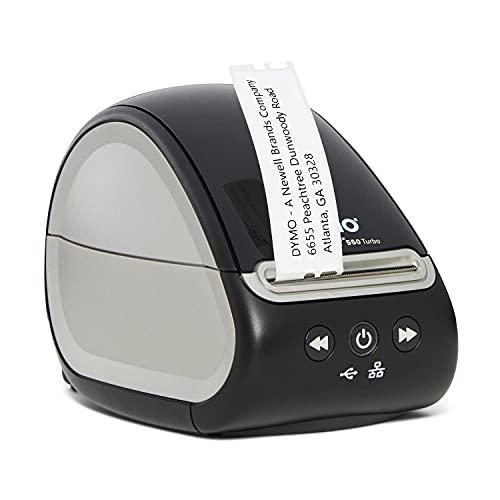
DYMO LabelWriter 550 Turbo — High-Speed DYMO With LAN
The 550 Turbo is the DYMO for businesses that outgrew the desktop but not the ecosystem. High-speed direct thermal printing handles mailing, postage and shipping labels at a pace the dispatch hour respects, and the connection story grows up: USB for the single desk, LAN networking for the office that wants the label printer shared like any other office machine. Automatic label recognition rides along, keeping the software honest about what is loaded.
The DYMO condition applies here in full, and this profile repeats it deliberately: genuine DYMO labels only. The Turbo’s speed and polish are the garden’s interior; the label prices are its wall. Businesses already stocked with DYMO labels across sizes — address, file folder, shipping — will find the Turbo the natural centre of that system, and its LAN sharing lets the whole office use the investment.
Against its 5XL sibling, the Turbo trades the extra-wide shipping specialisation for speed and network sharing across the general label repertoire. A shipping-only business belongs with the 5XL; an office labelling everything from post to parcels belongs here.
The Turbo’s LAN connection suggests its best placement: not on one person’s desk but at the office’s paperwork crossroads, where post is opened, parcels are prepared and files are labelled by everyone. Networked label printers die socially when they live in one colleague’s territory, because printing a label becomes an interruption negotiation; placed neutrally, the Turbo becomes the office’s shared hand. Administrators should complete the picture by installing its drivers on every machine that might plausibly print — the receptionist’s, the warehouse corner’s, the manager’s laptop — in one afternoon, rather than discovering each omission at the moment a label is urgently needed elsewhere.
- Speed: high-speed direct thermal printing
- Connectivity: USB plus LAN network sharing
- Recognition: automatic label recognition fitted
- Labels: genuine DYMO labels only
Strengths
- Fastest DYMO rhythm for dispatch hours
- LAN sharing serves a whole office
- Recognition keeps sizes honest automatically
Trade-offs
- Genuine DYMO labels only, as with its sibling
- No Wi-Fi or Bluetooth for phone-first workflows
- Speed is wasted on low-volume labelling
Best for: an office or growing seller already invested in DYMO labels, needing shared, high-speed printing on the network.
Not suited for: a label bargain hunter or a phone-first seller — open-label and Bluetooth picks above serve both better.

JADENS Bluetooth Thermal Label Printer — The Value Bluetooth Shipper
JADENS occupies the honest value corner of this guide: a Bluetooth thermal printer that produces the standard 4 by 6 shipping label for the platforms small sellers actually use — Amazon, Shopify, Etsy, USPS among them — across Android, iPhone, Windows and Mac, without charging for infrastructure a micro-business has not grown into yet. Its blue shell even looks the part of a tool bought to work, not to impress.
The value proposition only works because the essentials are uncompromised. Direct thermal means no ink costs; standard labels mean commodity shopping; Bluetooth means the phone that runs the shop also runs the printer. A seller moving from handwritten addresses or a paper-and-tape workaround will feel the upgrade in the first dispatch: labels that scan, peel and stick at the speed the orders arrive.
Its boundaries are the budget’s boundaries. There is no network sharing for a growing team, no wide-label versatility beyond the shipping core, and the long-term software polish trails Brother and DYMO. For the solo seller it serves, those are tomorrow’s problems at tomorrow’s prices — and this machine’s job is to make today’s shipping professional.
The JADENS rewards one habit above all: keeping its label supply boring. A solo seller’s dispatch should run on a single, proven roll type bought in sensible quantity, because the machine’s value proposition — professional labels at minimal fuss — evaporates if each new bargain roll demands alignment rituals and test prints. Spend the savings the printer creates on the unglamorous partners of good dispatch instead: a bench scale that agrees with the carrier’s, boxes that fit the products, and a spare roll always in reserve. The JADENS is the beginning of a shipping system, and systems, not printers, are what customers experience as reliability.
- Label width: 4 by 6 inch shipping labels
- Connectivity: Bluetooth wireless printing
- Platforms: Android, iPhone, Windows and Mac
- Sellers: aimed at Amazon, Shopify, Etsy and USPS workflows
Strengths
- Lowest-friction entry into real shipping labels
- Open standard labels keep running costs down
- Bluetooth phone printing matches solo-seller life
Trade-offs
- No network sharing for teams
- Shipping-label focus limits label versatility
- Software polish trails the established brands
Best for: a solo marketplace seller professionalising their dispatch with the smallest sensible investment.
Not suited for: a business already employing a packing team — buy shared infrastructure once rather than outgrowing this by spring.
DYMO Labels or Any Labels: How Do You Choose Your Road?
This is the category’s fork, and it deserves a decision rather than a default. The DYMO road buys curation: labels engineered for the machine, automatic recognition that knows each roll, software that never guesses a size, and a per-label price that includes all that certainty. High-volume sellers who value never thinking about labels often find the garden’s rent fair. The open road buys arithmetic: thermal labels are a commodity, competition keeps rolls cheap, and a business printing thousands monthly keeps the difference as margin.
Run your own numbers before choosing, because volume flips the answer. At fifty labels a month, the DYMO premium is a rounding error and its polish wins. At two thousand a month, the same premium is a part-time wage, and the open machines win on arithmetic alone. Neither answer survives contact with the other volume — which is why this guide keeps both roads open and labels the toll on each.
What Makes a Shipping Label Actually Work?
A label succeeds three times: at the printer, at the carrier’s scanner, and at the destination’s doorstep. The printer’s part is contrast and consistency — direct thermal heads produce the deep blacks scanners love, provided the head is clean and the label stock is decent. The scanner’s part is placement and condition: a label wrapped around a box edge, taped over with glossy tape, or printed with a fading head invites the manual-sort pile where parcels go to be delayed. The doorstep’s part is adhesion and weather: labels must survive van heat, rain on a porch, and the friction of neighbouring boxes.
Small businesses control all three with boring rituals. Keep a spare roll from a known-good batch, print a test label after every roll change, place labels flat on the largest face of the box, and never tape over the barcode. The printer you choose matters less than these habits — but a printer whose labels you can afford to reprint freely makes the habits easier to keep.
How Should a Growing Business Stage Its Label Setup?
Stage one is a single printer at the packing bench, close enough that printing a label never becomes a walk. Stage two, when a second person starts packing, is connectivity: the printer joins the network — Wi-Fi, or Ethernet where the bench is fixed — so both packers print without pairing or passing a cable. Stage three is specialisation: a second machine for the small labels, or a wide machine for signage, once the main printer’s queue proves the volume justifies it.
The mistake is buying stage three first. Businesses fall for the maximalist machine, then discover their real bottleneck was bench layout or label stock, not printer features. Start with the machine your current busiest hour demands, place it where the boxes are, and let a month of real dispatch data — labels per day, sizes actually used, who prints and from what device — write the specification for whatever comes next.
How Do You Set Up a Shipping Bench Around a Label Printer?
The bench is a system of distances. The printer belongs within one step of the packing surface, at the height where a label can be peeled and applied without the packer turning around — every rotation, multiplied by every order, is the business’s time leaking. The label roll stock lives below or beside, never across the room; the scale sits where boxes land after taping; the carrier’s collection sacks or the drop-off boxes stack in the order they will be filled. Walk the path of one parcel through the bench before fixing anything permanently, and move the printer, not the person, until the path is a straight line.
Power and connection deserve the same walk. A Wi-Fi printer needs signal at the bench, not at the office desk where the router was tested; a Bluetooth printer needs its phone-owning operator to be the person standing there; a LAN printer needs a cable run that nobody trips over at the dispatch hour. Test the full journey — order on screen to labelled box — with a real order before the busiest day of the week discovers the gap. Benches, like printers, should be rehearsed rather than assumed.
What Label Sizes Does a Small Business Actually Need?
Most small businesses live on three sizes, and buying a fourth before the third is understood is a recognisable beginner’s pattern. The 4 by 6 shipping label is the foundation. A mid-size product or barcode label — in the two-to-three-inch width family — covers jars, boxes, shelves and inventory. A small label, for prices, ingredients or date marks, completes the working set. Machines earn their versatility praise, like the Brother and the MUNBYN in this guide, by spanning those three gracefully; machines earn their focus praise, like the shipping specialists, by refusing to be distracted from the first.
Grow the set by evidence. When a product line genuinely needs a round label, or the warehouse introduces bin locations, add that roll deliberately, store it labelled, and update the bench’s constitution. Label collections grow like spice racks — one justified jar at a time, or in a single regretted bulk purchase of novelties. The businesses whose labels impress customers are rarely those with the most sizes; they are those whose three sizes are designed as a family and printed without error, every day, at speed.
How Do You Keep Label Costs Honest as Volume Grows?
Track one number monthly: labels consumed per order shipped. That ratio exposes waste that per-roll prices hide — the misprints, the reprints after address corrections, the test labels nobody counted. Businesses are often surprised to learn they print 1.3 labels per parcel, and the 0.3 is a process problem wearing a supply costume. Fix the address workflow, confirm sizes before batch printing, and the label budget falls without a single negotiation with a supplier.
Then negotiate with suppliers from knowledge. Know your monthly roll count by size, know your proven stock’s failure rate — which should be near zero — and let competing suppliers bid against a specification rather than a hope. Open-label machines make this auction possible, which is their deepest economic virtue; DYMO users should run the same accounting inside the garden, because knowing the true per-parcel label cost is what makes the garden’s rent a decision rather than a surprise.
How Do You Survive the Peak Shipping Week?
Peak week — the holiday rush, the product launch, the sale that worked too well — is the label printer’s examination, and preparation is the whole syllabus. A fortnight before, count label stock against the forecast and order to the ceiling of the estimate, because a label stock-out in peak week cannot be solved at any price the business would willingly pay. Service the machine in the same fortnight: clean the print head by the maker’s method, confirm the spare roll’s location, and print a test batch from every device that will be used, including the temporary staff member’s phone.
During the week, protect the rhythm the bench was built for. One person owns the printer — its rolls, its jams, its test labels — while others pack, because a machine tended by everyone in a crisis is tended by no one. Print labels in packing order, in small batches matched to the boxes physically present, and let the carrier’s deadline, not anxiety, set the batch size. Businesses emerge from peak week with two assets: the revenue, and the list of what to fix before the next one — which should be written down while the memory is still warm.
What Should a Second Location or a Market Stall Copy From the Main Bench?
Businesses grow sideways before they grow upward: a second stall, a pop-up, a partner’s garage pressed into service as a satellite warehouse. The labelling lesson from the main bench is to copy the system, not merely the machine. Same label sizes, same templates, same known-good stock — because a customer receiving parcels from two locations should meet one company, and a staff member moving between locations should meet one workflow.
Choose the satellite’s printer by the satellite’s reality rather than by symmetry with headquarters. A stall run from a phone wants the Bluetooth machines; a fixed second bench wants the networked ones; a DYMO-committed business keeps its garden’s gates consistent across both. Then connect the two with the dullest possible technology: a shared document listing label stock, suppliers and template locations, updated whenever either bench changes anything. Systems scale; improvisations merely multiply.
How Do You Train a New Packer on the Label System in One Shift?
A new packer’s first shift should end with the label system feeling inevitable rather than impressive. Walk one parcel through the entire journey slowly — order, pick, pack, weigh, label, scan-check — narrating the two rules that carry the system: the label prints when the box is ready, and every roll change earns a test print. Then let the packer run three real parcels with you watching silently, because competence is built in the doing and most questions answer themselves by the third box.
Finish by showing the failure drawer — every business should keep one for a month: the mis-sized label, the faded barcode, the label taped over a seam. New staff who have handled the failures recognise them instantly when their own first one appears, and recognition at the bench is worth a morning of reprints at the carrier counter. Training that includes the mistakes produces packers; training that only includes the successes produces surprises.
How Do You Audit a Month of Labelling for Waste and Wins?
Once a month, spend fifteen minutes with the label system’s own evidence. Count rolls consumed against orders shipped and compute the labels-per-parcel ratio this guide described earlier; a ratio creeping upward is a process asking for attention, usually at address corrections or at a roll whose alignment has begun to wander. Pull three parcels at random from the ready-to-ship stack and inspect their labels as a carrier’s scanner and a customer will: flat, legible, untaped, consistent. Random inspection, kindly done, keeps a standard alive better than any poster about standards.
Record the month’s one labelling failure — there is always exactly one worth recording — in the bench’s shared note: what happened, what it cost, what changed. A year of those notes is a training manual written by the business itself, in its own parcels’ language, and new staff absorb it faster than any generic guidance. Businesses that keep this small audit find their label costs fall and their carrier disputes fall faster, because most disputes are labelling stories told by the other side.
End the audit by checking the unglamorous reserves: one spare roll of each working size in stock, the test label above the machine still current, the cleaning supplies where the constitution says they live. Peak season never announces the date it will test these reserves; the audit exists so that the test, whenever it comes, is passed by a system rather than by luck. Fifteen minutes a month is the cheapest insurance a shipping business can buy, and it is bought with attention rather than money.
What Does a Customer Learn From Your Label Before Opening the Box?
A shipping label is the first physical sentence a business speaks to its customer, and customers read it fluently without knowing they can. A crisp, correctly placed label on a sound box says the business is run by people who finish things; a crooked, faded or hand-corrected label says something else, and the something else is remembered when the product inside is judged. This is not vanity — it is the packaging equivalent of a firm handshake, delivered at the exact moment trust is being decided.
The machines in this guide exist to make that sentence reliable at scale. Thermal printing’s deep blacks, the correct 4 by 6 canvas, the barcode that scans at the first pass — these are the grammar of the sentence, and the bench rituals in these pages are its proofreading. Businesses sometimes ask whether a label printer is a marketing expense; the honest answer is that it is a reputation expense, invoiced per parcel, at the lowest rate reputation has ever been sold.
Judge your own output as a stranger once a month: order nothing, simply take one parcel from the ready stack and open it as a customer, label first. Whatever that label tells you in the first three seconds is what your business has been saying all month. The fix, when the sentence disappoints, is almost never a new printer — it is the rituals, the stock and the placement, which is why this guide spent more words on those than on any specification.
How Do the Six Label Printers Compare?
Two questions sort this table instantly: does it accept any label, and how does it connect? DYMO’s pair curate labels and connect by cable or LAN; the open four compete on wireless freedom and commodity rolls.
| Pick | Role | Defining trait |
|---|---|---|
| DYMO LabelWriter 5XL | Wide DYMO shipper | 4×6 labels with automatic recognition; DYMO labels only |
| Rollo Wireless Shipping Label Printer | Wireless open shipper | Wi-Fi and AirPrint with any-brand 4×6 labels |
| Brother QL-1110NWB | Professional wide station | Triple connectivity and wide label versatility |
| MUNBYN Bluetooth Thermal Label Printer | Bluetooth all-width shipper | Phone-first printing across 1.57 to 4.25 inch labels |
| DYMO LabelWriter 550 Turbo | Networked fast DYMO | High-speed printing with LAN sharing; DYMO labels only |
| JADENS Bluetooth Thermal Label Printer | Value Bluetooth shipper | Budget-friendly 4×6 Bluetooth printing for solo sellers |
What Label Printer Mistakes Do Small Businesses Make?
Buying a DYMO without reading its label condition is the category’s signature regret — not because DYMO hides it, but because buyers assume all thermal printers eat all thermal labels. They do not, and the discovery should happen in a guide like this one rather than at a packing bench with a box of incompatible rolls. The mirror mistake is buying the cheapest open printer and the cheapest unbranded labels together, then blaming thermal technology when barcodes scan poorly; label stock quality is a real variable, and one known-good supplier is worth cultivating.
Placement errors follow. A label printer exiled to the office while boxes are packed in the stockroom adds a walk to every order, multiplied by every day. Put the printer at the bench, on the network the bench devices use. Finally, businesses forget the test-label ritual after roll changes and discover a misaligned batch at the carrier counter. One test label per roll change is the cheapest quality system in ecommerce — cheaper than one returned parcel, which is the unit in which all these mistakes are eventually invoiced.
One more bench-level error: printing labels in batches far ahead of packing them. A label printed Monday for a parcel packed Wednesday gets lost, stuck to the wrong box, or rendered obsolete by the customer’s address change, and the reprint quietly doubles its cost. Print at the moment of packing, in the order of the boxes, and let the printer’s speed — every machine here is fast enough — make batch-ahead printing the unnecessary risk it is.
Final Recommendation
Choose your label road first. Sellers who want curation and platform polish, and who accept genuine-label pricing as the rent, will be served beautifully by the 5XL for shipping or the networked 550 Turbo for a whole office. Sellers who count consumable margin — most growing businesses — should take the open road: Rollo for wireless shipping freedom, Brother’s QL-1110NWB for a shared all-purpose label station, MUNBYN for phone-first flexibility across label widths, or JADENS for the value route into professional dispatch.
Then honour the boring rituals that make any of them sing: printer at the bench, a known-good label supplier, a test print at every roll change, and barcodes placed flat and untaped. A label printer is the smallest machine in most businesses and the one whose failure stops revenue at the door — bought with open eyes and run with small disciplines, it becomes the most reliable employee on the packing bench, printing the business’s name cleanly onto every box that leaves.
Before the first busy season, photograph your bench exactly as it should look — printer placed, rolls stored, templates saved, test label pinned above the machine with the date it was printed. That photograph is the bench’s constitution in a single image: new staff copy it, tired staff at peak restore it, and the business’s labelling quality stops depending on anyone’s memory of how things were arranged on the good days.
If the choice must be made today, on one principle, make it this: remove the largest daily friction, not the largest theoretical one. Count yesterday’s labels, yesterday’s reprints and yesterday’s walks to the printer, and let that honest arithmetic choose between polish and openness, between the bench machine and the phone machine. A label printer chosen against yesterday’s evidence will still be right next season, because businesses change their products far faster than they change their dispatch habits.
Then give the chosen machine its first week of grace: templates built, stock settled, test rituals begun. By the second week the labels will have stopped being a subject at all — which, for the machine that touches every parcel a business sends, is the precise definition of a perfect purchase.
Growth, when it comes to a small business, rarely announces itself as a headline; it arrives as a Tuesday with twice the orders and the same pair of hands. The label system built on the quiet weeks — the right machine, the settled stock, the rehearsed bench — is what decides whether that Tuesday feels like a breakthrough or a breakdown. Build it now, while the parcels are few enough to forgive experiments, and the business will meet its busy Tuesdays as a company that was, in the only sense that matters, already ready.
Keep one more reserve beside the spare rolls: a printed card with the label supplier’s name, the exact stock codes for every size the bench uses, and the date of the last order. Stock-outs are rarely caused by forgetfulness about labels in general; they are caused by the missing code, the renamed product, the supplier whose listing changed. The card ends that genre of emergency permanently, for the price of one label — printed, naturally, on the machine itself.
Start with tomorrow’s parcels. Print them cleanly, place the labels flat, and let the carrier’s scanner deliver the verdict this whole guide has been rehearsing. A business whose labels scan first time, every time, has removed a friction its customers will never know existed — and invisible reliability, repeated daily, is how small businesses become larger ones.
Print the label. Ship the parcel. Earn the reorder. Repeat the rhythm tomorrow and every working day after that.
Frequently Asked Questions
Do label printers need ink or toner?
No — all six picks here are direct thermal printers. Heat from the print head darkens a coating on the label itself, so there are no cartridges, ribbons or refills to buy. Labels are the only consumable, which is exactly why the label-compatibility question — genuine DYMO only, or any brand — carries so much weight in this guide’s profiles.
Can I print shipping labels for any carrier with these machines?
The 4 by 6 inch format these printers produce is the standard the major carriers and selling platforms run on, and the DYMO 5XL’s profile notes its platform integrations explicitly. Generate the label in your carrier or marketplace software, send it at the correct size, and run one test print when you change label stock — that ritual prevents nearly every carrier-counter surprise.
Why does my barcode sometimes fail to scan?
Usually one of three culprits: a dirty print head softening the bars, poor-quality label stock with weak contrast, or tape and box edges distorting the printed label. Clean the head with the maker’s recommended method, keep one trusted label supplier, and place labels flat on the box’s largest face away from seams. Persistent failures after those fixes point to the printer’s settings — confirm the darkness and size match the label loaded.
Should a home-based seller choose Bluetooth or Wi-Fi?
Bluetooth suits the solo seller whose phone is the business: simple pairing, no network needed, the printer within the same room. Wi-Fi suits any setup where more than one person or device prints, or where the printer lives at a bench away from the phone. Many sellers start with Bluetooth and graduate to a networked model like the Rollo or Brother when a second packer joins — a natural staging, not a mistake.
Can these printers make product and barcode labels, not just shipping?
Yes, within their width ranges. The MUNBYN’s 1.57 to 4.25 inch span and the Brother QL-1110NWB’s wide label catalogue are built for exactly that variety — ingredient labels, price labels, inventory barcodes. The shipping-focused models print smaller labels too, but a business whose labelling is mostly small-format should choose by that width range first.
How long do thermal labels last on a shelf?
Direct thermal print fades with heat, sunlight and friction over time — fine for shipping labels whose journey is days, and for most inventory cycles. For labels that must stay legible for years in hot or bright conditions, ask suppliers about top-coated or synthetic thermal stocks, and store labelled archive boxes away from heat sources. Match the label stock to the label’s expected life, not just its price.
Can I print labels from my phone for market stall selling?
Yes — the Bluetooth models in this guide, MUNBYN and JADENS, are built for exactly that pairing, and the Rollo prints from Apple devices over Wi-Fi through AirPrint. A market trader can take an order in an app, print the product or shipping label at the stall, and hand over a parcel that looks like it came from a shop. Keep the printer shaded and its labels dry, and the stall gains a back office the size of a shoebox.
What is the difference between direct thermal and thermal transfer?
All six picks here are direct thermal: heat darkens a coating on the label itself, with no ribbon involved. Thermal transfer uses a heated ribbon to lay durable ink onto plainer stock, producing labels that resist heat, chemicals and years of shelf life. Shipping and product labels live comfortably in direct thermal territory; industrial or outdoor labelling is where transfer earns its extra complexity, and it belongs to a different class of machine than this guide covers.
How do I clean a thermal print head safely?
Follow the maker’s method for your model — commonly a soft cloth or a purpose-made cleaning pen or card, used when the machine is off and cool, with no abrasives and no household solvents improvising chemistry the manufacturer never approved. Cleanliness shows immediately in barcode contrast, which is why the test-label ritual after cleaning matters: one label, scanned successfully, confirms the head is back at work before a batch depends on it.
Can one label printer serve both my shop and my market stall?
It can if the machine’s connections travel with your business — the Bluetooth models in this guide move between a shop counter and a stall without infrastructure, provided the phone that runs the business travels too. Fixed networked models belong to fixed premises. Many traders keep the arrangement simple: one portable Bluetooth machine that lives wherever selling happens, and the shop’s heavier labelling handled by the same unit on its home days.
Related Guides
Guides that complete the small-business desk: best aio monochrome laser printers for invoices and paperwork best portable bluetooth printers for paperwork away from the office best refillable ink tank printers for colour labels’ paperwork cousins
Related guides
- Best 4K UHD HDR HDMI Extenders: 4K60, Long-Run and 4K120 Kits Compared
- Best 25–35 Inch Monitors With Lowest Display Lag: An Honest Ranking Without Invented Numbers
- Best Enterprise SATA SSDs: Endurance Classes, Power-Loss Protection and Fleet Sense
- Best Color Product Label Printers: Six Desktop Machines for Short-Run Product Labels



[…] for the neighbouring print decisions: best refillable ink tank printers for everyday colour all-in-ones best color duplex laser printers for office documents in colour best portable bluetooth printers […]