What's inside
- Where to buy
- Key Takeaways
- Quick Picks
- How did we choose machines for the top home tier?
- Should your top-tier budget buy FDM colour, resin detail or build volume?
- Which machines justify the top home tier?
- How does the top tier divide its talents?
- What running costs hide inside this tier?
- When does this tier stop making sense?
- How do you choose between two flagships that both fit?
- What does flagship ownership feel like after the first month?
- How long is this tier’s useful life?
- How do you insure a top-tier bench against its own success?
- What separates a flagship room from a flagship garage sale?
- How do you get a flagship’s second year right?
- One last top-tier test before you pay
- What should the flagship’s first print be?
- How do you protect a flagship purchase at checkout?
- How should you set up a top-tier machine room?
- What do buyers at this tier most often regret?
- Final Recommendation
- Frequently Asked Questions
- Related Guides
As an Amazon Associate I earn from qualifying purchases. This post may contain affiliate links at no extra cost to you.
gizmoverdict.com is reader-supported. When you buy through links on our site, we may earn an affiliate commission.
Where to buy
The listings linked on each name below are the exact configurations under discussion — Combo bundles where colour is included, the Prusa in its kit form where assembly is part of the deal. Prices in this tier drift with promotions and bundle changes, which is why this guide prints none of them: open the listing, read the current figure there, and judge it against the working setup you actually need, including filament, a dryer if your materials demand one, and any spare plates on your list.
There is a tier of home 3D printing where the compromises stop being structural. Below it, every machine asks you to forgive something — an open frame, a manual routine, a single filament path. The best 3d printers less than 1000 sit at the top of what a household can reasonably buy: enclosed CoreXY machines with mature colour systems, a large-format colour printer that swallows cosplay pieces whole, the finest desktop resin machine its maker sells, and a European kit that turns assembly into ownership. This guide ranks six ways to spend at that level without wasting the tier’s advantages.
Framing matters before models. Less than a thousand describes a ceiling, not a target: several picks here live comfortably below it in ordinary configurations, and street figures move enough that printing any price would date this page unfairly. Judge instead by what the tier buys outright — the best resin printer rather than a starter one, colour systems included rather than promised, enclosures and cameras and error detection as standard equipment. A machine bought at this level should end your upgrade research for years, and each section below tests its pick against that expectation.
The six divide by ambition. Bambu’s P2S Combo refines the enclosed colour formula, Elegoo answers with its Centauri Carbon 2 Combo, Flashforge’s AD5X builds colour into a compact CoreXY through a four-colour IFS, Anycubic’s Kobra 3 Max V2 Combo trades enclosure for sheer size, Elegoo’s Saturn 4 Ultra 16K represents resin at its desktop peak, and Prusa’s CORE One+ kit offers the enclosed CoreXY as something you build and therefore understand completely. Your project’s shape — colourful, enormous, miniature-detailed or engineering-serious — selects among them more honestly than any ranking order.
Key Takeaways
- This tier buys completeness: colour systems, enclosures, cameras and error detection included, not queued as future accessories.
- The Bambu Lab P2S Combo with AMS 2 Pro is the polished all-rounder of the group, refining the formula intermediate buyers already trust.
- Elegoo’s Saturn 4 Ultra 16K is the tier’s resin flagship — the same budget that buys a good FDM machine buys the best desktop resin experience outright.
- Anycubic’s Kobra 3 Max V2 Combo is the size outlier, printing 420 by 420 by 500mm pieces that other picks must split and glue.
- Prusa’s CORE One+ is a kit: the listing’s value includes the build itself, so count your assembly hours as part of the purchase.
- Flashforge’s AD5X puts four-colour printing into the smallest footprint here, suited to desks that cannot host the larger enclosures.
Quick Picks
| Pick | Badge | Why it earns its place |
|---|---|---|
| Bambu Lab P2S Combo | Best Overall at the Tier | The P2S pairs with AMS 2 Pro and AI error detection, refining the enclosed colour formula into the tier’s safest hands. |
| Elegoo Centauri Carbon 2 Combo | Best Value Flagship Feel | Multicolour printing joins a 350°C nozzle and one-click levelling inside Elegoo’s 256mm cubed enclosed platform. |
| Flashforge AD5X | Best Compact Colour | A built-in four-colour IFS inside a 220mm CoreXY with a 300°C hotend — colour without the external box sprawl. |
| Anycubic Kobra 3 Max V2 Combo | Best Build Volume | A 420 by 420 by 500mm build space with native four-colour printing — the tier’s answer to helmets and full-size props. |
| Elegoo Saturn 4 Ultra 16K resin | Best Resin at the Tier | A ten-inch 16K screen, flip-up lid and smart tank heating — the resin flagship this budget buys outright. |
| Prusa CORE One+ kit | Best Builder’s Enclosed CoreXY | Prusa’s enclosed CoreXY as a DIY kit — the tier’s choice for makers who want to build the machine they will keep. |
How did we choose machines for the top home tier?
Our entry rule was that a machine had to represent the best version of something — a brand’s refined colour platform, a flagship resin line, a size class leader — rather than a mid-range printer wearing a premium badge. Listings were verified so Combos genuinely bundle their colour systems, the Saturn is the 16K flagship rather than its 12K sibling, and the Prusa is honestly labelled a DIY kit in its own title. Anything whose premium bought only a larger screen or a louder speed claim was set aside.
Because this tier mixes technologies, we judged each pick inside its own discipline first: FDM machines on enclosure, calibration and colour manners; the resin machine on screen, release behaviour and the wash-and-cure workflow it implies; the kit on documentation and the quality of the finished result. Only then did we rank across disciplines, using the question a real buyer asks: given one serious budget and one bench, which single machine’s absence would you feel most?
We also priced the ownership, qualitatively, beyond the box. Colour systems consume filament in purges, large-format machines consume space and spools at a heroic rate, resin consumes ventilation and consumables, and kits consume weekends. A pick could survive one appetite but not dishonesty about it, so each section states its machine’s running costs in plain terms.
Should your top-tier budget buy FDM colour, resin detail or build volume?
Start from the object you most want to exist. If it is a colourful product prototype, a signed piece of decor or a game component that should leave the plate finished, FDM colour systems — P2S Combo, Centauri Carbon 2 Combo, AD5X — compete for you. If it is a miniature, a dental-grade model, a jewellery master or anything whose surface must read as sculpted rather than layered, resin’s fine Z resolution wins and the Saturn 4 Ultra is your candidate. If it is a helmet, a planter, a full-size enclosure, volume leads and the Kobra 3 Max V2 stands alone here.
Hybrids exist in ambitions rather than machines: no single pick in this guide prints huge, colourful and micron-fine at once. Serious hobbyists eventually own one FDM and one resin machine, and this tier is exactly where that pairing becomes sensible — one flagship now, chosen for your dominant project type, and the other discipline added later at its own flagship level rather than two compromised machines bought together. Choose the dominant discipline honestly; your last twenty project ideas already know which it is.
Which machines justify the top home tier?

Bambu Lab P2S Combo — Best Overall at the Tier
Bambu’s P2S Combo is the sound of a formula settling. The listing describes a high-speed CoreXY machine bundled with the AMS 2 Pro, multi-colour printing, the MakerWorld library and AI error detection — each element a direct answer to a complaint owners filed against earlier generations. Filament handling grows more managed, errors get caught by the machine instead of by your morning inspection, and the enclosed chamber keeps the material ladder from PLA to ASA within one workflow.
At this tier, refinement is a feature with cash value. Prints that fail at hour nine are the most expensive objects in home manufacturing, and a system tuned to detect its own errors, manage its filament’s condition and hold its calibration across months converts directly into finished parts per spool. The P2S Combo’s colour work carries the usual purge economics, but the surrounding discipline — the sense that the machine minds the details you used to mind — is what the top of the home market is actually selling.
Reservations remain philosophical rather than practical. The ecosystem is curated, the conveniences lean on the maker’s services, and tinkerers will find a finished appliance rather than a project. Buyers at peace with that trade get the most complete single purchase in this guide: a machine whose ceiling you are unlikely to reach before your ambitions, not its abilities, become the limiting factor.
The P2S Combo rewards owners who treat it as a small production system rather than a gadget: profiles dialled per filament, a plate rotation for different finishes, error detection trusted enough that long prints run during workdays rather than only overnight. Its AMS generation’s filament management shows most in humid seasons, when lesser setups print stringy apologies and this one simply continues. If your tier budget is buying back your attention — the hours previously spent supervising a lesser machine — the P2S is the pick that returns the most hours per week. P2S owners with a product sideline should exploit its error detection as a scheduling tool: queue the risky, support-heavy print for the workday, when detection can save it early, and the safe long print for the night. Flagship ownership is partly the art of assigning jobs to hours, and this machine gives you the information to assign them well.
- Form: enclosed CoreXY with AMS 2 Pro
- Detection: AI error detection listed
- Ecosystem: MakerWorld model library access
- Colour: multi-colour printing bundled
- Calibration: automatic routines across the platform
Strengths
- Error detection protects the long prints this tier exists for
- Filament management matures with the AMS 2 Pro generation
- Complete enough to end upgrade research for most households
Trade-offs
- Curated ecosystem is a philosophy some makers refuse
- Colour work still carries purge costs
- Appliance character leaves little for modifiers to modify
Best for: buyers who want one refined machine for colour, engineering and daily reliability.
Not suited for: open-platform purists or anyone shopping purely for build volume.
Check the P2S Combo listing for which AMS generation and accessories the current bundle carries.
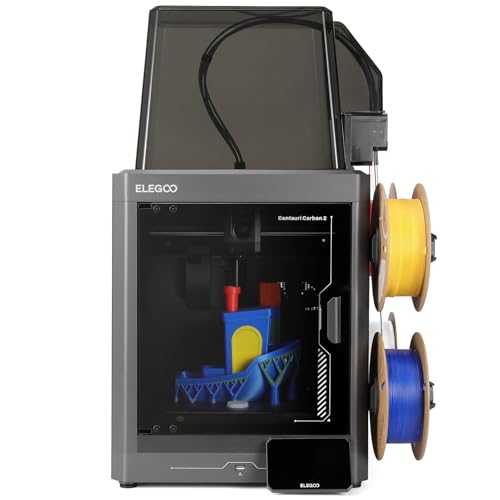
Elegoo Centauri Carbon 2 Combo — Best Value Flagship Feel
Elegoo’s second-generation Carbon arrives as a Combo, and the addition changes its character from engineering specialist to all-round contender. The listing combines multicolour printing with a 500mm/s CoreXY platform, one-click auto levelling, a nozzle rated to 350°C and a 256x256x256mm build volume, fed by the maker’s Nexprint model hub. Where the first Carbon asked colour buyers to look elsewhere, this one contests the whole brief — and at this tier, contesting Bambu’s home ground is itself a statement.
The hot nozzle matters more than its number suggests. A 350°C ceiling, as listed, keeps the door open to demanding filaments that lesser hotends refuse, while the enclosure and stationary-bed CoreXY layout protect the tall parts those filaments usually become. Colour arrives through filament swapping with the standard purge arithmetic, and one-click levelling keeps the daily ritual short. Elegoo is effectively offering the flagship checklist with its own ecosystem accent, for buyers who prefer the challenger brand’s flavour.
Challenger caveats apply: the model hub is younger than MakerWorld, community depth is still accumulating, and long-term parts support is a promise being built rather than a decade already kept. None of that diminishes the machine in front of you today. For the buyer whose tier budget wants colour, heat and volume in balance — and who enjoys backing the hungrier company — the Centauri Carbon 2 Combo is the most interesting purchase in this guide.
What a season with the Carbon 2 Combo teaches is how much of the flagship experience was software patience rather than hardware. Its one-click routines and hub-fed models shorten the distance between an idea and a running print to something approaching the Bambu benchmark, while the hot nozzle keeps a door open that the benchmark’s own mid-tier leaves closed. Owners who print both colour gifts and load-bearing parts in the same week — the realistic top-tier household — may find this the most honest single machine in the guide: no discipline treated as an afterthought, no discipline crowned king. The Carbon 2 Combo’s hub deserves a fair trial before veterans import their old habits wholesale: its model pipeline is tuned to the machine’s profiles, and owners who give it a month often find their slicing starting there rather than in a general library. Ecosystems earn loyalty by saving Tuesdays, not by winning arguments.
- Form: enclosed CoreXY Combo
- Nozzle from listing: 350°C
- Build volume from listing: 256x256x256mm
- Colour: multicolour printing included
- Levelling: one-click automatic; Nexprint hub access
Strengths
- Colour, heat and volume balanced in one platform
- Hot nozzle extends the serious filament ladder
- One-click routines keep flagship hardware approachable
Trade-offs
- Model hub and community still maturing
- Filament-swap colour carries purge costs
- Long-term support record is being written now
Best for: buyers wanting the flagship checklist from the challenger brand.
Not suited for: shoppers who rank decade-deep documentation above present hardware.
Compare the Centauri Carbon 2 Combo listing against the single-colour Carbon to price the colour step clearly.

Flashforge AD5X — Best Compact Colour
Flashforge builds colour into the AD5X rather than bolting it on. Its listing describes a built-in four-colour IFS feeding a CoreXY machine with one-click auto levelling, a 300°C hotend and a 220x220x220mm build volume. The integrated approach suits the tier buyer whose constraint is space rather than ambition: colour printing that lives inside the machine’s own footprint, on a desk or studio shelf, without a separate filament station colonising the surface beside it.
Four colours cover the overwhelming majority of real multicolour work — lettering, logos, layered graphics, colour-coded parts — and the AD5X’s discipline is to serve that majority well in a small box. The 300°C hotend reaches past PLA into the engineering shelf, one-click levelling keeps shared-space users productive, and Flashforge’s classroom heritage shows in controls that assume the operator has a lesson to teach or a client to serve, not a printer to nurse.
The boundaries are the compact class’s own: parts cap at the 220mm cube, colour count stops where the bigger systems merely start, and the surrounding model ecosystem stays quieter than the giants’. Within those boundaries, the AD5X is the tier’s most desk-friendly complete machine — the one you buy when the P2S-class enclosures simply will not fit the room your life actually has.
The AD5X earns repeat praise in shared professional spaces for a reason spec sheets miss: it finishes other people’s jobs gracefully. A colleague’s model, sliced in haste, still meets one-click levelling and a forgiving plate; a client’s colour logo prints from the built-in system without a filament-station negotiation over desk territory. In agencies, schools and clinics — the tier’s quiet growth market — that grace is the product. Owners buying for a room rather than a person should weight the AD5X above its paper position, because machines that serve queues politely get used to their full value. AD5X owners in small agencies report a billing virtue: the machine’s compact colour work lets a physical mock-up join a pitch for the cost of an afternoon. At this tier, the printer that fits the studio’s spare shelf outperforms the flagship that required a furniture decision, every single quarter.
- Form: compact CoreXY with built-in colour
- Colour: 4-colour IFS integrated
- Hotend from listing: 300°C
- Build volume from listing: 220x220x220mm
- Levelling: one-click automatic
Strengths
- Colour hardware lives inside the footprint
- Hotend reaches engineering filaments despite compact size
- Shared-space manners from a classroom-proven maker
Trade-offs
- 220mm ceiling on single-piece size
- Four colours is a ceiling, not a starting point
- Ecosystem smaller than the two biggest platforms
Best for: desk and studio buyers who need real colour in a compact enclosure.
Not suited for: large-part builders or colour maximalists.
Review the AD5X listing to confirm the IFS filament path and included spool setup.

Anycubic Kobra 3 Max V2 Combo — Best Build Volume
Some projects refuse to be sectioned. A cosplay helmet printed in pieces and glued carries its seams forever; a planter split for a smaller machine doubles its failure points. The Kobra 3 Max V2 Combo exists for those projects: its listing specifies a 420x420x500mm build size with native four-colour printing, a full-metal hotend, auto-levelling with anti-skip measures and a 600mm/s speed figure. It is the only machine here whose headline is the size of the thing you can make in one piece.
Scale changes printing’s physics and its housekeeping. A bed that large takes time to heat evenly, consumes filament by the serious spool, and turns a failed tall print into an expensive lesson — which is why the Combo’s monitoring and uninterrupted-printing features matter more here than on desktop machines. The open bedslinger layout keeps the machine accessible and the price of the volume attainable, while asking the room to cooperate: drafts and cold garages punish big PETG parts, and the wise owner sites this printer like the light industrial equipment it nearly is.
Buy it for the catalogue of large things you genuinely intend to print — armour, signage, garden and workshop pieces — and it has no rival in this guide. Buy it speculatively and it becomes the largest ornament in the room. Anycubic’s colour system adds finish to scale, but the honest headline remains volume: at the top home tier, this is what choosing size over enclosure looks like, chosen with open eyes.
Living with the Max teaches scale logistics: filament ordered by the multi-spool, prints scheduled like furniture deliveries, a room arranged around a machine that cannot be casually moved. Owners who embrace that rhythm produce objects that stop conversations — full helmets, garden pieces, signage that reads across a street. The Combo’s colour system matters more at this size, not less, because a giant single-colour object begs for the lettering, logos and accents that turn scale into finish. Buy the Max as a commitment to a category of making, and it repays the commitment weekly. Max owners learn to think in seasons: the giant cosplay build for the convention, the garden pieces for spring, the signage commission that pays for the filament shelf. A machine of this scale organises a maker’s year around itself, which is either its greatest pleasure or its disqualification — decide which before it arrives.
- Form: large-format open bedslinger Combo
- Build size from listing: 420 x 420 x 500mm
- Colour: native 4-colour included
- Hotend: full-metal design listed
- Levelling: automatic with anti-skip measures
Strengths
- Single-piece volume nothing else here approaches
- Colour included despite the size-class focus
- Monitoring features suit very long, expensive prints
Trade-offs
- Open frame exposes huge parts to room conditions
- Filament appetite and failure costs scale with volume
- Demands serious floor or bench space and a sturdy stand
Best for: prop, cosplay and large-part makers with a real queue of big work.
Not suited for: apartment benches, enclosure seekers or small-part specialists.
Measure your intended space against the Kobra 3 Max V2 listing dimensions before ordering — footprint surprises nobody twice.

Elegoo Saturn 4 Ultra 16K resin — Best Resin at the Tier
Every tier has a discipline where the money buys the flagship, and at this level that discipline is resin. The Saturn 4 Ultra 16K’s listing describes a ten-inch 16K monochrome screen, a flip-up lid, smart tank heating at 30°C and a build size of 8.33 by 4.66 by 8.66 inches. That combination is Elegoo’s desktop resin summit: screen resolution that renders miniature detail invisible to FDM, a lid that makes the daily resin routine cleaner, and tank heating that keeps resin viscosity — and therefore print reliability — steady in cool rooms.
Why a resin machine belongs in an FDM-dominated tier is a question of finished objects. Tabletop miniatures, jewellery masters, dental and hobby models emerge from the Saturn with surfaces that need washing and curing rather than sanding and filling. The workflow is the price: resin handling demands gloves, ventilation and a wash-and-cure station the budget must also carry, and the build area, generous for resin, remains a fraction of the FDM volumes above. This is a specialist’s flagship, bought for detail density nothing filament-based can imitate.
Within resin, the 16K generation’s honest gains are consistency and screen area at fine pixel pitch rather than magic — the resin guide elsewhere in this batch explains why pixel size outranks K-count boasting. Judged as the tier’s resin representative, the Saturn 4 Ultra earns its place by being the machine resin buyers would choose if the budget stopped mattering at exactly this level: flagship screen, thoughtful heating, and a lid design that respects the mess inherent in the craft.
Producers who settle on the Saturn 16K develop a batch rhythm the smaller resin machines cannot sustain: plates filled edge to edge with miniatures, wash cycles run like laundry, cured output photographed and listed while the next plate prints. The tank heating keeps that rhythm through cold snaps that would idle lesser setups, and the build area turns ‘print on demand’ from a slogan into a schedule. If your resin work has any commercial pulse at all — a shop, a club, a commission queue — this flagship’s premium is the easiest in the guide to justify, because it is bought back in completed plates. Saturn producers should keep a second vat in rotation if output matters: swapping a prepared vat is faster than cleaning one mid-queue, and the flagship’s economics reward every minute its screen spends exposing rather than waiting on housekeeping.
- Technology: resin, monochrome LCD
- Screen from listing: 10-inch 16K
- Build size from listing: 8.33 x 4.66 x 8.66 inches
- Tank: smart heating at 30°C listed
- Lid: flip-up design
Strengths
- Finest finished detail available anywhere in this guide
- Tank heating steadies resin behaviour in cool rooms
- Flip-up lid improves the daily handling routine
Trade-offs
- Requires wash-and-cure workflow and ventilation
- Build area is small beside the FDM picks
- Resin and consumables are ongoing costs, not accessories
Best for: miniature, model and master-pattern makers who prize surface detail.
Not suited for: workshops needing build plates beyond this footprint, or anyone unwilling to run a resin workflow.
Check the Saturn 4 Ultra listing alongside wash-and-cure options so the full resin setup is budgeted together.

Prusa CORE One+ kit — Best Builder’s Enclosed CoreXY
The CORE One+ listing says the quiet part in its title: DIY. This is Prusa’s enclosed, high-speed CoreXY delivered as a kit, including nozzle and filament, pitched for home and business alike. At this tier every other pick arrives ready to print; the Prusa arrives as an education. Builders who assemble it learn where every belt runs and every connector seats, and that knowledge compounds for years — every future adjustment, repair and upgrade is performed by someone who has already built the machine once.
The finished article is a fully enclosed CoreXY from the open-ecosystem tradition: documented, repairable, and designed to be modified rather than merely used. For workshops and small businesses, that character has practical value — a machine your own people can service is a machine whose downtime you control. Prusa’s kit documentation is the industry’s reference standard, so the build is a guided project measured in evenings, and the result is a printer whose quality you verified with your own hands at every step.
Count the cost honestly: your hours are the difference between this kit and its assembled rivals, and a mistake made in week one can echo until diagnosed. Buyers who want to print this weekend should choose accordingly. Buyers who want to understand this decade’s machine — and who suspect, correctly, that understanding is a feature — will find the CORE One+ kit the most satisfying spend in this entire guide.
Builders describe a specific moment late in the CORE One+ assembly when the machine stops being parts and becomes theirs — usually the first self-test, when axes they tensioned glide on command. Everything after that moment carries the signature of it: adjustments made without fear, upgrades evaluated as continuations rather than risks, a printer whose resale story includes ‘built and maintained by its owner’. The kit’s premium over its own parts is the education, and like most education it looks expensive only to people pricing the certificate instead of the competence. Kit builders: photograph your assembly at every stage. The photos become your personal service manual, your proof of build quality if you ever sell, and — owners insist — the most satisfying album a maker owns. The CORE One+ rewards documentation at every level of its culture; begin as you mean to continue.
- Form: enclosed CoreXY, DIY kit
- Assembly: full self-build from kit
- Includes: nozzle and filament per listing
- Ecosystem: open, documented and repairable
- Use: pitched for home and business
Strengths
- Building it creates lifetime maintenance knowledge
- Open documentation and parts culture
- Enclosed CoreXY result rivals assembled flagships
Trade-offs
- Your assembly hours are part of the real price
- No printing until the build is complete and tuned
- Kit mistakes are yours to find and fix
Best for: builders who want an enclosed CoreXY they understand completely.
Not suited for: anyone who needs to print the day the box arrives.
Read the CORE One+ kit listing carefully for build-time expectations and included parts before committing your weekends.
How does the top tier divide its talents?
Six machines, four ambitions: refined colour, challenger colour, compact colour, sheer volume, resin detail and builder’s sovereignty. The table compresses temperament; the sections above carry the nuance your money deserves.
| Pick | Form | Standout trait | Watch out for |
|---|---|---|---|
| Bambu Lab P2S Combo | Enclosed CoreXY | Refined colour with error detection | Curated ecosystem |
| Elegoo Centauri Carbon 2 Combo | Enclosed CoreXY | Colour plus 350°C headroom | Younger model hub |
| Flashforge AD5X | Compact CoreXY | Built-in four-colour IFS | 220mm part ceiling |
| Anycubic Kobra 3 Max V2 Combo | Large open bedslinger | 420mm-class single pieces | Room conditions matter |
| Elegoo Saturn 4 Ultra 16K | Resin flagship | Finest detail in the guide | Wash-cure workflow required |
| Prusa CORE One+ kit | Enclosed CoreXY kit | Build-it-yourself longevity | Assembly time is real cost |
What running costs hide inside this tier?
Flagship machines consume flagship quantities. Colour systems spend filament on purges proportional to your ambition; the Kobra Max spends it by the kilogram on single pieces; resin spends on resin itself, plus wash solvent, gloves, filters and replacement films and screens across the machine’s life. None of these costs is hidden by the makers, but all of them are absent from the headline comparison most buyers perform. A sane rule: reserve a meaningful slice of the total budget for the first season’s consumables and spares, and let the machine choice shrink before the operating budget does.
Time is the other currency. Big prints occupy a machine for days, resin workflows add post-processing to every object, and the Prusa kit front-loads hours before its first print. The tier rewards makers whose schedules can feed it. If your available making time is a few hours weekly, a mid-tier machine run constantly will out-produce a flagship run rarely — buy the tier your calendar can honour.
When does this tier stop making sense?
When the work turns commercial at volume, the next step is not a seventh home machine but a small farm or a professional unit with service contracts — a different guide for a different budget. When the work is occasional, the tier below serves better and leaves money for materials, which is where most of the joy lives anyway. This less-than-a-thousand shelf is the sweet spot specifically for serious home makers: people with a queue of real projects, a room that can host the machine properly, and the intent to print weekly for years. If that description fits, buy once at this level and stop researching.
How do you choose between two flagships that both fit?
At this tier, shortlists usually end with two machines that would both serve — and buyers stall, hunting a specification that breaks the tie. Better tiebreakers are biographical. Which ecosystem’s software have you already enjoyed in a slicer? Which community’s way of answering questions matches how you ask them? Which machine’s daily sounds, footprint and filament logistics fit the room it must live in? These are not soft criteria; they are the texture of the next five years, and they outlast any half-generation hardware edge, which the other brand will answer in its next model anyway.
Also interrogate your queue one final time with dates attached. The machine that serves the projects scheduled this quarter beats the machine that serves the projects imagined for next year, because this quarter’s completions fund, teach and justify everything after. Flagships hold value and capability long enough that buying for the real present is not short-sightedness — it is how a bench grows by evidence instead of by brochure.
What does flagship ownership feel like after the first month?
The research stops. That is the first symptom. Owners of top-tier machines describe a pleasant silence where comparison shopping used to live, replaced by a queue of projects and a machine whose limits they bump into rarely enough to enjoy as puzzles. The second symptom is scheduling confidence: prints are promised to family, clients and collaborators with dates attached, because the machine’s behaviour has become a known quantity. The third is a shift in spending, away from hardware and toward materials, models and the occasional indulgent tool — the economics of a bench that has finished assembling itself.
If the first month does not produce that calm, the cause is almost never the machine’s tier. It is an unfinished setup — a stand that wobbles, a resin station missing its second half, a kit rushed against a deadline, a colour system fed random filament. Finish the setup before judging the flagship; the tier’s entire value proposition is a system that disappears into your projects, and systems only disappear when every part of them, including the boring parts, is actually in place.
How long is this tier’s useful life?
Plan in generations of your own projects rather than product cycles. A flagship bought today will be out-specified within two years and out-needed much later, because the limiting factor in home printing is rarely the machine after this level — it is materials science, your design skill and the hours in your week. The picks here were chosen partly for staying power: ecosystems with momentum, parts cultures with depth, and in the Prusa’s case a design philosophy that treats a decade as a normal service life.
Resale softens the risk regardless. Top-tier machines with known names and complete accessories hold their value in the secondhand market far better than anonymous mid-tier boxes, so even a change of direction recovers a meaningful share of the spend. Buy the flagship your projects choose, keep its box and spares, maintain it like infrastructure, and the tier’s economics take care of themselves.
How do you insure a top-tier bench against its own success?
A flagship that works creates a new risk: dependence. The product line, the club, the classroom now assumes the machine exists, so its downtime has a constituency. Insure it the boring way — spares on the shelf before they are needed, profiles exported and backed up with the rest of your digital life, a relationship with the maker’s support channel established before the emergency, and, for resin, a second vat and film stock that turn consumable wear into a scheduled swap. None of this is pessimism; it is the difference between a hobby that pauses and a practice that continues.
The second insurance is knowledge redundancy. If only one person understands the flagship, the flagship owns that person’s weekends. Document the house profiles, the materials that behave, the quirks of your room, in the log this batch’s guides keep recommending. A top-tier bench that a second person can run is worth two that only its owner can.
What separates a flagship room from a flagship garage sale?
Follow-up. The machines in this guide appear in secondhand listings for two opposite reasons: owners upgrading within a beloved ecosystem, and owners who bought a tier their lives could not feed. The difference is visible in the listings themselves — complete accessories, spares, logs and honest wear versus a dusty machine photographed once and abandoned. Your purchase joins one of those stories. The queue of real projects, the finished setup, the operating budget and the maintenance ritual are the four decisions that choose which one, and all four are made in the first month.
There is no shame in the smaller story, either — the tier below this one contains superb machines that ask less of a life. The only genuine mistake at this level is buying the flagship as a substitute for the intention to use it. Intentions, unlike printers, cannot be upgraded later; bring yours with you and this tier will do the rest.
How do you get a flagship’s second year right?
Year one is capability; year two is system. The owners who still love a top-tier machine in its second year share a pattern: they stopped browsing hardware, deepened one material until it became a signature, and let the machine’s output develop a style other people recognise — the workshop’s brackets, the studio’s prototypes, the shop’s miniatures with a finish customers reorder by name. Flagships enable that depth because they stop interrupting it. If your first year was breadth — every material, every trick — let the second be depth, and the tier’s purchase will look wiser in retrospect than it did in the reviews.
Maintenance matures in year two as well, from ritual to record: belts and leadscrews inspected against the log, resin screens and FDM nozzles replaced on evidence rather than anxiety, firmware updated in the calm between projects. The machine’s birth-certificate test prints, recommended elsewhere in this batch, earn their keep here — reprint one annually and you hold a graph of your flagship’s health in your hands. A top-tier machine maintained on evidence does not really age; it accumulates proof.
One last top-tier test before you pay
Write the flagship’s job description before the box arrives: the three queues it will serve, the hours it will work weekly, the person who maintains it, the date of its first review against this guide’s promises. A machine bought against a written job description can be judged fairly in ninety days; a machine bought against a feeling can only be judged emotionally, forever. The tier deserves better arithmetic than that, and so does the maker who saved for it — one page of intentions, kept with the manual, is the cheapest flagship accessory in this entire batch and the one most likely to be reread with pleasure in five years.
What should the flagship’s first print be?
Not a benchmark cube — a hostage. Choose an object your household, studio or shop already needs, in the material the machine was bought for, at a size that uses its talent honestly. A flagship that produces a needed thing in its first session becomes infrastructure immediately, and its owner learns its real behaviour — sound, pace, finish, smell of the room afterwards — on a print whose success matters. Save the calibration objects for the second session, when the machine has a job history to be calibrated against. First impressions in this tier should be useful ones; the flagship will be judged by the room for months on the strength of its debut, so give it a debut worth judging. Keep that first object somewhere visible for the machine’s first year, too — flagships earn their keep in public, and a debut piece on the shelf is the standing answer when anyone asks what the large box in the corner actually does for a living.
How do you protect a flagship purchase at checkout?
Verify the configuration three times, because this tier’s listings breed variants the way rabbits breed rabbits. The Combo must name its colour unit in the bundle contents, not merely in a photograph; the kit must be the kit, not the assembled unit wearing a friendlier figure; the resin flagship must be the 16K generation, not its 12K sibling at a suspiciously flagship-like presentation. Screenshot the configuration you believe you bought. If the wrong variant ships, that screenshot is the difference between a five-minute correction and a fortnight of correspondence.
Then plan the unboxing like a delivery of furniture, because several of these machines are furniture-scale events. Clear the stand, confirm the doorway fits the Kobra’s ambitions, keep every bag of hardware until the machine has printed for a week, and resist the urge to discard the box — flagship resale and warranty returns both travel better in original packaging. The tier’s final lesson is logistical: the bigger the machine’s talent, the more its arrival deserves project management. Give it an afternoon of respect and it will repay you in years of not thinking about it.
How should you set up a top-tier machine room?
Machines at this level repay a deliberate installation weekend. Treat the setup as part of the purchase and the following years run smoother.
- Site the machine on a stand that does not wobble — CoreXY pace and large beds both punish resonant furniture — with power and ventilation planned rather than improvised.
- For resin, establish the full station before the first print: gloves, wash and cure equipment, sealed waste handling and airflow away from living space.
- Run each FDM machine’s complete calibration, then print a dimensional test you will keep as the machine’s birth certificate for later comparisons.
- Organise filament by material with dry storage for the hygroscopic shelf; label spools with purchase dates and drying history.
- Stock the first spares now — nozzles, a plate or resin film, belts where the maker sells them — while the exact model numbers are fresh.
- Schedule a monthly ten-minute maintenance ritual: clean plates and tanks, inspect belts and leadscrews, review the error log the machine keeps.
A flagship treated this way behaves like infrastructure. The makers in this tier have done their part; the room, the spares shelf and the ritual are yours.
What do buyers at this tier most often regret?
Spending the whole budget on the machine
A flagship starved of filament, spares and post-processing gear produces a month of wonder and a year of excuses. Hold back an operating slice from the start.
Buying volume for imaginary projects
The Kobra Max is magnificent for a real queue of large work and a burden as speculative furniture. Let printed evidence, not imagined helmets, justify footprint.
Treating resin like a cleaner FDM
Resin is a chemical workflow with superb output. Skipping ventilation, curing discipline or waste handling turns the flagship experience sour quickly; set the station up properly or choose filament.
Assembling a kit on a deadline
The CORE One+ kit rewards unhurried evenings. Bought against a project deadline, its build becomes the obstacle instead of the pleasure — choose an assembled machine when the calendar is tight.
Unboxing onto the floor permanently
Flagships parked on carpet or concrete inherit vibration, dust and kicked power cables. The stand is part of the machine; a flagship still on the floor after a month is a setup that never finished, and its print quality will keep the secret poorly.
Comparing flagships by top speed
Every listing here claims speed its real-world parts will never average. Compare finished-part quality at the pace you will actually run, error handling on long jobs, and the ecosystem you will live in — the travel figure is the least useful number at this tier.
Final Recommendation
Match the flagship to the ambition: P2S Combo for the refined all-round bench, Centauri Carbon 2 Combo for the challenger’s balance, AD5X for compact colour, Kobra 3 Max V2 Combo for genuine size, Saturn 4 Ultra for resin detail, and the CORE One+ kit for the builder’s long game.
At this tier there are no bad machines in this guide, only mismatched ones — spend the ceiling on the talent your projects will actually use every week, and a printer bought under a thousand becomes the one you stop thinking about replacing.
Frequently Asked Questions
Do these machines really stay under the tier in practice?
Configurations and promotions move street figures constantly, which is why this guide prints none. Judge the listing’s current figure for the exact Combo or kit described, and remember the operating budget — filament, spares, resin supplies — belongs in the same calculation.
Is resin or FDM the better single purchase at this level?
The one matching your dominant project type. Detail-led work — miniatures, masters, models — belongs to the Saturn; size, colour and engineering work belong to the FDM five. Most serious benches eventually host both, sequenced by which queue is longer today.
How much assembly does the Prusa kit really involve?
A full machine build, measured in evenings rather than hours, following documentation that is the best in the industry. The listing is explicit that this is a DIY kit. If that sentence excites you, it is your pick; if it worries you, the assembled machines exist precisely for you.
Will a Combo’s purge waste eat the tier’s value?
Purge costs are real but manageable with sensible modelling — colour by layer, grouped parts, restrained change counts. Makers who print colour weekly find the finished-object payoff dwarfs the purge pile; makers who rarely print colour should buy the single-colour strengths instead.
What should I buy first alongside the machine?
The consumables your discipline burns: spare nozzles and a second plate for FDM colour machines, wash-and-cure capacity and safety supplies for resin, dry storage for engineering filaments, and in every case the stand the machine deserves.
Should I wait for the next generation instead?
Generations in this tier now arrive as refinements, not revolutions, and every month spent waiting is a month of projects unprinted. Buy when your queue justifies the tier; the machine you buy will be out-refined eventually and out-needed much later.
Is one flagship better than two mid-tier machines?
For a single maker with one queue, usually the flagship — its completeness serves every job. For two simultaneous queues, a household of makers, or a small business separating colour work from engineering work, two mid-tier machines can out-produce it. Count your concurrent queues, not your ambitions.
Are extended warranties worth it at this tier?
For machines running a business queue, a warranty that guarantees uptime can pay for itself in one saved deadline. For household flagships, the makers’ standard cover plus a stocked spares shelf usually delivers better value. Decide by what a dead week would cost you, honestly priced.
Is the resin flagship cheaper to run than the FDM flagships?
Per finished object, small resin parts can be economical, but the workflow carries fixed costs — resin stock, wash supplies, films and screens as consumables — that FDM spreads differently into filament and nozzles. Compare cost per month of your actual output, not per machine, and include your post-processing time honestly.
Should a business buy at this tier or go professional?
For prototyping, jigs, short runs and product development, this tier is exactly right and pays for itself quickly. For continuous production with uptime guarantees, professional machines and service contracts enter the conversation. Many small businesses run both: flagships for development, contracted capacity for volume.
Related Guides
Companion guides for the same budget conversation: best 3d printers intermediate best 3d printers sub 500 best 4k resin printers


