What's inside
- Where to buy
- Key Takeaways
- Quick Picks
- How did we build a shortlist from such a thin shelf?
- Which 17-inch machine deserves your bench?
- Why does 16×20 change a photographer’s habits?
- How do you print and finish a 16×20, start to frame?
- What does the framing maths do to your budget?
- How do you choose between the Canon and Epson flagships at this size?
- How do you keep a 17-inch pigment printer in good humour?
- What changes when you start selling 16×20 prints?
- Which paper families deserve your first year?
- How much resolution does a 16×20 really use?
- When is the lab still the right answer?
- How do the six compare side by side?
- What mistakes do 16×20 buyers keep making?
- Final Recommendation
- Frequently Asked Questions
- Related Guides
As an Amazon Associate I earn from qualifying purchases. This post may contain affiliate links at no extra cost to you.
gizmoverdict.com is reader-supported. When you buy through links on our site, we may earn an affiliate commission.
Where to buy
Three printers in this guide have clean, current Amazon listings, and those carry the links below. The other three are covered in prose because their listings are inconsistent or their stock is the outgoing kind — in a class this small, we would rather show you the whole shelf honestly than pretend only the linkable machines exist.
The best 16×20 printers occupy the most consequential size in home photo printing, and the reason is framing arithmetic. A 16×20 print drops straight into one of the most common ready-made frame sizes on earth, mats beautifully inside a 20×24 frame for a gallery look, and hangs on a wall with enough presence to end arguments about whether home printing can be serious. It is also the size where the bill for sending work to a lab starts to sting, which is why photographers who exhibit, sell at markets, or simply decorate their own homes keep arriving at the same conclusion: the printer that makes this size at home changes the economics and the creative control of everything they shoot.
Sixteen by twenty demands a 17-inch carriage — the sheet must travel through a path at least an inch wider than itself for bordered work, and borderless printing at this size is a flagship feature rather than a given. That requirement collapses the market to professional machines, and this guide is honest about how thin the shelf is: three current linked listings carry the class, supported by three same-carriage alternatives you will meet in every serious buyer’s research. What separates them is not whether they can print the size — all six can — but ink philosophy, black-ink switching, media tolerance and the ownership temperament each machine rewards.
Key Takeaways
- A 17-inch carriage is non-negotiable for 16×20; anything narrower is a cropping exercise, not a printer for this size.
- Only three clean linked listings exist in this class right now — the guide names the three prose alternatives rather than padding the list with dye machines.
- Epson’s UltraChrome PRO10 and Canon’s LUCIA PRO II take different routes to the same gallery: violet-extended gamut versus chroma-optimised gloss handling.
- Matte black switching is the daily-friction detail: the P900 never asks you to swap, older machines trade a little ink for each paper-family change.
- Borderless 16×20 support varies by model and media type, so confirm it against the paper you actually print on, not the brochure size list.
- At this size, paper cost overtakes ink cost in most home studios — budget the sheets, not just the cartridges.
Quick Picks
| Pick | Badge | Why it earns its place |
|---|---|---|
| Epson SureColor P900 | Best for most 16×20 printers | Flagship PRO10 pigment output, both blacks always ready, and a body that fits a home studio instead of a print shop. |
| Canon imagePROGRAF PRO-1100 | Best Canon for gallery work | LUCIA PRO II inks with gloss-levelling chroma optimiser and the black depth framed colour work demands. |
| Epson SureColor P800 | Best for thick media and rolls | The older Epson flagship whose straight front feed and roll option still out-handle its successor for boards and panoramas. |
| Epson SureColor P5370 | Prose pick — studio step-up | Epson’s higher-volume 17-inch professional model, aimed at studios printing 16×20 work daily rather than weekly. |
| Epson SureColor P700 | Prose pick — compact carriage | The PRO10 family’s smaller-bodied 17-inch route for studios short on bench space. |
| Canon imagePROGRAF PRO-1000 | Prose pick — outgoing flagship | Canon’s previous 17-inch flagship; still superb output, finite stock, buy only verified-new. |
How did we build a shortlist from such a thin shelf?
We applied the carriage rule first and let it be brutal: if a machine cannot carry a 17-inch path, it is not a 16×20 printer, whatever its marketing says about scaling. That single test removes every dye-based consumer wide printer, which is deliberate — at exhibition sizes, pigment ink’s behaviour on matte and fine-art papers and its archival patience are the class’s entry ticket, and this guide will not dilute it. Surviving machines were then judged on the ownership details that decide satisfaction at this size: how black ink is handled when you change paper families, whether the feed path tolerates the thick cotton boards gallery printers favour, how honestly borderless printing is supported at 16×20 on real media, and how deep the profile support runs for third-party papers.
The result is a list with an unusual shape — three linked flagships and three prose alternatives — and we present it that way because the alternative is worse. Padding the guide with printers that cannot truly serve the size, or inventing listings that do not exist, would betray the only thing a buyer at this level actually needs: an accurate map of a small shelf. The prose picks are not consolation prizes. One is the studio step-up, one is the compact sibling, and one is the outgoing flagship whose remaining stock tempts every bargain hunter in the category. Each gets the same scrutiny as the linked three, minus a buy button we cannot honestly attach.
We also considered the second-hand weather around this class, because 17-inch flagships circulate used in meaningful numbers. A used machine can be a fine buy — these are durable devices — but ink age, nozzle health and the cost of a full fresh ink set must enter the arithmetic, and a seller who cannot show a clean nozzle check is asking you to fund their maintenance backlog. New buyers with no appetite for that detective work should stay with the linked listings, where the machine’s history begins with them.
Which 17-inch machine deserves your bench?
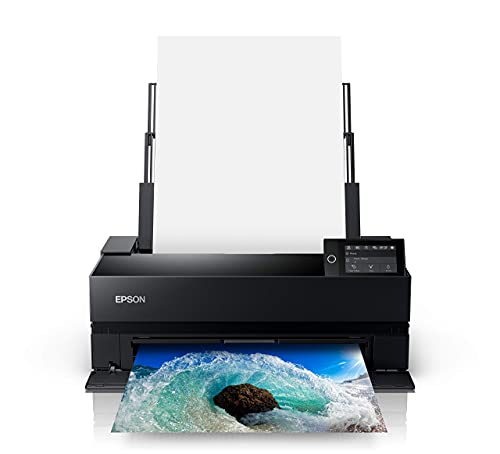
Epson SureColor P900 — Best for most 16×20 printers
The P900 is where most 16×20 buyers should land, because it removes the frictions that make big printing feel like a ceremony. Its UltraChrome PRO10 pigment set includes a violet ink that widens the printable gamut in the blue and purple regions — sunset skies, stage lighting, floral work all live there — and the machine carries matte black and photo black simultaneously, switching between them automatically as the media type changes. At 16×20 that convenience compounds: a week of printing might cross matte cotton for a portrait, baryta for a framed landscape and plain matte for proofs, and the P900 never once asks for an ink swap, a purge, or your patience.
Physically it is the most domestic 17-inch flagship ever made, compact and comparatively light, with a 4.3-inch touchscreen that walks media loading through illustrated steps. Output is the substance beneath the manners: matte blacks with real depth, gradients that step instead of banding, and a black-and-white mode that produces neutral, toneable monochrome good enough to hang beside lab work. Borderless printing covers the popular sizes, and Epson’s profile library reaches deep into third-party fine-art papers. For a photographer printing 16×20 at home weekly — for walls, for clients, for the quiet satisfaction of it — the P900 is the class’s most complete answer.
Its working rhythm suits a home studio’s calendar. The machine wakes, checks itself briefly and prints without the warm-up theatre of older flagships, which encourages the healthiest habit in pigment ownership: little and often. A test print on Tuesday, a proof on Thursday, the final on Saturday — the P900 treats that cadence as normal life rather than as a series of cold starts. Owners graduating from 13-inch machines will also appreciate that everything they learned about profiles and media types transfers directly, with the wider carriage simply removing the ceiling they kept hitting.
Watch it handle the classic 16×20 test — a portrait with a dark background gradient — and the PRO10 case makes itself. Lesser printers band in exactly that gradient or crush the background into a single black opinion; the P900 steps the tones down like a staircase in a well-built house, each tread distinct, none of them noisy. Skin against that darkness holds its modelling instead of posterising. It is the kind of print that makes a client sit up, produced by the machine most home studios can actually accommodate.
- Carriage: 17-inch, compact flagship body
- Ink family: UltraChrome PRO10 pigment with violet
- Black handling: both blacks on board, automatic switching
- Panel: 4.3-inch colour touchscreen
- Connections: wireless networking, Ethernet, USB
Strengths
- No black swapping ever — paper changes stay a paper change, nothing more.
- Home-studio size and weight make 17-inch printing a spare-room reality.
- Monochrome output with controlled toning flatters the size’s portrait tradition.
Trade-offs
- Very thick boards meet a less forgiving feed than the older P800 offers.
- Roll work requires the optional unit rather than arriving ready.
- Cartridge capacities suit weekly printing better than production runs.
Best for: home and semi-pro studios printing 16×20 across mixed paper families, weekly and happily. Not suited for: daily production volumes, or heavy-board specialists.
Start your comparison here: view the P900’s current Amazon listing and price a starter set of 17×22 sheets cut down or 16×20 packs beside it.

Canon imagePROGRAF PRO-1100 — Best Canon for gallery work
Canon’s flagship argues that a 16×20 print should be judged at reading distance under gallery light, and builds its ink set accordingly. The LUCIA PRO II pigment system pursues two things framed colour work notices immediately: black density that gives an image its foundation, and a chroma optimiser layer that lays a clear, even finish over the colour inks so semi-gloss and gloss surfaces sheen uniformly instead of patchily. Hang a PRO-1100 print beside a window and the difference announces itself — reflections stay coherent across dark and light passages alike, and the image reads as one object rather than a map of its own ink coverage.
As the successor to the long-running PRO-1000, the 1100 refines handling and ink formulation while keeping the serious furniture-grade build. It feeds fine-art media through a manual path with the care thick sheets need, supports borderless output at the sizes this class lives on, and its colour management utilities speak the language of photographers who calibrate monitors and mean it. A 16×20 from this machine is not a big home print; it is a small gallery print, and the distinction is visible across a room. Studios selling framed work at markets and exhibitions will find the Canon’s surface discipline the easiest to charge money for.
There is a temperament match to consider as well. Canon’s ecosystem rewards the methodical printer — the one who soft-proofs, keeps a paper log, and prints a considered final rather than a hopeful flurry. The utilities emphasise layout precision and media bookkeeping, and the machine’s own guidance during loading reads like a checklist written by someone who has ruined expensive sheets personally. If that rhythm sounds like yours, the PRO-1100 will feel less like equipment and more like a colleague with extremely high standards.
Give it the other classic examination — a saturated landscape destined for glass — and watch the surface rather than the colours. On rival machines the dark foreground and bright sky dry to slightly different sheens, and under a window’s reflection the print briefly becomes two prints. The Canon’s optimiser coat dries the whole sheet to one finish, so the reflection slides across the image like light across water, unbroken. Framers notice this before photographers do, and it is the most common reason given when a framing shop asks which machine made a piece.
- Carriage: 17-inch professional flagship
- Ink family: LUCIA PRO II pigment with chroma optimiser
- Black handling: matte and photo blacks on board
- Media path: manual front feed for fine-art stock
- Connections: Wi-Fi, Ethernet, USB
Strengths
- Gloss uniformity across a framed print is the best in this guide.
- Black density gives large colour work genuine foundation and depth.
- Built like gallery equipment, with handling guidance to match.
Trade-offs
- The largest commitment of space and budget among the linked three.
- Its methodical utilities reward patience more than spontaneity.
- Ink set costs track its flagship station without apology.
Best for: photographers selling or exhibiting framed 16×20 colour work. Not suited for: casual large printing, or studios where the bench is shared and small.
Exhibitors should examine the PRO-1100 on Amazon and weigh it against the frames and paper your work actually ships in.
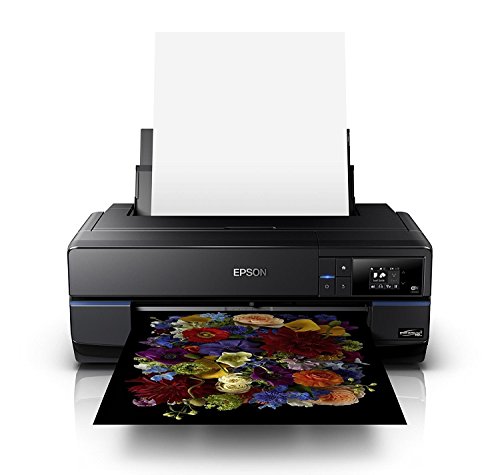
Epson SureColor P800 — Best for thick media and rolls
Every generation leaves one machine the specialists refuse to retire, and in this class it is the P800. Its front manual feed takes a straight line through the printer that thick fine-art boards and rigid media genuinely need — no bending around rollers, no hopeful flexing of a sheet that cost more than lunch. Add the optional roll unit and it also becomes the panorama and banner machine of the group, printing long formats the sheet-fed flagships cannot touch. For 16×20 specifically, that feed tolerance means the heavyweight cotton papers many gallery printers swear by pass through like commuters, not like negotiations.
The compromises are generational and visible. Black ink changes between matte and photo families are a physical swap with a small purge, the control panel predates the touchscreen era’s polish, and the UltraChrome HD ink set, while thoroughly professional, lacks the violet extension of the PRO10 generation. None of these touch a finished print’s quality, which remains flagship-grade. The P800 is therefore a connoisseur’s buy: purchased knowingly, usually by someone whose media drawer is full of difficult stock, it out-serves newer machines at the exact tasks they find awkward. Purchased as a generic flagship, it will feel dated. Know which buyer you are.
Its longevity carries a second, quieter asset: an enormous installed base means every paper, every setting quirk and every maintenance ritual is documented somewhere by an owner who solved it first. A 16×20 printer is a decade-long companion, and the P800’s decade is already half written in forums, studio notes and paper makers’ setting sheets. For experimental printers — the ones feeding handmade sheets and odd boards — that collective memory functions as a support department no manufacturer staffs.
Its party piece remains the panorama: a roll of paper, a landscape that refuses to be cropped, and an afternoon later a print that wraps a buyer’s attention around the room’s corner. Sellers at markets unroll these across a stall and watch crowds gather in a way no framed rectangle achieves. That the same machine spends its weekdays feeding civilised 16×20 boards through its straight path is the P800’s whole argument — breadth of media courage that newer, sleeker flagships traded for domestic manners.
- Carriage: 17-inch, previous-generation flagship
- Ink family: UltraChrome HD pigment
- Black handling: swaps between paper families
- Feed: straight front manual path, optional roll unit
- Connections: wireless, Ethernet, USB
Strengths
- Thick and rigid media feed straighter here than in any successor.
- Roll capability opens panoramas and long prints the others cannot attempt.
- Years of owner documentation cover every paper experiment imaginable.
Trade-offs
- Black swapping wastes a little ink and a little temper at every change.
- Interface and connectivity belong to its generation, plainly.
- Outgoing status means checking stock and support before committing.
Best for: printmakers whose 16×20 work runs on thick boards and experimental media. Not suited for: buyers wanting current-generation convenience or automatic black handling.
Media specialists, check the P800’s Amazon page — and verify roll unit availability at the same time, since the pair belong together.
Epson SureColor P5370 — Prose pick, the studio step-up
The P5370 exists for the moment a P900 stops being enough — not in quality, which it shares, but in appetite. Positioned above the P900 in Epson’s professional line, it is built for higher-volume studios: larger ink capacities, a build intended for daily production, and the workflow manners of a machine that expects to print other people’s deadlines. A portrait studio producing framed 16x20s every day, or a market seller restocking prints weekly in batches, will feel the difference in consumables logistics and in how rarely the machine asks for attention mid-run.
It is prose-only in this guide because the verified pool for this batch linked the P900 as the Epson representative, and studio-line models like this one are often sold through professional channels with listings that fluctuate. The honest advice: if your volume has genuinely outgrown the P900’s cartridge rhythm, price the P5370 through Epson’s professional dealers alongside any live marketplace listing, and compare total ink capacity economics rather than headline machine prices. For weekly home printing it is surplus capacity wearing a serious face; for a working studio it is the correct tool described plainly.
Consider also what a step-up like this signals about your practice. Needing a P5370 means 16×20 printing has become a production line, with paper bought in cases and clients expecting reprints that match the originals months later. That world values the machine’s consistency systems and capacity headroom over domestic virtues like compactness. Buy it when the diary, not the brochure, tells you to.
- Carriage: 17-inch professional, above the P900
- Ink family: UltraChrome PRO10 pigment
- Built for higher daily volumes and larger ink supply
- Sold substantially through professional channels
- Verify live listings and dealer pricing before planning
Strengths
- Capacity and duty headroom a working studio actually consumes.
- Same PRO10 colour behaviour, so existing profiles and habits transfer.
- Production build tolerates a daily print schedule for years.
Trade-offs
- Surplus machine for home volumes, in cost and in footprint.
- Listings fluctuate; buying takes more legwork than the P900.
- Studio features assume a workflow a hobby room may never build.
Best for: portrait and market studios printing 16×20 work daily. Not suited for: home printers whose weekly output a P900 handles without breathing hard.
No link is attached deliberately; search the model name, compare professional dealer pricing with any live listing, and let your real monthly volume arbitrate.
Epson SureColor P700 — Prose pick, the compact carriage
The P700 is the answer to a spatial problem, not a quality one. It belongs to the same 17-inch, UltraChrome PRO10 family as the P900 — a fact its modest model number actively conceals — but wraps the carriage in smaller bodywork for studios where the bench is contested territory. Both black inks ride on board, the violet channel is present, and a 16×20 emerging from a P700 is the same print its bigger sibling would produce. What you surrender is a measure of screen, finish and presence; what you gain is a flagship-class machine that fits rooms the P900’s owners had to rearrange.
Why prose? The batch’s verified pool carried the P900 as the linked Epson, and P700 stock should be confirmed live before being treated as a plan — model rotations in this line have confused buyers before, and the number alone has misled people into expecting a narrower printer. If you find a current listing from a reputable seller, the P700 is the thinking studio’s space-saving route into this class. If you cannot, the P900 is not a consolation; it is the same idea with the lights turned up.
The P700 also teaches the category’s most useful shopping lesson in miniature: in professional lines, the engine and ink system are the product, and the bodywork is packaging. Two machines sharing an ink family and carriage width will produce prints their owners cannot tell apart in a frame. The differences that matter hide in feeds, screens and capacities — which is why this guide spends its words there instead of on badge hierarchies.
- Carriage: 17-inch family in compact bodywork
- Ink family: UltraChrome PRO10 pigment
- Black handling: both blacks on board
- Positioned as the P900’s smaller-footprint relation
- Confirm live stock before planning a purchase
Strengths
- Full-width PRO10 printing where a P900 will not physically fit.
- Identical print character to its sibling once framed.
- Often priced as the quiet sibling rather than the headline act.
Trade-offs
- Availability is inconsistent between sellers and seasons.
- Smaller panel and plainer finish than the flagship presentation.
- Model number invites the wrong assumption about its width.
Best for: space-pressed studios wanting PRO10 output at 16×20. Not suited for: buyers who need a guaranteed in-stock order today.
Unlinked by design: check the live listing’s seller and completeness carefully, then compare the delivered total against the P900 before choosing the compact route.
Canon imagePROGRAF PRO-1000 — Prose pick, the outgoing flagship
Canon’s previous flagship still prints like a flagship, which is precisely why it needs a careful paragraph instead of a link. The PRO-1000’s LUCIA PRO pigment set produced the gallery 16x20s that built this class’s reputation, its vacuum feed keeps big sheets flat and honest, and its build quality embarrasses newer machines in lighter categories. Remaining stock, however, is exactly that — remaining. The PRO-1100 has replaced it, units in the channel are finite, and the listings that persist deserve to be read like contracts: new or refurbished, full ink set or partial, warranty intact or evaporated.
Bought with open eyes at a price that respects its generation, a new PRO-1000 is a legitimate bargain — the prints will not know they came from last year’s model. Bought carelessly at a flagship price from a listing long on adjectives and short on specifics, it is how buyers end up owning yesterday’s machine at tomorrow’s cost. Studios already running one are the exception to every caution here: a matching second unit shares inks, profiles and muscle memory, and for them the remaining stock is an opportunity with an expiry date.
For the 16×20 newcomer, treat this pick as the guide’s standing lesson in how professional product lines turn over. Flagships do not become bad printers on replacement day; they become pricing puzzles. The skills that solve the puzzle — reading condition lines, valuing the ink in the box, checking the support horizon — transfer to every future purchase in this category, which is worth almost as much as the discount itself.
- Carriage: 17-inch, replaced by the PRO-1100
- Ink family: LUCIA PRO pigment
- Feed: vacuum-assisted sheet handling
- Status: finite remaining stock, verify condition
- Price discipline: never above the current flagship’s street level
Strengths
- Prints that remain indistinguishable from current flagship output.
- Generation-change pricing can make it the class’s value play.
- Perfect fleet match for studios already running the model.
Trade-offs
- Listings blur condition; diligence is the buyer’s job.
- Shorter support runway than a current model, unavoidably.
- A big, heavy machine by any generation’s standards.
Best for: existing Canon studios and disciplined bargain hunters. Not suited for: first-time buyers who want the longest, simplest ownership runway.
Kept link-free here on purpose — read any listing’s condition and contents lines twice, and let the PRO-1100’s price discipline your bid.
Why does 16×20 change a photographer’s habits?
Because it is the first size that behaves like a destination rather than a draft. Smaller prints are proofs, gifts, album fillers; a 16×20 goes on a wall and stays there, being looked at by people who did not watch you make it. That changes shooting first — you start composing for a size where a weak corner cannot hide — and it changes editing, because flaws invisible at 8×10 stand in the open at four times the area. Photographers who print this size regularly report the same quiet effect: they shoot less, keep more, and learn their lenses’ real character within a season.
It changes the household, too. A home with a 16×20 printer develops a rotating gallery — the hallway print that changes with the seasons, the framed piece a guest asks about, the market stock leaning in sleeves by the door. The machine stops being office equipment and becomes part of how the family displays its own history. That is a soft argument in a technical guide, but it is the reason owners keep these printers for a decade while faster, newer gadgets cycle around them.
It also changes how a photographer gives. A 16×20 of a grandparent, printed on cotton and framed in the standard size, is the gift that ends up over mantels rather than in drawers; a market portrait printed while the client watches the sheet emerge is a small piece of theatre no download link performs. The size flatters generosity because it is big enough to be unmistakably deliberate and standard enough to be framed by Friday. Several owners in this class admit the machine paid for its shelf space in family currency long before the print-sales arithmetic arrived.
How do you print and finish a 16×20, start to frame?
Prepare the file at final size with resolution to spare — 300 pixels per inch across a 16×20 means a 4800 by 6000 pixel image — and soft-proof with your paper’s profile, watching the deep tones on matte stock, where the paper’s ceiling arrives earlier than the screen admits. Choose the media type that matches your sheet exactly, load through the manual feed if the paper is thick, and confirm the border intention in the driver: a borderless 16×20 for a flush frame, or a bordered print if a mat will dress it. Then print, and resist judgement for an hour; pigment colours settle as the last moisture leaves, and the print you assess at minute two is a draft of itself.
Finishing is where home printing separates itself. Let the sheet rest flat overnight before framing. If you mat, cut or buy a mat with a window slightly smaller than the image so no white edge strays, using acid-free board for anything meant to stay framed for years. Dry-mount or hinge the print rather than gluing — hinges let the sheet breathe with humidity and let a future you reframe without destruction. Behind glass, leave the print breathing room with a spacer or the mat’s own thickness; under acrylic, the same rule applies double, because a big pigment surface in hard contact will eventually make its objection visible. Sign the mat or the border in pencil, like the print shops do — it is a small vanity that also happens to be the archival-correct writing tool.
Before the frame closes, give the print its final inspection ritual: lay it flat under bright, angled light and walk around it. Raking light exposes the sins other light forgives — a faint roller mark, a speck of dust printed into a sky, a hairline of banding in a gradient. At smaller sizes these hide; at 16×20 the wall will find them for you, in front of an audience. Thirty seconds of orbiting your own print is the cheapest quality control in the entire process, and the professionals who charge for this size never skip it, because they know exactly which light their buyers’ hallways use.
What does the framing maths do to your budget?
A 16×20 print is cheap to frame and cheaper to mat, and understanding both routes helps you print with the destination already decided. Route one: print borderless or full-bleed at exactly 16×20 and drop it into a ready-made 16×20 frame — the fastest wall in photography, and the reason this size anchors gallery walls in rental flats and market stalls alike. Route two: print with a border, or print 16×20 and mat it inside a 20×24 frame, which adds the white breathing room that makes a print read as art rather than enlargement. The mat route costs a little more per piece and returns a great deal more presence, and it forgives the small border inconsistencies that full-bleed framing exposes.
The budgeting lesson hides in the consumables order. For most home studios at this size, paper spending passes ink spending within the first year — a pack of exhibition cotton in 16×20 is a serious line item, and a framing habit multiplies it. Plan the studio as a system: printer, two paper families you know deeply, mats and frames bought in the sizes you actually hang. Owners who improvise each stage pay hobby prices at every stage; owners who standardise buy paper in the economical pack sizes, frames when the craft stores run their cycles, and spend the savings on the one thing that cannot be standardised — better photographs.
One more piece of arithmetic deserves honesty: your reject rate. Learning a 17-inch machine involves some spoiled sheets — the wrong media setting discovered at full size, the border misjudged, the colour that dried differently than the screen swore it would. Every owner pays this tuition. Paying it on a mid-priced matte paper while you learn, and graduating to the exhibition cotton once your proofing ritual is trustworthy, is the difference between tuition and waste.
How do you choose between the Canon and Epson flagships at this size?
Strip away brand loyalty and three questions remain. First: how often do you change paper families? A printer who lives on one matte cotton for months will never feel the black-switching difference; a printer who crosses between matte and glossy weekly will feel it every single time, and should weight the P900’s automation heavily. Second: what do your finished prints live behind? Work destined for glass benefits from the Canon’s gloss-levelling discipline, because reflections are where framed prints succeed or fail in real rooms. Work destined for open portfolio sleeves and matte presentation leans Epson’s way, where the violet-extended gamut and monochrome control do their best work unglazed.
Third: which software temperament matches yours? Canon’s utilities court the photographer — layout, borders, gallery habits. Epson’s court the print technician — media management, profile depth, production calm. Neither is a flaw. Spend an evening with each maker’s downloadable utilities before the machines are even priced, and notice which one you stop fighting sooner. At this level the hardware outputs are close enough that the interface you will touch five hundred times is a legitimate tiebreaker, and guides that pretend otherwise are protecting a neutrality nobody asked for.
How do you keep a 17-inch pigment printer in good humour?
Big pigment machines ask for rhythm, not devotion. Print weekly — a single sheet, a test image, anything that fires every nozzle — and the cleaning cycles that waste ink stay rare visitors. Leave the machine connected to power so its own quiet maintenance can run; a printer switched off at the wall for a month wakes up needing the deep purge its owner was trying to save it from. Keep the paper path clean with the maker’s cleaning sheets or a plain sheet run through monthly, because paper dust accumulates exactly where big sheets flex, and dust is the parent of both feed errors and mysterious specks on matte blacks.
Environment matters at this size in a way smaller printers forgive. A 17-inch machine in a damp room feeds curled sheets and prints cockled colour; in a dusty workshop it inhales its own speckled future. Give it the driest, calmest corner you have, cover it when idle if the room is a working studio, and store its paper flat and bagged nearby rather than in a garage’s weather. None of this is preciousness. It is the maintenance schedule the machine would write for itself, and owners who follow it measure their printers’ lives in decades.
What changes when you start selling 16×20 prints?
Everything about your standards, in the healthiest way. A print for your own hallway can carry a small flaw you have agreed to stop seeing; a print a stranger pays for cannot. Sellers develop rituals the rest of us borrow gratefully: inspecting every sheet under two kinds of light before it is signed, printing editions in one session so paper and ink behaviour stay constant across the run, and keeping one archival copy of each image’s final print file with its paper and profile recorded, so a reprint ordered next year matches the original on a customer’s wall. The machines in this guide all support that discipline; the flagships’ consistency across a long run is exactly what their price buys.
Pricing teaches its own lesson about this size. A framed 16×20 sits in the band buyers consider an considered purchase rather than a souvenir, which means your paper and ink choices become part of the product’s story — pigment on cotton, printed by the photographer, is a sentence sellers can say with a straight face and buyers can repeat when the piece is admired. That story is also why the outgoing-flagship prose picks matter commercially: a studio producing matched editions cares about fleet consistency and ink availability more than about owning this year’s badge, and plans purchases accordingly.
Shipping is the final examination. A 16×20 travels flat in a rigid mailer or rolled in a wide tube, and matte pigment surfaces prefer flat, interleaved with clean paper, with the corners guarded like the value they are. Sellers learn to print a spare of any edition piece destined for the post, because the cheapest insurance against a carrier’s bad day is a second sheet already hanging in reserve. None of this is in the printers’ manuals, and all of it decides whether selling at this size is a pleasure or a correspondence course in apologies.
Which paper families deserve your first year?
Year one at this size should be a monogamous relationship with two papers. The first is a smooth matte cotton — the class’s reference surface, forgiving of learning curves, magnificent for monochrome and portraits, and honest about colour. Live on it until your proofing ritual is automatic. The second, added once the first is boring, is a fibre-based semi-gloss or baryta for framed colour work, where its gentle sheen deepens saturation behind glass. Between those two surfaces, ninety percent of what a 16×20 printer makes is covered, and covered well.
Resist the sampler-pack romance beyond a single exploratory box. Every new paper demands its profile hunt, its media-setting test and its proofing sheet at full size, and a drawer of nine half-known papers produces nine varieties of hesitation. The professionals whose walls sellers envy are, almost without exception, two-paper printers with profound knowledge of both. Depth photographs better than variety at sixteen by twenty inches, and the savings from buying your two papers in the large pack sizes quietly fund the frames.
How much resolution does a 16×20 really use?
Less than the anxiety market claims, and more than a phone snapshot casually offers. At the standard working target of 300 pixels per inch, the file is 4800 by 6000 pixels — comfortably inside what any serious camera of the last decade produces, and the reason this size became the home-printing flagship in the first place: it asks everything of a good file and forgives a merely decent one. Drop to 240 pixels per inch and most viewers at normal distance cannot convict the print of anything; drop below that and the softness stops being a number and becomes a look, acceptable for painterly work and fatal for architecture.
Sharpening is the size’s private craft. A file sharpened for screen will print gentle; a file sharpened for 16×20 needs output sharpening applied at final size, stronger than instinct suggests, because paper — matte paper above all — absorbs edge contrast the way a towel absorbs water. Learn to sharpen on the proof, at the size, for the paper, and the same image gains a clarity no camera upgrade could have sold you. This, more than any ink specification, is the skill that separates home 16×20 prints from lab ones in the owner’s favour: the lab sharpens to a house standard, and you sharpen to the image.
When is the lab still the right answer?
A fair guide admits the competition is not only other printers. A good lab prints a beautiful 16×20, charges a sum that feels reasonable exactly once, and asks nothing of your shelf space. For the photographer who needs four large prints a year, the lab wins on arithmetic and it is not close. The home machine wins when the count climbs — proofs, reprints, editions, gifts, the wall that changes with seasons — and when control matters: the crop adjusted at midnight, the tone warmed a breath, the print remade because the first one’s sky was a half-shade proud. Ownership is a subscription to your own iterations.
There is also the matter of paper identity. Labs print superbly on their papers; the home studio prints on yours — the cotton with the texture your work has become known for, the baryta whose sheen your clients recognise. Photographers who sell develop a surface signature as surely as a colour palette, and that signature is only available to people who print where they live. If your ambitions point that way, the lab remains a fine place to proof other sizes, but the 16×20 heart of the practice belongs at home, on one of the six machines above.
How do the six compare side by side?
| Model | Status | Ink family | Black switching | Standout trait |
|---|---|---|---|---|
| Epson P900 | Linked | UltraChrome PRO10 | Automatic | Complete home-studio flagship |
| Canon PRO-1100 | Linked | LUCIA PRO II | On board | Gloss discipline, deep blacks |
| Epson P800 | Linked | UltraChrome HD | Manual swap | Thick media and roll option |
| Epson P5370 | Prose | UltraChrome PRO10 | Automatic | Studio volume step-up |
| Epson P700 | Prose | UltraChrome PRO10 | Automatic | Compact 17-inch body |
| Canon PRO-1000 | Prose | LUCIA PRO | On board | Outgoing flagship pricing |
What mistakes do 16×20 buyers keep making?
The expensive classic is buying the printer and budgeting nothing for the paper habit it creates: a 16×20 sheet of good cotton stock is a real purchase, and a month of enthusiastic printing consumes a pack before the ink levels visibly move. Owners who planned only for cartridges find themselves rationing the fun. Second, people print borderless on papers whose makers never certified borderless use at that size, then blame the machine for edge quality the media type never promised. Third, new owners judge prints under a desk lamp at midnight and reprint masterpieces into mediocrity chasing a lighting problem. And fourth, the size seduces people into skipping proofs — one full sheet on the good paper, straight from a file never test-printed — which is the costliest possible way to discover a wrong media setting.
One more deserves its own warning: storing printed sheets in a stack, face to face, while they are still curing. Pigment needs its overnight rest before contact, and a stack assembled in the evening can greet the morning with faint offsets ghosted between sheets — invisible in the stack, obvious in the frame. Interleave with plain paper or wait the night out. Patience is this category’s recurring subscription fee, and it is cheaper than the paper it protects.
Final Recommendation
Send most buyers to the Epson P900: it is the 16×20 printer with the fewest daily arguments, flagship colour, and a body a spare room can adopt. Choose Canon’s PRO-1100 when framed colour work is your living or your pride, and its gloss discipline will repay you on every wall. Keep the P800 in mind if your media drawer is full of boards, and read the prose three as what they are — the studio step-up, the compact sibling and the outgoing bargain. Then buy the paper before the printer arrives, proof before you commit the good sheets, and let the first print you frame be the one that convinces the household this machine was furniture money spent on art.
If two finalists remain tied after all this, decide by the paper you love most: check which machine’s profile library and feed path treat that exact sheet with the most respect, and buy that one. Printers are replaced eventually; a paper relationship, once formed, tends to outlive machines, studios and occasionally the wall it hangs on. Choose the machine that serves the sheet, and the size will take care of itself.
Frequently Asked Questions
Can any 13-inch printer manage 16×20 with tiling or panorama tricks?
Software can slice an image across sheets, and for a workshop poster or a party backdrop that may be exactly the right economy. But a tiled 16×20 offered as a fine print is a craft project, not a print — seams, alignment and borders give it away at viewing distance, and the paper joins age at different rates under light. Keep tiling for the ephemeral, and give permanent work the single sheet it deserves. The honest route to this size is a 17-inch carriage, which is why every machine in this guide has one.
Is borderless 16×20 available on all six?
Borderless printing also asks more of the machine’s margins and the paper’s flatness, so a sheet with any curl will show it first at a borderless edge. Borderless support depends on model and media type, and thick fine-art papers frequently require borders regardless of the printer. Check the borderless size list against the specific paper family you use, in the maker’s documentation, before assuming a flush-mounted frame plan will work.
How much wall presence does 16×20 actually have?
Considerable, and disproportionate to the modest step up from 13×19. A framed 16×20 — especially matted into a larger frame — reads as a deliberate piece of decor rather than an enlarged snapshot, commanding the wall space above a mantel or a desk without the freight-and-furniture commitment of the 24-inch class. Interior decorators reach for it as the largest size that still behaves politely in ordinary rooms, which is why frames, mats and canvas wraps in this exact dimension fill entire shop aisles. It is the smallest size with that property, which is precisely why the framing industry standardised around it.
Should I cut 17×22 sheets in half or buy 16×20 packs?
Both work, and many studios keep both in the drawer: the large sheets for experiments, tests and the occasional bigger ambition, the true-size packs for production days when every minute at the trimmer is a minute not printing. Seventeen-by-twenty-two sheets are often the economical fine-art format and halve into two 11x17s rather than a true 16×20, so check your arithmetic; dedicated 16×20 packs save the cutting and the waste when this size is your staple. Whichever you choose, a clean rotary trimmer keeps edges print-worthy.
How long does a 16×20 print take to produce?
Longer than smaller sizes by simple geography — the head must cover four times an 8×10’s area — and quality settings extend it further. Treat a fine-art 16×20 as a several-minutes event rather than a while-you-wait one, and batch your finals so the machine’s rhythm, not your impatience, sets the pace of the afternoon. The wait is also a feature: it enforces the proofing discipline this guide keeps recommending, and it gives each finished sheet the drying head start its surface deserves before the next one lands.
Do these printers handle canvas?
Canvas media exists for this class and the thicker-feed machines — the P800 above all — handle it most gracefully. Canvas printing is its own craft of coatings and stretching, though; master paper first, and treat canvas as a second discipline rather than a first project. When you do graduate to it, buy canvas in the smallest roll that lets you ruin two attempts privately, because the first stretch over bars teaches more than any tutorial, and it teaches it at the expense of exactly one print if you let it.
Related Guides
Square-format work has its own dedicated roundup in the best 12 x 12 pigment photo printers, the step beyond this class lives among the best 24×36 printers, and the wider shelf is surveyed in the best 13 x 19 professional printers. The same wide carriage in office dress is ranked in the best 11×17 aio printers. Exhibition-scale work moves up to the best 44 fine art printers.
Related guides
- Best 4K UHD HDR HDMI Extenders: 4K60, Long-Run and 4K120 Kits Compared
- Best 25–35 Inch Monitors With Lowest Display Lag: An Honest Ranking Without Invented Numbers
- Best Enterprise SATA SSDs: Endurance Classes, Power-Loss Protection and Fleet Sense
- Best Color Product Label Printers: Six Desktop Machines for Short-Run Product Labels



[…] budget shrinks back to letter size. Photographers stepping up from office wide format should see the best 16×20 printers for the gallery size. Photo quality at the desk is ranked in the best 5 ink cartridge inkjet […]