What's inside
- Where to buy
- Key Takeaways
- Quick Picks
- How We Chose These Picks
- Why Do Pigment Inks Reproduce Watercolour Better Than Ordinary Photo Inks?
- How Does Paper Choice Change a Watercolour Reproduction?
- How Should You Light and Judge a Reproduction Before It Leaves the Studio?
- How Do You Edition a Watercolour Reproduction Like a Professional?
- Pigment, Dye and Tank: The Six Compared on Rag Paper Terms
- How Often Should a Reproduction Printer Actually Print?
- How Do Framing and Mounting Change What the Printer Must Achieve?
- How Do You Build a Paper Library Without Wasting Money?
- What Does a Working Reproduction Studio Keep Beside the Printer?
- How Do You Scan a Watercolour Painting So the Print Has a Chance?
- Which Reproduction Mistakes Do Watercolourists Make Most?
- Final Recommendation
- Frequently Asked Questions
- Related Guides
As an Amazon Associate I earn from qualifying purchases. This post may contain affiliate links at no extra cost to you.
gizmoverdict.com is reader-supported. When you buy through links on our site, we may earn an affiliate commission.
Where to buy
All six machines below are sold through verified US Amazon listings, and the listing page is the right place to settle the two details a guide should not guess on your behalf: which ink set the specific box contains, and which paper sizes the current configuration names. Fine-art printing is a consumables commitment disguised as a hardware purchase, so read the ink and media lines of a listing the way you would read a lease — the machine is the signature, the cartridges and cotton-rag paper are the rent.
The best printers for watercolor work are not really printing watercolour, and understanding that distinction is the whole purchase. They are reproducing it: taking a painting built from pigment suspended in water, with blooms, granulation and edges that feather where the wash ran thin, and asking a mechanical ink system to honour all of that on a different sheet of paper. A printer that excels at glossy photographs can fail this task completely, because watercolour reproduction lives on matte and textured papers, in pale washes where banding has nowhere to hide, and in earth pigments whose subtlety a four-ink office machine flattens into mud.
That is why this line-up is built from the fine-art end of the catalogue downward. Two 17-inch pigment flagships from Epson and Canon carry the serious reproduction argument. A six-ink EcoTank offers the same sizes at a fraction of the running cost for artists printing studies and editions on a budget. A compact six-ink Epson serves the desk that works small. Canon’s dye-ink professional makes the case for saturation. And an older 17-inch Epson, still sold new, waits at the value end as proof that yesterday’s flagship technology reproduces watercolour beautifully for artists who would rather spend the difference on paper.
Key Takeaways
- The Epson SureColor P900 is the complete watercolour reproduction machine here: 17-inch pigment output with the fine-art media handling delicate washes demand.
- Canon’s imagePROGRAF PRO-1100 answers with its own 17-inch pigment system, the choice for artists already living in Canon’s colour world.
- Epson’s EcoTank Photo ET-8500 prints six-ink colour from tanks, making it the affordable route to printing studies, proofs and saleable reproductions weekly.
- The Expression Photo XP-8700 condenses six-ink photo quality into a compact all-in-one for artists whose originals and prints stay small.
- Canon’s PIXMA PRO-200S brings eight dye inks and the most saturated colour here, glorious for vivid work that will live away from harsh light.
- The SureColor P800 is the previous 17-inch generation still sold new — framed honestly as the value route into big pigment printing, not a current flagship.
Quick Picks
| Pick | Badge | Why it is here |
|---|---|---|
| Epson SureColor P900 | Best Overall | Seventeen inches of pigment printing with fine-art paper manners. |
| Canon imagePROGRAF PRO-1100 | Best 17-Inch Pigment | Canon’s professional pigment flagship for matte and rag papers. |
| Epson EcoTank Photo ET-8500 | Best Tank Route | Six inks from bottles, so proofing a wash costs pennies in ink. |
| Epson Expression Photo XP-8700 | Best Compact | Six-ink photo quality in an all-in-one that fits an artist’s desk. |
| Canon PIXMA PRO-200S | Best Dye-Ink Colour | Eight dye inks for the most vivid, saturated reproduction here. |
| Epson SureColor P800 | Best Value 17-Inch | The older SureColor generation, still new in the box, at a friendlier tier. |
How We Chose These Picks
Watercolour set three tests that ordinary photo printing never faces. The first is the pale wash test: a gradient of five-percent pigment across a white sheet, where weak ink sets band visibly and strong ones melt. The second is the matte paper test, because reproductions live on matte, cotton and textured stocks where dye and pigment behave like different species and where a printer’s media path must carry heavy sheets without scuffing their fragile surfaces. The third is the earth palette test — ochres, umbers, granulating blues — where colour range in the dull directions matters more than the neon directions brochure printers brag about.
Ink chemistry was therefore weighted as heavily as mechanics. Pigment systems anchor the top of the list because pigment sits in the paper’s surface the way watercolour pigment sits in the original’s fibres, because it renders matte papers honestly, and because a reproduction sold or gifted should not fade on a different schedule than the painting it honours. Nothing here carries a link we could not verify first. Generational honesty is maintained throughout: where a machine is an older model still sold new, the guide says so and prices its recommendation accordingly, in words if not in numbers.
Why Do Pigment Inks Reproduce Watercolour Better Than Ordinary Photo Inks?
Because the original is pigment too. A watercolour painting is quite literally pigment particles lodged in paper fibre, held by gum arabic where the wash settled. A pigment printer performs the same trick with finer particles and mechanical precision: the colour sits in and on the paper rather than dissolving into a coating, so matte and textured papers — the papers that feel like the original — receive the image the way they received the painting. Dye inks, by contrast, are engineered to dive into glossy coatings and glow from within them; on a matte cotton sheet they can look comparatively sunken, their blacks greying where the coating that makes them shine is absent.
Pale washes expose the second advantage. Reproducing a wash means laying down very little ink very evenly, and pigment systems in the professional class are built with the additional channels — greys, extra blacks, colour extenders — that turn a five-percent tint from a sprinkling of visible dots into a continuous breath of colour. Granulation, the speckled settling that makes ultramarine and earth pigments so beloved, survives pigment printing as texture; on a coarse ink set it is the first casualty, ironed into flatness.
Longevity closes the argument for any reproduction that will be sold or hung. Pigment prints on rag paper carry lightfastness measured in generations under normal indoor conditions, while dye prints ask for kinder walls. A watercolourist selling reproductions is selling a promise that the copy will age as gracefully as the original, and pigment is how that promise is kept with a straight face.
How Does Paper Choice Change a Watercolour Reproduction?
More than the printer does, once the printer is competent — which is the sentence paper sellers print on their consciences and printer makers whisper. A smooth hot-pressed-style matte paper renders a reproduction with photographic clarity, every bloom and backrun legible, and suits paintings whose detail is the point. A cold-pressed texture lends the copy the original’s tooth, so the print feels like a painting at arm’s length and at fingertip length, at the cost of a whisper of sharpness. Cotton-rag papers sit at the top of both quality and price, and they are where pigment ink’s matte behaviour becomes genuinely beautiful: blacks with depth, whites that are the paper’s own warmth, washes that look suspended rather than printed.
The working rules are unglamorous. Use the paper maker’s own profile or the printer maker’s profile for that exact paper, because a reproduction printed through a glossy profile onto matte stock will be wrong in ways no slider fully repairs. Feed heavy sheets by the path the manual blesses — usually a manual or rear route, one sheet at a time — and let each print rest flat while its surface settles. Proof on the paper you will sell on, never on a cheaper cousin, because watercolour’s pale passages change personality with every change of paper white. And keep one sheet of the original beside the printer while proofing: memory is a flattering colourist, and the painting itself is the only honest reference in the room.
Weight deserves its own warning, because it is the specification artists most often buy blind. A paper’s weight is not its stiffness, and two sheets of identical weight can behave entirely differently in a paper path — one gliding, one arguing with every roller. The sample-pack ritual described later in this guide exists to expose exactly this: feed behaviour is learned by feeding, and a paper that a flagship’s specialty path carries serenely may defeat a compact’s cassette no matter how beautiful its surface. Match the paper’s temperament to the machine’s path as carefully as its colour to the painting, and the expensive sheet stops being a gamble and becomes a material.
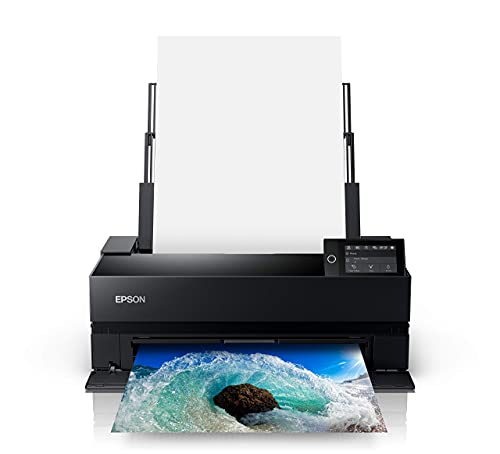
Epson SureColor P900 — Best Overall
The P900 is the machine watercolourists describe with the vocabulary usually reserved for good brushes: it does what the hand intended. Seventeen inches of width carry a full-size reproduction without compromise, Epson’s professional pigment ink family lays colour into matte and rag papers with the surface honesty this art form demands, and the media handling — including routes for thick fine-art stock — treats an expensive sheet of cotton paper as a passenger to be protected rather than a problem to be forced. A 4.3-inch touchscreen keeps the machine’s considerable settings legible, which matters more than it sounds when the difference between two media types is the difference between a proof and a product.
What elevates it for watercolour specifically is behaviour in the pale registers. Washes that would band on lesser machines graduate smoothly here, granulating pigments keep their speckle, and the blacks — when a painting’s darks are ink-and-pigment deep — land with matte authority instead of glossy shine. The ownership terms are the professional class’s usual ones: a serious ink commitment, a footprint that claims its own station, and a temperament that rewards correct profiles and punishes casual paper swaps with merely good output. Artists printing reproductions to sell, or originals’ twins to archive, will find the bargain fair. The P900 is not the cheapest way to print a watercolour; it is the way that makes visitors ask whether they are looking at the original.
Its scannerless, print-only nature deserves a word, because the watercolour workflow starts with digitising the painting. Pair it with any competent flatbed — including the all-in-ones elsewhere in this guide — and the pipeline is complete: scan at high resolution under even light, proof small, print large. The P900’s job in that pipeline is the last and most visible step, and it performs it like the flagship of its generation, which is exactly what it is.
Studio practicality rounds out the case. Borderless printing at the popular reproduction sizes removes the trimming ritual that risks a blade near a finished print, and the machine’s handling of roll and sheet media in its class gives artists a growth path from single sheets to longer formats without changing ink or ecosystem. Owners consistently report the same conversion experience: the first full-size reproduction on cotton rag recalibrates what they believed a desktop machine could do, and their pricing for editions quietly rises to match the object in their hands.
- Type: professional pigment printer, 17-inch class
- Ink: Epson’s UltraChrome professional pigment family
- Control: 4.3-inch touchscreen panel
- Media: specialty routes for thick fine-art sheets
- Connection: wireless, for studio placement
Strengths
- Pale washes graduate without the banding that betrays lesser ink sets.
- Matte and rag papers render with genuine depth in the blacks.
- Media handling respects expensive sheets instead of gambling with them.
Trade-offs
- Professional ink pricing makes casual proofing a budget decision.
- Print-only: the scanning half of the workflow lives elsewhere.
- Needs its own table; a spare desk corner will not house it.
Best for: artists reproducing work for sale, exhibition or serious archiving at full size.
Not suited for: occasional printing, where its ink commitment will never be exercised enough to justify itself.

Canon imagePROGRAF PRO-1100 — Best 17-Inch Pigment
Canon’s answer at 17 inches carries the same argument as the Epson in a different accent: a professional pigment ink system, a paper path built for matte and fine-art media, and colour science tuned by a company whose cameras already made half the reference photographs in the world. For the watercolourist, the PRO-1100’s virtues show in the same places — washes that stay washes, earth pigments that keep their differences, matte blacks with presence — delivered with Canon’s particular gift for making saturated colour behave on papers that usually mute it.
Choosing between this and the P900 is the happiest dilemma in the guide, and it is honestly decided by ecosystem and paper habits rather than by a quality gap either maker would concede. Artists whose shelves already hold Canon’s papers and whose colour memory is calibrated to Canon’s rendering will feel at home immediately; the machine’s professional ink set and media handling ask the same commitments as its rival and repay them in the same currency. Wireless operation and a studio-scale footprint complete a specification that wants a dedicated table and a serious owner.
One watercolour-specific note: monochrome and near-monochrome work — ink studies, graphite-wash pieces, single-pigment paintings — is where this class of Canon quietly earns devotion, holding neutral greys across a matte sheet without the colour casts that announce a lesser machine. Artists whose originals live in that restrained palette should weigh the PRO-1100 not as the alternative flagship but as possibly the correct one.
There is a workflow dividend to the Canon route that deserves naming: artists who photograph their own reference material with Canon cameras often find the colour conversation between capture and print unusually fluent, with skin tones in figurative work and the saturated accents in still-life passages landing close to intention on the first proof. Fewer proof cycles is not a soft benefit in a studio paying pigment prices per sheet; it is the difference between a flagship that feels expensive and one that feels merely professional.
- Type: 17-inch professional pigment inkjet printer
- Professional pigment ink system for photo and fine-art work
- Prints on matte, glossy and fine-art media to 17 in wide
- Wireless connectivity for studio setups
- Built for high-end photographic and art reproduction
Strengths
- Matte colour with a saturation discipline rivals struggle to match.
- Neutral, patient greys flatter monochrome and ink-wash originals.
- Canon’s paper ecosystem and profiles shorten the proofing road.
Trade-offs
- The same professional ink economics as its Epson rival.
- Print-only, so digitising originals needs a separate scanner.
- A serious footprint that rearranges a small studio.
Best for: Canon-ecosystem artists printing matte reproductions at full 17-inch scale.
Not suited for: tight desks or artists whose printing is a monthly event.

Epson EcoTank Photo ET-8500 — Best Tank Route
The ET-8500 is where watercolour reproduction becomes a weekly habit instead of a special occasion. Six inks — the photo set with grey among them — arrive from refillable tanks rather than cartridges, and that single fact rewrites the artist’s relationship with proofing: a wash can be printed, judged, adjusted and printed again without the small financial flinch that teaches artists to accept almost-right. It prints, scans and copies, covering the digitise-the-original step inside the same machine, and handles creative projects at up to 16 pages per minute when documents queue behind the art.
Honesty about its ink chemistry belongs in the first paragraph of any praise: these are dye-based inks, with dye’s virtues and limits. On matte papers the ET-8500’s six-ink rendering is genuinely lovely — the grey channel smooths the pale passages watercolour lives in — and for studies, proofs, classroom work and affordable editions it is more than sufficient. For the print that will hang in sunlight or sell with archival language, the pigment machines above remain the correct tools, and this guide will not pretend a tank changes chemistry. What the tank changes is volume: the artist who prints constantly, experiments freely and sells accessibly will produce more and better work through this machine than through a pigment flagship they are afraid to feed.
Size is its other boundary: this is the letter-and-A4-class sibling of Epson’s wide tank line, so full-size 13 x 19 ambitions belong to its bigger relatives and to the flagships here. Within its format, though, it may be the most artist-friendly machine in the guide — USB and memory card support for direct work, a scanner lid for the original, and running costs that treat printing as a sketchbook rather than a ceremony.
Teachers and workshop leaders should note this machine particularly. A classroom set of reproductions, a student’s portfolio printed for review, a demonstration wash printed six ways to show what paper does — these are volumes at which cartridge and pigment machines become absurd, and the ET-8500 makes them routine. The same logic serves the artist preparing a large body of work for selection: print everything, live with the prints pinned up for a week, and let the wall rather than the screen decide which three paintings earn the flagship treatment.
- Type: six-ink tank all-in-one — print, scan, copy
- Document speeds up to 16 ppm
- USB and memory card support for direct printing
- Tank ink visible and refillable by colour
- Letter/A4-class maximum print size
Strengths
- Proofing becomes nearly free, which improves the final prints measurably.
- Six inks with grey keep pale washes smooth at this price tier.
- Built-in scanner closes the painting-to-print loop in one machine.
Trade-offs
- Dye inks cannot carry archival promises into bright rooms.
- Print size stops at the letter class, below the flagships’ sweep.
- Fine-art heavy papers are handled willingly, not reverently.
Best for: prolific artists printing studies, proofs and accessible editions every week.
Not suited for: archival editions or sizes beyond its format ceiling.

Epson Expression Photo XP-8700 — Best Compact
Not every watercolourist works at 17 inches, and the XP-8700 is the guide’s acknowledgement of the sketchbook scale. Six inks in a compact all-in-one body — print, scan and copy, with USB and memory card routes for working directly from a camera’s card — produce photo-grade colour on the small formats where postcard reproductions, greeting cards, studies and journal prints actually live. For the artist whose originals are themselves small, a big printer is not an upgrade; it is furniture. This Epson is sized like the work.
The six-ink set is the point, as it is throughout this guide’s Epson contingent: the extra channels buy the gradient smoothness that pale watercolour washes expose mercilessly, and on matte photo papers the little machine produces reproductions with a delicacy that embarrasses four-ink rivals twice its price. Its scanner digitises the original sketchbook page without a separate device, and its speeds up to 10 pages per minute keep the non-art chores moving. Cartridge economics apply — six individual inks, replaced as they empty, reward moderate volumes and tax prolific ones — and the paper path is a home machine’s path, kind to standard photo and matte stocks and merely tolerant of the heavyweight rag papers the flagships cradle.
Consider it the gateway machine with an honest ceiling. An artist can build a real practice on it — cards, small editions, studies, a shop’s first products — and will know precisely when they have outgrown it: the day the originals get bigger than its format, or the ink bills start arguing with the product prices. Until that day, it returns more watercolour per shelf-inch than anything else here.
Its all-in-one nature shapes a particular workflow worth describing: paint in the morning, scan at lunch, print the study by afternoon, and pin original and reproduction side by side while the light is still the same. That tight loop is how reproduction skill is actually learned, and the big machines — for all their superiority at final output — slow the loop down with their size, cost and ceremony. Many artists will end with both: this class of compact for the daily conversation, a flagship for the final statement. Starting with the compact is not settling; it is sequencing.
- Type: six-ink compact all-in-one, print, scan and copy
- Speeds up to 10 ppm on documents
- USB and memory card support
- Individual ink cartridges per colour
- Desk-friendly footprint for small studios
Strengths
- Six-ink wash quality at a size a sketchbook artist can house.
- Scanner included, sized perfectly for digitising small originals.
- Card and postcard formats are its native, happiest territory.
Trade-offs
- Cartridge costs climb with edition-sized ambitions.
- Heavy rag papers exceed its paper path’s comfort.
- Format ceiling is the compact class’s, firmly.
Best for: small-format artists, card makers and sketchbook-scale reproduction.
Not suited for: full-size reproductions or heavy fine-art media.

Canon PIXMA PRO-200S — Best Dye-Ink Colour
Every guide needs its beautiful heretic, and here it is Canon’s 13-inch dye professional — the current model in the line the PRO-200 name made famous, carrying eight dye inks into a pigment argument and winning a fair share of it on colour alone. Some watercolour is not pale and contemplative; it is florals at full shout, market scenes, pigment piled on pigment for joy. On glossy and lustre papers, and even on matte stocks when the image is bold, the PRO-200S renders that joy with a saturation and depth the pigment machines admire and cannot quite copy. A reproduction of a vivid painting should look vivid, and dye remains the shortest path to vivid.
The professional apparatus around the colour is complete: individual ink tanks, a 3-inch colour screen, wireless printing up to 13 x 19 inches, and Canon’s mature media profiles. The counsel is about destination rather than quality. Dye prints earn their keep away from harsh, direct light; a PRO-200S reproduction framed behind glass in a normal room will delight for years, while the same print in a sun-trap window is spending its colour. Artists selling vivid work should print the care note and include it in the parcel — honesty as packaging — and artists whose own walls are gentle can buy this machine’s colour with no reservation at all.
Against the pigment Canons it is also the simpler ownership story at this size: one machine, one vivid purpose, a price tier below the PRO-1100’s flagship territory. Watercolourists whose palette runs bright and whose display conditions are kind will find it not a compromise but a preference, stated in ink.
One more constituency should hear its name called: illustrators working in gouache and ink alongside watercolour, whose originals share the vivid, graphic register. The PRO-200S’s dye saturation flatters that mixed-media work in a way matte-optimised pigment sometimes politely declines to, and its 13-inch ceiling covers the standard illustration reproduction sizes. A machine does not need to win the archival argument to win the artist, and this Canon’s case rests on the oldest ground in art: the picture looks right.
- Type: 13-inch professional photo printer
- Ink: eight dye colours in separate tanks
- Control: 3-inch colour LCD screen
- Sheets: borderless output reaching 13 x 19 in
- Connection: wireless for studio desks
Strengths
- The most saturated, joyful colour in this guide.
- Professional media handling at the 13-inch class’s friendlier tier.
- Glossy and lustre reproductions have a depth pigment cannot imitate.
Trade-offs
- Dye longevity asks for kind walls and honest care guidance.
- Matte rag papers flatter pigment more than dye.
- Print-only; scanning lives on another machine.
Best for: vivid, saturated watercolour reproduced for gentle indoor display.
Not suited for: sunlit walls or archival promises.
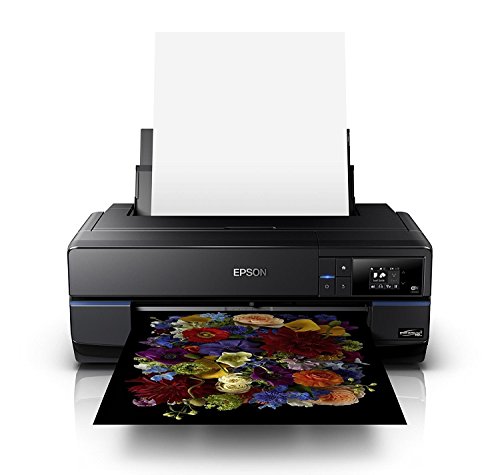
Epson SureColor P800 — Best Value 17-Inch
Let the framing be exact, because this machine deserves precision rather than nostalgia: the SureColor P800 is the previous generation of Epson’s 17-inch pigment line, superseded by the P900 above, and it remains on sale new — which makes it not a current flagship but the value route into everything that makes the flagship class matter. Seventeen inches of width. Professional pigment inks. A paper path with fine-art manners, including the thick-media routes reproduction work depends on. For an artist whose budget is torn between a new 13-inch machine and a big one, the P800 is the argument that size and pigment need not wait for a richer year.
What the generation gap actually costs is convenience, not image quality. The interface belongs to its era, the connectivity and screen are plainer than the P900’s polish, and the newest software refinements live with the successor. The prints, judged as prints, remain professional: washes graduate, matte blacks hold, rag papers are honoured. Artists who print deliberately — proof, adjust, print the edition — will rarely meet the differences in a working week, and the money saved against the flagship buys a great deal of the cotton paper both machines consume identically.
Buy it with clear eyes about support horizons: an older generation’s inks and parts have a long but not infinite tail, and a studio planning a decade of daily production may prefer the current flagship’s runway. For the artist stepping up to 17-inch pigment now — the painter whose originals have outgrown 13 inches and whose editions are real but young — the P800 is the most intelligent money in this guide.
There is a secondary-market wisdom embedded in choosing it new, too: a previous-generation flagship bought new carries a full warranty and a known history, which is a different proposition from the same model bought used with a print head of unknown mileage. Studios that have been burned by secondhand professional printers will recognise the value immediately. New-old flagship is a legitimate category in this market, and the P800 is currently its clearest example — yesterday’s professional standard, today’s rational purchase, judged on prints rather than on launch dates.
- Type: 17-inch professional pigment inkjet printer
- Previous-generation SureColor, still sold new
- Fine-art media handling including thick stocks
- Professional pigment ink family
- Wireless connectivity of its generation
Strengths
- Full 17-inch pigment reproduction at a value tier.
- Print quality that remains professional by any measure.
- Fine-art paper manners inherited from the flagship line.
Trade-offs
- An older generation’s interface and connectivity polish.
- Support and consumables horizon is long, not endless.
- Print-only, like both flagships here.
Best for: artists stepping up to 17-inch pigment printing on a real budget.
Not suited for: studios wanting the current flagship’s software and longest runway.
How Should You Light and Judge a Reproduction Before It Leaves the Studio?
Judgement is a lighting decision before it is an eyesight decision, and studios get it wrong by judging prints under whatever light the room happens to have. North-facing daylight, or a high-quality daylight-balanced lamp, is the reference the art world informally agrees on, because it is the light the painting was probably made in and the light a buyer’s wall most resembles. Judge the reproduction beside the original under that light, at the distance the piece will be viewed from, and resist the magnifier: a print that convinces at viewing distance has done its job, and the dots visible only at nose length are the medium’s honest texture, not its failure.
Two checks deserve ritual status. The first is the squint test — half-close your eyes so detail dissolves and only the value structure remains, then compare painting and print; watercolour lives in its values, and a reproduction whose lights and darks hold the original’s architecture will feel right even before its colour is examined. The second is the overnight test: pin the proof up and live with it until morning. Fresh prints are judged by hope and by the effort just spent; morning light and a night’s distance judge them as a stranger would, which is the only judgement a buyer will ever apply.
Studios selling online should add a third ritual: photograph the print for the listing under the same honest light, and compare that photograph with the original’s listing photograph. Customers buy the photograph of the print, and consistency between the two images is the difference between a reproduction that delights on arrival and one that merely resembles what was promised.
How Do You Edition a Watercolour Reproduction Like a Professional?
Editioning is where printing becomes publishing, and the habits are transferable to any machine in this guide. Decide the edition size before the first saleable print, not after the tenth, and print the edition in one campaign wherever possible — same paper batch, same ink generation, same settings card — because consistency across an edition is a promise the buyer is paying for. Number and sign in pencil on the margin or the reverse, keep the artist’s proof and the settings record together in one folder, and retire the file’s print settings when the edition closes so a later reprint is a new edition honestly labelled, never a quiet extension of the old.
The printer’s role in edition discipline is consistency under repetition, which is why the flagships earn their keep here and why the tank machine’s role is upstream — studies and selection — rather than in the edition itself. A studio that editions on the ET-8500 for accessibility should simply say so in the product description, price accordingly, and keep the same one-campaign discipline; honesty about process is itself a mark of the professional, and collectors forgive dye ink far more readily than they forgive vagueness.
Keep one unglamorous record through the whole campaign: how many sheets entered the printer and how many saleable prints left it. That ratio, known as the studio’s waste rate, is the number that tells you whether your proofing discipline is working, and it improves visibly in the first year of keeping it — because what gets counted gets careful.
Pigment, Dye and Tank: The Six Compared on Rag Paper Terms
| Pick | Ink chemistry | Widest print | Scans originals | Watercolour role |
|---|---|---|---|---|
| Epson SureColor P900 | Pigment, professional | 17 in | No | Flagship reproduction |
| Canon imagePROGRAF PRO-1100 | Pigment, professional | 17 in | No | Flagship reproduction, Canon accent |
| Epson EcoTank Photo ET-8500 | Dye, 6-ink tank | Letter class | Yes | Proofs, studies, affordable editions |
| Epson Expression Photo XP-8700 | Dye, 6-ink cartridge | Letter class | Yes | Small-format and card work |
| Canon PIXMA PRO-200S | Dye, 8-ink cartridge | 13 x 19 in | No | Vivid colour reproduction |
| Epson SureColor P800 | Pigment, previous generation | 17 in | No | Value route to big pigment |
Read the chemistry column as destiny. Pigment rows are the permanence and matte-paper rows; dye rows are the saturation and running-cost rows; the tank row is the practice-and-proofing row. The two all-in-ones are the only rows that can digitise the painting as well as print it, which is why so many real studios pair one of them with a flagship rather than choosing between the ideas.
How Often Should a Reproduction Printer Actually Print?
Professional ink systems are happiest in regular work, and the watercolour calendar — a burst of printing after a painting is finished, then weeks at the easel — is nearly the worst rhythm for them. Pigment heads left idle invite the cleaning cycles that spend expensive ink on readiness rather than on art, and dye systems are only somewhat more forgiving. The studio defence is a small weekly ritual: one modest print, every week, whether or not a painting was finished. A study, a card, a test strip from the paper library — the content hardly matters. The machine stays primed, the artist stays fluent in its settings, and the ritual doubles as the regular proofing practice that keeps colour judgement sharp.
Artists who teach or sell patterns can fold the ritual into real work — the weekly class handout, the shop’s new postcard — so the maintenance print is never waste. Solo artists often keep a standing file of a favourite gradient test, which has the side benefit of making any slow colour drift visible across months: the same file, the same paper, a row of dated prints that confess change honestly. A printer exercised weekly is a printer that greets the finished painting like a colleague rather than a stranger, and in reproduction work, where one painting may be printed once a year at full size, that familiarity is the whole game.
How Do Framing and Mounting Change What the Printer Must Achieve?
A reproduction is rarely judged naked. It is judged behind glass, inside a mount, at the size the frame dictates — and each of those facts feeds back into the printing decisions. Glass deepens contrast slightly and adds reflections that punish glossy surfaces, which is one more reason matte reproductions dominate this art form: a matte print behind glass keeps the painting’s quiet surface while gaining protection. The mount’s window defines the true image area, so artists print with margins planned for the mount rather than discovering at framing time that a signature sits under the bevel. Standardising two or three framed sizes across a catalogue — and printing to those sizes religiously — turns framing from a per-piece negotiation into a production step, and the printers here all handle the standard reproduction sizes without complaint.
There is a subtler framing dividend to pigment worth stating once: because pigment prints tolerate handling and light better during the framing process itself, framers quietly prefer them, and a studio whose work is easy to frame gets its pieces back faster and in better company. None of this appears on a specification sheet, and all of it appears in the life of the finished object, which is where reproductions are ultimately judged.
How Do You Build a Paper Library Without Wasting Money?
Paper is where reproduction budgets go to be nibbled, and the defence is a library built by experiment rather than by catalogue. Buy the sample packs the fine-art paper makers sell — most offer them precisely for this courtship — and print one standard test image on every sheet: the same pale wash gradient, the same earth-pigment passage, the same deep shadow. Label each print with paper, profile and date, and keep the set in a single folder. Within a month the folder becomes the studio’s most consulted document, because it converts paper choice from a guess repeated per painting into a lookup performed in a minute.
Then standardise ruthlessly. Two papers — one smooth, one textured — will carry ninety percent of a watercolour practice, and depth of knowledge in two papers beats shallow acquaintance with nine. Buy those two in the sizes the catalogue uses, store them sealed and flat, and let new papers audition through the sample-folder ritual rather than through a hopeful bulk order. The flagships’ profile ecosystems reward exactly this discipline, since their makers publish careful profiles for the major papers; the library folder is where those profiles stop being downloads and start being the studio’s own knowledge.
What Does a Working Reproduction Studio Keep Beside the Printer?
Walk into a studio that reproduces watercolour well and the printer is almost the least interesting object in the arrangement. Beside it sits a flat drawer of papers in labelled, sealed sleeves, each with its profile name written on the label in the owner’s hand. There is a cutting mat and a straight edge dedicated to trimming, kept away from the craft projects that dull blades. There is a folder — physical, unfashionable, complete — of approved proofs with settings pencilled on their backs, and a small stock of the frames or mounts the finished prints are sold in, because a reproduction judged loose on a desk looks different from the same sheet behind glass, and the studio judges it the way the buyer will receive it.
The digital half of the arrangement mirrors the physical one: a master folder of scans that nothing overwrites, a working folder of print files named by painting and paper, and a short text document — the studio’s settings bible — recording which profile, which media setting and which paper produced each approved proof. Artists imagine this apparatus is about tidiness. It is about reproducibility, which is the entire business model of a reproduction: the ability to make the same beautiful object again, on demand, months later, without archaeology. Every machine in this guide is capable of that consistency; the drawer, the folder and the document are what let the artist match it.
How Do You Scan a Watercolour Painting So the Print Has a Chance?
The finest printer in this guide cannot reproduce information the scan never captured, so the workflow begins at the glass. Scan at a resolution that survives your largest intended print — for most artists that means capturing the original generously and archiving the big file, then printing from a copy. Use the scanner’s least processed mode: automatic sharpening and saturation that flatter a document will vandalise a wash. Lay the painting flat, weight a curled sheet’s edges outside the image area, and close the lid gently on textured paper rather than pressing its tooth flat with enthusiasm.
Colour honesty at the scan stage is a two-minute discipline. Include the paper’s own white in the frame and let it be the white point, because watercolour paper is never truly white and pretending otherwise cools every wash. Compare the scan on a decent screen against the original in the same light, and correct toward the painting rather than toward prettiness. Artists who sell reproductions should keep the corrected master untouched forever and make every print from a working copy — the master is the negative, and negatives are not edited.
Where no scanner exists, a careful camera capture under two matched lights at forty-five degrees is the respectable alternative, and the all-in-ones in this guide exist partly because flatbed scanning removes the lighting problem entirely. However the file is made, proof it small on the final paper before any large sheet is committed; the proof is where scan sins confess cheaply.
Which Reproduction Mistakes Do Watercolourists Make Most?
Printing a first proof on the good rag paper is the most expensive habit in the studio — proof on the machine’s friendlier matte stock, migrate to the rag only when colour and scale are settled, and let the expensive sheets carry only decisions already made. Second is the glossy reflex: artists raised on photo printing reach for glossy paper and then wonder why the reproduction looks laminated, when the original’s whole soul is its matte surface. Third is over-saturating the file to compensate for matte paper’s softer contrast, which produces reproductions that shout where the painting whispered.
Two quieter errors complete the set. Ignoring the paper white — printing a warm-papered original onto a blue-white stock — shifts every wash cooler and is the most common reason a reproduction feels wrong without looking wrong. And storing original paintings for scanning in a stack under weight, which embosses texture into the paper that the scanner then faithfully records as damage. The paintings deserve the same archival manners as the prints.
Final Recommendation
For the artist whose reproductions must honour the original at full size, the Epson SureColor P900 is the recommendation this guide was written to reach, with Canon’s imagePROGRAF PRO-1100 as its equal in pigment and its rival only in accent — choose between them by ecosystem and by the papers already on your shelf. The SureColor P800 earns the value-minded artist the same 17-inch pigment world at a friendlier tier, honestly labelled as the older generation it is. Below the flagships, the EcoTank Photo ET-8500 is the working artist’s liberator, trading archival chemistry for proofing freedom, and the little XP-8700 serves the sketchbook scale with the same six-ink courtesy. The PRO-200S remains the vivid exception, dye’s brilliant case for bright paintings in kind light. A watercolour is pigment behaving like weather on paper; buy the machine that respects both halves of that sentence, and the reproduction stops being a copy and becomes the painting’s second life.
One final counsel on sequencing, for the artist furnishing a reproduction practice from nothing: buy the printer before the framing equipment, the paper library before the second ink set, and the habit of weekly printing before either. The machines in this guide will out-serve most owners’ workflows for years; what separates the studios that thrive with them is never the specification sheet but the discipline around it — proofed papers, recorded settings, honest editioning. Get those right and even the humblest machine here, the little six-ink compact, will produce reproductions an artist can sign without flinching.
Sign them, then, and let the original rest in its portfolio knowing its likeness is out in the world doing the travelling for it — which was, after all, the entire point of learning to print a painting properly, patiently, and on paper worthy of the wash.
Frequently Asked Questions
Do I really need pigment ink for watercolour prints?
For prints that will be sold, hung in real light or kept for decades, yes — pigment on matte and rag papers reproduces the original’s surface honestly and ages gracefully. For studies, proofs and classroom work, the six-ink dye machines here are entirely respectable and far cheaper to run.
What is the difference between the SureColor P900 and P800?
Generation. The P900 is Epson’s current 17-inch flagship with the newer interface and refinements; the P800 is its predecessor, still sold new, with professional pigment output and older-generation conveniences. This guide frames the P800 as the value route into the same size and chemistry, not as a current flagship.
Which printer is best for small watercolour cards and studies?
The Epson Expression Photo XP-8700: six inks for smooth washes, a built-in scanner for digitising sketchbook pages, and a compact body. The EcoTank ET-8500 takes over when card and study volume grows enough for cartridge costs to argue.
Can these printers print on real watercolour paper?
They print on inkjet-receptive fine-art and matte papers made to watercolour weights and textures, which is the correct media for reproduction. Actual watercolour paper from an art shop lacks the inkjet coating and produces soft, bleeding results; the art-paper ranges sold for inkjet exist precisely to give the painting’s feel with a printable surface.
How large can I reproduce a small painting?
As large as your scan honestly supports. A high-resolution scan of a small original can print beautifully at moderate enlargements on the 17-inch machines, but pale washes expose soft captures quickly, so scan generously, proof at final size in a corner crop first, and let the proof — not hope — set the ceiling. Remember too that viewing distance forgives: a reproduction destined for above a sofa is judged from two metres, where a capture that would fail at reading distance passes easily, while a card-sized print is judged in the hand and deserves the strictest file you can give it.
Dye or pigment for a brightly coloured painting?
If the painting is vivid and its home will be gentle light, Canon’s PRO-200S dye colour is legitimately the most faithful to its joy. If the same painting must survive a bright wall or carry archival promises, pigment’s discipline wins. The painting’s destination, not its palette alone, makes the call. When in doubt, print the same painting both ways during a studio visit or from sample services where available — the two prints side by side will settle in ten seconds an argument that specifications can circle for an hour, because the difference is not quality but temperament.
Related Guides
Artists building out the studio should also read the guide to printers for selling craft and art products, where the business maths of editions is worked through, the comparison of photo printers for pictures and sticker projects for the smaller formats, and our round-up of printers for Cricut-based craft work if the practice extends into cut media.
Related guides
- Best 4K UHD HDR HDMI Extenders: 4K60, Long-Run and 4K120 Kits Compared
- Best Built PC: Six Prebuilt Gaming PCs Judged on Parts, Power and Upgrades
- Best 1440p 165Hz Monitors: One Native 165Hz Pick, Three 180Hz Upgrades, an Overclock Headline and a 160Hz Ultrawide
- Best Enterprise SATA SSDs: Endurance Classes, Power-Loss Protection and Fleet Sense


