What's inside
- Key Takeaways
- Quick Picks
- How Did We Choose These Picks?
- Why Is V30 the Floor for 4K in Small Devices?
- What Does the A2 Rating Add for Phones and Handhelds?
- Which Devices Ask What of a microSD Card?
- How Much 4K Fits on Each Size, Device by Device?
- Why Is There No UHS-II Card in This Lineup?
- What Happens to These Cards in Heat, Cold and Water?
- How Do Recovery Services and Warranties Actually Differ?
- When Should a microSD Card Be Retired?
- How Do the Six microSD Cards Stack Up Against Each Other?
- How Should You Format, Swap and Care for microSD Cards?
- What Mistakes Do microSD Buyers Keep Making?
- Does Adoptable Storage Change the Phone Calculation?
- What About 5K and the Modes Above 4K?
- What Should You Check in the Five Minutes Before Ordering?
- Why Does Your Reader Decide Half the Speed You Paid For?
- Final Recommendation
- Frequently Asked Questions
- Related Guides
As an Amazon Associate I earn from qualifying purchases. This post may contain affiliate links at no extra cost to you.
gizmoverdict.com is reader-supported. When you buy through links on our site, we may earn an affiliate commission.
Where to buy: Every card in this roundup links to its Amazon listing, where you can check the capacity variant on sale, whether an SD adapter is bundled, and the speed classes printed for that exact size, because microSD families routinely change their ratings between capacities. If a listing’s photographs and its specification table disagree, believe the table and the manufacturer’s own page, in that order.
The hunt for the best micro sd cards 4k cameras, drones and phones can swallow turns on a deceptively simple truth: in this format, nearly every credible card now carries the same V30 badge, and yet the cards are not interchangeable. V30 certifies the floor that 4K recording needs, a sustained write of at least 30MB/s, but it says nothing about how fast a card reads footage back, how snappily it behaves as phone storage, how much of it you get for your money, or whether its maker built it to survive a hot dashboard or a cold mountainside. This guide is organised around those differences that survive once the shared badge stops being the story.
Six cards made the cut, spanning 128GB to a full terabyte. At one end sits a 1TB Samsung flagship for people who record for days between offloads; at the other, a modest 128GB action-camera card from Gigastone that bundles something none of the giants offer, a multi-year data-recovery promise. Between them are the two names most buyers cross-shop, SanDisk’s Extreme and Samsung’s PRO Plus and EVO Plus lines, plus a Lexar and a TEAMGROUP card that make their cases on value. All six speak the same UHS-I language, because in microSD that interface remains the universal dialect; the faster UHS-II microSD standard exists on paper and in a handful of readers, but almost no camera or drone you can buy gives it a slot to shine in.
A note on adapters, because several of these cards arrive with one in the packet. Slipping a microSD card into a full-size adapter makes it fit a camera’s SD slot, and electrically the combination works. Mechanically it adds a sprung contact layer that wears, wobbles and occasionally confuses a tight slot, which is why photographers who shoot full-size bodies daily buy native SD cards for them and keep microSD for the devices born with micro slots. Adapters are for occasional cross-use and for readers, not a permanent bridge between formats, and the detailed notes below return to that distinction where it matters.
Key Takeaways
- V30 is the working floor for 4K in this format: it guarantees the sustained write that action cameras, drones and phones need, and every serious pick here carries it or its U3 equivalent.
- The A2 application rating is the badge that matters when a card doubles as phone or handheld storage, because it speaks to the small random reads and writes that apps generate all day.
- Read speed decides offload time and nothing about recording safety, so judge a card’s 4K fitness by its class and its maker’s reputation, not by the biggest number on the packet.
- Capacity strategy differs by device: drones and action cameras favour several mid-size cards swapped per flight or session, while phones and handhelds reward one large card left in place.
- An adapter makes microSD fit an SD slot, but the extra contact layer makes it a poor permanent substitute for a native SD card in a camera you rely on.
Quick Picks
| Card | Badge | Why it earns its place |
|---|---|---|
| SanDisk Extreme 256GB microSDXC | Best overall for 4K action | Very fast reads, V30 and A2 ratings, and a long action-camera pedigree make it the default card for GoPro-style shooting. |
| Samsung PRO Plus 1TB microSDXC | Best maximum capacity | A terabyte of V30, A2 storage for shooters and travellers who offload rarely and record constantly. |
| Lexar Blue 256GB microSDXC | Best straightforward value | Full V30 and A2 credentials at 256GB without flagship pricing or exotic claims. |
| GIGASTONE 128GB microSD 4K Camera Pro | Best recovery safety net | Action-camera tuning plus a five-year free data-recovery offer that treats lost footage as the real enemy. |
| TEAMGROUP GO 256GB microSDXC | Best drone and action spare | A V30 card built and marketed squarely for action cameras and drones, easy to buy in multiples as flight spares. |
| Samsung EVO Plus 512GB microSDXC | Best big-card all-rounder | Half a terabyte from Samsung’s mainstream line, sized for phones, handhelds and long 4K trips alike. |
How Did We Choose These Picks?
We began by asking which devices actually record 4K to microSD: action cameras, drones, 360 cameras, phones, handheld consoles pressed into media duty, and a long tail of gimbals and compact recorders. Each of those hosts stresses a card differently. A drone writes one relentless stream at a fixed bitrate and bakes in the sun; a phone sprinkles thousands of tiny writes between bursts of video; an action camera vibrates, freezes and gets dunked. A single ranking pretending those jobs are identical would be fiction, so the six picks were chosen to cover the spread, with the detailed notes naming the host each card suits best.
Verification came next. Each linked card was checked against its live listing for class, capacity and bundled adapter, and the claims repeated in this guide are the conservative ones from those listings: certified classes and headline read figures attributed to their makers, never benchmark promises of our own. Where a brand advertises a recovery service or a drone focus, we describe it as the brand’s offer rather than as a guarantee of outcome, because a promise to attempt recovery is valuable without being magic.
The last filter was redundancy of choice. Two Samsungs appear because the PRO Plus and EVO Plus lines genuinely serve different budgets and capacities, and two action-focused cards appear because the SanDisk Extreme and the Gigastone answer the same question with different priorities, speed pedigree versus recovery cover. Where two cards look similar on paper, the notes say so and point at the consideration that should actually separate them in your basket.
Why Is V30 the Floor for 4K in Small Devices?
Action cameras and drones record 4K at bitrates that surprise people used to phones. A flagship action camera at its top quality setting can write around 120 megabits per second or more, roughly 15MB/s before overhead, and it writes that stream without pause for the length of a battery. A V30 card promises at least double that rate sustained, which sounds like generous headroom until you remember that the promise must hold on a hot card, a nearly full card, in a vibrating housing at altitude. Margins that look excessive on a specification sheet become the difference between a complete flight recording and a file that ends mid-descent.
Cards below V30, the V10 and plain Class 10 media that still fill bargain bins, are where 4K stories go wrong. They may start a recording cheerfully, since fresh flash is fast flash, then falter minutes in as the card’s controller juggles housekeeping, at which point the camera stops, warns or quietly lowers quality depending on its manners. Every pick in this guide clears the V30 bar or carries the U3 mark that certifies the same 30MB/s floor, and that is not conservatism; it is the accumulated experience of everyone who has ever landed a drone to find the good part missing.
Sustained write also explains why read speed, the figure brands print largest, deserves your indifference during selection. A card reading at 245MB/s empties beautifully onto a computer and a card reading at 160MB/s empties merely quickly, but both record identically safely if their write guarantees match. Buy read speed with leftover budget after the class, capacity and brand questions are settled, and never let a gaudy read figure talk you into a card whose write credentials are vague.
What Does the A2 Rating Add for Phones and Handhelds?
The A ratings measure a job video classes ignore: the thousands of tiny, scattered reads and writes an operating system generates when a card holds apps, game assets, photo libraries and offline maps. A1 set the first bar for that random-access behaviour and A2 raised it, asking more of the card’s controller and its ability to queue commands efficiently. In a camera the A badge is decoration. In a phone storing applications, or a handheld console loading game worlds from the card, A2 is the difference between storage that feels internal and storage that stutters.
Most picks here carry A2, and the pattern is deliberate. The SanDisk Extreme, both Samsung lines in their different ways, the Lexar Blue and the TEAMGROUP GO all anticipate lives split between recording and carrying data for a host that thinks in small files. If your card will live permanently in one camera and never touch a phone, you can safely ignore this entire section and shop on video class alone. If the card will migrate, and microSD cards are champion migrators, A2 is cheap insurance bought once.
One caution belongs here: a fast A2 card cannot rescue a phone that treats external storage grudgingly. Some handsets restrict which apps may live on a card, and some handhelds load noticeably slower from any card than from internal memory. The card sets the ceiling for those behaviours; the host decides how close to the ceiling you get, which is why the notes below talk about hosts as much as about cards.
Which Devices Ask What of a microSD Card?
Drones are the purists. They write a single high-bitrate stream, they offer no buffer worth mentioning, and their makers publish approved-card lists that should be treated as near-binding, because a drone that stops recording at four hundred feet has no operator within reach to notice. V30 from a recognised maker is the entry requirement, capacity is a per-flight decision, and the wisest drone kits carry several mid-size cards rather than one giant, swapping with each battery so a lost aircraft never takes a whole day down with it.
Action cameras are the endurance athletes. Their top modes combine high bitrates with high frame rates, their housings trap heat, and their natural habitat involves shock and water that test a card’s physical build as much as its controller. Cards marketed for this life, like the SanDisk Extreme and the Gigastone below, earn their positioning honestly, and the genre rewards owners who format cards in-camera and retire any card that has survived one too many impacts.
Phones and handhelds are the generalists. Their 4K recording is real but usually gentler than a dedicated camera’s, while their storage duties are broader and their cards stay installed for months. Capacity and A2 behaviour dominate their decisions, which is why the largest cards in this guide aim squarely at them. A card for a phone is furniture, bought once and forgotten; a card for a drone is a consumable, bought in multiples and rotated. Recognising which purchase you are making is half of choosing well.

SanDisk Extreme 256GB microSDXC — Best overall for 4K action
The Extreme line is the card action-camera owners reach for almost by reflex, and this 256GB edition shows why the reflex persists. SanDisk quotes read speeds up to 245MB/s, the fastest headline in this roundup, which translates into genuinely brisk offloads when a day of 4K comes home. The recording credentials are the full set for this format: UHS-I bus, V30 video class, U3, Class 10 and an A2 application rating, a combination that lets one card serve an action camera on Saturday and a phone or handheld through the week without being the weak link in either.
Its 256GB size is the considered choice for action work rather than a compromise. At typical action-camera bitrates it holds hours of 4K, far more than a battery sustains, which encourages the healthy pattern of swapping media with batteries and offloading each evening. SanDisk also fields faster and slower siblings, but the Extreme sits at the point where the brand’s action pedigree, the class guarantees and the transfer pace overlap, and for most buyers wandering this category without a special case, the search can reasonably end here.
- Format: microSDXC with adapter included per listing
- Bus and classes: UHS-I, V30, U3, Class 10, A2
- Capacity listed: 256GB
- Headline read speed: up to 245MB/s (maker-stated)
- Stated scope: 4K and 5K video per the brand’s own listing
- Suited to: action cameras, drones, phones and handhelds in rotation
Strengths
- Quickest offloads in this group, which matters when 4K fills cards daily.
- Complete credential set covers video and app duties without forcing a second card for the phone.
- Deep base of user experience in popular action cameras and drones reduces guesswork.
Trade-offs
- Premium positioning means multiples for a drone rotation cost more than value brands.
- The Extreme name spans many capacities and generations, so the class marks on the exact listing need a glance.
- Its read advantage only appears with a reader and host that can use the faster modes.
Best for: action-camera and drone owners who want one proven card type across their small devices. Not suited for: buyers stocking a large fleet on a tight budget, where the value picks below multiply more cheaply.

Samsung PRO Plus 1TB microSDXC — Best maximum capacity
A terabyte in a card the size of a fingernail still feels like a conjuring trick, and the PRO Plus is Samsung’s flagship way of performing it. The credentials are full-strength: UHS-I, V30, U3, Class 10 and A2, with reads quoted up to 180MB/s, so the capacity does not arrive by quietly downgrading the card’s manners. This is the pick for recording lives measured in weeks: the overlander whose drone and action camera feed a single card pool between rare offloads, the traveller shooting a long trip on a phone, the handheld gamer whose library simply will not fit in anything smaller.
Capacity this large changes behaviour, and the change deserves honesty. A 1TB card tempts its owner to treat it as an archive, letting months of footage accumulate in one fragile place, and the correct discipline is to offload on schedule regardless of how much room remains. It also concentrates value: losing this card stings more than losing any other in the guide. Used with a backup habit worthy of its size, though, it is unmatched convenience, one card installed once, forgotten, and still not full when the trip ends.
- Format: microSDXC with adapter included per listing
- Bus and classes: UHS-I, U3, V30, Class 10, A2
- Capacity listed: 1TB
- Headline read speed: up to 180MB/s
- Stated scope: Full HD and 4K UHD recording
- Suited to: long trips, phone storage, handheld libraries, infrequent offloaders
Strengths
- Largest capacity here with flagship classes intact rather than traded away.
- Strong read pace keeps even very large ingests tolerable at the computer.
- One-card simplicity suits devices whose slots are awkward to reach.
Trade-offs
- Concentrates the most footage and the most money in the smallest, losable object.
- Some older hosts cap recognised capacity below a terabyte, so host limits need checking.
- Drone and action best practice still favours several smaller cards for rotation.
Best for: travellers, phone shooters and handheld owners who genuinely fill big cards and offload on a schedule. Not suited for: drone pilots building a per-flight rotation, who should spread the same budget across mid-size cards.

Lexar Blue 256GB microSDXC — Best straightforward value
Not every good card needs a flagship story. Lexar’s Blue line is the company’s mainstream microSD family, and this 256GB card presents the complete working credential set, UHS-I with V30, U3, Class 10 and A2, reads quoted up to 160MB/s, and no exotic claims competing for your attention. It records 4K in the devices this guide covers, behaves properly as phone and handheld storage, and costs the kind of money that makes buying a spare feel sensible rather than extravagant.
The Blue’s natural role is the dependable second card and the honest first card for undemanding hosts. Keep one in the drone case as the rotation partner to a flagship, one in the family action camera, one in the phone that shoots the school play in 4K. Lexar sells faster professional microSD lines for those who need them, but the Blue’s proposition is that most hosts cannot spend the difference, and on the evidence of its class marks, most hosts are right.
- Format: microSDXC, UHS-I
- Classes: V30, U3, Class 10, A2
- Capacity listed: 256GB
- Headline read speed: up to 160MB/s as the brand quotes it
- Stated scope: Full HD and 4K UHD recording
- Suited to: spares, family action cameras, phones, second slots in every bag
Strengths
- Full V30 and A2 credentials at a mainstream price point.
- 256GB is the flexible middle size for both recording and storage duties.
- Uncomplicated range makes reordering the same card later straightforward.
Trade-offs
- Offloads run at mainstream pace beside the SanDisk Extreme’s faster transfers.
- Lacks the action-specialist branding and bundles of the dedicated camera cards.
- Lexar’s several microSD tiers require a moment’s care to reorder the intended one.
Best for: buyers who want correct credentials without ceremony, and anyone building spares into every kit. Not suited for: professionals whose ingest schedule makes top-tier read speed a daily necessity.
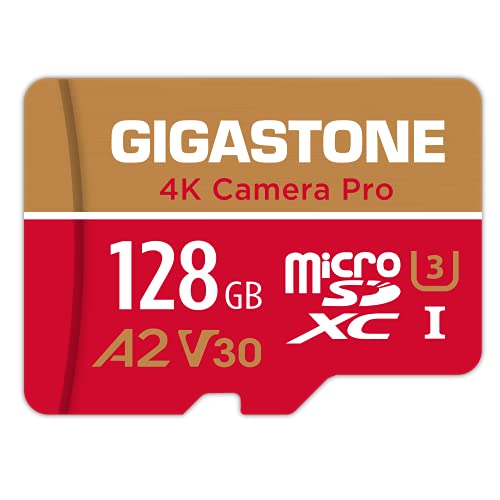
GIGASTONE 128GB microSD 4K Camera Pro — Best recovery safety net
Gigastone aims this card squarely at the action crowd, naming GoPro-style cameras, drones and game devices in its pitch, and then does something the giant brands do not: it bundles a five-year free data-recovery service, a promise that if the card fails with your footage on it, the maker’s lab will attempt to get that footage back. Recovery is never guaranteed, and no service resurrects every card, but as a statement about what the buyer actually fears, it is the most honest bundle in this guide. Nobody mourns a dead card; they mourn the dive, the descent, the goal that was on it.
As a card, the 128GB Camera Pro is the modest member of this company, sized for single sessions and priced for multiples. Its natural deployment is rotational: one in the camera, one in the case, swapped per outing, with the recovery cover standing behind the whole rotation as a last resort rather than a plan. Owners should still offload promptly, since a successful recovery next month is a poor substitute for a backup tonight, but among budget action cards this is the one that visibly understands the assignment.
- Format: microSDXC aimed at action cameras and drones
- Capacity listed: 128GB
- Series: 4K Camera Pro
- Bundle highlight: five years of free data recovery (stated by the maker)
- Stated scope: 4K video recording for action and drone cameras
- Suited to: session-by-session rotation in action cameras
Strengths
- The bundled recovery offer addresses the loss buyers actually dread.
- Session-size capacity encourages swapping and offloading habits that protect footage.
- Action-focused positioning keeps its promises aligned with its intended hosts.
Trade-offs
- Smallest capacity here, so long trips mean carrying several.
- Recovery is an attempt with conditions, not a promise that lost footage returns.
- Brand support runs through the maker’s own channels rather than local retail presence.
Best for: action-camera owners who shoot unrepeatable moments and value a recovery fallback behind modest cards. Not suited for: phone or handheld owners needing large permanent storage, who should look at the big Samsung and Lexar cards.

TEAMGROUP GO 256GB microSDXC — Best drone and action spare
TEAMGROUP names this card GO and points it, without ambiguity, at action cameras and drones. The specification supports the aim: UHS-I, U3 and V30, the full 4K floor, at a 256GB capacity that gives a drone a long day or an action camera a long weekend. An adapter is included for the readers and occasional slots that want one. Where the flagships compete on read speed and brand heritage, the GO competes on being the card you can buy three of, so that the rotation your aircraft deserves does not require a finance discussion.
That fleet role is its honest ceiling and its real virtue. A working drone kit consumes cards the way it consumes batteries, in sets, and a V30 card from an established memory maker at value pricing fills the case slots that a flagship-only strategy leaves empty. Keep the premium card for the flight that matters most if you like; the GO ensures the ordinary flights, the practice sessions and the B-camera are never grounded for want of media, and its behaviour in those hosts is governed by the same certification as everything else here.
- Format: microSDXC with adapter included per listing
- Bus and classes: UHS-I, U3, V30
- Capacity listed: 256GB
- Series: GO Card, aimed at action cameras and drones
- Stated scope: 4K recording in action and aerial hosts
- Suited to: multi-card drone rotations and action spares
Strengths
- V30 certification at a price that makes genuine rotation affordable.
- Capacity suits a full flying day without mid-session media anxiety.
- Clear single-purpose positioning leaves little doubt about its intended hosts.
Trade-offs
- Transfer speeds are workmanlike beside the flagship cards in this guide.
- Fewer published endurance and recovery extras than the specialist rivals.
- Value ranges change revisions over time, so verify classes when reordering.
Best for: drone and action owners building a real rotation of spares on a sane budget. Not suited for: a single-card strategy in a phone, where A2 behaviour and capacity deserve priority.

Samsung EVO Plus 512GB microSDXC — Best big-card all-rounder
The EVO Plus is Samsung’s mainstream line, the card sold in the largest numbers to the widest mix of devices, and this 512GB edition is its sweet spot for the 4K era. Reads are quoted up to 160MB/s, the card carries U3 certification with A-class application performance per its listing, and an SD adapter rides in the packet. Half a terabyte is the size at which a phone stops asking you to manage it, a handheld library becomes generous, and a long 4K trip fits without a mid-journey ingest, all without stepping to the flagship tier’s pricing.
Its role in this guide is the generalist’s champion. The PRO Plus above it is the choice when maximum capacity or the flagship’s pace justifies itself; the EVO Plus is the choice when a card must simply disappear into a device and serve for a year. Check the exact class marks on the listing for the capacity you order, as mainstream families adjust specifications between sizes and revisions, and then enjoy the least dramatic purchase in this entire roundup: the card almost everybody can buy without a follow-up question.
- Format: microSDXC with SD adapter included per listing
- Bus: UHS-I, Class 10, U3
- Capacity listed: 512GB
- Headline read speed: up to 160MB/s
- Positioning: mainstream upgrade storage for phones, handhelds and cameras
- Suited to: long-term installation in a primary device
Strengths
- Generous capacity at mainstream pricing settles the storage question for a long time.
- Samsung’s mainstream line is stocked widely, making like-for-like replacement easy.
- Balanced credentials cover casual 4K recording alongside everyday storage duty.
Trade-offs
- Specifications vary across the family’s capacities, so the listing for your size is the authority.
- Not the action specialist: heavy drone rotation is better served by the dedicated picks.
- Read pace matches the mainstream tier rather than the flagship cards here.
Best for: phone, handheld and casual-camera owners who want one large, unremarkable, dependable card. Not suited for: pilots and action specialists whose hosts demand certified video classes they should verify model by model.
How Much 4K Fits on Each Size, Device by Device?
Recording time is where capacity stops being abstract. An action camera at a high 4K setting consuming roughly 45GB an hour turns 128GB into a long morning, 256GB into a full day of intermittent shooting, and 512GB into a weekend you can ignore. A drone is thriftier per minute but flies in battery-length sorties, so pilots think in flights rather than hours: a mid-size card per battery keeps the accounting clean and the losses bounded. A phone shooting family 4K at gentler bitrates stretches the same capacities several times further, which is why phone owners chronically overestimate how much card their camera-owning friends need.
The trap is planning to the brim. Every host in this category behaves worse on a nearly full card, file systems fragment, sustained writes sag, and the last minutes of a session are often the ones worth keeping. Treat four-fifths full as full in your planning and the arithmetic above becomes honest. It also explains the guide’s shape: several 256GB cards for the devices that swap, and the genuinely large cards reserved for devices that stay sealed for weeks, where swapping is a chore rather than a ritual.
High-frame-rate modes rewrite the table without warning. A 4K slow-motion setting can consume storage at double or triple the standard rate while also demanding the most of the card’s sustained write, so the owner who enables it for one afternoon can halve a capacity plan built on ordinary shooting. Check your host’s hungriest mode before choosing a size, not after the card reports full at the interesting moment.
Why Is There No UHS-II Card in This Lineup?
Newcomers sometimes hunt for a UHS-II microSD card as the obvious flagship upgrade, and the hunt mostly fails for an instructive reason: the hosts never arrived. UHS-II microSD exists as a standard and in a scattering of cards and readers, yet action cameras, drones and phones have overwhelmingly stayed with UHS-I slots, because their recording needs top out where V30 already serves and their designers prize thinness and cost over transfer ceilings. A UHS-II microSD card in a UHS-I host runs at UHS-I behaviour, which makes it an expensive way to buy the same recording day.
The practical consequence is that this entire category competes within one interface, and the competition moves to the qualities this guide keeps returning to: certified floors, controller behaviour under heat and fill, read pace for offload, application ratings, capacity and the maker’s record. It also means your reader deserves the attention a UHS-II card would have absorbed, because a good modern reader is how the faster cards here actually deliver their offload advantage at the desk.
If a future host of yours does adopt a faster microSD interface, nothing bought from this list becomes useless; the cards will run in it at the older negotiated behaviour, exactly as UHS-II SD cards run in older cameras. Media bought for today’s certified classes ages gracefully in a way that media bought for a speculative interface never has to prove.
What Happens to These Cards in Heat, Cold and Water?
The environments that define this category would void a office product’s warranty and are simply Tuesday for an action card. Makers of the serious lines design for temperature swings, shock, X-rays at airport scanners and brief immersion, and several listings in this category gesture at those protections. The honest reading is that the card is rarely the first casualty: batteries quit in cold before flash does, housings leak before a sealed card drowns, and heat inside a parked car’s camera is a greater long-term threat than any single adventure.
Behaviour matters more than survival statistics. A card that technically endures a hot dashboard may still write more slowly there, and a drone descending through cold air asks for its stream while the card is at its stiffest. This is the unglamorous reason the V30 margin exists and why buying exactly at a host’s minimum class is a false economy in this format. Headroom is not wasted performance; it is the budget from which weather, age and a nearly full card all draw.
After any genuine trauma, a dunking, a crash, a card found in a washing machine’s filter, the protocol is the same: dry it, read it once carefully, copy everything off, and retire it from important duty whatever it reports. Flash that has been stressed can fail late and silently, and the price of a replacement is trivial beside the footage the next failure would choose. Cards are the cheapest insurance-shaped objects in photography; treat them as replaceable and they will rarely need replacing dramatically.
How Do Recovery Services and Warranties Actually Differ?
Two kinds of promise follow a memory card home. The warranty speaks about the card itself: if it fails within its term under normal use, the maker repairs or replaces the plastic. The recovery offer, which Gigastone bundles here and other brands sell or include selectively, speaks about the data: specialists attempt to extract files from a failed card, an attempt that can succeed brilliantly or fail completely depending on how the controller died. Confusing the two leaves owners believing a replaced card means restored footage, when in fact the replacement arrives empty and the footage question is separate, slower and uncertain.
Neither promise substitutes for the only protection that always works, which is a second copy. The recovery bundle earns its place in this guide as a tiebreaker and a comfort, particularly for the action footage that cannot be reshot, and owners should register or note its terms at purchase rather than discovering conditions after a failure. Read what the offer covers, how the card must be sent, and how long attempts take, while everything is still hypothetical and calm.
Warranty length also quietly signals how a maker positions a line. Flagship families tend to carry the longest terms and the clearest support paths, value families shorter and more marketplace-dependent ones. For a resident phone card expected to serve for years, that support horizon is a genuine feature; for a rotational action card you may lose overboard next season, it matters less than price per card. Match the promise to the life the card will actually lead.
When Should a microSD Card Be Retired?
Flash wears by writing, and 4K video writes relentlessly, so a heavily used action or drone card accumulates more wear in a season than a phone card does in years. The symptoms of a tiring card are behavioural before they are fatal: a recording that stops once and never explains itself, a file that will not play past a certain minute, a host that occasionally fails to see the card at all. Any one of these, once, is a retirement interview; the card does not get to produce a second mystery with irreplaceable footage aboard.
Demotion is the graceful path. A card retired from the drone can serve a stills-only gadget, a music player, a dash-bound experiment, any duty where a failure is an anecdote rather than a loss. Mark it, physically, so future-you does not promote it back into a camera during a packing rush. The tiny size that makes these cards miraculous also makes them easy to confuse, and a dab of marker on a demoted card has saved more shoots than any specification in this guide.
Rotation spreads the wear that makes retirement necessary. A kit that cycles four cards evenly will outlast a kit that rides one hero card to death while three spares stay pristine, and it fails more gracefully when a member does tire. This is the same argument as the capacity sections, seen from the other end of the card’s life: multiples are not indulgence in this format, they are how the format is meant to be owned.
How Do the Six microSD Cards Stack Up Against Each Other?
| Card | Capacity | Video floor | App rating | Natural habitat |
|---|---|---|---|---|
| SanDisk Extreme | 256GB | V30 | A2 | Action cameras and drones, fastest offloads here |
| Samsung PRO Plus | 1TB | V30 | A2 | Maximum storage for travel, phones and handhelds |
| Lexar Blue | 256GB | V30 | A2 | Everyday value and spares across devices |
| GIGASTONE Camera Pro | 128GB | Action-class 4K card | Not its focus | Session rotation with recovery cover |
| TEAMGROUP GO | 256GB | V30 | Not its focus | Drone and action fleets bought in multiples |
| Samsung EVO Plus | 512GB | U3 class | A-class per listing | One big card living in a primary device |
The comparison resolves into two questions. First, is the card a traveller or a resident? Travellers, drone and action cards, favour mid-size capacities, certified video floors and multiples; residents, phone and handheld cards, favour capacity and application ratings in a single unit. Second, what breaks first if you choose wrong: a recording that stops, or a device that feels sluggish for a year? Buy against the failure you would actually regret, and the table above becomes a short decision rather than a beauty contest.
How Should You Format, Swap and Care for microSD Cards?
Format a microSD card in the device that will record to it, every time it changes hosts. Cameras, drones and phones each lay down their own directory expectations, and an in-device format is the only version guaranteed to match them; the card that was formatted by a phone and flown in a drone without reformatting is a recurring character in lost-footage stories. The ritual takes seconds and belongs in the same checklist breath as batteries and lens cloths.
Handle the format physically with more respect than its size invites. microSD cards vanish into carpet, couch seams and airport seating with a talent no other storage medium matches, and their contacts resent pocket carry among keys and coins. A small hard case, with recorded and blank cards kept in separate rows or reversed, is the entire system most owners need. When a drone is involved, extend the discipline: a fresh card with every battery, so media and power run out together and neither is ever the reason a flight’s footage stayed in the sky.
At the computer, offload through the fastest reader you own, verify that the files play, and keep the card out of service until the footage exists somewhere else. Resist the urge to delete individual clips in-camera to make room; selective deletion fragments the card’s work and invites the file-system oddities that full formatting exists to prevent. Fill, offload, format, repeat is a boring liturgy, and boring is exactly what storage should be.
What Mistakes Do microSD Buyers Keep Making?
Buying by read speed leads the list, as it does in every card format, because the biggest printed number answers the least important question. Close behind is buying counterfeit capacity: microSD cards are the most faked storage on earth, tiny and valuable and sold everywhere, and a fake terabyte that quietly overwrites its own oldest data is worse than no card at all. Purchase from reputable sellers, and test any suspiciously cheap card by filling it fully and verifying the contents before it carries anything real.
The adapter mistake is subtler. An owner buys excellent microSD media, parks it permanently in a full-size adapter inside a mirrorless camera, and then troubleshoots the occasional contact glitch for months without suspecting the two-piece arrangement. Adapters are honest tools for readers and emergencies; a camera you depend on deserves a native card, which is why this site keeps the formats in separate guides and why the adapter in these packets should be treated as a bonus, not a strategy.
Finally, there is the single-giant-card mistake in its travelling form: one huge card, every device, no rotation, no offload until it fills. It survives right up until the trip where it does not. The mid-size multiples that drone culture adopted are not fussiness; they are the scar tissue of lost aircraft and drowned cameras, and adopting the pattern before it is your scar tissue is the cheapest wisdom in this guide.
Does Adoptable Storage Change the Phone Calculation?
Some phones offer to adopt a card as internal storage, merging it into the device’s own pool, and the feature changes what a good card means. An adopted card becomes part of the phone’s daily machinery, touched constantly, encrypted to that handset, and unreadable elsewhere without reformatting. For that life the A2 rating stops being a nicety and becomes the specification, because the card now fields the small random traffic of the operating system itself. It also means the card effectively marries the phone: budget for it as part of the handset, and expect to replace rather than migrate it at upgrade time.
Owners who instead keep a card as portable storage, the traditional arrangement, get the opposite virtues: footage and files move freely to readers and computers, and the card can jump to a camera in a pinch. The cost is that some phones limit which apps may use portable storage at all. Neither arrangement is superior in the abstract; they are different relationships between the same objects, and choosing one before buying tells you whether to prioritise application behaviour or flexibility, which is precisely the fork between several picks in this guide.
What About 5K and the Modes Above 4K?
Action cameras have begun advertising 5K and higher capture, and owners reasonably wonder whether a 4K card guide still speaks to them. The class logic does not change, because those modes are bitrate decisions before they are resolution decisions: a 5K mode at an efficient codec rate can sit comfortably inside V30, while a high-frame-rate 4K mode can demand more of a card than a gentle 5K setting does. The SanDisk Extreme’s listing explicitly claims 5K scope, which reflects that continuity rather than a new card category waiting to be invented.
The practical advice is to shop from the mode table again. Find the bitrate of the hungriest mode you will actually enable, confirm the host maker’s own recommended list, and let those two documents arbitrate. Resolution makes headlines; bitrate makes recordings stop, and in the microSD world the V30 generation has more headroom above 4K than the marketing of newer, scarcer formats would like you to believe.
What Should You Check in the Five Minutes Before Ordering?
Run a short gauntlet before any card in this guide reaches a basket. First, find your host maker’s own recommended or approved list and confirm the family you are eyeing appears on it, or at least that its classes match the list’s pattern. Second, confirm the host’s maximum recognised capacity, because older phones, consoles and cameras sometimes cap below the largest sizes sold today, and a terabyte card in a host that sees half of it is money spent on invisible storage. Third, check what is in the packet: whether the adapter is included, whether the capacity in the listing title matches the variant selected, since marketplace pages love to open on the cheapest size while the photograph shows the largest.
Fourth, decide the card’s job in one sentence before paying: resident or traveller, recording or storage, hero or spare. That sentence, trivial as it sounds, is what separates the six picks from one another, and every regret in this category can be traced to skipping it and buying a fine card for a job it was not shaped for. The right microSD purchase feels almost boring at the till; it is supposed to, because all of the excitement in this format belongs in the footage, never in the storage.
Why Does Your Reader Decide Half the Speed You Paid For?
The read figures quoted throughout this guide are negotiations between card, reader and computer, and the slowest party sets the pace. Plug the fastest card here into an ageing reader or a bargain hub and the offload will amble at the reader’s ceiling while the card waits, blameless. Owners who feel cheated by a premium card’s transfer speed are very often looking at a reader problem wearing a card’s face. A current reader from a recognised maker, connected directly rather than through a chain of hubs, is the unglamorous accessory that makes the flagship picks in this guide honest, and it will serve every card you buy for years after any single card has retired.
One last habit separates owners who lose footage from owners who merely lose cards: the evening offload. However the day was shot, on wings, wheels or foot, the footage moves to a computer or drive that night and the card returns to the case empty and formatted by its host the next morning. Every pick in this guide performs better inside that rhythm, because no card, at any price, was designed to be an archive, a filing cabinet and a recording medium simultaneously.
Final Recommendation
Start with the SanDisk Extreme 256GB if your life is action cameras and drones and you want the safest pair of hands in the format, or with the Samsung PRO Plus 1TB if your defining problem is sheer volume between offloads. Let the Lexar Blue be the spare in every case, the TEAMGROUP GO the rotation-builder for fleets, the Gigastone the session card with a recovery promise behind it, and the EVO Plus 512GB the quiet resident of the phone or handheld that simply needs room. In microSD, the badge gets a card into the conversation, but the host decides the winner, so name the device first and let the card follow.
Frequently Asked Questions
Is V30 really enough for 4K on a GoPro-style camera?
For the recording modes those cameras offer, yes, provided the card is genuine and healthy. Their top bitrates sit within the sustained floor V30 certifies, which is why camera makers’ own recommended lists are populated by V30 cards. Failures blamed on the class usually trace to counterfeit media, a worn card, or a card formatted somewhere else and never prepared in the camera.
Can I use these cards in a full-size SD slot with the adapter?
Occasionally and for reading, happily; permanently in a working camera, reluctantly. The adapter adds a contact interface that can loosen and confuse, and it does nothing to change the card’s own classes. A native SD card is the correct tool for an SD slot, and the adapter’s proper home is the card reader on your desk.
What does A2 actually change in daily use?
On a phone or handheld storing apps and game data, A2 describes quicker small-file behaviour: snappier launches, smoother asset loading, fewer pauses while the system shuffles tiny writes. In a camera recording video it changes nothing you can measure. Buy it for hosts that think in files, ignore it for hosts that think in streams.
Why do drone makers publish approved card lists?
Because a drone cannot warn you politely and wait. Its recording is a single unattended stream at a set bitrate, and the maker has tested which cards sustain that stream across temperature and fill levels. A card on the list is a tested promise; a card off it may work, but the experiment runs at altitude with your footage as the stake.
How many cards should an action or drone kit carry?
Enough to pair one with every battery, plus one spare beyond that. The pairing keeps swaps automatic, caps the footage any single loss can claim, and means a card problem grounds one flight rather than the day. Capacity per card can then stay modest, which is why several picks here are mid-size by design.
How do I spot a fake microSD card?
By price that undercuts every legitimate seller, by packaging with soft printing or spelling slips, and decisively by testing: fill the card completely with data and read it back with a verification tool. A genuine card delivers its capacity intact; a fake reveals a small fraction of real storage wearing a large costume.
Related Guides
Owners of mirrorless bodies should step up to the full-size format in our guide to the best sd cards 4k cameras with native slots deserve rather than living through an adapter. Pilots can go deeper with which sd cards dji drones approve for sustained flight recording, and drivers facing a different kind of endurance test will find it covered in how to pick sd cards that survive dash camera loop recording.
Related guides
- Best 4K UHD HDR HDMI Extenders: 4K60, Long-Run and 4K120 Kits Compared
- Best 25–35 Inch Monitors With Lowest Display Lag: An Honest Ranking Without Invented Numbers
- Best Color Product Label Printers: Six Desktop Machines for Short-Run Product Labels
- Best Enterprise SATA SSDs: Endurance Classes, Power-Loss Protection and Fleet Sense



[…] smarter spend. Travellers splitting their kit between this body and an action camera can compare which micro sd cards 4k small devices should carry, and aerial shooters will find the sustained-write logic continued in how to select sd cards for […]
[…] broader small-format picture lives in our roundup of the best micro sd cards 4k action cameras and phones can share, which covers the A2 ratings drones ignore. Camera owners with native slots should compare which sd […]