What's inside
- Where to Buy an HDMI 2.1 Monitor Whose Ports Tell the Truth
- Key Takeaways
- Quick Picks
- How Did We Judge the Best Gaming Monitors with HDMI 2.1?
- Where Does Each HDMI 2.1 Panel Spend Its Bandwidth?
- What Does Full-Bandwidth HDMI 2.1 Actually Unlock?
- How Do You Configure an HDMI 2.1 Setup So It Actually Runs at Full Signal?
- How Should a Buyer Choose Between OLED, Full-Array IPS and Mini-LED?
- What Happens to the Rest of the Desk When the Monitor Gets This Capable?
- What Mistakes Do HDMI 2.1 Buyers Keep Making?
- How Long Does an HDMI 2.1 Flagship Stay a Flagship?
- Final Recommendation
- Frequently Asked Questions
- Related Guides
As an Amazon Associate I earn from qualifying purchases. This post may contain affiliate links at no extra cost to you.
gizmoverdict.com is reader-supported. When you buy through links on our site, we may earn an affiliate commission.
Where to Buy an HDMI 2.1 Monitor Whose Ports Tell the Truth
The hunt for the best gaming monitors with hdmi 2.1 begins with a warning the industry earned: a port’s label is not its bandwidth. HDMI 2.1 is the standard that carries 4K at 120Hz and beyond to the current consoles and graphics cards, yet the specification’s optional features have allowed screens to wear the badge while delivering a fraction of its promise. This guide therefore admits only panels whose listings and class make the full-bandwidth case credibly — screens built for the PlayStation 5, the Xbox Series X and the modern PC simultaneously — and judges them on what that connection unlocks: high-refresh 4K, variable refresh without tears, and HDR with the headroom to matter.
Six panels make the field, and they span the modern gaming desk. Sony’s INZONE M9 II leads at 27 inches as the complete console-and-PC instrument, with DisplayPort 2.1 riding beside its HDMI 2.1. MSI’s MPG 322URX and LG’s UltraGear 32GX870A bring QD-OLED and WOLED contrast to 32-inch 4K at 240Hz, the LG adding a dual-mode trick. ASUS’s ROG PG32UCDP pushes the dual-mode idea to an esports extreme — 4K at 240Hz, or Full HD at 480Hz. LG’s 27GR83Q-B holds the 1440p value line at 240Hz with HDMI 2.1 stated outright. And Samsung’s 57-inch Odyssey Neo G9 closes the field as the super-ultrawide statement, a dual-4K curved expanse with DisplayPort 2.1 and Mini-LED light. Each carries a verified link for checking its current price on Amazon.
The through-line is bandwidth spent well. A console spends it on 4K and 120 frames; a PC spends it on refresh rates consoles cannot dream of; a dual-mode panel spends it two ways at the flick of a setting. The reviews judge each pick by the honesty of that spending — what the signal becomes on the glass — rather than by the port count on the box.
Read the field against your own sources. One console and a desk argues one way; a console plus a flagship PC argues another; the esports hopeful and the flight-sim devotee inhabit different rows of the same table entirely. The verdicts name the source mix each panel serves, because HDMI 2.1 is not a feature — it is a treaty between everything you own that plays.
Prices, as throughout this batch, are left to the listings, where they belong: flagship panels move with promotions more dramatically than most categories, and a figure printed here would mislead within the month. What this guide guarantees instead is the reasoning — the bandwidth evidence, the panel families, the source matching — which stays true while the numbers dance, and which is the part of a flagship purchase that cannot be returned if gotten wrong.
Key Takeaways
- Sony INZONE M9 II is the complete treaty panel: 27-inch 4K at 160Hz, full-array dimming, DisplayHDR 600, HDMI 2.1 with VRR and DisplayPort 2.1 beside it.
- MSI MPG 322URX is the QD-OLED expression, 32-inch 4K at 240Hz with the port set a modern flagship desk expects.
- LG UltraGear 32GX870A adds dual-mode flexibility, a 4K 240Hz OLED that can trade resolution for speed when the game demands it.
- ASUS ROG PG32UCDP is the esports extremist, dual mode reaching 480Hz at Full HD for competitive play, 240Hz at 4K for everything else.
- LG 27GR83Q-B is the value diplomat, 1440p at 240Hz with HDMI 2.1 in the title and a full ergonomic stand.
- Samsung Odyssey Neo G9 57in is the immersion monument, dual-4K super-ultrawide with Mini-LED HDR and DisplayPort 2.1.
Quick Picks
| Pick | Badge | Why it is here |
|---|---|---|
| Sony INZONE M9 II 27in | Best Overall | Both 2.1 standards, full-array dimming and a three-year warranty in one 27-inch panel. |
| MSI MPG 322URX 32in | Best QD-OLED | Perfect-black 4K at 240Hz for the flagship mixed desk. |
| LG UltraGear 32GX870A 32in | Best Dual-Mode OLED | 4K immersion or high-speed mode from one OLED panel. |
| ASUS ROG PG32UCDP 32in | Best Esports Dual-Mode | 480Hz Full HD mode for competition, heatsink-cooled OLED calm for the rest. |
| LG UltraGear 27GR83Q-B 27in | Best 1440p HDMI 2.1 Value | 240Hz IPS with the port standard printed in its name. |
| Samsung Odyssey Neo G9 57in | Best Super-Ultrawide | Two 4K screens in one curve, Mini-LED HDR, simulator-grade immersion. |
How Did We Judge the Best Gaming Monitors with HDMI 2.1?
By what travels through it. The first test was the full console signal — 4K at 120Hz with variable refresh — accepted without negotiation tricks, because that is the load the current consoles place on HDMI 2.1 and the one buyers most often discover, too late, that a lesser port cannot carry. The second test was the PC’s heavier load: refresh headroom at 4K, where the field’s 160-to-240Hz panels separate themselves from console-only screens, and where DisplayPort 2.1 on the Sony and the Samsung marks the forward edge of the standard.
Picture architecture came third, and it divides the field into its three honest families. Full-array backlit IPS, in the Sony, trades blows with brightness and halo-free discipline. The three OLEDs trade on per-pixel light — perfect blacks, instant response — with the care habits OLED ownership includes. The Neo G9’s Quantum Mini-LED bends the backlit idea around a 57-inch curve with HDR brightness no OLED here attempts. No family wins the guide; each wins a room, a genre and a budget posture, and the reviews say which.
Finally, the desk realities: stands that adjust, warranties that mean something — Sony’s three-year limited warranty is stated in its listing and weighed accordingly — and the dual-mode question, treated throughout as a genuine feature with a genuine audience rather than a number for the box. A monitor bought for a port standard will be judged for a decade by everything except the port; this guide judged accordingly.
A note on the two models that also appear elsewhere in this batch, since honest guides should keep their own house in order. The INZONE name appears in the console guide in its earlier M9 form; the M9 II here is the successor, judged on its own listing for the mixed-source desk. The MSI MPG line appears in both guides in different models — the 321URXW there, the 322URX here — and each review was written for its own article’s question, because a panel’s virtues genuinely reorder themselves when the question changes from console-only to everything-at-once.

Sony INZONE M9 II 27in — Best Overall
The M9 II is what happens when a console maker’s display division designs without compromise for both of its audiences at once. Sony’s listing specifies a 27-inch 4K UHD panel at 160Hz with a full-array LED backlight, 1ms GtG response, Nvidia G-Sync compatibility, DisplayHDR 600, built-in speakers, DisplayPort 2.1 in its UHBR10 form, VRR over HDMI 2.1 and a three-year limited warranty. Read that as a treaty document: the console gets its full 4K/120 signal with variable refresh; the PC gets 160Hz at 4K today and a DisplayPort 2.1 runway for tomorrow’s graphics cards; and the owner gets the field’s clearest warranty statement standing behind both.
The full-array backlight is the picture argument, and it is the mature version of the idea its predecessor introduced in this batch’s console guide. Zones of LEDs dim independently behind the panel, so HDR scenes hold bright highlights and genuinely dark surroundings in the same frame — DisplayHDR 600 gives that staging a certified brightness to work with. Against the OLEDs below, the Sony concedes the last measure of black depth and answers with brightness, immunity to burn-in anxiety, and a panel that can hold a static interface all day without a maintenance thought. For the mixed desk that works as hard as it plays, that trade is not a compromise; it is the correct engineering.
The 160Hz ceiling is pitched with unusual honesty by the category’s standards. It clears the consoles’ 120 with headroom, serves high-refresh PC play at 4K without reaching for the 240Hz tier’s price or its demands on the graphics card, and leaves the panel’s budget concentrated on the backlight and the ports. Buyers whose PCs can genuinely feed 240 frames at 4K have their picks below; buyers whose machines live in the real world of 100-to-160 frames will find the Sony’s ceiling is not a limit but a match.
The dual-source desk is this panel’s home: a console under the desk, a PC beside it, one 27-inch screen presiding with both modern standards in its back panel and a warranty that treats the arrangement as normal. It is the guide’s overall pick because it is the only one that asks no audience to wait for a feature, a port or an excuse.
The speakers deserve their honest line, because overall picks are judged on their whole behaviour. Built-in speakers on a 27-inch flagship are for calls, casual video and system sound — adequate, present, and not a substitute for the headset or soundbar a serious session deserves. Their inclusion completes the panel’s no-excuses character: a desk can be built around the M9 II with nothing else purchased, and upgraded with audio later without the monitor ever having been the missing piece.
- Panel: 27 inch 4K UHD, full-array LED backlight, 160Hz
- Response and sync: 1ms GtG, Nvidia G-Sync compatible
- HDR: DisplayHDR 600 per the listing
- Ports: HDMI 2.1 with VRR, DisplayPort 2.1 UHBR10 per the listing
- Extras: built-in speakers, three-year limited warranty
Strengths
- Both current 2.1 port standards in one panel — no source left behind.
- Full-array dimming with HDR 600 brightness stages HDR properly.
- A three-year warranty stated in the listing itself.
Trade-offs
- Backlit blacks stop short of the OLED picks’ perfect dark.
- Its 160Hz ceiling trails the 240Hz flagships for elite PC play.
- Twenty-seven inches is the joint-smallest stage in this field.
Best for: console-plus-PC desks wanting one panel fluent in everything.
Not suited for: dark-room purists who measure a screen by its blacks.

MSI MPG 322URX QD-OLED 32in — Best QD-OLED
The MPG 322URX is MSI’s flagship answer to the question this whole guide asks: what should a no-compromise gaming panel look like while the HDMI 2.1 era is young? Its listing describes a 32-inch QD-OLED at 3840 by 2160 with a 240Hz refresh rate, adaptive sync, HDMI and DisplayPort provision, VESA mounting, tilt adjustment and speakers, at 0.03ms response. The QD-OLED core delivers the family’s signature: pixels that switch off completely for black, colour that stays saturated at angles where backlit panels fade, and response so fast that at any refresh this guide discusses, motion is limited by the source rather than the screen.
At 32 inches and 240Hz, this is the panel for the desk whose PC is a flagship and whose consoles are honoured guests. The PC spends the full specification — 4K at 240 frames is the current summit of the hobby, and the 322URX sits on it. The consoles spend the panel’s contrast and response at their 120Hz, which flatter cinematic games exactly as they did in this batch’s console guide, here on the newer, larger MSI panel. Nothing in the arrangement asks either source to accept a lesser version of the screen.
Ownership of a QD-OLED flagship includes the technology’s standing arrangements, and the review states them as plainly as the Xbox guide did for its cousins: vary the content, let the panel’s maintenance routines run, and do not leave one static image burning for days. MSI builds its MPG line for enthusiasts who accept those terms as the price of the picture — and the picture, in a darkened room with an HDR game running, remains the most persuasive argument in the entire category.
The enthusiast’s mixed desk is the constituency: a PC built without restraint, a console or two beneath, films and series after hours on the same perfect-black canvas. The 322URX does not try to be the value pick or the diplomat; it is the flagship, and flagships are bought by people who have already decided. For them, this is the decided panel.
A word on the VESA line in its listing, small as it looks. Flagship OLEDs increasingly live on arms in enthusiast desks — floated over the surface, angled for the room’s one good chair, freed from their stands’ footprints. A panel that mounts cleanly has a second and third desk life designed into it; a panel that does not is married to its stand’s geometry. MSI’s inclusion of the mount is a small promise about the panel’s future, and enthusiasts who rearrange their rooms yearly will collect on it.
- Panel family: 32-inch QD-OLED at full UHD resolution
- Speed: 240Hz refresh with 0.03ms response, per the listing
- Sync behaviour: adaptive sync per the listing
- Connections: HDMI and DisplayPort per the listing
- Desk hardware: VESA mounting, tilt adjustment, integrated speaker
Strengths
- QD-OLED contrast and response at the full 4K 240Hz summit.
- A flagship port set that serves console and PC without favourites.
- Thirty-two inches is the size this panel class wears best.
Trade-offs
- OLED care habits are part of the flagship’s terms.
- Consoles spend only half its refresh; the PC must justify the rest.
- Its speaker is a courtesy, not a sound system.
Best for: flagship PC desks that also host current consoles.
Not suited for: static-content desks that run one dashboard all day.
LG UltraGear 32GX870A 32in — Best Dual-Mode OLED
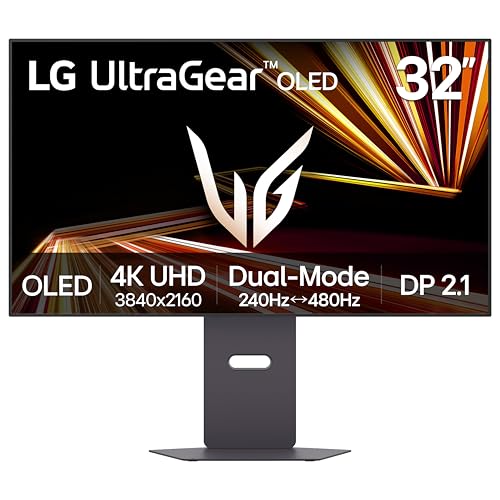
LG builds the panels inside half the OLED monitors in this industry, and the 32GX870A is its own flagship wearing its own name. The listing specifies a 32-inch UltraGear OLED at 4K with 240Hz, 0.03ms response, FreeSync Premium Pro and G-Sync compatibility, DisplayHDR TrueBlack 400, HDMI 2.1 and DisplayPort, and a full ergonomic stand with tilt, height, swivel and pivot. The dual-mode character flagged in its badge is the LG party piece of this generation: the panel can present itself at full 4K for immersion, or drop resolution to run dramatically faster for competitive titles — two monitors’ personalities in one sheet of glass.
The dual mode deserves a practical rather than a mystical reading. Most players own two libraries: the cinematic one, where resolution and HDR are the experience, and the competitive one, where frames are. A dual-mode OLED serves the first library at 4K and the second at speed, without the second physical monitor that desks used to dedicate to esports. The switch is a setting, not a purchase — and for the player whose week genuinely contains both libraries, it retires a real compromise rather than a theoretical one.
Against its QD-OLED rivals here, the LG’s distinctions are the stand and the badge ecosystem. The full ergonomic range — pivot included — is the most complete furniture in the OLED group, suiting desks that share the screen between play and work postures. FreeSync Premium Pro speaks to HDR-aware variable refresh on the AMD side while G-Sync compatibility covers the other; the panel is fluent in both houses’ languages, which matters on a desk whose graphics allegiance may change with the next upgrade cycle.
The two-library player is the owner in view: ranked matches on weeknights at speed, the big story game at weekends in 4K, one panel changing its nature with the library instead of the player changing panels. Flexibility of that order is a feature with a weekly dividend, and the LG collects it more completely than any rival here.
LG’s position as the panel maker behind so much of this industry carries a quiet assurance worth naming. When the company sells its own flagship, the firmware attention, the panel binning and the feature roadmap are all first-party — the dual mode in this generation is the kind of capability that arrives when the panel’s designer and the monitor’s designer are the same people. Buyers are not merely purchasing LG’s glass; they are purchasing the shortest distance between the glass and its maker in the entire field.
- Panel: 32 inch UltraGear OLED 4K UHD, 3840×2160
- Refresh and response: 240Hz, 0.03ms per the listing
- Modes: dual-mode operation, resolution traded for speed
- Sync and HDR: FreeSync Premium Pro, G-Sync, TrueBlack 400
- Stand: tilt, height, swivel and pivot per the listing
Strengths
- Two gaming personalities — immersion and speed — in one panel.
- The OLED group’s fullest ergonomic stand.
- Fluent in both sync ecosystems for future upgrade freedom.
Trade-offs
- Dual mode’s speed half is wasted on single-library players.
- TrueBlack 400 certifies the blacks; peak HDR brightness is modest.
- OLED care discipline applies as it does to its cousins.
Best for: players whose week holds both ranked speed and 4K cinema.
Not suited for: single-genre desks that would never touch the second mode.

ASUS ROG PG32UCDP 32in — Best Esports Dual-Mode
The PG32UCDP takes the dual-mode idea and removes its ceiling. ASUS’s listing specifies a 32-inch 4K OLED at 240Hz with a dual mode reaching Full HD at 480Hz, a custom heatsink, 0.03ms response, G-Sync compatibility, AI gaming features, USB-C at 90W and true 10-bit colour, naming the PS5 and Xbox in its title. The 480Hz mode is the headline and it should be read precisely: it is a competitive instrument, trading the panel’s resolution for a frame rate at which the fastest players’ inputs and eyes operate, in the handful of titles built to be played that way. Nothing else in this guide — nothing in most guides — offers it.
The heatsink is the pick’s second signature, and the more durable one. OLED panels manage heat as part of managing their lifespan, and ASUS’s custom thermal design, carried over from its QD-OLED sibling in this batch’s console guide, is the engineering that lets a flagship be driven hard for years. Competitive players are hard drivers — long sessions, bright scenes, static HUDs — and the thermal story is therefore not a footnote for this audience but the foundation their purchase stands on.
At 4K the panel is a full citizen of the flagship class: 240Hz, 10-bit colour, the console fluency its title advertises, USB-C strong enough to dock a laptop at the same desk. The AI gaming features in its listing — the crosshair and shadow-enhancement class of tools — serve the competitive half of its identity. The honest summary is that the UCDP contains two monitors that share only a chassis: an esports instrument of unusual extremity, and a 4K OLED flagship that would headline a lesser guide on its own.
The aspiring competitor with a cinematic streak is the owner: the player whose ranked grind is serious enough to want 480Hz available, and whose Sundays are spent in games that deserve 4K OLED. That player previously bought two screens or accepted a compromise; this ASUS is the industry’s answer, priced like the two-in-one it is.
The USB-C at 90W is the detail that keeps the UCDP honest as a desk citizen rather than a tournament exile. Between competitive sessions the same panel docks a laptop, charges it properly and shows work at 4K with 10-bit colour — a weekday identity most esports equipment refuses. Players whose desks must earn their space in a shared room will find that weekday identity is what gets the purchase approved, by housemates or by conscience.
- Panel: 32 inch 4K OLED, 3840×2160, 240Hz
- Dual mode: Full HD at 480Hz per the listing
- Response and colour: 0.03ms, true 10-bit per the listing
- Thermal design: custom heatsink per the listing
- Connections: USB-C 90W, G-SYNC Compatible, console-ready
Strengths
- A 480Hz competitive mode no other pick here can offer.
- Heatsink engineering suits the hardest-driving audience.
- Full 4K flagship behaviour when the grind is over.
Trade-offs
- The extreme mode serves a narrow, elite slice of players.
- Flagship pricing buys capability most desks never engage.
- Static competitive HUDs make OLED care habits non-optional.
Best for: serious competitive players who also play cinematically.
Not suited for: casual desks paying for a mode they will never open.

LG UltraGear 27GR83Q-B 27in — Best 1440p HDMI 2.1 Value
The 27GR83Q-B is the guide’s reality check, and its listing states its whole philosophy in one line: a 27-inch QHD IPS gaming monitor at 240Hz with 1ms response, DisplayHDR 400, G-Sync and FreeSync Premium, HDMI 2.1 and DisplayPort, a four-pole headphone output with DTS Headphone:X, and a tilt, height and pivot stand. Every clause answers the value player’s actual question. The consoles get their full signal through the named HDMI 2.1 — at 1440p the Series X and PS5 render beautifully and the panel accepts their 120Hz without strain. The PC gets 240Hz at the resolution mid-range graphics cards can actually feed at high settings. The player gets a complete stand and a proper headphone output. Nothing is missing; nothing is theatre.
1440p is the resolution this pick defends, and the defence is arithmetic. At 27 inches, QHD is dense and sharp; the frame rates it allows are the ones real hardware sustains; and the money it saves against the 4K flagships buys the rest of a desk — the console, the second year of game subscriptions, the chair. Value in this guide has never meant cheap; it means the specification matched to the buyer’s actual sources, and for the enormous population of players whose PC is mid-range and whose console is current, this LG is the match the flagships are not.
IPS is the right panel for the brief as well: bright-room friendly, angle-tolerant for the shared desk, immune to the care habits the OLEDs require, and fast enough at 240Hz with 1ms response that its motion is a non-issue in any genre. The headphone output’s DTS processing is a small, telling inclusion — a value panel that thought about the player’s ears as well as their eyes.
The sensible enthusiast is the owner: the player who reads the flagship reviews with pleasure, checks them against their own hardware, and buys the panel their sources can actually feed. This guide honours that reader with its clearest conscience — the 27GR83Q-B is not the consolation prize of the HDMI 2.1 field; for its desk, it is the correct flagship.
There is a longevity argument for the value pick that flagship owners rarely get to make. A panel matched to today’s hardware will be matched to tomorrow’s mid-range as well, because the mid-range advances into yesterday’s flagship territory on a predictable schedule. The 27GR83Q-B bought beside a mid-range PC this year will be fed even more comfortably by its successor in three — the rare technology purchase that improves as the rest of the desk catches up with it.
- Panel: 27 inch QHD IPS, 2560×1440, 240Hz
- Response and HDR: 1ms, DisplayHDR 400 per the listing
- Ports: HDMI 2.1 and DisplayPort per the listing
- Sync: G-Sync and FreeSync Premium per the listing
- Stand and audio: tilt, height, pivot; DTS headphone output
Strengths
- HDMI 2.1 named outright at the field’s friendliest tier.
- 240Hz at the resolution real mid-range PCs can feed.
- A complete stand and headphone stage, no corners cut.
Trade-offs
- 1440p concedes the 4K flagships’ pixel density at this size.
- HDR 400 is an entry tier; the OLEDs stage darkness better.
- Flagship-PC owners will leave its value logic behind.
Best for: mid-range PC plus console desks buying the honest match.
Not suited for: flagship PCs built to feed 4K at maximum frames.

Samsung Odyssey Neo G9 57in — Best Super-Ultrawide
The Neo G9 is less a monitor than a landscape. Samsung’s listing describes a 57-inch curved panel — 1000R curvature — presenting dual 4K UHD resolution, two 32-inch 4K screens’ worth of pixels in one continuous expanse, at 240Hz with 1ms response, Quantum Mini-LED backlighting, DisplayHDR 1000, FreeSync Premium Pro and DisplayPort 2.1. Every figure serves the single idea of immersion: the curve wraps the player’s peripheral vision, the Mini-LED array lights it with HDR brightness beyond any OLED here, and the resolution means the wrap never dissolves into visible pixels.
Its natural habitats are the genres built for horizons. Racing and flight simulation become cockpit experiences, with mirrors, gauges and track edges living where the player’s peripheral vision expects them; strategy and open-world games acquire a map-like grandeur; and productivity, though this is a gaming guide, inherits a two-monitor desk with no centre seam. The HDMI 2.1 side serves the consoles as well as a 57-inch curve can — console games are framed for 16:9, so the Neo G9 hosts them in its centre with room to spare, a fact its review states plainly rather than dressing the panel as a console-first device. Its first allegiance is the PC, and specifically the simulator PC.
The ownership commitments scale with the panel. It needs a desk — or a mount — of genuine substance, a graphics card of flagship appetite to feed its pixels at speed, and a room whose lighting respects a screen that is also a light source. DisplayPort 2.1 in its listing is the forward-looking detail: the standard that lets a single cable carry this much picture is the same standard the Sony carries at 27 inches, and its presence here marks the Neo G9 as a purchase meant to survive several graphics-card generations.
The simulator devotee is the owner this monument was built for: the player constructing a cockpit corner, for whom immersion is not a mood but the hobby itself. For that desk, there is no alternative in this guide or most others — the Neo G9 is not the biggest pick here; it is a different category that happens to share the page.
Installation day deserves a sentence of respect. A 57-inch curved panel is a two-person lift, a measured wall or a desk audited for depth and load, and a cable run planned before the box is opened rather than after. Owners who treat the installation as part of the hobby — and simulator builders, to their credit, always do — will find the Neo G9 settles into its corner like infrastructure. Everyone else should reread the trade-offs above and choose the 32-inch rows with a clear conscience.
- Panel: 57 inch dual 4K UHD, 1000R curved
- Refresh and response: 240Hz, 1ms per the listing
- Backlight and HDR: Quantum Mini-LED, DisplayHDR 1000
- Ports: DisplayPort 2.1 and HDMI 2.1 class connections
- Sync: AMD FreeSync Premium Pro per the listing
Strengths
- Peripheral-vision immersion no standard format can approach.
- Mini-LED HDR brightness beyond the OLED field’s reach.
- Two 4K workspaces in one seamless curve for long days.
Trade-offs
- Demands a flagship graphics card, a serious desk and a real budget.
- Consoles use only its central 16:9 stage.
- Its scale makes it furniture — measure the room twice.
Best for: simulator and immersion devotees building a cockpit corner.
Not suited for: ordinary desks, modest PCs or shared living spaces.
Where Does Each HDMI 2.1 Panel Spend Its Bandwidth?
| Monitor | Size and panel | Ceiling | Port story | Spends bandwidth on |
|---|---|---|---|---|
| Sony INZONE M9 II | 27in 4K full-array IPS | 160Hz | HDMI 2.1 VRR plus DP 2.1 | Balance — every source served fully |
| MSI MPG 322URX | 32in 4K QD-OLED | 240Hz | HDMI and DP flagship set | Contrast and speed at the summit |
| LG 32GX870A | 32in 4K OLED | 240Hz, dual mode | HDMI 2.1 and DP | Two personalities, one panel |
| ASUS PG32UCDP | 32in 4K OLED | 240Hz, 480Hz FHD mode | HDMI 2.1 class plus USB-C 90W | Competitive extremity |
| LG 27GR83Q-B | 27in 1440p IPS | 240Hz | HDMI 2.1 stated in the title | Honest match for real hardware |
| Samsung Neo G9 | 57in dual-4K Mini-LED | 240Hz | DisplayPort 2.1 flagship | Immersion at landscape scale |
The table’s lesson is that bandwidth is a budget, and each panel is a different spending philosophy. The Sony spends on universality, the OLEDs on intensity, the ASUS on extremity, the value LG on honesty and the Samsung on acreage. None of the philosophies is the correct one in the abstract — the correct one is the philosophy that matches the sources on your desk and the games in your library, which is a more useful sentence than any ranking this guide could impose.
What Does Full-Bandwidth HDMI 2.1 Actually Unlock?
Three things, and it is worth being exact about all of them. The first is resolution with refresh together: 4K at 120Hz for the consoles, and at higher rates for PCs, where the older standard forced a choice between sharp and smooth. The second is variable refresh as a native conversation — the display matching its refresh to the game’s fluctuating output, erasing the tearing and stutter that fixed-refresh screens show whenever a title’s frame rate wanders, which is most of the time in most ambitious games. The third is the headroom for HDR and colour depth to travel at full quality alongside the first two, rather than being traded away when the signal gets heavy.
The practical consequence is a generation of games that finally looks the way its hardware intended. Performance modes stop being a compromise the screen imposes and become a choice the player makes. That is the entire case for this category, and it explains the guide’s strictness at the door: a screen that wears the badge without the bandwidth quietly reimposes the compromise, charging full price for half the treaty. Every pick here was admitted because its class and its listing make the full promise — and the reader buying outside this guide should demand the same evidence, in the title or the specification, before paying for the badge.
Variable refresh deserves one more paragraph, because it is the benefit players feel most and understand least. Games render at the rate the scene allows, which fluctuates constantly — a quiet corridor at full speed, an explosion-filled plaza well below it. A fixed-refresh screen must either repeat frames, producing judder, or show two frames at once, producing tearing. A variable-refresh screen simply waits for the game, refreshing when the frame is ready, so the plaza’s dip reads as a gentle slowing of the world rather than a glitch in it. Every pick here conducts that conversation with both consoles and PCs, and once a player has lived with it, its absence in older screens becomes the most visible thing about them.
How Do You Configure an HDMI 2.1 Setup So It Actually Runs at Full Signal?
Start with the cable, because it is the saboteur in most failed setups. The connection needs an ultra-high-speed HDMI cable — the one supplied with the console, or a certified equivalent of sane length. A legacy cable from a drawer will often negotiate the link down silently, leaving the owner of a superb monitor looking at a capped signal and blaming the panel. Cable first, always, and keep it as short as the desk honestly allows.
Then tell both ends the truth. On the console, set the output to 4K, enable the 120Hz and variable refresh options, and run the HDR calibration in the room’s gaming light. On the PC, confirm the graphics control panel is offering the panel’s full refresh at full resolution — and select it, because defaults are conservative. On the monitor, check that the HDMI port is in its enhanced or full-bandwidth mode where the model offers one, choose the game picture mode for the console input, and keep a separate, calmer profile on the input the work machine uses. OLED owners finish by enabling the panel’s maintenance features and letting them run; everyone finishes by playing the most demanding game they own and confirming the experience matches the specification they bought.
One verification habit separates the satisfied from the quietly disappointed: check the signal, not the feeling. Both consoles and modern PCs can report the resolution and refresh actually negotiated, somewhere in their display settings. Read that number on day one. A setup running at 4K and 120 on the console input, and at the panel’s ceiling on the PC input, is a finished setup; anything less is a cable, a port mode or a setting asking to be found, and it will be findable in minutes precisely because the hardware on both ends is capable.
How Should a Buyer Choose Between OLED, Full-Array IPS and Mini-LED?
This field contains the industry’s three serious answers to gaming light, and the choice between them is a room-and-genre decision disguised as a technology one. OLED — the MSI, the LG and the ASUS — owns the dark room and the cinematic genre: perfect blacks, instant response, HDR that lives in its shadows. Its terms are the care habits and a peak brightness that favours controlled light. Full-array IPS, the Sony’s answer, owns the mixed room and the mixed day: bright, tireless, indifferent to static content, with dimming that narrows the black gap honourably. Mini-LED at the Neo G9’s scale owns immersion and raw HDR brightness, at the price of size, cost and a flagship appetite in the PC feeding it.
The practical method is to audit your own week honestly. Count the hours in darkness against the hours in daylight; count the static dashboards against the moving games; count the genres by where their beauty lives — shadow or spectacle. The technology with the most hours wins, and the audit takes ten minutes. Buyers who skip it buy by demonstration instead: whichever panel dazzled in a showroom’s chosen scene. Showrooms are lit for OLED’s blacks and stocked with spectacle for Mini-LED’s peaks, and neither is your room. Audit the week, then read the three families’ reviews again with the audit in hand.
Households, as opposed to solo desks, add one more variable to the audit: other people’s habits. A panel in a shared room will show sport in daylight, films at midnight, a partner’s work presentation and a child’s cartoon, and its family should be chosen for the household’s whole distribution rather than the buyer’s favourite hour. The Sony’s full-array versatility is the household answer in this field; the OLEDs are the personal answer; the Neo G9 is the household that has agreed, formally, to become a cockpit. Choose for the population that will actually sit in front of the glass.
And if the audit deadlocks between two families, let the warranty and the stand cast the deciding votes. Pictures converge at this level far more than ownership does; the panel that is better supported and better positioned will be the better panel in year three, whatever the showroom said in week one.
What Happens to the Rest of the Desk When the Monitor Gets This Capable?
A flagship panel quietly re-specifies everything around it. The graphics card is the first to feel it: 4K at 240Hz is a demand, not a suggestion, and owners of the OLED flagships should budget the card that feeds them or accept the panel running below its ceiling until the upgrade lands — a respectable arrangement, provided it is planned rather than discovered. The desk is the second: 32-inch panels want depth, the 57-inch wants architecture, and arms rated for real weight replace the hope-based furniture of lesser setups.
The third re-specification is the owner’s expectations, and it is the pleasant one. A screen that shows the source’s full signal recalibrates what the household considers normal — the living-room television starts to look like the compromise it is, and future purchases across the home get judged against the desk’s standard. None of this is an argument against the flagship; it is the flagship’s actual price list, printed in full. Buyers who read it in advance spend once. Buyers who discover it serially spend the same money with worse grace.
Sound is the fourth re-specification, and the one most often deferred past its usefulness. A picture this revealing makes weak audio suddenly audible as a mismatch — the flagship panel fed by a laptop’s speakers is a concert heard through a door. The field’s built-in speakers cover casual duty honestly, and several picks include thoughtful headphone stages, but the desk plan should name its serious audio route from the start: headset for competition and chat, soundbar or speakers for the cinematic library. Bandwidth bought the picture its freedom; the ears deserve a line in the same budget.
What Mistakes Do HDMI 2.1 Buyers Keep Making?
The first is trusting the badge without the evidence — the purchase this guide’s introduction exists to prevent. The second is feeding a flagship panel with a legacy cable and concluding the panel is ordinary. The third is buying refresh the sources cannot spend: a console-only desk under a 240Hz panel is a fine desk, but its owner paid for a ceiling that only a PC can reach, and the money’s better home was the OLED’s contrast or the Sony’s backlight. Match the ceiling to the fastest source you own today or genuinely plan to own this year.
The fourth mistake is ignoring the second standard. DisplayPort 2.1, carried by the Sony and the Samsung here, is where the PC side of this technology is heading; a flagship purchase meant to last two graphics-card generations should weigh it more heavily than a screen bought for the current console alone. The fifth is forgetting the room and the desk — a 57-inch curve or a 32-inch OLED placed by hope rather than by measurement. Bandwidth may be this guide’s subject, but geometry still signs the final verdict on every desk.
The sixth mistake is subtler and increasingly common: running the flagship at its default picture settings forever. These panels ship in vivid showroom modes that flatter a store wall and misrepresent a game; the game mode, the HDR calibration on the console and ten honest minutes in the menus are the difference between the panel that was reviewed and the panel that was merely delivered. A flagship’s last specification is the owner’s attention, and it is the only one that cannot be bought later.
How Long Does an HDMI 2.1 Flagship Stay a Flagship?
Longer than most technology in the house, and the reason is the fixed nature of its sources. Consoles hold their output for a generation; a panel that accepts the Series X and PS5 at full signal today will accept them identically on the generation’s last day. PC standards move faster, but the direction of travel — the 2.1 pair, higher refresh at 4K, variable refresh as a default — is the direction these flagships already face. The realistic ageing is in the light engines: an OLED’s peak settles over years, a backlight dims almost imperceptibly, and a newer panel family eventually makes the current one look like the previous era. That is a five-to-eight-year story, not a two-year one.
The buying consequence is to purchase the flagship as furniture, not as a gadget. Choose the size the room will still want in five years, the stand or mount that survives rearrangement, and the maker whose warranty and support operation will still recognise the serial number when the decade turns. All six names here pass that test, which is not an accident — a guide organised around a connection standard that promises longevity has a duty to stock it with manufacturers built the same way.
Firmware is the longevity factor buyers forget to ask about, and it matters more in this generation than in any before it. Modern gaming panels are computers wearing glass: their sync behaviour, their HDR tone mapping and their mode logic all live in software the maker can improve. The established houses in this field publish those improvements; the discipline for the owner is simply to apply them, once a season, as part of the same maintenance rhythm the OLED picks already ask for. A flagship kept current in firmware ages at the speed of its panel rather than the speed of its launch-day software.
Final Recommendation
For the mixed console-and-PC desk, buy the Sony INZONE M9 II: it is the only panel here fluent in both 2.1 standards, with a backlight that stages HDR properly and a warranty that says so. Choose the MSI MPG 322URX for the flagship QD-OLED picture, the LG 32GX870A when your library genuinely splits between cinema and speed, and the ASUS PG32UCDP when competition is serious enough to spend a mode on. The LG 27GR83Q-B is the honest flagship of the mid-range desk, and the Samsung Neo G9 is the monument for the simulator corner. Six panels, one treaty — buy the one whose bandwidth spending matches your sources, wire it with a cable worthy of it, and the signal you paid for will finally arrive whole, every night, at full strength.
If the choice still resists after the audit and the table, decide by the second source. Most desks in this category are bought for one machine and live with two; the panel that flatters the machine you play on second-most is usually the panel the desk keeps longest. The Sony was ranked first on exactly that logic — it is nobody’s second-best at anything — and the reader whose sources argue otherwise now has the framework, and the five alternatives, to overrule it intelligently.
Frequently Asked Questions
How can I tell if a monitor’s HDMI 2.1 is full bandwidth?
Look for the signal it accepts, stated plainly: 4K at 120Hz or higher over HDMI, with variable refresh, in the listing or specification. Every pick in this guide makes that case in its title or its class; the MSI and LG picks in this batch’s console and value slots print the standard outright. If a listing hides behind the badge alone, treat the bandwidth as unproven and shop where the evidence is printed. After purchase, verify rather than trust: both consoles report the negotiated signal in their display settings, and a screen receiving 4K at 120 has passed the only examination that matters.
Do I need DisplayPort 2.1 as well?
For a console-only desk, no — HDMI 2.1 carries everything the current consoles send. For a flagship PC desk meant to last, increasingly yes: DisplayPort 2.1, found here on the Sony INZONE M9 II and the Samsung Neo G9, is the standard the next graphics generations are building around, and it carries the heaviest signals — the Neo G9’s dual-4K expanse among them — over a single cable without compromise.
Is 1440p with HDMI 2.1 a sensible buy, or a compromise?
Sensible, for the desk it matches. The LG 27GR83Q-B pairs the full console signal with 240Hz at the resolution mid-range PCs sustain at high settings, on a complete stand, at the field’s friendliest tier. It becomes a compromise only when the sources outgrow it — a flagship PC built for 4K deserves a 4K panel. Judge the resolution against your hardware’s honest output, not against the largest number in the guide.
What is dual mode, and who actually needs it?
Dual mode lets one panel present two personalities: full resolution at a high refresh, or reduced resolution at a much higher one — the LG 32GX870A’s flexibility, and the ASUS PG32UCDP’s extreme version reaching 480Hz at Full HD. It serves players whose library splits between cinematic games and competitive ones. Single-genre players should let the feature go unpurchased; two-library players will use it weekly and feel the saving of the second monitor it replaces. One practical note: the reduced-resolution mode is a competitive instrument, not a quality failure — at the distances and speeds of tournament play, frames carry more information than pixels, which is why the professionals the mode was built for choose it deliberately.
Can these monitors serve a PlayStation 5 and an Xbox on the same desk?
Yes. Both consoles speak the same HDMI 2.1 language, and this field was chosen for fluency in it — the Sony by design heritage, the ASUS naming both machines in its listing, the rest by their full-bandwidth ports. Desks running both consoles should count full-bandwidth HDMI inputs before buying, since a second console on a lesser port reintroduces exactly the compromise this guide exists to remove.
Does HDMI 2.1 matter for older consoles or a Switch?
Not for their signals — older machines speak older standards, and every port here accepts them happily at their native output. The benefit for a mixed-generation household is consolidation rather than enhancement: one flagship screen that gives the current consoles their full treaty while still hosting the retro corner’s machines on its remaining inputs. Buy the panel for the newest source you own; the older ones will be served as honoured guests, unchanged and unharmed.
Will an HDMI 2.1 monitor still be current in five years?
The standard’s headroom says yes for the sources that exist and those credibly coming: the consoles are fixed for their generation, and the PC standards are converging on the 2.1 pair these flagships carry. Panels age by their backlights and pixels rather than their ports, and the makers here are the industry’s established display houses. Buy the picture you love at the size your room fits, with one full-bandwidth port spare, and the connection will not be the reason the desk is upgraded.
Related Guides
Readers speccing a complete gaming desk may also want our guides to the best gaming monitors for Xbox Series X, the best computer monitors for CAD work and the best monitors for design and photography.



[…] Colour desks rarely stand alone, so readers may also want our guides to the best computer monitors for CAD work, the best IPS monitors for office work and the best external monitors for photo editing on the move. […]
[…] the laptop comes home, the desk can grow too — readers may also want our guides to the best IPS monitors for office work, the best vertical monitors for document-heavy desks and the best gaming monitors for Xbox Series X […]