What's inside
- Key Takeaways
- Quick Picks
- How Did We Choose These Picks for Student Life?
- What Should a Student Actually Look For in a Dorm Printer?
- Which of These Printers Belongs on Which Desk?
- How Do You Set Up a Printer to Survive a Dorm Network?
- What Mistakes Do Students Make When Buying a Printer?
- How Does Toner Economics Work Across a Whole Degree?
- What Paper Should a Student Feed a Laser Printer?
- How Should a Student Print From a Phone, a Chromebook and a Library Computer?
- What Happens to a Student Printer Over the Summer?
- How Much Desk Does Each Kind of Student Actually Need to Give Up?
- Which Courses Print the Most, and Does Yours?
- Final Recommendation
- Frequently Asked Questions
- Related Guides
As an Amazon Associate I earn from qualifying purchases. This post may contain affiliate links at no extra cost to you.
gizmoverdict.com is reader-supported. When you buy through links on our site, we may earn an affiliate commission.
Where to buy: Five of the six machines below link to checked listings in this site’s product pool, and the sixth, a Pantum model with no printer listing in this check, is discussed plainly as a budget route you may have to source elsewhere. Prices on student hardware swing with every semester sale, so treat the listings themselves as the live source rather than any number printed in a guide.
Finding the best laser printers for college students starts with a problem that has nothing to do with print quality. A first-year dorm room offers roughly one desk, one shelf and one power strip, and into that space must fit a laptop, a lamp, a stack of textbooks and whatever machine is going to produce the essay due at nine in the morning. An inkjet fits the space but brings cartridges that dry out between assignments; a laser printer asks for more shelf room up front and then rewards the student with toner that sits patiently for months, pages that emerge dry and smudge-free, and text sharp enough for a professor reading the fortieth paper of the evening.
The six machines here are all monochrome lasers, and that limitation is deliberate. College printing is overwhelmingly black text: lecture slides, problem sets, reading packets, application forms and the occasional concert ticket. Colour is the library’s job, and paying for colour hardware, colour toner and colour maintenance to print three posters a year is poor economics on a student budget. What matters instead is footprint, automatic two-sided printing, a toner cartridge that does not empty itself into a single midterm week, and Wi-Fi that survives a crowded dorm network where forty other devices are shouting for attention.
One honesty note belongs at the top. The Lexmark pick in this guide is the MS431dw, a small workgroup machine that happens to suit a shared student house unusually well. An earlier Lexmark model sometimes mentioned in this class, the B3442, turned up in this check with toner listings only and no printer listing at all, so it does not appear here as a linked pick. The Pantum at the end of the list is in the same position: a genuinely cheap machine whose printer listing could not be verified, presented without a link so nobody clicks through expecting a purchase page that this check could not confirm.
Key Takeaways
- Monochrome laser is the student sweet spot: toner never dries out over a quiet summer, and text stays crisp through a whole degree.
- Automatic duplex printing halves paper costs and halves the weight of a reading packet carried across campus.
- Footprint is a real specification in a dorm room; the smallest pick here fits on a shelf that would reject every other machine listed.
- Dorm Wi-Fi is hostile territory, so a printer with Ethernet as a fallback earns its place in shared houses with a router in reach.
- The Pantum P2502W is discussed without a purchase link because this check found toner listings for it, not a printer listing.
- Buy the printer around the toner cartridge, not the box: cost per cartridge and pages per cartridge decide the four-year bill.
Quick Picks
| Pick | Badge | Why it earns its place |
|---|---|---|
| Brother HL-L2460DW | Best overall | The current Brother compact formula: duplex, wireless and mobile printing in a box sized for a dorm desk corner. |
| Brother HL-L2370DW | Best proven value | The long-running predecessor with a deep record in student rooms and speed up to 36 pages per minute. |
| Canon imageCLASS LBP122dw | Best compact Canon | Canon’s small-footprint answer at 30 pages per minute for students who prefer the imageCLASS way of doing things. |
| Lexmark MS431dw | Best speed step-up | A workgroup-grade engine with Ethernet and cloud connection for shared houses that print like a small office. |
| HP LaserJet M110w | Smallest footprint | HP’s tiniest LaserJet, built for the student whose entire print station is one end of a bookshelf. |
| Pantum P2502W | Ultra-budget route, no link in this check | The cheapest name in the class, presented without a link because only its toner listings surfaced here. |
How Did We Choose These Picks for Student Life?
We filtered the class the way a student actually shops in August. First, every machine had to be a monochrome laser, because the whole economic case for a dorm printer rests on toner that waits quietly between assignments instead of ink that evaporates. Second, every machine had to print on both sides automatically or, in the one case where it does not, be so small that its footprint argued its way onto the list anyway. Third, wireless printing from a phone had to be part of the design, because a large share of student printing starts life as a PDF on a phone screen at midnight.
Beyond the filters, we weighted the unglamorous things. Toner availability in ordinary shops mattered, because a cartridge that can only be ordered and waited for will fail a student exactly once, the night before a deadline. Physical size mattered in centimetres, not in marketing language. And we treated headline speed with suspicion: the difference between 30 and 36 pages per minute is invisible on a twelve-page essay, but the difference between a machine that wakes and prints in seconds and one that thinks about it is felt every single time.
Finally, we checked listing reality. A pick only carries a purchase link when the listing in this site’s pool is the printer itself. That rule is why the Pantum appears unlinked and why a Lexmark B3442, whatever its merits as a machine, does not appear at all: in this check its name returned cartridges, not a printer, and a guide that links a student to a toner box while calling it a printer has failed at its only job.
What Should a Student Actually Look For in a Dorm Printer?
Start with the paper path, because dorm printing is abusive printing. Notebooks get torn out, handouts get re-fed, and cheap paper from the campus shop curls in humidity. A straight, simple paper path with a proper enclosed tray beats an open feed slot that leaves the stack gathering dust and paperback novels. A closed tray also keeps the paper supply invisible, which in a shared room is a small mercy: an open stack of blank paper has a way of becoming everyone’s scratch paper.
Duplex printing deserves more respect than students give it. A 60-page reading packet printed single-sided is a brick; printed double-sided it is a pamphlet, and over a semester the paper saving alone can pay for a toner cartridge. Every pick here except the tiny HP offers automatic two-sided printing, and the HP’s omission is the honest price of its size. If your course load is reading-heavy, that single feature should outrank raw speed in your decision.
Connectivity is the third leg. Dorm networks often isolate devices from each other for security, which can make a Wi-Fi printer invisible to a laptop on the same network. The workarounds are a printer that supports Wi-Fi Direct, so the laptop connects to the printer itself, or a room in a shared house where the router sits close enough for a cable. The Lexmark’s Ethernet port looks like office overkill until the night the dorm network refuses to cooperate and a cable saves the assignment.
Last, think about noise and light. A laser printer is not loud, but its fan and its ready light live in the same room as a sleeping roommate. Machines that sleep deeply and wake quickly, and that let you mute status lights or at least place them facing a wall, are better neighbours than machines that hum. It is a small thing in a showroom and a large thing at two in the morning in a room twelve feet long.

Brother HL-L2460DW — Best overall
The HL-L2460DW is the current expression of a formula Brother has refined across several generations of compact monochrome machines: a small grey box, a proper paper tray, automatic two-sided printing, wireless and mobile printing, and very little drama. For a student, that lack of drama is the product. The machine connects to the room network, appears on a phone when a PDF needs to become paper, and produces the dry, dark, even text that makes a long essay easy to read and easy to grade.
What separates this generation from its elders is polish in the places students touch daily. Mobile printing is treated as a first-class route rather than an afterthought, which matches how coursework actually arrives: a learning-platform download on a phone, a shared document from a study group chat, a boarding pass for the flight home. The printer also works with Alexa for voice-triggered status and printing, a feature most students will use twice and then ignore, but its presence signals where the design attention went — toward the connected, phone-first habits of the people who buy this machine.
The Refresh subscription trial bundled with the listing deserves a clear-eyed paragraph. Toner-by-subscription can suit a student who prints steadily and hates surprises, but it is optional, and the machine runs perfectly well on cartridges bought outright when the supplied one runs down. Read the trial terms before activating it, decide based on your real page count after a month of term, and remember that declining a subscription never disables a printer you own. The honest summary is that the hardware stands on its own; the trial is a door you may open or leave shut.
- Class: Print-only monochrome laser
- Two-sided printing: Automatic duplex
- Connectivity: Wireless, mobile printing, works with Alexa
- Included extra: Refresh toner subscription trial
- Footprint class: Compact desktop, dorm-desk sized
Strengths
- Automatic duplex as standard, so reading packets come out half as thick and half as costly in paper.
- Phone-first printing that matches how assignments actually reach a student at midnight.
- Brother’s compact chassis leaves room on the desk for the laptop and the coffee that accompany every print job.
Trade-offs
- Print only: scanning a signed form means a phone app or a trip to the library.
- The bundled subscription trial needs a deliberate decision, not a sleepy click during setup.
- Monochrome only, so the one colour poster of the year still belongs to the campus print shop.
Best for: the typical undergraduate in a dorm or first flat who prints essays and readings weekly and wants the machine to disappear between jobs. Not suited for: shared rooms where three people’s laptops all need a scanner as often as a printer.

Brother HL-L2370DW — Best proven value
If the newer Brother above is the current model, the HL-L2370DW is the one with the long service record: years of dorm rooms, first apartments and home offices have established exactly what it does, which is print black text at up to 36 pages per minute, at up to 2400 by 600 dpi resolution, over wireless, without complaint. Buying a proven design late in its life is a legitimate student strategy. The quirks are documented, the toner is everywhere, and every problem you might meet has been met and solved by somebody’s forum post at 1 a.m.
Speed is this machine’s quiet luxury. Thirty-six pages per minute sounds like office bragging until the morning a 40-page packet needs printing while you are also finding your shoes. The printer simply finishes before the panic starts. Its wireless follows the 802.11 standards of its generation, which is entirely adequate for a room or a small flat, and its resolution figure, while not the number that decides text quality on its own, reflects an engine that renders small fonts and dense footnotes cleanly.
The value argument needs one honest qualification. An older model can be priced oddly as stock thins, sometimes drifting close to its successor. The pick earns its place when the listing price sits clearly below the newer machine; if the two are within a few notes of each other on the day you shop, the newer model’s polish is worth taking. That is not indecision — it is the correct way to buy any long-running design, and the listing page, checked on the day, is where that decision gets made.
- Class: Print-only black-and-white laser
- Speed: Up to 36 pages per minute
- Resolution: Up to 2400 x 600 dpi
- Connectivity: Wireless 802.11 networking
- Design status: Long-running, widely documented model
Strengths
- Fastest engine in this guide, which turns deadline-morning printing into a non-event.
- A deep public record of fixes, toner options and setup guides accumulated over years of sales.
- Toner for this family is stocked so widely that a replacement is a shopping trip, not a delivery wait.
Trade-offs
- An ageing design whose price can drift upward as stock thins; compare it against its successor on the day.
- No scanner or copier, like its newer sibling, so forms and ID copies happen elsewhere.
- Its control interface belongs to an earlier, more spartan generation of Brother compacts.
Best for: the student who values a known quantity and prints in bursts — packets, problem sets, revision notes — where engine speed pays. Not suited for: desks in rooms where the printer must also serve as the household copier for leases and forms.

Canon imageCLASS LBP122dw — Best compact Canon
Canon’s entry in this class takes the same brief — compact, monochrome, wireless, duplex — and answers it in the imageCLASS idiom: a print-only machine rated at 30 pages per minute, described by its maker as mobile ready, and sized for the home desks and small rooms where students actually live. Students who have used Canon printers at home often have a plain preference for the menus, the driver behaviour and the way Canon renders a page, and this is the machine that honours that preference without asking for office money.
Thirty pages per minute is worth translating into student units. A fifteen-page essay is roughly thirty seconds of engine time; the real wait in any print job is the first page, while the machine wakes and warms its fuser. Canon’s small imageCLASS machines are tuned for exactly this pattern of short, frequent jobs, and the LBP122dw’s whole posture — compact body, quick readiness, mobile printing treated as normal — reflects a design aimed at people who print five pages ten times a week rather than five hundred pages once.
The duplex printing matters here as much as on the Brother machines, and it is automatic rather than a manual re-feed routine, which is the difference between a feature students use and a feature they abandon after one mis-ordered stack. Paired with a closed paper supply and wireless that a phone can find, the Canon covers the complete student brief in a footprint that sits comfortably beside a laptop stand. Its case rests on execution rather than novelty, and for a machine bought to be forgotten, execution is the right thing to rest on.
- Class: Single-function monochrome laser
- Speed: 30 pages per minute
- Two-sided printing: Automatic duplex
- Connectivity: Wireless, mobile ready
- Footprint class: Compact, home-desk sized
Strengths
- Automatic duplex in a genuinely small body, the combination dorm desks reward most.
- Tuned for short, frequent jobs, which is the true rhythm of student printing.
- The natural choice for households already comfortable with Canon’s drivers and menus.
Trade-offs
- A step slower than the fastest Brother here, felt only on very long packets.
- Print-only design, so scanning still means a phone camera and a steady hand.
- Less surrounded by years of student-specific setup lore than the long-running Brother models.
Best for: Canon households and students in small rooms who print short jobs constantly and want duplex without bulk. Not suited for: housemates splitting one machine four ways, where a heavier-duty engine earns its keep.
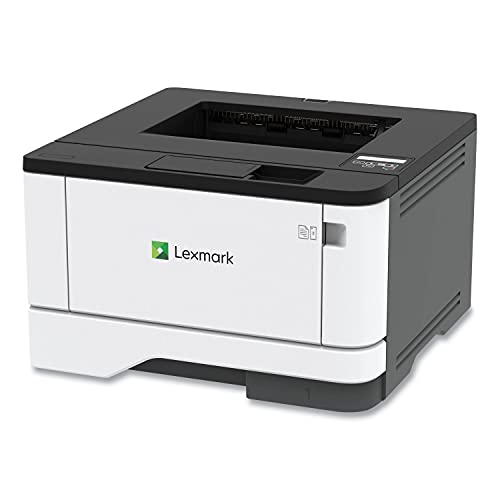
Lexmark MS431dw — Best speed step-up
The MS431dw is the outlier in this guide and knows it: a Lexmark 4-Series workgroup printer with wireless, Ethernet, mobile-friendly printing, cloud connection and automatic two-sided printing, built for small offices that print all day. Its place on a student list is specific and real. In a shared student house — four or five people, one router, a group project culture and a semester of lab reports — a workgroup engine stops being overkill and starts being the machine that never becomes the bottleneck or the argument.
Ethernet is the feature to linger on. Every other pick here leans on Wi-Fi, and Wi-Fi in a crowded house, let alone a dorm, is a shared and contested medium. A cable to the router gives this printer a fixed, boring, permanent presence on the network: it is simply always there, for every laptop in the house, at full speed, immune to the interference from the microwave and the neighbour’s router that make wireless printers mysteriously vanish. Cloud connection adds the ability to print from elsewhere on campus, which suits the student who realises on the bus that the form was never printed.
Honesty about lineage belongs in this review. The MS431dw is the Lexmark pick because it is the Lexmark machine with a verifiable printer listing in this check. The smaller B3442 that some student guides name could not be linked here: its name returned toner cartridge listings only. If you meet a guide that links you to a B3442 purchase expecting a printer, check what is actually in the basket. Meanwhile the MS431dw asks more money and more shelf than the dorm compacts, and a single student in a single room should spend the difference on toner instead. This is a house printer, and judged as one, it is excellent.
- Class: Workgroup monochrome laser, print only
- Two-sided printing: Automatic
- Connectivity: Wireless, Ethernet, mobile-friendly, cloud connection
- Series: Lexmark 4-Series office line
- Best setting: Shared houses and heavy group workloads
Strengths
- Ethernet ends the vanishing-printer problem permanently in houses with the router in reach.
- Workgroup build and duty headroom shrug off the whole house printing on the same evening.
- Cloud printing covers the forgotten-form-on-the-bus scenario that every student meets once a term.
Trade-offs
- The largest and priciest machine here; a single dorm room rarely justifies it.
- Office-class toner economics assume volume a lone student may never reach.
- Its capabilities are wasted where one person prints ten pages a week.
Best for: student houses sharing one printer across several heavy courses, especially with a router close enough to cable it. Not suited for: a lone first-year in a single dorm room watching every centimetre of desk.
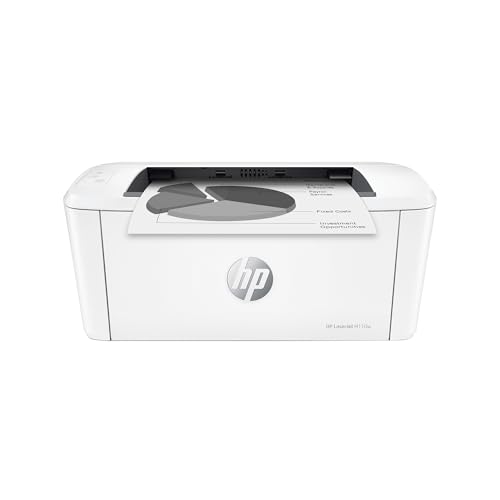
HP LaserJet M110w — Smallest footprint
The M110w exists for one argument, and it makes the argument physically: this is HP’s smallest LaserJet class machine, a monochrome wireless printer so compact that the question stops being whether you have room for a printer and becomes whether you have room for a hardback textbook. For the student in the smallest rooms — a bunk-desk combination, a shared room where the desk is genuinely a plank — that difference decides whether personal printing happens at all or every page is a library trip.
Smallness is bought with compromises, and this review will name them rather than let the footprint charm hide them. There is no automatic duplex: two-sided printing means printing the odd pages, turning the stack, and printing the even pages, in the correct order, while paying attention. On a forty-page packet that routine is a chore; on a six-page essay it is a shrug. There is also less paper capacity and less engine than the Brother and Canon picks offer, because physics collects its fee somewhere. The M110w is a light-duty machine and behaves best when treated as one.
Within that honest frame, what it does, it does the HP way: fast black-and-white output for its class, mobile printing and wireless printing as standard habits, and setup aimed at people who have never installed a printer driver and do not intend to start. For the student whose printing is essays, forms and tickets in modest counts, and whose room is measured in centimetres, the trade is rational. Measure your shelf first. If the bigger machines fit, buy one of them; if they do not, this is the printer that fits the life you actually have.
- Class: Ultra-compact monochrome laser, print only
- Two-sided printing: Manual only
- Connectivity: Wireless, mobile printing
- Footprint class: Smallest in this guide
- Duty posture: Light, personal volumes
Strengths
- Fits shelves and desk ends that reject every other machine in this guide outright.
- HP’s phone-led setup suits students who have never owned a printer before.
- Perfectly adequate engine for essays, forms and tickets in ordinary weekly counts.
Trade-offs
- Manual duplex turns long double-sided packets into a supervised chore.
- Light-duty capacity and pace are outgrown by reading-heavy courses.
- Compact cartridges suit low volume; heavy users pay more per page than with the bigger machines.
Best for: the smallest rooms in the building, where the alternative to this printer is no printer at all. Not suited for: seminar-heavy degrees built on weekly hundred-page reading packets.
Pantum P2502W — Ultra-budget route, presented without a link
The Pantum P2502W is the name students find when they sort the entire category by price and start at the top. It is a small, simple, wireless monochrome laser sold at prices the big brands do not attempt, and for a student counting every note of a loan payment, that proposition deserves a fair hearing rather than a dismissive one. The machine prints text, connects wirelessly, and asks very little shelf or money. Plenty of students have finished degrees on exactly such hardware.
The reason this pick carries no purchase link is stated plainly so there is no mystery: in this check, searching for this model surfaced its toner cartridges, not a printer listing that could be verified in the site’s pool. Rather than link a cartridge while calling it a printer, or invent a listing, the guide presents the machine as context. If you pursue it, buy from a seller whose listing clearly describes the printer itself, confirm the box contents, and check the return terms before the term starts rather than after a deadline exposes a problem.
Expectations should travel with the price. A machine at this end of the market asks more patience: setup can be less polished, wireless manners less refined, and long-term toner sourcing worth checking before you commit, since an orphaned cartridge supply is the classic way ultra-budget printing stops being cheap. None of that disqualifies it. It means the saving is partly paid in attention, and a student with more attention than money may find that a fair exchange — provided the purchase itself is made carefully, from a listing that is unmistakably for the printer.
- Class: Budget monochrome laser, print only
- Listing status in this check: No verifiable printer listing; toner only
- Connectivity: Wireless (per the model’s established design)
- Price posture: Bottom of the class, qualitatively
- Buying advice: Verify the listing describes the printer itself before paying
Strengths
- The lowest entry cost in the class for a student whose budget is genuinely tight.
- Simple, small and wireless, covering the core dorm brief without extras.
- A rational gamble when bought carefully with returns available.
Trade-offs
- No verified printer listing in this check, so sourcing takes real care.
- Setup polish and wireless refinement trail the big-brand compacts.
- Long-term toner availability deserves checking before, not after, purchase.
Best for: the student with more patience than money who will verify the listing carefully and print modest volumes. Not suited for: anyone buying the night before term who needs setup to be a ten-minute certainty.
Which of These Printers Belongs on Which Desk?
The honest answer is that the two Brother machines and the Canon divide most students between them, and the deciding factors are biography and budget rather than specifications. A student who prints in deadline bursts takes the faster, proven HL-L2370DW when its price behaves; a student who prints steadily from a phone all term takes the newer HL-L2460DW; a student raised on Canon takes the LBP122dw and loses nothing by it. All three duplex automatically, all three fit a dorm desk, and none of them will be the reason an essay is late.
The edges of the list answer narrower questions. A shared house with a router in the hall and five laptops in the kitchen takes the Lexmark and cables it, ending the household’s printer arguments for the length of the lease. A room so small that the desk is a shelf takes the HP, accepting manual duplex as the rent paid for a footprint nothing else matches. And a budget so tight that the big brands are simply out of reach takes the Pantum route, carefully, from a listing verified to be the printer itself. Notice that each answer begins with the room and the workload, not with a brand logo: that ordering is the whole method of this guide.
One comparison students rarely make, and should, is the library. University printing charges per page and queues at deadline time, but it costs nothing up front and never needs toner. A student printing twenty pages a month may honestly be better served by the library and a good travel mug. The personal printer earns its shelf from about a hundred pages a month upward, or at any volume when the printing happens at hours the library is shut — which, in student life, is a substantial share of all the printing that matters.
How Do You Set Up a Printer to Survive a Dorm Network?
Begin before the printer leaves its box: photograph the room’s network details, because dorm Wi-Fi often runs on a portal or a per-device registration system that printers cannot navigate. Many universities provide a separate device network or a MAC-address registration page for exactly this kind of hardware; find yours on the IT help pages during freshers’ week, not during your first deadline. Registering the printer properly at the start is the difference between a semester of silent reliability and a recurring mystery.
If the campus network will not let your laptop see your printer — a common security policy that isolates devices — fall back in order. First, Wi-Fi Direct: connect the laptop straight to the printer’s own signal for the duration of the job. Second, a USB cable, unfashionable and utterly dependable; keep one in the desk drawer regardless. Third, in a shared house, Ethernet into the router, which is why the Lexmark’s port matters. A student with a cable in the drawer is never truly unable to print, and that sentence is worth the small cost of the cable.
Finish the setup with the habits that prevent the classic failures. Load the tray with decent paper and keep the rest sealed against dorm humidity. Print something at least every few weeks — less critical for toner than for ink, but moving parts like being moved. Keep the printer out of the direct blast of a radiator and off the floor where kicked dust gathers. And write the toner model number on a note inside the desk drawer now, while you know it, because the night the cartridge fades you will not remember it and the note will.
What Mistakes Do Students Make When Buying a Printer?
The first mistake is buying an inkjet because the box was cheaper in August. The laser’s higher entry price buys toner that survives Christmas, Easter and the summer break without drying into a clog, while the inkjet’s cartridges quietly age whether they print or not. Students print in bursts separated by holidays; that rhythm is precisely the one laser technology was born for, and the cheap inkjet is frequently the expensive printer by second year.
The second mistake is ignoring duplex. Students glance at speed figures and skip the two-sided line of the specification, then spend four years feeding pages twice, carrying bricks of single-sided readings and paying double for paper. The third mistake is buying for colour that coursework never uses: one poster and two photographs across a degree do not justify colour hardware, and the library’s colour machines are better than anything that fits on a dorm desk anyway.
The fourth mistake is trusting a listing without reading it. This guide declined to link two famous budget names because their listings, on inspection, were toner or unverifiable; students in a hurry make the same error with real money. Read what the basket actually contains, confirm the model number digit by digit, and treat a price that seems impossible as information rather than luck. The fifth mistake is forgetting the roommate: a printer is a shared acoustic and luminous presence in a small room, and choosing one that sleeps quietly is a social decision as much as a technical one.
How Does Toner Economics Work Across a Whole Degree?
Students tend to price a printer by its box and then act surprised by its cartridge, when the honest arithmetic runs the other way: over four years the cartridge purchases will usually exceed the purchase price of the machine. The figure that governs your life is pages per cartridge divided into the cartridge’s cost, and the second figure that governs it is whether you print enough to use a high-yield cartridge before graduation. A high-yield cartridge that still holds a third of its toner when you leave is not a saving; it is a donation to the next tenant.
The starter cartridge in the box deserves suspicion. Manufacturers commonly ship compact machines with a modest introductory cartridge, entirely legitimate as a way to start, but the student who budgets assuming the first replacement is a year away can be ambushed in November. Check what the listing says about the included toner, note the page figure if one is stated, and price the first full replacement cartridge on the day you buy the printer. That single act of arithmetic converts the printer from a purchase into a plan, and plans are what survive contact with a semester.
Subscription toner, offered with the newer Brother in this guide, changes the shape of the bill rather than its existence: a monthly amount against pages printed, with cartridges arriving before the old one dies. For the steady printer — the student with weekly readings who never faces a dry cartridge at midnight — the convenience is real. For the bursty printer who prints nothing for six weeks and four hundred pages in the seventh, a page-counted plan can feel like paying rent on an empty room. Neither answer is universal; your first month’s page count, honestly recorded, is the only data that should decide it.
Compatible and remanufactured cartridges form the third road, and the honest account is mixed. Reputable compatibles for these long-running Brother, Canon, Lexmark and HP engines can print perfectly well and cost meaningfully less; anonymous ones can leak, fade or be rejected by the machine’s cartridge recognition. The student compromise that experience supports is this: use the manufacturer’s cartridge while the printer is new and any problem would be ambiguous, and experiment with a well-reviewed compatible later, one cartridge at a time, never on the eve of a deadline and never in a bulk order you cannot return.
What Paper Should a Student Feed a Laser Printer?
Paper is the invisible half of print quality. The bargain ream from the campus shop is usually adequate for drafts, but its two vices — dust and moisture — are precisely the two things a laser’s paper path dislikes. Dusty paper sheds fibres that accumulate on rollers until pages begin to slip and skew; damp paper curls, jams and emerges from the fuser wavy. Keeping the working ream sealed in its wrapper until it enters the tray, and storing the rest away from the kettle and the shower steam of a shared house, eliminates most of the jams students blame on their printers.
Weight matters at the extremes. Very light paper can crumple in a tight paper path; very heavy stock can refuse the turn into the tray path entirely and should go through whatever manual or straight-through feed the machine provides, one sheet at a time. For the ordinary student diet of essays and handouts, standard copier paper in the middle of the weight range is the correct and boring answer. Save the heavy matte stock for the library’s machines and the one presentation handout of the year, where its stiffness reads as professionalism rather than as a jam waiting at page three.
There is also a social paper economy in shared housing. A printer in a communal kitchen prints for the house whether its owner agrees or not, unless the arrangement is made explicit early. The households that stay happy tend to run a shared paper and toner fund with the costs divided by rough page counts, and to keep the printer’s own counter page — every machine here can report its total pages — as the neutral referee. It sounds bureaucratic in September and feels like wisdom by February, when the alternative is an argument about whose dissertation chapter consumed the cartridge.
How Should a Student Print From a Phone, a Chromebook and a Library Computer?
The modern student’s devices are a menagerie: a phone, perhaps a Chromebook issued by a school, a borrowed laptop, a library desktop. Each of the linked machines here treats mobile printing as a normal route, which in practice means the phone on the same network can send a document without a driver installation ceremony. The practical advice is to test this in the first week with a harmless document, because the failure modes — the printer asleep, the phone on a different network band, the document in an odd format — are all trivially fixable at leisure and mysteriously hard at midnight.
Chromebooks deserve a specific note, because they cannot install conventional printer drivers at all and rely on the printer advertising itself properly on the network. The current Brother, Canon, Lexmark and HP machines in this guide are built for that world; the practical test remains the same: connect during freshers’ week, print a timetable, and only then trust the arrangement. A student whose entire computing life is a Chromebook should treat that first successful test print as part of the purchase, and use the returns window if the pairing refuses to behave.
Library and campus computers add a final wrinkle: you may need the file to travel rather than the print job. Printing to a PDF at home, checking its pagination on screen, and carrying the finished file to a campus machine is sometimes the robust route for the one document that must be perfect. The home printer’s job, most weeks, is everything else — the drafts, the readings, the forms — and it performs that job best when the network pairing, the paper and the toner plan were all settled in the calm of the first fortnight rather than the storm of the first deadline.
What Happens to a Student Printer Over the Summer?
The summer break is where the laser-versus-inkjet argument is settled in practice. A laser printer switched off in June and switched on in September behaves, in almost every case, exactly as it did in June: toner is a dry powder, indifferent to time, and the first page of the new term comes out as dark as the last page of the old one. The student returning to an inkjet performs a small ceremony of cleaning cycles and test pages and sometimes buys a cartridge before printing anything at all. Across a four-year degree with three long breaks, that difference alone can justify the laser’s higher shelf price.
Storage still rewards a little care. If the printer travels home for the summer, keep it upright, keep the toner cartridge inside it rather than loose in a car boot where heat and knocks can spread powder, and slip the whole machine into a bag against dust. If it stays in a vacated student house, a cover against dust and a note to the landlord’s cleaner not to stack boxes on it are the whole of the duty. These are five-minute kindnesses that return a machine ready for the autumn rather than a small archaeology project.
There is a final end-of-degree question worth answering early: the printer’s second life. Compact lasers of the kind in this guide hold their usefulness for years, which makes them easy to hand to a younger sibling, sell to a first-year in the same halls, or carry into a first job’s home office. A machine bought with that horizon in mind — a known brand, available toner, a model with a public record — keeps its value in a way that the anonymous ultra-budget box may not. That is not an argument against the Pantum route for a tight budget; it is a reminder that the cheapest purchase and the cheapest four years are different calculations, and a student who runs both numbers before buying will rarely regret either answer.
How Much Desk Does Each Kind of Student Actually Need to Give Up?
It helps to translate footprints into the objects students actually own. The HP M110w asks for roughly the rectangle of a large hardback novel opened flat; the Brother and Canon compacts ask for a rectangle closer to a laptop tray; the Lexmark, as a workgroup machine, claims something nearer a small microwave’s footprint and belongs on a side table or the floor beside the router rather than on the desk itself. Measuring the intended spot with a tape before ordering — and remembering the paper needs room to exit and the lid, where fitted, room to open — prevents the particular misery of a printer that fits its shelf only diagonally.
Vertical space is the forgotten dimension. Printers that load paper from the top or open upward for cartridge changes need headroom that a bunk bed or a low shelf quietly denies. Front-loading tray machines, which most of this guide’s picks are, tolerate shelves far better. A student furnishing a room from photographs on a housing portal should ask where, exactly, the printer opens, and should treat that answer as seriously as the width figure, because a machine that cannot open cannot change its cartridge, and a printer that cannot change its cartridge in November is furniture.
Which Courses Print the Most, and Does Yours?
Workload prediction is the last piece of honest buying advice this guide can offer. Law, history, English and other reading-led degrees generate the heaviest paper: primary sources, case extracts and articles that lecturers still expect to be read on paper and annotated by hand. For those students the duplex compacts are not a luxury but the centre of the degree’s machinery, and the faster Brother earns its premium in October alone. Laboratory sciences print in spikes — reports, protocols, the occasional enormous graph — and suit any machine here, with the shared-house Lexmark coming into its own when a whole lab group prints the night before a practical.
Mathematics, computer science and engineering often print less than their students expect, because problem sets live on tablets and code lives on screens; for those courses the printer is a forms-and-essays machine, and the Canon or the smaller Brother covers the need with room to spare. The student who genuinely prints least is the one whose course is fully coursework-portfolio based, assessed through uploads; that student should buy the smallest, cheapest adequate machine — or share a housemate’s — and spend the difference on the storage and backup that their assessed work actually depends on. Knowing your own course’s paper habits, from the reading lists published before term, is worth more than any single specification in this guide.
Final Recommendation
For most students, most of the time, the Brother HL-L2460DW is the answer: duplex, wireless, phone-friendly and small, from the family that has defined this class for years. Take the HL-L2370DW instead when its longer record and faster engine come at a clearly kinder price, and take the Canon LBP122dw when Canon is the name your hands already know. The Lexmark MS431dw serves the shared house, the HP M110w serves the tiny room, and the Pantum waits, unlinked and honestly labelled, for the budget that needs it. Buy the machine that matches your room and your reading load, register it on the network in the first week, keep a cable in the drawer — and the printer will do the one thing student technology must do, which is be ready at midnight in May when the dissertation draft needs to exist on paper.
Frequently Asked Questions
Is a laser printer really better than an inkjet for a student?
For the typical student pattern — bursts of black text separated by holidays — yes. Toner does not dry out during breaks, pages emerge dry and smudge-resistant, and text is sharp. An inkjet makes sense mainly when colour photographs are a regular part of coursework, which for most degrees they are not.
Will a Wi-Fi printer work on a university dorm network?
Often, but not always directly. Many campuses isolate devices or require registration of the printer’s hardware address on a device network. If direct connection fails, Wi-Fi Direct to the printer, a USB cable, or — in a shared house — an Ethernet cable to the router will get the job printed.
How much toner does a student actually use?
It varies enormously by course. Reading-heavy humanities students can pass a thousand pages a term; a problem-set course may need a tenth of that. The practical approach is to track your first month, then decide between outright cartridges and any subscription offer with real numbers in hand.
Why is the Pantum P2502W in the guide without a buy link?
Because the verification behind this guide found toner cartridge listings for that model, not a printer listing that could be confirmed. Linking a cartridge as if it were a printer would mislead exactly the budget-conscious reader the pick is meant to help, so it is discussed openly as a route to source carefully elsewhere.
Do I need a scanner in my dorm printer?
Less than you might expect. Phone scanning applications handle signed forms, ID copies and single pages well. A built-in scanner earns its space when you regularly digitise bound material or multi-page documents; otherwise print-only machines are smaller and cheaper for the same print quality.
Can one printer serve a whole student house?
Yes, if it is chosen for the job: a workgroup-class machine like the Lexmark MS431dw, ideally cabled to the router, handles several students’ workloads without strain. Agree the paper and toner kitty in the first week, while everyone is still friends, and the arrangement usually survives the year.
Related Guides
Students equipping a whole desk may also want our reading on compact printers for small apartments, the companion survey of monochrome lasers for home offices, and the guide to low-cost toner strategies for heavy readers.



[…] equipping the whole office may also want our survey of high-volume monochrome lasers for busy departments, the companion guide to document scanners and feeders for paper-heavy offices, and our overview of […]