What's inside
- Key Takeaways
- Quick Picks
- How Did We Shortlist These 5.1 Cards?
- What Does a Real 5.1 Signal Path Look Like?
- Comparison Table
- How Do You Place and Calibrate a PC 5.1 Setup?
- What Does the Cable Reality of Six Channels Teach You?
- Which 5.1 Buying Mistakes Cost People Money?
- How Long Will a 5.1 Card Remain Useful?
- Analogue or Optical: Which Should Feed Your Rig?
- How Does 5.1 Handle Games That Mix in Stereo?
- What About the Subwoofer Channel Everyone Forgets?
- Final Recommendation
- Frequently Asked Questions
- Related Guides
As an Amazon Associate I earn from qualifying purchases. This post may contain affiliate links at no extra cost to you.
gizmoverdict.com is reader-supported. When you buy through links on our site, we may earn an affiliate commission.
Where to buy: Each card below is drawn from this site’s verified pool, and each pick states plainly how its 5.1 actually leaves the PC — discrete analogue channels, an encoded optical stream, or a virtualised headphone effect — because the best 5.1 sound cards for PC are bought for wiring diagrams as much as for sound, and a card that cannot feed your speakers the way you assumed is a card bought twice.
Five-point-one is the oldest honest surround format on the PC: five full-range channels — front left, centre, front right, side left, side right — plus a low-frequency channel for the subwoofer. It predates the current fashion for virtual everything, and it survives because it maps perfectly onto a desk. The centre speaker sits under the monitor and nails dialogue to the screen. The fronts flank the display. The surrounds perch at or just behind the listener’s shoulders. Nothing in that arrangement requires simulation, and when a game mixes for it properly, the result still embarrasses fancier formats delivered badly.
The confusion begins at the outputs. A card can claim 5.1 support while offering it through very different doors. Discrete analogue output gives each channel its own jack and its own feed — the gold standard for a powered satellite set. An optical output carries 5.1 only when the card encodes it in real time with Dolby Digital Live or DTS, because raw optical bandwidth cannot carry six uncompressed channels; without that licence and feature, optical means stereo. And a headphone jack can carry a virtualised fold-down that borrows the 5.1 name while producing two channels of processed stereo. All three are useful. They are not interchangeable, and this guide labels each pick with the doors it actually has.
Read the picks with your speaker set in mind. If your satellites accept analogue inputs, discrete output is your headline requirement. If your PC feeds a receiver or a soundbar through optical, encoding is the feature that decides everything. If the 5.1 in your life happens through headphones at night, the processing quality matters more than the jack count. The six cards below cover those three lives in descending order of speaker seriousness.
A note on expectations for newcomers: a 5.1 desk will not sound like a cinema, and should not try to. It plays at nearfield distances, at civilised volumes, in a room that also contains a bed or a sofa and other people’s patience. What it offers instead is precision at arm’s length — dialogue you never strain to catch, effects placed with a surveyor’s neatness, and immersion that comes from correctness rather than scale. Owners who buy for that promise keep their rigs for years; owners who buy expecting a multiplex in a bedroom blame the format for a mismatch of brief, and this guide would rather set the brief straight on page one.
Key Takeaways
- True discrete 5.1 means six separate analogue feeds; anything else is encoding or virtualisation wearing the same badge.
- Optical only carries surround when the card encodes Dolby Digital Live or DTS in real time.
- The centre channel is the quiet hero of PC 5.1 — it anchors dialogue and game callouts to the screen.
- Match the card to the inputs your speakers actually have before comparing any other specification.
- A virtual headphone mode is a fine extra, but it should never be the reason a speaker card is chosen.
- The Sound Blaster Z SE states its discrete 5.1 and its encoders outright, which is why it leads this list.
Quick Picks
| Pick | Badge | Why it is here |
|---|---|---|
| Creative Sound Blaster Z SE | Best Overall | Its listing names discrete 5.1 output and Dolby Digital Live plus DTS encoding, covering analogue satellites and optical receivers alike. |
| ASUS Xonar SE | Best Straightforward 5.1 | A card whose listing leads with its 5.1 channels and published fidelity figures, without asking you to decode marketing first. |
| Creative Sound Blaster Audigy Fx Pro | Best New Entry Option | The Pro generation of the Audigy Fx family brings the entry tier up to date for a modern build. |
| Creative Sound BlasterX AE-5 Plus | Best Premium Source | A flagship-grade DAC with Dolby Digital and DTS support for buyers whose 5.1 rig shares a serious headphone habit. |
| Creative Sound Blaster Audigy FX V2 | Best Budget Card | The current Audigy generation for a first discrete-speaker setup or an ageing PC that needs quiet, competent audio. |
| Creative Sound Blaster AE-7 | Best Desk Control | Its desktop module suits a 5.1 desk where volume and headphone switching happen constantly. |
How Did We Shortlist These 5.1 Cards?
The first filter was documentary honesty. We required each card’s listing or established specification to state how surround leaves the machine, and we demoted any product whose 5.1 claim dissolved into a headphone effect on inspection. That filter shaped the whole list: the leaders state discrete channels in plain language, while the premium picks are included for their encoding support and source quality with their actual output paths described carefully rather than assumed.
The second filter was the centre channel’s dignity. Cheap implementations sometimes treat 5.1 as stereo with garnish, starving the centre feed that carries speech. We favoured cards from lines with a track record of proper multichannel handling and software that exposes per-channel levels and distances, because calibration controls are what turn six speakers from a pile of boxes into a coherent field.
Third came the practicalities of a 2026 build: a PCIe slot that survives beside a fat graphics card, drivers maintained into the current Windows generation, and software that remembers a configuration instead of resetting it. A 5.1 installation involves enough cables and calibration that nobody should have to redo it because an update forgot the speaker layout.
Finally we weighed the dual-life reality. Most 5.1 desks become headphone desks after dark, so a card that handles the night shift gracefully — decent headphone output, painless switching — outranks a marginally finer speaker card that makes headphones a chore. Every pick below was assessed on both shifts.
We also kept a deliberate spread of eras and tiers, because 5.1 buyers are not one person. The veteran platforms earned their places on documented configurations; the current-generation entries earned theirs on production currency and driver attention; the flagships earned theirs on what they do for the hours when the speakers are off. A roundup that only crowned the newest or only crowned the priciest would fail the reader whose actual question is which of these six shapes matches a specific desk, a specific speaker set and a specific household’s tolerance for cables.
What Does a Real 5.1 Signal Path Look Like?
Trace one explosion from game to air. The engine mixes the blast to the rear-left and subwoofer channels. A discrete card converts all six channels separately and sends each down its own cable to the amplifier in your speaker set, which drives each satellite with exactly its intended feed. Nothing is compressed, nothing is guessed, and the only quality questions are conversion cleanliness and amplifier power. That simplicity is the format’s enduring charm.
The optical path adds a translation step. The card takes the same six channels and encodes them in real time into a Dolby Digital or DTS bitstream that fits down the optical cable, where a receiver or soundbar decodes them back to six feeds. The encoding is lossy in principle and perfectly serviceable in practice, and it exists because a generation of living-room equipment speaks optical. Without an encoder on the card, that same cable carries stereo and the receiver upmixes — a simulation wearing a surround costume.
The analogue path has one more virtue worth naming: it is inspectable. A dead channel is a swapped cable away from diagnosis, levels can be trimmed per speaker in the card’s software, and a test tone walks the room speaker by speaker. Buyers who enjoy a system they can verify, rather than a black box they must trust, tend to stay with discrete wiring for decades.
There is a corollary for buyers torn between the paths: the speaker set usually decides for you, and it decides early. Powered PC satellites speak analogue because their amplifier expects six line-level feeds; AV receivers speak optical or HDMI because their whole design assumes a bitstream to decode. Read your speakers’ input panel before reading any card review — including this one — because the correct shortlist is the one whose outputs match that panel, and every other virtue in this guide is commentary on a decision the hardware has already framed.

Creative Sound Blaster Z SE — Best Overall
No card in this pool states its 5.1 credentials as completely as the Z SE. The listing promises discrete 5.1 surround — six genuine channels for a satellite set — alongside virtual 7.1 for headphones, 24-bit/192kHz playback, a 116dB signal-to-noise ratio, and Dolby Digital Live with DTS encoding for the optical path. That is the entire 5.1 buyer’s checklist on one line, and it means this card can serve an analogue speaker rig today, an optical receiver tomorrow, and headphones tonight without asking you to compromise on any of the three.
Fed into powered satellites, the discrete output delivers what the format promises: a centre channel that keeps a squadmate’s callouts welded to the screen, surrounds that make weather and crowd noise genuinely ambient, and a subwoofer feed that handles explosions so the small drivers do not have to. The card’s maturity helps here — this platform has been calibrated by years of owners, so sensible settings for distance, crossover and channel trim are well documented, and the software exposes the controls a careful setup needs.
The living-room route deserves its sentence too. Dolby Digital Live encoding means a single optical cable can carry real game surround to a receiver or soundbar, which turns a desk PC into a credible sofa machine for the price of a cable. Owners whose gaming migrates between desk and television across the week will find this the most flexible card in the roundup, and flexibility, in a component expected to serve for years, is a form of quality.
One practical note from long ownership: the Z SE rewards the owner who labels the cables. Six analogue leads leaving the back of a PC all look alike in the dark under a desk, and the day you unplug the rig to move house, coloured tape applied today becomes the difference between a ten-minute reconnection and an evening of test tones. The card’s longevity means you will move it, hand it down or re-case it at least once; buy it expecting that day, and its mature ecosystem of guides and settings advice will meet you there.
- Form factor: Internal PCI-e sound card and DAC
- Speaker output: Discrete 5.1 surround (per listing)
- Headphone mode: Virtual 7.1 surround (per listing)
- Playback: 24-bit/192kHz, 116dB SNR (per listing)
- Encoding: Dolby Digital Live and DTS (per listing)
Strengths
- Every 5.1 delivery method a PC owner plausibly needs, in one card.
- Discrete analogue output for a proper powered satellite set.
- Real-time encoding turns optical into genuine surround, not upmixed stereo.
Trade-offs
- Converter refinement sits a rung below the AE-series flagships.
- Exploiting it fully means owning speakers worth wiring carefully.
- The platform’s age shows in a less polished control application.
Best for: The canonical 5.1 buyer — a desk satellite rig, occasional optical duty, headphones after dark. Not suited for: A pure headphone player, who would leave its best outputs unwired forever.
ASUS Xonar SE — Best Straightforward 5.1
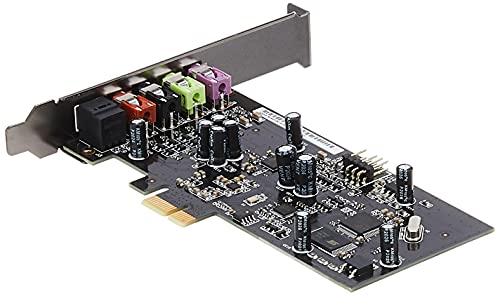
The Xonar SE’s listing is a model of plain speaking: a 5.1-channel PCIe gaming sound card with 192kHz/24-bit hi-res audio and a 116dB signal-to-noise ratio. There is no virtual garnish in that sentence and no ambiguity about what the card is for. It exists to drive five speakers and a subwoofer properly at a price that leaves budget for the speakers themselves, and in a category addicted to inflated channel claims, that directness is a genuine feature.
In a working setup the card does the fundamentals with composure. Dialogue sits in the centre where it belongs, game effects pan across the front stage without the image tearing, and the surrounds contribute atmosphere rather than shouting for attention. ASUS’s software provides the channel trims and configuration a careful owner needs, without burying them under gaming theatre. For a first surround desk or a media PC that also games, this is very close to the rational default.
Its limits are equally plain. The headphone experience is serviceable rather than special, and buyers whose nights are mostly headset hours should weigh the Creative picks more heavily. There is no headline optical-encoding story here either, so a receiver-based living-room rig belongs to the Z SE. The Xonar SE is a specialist in the honourable sense: analogue multichannel, done cleanly, at a fair tier — and for the buyer whose speakers take analogue feeds, specialisation beats versatility.
There is a quiet second career waiting for this card in media PCs. A living-room or bedroom machine that plays films from local files and streams games from the main rig needs exactly what the Xonar SE sells: clean multichannel analogue output into a modest speaker set, no gaming theatre, no lighting to disable at midnight. Cards this straightforward age gracefully because there is little in them to go out of fashion — six channels, honestly converted, will still be the correct answer to the same question in a decade.
- Form factor: Internal PCIe sound card
- Channels: 5.1 discrete (per listing)
- Playback: 192kHz/24-bit hi-res (per listing)
- Signal-to-noise: 116dB (per listing)
- Orientation: Analogue multichannel speaker setups
Strengths
- Unambiguous discrete 5.1 at a speaker-friendly price.
- Published fidelity figures match far pricier company.
- Calm, sensible software without gaming gimmickry.
Trade-offs
- Headphone output is competent, not a reason to buy.
- No flagship optical-encoding pitch for receiver rigs.
- Minimal extras — no desk module, no lighting, no theatre.
Best for: A first or second analogue 5.1 desk built with a sensible budget split between card and speakers. Not suited for: Optical receiver owners or headphone-led players.

Creative Sound Blaster Audigy Fx Pro — Best New Entry Option
The Audigy Fx Pro is the newest name in this list, presented in its listing as a hi-res PCIe sound card and as the Pro generation of the long-running Audigy Fx family — explicitly not the original Audigy Fx, which no longer has a clean listing. That lineage matters because the Audigy brief has always been the honest entry point: beat the motherboard, behave predictably, and introduce Creative’s software ecosystem without flagship pricing. The Pro suffix signals the current, better-specified rung of that ladder.
For a 5.1 buyer, its role is the modern starter card. A new build deserves a card from a current production line with current driver attention, and the Fx Pro is the pick for the owner assembling a first surround desk who wants this year’s model rather than a veteran platform. Its hi-res positioning lifts general playback quality above the bargain tier, and Creative’s control software gives the channel configuration and processing options a growing setup needs, with headroom to learn on.
Set expectations by tier and the card satisfies. It will not match the Z SE’s documented surround versatility line for line, nor the AE cards’ conversion refinement, and buyers with an existing receiver rig should confirm their exact output plan against the Z SE’s explicit encoding support. What the Fx Pro offers is currency: the newest entry in a dependable family, sized for the majority of real desks, and a natural first step that does not embarrass itself when the speaker set improves around it.
Newness carries one more dividend worth weighing: documentation written for current systems. A card from a live production line tends to have its setup guides, firmware notes and troubleshooting written against the Windows version you actually run, rather than archived against one you retired. For a first-time surround builder — the person most likely to need a clear answer at midnight — that currency can matter as much as any specification, and it is the Fx Pro’s least advertised advantage over the veterans elsewhere in this list.
- Form factor: Internal PCIe sound card
- Line: Pro generation of the Audigy Fx family (per listing)
- Playback class: Hi-res (per listing)
- Role: Current entry point to Creative’s ecosystem
- Orientation: New builds and first surround desks
Strengths
- The current-generation option in a proven entry family.
- Hi-res positioning lifts it above the cheapest tier’s compromises.
- Creative software familiarity carries forward if you upgrade later.
Trade-offs
- Its surround specification is less exhaustively stated than the Z SE’s.
- Flagship converter and amplifier performance live further up the range.
- Receiver owners should verify their encoding plan before choosing it.
Best for: New-build owners who want the current entry card for a growing 5.1 desk. Not suited for: Buyers who need the Z SE’s explicitly documented encoding and discrete-output combination today.
Creative Sound BlasterX AE-5 Plus — Best Premium Source
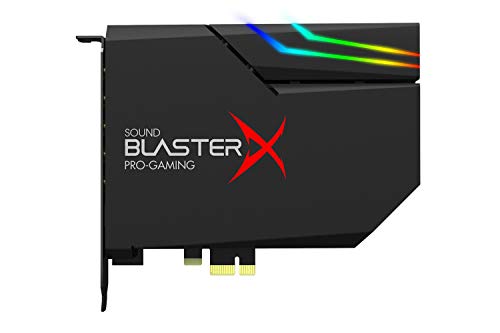
The AE-5 Plus enters a 5.1 conversation from the top end, and its inclusion needs an honest frame. Its listing describes a SABRE32-class hi-res 32-bit/384kHz DAC with a 122dB signal-to-noise ratio, the discrete Xamp headphone amplifier, and Dolby Digital plus DTS support. What that buys a surround household is source quality: conversion clean enough that a good speaker set or a receiver fed from this card receives a signal with nothing to hide, and a headphone stage that makes the same PC a serious night-time machine.
Think of the division of labour. Where the Z SE is the versatile plumber of 5.1 — every pipe, every fitting — the AE-5 Plus is the connoisseur’s source, aimed at owners whose speakers or receiver handle the multichannel work while the card guarantees the fidelity of everything passing through it, and whose headphones are good enough to expose a lesser card instantly. In a mixed household where the PC feeds a television rig by day and planar headphones by night, that profile is not indulgence; it is the correct allocation.
The caveat is equally clear. Buyers shopping strictly for discrete analogue 5.1 outputs should compare the Z SE’s and Xonar SE’s stated channel configurations first, because they declare that exact job in their listings. The AE-5 Plus earns its place here on fidelity, encoding support and dual-life excellence — and for the right rig those are the deciding virtues — but a surround purchase should always begin from the wiring diagram, and this guide will not pretend otherwise for the sake of a flagship.
Where the fidelity genuinely announces itself is in the material between the explosions. Rain against a window, a string quartet under a menu screen, the room tone of a quiet interior — these low-level details live near the noise floor, and a converter with real headroom keeps them textured instead of grey. Owners upgrading from lesser sources consistently describe the change as the quiet parts getting more expensive, and in a surround rig that spends half its life on dialogue and ambience rather than detonations, that is the upgrade that gets used every single day.
- Form factor: Internal PCIe sound card and DAC
- Playback class: Hi-res 32-bit/384kHz, SABRE32-class DAC (per listing)
- Signal-to-noise: 122dB (per listing)
- Headphone stage: Xamp discrete dual-amplifier design
- Encoding: Dolby Digital and DTS support (per listing)
Strengths
- The cleanest conversion in this roundup, audible in quiet passages.
- A headphone stage that flatters genuinely demanding headphones.
- Encoding support suits receiver-fed living-room duty.
Trade-offs
- Its listing leads with fidelity, not with a discrete 5.1 wiring promise.
- Premium pricing buys refinement a modest speaker set cannot reveal.
- Overkill for a satellite set bought as an afterthought.
Best for: A high-quality mixed rig — good speakers or a receiver, plus serious headphones on the same PC. Not suited for: A buyer whose only question is discrete analogue 5.1 at the lowest sensible cost.

Creative Sound Blaster Audigy FX V2 — Best Budget Card
The FX V2 is the current generation of Creative’s Audigy Fx line, and its listing presents it without ceremony as the Sound Blaster Audigy FX V2 sound card. In a 5.1 guide its honest job is to be the affordable foundation: a dedicated card that lifts a PC away from motherboard interference, gives a first speaker set a clean and configurable source, and introduces Creative’s software at the gentlest tier in this roundup. Not every surround story begins with a flagship, and most should not.
Consider the typical first rig: a hand-me-down or entry-level 5.1 speaker set, a PC whose onboard audio hisses faintly through every quiet scene, and an owner who wants films and games to envelop without a research project. The FX V2 answers that brief directly. The background goes quiet, the channels behave, and the money saved against the premium picks buys the speaker stands and cable that make placement — the real determinant of surround quality — actually happen.
Its ceiling should be respected rather than resented. Demanding headphones will find its output merely adequate, elaborate encoding plans belong to the Z SE, and an owner who upgrades speakers aggressively will eventually upgrade this card too. As a deliberate first step, though, it is the right shape of purchase: cheap enough to be an experiment, good enough that the experiment usually succeeds, and backed by a family name with two decades of troubleshooting lore behind it.
It is worth saying who should skip it, because a budget card recommended without boundaries becomes a disappointment with good reviews. If your speaker set cost serious money, if your headphones need real amplification, or if a receiver waits in the plan, the FX V2 is a detour rather than a destination and the money belongs further up this list. Its virtue is proportionality — it matches the rigs most people actually assemble first — and proportionality, honestly labelled, is what budget recommendations are for.
- Form factor: Internal sound card
- Line: Current generation of the Audigy Fx family (per listing)
- Role: Budget foundation for a first surround setup
- Processing: Creative software ecosystem support
- Orientation: Entry 5.1 desks and ageing PCs
Strengths
- The gentlest price of entry to a dedicated, quiet audio source.
- Frees budget for the speakers and placement that matter more.
- Simple to install, simple to live with, easy to hand down.
Trade-offs
- Amplifier and converter ceilings are real with better transducers.
- Not the card for an optical receiver plan.
- Ambitious upgraders will replace it within a speaker generation.
Best for: First surround desks, older PCs, and anyone testing whether dedicated audio matters to them. Not suited for: A finished high-end rig, where it would be the weakest link by design.
Creative Sound Blaster AE-7 — Best Desk Control
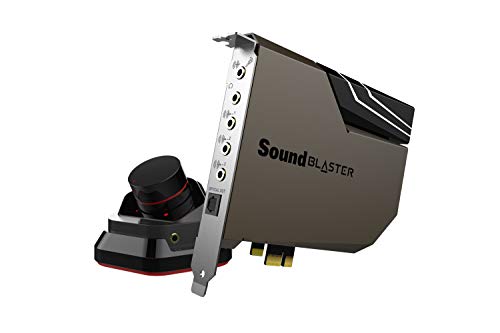
The AE-7 pairs a hi-res PCIe gaming sound card with an Audio Control Module, per its listing, and that module is why it belongs in a 5.1 guide despite its headphone fame. A surround desk is a volume-managed desk: films swell, games spike, calls interrupt, and the difference between a knob under your fingers and a software panel three clicks deep is the difference between adjusting and enduring. The module also gives headphones a home at the desk, so the day-to-night switch that defines a 5.1 household takes seconds.
Sonically the AE-7 brings the AE family’s conversion quality and Xamp headphone amplification to the setup, which matters for the hours when the speakers rest. Its presentation favours clarity and organisation, flattering dialogue-heavy content and competitive cues alike. For the owner whose PC is simultaneously a surround cinema, a gaming rig and a communications hub, the AE-7 is less a sound card than a small audio headquarters, and it organises the other equipment rather than merely feeding it.
As with its sibling, begin from the wiring diagram. A buyer whose sole requirement is a stated discrete 5.1 analogue configuration should shortlist the Z SE and Xonar SE first. The AE-7’s case rests on fidelity, control and dual-shift excellence — virtues that dominate daily life once the speakers are wired — and on desks where hands reach for volume constantly, no other pick here understands the assignment as completely.
The module also changes the social life of the rig. A partner reaching to lower a film’s volume during a phone call, a child sent to turn the game down, a guest who wants the music softer — none of them needs a software tutorial, because a knob is the most self-explanatory interface ever fitted to a PC. Surround systems fail socially before they fail technically, and the AE-7’s little aluminium headquarters is the only component in this roundup designed with the whole household, rather than only its owner, in mind.
- Form factor: Internal PCIe sound card with external Audio Control Module
- Headphone stage: Xamp amplifier (per listing)
- Control: Desktop module for volume and connections
- Playback class: Hi-res gaming DAC (per listing)
- Orientation: Busy media and communication desks
Strengths
- Physical volume control transforms daily surround listening.
- Desk-level headphone access makes the night shift effortless.
- AE-family fidelity across both speakers and headphones.
Trade-offs
- The module needs desk space and a cable run.
- Its listing does not headline a discrete 5.1 configuration.
- Quiet, set-and-forget users pay for control they rarely touch.
Best for: A 5.1 media desk with constant volume changes, calls and headphone switching. Not suited for: A minimalist single-purpose speaker rig.
Comparison Table
| Pick | 5.1 path | Headphone life | Choose it if… |
|---|---|---|---|
| Sound Blaster Z SE | Discrete analogue + Dolby Digital Live / DTS optical | Virtual 7.1 mode | You want every delivery method in one card. |
| ASUS Xonar SE | Discrete analogue 5.1 | Serviceable output | Your satellites take analogue and your budget is sane. |
| Audigy Fx Pro | Current entry multichannel card | Mainstream headsets | You are building new and want the current model. |
| Sound BlasterX AE-5 Plus | Premium source with Dolby/DTS support | Xamp discrete amp | Fidelity across speakers and headphones decides it. |
| Audigy FX V2 | Budget multichannel foundation | Basic amplified output | This is a first rig or an ageing PC rescue. |
| Sound Blaster AE-7 | Premium source, desk-controlled | Xamp amp via module | Your hand lives on a volume knob. |
How Do You Place and Calibrate a PC 5.1 Setup?
Placement begins with the centre speaker, because it does the most talking. Put it directly above or below the monitor, aimed at your ears, as close to screen height as the desk allows; a centre marooned on the floor or a high shelf detaches voices from faces in a way no calibration can fully repair. The front pair should form a rough equilateral triangle with your head, toed in slightly, at ear height when seated. Symmetry matters more than perfection — a matched pair of compromises beats one ideal speaker and one stuffed behind a printer.
The surrounds cause the most arguments. For a desk setup they belong at or slightly behind your seated position, roughly at ear level or a little above, angled toward you rather than firing across the room. They are ambience and effects channels, not a second front stage; if they constantly announce themselves during dialogue scenes, they are too loud, too close, or both. The subwoofer goes where the room flatters it — often near a front corner — and the honest test is walking the seating area during a bass-heavy scene and choosing the spot where the low end stays even at your chair rather than booming in one corner and vanishing in another.
Calibration then makes the geometry real. Use the card software’s test tones to confirm every channel speaks from its correct corner — swapped surrounds are astonishingly common and quietly ruin panning for months. Set each speaker’s distance so sounds arrive together, trim levels until the test noise sounds equally loud from each position at your chair, and set the subwoofer crossover so bass hands over to the satellites without a hole or a hump in male voices. Finish with a film scene you know well and adjust by ear in small steps; measurements start the job and familiarity finishes it.
One more placement truth deserves emphasis because desks fight it: height beats distance. A surround speaker a little too far away but at ear level will image better than a perfectly distanced one firing at your shins from the floor or down from a bookshelf’s top. Stands, small shelves or even sturdy stacks of books that lift satellites to seated ear height return more surround quality per unit of effort than any other adjustment in this section, and they cost almost nothing — which is precisely why they are so often skipped in favour of buying something.
What Does the Cable Reality of Six Channels Teach You?
Nobody photographs the back of a 5.1 desk for the brochure, and there is a reason. Six audio leads, five speaker power arrangements in some sets, the PC’s own cabling and a monitor or two produce a thicket that collects dust and swallows dropped screws. Planning for it is part of buying surround honestly: a cable channel or a simple loom keeps the audio leads away from power bricks, whose proximity invites hum; a labelled power strip for the speaker set lets the whole array sleep with one switch; and a little slack at the PC end means the tower can slide out for cleaning without unthreading the entire installation.
The thicket also argues for buying the card and speakers as one decision. A set whose amplifier lives in the subwoofer wants the card’s leads to converge at floor level; a receiver-based rig wants one optical run and nothing else. Deciding the topology before the boxes arrive turns installation into an afternoon of placement and calibration — the enjoyable parts — instead of a week of adaptors. Owners consistently report that the rigs they still use daily are the ones whose cabling was planned, which is the least glamorous and most reliable buying advice in this entire guide.
Which 5.1 Buying Mistakes Cost People Money?
The costliest is assuming optical means surround. Owners connect a single optical cable from a card without real-time encoding, receive upmixed stereo, and blame the speakers. The second is buying a speaker set whose inputs do not match the card’s outputs — analogue satellites with an optical-only plan, or the reverse — discovered only when the boxes are open. Draw the wiring diagram on paper before ordering anything; it takes four minutes and prevents the entire genre of mistake.
A third error is neglecting the centre channel’s quality and placement while overspending on surrounds, when dialogue clarity is what a household actually judges nightly. A fourth is placing all five satellites on the desk in a row for tidiness, converting an enveloping format into a wide stereo bar with extra steps. And a fifth is forgetting the night shift: a rig with no graceful headphone path gets used less and less in a shared house, until the surround investment is mostly decorative.
Finally, beware the silent reset. Speaker layouts live in software, and software updates occasionally restore stereo defaults while continuing to make sound, so the failure hides in plain hearing. After any major driver or system update, run the channel test tones before concluding that games have become less immersive lately.
And a word about second-hand speaker sets, the budget path many 5.1 desks actually take. A used satellite system is a fine purchase, but test every channel before money changes hands, because a dead surround or a rattling subwoofer turns a bargain into a parts donor. Bring a phone, a cable and a test-tone video; five minutes of diligence protects the entire project, card included, since a faulty speaker has sent many owners troubleshooting a perfectly innocent sound card.
How Long Will a 5.1 Card Remain Useful?
Longer than almost anything else in the PC. The 5.1 format is a settled standard, PCIe slots change slowly, and a card bought today will feed speaker sets that have not been designed yet, because six channels of analogue audio ask nothing exotic of the future. The realistic expiry dates are software support and your own ambitions — a hankering after object-based formats or a move to a laptop — rather than any failure of the format itself. That longevity is the economic soul of this category: spend once on the outputs you genuinely need, calibrate carefully, and the card quietly serves across several graphics cards and at least one entire console generation.
It also means the second-hand and hand-me-down paths are honourable here. A Z SE or Xonar SE retired from a main rig remains a superb gift to a second machine, and an entry Audigy in a family PC will outlast the PC. Buy the card your wiring diagram demands, keep its box of cables tidy, and expect it to be among the last components you ever think about again — which, for infrastructure, is the highest praise available.
Longevity also changes the maths of the tiers. A flagship premium spread across eight or ten years of service costs less per year than a bargain card replaced twice, which is why this guide refuses to apologise for including the AE-series in a surround conversation — provided the buyer’s rig can actually reveal what the premium purchases. The reverse also holds: a budget card in a modest rig that serves five happy years has beaten a flagship in a cupboard on every measure that matters, and proportionality remains the whole game.
Analogue or Optical: Which Should Feed Your Rig?
Choose analogue when the speakers live at the desk and accept it. The connection is uncompressed, per-channel trims happen in the card’s software where you can see them, latency is as low as the format gets, and fault-finding is a matter of swapping leads until the test tone confesses. Its costs are cable bulk — six leads where one might do — and a practical distance limit before the runs become unsightly or pick up interference from the power cables they inevitably travel beside.
Choose optical when the PC must join a living-room system across the room, when a receiver already owns the amplification and speaker wiring, or when electrical isolation matters — optical breaks the conductive path between PC and amplifier, which cures a whole family of ground-loop hums that plague analogue runs between separately powered devices. Its condition is the encoder: the card must produce Dolby Digital Live or DTS in real time, or the cable delivers stereo and the receiver’s upmixer fakes the rest. Neither path is the audiophile’s moral victory; each is the right tool for a geography, and the Z SE’s presence at the top of this list owes much to refusing to make you choose between them at purchase time.
Distance settles most real arguments between the two. Across a desk, analogue’s cable bulk is a ten-minute tidying problem and its advantages are free. Across a room, analogue becomes a construction project while optical stays a single thread along a skirting board. Measure the room before romanticising either format, and let the tape measure — the cheapest component in the entire setup — cast the deciding vote.
How Does 5.1 Handle Games That Mix in Stereo?
Plenty of games — older titles, most indie releases, anything built around a stereo soundtrack — will arrive at the card as two channels, and the owner then chooses between honest stereo played through the front pair and an upmix that spreads the signal across the array. Upmixing is a taste, not a truth: it can make a world feel larger and wetter, and it can also smear a carefully mixed soundtrack into porridge, particularly dialogue, which an eager upmixer may spray into the surrounds where it no longer matches the faces on screen.
The disciplined approach is to let the card’s software remember per-application choices where it offers profiles: stereo material stays stereo, genuine multichannel games get the full array, and films sit in whichever mode their mix deserves. Owners who set one global mode and forget it are the ones who conclude that 5.1 is inconsistent, when in fact the inconsistency lives in the sources and the fix lives in the profiles. A surround rig is a small broadcast chain, and like any chain it rewards the operator who labels the inputs honestly.
What About the Subwoofer Channel Everyone Forgets?
The “.1” in 5.1 is a channel with its own personality, and mishandling it is the most common reason a new rig sounds boomy rather than big. The subwoofer feed carries effects bass plus, in most PC setups, the redirected low frequencies the small satellites cannot reproduce. Where those two duties divide is the crossover setting, and the rule of thumb is to hand over below the point where your satellites start to strain — audible as thinness or strain in male voices and acoustic bass when set too low, and as a detached, locatable rumble when set too high, because a subwoofer asked to play too high up the spectrum can be pointed at like a speaker.
Level discipline matters as much as the crossover. A subwoofer set by enthusiasm rather than by test tones will mask dialogue, fatigue listeners and annoy the household in adjacent rooms, since low frequencies travel through structures that stop everything else. Set it so that an explosion startles and a closing door merely registers, then leave it for a week; most owners who revisit the setting after that week turn it down slightly, which tells you where the honest level lived all along. The cards in this guide all provide the trim controls to do this properly — the discipline to use them is the part that cannot be bought.
Neighbours deserve a footnote in any subwoofer discussion. The .1 channel is the one part of a PC rig that other households can hear, and it travels through floors with a disregard for property boundaries. A modest level, a subwoofer lifted off a bare floor onto isolation feet, and a household agreement about hours will preserve both the immersion and the diplomacy — and a rig that can be used freely at civilised settings beats a thunderous one rationed to Sunday afternoons.
Final Recommendation
One last discipline before the verdict: live with the calibration for a fortnight before upgrading anything else in the chain. New surround owners routinely blame hardware for what turns out to be a surround level two decibels too proud or a centre channel angled at their knees, and a fortnight of small, noted adjustments separates the rig’s real ceiling from its first-evening impression. The cards below are all capable of more than their first setup reveals.
Begin from the speakers, not the shortlist. If your rig takes analogue feeds and you want the fullest set of options around them, the Sound Blaster Z SE is the card this guide would buy first, with the Xonar SE the rational alternative when the budget should lean toward the speakers themselves. New builders who value a current production line should start at the Audigy Fx Pro, while the FX V2 remains the gentle-priced foundation for a first or rescued setup. The AE-5 Plus and AE-7 serve the households where fidelity and control across both speakers and headphones outweigh a wiring-led brief. Wire it once, calibrate it honestly, and a good 5.1 desk will keep a secret: the explosion was never behind the monitor at all, it was behind you, where the speaker has been waiting all along.
Frequently Asked Questions
Is 5.1 still worth it when 7.1 and Atmos exist?
For a desk, usually yes. The two extra channels of 7.1 need space behind the listener that most desks against walls cannot give, and object-based formats shine mainly with height speakers few PC setups have. A well-placed 5.1 array beats a compromised larger format, and games mix superbly for it because the installed base is enormous.
Can I run 5.1 through a single optical cable?
Only if the card encodes the six channels in real time with Dolby Digital Live or DTS, as the Z SE’s listing states. An unencoded optical feed carries stereo, and any surround you then hear is the receiver inventing it. Check for the encoder by name before planning a one-cable living-room setup.
Do I need powered speakers for these cards?
Sound cards output line-level signals, so the speakers must amplify themselves or be driven by a receiver or amplifier. Most PC 5.1 sets are powered and accept the card’s analogue feeds directly. Passive home-theatre speakers need an AV receiver between the PC and the speakers, usually fed by optical.
Will a 5.1 card improve stereo music?
It can improve the source quality — quieter background, cleaner conversion — but music should be played as stereo through the front pair or headphones, not upmixed across all channels unless you enjoy the effect. The card’s contribution to music is fidelity, not distribution.
That said, many owners keep a gentle upmix for live recordings and games with strong ambient soundtracks, where the spread flatters the material. Treat it as a seasoning with a per-application memory rather than a house rule, and it earns its place in the software.
What if my desk has no room for rear speakers?
Then a honest 3.1 or a strong headphone setup will serve you better than surrounds crammed beside the monitor. Several picks here handle headphones well precisely for this reason. Surround formats reward geometry; forcing the geometry produces expensive stereo with extra cables.
A 3.1 compromise — fronts, centre and subwoofer — keeps dialogue anchoring and low-end support while surrendering only the rear effects, and it is the configuration many small-desk owners quietly settle on for years without regret.
Can I start with fewer speakers and grow into 5.1?
Yes, and it is often the wisest route. Begin with the front pair and centre — the channels that carry most of any mix — driven properly, then add the subwoofer, then the surrounds when the room and budget allow. A card with the full 5.1 outputs from day one, like the leaders in this guide, waits patiently through that growth without needing replacement, which is another argument for buying outputs ahead of speakers rather than the reverse.
Does a 5.1 card help with voice chat and streaming?
Indirectly, yes. A dedicated card usually brings cleaner microphone input and better control over monitoring and levels than a crowded motherboard layout, and keeping game audio on the card while a stream runs gives you a tidier routing picture. The surround channels themselves do nothing for a mono microphone, but the household calm of a well-organised audio chain shows up in every call.
How do I know my channels are wired correctly?
Run the test tones in the card’s software and listen for each sound to arrive from its named corner, in order, at similar loudness. Then play a scene with a clear pan — a vehicle crossing the screen — and confirm the sound travels with the picture. Two minutes of testing prevents months of subtly wrong panning.
Repeat the test after moving house, swapping speakers or any major software change; a surround rig’s correctness is a state to be maintained, not a fact established once. Owners who build the two-minute ritual into their habits are the ones whose decade-old rigs still image like the day they were calibrated.
Related Guides
Round out the picture with our guide to 3D sound cards and positional audio, our honest look at 7.1 sound cards and virtual surround, and our roundup of affordable internal sound cards.
Related guides
- Best Direct Thermal Printers: Shipping-Label Machines and Professional Label Systems
- Best 4K UHD HDR HDMI Extenders: 4K60, Long-Run and 4K120 Kits Compared
- Best 25–35 Inch Monitors With Lowest Display Lag: An Honest Ranking Without Invented Numbers
- Best Enterprise SATA SSDs: Endurance Classes, Power-Loss Protection and Fleet Sense


