What's inside
- Key Takeaways
- Quick Picks: HDMI Extenders for Real Rooms and Real Distances
- How Did We Separate Genuine 4K HDR Extenders from Wishful Ones?
- Why Does Cable Choice Decide Whether These Kits Work?
- All Six Extenders in One Comparison Table
- What About Wireless HDMI? An Honest Comparison in Prose
- How Do You Plan an Extender Installation That Works First Time?
- Which Mistakes Cause Most Extender Returns?
- What Should You Check in the First Week After Installation?
- How Do Extenders Behave in Commercial and Rental Settings?
- Final Recommendation
- What Is EDID, and Why Does It Cause So Many Black Screens?
- How Should Audio Be Planned in an Extender System?
- Extenders over Dedicated Cable versus Extenders over a Network: What Is the Difference?
- How Do Projector Installations Change the Extender Decision?
- What Does a Sensible Spare-Parts and Testing Kit Look Like?
- Three Installations, Three Different Kits: Worked Examples
- How Future-Proof Should an Extender Purchase Be?
- Frequently Asked Questions
- Related Guides
As an Amazon Associate I earn from qualifying purchases. This post may contain affiliate links at no extra cost to you.
gizmoverdict.com is reader-supported. When you buy through links on our site, we may earn an affiliate commission.
Where to buy: every kit in the main list links to its Amazon listing, where you can check the distance rating at your resolution, not just the headline figure, before spending.
HDMI cables give up quickly. Past roughly seven or eight metres, a passive cable carrying a full 4K signal becomes a gamble, and past fifteen it becomes a near-certainty of sparkles, dropouts or a black screen. That is why the best 4k uhd hdr hdmi extenders exist: they convert the HDMI signal to travel over ordinary network cable, Cat6 being the sensible default, and convert it back at the far end, carrying picture, sound and often remote-control signals across rooms, floors or an entire house. The six kits below range from a 165-foot 4K60 workhorse to a four-screen splitter system, and they are not interchangeable, because resolution, refresh rate and distance trade against each other in ways the headlines blur.
Read the distance figures in this category the way engineers do: every kit has one rating at 1080p and a shorter one at 4K, and the number on the box is almost always the longer, easier one. HDR at 4K60 is the demanding case, needing the full 18Gbps HDMI 2.0 pipeline intact from source to screen, cable and both extender units included. Two of the six kits here are 4K30 devices and are labelled as such wherever they appear, because a 30Hz ceiling is a legitimate budget choice for signage and film but a genuine disappointment for gaming bought by mistake.
Key Takeaways
- Always match the kit’s distance rating at your resolution; the 1080p figure on the box flatters every extender in this category.
- Full 4K60 HDR needs an unbroken 18Gbps path, so cable quality and both extender units matter as much as the headline specification.
- Solid-core Cat6 cable is the foundation these kits assume; stranded patch leads and couplers are where long runs go to fail.
- Power over Cable, where fitted, lets one end of the link run without its own power supply, simplifying projector and ceiling installations.
- The 8K kit in this list is a deliberate step above the keyword’s specification, worth it for 4K120 gaming, unnecessary for ordinary viewing.
Quick Picks: HDMI Extenders for Real Rooms and Real Distances
| Pick | Badge | Why it made the cut |
|---|---|---|
| OREI 4K@60Hz HDMI Extender over Cat6, 165ft | Dependable 4K60 standard | Full 18Gbps HDR support, a loop output at the source and EDID handling in a proven balun design. |
| 4K@60Hz HDMI Extender over Ethernet, 230ft | Longest 4K60 reach here | Claims 230 feet at 4K60 with PoC and EDID, suiting big rooms and halls where the rack sits far away. |
| OREI HDMI Extender over Cat6, 4K, 230ft | Established long-run choice | A long-serving 18Gbps design with HDCP 2.3 and one-way IR for hiding the source in another room. |
| OREI 8K HDMI Extender over Cat6, 130ft | Step-up for 4K120 gaming | HDMI 2.1 bandwidth with VRR and ALLM support, bought for games consoles and future screens. |
| OREI HDMI Extender over Cat5, 165ft, 4K@30Hz | Honest 4K30 value | Clearly a 30Hz kit, and all the better for it: film, signage and presentation work at a lower price class. |
| OREI HDMI Splitter Extender 1×4, 230ft, 4K@30Hz | Four screens from one source | Feeds four distant displays from a single input, the natural shape of bars, halls and places of worship. |
How Did We Separate Genuine 4K HDR Extenders from Wishful Ones?
Bandwidth was our first sieve. A kit claiming 4K60 HDR must move 18Gbps end to end, the full HDMI 2.0 rate, and anything specifying 10.2Gbps tops out at 4K30 whatever the surrounding adjectives suggest. That single number sorted this list into its honest tiers: three full-rate 4K60 kits, one HDMI 2.1 step-up at 48Gbps, and two 4K30 kits that earn their place on price and purpose rather than pretending to a specification they lack. We applied the same scepticism to distance, crediting kits for their 4K reach specifically and treating longer 1080p figures as a bonus for legacy screens.
Control features formed the second sieve, because an extender’s job is rarely picture alone. Infrared pass-through lets you point a remote at the screen and control a source hidden in a cupboard or another room, and we noted whether each kit’s IR runs one way or both. A loop output at the transmitter feeds a local monitor beside the source, invaluable for racks and control desks. EDID handling, the handshake that tells a source what the screen can accept, decides whether a mixed-resolution setup negotiates gracefully or sulks, so kits with EDID management scored above those leaving the conversation to chance.
Finally we weighed installation realism. Power over Cable reduces one end of the link to a single network cable, which matters enormously when the receiver hides behind a wall-mounted screen with no spare socket. We also kept a comparison class in view throughout: wireless HDMI kits, discussed in prose further down, trade the cable run for latency and compression, and any buyer tempted by them should understand exactly what that trade costs a gamer or a film purist before choosing convenience.
Why Does Cable Choice Decide Whether These Kits Work?
Every kit here is a balun pair that assumes a proper network cable between its units, and the cable is the component buyers most often cheapen into failure. Solid-core Cat6 is the specified medium: its conductors carry the high-frequency signal cleanly over distance in a way stranded patch cable, designed for short flexible links, does not. A run should be one continuous length, wall box to wall box, because each coupler and patch panel connection nibbles at the signal budget that a 165-foot 4K60 link spends almost fully. If your building already has Cat5e in the walls, shorter 4K runs may behave, but the honest expectation is reduced reach, and Cat6 or better is the upgrade that unlocks the ratings in this guide.
Route the run like it matters, because it does. Keep distance from mains cables where the path allows, avoid crushing bends, and terminate carefully if you crimp your own plugs, since one marginal termination can pass 1080p happily while refusing 4K HDR, a maddening failure mode that sends buyers blaming the extender for the cable’s sin. Test any in-wall run with the extender pair before the plasterboard closes or the floor goes down, at the exact resolution and refresh rate you intend to watch, because that ten-minute check is the cheapest insurance in the whole project.

OREI 4K@60Hz HDMI Extender over Cat6, 165ft — Dependable 4K60 standard
This OREI balun is the reference design of the category: HDMI 2.0 at the full 18Gbps, 4K at 60Hz with HDR, HDCP 2.2 and 1.4 support, and a reach of 165 feet over Cat6 at that full specification. Those numbers describe the mainstream done properly, a Blu-ray player, streamer or console in one room feeding a television or projector in another with nothing visibly lost along the way. The loop output at the transmitter earns particular praise, because a rack-side monitor for setup and troubleshooting is the feature installers miss most when it is absent, and one-way IR carries remote commands back to the hidden source.
EDID support helps this kit behave in mixed households of equipment, where a modern screen and an ageing amplifier might otherwise argue about what signal to request. Dolby TrueHD and DTS-HD class audio pass through for home cinema receivers at the far end, so the kit suits a proper cinema room as readily as a bedroom television. Choose it when your run fits inside 165 feet at 4K60, which covers the overwhelming majority of homes, and when you value a mature, widely deployed design over the longest claim on a box. Buyers whose run stretches further at 4K should look at the 230-foot kits below rather than asking this one to perform past its rating.
- Signal: 4K at 60Hz, HDR, 18Gbps HDMI 2.0 bandwidth
- Reach: up to 165ft over Cat6 at full 4K60 specification
- Extras: HDMI loop out at the source, one-way IR, EDID support
- Audio: high-definition formats including Dolby TrueHD and DTS-HD pass through
- Typical job: cinema rooms and cross-room console or player feeds
Strengths
- Full-rate 4K60 HDR with no quiet asterisks in the specification.
- Loop output makes rack setup and fault-finding far less painful.
- A proven, widely used design with predictable behaviour.
Trade-offs
- 165ft at 4K is its ceiling; longer runs need the bigger kits.
- IR runs one way, so control flows from screen to source only.
- No step-up headroom for 4K120 gaming signals.
Best for: home cinema and living-room runs up to 165 feet at full 4K60 HDR. Not suited for: very long halls, multi-screen distribution or 4K120 gaming.

4K@60Hz HDMI Extender over Ethernet, 230ft — Longest 4K60 reach here
Reach is this generic kit’s entire argument: 4K at 60Hz with HDR over a single Cat5e, Cat6 or Cat7 run of up to 230 feet, with Power over Cable so only one end needs a mains supply and EDID handling to keep source and screen in agreement. In a large open-plan space, a village hall, a house of worship or a long commercial room, that extra distance over the OREI standard above is the difference between a design that works on paper and one that reaches the projector. PoC deserves emphasis in such venues, because the receiver typically lives at a ceiling-mounted projector or a high wall screen where a spare socket is a rumour.
Generic branding asks for the usual diligence: keep the documentation, test the full run at 4K60 HDR before committing to fixed installation, and treat the 230-foot figure as a best case over good Cat6 rather than a guarantee over whatever cable a building happens to contain. Within those honest bounds, the proposition is strong, full specification at the longest 4K distance in this guide, and for many buyers the absence of a famous logo matters less than the presence of a working picture at the far end of a very long room. Pair it with the cable discipline described earlier and it should reward you.
- Signal: 4K at 60Hz with HDR over Ethernet cable
- Reach: up to 230ft claimed at 4K60 over Cat5e, Cat6 or Cat7
- Power: PoC, one-end powering for awkward receiver positions
- Handshake: EDID support for source and screen negotiation
- Typical job: halls, large venues and long residential runs
Strengths
- The longest full-4K60 reach among the six picks.
- PoC removes the hunt for a socket at the display end.
- EDID support steadies setups with mixed-age equipment.
Trade-offs
- Generic support means your own testing carries more weight.
- The distance claim presumes quality cable installed carefully.
- Fewer installer-friendly extras than the branded cinema kits.
Best for: long 4K60 runs in big rooms and venues with one display. Not suited for: buyers wanting multi-screen splitting or a famous brand’s support.

OREI HDMI Extender over Cat6, 4K, 230ft — Established long-run choice
OREI’s longer balun pairs the full 18Gbps, 4K60 HDR specification with a 230-foot reach over Cat6 and HDCP 2.3, the newer content-protection version that keeps it agreeable with recent sources and screens. Power over Cable is fitted, one-way IR returns remote commands to the source, and 12-bit colour support with HDR and HLG flavours covers broadcast and streaming content as well as discs. It is, in short, the kit for the buyer who looked at the 165-foot standard model, measured their run honestly, and discovered a house, garden room or small venue that needs the extra distance at undiminished quality.
Longevity counts in this design’s favour. Long-running extender models accumulate a public record of behaviour with awkward sources, fussy projectors and marginal cables, and that record is worth money to anyone installing once and expecting years of silence from the system. The compromises mirror its sibling: IR travels one way, and there is no provision for 4K120 signals, which belong to the HDMI 2.1 kit below. For film, sport, streaming and 60Hz gaming across a serious distance, though, this is the guide’s most complete traditional answer, and the one we would specify for a cinema build in a detached annexe without a moment’s hesitation.
- Signal: 4K at 60Hz, HDR and HLG, 18Gbps, HDCP 2.3
- Reach: up to 230ft over Cat6 with Power over Cable
- Extras: one-way IR return for the hidden source
- Colour: 12-bit colour support with LPCM audio options
- Typical job: annexe cinemas and long single-screen runs
Strengths
- Full 4K60 HDR specification maintained across a long reach.
- Newer HDCP version keeps recent sources and screens cooperative.
- PoC simplifies the display end of awkward installations.
Trade-offs
- One-way IR only, like most kits in this class.
- No path to 4K120 or other HDMI 2.1 gaming features.
- Long runs still demand excellent cable to reach the rating.
Best for: long single-display runs at full 4K60 HDR quality. Not suited for: high-refresh gaming or feeding several screens at once.

OREI 8K HDMI Extender over Cat6, 130ft — Step-up for 4K120 gaming
Let the framing be explicit, because this kit exceeds the keyword rather than merely meeting it: it is an HDMI 2.1 extender, 48Gbps, built for 8K signals and, far more relevantly for real buyers, 4K at 120Hz with HDR, variable refresh rate and auto low latency mode. Those gaming features are why it belongs in a 4K UHD HDR guide at all. A current games console or gaming PC in a rack, feeding a high-refresh television 130 feet away over Cat6, is a setup the 18Gbps kits above physically cannot carry, and this is the pick that can, with two-way IR as a bonus for control in both directions.
The step-up logic cuts both ways. If your sources are a streamer, a disc player and broadcast television, this kit’s extra bandwidth will sit unused for its entire life while its price premium and shorter reach, 130 feet against the 230 of the long-run models, argue against it. Buy it when a 4K120 display and a console or PC genuinely anchor your system, or when a planned screen upgrade makes those features a certainty rather than a hope. Framed that way it is not the expensive option; it is the only option in the list that speaks your system’s language, and buying a lesser kit first would be the true waste.
- Signal: HDMI 2.1, 48Gbps, 8K capable and 4K at 120Hz with HDR
- Reach: up to 130ft over Cat6 with PoC
- Gaming features: VRR and ALLM support for consoles and PCs
- Extras: two-way IR, the most flexible control here
- Typical job: high-refresh gaming across rooms, future-proof cinema
Strengths
- The only pick that carries 4K120 gaming signals between rooms.
- VRR and ALLM survive the journey, keeping modern TVs in their best modes.
- Two-way IR suits more complex control arrangements.
Trade-offs
- Shorter reach than the 18Gbps long-run kits.
- Premium capability that film-only systems will never touch.
- 8K sources remain rare; buy it for 4K120, not for 8K bragging.
Best for: console and PC gamers with 4K120 screens in another room. Not suited for: film and streaming setups, or runs beyond 130 feet.

OREI HDMI Extender over Cat5, 165ft, 4K@30Hz — Honest 4K30 value
Thirty hertz, stated plainly, because that is what this kit is: a 4K30 extender reaching 165 feet over Cat5e or Cat6, with IR, a loop output, EDID handling and PoC, at a lower price class than the 4K60 models. For a large class of real jobs that ceiling costs nothing at all. Digital signage, presentation screens, CCTV monitor feeds, church overflow displays and film viewing, which is shot at 24 frames per second anyway, all live comfortably inside 30Hz, and paying for 60Hz silicon to serve them buys capability the content never requests.
The kit’s honesty is its charm, and its danger is only misreading. A buyer who misses the 30Hz specification and connects a games console will meet judder and input lag that no setting can cure, which is why this guide repeats the figure at every mention. Judge it as what it is, a dependable utility extender for screens whose content does not move fast, with the loop out and IR that installers appreciate, and it represents some of the best value in the list. Judge it as a cinema or gaming bargain and it will punish the misunderstanding faithfully for years.
- Signal: 4K at 30Hz, clearly specified, over Cat5e or Cat6
- Reach: up to 165ft at that specification
- Extras: loop out, IR, EDID and PoC included
- Content fit: film, signage, presentations and monitor feeds
- Typical job: commercial displays and utility screens
Strengths
- Installer-friendly extras survive despite the lower price class.
- Perfectly matched to 24fps film and static or slow content.
- Long reach makes it useful across big utility spaces.
Trade-offs
- Thirty hertz is a hard ceiling; gaming and fast sport suffer visibly.
- Bandwidth headroom for future sources simply is not there.
- Easy to buy by mistake if the specification goes unread.
Best for: signage, presentations and film screens up to 165 feet away. Not suited for: any gaming, fast sport or 60Hz source whatsoever.
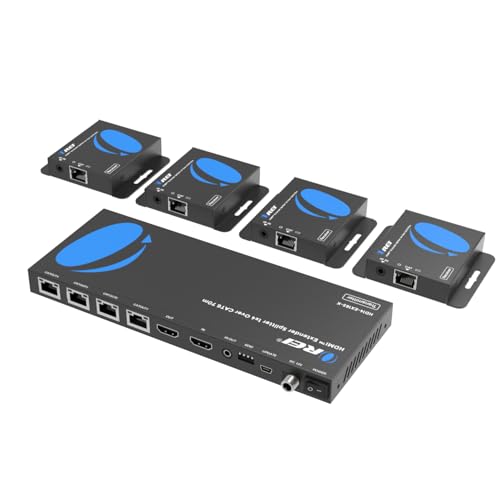
OREI HDMI Splitter Extender 1×4, 230ft, 4K@30Hz — Four screens from one source
Distribution is a different problem from extension, and this kit solves it directly: one HDMI source enters, four network-cable runs leave, each feeding a receiver at up to 230 feet, showing the same 4K30 picture with HDR10, Dolby Vision and HLG support at 10.2Gbps, plus a loop output for a fifth local screen and one-way IR and PoC to keep the receivers manageable. Sports bars showing one match everywhere, houses of worship feeding overflow rooms, retail floors and exhibition stands are its natural habitat, anywhere the message is singular and the screens are many.
Two specification truths govern its use. First, the 30Hz ceiling, repeated deliberately: one shared feed of film, presentations or ambient content thrives within it, while fast gaming across four screens does not exist in this product’s world. Second, a splitter shows every screen the same negotiated signal, so mixing a 4K display with elderly 1080p screens means EDID diplomacy decides what everyone watches, usually the lowest common denominator unless the kit’s EDID management persuades otherwise. Plan the screen fleet as a set, keep resolutions friendly, and this becomes the simplest possible architecture for multi-room display, one source, one remote, four audiences.
- Signal: one source to four displays, 4K at 30Hz, 10.2Gbps
- Reach: up to 230ft per receiver run over Cat5 or Cat6
- Extras: loop out for a local screen, one-way IR, PoC, EDID
- Formats: HDR10, Dolby Vision and HLG support stated
- Typical job: bars, worship halls, retail and exhibition displays
Strengths
- Four distant screens from a single source with minimal hardware.
- Generous per-screen reach suits genuinely large venues.
- Loop output adds a control-room or bar-side monitor for free.
Trade-offs
- Every screen shares one signal and one 30Hz ceiling.
- Mixed-resolution screen fleets negotiate down to a common format.
- Four receivers mean four cable runs to plan and terminate well.
Best for: venues showing one feed on several distant screens. Not suited for: gaming, independent content per screen, or 60Hz sources.
All Six Extenders in One Comparison Table
| Pick | Ceiling | Reach | Defining feature |
|---|---|---|---|
| OREI 165ft 4K60 Balun | 4K60 HDR, 18Gbps | 165ft | Loop out and EDID in the standard home-cinema design |
| 230ft 4K60 Extender | 4K60 HDR | 230ft | Longest full-spec reach, powered from one end |
| OREI 230ft 4K Balun | 4K60 HDR, 18Gbps | 230ft | HDCP 2.3 and a long public track record |
| OREI 8K Extender | 4K120 HDR, 48Gbps | 130ft | VRR and ALLM for high-refresh gaming |
| OREI 165ft 4K30 Extender | 4K30 | 165ft | Utility value with loop out and IR intact |
| OREI 1×4 Splitter Extender | 4K30 | 230ft per screen | Four displays fed from one source |
A note on the two numbers buyers most often confuse in that table: reach is measured along the cable, bends, rises and all, not across the room, and ceiling describes the best signal the kit can carry on its best day over a short cable as well as at full stretch only when the listing says so at that resolution. When a listing quotes its distance at 1080p beside a 4K badge, assume the 4K reach is shorter and find the exact figure in the specification before the tape measure comes out, because discovering the difference after the cable is buried is the defining misery of this category.
Sort yourself by ceiling first, because no other feature compensates for a refresh rate your content exceeds, then by reach measured at that ceiling, and only then by the extras that make a particular installation graceful.
What About Wireless HDMI? An Honest Comparison in Prose
Wireless HDMI kits tempt every buyer facing a difficult cable route, and they deserve a fair hearing rather than dismissal. A transmitter at the source and a receiver at the screen, talking over their own radio link, install in minutes with no drilling and suit rented rooms, listed buildings and presentations that move between spaces. For a laptop feeding a meeting-room screen or a camera feeding a nearby monitor, the convenience is real and the picture entirely adequate.
The costs are physics again. Wireless links compress the picture to fit their airwaves, add latency that gamers feel immediately and film viewers notice in lip-sync drift on lesser kits, and share spectrum with your Wi-Fi, so a busy network evening can coincide with a fragile picture. Range through walls shrinks fast compared with the same money spent on cable. Our position is simple: where a cable can be run, even awkwardly, run it and choose from the six wired kits above; where a cable genuinely cannot go, wireless is a legitimate compromise bought with open eyes, for content that forgives latency rather than content that punishes it.
How Do You Plan an Extender Installation That Works First Time?
Measure the real route, not the straight line. Cable travels up walls, across ceilings and around door frames, and a room twelve metres away in a straight line routinely consumes twenty metres of cable. Add slack at both ends for the rack and the screen mount, then compare the total against the kit’s rating at your resolution, keeping a margin rather than landing exactly on the limit, because ratings assume ideal cable and your building is not a laboratory.
Bench-test the entire chain on the floor before anything enters a wall: source, short HDMI leads, transmitter, the full length of network cable coiled beside you, receiver, screen. Confirm the exact picture you intend to live with, 4K60 HDR from the actual player, the console’s 120Hz mode if that is the plan, audio formats reaching the receiver or soundbar correctly. A chain that fails on the floor is an inconvenience; the same chain failing inside a finished wall is a renovation.
Finish the installation like someone who will troubleshoot it in three years. Label both ends of every cable, photograph the runs before they are covered, leave a note of the kit model and EDID settings with the rack, and keep the short HDMI leads in the chain as short and as high-quality as the extender itself, since a bargain lead at either end can throttle an otherwise full-rate system. Extenders themselves are fit-and-forget devices; it is the undocumented installation around them that generates midnight fault-finding.
Which Mistakes Cause Most Extender Returns?
Buying by the 1080p distance figure leads the list by a wide margin. A kit advertised at a heroic length that quietly halves at 4K arrives, fails at the buyer’s actual run, and goes back as faulty when it was merely misread. The second mistake is cabling: patch leads, couplers, CCA cable sold as Cat6 and runs pinched under floorboards all pass casual testing and fail at full 4K HDR rates, and the extender takes the blame for each of them.
Third comes the refresh-rate mix-up this guide has laboured to prevent, a 4K30 kit bought for a 60Hz console or a 120Hz ambition paired with an 18Gbps kit. Fourth, buyers forget the short HDMI leads and audio path: ARC and eARC do not generally travel back through these extenders the way they do through a direct cable, so sound architecture needs planning rather than assumption. Read your exact chain end to end before ordering, and nearly every return in this category becomes unnecessary.
What Should You Check in the First Week After Installation?
New systems reveal their character quickly if you watch for it. Run every source you own through the chain, not just the favourite one, because a streamer that negotiates politely tells you nothing about the older disc player that will be used at Christmas. Watch a full film rather than demo clips, since thermal drift and marginal cables often wait an hour before misbehaving, and play the darkest HDR scenes you own, because near-black performance is where bandwidth shortcuts announce themselves as banding and crushed shadow detail.
Check the control path under real conditions too: remote commands from the viewing seat with the room dark, volume changes, source switching, the television’s own menus. Note the power-on order that produces a picture fastest and teach it to the household, because many a robust system acquires a reputation for fussiness purely because everyone wakes its devices in a different sequence. Write the working order on a card in the rack. Small kindnesses to your future self are the mark of an installation done properly.
One household scenario deserves its own warning: the media wall built during a renovation, where the builder runs the cable and the homeowner buys the extender afterwards. Insist, politely and in writing if needed, on knowing exactly what cable went into the wall, its category, whether it is solid-core copper, and whether the run is continuous or jointed at wall plates. Photograph the open walls yourself if you can. More extender grief is inherited from unknown in-wall cable than from any other single cause, and a five-minute conversation during the build prevents a five-hundred-pound investigation after it.
How Do Extenders Behave in Commercial and Rental Settings?
Bars, cafés and rental venues ask harder questions of this hardware than homes do, because the systems run twelve hours a day, get operated by staff who never read the manual, and must recover from power cuts without an engineer. In those settings the virtues reorder themselves: the splitter kit’s single-source simplicity becomes a training advantage, PoC reduces the number of supplies that can be unplugged by a cleaner, and a loop-out monitor at the bar lets staff confirm the feed exists before blaming the screens. Label the power supplies, fix the EDID to the known screen fleet, and put the one-page recovery procedure, power order and who to call, in the same folder as the drinks licences.
Rental and events work adds portability to the equation. Kits travel in cases, cables get coiled by tired crews at midnight, and terminations live dangerously. The dedicated balun pairs here survive that life well provided the cables are treated as consumables, inspected and replaced on a schedule rather than after a public failure. For a venue whose reputation rides on a Saturday match appearing on four screens at once, a tested spare pair in the cupboard is cheaper than the apology.
Final Recommendation
Most homes should buy the 165-foot OREI 4K60 kit and stop thinking, because it covers ordinary rooms at full quality with installer-friendly extras. Measure beyond it and the choice splits by need: the two 230-foot 4K60 kits for long single-screen runs, the branded OREI preferred where its track record and HDCP 2.3 matter, the 8K HDMI 2.1 kit only where 4K120 gaming is real, and the two 4K30 kits proudly where their ceiling fits, single utility screens and four-screen distribution respectively. Whatever you choose, spend as much care on the cable in the wall as on the boxes at its ends, because that invisible middle is where these systems are truly decided.
What Is EDID, and Why Does It Cause So Many Black Screens?
EDID is the short data block a display uses to introduce itself: I am this size, I accept these resolutions, these refresh rates, these colour formats, this audio. A source reads it and chooses what to send. In a direct connection the conversation is simple, but an extender sits in the middle as interpreter, and every device in the chain, screen, amplifier, extender pair, adds an accent. When the conversation goes wrong the symptoms are theatrical: a source stuck at 1080p feeding a 4K screen, HDR that never engages, a picture that appears only when devices power on in one lucky order.
Kits with EDID management give you a say in the conversation. Settings may copy the display’s EDID faithfully, present a fixed known-good profile to a fussy source, or prioritise one screen in a loop or splitter arrangement. The practical method is patient: set the source to automatic, let the chain negotiate, and only intervene with fixed EDID when the automatic result is wrong, changing one variable at a time and noting what worked. Most black-screen mysteries in extender systems resolve at this layer rather than in the cable, which is why the testing ritual earlier insists on the exact source and screen you will actually use.
Splitter systems feel EDID most keenly, because four screens introduce themselves simultaneously and the source must choose a format all can accept. Keeping the screen fleet at similar resolutions, as advised in the 1×4 review, is less a limitation than a recognition of how the handshake works: diplomacy succeeds when the parties’ demands are close enough to compromise.
How Should Audio Be Planned in an Extender System?
Picture gets the attention, but audio decides whether a cinema room feels finished. In the simplest layout the extender delivers everything to the screen and the screen’s speakers or a soundbar at the display end handle sound, which suits bedrooms and utility rooms perfectly. In a cinema layout the audio usually wants to live at the source end, where the AV receiver sits with the players, and the extender then carries picture onward to a projector while the receiver handles sound locally. Both architectures work; confusion only starts when a design assumes sound will travel somewhere the chain does not actually carry it.
The specific trap is return-channel audio. ARC and eARC, which let a television send sound from its own apps back down an HDMI cable to a receiver, generally do not pass through balun extenders of the type in this guide. A household that watches through the projector and a rack-mounted receiver never meets the problem, while one planning to use a distant television’s smart apps with a receiver at the other end of the extender will meet it immediately. Plan the app viewing on a source at the receiver end, a streamer in the rack, and the trap disarms itself.
Multi-room distribution adds a quieter consideration: lip sync. Each display processes video at its own speed, so four screens fed by the splitter kit can sit a frame or two apart, invisible in separate rooms and mildly noticeable where two screens share one space, such as a bar’s main room. Nothing in this price class corrects it, and forewarned installers simply avoid placing two differently-aged screens side by side on one feed.
Extenders over Dedicated Cable versus Extenders over a Network: What Is the Difference?
Every kit in this guide uses network cable as a private road: the Cat6 run connects transmitter to receiver directly and carries no ordinary network traffic. A different family, HDMI over IP, encodes the picture as data that travels across a real network through switches, reaching many screens on existing infrastructure at the cost of compression and more complex setup. The distinction matters when a seller’s language blurs it. The balun kits here are prized precisely because they avoid compression and network configuration entirely; the signal path is dumb, dedicated and fast.
Choose the private-road approach for a home cinema, a gaming run or any single link where picture integrity is the point. Consider the network approach for a business distributing content across dozens of screens on a managed network, where flexibility outranks perfection and IT support exists. For the homes this guide serves, the six dedicated kits are the right species, and the only networking skill they demand is terminating a cable neatly.
How Do Projector Installations Change the Extender Decision?
Projectors concentrate every extender virtue in one place. The screen end of the link sits high, far from sockets and further from the equipment rack, so Power over Cable stops being a convenience and becomes the feature that decides the model. The receiver unit is small enough to hide at the mount, the network cable is far easier to run through a ceiling void than a fat HDMI lead, and the loop output at the rack lets the installer align the picture on a local monitor without shouting measurements across the room. If your system centres on a projector, weight PoC and loop out above almost everything else in the comparison table.
Projectors also forgive and demand in unusual proportions. They forgive refresh-rate ambition, since most home projectors live at 60Hz and many film-focused models are happiest there, which keeps the 18Gbps kits perfectly sufficient. They demand handshake reliability, because a projector that loses its source mid-film takes long, lamp-striking seconds to recover, making EDID stability and cable quality worth more than headline bandwidth. Test the full chain with the projector’s actual input, not a substitute television, since projectors are famously individual in their HDMI manners.
Heat and dust complete the picture. A receiver tucked above a projector lives in warm, dusty air for years, so mount it with a whisper of ventilation rather than sealed inside insulation, and include it in the annual filter-cleaning visit you already owe the projector. Treated that way, an extender pair disappears into the building’s fabric, which is the highest compliment this category can earn.
What Does a Sensible Spare-Parts and Testing Kit Look Like?
Installers who work with these systems keep a small, unglamorous pouch: two short certified HDMI leads of known quality, a short factory-made Cat6 patch cable, a spare power supply of the common voltage these units use, and a cable tester. When a system misbehaves, substitution with known-good parts isolates the fault in minutes, dividing the chain in half repeatedly until the guilty component stands alone. Homeowners can borrow the method without the pouch: the short cable test on the living-room floor, described earlier, is the same logic with furniture moved instead.
Documenting the finished system is the other half of the kit. A photograph of the EDID switch positions, the model numbers of both units, and the route of the cable run, stored with the house’s paperwork, converts a future fault from archaeology into maintenance. Extenders fail rarely, but buildings change, screens get replaced, sources multiply, and the person reconnecting everything in five years, possibly you, deserves the map.
Three Installations, Three Different Kits: Worked Examples
A family converts a garage into a cinema room, rack at the front, projector at the back, twenty metres of ceiling void between them. The 165-foot OREI 4K60 kit covers the distance at full HDR quality with room to spare, PoC would be welcome but the loop output wins the decision, because aligning a projector from a ladder while a helper squints at the screen is nobody’s idea of an evening. The cable is one unbroken Cat6 run, tested on the floor with the actual projector before the ceiling boards went up, and the system has nothing left to prove.
A community hall needs its laptop point at the back and its projector at the front, forty-five metres apart, plus occasional use of a side screen for lyrics. Distance rules here: the 230-foot 4K60 kit takes the main run, and the hall’s committee wisely standardises on 1080p and 4K60 sources the kit handles without negotiation drama. When the side screen joins for a carol service, a separate feed handles it rather than overcomplicating the main chain, a reminder that distribution problems sometimes dissolve when each screen gets a simpler job.
A gamer builds a living-room setup around a 4K120 television, with the PC and console banished to a study cupboard for noise and heat reasons, eighteen metres of wall between them. Only one kit in this guide speaks that language, the HDMI 2.1 step-up, and its shorter reach is irrelevant at this distance. VRR survives, the television stays in its low-latency mode, and the study stays quiet. The example is the guide in miniature: the correct extender is the one whose ceiling and reach bracket your actual system, and every other consideration is decoration.
How Future-Proof Should an Extender Purchase Be?
Cables in walls outlive the electronics at their ends, which tempts buyers to overspecify everything. Resist selectively. The cable itself deserves generosity: pulling Cat6a instead of Cat6 costs little more during an open-wall moment and buys headroom for whatever standard arrives next. The extender units deserve honesty instead, because they are replaceable in minutes at either end of that cable. Buying the HDMI 2.1 kit today for a hypothetical console in three years means paying a premium for silicon that will be cheaper and better when the console exists, while the 18Gbps kits serve the intervening years perfectly.
The exception proves the rule: if the wall is closing once and the far end will be genuinely inaccessible, a projector sealed into a ceiling void, for instance, then fitting the higher-specification receiver now can be rational insurance. Judge by access, not anxiety. Accessible ends favour buying for today; sealed ends favour buying for tomorrow; and the cable, in both cases, gets the best specification the budget allows because it is the one component nobody wants to meet twice.
Frequently Asked Questions
Can I use my existing Cat5e wiring for a 4K extender?
Sometimes, over shorter distances, and with reduced certainty. Cat5e carries less bandwidth headroom than Cat6, so a run that behaves at 1080p may refuse 4K60 HDR or manage it only over a few metres. The 4K30 kits tolerate Cat5e more kindly. Test your actual run at your actual resolution before relying on it, and treat a Cat6 upgrade as the fix when tests disappoint.
Will an extender add lag to my gaming?
Wired balun extenders add negligible latency, effectively nothing a player can perceive, which is one of their great advantages over wireless kits. Your refresh-rate ceiling is the real gaming question: a 4K60 kit caps the console at 60Hz and a 4K30 kit at 30Hz, so match the kit to the mode you actually play in rather than worrying about lag.
Does HDR survive the journey through an extender?
Yes, when the whole chain supports the bandwidth HDR at your resolution and refresh rate requires. At 4K60 that means a full 18Gbps path, kit, network cable and the short HDMI leads at both ends included. A single weak link negotiates the whole system down, which is why HDR failures usually trace to a cable or lead rather than the extender.
Can one extender feed both a TV and a projector?
Not by itself, unless it has a loop output and the second display sits near the source end, as with the loop-equipped kits here. Feeding two distant displays with the same content calls for the splitter extender or a separate distribution design, and feeding them different content calls for two sources and two extender pairs.
Why does my extender pass 1080p but show a black screen at 4K?
Because 1080p is a light load that forgives marginal cable, tired terminations and slow HDMI leads, while 4K HDR is not. Work the chain in order: shorten or replace the HDMI leads, test with a known-good short Cat6 cable on the floor, check EDID settings, and only then suspect the extender units themselves.
Can I run the network cable for an extender through my home network switch?
No, not with the balun kits in this guide. Their network cable is a private point-to-point link carrying a converted HDMI signal, not network data, and plugging either unit into a switch or router will simply fail and may confuse your fault-finding for an afternoon. Keep the run dedicated, exactly as the manuals describe, and label its wall sockets so nobody helpfully patches it into the network later.
Can an extender carry a soundbar’s signal at the far end?
Yes, in the ordinary arrangement where the screen at the far end feeds its own soundbar locally, or where the audio is handled by a receiver at the source end before the picture travels. What these kits do not generally provide is a return path for a far-end television’s own apps to send sound back to a source-end receiver, so design the audio around a streamer or player at the receiver’s end and the limitation never surfaces.
How long do HDMI extenders typically last?
These are simple, cool-running devices with no moving parts, and a well-installed pair commonly serves until the next resolution generation makes it obsolete rather than until it fails. Heat is the main enemy, so receivers sealed into hot, unventilated spaces age fastest. Expect the cable in the wall to outlive two or three generations of the units at its ends, which is exactly how the system should be planned.
Do I need to power both ends of every extender?
Only where the kit lacks Power over Cable. PoC models draw power at one end and send it along the network cable to feed the other, which is why they dominate ceiling and projector work. Kits without PoC need a supply at each unit; check the comparison details for your chosen model before assuming a socket exists at the far end.
Is it worth paying for the 8K kit if I only watch films?
For film and streaming alone, no. Your sources top out at 4K60, the 18Gbps kits carry them completely, and the longer-reach models serve big rooms better than the step-up kit’s shorter run. The 8K model earns its premium in exactly one household, the one with a 4K120 gaming source and screen, and it earns it completely there.
What cable should I have installed during a renovation for a future extender?
Ask for solid-core Cat6 at minimum, Cat6a if the budget stretches, run as one continuous length between the two points with generous slack coiled at each end and no joints in between. Photograph the route before the walls close and keep the cable’s specification with the house documents, so the extender you buy in five years inherits a known foundation instead of a mystery.
Can I run one of these extenders through my network switch instead of a direct cable?
For most of the kits above, no. Classic HDBaseT and point-to-point baluns borrow Ethernet cable as a transport medium, but the signal on it is not Ethernet data: plug one into a switch and it simply will not link, and forcing the issue helps nothing. They need one unbroken, dedicated run from transmitter to receiver, ideally a single cable with no patch-panel hops. The exception is the IP-based design represented by the 8K over-LAN pick, which genuinely packetises the video and can traverse switches; even there, give it gigabit ports, keep it on its own VLAN if the network is busy, and expect configuration rather than plug-and-play. If your building is already wired with structured cabling to a central rack, the dedicated-run models usually work beautifully over those point-to-point wall jacks, because electrically that is still one continuous cable path.
Related Guides
Done well, an extender disappears entirely: the screen simply works, the source stays hidden, and nobody in the room ever thinks about the hundred feet of cable making it possible.
Moving signals around a house is a family of problems, and the neighbouring guides cover its other members: dual-band Wi-Fi extenders for data dead zones, cell boosters when the weak signal is your phone’s and doorbell cameras and the apps that run them. You may also want our guide to best dual-band Wi-Fi extenders. You may also want our guide to best 4G network extenders. You may also want our guide to best 4K HDBaseT extenders.
Related guides
- Best Printers for Watercolor: Pigment and Fine-Art Machines for Reproducing Paintings
- Best Built PC: Six Prebuilt Gaming PCs Judged on Parts, Power and Upgrades
- Best 1440p 165Hz Monitors: One Native 165Hz Pick, Three 180Hz Upgrades, an Overclock Headline and a 160Hz Ultrawide
- Best Enterprise SATA SSDs: Endurance Classes, Power-Loss Protection and Fleet Sense


