What's inside
- Key Takeaways
- Quick Picks
- How Did We Choose These Picks?
- Which 15.6-Inch Gaming Laptops Deserve a Detailed Look?
- Why Do Cooling and Colour Matter More Than the Headline Specs?
- How Should You Set Up a 15.6-Inch Gaming Laptop for Work and Play?
- Comparison Table
- What Mistakes Do Buyers in This Class Keep Making?
- How Does This Class Age, and When Should You Upgrade Instead?
- What Should You Check in the First Week of Ownership?
- What Does Daily Life Look Like on a Machine From This Class?
- How Should Different Players Choose Within This List?
- How Do You Keep One Fast and Cool for Years?
- When Should You Look Outside This Class Instead?
- What Accessories Actually Earn Their Place Beside One?
- How Do You Read a Listing in This Class Like an Editor?
- What Role Does the Second Victus Play in Understanding Value?
- How Does Warranty and Support Fit Into a Class This Crowded?
- Should You Wait for the Next Generation or Buy From This List?
- What About Noise, Heat on the Desk and Playing in Shared Rooms?
- A Short Word on Resale and Handing a Machine Down
- Final Recommendation
- Frequently Asked Questions
- Related Guides
As an Amazon Associate I earn from qualifying purchases. This post may contain affiliate links at no extra cost to you.
gizmoverdict.com is reader-supported. When you buy through links on our site, we may earn an affiliate commission.
Where to buy: Every laptop below links to its current Amazon listing. Because 15.6-inch families are sold in dozens of configurations under one name, verify the graphics chip, its wattage where stated, the memory amount and the panel’s colour and refresh details on the exact listing before you order.
The best 15.6 inch gaming laptops form the centre of the entire gaming laptop market, and shopping them well means understanding why. Fifteen point six inches is the size where physics relaxes: there is room for real cooling, full keyboards, honest batteries and panels that do not cost flagship money, so every manufacturer competes here and every price rung has a genuine contest. The six machines in this guide were chosen to map that contest truthfully — from an entry configuration with a last-generation graphics chip to the class’s balanced reference build — with the differences that actually separate them named in plain language.
Those real differences are worth previewing, because the headline specifications often look identical. Graphics wattage varies between implementations of the same chip and changes performance more than the badge does. Panel colour coverage splits the class quietly: the friendliest listings often carry narrower-gamut screens that games forgive and photo work does not. Cooling design decides how much of the paper specification survives a two-hour session. And memory divides the list into machines that arrive finished and machines that arrive as projects, with 16GB on one side of that line and 8GB on the other. Each pick’s review states its own RAM configuration explicitly, because in this class that line is destiny.
A word about expectations. Nothing here is an ultraportable, and nothing here games well on battery for long; those are different product categories wearing similar keyboards. What a good 15.6-inch gaming laptop offers is the best ratio in the industry between money, power and everyday usability — a machine that can be a household’s only computer, a student’s everything device, and a serious gaming platform after dinner. Buy for that brief and this class will not disappoint you.
Key Takeaways
- This is the most contested size in gaming, which is good news: every rung from entry to balanced flagship has real competition and mature designs.
- Same graphics name, different wattage, different performance. Check the TGP of the exact configuration before comparing listings by badge.
- Entry panels in this class often cover a narrower colour gamut. Gamers rarely mind; anyone editing photos or video should verify the panel’s colour specification.
- Memory splits the list: the 16GB machines arrive ready, while the single 8GB configuration here is flagged as an upgrade-first purchase.
- Cooling is the specification behind the specifications. The chassis that sheds heat best delivers its paper performance longest.
Quick Picks
| Pick | Badge | Why it earns its place |
|---|---|---|
| MSI Katana 15 | Class reference build | Core i7, RTX 4060, 16GB of DDR5 and a terabyte of storage behind a 144Hz panel — the configuration the rest of the class is measured against. |
| HP Victus 15 (RTX 2050) | Gentlest entry point | A Ryzen Victus with full 16GB memory and an RTX 2050, for buyers entering gaming with a modest library and honest expectations. |
| Acer Nitro V 15 (RTX 5050) | Current-generation option | The newest graphics generation in the roundup, a 165Hz IPS panel and 16GB of memory for buyers purchasing on a long horizon. |
| ASUS TUF Gaming A15 | Hard-wearing workhorse | A durability-led TUF with a Ryzen platform and DDR5 memory, built for daily carrying and long service. |
| Lenovo LOQ (RTX 4050) | Frame-generation rung | An RTX 4050 with wired Ethernet and restrained styling, the mainstream step into current graphics features. |
| HP Victus 15 (RTX 3050, 8GB) | Upgrade-path value | A current Victus with a 144Hz screen whose 8GB of memory is its one real flaw — worth it only with an upgrade planned. |
How Did We Choose These Picks?
We chose for coverage of the class as buyers actually meet it. At the top sits a fully specified RTX 4060 build, the configuration most “which laptop” conversations are secretly about. The middle holds the current-generation and frame-generation rungs, where features rather than raw power drive the decision. The base holds the entry machines, including one carrying a graphics chip from an earlier generation and one carrying too little memory, because a guide that airbrushed those realities out of the class would fail the readers most likely to buy them.
Every pick shares the class’s table stakes: a genuine 15.6-inch Full HD panel at 144Hz or better, a discrete gaming graphics chip, an NVMe drive, and a family name with a service and ownership record a buyer can research. Within those stakes we weighted the quiet differentiators — cooling reputation, memory completeness, panel honesty, port selection — because at this size the loud specifications converge and the quiet ones decide satisfaction.
We also respected the class’s role as the household computer. These machines will write the essays, hold the family photos, join the work calls and store the save files, so keyboards, webcams, port layouts and the ability to look respectable in a shared room all counted. A gaming laptop that only games is a console with a keyboard; the picks below were chosen as computers first and gaming machines in the same breath.
Which 15.6-Inch Gaming Laptops Deserve a Detailed Look?

MSI Katana 15 — Class reference build
Every crowded class needs a reference, and in this one the Katana 15’s configuration earns the role: an Intel Core i7-13620H, a GeForce RTX 4060, 16GB of DDR5 memory, a 1TB NVMe drive and a 15.6-inch Full HD panel at 144Hz. Nothing in that list is exotic. Its power is completeness — the strongest mainstream graphics rung in the guide, the full memory amount, double the storage of most rivals — assembled in MSI’s accessible Katana line, whose Cooler Boost 5 system spreads shared heatpipes across both hot chips and whose USB-C port carries a display signal for desk docking.
The buyer’s homework for this machine is the same homework this guide assigns everywhere: confirm the graphics wattage of this exact configuration. Katana models are tuned as balanced all-rounders rather than maximum-extraction showcases, and a shopper comparing this listing against a rival RTX 4060 machine should compare wattage figures alongside badges. Do that check and the Katana’s case is formidable — a processor with cores to spare for streaming and creation beside the games, storage that postpones library management for years, and a panel matched to what the hardware feeds.
Living with it is uncomplicated. The chassis is functional rather than jewellery, the keyboard deck has room to breathe at this size, and the cooling has the volume to work without hysteria in ordinary play. It is the machine for the buyer who has decided to buy the class properly once: no upgrade errands in the first month, no specification to apologise for, and headroom that keeps new releases comfortable long after the entry picks have begun negotiating with their settings menus.
- Display: 15.6-inch Full HD, 144Hz
- Graphics: GeForce RTX 4060 — verify wattage on this configuration
- Processor: Intel Core i7-13620H
- Memory and storage: 16GB DDR5, 1TB NVMe SSD
- Cooling and ports: Cooler Boost 5; USB-C with DisplayPort output
Strengths
- The complete specification: strongest graphics rung here, full memory, terabyte storage.
- Processor headroom serves streamers and creators as well as players.
- Display-output USB-C makes a one-cable desk setup realistic.
Trade-offs
- Wattage diligence is required to compare it fairly with rival 4060 machines.
- Accessible-line materials prioritise budget over premium feel.
- Its completeness costs more than the entry picks, as completeness does.
Best for: buyers purchasing the class’s balanced best in one decision. Not suited for: the tightest budgets, or shoppers chasing ultra-thin design.

HP Victus 15 (RTX 2050) — Gentlest entry point
This Victus configuration is the softest landing in the guide, and its review must begin with its graphics chip: the GeForce RTX 2050 is a design from an earlier generation than the 30, 40 and 50-series chips around it, built for light gaming rather than for the newest releases at ambitious settings. A guide that buried that fact would be selling something. Stated plainly, the machine’s proposition becomes clear and even attractive: an AMD Ryzen 5 7535HS, a full 16GB of DDR5 memory, a 512GB drive and a 15.6-inch Full HD panel at 144Hz, in HP’s restrained Victus design, for the buyer whose games are older, lighter or competitive titles that sip rather than gulp.
The specification around the chip is genuinely well judged. Sixteen gigabytes of DDR5 means the machine arrives finished — no upgrade errand stands between the buyer and their library, which distinguishes it from the other entry Victus in this guide. The Ryzen platform is efficient in daily work, the 144Hz panel flatters the esports titles this GPU serves best, and the Victus chassis looks at home in a classroom or an office, with an HDMI port and a webcam covering the hybrid life these machines actually lead.
Buy it as a first gaming laptop for a light library, a household’s shared machine that also plays, or a student’s computer whose gaming is social and undemanding. Do not buy it as a down-payment on maximum settings in next year’s releases; that is a different pick, and this guide contains it. Entry points are honest products when their ceilings are printed on the door, and this one’s is.
- Display: 15.6-inch Full HD, 144Hz
- Graphics: GeForce RTX 2050 — earlier-generation chip, light gaming brief
- Processor: AMD Ryzen 5 7535HS
- Memory and storage: 16GB DDR5 fitted, 512GB PCIe SSD
- Extras: HDMI, webcam, backlit keyboard per listing
Strengths
- Arrives complete with 16GB of DDR5 — no corrective purchase needed.
- 144Hz panel suits the esports and lighter titles it plays best.
- Restrained Victus styling works in shared and professional spaces.
Trade-offs
- The RTX 2050 is the weakest graphics chip in this guide by a clear margin.
- Newer demanding games will require low settings or should be skipped.
- 512GB storage is the class’s usual constraint.
Best for: first-time buyers with light or older libraries, students and shared household use. Not suited for: players centred on new, demanding releases.

Acer Nitro V 15 (RTX 5050) — Current-generation option
The Nitro V 15 brings this class its newest silicon: a GeForce RTX 5050, the entry chip of the current graphics generation, driven by an Intel Core i5-13420H and fronted by a 15.6-inch Full HD IPS panel refreshing at 165Hz — the fastest screen in this guide. The purchase logic is horizon logic. A buyer keeping a laptop for four or five years is buying driver support, feature support and resale relevance as much as launch-day speed, and the current generation’s DLSS feature set, including its latest frame generation, is where that support will live longest.
In the hand, the Nitro line’s character is familiar and welcome: an angular, purposeful chassis, a backlit keyboard, and a specification sheet written by people who know where money matters. Sixteen gigabytes of memory is fitted, which this guide treats as the class’s finishing line, and the 512GB drive is the configuration’s one pinching figure, as it is across most of this list. Thunderbolt-class connectivity appears in the listing, a useful bridge to fast docks and storage for owners whose desk setup grows over time.
Set the generation question honestly. An entry chip of a new generation does not automatically outrun a mature, generously powered chip of the previous one in every game; what it guarantees is the newest features and the longest runway. For the buyer whose alternative is a discounted older flagship, the choice is genuinely arguable, and this guide’s answer is to buy features and runway when the ownership span is long, and raw mature value when it is short. The Nitro V is the long-span pick, panel speed included.
- Display: 15.6-inch Full HD IPS, 165Hz
- Graphics: GeForce RTX 5050, current generation with latest DLSS support
- Processor: Intel Core i5-13420H
- Memory and storage: 16GB RAM, 512GB SSD
- Extras: backlit keyboard, Thunderbolt connectivity per listing
Strengths
- Newest graphics features and the longest support runway in the guide.
- 165Hz IPS panel is the fastest screen here and flatters competitive play.
- Complete 16GB memory configuration from day one.
Trade-offs
- Storage starts at 512GB, tight for a large modern library.
- Entry chip of its generation; mature rivals can rival its raw rendering.
- New-generation pricing rarely carries older lines’ discounts.
Best for: long-horizon buyers who value current features and panel speed. Not suited for: bargain hunters or owners with very large immediate libraries.
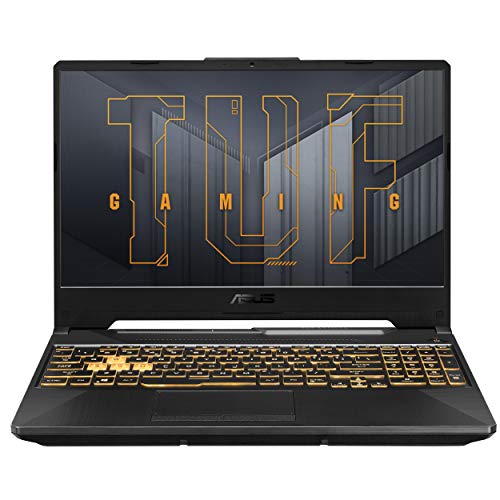
ASUS TUF Gaming A15 — Hard-wearing workhorse
The TUF A15 is the pick for buyers who measure a laptop in years of being carried, opened, closed, slid into bags and set down hard. ASUS’s TUF family builds durability testing into its identity, and this configuration gives that chassis a sensible modern heart: an AMD Ryzen 5 7535HS, a GeForce RTX 3050, 16GB of DDR5 memory and a 512GB PCIe drive, behind a 15.6-inch Full HD panel at 144Hz. It is the workhorse specification — nothing fragile, nothing missing, nothing pretending.
The Ryzen platform suits the machine’s likely life. A TUF will spend its weekdays in lectures, offices and site visits, where the HS-series chip’s efficiency and the DDR5 platform’s responsiveness are what the owner actually feels, and its evenings in games the RTX 3050 handles at the settings this guide has consistently described for that chip: esports at speed, the back catalogue in full, new releases at considered settings. A workhorse is not a thoroughbred, and confusing the two is how buyers end up disappointed by a machine doing exactly its job.
Serviceability is the quiet headline. TUF designs tend to welcome the owner who eventually opens the bottom panel — to clean fans, to grow storage, to replace a battery in year four — and that welcome compounds over a long ownership. Pair it with the family’s track record and the A15 becomes the recommendation for the buyer who keeps machines until they are genuinely done, and wants the chassis to cooperate with that plan.
- Display: 15.6-inch Full HD, 144Hz
- Graphics: GeForce RTX 3050
- Processor: AMD Ryzen 5 7535HS
- Memory and storage: 16GB DDR5, 512GB PCIe SSD
- Design focus: durability-tested chassis, owner-serviceable layout
Strengths
- Built for rough daily handling and long service.
- Efficient Ryzen platform and DDR5 keep weekday work feeling brisk.
- Full memory fitted; specification complete as delivered.
Trade-offs
- RTX 3050 sets the gaming ceiling regardless of chassis toughness.
- Styling is utilitarian next to sleeker rivals.
- Storage begins at the class-standard 512GB.
Best for: students, commuters and long-keepers who are hard on hardware. Not suited for: maximum-settings players or design-led buyers.

Lenovo LOQ (RTX 4050) — Frame-generation rung
Lenovo’s LOQ distils the company’s Legion experience into the mainstream, and this configuration is the guide’s frame-generation doorway: a GeForce RTX 4050 with an AMD Ryzen 5 7235HS, 16GB of DDR5 and a 512GB drive, behind a 15.6-inch Full HD panel at 144Hz. The RTX 4050 matters because it carries the previous generation’s full feature set, DLSS frame generation included, at the rung where most of this class’s buyers actually shop. For games that support it, generated frames smooth the demanding scenes that define a title’s feel, and at 1080p the base rates are healthy enough for the technology to shine.
Two inclusions lift the machine beyond its sheet. Wired Ethernet sits alongside Wi-Fi 6 in its connections, and for online players that port is worth more than a spec-sheet flourish elsewhere, because latency stability decides competitive matches in ways a faster chip cannot rescue. The design, meanwhile, is deliberately calm — a laptop that can open in a workplace without a lighting show — which in shared households and hybrid jobs is a feature adults notice weekly.
The honest limit is processor cores. The Ryzen 5 7235HS is a leaner design than the chips in the Katana and the Intels here, and buyers who stream gameplay, edit long video or compile large projects will reach its edges first. Pure players at 1080p rarely will, because their bottleneck lives in the graphics chip by design. That is the LOQ’s wager, and for its intended owner it is the right one: money on the graphics rung and the full memory, saved where the games do not look.
- Display: 15.6-inch Full HD, 144Hz
- Graphics: GeForce RTX 4050 with frame generation
- Processor: AMD Ryzen 5 7235HS
- Memory and storage: 16GB DDR5, 512GB SSD
- Connections: Ethernet, Wi-Fi 6, USB-C per listing
Strengths
- Frame generation at the class’s mainstream rung.
- Wired Ethernet for stable online play.
- Calm design and full memory make it an easy household citizen.
Trade-offs
- Fewer processor cores than the strongest picks for creation work.
- 512GB storage, the familiar class constraint.
- Graphics wattage still deserves a listing check before ordering.
Best for: mainstream and online players who want current features without flagship money. Not suited for: heavy streamers and creators who lean on processor cores.

HP Victus 15 (RTX 3050, 8GB) — Upgrade-path value
The second Victus in this guide is a lesson in reading past a headline. Its modern ingredients are real: an Intel Core i5-13420H, a GeForce RTX 3050, a 512GB NVMe drive and a 15.6-inch Full HD panel at 144Hz. But it ships with 8GB of DDR4 memory, and this guide’s position on that figure has not softened across any of its articles: 8GB is below the floor for a new gaming laptop, constraining newer games and everyday multitasking alike, and it converts this machine from a purchase into a project. The project is a good one — a memory upgrade is the cheapest meaningful upgrade in computing — but it must be entered knowingly and completed promptly.
Compare it directly with its sibling above and the class’s logic sharpens. The RTX 2050 Victus carries the weaker graphics chip yet arrives finished, its 16GB fitted and its ceiling purely graphical. This machine carries the stronger chip and the faster panel behaviour, yet arrives incomplete, its ceiling partly clerical until an owner opens the panel and fixes the memory. Which compromise suits you depends on whether your constraint is money now or patience now — but only one of these machines plays properly on its first night without a screwdriver, and it is not this one.
Bought with the upgrade budgeted and scheduled, the value case is respectable: a current processor, a real gaming chip, a fast screen and HP’s inoffensive Victus design, with the memory errand as the single toll. Bought casually, on the strength of the processor and graphics names in the listing’s title, it is the purchase most likely in this entire guide to generate a confused review about stutter that was never the graphics chip’s fault. The difference between those outcomes is entirely in the reading, which is why this guide spends so many words on one number.
- Display: 15.6-inch Full HD, 144Hz
- Graphics: GeForce RTX 3050
- Processor: Intel Core i5-13420H
- Memory and storage: 8GB DDR4 as shipped — upgrade to 16GB promptly; 512GB NVMe SSD
- Class note: value configuration of the current Victus line
Strengths
- Current processor and a fast 144Hz panel at the class’s friendly end.
- The one shortfall is the cheapest kind to fix in all of computing.
- Victus design is discreet enough for work and shared spaces.
Trade-offs
- 8GB of memory limits games and multitasking until upgraded.
- DDR4 rather than the DDR5 fitted to most rivals here.
- Requires an owner willing to open the machine or pay a shop to.
Best for: shoppers happy to treat a memory stick as part of the purchase price. Not suited for: anyone wanting a finished machine on night one.
Why Do Cooling and Colour Matter More Than the Headline Specs?
Put two of this class’s laptops side by side with the same graphics name and the differences that emerge over a long session are thermal. A gaming laptop’s processor and graphics chip share a power and heat budget inside one chassis, and the design of heatpipes, fins, fans and vents decides how much of the paper performance is still available in hour two. This is why the established families dominate this guide: their cooling behaviour across generations is documented, their fan curves are mature, and their worst habits are known quantities a buyer can weigh rather than surprises an owner discovers.
Colour is the other quiet divider. The class’s friendliest listings frequently use panels with narrower colour coverage, a legitimate economy for pure gaming that becomes a genuine limitation the moment the same screen is asked to judge photographs, grade video or match a brand colour. None of the picks here hides its panel type, and buyers with creative work in their lives should read the listing’s colour claims — or their absence — as carefully as the refresh rate. A screen is the component you look at for every second of ownership; its quiet specifications deserve the same diligence as its loud ones.
How Should You Set Up a 15.6-Inch Gaming Laptop for Work and Play?
Give the machine two personalities from the first evening. The manufacturer’s utility holds power and fan profiles: set a quiet or balanced profile as the daily default for documents, calls and browsing, and a performance profile for plugged-in gaming, so the laptop’s manners match its moment without daily fiddling. Confirm the panel is running at its full 144Hz or 165Hz in Windows settings, because a high-refresh screen idling at a low default rate is the class’s most common silent disappointment. Apply Windows updates, then the graphics driver from NVIDIA’s channel, then your games and work software, in that order.
Arrange the desk around the ports you actually have. Most of these machines charge from a barrel or proprietary connector and dock happily through USB-C for display and peripherals; the LOQ adds the Ethernet cable competitive players should actually plug in. A stand that lifts the rear improves both airflow and posture, and an external keyboard and mouse turn the laptop into a desktop that happens to fold. Finally, plan storage before the library plans it for you: keep the active games on the internal drive, archive the rest externally, and a 512GB machine will feel as roomy in year two as a careless terabyte does.
Comparison Table
| Laptop | Graphics | Memory | Watch out for |
|---|---|---|---|
| MSI Katana 15 | RTX 4060 | 16GB DDR5 | Verify graphics wattage for the configuration |
| HP Victus 15 (RTX 2050) | RTX 2050 | 16GB DDR5 | Earlier-generation graphics ceiling |
| Acer Nitro V 15 (RTX 5050) | RTX 5050 | 16GB | 512GB drive fills quickly |
| ASUS TUF Gaming A15 | RTX 3050 | 16GB DDR5 | Entry graphics rung |
| Lenovo LOQ (RTX 4050) | RTX 4050 | 16GB DDR5 | Leaner processor core count |
| HP Victus 15 (RTX 3050, 8GB) | RTX 3050 | 8GB DDR4 | Memory upgrade required promptly |
What Mistakes Do Buyers in This Class Keep Making?
Badge arithmetic is the first: assuming two laptops with the same graphics name perform alike, when wattage and cooling can separate them by more than a model rung. The second is memory blindness — reading the processor and screen in the listing title and never reaching the line that says 8GB. The third is panel pride misdirected: paying for resolution the hardware cannot feed, or ignoring colour coverage the buyer’s creative work genuinely needs. Each mistake is a failure of reading rather than of budget, which is why this guide repeats its checks until they become reflexes.
The fourth mistake is lifestyle denial. A 15.6-inch gaming laptop is a bag-sized machine with a substantial charger, fans that speak during play and a battery that bridges rather than roams. Buyers who wanted an ultraportable and bought this class on price spend years resenting a machine that never claimed to be one. The fifth is setup neglect: profiles never touched, refresh rate never verified, vents against a wall, a library installed until the drive gasps. One attentive evening prevents all of it, and this class — mature, documented, predictable — rewards that evening more reliably than any other in gaming.
How Does This Class Age, and When Should You Upgrade Instead?
A well-bought 15.6-inch machine ages gracefully because its target is stable. Full HD remains the resolution most games are built around, so the panels here never become the bottleneck, and the stronger graphics rungs — the Katana’s 4060, the frame-generation picks — stretch their relevance with features that did not exist when cheaper machines were designed. The entry picks age differently: the RTX 2050 Victus will spend its life in the lighter library it was bought for, contentedly, while the 8GB Victus’s fate is decided entirely by whether its owner completes the memory errand.
Upgrade the machine you own when the pinch is specific and fixable — memory, storage, a worn battery, dusty cooling — and replace it when the pinch is the graphics chip itself, because that is the one component this class solders beyond reach. Owners who internalise that single distinction time their purchases well: they buy the graphics rung for the years ahead, keep the fixable things fixed, and replace on a rhythm set by their library rather than by launch events.
What Should You Check in the First Week of Ownership?
Verify the machine against its listing before the return window becomes a memory. System information should confirm the processor, graphics chip, memory amount and drive size you ordered, because this class’s families ship near-identical boxes with meaningfully different contents. Run the panel at full brightness and full darkness looking for dead pixels and uneven backlight, play a familiar game and learn the fan voice on each profile, and test the ports with your own peripherals rather than assuming them.
Then do the unglamorous paperwork while it is easy: register the warranty, save the invoice somewhere findable, and note the return deadline. If a hinge creaks unevenly, a fan ticks, or heat pools in one strange place, exchange inside the window rather than adapting around a defect. These are high-volume machines from mature lines; the vast majority are flawless, and the system for the minority is built for exactly this week.
What Does Daily Life Look Like on a Machine From This Class?
Picture the ordinary week rather than the launch-day benchmark. The laptop opens at breakfast for mail and news, fans silent, screen bright enough for a kitchen. It rides in a backpack that was not designed for it and survives, because at this size every bag is a laptop bag. Work hours are uneventful in the best way: documents, calls, a browser’s worth of tabs, the webcam doing its duty, the keyboard handling a day of typing without the compromises smaller decks impose. This class’s unsung virtue is that its gaming hardware idles into a completely ordinary, completely competent office computer.
Evenings reveal the second life. The same machine that took minutes in a meeting now loads a game at full panel refresh, fans rising to a purposeful note that a closed door or a headset renders irrelevant. A partner watches a film on the television while a co-op session runs at the desk; a student finishes an assignment and joins friends in the same chair, on the same screen, without moving rooms. That continuity — one machine, every role, no ceremony — is what the 15.6-inch class sells beneath its specifications, and it is why so many households standardise on it.
The frictions are the known ones, priced in by anyone who read this far: the charger is a brick and it travels with intent, the battery is a bridge between sockets rather than a day of freedom, and the machine asks for a desk or a table rather than a lap for its best work. Owners who accept those terms describe the class with a word rarely applied to gaming hardware: settled. The machine stops being a purchase and becomes furniture, in the affectionate sense.
How Should Different Players Choose Within This List?
The competitive player should weight the panel and the network. Refresh rate and response behaviour decide how the game feels at this level, wired Ethernet decides how it behaves online, and by those lights the Nitro V’s 165Hz screen and the LOQ’s Ethernet port are the list’s competitive signatures, with graphics muscle beyond the 4050 rung yielding diminishing returns in the titles that dominate ranked play. Spend the saving on the mouse, the headset and the chair; your aim lives there, not in a benchmark.
The story-game player should invert the weighting. Single-player libraries lean on the graphics chip continuously and reward headroom, frame generation and storage, which pushes the decision toward the Katana’s complete specification or the Nitro’s current generation, with the entry picks reserved for backlogs rather than new releases. The creator-player — streaming, editing, recording — should weight processor cores and memory completeness, where the Katana again leads and the LOQ’s leaner processor asks its one honest question. The travelling player should weight the chassis and the family’s service record, which is the TUF’s entire argument. The class is wide enough that “best” is a question about your library and your week, and this list was built so each of those readers finds a different correct answer in it.
How Do You Keep One Fast and Cool for Years?
Maintenance in this class is light but not optional. Dust is the slow thief: it mats across the fin stacks until the cooling that justified the purchase can no longer reach the chips, and the machine begins throttling in sessions it once handled easily. Twice a year, with the machine off, work a soft brush and short bursts of air through the vents; owners comfortable opening the bottom panel — the TUF’s design philosophy encourages it — can do the job properly in fifteen minutes. Keep the rear and side vents unobstructed in daily use, and let a stand or even a book’s worth of elevation help the intakes breathe.
Software housekeeping is the other half. Keep graphics drivers current from NVIDIA’s channel, let Windows update on your schedule rather than its own mid-game ambitions, audit startup applications each season, and hold free space on the system drive so the NVMe and the operating system both keep their easy speed. Check battery health annually in the manufacturer’s tool and recalibrate your expectations rather than your machine: a well-kept 15.6-inch laptop from this list should feel recognisably itself in year four, and when it does not, the cause is almost always one of the items in this section rather than age itself.
When Should You Look Outside This Class Instead?
Three readers should take their shortlist elsewhere. The constant traveller who games in hotels and lounges will feel every gram and every decibel of this size, and the 14-inch class exists for them. The desk-bound maximalist, whose laptop will never move and whose library is the heaviest available, is buying cooling and screen area they are not getting here; the large class serves them better. And the ultra-budget buyer whose real library is browser games and classics may be over-buying entirely, better served by a modest everyday laptop and honesty about their habits.
Everyone else — which is most people who game on a laptop at all — is standing in the right aisle. This class’s combination of price, power, screen, keyboard and maturity is not an accident of marketing but the settled result of a decade of manufacturers competing at the size physics likes best. Choose within it by wattage, memory and panel rather than by badge, and the machine you bring home will justify the class’s dominance every day you use it.
What Accessories Actually Earn Their Place Beside One?
The honest accessory list for this class is short, and most of it is about posture and heat rather than spectacle. A stand that raises the rear of the machine improves airflow and screen height in one purchase. An external keyboard and mouse for the home desk turn long sessions into ergonomic ones and keep the laptop’s own deck as the travel set. A headset matters more than any lighting accessory ever will, because it solves the fan-noise question for everyone else in the room while improving your own awareness in competitive games. A padded sleeve protects the corners that actually meet the world inside a general-purpose bag.
Storage is the one upgrade-adjacent purchase worth planning early: a capacious external drive for the archived library, or a second internal drive where the chassis offers the bay, confirmed on the listing before the machine arrives. A compact travel charger is a maybe — only where the manufacturer supports USB-C charging at a useful wattage, and always as a companion to the full gaming brick rather than a replacement for it. Everything beyond that list is decoration, and decoration is a fine thing to buy with open eyes and a finished specification, never instead of one.
How Do You Read a Listing in This Class Like an Editor?
Listings in this class reward a forensic habit, because one family name can hide a dozen configurations. Read in this order: graphics chip and its stated wattage; memory amount and type; panel resolution, refresh rate and any colour claim; storage size and whether a second bay exists; processor exact model; then ports, weight and warranty. When a listing omits a figure — most often wattage or colour coverage — treat the omission as the figure: manufacturers print their strengths. Cross-check the model code against the manufacturer’s own specification page, which takes two minutes and has saved more buyers than any review ever written.
Beware the configuration shuffle in marketplace listings especially: a headline built on the family’s best configuration attached to a product page whose options quietly select a weaker one. Choose options deliberately, re-read the summary before checkout, and screenshot the configuration you ordered. In a class this crowded, diligence is not paranoia; it is the entire skill the purchase requires, and it is a skill this guide has been teaching in every section.
What Role Does the Second Victus Play in Understanding Value?
It is worth pausing on the guide’s most instructive comparison, because it teaches the class in miniature. Two HP Victus machines sit in this list. One carries the oldest graphics chip here and a full memory configuration; the other carries a newer chip and half the memory. A badge-first shopper picks the second instantly. An editor reads both spec sheets whole and sees two different compromises: a graphical ceiling you cannot change, and a memory ceiling you can change in fifteen minutes with a screwdriver and a modest stick of DDR4. Neither is the “bad” laptop. They are answers to different questions — do you want it finished, or do you want it stronger eventually?
That is the class’s deepest lesson, and it generalises to every listing a reader will ever open. Specifications are not a score; they are a set of doors, some locked and some merely closed. Graphics chips and panels are locked at purchase. Memory and storage are usually closed doors with handles. Processors are locked, but their importance varies wildly by workload. A buyer who sorts every specification into those two columns — permanent and negotiable — will read this entire market more clearly than most of the people selling into it, and will understand why this guide spends as many words on 8GB of memory as on a flagship graphics chip.
How Does Warranty and Support Fit Into a Class This Crowded?
When specifications converge, ownership infrastructure becomes a real differentiator, and this class’s established families earn part of their dominance there. A mature line means spare parts exist, service centres have seen the chassis before, firmware updates arrive on a cadence, and a question typed into a search engine at midnight returns a hundred owners who met the same quirk before you. None of that appears on a specification sheet, and all of it appears in year three, which is when laptops are actually owned rather than merely purchased.
Practical steps cost nothing. Buy from a listing whose warranty terms you can read in full before checkout, register the machine in its first week, and keep the invoice with the serial number somewhere that survives a house move. Note whether the warranty covers the battery and for how long, since that component’s wear is the one certainty in laptop ownership. If you are choosing between two near-identical configurations in this guide and cannot separate them on hardware, separate them here: the family whose support story you can verify is the tiebreaker that will still matter when the unboxing is forgotten.
Should You Wait for the Next Generation or Buy From This List?
Every buyer in a fast-moving class meets the temptation to wait, and this class rewards a clear rule. Wait when a announced generation is weeks away and your current machine still serves; buy when the need is present, because a laptop’s value is delivered in evenings of use, not in launch comparisons. The current list already spans three graphics generations side by side, which is itself the market’s confession that generations overlap for years and that a well-chosen machine from any of them serves its library faithfully. The reader who buys the complete configuration today, at the rung their games require, will not be made a fool by next season’s keynote. They will be too busy playing.
What About Noise, Heat on the Desk and Playing in Shared Rooms?
A gaming laptop’s social life is decided by its cooling manners. In shared rooms, the practical techniques are simple and effective: play on the balanced profile rather than the maximum one when others are present, position the machine so its exhaust does not fire into a wall inches away or into the person beside you, and use a headset, which removes your need to raise game volume over fan noise in a spiral every household recognises. The larger chassis in this class have an inherent advantage here — more fin area and larger fans move the same air at lower, less frantic speeds — and it is one more reason the complete, well-cooled configurations feel civilised beyond their benchmarks.
Desk heat deserves a sentence of its own. These machines exhaust real warmth during play, and a laptop sitting in a cupboard-like desk nook will recycle its own exhaust and run hotter than the same machine in open air. Give the vents a hand’s breadth of clearance, keep papers and books out of the exhaust path, and the cooling system you paid for can actually do its work. Comfort, in this class, is mostly ventilation plus honesty about profiles.
A Short Word on Resale and Handing a Machine Down
This class’s maturity pays one final dividend: its machines remain useful and legible to the next owner. A complete configuration — the Katana pattern, or an entry Victus with its memory sorted — hands down gracefully to a younger sibling, a parent discovering games, or a household’s second desk, because its specifications need no explaining and its family name carries a known service story. Machines bought incomplete or at the ragged edge of their class age into e-waste conversations sooner. Buying the finished specification is therefore not only a present-tense kindness to yourself; it is the difference between a laptop with a second life and one without, and in a class bought by the millions that difference is worth the small premium it usually costs.
Final Recommendation
Start from the reference: the MSI Katana 15 is the configuration this class revolves around, complete in every column, and it is the right answer for the buyer who wants to decide once. Step sideways for your reasons — the Acer Nitro V 15 for the newest generation and the fastest panel, the Lenovo LOQ for frame generation with wired networking and calm manners, the ASUS TUF A15 for a chassis that will outlast rough handling. At the entry edge, choose your compromise consciously: the RTX 2050 Victus arrives finished for a light library, while the 8GB Victus arrives stronger but incomplete, a bargain only in the hands of an owner who upgrades it at once. Fifteen point six inches is where gaming laptops grow up, and a buyer who reads wattage, memory and panel before badge will own the version of that maturity that suits them for years.
Frequently Asked Questions
Why is 15.6 inches the most popular gaming laptop size?
Because it is the smallest size that stops forcing compromises: room for proper cooling, a full keyboard deck, a large panel and a battery that bridges a workday’s gaps, all at prices the bigger and smaller classes struggle to match. Every manufacturer competes here, which keeps designs mature and choices honest.
How much memory should a 15.6-inch gaming laptop have?
Sixteen gigabytes is this guide’s floor for a new machine. It covers modern games and ordinary multitasking without drama. The one 8GB pick here is recommended only as an upgrade project, and its review says so in its badge, its text and its spec list.
Does the RTX 2050 still make sense in a new laptop?
For a light, older or esports-centred library, yes, provided the rest of the machine is complete — as it is in the Victus configuration here, with 16GB of memory and a 144Hz panel. For new demanding releases it is the wrong chip, and this guide labels it accordingly rather than letting the RTX name imply more.
What is the difference between the RTX 4050, 5050 and 4060 picks?
The 4060 is the previous generation’s stronger mainstream chip, the 4050 its frame-generation entry rung, and the 5050 the current generation’s entry with the newest feature set and longest support runway. Which suits you depends on whether you value mature raw performance, mainstream features or the longest horizon.
Should I worry about panel colour coverage if I only game?
Mostly not — games are forgiving of narrower-gamut panels, and refresh rate will matter more to your experience. If the same laptop will edit photos or video for an audience, verify the colour specification on the listing and weight it properly, because that work exposes exactly what gaming hides.
Can these laptops replace a desktop for everything?
For many households, yes, especially docked with a monitor and peripherals. The honest limits are upgradeability — the graphics chip is fixed for life — and sustained cooling compared with a large desktop tower. Buy the graphics rung for the years ahead and the rest of the machine will keep its side of the bargain.
Is a 165Hz screen worth choosing over 144Hz?
It is a genuine but incremental advantage, most visible in fast competitive titles where the hardware can sustain very high frame rates. Treat the Nitro V’s panel as a strong supporting argument rather than a deciding one: graphics wattage, memory completeness and cooling will shape your ownership more than the extra refresh step, and a buyer choosing between a complete 144Hz machine and an incomplete 165Hz one should take the complete machine every time.
How do I know if a listing’s configuration matches its headline?
Select your options deliberately, then re-read the order summary line by line against the headline’s claims — graphics chip, memory, storage and panel — before paying. Marketplace pages sometimes attach a family’s strongest headline to a page whose default option is weaker. A screenshot of the configuration you ordered is cheap insurance if anything arrives differently.
Related Guides
Round out your shortlist with best 1080p gaming laptops for the resolution-first view of this market, best 14 inch laptop gaming laptops if portability starts to matter more than size, and best large gaming laptops when a 17 or 18 inch screen tempts you instead. You may also want our guide to best 32GB RAM laptops for work.


