What's inside
- Where to Buy and What This Guide Covers
- Key Takeaways
- Quick Picks: The Shortlist for 20 Megapixel Cameras
- How We Chose These Picks
- The Six Picks in Detail: Which 20 Megapixel Cameras Fit Which Job?
- What 20 Megapixels Buys on a Small Sensor, and What It Cannot
- Bridge Versus Action: Two Answers to the Word Camera
- Side-by-Side Comparison
- How Do You Choose the Right 20 Megapixel Cameras?
- Setting Up and Getting Consistent Results
- What Are the Most Common Mistakes Buyers Make?
- The Moon Test: What Long Zooms Are Really For
- Action Stills: Getting Photographs From a Video Tool
- Field Notes: Small Practices That Decide Results
- Final Recommendation
- Frequently Asked Questions
- Related Guides
As an Amazon Associate I earn from qualifying purchases. This post may contain affiliate links at no extra cost to you.
gizmoverdict.com is reader-supported. When you buy through links on our site, we may earn an affiliate commission.
Where to Buy and What This Guide Covers
The best 20 megapixel cameras split into two families that share a number and almost nothing else, and this guide’s first job is keeping them apart. Three picks are bridge cameras: substantial bodies, long optical zooms, and 20 megapixel sensors intended for still photography at distances a phone cannot reach. Three are action cameras: tiny waterproof bodies whose 20 megapixel figure describes snapshot stills, while their real purpose is stabilised video recorded through fixed ultra-wide lenses. Every pick below is labelled with its family wherever it appears.
Why does 20 megapixels endure as a category? Because it sits at a practical sweet spot for small sensors. Twenty megapixels crops respectably, prints large, and does not punish a modest sensor with the noise that ultra-high counts invite in this class. It is also the figure the bridge and budget action markets standardised on, so a buyer searching the term finds real choice rather than a museum. The differences that matter are lens, body and purpose, and those are what the reviews spend their words on.
Where to buy: each of the six cameras carries an Amazon link in the Quick Picks table and a second at its review heading. Bridge bundles deserve a contents check, since cases, cards and spare batteries move between listings, and the action cameras’ value often lives in their included mounts and housings. Confirm what the exact box contains on the day you order, particularly which waterproof housing and how many batteries accompany the action picks.
Key Takeaways
- All six picks genuinely carry 20 megapixel sensors, split between two different families.
- The Kodak AZ653, Kodak AZ405 and Minolta MN68Z are bridge cameras built for stills at long range.
- The AKASO EK7000, AKASO Brave 4 and Hiicam are action cameras whose 20MP figure describes snapshots.
- Bridge zoom figures are optical and real; action camera zoom figures are digital cropping.
- Small sensors in both families reward daylight and forgive little after dark.
- Choose the family by subject distance first, then compare inside it.
Quick Picks: The Shortlist for 20 Megapixel Cameras
| Pick | Badge | Why it earns its place |
|---|---|---|
| KODAK PIXPRO AZ653 Astro Zoom | 65x bridge with real 20MP files | The fullest bridge expression here: 65x reach, stabilisation and honest 20MP stills. |
| KODAK PIXPRO AZ405 | 40x bridge on AA power | Forty times zoom and AA convenience in the household-friendly bridge. |
| Minolta MN68Z | 68x reach with 4K video | Maximum magnification at 68x, with 4K video for daylight documentation. |
| AKASO EK7000 | 20MP action stills, 4K30 video | A tough, inexpensive action camera whose 20MP stills document adventure. |
| AKASO Brave 4 | Action all-rounder with 20MP stills | The polished AKASO with selfie framing for riders who record themselves. |
| Hiicam 4K Action Camera | Dual-screen 20MP action camera | Dual touch screens and the widest lens in the guide for adventure presenters. |
How We Chose These Picks
Verification came first: each pick’s 20 megapixel claim was checked against its maker’s stated sensor specification, and cameras advertising interpolated counts above their real sensors were excluded. That left a clean pool, which was then divided by family rather than ranked as one list, because a single ranking across bridge and action cameras would crown whichever family’s strengths the scoring happened to favour and mislead everyone else. Each review therefore argues its pick’s case inside its family and names the cross-family buyer it might still suit.
Within the bridges, the axes are reach, power and refinement. The AZ653 maximises reach with refinement close behind; the AZ405 trades some reach for AA universality; the MN68Z pushes magnification furthest and asks patience with polish. Within the action cameras, the axes are screens, ecosystem and bundle value, since sensors and headline video modes are closely matched. The EK7000 is the value baseline, the Brave 4 polishes self-framing, and the Hiicam pushes width and touch control.
Video was scored as a secondary capability for bridges and the primary one for action cameras, mirroring how owners actually use them. A bridge’s 1080p documents the distant subject its lens found; an action camera’s stabilised 4K is the product, with stills as souvenirs. Low-light expectations were set by sensor physics rather than brochure adjectives: every sensor here is small, every review says what that means at dusk, and no pick was allowed to borrow credibility from a larger-sensor camera it does not resemble.
Ownership costs completed the picture. Bridges consume batteries at long-zoom rates and deserve spares; action cameras consume mounts, housings and cards, and their bundles differ enough to change rankings between listings. The guide therefore judges the action picks partly on ecosystem and box contents, and reminds readers at each step that the exact listing in front of them, not the model name in the abstract, is what arrives at their door.
The Six Picks in Detail: Which 20 Megapixel Cameras Fit Which Job?

KODAK PIXPRO AZ653 Astro Zoom — 65x bridge with real 20MP files
The AZ653 is what most people mean by a 20 megapixel camera: a bridge body whose 20 megapixel sensor sits behind a 65x optical zoom starting at 24mm. That lens range is the story. At the wide end it photographs rooms and landscapes; at the long end it reaches across a lake to a heron, frames the moon with recognisable surface shading, and pulls a distant lighthouse into a composition. Optical image stabilisation works constantly at those magnifications, because at 65x a heartbeat is an earthquake.
Bridge cameras ask for a photographer’s patience in exchange for that reach. Autofocus is deliberate rather than instant, the electronic viewfinder and rear screen are workmanlike, and the small sensor behind all that glass shows its limits after sunset, when noise rises and detail softens. Video is 1080p, adequate for documenting what the lens found. Judged as a daylight reach machine for a buyer who refuses interchangeable lenses, the AZ653 is the most complete expression of the 20 megapixel bridge idea in this guide, and its price class makes the experiment affordable.
Key specifications — AZ653:
- Sensor: 20 megapixels, bridge-class sensor
- Lens: 65x optical zoom from 24mm wide angle
- Stabilisation: Optical image stabilisation
- Video: 1080p Full HD recording
- Body: Bridge body with grip and viewfinder
Strengths
- 65x optical reach covers wildlife, moon and distant detail
- 24mm wide end keeps landscapes and interiors in play
- Stabilisation makes the long end genuinely usable handheld
Trade-offs
- Small sensor loses detail quickly as light falls
- Autofocus pace suits still subjects better than action
- Body is far too large for any pocket
Best for: daylight photographers who want extreme reach without interchangeable lenses.
Not suited for: evening shooters, sports photographers, or anyone needing pocket size.

KODAK PIXPRO AZ405 — 40x bridge on AA power
The AZ405 trims its bigger sibling’s formula to a friendlier scale: the same honest 20 megapixel resolution, a 40x optical zoom from 24mm, stabilisation, and AA batteries feeding the whole outfit. Forty times zoom is not a consolation prize. It reaches school stages from the back row, birds at a garden feeder from a kitchen window, and architectural detail from the street, all with real glass rather than cropping. For many households it is the point where reach stops being a compromise at all.
AA power shapes its character the way it does in every camera that uses it: universal availability, leisurely flash recycle, and a drawer-friendly life with no charger to lose. The bridge body gives a proper grip and viewfinder, which matter at full zoom more than any menu feature. Low light remains the family weakness, and video is a plain 1080p. As a household’s one serious camera, kept for trips, performances and the garden’s wildlife, the AZ405 balances reach, resolution and running cost with unusual common sense.
Key specifications — AZ405:
- Sensor: 20 megapixels, bridge-class sensor
- Lens: 40x optical zoom from 24mm wide angle
- Stabilisation: Optical image stabilisation
- Video: 1080p Full HD recording
- Power: AA batteries
Strengths
- 40x reach handles stages, feeders and landmarks convincingly
- AA batteries keep it running anywhere on earth
- Grip and viewfinder steady long-zoom framing
Trade-offs
- Indoor and evening files soften noticeably
- AA pace means considered shooting, not bursts
- Bridge bulk rules out casual pocket carry
Best for: households wanting one long-zoom camera for trips and events.
Not suited for: low-light specialists or travellers packing ultralight.

Minolta MN68Z — 68x reach with 4K video
The MN68Z carries the Minolta name into the modern bridge market with the longest reach in this guide, 68x optical zoom, around a 20 megapixel sensor that also records 4K video. On paper it out-guns the Kodaks at both ends of the comparison. In the hand it is a similar proposition: a gripped bridge body, stabilisation doing heavy work at full extension, and manual controls for photographers who like to set exposure deliberately rather than accept the camera’s first opinion.
The honest cautions are about refinement rather than reach. Menus and focusing behaviour in this price class reward patience, and the small sensor’s 4K should be judged as detailed daylight video rather than a low-light tool. Buyers should also verify exactly which accessories and battery the box contains, because listings in this segment vary. What the MN68Z unquestionably delivers is the 20 megapixel bridge concept at maximum magnification, and for a moon photographer or a distant-shoreline specialist on a budget, that single fact may settle the comparison before refinement enters it.
Key specifications — MN68Z:
- Sensor: 20 megapixels, bridge-class sensor
- Lens: 68x optical zoom, longest reach here
- Stabilisation: Image stabilisation fitted
- Video: 4K Ultra HD plus Full HD options
- Controls: Manual exposure controls available
Strengths
- 68x zoom reaches subjects the other bridges cannot frame
- 4K video adds detail for daylight documentation
- Manual controls reward deliberate photographers
Trade-offs
- Refinement and menu polish trail the bigger brands
- Small sensor limits evening and indoor quality
- Box contents vary by listing, so verify before ordering
Best for: reach-obsessed budget photographers, moon and shoreline specialists.
Not suited for: buyers who value slick menus and fast autofocus over magnification.

AKASO EK7000 — 20MP action stills, 4K30 video
The EK7000’s 20 megapixels describe something different from the bridges above, and this guide insists on the distinction. In an action camera, the megapixel count governs still photographs pulled from a tiny, rugged, waterproof body, while the camera’s real work is video: 4K at 30 frames per second with electronic stabilisation, recorded through a fixed ultra-wide lens. Its stills are wide, bright documentation of a ride, a dive or a climb. Nobody frames a portrait with it, and nobody was meant to.
Value is the EK7000’s argument. It arrives with a remote control, waterproofing rated for serious submersion in its housing, and a price that makes it a rational risk on a handlebar or a helmet. Image quality in good light is cheerful and shareable; in poor light the small sensor and wide lens produce the softness common to the class. Owners who understand they bought a video tool that also takes 20 megapixel snapshots get a bargain. Owners who expected a bridge camera’s stills discipline from a matchbox get a lesson in reading categories.
Key specifications — EK7000:
- Sensor: 20 megapixels, action-camera stills
- Video: 4K at 30fps with electronic stabilisation
- Lens: Fixed ultra-wide action lens
- Waterproofing: Rated to 131 feet in its housing
- Extras: Remote control and Wi-Fi included
Strengths
- Genuine action toughness at a fraction of flagship prices
- 20MP stills are ample for documenting rides and dives
- Remote control helps solo riders start recording
Trade-offs
- Stills lack the control and reach of any bridge here
- Low-light footage softens quickly
- Zoom figures are digital cropping, not optical reach
Best for: riders, paddlers and travellers wanting cheap, tough documentation.
Not suited for: photographers whose main work is considered still images.

AKASO Brave 4 — Action all-rounder with 20MP stills
The Brave 4 is AKASO’s step-up answer to the EK7000, keeping the formula, 20 megapixel stills, 4K30 video, stabilisation, waterproof housing, and polishing the ownership details. A front-facing display joins the rear screen on many configurations, which matters more than it sounds: action cameras are aimed by guesswork more often than their makers admit, and a selfie screen converts guesswork into framing for riders recording commentary or divers checking an angle before descending.
Comparisons with its sibling should be made on the exact listing, because bundles and included batteries shift the value calculation weekly. The fundamentals are shared: bright-light competence, small-sensor limits after dark, digital rather than optical zoom, and a body built to be risked. Between the two AKASOs, choose on the screen arrangement and bundle contents in front of you. Against the bridges, the Brave 4 is not a rival but a different instrument, and households that travel actively often end up owning one of each kind, for different days.
Key specifications — Brave 4:
- Sensor: 20 megapixels, action-camera stills
- Video: 4K at 30fps with electronic stabilisation
- Lens: Fixed ultra-wide action lens
- Waterproofing: Rated to 131 feet in its housing
- Screens: Rear screen with front display on many configurations
Strengths
- Front display ends the guesswork in self-framing
- Proven formula with wide accessory compatibility
- Stills and video both ample for adventure documentation
Trade-offs
- Shares the class limits in low light and digital zoom
- Bundle contents vary, so comparisons need the exact listing
- No optical zoom for distant subjects
Best for: adventurers who film themselves and want framing certainty.
Not suited for: still photographers needing reach, control or low-light quality.
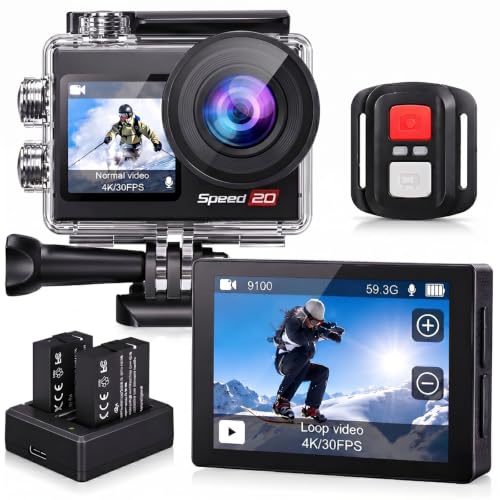
Hiicam 4K Action Camera — Dual-screen 20MP action camera
The Hiicam enters the same arena as the AKASOs with dual touch screens as its calling card: a main rear display and a front display, both touch capable, wrapped around 20 megapixel stills, 4K video and stabilisation. Its 170-degree lens sees the widest view in this guide, swallowing a whole cockpit, handlebar scene or pool lane without aiming precision. For vlog-style adventure recording, where the presenter and the environment share the frame, that width plus the front screen is a coherent design rather than a gimmick.
Apply the standard action-camera audit before buying: the zoom is digital, the low-light ceiling is the class ceiling, and long-term support depends on a smaller brand’s app and accessory ecosystem. Within those terms the Hiicam is a legitimate third flavour of the 20 megapixel action idea, strongest for presenters and weakest for purists who want an established platform. Its inclusion completes this guide’s central lesson: the same 20 megapixel label sits on bridge cameras built for stills at distance and action cameras built for video up close, and confusing the two is the costliest mistake a buyer here can make.
Key specifications — Hiicam:
- Sensor: 20 megapixels, action-camera stills
- Video: 4K recording with electronic stabilisation
- Lens: 170-degree ultra-wide fixed lens
- Waterproofing: Rated to 131 feet in its housing
- Screens: Dual touch screens, front and rear
Strengths
- Dual touch screens make framing and menus effortless
- Widest lens here captures whole scenes without aiming fuss
- Complete action feature set at an aggressive price class
Trade-offs
- Smaller brand means a thinner accessory and support ecosystem
- Digital zoom only, like every action camera here
- Ultra-wide view distorts faces near the edges
Best for: adventure presenters who want front-screen framing on a budget.
Not suited for: buyers investing in a long-term platform of mounts and spares.
What 20 Megapixels Buys on a Small Sensor, and What It Cannot
Twenty megapixels on a bridge or action sensor produces files around 5152 by 3864 pixels: enough for large prints, aggressive cropping and any screen in the house. Cropping is where the count earns its keep in this class. A bird photographed at the long end of a bridge zoom rarely fills the frame; cropping to the central quarter still leaves a five megapixel image that shares and prints at modest sizes perfectly well. That arithmetic, reach multiplied by cropping headroom, is the bridge camera’s whole reason to exist.
The ceiling is set by photosite size. Twenty million sensors on a small chip gather little light each, so as sensitivity climbs to fight dusk, noise climbs with it and processing smooths detail away. No setting defeats this; the craft is working within it, shooting in the best light available, stabilising carefully, and exposing for the subject rather than the sky. Buyers who understand that bargain get startling results from these cameras. Buyers who expect evening performance like a large-sensor camera get disappointment that no megapixel figure could have prevented.
Bridge Versus Action: Two Answers to the Word Camera
A bridge camera is a telescope with a sensor: its design begins with a long lens and builds a body around holding that lens steady. It photographs things far away, deliberately, in a photographer’s posture, both hands up, eye to a viewfinder. An action camera is a witness: it begins with toughness and a wide lens, mounts to the participant rather than observing from a distance, and records the experience from inside it. The two designs share megapixel counts the way a lorry and a motorcycle share wheel counts.
Households often discover they want both witnesses at different times: the bridge for the school play and the garden’s birds, the action camera for the ski trip and the kayak. Budgets force a first choice, and subject distance makes it. If your missed photographs are distant, buy reach first. If your missed footage is the activity itself, buy toughness first. The second camera, whichever it is, can join later, and each family’s used and bundle markets make that second step cheaper than the first.
Side-by-Side Comparison
| Camera | Family | Lens | Video | Power and notes |
|---|---|---|---|---|
| KODAK PIXPRO AZ653 Astro Zoom | Bridge | 65x optical from 24mm | 1080p Full HD | Rechargeable; viewfinder body |
| KODAK PIXPRO AZ405 | Bridge | 40x optical from 24mm | 1080p Full HD | AA batteries |
| Minolta MN68Z | Bridge | 68x optical | 4K Ultra HD available | Rechargeable; verify box contents |
| AKASO EK7000 | Action | Fixed ultra-wide; zoom is digital | 4K at 30fps, stabilised | Rechargeable; housing rated to 131ft |
| AKASO Brave 4 | Action | Fixed ultra-wide; zoom is digital | 4K at 30fps, stabilised | Rechargeable; front display on many bundles |
| Hiicam 4K Action Camera | Action | 170-degree fixed; zoom is digital | 4K, stabilised | Rechargeable; dual touch screens |
The family column should be read first and the megapixel column, deliberately absent because all six match, last in your mind. Within bridges, the lens column separates reach philosophies; within action cameras, the notes column separates framing and ecosystem choices. A buyer who reads the table in that order, family, then lens or screens, then power, will land on the right shortlist of two and can let bundle contents and price on the day make the final call.
Power quietly divides lifestyles again: the AZ405’s AA diet suits intermittent, travel-anywhere use, while the rechargeable majority suit owners with a charging routine. None of the six asks for a subscription, an app account is needed only by the action cameras for their full feature set, or any accessory to start shooting beyond a memory card, which some bundles include and some do not. That card check is the table’s final lesson: confirm it before the box arrives.
How Do You Choose the Right 20 Megapixel Cameras?
Start With Subject Distance, Honestly Measured
Estimate the distance to your three most-wanted subjects in metres, not adjectives. A garden feeder at six metres, a stage at twenty-five, a headland lighthouse at four hundred: each maps to a different zoom requirement, and the bridges separate cleanly once distances are numbers. Forty times zoom covers most household distances with cropping headroom; sixty-five and sixty-eight exist for the genuinely far. Action cameras invert the question: their subjects are within a few metres by definition, and distance beyond that is scenery.
If the honest answer is a mixture, weight by frequency and by regret. The camera that covers the monthly subject beats the camera that covers the annual one, because the annual subject can be rented, borrowed or approached differently. Most mixed households discover the bridge serves more of their calendar, while activity-heavy households, cyclists, paddlers, skiers, discover the opposite. Either discovery is a good outcome; the bad outcome is buying magnification for a life lived at arm’s length, or toughness for a life lived in the back row.
Judge Zoom by the Long End’s Behaviour
Maximum zoom figures impress in listings and wobble in hands. At 65x, the frame magnifies every tremor, so stabilisation quality, grip shape and viewfinder use decide whether the reach is real. Practise the posture these cameras reward: elbows braced, viewfinder to the eye creating a third contact point, breath settled, shutter pressed rather than jabbed. A monopod or a fence post transforms long-end sharpness more than any menu setting, and bridge photographers who learn support craft get results that embarrass their cameras’ price class.
Focus speed at the long end deserves equal realism. Bridge autofocus hunts more as magnification rises and light falls, which is why these cameras suit perched birds over flying ones, landmarks over athletes. Pre-focusing on the feeder, the nest box or the finish line, then waiting, is the professional’s workaround and it works with any pick here. Buyers whose subjects move fast should hear the guide plainly: this entire category, bridges included, is a deliberate-shooting category.
Set Up an Action Camera Like a Witness, Not a Camera
Action camera craft is mounting craft. Choose the mount that puts the lens where the story is: chest for hands-and-trail narratives, helmet for the rider’s exact view, pole for group and selfie angles. Set the field of view deliberately rather than defaulting to widest, because narrower settings reduce the fisheye bending that dates footage. Lock exposure behaviour for the conditions where the platform allows it, since a camera swinging between sky and shadow mid-run will pump brightness distractingly at automatic settings.
Before the real outing, record a two-minute rehearsal at the exact mount and review it on a television. Check the horizon, the visible slice of helmet or handlebar, and the wind noise, then adjust once. Batteries and cards follow the arithmetic of the day: action cameras record continuously and consume both continuously, so spares ride in the bag as standard. The witness only testifies if it was running, charged and pointed correctly when the moment arrived.
Setting Up and Getting Consistent Results
First-Week Tests That Reveal Your Camera’s Character
Bridge owners should spend one session at maximum zoom on a static distant subject, a sign, a chimney, a moored boat, comparing handheld, braced and supported shots enlarged on a computer screen. That comparison teaches the stabilisation’s real limit and the posture your hands need. Then photograph the same subject across the day, morning, noon and dusk, to learn where your sensor’s quality falls away. That knowledge, gained on unimportant subjects, is what you will spend at important ones.
Action owners should record the same short route at every field-of-view and stabilisation setting, then watch for the combination that flatters their activity. Both families benefit from one administrative hour: update firmware, format cards in camera, set the clock, name files sensibly, and establish the folder the footage will live in. Cameras bought in excitement and configured in haste produce archives of mystery files; an hour of order at the start pays interest for years.
Care, Batteries and the Drawer Test
Long-zoom lenses are dust and fingerprint magnets at their front elements, and a microfibre cloth in the bag prevents more ruined shots than any filter. Bridge cameras stored between trips deserve the drawer test applied to their batteries: AA models should not sleep with ageing alkalines inside, and rechargeable models should be topped up monthly rather than discovered empty. Action housings need their seals inspected and rinsed after salt water, because the waterproof rating describes a maintained seal, not a permanent property.
Finally, keep the kit together: camera, spare power, card reader, cloth, in one bag or box per family. The bridge that lives assembled gets taken to the school play; the action camera whose mounts live in three drawers stays home. Organisation is an unglamorous specification no listing prints, and it predicts how many photographs a household actually makes more reliably than any figure on the box.
What Are the Most Common Mistakes Buyers Make?
Treating an action camera’s megapixels as a stills promise
The action picks’ 20 megapixel stills are real and useful for documentation, but they come through fixed ultra-wide lenses with automatic everything. A buyer expecting bridge-style portraits and distant detail from them has misread the category, not been misled by the number. Match the megapixel count to the family it lives in: in a bridge it headlines the product, in an action camera it supports the video.
Paying for zoom you cannot hold steady
A 68x lens in unsteady hands produces magnified blur, and the disappointment gets blamed on the camera. Before buying maximum reach, be honest about your willingness to brace, support and practise. Many buyers get sharper real-world results from the AZ405’s 40x with good posture than from 68x used casually. Reach is a system of lens, stabilisation and technique, and the cheapest component to upgrade is the technique.
Believing digital zoom figures on action cameras
Four and five times zoom claims on fixed-lens action cameras describe cropping the sensor’s output, which discards the resolution the same listing advertises. Filming at native framing and cropping later, if at all, preserves options and quality. The bridges’ optical figures, by contrast, describe glass genuinely magnifying the scene. Learning to ask which kind of zoom a number describes protects buyers across the whole camera market, not only in this guide.
Ignoring the bundle when comparing action cameras
Two listings for the same action camera can differ by a housing, a battery, a mount set and a card, which together outweigh a small price gap. Compare total working kits: camera, housing, two batteries, mounts for your activity, and a card of honest speed. The cheapest bare box is frequently the most expensive route to a working setup, and the difference only becomes visible when the first outing is already booked.
Testing a bridge camera only indoors
Small sensors look their worst in dim rooms, and many bridges are returned by buyers who never took them outside, where they shine. Judge any pick here across its intended habitat: daylight distance for bridges, motion and weather for action cameras. A fair test week, described in this guide’s setup section, prevents both mistaken returns and mistaken keeps, and it costs nothing but a little method.
The Moon Test: What Long Zooms Are Really For
Every bridge owner eventually photographs the moon, and the exercise is a complete education in the category. At 65x the moon fills a satisfying portion of the frame; exposure must be set manually or by spot metering, because the camera’s automatic brain exposes for the black sky and blows the disc to white. A tripod or a beanbag, a self-timer to settle vibration, and the result is a recognisable lunar surface from a camera that costs less than a single telephoto lens for a system camera.
The same discipline, spot exposure, support, patience, transfers to every long-zoom subject: the heron, the lighthouse, the distant spire. Bridge photography rewards the photographer who treats the camera as an instrument to be set rather than a box to be pointed. That is why enthusiasts defend these cameras against phone comparisons: the phone may match the snapshot, but the bridge teaches and rewards a craft, and its failures are instructive rather than algorithmic.
Action Stills: Getting Photographs From a Video Tool
Action cameras take their best stills when the owner stops treating the shutter button as the main event. Burst modes capture the peak of a jump or a trick more reliably than timing does; extracting a frame from 4K video yields an eight megapixel still that is often sharper than a hurried snapshot, because the video pipeline was already stabilised and exposed. Scheduling interval shots on a mounted camera documents a whole climb or build without interrupting it, a trick travel photographers use constantly.
Composition follows the lens: get close, because the ultra-wide view shrinks anything distant to a speck, and place the subject off-centre where the distortion bends least. Shoot more than feels necessary, since the camera’s screen is a poor judge at arm’s length in sunlight. Reviewed at home, a day’s action stills form a document no posed photography matches, and the 20 megapixel ceiling is rarely the limit on how good they look. Light and proximity are, as they are everywhere in this guide.
Field Notes: Small Practices That Decide Results
Carry the bridge cameras with the lens hood reversed or a cap tethered, because front elements on long zooms collect fingerprints precisely when handled most, at the start of an outing. A smudged element at 65x does not merely soften the centre; it veils the whole frame with glow in bright light. The ten-second wipe before raising the camera is the cheapest sharpness available in this entire guide.
Learn the half-press pre-focus habit for perched birds: focus on the feeder or branch where the subject will land, hold, and wait. Bridge autofocus at full zoom is too deliberate to chase arrivals, and the pre-focused trap turns that weakness into a method. Generations of bird photographers built their portfolios on exactly this patience with slower equipment than anything sold today.
For the moon, expose manually: start near the settings you would use for a sunlit landscape, because the moon’s surface is sunlit rock. Automatic metering exposes for the black sky and returns a white disc. A tripod or beanbag, the self-timer, and two or three test frames at different exposures produce, within ten minutes, the photograph that sells most owners on their bridge camera permanently.
Set the action cameras to their widest field of view only when the scene deserves it. Narrower settings reduce edge distortion and make subjects larger in frame, which usually matters more than the extra scenery. The choice takes five seconds in a menu and changes the character of the footage more than any resolution setting the camera offers.
Rinse action camera housings in fresh water after sea use, and inspect the seal for sand or hair before closing it next time. The depth rating describes a clean, intact seal; a single grain at the gasket is the difference between a waterproof camera and a drowned one. This two-minute ritual is the entire maintenance contract of the action family, and skipping it voids the promise silently.
Keep bridge and action batteries on different charging shelves if you own both families. Their packs look similar in a drawer and differ in every way that matters. A labelled box per camera, containing its charger, spare pack and card reader, ends the archaeological dig through the household’s cable drawer that otherwise precedes every outing.
Photograph a resolution test informally once: a detailed distant subject, a brick wall with signage, at several zoom settings, and view the results at full size. You will learn exactly where your bridge’s lens is sweetest and where it begins to soften, knowledge that shapes every later decision about how far to zoom versus how much to crop.
Use exposure compensation as your main creative control on the bridges. Bright skies fool their meters into silhouetting the subject; a deliberate positive adjustment restores the bird, the building or the boat. The control is one button away on all three bridges, and mastering it improves more photographs than any other single skill this class of camera offers.
For action stills, use burst mode for the peak moment rather than a single frame. The camera chooses nothing; you choose afterwards from a strip of near-identical frames, one of which caught the exact instant. Deleting the rest costs a minute. This is the correct way to exploit a video-first camera’s stills, and it routinely produces the day’s best photograph.
Name files by event at import, because bridge and action cameras both generate anonymous sequences that become indistinguishable within a month. A folder per outing, named with place and date, keeps a decade of distant birds and descents findable. The archive’s value compounds with its organisation and evaporates without it, regardless of the megapixels involved.
Store the bridges with their lenses retracted and a cap on, in a dry place away from radiators. Zoom mechanisms and lubricants age best at stable room conditions, and a camera stored hot and damp invites the fungus and stiffness that end long zooms. A silica packet in the bag is cheap insurance in humid climates.
When a bridge shot at full zoom looks soft, check shutter speed before blaming the lens. At 1500mm equivalent, even stabilised cameras need speeds that bright light provides and dusk denies. Raising sensitivity one step trades a little noise for a lot of sharpness, and at the sizes these photographs are viewed, that trade wins almost every time it is offered.
Mount the action camera and then check the framing on its screen or app before the activity starts, every time. Mounts shift in bags and cars, and a day of footage aimed at a helmet brim is the classic preventable loss of this family. The check takes twenty seconds at the trailhead and has saved more adventures than any feature in any menu.
Carry one spare card per camera, formatted in that camera, in the same bag. Cards fail rarely, fill predictably, and are cheapest insurance in the kit. For the bridges, a spare set of AAs or a charged pack belongs beside it; for the action cameras, a second battery, because continuous 4K recording consumes both card and power at rates stills shooters underestimate.
Teach the household where each camera lives and what it is for. The bridge that everyone knows hangs by the back door photographs the heron on the fence; the bridge in a cupboard under the stairs does not. Availability is a specification no listing prints, and households that organise for it take more photographs with whatever they own.
Review long-zoom photographs at full size occasionally, not only as thumbnails. Thumbnails forgive focus errors that prints will not, and an honest review session teaches your hands what the stabilisation can and cannot hold. That knowledge, carried into the next outing, is worth more than the difference between any two cameras in this guide.
For garden wildlife with the AZ405 or AZ653, set up a comfortable seat and a thermos as part of the equipment. Bridge wildlife photography is ambush photography, and comfort is a technical specification: the photographer who can wait forty minutes gets the photograph the restless one chased away. The cameras reward the waiter with reach the waiter could never afford in a system lens.
Keep the action cameras’ firmware and app updated together. Mismatched versions are a common source of connection sulks that owners blame on hardware. A quarterly update session, batteries charged and cards backed up first, keeps the platform boring, and boring is the highest compliment a tool that must work on a mountainside can earn.
For distant subjects, switch the bridge to its centre focus area rather than multi-area automatic. At long range the camera otherwise focuses helpfully on branches, fences and waves in front of the subject. A single central point, placed deliberately on the subject and half-pressed, is the professional’s default for exactly this class of camera and subject.
Carry the action cameras with a floating grip for water activities. A camera that sinks is a camera whose footage sinks with it, and the bright floating handle is the cheapest recovery insurance in the family. It also gives a steadier hold for surface-level shots, where waves make every other grip a negotiation.
Compose bridge photographs with the crop already in mind. Leave deliberate space around a distant subject rather than zooming to the frame’s edge, because the 20 megapixel file allows a decisive crop later, and a subject clipped by the frame’s edge cannot be unclipped. Zoom to eighty percent of your instinct and let the file’s headroom finish the composition at leisure.
Keep a log, even a phone note, of the settings that produced your best long-zoom results: distance, light, zoom, speed. Bridge photography improves through exactly this feedback loop, because conditions repeat, herons return to the same post, the moon crosses the same gap between buildings, and last month’s numbers are this month’s starting point rather than a fresh guess.
For family events, hand the bridge to the household’s most patient member, not its most technical. Long-zoom event photography is waiting photography: the candid expression, the unguarded laugh across the room. Patience out-produces settings knowledge at every school play ever held, and the camera’s automatic modes cover the technical side for a willing waiter.
Check action camera footage for the horizon before the activity ends. A tilted mount produces a day of drunken-looking footage that editing can only partly repair, at the cost of resolution. Twenty seconds of review at the first pause, while the mount can still be adjusted, is the highest-value habit in the action family’s whole routine.
Buy the second battery before the decorative accessory, for every camera in this guide. Bridges at full zoom and action cameras at 4K both consume power at rates that surprise stills photographers. The spare pack is the accessory that creates photographs; the rest merely decorate the bag they were carried in.
When photographing from a boat, a train or a moving car with a bridge, raise the shutter speed beyond what the light seems to require. Platform motion adds its own blur to subject motion, and stabilisation cannot subtract a moving world. A little extra sensitivity is a small price for the one sharp frame of the coastline that the whole journey was for.
Give the action cameras a named role in the household: the bike camera, the beach camera. Cameras with a role get charged, mounted and taken; cameras without one get rediscovered in drawers with flat batteries and full cards from last summer. The naming costs nothing and organises everything, which is why rental shops and film crews label their kit the same way.
Print one long-zoom photograph large each season. The print reveals what the screen forgives and teaches the hands what the lens can truly hold. It also gives the bridge camera’s owner a wall-worthy return on the patience this guide keeps recommending, and a household that prints its best work keeps making better work to print.
Store each camera’s manual, or its PDF, in the same folder as its photographs’ archive index. Questions about an obscure mode arise mid-trip, and the answer is either thirty seconds away in a saved document or an evening away in a hotel search. The habit sounds clerical because it is, and clerical habits are what separate archives that work from equipment that merely exists.
Rotate memory cards rather than filling one giant card across months. Smaller cards emptied weekly keep the archive current and limit any single failure’s damage. The bridges and action cameras here all sip storage compared with system cameras, so a rotation of modest cards is inexpensive, and the discipline it imposes is worth more than the capacity it gives up.
When the light is kind and the subject is still, these cameras produce files that embarrass their price class, and the owner’s job is mostly to be present for those conjunctions. Keep the bridge charged and the action camera mounted before the moment, because readiness, more than any specification compared in this guide, is what the photographs of the next year will actually be made of.
A final word on expectations: megapixels describe a file’s dimensions, not its worth. The heron caught cleanly at forty metres, the descent filmed from the chest, the moon resolved over the rooftops, none of these cares which number was printed on the box. Buy the family that matches your subjects, learn its two or three real habits, and the count will take care of itself.
Treat the first month as tuition. Shoot daily, review honestly, note what the camera did in each kind of light, and resist judging the purchase by its worst indoor frame. By the second month the camera’s character is known, the settings have settled, and the photographs begin. Every experienced owner of every camera in this guide served the same apprenticeship.
Final Recommendation
Inside the bridge family, the AZ653 is the recommendation for reach with refinement, the AZ405 for the household that values AA simplicity and 40x adequacy, and the MN68Z for the magnification maximalist who accepts rougher edges for 68x and 4K. Inside the action family, the EK7000 is the value baseline, the Brave 4 the self-framing polish, and the Hiicam the wide, touch-friendly alternative.
Across families, let subject distance arbitrate, as it has throughout this guide. Distant subjects you watch belong to bridges; experiences you inhabit belong to action cameras. The shared 20 megapixel label is a coincidence of marketing history, useful as a search term and useless as a comparison, and a buyer who sees through it will choose well from either family.
Twenty megapixels was never the point of any of these cameras; the point was always what the lens in front of those pixels lets you witness, from a heron across the water to your own hands on the handlebars, and that is what your money should follow.
Frequently Asked Questions
Are all six cameras really 20 megapixels?
Yes, each pick’s sensor is specified at 20 megapixels by its maker, which is why this guide could be written without the honesty caveats its 10 megapixel sibling needed. The important difference is not the count but the family: bridge sensors serve still photography through long zooms, while action sensors serve video through fixed wide lenses, with stills as a supporting feature.
Which family is better for photographing my children’s sports?
Neither is perfect, and the honest answer depends on the sport’s distance and pace. A bridge frames a distant player and suits perched, predictable moments, but its focusing pace strains with fast action. An action camera belongs on the participant, not the sideline. For serious sports photography, a different category altogether, interchangeable-lens cameras with fast autofocus, is the real answer, and this guide will not pretend otherwise.
Can the action cameras replace a phone for holiday snapshots?
For adventure days, yes, and they add toughness no phone should be asked for. For general holiday photography, their fixed ultra-wide lenses distort group portraits and cannot zoom optically, so most owners use them alongside a phone rather than instead of one. Their stills shine as documentation of the activity itself: the summit, the reef, the descent, moments where the phone stayed safely dry in a bag.
Is 68x zoom meaningfully better than 65x or 40x?
At the margin, 68x frames slightly tighter than 65x, a difference few subjects will reveal. The jump from 40x to the mid-60s is the meaningful one, roughly half again the magnification, worth having for the moon, distant wildlife and shoreline detail. Beyond the numbers, stabilisation and your own steadiness decide how much of any figure is usable, which is why this guide weighs handling alongside reach.
Do these cameras need fast memory cards?
The bridges are undemanding; any reputable card keeps up with their stills and 1080p video. The action cameras recording 4K deserve cards with honest sustained write ratings, and the MN68Z’s 4K mode sits between the two. Buy name-brand media, format it in the camera that will use it, and carry a spare: a failed card costs the day, while a spare costs very little.
Related Guides
These companion guides take the neighbouring questions in turn: Best 20x optical zoom compact cameras Best 10 megapixels cameras and their modern stand-ins Best 1080p action cameras for travel.


