What's inside
- Key Takeaways
- Quick Picks: The Best 10 Security Cameras Worth Shortlisting
- How Did We Choose These Best 10 Security Cameras?
- How Do the Six Picks Compare Side by Side?
- Four Honourable Mentions That Complete the Ten
- What Should You Check Before Choosing a Security Camera?
- How Should You Set Up and Use Your Choice Well?
- Putting It Into Practice, Week by Week
- What Mistakes Do Buyers Keep Making?
- Final Recommendation
- Frequently Asked Questions
- Related Guides
As an Amazon Associate I earn from qualifying purchases. This post may contain affiliate links at no extra cost to you.
gizmoverdict.com is reader-supported. When you buy through links on our site, we may earn an affiliate commission.
Where to buy: every linked pick below goes to its Amazon listing, where you can check current availability, bundle options and delivery terms before you commit. The four honourable mentions near the end are described in prose only, so you can research them on your own terms.
Shopping for the best 10 security cameras sounds simple until you realise the phrase hides three different jobs. One household wants a camera over the front door that runs for months without a ladder trip. Another wants eight wired cameras recording around the clock to a hard drive in the hall cupboard. A third wants a rented flat covered without drilling a single hole. A single ranked list that pretends those jobs are the same would waste your money, so this guide is built differently: six fully linked picks you can buy today, each matched to a clear role, followed by four honourable mentions that round the selection out to ten genuine options.
That structure also keeps the count honest. The headline promises ten choices, and you will find ten real ones here, but only the six with verified listings carry purchase links. The remaining four are named, described and judged in prose, with no link attached, because a recommendation you cannot verify is worse than a shorter list. Read the Quick Picks table first if you are in a hurry, then use the detailed reviews to check the trade-offs that matter at your property: power source, storage, night performance and how much footage you actually keep.
Key Takeaways
- Ten real options, two formats: six linked picks you can order today, plus four honourable mentions covered in prose so the count in the headline is a count you can trust.
- Power decides more than resolution: battery and solar cameras win on placement freedom, while wired PoE and DVR kits win on non-stop recording and zero charging chores.
- Local storage is the quiet money-saver across this list — kits that record to their own hard drive or built-in memory avoid the monthly fees that quietly double a cheap camera’s cost.
- Match the camera count to the building, not the deal: a four-camera kit that covers every entry beats an eight-camera kit with three views of the same driveway.
- Night footage is where budget systems separate — colour night vision and strong infrared matter more after dark than any daytime specification.
Quick Picks: The Best 10 Security Cameras Worth Shortlisting
| Pick | Badge | Why it made the cut |
|---|---|---|
| Blink Outdoor 4 | Best for renters and low-effort coverage | Runs for a very long stretch on AA lithium cells, mounts almost anywhere, and asks almost nothing of you between installs. |
| aosu D1 Classic 4-Cam Kit | Best solar kit without a subscription | Four solar-topped cameras with built-in storage, so the sun handles charging and there is no monthly bill for keeping clips. |
| Reolink RLK16-800B8 16-Channel 4K PoE Kit | Best wired kit for serious properties | Eight 4K PoE cameras recording to a 4TB drive in the recorder — the heavyweight option for big homes, farms and small businesses. |
| ZOSI 16-Channel 1080p DVR Kit | Best value wired kit on coax | Eight dome cameras and a sixteen-channel DVR using classic coax cabling — a proven, expandable layout at a gentler level than PoE. |
| Hiseeu 5MP WiFi Kit, 10-Channel, 8 Cameras | Best wireless kit that still records locally | Eight Wi-Fi cameras feeding a recorder with a 3TB drive — the middle path between plug-and-play cameras and a fully wired install. |
| Hiseeu 4MP Solar Camera with Touchscreen Monitor | Best for homes that dislike apps | A solar dual-lens camera that auto-tracks movement and pairs with a big touchscreen monitor, so you can watch without reaching for a phone. |
How Did We Choose These Best 10 Security Cameras?
We chose these picks by starting with the properties readers actually describe to us: a suburban house with a driveway and a side gate, a small shop with a till and a stockroom door, a rental where cables cannot be chased into walls. Each candidate had to answer one of those situations convincingly. Listings were checked on 2026-11-25, and only products with a verified listing and a matching product image earned a link. Everything else, however interesting, stayed prose-only.
We also weighted ownership friction heavily. A camera that needs its battery swapped every few weeks, or an app that nags you into a subscription before it will show yesterday’s clips, fails the households it was bought to protect. So the scoring favoured long battery claims backed by sensible power design, recording that stays on the premises, and detection that tells a person from a swaying branch. Resolution mattered, but it came after reliability, because an argument about a blurry clip is never won by the person holding it.

Blink Outdoor 4 — Best for renters and low-effort coverage
The Blink Outdoor 4 is the camera for people who want coverage without becoming the household IT department. It is a small, weather-resistant box that pairs over Wi-Fi, mounts with a simple bracket, and then largely disappears from your life. The headline trait is stamina: Blink rates the battery life in years rather than weeks under typical motion-activated use, which changes the maths of placement. You can put it high on a gable, over a garage, or watching a side path, and not schedule your weekends around recharging it.
That freedom comes from a deliberate trade. This is a motion-activated camera, not a non-stop recorder. It wakes, captures a clip, and goes back to sleep, which is exactly right for a front door or a garden gate and exactly wrong for a shop till that needs an unbroken timeline. Daylight footage is clean 1080p, faces are recognisable at conversational distances, and the infrared night view handles porches and paths well. Two-way talk lets you answer a courier from the sofa, though there is a slight delay, so keep exchanges short.
Ownership is where you should read the fine print. The richest clip storage and some convenience features sit behind Blink’s subscription, while a sync module with local storage offers a different route that suits some homes better. Decide which you prefer before buying several cameras, because the choice shapes the whole system. Taken on its own terms, though, the Outdoor 4 remains the easiest recommendation on this list for flats, rentals and anyone whose main requirement is a camera that simply stays working.
- Video: 1080p HD in daylight, infrared at night
- Power: AA lithium batteries, long service intervals
- Audio: two-way talk through the app
- Mounting: compact weather-resistant housing, screw mount
- System: works as a single camera or part of a larger Blink setup
Strengths
- Exceptional battery stamina means rare ladder trips
- Tiny footprint suits discreet mounting almost anywhere
- Simple app and setup suit non-technical households
Trade-offs
- Motion clips only — no continuous recording
- Fullest storage features lean on a subscription or extra hardware
- Night range is modest compared with wired floodlight rivals
Best for: renters, flats and homeowners who want fit-and-forget coverage of doors and paths.
Not suited for: anyone who needs an unbroken 24-hour recording of a till, yard or entrance.
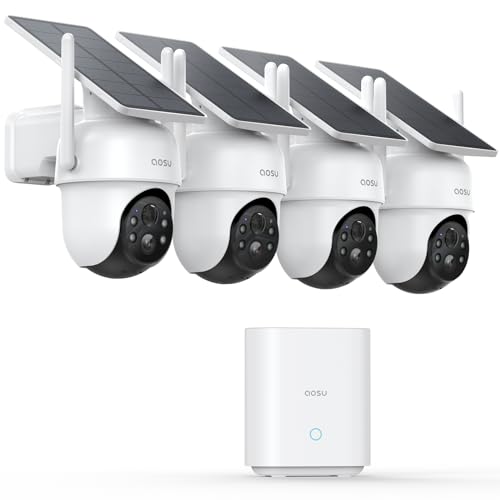
aosu D1 Classic 4-Cam Kit — Best solar kit without a subscription
The aosu D1 Classic kit attacks the two annoyances that put people off wireless cameras: charging them and paying monthly to keep the evidence. Each of its four cameras carries a solar panel that trickles power back in during daylight, so a sensibly placed unit can run for very long stretches without you touching it. Meanwhile the footage lives on storage built into the system rather than in a rented cloud locker, and aosu is explicit that no subscription is required to use the kit properly.
Four cameras is the right count for most houses. One over the front door, one on the driveway, one covering the back garden and one on the side passage gives you a perimeter with no obvious blind approach, and because the cameras are wireless, that layout is an afternoon of work rather than a weekend of cable runs. Picture quality is comfortably modern, with colour recording and night performance that handles gardens and drives without drama. The app ties the four views together so checking the house feels like one system, not four gadgets.
The honest caveat is sunlight. A camera tucked under a deep north-facing eave or shaded by a tree all day will lean harder on its battery, and in a dull winter that can mean an occasional manual top-up. Plan each mounting point with the sky in mind and the kit rewards you. For a family home that wants full coverage, no ladders every month and no subscription direct debit, this is the most self-sufficient package in the guide.
- Cameras: four wireless outdoor units in one kit
- Power: integrated solar panel topping up internal battery
- Storage: 32GB built into the system, no subscription required
- Video: colour footage with night capability
- Use case: whole-house perimeter in a single purchase
Strengths
- Solar charging removes routine battery chores
- Built-in storage avoids monthly subscription costs
- Four cameras cover a typical house perimeter in one box
Trade-offs
- Shaded mounting spots weaken the solar advantage
- Wireless range depends on your walls and router position
- Not designed for continuous recording like a wired DVR kit
Best for: detached and semi-detached homes wanting full perimeter coverage with minimal upkeep.
Not suited for: heavily shaded plots or buyers who need non-stop recording of every camera.
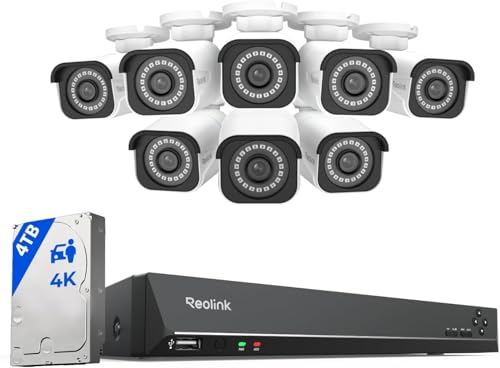
Reolink RLK16-800B8 16-Channel 4K PoE Kit — Best wired kit for serious properties
Some properties outgrow wireless cameras, and this Reolink kit is built for exactly that moment. Eight bullet cameras connect by Power over Ethernet cable to a sixteen-channel recorder, so one cable per camera carries both picture and power, and the recorder’s channels leave room to add more cameras later. Footage lands on a 4TB hard drive inside the recorder, which means weeks of history stored in your own building, viewable without asking a cloud service for permission.
The 4K recording is not a vanity figure here. On a long driveway, a farmyard or a car park, the difference between a smudge and a readable number plate is resolution, and this system has it where it counts. Person and vehicle detection trims the alert noise that makes people ignore their security app, and because everything is wired, there are no batteries to fade and no Wi-Fi dead spots to discover at the worst moment. Once installed, it simply records, day and night, in all weathers.
Respect the installation, though. Running Ethernet to eight positions is a day or two of drilling, clipping and ladder work, or a job for an installer, and the recorder needs a sensible home near your router. Renters should look elsewhere entirely. But for an owner-occupier, a rural property or a small business that wants evidence-grade coverage and room to expand, this kit is the most capable system in the guide and the one least likely to be replaced in two years.
- Cameras: eight wired PoE bullet cameras included
- Recorder: 16-channel NVR, so the system can grow
- Storage: 4TB hard drive fitted for local recording
- Detection: person and vehicle alerts to cut false alarms
- Video: 4K recording for number plates and faces at distance
Strengths
- 4K wired footage suits plates and faces at distance
- Large local hard drive keeps long recording history on site
- Spare recorder channels allow the system to grow
Trade-offs
- Installation is a substantial cabling project
- Recorder and drives need a fixed, ventilated home
- Overkill for a flat or a small terraced house
Best for: large homes, farms, workshops and small businesses wanting permanent wired coverage.
Not suited for: renters or anyone unwilling to run cables through the building.

ZOSI 16-Channel 1080p DVR Kit — Best value wired kit on coax
The ZOSI kit represents the other wired tradition: analogue cameras feeding a DVR over coax cable. It is less fashionable than PoE networking, but it has real virtues. Coax is forgiving, the hardware is well understood, and a sixteen-channel recorder with eight dome cameras included leaves eight spare channels for the day you realise the stockroom or the side alley needs a camera too. For a small business replacing an elderly CCTV setup, that upgrade path matters more than fashion.
Dome cameras bring their own practical benefits. Their shape is harder to knock out of alignment than a bullet on a stalk, they look tidier on a shop ceiling or a porch soffit, and vandals cannot easily tell which way they are pointing. The DVR’s H.265+ compression stretches recording time from a given hard drive, and human and vehicle detection keeps the alert feed useful instead of burying you in moth and rain notifications. Remote viewing through the app covers the check-the-shop-from-home routine well.
Be clear about the ceiling, though: this is a 1080p system. At porch distances that is plenty, but across a long yard the finer detail a 4K PoE kit captures will not be there. Treat the ZOSI as the sensible middle — dramatically more serious than a couple of battery cameras, far less demanding than a full network install — and it earns its place for shops, larger homes and anyone modernising an old coax system.
- Cameras: eight 1080p indoor/outdoor dome cameras
- Recorder: 16-channel DVR with H.265+ compression
- Detection: human and vehicle alerts
- Cabling: analogue coax runs, tolerant of older installs
- Use case: shops, larger homes and upgrades of legacy CCTV
Strengths
- Spare channels make later expansion cheap and easy
- Dome housings resist tampering and look discreet
- Compression keeps long recording history on modest drives
Trade-offs
- 1080p limits fine detail across long distances
- Coax plus power cabling is still a proper installation
- Analogue platform offers fewer smart features than IP rivals
Best for: shops and larger homes wanting an expandable wired system without network complexity.
Not suited for: buyers who need number-plate detail at the far end of a long drive.

Hiseeu 5MP WiFi Kit, 10-Channel, 8 Cameras — Best wireless kit that still records locally
Hiseeu’s kit is the answer for people who like the idea of a recorder-based system but cannot face running data cables to eight positions. The cameras connect wirelessly to a central recorder fitted with a 3TB hard drive, so footage is stored locally and continuously in the way a proper CCTV system should be, while the installation stays closer to hanging cameras and finding power than to a cabling project. Eight cameras is generous coverage for a house and outbuildings or a small commercial unit.
The 5MP sensors and colour night vision give the footage a clarity that basic 1080p wireless cameras struggle to match after dark, when most incidents actually happen. Two-way audio turns a camera over a delivery area or a side door into something you can act through, not just watch, and the weather-sealed housings are built for permanent outdoor duty through winter rain. Because recording happens on the recorder rather than in a cloud account, reviewing last Tuesday is a local, private affair.
The compromises are physical. Each camera still needs mains power, so an outdoor socket or a drilled cable route is part of every mounting decision, and eight wireless streams ask a lot of a weak router in a thick-walled house — walk the property with the app during setup and be honest about signal. Solve those two things and this kit delivers most of a wired system’s discipline with a fraction of its disruption.
- Cameras: eight 5MP outdoor Wi-Fi cameras
- Recorder: 10-channel unit with 3TB hard drive
- Night: colour night vision for clearer after-dark clips
- Audio: two-way talk from the app
- Housing: IP66 weather resistance for outdoor mounting
Strengths
- Recorder-based local storage without data cabling
- Colour night vision improves after-dark evidence
- Eight cameras cover house plus outbuildings in one kit
Trade-offs
- Every camera still needs a power source nearby
- Eight streams demand strong Wi-Fi throughout the property
- Recorder fan and drive want a quiet, ventilated spot
Best for: larger homes and small premises wanting recorder storage without Ethernet runs.
Not suited for: properties with weak Wi-Fi or no outdoor power near camera positions.

Hiseeu 4MP Solar Camera with Touchscreen Monitor — Best for homes that dislike apps
This Hiseeu package starts from a different question: what if watching your cameras should not require a smartphone at all? Alongside a 4MP solar camera it includes a large touchscreen monitor, the kind of thing that can sit on a kitchen counter or a shop desk and show the view at a glance. For households with older residents, or a small business counter where a phone is always busy, that dedicated screen is not a gimmick — it is the feature that decides whether the system gets used.
The camera itself is ambitious for a solar unit. A dual-lens design pairs a wide view with a closer look, and auto tracking swings the camera to follow a person crossing the yard rather than letting them walk out of frame, which is where fixed budget cameras so often fail. Solar charging keeps the battery topped up in a decent position, dual-band Wi-Fi gives you placement flexibility, and the recording quality is a step above the cheapest wireless cameras, with colour detail that survives dusk.
Its limit is geometry: one camera, however clever, watches one approach at a time, and auto tracking cannot follow two people in opposite directions. Treat it as an excellent sentinel for a main entrance, a yard or a single vulnerable side of a building, and add fixed cameras elsewhere if the property needs them. For a shop counter or a kitchen-counter household, though, this is the most approachable pick in the entire guide.
- Camera: 4MP dual-lens solar wireless unit
- Tracking: automatic pan following of detected movement
- Display: large touchscreen monitor included for live viewing
- Wi-Fi: dual-band 2.4 and 5 GHz support
- Power: solar panel with internal battery backup
Strengths
- Included touchscreen suits app-free daily viewing
- Auto tracking keeps moving subjects in frame
- Solar power keeps running costs and chores low
Trade-offs
- One viewpoint cannot cover a whole large property
- Tracking can be distracted by busy, multi-direction scenes
- Monitor needs its own permanent spot and power
Best for: shops and households wanting a counter-top screen and a self-charging entrance camera.
Not suited for: large properties needing several simultaneous fixed viewpoints.
How Do the Six Picks Compare Side by Side?
| Pick | Type | Headline strength | Watch out for |
|---|---|---|---|
| Blink Outdoor 4 | Battery Wi-Fi camera | Very long battery life, compact body | Needs a sync module and cloud plan for the fullest feature set |
| aosu D1 Classic 4-Cam Kit | Solar wireless kit, 4 cameras | Solar charging plus built-in storage | Each camera needs a reasonably sunlit mounting spot |
| Reolink RLK16-800B8 16-Channel 4K PoE Kit | Wired PoE NVR kit, 8 cameras | 4K detail and a large local hard drive | Cable runs make installation a real project |
| ZOSI 16-Channel 1080p DVR Kit | Wired DVR kit, 8 dome cameras | Expandable coax system with smart detection | 1080p ceiling, so fine detail at distance is limited |
| Hiseeu 5MP WiFi Kit, 10-Channel, 8 Cameras | Wireless NVR kit, 8 cameras | Local recorder storage with colour night vision | Cameras still need power sockets and solid Wi-Fi |
| Hiseeu 4MP Solar Camera with Touchscreen Monitor | Solar camera with monitor | Auto tracking and a dedicated viewing screen | A single viewpoint, so wide properties need more units |
Read the table as a map of jobs, not a league table. The wired kits trade an installation weekend for years of unattended recording, the battery and solar picks trade continuous footage for placement freedom, and the recorder-based wireless kit sits deliberately between those poles. Your building, your power sockets and your tolerance for ladders will pick the winner faster than any specification sheet.
Four Honourable Mentions That Complete the Ten
First, the Ring Stick Up Cam deserves its prose-only place for households already living in Ring’s ecosystem, where one app already runs the doorbell and the alarm. Its cameras are competent, the accessories are everywhere, and the experience is polished — but the experience leans on a subscription for recorded history, which is why it sits here rather than among the linked six. If your home is already Ring-shaped, it is a sensible extension; if not, the kits above ask less of your wallet each month.
Second, the Wyze Cam line earns a mention as the indoor bargain of the category. A small Wyze on a shelf watching a hallway, a nursery or a pet’s favourite chair costs very little and performs above its station, especially in good light. The compromises are the ones you would expect at the price: outdoor duty needs the right model and housing, and the app experience has grown busier over the years. As a first camera or an indoor supplement, though, it remains hard to ignore.
Third, the Google Nest Cam family is the polished option for homes already organised around Google services. The hardware is handsome, the app is calm, and the intelligence features are genuinely thoughtful about telling a parcel from a passer-by. You pay for that polish, and recorded history again leans on a subscription tier, so it suits buyers who value the software experience over storage independence. In a Google-centred smart home it slots in beautifully.
Fourth, the Eufy SoloCam range rounds out the ten as the connoisseur’s battery camera: strong local-storage thinking, crisp footage and a design that respects the idea of your video staying in your house. Availability and bundles shift often, which is why it appears in prose rather than with a link today. If the Blink’s subscription lean puts you off but you still want wire-free simplicity, research the current SoloCam models carefully — they are the natural alternative.
What Should You Check Before Choosing a Security Camera?
Start with power, because power decides placement, and placement decides whether the camera sees anything useful. Battery and solar cameras can go almost anywhere you can reach with a ladder, which makes them perfect for gates, sheds and rented walls. Wired cameras demand more from the building but repay it with permanence: a PoE or DVR camera never sleeps through an incident because its battery faded, and it never misses the first seconds while waking up. Walk your property and mark the views you truly need — every entry door, the driveway approach, the one dark side path — then count. That count, not a headline bundle size, is your real requirement.
Next, decide where footage lives. Local storage — a hard drive in a recorder, memory built into a kit, or a card in the camera — keeps your video in your building and usually avoids monthly fees, but it can be stolen with the hardware if a burglar finds it. Cloud storage survives the theft of the camera itself and makes remote viewing effortless, at the price of a subscription and your footage living on someone else’s computer. Many households land on a hybrid: local recording for everything, cloud clips for alerts. Whichever you choose, decide before buying, because switching ecosystems later means starting again.
Finally, think about the night and the alert. Most incidents that matter happen in poor light, so weigh night performance — infrared range, colour night vision, a built-in light — more heavily than a daytime resolution figure. Then consider detection quality: a camera that alerts you thirty times a day about shadows will be muted within a week, and a muted camera is decoration. Person and vehicle detection, adjustable sensitivity and sensible activity zones are worth more than an extra megapixel. Set the system up, live with it for a fortnight, and adjust zones and sensitivity until the alerts you get are the alerts you would act on.
How Should You Set Up and Use Your Choice Well?
Installation rewards patience in a specific order. Fit one camera first, in the most important position, and live with it for two days before mounting the rest. You will learn your Wi-Fi’s real reach, discover that the perfect angle includes a swaying branch, and find out whether the app’s alerts suit you — all while only one set of holes exists. Angle cameras to overlap slightly at the edges, keep them high enough to deter tampering but low enough to capture faces rather than the tops of heads, and never point one directly at a rising or setting sun unless you enjoy white-out footage at the same time daily.
After fitting, do the boring work that makes the system real. Name each camera by its location, set recording retention to match your storage, test night footage on the darkest evening of the week, and walk every approach yourself while watching the live view — you are looking for the gap a stranger would find. Share access with the adults in the house, agree who responds to alerts, and note the date for a six-month check of lenses, mounts and firmware. A security system is a habit, not a purchase, and the households that treat it that way are the ones whose footage is there when it matters.
Putting It Into Practice, Week by Week
Week one is about the front approach, because that is where most properties are actually tested. Mount your chosen camera or kit’s first unit to watch the front door and the path to it, then walk the route at a normal pace in daylight and again after dark. Watch both recordings side by side. You are checking three things: whether a face is identifiable at the door, whether the driveway edge is inside the frame, and whether the night picture holds detail at the gate. Adjust the angle before adding any other camera — a corrected first view teaches you more than five guessed ones.
In week two, extend to the sides and rear, which is where the differences between these picks start to bite. A battery camera can go on the garden fence today; a wired kit wants its cable route planned through the loft or along the eaves. Notice how your motivation changes with the hardware: wireless picks invite experimentation, wired picks demand commitment, and both behaviours are useful at different addresses. Photograph each mounting position before drilling, and keep the photos — they become your map when a camera needs attention in February rain.
Week three belongs to alerts. By now every system in this guide would have shown you its personality: the chatty one that reports every cat, the quiet one that only speaks for people. Tune sensitivity down before you tune it up, draw activity zones around pavements and roads, and set schedules if your household’s own comings and goings trigger recordings you will never watch. The goal is a feed you trust. An alert you believe is worth ten you skim, and the fortnight point is exactly when most owners either build that trust or quietly mute everything.
Use week four to test the bad day. Pull the plug on the recorder or router for five minutes and watch how the system recovers; check what footage survived and what the gap looks like. Review the oldest recording still stored, because that tells you your true retention — not the number on the box, but the day the drive or memory starts overwriting. If retention is shorter than your longest holiday, change the settings or the storage now, while the lesson is free.
By the second month, patterns emerge that no review can predict for your address. You will know which camera catches the low winter sun, which mount loosens in storms, and which view you actually open every day. Feed those lessons back into the system: re-aim the glare-prone camera, tighten the loose bracket, and consider whether a spare recorder channel or one more wireless unit closes the gap you keep noticing. Security improves in iterations, and the owners who iterate are the ones whose systems age well.
A word on neighbours and the law, because a camera that films the street films other people’s lives too. Angle views to favour your own property, use privacy masking where the software offers it, and be ready to explain your setup cheerfully if asked — most friction evaporates when people see the view is of your gate, not their garden. Rules on recording and signage vary by place, so check your local position, especially for a business. A system that respects the street is one you will never feel awkward defending.
Storage deserves one more pass once the system has run a while, because real bitrates never match the tidy figures in adverts. Busy scenes, night noise and high detail settings all inflate file sizes. If your recorder keeps a fortnight when you expected a month, the honest fixes are a bigger drive, smarter motion-based recording on quiet views, or lower frame rates on cameras that watch empty yards. Do not solve it by shortening retention below your longest absence — that trades away the exact coverage you bought the system for.
Finally, plan the dull maintenance that keeps all ten of these options honest. Lenses gather spider webs precisely where infrared reflects worst, so a soft cloth twice a year is genuine security work. Batteries that claim years still deserve an annual check, solar panels want the leaves swept off, and firmware updates close holes you cannot see. Put the dates in the same calendar as your boiler service. The best security camera, in the end, is the one that is clean, powered and recording on the one night it is needed.
Consider the delivery routine, because it is the test most systems face weekly. Couriers arrive when you are out, parcels wait on steps, and a camera’s job in that moment is specific: capture the drop clearly, alert you promptly, and — if it has two-way talk — let you redirect the driver to a safer spot. Practise this with a family member playing courier. You will learn whether your alert arrives in seconds or minutes, whether the talk delay makes conversation realistic, and whether the camera’s view actually includes the step where parcels land rather than the hedge beside it.
Visitors and tradespeople write the other half of a system’s diary. A camera that records the meter reader, the window cleaner and the neighbour’s borrowed ladder is building the household’s memory of who was legitimately there, which matters enormously on the one day something is genuinely wrong. Review a fortnight of ordinary visitors and notice how quickly you learn to read your own footage: gaits, vehicles, routines. That fluency is a security asset in itself, and it only develops in owners who look at their systems when nothing is wrong.
Weather writes the third chapter. Rain on a lens turns night infrared into a glowing fog; low sun blinds a west-facing camera for an hour each evening; spiders choose exactly the warm spot in front of the LEDs. None of these are faults, and all of them are manageable once seen: a slight downward tilt, a repositioned mount, a scheduled wipe in autumn. Walk your system through one storm and one sunset in its first month, note which cameras suffer, and fix positions while the ladder is still a novelty rather than a chore.
Think about who else the system serves. Elderly parents checking their own front door from a touchscreen, a teenager confirming the dog is in the garden, a house-sitter given temporary access during your holiday — each user has different skills and needs. Set up the guest access before the holiday, not from the airport. Remove it when it is no longer needed. Systems that serve the whole household get maintained by the whole household; systems that belong to one person’s phone get neglected by everyone, including, eventually, that person.
Power cuts and broadband failures deserve a rehearsal of their own, because they reveal which parts of your setup are resilient. A recorder on a shelf keeps its footage through a router reboot; battery cameras ride out short outages entirely; cloud-dependent viewing pauses until the connection returns. Unplug things in a calm moment and time the recovery. If your property has a history of long outages, a small uninterruptible power supply for the recorder and router is one of the least glamorous and most effective security purchases available.
There is also the question of evidence handling, which nobody considers until they must. If footage is ever needed — by police, an insurer, a neighbour dispute — its value depends on boring details: correct timestamps, an unbroken sequence, a copy exported before the retention window overwrote it. Practise exporting one clip to a computer and a phone today, and note how long it takes. Confirm the system clock is right. These five minutes, spent now, are the difference between footage that settles a matter and footage that merely describes one.
Growth is the final long-term consideration. Properties change: a new gate, a converted garage, a teenager’s first car on the drive. The systems in this guide grow differently — spare recorder channels, an extra wireless unit, a second solar camera — and knowing your expansion path before you need it prevents the classic outcome of two incompatible systems glaring at each other across the same driveway. When you add, add within the ecosystem you already run, unless that ecosystem has genuinely failed you.
And spare a thought for the camera’s-eye etiquette of shared spaces. In terraces and flats, your ideal mounting point may overlook a neighbour’s only private corner; a few degrees of angle or a privacy mask usually solves it without costing you coverage. Mention the cameras to regular visitors. None of this weakens security — determined intruders are deterred by visible systems — and it keeps the peace that makes a street pleasant to live on, which is, in the end, part of what the cameras are protecting.
One more rhythm worth building: the seasonal review. Twice a year, when you check smoke alarms, give the cameras their ten minutes. Foliage will have grown into one view, a mount will have sagged a degree, a battery percentage will have a story to tell. Compare each live view against the photograph you took at installation. Systems drift slowly and fail suddenly; the seasonal review is how you catch the drift while it is still a two-minute fix rather than a missing recording on the night that mattered.
There is one more habit that ties the whole system together: a single household page, kept wherever your household keeps such things, listing every camera’s position, its power source, its storage type and the date it was fitted. When a camera misbehaves at midnight, that page turns a mystery into a checklist. When you move house, it becomes the plan for the next installation. When a relative house-sits, it makes you look like the kind of person who has their life in order. Security systems reward documentation out of all proportion to the effort it takes, and the effort, in this case, is one page.
Do not overlook the humble test of the timestamp. Record a clock, check the playback time against reality, and correct any drift you find, because a system whose clocks wander is a system whose evidence argues with itself. Recorders usually sync to network time; battery cameras sync when they connect. A two-minute check during installation, repeated when the clocks change in spring and autumn, keeps every camera in this guide telling the same story about when things happened — which is, when it matters, the whole story.
Think about sound as carefully as sight. Several picks here carry microphones and two-way talk, and audio changes both the value and the responsibility of a recording. A camera that hears a conversation is a different neighbourly proposition from one that merely watches a gate. Know which of your cameras record sound, consider disabling audio where it is not needed, and be aware that rules about audio recording are stricter in many places than rules about video. The considerate system is usually also the legally comfortable one.
Plan for the camera you will inevitably move. Almost every owner relocates one unit in the first year — the view that seemed perfect in June is behind a grown hedge by September. Keep spare mounts, keep the installation photographs, and keep a little slack in any cable run you install. Systems designed for one rearrangement age gracefully; systems installed as if the first guess were eternal get their second guess made with a hammer and bad grace, usually in the rain.
Lastly, teach the household the system’s ordinary sounds and silences. A recorder’s fan, a camera’s click as infrared engages, the app alert’s particular chime — familiarity with the normal makes the abnormal obvious. The night a camera goes offline, the person who notices is the person who knew what its presence sounded like. That is the deepest layer of security any of these ten options can offer: not the recording itself, but a household that has absorbed the system into its awareness.
One more scenario is worth rehearsing: the false alarm that teaches you something. When an alert turns out to be a fox, a delivery, a neighbour’s cat on the wall, resist the urge to simply dismiss it. Each false alarm is the system showing you its current understanding of your property, and a thirty-second review — was the zone right, the sensitivity right, the angle right — is how that understanding improves. Owners who treat false alarms as tuition end up with quiet, trusted systems; owners who treat them as insults end up with muted ones.
Consider, too, the view from the street. A visible camera deters, but a wall bristling with domes can also advertise anxiety and, occasionally, attract the wrong curiosity. Most homes sit comfortably with cameras that are findable rather than flaunted — visible on approach, unremarkable at a glance. Walk across the road and look back at your own house with a stranger’s eyes. If the system reads as calm competence, you have it right; if it reads as a fortress, consider whether every unit earns its prominence.
And remember that the system’s real product is not footage but peace of mind, which has its own maintenance schedule. Check the cameras when you think of it, not only when you worry; let the app be a reassurance you open with coffee rather than an alarm you open with dread. The households that get the most from any of these ten options are the ones whose relationship with the system stays ordinary — a tool in the background of a life, watched over by people who are getting on with that life in front of it.
What Mistakes Do Buyers Keep Making?
The classic mistake is buying cameras before deciding the job. A household purchases a bargain eight-camera kit for a flat with two doors, or a single battery camera for a shop that needs an unbroken till record, and then blames the hardware for a mismatch that was made at the checkout. The second mistake is chasing resolution while ignoring light: a modest camera with a good view and decent night performance will identify more people in a year than a high-resolution camera pointed into the sun from a dark corner. Placement and purpose beat specifications every time.
Buyers also underestimate the running relationship. Subscriptions renew quietly, batteries fade in the coldest month, Wi-Fi routers get replaced and take every camera password with them. Write down your system’s essentials — recorder location, account details, mounting map — and keep the note somewhere sensible. And avoid the quietest failure of all: never reviewing footage until the day you need it, then discovering the lens filmed a hedge growing across the view for three months. A monthly two-minute check of every camera is the cheapest insurance in this entire guide.
Final Recommendation
So, which of the ten should you actually buy? If you want the least effort, the Blink Outdoor 4 covers doors and paths with almost no upkeep. If you want a whole house covered without a subscription, the aosu D1 kit is the self-sufficient choice. Serious properties should go wired — the Reolink for 4K evidence and growth, the ZOSI for expandable coax value — while the Hiseeu wireless recorder kit splits the difference for big homes, and the Hiseeu solar camera with its touchscreen is the friendliest sentinel for a single entrance or a shop counter.
Whichever route you take, buy for the building you have, fit one camera well before you fit them all, and tune the alerts until you trust them. Do that, and the system you choose from this list will still be earning its keep years from now — quietly watching the gate on the one ordinary night when being watched is exactly what your home needed.
Frequently Asked Questions
How many security cameras does a typical house actually need?
Most houses are genuinely covered by four well-placed cameras: front door, driveway, back garden and the side approach people forget. Larger properties, outbuildings or a business premises justify eight, which is why the wired and recorder kits in this guide include eight. Adding cameras beyond your real approaches mostly adds footage nobody watches, so start with the entries and expand only when you find a true blind spot.
Is it better to choose battery, solar or wired cameras?
Each power type wins a different argument. Battery cameras offer the freest placement and suit rentals; solar adds freedom from charging where sunlight allows; wired PoE and DVR systems never sleep and record continuously, which suits evidence and business use. Many strong setups mix them — wired for the crucial views, wireless for the awkward corners. Choose per viewpoint rather than forcing one technology across the whole property.
Do I need a subscription for a security camera system?
Not necessarily. Several picks here record to local storage — a recorder hard drive or built-in memory — and work fully without monthly fees. Cloud-based cameras often reserve recorded history and richer alerts for subscribers, which can be worth it for remote access and off-site backup. Read what the free tier actually keeps before buying multiple cameras, because the subscription, not the hardware, is often the long-term cost.
Can security cameras record legally in my area?
Generally you may record your own property, but rules about filming public spaces, neighbours’ land, audio recording and signage vary by country and sometimes by city, and businesses face stricter duties. Angle cameras inward, use privacy zones where offered, and check your local guidance before installing — especially for a shop. This guide is practical advice, not legal advice, and a few minutes with your local rules is time well spent.
What resolution do home security cameras need?
For doors and paths, a good 1080p camera identifies faces at the distances that matter. Longer views — a farmyard, a car park, a long drive — benefit from the extra detail of the 4K and 5MP systems here, because identification happens across more metres. Remember that lens, light and placement shape real-world clarity as much as the sensor figure, so judge resolution as part of the whole camera, not as the headline.
Related Guides
Once your cameras are chosen, these companion guides will help you finish the setup properly: How to position security cameras for full coverage, Local storage vs cloud recording explained and Smart lighting that works with your cameras.


