What's inside
- Key Takeaways
- Quick Picks: The Best 1080P Video Cameras Worth Shortlisting
- How Did We Choose These Best 1080P Video Cameras?
- How Do the Six Picks Compare Side by Side?
- What Should You Look for in a 1080p Video Camera?
- How Should You Set Up and Use Your Choice Well?
- Putting It Into Practice, Week by Week
- What Mistakes Do Buyers Keep Making?
- Final Recommendation
- Frequently Asked Questions
- Related Guides
As an Amazon Associate I earn from qualifying purchases. This post may contain affiliate links at no extra cost to you.
gizmoverdict.com is reader-supported. When you buy through links on our site, we may earn an affiliate commission.
Where to buy: the linked listings below are the exact products checked for this guide. With camcorders especially, read whether the item is new or renewed, what card and battery are included, and who is selling it — the listing details matter as much as the camera.
The best 1080p video cameras are not stills cameras that happen to record, and they are not cinema bodies chasing resolution headlines. They are camcorders and video-first recorders built around one job: press record and capture the whole thing — the school play, the training session, the family holiday, the church service, the product demo — without overheating, without a thirty-minute limit ambushing you, and without a menu system that needs a manual. This guide takes that job seriously, and it is deliberately different from a general camera round-up: here, zoom reach, handling, battery stamina and simple reliability outrank sensor bragging rights.
It is also an honest guide about levels. One pick is a genuine Canon camcorder with an optical zoom that budget rivals cannot imitate with digital tricks. The others are affordable recorders from lesser-known brands, and they are judged as exactly that: useful, simple tools for undemanding video, not secret professional cameras at a tenth of the price. Where a listing is a renewed item, we say so plainly and neutrally. Read the reviews with your actual footage in mind, and the right level will pick itself.
Key Takeaways
- This is a camcorder guide, not a stills guide: long zooms, long recording and simple handling matter more here than sensor size or interchangeable lenses.
- The Canon VIXIA is the one true name-brand camcorder in the set, with a genuine long optical zoom — and this listing is a renewed unit, sold as such.
- Budget recorders from small brands trade in digital zoom and modest low-light ability; judged as simple family and school tools, they make sense — judged as cinema cameras, they do not.
- Optical zoom is the honest zoom. Digital zoom figures in big type are cropping, and the picture softens exactly when you lean on them hardest.
- For services, sports days and stage shows, battery life and a tripod thread will shape your results more than any resolution claim.
Quick Picks: The Best 1080P Video Cameras Worth Shortlisting
| Pick | Badge | Why it made the cut |
|---|---|---|
| Canon VIXIA HF R600 (Renewed) | Best genuine camcorder in the set | A real Canon camcorder with a long optical zoom and proper camcorder manners — this listing is a renewed unit, so judge it as one. |
| kimire Video Camera Camcorder 1080P | Best simple starter recorder | A straightforward budget camcorder with a rotating screen — honest expectations required, but genuinely easy for a first-time operator. |
| VETEK Video Camera 1080P Camcorder | Best budget pick with night mode | Adds infrared night vision to the budget camcorder formula — useful for evening events and wildlife corners, within honest limits. |
| Video Camera Full HD 1080P 30MP Camcorder | Best for beginner YouTube practice | A vlogging-aimed budget recorder with infrared mode — a practice tool for learning framing and consistency before upgrading. |
| ZYDIIE 4K Video Camera Camcorder | Best budget touchscreen option | A touchscreen budget camcorder with a rotating IPS display — buy it for the handling, and treat the big headline numbers with a cool head. |
| Camcorder Video Camera 2.7K 48MP | Best budget pick that doubles as a webcam | A flip-screen budget camcorder that also works as a webcam — handy for a beginner splitting time between recording and video calls. |
How Did We Choose These Best 1080P Video Cameras?
We chose these picks for video-first buyers: parents filming from the back of halls, teachers recording lessons, small churches and community groups capturing services, and beginners who want a dedicated recorder rather than a phone. Each listing was checked on 2026-11-25, and only the six products in this article’s pool carry links. We weighted the things that decide camcorder footage in real rooms — zoom honesty, screen usability, recording stamina and how forgiving the camera is of a non-technical operator.
We were equally careful about what we did not reward. Inflated headline figures — enormous digital zoom multipliers, resolution claims the footage cannot cash — earned no credit; several listings here carry such numbers, and the reviews translate them into plain expectations. A budget camcorder that starts quickly, focuses without hunting in decent light and records a clear, watchable hour is a good tool. One that promises the moon in its title and delivers mush at the back of a hall is not, whatever its price. The six below are ranked by that standard.

Canon VIXIA HF R600 (Renewed) — Best genuine camcorder in the set
The VIXIA HF R600 is the only camera in this guide from a major camcorder maker, and picking one up explains what that means. The zoom rocker falls under your finger, the lens travels smoothly through a long optical range that keeps its quality at the far end, and the image processing has the calm, accurate colour of a company that refined camcorders for decades. For filming a stage from the back row or a match from the touchline, that optical reach — real glass, not cropping — is the single most valuable feature any camera here offers.
Now the condition, stated plainly: this listing is for a renewed unit. Renewed means the camera has been refurbished or returned and resold, typically checked and cleaned, rather than shipped factory-new. That is neither a scandal nor a guarantee — it is a category. The sensible approach is to buy it as you would any renewed electronics: confirm the seller’s description and return terms, inspect the camera on arrival, test the zoom, screen and recording across a full battery, and keep the paperwork. Many renewed Canons give years of service; the point is to verify yours promptly rather than discover a fault at the school concert.
As a tool, it remains the reference here. Full HD recording without drama, a touchscreen that makes settings approachable, image stabilisation that forgives hand-held shooting, and a form factor designed for one-handed use over long events. If your budget stretches to it and the renewed status sits comfortably with you, this is the pick that behaves like the camcorders people remember fondly — because it is one.
- Status: renewed listing — refurbished or returned stock, not a factory-new unit
- Zoom: long Advanced Zoom system built on a genuine optical zoom
- Screen: 3-inch touchscreen for framing and menus
- Recording: Full HD 1080p to memory card
- Handling: classic camcorder grip with zoom rocker
Strengths
- Genuine optical zoom keeps quality at long reach
- Canon colour and stabilisation feel a class above
- Proper camcorder ergonomics for long events
Trade-offs
- Renewed unit, so condition depends on the individual item
- An older model without modern wireless frills
- Budget rivals undercut it while promising more on paper
Best for: stage, sports and service filming where real zoom reach decides the footage.
Not suited for: buyers who only want factory-new stock with a full new-item presentation.
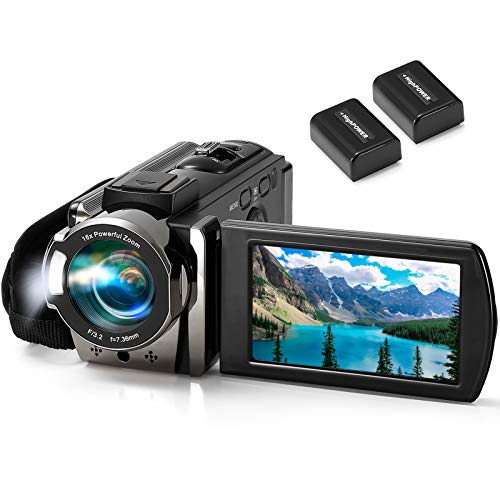
kimire Video Camera Camcorder 1080P — Best simple starter recorder
The kimire is the kind of camcorder that fills school bags and family drawers: inexpensive, light, and simple enough that a grandparent can be filming within minutes of unboxing. Its rotating screen is the feature people actually love — angle it for a low shot of a toddler, flip it for a piece to camera, or fold it away for transport. For birthdays, holidays and school projects in decent light, it produces cheerful, watchable footage without asking anything of the operator.
Calibrate your expectations with the listing itself, which is commendably plain about two things. The video frame rate is modest, so fast pans and sports will look less smooth than footage from pricier cameras, and the zoom is digital — it enlarges the middle of the picture rather than reaching optically, so quality thins as you push it. The megapixel figure in the title describes still photographs, not the detail in your video, which is standard practice in this class and worth understanding before you buy.
Judged as a first recorder or a knockabout family camera, the kimire makes its case: it is the camera you lend, drop in a beach bag and hand to a teenager without anxiety. Judged as anything more, it will disappoint. Keep it in good light, zoom with your feet where you can, and it will do the job it was honestly built for — recording the day, simply and affordably.
- Recording: Full HD 1080p video — note the listing’s modest frame-rate figure
- Screen: 3.0-inch LCD rotating through 270 degrees
- Zoom: 16x digital zoom (cropping, not optical)
- Stills: headline megapixel figure refers to stills mode, not video detail
- Use case: family events, school projects, first recorder
Strengths
- Rotating screen suits vlogging angles and low shots
- Very simple operation for beginners and children
- Light, inexpensive and worry-free to lend or travel with
Trade-offs
- Digital zoom softens footage when pushed
- Modest frame rate limits fast-motion smoothness
- Low-light footage is noticeably weaker than daylight work
Best for: families and students wanting a first, simple dedicated recorder.
Not suited for: sports filming or anyone expecting name-brand optical quality.
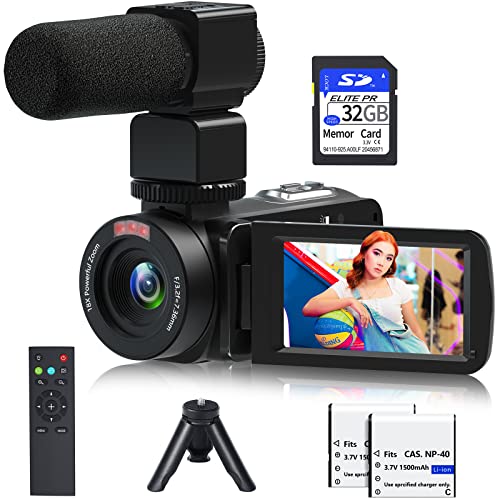
VETEK Video Camera 1080P Camcorder — Best budget pick with night mode
The VETEK’s party piece is infrared night vision, a feature the name-brand pick in this guide does not offer at this level. Switch it on and the camera records in the dark using infrared light the subject cannot see, producing monochrome footage of a sleeping baby, a hedgehog at the feeding bowl, or a hall after the lights go down. The range is short and the look is unmistakably night-vision — green-grey, soft, atmospheric — but for the moments it suits, no amount of daylight specification matters at all.
In daylight it is a conventional budget camcorder, with the class’s usual shape: a 3-inch screen, an 18x digital zoom that should be treated as a framing aid rather than a quality tool, and stills figures in the title that describe photographs rather than video sharpness. Footage in good light is perfectly serviceable for family archives, school work and beginner vlogging, and the camera’s simplicity remains its charm — few menus, no interchangeable anything, just record.
Buy it for the night mode and the price, and operate it within its nature. Keep subjects within a few metres after dark, prefer a tripod so the infrared picture stays steady, and do not ask the digital zoom to rescue a distant subject. As a second camera for a garden wildlife project or a first camera for a young film-maker, the VETEK offers something genuinely different in this set — the dark, made visible, cheaply.
- Recording: 1080p video with a 3.0-inch LCD screen
- Night: infrared night-vision mode for dark scenes
- Zoom: 18x digital zoom — plan shots around its limits
- Stills: headline megapixel figure is a stills-mode number
- Use case: evening events, garden wildlife, beginner vlogging
Strengths
- Infrared mode records scenes other budget cameras miss
- Simple controls suit beginners and young users
- Works as an inexpensive wildlife or nursery watcher
Trade-offs
- Night footage is monochrome with limited range
- Digital zoom only, with softening at full stretch
- Daylight quality is ordinary for the class
Best for: garden wildlife, nurseries and evening events on a tight budget.
Not suited for: buyers needing colour night footage or long-range zoom.

Video Camera Full HD 1080P 30MP Camcorder — Best for beginner YouTube practice
This unbranded 1080p camcorder is aimed squarely at the beginner creator, and it is best understood as a practice instrument. Its job is to let a new vlogger learn the crafts that actually grow a channel — framing a shot, talking to a lens, recording regularly, finishing and uploading — without the cost or complexity of a creator camera. For that job, a simple recorder with a screen you can work from and controls that never interrupt you is genuinely appropriate, and thousands of channels have started on less.
The specification follows the budget pattern this guide has been honest about throughout: the megapixel headline describes stills, the zoom is digital and best used sparingly, and an infrared mode adds after-dark fun at short range. Daylight footage for talking-head pieces, unboxings and family vlogs is clear enough for a starting channel, especially if you help it with the things that cost nothing — a window for light, a quiet room, a tripod or a stack of books for stability.
The right way to buy it is with an exit plan. If the channel takes off, your audience will eventually reward better sound and low-light quality, and this camera becomes the spare, the backup camera or the hand-me-down. If it does not, you have learned the craft for very little money. Either way it has done honest work — and a beginner who records fifty videos on this will outgrow, and out-film, a beginner still saving for the perfect camera.
- Recording: Full HD 1080p aimed at beginner creators
- Night: infrared night-vision mode included
- Zoom: 18x digital zoom for framing flexibility
- Screen: sized for self-recording and review
- Use case: first vlogs, family archives, practice projects
Strengths
- Low cost removes the barrier to starting a channel
- Infrared mode adds creative options after dark
- Simple workflow keeps focus on content, not settings
Trade-offs
- Sound and low-light quality cap channel growth later
- Digital zoom and stills-led spec need honest reading
- Build and support reflect the budget class
Best for: beginner creators learning consistency and framing on a budget.
Not suited for: established channels or low-light event work.
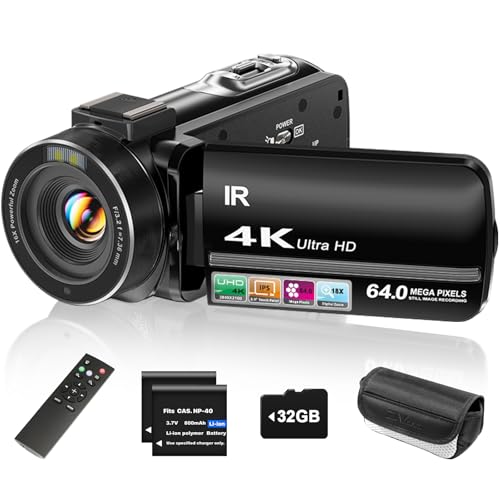
ZYDIIE 4K Video Camera Camcorder — Best budget touchscreen option
The ZYDIIE’s real selling point is in your hands, not its title: a 3-inch IPS touchscreen that rotates through 270 degrees. Touch focus and menu control make it feel modern, the IPS panel keeps colours honest at an angle, and the rotation covers self-recording, low angles and overhead shots of a desk or a kitchen counter. For casual creators who think in phone gestures, this is the most natural budget camcorder here to operate.
The title, however, needs the cool-headed reading this guide applies to the whole class. The large stills megapixel figure describes processed photographs, not video detail, and while the camera markets higher recording resolutions, the sensible expectation — the one your footage will meet — is competent 1080p-class video in good light. That is not a dismissal: at this price, pleasant handling plus honest HD is a fair bargain. It is only a problem if you buy the numbers instead of the camera.
Use it where it shines: bright rooms, gardens, travel diaries and pieces to camera where the flip touchscreen earns its keep daily. Add a small tripod, keep digital zoom for emergencies, and record your voice close to the camera or in quiet spaces. Treated as the class’s best-handling budget recorder rather than a resolution miracle, the ZYDIIE is easy to like and easy to recommend with a straight face.
- Screen: 3-inch IPS touchscreen rotating 270 degrees
- Zoom: 18x digital zoom
- Recording: marketed at higher resolutions — judge by 1080p expectations
- Stills: very large headline megapixel figure refers to stills processing
- Use case: self-recording, family video, casual vlogging
Strengths
- Touchscreen and rotation make self-recording easy
- IPS screen shows colours accurately while framing
- Modern, phone-like operation suits casual creators
Trade-offs
- Headline numbers exceed what footage delivers
- Digital zoom only, soft at full extension
- Low-light performance is budget-class
Best for: casual vloggers and families who value touchscreen handling.
Not suited for: spec-led buyers expecting true high-end resolution.
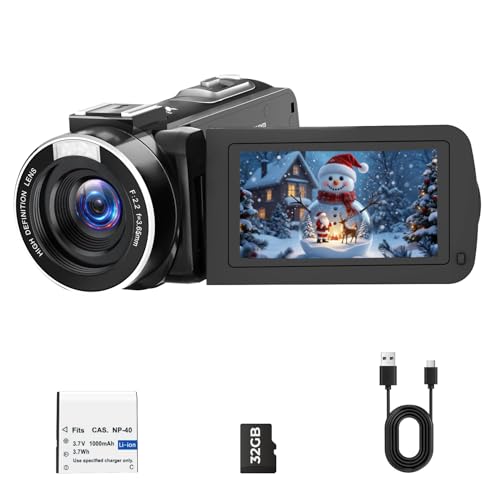
Camcorder Video Camera 2.7K 48MP — Best budget pick that doubles as a webcam
This camcorder’s neat trick is a second job: plug it into a computer and it works as a webcam, which makes it a sensible single purchase for a student or beginner whose life splits between recording videos and joining calls. The 3-inch flip screen handles the self-recording side, rotating for framing at a desk or on a tripod, and the whole package is aimed at people making their first videos rather than their fiftieth.
Apply the class’s honest translation to its numbers: the recording is marketed above HD, the stills figure is large, and the zoom is digital — so expect likeable 1080p-class footage in decent light, softer results when the digital zoom stretches, and stills that are fine for thumbnails and keepsakes rather than prints. None of that prevents it doing its actual job well. A beginner’s bottleneck is never resolution; it is lighting, sound, stability and finishing videos at all, and this camera removes excuses on all four fronts cheaply.
As a webcam it will generally out-perform a tired laptop camera, especially with a window in front of you, and as a camcorder it covers family events and first vlogs without fuss. Buy it as a flexible starter that earns its keep twice — on calls in the week, on a tripod at the weekend — and it is one of the most practical budget choices in this guide.
- Recording: marketed at 2.7K — plan around solid 1080p results
- Screen: 3-inch flip screen rotating 270 degrees
- Zoom: 18x digital zoom
- Extra: webcam function for calls and streaming via computer
- Use case: beginners, students, home recording and calls
Strengths
- Webcam mode makes one purchase serve two jobs
- Flip screen suits desk recording and self-framing
- Beginner pricing keeps the risk of starting low
Trade-offs
- Marketing resolutions flatter the real footage
- Digital zoom softens distant subjects
- Not built for demanding low-light or fast sport
Best for: students and beginners mixing video calls with first recordings.
Not suited for: event filming from the back of large halls.
How Do the Six Picks Compare Side by Side?
| Pick | Type | Headline strength | Watch out for |
|---|---|---|---|
| Canon VIXIA HF R600 (Renewed) | Name-brand HD camcorder (renewed) | True optical zoom and Canon processing | Renewed condition varies — inspect on arrival |
| kimire Video Camera Camcorder 1080P | Budget camcorder | Rotating screen and simple controls | Modest frame rate and digital zoom limit polish |
| VETEK Video Camera 1080P Camcorder | Budget camcorder with IR mode | Infrared night vision recording | Night mode is monochrome and short-ranged |
| Video Camera Full HD 1080P 30MP Camcorder | Budget vlogging camcorder | Beginner-friendly all-in-one recorder | A learning tool, not a channel’s forever camera |
| ZYDIIE 4K Video Camera Camcorder | Budget touchscreen camcorder | Rotating touchscreen handling | Headline resolution and stills figures flatter it |
| Camcorder Video Camera 2.7K 48MP | Budget camcorder / webcam | Webcam mode plus flip screen | Jack of two trades, master of neither |
The table tells the story of this category in one glance: one renewed name-brand camcorder with real optics, and five budget recorders whose value lies in simplicity and price rather than specifications. Neither group is a trick. The Canon rewards buyers who need reach and reliability; the budget five reward buyers who need a camera in the bag this weekend. Confusing those two jobs is the only way to buy badly here.
What Should You Look for in a 1080p Video Camera?
Start with the zoom, and learn to read it like an adult. Optical zoom moves glass and keeps quality; digital zoom crops the picture and spends quality. A camcorder’s honest reach is its optical figure, and for the classic camcorder jobs — stage, sport, ceremony — reach is the feature that decides whether your footage shows faces or heads the size of peas. The budget cameras in this guide lean on digital zoom, which is usable for mild framing but punishing at full stretch. If your filming position is fixed and far away, that single fact should steer your choice more than any other.
Next, weigh the recording experience: how fast the camera starts, whether it can record for the full length of your events without limits or overheating, how long the battery truly lasts, and whether the screen works in the light you film in. Camcorders earned their reputation on exactly these unglamorous virtues. A flip or rotating screen matters more than it sounds — it is how you film a toddler at floor level and a vlog at arm’s length — and a standard tripod thread plus a microphone input, where offered, extend a cheap camera further than any menu feature.
Finally, price the whole tool, not the headline. Memory cards, a spare battery, a small tripod and a case turn a camcorder into a working kit, and with budget brands the included bundle varies wildly between listings — read what is actually in the box. Set your expectations by class: name-brand optics and processing cost more because they deliver more, and budget recorders deliver simplicity. The happiest buyers in this category are the ones who knew which of those they were purchasing before the parcel arrived.
How Should You Set Up and Use Your Choice Well?
Technique rescues budget footage more than settings do. Plant the camera on a tripod or a steady surface for anything longer than a minute, because shake is the first thing viewers notice and the last thing a cheap stabiliser fixes. Zoom before you press record, not during, unless the shot demands it — digital zooms especially reward pre-framing. Get closer whenever the event allows; three steps forward improve a budget camcorder’s picture more than any menu setting, and they improve the sound just as much.
Sound deserves its own paragraph in every camcorder guide. Built-in microphones hear the room — the echo, the air conditioning, the audience — as faithfully as the subject. Sit nearer the speakers, choose seats out of the draught of doors, and for services or speeches, ask whether the venue offers an audio feed or a better position near a loudspeaker. Record a minute before the event starts and listen back on headphones; that one habit catches dead batteries, full cards and awful positions while they are still free to fix.
Putting It Into Practice, Week by Week
Your first filming day with any of these cameras should be a rehearsal, not an occasion. Record ten minutes around the house and garden: a face in window light, a pet crossing the room, the far end of the garden at full zoom. Watch it all back on the biggest screen you own. You will learn your camera’s true zoom honesty, its low-light limit and its microphone’s reach in one sitting — the three facts that decide every real shoot afterwards, learned while nothing mattered.
Practise the back-of-hall shot before you need it. Set the camera at the distance of a school hall’s rear wall from a willing subject, frame them at the zoom you would actually use, and record a minute of them speaking. On playback, judge two things only: can you read their expression, and can you follow every word? If either fails, your fixes are positional, not financial — arrive earlier, sit closer, or choose the pick with real optical reach. Knowing this in advance turns concert day from a gamble into a plan.
Battery discipline separates camcorder owners from camcorder borrowers. Charge fully the night before an event, carry the spare if you have one, and learn how your camera behaves in its last quarter — some warn politely, others simply stop. For long services and tournaments, note that screens are the hungriest component; dimming the display and using it less between moments stretches a modest battery across a whole afternoon. Write your real recording time, measured at home, on a label in the camera bag.
Treat the flip screen as a creative tool rather than a convenience. Low angles make children and pets the heroes of their own footage; a screen tilted down lets you hold the camera overhead at a parade or over a cooking pot for a recipe video. The budget picks here all rotate their screens for a reason. Spend one filming session deliberately at floor level and one at arm’s length overhead, and you will double the variety of your family footage without spending anything.
If your camera offers a night or infrared mode, rehearse with it too, because its look surprises everyone the first time. Film the garden after dark, a pet asleep, the street from a window. Learn its real range — usually a few metres of clear subject, then a fall into murk — and its monochrome character. On the night you actually want it, for a hedgehog’s visit or a baby’s room check, you will already know where to stand and what the footage will look like.
Archive like you mean it. Camcorder footage dies in two places: on cards that get reused and in folders named with dates nobody remembers. After every event, copy the card to a computer the same evening, name the folder for the occasion and the people, and only then format the card in the camera. A second copy on any other drive — even an old one — is the difference between a family archive and a family rumour. Budget cameras record priceless things; treat the files accordingly.
Finally, review your footage monthly with a notebook, the way photographers review contact sheets. Note which shots worked and which habit ruined the others — the zoom you leaned on, the seat you chose, the battery you forgot. Camcorder craft is mostly this: a short list of personal lessons, applied calmly. The cameras in this guide span a wide range of ability, but the operator’s habits are the same at every level, and they are worth more than the gap between the cheapest and dearest pick here.
Learn the geography of your regular venues, because camcorder work is repeat work. The school hall, the sports club, the place of worship — each has a best seat for filming, and it is rarely the one you are first offered. Arrive once with time to spare, test the view from three positions, note where the power sockets hide and which lights hum into a microphone. Write it down. The second visit, you walk in like a professional, and every event afterwards inherits that first visit’s homework in the form of calmer, better footage.
Stage lighting defeats more camcorder footage than any camera fault. A performer lit by a follow spot against a dark hall will fool automatic exposure into a glowing face in a black void, or the reverse. Practise at a rehearsal if you can: lock exposure once the lights are set, or learn where your camera’s exposure compensation lives and use it deliberately. Even budget camcorders usually offer a backlight or spotlight mode — find yours at home, in the manual’s quiet company, rather than mid-performance with the lights down.
Sports days teach a different discipline: anticipation over reaction. A camcorder started when the race begins captures the middle; a camera already recording as the whistle approaches captures the start that parents actually want. Record generously and edit later — cards are cheap, moments are not. Pan smoothly by turning your whole body from the hips, keep the zoom wider than your instincts suggest so the action stays in frame, and let the game’s flow, not your zoom rocker, provide the drama.
For services and ceremonies, invisibility is the craft. Settle before the congregation or guests arrive, agree your position with whoever leads the event, and then become furniture: no wandering for angles, no screen glow in a darkened room, no beeping menus. A single, well-chosen, static wide shot with clean sound honours such occasions far more than restless coverage, and it is the footage families rewatch for decades. The camcorder’s long recording stamina exists precisely for this kind of respectful, unbroken witness.
Travel filming rewards the lightest habits. A camcorder in a side pocket, already charged, already holding an empty card, gets used; a kit that needs assembling stays in the hotel. Film arrivals and departures, not just landmarks — future viewers care about the train window and the café table more than another angle of the famous tower. Keep clips short and varied, turn the camera on companions as often as views, and remember that the sound of a place — market noise, sea, a busker — is half the souvenir.
School projects deserve a word, because several picks here will live in classrooms. A simple camcorder that any pupil can operate democratises the project: the confident child no longer owns the filming by default. Teach three rules — hold it steady, get closer, check the sound — and let groups rotate roles. Footage shot by children has an honesty adults cannot fake, and a robust budget camera that survives the school bag is a better educational tool than a precious one kept in a cupboard for safety.
Interviews and family histories are where these cameras quietly become priceless. Sit an grandparent by a window, place the camcorder on a tripod at eye level, ask about the street they grew up on, and record an hour. The technical demands are tiny — steady frame, close sound, no interruptions — and every pick in this guide can meet them today. In ten years that file will be the most valuable footage your family owns, outvaluing every specification in this article combined. If you buy a camcorder and do only this with it, it has earned its price.
Group events — parties, reunions, club dinners — reward a roving brief. Short clips of conversations, arrivals, the cook at work, the speech and the laughter after it assemble later into a film of the day; one unbroken two-hour recording assembles into a file nobody finishes. Move kindly, film people in twos and threes rather than crowds, and lower the camera when someone signals they would rather not be filmed. Consent is part of craft, and the footage everyone enjoys is the footage nobody resents.
Learn your camera’s microphone geography. Built-in microphones favour what is in front and near; they are honest about rooms and ruthless about wind. Outdoors, a cheap foam wind cover — or filming from a sheltered spot — rescues more dialogue than any setting. Indoors, soft furnishings are your friends and tiled halls your enemies. Position is the cheapest audio upgrade in existence: three steps closer improves a voice more than any accessory you can buy for a budget camcorder, and it costs exactly nothing, every single time.
Editing begins at the camera, even for beginners. Hold each shot for a few seconds before and after the action, so the editor — often future you — has handles to cut with. Film cutaways deliberately: hands, signs, the audience’s faces, the scoreboard. Avoid zooming mid-shot unless the event demands it, because a steady frame cuts cleanly and a wandering one announces itself. These habits, practised on any pick here, are what separate footage that assembles into a film from footage that remains a pile of clips.
Storage discipline returns in a new costume: cards are small and events are long. Format cards in the camera before an event, never borrow a card from another device mid-season, and carry the spare in the same pocket every time so habit finds it in the dark. After filming, the copy comes before the celebration drink — two copies, one evening, every time. Camcorder history is littered with masterpieces recorded over by the next match; a dull routine is the only known cure.
Maintain the tool like the simple machine it is. A soft cloth for the lens before every event, a blower for the card slot dust, a battery charged rather than stored flat for months, firmware left alone unless it fixes something you suffer from. Budget camcorders fail from neglect more often than from defects, and name-brand ones fail from being lent without their charger. A labelled bag with camera, card, battery, charger and cloth is a system; a camera alone in a drawer is a hope.
Finally, set yourself the one-minute challenge monthly: one minute of finished, watchable film about anything — the garden in rain, a bus journey, a pet’s routine. The constraint teaches framing, sound and cutting faster than any tutorial, and it builds the archive of ordinary life that families treasure most. The cameras in this guide were built for exactly this accumulation of small, honest minutes. Resolution was never the point of them. Presence was, and presence is a habit you can start this week.
Practise the two-shot interview framing if you record conversations, because it is the shape half of all useful footage takes. Place the camcorder so both faces sit in profile-to-three-quarter view, or record each speaker separately with matched eyelines if the event allows. Keep the camera at the speakers’ eye height — a camcorder on a stack of books at the wrong height makes everyone look interviewed by a child or a giant. Small dignities of framing are what separate footage people treasure from footage people merely keep.
Learn the venue’s light switch geography before any evening event. Halls and places of worship often have one person who knows which switch kills the fluorescents and which warms the room, and that person is worth finding early. Camcorders of every class in this guide prefer warm, steady light to bright, flickering light, and a thirty-second conversation with the caretaker can improve an evening’s footage more than any camera upgrade on this page. Politeness, again, is a technical skill.
If you film regularly for a group — a club, a team, a congregation — build a tiny kit that lives together: camera, charged battery, empty card, small tripod, cloth, and a card with the group’s name on the bag. Regular filming fails on logistics, not talent; the evening the tripod is in another car is the evening the speeches happen. A dedicated bag removes the logistics from the equation and turns an occasional favour into a reliable institution that the whole group quietly depends on.
Respect the pause button’s older sibling: the decision not to record. Some moments — a family’s grief, a child’s worst day, a stranger’s misfortune — are not improved by being filmed, and a camcorder’s owner is the person trusted to know the difference. The cameras in this guide will record anything; their operators supply the judgement. Footage taken with consent and kindness gets watched for decades. Footage taken without it gets deleted with embarrassment, and the memory of taking it lasts longer than either.
Give your footage titles the day it is shot. A clip named for the occasion, the people and the place is findable forever; a clip named by a camera’s counter is findable never. Rename during the evening copy, while the day is still in your head, and keep the names boring and literal — future searchers, including your own grandchildren, will use the obvious words. This ten-minute habit is the difference between an archive and a attic: both are full of boxes, but only one of them can be searched.
Check your playback chain occasionally, because footage is only real if it can be watched. Files recorded today should play on the television, the laptop and the tablet your family actually owns; if a format only plays in one place, that place is a single point of failure wearing a screen. Keep copies in the most ordinary formats you can, on the most ordinary drives you own. Camcorder history’s saddest artefacts are perfect recordings in formats nothing reads any more, and the cure is dull, regular verification.
And when the camera finally ages — as even the Canon will — let its last job be a good one. Film the family elder’s stories, the house before the move, the dog in its prime. Then pass the camera on to a school, a club or a young relative with the bag packed and the charger included. These are tools built to witness ordinary life, and ordinary life does not end when a newer model ships. The best 1080p video camera, in the end, is the one still being carried when the moment happens.
A word about filming in public places, where these cameras will often work. Rules and courtesies vary — some venues welcome recording, some restrict it, some forbid it outright — and the camcorder owner who asks first is rarely refused and never ejected mid-event. A quiet word with an usher, teacher or official before the occasion protects the footage and the filmer alike. The camera’s small size helps here: a modest camcorder reads as a family keepsake device in settings where a large rig reads as a commercial intrusion.
Practise filming without the screen occasionally, using the viewfinder if your model has one or simply framing by instinct and reviewing afterwards. The exercise sounds perverse and teaches beautifully: you learn your lens’s true field of view in your body rather than on a display, and bright-sun filming — the camcorder’s home turf — stops depending on a screen the sun has washed out. Even a few minutes a month keeps the skill alive, and the first beach holiday afterwards will thank you for it.
Keep the original boxes and paperwork longer than feels rational if you buy renewed or budget, because returns, resales and gifts all move more smoothly with them. Note the purchase date and seller on the box in pencil. These small acts of household administration are unglamorous, and they are also the difference between equipment that circulates usefully for a decade and equipment that becomes anonymous e-waste in a drawer. A camcorder’s life is long; help it live that life with its identity intact.
Consider lending your skills along with your camera, because every community has events that go unrecorded for want of a volunteer rather than equipment. The school play, the veterans’ parade, the village fete — an hour of steady camcorder work, offered kindly, becomes part of other families’ archives as well as your own. The picks in this guide are priced and built for exactly that generosity, and the operator who practises it discovers that filming for others sharpens the eye faster than filming for oneself ever does.
And keep one small promise to the future: label the people in your footage while you still know all their names. A voice note at the start of a family recording, a written list in the archive folder, a title card edited in later — any of these turns anonymous faces into ancestors for the viewers of fifty years hence. The camcorder records the moment faithfully; only you can record what the moment meant, and that caption, added today in two minutes, is the most valuable footage in the entire archive.
One last rehearsal is worth the calendar space: film the same family moment twice, once exactly as instinct directs and once applying everything this guide has taught — position chosen, zoom pre-set, sound considered, shot held. Compare the two honestly. The gap between them is your personal measure of what technique is worth, and it will be larger than the gap between any two cameras in this guide.
What Mistakes Do Buyers Keep Making?
The category’s classic mistake is buying the title instead of the camera: chasing the largest megapixel and zoom figures in a listing, then discovering at the school play that digital zoom mush and a dim hall defeat both. Read specifications by type — optical versus digital zoom, video resolution versus stills figures — and the disappointment mostly evaporates. The second mistake is filming everything from where you happen to be sitting. Camcorder footage is made by position: arrive early, sit on the aisle, get the tripod level. Ten minutes of positioning beats any upgrade.
Owners also neglect the dull essentials. Cards fill mid-ceremony because nobody checked the remaining time; batteries die because the spare was never bought; footage stays on a card until it is overwritten by the next birthday. And with renewed or budget listings, a subtler mistake: not testing the camera thoroughly in the first days, while returning or exchanging is easy. Film a full battery’s worth, at every zoom, in day and night modes, the week it arrives. Whatever a camera is going to be, it will tell you quickly if you ask it properly.
Final Recommendation
Choose by job and the answer is clear. For real events at real distances — stages, sports, services — the renewed Canon VIXIA is the only pick here with the optics the job demands, bought with your eyes open about its renewed status. For family life, school projects and first channels, the budget five divide by flavour: the kimire for simplicity, the VETEK for its night mode, the unbranded recorder and the ZYDIIE for beginner vlogging, and the 2.7K camcorder if webcam duty sweetens the deal.
Whichever level you choose, film something this week, watch it honestly, and fix one habit before the next outing — because in this category the camera you learn to use well will always out-film the finer camera still sitting in its box.
Frequently Asked Questions
How is a camcorder different from a mirrorless camera for video?
A camcorder is designed around recording: a long built-in zoom, a grip and zoom rocker for one-handed use, long recording times without overheating, and controls that favour starting and stopping reliably. A mirrorless camera offers bigger sensors and interchangeable lenses, with finer image quality, but often shorter practical recording stamina and more complexity. For events and family coverage, the camcorder’s simplicity is the feature; for crafted short films, the mirrorless pipeline wins.
What does it mean that the Canon VIXIA listing is renewed?
Renewed means the unit has been refurbished or returned and is being resold in checked condition, rather than supplied factory-new. It is a legitimate way to buy an older name-brand model for less, with the sensible precautions: read the seller’s condition description and return terms, inspect and fully test the camera as soon as it arrives — zoom, screen, recording, battery — and keep your paperwork. We describe it neutrally because that is what it is: a condition category, not a warning.
Is digital zoom as good as optical zoom?
No, and the difference is visible. Optical zoom uses the lens to magnify the image before it reaches the sensor, keeping detail. Digital zoom crops into the picture and enlarges it, which softens detail increasingly as you push further. Mild digital zoom for framing is fine; relying on its full stretch for a distant stage is how families end up with faces made of porridge. If your filming is regularly at long range, optical reach should drive your choice.
Can these budget camcorders really record good 1080p?
In good light, yes — clear, watchable Full HD of family events, lessons and vlogs is exactly what the better budget recorders deliver. Their limits appear in dim rooms, fast motion and heavy zoom, where footage softens and noise rises. That is the honest class standard, and it is why this guide ranks them as tools for undemanding video rather than pretending they rival name-brand cameras. Help them with light and position and they repay you.
Do I need a camcorder if my phone records video?
A phone is excellent for spontaneous clips, but a camcorder earns its place on planned occasions: it can sit on a tripod recording the whole play while your phone stays in your pocket, its zoom reaches further, its battery is not your phone’s battery, and handing it to a relative does not hand them your messages. Many families keep both — phone for moments, camcorder for events — and that division of labour is the practical answer.
Related Guides
To get more from your camcorder once it arrives, read on with: Tripod skills for steadier event footage, Recording better sound at services and shows and Organising a family video archive that lasts.
Related guides
- Best Canon Point and Shoot Digital Cameras: PowerShot Picks From Pocket Compacts to Travel Zooms
- Best Balancing Stabilizers for Mirrorless Cameras: Payload, Balancing and Native Vertical Shooting
- Best Basic Phones Camera Buyers Can Trust: Flip Phones and Simple Handsets That Still Take a Photograph
- Best Sony Full Frame Cameras for Astrophotography: Sensitivity vs Resolution


