What's inside
- Key Takeaways
- Quick Picks
- How Did We Decide What Counts as a 90Hz Pick?
- What Does a Higher Refresh Rate Actually Do?
- When Does 120Hz Beat 90Hz, and When Is It Just a Bigger Number?
- What Does a Fast Screen Cost in Battery Life?
- Does Panel Type Change What a High Refresh Rate Feels Like?
- Who Notices the Upgrade Most — and Who Honestly Might Not?
- The Six Fast Screens, Examined One by One
- How Should You Choose Between the Two 90Hz Phones and the Four at 120Hz?
- Does a Fast Screen Help or Hurt Eye Comfort?
- How Do the Six Screens Compare Side by Side?
- Which Mistakes Do Buyers Make When Chasing a Faster Screen?
- How Can You Test Refresh Rate Properly in the First Days?
- How Should You Set Up a Fast Screen to Keep the Battery Honest?
- How Does a Fast Screen Age Over a Phone’s Life?
- What Should You Check on the Listing Before Trusting a Hertz Claim?
- A Last Word on Expectations Before You Spend
- Final Recommendation
- What About Screens Faster Than 120Hz — Should You Hold Out for One?
- Frequently Asked Questions
- Related Guides
As an Amazon Associate I earn from qualifying purchases. This post may contain affiliate links at no extra cost to you.
gizmoverdict.com is reader-supported. When you buy through links on our site, we may earn an affiliate commission.
Where to buy: Every phone below refreshes at 90Hz or faster, and each pick states its true rate rather than hiding behind the headline figure. Two are renewed units — a Pixel 8a and a Galaxy A35 — and both are labelled renewed in the table, the headings and the comparison, because a smooth screen on a pre-owned phone is still a pre-owned phone.
Most people searching for the best 90Hz smartphones have just come from the opposite direction: they used a friend’s newer phone for thirty seconds on a train platform or across a café table, scrolled one list, and felt their own handset turn to cardboard. That sensation is real, it is not snobbery, and it has a simple cause. A standard 60Hz display redraws the picture sixty times a second; a 90Hz panel redraws it half as often again, and a 120Hz panel twice as often. Motion that used to step visibly from frame to frame starts to glide, text stays legible a moment longer while a page is moving, and the whole phone feels less like it is negotiating with you.
This guide treats 90Hz as the floor, not the ceiling, because that is how the market now works. Only two of the six picks sit exactly at 90Hz; the other four run at 120Hz, and they are included deliberately, with their real rates stated, so you can see what the extra smoothness costs and what it buys. What this guide will not do is pretend the number transforms a phone. Refresh rate polishes interaction; it does not fix a slow processor, a dim panel or a battery that fades by dinner, and the sections below keep the benefit in its proper proportion.
The six phones span the sensible range: Samsung’s budget AMOLED at exactly 90Hz, a matte-screened TCL that treats smoothness as a reading feature, two renewed bargains with flagship-grade 120Hz panels, a battery-led Motorola, and Nothing’s design piece. Between them they cover the honest ways to buy a fast screen without paying flagship prices or believing flagship promises.
Our Top Picks
Key Takeaways
- Ninety hertz is the entry point to smooth scrolling; four of these six phones exceed it at 120Hz, and each pick lists its actual rate.
- The clearest gains appear in scrolling, animations and supported games — not in video, which is filmed at far lower frame rates.
- A high refresh rate cannot rescue a weak processor; the pair work together, which is why chipset notes appear beside every pick.
- Faster screens draw more power, so battery size matters more on this list than on most — the Moto G Power exists here for that reason.
- The Pixel 8a and Galaxy A35 are renewed units; their 120Hz panels are excellent, their condition is pre-owned, and both facts travel together.
- The TCL’s matte NxtPaper screen is the comfort pick: 90Hz smoothness with far less glare for readers.
Quick Picks
| Pick | Badge | Why it earns its place |
|---|---|---|
| Samsung Galaxy A15 5G | The honest 90Hz | A Super AMOLED panel at exactly 90Hz on a new phone, with Samsung’s long update support behind it. |
| Google Pixel 8a (Renewed) | 120Hz, Google’s brain | A renewed handset pairing a fluid 120Hz OLED with the smartest software in this group. |
| Motorola Moto G Power 2025 | 120Hz that lasts | The big-battery answer to the refresh-rate power drain, sold new with a large 120Hz screen. |
| TCL 50 XE NxtPaper 5G | 90Hz without the glare | A matte, paper-like display for readers, unlocked across Verizon, T-Mobile and AT&T per its listing. |
| Nothing Phone (2a) | 120Hz with personality | A bright AMOLED at 120Hz inside the most distinctive design at this level, with clean software. |
| Samsung Galaxy A35 5G (Renewed) | 120Hz, polished and renewed | Samsung’s smoother A-series screen with water resistance, bought as an inspected pre-owned unit. |
How Did We Decide What Counts as a 90Hz Pick?
The rule was simple to state and awkward to apply: the panel’s true maximum refresh rate had to be 90Hz or higher, verified against well-established model specifications rather than a listing’s adjectives. Marketplace copy loves the word “smooth” and applies it to 60Hz phones with a straight face, so adjectives were ignored entirely. Where a phone supports an adaptive rate that varies with content, the pick is described by its ceiling and its behaviour, not by a single flattering number.
Condition was the second consideration, because two of the most attractive fast screens in the pool sit inside renewed phones. Rather than exclude them — which would have hidden the best value in the category — they are included with their condition stated everywhere they appear. A renewed Pixel 8a with a 120Hz OLED is a genuinely compelling purchase; it is simply a different purchase from a new phone, with a battery that has lived a previous life and stock that comes and goes.
The third filter was balance. A fast screen bolted to a processor that cannot feed it produces smoothness in menus and stutter in games, which is the worst of both worlds. Each pick below was checked for a chipset that can hold its panel’s rate in ordinary interface work at minimum, and the two phones whose ambitions exceed that — the Pixel and the Nothing — are noted as the ones where supported games actually benefit.
What Does a Higher Refresh Rate Actually Do?
Refresh rate counts how many times per second the display paints a new image. At 60Hz, each frame lingers for about seventeen milliseconds; at 90Hz, about eleven; at 120Hz, about eight. Your eyes do not count frames, but they register the gaps during motion: a list flicked upward at 60Hz smears and steps, while the same list at 120Hz holds its text together, so you can begin reading before the scroll fully stops. That single difference, repeated hundreds of times a day, is most of what people mean when they say a phone feels fast.
Touch responsiveness rides along. Panels with higher refresh rates usually sample touch more frequently too, so the content follows your finger with less lag during a drag. The effect is subtle in menus and obvious in any game or drawing app where the image is supposed to be glued to your fingertip. Combined with shorter frame times, the phone feels less like a device responding to requests and more like a surface you are directly manipulating.
There are honest limits. Video does not benefit: films and nearly all streamed shows are produced at 24, 30 or 60 frames per second, and a 120Hz screen simply shows each of those frames several times. Photographs do not benefit. Reading a static page does not benefit, because nothing is moving. The gain lives entirely in motion — scrolling, swiping between home screens, panning a map, playing a game that renders at high frame rates — and a buyer whose phone use is mostly calls, messages and still photographs will notice it least.
When Does 120Hz Beat 90Hz, and When Is It Just a Bigger Number?
The step from 60Hz to 90Hz is the large one; the step from 90Hz to 120Hz is a refinement. Side by side, most people can tell them apart in a fast scroll, but the difference is a polish rather than a revelation, and it shrinks further on phones whose processors cannot sustain high frame rates in demanding apps. If a 90Hz phone and a 120Hz phone otherwise match, the 120Hz model is nicer; if the 120Hz model costs meaningfully more or carries a weaker battery, the trade deserves thought.
Games are where the extra frames can matter competitively and experientially, but only for titles that actually render above 90 frames per second and only on hardware that can hold those rates without throttling. In this group, that realistically means the Pixel 8a and the Nothing Phone (2a) in supported games at sensible settings. On the Motorola and the Samsungs, 120Hz is an interface luxury — a real one, felt every time you scroll — rather than a gaming weapon, and the picks are described that way below.
Adaptive behaviour complicates the headline further. Several of these phones vary their rate with content, dropping toward lower rates for static screens to save power and rising for motion. That is good engineering, not cheating: you get the smoothness when something moves and the battery savings when nothing does. When you compare phones, prefer the one whose adaptivity is broad and automatic over one locked at a fixed high rate, unless you specifically want a fixed rate for a particular game.
What Does a Fast Screen Cost in Battery Life?
Painting twice as many frames means the display and the graphics hardware work harder, and on a phone left at a fixed maximum rate the battery cost is real — noticeable across a day, especially combined with high brightness outdoors. This is the unglamorous reason the Moto G Power 2025 belongs in a refresh-rate guide: its oversized battery absorbs the cost so thoroughly that the smoothness becomes free in practical terms, which cannot be said of every thin, light handset with a fast panel.
You also hold some of the controls yourself. Dropping brightness a notch saves more power than the refresh rate consumes; locking a phone to 60Hz for a long travel day is a legitimate emergency measure; and adaptive modes exist precisely so you do not have to think about any of this. Judge the picks below by the pairing of screen and battery rather than by either figure alone, because that pairing is what you will actually live with.
Does Panel Type Change What a High Refresh Rate Feels Like?
Yes, in ways the hertz figure alone never reveals. An AMOLED or OLED panel lights each pixel individually and can switch pixels almost instantly, so motion stays clean at high rates: a scrolling page does not trail ghost images behind its text, and dark scenes keep their depth while the camera pans. The Samsung picks and the Pixel and Nothing phones in this guide all use this technology, which is why their smoothness feels luxurious rather than merely quick.
LCD panels switch more slowly, and at high refresh rates a fast-moving edge can smear slightly because the pixels are still transitioning while the next frame arrives. Modern phone LCDs have narrowed this gap enormously — the Moto G Power’s 120Hz screen looks genuinely fluid in ordinary use — but the smearing is why a 120Hz LCD and a 120Hz AMOLED do not feel identical in a dark room with white text scrolling over black. Neither is a bad choice; they are different textures of fast, and the LCD’s compensations are size, brightness and price.
The TCL’s matte NxtPaper panel adds a third texture: the anti-glare finish scatters reflections before they reach your eyes, which softens colour saturation but removes the mirror effect that makes glossy screens tiring outdoors and under office lighting. For a reader, that trade is usually worth more than the difference between 90Hz and 120Hz, because glare fatigue accumulates over hours while frame-rate differences register in moments. Choosing among these six is therefore partly a question about your rooms and your habits, not only about a number.
Brightness completes the picture. A fast panel that cannot be read in sunlight is a laboratory feature, and outdoor brightness has improved faster in the AMOLED camp. If your work or commute keeps you outside, weight the bright AMOLED picks and the big, bright Motorola more heavily; if your phone lives indoors on a desk or a sofa, even the gentlest panel here will look perfectly at home.
Who Notices the Upgrade Most — and Who Honestly Might Not?
Commuters who read on trains notice first: a scrolling feed on a moving vehicle is a worst case for 60Hz, with vibration adding its own judder to the panel’s, and the step to 90Hz or beyond calms the whole experience noticeably. Social scrollers and news grazers live in the exact motion this feature improves. Map-heavy users — delivery riders, travellers, walkers navigating a new city — pan constantly, and a map that holds street names legibly while it moves is a functional upgrade, not a cosmetic one.
Gamers notice selectively, as the earlier sections explained: only in supported titles, but there the difference between a 60-frame ceiling and a fluid 120 is the difference between reacting to an event and feeling half a beat behind it. Photographers reviewing a day’s shots by flicking through the gallery notice more than they expect to. And anyone who uses their phone one-handed while walking — which is to say, everyone — benefits from touch tracking that keeps content glued to a moving thumb.
The honest exceptions are worth naming. A buyer whose phone is mostly a telephone — calls, a messaging app, the occasional photograph, long periods face-down — will struggle to justify prioritising refresh rate over battery or simplicity. So will a buyer replacing a phone for an older relative whose previous device was never scrolled quickly in its life. For those readers, several picks here still make sense on their other merits — the A15’s support window, the Motorola’s endurance — but the hertz figure should be a footnote in the decision rather than its headline.
The Six Fast Screens, Examined One by One

Samsung Galaxy A15 5G — The honest 90Hz
Only one phone here takes the keyword literally — the Galaxy A15 5G — and it does so with the best panel technology in the budget tier. Its Super AMOLED display refreshes at 90Hz, which delivers the full step up from 60Hz that this search is about, and AMOLED’s per-pixel lighting gives the motion a richness that LCD rivals cannot copy: blacks stay black while the page moves, contrast holds at angles, and video looks a class above the price. It is a new, unlocked US A-series phone, which also makes it the lowest-risk purchase in the guide.
Samsung’s software is set up sensibly for the hardware: the 90Hz mode is the phone’s natural state rather than a hidden toggle, and the interface animations are tuned to show it off. The chipset is modest, so the smoothness is an interface pleasure rather than a gaming feature — demanding games will run at their own frame rates regardless of the panel — but for scrolling feeds, flicking through photographs and panning around a map, the A15 delivers exactly the sensation that sends people searching for this keyword. A memory-card slot and Samsung’s long update runway complete a package with no real catch beyond its performance ceiling.
- Refresh rate: 90Hz, Super AMOLED panel
- Condition: sold new, unlocked US model
- Storage: 128GB with memory-card expansion
- Character: budget all-rounder, long software support
Strengths
- AMOLED contrast at 90Hz looks richer than faster LCD panels costing similar money.
- It is the straightforward new-phone purchase here, with no condition caveats.
- Card expansion keeps a media-heavy library from crowding the internal storage.
Trade-offs
- The processor caps gaming frame rates well below what the panel could show.
- Ninety hertz is the ceiling; the 120Hz picks feel a shade smoother in direct comparison.
- Charging speeds are unhurried on a battery of this size.
Best for: first-time smooth-screen buyers who want the genuine 90Hz step on a new phone with years of updates. Not suited for: mobile gamers chasing high frame rates, who should look at the Pixel or the Nothing instead.

Google Pixel 8a (Renewed) — 120Hz, Google’s brain
The Pixel 8a’s screen refreshes at 120Hz, and unlike several rivals it has the processor to honour that figure. Google’s Tensor G3 keeps the interface fluid under load, renders supported games at high frame rates, and drives the computational photography the Pixel line is known for. This pool listing is a renewed unit — inspected, pre-owned stock rather than a sealed box — and that condition is the entire reason a phone of this calibre sits in a value-oriented guide at all. Buy it as a renewed phone and it is a bargain; mistake it for new and you have misunderstood the listing.
Beyond the panel, the 8a is the thinking person’s pick: a clean Android build with Google’s call screening, transcription and photo tools, plus a long support window that keeps a renewed purchase sensible years from now. The OLED is bright and colour-accurate, the body compact enough for one-handed use in a way the larger picks here are not, and the camera outperforms everything else in this group by a wide margin, particularly in low light and with moving subjects like children and pets. The costs of admission are renewed-unit variability — battery health and cosmetic state depend on the individual phone — and storage fixed at the listed capacity with no card slot.
- Refresh rate: 120Hz OLED, adaptive behaviour
- Condition: renewed, unlocked — pre-owned and inspected
- Storage: 128GB, no card expansion
- Character: camera and software leader of the group
Strengths
- The only pick where 120Hz, a strong processor and an excellent camera arrive together.
- Google’s software features and long support window age gracefully.
- Compact dimensions suit one-handed use better than the big-screen rivals.
Trade-offs
- Renewed condition means the individual unit’s battery wear is a lottery within programme limits.
- Charging is leisurely, and no charger headline feature compensates.
- Fixed storage with no expansion asks cloud users and minimalists only.
Best for: photography-led buyers who want a genuinely fluid 120Hz phone and accept renewed stock knowingly. Not suited for: anyone who needs a factory-sealed phone with a guaranteed-pristine battery.

Motorola Moto G Power 2025 — 120Hz that lasts
Every refresh-rate discussion eventually collides with a battery graph, and the Moto G Power 2025 is the collision resolved. Its large display runs at 120Hz — double the rate of the standard panels this keyword’s readers are escaping — while the battery behind it is sized for multi-day endurance, so the smoothness does not arrive with a charging anxiety attached. The phone is sold new and unlocked for US networks, with a build meant to tolerate rough handling on work sites and family outings.
The panel is an LCD rather than an AMOLED, which shows in side-by-side contrast: blacks are greyer, and video lacks the inky depth of the Samsung and Pixel picks. In exchange you get size, brightness for outdoor work and a refresh rate that makes maps, documents and feeds feel effortless. Motorola’s software stays close to stock Android, the phone adds wireless charging that remains rare in this class, and performance is tuned for reliability across a long day rather than for benchmark theatre. As a complete answer to “give me a fast screen I do not have to babysit,” it is the most coherent phone in the guide.
- Refresh rate: 120Hz, large LCD panel
- Condition: sold new, unlocked, made for US networks
- Endurance: oversized battery, wireless charging, rugged build
- Memory and storage: 8GB RAM with 128GB, per its listing
Strengths
- The battery absorbs the 120Hz power cost better than any rival here.
- A big, bright, fast screen suits navigation, documents and outdoor work.
- Wireless charging at this level quietly removes daily cable friction.
Trade-offs
- LCD contrast trails the AMOLED picks, most noticeably in dark video scenes.
- Size and battery make it a heavy phone for smaller hands and pockets.
- The camera is a supporting feature here, not a headline.
Best for: heavy users, drivers and outdoor workers who want 120Hz without watching the battery gauge. Not suited for: contrast connoisseurs or anyone shopping for a small phone.
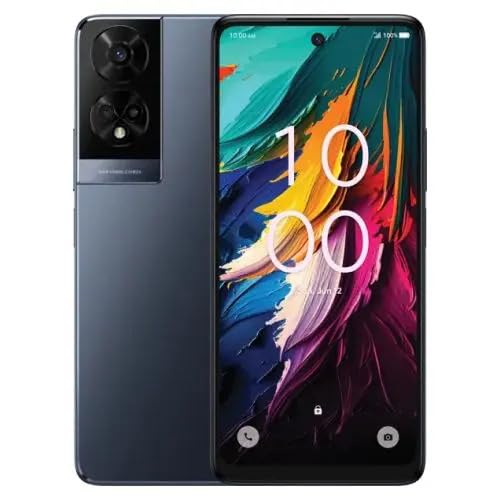
TCL 50 XE NxtPaper 5G — 90Hz without the glare
The TCL 50 XE approaches smoothness from an unusual direction: its NxtPaper display has a matte, paper-textured finish that kills reflections, and it refreshes at 90Hz so that turning pages and scrolling articles feels as gentle as the surface looks. For readers — and this phone is unambiguously aimed at them — the combination is more valuable than a glossier 120Hz panel, because eye comfort across a two-hour reading session is governed by glare and contrast behaviour far more than by the last thirty frames per second.
TCL leans into the reading brief with display modes that mimic paper, including a monochrome-style mode for long texts, and the hardware around the screen is honest budget equipment: a capable-enough processor for reading, browsing and video, 128GB of storage for a downloaded library, and 5G across an unusually wide carrier spread. The listing states compatibility with Verizon, T-Mobile and AT&T, which makes this one of the easiest unlocked phones here to move between networks. Colours are muted by the matte finish — photographers and video-first buyers will find it dull — but judged as a reading and everyday-communication device, it is the most original phone in this guide.
- Refresh rate: 90Hz, matte NxtPaper anti-glare panel
- Condition: unlocked, per listing for Verizon, T-Mobile and AT&T
- Storage: 128GB
- Character: reading-first design, paper-like display modes
Strengths
- The matte screen is uniquely comfortable for long reading in bright rooms and outdoors.
- Broad stated carrier compatibility makes network-switching painless.
- Ninety hertz keeps page turns and scrolling fluid without glossy-screen glare.
Trade-offs
- Muted colours disappoint buyers who want vivid video and photography.
- Performance is everyday-grade; demanding games are not its brief.
- The paper effect is a finish, not e-ink — it still needs backlight and battery like any LCD.
Best for: readers, commuters and anyone whose eyes tire on glossy screens. Not suited for: colour-critical viewers or gamers.

Nothing Phone (2a) — 120Hz with personality
The Nothing Phone (2a) pairs a 120Hz AMOLED display with the strongest everyday performance in this group outside the Pixel, and wraps both in a transparent design with a strip of glyph lights that signal calls and timers face-down on a desk. The panel itself is excellent for the class: bright, evenly lit, with slim symmetrical borders that make the phone look more expensive than it is, and the 120Hz rate is sustained by a processor that does not stumble when the interface asks for it repeatedly.
Nothing’s software deserves as much credit as the hardware. The interface is close to stock Android with a distinctive monochrome-dot aesthetic, animations are consistently tuned to the panel’s rate, and there is none of the duplicated-app clutter that makes some rival phones feel busy. The pool configuration carries generous memory and storage, which helps the phone hold its smoothness as apps accumulate over years. Camera performance is good rather than great — punchy, social-ready photographs — and there is no card slot, but as a fast-screen phone with genuine character, the (2a) is the pick that owners tend to enjoy rather than merely use.
- Refresh rate: 120Hz AMOLED, slim symmetrical bezels
- Condition: unlocked 5G model
- Configuration: 12GB memory with 256GB storage, per the pool listing
- Character: glyph lights, transparent design, clean software
Strengths
- Sustained 120Hz backed by a processor that keeps up in games and heavy apps.
- Clean, fast software with a personality no rival here attempts.
- Generous memory and storage protect the smoothness for years.
Trade-offs
- The camera trails the Pixel 8a clearly, especially in low light.
- No memory-card slot, so storage planning happens at purchase.
- The glyph lights divide opinion; they are charm to some, garnish to others.
Best for: buyers who want flagship-feeling fluidity and design character without flagship money. Not suited for: camera-first shoppers, who should take the Pixel’s trade instead.

Samsung Galaxy A35 5G (Renewed) — 120Hz, polished and renewed
The Galaxy A35 brings Samsung’s smoother tier into reach by being renewed: an inspected pre-owned unit whose 120Hz Super AMOLED display is the finest screen Samsung offers in this guide. Compared with its A15 sibling, everything tightens — the frame feels denser, the glass is tougher, the animations run at the full 120Hz, and water resistance joins the specification for rainy-day confidence. This is the phone for the reader who scrolled the A15’s section thinking “nearly, but nicer.”
The renewed condition is the honest price of that polish, and it should be weighed rather than waved away. The battery has a previous owner’s history, cosmetic grading varies by unit within the programme’s standards, and stock appears and disappears. Against that, Samsung’s update support for the A35 runs long, the processor is a clear step above the A15’s, and the camera system — with optical stabilisation — handles evening photographs far more gracefully. Bought with open eyes, the A35 is the connoisseur’s route to 120Hz in this group; bought carelessly, it is a reminder to always read the condition line twice.
- Refresh rate: 120Hz Super AMOLED
- Condition: renewed, unlocked — inspected pre-owned unit
- Storage: 128GB class, per the pool listing
- Character: water-resistant, stabilised camera, premium feel
Strengths
- The best Samsung screen in the guide, at the full 120Hz the keyword dreams about.
- Water resistance and a stabilised camera lift it above budget norms.
- Long Samsung support keeps a renewed purchase worthwhile.
Trade-offs
- Renewed variability: battery wear and cosmetic state differ per unit.
- Stock is inconsistent, so the configuration may vanish between visits.
- It costs the certainty of new; the A15 is the safer Samsung buy.
Best for: Samsung fans who value screen quality and build polish and accept renewed terms. Not suited for: buyers who need a sealed box and a guaranteed-fresh battery.
How Should You Choose Between the Two 90Hz Phones and the Four at 120Hz?
Work through three questions in order. First: is the phone new or renewed? If a sealed box matters — for a gift, for battery certainty, for the simplest possible purchase — your field narrows to the A15, the Moto G Power, the TCL and the Nothing, and the renewed pair leaves the table regardless of their screens. If renewed is acceptable, the Pixel 8a immediately becomes the value centre of the whole guide, because its panel, processor and camera combination is otherwise unavailable at anything like its tier.
Second: what moves on your screen all day? If the honest answer is text — articles, messages, documents, books — then the two 90Hz phones deserve more respect than their smaller number suggests. The A15 wraps 90Hz in AMOLED richness and Samsung’s support; the TCL wraps it in glare-free comfort. Either will feel like a different world after a 60Hz phone, and neither asks you to pay for frames your reading never uses. If the answer is games, feeds and video-first social apps, the 120Hz group earns its premium, with the Nothing the new-phone pick and the Pixel the renewed one.
Third: how long are your days away from a charger? The further your routine strays from a socket, the more the Moto G Power’s pairing of 120Hz with a genuinely large battery outranks purer screen quality. A commuter with a desk charger can afford the A35’s polish or the Pixel’s brilliance; a courier, a nurse on long shifts or a festival-goer should let endurance arbitrate. Answer the three questions honestly and the six phones sort themselves — which is what a buying guide is for.
Does a Fast Screen Help or Hurt Eye Comfort?
For most people it helps modestly, for an understandable reason: smoother motion means your eyes perform fewer corrective movements while tracking a scrolling page, and text that stays legible during motion reduces the strain of constantly refocusing on a stopped page. Readers who get headaches from long phone sessions often find a high-rate panel part of the remedy — though the larger parts are usually brightness discipline, viewing distance and the glare question the TCL addresses head-on.
There is a minority experience worth acknowledging: some people are sensitive to the way certain OLED panels dim themselves at low brightness, and can find particular phones uncomfortable at night regardless of refresh rate. If you know yourself to be in that group, favour the LCD picks here — the Motorola and the TCL — whose backlights behave differently, and test any phone in a dim room during its return window rather than only under shop lighting. Comfort is personal enough that the return policy is part of the specification.
How Do the Six Screens Compare Side by Side?
| Phone | Refresh rate | Panel type | Condition | Screen personality |
|---|---|---|---|---|
| Galaxy A15 5G | 90Hz | Super AMOLED | New | Rich contrast, exact keyword match |
| Pixel 8a | 120Hz | OLED | Renewed | Fluid, accurate, camera-led phone |
| Moto G Power 2025 | 120Hz | LCD, large | New | Big and bright, battery-backed |
| TCL 50 XE NxtPaper | 90Hz | Matte NxtPaper LCD | New | Glare-free reading comfort |
| Nothing Phone (2a) | 120Hz | AMOLED | New | Bright, slim-bezelled, design-led |
| Galaxy A35 5G | 120Hz | Super AMOLED | Renewed | Polished, water-resistant |
Which Mistakes Do Buyers Make When Chasing a Faster Screen?
The first is believing the adjective instead of the number. Listings and even some manufacturer pages describe 60Hz phones as “silky” or “fluid,” and shoppers who do not find the actual hertz figure in the technical details can pay for smoothness that never arrives. Every pick in this guide was chosen on a stated, verifiable rate; apply the same standard to any phone you consider elsewhere, and treat a missing figure as a 60Hz figure until proven otherwise.
The second mistake is expecting video to improve. Streaming apps, films and social clips are delivered at frame rates far below these panels’ ceilings, so a buyer whose phone life is mostly watching things will gain the least from this entire category. The gain is in touching — scrolling, swiping, panning, playing — and if your hands are rarely the thing moving the picture, spend the money on brightness, speakers or battery instead.
Third, buyers forget the battery pairing and then blame the screen. A small-batteried phone locked at its maximum rate will die noticeably earlier, and the owner concludes that high refresh is a gimmick rather than recognising a mismatched pairing. Adaptive modes, sensible brightness and — if endurance rules your life — a battery-led phone like the Moto G Power solve the problem at its root.
Finally, do not let a fast screen launder a weak phone. A 120Hz panel on a handset with a struggling processor, a neglected update policy or a poor camera is still that handset. The screen is the surface you touch most, which argues for prioritising it — but the picks above were chosen because the phone underneath the glass deserved the glass.
How Can You Test Refresh Rate Properly in the First Days?
Start with the settings menu: confirm the display is actually set to its high or adaptive mode, since some phones ship in a battery-saving standard mode and quietly never show their best. Then use the phone normally for a day — the honest test is not a frame-rate counter but the moment you pick up an older 60Hz device and feel the difference without trying. Scroll a long article, pan around a map at walking pace, flick through the photo gallery: these ordinary motions are where the money went.
Gamers should test with the titles they actually play, checking each game’s own frame-rate setting, because many games cap their output below the panel’s ceiling until told otherwise. If a favourite title will not exceed 60 frames per second on any setting, the 120Hz premium buys you interface smoothness only — still pleasant, but worth knowing before you credit the screen with a gaming advantage it cannot deliver on your library.
How Should You Set Up a Fast Screen to Keep the Battery Honest?
Choose the adaptive or automatic refresh mode if the phone offers one; it is the setting the engineers tuned, and it reserves the highest rates for the moments your eyes are moving with the content. Pair it with adaptive brightness rather than a fixed high level, because outdoors-level brightness held indoors costs more energy than the refresh rate ever will. On travel days or long hikes, dropping to the standard rate is a legitimate lever — the phone remains perfectly usable, and the saved charge is real.
Also give the phone a week before judging its endurance. New handsets index photographs, restore backups and learn usage patterns in their first days, all of which flatter nobody’s battery figures. The pattern that matters is the one at the end of week two, with your real apps installed and your real routine running; measure the picks’ reputations against that pattern, not against the chaotic first weekend.
How Does a Fast Screen Age Over a Phone’s Life?
Better than most features, with one caveat. Interface animations only grow more elaborate with each Android generation, and apps increasingly assume high-rate panels when they design their motion, so a 120Hz phone tends to feel contemporary longer than a 60Hz phone of the same age. The smoothness you buy today is partly a down payment on the software of three years from now, which is a genuine argument for stepping up to 120Hz when the rest of the phone — processor, memory, support calendar — can keep pace with it.
The caveat is the battery, the one component that measurably ages. A high-rate panel draws more from a weakening battery than a standard panel does, so a phone that ended day one at forty percent may, in year three, end it at fifteen — with the screen’s appetite a contributing cause. This is another quiet argument for the endurance-led and larger-batteried picks, and for renewed buyers to treat battery health as the first question rather than the last: on a renewed unit, ask what the programme guarantees, and favour sellers who state a minimum battery standard.
Software support interacts here too. A phone whose maker keeps optimising its display drivers and animation tuning stays fluid; one abandoned on an early build can develop stutters that owners misdiagnose as hardware failure. The Samsung and Google picks carry the longest optimisation runways in this group, which is part of why they anchor so many of these guides — smoothness is a property of a whole phone maintained over time, not a number printed once on a box.
What Should You Check on the Listing Before Trusting a Hertz Claim?
Find the number, in digits, in the technical specifications — not in the headline adjectives and not in a lifestyle photograph of someone scrolling. Then confirm it belongs to the exact model and variant in the basket, because phone families sometimes span two panel tiers under one name. Check the panel type beside it, since the same figure feels different on AMOLED and LCD, and check the battery capacity in the same sitting, because the pairing of the two decides your daily experience more than either does alone.
For the two renewed picks, add the condition questions: what the programme inspects, what battery standard it promises, what the return route looks like if the individual unit disappoints. A renewed 120Hz phone from a programme with clear answers is a confident purchase; the same phone from a listing that will not discuss condition is a gamble wearing a good screen. Screenshots of the key specification lines at purchase time remain the cheapest insurance in all of consumer electronics.
A Last Word on Expectations Before You Spend
Set the expectation correctly and every phone in this guide will satisfy it: a fast screen makes a phone feel responsive, modern and pleasant in the hand, hundreds of small times a day. It does not make photographs better, calls clearer, networks faster or a frustrating app well designed. Buyers who understand that distinction tend to love their purchase for years; buyers who expect a hertz figure to redeem an otherwise wrong phone tend to be shopping again by spring. Read the pick sections above with your own days in mind — the train, the ward, the building site, the school run — and choose the phone whose whole character, screen included, fits the life it will actually live.
Final Recommendation
Choose by the kind of smoothness you are actually buying. For the pure keyword at the fairest risk, the Galaxy A15 5G delivers a genuine 90Hz AMOLED on a new phone with years of support. For readers and tired eyes, the TCL 50 XE’s matte 90Hz panel is the comfort answer nothing else here imitates. For endurance with the full 120Hz, the Moto G Power 2025 is the pairing that makes sense, and for the finest screens in the group, the renewed Pixel 8a and Galaxy A35 trade box-fresh certainty for panels and cameras a class above — a trade worth making only with your eyes open.
The Nothing Phone (2a) is where we would send the undecided enthusiast: sustained 120Hz, clean software and a design that still feels fresh a year later. Whichever you choose, remember that the hertz figure is a floor you set, not a phone you bought — let it open the conversation, then let the battery, camera and support calendar finish it.
And if you are buying for someone else — a teenager’s first phone, a parent’s overdue upgrade — weight the new phones with long support more heavily than this guide’s order suggests, because the recipient will never read a guide like this one and the phone must simply keep working, smoothly and safely, for as long as possible. That is the A15’s quiet superpower, and it is why it leads a list it could easily have trailed on numbers alone.
What About Screens Faster Than 120Hz — Should You Hold Out for One?
A small number of phones, mostly gaming-branded or compact flagships, push to 144Hz or beyond, and readers occasionally ask whether settling for 120Hz means settling at all. The honest answer is that the returns have already diminished to near-invisibility for interface use: the difference between 120Hz and 144Hz is a small fraction of the difference between 60Hz and 90Hz, and almost no content outside a handful of games is produced to exploit it. Chasing the highest figure also tends to drag the rest of the phone toward a gaming brief — louder design, hotter operation, cameras treated as an afterthought.
The sensible ceiling for a general-purpose phone is therefore the one this guide’s top picks already reach. Spend the difference on the things that have not hit diminishing returns: a better camera, a larger battery, a longer support calendar, more storage. If a future phone you otherwise love happens to offer a faster panel, enjoy it as a garnish; do not let the garnish choose the meal. The keyword that brought you here — ninety hertz, the point where phones start to feel fluid — remains the threshold that matters, and every phone above it in this guide is standing on the right side of the only line that truly changes daily life.
Frequently Asked Questions
Can everyone actually see the difference between 60Hz and 90Hz?
Nearly everyone notices it during scrolling once it is pointed out, and most people feel it even before they can name it — the page simply tracks the finger more faithfully. Sensitivity varies: fast-scrolling readers and gamers notice immediately, while people who mostly tap between static screens may need a side-by-side comparison. Almost nobody who lives with 90Hz or 120Hz for a month wants to return to 60Hz, which is the most reliable evidence the difference is real.
Will a 90Hz or 120Hz screen make my videos look better?
No, and any seller implying otherwise is overselling. Films and streamed shows are produced at much lower frame rates, so the panel simply repeats frames. What does improve video is the panel type and brightness — the AMOLED picks here will make the same video look richer than an LCD does — but that is a contrast story, not a refresh-rate story.
Do all games take advantage of these screens?
No. A game must be built to render at high frame rates, the phone’s processor must sustain those rates, and many titles cap themselves at 60 frames per second regardless. Competitive and racing titles are the most likely to offer high-frame modes. Check your own library’s settings; the panel can only display what the game produces.
How much battery does a high refresh rate really cost?
At a fixed maximum rate with high brightness, the cost across a day is noticeable; with an adaptive mode doing its job, it shrinks to a minor factor most owners never isolate. Battery size is the real defence, which is why the endurance-led Moto G Power sits comfortably in this guide while some slimmer fast-screen phones would not.
Is a renewed phone with a 120Hz screen a sensible buy?
It can be the smartest buy in the category, provided you accept what renewed means: an inspected, pre-owned unit whose battery wear and cosmetic state vary within the programme’s standards, covered by that programme’s return terms. The Pixel 8a and Galaxy A35 here put flagship-grade panels within reach precisely because they are renewed. If a pristine battery matters more than the panel, buy new and take the A15 or the Nothing.
Should I turn the high refresh mode off to save battery permanently?
Only if your days regularly outlast your battery. The adaptive modes on these phones already surrender most of the savings automatically by slowing down for static content, so a permanent lock to the standard rate usually buys a small amount of charge at the cost of the feature you paid for. Try adaptive for a full week first; reserve the hard lock for travel days, festivals and other long stretches away from a socket, where it becomes a sensible tool rather than a default sacrifice.
My current phone says “smooth display” but feels slow. What gives?
Possibly a marketing phrase covering a 60Hz panel, possibly a high-rate panel paired with a processor that cannot feed it, or possibly a high-rate mode switched off in settings. Check the technical specifications for a stated hertz figure, confirm the display mode in settings, and if both are right, the bottleneck is the chipset — a problem no screen setting can fix.
Does using the high refresh mode wear the screen out faster?
No meaningful wear mechanism connects refresh rate to panel lifespan in normal use. What ages an OLED is cumulative brightness over time, particularly static bright elements, and what ages any phone is its battery’s charge cycles — which a high-rate mode can modestly increase by drawing more power. Both effects are slow and manageable: adaptive brightness, adaptive refresh and ordinary charging habits keep a phone from this guide healthy for its whole support window. Worry about drops and water, not about frames.
I mostly read books on my phone. Which pick is really for me?
The TCL 50 XE NxtPaper, and it is not close. Its matte finish removes the reflections that tire eyes across long sessions, its paper-like modes soften the whole presentation, and its 90Hz rate keeps page turns and scrolling smooth without paying for frames a novel never uses. Pair it with the monochrome-style reading mode for evening sessions and it becomes the closest thing in this guide to a reading device that also happens to make calls, send messages and run a maps app when you need one.
Related Guides
If the screen is only one part of your decision — and for most buyers it should be exactly one part, weighed honestly against battery, camera and support — our neighbouring smartphone guides cover the rest: best affordable smartphones for the wider value field, best 8GB RAM smartphones with 128GB storage for the memory-and-capacity pairing explained, and best affordable smaller smartphones if these big panels are more phone than your hand wants.


