What's inside
- Where to buy your next phone when the Galaxy is not the answer
- Key Takeaways
- Quick Picks
- How did we choose the alternatives worth your attention?
- What does Samsung genuinely do better than everyone here?
- The six alternatives in detail — and what each one asks you to give up
- How do the alternatives stack up against a Galaxy, head to head?
- How do you switch ecosystems without losing your digital life?
- What should a Galaxy owner check before buying any alternative?
- What mistakes do switchers keep making?
- What happens to your Galaxy watch, earbuds and other accessories?
- What does the first month after switching actually feel like?
- Should you sell, trade or keep the old Galaxy?
- When is staying with Samsung the right answer?
- How do the cameras really differ in philosophy, not just hardware?
- What about the children, grandparents and other non-consenting switchers?
- How much storage should a switcher buy, given there is no going back?
- What do you gain in resale and trade-in value by switching — or staying?
- Final Recommendation
- Frequently Asked Questions
- Related Guides
As an Amazon Associate I earn from qualifying purchases. This post may contain affiliate links at no extra cost to you.
gizmoverdict.com is reader-supported. When you buy through links on our site, we may earn an affiliate commission.
Where to buy your next phone when the Galaxy is not the answer
Follow any name below to that phone’s own Amazon listing, and read the condition line as carefully as the model name: of these six alternatives to Samsung Galaxy phones, four are Renewed listings, one is an international version, and only one is a new US phone — a mix this guide flags at every step rather than in the small print. People leave Galaxy phones for honest reasons. Some want a camera that thinks differently, some want software without a second app store, some are simply tired of the same slab and curious what the neighbours have built. What they rarely want is a lecture, so this guide begins with a concession it will repeat: Samsung makes excellent phones, and several things a Galaxy does, it still does best. The alternatives below win on specific ground, for specific people — and each section names the ground Samsung keeps, so you can tell whether the trade is yours to make.
The six phones span the real map of the non-Galaxy world: Google’s Pixel 9 and Pixel 9 Pro for the software-and-camera faithful, Apple’s iPhone 16 for the household that lives in blue bubbles, the OnePlus 12 for speed absolutists, the Nothing Phone (2) for design romantics, and Motorola’s Edge 2025 for people who want flagship manners without flagship ceremony. They are not six ways of saying the same thing. They are six different answers to the question of what a phone is for, and the sections below treat them that way — including the moments where the honest answer is that your Galaxy already does it better.
Key Takeaways
- Leaving Galaxy is a trade, not an upgrade: every alternative here wins specific ground and surrenders other ground, and the sections name both.
- The Pixel 9 is the only new phone in this list and the easiest switch — Google’s camera and clean Android answer the two commonest Galaxy complaints.
- The iPhone 16 listing here is Renewed, and switching to it is an ecosystem migration, not a phone swap — budget the weekend, not the hour.
- Samsung still leads on hardware variety, foldables, customisation depth and sheer accessory choice; no pick below pretends otherwise.
- Four of six listings are Renewed and the Nothing Phone (2) is an international version — condition and variant are part of each verdict.
- Your data is portable but your habits are sticky: the honest cost of switching is measured in relearned gestures, not lost photographs.
Quick Picks
| Pick | Badge | Why it earns its place |
|---|---|---|
| Google Pixel 9 | Easiest switch overall | A new, unlocked flagship with Google’s camera brain and none of Samsung’s duplicate-app clutter. |
| Apple iPhone 16 (Renewed) | Best for Apple households | The current iPhone experience as a Renewed listing — for families and friendships that run on iMessage and FaceTime. |
| OnePlus 12 (Renewed) | Best for speed and charging | A Renewed flagship with 512GB, generous memory and charging pace that makes Galaxy owners blink. |
| Nothing Phone (2) | Best design statement | The Glyph-lit transparent phone, sold as an international/global version — check your carrier fit first. |
| Motorola Edge 2025 (Renewed) | Best understated flagship feel | A Renewed Edge 2025 with clean software and elegant hardware for buyers done with software bloat. |
| Google Pixel 9 Pro (Renewed) | Best camera ceiling | The Pro Pixel as a Renewed listing — telephoto reach and Google’s fullest camera system for switchers who shoot. |
How did we choose the alternatives worth your attention?
An alternative earns its place by being genuinely different in a way a Galaxy owner can feel within a day, not by matching Samsung’s spec sheet with a different logo. So the filters were: a distinct philosophy (Google’s computational camera, Apple’s ecosystem, OnePlus’s speed, Nothing’s design, Motorola’s restraint); flagship or near-flagship hardware, because most Galaxy switchers are leaving good phones and will not tolerate a downgrade disguised as a change; and a verifiable listing whose condition and variant we could state plainly. That last filter shaped this list’s honesty: the market for recent flagships on Amazon runs heavily through Renewed stock, so four of these six arrive as inspected resale units, and the Nothing Phone (2) arrives as the international version. We would rather show you that market as it is than pretend it is something tidier.
We also required each alternative to survive the “what does Samsung do better” test with its dignity intact — meaning the phone had to offer something real in exchange for what it surrenders. Every pick section below therefore contains an explicit concession: the Galaxy feature, habit or advantage you will genuinely miss. A guide that hides the cost of switching produces return parcels and resentful readers; a guide that prices the trade honestly produces switchers who stay switched. Read the concessions as carefully as the praise. They are where your decision actually lives.
What does Samsung genuinely do better than everyone here?
Begin with breadth. Samsung sells a credible phone at nearly every price and in shapes nobody else attempts at scale — the folding and flipping Galaxies have no counterpart anywhere in this guide, and if your next phone must fold, your next phone is a Samsung and this article is a pleasant read rather than a shopping tool. Continue with customisation: One UI lets owners rearrange, automate and theme to a depth that Pixel and iPhone software simply decline to match, and long-time Galaxy owners have often built a phone that fits them like a tailored jacket. The alternatives below will feel, by turns, cleaner or more restrictive — sometimes both in the same afternoon.
Add the practical empire: Samsung’s update support is now among the longest in the business, its service network and accessory ecosystem are unmatched in most countries, and features like DeX — the phone-as-desktop trick — have no equivalent on this list at all. Galaxy cameras are also consistently excellent all-rounders with a processing style many people simply prefer. None of this is a reason to stay if your reasons to leave are real. It is a reason to leave with your eyes open, choosing the specific ground you want to win — camera intelligence, software calm, charging speed, design joy, ecosystem gravity — rather than drifting toward a logo and discovering the costs later.
The six alternatives in detail — and what each one asks you to give up

Google Pixel 9 — Easiest switch overall
The Pixel 9 is the answer for the Galaxy owner whose complaints are specific: the duplicate apps, the software that feels like two companies’ ideas sharing one phone, the camera that oversaturates the dog. This listing is the new, unlocked 128GB phone in Obsidian — the only factory-fresh flagship in this guide — and it offers the cleanest version of Android sold anywhere: one app store, one assistant, one design language, and updates that arrive from Google on Google’s schedule rather than after a carrier’s blessing. The switch is a weekend’s light work, because everything you own — photos, mail, messages history, passwords — already lives in a Google account that simply signs in on the new phone and finds itself at home.
The camera is the deeper argument. Pixel processing has a philosophy — measure the scene, balance the light, keep skin tones honest — that produces photographs many Galaxy owners describe, on first contact, as the pictures they meant to take. Night work, portraits of moving children, the dim restaurant: the Pixel’s computational patience flatters exactly the photographs that fill real camera rolls, as opposed to the landscapes that fill advertisements. Around that camera sits a bright, handsome flagship with Google’s AI features woven through calls, transcription and photo editing in ways that compound quietly across a year of use.
Now the concession, and it is not small. You will miss One UI’s customisation — the deep theming, the automation routines, the edge panels — because Pixel software has opinions and keeps them. You will miss DeX entirely. Samsung’s hardware breadth also means Galaxy accessories, cases and trade-in deals follow you less easily into Pixel life, and Google’s charging pace remains unhurried beside Samsung’s faster options. What you get in exchange is calm: a phone that feels like one idea, executed consistently. For most switchers, that calm is the thing they were actually shopping for.
- Line: Google Pixel flagship, 9th generation
- Listing condition: New, unlocked
- Memory and storage: 128GB storage as listed, Obsidian finish
- Software: Google Android, first-wave updates, AI call and photo features
- Concession: Less customisation than One UI; no DeX; unhurried charging
Strengths
- The most coherent software experience in Android, free of duplicate apps.
- Camera processing that flatters real life — people, pets, dim rooms.
- New and unlocked, with Google’s long update runway ahead of it.
Trade-offs
- Customisation depth is a fraction of what Galaxy owners are used to.
- No desktop mode and a thinner accessory ecosystem than Samsung’s.
- Charging speed trails the fastest rivals, including the OnePlus below.
Best for: Galaxy owners tired of software clutter who photograph their actual lives. Not suited for: One UI customisers, DeX users and foldable fans — Samsung keeps all three crowns.

Apple iPhone 16 (Renewed) — Best for Apple households
Some switches are not about phones at all. If your partner, your children, your parents and your group chats live inside Apple’s world — iMessage threads, FaceTime calls, shared albums, AirDrop at the kitchen counter — then the best alternative to your Galaxy is the phone that ends your exile, and it is this one: the iPhone 16, offered here as a Renewed, unlocked 128GB unit in black. Renewed status on a current-generation iPhone is a sensible way to buy into the ecosystem without the flagship queue or the flagship outlay, provided you do the renewed homework this guide keeps repeating: check the battery health on arrival, confirm the grade, and keep the returns window sacred.
What you gain is gravity. The iPhone’s ecosystem is the most complete in consumer technology — the watch, the earbuds, the laptop handoff, the tablet that unlocks with your face — and the 16 is a refined, powerful handset with an excellent camera system and software support measured in long years. Apple’s retail and service footprint also matters to switchers: help is a physical place in most cities, not a forum thread. For families, the calculus is often social before it is technical, and there is no shame in that; the best phone is frequently the one your people’s photographs arrive on without compression and apologies.
The concession is the largest in this guide, because this is the only true platform migration here. Your purchased Android apps do not follow; your home-screen muscle memory must be retrained; your files move through Apple’s filing philosophy whether you share it or not; and Samsung-specific joys — the customisation, the split-screen fluency, the folding options — have no counterparts at all. iOS is polished, opinionated and, for the first fortnight, faintly irritating to a decade of Android habits. Switch for the people and the ecosystem, with a weekend budgeted for the move, and the irritation fades into the background hum of a very well-made phone.
- Line: Apple iPhone, 16th generation
- Listing condition: Renewed — inspected resale unit, unlocked
- Memory and storage: 128GB storage as listed, black finish
- Software: iOS with long Apple support; full ecosystem access
- Concession: A platform migration — apps, habits and files all move house
Strengths
- Ends the green-bubble exile for Apple-centred families and friendships.
- Excellent cameras, performance and the industry’s deepest accessory world.
- Renewed pricing softens the cost of joining the current generation.
Trade-offs
- Android app purchases and habits do not transfer — budget a relearn.
- Renewed battery health varies; inspect it the day the phone arrives.
- Customisation and multitasking freedom are Apple’s way or no way.
Best for: Galaxy owners whose household and social life already run on Apple. Not suited for: Android customisers and anyone whose workflow depends on Android-only tools.

OnePlus 12 (Renewed) — Best for speed and charging
The OnePlus 12 is the alternative for the Galaxy owner who has started to feel time passing: apps that open a beat late, a charger that needs an hour where the day offers twenty minutes. This Renewed listing is the full-fat configuration — 512GB of storage with 16GB of memory, in Silky Black, unlocked — a 2024 flagship whose entire personality is velocity. The processor was the fastest in its Android generation, the software is tuned to feel instantaneous, and the charging is the party trick that converts sceptics: a phone that refills in the time a Galaxy owner spends making coffee changes the owner’s relationship with the battery gauge from anxiety to indifference.
Speed compounds in small ways. A flagship with this much memory keeps apps resident instead of reloading them, so the phone feels faster on day two hundred than lesser phones feel on day two. The display is a big, bright, high-refresh panel that flatters games and video, and the camera system — built with a famous camera maker’s colour input — is a genuine flagship tool, particularly for people who like a slightly punchier photographic style than Google’s restraint. As a Renewed purchase it also represents the guide’s value extreme: a recent top-tier flagship, in its highest storage tier, at resale money.
The concessions are about ecosystem and polish. OnePlus software is quick but its update commitment, while improved, does not match the longest Samsung and Google runways, and its service and accessory footprint in the US is thinner than the giants’. The camera, for all its speed, can be less consistent than the Pixel’s in tricky mixed light. And Renewed discipline applies with full force: this is a used flagship, so battery health and screen condition are arrival-day inspections, not assumptions. Buy it for velocity, verify it like a professional, and it will make your old phone feel like it was moving through honey.
- Line: OnePlus flagship, 12th generation (2024)
- Listing condition: Renewed — inspected resale unit, unlocked
- Memory and storage: 512GB storage, 16GB RAM as listed, Silky Black
- Software: OnePlus OxygenOS, tuned for responsiveness
- Concession: Thinner US service/accessory network; shorter runway than Google/Samsung
Strengths
- Charging pace that turns top-ups into a coffee-break errand.
- Flagship speed with memory headroom that keeps it feeling fast for years.
- The highest storage tier in this guide, at a renewed price.
Trade-offs
- Camera consistency trails the Pixel pair in difficult light.
- Smaller support and accessory ecosystem than Samsung’s empire.
- Renewed unit — battery and screen checks on arrival are mandatory.
Best for: Impatient power users, gamers and anyone who lives on short charging windows. Not suited for: Buyers wanting the longest update support or the deepest service network.

Nothing Phone (2) — Best design statement
Every other phone in this guide is a black rectangle with ambitions. The Nothing Phone (2) is a transparent-backed light show with a philosophy: the Glyph interface, a constellation of LED strips on the back that signals calls, timers and notifications in patterns you assign, so the phone can sit face-down and still communicate — a deliberate argument that your attention is worth designing for. This listing is the high configuration, 512GB with 12GB of memory, and it is the international/global version of the phone, a fact this guide states in the same breath as the praise because it shapes the purchase: international versions can differ in band support and warranty handling, so your carrier fit needs the explicit check described in the buying-guide section below.
Nothing’s software matches the hardware’s restraint — a clean, monochrome-dotted take on Android that is close to Google’s stock experience with a distinctive visual accent, and quick in the hand thanks to a flagship-grade processor from its generation. The cameras are honest upper-tier tools rather than class leaders, the build quality is genuinely premium in the hand, and the whole object has the one quality no Galaxy can offer: people ask about it. For the switcher whose Galaxy complaint is boredom — the sense that phones have converged into interchangeable slabs — the Phone (2) is the most joyful answer in this guide.
The concessions match the romance. The Glyph is delightful and, for many owners, eventually optional — a feature you will either weave into your day or quietly disable by month two. Nothing is a young company; its service network and long-term support story are still being written, and the international-version status of this listing means warranty and band homework sits with you, the buyer, in a way the US-version phones in this guide do not demand. None of that should stop the right buyer. It should stop the wrong one — the buyer who needs carrier-store support on every corner — from mistaking a design statement for a utility purchase.
- Line: Nothing Phone, second generation
- Listing condition: International/Global Version — verify bands and warranty
- Memory and storage: 512GB storage, 12GB RAM as listed
- Software: Nothing OS, near-stock Android with a distinctive visual identity
- Distinguishing feature: Glyph LED interface on a transparent back
Strengths
- The only phone here with a genuine design point of view.
- Clean, fast software without Samsung’s duplicate-app layer.
- Face-down notification system genuinely reduces screen pickups.
Trade-offs
- International version — band and warranty homework is on the buyer.
- Young maker’s support network is still growing.
- Cameras are very good rather than class-leading like the Pixels’.
Best for: Design lovers bored by identical slabs, who are comfortable verifying carrier fit. Not suited for: Buyers who need walk-in service everywhere or guaranteed US-variant support.
Motorola Edge 2025 (Renewed) — Best understated flagship feel
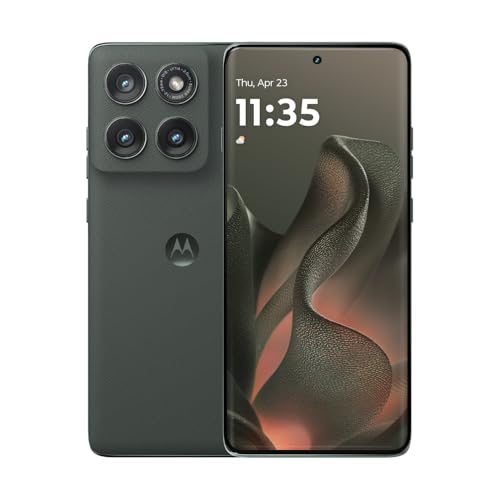
Motorola’s Edge line is the quiet corridor out of Galaxy ownership: flagship manners, clean software, elegant curved-edge hardware, and none of the duplicate ecosystems that drive Samsung owners to guides like this one. The listing here is the Edge 2025 — the current model, named exactly that, offered as a Renewed unlocked unit with 256GB of storage in Deep Forest. Note the year, because Motorola’s back catalogue contains older Edges with similar names, and this guide is recommending the 2025 phone: a refined, slim handset with a bright high-refresh display, a capable camera system and Motorola’s near-stock Android, which arrives without a second app store, a second assistant or a second gallery arguing with the first.
The Edge’s appeal in daily use is composure. It is quick without shouting about it, handsome without a camera plateau the size of a postage stamp, and its battery and charging are balanced for real days rather than spec-sheet duels. Motorola’s gestures — chop for the torch, twist for the camera — survive from the G line and remain the kind of detail owners demonstrate to friends. As a Renewed purchase, the Edge 2025 is also the freshest model year in this guide’s renewed contingent: you are buying the current design at a used discount, with the usual inspection homework as the price of the saving.
The concession is support altitude. Motorola’s update commitments have improved but still sit below the Samsung and Google flagships a switcher may be leaving, and its camera processing, while pleasant, does not match the Pixel pair’s consistency in hard light. The Edge also lacks Samsung’s ecosystem gravity — no DeX, no sprawling accessory empire, no foldable sibling waving from the next shelf. What it offers instead is the original promise of the smartphone before the platforms grew barnacles: a beautiful, fast, honest handset. For switchers whose complaint was clutter rather than capability, that is not a consolation prize; it is the point.
- Line: Motorola Edge series, 2025 model year
- Listing condition: Renewed — inspected resale unit, unlocked
- Memory and storage: 256GB storage as listed, Deep Forest finish
- Software: Near-stock Android with Motorola gestures
- Concession: Update runway and camera consistency trail Google and Samsung flagships
Strengths
- Current-year flagship design at a renewed price.
- Clean software with no duplicate ecosystem to fight.
- Elegant, slim hardware that feels a class above its cost.
Trade-offs
- Update commitment is the shortest among the flagship names here.
- Camera processing is pleasant rather than class-leading.
- Renewed unit — verify battery health and condition on arrival.
Best for: Switchers who want flagship calm without flagship clutter or ceremony. Not suited for: Buyers prioritising the longest updates or the very best cameras.

Google Pixel 9 Pro (Renewed) — Best camera ceiling
If the Pixel 9 is the easy switch, the Pixel 9 Pro is the ambitious one. This Renewed listing — 128GB in Obsidian, unlocked — puts Google’s fullest camera system in a switcher’s hands at resale money: the Pro adds a dedicated telephoto lens to the Pixel formula, so the school play, the wildlife at the feeder and the far end of the wedding aisle stop being smudges and start being photographs. Around that camera sits the Pro tier’s brighter, smoother display and Google’s complete AI feature set, in a handset that is flagship-sized rather than flagship-huge — a combination the Galaxy line answers only with its Ultra models at Ultra prices.
The renewed framing is what makes this pick interesting rather than merely expensive taste. A Pro-tier Pixel bought new is a flagship purchase; bought renewed, with its battery inspected and its grade verified, it becomes the value play of this entire guide for photography-led switchers — the highest camera ceiling available here, on the software platform with the longest runway, at a discount created purely by the word “renewed”. The update commitment Google attaches to this generation stretches for years, so the phone’s remaining life is long even though its first chapter belonged to someone else.
Concessions, as always in this guide, are itemised. The Pro surrenders the same One UI customisation and DeX as its sibling, charges at Google’s measured pace rather than OnePlus’s sprint, and — as a renewed unit — asks for the full arrival inspection: battery health, lens glass, screen condition, in that order. Its 128GB tier is also the one to think about if you shoot video heavily, since there is no card slot to rescue a full phone. None of this dims the proposition for the right buyer: if you are leaving Samsung because you want the best camera your money can reach, this renewed Pro is where your money reaches furthest.
- Line: Google Pixel flagship, 9 Pro generation
- Listing condition: Renewed — inspected resale unit, unlocked
- Memory and storage: 128GB storage as listed, Obsidian finish
- Camera note: Pro tier adds a dedicated telephoto lens over the standard Pixel 9
- Concession: Same Pixel limits as the 9, plus renewed inspection duties
Strengths
- Telephoto reach the standard Pixel 9 — and most Galaxies below Ultra — cannot match.
- Google’s longest software runway, bought at a renewed discount.
- Flagship capability in a manageable, one-handable size.
Trade-offs
- Renewed condition must be verified — battery, lenses, screen.
- 128GB with no expansion will pinch heavy video shooters.
- Charging pace is deliberate; overnight is the intended rhythm.
Best for: Photography-led switchers who want the highest ceiling their budget can touch. Not suited for: Video hoarders needing big storage, or buyers who refuse used goods on principle.
How do the alternatives stack up against a Galaxy, head to head?
| Alternative | Condition | Wins against Galaxy | Galaxy keeps |
|---|---|---|---|
| Pixel 9 | New | Software coherence, camera honesty | Customisation, DeX |
| iPhone 16 | Renewed | Ecosystem gravity, family features | Android freedom itself |
| OnePlus 12 | Renewed | Speed, charging, storage tier | Service network, update length |
| Nothing Phone (2) | International | Design, attention-friendly Glyph | Support depth, camera polish |
| Motorola Edge 2025 | Renewed | Clean software, understated design | Ecosystem, update runway |
| Pixel 9 Pro | Renewed | Camera ceiling for the money | Ultra-tier hardware breadth |
The table’s right-hand column is the most honest part of this guide: Samsung’s retained advantages are structural — breadth, support, customisation, ecosystem — while the alternatives’ wins are experiential, felt in photographs, charging breaks and daily calm. Structural advantages matter most to buyers who use them; experiential wins matter every hour. Know which kind of owner you are before you let either column decide for you.
How do you switch ecosystems without losing your digital life?
The mechanics are kinder than the fear. Photographs and files live in cloud accounts that sign in anywhere; contacts follow your Google or Apple account; banking and messaging apps reinstall and re-verify. The genuine work is in the edges: export chat histories where the app demands it, move two-factor authenticator entries deliberately rather than discovering their absence at a login screen, re-pair the watch, the earbuds and the car, and download your music library’s offline copies again. Budget a weekend afternoon, keep the old Galaxy alive on Wi-Fi for a fortnight as a reference device, and the migration becomes a tidy project instead of a slow leak of small losses.
The platform jump to the iPhone deserves its own sentence of respect: Apple’s transfer tools move the bulk of an Android life competently, but purchased apps stay behind, home-screen habits must be rebuilt, and a few Android-only tools will need iOS substitutes chosen rather than inherited. None of it is hard; all of it is real. The buyers who regret switching are rarely defeated by the new phone — they are defeated by underestimating the fortnight. Price the fortnight in, and every phone in this guide can be judged on its merits instead of on your migration fatigue.
What should a Galaxy owner check before buying any alternative?
Make the concession list personal. Open your current Galaxy and note the Samsung-specific things you actually use weekly — not the features you admire, the ones you touch. If the list includes DeX, deep routines, a foldable screen or the S Pen, your honest alternative set shrinks to none, and staying is a decision, not a default. If the list is empty — if your Galaxy life is really apps, photographs and messages wearing a Samsung coat — then every pick above is open to you, and the choice becomes about which positive vision pulls hardest: Google’s calm, Apple’s gravity, OnePlus’s velocity, Nothing’s joy, Motorola’s restraint.
Then verify the listing like the guides in this series keep insisting: condition and grade for the four renewed phones, variant and bands for the Nothing’s international version, storage tier against your camera roll’s appetite, and the returns window used actively rather than admired passively. A switch is a two-year decision made in twenty minutes; the checks are how the twenty minutes earn the two years.
What mistakes do switchers keep making?
The first is switching in anger — buying a rival the same day a Galaxy irritates you, and discovering that the irritation was a setting while the new phone’s compromises are structural. The second is assuming your data is the migration, when your habits are: the gesture you have made ten thousand times does not care that your photographs transferred perfectly. The third is buying the renewed flagship and skipping the inspection, then blaming the model for the unit. The fourth is choosing on camera samples alone, because cameras are the most demonstrable difference and software calm — the thing you will feel hourly — does not photograph. And the fifth is switching platforms for a person rather than with a plan: join the family’s ecosystem gladly if that is the decision, but make it as a decision, with the fortnight budgeted and the old phone kept as a bridge.
What happens to your Galaxy watch, earbuds and other accessories?
A phone rarely travels alone, and the accessories drawer is where switching costs hide. The good news is that most of it is more portable than the marketing implies. Bluetooth earbuds — including Samsung’s own Galaxy Buds — pair with any phone here and play music happily, though their fanciest settings and firmware updates may live in a Samsung-flavoured app that behaves best on a Galaxy. A Galaxy Watch is the tighter knot: recent models are Android watches that pair with other Android phones with most functions intact, but a few health features have historically been Samsung-phone exclusives, so check the specific features you use — the ECG you never open is not a switching cost, the sleep tracking you read daily is. Nothing in the drawer talks to the iPhone except the earbuds, which is why the Apple section of this guide budgets a full ecosystem move rather than a phone swap.
Cases, of course, fit nothing but the phone they were moulded for, and chargers mostly carry over — modern phones share the USB-C faith, and a good brick serves any badge. The subtler item is your car: Android Auto works across every Android pick here and CarPlay joins it on the iPhone, so the dashboard survives the switch intact. Make the accessory inventory before you buy, price the one or two items that genuinely strand, and the drawer stops being an argument for staying and becomes what it should be — a list of small, known numbers in a decision you are making for bigger reasons.
What does the first month after switching actually feel like?
Week one is friction, and it is worth describing honestly so nobody mistakes it for failure. Your thumbs will perform Galaxy gestures at a Pixel and be briefly betrayed; you will reach for a settings toggle that has moved two menus to the left; a muscle-memory screenshot will produce a volume change. This is not the new phone being worse. It is ten thousand repetitions being revised, and it fades on a schedule as predictable as it is annoying — most switchers report the new phone feeling “theirs” somewhere in the third week, which is conveniently when the returns window demands a verdict, so judge the phone in week three, not in the irritation of day two.
Month one also reveals the quiet wins that reviews cannot demonstrate. The Pixel owners notice their photographs first — not in a side-by-side test, but at a birthday dinner when the candid simply worked. The iPhone joiners notice the family thread going quiet in the best way: no more compressed videos, no more apologies. The OnePlus owners notice time — the accumulated minutes not spent watching a charge percentage climb. And nearly every switcher notices the same negative: one small Samsung convenience, some edge panel or routine, whose absence itches out of proportion to its importance. Name it, find its substitute or accept its loss, and the itch resolves. The switchers who thrive are the ones who expected the fortnight and the itch; the ones who struggle expected a coronation.
Should you sell, trade or keep the old Galaxy?
The old phone has three possible second lives, and the choice is worth a paragraph of arithmetic. Trading it in at purchase is the simplest and usually the least lucrative; selling it privately pays best and costs an afternoon of listings, photographs and messages; keeping it is the option this guide quietly favours for the first month at least, because a working Galaxy on Wi-Fi is the perfect migration bridge — authenticator codes, the banking app you forgot, the chat archive you need once — and afterwards it becomes the household spare, the travel phone or the hand-me-down that makes a teenager’s year. A kept Galaxy also hedges the switch itself: if the new phone must go back inside its returns window, your life is still running on the old one, untouched.
Whichever life you choose, prepare the phone like you mean it. Back it up completely, sign out of every account, remove it from your two-factor lists only after the new phone is proven, then factory-reset it and remove the SIM and any memory card. A Galaxy sold or handed down with your accounts still aboard is not a gift; it is a liability with a nice screen. Done properly, the old phone’s departure is the final, satisfying step of the switch — the moment the new phone stops being the new phone and becomes, simply, your phone.
When is staying with Samsung the right answer?
This guide sells alternatives, so let it also sell the null hypothesis with equal conviction. Stay if your Galaxy life genuinely uses the things only Samsung does: if the phone folds, if the pen writes your working day, if DeX is your second computer, if your routines and themes are a tailored suit you would have to abandon for off-the-rack software. Stay if your complaint list, examined honestly, is a list of settings rather than a list of philosophies — a battery to replace, a storage tier to raise, a notification habit to retrain. And stay if the switch would be for someone else’s approval: the group chat that teases your bubbles will survive your defiance, and a phone bought to end teasing is a phone resented by spring.
The alternatives in this guide are excellent, and every one of them is the right answer for somebody in this guide’s audience. The discipline the guide asks for is only this: switch toward something, not away from something — toward Google’s camera calm, Apple’s family gravity, OnePlus’s speed, Nothing’s delight, Motorola’s quiet — and the purchase will still feel right when the novelty has worn off and the phone has become furniture in your life. That is the only review that matters, and you write it yourself, about a month in.
How do the cameras really differ in philosophy, not just hardware?
Stand the three camera philosophies in this guide side by side and the spec sheets stop mattering. Samsung photographs for impact: vivid colour, brightened shadows, images that leap off a social feed and please at arm’s length. Google photographs for memory: restrained colour, protected highlights, faces that look like the person rather than the advertisement. Apple photographs for consistency: the same scene rendered the same way across every lens and every year, so a family archive looks like one archive. None of these is the correct answer; they are temperaments, and the reason camera comparisons never settle the argument is that they are secretly temperament comparisons. The most useful question a switcher can ask is not which camera wins, but which rendering they want their next five years of birthdays to wear.
Video splits the field differently again. Apple’s video remains the reference the others chase, which is why the iPhone section of this guide speaks to family archivists with such confidence. Samsung’s video is strong and feature-rich, Google’s is computationally clever in low light, and OnePlus and Motorola deliver capable footage that serves social sharing without aspiring to cinema. If your camera roll is mostly moving pictures of people you love, weight video in your decision far beyond what stills-focused reviews suggest — the birthday song is a video, the first steps are a video, and the archive your grandchildren browse will move.
What about the children, grandparents and other non-consenting switchers?
Phones are often bought in fleets by one exhausted administrator, so a word for the people who will receive your decision. A grandparent moved from a Galaxy to a Pixel gains a simpler interface and loses the one they had finally memorised; that trade needs a training afternoon and a printed cheat sheet, not a surprise. A teenager handed your renewed OnePlus gains a gaming phone and a lesson in inspected goods; a partner moved to the iPhone gains the family thread and loses the shared charger drawer logic they understood. Every switch in a household is a small change-management project, and the administrator’s real job is not choosing the phone — it is scheduling the patience. Do that, and even the boldest alternative in this guide lands softly.
How much storage should a switcher buy, given there is no going back?
Switching day is the one moment your storage decision resets, so make it with your archive in view rather than your optimism. Photographs and videos are the growth stock in every phone: a library that fits comfortably today will not fit in three years, and none of the six phones in this guide accepts a memory card to rescue a full one. The listings here hand you the decision in concrete form — the OnePlus arrives with a cavernous tier that deletes the question entirely, the Nothing matches it, the Edge doubles the base, and the two Pixels and the iPhone sit at the standard tier where cloud offload becomes a monthly habit. If your camera roll grows faster than your willingness to manage it, let the storage column of the comparison table cast a heavy vote; it is the one specification whose shortage cannot be fixed later with a setting, an accessory or an apology.
Cloud storage deserves its honest sentence too: it converts a one-time hardware decision into a small monthly rent, forever, and for many households that rent is worth paying for the backup alone. But a switcher already changing platforms should count the subscriptions the new ecosystem will propose — they arrive politely, one feature at a time — and decide the total with open eyes. The cheapest phone in this guide can become the dearest ecosystem if its storage tier forces a stack of rents; the renewed flagship with the big tier can be the bargain it appears to be. Arithmetic, as usual, beats vibes.
What do you gain in resale and trade-in value by switching — or staying?
One cold-eyed consideration deserves a place in an emotional decision: what the phone will be worth when you leave it. iPhones hold value with a stubbornness the whole industry envies, which quietly rebates the iPhone’s ecosystem entry cost across its life. Samsung flagships trade in generously inside Samsung’s own upgrade machine, a loyalty discount that functions as golden handcuffs — leaving means forfeiting the richest trade-in offers for your old phone. Pixels sit between, helped by Google’s own promotions; OnePlus, Motorola and Nothing resell into thinner markets where patience, not the phone, determines the price. None of this should choose your phone. But a switcher who plans to change every two years should count the exit value as part of the entrance price, because in this market the phone you can sell well is, in a real sense, cheaper than the phone you cannot — whatever the receipts said on day one.
Keep one more bridge intact for the first month: do not sell, trade or give away the Galaxy until the new phone has survived a full cycle of your real life — a work trip, a family weekend, a software update. After that month, decide its fate with evidence instead of optimism, and let it go without a backward glance. Trust the month, not the unboxing, and not the loudest voice in the group chat either, however fond of it you may honestly be today, truly.
Final Recommendation
For the typical Galaxy owner reading this guide, the Pixel 9 is the switch we would make first: new, unlocked, calm in the hand and honest in the camera, it answers the commonest complaints without asking you to learn a new civilisation. Photographers with ambition and a tolerance for renewed homework should reach past it to the Pixel 9 Pro, whose telephoto ceiling justifies the inspection ritual. Join the iPhone 16 if your people are already there — that is a family decision wearing a phone’s clothes, and a good one. Take the OnePlus 12 for speed, the Nothing Phone (2) for joy, the Edge 2025 for quiet elegance. And if, after the concessions, your Galaxy still fits your hand and your habits — keep it, and let this guide be the thing that confirmed your fit rather than disturbed it.
Frequently Asked Questions
Will I lose my photos and contacts if I leave Samsung?
Almost certainly not. Photographs and contacts live in your Google account (or Samsung Cloud, which exports), and both sign in on any Android alternative here. The iPhone move uses Apple’s transfer tool for the bulk of your data. What needs deliberate handling is chat history in certain apps, authenticator entries and offline downloads — a weekend afternoon’s work, itemised in the switching section above.
Is a Renewed flagship a sensible alternative to a new Galaxy?
It is the value engine of this guide — four of the six picks are Renewed — provided you treat inspection as part of the purchase: battery health, screen and lens condition, grade against listing, all inside the returns window. A verified renewed flagship delivers most of the new experience; an uninspected one delivers a lottery ticket.
What will I miss most about my Galaxy?
For most switchers, One UI’s customisation and Samsung’s small conveniences — and, for the minority who use them, DeX, the S Pen or a folding screen, which have no substitutes here at all. The pick sections name the concession phone by phone so you can check your own habits against the list before spending anything.
Does the Nothing Phone (2) work properly in the US?
This listing is the international/global version, so the honest answer is: verify before you rely on it. Check the band support against your carrier and understand the warranty position, as the pick section advises. Many owners use international versions happily; the guide’s job is to make sure you join them knowingly rather than hopefully.
Which alternative has the best camera?
The Pixel 9 Pro, on ceiling — its telephoto lens and Google’s processing make it the most capable photographic tool here. The standard Pixel 9 is the better value for the photographs most people actually take, and the iPhone 16 leads this list for video and for families already inside Apple’s sharing world.
Should I switch if my only complaint is battery life?
Probably not platforms — batteries fade on every brand, and a fresh phone of any make will feel like a revelation for a month. Switch for a philosophy you prefer, and let the new battery be a bonus. If stamina is truly the whole complaint, guides devoted to battery-first phones will serve you better than an ecosystem migration.
I use Samsung Pay, Samsung Health and SmartThings daily. Can I still switch?
Partly, and the honest answer is device by device. Payments are the easiest: Google Wallet and Apple Pay cover the same tills, and your cards re-register in minutes. Health data exports imperfectly — years of Samsung Health history may arrive in the new home reduced or read-only, so export what you can before you move. SmartThings is the pleasant surprise: it is a platform, not a phone feature, and its app runs on the alternatives here, so the smart home usually survives the switch untouched. Audit your own trio before buying; for most owners the list of true prisoners is shorter than feared.
How long does it take to feel at home on a different brand?
For most switchers, about three weeks of daily use — long enough for new gestures to become reflexes and for the old phone, picked up idly, to start feeling like the foreign one. Android-to-Android moves settle fastest; the iPhone migration takes the full fortnight-plus because it replaces habits at the operating-system level. Plan any switch for a calm stretch of life rather than the week of a house move or a new job, and the adjustment shrinks to a footnote.
Related Guides
Keep comparing with the best AMOLED smartphones, affordable smartphones chosen for battery life, and small Android smartphones for switchers who want a different size as well as a different badge.
Related guides
- Best Balancing Stabilizers for Mirrorless Cameras: Payload, Balancing and Native Vertical Shooting
- Best Basic Phones Camera Buyers Can Trust: Flip Phones and Simple Handsets That Still Take a Photograph
- Best Sony Full Frame Cameras for Astrophotography: Sensitivity vs Resolution
- Best Affordable Android Tablets: Five True Android Slates and One Fire OS Specialist, Clearly Labelled


