What's inside
- Key Takeaways
- Quick Picks
- How Did We Choose Tablets for the Hinge Year?
- Which Tablet Matches Your Fifth Grader’s School Bag?
- How Do You Set Up a Fifth Grader’s Tablet in the First Evening?
- What Does a Sensible Screen-Time Rhythm Look Like at Ten and Eleven?
- How Should Parents Read the Numbers in Kids’ Tablet Listings?
- What Does the Homework Actually Look Like, Subject by Subject?
- How Does the Two-Tablet Household Actually Work?
- What Does the School Bag Do to a Tablet in a Year?
- How Should the Family Handle the First Broken Rule and the First Broken Screen?
- What Should Happen in the Last Week of the School Year?
- What Mistakes Do Parents Make at the Fifth-Grade Hinge?
- Final Recommendation
- Frequently Asked Questions
- Related Guides
As an Amazon Associate I earn from qualifying purchases. This post may contain affiliate links at no extra cost to you.
gizmoverdict.com is reader-supported. When you buy through links on our site, we may earn an affiliate commission.
Fifth grade is the hinge year. The ten- and eleven-year-olds in it are too old for toddler apps and too young for an unsupervised corner of the internet, and their schoolwork has quietly changed character: homework that expects research, reading that runs to chapter books, projects that involve photographs, timelines and the occasional presentation assembled at the kitchen table the night before it is due. The best tablets for 5th graders are the ones that respect that hinge. They need a real screen at a real size, parental controls that function as listed features rather than as magic, a case that survives a school bag, and enough openness that next year’s homework does not outgrow this year’s purchase by October.
Where to buy: the six picks below are listed on Amazon; each product page spells out the included case, stylus and accessory bundles, and shows the current price for parents to consider in the calm before term starts. Five of the six are ten-inch Android kids’ tablets or close relations, and one, Amazon’s Kids Tablet 8, is the compact entry from the biggest name in the category. The sixth name on the list will surprise some parents: the LeapFrog LeapPad Academy, included deliberately and labelled honestly wherever it appears, because it skews younger than fifth grade and earns its place as the hand-me-down companion for a younger sibling rather than as a fifth grader’s main machine. That placement is explained in full in its review.
A word about the numbers in these listings, because parents deserve a translator. Several titles advertise memory figures like 24GB or 30GB of RAM; in this corner of the market those numbers commonly combine physical memory with virtual expansion, and the honest reading is that these are modest, homework-class processors wearing optimistic arithmetic. Judge these tablets by their jobs: reading, school apps, video for research, light creative work and games pitched at their age. By that measure the class is coherent, and the differences that matter are screens, controls, included accessories and the age honesty of the software.
Parental controls get the same plain treatment throughout this guide. They are software features, described by their makers in the listings, useful for setting time boundaries, approving apps and filtering what a child can reach. They are not promises about outcomes, and this guide will not dress them up as safety guarantees, because a control is a tool a family uses, not a result a product delivers. Used alongside conversation and house rules, the controls on these six machines give a fifth grader room to grow into the internet at a pace their parents set.
Key Takeaways
- Fifth graders need homework-capable tablets: ten-inch screens, real browsers under supervision, and room for school apps and projects.
- Headline memory figures in this class often blend physical and virtual memory; judge the machines by homework jobs, not arithmetic.
- The LeapPad Academy skews younger than fifth grade and is placed here honestly as the younger-sibling handoff pick.
- Parental controls are listed software features for time, apps and content boundaries, never guarantees of safety outcomes.
- Included cases and styluses in these bundles matter, because a fifth grader’s tablet lives in a school bag, not on a shelf.
- Amazon’s Kids Tablet 8 is the compact, age-labelled option for families already using Amazon’s kids’ services.
Quick Picks
| Pick | Badge | Why it fits a fifth grader’s school year |
|---|---|---|
| Android 16 Kids Tablet 10-inch with Stylus | Homework-first bundle | A 10-inch Android 16 tablet with stylus and case, parental controls and Kids Space for the homework-and-reading core. |
| aiprotablet Kids Tablet 10-inch | Full accessory kit | A 10-inch octa-core tablet bundled with case, keyboard, mouse and stylus for project work at a desk. |
| RebotAi Kids Tablet 10-inch | Three-mode family pick | Three kids’ modes let the same tablet adjust as the child grows, with eye-care framing and a case included. |
| LeapFrog LeapPad Academy | Young-sibling handoff | A learning tablet that skews younger than fifth grade, ideal to hand down while the older child graduates up. |
| Kids Tablet 10-inch Android 16 | Straightforward school-bag tablet | A 10-inch Android 16 tablet with protective case and parental controls, aimed squarely at the 1280 by 800 homework screen. |
| Amazon Kids Tablet 8 (ages 6-12) | Big-name compact | An 8-inch tablet labelled for ages 6 to 12 with books, apps and videos for STEM and hobbies in a slim hard case. |
How Did We Choose Tablets for the Hinge Year?
The first filter was the school year’s actual workload. A fifth grader’s tablet must open the school’s chosen apps and web portals, hold a term’s worth of project files, show a research video beside a notes document without collapsing, and present a book at a size that does not punish an evening’s reading. That workload set the shape of the list: ten-inch screens as the norm, current Android versions where the listings offer them, and storage that can be expanded by card when a year of photographs and projects lands. Machines pitched purely at toddlers failed this filter on software grounds alone, however charming their bumpers.
The second filter was age honesty, and it cut in both directions. Products whose content world ends at age seven strand a fifth grader by Christmas; products with no meaningful controls hand a ten-year-old the whole internet and call it trust. We looked for the middle: ecosystems and control sets, described in the listings, that let parents widen the gate gradually. The LeapPad Academy is the instructive case. It fails the first filter for a fifth grader’s main machine, and we say so in its review, but it passes a different test so well, as a curated learning world for a younger child, that excluding it would have hidden the smartest two-tablet strategy many families actually use.
The third filter was physical reality. A fifth grader’s tablet travels: bag, bus, classroom cubby, kitchen table, sofa, and occasionally the floor of all five. Included protective cases were therefore scored as core equipment rather than as bundle decoration, and stylus inclusion mattered because handwriting practice, maths working and drawing all still belong in a ten-year-old’s school life. Our guide to best graphic tablets for kids covers the drawing-specialist end of that creative spectrum for children whose art outgrows a general tablet.
Finally, we read every listing’s control claims as claims. Phrases about parental controls and kids’ spaces describe features a family configures; they were noted, attributed and never upgraded into promises. Screen-time guidance in this guide stays general for the same reason: families set their own rhythms, and a product page is not a paediatric authority. What a review can honestly do is match machines to workloads and households, and that is the standard the six reviews below hold themselves to.

Android 16 Kids Tablet 10-inch with Stylus — Homework-first bundle
This is the list’s most direct answer to its own title: a 10-inch HD Android 16 tablet sold with a stylus and a case, aimed at children across a wide stated age span and equipped, per its listing, with parental controls and a Kids Space environment. For a fifth grader, the shape of the offer matters more than any single figure inside it. The stylus turns the tablet into a working surface for maths practice and project sketches, the case acknowledges the school bag, and the current Android version means the school apps of the next two years start life compatible rather than apologetic.
The listing’s memory language deserves the translation promised in the introduction. The headline figure combines physical memory with virtual expansion, a common practice in this class, so expect homework-class performance: brisk enough for reading platforms, research browsing under the family’s settings, video and the creative apps a ten-year-old actually opens, without the headroom of a flagship. Storage at 64GB with card expansion to the stated 1TB removes the real constraint, which is space for projects and downloads, and the 6,000mAh battery fits a school day’s rhythm of bursts rather than marathons.
Where this pick earns its lead position is balance. Nothing about it is the best in the guide, and nothing about it is missing: screen, stylus, case, controls, current software, sane storage. For a family buying one tablet for one fifth grader and wanting the decision finished by dinner, that completeness is the argument. Set the controls with the child watching, agree the charging spot, load the school’s apps together, and this machine disappears into the school year in the way good tools do.
- Screen: 10-inch HD as listed
- Platform: Android 16 as listed
- Storage: 64GB with expansion to 1TB as listed
- Battery: 6,000mAh as listed
- Included: stylus and case as listed
- Controls: parental controls and Kids Space as listed
Strengths
- Complete homework kit in one box, stylus and case included
- Current Android gives school apps the longest runway here
- Expandable storage swallows years of projects and photographs
Trade-offs
- Headline memory figure blends physical and virtual memory
- Brand is a category specialist rather than a household name
- Performance is homework-class, not flagship-class
Best for: a fifth grader’s single main tablet for homework, reading and projects.
Not suited for: families wanting a big-name ecosystem or heavy gaming performance.

aiprotablet Kids Tablet 10-inch — Full accessory kit
The aiprotablet listing reads like a desk being assembled in real time: a 10-inch Android 16 tablet with an octa-core processor, supplied with a case, a keyboard, a mouse and a stylus. For the fifth grader whose homework increasingly resembles office work in miniature, research in one window, a document in another, a presentation due Friday, that bundle is not decoration. The keyboard turns the tablet into a typing-practice machine at exactly the age when typing becomes a school skill, and the mouse teaches the pointer fluency that school computers still assume.
Performance language needs the same calm reading as its rivals. The listing’s memory headline blends physical and virtual figures, and the honest expectation is a willing homework machine rather than a powerhouse. Storage at 64GB with expansion stated to 2TB is generous for the class, parental controls are listed among its features, and the dual cameras cover the project-photograph and video-call duties of family life. In its green case it also looks like a child’s possession rather than a borrowed adult device, which matters more to a ten-year-old’s care habits than parents sometimes expect.
The bundle’s risk is the bundle’s nature: more pieces mean more pieces to lose, charge or leave in the wrong classroom. Families should decide which accessories are school-bag residents and which live at the desk, and label everything with the child’s name in the first week. Judged as a homework station that occasionally travels, the aiprotablet is the most complete desk setup in this guide. Judged as a throw-it-in-the-bag reader, its simpler rivals travel lighter. Know which child you are buying for and the choice makes itself.
- Screen: 10-inch as listed
- Processor: octa-core 2.2GHz as listed
- Storage: 64GB with expansion to 2TB as listed
- Included: case, keyboard, mouse and stylus as listed
- Platform: Android 16 as listed
- Controls: parental control listed among features
Strengths
- Keyboard and mouse turn homework into early typing and pointer practice
- Largest stated storage expansion in the guide
- Desk-station completeness for project-heavy schoolwork
Trade-offs
- Accessory count invites loss without a labelling ritual
- Memory headline blends physical and virtual figures
- Bundle travels heavier than the single-slab rivals
Best for: project-heavy fifth graders building a first homework desk station.
Not suited for: children whose tablet must live light in a school bag every day.

RebotAi Kids Tablet 10-inch — Three-mode family pick
The RebotAi’s listing leads with an idea rather than a component: three kids’ modes, designed so the tablet’s environment can be adjusted as the child grows. For the hinge year, that idea is the product. A fifth grader in September is not the user they will be by the following summer, and a tablet whose controls and content modes acknowledge growth lets parents widen the world in steps instead of replacing hardware at each birthday. The rest of the listing supports the framing: a 10-inch screen, Android 16, a case in the box, dual cameras, Wi-Fi 6 and a 6,000mAh battery.
Eye-care language appears in this listing, as it does across the class, and this guide treats it the way it treats control claims: as a description of display features the maker offers, not as a medical promise. Families still set the reading light, the session lengths and the bedtime rules; the tablet contributes its modes and its filters to a rhythm the household owns. Storage is the specification to read carefully here, with 32GB in the listing’s headline configuration and expansion to 1TB by card, so a family expecting heavy project and photo use should budget the card from the start rather than meet the limit mid-term.
Against the lead pick above, the RebotAi trades the included stylus for its mode system and a slightly leaner storage start. Against the Amazon tablet below, it offers the bigger screen and the open Android world. Its natural buyer is the parent who thinks in stages, who wants the setup conversation to be a dial rather than a switch, and who is buying for a child visibly mid-growth. In a category that often pretends children are static, that is a grown-up piece of design thinking at a child’s price class.
- Screen: 10-inch as listed
- Platform: Android 16 as listed
- Modes: three kids’ modes as listed
- Storage: 32GB with expansion to 1TB as listed
- Battery: 6,000mAh as listed
- Included: case as listed; dual cameras and Wi-Fi 6 listed
Strengths
- Mode system lets the tablet’s world widen as the child grows
- Current Android and Wi-Fi 6 keep school platforms happy
- Case included for the school-bag reality
Trade-offs
- Starting storage is the leanest of the ten-inch picks
- No stylus in the headline bundle for handwriting work
- Eye-care wording describes features, not outcomes
Best for: parents who want staged, adjustable controls across the hinge years.
Not suited for: buyers who want maximum storage in the box or a bundled stylus.
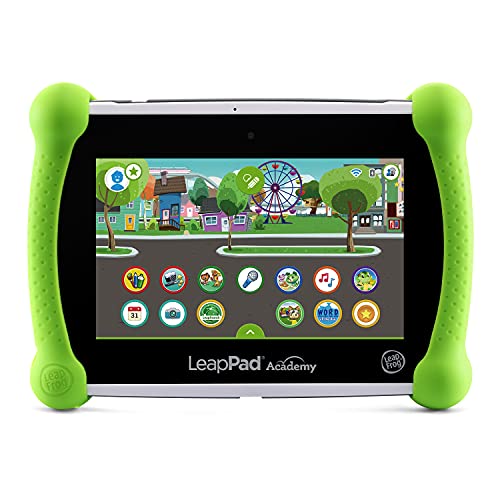
LeapFrog LeapPad Academy — Young-sibling handoff
Honesty first, because this pick’s whole placement depends on it: the LeapPad Academy skews younger than fifth grade. LeapFrog builds learning tablets for the early-years and early-primary world, and the Academy’s curated content, durable child-first design and walled garden are pitched at that younger child, not at a ten-year-old researching a science project. Recommending it as a fifth grader’s main tablet would be a disservice, and this guide does not. Its presence here answers a question real families ask instead: the fifth grader is graduating to a real tablet, so what should the six-year-old sibling get?
As the answer to that question, it is close to perfect. The LeapPad world is built so a young child can explore without wandering, with learning content designed by an education-focused maker rather than harvested from an open store. The hardware expects to be dropped, carried by one small hand and abandoned under a sofa, and it shrugs accordingly. Handing a younger sibling a machine that is truly theirs also protects the fifth grader’s new tablet from the sticky-fingered borrowing wars that otherwise define two-child households in September.
There is a second, quieter use worth naming. Some fifth graders, particularly those who find open devices overwhelming or whose families prefer the firmest possible boundaries for now, may use a LeapPad-class machine for its learning games alongside a shared family tablet for schoolwork. That is a legitimate household strategy, chosen knowingly. What it is not is a substitute for the homework machine the rest of this guide describes, and parents should budget the two roles separately rather than expecting one green tablet to cover a ten-year-old’s school year.
- Type: dedicated children’s learning tablet
- Maker: LeapFrog, education-focused
- Content: curated learning world for younger children
- Age fit: skews younger than fifth grade, as stated in this review
- Role in this guide: younger-sibling handoff pick
- Design: child-first durability for small hands
Strengths
- Curated content suits a younger child’s independent exploration
- Purpose-built toughness for the drops of early childhood
- Gives siblings separate machines and ends borrowing wars
Trade-offs
- Too young in content and capability for fifth-grade homework
- Closed world cannot run the school’s apps and portals
- A fifth grader will outgrow it immediately if bought as their main tablet
Best for: the younger sibling of a fifth grader, as a learning tablet of their own.
Not suited for: a fifth grader’s main homework machine, whatever the birthday budget says.

Kids Tablet 10-inch Android 16 — Straightforward school-bag tablet
Some listings earn attention by having no angle at all, and this one is the guide’s plain-spoken entry: a 10-inch Android 16 kids’ tablet with a 1280 by 800 IPS screen, dual cameras listed at 5MP and 8MP, parental controls, a protective case and a 6,000mAh battery. It does not bundle a keyboard or headline a mode system. It proposes to be the tablet in the school bag, opened for the reading app, the homework portal and the research video, then closed again, and there is a real market of families who want exactly that sentence and nothing more.
The specification follows the class pattern this guide has taught you to read. The memory headline blends physical and virtual figures, storage starts at 64GB with the class’s usual card expansion, and Wi-Fi 6 with Bluetooth 5.4 covers the connectivity a school year needs. The IPS panel at this resolution is the homework standard of the entire category: text stays clear at reading distance, video looks like video, and nobody’s project presentation was ever failed by 1280 by 800. Parents upgrading from a toddler tablet will feel the size jump most; fifth graders will simply feel that the machine finally matches the work.
Its rivalry with the lead pick is close and instructive. The stylus-bundled tablet above adds handwriting to the same basic recipe; this one keeps the recipe clean and lets a family add a stylus later only if the child’s schoolwork actually calls for one. Neither instinct is wrong. Buy the bundle when handwriting practice is a known need, buy this when it is a guess, and spend the difference on the labelled case accessories and the spare charger that every school-bag tablet eventually demands.
- Screen: 10-inch IPS, 1280 by 800 as listed
- Platform: Android 16 as listed
- Cameras: 5MP and 8MP dual cameras as listed
- Battery: 6,000mAh as listed
- Storage: 64GB as listed with card expansion
- Included: protective case as listed
Strengths
- Clean, complete recipe with no bundle clutter to manage
- Current Android and Wi-Fi 6 suit the school platforms
- Protective case included for daily bag travel
Trade-offs
- No stylus or keyboard in the bundle for project work
- Memory headline uses the class’s blended arithmetic
- Brand support is category-standard rather than big-name
Best for: families wanting the straightforward school-bag tablet without extras to lose.
Not suited for: handwriting-heavy homework or desk-station project setups.

Amazon Kids Tablet 8 (ages 6-12) — Big-name compact
Amazon’s entry is the only pick that prints its age judgement on the box: ages 6 to 12, which brackets fifth grade deliberately. This newest-model 8-inch kids’ tablet arrives, per its listing, with books, apps and videos for STEM and hobbies, the ability to add popular school apps to support homework, and an aquatic slim hard case in this configuration. The pitch is ecosystem rather than hardware: a curated children’s content world, parental controls through Amazon’s established family tools, and a machine sized for a child’s bag and hands rather than for a desk.
The 8-inch screen is the honest trade to examine. Against the ten-inch Androids above, it gives up working room: split homework tasks crowd sooner, and a project presentation feels smaller. In exchange it gains portability, a lower carry weight for a child who hauls it daily, and the confidence of the category’s most developed parental-control ecosystem, where the family’s existing Amazon relationships, library habits and subscriptions may already live. For a child whose reading happens inside Amazon’s books world and whose school apps are confirmed addable, that exchange can be the right one.
Note the listing’s own framing of homework: school apps are added to support it, which describes a curated-first device that opens selected doors rather than an open Android tablet. Families should verify their specific school’s apps before choosing this route, the same check this guide recommends for every closed ecosystem. Verified, the Amazon tablet is the low-anxiety pick: big-name support, age-labelled content and a case that expects the playground. Unverified, it is a beautiful walled garden beside a school that lives outside the walls. Our reading-focused coverage in best reading tablets for adults shows where this child’s library habit can grow up to.
- Screen: 8-inch as listed
- Age label: ages 6 to 12 as listed
- Content: books, apps and videos for STEM and hobbies as listed
- Homework: popular school apps can be added, as listed
- Case: slim hard case in this configuration, aquatic design
- Ecosystem: Amazon kids’ services and family controls
Strengths
- Age-labelled curation matches the fifth-grade bracket directly
- Most developed parental-control ecosystem in the guide
- Compact size travels lightest in a child’s own bag
Trade-offs
- Smaller screen crowds homework tasks sooner than ten-inch rivals
- School apps must be verified as addable before purchase
- Content world centres on Amazon’s services
Best for: Amazon households wanting curated content and controls in a compact, child-sized machine.
Not suited for: schools whose apps live outside Amazon’s addable selection.
Which Tablet Matches Your Fifth Grader’s School Bag?
| Pick | Screen | Bundle character | Deciding trait |
|---|---|---|---|
| Android 16 Kids Tablet with Stylus | 10-inch HD | Stylus and case | Balanced homework machine with handwriting included |
| aiprotablet Kids Tablet | 10-inch | Keyboard, mouse, stylus, case | Desk-station completeness for project work |
| RebotAi Kids Tablet | 10-inch | Case | Three kids’ modes that adjust as the child grows |
| LeapFrog LeapPad Academy | Child-format | Curated learning world | Skews younger; the sibling handoff, not the main machine |
| Kids Tablet 10-inch Android 16 | 10-inch IPS | Protective case | The plain, complete school-bag recipe |
| Amazon Kids Tablet 8 | 8-inch | Slim hard case | Age-labelled Amazon curation in a compact body |
Choose by the year’s shape. A homework-heavy, desk-based year points to the aiprotablet’s kit or the stylus bundle. A bag-based year of reading, portals and research points to the plain ten-inch machines. A household already inside Amazon’s family services, with school apps verified, can take the compact route happily. And a household with two children should read the LeapPad row as the second line of a two-tablet plan, which is how it earns its place in a fifth-grade guide at all.
How Do You Set Up a Fifth Grader’s Tablet in the First Evening?
Do it together, at the kitchen table, with the child watching and the house rules spoken aloud as they are configured. Create the child’s account under the family’s supervision structure, set the parental controls the listing describes, time boundaries, app approvals, content filters, and explain each one as a boundary with a reason rather than a trap with a password. Children who understand the fences rarely spend the year testing them; children who discover fences by collision treat the tablet as an opponent. The setup hour is a parenting conversation with a screen present, and it is worth more than any feature in this guide.
Load the school’s world before the fun world. The homework portal, the reading app, the class communication tool the teacher actually uses: these go on the first screen, signed in and tested, so the tablet’s first identity is competence. Then add the child’s chosen joys, a game, a drawing app, a book series, in the second row, because a tablet that is only homework will be resented and a tablet that is only games will be confiscated, and both failures are scheduling errors by adults. Our guide to best android tablets for school notetaking picks up the story for older students whose notes go fully digital.
Finish with the physical contract. The case stays on. The tablet charges in the agreed spot, never in the bedroom by default unless the family has decided otherwise, and it travels in the bag’s protected pocket rather than loose among the lunch things. Write the child’s name on the case and the charger, because school lost-property boxes are full of identical black rectangles whose owners cannot prove a thing. These small agreements, made once and kept kindly, are the difference between a tool and a recurring negotiation.
What Does a Sensible Screen-Time Rhythm Look Like at Ten and Eleven?
This guide stays general here deliberately, because rhythms belong to families, not product pages. The patterns that work share a shape: homework first on school nights, recreational use in agreed windows rather than in ambient grazing, and a charging spot outside the bedroom that makes the day’s end automatic instead of argued. The controls listed in these products support that shape with timers and app limits, but the shape itself is a household decision, reviewed as the child grows, exactly as the RebotAi’s modes anticipate.
Build in the uses nobody needs to limit. A video call with grandparents, a chapter of a book at bedtime in the family’s chosen format, photographing a science experiment for a project: a tablet woven into family life at these points stops being a treat machine and becomes furniture, and furniture does not get begged for. Parents who model the same rhythm on their own devices, charging in the same hallway, find the rules land as culture rather than as law, and culture survives the teenage years better.
Review the arrangement each term. The fifth grader’s world widens fast: a new school platform, a group project that legitimately needs messaging within the school’s tools, a coding club with its own app. Each widening is a chance to loosen one control deliberately, in daylight, as a sign of growing trust, which teaches the child that boundaries respond to maturity. That lesson, delivered by a tablet’s settings menu across two school years, may be the most valuable thing any machine in this guide ever teaches.
How Should Parents Read the Numbers in Kids’ Tablet Listings?
Treat the specification block as a dialect that needs translating once and then never again. Memory headlines in this class commonly add physical RAM and virtual memory expansion into one cheerful figure; the working truth is a modest processor class that handles school apps, reading and video well and flagship games indifferently. Storage figures are more literal, and expansion claims describe the card size the slot accepts, which is why several picks here can swallow a card larger than a fifth grader’s entire project history. Battery figures in milliamp-hours compare within the class rather than promising hours, since screens and workloads spend them at different rates.
Cameras deserve the same calm. The dual cameras in these listings exist for video calls with family, photographing homework and projects, and the occasional documentary about the dog. Their megapixel counts will not trouble a phone, and they do not need to. What matters is that the front camera makes a grandparent’s call pleasant and the rear camera makes a worksheet legible, and every pick here clears that bar by design.
The figures that genuinely separate these six machines are the unfashionable ones: whether a stylus is in the box, whether the case is protective or decorative, which Android version ships and can be updated, and how the control system is structured. Those are the lines to compare in the table above, because they are the lines a family will still feel in March. The arithmetic fireworks in the titles will have been forgotten by October, which is exactly where they belong.
What Does the Homework Actually Look Like, Subject by Subject?
Reading first, because it fills the most hours. A fifth grader’s reading life splits between the school’s platform, where comprehension questions wait after each chapter, and free reading, where the book itself is the point. Both live happily on the ten-inch picks, whose screens show a novel’s page at a comfortable size and whose weight survives a chapter in bed. The Amazon tablet’s books world is its home turf here, while the open Androids reach whichever library app the school or the public library prefers. Either way, the tablet that gets charged nightly becomes the reading habit’s home, and the reading habit is the year’s highest-yield routine.
Mathematics has gone quietly digital in most schools: practice platforms that adapt to the child, homework submitted as photographs of written working, and the occasional video that explains fractions better than the worksheet did. This is where the stylus bundles stop being accessories. Writing working directly on the screen, photographing the page, submitting before dinner: the loop is faster and the feedback quicker than the paper version ever managed. The plain ten-inch tablets handle the platforms equally well; they simply ask for a stylus added when the photograph-the-working stage becomes nightly.
Research and projects are where the hinge year shows. A fifth grader’s project now expects sources: a museum website, a video, a photograph of their own experiment, assembled into slides or a document that a teacher opens on a school machine. The aiprotablet’s keyboard earns its keep in this term, because assembling a presentation by tapping glass is nobody’s idea of a skill worth learning, while the same task on keys teaches the layout of real work. Parents should check the school’s preferred formats once, in September, and load exactly those apps, because project week is the wrong time to discover a file will not open.
Creative work rounds out the year and should not be treated as the optional extra. Drawing, simple video, music practice apps and the class’s photography all live on these machines comfortably, and for some children they are the reason the tablet is loved rather than tolerated. A child who loves the machine takes care of it, charges it and brings it home, which is why the fun row on the home screen, chosen in the setup section above, is a management strategy disguised as generosity.
How Does the Two-Tablet Household Actually Work?
The LeapPad’s placement in this guide deserves its full logic, because two-child households are where tablet purchases go to be wasted. The pattern that fails is sequential sharing: one good tablet, two children, a timetable of possession enforced by a parent until everyone involved hates the object. The pattern that works is differentiated ownership. The older child gets the real machine, with real responsibilities attached; the younger gets a machine that is genuinely theirs, age-right in content and toughness, which in this guide means the LeapPad Academy or its class. Each child’s device matches each child’s year, and the household’s peace is the dividend.
Grandparents and gift-givers should hear this plainly, because they fund many of these purchases. Ask which role is unfilled before buying anything. A second LeapPad-class machine for a household whose younger child already has one is a cupboard donation; the same money toward the older child’s stylus bundle, or toward the storage card and spare charger the main tablet needs, lands where it will be used daily. The kindest gift in this category is the unglamorous one that completes a system rather than duplicating its most photogenic part.
Hand-me-downs reverse the flow in time. When the fifth grader eventually graduates to a larger student machine, their ten-inch Android, wiped and re-set for a younger account, becomes an excellent sibling tablet for a child now old enough for its world, while the LeapPad passes further down or out to a cousin. Plan purchases with that cascade in mind and the family’s total spend across three children and six school years drops remarkably, because every machine in this guide was bought for a first role with a second role already imagined.
What Does the School Bag Do to a Tablet in a Year?
It is worth picturing the journey honestly. The bag is dropped off a bus seat, swung onto a hook, rained on between the gate and the door, and opened a dozen times a day by hands in a hurry. The case included with these picks is therefore not packaging; it is the tablet’s working clothes, and it should be inspected each term the way shoes are, for the split corner and the loosening fit that announce retirement. A case that costs a fraction of the tablet and is replaced on schedule is the cheapest insurance in this entire guide.
Screen protection follows the same logic. A film or glass protector, applied on the first evening while the screen is factory-clean, absorbs the year’s scratches from bag zips, pencil-case corners and the grit that lives at the bottom of every school bag ever made. Teach the child the two handling habits that matter: two hands when walking with it, and never, ever as a tray, a seat or a doorstop, however convenient the moment suggests. Children rise to equipment expectations that are stated clearly and enforced mildly, and a tablet that survives to be handed down is usually the one whose rules were boring and consistent.
Charging discipline is the third leg. A tablet that charges in the hallway every night is a tablet that starts every school day full, and a full tablet is the one that never needs to borrow a classroom socket or miss a submission. The spare charger, labelled, lives in the bag for the genuinely forgotten night, and its existence should be a comfort rather than a routine. Families who build these three habits, case, protector, charging spot, report the same surprise: the cheap kids’ tablet they expected to replace by spring is still, stubbornly, fine in June.
How Should the Family Handle the First Broken Rule and the First Broken Screen?
Both will happen, and both are curriculum rather than catastrophe. The first broken rule, usually a game discovered in a lesson or a session that quietly doubled its agreed length, deserves a response sized to a ten-year-old’s offence: a conversation, a tightened setting for a while, and a clear path back to the previous trust level. Parents who respond with permanent confiscation teach concealment; parents who respond with nothing teach that the agreements were decorative. The controls in these listings make the middle path easy to operate, which is their real value to a family.
The first broken screen deserves the same proportionality. Price the repair against the machine’s remaining school life before deciding; in this price class, a repair can approach the cost of a fresh tablet with a newer Android, and the honest answer is sometimes replacement with the lessons applied. Whichever route is chosen, let the child participate in the cost in an age-appropriate currency, chores, saved allowance, a term of extra care duties, not as punishment but as the economics of objects made visible. A child who has once paid attention to a screen’s fragility with their own resources rarely needs the lesson twice.
Keep the packaging and the order record until the warranty conversation is certainly over, and register nothing, subscribe to nothing, in the first excited hour that the family has not discussed. Kids’ tablets attract accessory offers and content subscriptions the way a school gate attracts leaflet distributors. The setup hour’s discipline, school apps first, joys second, subscriptions only by family decision, extends naturally: the tablet’s world should grow by the same deliberate widening as its controls, one agreed addition at a time.
What Should Happen in the Last Week of the School Year?
Back the machine up, together, as a small ceremony. The year’s projects, photographs and reading records are the child’s first digital portfolio, and saving them to the family’s storage teaches the habit every digital citizen needs before they need it urgently. Clear the school accounts that the school itself will close, keep the ones the family owns, and review the control settings against the child who now exists rather than the one who started the year. Summer’s rhythm will differ from term’s, and the tablet’s rules should say so explicitly.
Then let the machine have its holiday identity. The reading continues, the calls to grandparents continue, the creative apps get their longest sessions of the year, and the homework row rests. A tablet that is allowed to be a pleasure in July will be accepted as a tool again in September without a renegotiation, which is the quiet goal of every rhythm this guide has described. When the new school year opens, repeat the September checks: school apps verified, case inspected, controls reviewed, name label renewed. The hinge will have swung a little further, and the tablet, chosen well, swings with it.
What Mistakes Do Parents Make at the Fifth-Grade Hinge?
Buying the toddler tablet one more time is the classic. A parent whose child loved a chunky preschool machine at five reaches for its successor at ten, and discovers by half-term that the school portal will not run and the content world ends two years too early. The LeapPad discussion in this guide exists to prevent exactly that purchase being made by accident. The opposite error is equally common: handing down an unrestricted adult tablet with a cracked screen and a parent’s entire digital life still signed in, then acting surprised by the year’s adventures. The hinge year deserves its own machine, set up on purpose.
The third mistake is configuring controls in secret and at maximum, which converts the tablet into a puzzle to defeat and the parent into a warden to outwit. Set them together, at the level the child has earned, and loosen them on schedule. The fourth is skipping the school check: buying the closed-ecosystem pick before confirming the school’s apps can be added, or the open pick before confirming the school’s portal runs happily on it. Five minutes on the school’s website prevents a term of workarounds. The fifth is forgetting the bag: no case discipline, no name label, no charging routine, and then genuine shock at the lost-property box in June.
Final Recommendation
For most fifth graders, buy the stylus-bundled ten-inch Android tablet that leads this guide, because it covers the year’s homework, reading and projects without a missing piece, and set it up together on the first evening. Project-heavy children will use the aiprotablet’s desk kit daily, stage-minded parents will appreciate the RebotAi’s growing modes, and Amazon households with verified school apps can choose the compact Kids Tablet 8 with confidence. Keep the LeapPad Academy in its honest role, as the younger sibling’s own machine, and the whole family’s September gets calmer. Choose for the child in front of you rather than the one in the advertisement, and the tablet will do what the hinge year asks of it: carry the homework, widen the world at a parent’s pace, and still be standing, charged and labelled, when the last project of spring is handed in.
One more September habit deserves a line: photograph the setup. A picture of the home screen as agreed, the charging spot as arranged and the case with its label visible gives the family a reference when, by November, the arrangement has drifted and nobody remembers the original. Restoring a photographed agreement takes five minutes and no arguments about whose memory is right, because the photograph is right, and the child can see that as clearly as the parent.
And keep one eye on the child’s own verdict as the term settles. Ask, a month in, what the tablet is genuinely best at and what annoys them about it, and take the answers seriously rather than defensively. A fifth grader who reports that the reading app is wonderful and the case flap fights the stand has handed the family its entire improvement list, and acting on it, a different stand, a solved annoyance, teaches the deeper lesson that tools are adjusted to people, not the other way round.
Teachers, consulted early, repay the consultation all year. A two-line message in the first fortnight, asking which apps and formats the class will actually use and whether the school has preferences the family should know, prevents the two classic mismatches: the tablet loaded with last year’s platform, and the project submitted in a format the school machine cannot open. Teachers have watched a hundred families buy these machines, and their short answers carry more signal than a specification sheet. Ask, listen, and load accordingly.
The same courtesy extends to the school’s own device rules, which vary and which this guide will not presume to summarise. Some schools welcome a personal tablet for reading time; others keep personal devices in bags until home. A fifth grader whose family has read the actual rule, and whose tablet use at school matches it, never has to negotiate the machine’s legitimacy in front of the class, and that social smoothness is worth more than any feature the year’s models can add.
Finally, remember that the adult’s own habits are the loudest settings on the device. A parent who reads on a tablet at breakfast, charges their own phone in the hallway and keeps their screen face-down during dinner has configured the child’s tablet more deeply than any menu can. The machines in this guide are modest, honest tools; the culture they land in decides what they become, and fifth grade, the hinge year, is when that culture is most teachable. Buy the tablet, by all means, and choose it carefully using the reviews above. Then teach the year, because the year was the purchase all along.
Keep the family’s tablet paperwork with the school paperwork, in whatever folder or drawer already holds report cards and permission slips. The warranty dates, the order record and the note of which controls were set and when will all be wanted exactly once, urgently, and the household that can produce them in a minute will wonder why other families find these moments stressful. Organisation is a theme of this entire guide because childhood, at ten and eleven, generates paper and pixels at the same frantic rate, and the tablet was supposed to reduce the chaos rather than join it.
And if the year ends with the tablet scuffed, labelled, backed up and still loved, resist the upgrade itch that September’s new models will provoke. A machine mid-cascade, with a known successor role waiting in a younger sibling, is worth more to the family than a marginal specification improvement, and the money saved is next year’s book fair, instrument rental or field trip, all of which a ten-year-old will remember longer than a processor.
That restraint, practised in front of the child, is also a lesson, and like most of the lessons in this guide it costs nothing and compounds quietly.
File it, too, with the year’s other evidence that growing up is mostly a series of small, kept agreements between people who trust each other a little more each term that passes together at home and school.
Frequently Asked Questions
Is the LeapPad Academy suitable for a fifth grader?
As a main homework tablet, no: it skews younger in content and capability, as its review states plainly. It earns its place here as the younger-sibling handoff pick, or as a bounded learning-games machine alongside a real homework tablet.
What do the large RAM figures in these listings mean?
In this class they commonly combine physical memory with virtual expansion into one headline number. Expect homework-class performance suited to school apps, reading, research and video rather than flagship gaming.
Are parental controls a guarantee of safety?
No. They are software features, as listed by the makers, for managing time, apps and content access. Families use them alongside conversation and house rules; no product in this guide promises outcomes.
Should I choose the 8-inch Amazon tablet or a 10-inch Android?
Choose the Amazon if your household lives in its kids’ ecosystem and the school’s apps are confirmed addable; choose a ten-inch Android for working room, stylus options and an open app store. Verify the school check either way.
Does a fifth grader need a stylus?
Only if their schoolwork includes handwriting practice, maths working or drawing, which for many ten-year-olds it does. Two picks bundle one; the others accept one added later if the need proves real.
How long should one of these tablets last?
Through the hinge years is the honest aim: fifth and sixth grade on current Android, with the controls widening as the child grows. Budget a case replacement and a storage card before budgeting a successor.
Related Guides
Families planning the next step up can continue with our guide to best affordable student tablets and the school notetaking roundup linked above, both aimed at the years immediately after fifth grade.
The other end of the family tablet shelf has its own simplicity rules, and our guide to the best lightweight tablets for seniors states them plainly.


