What's inside
- Key Takeaways
- Quick Picks
- How Did We Judge Prepaid Phones for Older Owners?
- Which Prepaid World Fits Your Family — Lively, Tracfone or Verizon Prepaid?
- How Do the Six Prepaid Picks Compare?
- How Does Prepaid Billing Actually Work Across a Year?
- Which Accessibility Settings Matter Most Day to Day?
- How Do You Set Up a Senior’s Phone in the First Hour?
- What Goes Wrong When Families Buy Prepaid Phones for Parents?
- Final Recommendation
- Frequently Asked Questions
- Related Guides
As an Amazon Associate I earn from qualifying purchases. This post may contain affiliate links at no extra cost to you.
gizmoverdict.com is reader-supported. When you buy through links on our site, we may earn an affiliate commission.
Where to buy: Each phone below is a prepaid, carrier-locked handset sold with its own network’s service in mind — Lively, Tracfone or Verizon Prepaid — and each name links to the verified listing for that exact bundle. Read the lock line in every review before ordering: a prepaid phone is only a bargain on the network it was built for, and every lock, bundle and silence in these listings is reported below exactly as the listing prints it, so the family deciding over this guide will know everything the box would eventually have told them anyway.
Shopping for the best prepaid smartphones for senior citizens usually means shopping for someone you love, and the brief is different from every other phone purchase in the family. The phone must be simple on the day it arrives, forgiving on the days its owner forgets to charge it, loud and clear on calls with grandchildren, and cheap to run month after month on a fixed income. It must not demand a two-year contract, a credit check ceremony or a grandson’s weekend visit every time an update moves the buttons. Prepaid answers that brief almost perfectly — service bought in advance, no contract, no surprise bill — provided the phone itself respects its owner.
The six handsets here come from the three prepaid worlds most American seniors actually live in. Lively’s Jitterbug Smart5 is the specialist: a phone designed from the first screen for older users, sold by the company built around senior service. Tracfone contributes three phones — a Samsung Galaxy A16 5G, a Motorola Moto G Play 2026 and a TCL K33 5G — each bundled with a year of basic service in the box, which is a quietly brilliant arrangement for a light user. Verizon Prepaid adds a Moto G Power 2025 and a Samsung Galaxy A17 5G for families who want the big network’s coverage with prepaid discipline. Every one of them is locked to its carrier, and this guide treats that lock as a fact to plan around rather than a flaw to hide.
What “senior-friendly” means deserves care, because it is not a spec-sheet word. It means text that can be made large without breaking the layout, a speaker that carries a voice clearly, buttons and menus that forgive an uncertain tap, a battery that does not punish a forgotten charger, and a support line answered by a human when something confuses. Some of that is hardware, and the reviews below cover it pick by pick. Much of it is setup — the first hour a family member spends configuring the phone decides whether it becomes a lifeline or a drawer ornament — so this guide gives the setup its own section and treats it as seriously as the handsets.
It is worth saying plainly what prepaid is not. It is not the leftover shelf. The handsets below include current Samsung and Motorola models with 5G, large modern screens and cameras that would have embarrassed flagships a few years ago; what makes them prepaid is the commercial arrangement, not the engineering. A senior on a prepaid Galaxy is not carrying a lesser phone — they are carrying the same phone under a saner contract, which is rather the theme of this entire guide.
A word about who is buying. If you are the senior, welcome: this guide was written to respect your judgement, and it will tell you plainly where a phone condescends and where it simply helps. If you are buying for a parent, read the trade-offs twice — the cheapest bundle is not always the kindest one, and the right network is the one that works at their kitchen table, not at yours.
Our Top Picks
Key Takeaways
- Every pick here is carrier-locked by design; choose the network first — Lively, Tracfone or Verizon Prepaid — and the phone second.
- The three Tracfone bundles include a year of talk, text and a modest amount of data in the box, which suits light users beautifully.
- The Jitterbug Smart5 is the only phone here designed solely for seniors, and it cannot be used with other carriers at all.
- Big screens help ageing eyes: five of the six picks offer displays of 6.6 inches or more, as printed in their listings.
- Setup is half the product — large text, loud ringtones, favourite contacts on the home screen and a printed charger routine.
- None of these phones needs a contract; that is the point of prepaid, and it keeps a fixed income in charge.
- Keep one family member as the named keeper of renewals and anniversaries — most prepaid failures are calendar failures, not phone failures.
Quick Picks
| Pick | Badge | Why it is here |
|---|---|---|
| LIVELY Jitterbug Smart5 | Best Purpose-Built Senior Phone | A smartphone designed around older users from the first screen, on Lively’s senior-focused service. |
| Tracfone Samsung Galaxy A16 5G | Best Year-in-the-Box Bundle | A familiar Samsung with 1500 minutes, texts and data bundled for a full year of light use. |
| Tracfone Motorola Moto G Play 2026 | Best Easy Big Screen | A 6.7-inch 120Hz display and a 5,100mAh battery in a gentle, uncomplicated handset. |
| Verizon Prepaid Moto G Power 2025 | Best Battery on Verizon Prepaid | A multi-day battery and a 50MP camera on the network many rural families trust most. |
| Tracfone TCL K33 5G | Best Starter 5G Bundle | A 6.75-inch screen and a one-year activation plan for the lightest of light users. |
| Verizon Prepaid Samsung Galaxy A17 5G | Best Screen on Verizon Prepaid | A 6.7-inch Super AMOLED display and a stabilised 50MP camera in Samsung’s friendly software. |
How Did We Judge Prepaid Phones for Older Owners?
We judged them the way a family actually experiences them: over months, not minutes. A senior’s phone succeeds if it is still being carried, charged and answered in month six. So the first test was friction — how much learning, how many accounts, how many small print surprises stand between the box and the first successful call to a grandchild. Phones that arrive with service bundled, like the three Tracfone picks, score well here because the activation is the plan: the year is in the box, and nobody has to choose a tariff at a shop counter under fluorescent pressure.
The second test was the senses. Eyes need size and contrast, so screen dimensions printed in the listings were weighed heavily, and the two 6.7-inch-class Tracfone and Verizon screens earned their places partly on that line alone. Ears need volume and clarity on calls; listing titles rarely print speaker specifications, so where a title is silent the spec boxes below say so, and the guide’s setup section covers the hearing and caption settings that matter more than any speaker grille. Hands need a phone that is not slippery, not tiny and not festooned with edge gestures, and the reviews note grip and size honestly where the listings allow.
The third test was the running cost pattern. Prepaid is not one thing: Lively sells a service relationship built for seniors, Tracfone bundles a year of light use into the purchase, and Verizon Prepaid sells monthly flexibility on a premium network. A phone that costs little but demands a plan the owner will never use is not cheap; a bundle that matches a light user’s real habits — a few calls a week, family photos, the weather, a maps check — can run a whole year on its included service. Each review therefore describes who the bundle fits, in minutes-and-messages terms, rather than pretending all prepaid is equal.
We also considered the gift test, because so many of these phones are bought by adult children. A gift phone must not arrive as homework. That ruled the roundup toward handsets whose service story can be explained in one sentence — a year is included; it runs on the network that covers the farm; it is the senior phone with the patient helpline — and against any arrangement whose first month requires the recipient to compare tariffs. If you cannot explain the phone’s running costs to its owner over one cup of tea, the arrangement is wrong for them however good the handset is, and every pick that survived our judging can be explained exactly that quickly.
Finally, we checked the locks without flinching. Every phone here is tied to its carrier, one of them — the TCL — prints a 365-day network lock in its title, and the Jitterbug cannot join another carrier at all. That is acceptable when the network suits the owner and the family knows it in advance. It is a nasty surprise when discovered at a holiday dinner in a different state. So the locks are stated in every spec box, in the comparison table, and again in the mistakes section, because the kindest feature of this entire guide is that nobody who reads it will learn about a lock from a “no service” message.
Which Prepaid World Fits Your Family — Lively, Tracfone or Verizon Prepaid?
Lively is the specialist. The company exists to serve older customers, and the Jitterbug Smart5’s listing says the quiet parts out loud: no SIM needed, an activated phone plan required, and no compatibility with other carriers. In exchange for that closed door, the owner gets a phone whose whole interface was drawn for them — large, plain, unhurried — and a service relationship designed around patience. For a senior who is new to smartphones, or whose previous phone caused tears, that specialisation is worth more than any camera specification in this guide.
Tracfone is the bundle artist. Its three phones here each carry an activation promotion built around a year of service — the Samsung and the TCL print the shape of it in their titles: 1500 minutes, 1500 texts and a modest data allowance across 365 days. That is roughly four minutes of calls a day, every day, which matches a great many real seniors’ usage with room to spare. Tracfone service also rides on major underlying networks, though the listing titles here do not name which one serves a given handset, so coverage at the owner’s actual address should be checked with the carrier before the box is opened — a step the how-to section turns into a checklist.
Verizon Prepaid is the network-first choice. Families pick it because Verizon’s coverage map reaches the farmhouse, the lake cabin and the small town where their parent actually lives, and prepaid keeps the arrangement contract-free. The two Verizon picks here are also the most conventionally capable phones in the roundup — a multi-day-battery Moto G Power and a Super AMOLED Galaxy A17 — which suits the senior who is perfectly comfortable with smartphones and simply wants the bill disciplined. There is no included year of service printed in either Verizon title, so running costs are a monthly decision, and the reviews say so.
One more consideration cuts across all three worlds: who answers when something goes wrong. With Lively, the answer is a company whose entire staffing model assumes an older caller. With Tracfone and Verizon Prepaid, the answer is a large carrier’s prepaid support, plus — realistically — the family member who did the setup, which is why this guide keeps insisting that person leave their number in the box and the instructions on a card. A senior’s support network is a feature of the purchase, and it should be chosen as deliberately as the handset.
Choosing between the three worlds is therefore not really about phones. It is about the owner’s confidence (Lively), the owner’s lightness of use (Tracfone’s year bundles), and the owner’s address (Verizon’s coverage). Decide that first, honestly, and the shortlist writes itself — which is why this guide’s comparison table leads with the carrier column rather than the camera column.

LIVELY Jitterbug Smart5 — Best Purpose-Built Senior Phone
Every other phone in this guide is a general handset that a senior can use. The Jitterbug Smart5 is a handset that was designed for seniors before anything else was decided, and the difference shows in the listing itself: it is sold as a smartphone for seniors, it needs no SIM card from the buyer, it requires an activated Lively phone plan, and it is not compatible with other carriers — a closed arrangement that is either exactly right or entirely wrong for your family, with very little middle ground. For the owner it fits, the closed door is the feature: one company, one phone, one support relationship, and an interface that never asks its user to feel stupid.
Think of the buyer this serves. She has used a flip phone for a decade, or a smartphone she secretly hates, set up by a well-meaning nephew into a thicket of accounts. She wants to call her sister, see photographs of great-grandchildren, and reach help easily if she falls or feels unwell. The Jitterbug line exists for her, and Lively’s whole service culture — patient, senior-focused, reachable — is the product as much as the handset is. The honest limits are equally clear. The phone cannot follow her to another carrier if the family later consolidates plans; the title states no screen size, storage or camera figure, so this guide will not invent any; and a confident smartphone user will find the simplified world smaller than the one they already navigate happily.
There is also a dignity point that spec sheets miss. A purpose-built senior phone does not look like a compromise handed down from a teenager’s upgrade cycle; it looks like a product someone chose. For many older buyers that distinction decides whether the phone is carried with pride or hidden in a drawer. If the senior in your life is a first-time smartphone owner, start the conversation here — and if they are already fluent in Android, skip to the Samsungs below and let them keep their fluency.
- Model: LIVELY Jitterbug Smart5, smartphone for seniors
- SIM: No SIM needed, per the listing title
- Service: Requires an activated phone plan (Lively)
- Carrier compatibility: Not compatible with other carriers, per the listing title
- Display size: Not stated in the listing title — verify with the maker’s documentation
- Storage and camera: Not stated in the listing title — verify with the maker’s documentation
Strengths
- The only phone here designed for seniors first, with a service culture to match.
- No SIM handling at all — activation is the carrier’s job, not the owner’s.
- One accountable company for phone, plan and help, which simplifies every future problem.
Trade-offs
- Cannot be used with other carriers — if Lively does not suit, this phone cannot follow.
- An activated plan is required; there is no bring-your-own-service route.
- The listing title prints no hardware figures, so comparison shoppers must check Lively’s own documentation.
Best for: a first-time smartphone owner in her seventies or eighties whose family wants one patient company standing behind the whole arrangement. Not suited for: a grandfather already fluent in Android who wants to keep his existing carrier — the Jitterbug’s closed door would only frustrate him.

Tracfone Samsung Galaxy A16 5G — Best Year-in-the-Box Bundle
The Galaxy A16 5G is the phone most seniors’ families picture when they picture a sensible smartphone: a Samsung, with Samsung’s familiar software, 128GB of storage, 5G, and — in this Tracfone listing — an activation promotion bundling 1500 minutes, 1500 texts and data for 365 days of service. Read that bundle as the product. For a light user, the year’s service in the box converts a phone purchase into a solved problem: activate it, hand it over, and the running costs are settled until next year, with top-ups available if habits grow. Few gifts a family can give are as administratively peaceful as that.
Samsung’s software is a genuine senior feature here, for a practical reason: it is the software most families already know. When Dad calls with a question, the person helping him has likely held the same menus. Samsung also offers an easy-mode style of home screen on its Galaxy line as a general platform feature, and a large-text setting that behaves predictably — set it up once, in the first hour, using the checklist later in this guide. The phone itself is locked to Tracfone, as the title states, and the data portion of the bundle is modest: this is a calls, messages, photographs and weather phone, not a streaming phone, and a senior who discovers video calls with grandchildren daily will need top-ups or a different plan shape.
Longevity is the quiet question. The listing title prints no update promise, so this guide records that honestly in the spec box; Samsung’s A-series has a reasonable reputation for support, but a reputation is not a listing claim and we will not upgrade it into one. What the title does promise — storage, 5G, the bundle, the lock — it promises clearly, and for a great many families that is the whole decision: a known brand, a known interface, a year of light service prepaid, and a phone their parent can grow into rather than fight.
- Model: Tracfone Samsung Galaxy A16 5G, prepaid smartphone
- Storage: 128GB
- Bundled service: 1500 min/text/data for 365 days of service, per the listing title (activation promotion)
- Carrier: Locked to carrier (Tracfone), per the listing title
- Display size: Not stated in the listing title — verify with the maker’s documentation
- Update promise: Not stated in the listing title — verify with the maker’s documentation
Strengths
- A full year of light service in the box — the simplest running-cost story in this guide.
- Samsung’s familiar interface means family tech support already knows the menus.
- 128GB of storage swallows years of family photographs without housekeeping.
Trade-offs
- Locked to Tracfone; the phone cannot move networks with the family.
- The bundled data is sized for light use — daily video calling will outgrow it.
- The title prints no display size, so check Samsung’s documentation if screen dimensions are decisive.
Best for: a mother who calls, texts and photographs grandchildren, on a street where Tracfone’s underlying coverage is strong. Not suited for: a father who has discovered tablet-free video calling for an hour a day — his data habits need a monthly plan, not a yearly bundle.

Tracfone Motorola Moto G Play 2026 — Best Easy Big Screen
Motorola’s G Play line has a talent the senior market prizes: it does ordinary things without drama. This Tracfone listing prints a friendly set of numbers — a 6.7-inch 120Hz HD+ display, a 32MP Quad Pixel camera, a 5,100mAh battery and 64GB of storage, locked to Tracfone as a prepaid smartphone. Start with the screen. At 6.7 inches it is among the largest in this roundup, and size is the single most merciful feature a phone can offer ageing eyes: text can be set large and still fit a useful amount on the display, photo thumbnails are recognisable at a glance, and video calls show a grandchild’s face at a size that feels like company rather than surveillance footage.
The 120Hz refresh figure deserves translation, because it is usually sold to gamers. For an older owner it means scrolling that moves smoothly instead of juddering — through a contact list, a long message thread, a news page — and smooth motion is simply easier to follow. The battery, at 5,100mAh, is sized for the forgotten-charger reality: a light user can miss an evening charge and still have a working phone the next day, which is a safety feature disguised as a specification. Motorola’s software is also close to plain Android, with little decorative clutter, and for an owner who finds Samsung’s extras confusing that plainness can be the deciding kindness.
The debits are the class’s usual ones. Sixty-four gigabytes is half the Samsung’s storage — adequate for photographs and a modest app set, tight for an owner who films every family event in full. The camera’s 32MP Quad Pixel arrangement is a step below the 50MP units elsewhere here, though for prints of grandchildren and scans of documents it remains entirely serviceable. And the lock is Tracfone’s, stated in the title. Within those lines, this is the roundup’s most relaxing screen-and-battery combination for the money-conscious family.
- Model: Tracfone Motorola Moto G Play 2026, prepaid smartphone
- Display: 6.7-inch 120Hz HD+, per the listing title
- Camera: 32MP Quad Pixel, per the listing title
- Battery: 5,100mAh
- Storage: 64GB
- Carrier: Locked to Tracfone, per the listing title
- Bundled service: Not stated in the listing title — check the listing’s activation terms before buying
Strengths
- A large, smooth-scrolling screen that makes big text practical rather than cramped.
- A 5,100mAh battery forgives the missed evening charge.
- Motorola’s near-plain Android keeps the interface calm and predictable.
Trade-offs
- 64GB of storage is the roundup’s joint-smallest; enthusiastic videographers will fill it.
- The title does not print a bundled service year, unlike its Tracfone siblings.
- Camera hardware sits a rung below the 50MP picks here.
Best for: a senior whose eyes need the biggest, calmest screen in the Tracfone world and whose filming habits are modest. Not suited for: a grandmother documenting every recital in video — point her at the 128GB Samsungs before her storage fills mid-performance.
Verizon Prepaid Moto G Power 2025 — Best Battery on Verizon Prepaid
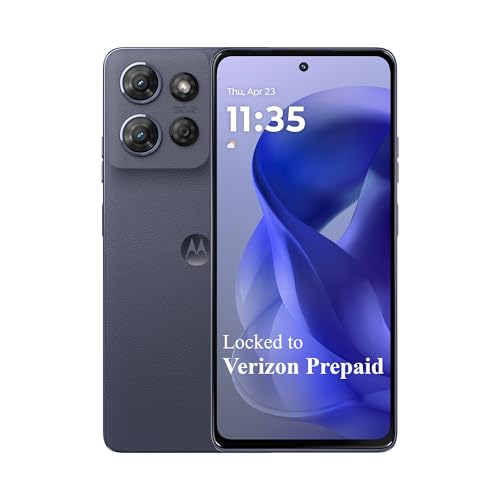
The Moto G Power name has always promised one thing above all: days, not hours. This Verizon Prepaid listing prints the supporting cast — 128GB of storage, a 50MP camera, a 6.6-inch 90Hz display, 5G, and the phrase “multi-day battery” in the title itself — in Cosmic Black, locked to Verizon Prepaid. For a senior, multi-day battery life is not a convenience specification; it is the difference between a phone that is alive on the morning it is needed and a phone that died quietly in a handbag. Owners who charge by routine rather than by habit — Sunday and Wednesday, say, with the big shop — are exactly the people this phone was specced for.
The Verizon half of the proposition matters just as much. Families choose Verizon Prepaid when the parent’s address sits in the kind of coverage country where one network plainly reaches and others politely apologise. If that is your family’s map, the prepaid arrangement keeps the coverage and drops the contract, which is the whole trick. The screen, at 6.6 inches and 90Hz, is a fraction smaller and a fraction less smooth than the Tracfone Moto’s, and in daily senior use neither difference will ever be noticed; the camera, at 50MP, is a clear step up for photographing family and — an underrated senior use — snapping documents, letters and prescription labels at legible quality.
What the title does not print is any bundled service, so the running-cost conversation is monthly: choose a Verizon Prepaid plan sized to the owner, set it to renew automatically, and the discipline prepaid promises is preserved. Motorola’s calm software carries over from its Tracfone sibling. The honest summary: this is the pick for the family that has already decided on Verizon’s map and wants the longest-legged phone on that prepaid shelf.
- Model: Verizon Prepaid Moto G Power 2025, prepaid smartphone 5G
- Display: 6.6-inch 90Hz, per the listing title
- Camera: 50MP, per the listing title
- Battery: Described as multi-day in the listing title; capacity figure not stated there — verify with the maker’s documentation
- Storage: 128GB
- Carrier: Locked to Verizon Prepaid, per the listing title
Strengths
- Multi-day battery life built for routine chargers, not nightly ones.
- Verizon’s coverage with prepaid’s contract-free discipline.
- A 50MP camera that doubles as a document and letter scanner for ageing eyes.
Trade-offs
- No bundled service year printed in the title — running costs are a monthly plan decision.
- The 6.6-inch screen is a touch smaller than the biggest screens here.
- Locked to Verizon Prepaid; a family move to another network leaves this phone behind.
Best for: a rural father whose farm sits firmly in Verizon country and who charges his phone twice a week whether it needs it or not. Not suited for: an urban mother on a street where every network is strong and a Tracfone year-bundle would cost the family far less to run.

Tracfone TCL K33 5G — Best Starter 5G Bundle
The TCL K33 is the lightest-weight proposition in this guide, and it knows it. The Tracfone listing prints a 6.75-inch NXTVISION display — the largest screen in the roundup — a 13MP camera, 64GB of storage, 5G speed, and an activation promotion including a one-year plan of 1500 minutes, 1500 texts and 1.5GB of data, with a 365-day network lock stated plainly. For the senior who makes a handful of calls a week, receives the family’s photographs and wants a phone that simply exists for emergencies and Sundays, this bundle is almost comically well matched: the biggest screen for the eyes, a year of service in the box, and nothing in the proposition that asks the owner to become a telecommunications enthusiast.
The camera is where the economy shows, and honesty requires saying so. Thirteen megapixels will capture a readable photograph of a grandchild, a whiteboard or a letter, but it is the weakest camera here by a clear margin, and an owner who loves photography should be steered to either Samsung. The 1.5GB of data across the year is likewise an emergency ration rather than a supply — enough for messages, maps checks and the occasional photograph, nowhere near enough for streaming or daily video calls. TCL’s NXTVISION branding refers to the brand’s display tuning; what matters to the owner is simpler: 6.75 inches of screen on which large text still leaves room to breathe.
Consider this the gateway phone. It suits the reluctant adopter — the parent who insists they do not need a smartphone, right up until the family group chat and the photo stream win them over. If they outgrow it, the family has lost little; if it matches their habits, as it will for many, it may be the best-value line in this entire guide. The 365-day lock is printed in the title, which is more candour than many listings offer, and the family should simply plan around it.
- Model: Tracfone TCL K33 5G, prepaid smartphone
- Display: 6.75-inch NXTVISION, per the listing title
- Camera: 13MP, per the listing title
- Storage: 64GB
- Bundled service: Activation promo includes 1-year plan — 1500 min / 1500 text / 1.5GB data, per the listing title
- Carrier: Locked to carrier with a 365-day network lock, per the listing title
Strengths
- The largest screen in the roundup, paired with a full year of light service in the box.
- An honest starter proposition: everything a light user needs, nothing they must master.
- The 365-day lock is printed in the title — no surprises for the family that reads it.
Trade-offs
- A 13MP camera is the weakest here; photography lovers should look at the Samsungs.
- 1.5GB of yearly data is an emergency ration, not a browsing supply.
- 64GB of storage matches its light-use brief and no more.
Best for: a reluctant first-time owner whose weekly use is a few calls, the family photographs and peace of mind in a coat pocket. Not suited for: a photo-enthusiast grandmother — her camera expectations will collide with 13 megapixels within the first family holiday.

Verizon Prepaid Samsung Galaxy A17 5G — Best Screen on Verizon Prepaid
The Galaxy A17 is the connoisseur’s pick in a prepaid roundup, insofar as a senior choosing a phone for its screen quality is a connoisseur — and many are. The Verizon Prepaid listing prints a 6.7-inch Super AMOLED display at 90Hz, a 50MP triple camera with optical image stabilisation, Android 16, and 128GB of storage in black, locked to the carrier. AMOLED is the screen technology that renders blacks as true black and text with a crispness that ordinary LCD panels work harder to match; for an owner who reads on the phone — news, books, long messages from family — that contrast is a daily comfort, not a luxury.
The stabilised camera earns its keep in a specifically senior way. OIS steadies the small hand movements everyone makes and many older hands make more of, so the photograph of the great-grandchild is sharp rather than nearly sharp. Combined with Samsung’s software — the same familiar menus as the A16, with the same large-text and simplified-home-screen options to configure at setup — the A17 is the pick for the senior who is already a smartphone person and wants the prepaid discipline without the prepaid feel. It runs Android 16 per the title, the freshest platform version printed in this roundup, which bodes well for its remaining support runway even though the title prints no specific update promise.
As with its Verizon sibling, no service bundle is printed in the title, so the family chooses a monthly prepaid plan and sets it to renew. The lock is Verizon Prepaid’s. And the price class — unspoken here, as everywhere in this guide — sits above the bundle phones, which is the correct trade for the right owner and pure waste for the wrong one. Buy this screen for a reader, this camera for a photographer, and let the light users save their money on the TCL.
- Model: Verizon Prepaid Samsung Galaxy A17 5G, prepaid smartphone
- Display: 6.7-inch Super AMOLED, 90Hz, per the listing title
- Camera: 50MP triple camera with OIS, per the listing title
- Platform: Android 16, per the listing title
- Storage: 128GB
- Carrier: Locked to carrier (Verizon Prepaid), per the listing title
- Bundled service: Not stated in the listing title — plan chosen separately
Strengths
- A Super AMOLED screen whose contrast makes reading and photographs visibly kinder.
- Optical stabilisation quietly rescues photographs from unsteady hands.
- Android 16 out of the box is the freshest start in this roundup.
Trade-offs
- No bundled service in the title; the monthly plan is a separate decision and cost.
- Its advantages are wasted on a calls-only owner — the TCL serves that reader for less fuss.
- Locked to Verizon Prepaid, like its sibling.
Best for: a reading, photographing mother in Verizon country who wants prepaid discipline without giving up a lovely screen. Not suited for: a calls-only father who will never open the camera app — the TCL’s year bundle fits his life at a fraction of the commitment.
How Do the Six Prepaid Picks Compare?
| Phone | Carrier world | Screen (per title) | Camera (per title) | Storage | Service in the box |
|---|---|---|---|---|---|
| LIVELY Jitterbug Smart5 | Lively only | Not stated | Not stated | Not stated | Activated Lively plan required |
| Tracfone Galaxy A16 5G | Tracfone | Not stated | Not stated | 128GB | 1500 min/text/data, 365 days |
| Tracfone Moto G Play 2026 | Tracfone | 6.7″ HD+ 120Hz | 32MP | 64GB | Not stated in title |
| Verizon Prepaid Moto G Power 2025 | Verizon Prepaid | 6.6″ 90Hz | 50MP | 128GB | Not stated in title |
| Tracfone TCL K33 5G | Tracfone | 6.75″ NXTVISION | 13MP | 64GB | 1-yr plan: 1500/1500/1.5GB |
| Verizon Prepaid Galaxy A17 5G | Verizon Prepaid | 6.7″ Super AMOLED 90Hz | 50MP triple, OIS | 128GB | Not stated in title |
The empty cells in that table are themselves information: where a listing title stays silent, this guide leaves the cell honest rather than borrowing figures from other variants of the same phone. Compare first by carrier world, then by the bundled service, then by screen — in that order — and the table will point at the same phone the detailed reviews pointed at for your family’s situation.
How Does Prepaid Billing Actually Work Across a Year?
Prepaid confuses families because it wears two different costumes in this roundup. In the Tracfone costume, the year is the unit: the Samsung and TCL bundles front-load 365 days of light service into the purchase, and the family’s job reduces to watching one anniversary date and topping up only if habits outgrow the ration. In the Verizon Prepaid costume, the month is the unit: a plan renews monthly, can be set to pay itself automatically, and can be resized as the owner’s habits reveal themselves. Lively wears a third costume — a service relationship, billed as an ongoing plan attached to a phone that works nowhere else, bought for the support culture as much as the minutes.
Each costume has a failure mode worth naming. The year bundle fails by surprise expiry: a phone that goes silent on day 366 because nobody calendared the anniversary, which is why the setup section insists on writing that date down. The monthly plan fails by autopay drift — a card expires, a renewal lapses, a parent concludes the phone is broken. The service relationship fails only if the family later wants out, at which point the Jitterbug’s carrier exclusivity turns a plan change into a phone change. None of these is a reason to avoid prepaid; all three are reasons to assign one family member as the named keeper of the renewal, the way one person keeps the spare key.
There is also a budgeting truth that fixed incomes appreciate: prepaid cannot produce a shocking bill. There is no overage ambush, no roaming surprise from a trip to see grandchildren across a state line, no contract termination fee lurking in a drawer. The worst prepaid can do is stop, and stopping is recoverable in an afternoon. For many older owners that ceiling on unpleasant surprises is worth more than any single hardware feature in this guide, and it is why this category — not the flagship shelf — is where most senior phones should be bought.
Which Accessibility Settings Matter Most Day to Day?
Beyond text size, three settings quietly decide whether a senior phone gets used. The first is call captions and hearing support: Android offers live captioning features on many models and hearing-aid compatibility varies by handset, and since none of the listing titles here print hearing specifications, a buyer shopping for a hearing-aid wearer should confirm compatibility in the maker’s documentation for the exact model before purchase — this is a title-silent area where guessing helps nobody. The second is the answer gesture: some interfaces answer with a tap, others with a swipe that arthritic fingers find treacherous, and most phones can be set to answer with a button or automatically when raised to the ear. Find that setting in the first hour and the phone stops ringing unanswered in a handbag.
The third is accidental-touch forgiveness. Large icons, a simplified home screen where the platform offers one, and the removal of every app the owner does not use shrink the surface area for confusion to nearly nothing. Families should resist demonstrating features. Show the phone doing the four things its owner asked for — calling family, seeing photographs, checking the weather, reaching help — and let everything else wait for the month-two visit, when confidence has somewhere to stand. A senior phone succeeds by being boring in the best way: predictable, loud, large-print and always, always charged.
How Do You Set Up a Senior’s Phone in the First Hour?
Do the setup with the owner, not for the owner, and do it at their kitchen table with their glasses on and their address book — the paper one — open beside you. Start with coverage: before any unboxing ceremony, confirm the chosen carrier actually serves their home, because a prepaid phone with no signal at the kitchen table is a paperweight with a charging cable. Activate the service, make a test call to your own phone from the chair they sit in every evening, and only then begin.
Next, the senses. Set the text size two steps above default and watch the owner’s face rather than the screen — the right size is the one where they stop squinting, not the one that looks elegant. Turn on bold text if offered, raise the ringtone and call volume to maximum, and choose a ringtone that is long, loud and unlike the television’s sound effects. Add hearing-related settings the platform offers — captions for calls where available, mono audio if one ear hears better, the flash alert for incoming calls if the phone may sit across the room. Then ring the phone from another room and let the owner find it, answer it and end the call unaided. That small rehearsal is worth more than any feature in this guide.
Then, the people. Put four to six favourite contacts on the home screen as big, named tiles — daughter, son, neighbour, doctor — with photographs if the owner likes them. Type the contacts in yourself from the paper address book, including the landline numbers of friends who will never text. Add an emergency contact and, on the Samsungs and Motorolas, fill in the emergency information the lock screen can show. Show the owner exactly one way to make a call, one way to answer, and one way to charge, and write those three things on a card that lives beside the charger.
Finally, the charger routine, because dead phones cause more senior phone misery than every other cause combined. Choose one socket, one cable, one place — beside the bed or beside the kettle — and make charging part of an existing ritual rather than a new chore. With the multi-day Moto G Power or the 5,100mAh Tracfone Moto, a twice-a-week routine suffices; with the others, nightly is safer. Set up automatic plan renewal or calendar the bundle’s anniversary, and leave your own number taped inside the phone’s box lid: the first support call should reach family before it reaches a call centre.
What Goes Wrong When Families Buy Prepaid Phones for Parents?
The classic failure is buying the network that works at your house. Coverage is address-specific, prepaid locks are unforgiving, and a phone that shows no service at your mother’s farmhouse cannot be argued into working. Check the map, ask her neighbours what they use, and let her postcode outrank your brand loyalty every time.
The second failure is under-buying data for a video caller, or over-buying everything for a voice-only parent. The Tracfone year bundles are honest light-use rations — 1500 minutes and a small data allowance — and a parent who discovers daily video calls with a grandchild across the country will burn through the data side of that bundle while the minutes sit untouched. Match the bundle to the habit you actually observe, not the habit you assume, and re-check after the first month.
The third failure is the fifteen-minute setup: a phone handed over with factory text size, a silent ringtone, no contacts and a charger still in the box’s bottom layer. Every abandoned senior smartphone in every drawer in America died of that quarter-hour. The setup section above takes an hour, once, and it is the difference between a phone and a lifeline.
The fourth is forgetting the lock when plans change. Families consolidate, parents move, coverage shifts — and a locked prepaid phone does not follow. That is not a reason to avoid these phones; it is a reason to buy them with open eyes, at prices and bundles whose value is realised within the lock period, exactly as the Tracfone year bundles are designed to do.
Final Recommendation
Choose the world first. If the senior is new to smartphones and the family wants one patient company behind everything, the Jitterbug Smart5 is the kindest starting point in this guide. If the owner is a light user in Tracfone coverage country, the Galaxy A16 5G’s year of bundled service is the most peaceful purchase a family can make, with the TCL K33 as the even simpler starter for the truly reluctant and the Moto G Play 2026 as the big-screen alternative. If the address demands Verizon’s map, take the Moto G Power 2025 for the routine charger and the Galaxy A17 5G for the reader and photographer. Whichever phone leaves the shop, spend the setup hour, write the card, tape your number in the box — because the best prepaid phone for a senior citizen is not really the one with the best screen or the biggest bundle, it is the one still being carried, charged and answered with confidence at Christmas, by someone who never once had to feel foolish for owning it.
Frequently Asked Questions
What does carrier-locked actually mean for a prepaid phone?
It means the phone will only work with the carrier named in its listing, for at least the lock period. The TCL prints a 365-day network lock in its title; the Jitterbug cannot join other carriers at all. A locked phone is not a defective phone — it is a phone whose bargain price or bundle is subsidised by loyalty — but the family must choose the right network first, because the phone cannot follow a later change of mind.
Is 1500 minutes for a year really enough?
For many seniors, comfortably: it averages about four minutes of calls every day of the year, plus 1500 texts. A parent who chats with a sister for half an hour twice a week uses roughly that pace. Where the bundles run short is data, not minutes — video calling and photo-heavy apps draw on the small data allowance, so a video-call enthusiast needs top-ups or a monthly plan instead.
Can these phones make emergency calls and show emergency information?
Any phone can dial emergency services, and the Android handsets here let you store emergency contacts and information accessible from the lock screen — set that up during the first hour, with the owner’s medications and doctor listed as they direct. The Jitterbug’s service is built around senior support, and Lively’s own materials describe its help offerings; check the current plan details with Lively before relying on any specific service.
Which screen is easiest on older eyes?
Size first, technology second. The TCL’s 6.75-inch display and the 6.7-inch screens on the Tracfone Moto and the Galaxy A17 all give large text room to breathe. The A17’s Super AMOLED adds contrast that readers tend to love. But the setting matters more than the panel: text size raised, bold text on, brightness set for the room the phone actually lives in.
What if my parent already has a carrier they like?
Then start from that carrier’s prepaid shelf rather than from this list’s order — the guide’s structure still helps, because the same questions apply: Is the screen big enough? Is service bundled or monthly? Who helps when it confuses? The Jitterbug is the exception: it only exists inside Lively’s world, so choosing it means choosing Lively too, which many families do deliberately.
Should we keep the old landline as well?
Many families do for the first year, and there is no shame in the overlap: the landline is the number every old friend, doctor and dentist already has, and it works in a power cut. Let the mobile earn trust gradually — carried on walks, used for the family photographs, answered when the grandchildren call it — and retire the landline only when the owner themselves suggests it. A phone adopted at the owner’s pace stays adopted.
What happens when the Tracfone year runs out?
The service needs renewing — Tracfone sells service plans that extend the arrangement, and the phone remains a Tracfone phone. The practical move is to calendar the anniversary at setup, check the remaining balance a month before it, and renew early so there is no silent gap. Owners who discovered mid-year that they use far less than the bundle can renew with the lightest option; owners who outgrew it can step up. Either way, the decision belongs on a calendar, not in a crisis.
How long will these phones keep receiving updates?
The listing titles here do not print update promises, and this guide will not invent them. The Galaxy A17 starts from Android 16, the freshest platform in the roundup, which is a good sign for its runway. For a light-use senior phone, the practical horizon is the lock period and a year or two beyond; families who keep phones longer should ask the carrier or maker directly before buying.
Related Guides
Readers equipping the whole family may also want our roundup of the best smartphones for those that destroy them for the accident-prone, the guide to the best smartphones for hand tremor for steadiness and easy handling, and our look at the best android phones for security updates for buyers who plan to keep a handset for many years.
Related guides
- Best Balancing Stabilizers for Mirrorless Cameras: Payload, Balancing and Native Vertical Shooting
- Best Canon Point and Shoot Digital Cameras: PowerShot Picks From Pocket Compacts to Travel Zooms
- Best Basic Phones Camera Buyers Can Trust: Flip Phones and Simple Handsets That Still Take a Photograph
- Best Sony Full Frame Cameras for Astrophotography: Sensitivity vs Resolution


